Top 12 Best AIO Cooler for 5800X3D That Will Blow Your Mind
Overheating and loud fan noise are common issues when using a cheap or poorly matched AIO cooler for a 5800X3D. This processor runs hotter than many others in its class, so the best AIO cooler for 5800X3D needs to handle sustained high loads without causing thermal throttling or excessive sound.
A cooler that lacks sufficient radiator size or pump strength will struggle to keep temperatures in check during gaming or content creation sessions.
The main factors that separate a reliable AIO cooler from a weak one are radiator size, pump performance, and compatibility with your case and motherboard. Radiators of at least 240mm or 280mm typically offer enough surface area to dissipate heat effectively from the 5800X3D.
A good pump should run quietly but maintain strong coolant flow to prevent hotspots. Compatibility ensures the cooler fits snugly without interfering with RAM or VRMs, and ease of maintenance matters if you plan on cleaning dust buildup over time.
Need a Quick Check?
| Image | Product | Price |
|---|---|---|
Our Top Picks 1  | ARCTIC Liquid Freezer III Pro | Check Price |
Our Top Picks 2  | ARCTIC Liquid Freezer III Pro | Check Price |
Our Top Picks 3  | Noctua NL-LC1-36 360mm AIO | Check Price |
Our Selected Top 12 Aio Cooler for 5800x3d Worth Your Money
This list features carefully chosen all-in-one coolers ideal for the 5800x3d processor, highlighting how each performs under various conditions. Readers will find insights on suitability for different setups, along with key strengths and possible drawbacks to help make an informed decision.
1. ARCTIC Liquid Freezer III Pro 360 CPU Cooler
Known for its precise cooling design, the ARCTIC Liquid Freezer III Pro 360 stands out with a native offset mounting that targets the CPU hotspot directly. Ideal for anyone running a Ryzen 7 5800X3D looking for efficient heat transfer and quieter fan performance under high workloads.
Setting up the cooler is straightforward, with native mounting support for Intel and AMD sockets, including LGA1851 and LGA1700. The integrated VRM fan is PWM-controlled, which means it adjusts speed based on temperature to keep voltage converters cool. The P12 PRO fans provide more power quietly, especially at low speeds, making daily use comfortable for longer gaming or productivity sessions.
Cooling performance matches expectations for a 360mm liquid cooler, offering solid thermal management thanks to the optimized pressure distribution on the contact frame. While the build feels sturdy and purpose-built for heavy CPUs, some note the fan speed reaching a maximum of 3000 rpm can be a bit loud under intense loads.
Still, it reliably maintains temperatures efficiently throughout use.
The integrated VRM fan and offset cold plate center improve cooling where it matters most, praised for extending CPU life and maintaining stable temperatures. Noise at top fan speed is commonly pointed out as a downside during heavy tasks.
Great choice for those prioritizing direct CPU hotspot cooling and who tolerate occasional louder fan noise. Less suited for users needing ultra-quiet operation or lower overall power consumption from their cooler.
Pros
- Optimized contact pressure for better heat dissipation
- Quieter P12 PRO fans at low speeds
- Integrated VRM fan cools voltage converters effectively
- Native offset mounting targets CPU hotspot accurately
Cons
- Fans can get loud at max 3000 rpm
- Relatively high power draw for quiet operation
| Specification | Details |
|---|---|
| Power Connector Type | 4-Pin |
| Voltage | 12 volts |
| Wattage | 3.96 watts |
| Cooling Method | Liquid |
| Maximum Rotational Speed | 3000 rpm |
| Air Flow Capacity | 77 cfm |
2. ARCTIC Liquid Freezer III Pro 360 A-RGB CPU Cooler
ARCTIC Liquid Freezer III Pro 360 A-RGB CPU Cooler stands out as a powerful solution for cooling the Ryzen 7 5800X3D, thanks to its optimized heat dissipation and smart VRM fan. It suits anyone looking for solid liquid cooling performance combined with quieter fan operation.
Installation is straightforward with the native offset mounting designed specifically for AMD CPUs like the 5800X3D, which helps focus cooling where it’s needed most. The included ARCTIC P12 PRO fans provide strong airflow without generating excessive noise, especially at low speeds.
The integrated VRM fan is a helpful addition to keep voltage converters cool during heavy workloads, contributing to stable performance over time.
Cool-down abilities here are very solid. The cooler handles high loads well with a maximum fan speed of 3000 rpm and airflow of 77 cfm. Its build focuses on durability, with optimized contact pressure to spread heat evenly.
Fans run quietly during everyday tasks, but when pushed hard, some noise might be noticeable. A common nitpick is the size, as the 360mm radiator takes significant space inside the case.
Strong cooling performance with quiet fans at low speeds is highly appreciated. The integrated VRM fan also adds value for long-term CPU performance. Common feedback points to the radiator’s size as bulky, making fitment an issue in smaller cases.
Enthusiasts with large cases and demanding workloads should be well pleased here. Those with compact rigs or who prioritize minimal noise under heavy load might want to explore smaller or quieter alternatives.
Pros
- Powerful cooling with optimized contact pressure
- Quiet operation at low to medium speeds
- Integrated VRM fan for consistent component temperatures
- Specifically designed mounting for AMD CPUs
Cons
- Large radiator requires ample case space
- Fans can get noisy at maximum speed
| Specification | Details |
|---|---|
| Power Connector Type | 4-Pin |
| Voltage | 12 volts |
| Wattage | 3.96 watts |
| Maximum Rotational Speed | 3000 rpm |
| Air Flow Capacity | 77 cfm |
| Cooling Method | Liquid |
3. Noctua NL-LC1-36 360mm AIO CPU Cooler
Using this cooler feels reassuring with its large 360mm radiator and quiet operation. It’s aimed at those who want strong thermal performance without sacrificing noise levels, especially for a high-demand CPU like the 5800X3D. Its biggest strength lies in its balance of powerful cooling and quiet running.
Setup involves mounting the sizeable radiator and fitting three 120mm fans, which requires a roomy case. The pump features a noise absorber that keeps vibrations low, so the system stays calm even under load. Speed-offset fans help optimize airflow while keeping noise minimal during daily use, making it suitable for both gaming and workstation builds.
Cooling performance meets the expectations for demanding CPUs, efficiently keeping temperatures down during heavy tasks. The build quality is solid with premium Asetek internals and high-grade fans known for long life. Praise frequently notes its near-silent operation, while occasional remarks mention the large size requiring careful case compatibility checks.
Near-silent operation is a regular highlight, thanks to the effective noise absorber and fan setup. The most common drawback is the need for a spacious case to accommodate the large radiator, limiting use in smaller builds.
Those who prioritize quiet performance and have a roomy chassis will find this cooler fitting well for high-performance CPUs. Users with compact cases or strict size constraints might consider smaller alternatives.
Pros
- Quiet pump with soundproofing and vibration damping
- Large 360mm radiator for strong cooling
- Three high-quality NF-A12x25 G2 fans included
- Low noise level of 22.5 db even under load
Cons
- Requires a case that fits a 360mm radiator
- Relatively high maximum fan speed may increase noise
| Specification | Details |
|---|---|
| Cooling Method | Water |
| Radiator Size | 360mm |
| Noise Level | 22.5 db |
| Maximum Rotational Speed | 1800 rpm |
| Air Flow Capacity | 107.3 cubic meter per hour |
| Power Connector Type | 4-Pin |
4. LIAN LI HydroShift II OLED Curved 360 AIO Cooler

LIAN LI HydroShift II OLED Curved 360 AIO Cooler is ideal for anyone running a 5800X3D who wants strong cooling power combined with a unique display feature. Its biggest appeal lies in the 6.67” curved OLED screen that adds a visual touch while keeping temperatures in check.
Setup involves mounting the radiator and connecting the motorized pump head, which can be easily adjusted for the perfect viewing angle thanks to lift, rotation, and dual-axis movement. L-Connect 3 software simplifies customizing those angles and preferences, making daily adjustments straightforward.
Noise hovers around 33 db, keeping things quiet during regular use.
Cooling with water method proves effective for a high-performance CPU like the 5800X3D. The build feels solid, and the motorized pump takes personalization beyond what typical AIOs offer.
Reviews consistently praise the OLED display clarity and customization options. A common complaint concerns the potential complexity for those unfamiliar with software controls.
Users enjoy the crisp, vibrant OLED screen and flexible pump head movement, making the cooler stand out visually. A common drawback is the software controls, which some find unintuitive and harder to manage initially. The noise level remains low in most cases but can rise with faster fan speeds.
Those who want a blend of visual flair and solid cooling will appreciate what it offers. People looking for simpler, more plug-and-play AIOs might want to consider other options that avoid extra software setup.
Pros
- Adjustable motorized pump head for custom angles
- Bright, vivid 2K curved OLED display
- Quiet operation at 33 db noise level
- Compatible with desktop CPUs
Cons
- Software setup can be confusing for some users
- Higher rotational speed may increase noise under load
| Specification | Details |
|---|---|
| Cooling Method | Water |
| Compatible Devices | Cpu, Desktop |
| Noise Level | 33 db |
| Maximum Rotational Speed | 2600 rpm |
| Display | 6.67” 2K curved OLED, 500 nits brightness |
5. ARCTIC Liquid Freezer III Pro 240 CPU Cooler

Designed with an optimized contact frame and a native offset mounting, this cooler is ideal for keeping a Ryzen 7 5800X3D chip cool. Its standout feature is the integrated VRM fan that targets voltage converters, helping to maintain reliable performance under load.
Perfect for those who want focused cooling around their CPU hotspot.
The setup is straightforward thanks to the mounting system tailored for AMD sockets, which centers the cold plate right where it counts. The ARCTIC P12 PRO fan runs quieter than many comparable models, especially when idling or under light loads, and ramps up to 3000 rpm when more cooling power is needed. Daily operation remains quiet while keeping temperatures well in check.
It handles heat well, making sure the CPU and surrounding components stay stable during demanding tasks. The build feels sturdy with a well-thought-out design to spread pressure evenly. Positive feedback often highlights the quiet operation and effective cooling, while a frequent downside is the fan noise when it spins at maximum speed.
Most users appreciate the quiet performance at everyday speeds and the extra cooling provided by the VRM fan. A common drawback remains the louder fan noise when pushed to its top speed during heavy workloads.
Those looking for efficient and targeted cooling with quieter idle performance will find this cooler suitable. People highly sensitive to fan noise at full load might want to consider alternative options with lower maximum fan speeds.
Pros
- Quieter operation at low fan speeds
- Integrated VRM fan for cooler voltage converters
- Optimized mounting for better heat transfer
- Supports both AMD and Intel sockets
Cons
- Fan noise increases noticeably at max speed
- Maximum rotational speed may feel loud under heavy load
| Specification | Details |
|---|---|
| Cooling Method | Water |
| Power Connector Type | 4-Pin |
| Voltage | 12 volts |
| Maximum Rotational Speed | 3000 rpm |
| Air Flow Capacity | 77 cfm |
| Wattage | 3.96 watts |
6. Thermalright Aqua Elite 360 V6 CPU Liquid Cooler

ARGB lighting on the pump head catches the eye right away, making it a great choice for those who want both power and style in a cooler. Designed for desktop use, it performs really well with high-demand CPUs like the 5800X3D thanks to its efficient 360mm radiator setup.
Setting it up involves syncing the ARGB lighting through a standard 5V 3-pin motherboard header, which makes it easy to get consistent lighting effects with other components. Daily operation stays quiet at around 29.8 dB, while the pump spins around 2800 RPM to keep temps low.
The fans push good airflow, helping everything run cool and quiet during heavy use.
Performance-wise, it handles heat dissipation efficiently with a maximum fan speed of 2000 RPM and a strong airflow rate of 70.84 CFM. The build feels solid and reliable, with a unique vortex pump design that stands out visually.
One common complaint is the need to ensure adequate lighting headers on the motherboard to fully enjoy its ARGB effects.
Users highlight the efficient heat dissipation and impressive ARGB lighting as major strengths. Quite a few mention needing the right motherboard support to make full use of the lighting features. The quieter operation with solid cooling ranks highly, while the potential lighting sync issues come up most often.
People wanting a powerful AIO with vivid lighting and quiet performance will appreciate this cooler. Those lacking compatible lighting headers on their motherboard or seeking maximum airflow beyond 2000 rpm might consider other options better suited to those needs.
Pros
- Strong 360mm radiator cooling for high-performance CPUs
- ARGB lighting syncs well with motherboard headers
- Quiet operation at under 30 db noise level
- Unique vortex pump design adds visual appeal
Cons
- Lighting requires compatible 5V 3-pin motherboard header
- Maximum fan speed of 2000 rpm may limit peak airflow
| Specification | Details |
|---|---|
| Power Connector Type | 4-Pin |
| Cooling Method | Water |
| Compatible Devices | Desktop |
| Noise Level | 29.8 db |
| Maximum Rotational Speed | 2000 rpm |
| Air Flow Capacity | 70.84 cfm |
7. Chill Arc 360mm AIO CPU Cooler

Chill Arc 360mm AIO cooler stands out with its stunning 2K rotatable AMOLED screen that adds a unique flair to any build. Suited for gamers and creators running a Ryzen 7 5800X3D, it’s designed to handle powerful processors while keeping temperatures in check with a high TDP capacity.
Installation is straightforward thanks to universal compatibility across AMD and Intel sockets, so it fits the 5800X3D without fuss. Daily operation is quiet at just 30 dB despite the strong airflow from three 120mm ARGB fans.
The screen can be customized easily, making monitoring CPU stats or displaying custom images a cool feature during regular use.
Cooling performance is solid, managing up to 320W TDP which suits high-demand tasks without overheating. Build quality feels premium, with a durable radiator and well-constructed pumps and fans.
Users often praise the display’s vivid visuals but mention that fan noise can get noticeable under heavy load. The combo of power and aesthetics makes it stand out, though some find the noise a downside.
This cooler gets praised for its bright, high-resolution screen that lets you keep an eye on your system or show off wallpapers. At the same time, many note that the fans become loud when pushing the CPU hard, which might bother quieter workspaces. The build is solid and matches its performance well.
Those wanting unique aesthetics combined with strong cooling for a Ryzen 7 5800X3D will appreciate this cooler. It might not suit users who prioritize ultra-quiet environments due to its fan noise at maximum speeds. It’s a good fit for enthusiasts who like monitoring and customization features.
Pros
- Customizable 2K AMOLED rotatable screen
- Strong 320W TDP cooling performance
- Quiet operation at 30 dB under normal loads
- Supports all major AMD and Intel sockets
Cons
- Fans can get noisy under heavy load
- Consumes 6.1 watts, relatively high power draw
| Specification | Details |
|---|---|
| Power Connector Type | 4-Pin |
| Voltage | 12 volts_of_direct_current |
| Wattage | 6.1 watts |
| Cooling Method | Air, Water |
| Noise Level | 30 db |
| Maximum Rotational Speed | 2700 rpm |
8. Thermalright Frozen Warframe 360 SE ARGB V2 AIO Cooler
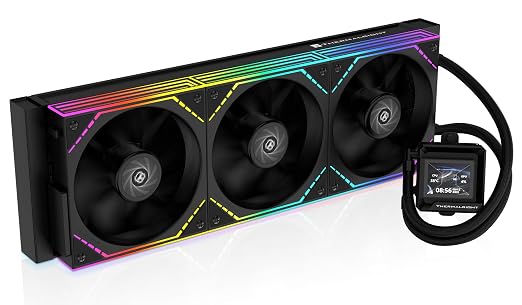
Handling the heat from a powerful CPU like the 5800X3D requires serious cooling, and the Thermalright Frozen Warframe 360 SE ARGB V2 fits right in for gamers and content creators pushing their rigs hard. Its standout feature is the 2 LCD screen that adds a neat personal touch while keeping things cool with a 360mm radiator.
Setting it up involves mounting the large aluminum radiator and plugging in the 3 included 120mm PWM fans that daisy-chain to reduce cable mess. The fans top out at 2000RPM, and you get decent airflow for moving hot air out fast. The software lets you customize the LCD with system info or images, making daily use a bit more fun while keeping an eye on temperatures without extra tools.
Cooling performance stays solid under load thanks to a 3000RPM pump pushing water through the large radiator. The cooler handles heat well and feels sturdy, although some mention the overall noise level peaking around 28.2 dB when fans ramp up.
The biggest plus is how quiet the pump runs despite the high speed. On the downside, the size demands a roomy case to fit the 397×120×27mm radiator comfortably.
The 2″ LCD screen stands out as a favorite feature by users, allowing real-time system monitoring and customization, while the main complaint relates to the size of the radiator, which may limit compatibility in smaller cases. The noise level rises noticeably when fans hit top speed but remains reasonable given its cooling capacity.
Anyone with a mid to large case and a need for strong cooling will appreciate this cooler’s balance of performance and aesthetics. Those with compact builds or who prioritize ultra-quiet operation might want to explore smaller or quieter options.
Pros
- Customizable 2″ LCD screen for system status and visuals
- Three 120mm PWM fans reduce cable clutter with daisy-chain
- High pump speed supports stable cooling for demanding CPUs
- Compatible with AMD and Intel mainstream platforms
Cons
- Large radiator requires spacious case for installation
- Noise can reach 28.2 dB at maximum fan speed
| Specification | Details |
|---|---|
| Radiator Size | 397×120×27mm aluminum |
| Pump Speed | 3000 RPM |
| Fan Size and Count | 3×120mm TL-M12Q fans |
| Fan Max Speed | 2000 RPM |
| Noise Level | 28.2 dB |
| Power Connector | 4-Pin, 12 volts, 3 watts |
9. Be Quiet! Light Loop 360 CPU Liquid Cooler

360mm radiator size makes the Light Loop 360 great for cooling a Ryzen 7 5800X3D without much fuss. Anyone looking for solid performance and a visually impressive setup will find this cooler fits well, especially when RGB lighting matters alongside quiet operation.
Installation is straightforward on AM4 sockets, matching the 5800X3D perfectly. The three 120mm fans spin up to 2100 rpm, controlled by PWM for quieter operation when idle. The LEDs spread evenly across the fans and block offer a neat customization option.
Its water cooling method balances cooling and noise well for everyday use.
Cooling is efficient with airflow rated at 61.8 CFM, enough for the higher core temperatures of the 5800X3D under load. The build feels solid and looks sharp with the black finish and lighting effects. Common feedback praises the visual design and quiet fans, though a few find the noise noticeable near maximum fan speeds.
Lighting and quiet operation stand out as the best features in daily use. Most users enjoy the design and effective cooling, but higher fan speeds increase noise noticeably. The balance of looks and function is a clear highlight.
Good pick for gamers and builders who want strong cooling with a personalized RGB touch and relatively low noise. Those needing ultra-quiet or extreme overclocking setups might look for alternatives with lower max noise or higher power cooling.
Pros
- Effective airflow at 61.8 CFM
- 64 LEDs offer customizable lighting
- Quiet operation below 36.8 dB
- Works well on AM4 sockets like 5800X3D build
Cons
- Noisy at full 2100 rpm fan speed
- Wattage could limit extreme overclocking cooling
| Specification | Details |
|---|---|
| Voltage | 12 volts |
| Wattage | 5.4 watts |
| Maximum Rotational Speed | 2100 rpm |
| Air Flow Capacity | 61.8 cfm |
| Noise Level | 36.8 db |
| Compatible Devices | AMD sockets: AM5/AM4 |
10. Thermalright Wonder Vision 360 UB ARGB CPU AIO Cooler

Enthusiasts running a Ryzen 7 5800X3D looking for a powerful all-in-one cooler will appreciate the Thermalright Wonder Vision 360 UB ARGB. It suits those wanting strong cooling performance paired with a visually customizable display.
Its biggest strength lies in combining high-speed fans and an AMOLED screen that lets you personalize the look and monitoring data.
Setup requires handling a fairly large cooler with dimensions of 403x120x52mm and a sizable cooling head. The 3 fans run at up to 2150 RPM, providing solid airflow without being too loud at 27 dB.
The water pump spins at around 6400 RPM, keeping your CPU temperature down while running quietly enough for daily tasks. The 4-pin power connector plugs in easily, and the AMOLED panel adds a fun, customizable element to your rig.
Cooling performance is impressive thanks to the triple fans pushing 207 CFM airflow. The materials feel sturdy and well-built, though the size might need checking against your case space. Praise mainly centers on its strong temperature control and the vivid display screen.
Some users mention that the cooler can be on the bulky side and noise can pick up under heavy load.
Strong cooling and the vivid AMOLED screen impress most, while bulkiness and occasional noise under stress remain noted drawbacks. The cooler manages heat efficiently with a triple-fan design but requires considering space in your build.
Those seeking thermal control alongside aesthetic customization will find this suitable for the 5800X3D. Users with smaller cases or who prioritize ultra-low noise might want to explore alternatives with a smaller footprint or quieter operation.
Pros
- High airflow with 3 fans at 2150 RPM
- Customizable AMOLED display for monitoring data
- Quiet operation at 27 dB under regular use
- Sturdy build quality and reliable pump speed
Cons
- Large size may limit compatibility in some cases
- Noise can rise during heavy CPU loads
| Specification | Details |
|---|---|
| Maximum Rotational Speed | 2150 rpm |
| Air Flow Capacity | 207 cfm |
| Noise Level | 27 db |
| Power Connector Type | 4-Pin |
| Water Pump Speed | 6400 RPM±10% |
| Cooling Head Size | 120.1x80x107mm |
11. Minorsonic 360mm AIO CPU Liquid Cooler

Perfect for anyone building a gaming PC or workstation around the 5800X3D, it offers broad socket compatibility and strong cooling without extra noise. Its biggest advantage is smart fan control that balances airflow and quiet operation, making it stand out in a crowded AIO market.
Setting it up is straightforward thanks to universal socket support for AMD AM4 and AM5, as well as Intel LGA 1700 and 1851. The three 120mm fans adjust speed automatically up to 1800 RPM, so you don’t have to fiddle with fan curves manually. Daily use means the system can handle heavy loads while keeping noise around 35 dB, which keeps your workspace peaceful.
It cools effectively using water cooling with an industrial-grade 3-phase motor, which ensures the pump runs smoothly and quietly. The build quality includes reliable fans with ARGB lighting for those who want visual flair.
Strong points include its quiet operation and efficient cooling during intense sessions. Some users mention occasional fan noise above 1800 RPM, but that seems rare.
The cooling system runs quietly with its PWM fans and industrial motor, which many appreciate during intense gaming or workloads. Most complaints relate to occasional fan noise when speeds climb above 1800 RPM, which can disrupt otherwise quiet setups.
Gamers and workstation users needing strong, quiet cooling across newer CPU sockets will find this cooler a solid choice. Those highly sensitive to any higher speed fan noise or looking for ultra-low-profile solutions might want alternative options.
Pros
- Wide socket compatibility for Intel and AMD
- Quiet operation around 35 dB under load
- Smart PWM fans auto-adjust speeds
- ARGB lighting adds visual style
Cons
- Some reports of fan noise over 1800 RPM
- Maximum fan speed up to 2800 rpm may feel loud
| Specification | Details |
|---|---|
| Cooling Method | Water |
| Compatible Devices | Desktop |
| Noise Level | 35 db |
| Maximum Rotational Speed | 2800 rpm |
| Fan Size | 3 x 120 mm |
12. Thermalright Aqua Elite 240 V3 CPU Water Cooler

Thermalright Aqua Elite 240 V3 delivers strong cooling performance tailored for Ryzen 7 5800X3D processors, known for their heat output. Its key strength lies in combining a powerful 4th generation pump with a sizable 240mm radiator and ARGB fans for quiet and effective heat dissipation.
Great for desktop users seeking steady temps under load.
Installation is straightforward with the included 120mm ARGB fans and protective mesh on the water pipes that prevent leaks over time. The 4-pin power connector keeps fan control simple, making it easy to balance airflow and noise.
Daily operation is quiet at 25 dB, and the octagonal pump head adds a nice visual touch with ARGB lighting beneath the logo.
This cooler performs well at managing the 5800X3D’s heat thanks to its aluminum fin heat sink and high flow with up to 1800 rpm fan speed. Its build quality feels solid, with low vibration running quietly and lasting up to 40,000 hours.
Some users mention that pump noise can become noticeable at full speed, but overall, it keeps temperatures in check without much fuss.
The cooler’s quiet operation and solid longevity stand out, while some report pump noise during heavy use as a drawback. It maintains good thermal performance although the fans max out at 1800 rpm, which could limit headroom in very hot or overclocked setups.
Ideal for users looking for reliable, everyday cooling with low noise and smart aesthetics. Those requiring extreme overclocking headroom or ultra-silent operation might want to explore higher-end options or larger radiators.
Pros
- Low vibration pump for quieter operation
- 240mm radiator with efficient aluminum fins
- ARGB lighting adds subtle visual flair
- Mesh water pipes improve durability
Cons
- Pump noise can be noticeable at peak speeds
- Fan max speed limits cooling under extreme load
| Specification | Details |
|---|---|
| Maximum Rotational Speed | 1800 rpm |
| Air Flow Capacity | 66.17 cfm |
| Power Connector Type | 4-Pin |
| Voltage | 5 volts |
| Noise Level | 25 db |
Best AIO Coolers for 5800X3D Compared
| Product | Cooling Method | Max RPM | Air Flow | Noise Level |
|---|---|---|---|---|
| ARCTIC Liquid Freezer III Pro | Liquid | 3000 rpm | 77 cfm | – |
| ARCTIC Liquid Freezer III Pro | Liquid | 3000 rpm | 77 cfm | – |
| Noctua NL-LC1-36 360mm AIO | Water | 1800 rpm | 63 cfm | 22.5 db |
| LIAN LI HydroShift II OLED | Water | 2600 rpm | – | 33 db |
| ARCTIC Liquid Freezer III Pro | Water | 3000 rpm | 77 cfm | – |
| Thermalright Aqua Elite 360 V6 | Water | 2000 rpm | 70.84 cfm | 29.8 db |
| Chill Arc 360 AIO | Air, Water | 2700 rpm | 165 cfm | 30 db |
| Thermalright Frozen Warframe 360 SE | Water | 2000 rpm | 68.9 cfm | 28.2 db |
| be quiet! Light Loop 360 | Water | 2100 rpm | 61.8 cfm | 36.8 db |
| Thermalright Wonder Vision 360 UB | Water | 2150 rpm | 207 cfm | 27 db |
| Minorsonic 360 AIO | Water | 2800 rpm | – | 35 db |
| Thermalright Aqua Elite 240 V3 | Air, Water | 1800 rpm | 66.17 cfm | 25 db |
- Cooling MethodLiquid
- Max RPM3000 rpm
- Air Flow77 cfm
- Noise Level–
- Cooling MethodLiquid
- Max RPM3000 rpm
- Air Flow77 cfm
- Noise Level–
- Cooling MethodWater
- Max RPM1800 rpm
- Air Flow63 cfm
- Noise Level22.5 db
- Cooling MethodWater
- Max RPM2600 rpm
- Air Flow–
- Noise Level33 db
- Cooling MethodWater
- Max RPM3000 rpm
- Air Flow77 cfm
- Noise Level–
- Cooling MethodWater
- Max RPM2000 rpm
- Air Flow70.84 cfm
- Noise Level29.8 db
- Cooling MethodAir, Water
- Max RPM2700 rpm
- Air Flow165 cfm
- Noise Level30 db
- Cooling MethodWater
- Max RPM2000 rpm
- Air Flow68.9 cfm
- Noise Level28.2 db
- Cooling MethodWater
- Max RPM2100 rpm
- Air Flow61.8 cfm
- Noise Level36.8 db
- Cooling MethodWater
- Max RPM2150 rpm
- Air Flow207 cfm
- Noise Level27 db
- Cooling MethodWater
- Max RPM2800 rpm
- Air Flow–
- Noise Level35 db
- Cooling MethodAir, Water
- Max RPM1800 rpm
- Air Flow66.17 cfm
- Noise Level25 db
How to Choose the Best AIO Cooler for 5800X3D
Choosing the right AIO cooler for the 5800X3D involves focusing on factors like cooling performance, compatibility with your case, and quiet operation. Getting these elements right ensures efficient heat management, prolongs CPU life, and prevents costly upgrades or repairs later.
Cooling Performance
Processors like the 5800X3D generate a significant amount of heat, especially under heavy gaming or rendering loads. The combined pump and radiator must efficiently transfer that heat away from the CPU to prevent throttling. Poor cooling setups often lead to higher temperatures and lower sustained performance, as the system downclocks to stay safe.
A strong pump with a high flow rate paired with a radiator at least 240mm in size usually manages the heat well. Fans rated around 70 CFM with static pressure designed for radiator use push air effectively, improving heat dissipation.
Many users notice a big difference when the pump doesn’t maintain steady circulation or the fans aren’t matched to the radiator. Good quality fans help reduce hotspots, allowing the CPU to maintain boost clocks longer.
High static pressure fans combined with a radiator featuring a dense yet clean fin design help improve thermal exchange, making this cooling setup dependable during heavy workloads.
Compatibility and Fit
Socket compatibility is crucial for proper installation and cooling efficiency. The most common AM4 mounting brackets still fit the newer AM5 with some AIOs, but not all.
Checking the included hardware details beforehand avoids frustration or buying extra mounting kits. The radiator size needs to fit inside your PC case with enough clearance for cables and other components. Many cases support 240mm or 280mm radiators easily, but larger sizes such as 360mm require more planning.
Mounting hardware that fits both sockets and installs without complex tools saves time. A system that requires removing the motherboard for installation can add an hour or more of work.
Look for kits that include brackets for both AM4 and AM5 and clear instructions. The fit and finish of mounting parts also affect even pressure on the CPU, influencing cooling consistency.
Noise Levels
At idle, the fans on some coolers can still produce noticeable noise, especially if they don’t ramp down below 800 RPM or so. High-speed fans are louder but provide better airflow, which matters most under full CPU load.
Pump noise varies between models; some pumps pulse or whine at certain RPMs, which can be irritating during quiet computing. Vibration dampening around the pump and fan mounts helps reduce this issue.
Balancing cooling and noise usually means picking fans that produce around 25 to 35 dBA at full speed but can slow down when the CPU is cool. The most enjoyable daily use comes from quiet fans that still ramp up quickly under load to keep temps down.
Continuous high-pitch sounds or spasms in pump operation can degrade the experience significantly.
Build Quality and Materials
Leaking tubes or failing pumps are the worst problems to face with liquid coolers, often caused by subpar materials or assembly shortcuts. Durable rubber or nylon braided tubing lasts longer and resists kinks, which helps prevent coolant loss. Radiators with thick aluminum fins and a sturdy frame improve heat transfer and resist damage from handling or installation mistakes.
Look for coolers with corrosion-resistant coatings inside the loop and anti-leak seals on the pump housing. This attention to materials and build quality often means fewer failures after a year or more. Users who have experienced leaks appreciate how well-made seals and strong tubing prevent those issues from even starting.
Maintenance and User Convenience
Fans and radiators accumulate dust rapidly, which hurts performance over time. Models designed for easy removal of fans and with enough space around the radiator make cleaning much less of a chore. Replacing worn pumps or refilling coolant is rare in sealed AIOs, but coolant longevity matters as some units can start to dry out or lose performance after several years.
Upgrading an AIO cooler or swapping fans usually requires dismantling parts of your PC, but some designs offer tool-less fan clips or quick-release mounting hardware. This convenience saves time and reduces the risk of damaging components.
Knowing how accessible these parts are can mean fewer headaches at maintenance intervals or future upgrades.
Optimizing AIO Cooler Performance with the Ryzen 7 5800X3D
Choosing the right AIO cooler for the Ryzen 7 5800X3D means looking beyond just the pump speed and radiator size. The 5800X3D generates variable heat loads heavily dependent on workload, so the cooler needs a balanced setup that manages bursts without excessive noise. Radiators around 240mm to 280mm tend to provide solid cooling while fitting most mid-sized cases.
Key setup tips:
- Mount the radiator in a position that promotes good airflow, like the top or front intake, to move heat out effectively.
- Use quality thermal paste and apply it evenly; this affects heat transfer more than the choice of cooler alone.
- Consider fan curve adjustments to allow higher speeds during intense gaming or rendering but keep noise levels down during light use.
This approach ensures consistent performance without unnecessary wear on components or overblown noise.
Maintaining Your AIO Cooler for Long-Term Reliability
Regular maintenance is essential to keep AIO coolers functioning properly over several years. Dust buildup on the radiator is a common cause of temperature spikes and can be easily prevented. Use compressed air every few months to clean the radiator fins and keep airflow unobstructed.
Additional maintenance points:
- Check all mounting points and fittings to ensure nothing has loosened with normal case vibration.
- Look for any signs of leakage or discoloration near the pump housing; these may indicate a developing fault.
- Monitor pump noise; increased vibrations or whining sounds can signal pump wear that might require replacement.
Following a straightforward maintenance schedule extends the cooler’s usable life and avoids unexpected overheating on high-demand CPUs like the 5800X3D.
Comparing AIO Coolers with Air Coolers for the 5800X3D
AIO coolers offer an advantage over air coolers by moving heat away from the CPU to a radiator, permitting either smaller case footprint around the socket or more flexibility with RAM and VRM cooler heights. This can make installation cleaner in tighter builds.
Some practical differences include:
- Air coolers rely on large heatsinks which can block airflow or interfere with other components.
- AIO setups generally provide more consistent temperatures under heavy load but depend on pump operation and sealed fluid loops.
- Noise profiles vary; a good air cooler can be quieter at idle since it doesn’t have a pump running constantly.
For the 5800X3D, which runs cooler naturally due to its unique architecture, a quality air cooler might suffice for many users. However, an AIO can offer tighter temperature control if overclocking or sustained workloads are planned.
People Also Asked
Will an AIO Cooler Fit Properly on a 5800X3D CPU?
An AIO cooler can fit properly on a 5800X3D as long as it supports the AM4 socket. Check your cooler’s compatibility list before buying, and make sure your case has space for the radiator size.
How Do I Maintain an AIO Cooler for Optimal Performance?
Keep the radiator and fans free of dust by cleaning regularly with compressed air. Monitor pump noise and temperatures occasionally to catch issues early and keep heat levels down.
Is It Safe to Install an AIO Cooler Myself on a 5800X3D?
Installing an AIO on a 5800X3D is safe for most users with some technical skill. Follow the manufacturer’s instructions carefully, especially for mounting the pump and applying thermal paste properly.
How Long Does an AIO Cooler Typically Last Before Needing Replacement?
An AIO cooler typically lasts around 5 to 7 years before needing replacement, depending on the quality and usage. Watch for increased noise or rising temperatures as signs it might be time for a new unit.
What Are Common Problems When Using an AIO Cooler with a 5800X3D?
Common issues include pump failure, fan noise, and potential leaks. Ensuring tight but not overly tight fittings and proper cable management helps avoid most problems during installation and use.
Conclusion
Choosing an AIO cooler for the 5800X3D mostly comes down to effective heat dissipation, quiet operation, and compatibility with your PC case. The processor runs hot under load, so a cooler that can maintain lower temperatures without making too much noise is key. Also, make sure the cooler’s size fits your case and motherboard layout to avoid installation headaches.
Consider how much space you have and how much you’re willing to spend, since larger radiators and premium features can push prices higher. Match the cooler to your usage – heavy gaming or content creation benefits from better cooling. Check the comparison table and picks above to find options that suit your setup and budget.

I’m Grant Mitchell, a firearms and hunting writer with years of experience at the range and in the field. I write about rifles, shotguns, handguns, optics, safe storage, cleaning, and responsible ownership, along with practical hunting tips. My goal is to share accurate, safety-first information that helps you choose the right firearm, maintain it properly, and become a more confident shooter.