Top 12 Best AIO Cooler for 5800X That Will Boost Performance
Many who upgrade to a Ryzen 7 5800X quickly find that a standard cooler can’t keep up. The best aio cooler for 5800x stops the CPU from overheating during demanding tasks like gaming or video editing. Without proper cooling, clock speeds drop as the processor throttles, causing performance dips and higher noise levels from the CPU fan ramping up.
A reliable aio cooler for the 5800X needs an efficient pump and a radiator large enough to dissipate heat effectively, a 240mm or 280mm radiator is typical. Good compatibility with the AM4 socket and enough mounting pressure ensures steady contact with the CPU for better heat transfer. Durable tubing and easy-to-clean components help with maintenance and long-term stability, which are crucial for heavy users.
Need a Quick Check?
| Image | Product | Price |
|---|---|---|
Our Top Picks 1  | ARCTIC Liquid Freezer 360 Pro | Check Price |
Our Top Picks 2  | ARCTIC Liquid Freezer 360 A-RGB | Check Price |
Our Top Picks 3  | Noctua NL-LC1 360 AIO | Check Price |
Our Selected Top 12 Aio Cooler for 5800x for Every Budget
This list features a carefully chosen selection of all-in-one coolers compatible with the 5800x, covering a range of budgets. Each review explains performance, ideal user scenarios, and highlights strengths and weaknesses to help you find the best fit for your needs.
1. ARCTIC Liquid Freezer III Pro 360
Noticeable by its size and cooling capacity, the ARCTIC Liquid Freezer III Pro 360 suits anyone running an AMD 5800X looking for serious heat management. Its biggest strength lies in combining powerful, quiet fans with a design built to keep CPU and VRM temperatures low under heavy load.
Setting up involves mounting the offset cold plate centered over the CPU hotspot, which helps with heat transfer. The included P12 PRO fans run quietly at low speeds but can ramp up to 3000 rpm when needed. An integrated VRM fan adds extra protection by cooling voltage converters, improving overall system reliability during gaming or demanding tasks.
Cooling performance is strong, managing the 5800X heat effectively thanks to a 77 cfm airflow and liquid cooling. The build is solid, with attention to CPU contact pressure to extend lifespan. Most praise focuses on its quiet operation paired with high cooling power.
Some users mention the fan speed getting loud when pushed to maximum, though.
The integrated VRM fan is praised for keeping voltage converters cool, contributing to system stability during heavy workloads. The most common complaint involves the fans running quite loudly when pushed to their 3000 rpm maximum, which might be distracting in quieter setups.
This cooler fits well for those prioritizing performance and low temperatures in a mid-to-large case. Users seeking the quietest operation without high fan speeds might want to consider alternatives. Compact builds may encounter fitting difficulties given the unit’s size.
Pros
- Quiet operation at low to medium speed
- Efficient VRM cooling with integrated fan
- Optimized CPU contact for better heat transfer
- Strong airflow at high fan speeds
Cons
- Fan can become noticeably loud at maximum speed
- Large size may challenge smaller PC cases
| Specification | Details |
|---|---|
| Power Connector Type | 4-Pin |
| Voltage | 12 volts |
| Wattage | 3.96 watts |
| Maximum Rotational Speed | 3000 rpm |
| Air Flow Capacity | 77 cfm |
2. ARCTIC Liquid Freezer III Pro 360 A-RGB
Strong cooling power and quiet operation make this AIO cooler ideal for anyone building around a Ryzen 7 5800X. Perfect fit with native offset mounting and an integrated VRM fan, it excels at keeping CPU and motherboard components cool under demanding loads.
Setting it up is straightforward with a contact frame optimized for Intel LGA1851 and LGA1700 sockets, but the AMD native offset mounting means the cold plate hits the CPU hotspot precisely. Fans run quietly at low speeds thanks to ARCTIC’s P12 PRO, and the PWM-controlled VRM fan manages motherboard temps without extra noise.
Its design keeps your build tidy and efficient day in, day out.
Cooling performance stands out with a maximum fan speed of 3000 rpm delivering strong airflow of 77 cfm. The build quality supports effective heat dissipation without excess noise, although some users mention that the higher fan speeds can be louder than expected. The integrated VRM fan is praised for lowering voltage converter temps, boosting overall system reliability.
The integrated VRM fan effectively cools voltage converters, improving system stability during heavy use. Most users agree it stays quiet at low speeds but can sound louder when ramps up close to its 3000 rpm maximum. Quiet operation depends on workload and fan speed settings.
Builders prioritizing efficient cooling paired with quieter fans will appreciate the design and performance, especially with a 5800X. Those seeking an ultra-silent setup might want to consider alternatives that focus purely on noise reduction rather than maximum airflow and cooling power.
Pros
- Powerful and quiet P12 PRO fan at low speeds
- Native offset mounting for better heat transfer
- Integrated PWM-controlled VRM fan included
- Optimized contact pressure for longer CPU life
Cons
- Higher fan speeds can generate noticeable noise
- Designed mainly for Intel and AMD sockets, less versatile
| Specification | Details |
|---|---|
| Power Connector Type | 4-Pin |
| Voltage | 12 volts |
| Wattage | 3.96 watts |
| Cooling Method | Liquid |
| Maximum Rotational Speed | 3000 rpm |
| Air Flow Capacity | 77 cfm |
3. Noctua NL-LC1-36 360mm AIO CPU Cooler
Keeping a Ryzen 7 5800X cool during intense gaming or heavy workloads needs serious cooling power. The Noctua NL-LC1-36 360mm AIO Cooler suits anyone looking for efficient cooling with minimal noise, thanks to its large radiator and quiet pump design.
Its biggest strength lies in balancing strong thermal performance with silence.
Setup is straightforward thanks to the closed-loop Asetek Emma V2 platform that ensures reliable operation. The three 120mm Noctua NF-A12x25 G2 PWM fans are designed with noise reduction in mind, spinning at a maximum of 1800 rpm but offset for quiet running. The innovative pump noise absorber dramatically cuts down vibrations, which means the cooler stays near-silent during daily tasks and gaming sessions.
Performance-wise, the large 360mm radiator handles heat efficiently, keeping temperatures down even under heavy CPU load. Build quality stands out with premium components focused on durability and soundproofing. Strong praise is often about how quiet and reliable the cooler operates.
Some complaints mention the size demanding enough space in the case, which isn’t ideal for smaller builds.
The cooling system consistently delivers quiet operation thanks to the pump noise absorber and carefully optimized fans. The most common issue revolves around the cooler’s size, which can be a tight fit in smaller cases. Users appreciate how it keeps temperatures low while running nearly silent.
People building a near-silent, high-performance desktop with enough case space will find this AIO cooler a great match. Those with compact cases or needing faster pump speeds might want to look at smaller or more aggressive coolers instead.
Pros
- Very quiet pump with acoustic soundproofing
- Large 360mm radiator cools effectively
- High efficiency Noctua NF-A12x25 G2 PWM fans
- Reliable Asetek Emma V2 closed-loop platform
Cons
- Requires ample case space for radiator
- Pump speed limited to 1800 rpm max
| Specification | Details |
|---|---|
| Power Connector Type | 4-Pin |
| Voltage | 12 volts |
| Wattage | 1.8 watts |
| Noise Level | 22.5 db |
| Maximum Rotational Speed | 1800 rpm |
| Air Flow Capacity | 107.3 cubic meter per hour |
4. LIAN LI HydroShift II OLED Curved 360 TL Flex

A 6.67” 2K curved OLED panel gives vivid color and sharp contrast, perfect for someone wanting both an efficient cooler and eye-catching visuals. It fits well with powerful CPUs like the 5800X, offering a unique blend of performance and style thanks to its motorized pump head.
Installation involves attaching the water cooling setup to your CPU and desktop. Adjusting the curved OLED display’s angle feels smooth, handled easily via the L-Connect 3 software. Noise stays quiet at 33 dB, so daily work or gaming sessions are undisturbed, while the motorized controls offer a personalized, comfortable viewing angle.
Cooling power keeps processor temps low under various loads, reflecting solid build quality and reliable water cooling. The most praised feature is the OLED display’s crisp, bright visuals, while some mention the complexity in software as a minor inconvenience. The radiator runs fans up to 2600 rpm to keep things cool.
The display consistently receives high praise for its sharp colors and brightness, adding a unique visual touch to the cooling unit. On the downside, users often find the software controlling the motorized pump head less intuitive than expected, which can slow down setup adjustments.
This cooler suits anyone wanting capable CPU cooling paired with a standout visual element and is tolerant of some software complexity. It might not be the best fit for users who want the simplest control software or extremely low noise at maximum fan speeds.
Pros
- Brilliant 6.67” 2K curved OLED display
- Motorized pump head for easy angle adjustments
- Quiet operation at 33 dB
- Compatible with powerful CPUs
Cons
- L-Connect 3 software can be tricky to figure out and use properly
- Higher fan speeds may produce noticeable noise
| Specification | Details |
|---|---|
| Cooling Method | Water |
| Compatible Devices | Cpu, Desktop |
| Noise Level | 33 db |
| Maximum Rotational Speed | 2600 rpm |
5. ARCTIC Liquid Freezer III Pro 240

People building a PC with a Ryzen 7 5800X who want quiet but powerful cooling will appreciate this AIO cooler. Its standout feature is the built-in VRM fan that helps keep voltage regulators cool, which contributes to consistent performance and longer CPU lifespan.
Setup is straightforward thanks to native mounting designed specifically for AMD CPUs, and shifting the cold plate closer to the CPU hotspot improves heat transfer. The included P12 PRO fan runs quietly at low speeds while still being capable of higher speeds when needed.
Daily operation stays quiet, and the power connector is a standard 4-pin PWM, making fan speed adjustments easy.
Cooling is solid with a maximum airflow capacity of 77 cfm and a top fan speed of 3000 rpm, making it great for heavy workloads without much noise compromise. The build feels strong and purposeful, especially with the optimized contact pressure for better heat dissipation. Most users praise the quietness and cooling efficiency, while some find the 240mm radiator size a bit limiting for larger cases or extreme overclocking.
Cooling effectiveness combined with quiet operation and built-in VRM fan is highly praised. Common complaints focus on the radiator size and noise at top fan speeds during demanding use.
Those aiming for solid, quiet performance in mid-sized cases will find it well suited. People needing a bigger radiator or ultra-silent operation at extreme loads may want to explore larger or more specialized coolers.
Pros
- Integrated VRM fan improves CPU power stability
- Quieter than standard P12 fans at low speeds
- Optimized cold plate placement targets CPU hotspot
- Supports AMD and Intel via native mounting
Cons
- 240mm radiator size might not fit all cases
- Maximum fan speed can be loud under heavy load
| Specification | Details |
|---|---|
| Cooling Method | Water |
| Maximum Rotational Speed | 3000 rpm |
| Air Flow Capacity | 77 cfm |
| Power Connector Type | 4-Pin |
| Voltage | 12 volts |
| Wattage | 3.96 watts |
6. CORSAIR NAUTILUS 360 RS

Corsair’s Nautilus 360 RS stands out with its powerful RS120 fans and wide CPU compatibility, designed for gamers and builders using a Ryzen 5800X. Its biggest strength lies in delivering focused cooling through AirGuide technology, ensuring your CPU stays cool under heavy loads.
Installation goes smoothly thanks to the daisy-chained RS120 fans that connect with a single cable, reducing cable clutter inside your case. These magnetic dome bearing fans minimize noise while running at speeds up to 2100 rpm.
Day-to-day use is quiet and cooling performance remains consistent, making it great for long gaming sessions or content creation.
The cooler handles heat efficiently, benefiting from strong airflow and high static pressure fans crafted for water cooling. It fits easily on AMD AM4 and AM5 sockets, as well as Intel LGA 1700 and 1851, proving versatile across platforms.
Most praise notes its quiet operation, though some find the fan noise noticeable at max speeds.
Strongest praise focuses on quiet, effective cooling provided by the included RS120 fans with AirGuide tech. The most common complaint centers on fan noise becoming more noticeable at the higher 2100 rpm speed. It delivers consistent temperature control despite this trade-off.
Those who want wide compatibility and good cooling performance with reduced cable clutter will be happy with this cooler. People sensitive to any noise during heavy workloads or limited by case size might consider smaller or quieter alternatives instead.
Pros
- Strong airflow with AirGuide technology
- Easy daisy-chained fan setup reduces cables
- Quiet magnetic dome bearing fans
- Supports latest AMD and Intel sockets
Cons
- Fan noise can rise at maximum speed
- May be bulky for smaller cases
| Specification | Details |
|---|---|
| Cooling Method | Water |
| Maximum Rotational Speed | 2100 rpm |
| Power Connector Type | 4-Pin |
| Compatible Devices | Desktop |
| CPU Socket Support | AMD AM4, AM5; Intel LGA 1700, 1851 |
7. Minorsonic 360mm AIO CPU Cooler

Minorsonic 360mm AIO CPU Cooler handles heavy loads like a champ, making it a solid pick for anyone running a Ryzen 7 5800X and looking for dependable, consistent cooling. Its standout feature is the high-speed ceramic bearing pump, which keeps things running quietly without sacrificing performance.
Setup involves mounting the large 360mm radiator and connecting the 4-pin power cable. The pump’s industrial-grade 3-phase motor keeps noise down to a steady 30 dB, even at a rotor speed topping out at 1600 RPM. With water and fan cooling working together, it manages heat efficiently throughout the day, so you don’t have to constantly worry about temps during gaming or heavy multitasking.
Heat gets transferred quickly thanks to the ceramic bearing pump running at 3000 RPM, supported by a motor designed for smooth operation with less vibration. Build quality feels solid, with the ceramic pump promising a longer life.
Most people praise how quiet it stays while working hard. A common downside involves the bulk and size of the 360mm radiator, which might not fit every case.
The ceramic bearing pump running at 3000 RPM delivers quiet, long-lasting performance while effectively managing CPU temperatures. Most users find the cooler remains silent even under load, but the 360mm radiator’s size can be a tight fit in mid-sized PC builds.
Great choice for those with roomy cases and a Ryzen 7 5800X looking for steady, quiet cooling during gaming or work. Compact PC builds or users sensitive to radiator size constraints might want to consider smaller options.
Pros
- Quiet operation at 30 db
- Durable ceramic bearing pump
- High radiator cooling capacity 360mm
- Low vibration thanks to advanced motor
Cons
- Large radiator may not fit all cases
- Maximum fan speed capped at 1600 rpm
| Specification | Details |
|---|---|
| Power Connector Type | 4-Pin |
| Voltage | 12 volts |
| Wattage | 5 watts |
| Noise Level | 30 db |
| Maximum Rotational Speed | 1600 rpm |
8. Thermalright Frozen Warframe 360 SE ARGB V2
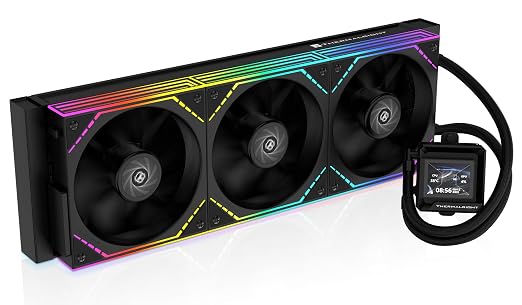
Cooling high-performance CPUs like the 5800X feels stable and confident with a 360mm radiator and a high-speed pump keeping temps down. The standout feature is the 2 LCD screen that shows system info or custom images, bringing a unique touch to your gaming or creator build.
Installation fits well on AMD AM5 and AM4 sockets, making it practical for many setups. The three 120mm PWM fans daisy-chain to reduce cable clutter, which helps keep airflow smooth inside the case. Managing the system and customizing the LCD is straightforward with Thermalright’s software, adding a personalized flair without extra hassle.
The cooler handles heavy loads by maintaining stable temperatures thanks to its 3000RPM pump and good airflow from fans cruising up to 2000RPM. Built with a sizeable aluminum radiator, it combines strong cooling performance with quiet operation at around 28.2 dB.
Some users mention the noise level can be noticeable when fans spin faster, but the durable design gains praise for reliability.
The most praised aspect is stable cooling from the 3000RPM pump and 360mm radiator combined with effective 120mm fans that bring good airflow. The common complaint centers on the noise levels increasing when fans approach their top speed, which can be distracting in very high-demand tasks.
People who want solid cooling performance with an option for visual customization on their PC will find this cooler appealing. Those needing ultra-quiet operation or simpler software might want to explore other options better suited for silent builds or ease of use.
Pros
- Customizable 2″ LCD screen for system info
- Efficient 360mm aluminum radiator
- Includes three PWM fans reducing cable clutter
- Quiet operation around 28.2 dB at normal speeds
Cons
- Fans can get noticeably loud near max speed
- Software customization could be more intuitive
| Specification | Details |
|---|---|
| Radiator Dimensions | 397×120×27 mm |
| Fan Speed | Up to 2000 RPM |
| Air Flow | 68.9 CFM |
| Noise Level | 28.2 dB |
| Power Connector | 4-Pin |
| Wattage | 3 watts |
9. NZXT Kraken Plus 240 RGB

NZXT Kraken Plus 240 RGB offers solid cooling performance tailored for the Ryzen 7 5800X, pairing power and style with its customizable LCD screen. Ideal for users who want reliable CPU temperature management under load without a complicated setup, it stands out with its unique display feature.
Installation is straightforward thanks to a simple design with only four screws and one cable, making it easy to get up and running without a tangled mess. The Turbine pump runs quietly, which helps keep the system calm even during gaming or heavy multitasking.
The fan provides good airflow paired with RGB lighting that brightens the case without extra fuss. Managing the LCD is intuitive through the NZXT CAM software where you can choose temperatures, images, or even animated GIFs.
Cooling is effective with a 12-watt water cooling system that supports the latest AMD sockets including AM5. Noise levels remain modest at 31.9 dB while the fan speed can reach 2800 rpm when needed. The build feels solid, and the pump’s high flow helps maintain low CPU temperatures under stress.
The standout praise revolves around the LCD’s versatility and clarity, while the most common gripe highlights the fan noise at peak rotations.
The LCD screen receiving praise for customization and clear readouts stands out, while users point out the fan noise spike at higher RPMs as a drawback. The pump delivers steady cooling quietly during most tasks but can get louder under heavy loads.
Great for those wanting style and solid performance in a mid-sized cooler with easy installation. Users needing quieter operation at full load or more powerful cooling may want to look at larger radiator options.
Pros
- Customizable 1.54″ LCD screen for system monitoring
- Quiet Turbine pump with efficient water cooling
- Simple installation with minimal cables and screws
- RGB fan combines lighting with strong airflow
Cons
- Fan noise increases noticeably near maximum speed
- Limited to 240mm radiator size for cooling capacity
| Specification | Details |
|---|---|
| Power Connector Type | 4-Pin |
| Voltage | 12 volts_of_direct_current |
| Wattage | 12 watts |
| Noise Level | 31.9 db |
| Maximum Rotational Speed | 2800 rpm |
| Compatible Devices | Supports latest AMD and Intel CPU sockets including AM5 and LGA 1851 |
10. Thermalright Aqua Elite 240 V3

Aluminium fin heat sinks and a fourth generation pump head shape the cooling design here. Ideal for anyone running a Ryzen 7 5800X, its main strength lies in providing solid cooling with low noise and vibration levels, making it a reliable choice for quiet setups.
Setup involves mounting the 240mm radiator with two included 120mm ARGB fans that run quietly at up to 1800 RPM. The water pipe comes with a protective mesh for durability, and daily use shows the cooler sustaining low noise around 25 dB.
The 4-pin power connection and ARGB lighting add easy control over both performance and looks.
Performance is consistent, keeping temperatures in check without loud fan activity. The octagonal pump head design runs at about 2800 RPM and is rated for 40,000 hours, highlighting a focus on longevity. Users often praise its quiet operation and cooling efficiency, though some mention that the fan speed maxes out at 1800 RPM, limiting extreme overclocking headroom.
Quiet operation and long pump life stand out as strengths in everyday use. Many notice the capped fan speed restricts cooling headroom when pushing the CPU hard. Setups benefit from the sturdy build and low vibration, but aggressive overclockers might find the limits a drawback.
Builders seeking a reliable AIO for moderate use and silent running will appreciate the balance here. Anyone aiming for maximal overclocking performance should explore options with higher fan speeds and more aggressive cooling capability.
Pros
- Low noise level at 25 dB during operation
- Durable pump design rated for 40,000 hours
- ARGB lighting adds visual flair
- Protective mesh on water pipe improves durability
Cons
- Fan speed limited to 1800 RPM max
- Cooling may not suit heavy overclocking
| Specification | Details |
|---|---|
| Power Connector Type | 4-Pin |
| Voltage | 5 volts |
| Wattage | 2.64 watts |
| Noise Level | 25 db |
| Maximum Rotational Speed | 1800 rpm |
| Air Flow Capacity | 66.17 cfm |
11. Be Quiet! Light Loop 360mm

Vivid lighting grabs your attention immediately with 64 LEDs spread across the fans and cooling block. Geared toward those who want a cool and colorful setup for AMD AM4 or AM5 sockets, it stands out for its visual appeal combined with solid cooling performance.
Installation goes smoothly with three 120mm Light Wings LX fans controlled via PWM, helping adjust speeds automatically based on your CPU’s needs. The 4-pin power connector and 12-volt design make it compatible with many motherboards.
Regular daily operation is quiet at under 37 dB, making it easy to work or game without noise distractions.
Cooling by water keeps Ryzen 7 5800X temperatures in check even under load. The build feels sturdy, with well-distributed airflow rated at 61.8 cfm from the high-speed 2100 rpm fans. Most users appreciate the impressive lighting effects and solid cooling, although some mention the noise level rises noticeably during heavy workloads.
The vivid lighting with 64 LEDs turns this cooler into a visual centerpiece, while the high-speed fans provide strong airflow and effective cooling for the 5800X. Noise levels rise noticeably when the CPU is stressed, making it less ideal for silent PC builds.
People who value eye-catching illumination alongside solid cooling will appreciate this cooler. Those seeking ultra-quiet operation under full load might look for quieter alternatives.
Pros
- 64 LEDs for stunning, customizable lighting
- Quiet operation during regular use
- Strong airflow with 3 high-speed fans
- Compatible with both AM4 and AM5 sockets
Cons
- Noise can spike under heavy CPU load
- Relatively high maximum fan speed may wear fans faster
| Specification | Details |
|---|---|
| Cooling Method | Water |
| Compatible Devices | AMD sockets: AM5/AM4 |
| Noise Level | 36.8 db |
| Maximum Rotational Speed | 2100 rpm |
| Air Flow Capacity | 61.8 cfm |
| Power Connector Type | 4-Pin |
12. PCCOOLER DC360 360mm AIO CPU Cooler

Built to handle high thermal loads, the PCCOOLER DC360 360mm AIO CPU cooler is ideal for anyone running a powerful Ryzen 7 5800X looking to keep temperatures down without compromise. Its standout feature is a 310W cooling capacity that offers strong performance even during heavy workloads.
Setup involves mounting the large 360mm radiator, which requires enough case space but allows great airflow. The pump includes a 2.4-inch IPS LCD display, letting you monitor temps and customize images right on the unit. Day-to-day use is quiet, operating at just 15 dB noise level, while the 3-pin connector and 12V power keep installation straightforward.
Cooling power is excellent for a CPU with high TDP, maintaining solid performance during gaming and content creation. The build quality feels sturdy with smooth pump operation.
A common complaint is the size, as fitting the radiator in smaller cases can be tricky. Most praise highlights the customizable LCD display adding a unique personal touch.
Users appreciate the LCD display for live hardware monitoring and customization, making the cooler visually distinctive. The biggest downside is the radiator’s size, which can pose installation challenges in smaller PC cases. Cooling effectiveness and quiet performance receive consistent positive mentions.
This cooler suits gamers and content creators running 5800X processors prioritizing strong temperature management and style. Those with limited case space or simpler setups might want to look at smaller AIO coolers with easier installation.
Pros
- Supports up to 310W TDP for strong cooling
- Quiet operation at just 15 dB noise level
- Customizable 2.4-inch IPS LCD display on pump
- High airflow capacity of 90.56 cfm
Cons
- Large 360mm radiator requires ample case space
- 3-pin connector may limit RGB control options
| Specification | Details |
|---|---|
| Cooling Method | Water |
| Power Connector Type | 3-Pin |
| Voltage | 12 volts_of_direct_current |
| Wattage | 310 watts |
| Noise Level | 15 db |
| Maximum Rotational Speed | 2500 rpm |
Best AIO Coolers for 5800X Comparison Table
| Product | Cooling Method | Max RPM | Air Flow Capacity | Noise Level |
|---|---|---|---|---|
| ARCTIC Liquid Freezer 360 Pro | Liquid | 3000 rpm | 77 cfm | – |
| ARCTIC Liquid Freezer 360 A-RGB | Liquid | 3000 rpm | 77 cfm | – |
| Noctua NL-LC1 360 AIO | Water | 1800 rpm | 107.3 m3/h | 22.5 db |
| LIAN LI HydroShift II 360 | Water | 2600 rpm | – | 33 db |
| ARCTIC Liquid Freezer 240 Pro | Water | 3000 rpm | 77 cfm | – |
| CORSAIR NAUTILUS 360 RS | Water | 2100 rpm | – | – |
| Minorsonic 360 AIO Cooler | Water, Fan | 1600 rpm | – | 30 db |
| Thermalright Frozen Warframe 360 ARGB | Water | 2000 rpm | 68.9 cfm | 28.2 db |
| NZXT Kraken Plus 240 RGB | Water | 2800 rpm | – | 31.9 db |
| Thermalright Aqua Elite 240 V3 | Air, Water | 1800 rpm | 66.17 cfm | 25 db |
| be quiet! Light Loop 360 | Water | 2100 rpm | 61.8 cfm | 36.8 db |
| PCCOOLER DC360 AIO | Water | 2500 rpm | 90.56 cfm | 15 db |
- Cooling MethodLiquid
- Max RPM3000 rpm
- Air Flow Capacity77 cfm
- Noise Level–
- Cooling MethodLiquid
- Max RPM3000 rpm
- Air Flow Capacity77 cfm
- Noise Level–
- Cooling MethodWater
- Max RPM1800 rpm
- Air Flow Capacity107.3 m3/h
- Noise Level22.5 db
- Cooling MethodWater
- Max RPM2600 rpm
- Air Flow Capacity–
- Noise Level33 db
- Cooling MethodWater
- Max RPM3000 rpm
- Air Flow Capacity77 cfm
- Noise Level–
- Cooling MethodWater
- Max RPM2100 rpm
- Air Flow Capacity–
- Noise Level–
- Cooling MethodWater, Fan
- Max RPM1600 rpm
- Air Flow Capacity–
- Noise Level30 db
- Cooling MethodWater
- Max RPM2000 rpm
- Air Flow Capacity68.9 cfm
- Noise Level28.2 db
- Cooling MethodWater
- Max RPM2800 rpm
- Air Flow Capacity–
- Noise Level31.9 db
- Cooling MethodAir, Water
- Max RPM1800 rpm
- Air Flow Capacity66.17 cfm
- Noise Level25 db
- Cooling MethodWater
- Max RPM2100 rpm
- Air Flow Capacity61.8 cfm
- Noise Level36.8 db
- Cooling MethodWater
- Max RPM2500 rpm
- Air Flow Capacity90.56 cfm
- Noise Level15 db
How to Choose the Best AIO Cooler for 5800X
Choosing the right AIO cooler for the 5800X depends on factors like cooling performance, radiator size, and compatibility with your case and CPU socket. Proper selection ensures efficient heat dissipation, preventing overheating and extending your processor’s lifespan, which ultimately avoids costly repairs and downtime.
Compatibility and Mounting
Many users discover too late that their new cooler’s radiator won’t fit in their case or that the mounting system is too complicated. The processor’s AM4 socket requires a cooler designed with compatible brackets. Radiators come in sizes like 120mm, 240mm, and 360mm; ensuring the radiator fits without blocking RAM slots or the GPU is critical.
Cases vary widely, so always compare radiator dimensions with internal measurements.
A sturdy mounting kit greatly improves both installation and long-term stability. Thin or weak brackets can cause uneven pressure on the CPU, leading to poor contact and higher temperatures.
Look for coolers that include sturdy backplates and clear instructions to secure a flat, tight fit easily.
Cooling Performance
Radiators with more surface area and multiple fans directly influence cooling efficiency. A 240mm or 280mm radiator with two fans generally handles heat better than a single-fan 120mm model, especially under heavy CPU load.
Pump design also plays a critical role, as inconsistent flow can cause temperature spikes.
Thermal performance depends on both the pump’s reliability and the cold plate’s material. Copper cold plates with microchannels offer superior heat transfer compared to aluminum.
Pay attention to pump RPM ratings and if manufacturers specify thermal conductivity values. These factors translate to lower CPU temperatures during extended gaming or rendering sessions.
Noise Levels
Fan noise sources vary with speed and blade design. Running fans at high RPM can generate distracting noise, which is more pronounced in cases without sound insulation.
During idle, a good cooler maintains minimal fan speed to keep the system quiet. Some models provide rubber mounts that reduce vibration noise.
Pump operation itself sometimes adds a faint hum or whine. This becomes irritating if the pump runs constantly at high speed or if the pump bearings degrade. Coolers with customizable fan curves via software help balance sound and cooling, letting you dial down fan speeds when temperatures permit.
Build Quality and Materials
Many early failures in closed-loop coolers come from leaks or corrosion caused by substandard tubing and radiator materials. Thick, flexible tubing resists kinks and cracking over time, which prevents coolant loss.
Radiators made from corrosion-resistant alloys like aluminum or treated copper last longer under continuous use.
The cold plate quality directly impacts cooling reliability. Copper plates offer better thermal conductivity but are often nickel-plated to prevent oxidation.
Checking material specs before purchase helps avoid premature efficiency drop due to tarnishing or corrosion. Fans with metal frames generally outlast plastic ones and maintain stable airflow.
Maintenance and Ease of Use
Cleaning dust buildup on the radiator fins and fans is necessary for maintaining optimal performance. Coolers that allow easy removal of fans and radiator panels save time and reduce the risk of damage during cleaning. Some manufacturers offer quick-release brackets or modular designs to simplify maintenance.
Software controls add convenience by letting you adjust fan and pump speeds without entering BIOS. This is useful for fine-tuning noise levels or ramping up cooling under heavy workloads.
Check if the included software is compatible with your system and offers sufficient customization options to meet your needs.
Optimizing AIO Cooler Performance with Your Ryzen 7 5800X
The Ryzen 7 5800X benefits significantly from a cooler that moves heat away quickly during heavy workloads. Choosing an AIO cooler with a sufficiently large radiator, such as a 240mm or 280mm model, helps maintain lower temperatures by increasing the surface area for heat dissipation. Using good thermal paste and applying it evenly can improve contact between the CPU and the cooler’s cold plate, which directly affects thermal transfer.
Mounting the radiator in a position where airflow is not restricted, usually at the front or top of the case, optimizes cooling efficiency. Fans running at a moderate speed balance noise and cooling performance, too slow can cause heat buildup, while too fast may create unnecessary noise. Regularly checking fan curves and adjusting through BIOS or software helps maintain stable temperatures during gaming or content creation workloads.
Maintenance Tips to Extend the Lifespan of Your AIO Cooler
Extending the lifespan of an AIO cooler primarily involves keeping the system free of dust and ensuring proper radiator airflow. Accumulated dust blocks airflow through radiator fins, reducing cooling efficiency. Cleaning the radiator and fans every few months with compressed air keeps the system working at its best.
- Check for any unusual noises from the pump, as this may indicate wear or damage.
- Ensure tubing is free from kinks or damage that could restrict coolant flow.
- Keep the cooler mounted securely to prevent vibrations that can degrade pump performance.
- Monitor coolant temperatures via software if supported, to catch early signs of malfunction.
These steps can prevent common AIO issues and maintain consistent cooling performance over time.
Comparing AIO Liquid Coolers and High-End Air Coolers for the 5800X
AIO liquid coolers offer better thermal performance under sustained heavy loads compared to high-end air coolers, thanks to their ability to move heat out of the case through radiators. However, many premium air coolers can still keep the Ryzen 7 5800X within safe temperatures without the complexity of liquid cooling.
Air coolers are easier to install, require less maintenance, and avoid potential leak risks.
On the downside, large air coolers can interfere with RAM clearance and produce more noise at higher fan speeds. AIO coolers, particularly those with 280mm or larger radiators, often provide quieter operation and better aesthetics but come with a higher price tag and greater installation effort.
Choosing between the two depends on your case size, noise tolerance, and willingness to perform occasional maintenance. Both types can effectively cool the 5800X, so considering these factors helps select the right solution.
People Also Asked
How Do I Install an AIO Cooler on a 5800X?
Installation requires mounting the pump block on the CPU with thermal paste and securing the radiator to your case using screws. Remember to connect the pump and fan cables to the appropriate headers on the motherboard to ensure proper operation.
Is a 240mm AIO Cooler Big Enough for My 5800X?
A 240mm AIO cooler is generally sufficient for the 5800X under normal workloads. It’s a good idea to check your case compatibility to make sure there is enough space for radiator installation.
What Are Common Problems with AIO Coolers on Ryzen CPUs?
One common issue is pump noise or failure, which can cause overheating if not addressed. Regularly check for proper pump operation and clean dust from the radiator fans to maintain cooling efficiency.
How Long Does an AIO Cooler Usually Last on a 5800X?
A typical AIO cooler can last around 3 to 5 years before pump performance starts to degrade. Monitoring temperatures over time will help you know when it’s time to consider replacing the unit.
Can I Safely Run a 5800X Without an AIO Cooler?
Running a 5800X without an AIO is possible but not recommended for high performance or long-term use. Using the stock cooler or a quality air cooler is safer and maintains better temperatures under load.
Conclusion
Cooling capacity, noise level, and compatibility with your case and motherboard are the most important factors when choosing an AIO cooler for the 5800x. The processor can get hot under load, so a cooler that can handle that heat without excessive noise is crucial. Also, make sure the mount fits the AM4 socket and that your case has enough room for the radiator size you choose.
Consider the size of your case and how much noise you can tolerate daily before making a selection. Budget plays a role, but investing in reliable cooling helps maintain performance and longevity. You can refer back to the comparison table and the picks above to find the cooling option that fits your setup and needs best.

I’m Grant Mitchell, a firearms and hunting writer with years of experience at the range and in the field. I write about rifles, shotguns, handguns, optics, safe storage, cleaning, and responsible ownership, along with practical hunting tips. My goal is to share accurate, safety-first information that helps you choose the right firearm, maintain it properly, and become a more confident shooter.