Top 12 Best AIO Cooler for 14900K That Will Blow Your Mind
Heat buildup can quickly throttle the performance of a 14900k processor, making a well-chosen best aio cooler for 14900k crucial. Poor cooling solutions often lead to high temperatures that cause noise spikes and reduce the lifespan of the CPU.
A cooler that doesn’t fit properly or lacks sufficient heat dissipation will struggle to keep the processor within safe operating limits during heavy workloads.
The effectiveness of an aio cooler for a 14900k mostly depends on the size of the radiator, typically between 240mm and 360mm, and the quality of its pump and fans. Radiators with thicker fins and a higher fin density usually transfer heat better but may require better airflow.
A pump that maintains steady flow without excessive noise and fans that can push sufficient air while running quietly make a noticeable difference. Easy mounting and accessible tubes also help with installation and maintenance over time.
Need a Quick Check?
| Image | Product | Price |
|---|---|---|
Our Top Picks 1  | ARCTIC Liquid Freezer 360 | Check Price |
Our Top Picks 2  | Cooler Master R9 Ultra 360 | Check Price |
Our Top Picks 3  | ARCTIC Liquid Freezer Pro 360 | Check Price |
Our Selected Top 12 Aio Cooler for 14900k for Different Needs
This list features a variety of all-in-one coolers designed to handle the thermal demands of the 14900k processor. Each review explains performance levels, suitability for different setups, and highlights strengths and weaknesses to help you find the most appropriate option.
1. ARCTIC Liquid Freezer III Pro 360
Quiet operation and powerful cooling grab attention right away with this liquid cooler designed for intensive Intel setups like the 14900k. It suits anyone needing excellent thermal management without loud fans taking over the room. The standout feature lies in its efficient heat dissipation thanks to optimized contact pressure and fan performance.
Setup feels straightforward with mounting options tailored to Intel and AMD sockets, shifting the cold plate towards the critical CPU hotspot for better cooling. The ARCTIC P12 PRO fan runs smoothly and quietly even at higher speeds, while the integrated VRM fan helps keep voltage regulators cool.
These details make day-to-day use stable and reliable, avoiding temperature spikes during heavy workloads.
Performance impresses with strong cooling power thanks to a maximum rotational speed of 3000 rpm and 77 cfm airflow capacity. Materials and construction support durability and long CPU life through improved contact pressure distribution.
The most frequent compliment highlights how quiet the fans are, contrasted by occasional comments about the size taking up space in some builds.
Cooling efficiency and quiet operation receive strong praise, making it ideal for demanding CPUs. However, its physical size poses challenges for smaller cases, and noise can rise at maximum fan speeds. These factors shape daily experience with the unit quite notably.
Tech enthusiasts who want solid cooling and low noise will appreciate these features. Those with compact builds or who prioritize silence above all might want to explore alternatives better suited to tight spaces or ultra-quiet environments.
Pros
- Quiet ARCTIC P12 PRO fan at low speeds
- Optimized cold plate position for CPU hotspots
- Integrated VRM fan cools voltage regulators
- Reliable contact pressure distribution
Cons
- Large size may not fit all cases
- Higher fan speed can increase noise
| Specification | Details |
|---|---|
| Power Connector Type | 4-Pin |
| Voltage | 12 volts |
| Wattage | 3.96 watts |
| Maximum Rotational Speed | 3000 rpm |
| Air Flow Capacity | 77 cfm |
| Cooling Method | Liquid |
2. Cooler Master R9 Ultra 360 AIO Liquid Cooler
Designed for challenging builds like the Intel i9 14900K, this cooler shines with its patented dual chamber system that directs water flow specifically to the CPU hotspot. Its cooling focus makes it a solid pick for anyone needing to keep high-performance chips under strict thermal limits without fuss.
Installation is straightforward thanks to brackets made for the latest AM5 and LGA 1851|1700 sockets, which means fitting it on modern boards won’t be a hassle. The pre-installed SickleFlow Edge fans simplify setup and provide steady airflow, while the custom pump top cover lets you add a personal touch that also supports ARGB lighting, blending function with style daily.
Cooling performance ranks well due to ultra-thin spade fins optimized for heat dissipation, handling intense workloads with ease. Build quality feels durable, with parts designed for high pressure and flow. Praise highlights how quietly it runs, though some find the 25 dB noise not quiet enough in super silent setups.
This cooler is repeatedly praised for its focused cooling approach and efficient heat dissipation enabled by the dual chamber system and fan design. Common feedback points to the noise level, which at 25 dB and 2500 rpm can be noticeable during heavy use.
Those running demanding CPUs like the Intel i9 14900K looking for effective temperature control and simple installation will find this cooler reliable. Users prioritizing ultra-quiet operation might explore quieter alternatives to meet their needs better.
Pros
- Optimized dual chamber for targeted CPU cooling
- Easy installation with AM5 and LGA 1851|1700 brackets
- Pre-installed SickleFlow fans for efficient airflow
- Customizable ARGB pump top cover
Cons
- Noise level reaches 25 dB under load
- Fans run up to 2500 rpm, which may be loud
| Specification | Details |
|---|---|
| Cooling Method | Water |
| Power Connector Type | 4-Pin |
| Noise Level | 25 db |
| Maximum Rotational Speed | 2500 rpm |
| Air Flow Capacity | 70.7 cfm |
3. ARCTIC Liquid Freezer III Pro 360
Handling a 14900k can push any cooling system to its limits, and the ARCTIC Liquid Freezer III Pro 360 steps up here with confidence. It suits users looking for a high-performance liquid cooler that manages heat efficiently without being loud. Its standout feature is how it distributes contact pressure to keep CPU temps down and extend the chip’s lifespan.
Setup suits people who want a solid balance of power and quiet operation. The P12 PRO fans adapt well to different loads, staying quieter than previous models while cranking up speed smoothly when you need extra cooling. The integrated VRM fan plays a subtle but important role, keeping voltage converters cool so the whole system runs reliably.
The offset mounting design is a smart touch to improve heat transfer right where it counts.
Performance-wise, it nails the primary task of cooling the 14900k effectively under heavy load. The build feels solid and thoughtfully engineered, especially with the focus on Intel’s socket types.
Most praise points to its quiet operation and stable temperatures, while some find the fan speed peak a bit noisy during max RPM bursts.
Strongest praise goes to the cooler’s quiet performance paired with excellent heat management, which keeps the CPU stable even under load. The most frequent complaint concerns the fan noise at peak speeds, noticeable during intensive tasks but not constant.
Those who want dependable, quiet cooling for a demanding 14900k will be satisfied here. Users with smaller cases or who prioritize ultra-quiet operation at all times might want to explore other cooler options.
Pros
- Effective cooling for high TDP CPUs
- Quiet operation especially at low speeds
- Integrated VRM fan aids system stability
- Optimized mounting for Intel sockets
Cons
- Maximum fan speed can get loud
- Larger size may challenge some case fits
| Specification | Details |
|---|---|
| Cooling Method | Liquid |
| Power Connector Type | 4-Pin |
| Maximum Rotational Speed | 3000 rpm |
| Air Flow Capacity | 77 cfm |
| Voltage | 12 volts |
| Wattage | 3.96 watts |
4. Noctua NL-LC1-42 420mm AIO CPU Cooler

Extra-large 420mm radiator with three 140mm fans makes this cooler ideal for anyone looking to keep a 14900k running quiet and cool. Its main strength lies in offering top-level thermal performance while maintaining very low noise levels, perfect for gamers or professionals aiming for silence without compromise.
Setup involves fitting a sizable radiator, so case compatibility is key. The included Noctua NF-A14x25 G2 PWM fans use speed-offset to optimize airflow and noise, making daily operation extremely quiet. The innovative pump noise absorber lowers vibration and keeps pump sounds down, so running it day to day blends easily into a quiet environment.
Power connection via a standard 4-pin plug ensures compatibility with most motherboard headers.
Cooling efficiency ranks highly thanks to the Asetek Emma V2 design combined with the oversized radiator. Build quality is solid, with premium fans known for durability and quietness. The main praise points to how silent it runs.
The most frequent complaint comes from its large 420mm radiator size, which won’t fit in every case and requires careful planning.
Many users appreciate the quiet operation due to the innovative pump noise absorber and the three large fans, which keep noise well below typical levels. The main drawback is the size of the radiator, which can be too large for smaller or mid-sized cases, limiting where it can be installed comfortably.
Those building a high-performance PC in a roomy case and prioritizing low noise will be very satisfied. People with compact cases or who need more fan speed headroom might want to consider smaller or differently designed coolers that better fit their setup.
Pros
- Very quiet pump with noise absorber
- Large 420mm radiator for excellent cooling
- High airflow from three 140mm PWM fans
- Low vibration levels during operation
Cons
- Radiator size requires spacious case
- Maximum fan speed limited to 1500 rpm
| Specification | Details |
|---|---|
| Cooling Method | Water |
| Radiator Size | 420mm |
| Noise Level | 24.8 db |
| Maximum Rotational Speed | 1500 rpm |
| Air Flow Capacity | 155.6 cubic meter per hour |
| Power Connector Type | 4-Pin |
5. CORSAIR Nautilus 360 RS

People with a high-performance Intel 14900K CPU will find this AIO cooler well-suited for keeping temperatures in check. Its standout feature is the trio of pre-installed RS120 fans designed to deliver strong airflow with focused cooling, helping powerful processors stay stable under pressure.
Installation feels straightforward thanks to the daisy-chained RS120 fans, which connect with just one cable to reduce clutter and speed up setup. The fans run quietly due to magnetic dome bearings that cut down friction. Compatibility is broad, supporting the latest AMD and Intel sockets, making it easy to fit into different builds.
Cooling performance handles heavy loads effectively, keeping CPU temps controlled with water-based cooling combined with high static pressure fans. The build quality of the pump and fans is solid, offering a reliable feel. Most praise highlights how quiet the cooler runs, while some note the size of the radiator demands spacious cases.
The quiet operation during heavy workloads stands out as a major benefit, making this AIO cooler ideal for those who value low noise. At the same time, several mention the radiator’s size can be challenging in compact cases, limiting installation options.
Anyone with a roomy desktop who wants strong, silent cooling will be happy with this model. Those working with smaller cases or who need even higher fan speeds might want to explore more compact or faster alternatives.
Pros
- Pre-installed RS120 fans with AirGuide technology
- Daisy-chained fan connection reduces cable clutter
- Low-noise operation with magnetic dome bearings
- Wide CPU socket compatibility
Cons
- Radiator size requires ample case space
- Maximum fan speed limited to 2100 rpm
| Specification | Details |
|---|---|
| Power Connector Type | 4-Pin |
| Cooling Method | Water |
| Compatible Devices | Desktop |
| Maximum Rotational Speed | 2100 rpm |
6. Noctua NL-LC1-36 360mm AIO CPU Cooler

A high-performance liquid cooling setup designed for demanding Intel 14900K builds stands out with its quiet operation and effective heat dissipation. Ideal for gamers and workstation users wanting powerful cooling without excessive noise or vibration, it excels with its large 360mm radiator and advanced fan design.
Setting up involves a sizable radiator that requires ample case space but comes with three award-winning 120mm fans designed for low noise. The pump incorporates a special soundproofing structure that reduces vibration noticeably, making daily use peaceful even under load. Its 4-pin connector and water cooling method ensure compatibility with standard desktop rigs, blending well into a near-silent PC setup.
Thermal performance ranks very high due to the Asetek Emma V2 cooling platform paired with the three NF-A12x25 G2 PWM fans, providing efficient airflow at speeds up to 1800 rpm. Build quality impresses with its focus on durability and quiet operation. The main complaint tends to be the radiator’s large size, limiting fit in smaller cases.
Strong thermal performance and very quiet pump operation receive frequent praise, while many find the big radiator difficult to fit in mid-sized cases. The cooling system is well constructed for long-lasting, low-noise use under heavy workloads.
Perfect for users with spacious cases who want silent and efficient cooling for the 14900K processor. Less suitable for compact builds or those prioritizing ultra-low noise at top fan speeds over maximum cooling power.
Pros
- Quiet pump with advanced noise absorption
- Large 360mm radiator for better cooling
- Three efficient Noctua 120mm fans included
- Low vibration operation enhances comfort
Cons
- Large radiator size limits case compatibility
- Higher noise at maximum fan speed
| Specification | Details |
|---|---|
| Cooling Method | Water |
| Maximum Rotational Speed | 1800 rpm |
| Noise Level | 22.5 dB |
| Air Flow Capacity | 107.3 cubic meter per hour |
| Power Connector Type | 4-Pin |
7. MSI MAG Coreliquid A13 360

MSI MAG Coreliquid A13 360 suits those building a powerful desktop with an Intel 14900K, excelling in efficient liquid cooling. Its standout feature is the split-flow aluminium radiator combined with an integrated pump, designed for long-lasting durability and quiet operation while tackling high heat loads.
Setting up the cooler is straightforward, compatible with the new LGA 1851 socket without extra adapter hassle. The high-performance pump runs quietly thanks to ceramic bearings, and the water cooling design keeps your system temperature under control without much noise disruption, perfect for everyday gaming or workstation tasks.
It handles heavy workloads well, maintaining cool temperatures at pump speeds up to 3800 RPM. The build quality feels solid with aluminium radiator and a reliable motor that reduces vibration. Users appreciate its quiet operation at 14.4 dB, though some note the pump noise can increase under max load.
The most praised feature is the cooler’s quiet pump performance paired with effective heat management for demanding CPUs. The common complaint revolves around the pump becoming louder at peak speeds, which can be distracting in very quiet environments.
Those seeking strong cooling with moderate noise will appreciate this model, especially users with the latest LGA 1851 CPU socket. People who want ultra-silent operation at all times might want to consider other solutions designed specifically for near-silent performance.
Pros
- Out of box support for LGA 1851
- Durable aluminium radiator with split-flow design
- Quiet pump operation with ceramic bearings
- High pump speed up to 3800 RPM for cooling power
Cons
- Pump noise can rise noticeably under heavy loads
- Requires a 4-pin power connector, less common on some boards
| Specification | Details |
|---|---|
| Power Connector Type | 4-Pin |
| Voltage | 10 volts_of_direct_current |
| Wattage | 25 watts |
| Cooling Method | Water |
| Noise Level | 14.4 db |
| Maximum Rotational Speed | 5200 rpm |
8. Thermalright Peerless Vision 360 ARGB

Cooling a powerful CPU like the 14900k demands serious hardware, and the Thermalright Peerless Vision 360 ARGB fits that bill perfectly. It suits anyone wanting clear visuals on the pump head with a magnetic, quick-install display that makes system monitoring visible at a glance.
Its biggest strength lies in combining solid cooling performance with eye-catching ARGB lighting.
Installation is straightforward, thanks to the magnetic pump head that snaps on or off easily, allowing quick setup and maintenance. The three TL-M12Q fans spin at up to 2000 rpm, equipped with PWM control to keep noise under 28.2 dB on average, making daily use quiet enough not to distract during gaming or intensive work.
The infinity mirror lighting adds a unique style element, especially when paired with the narrow bezel full HD screen showing animations or videos.
The cooler handles heat from the 14900k impressively, aided by a cold radiator and high airflow of 68.9 CFM. Its water cooling method ensures temperatures stay managed without excessive noise, with a 45-watt power draw balancing efficiency well.
The build quality feels solid with low-friction S-FDB bearings that extend fan lifespan and reduce vibrations. Strong praise surrounds the magnetic screen feature, while some mention that the visual aspect might be less useful for users not keen on RGB or screen effects.
The magnetic full-screen display is praised for its quick installation and unique visual flair, making system status instantly visible. Most reviews note the fans stay quiet during normal loads but can get noticeably noisy at full 2000 rpm speed.
Those who appreciate in-case visual effects and solid cooling performance will find it a great match. Users wanting a strictly quiet setup without extra lighting might want to look elsewhere.
Pros
- Magnetic 3.95-inch full HD pump head screen
- Quiet PWM fans with S-FDB bearing technology
- High airflow of 68.9 cfm for effective cooling
- Supports videos and animations on display
Cons
- Screen may not appeal to non-RGB users
- Fans can reach 2000 rpm, creating some noise
| Specification | Details |
|---|---|
| Wattage | 45 watts |
| Maximum Rotational Speed | 2000 rpm |
| Air Flow Capacity | 68.9 cfm |
| Noise Level | 28.2 db |
| Power Connector Type | 4-Pin |
| Cooling Method | Water |
9. LIAN LI HydroShift II OLED 360 TL Flex

Ideal for anyone running an Intel 14900K who wants a powerful AIO cooler with a unique visual twist. Its standout feature is the large 6.67” 2K curved OLED display that adds a touch of flair while keeping temperatures in check.
Setting it up involves managing the motorized pump head, which you can adjust in lift, rotation, and dual-axis movement to get the perfect angle. The L-Connect 3 software makes customization easy, so adjustments don’t require tools or disassembly.
Noise levels stay quiet at 33 dB, making day-to-day use pleasantly unobtrusive during heavy tasks or gaming.
The cooling performance is solid thanks to the water cooling system and high maximum rotational speed of 2600 rpm, which keeps the CPU cool under pressure. The pump and radiator build feels premium and durable.
Most praise goes to the vivid OLED display and flexible pump movement, while some find the size of the unit challenging in smaller cases.
Users appreciate the bright, detailed OLED display as a standout feature that adds both style and functionality. A common issue is the cooler’s large size, which can make installation in compact builds tricky.
Anyone with enough case space who values aesthetics alongside performance will enjoy this cooler. Those with smaller cases or who prefer simpler setups might want to consider more compact or less software-dependent options.
Pros
- Large vivid 2K curved OLED display
- Motorized pump head with multi-axis adjustment
- Quiet operation at 33 dB
- Strong cooling with high pump speed
Cons
- Size may be tight in smaller cases
- Requires software for full customization
| Specification | Details |
|---|---|
| Cooling Method | Water |
| Compatible Devices | Cpu, Desktop |
| Noise Level | 33 db |
| Maximum Rotational Speed | 2600 rpm |
| Display | 6.67” 2K curved OLED |
10. Thermalright Frozen Warframe 360 SE ARGB V2
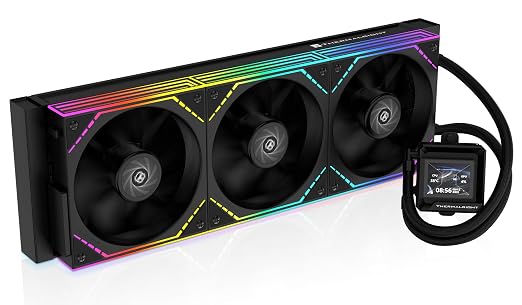
Aluminum forms a solid base for this 360mm AIO liquid CPU cooler, which is ideal for gamers and creators using the 14900k CPU. Its standout feature is the 2 LCD screen, offering a unique way to track system status or show custom images right on your cooler.
Setup involves mounting the sizable 397×120×27mm radiator, which fits most mainstream desktop systems with Intel LGA1851, 1700, 1200, and 115X sockets. The three TL-M12Q 120mm PWM fans link in a daisy-chain to keep cable clutter down while spinning up to 2000 RPM.
They push airflow at 68.9 CFM with 2.21mmH2O pressure, helping keep your rig cool and neat. The software for the LCD screen allows you to create personalized visuals, which adds some fun personality to the build.
Cooling is stable under load thanks to a 3000 RPM pump and solid fan performance, with noise levels at a manageable 28.2 dB. The aluminum radiator is sturdy and sized well to handle demanding processors like the 14900k.
Most praise centers on its impressive customization options via the LCD screen. Complaints usually mention the relatively high noise when fans run at maximum speed.
The 2″ LCD screen is highly praised for personalization and system monitoring, while noise from fans running at top speed is the most common downside. The cooler shows solid performance and durability thanks to the aluminum radiator and high-quality pump and fan setup.
Gamers and content creators wanting strong cooling and a customizable look will appreciate this model. Those with smaller cases or who prioritize quiet operation might consider a quieter or smaller alternative.
Pros
- Customizable 2″ LCD screen for system info and images
- Strong airflow with 68.9 CFM per fan
- Supports multiple Intel sockets, including LGA1851 and 1700
- Radiator size fits large cases and aids cooling
Cons
- Fans can get noisy at full 2000 RPM speed
- Large radiator requires ample case space
| Specification | Details |
|---|---|
| Radiator Dimensions | 397×120×27mm |
| Pump Speed | 3000 RPM |
| Fan Speed | Up to 2000 RPM |
| Air Flow Capacity | 68.9 CFM |
| Noise Level | 28.2 dB |
| Power Connector Type | 4-Pin |
11. NZXT Kraken Plus 360

Bright and customizable LCD screen stands out immediately, making the NZXT Kraken Plus 360 great for anyone wanting both performance and style in their PC cooling. Its biggest strength is efficient, quiet cooling paired with unique visual flair on the pump itself.
Installation is straightforward, fitting well inside most desktop cases built for liquid cooling. The Turbine pump delivers steady water flow, keeping temperatures low even under heavy use.
Fans are quiet thanks to high-static pressure design and Zero RPM Mode, which stops fans completely at low workloads for silent operation. The NZXT CAM software helps easily customize the 1.54 LCD to show temps or animations.
Performance keeps the CPU well-cooled during intense workloads without noticeable noise, a key factor for sustained heavy use like gaming or content creation. Build quality is solid, with reliable 3-pin or 4-pin power connectors and a well-machined pump unit. Most praise revolves around the LCD screen’s customizability, while the occasional complaint is about the radiator size not fitting smaller cases comfortably.
The customizable LCD screen frequently receives praise for making monitoring system temps visually engaging, while some note that radiator size can limit installation options in smaller cases. Noise stays low during regular use, but fan speeds climb up to 2800 rpm when pushed hard, which can be noticeable.
Anyone who prioritizes quiet, strong cooling paired with system monitoring right on the pump will appreciate the setup. Users with smaller cases or those highly sensitive to fan noise at full speed should explore alternative cooler sizes or quieter fan options.
Pros
- Customizable 1.54″ LCD screen on pump
- Low-noise operation with Zero RPM Mode
- Efficient cooling with high-flow Turbine pump
- Flexible 3-pin or 4-pin power connector
Cons
- Radiator may be too large for compact cases
- Fans can reach 2800 rpm, audible at max speed
| Specification | Details |
|---|---|
| Power Connector Type | 3-Pin or 4-Pin |
| Voltage | 12 volts_of_direct_current |
| Wattage | 2.16 watts |
| Noise Level | 30 db |
| Maximum Rotational Speed | 2800 rpm |
| Cooling Method | Water |
12. NZXT Kraken Elite 360

NZXT Kraken Elite 360 is designed for anyone running a power-hungry 14900k processor who wants effective cooling paired with a striking display. Its standout feature is the custom NZXT Turbine pump that offers a noticeable 10% performance boost with lower noise, making it worth considering over basic coolers.
Setting it up involves mounting the large 360mm radiator inside a desktop case, where the high flow rate pump keeps temperatures down quietly. The 2.72-inch IPS LCD is more than a novelty, showing clear visuals and allowing you to display custom images or GIFs while monitoring system stats. Controlling RGB and syncing with apps like Spotify adds a personal touch during daily use.
Cooling is solid thanks to the water-based method combined with the pump’s high head pressure, handling heat from demanding CPUs well. Build quality feels premium with bright, sharp LCD visuals and sturdy materials. Most praise goes to quiet operation and effective cooling.
Complaints mainly focus on the high rotational speed of 2800 rpm, which can cause noticeable noise under load.
Quiet, efficient cooling stands out as the most praised aspect, helping maintain stable CPU temps noticeably better than air coolers. The most frequent complaint is the fan noise at maximum 2800 rpm speeds, which some find louder than expected despite the quiet pump.
Users wanting strong cooling and a display that adds flair will appreciate this cooler. Those sensitive to high fan noise or needing compatibility with different power connectors may want to look for quieter or more versatile alternatives.
Pros
- Efficient pump delivering 10% better cooling performance
- Large 2.72-inch IPS LCD with vivid colors
- Quiet operation under most loads
- Customizable RGB and media integration
Cons
- High fan speed can be noisy under full load
- Power connector limited to 3-Pin only
| Specification | Details |
|---|---|
| Cooling Method | Water |
| Power Connector Type | 3-Pin |
| Voltage | 12 volts |
| Noise Level | 33.88 db |
| Maximum Rotational Speed | 2800 rpm |
| Wattage | 2.16 watts |
Best AIO Coolers for 14900k Compared
| Product | Cooling Method | Max Rotational Speed | Noise Level | Air Flow Capacity |
|---|---|---|---|---|
| ARCTIC Liquid Freezer 360 | Liquid | 3000 rpm | – | 77 cfm |
| Cooler Master R9 Ultra 360 | Water | 2500 rpm | 25 db | 70.7 cfm |
| ARCTIC Liquid Freezer Pro 360 | Liquid | 3000 rpm | – | 77 cfm |
| Noctua NL-LC1-42 420mm | Water | 1500 rpm | 24.8 db | 155.6 m³/h |
| CORSAIR Nautilus 360 RS | Water | 2100 rpm | – | – |
| Noctua NL-LC1-36 360mm | Water | 1800 rpm | 22.5 db | 107.3 m³/h |
| MSI MAG Coreliquid A13 | Water | 5200 rpm | 14.4 db | – |
| Thermalright Peerless Vision 360 | Water | 2000 rpm | 28.2 db | 68.9 cfm |
| LIAN LI HydroShift II 360 | Water | 2600 rpm | 33 db | – |
| Thermalright Frozen Warframe 360 | Water | 2000 rpm | 28.2 db | 68.9 cfm |
| NZXT Kraken Plus 360 | Water | 2800 rpm | 30 db | – |
| NZXT Kraken Elite 360 | Water | 2800 rpm | 33.88 db | – |
- Cooling MethodLiquid
- Max Rotational Speed3000 rpm
- Noise Level–
- Air Flow Capacity77 cfm
- Cooling MethodWater
- Max Rotational Speed2500 rpm
- Noise Level25 db
- Air Flow Capacity70.7 cfm
- Cooling MethodLiquid
- Max Rotational Speed3000 rpm
- Noise Level–
- Air Flow Capacity77 cfm
- Cooling MethodWater
- Max Rotational Speed1500 rpm
- Noise Level24.8 db
- Air Flow Capacity155.6 m³/h
- Cooling MethodWater
- Max Rotational Speed2100 rpm
- Noise Level–
- Air Flow Capacity–
- Cooling MethodWater
- Max Rotational Speed1800 rpm
- Noise Level22.5 db
- Air Flow Capacity107.3 m³/h
- Cooling MethodWater
- Max Rotational Speed5200 rpm
- Noise Level14.4 db
- Air Flow Capacity–
- Cooling MethodWater
- Max Rotational Speed2000 rpm
- Noise Level28.2 db
- Air Flow Capacity68.9 cfm
- Cooling MethodWater
- Max Rotational Speed2600 rpm
- Noise Level33 db
- Air Flow Capacity–
- Cooling MethodWater
- Max Rotational Speed2000 rpm
- Noise Level28.2 db
- Air Flow Capacity68.9 cfm
- Cooling MethodWater
- Max Rotational Speed2800 rpm
- Noise Level30 db
- Air Flow Capacity–
- Cooling MethodWater
- Max Rotational Speed2800 rpm
- Noise Level33.88 db
- Air Flow Capacity–
How to Choose the Right AIO Cooler
Choosing the right AIO cooler depends on factors like cooling performance, radiator size, and compatibility with your CPU socket, ensuring efficient heat dissipation and quiet operation. Getting these right prevents overheating issues, extends hardware life, and avoids costly replacements or upgrades later.
Compatibility and Mounting
Many people overlook socket compatibility until they start the build and find their cooler doesn’t fit. The LGA 1700 socket has a unique mounting design requiring specific brackets. A cooler without explicit support can mean extra costs for adapters or, worse, wasted time returning parts.
Radiator size and fan dimensions also affect whether it fits inside a mid-tower or smaller case. Large 360mm radiators, for example, need top or front mounts with enough clearance from memory sticks or GPU.
Reliable mounting mechanisms make a big difference during installation and in keeping stable contact with the CPU. Thumb screws or quick-mount brackets usually offer more straightforward, secure setups than complex multi-part assemblies. Confirm that the cooler comes with all needed mounting hardware for the socket so you won’t have to improvise.
This is crucial for ensuring you don’t end up with uneven pressure or a wobbly block that can hurt thermal transfer.
Cooling Performance
Cooling performance hinges on the pump’s ability to maintain strong, consistent flow rates to move heat efficiently through the loop. Pumps rated around 2 to 3 liters per minute tend to strike a balance for high-end CPUs, preventing hotspots under heavy load.
Radiator size directly influences how much heat can be dissipated, with 240mm or 360mm being common choices depending on case size and overclocking.
Fans designed with higher static pressure, typically above 2 mmH₂O, push air through dense radiator fins more effectively. RPM ranges that go up to about 2000 allow for increased airflow without sacrificing too much noise. The right combination keeps temperatures stable during gaming or work without abrupt slowdowns or throttling issues.
Noise Levels
Noisy pumps or fans can turn an otherwise great system into a distraction, especially during quiet tasks like web browsing or document editing. Noise levels may spike significantly under load, sometimes reaching beyond 40 decibels if not carefully managed. Choosing coolers with pump housings designed to reduce vibration and fans engineered for lower noise profiles helps keep the environment comfortable.
Some models include software or BIOS options to fine-tune fan curves, allowing quieter operation during light tasks and ramping up only when needed. This flexibility avoids having to hear maximum ramp noise all the time.
Look out for features like fluid dynamic bearings in fans and insulated pump mounts as signs of quieter design focus.
Build Quality and Durability
Materials matter for durability, radiators made of copper provide better heat transfer than aluminum but may cost a bit more. Pump housings often use plastic composites, so quality matters to avoid cracks or warping. Tubing needs to be flexible but tough, usually reinforced with braiding or thicker walls to resist kinks and leaks over time.
Corrosion resistance is important for AIOs since metal parts contact coolant for years. Some units use anti-corrosive coatings inside radiators and blocks to prevent buildup. A well-built loop holds up through temperature cycles and occasional bumps during maintenance without failing prematurely or losing coolant.
Maintenance and Ease of Use
Dust buildup on radiators and fans reduces cooling efficiency and can cause higher noise due to fan strain. Coolers with easily removable fans or accessible radiator grills simplify dusting, either by cleaning with compressed air or wiping with a cloth.
This can prevent overheating without frequent full disassemblies.
Access to cables and mounting points makes repairs or upgrades less frustrating, especially if the cooler needs a replacement pump or fans down the line. Some models offer software or manual controls that let users adjust fan speeds and monitor temperatures conveniently, which helps maintain optimal performance without hassle.
Optimizing Your 14900K Performance with AIO Cooler Installation Tips
Proper installation of an AIO cooler is essential to keep the 14900K running smoothly and within safe temperature limits. Start by ensuring the mounting bracket firmly holds the cooler’s pump against the CPU, as uneven pressure can cause inefficient heat transfer. Applying a thin, even layer of thermal paste is critical; too much or too little can lead to higher temperatures.
When positioning the radiator, place it in an airflow-optimized location in your case, usually at the top or front, where cool air can flow directly through the fins. Secure the fans in a push or pull setup that aligns with your case’s airflow pattern to improve cooling performance.
- Double-check that fan cables and pump power connectors are properly connected to the correct headers.
- Balance radiator orientation to prevent air bubbles from gathering in the pump housing, which can lead to noise and reduced pump life.
- Test the system under load to confirm stable temperatures before finalizing cable management.
Maintaining Peak Cooling Efficiency: Cleaning and Upkeep for AIO Coolers
Regular cleaning is key to maintaining an AIO cooler’s efficiency over time, especially with the 14900K generating substantial heat. Dust buildup on radiator fins and fans reduces airflow, which directly impacts cooling performance.
Use compressed air to blow dust from the radiator and fan blades every few months, paying attention to both sides of the radiator. Soft brushes can help dislodge stubborn particles without damaging delicate fins.
Monitor pump noise or vibration as increased sounds can indicate the start of pump wear or trapped air bubbles. Keeping the cooler’s tubes clear of kinks and ensuring the pump is securely mounted reduce strain and prolong component life.
- Inspect tubing periodically for signs of leakage or discoloration.
- Check fan speed through BIOS or software to ensure they run at expected RPMs.
- Replacing fans is an option if they become noisy or lose efficiency.
Comparing AIO Coolers and Custom Loop Liquid Cooling for the 14900K
AIO coolers offer a straightforward installation and come pre-filled, making them a practical choice for handling the thermal demands of the 14900K without extensive setup.
In contrast, custom loop liquid cooling provides more flexibility and potentially lower temperatures by using larger radiators and custom layouts. However, building and maintaining a custom loop requires more expertise, regular fluid changes, and part replacements.
The compact design of AIO coolers fits most standard cases and requires less maintenance, while custom loops can take up more space and increase the overall system cost. Performance gains from custom loops may be noticeable under heavy overclocking, but for many users, a quality AIO cooler balances performance and convenience effectively.
- AIOs generally come with reliable warranties and manufacturer support.
- Custom loops allow for more personalized aesthetics and component choices.
- AIOs tend to have quieter operation due to integrated pump and fan control.
People Also Asked
How Do I Install an AIO Cooler on a 14900K?
Installing an AIO cooler on a 14900K requires securing the pump block tightly onto the CPU socket and mounting the radiator and fans inside the case. Make sure the backplate is aligned correctly to avoid uneven pressure. Applying the right amount of thermal paste helps improve heat transfer significantly.
Will an AIO Cooler Fit in My PC Case with 14900K?
An AIO cooler will fit if your PC case supports the radiator size you choose and has enough clearance for the fans. Check your case specifications for radiator support, like 240mm or 360mm sizes. Sometimes swapping fan orientation or radiator location inside the case helps create better airflow.
What Are Common Issues with AIO Coolers on 14900K CPUs?
Common AIO cooler issues with the 14900K include pump noise, radiator fan vibrations, or poor cooling performance from dried thermal paste. Air bubbles in the coolant can also reduce efficiency. Keeping cables tidy and ensuring proper radiator orientation helps avoid these problems.
How Long Does an AIO Cooler Typically Last When Used with 14900K?
A typical AIO cooler lasts about 4 to 6 years with a 14900K under normal use before pump or coolant degradation may occur. Regularly monitoring temperatures can signal cooling issues early. Replacements often become necessary once noise or temperature spikes start happening.
Is Extra Maintenance Needed for AIO Coolers on 14900K Processors?
Extra maintenance for AIO coolers on the 14900K isn’t required beyond usual dust cleaning on the radiator fans. Avoid moving or tilting the cooler excessively after installation. You might want to check for leaks or corrosion during routine PC cleanups to catch problems early.
Conclusion
Choosing the right AIO cooler for a 14900k mainly comes down to cooling performance, noise levels, and radiator size. Strong cooling is necessary to keep the processor running smoothly under heavy load. Noise matters if you want a quieter system.
The radiator size needs to fit your case and airflow setup without causing installation issues.
Think about how much space you have inside your case and your budget before making a decision. Also consider how often you push your CPU to its limits, as this affects how much cooling you need.
Check the comparison table and our detailed picks above to find one that fits your setup and needs.

I’m Grant Mitchell, a firearms and hunting writer with years of experience at the range and in the field. I write about rifles, shotguns, handguns, optics, safe storage, cleaning, and responsible ownership, along with practical hunting tips. My goal is to share accurate, safety-first information that helps you choose the right firearm, maintain it properly, and become a more confident shooter.