Top 12 Best and Quietest CPU Cooler You Can’t Miss!
Anyone who has built a PC or upgraded their processor knows the frustration when their rig suddenly sounds like a jet engine. A poorly chosen or cheap fan can easily drown out conversations or distract during work and gaming. The best and quietest CPU cooler solves this by keeping temperatures down without adding noise, striking a balance that many fail to achieve.
Effective CPU coolers rely heavily on the quality of their heat sinks and fan design. Larger, denser fins made of copper or aluminum help dissipate heat faster, while quieter fans usually operate at around 600 to 1200 RPM. Proper sizing ensures it fits the case and CPU socket, and an easy-to-clean design helps maintain performance over time without raising noise levels.
Need a Quick Check?
| Image | Product | Price |
|---|---|---|
Our Top Picks 1  | Thermalright Peerless 120 | Check Price |
Our Top Picks 2  | Noctua NH-D15 chromax.Black | Check Price |
Our Top Picks 3 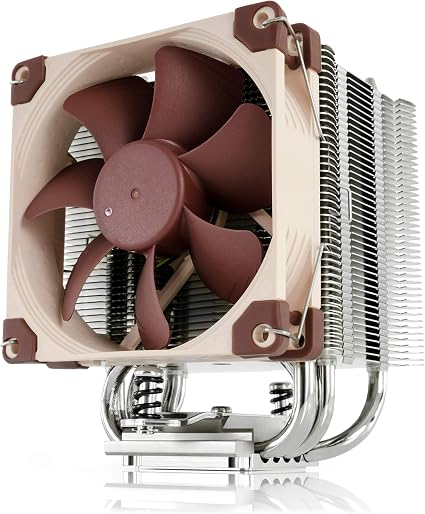 | Noctua NH-U9S | Check Price |
Our Selected Top 12 and Quietest Cpu Cooler for Different Needs
This list features carefully chosen CPU coolers that balance quiet operation with effective performance. Each review covers how the cooler performs, its ideal user, and highlights both strengths and weaknesses to help you find the best fit for your needs.
1. Thermalright Peerless Assassin 120 SE CPU Cooler
Running quietly while keeping your CPU cool is key for long sessions at the desk. Suitable for anyone wanting a reliable, low-noise solution, the Thermalright Peerless Assassin 120 SE impresses with its quiet operation, making it a solid choice for silent builds without sacrificing cooling power.
Installation is straightforward, thanks to its well-designed mounting brackets that hold the cooler firmly in place. The 4-pin connector allows for precise fan speed control, so you can balance cooling and noise depending on your workload. Daily use shows the fan stays relatively quiet at a maximum 1550 rpm, helping to avoid distracting background noise.
It handles heat effectively, managing up to 265 watts with its 66.17 cfm airflow capacity. The cooler has a solid build, combining materials focused on effective air cooling and durability. Most users praise its quiet fan speed, while some wish it pushed quieter at its highest RPM setting.
The strongest praise lies in how quiet the fan remains during regular use, contributing to a low-noise environment. Common feedback points to the fan speed, which can get noticeably louder when pushed to its top RPM, trading silence for maximum cooling performance.
Anyone prioritizing a quieter setup while still requiring solid air cooling will appreciate this cooler. Those needing completely silent operation at all times or compatibility beyond desktops might want to look for alternatives.
Pros
- Runs quietly at 25.6 dB under load
- Good airflow at 66.17 cfm for effective cooling
- Simple installation with secure mounting bracket
- Supports up to 265 watts power dissipation
Cons
- Can be a bit noisy at maximum 1550 rpm speed
- Only compatible with desktop devices
| Specification | Details |
|---|---|
| Power Connector Type | 4-Pin |
| Voltage | 12 volts |
| Wattage | 265 watts |
| Cooling Method | Air |
| Noise Level | 25.6 db |
| Maximum Rotational Speed | 1550 rpm |
| Air Flow Capacity | 66.17 cfm |
2. Noctua NH-D15 chromax.Black CPU Cooler
Quiet and powerful, the Noctua NH-D15 chromax.Black suits anyone wanting excellent cooling without noise distractions.
Its standout feature is the dual 140mm fan setup combined with a dual-tower heatsink, delivering temperature control comparable to water coolers. Perfect for overclockers and those who value silent operation alike.
Setting up involves a bit of care due to its size, but the included Low-Noise Adaptors and PWM control make daily running smooth. At idle, the fans barely make a sound, yet they ramp up efficiently under load.
Its all-black design fits most color schemes well, and maintenance is straightforward as the fans are easily removable for cleaning.
Cooling power meets expectations with six heatpipes and a solid dual-tower heatsink, handling high thermal loads skillfully. Constructed with quality materials, the build feels durable and premium.
Praise often highlights its quiet performance, while the main grip is its bulky size, which can cause fitting challenges in smaller cases.
Users find the cooling remarkably quiet even under load, attributing this to the excellent NF-A15 fans and 6-heatpipe design. A frequent drawback is the cooler’s bulky size, which can be problematic in tighter cases or tricky setups.
Gamers and overclockers needing strong and silent air cooling will appreciate its performance and noise levels. Those with smaller PC cases or limited installation space should consider smaller coolers or water cooling alternatives due to its size.
Pros
- Whisper quiet operation at idle speeds
- Strong cooling rivals many water coolers
- Automatic fan speed control with PWM
- Stylish all-black design fits many builds
Cons
- Large size may not fit compact cases
- Installation requires careful handling
| Specification | Details |
|---|---|
| Power Connector Type | 4-Pin |
| Voltage | 12 volts |
| Noise Level | 24.6 db |
| Maximum Rotational Speed | 1500 rpm |
| Air Flow Capacity | 140.2 cubic meter per hour |
3. Noctua NH-U9S CPU Cooler
Copper and aluminum make up a compact single-tower design that fits perfectly in HTPCs, ITX, and small form factor builds. Ideal for those who need a cooler that’s both quiet and space-conscious, it manages to stay low-profile at just 125mm in height without compromising on cooling power.
Installation is straightforward thanks to the SecuFirm2 mounting system that supports recent Intel and AMD sockets, plus you get high-end NT-H1 thermal paste right in the box. The 92mm fan adjusts speeds automatically with PWM control, keeping noise incredibly low while still providing enough airflow. It doesn’t block RAM or PCIe slots, which means setup with hot components stays easy.
The cooler handles CPU heat well considering its small size, maintaining good temperatures without noisy fan output. Build quality is solid too, with quality materials and a thoughtful design. The most praised aspect is just how quiet it runs, while some users mention it might not be quite enough for high-TDP CPUs.
Quiet operation stands out as the biggest advantage, thanks to the finely tuned 92mm fan and adaptive speed control. General consensus notes that while thermal management is solid for most builds, the cooler can struggle with the heat output of more demanding processors.
People building compact systems or prioritizing noise levels will appreciate this cooler’s design and performance. Those running top-end CPUs with heavy loads might want to consider larger coolers for better heat dissipation.
Pros
- Compact 125mm height suits small builds
- Ultra-quiet 92mm PWM fan included
- Compatible with many Intel and AMD sockets
- Includes high-quality thermal paste
Cons
- Cooling might be limited on very high-TDP CPUs
- Fan size smaller than some competitors
| Specification | Details |
|---|---|
| Unit Count | 1 Count |
| Fan Size | 92mm |
| Height | 125mm |
| Socket Compatibility | Intel LGA1851, LGA1700, LGA1200, LGA115x, AMD AM5 & AM4 |
| Included Thermal Paste | NT-H1 |
| Warranty | 6 year manufacturer’s warranty |
4. Noctua NH-L12S CPU Cooler

One of the first things you’ll notice about the Noctua NH-L12S is how compact and quiet it is, making it perfect for small ITX or HTPC systems. It excels in fitting into tight spaces while running nearly silently, which is its biggest strength for anyone who needs strong cooling without noise.
Setting it up is straightforward thanks to the SecuFirm2 mounting system, compatible with a wide range of Intel and AMD sockets including LGA1700 and AM5. The package also includes high-quality thermal paste, which helps optimize heat transfer right from the start.
Its 70mm height keeps it low-profile, fitting comfortably in small cases without interfering with other components.
The cooler does a solid job managing heat with its four heatpipes and optimized 120mm slim fan. Noctua’s build quality shines through in its durable materials and well-designed fan that adjusts speed with PWM control, keeping noise to a minimum.
Praise often highlights how quiet it runs, but some mention that, in very tight builds, installation can be a bit fiddly despite the offset mounting option.
The quiet fan and compact size consistently receive praise from users who prioritize silent, small-form-factor builds. Installation challenges arise mainly in builds where space is extremely limited, despite the cooler’s careful design.
Those building ITX or HTPC systems will find excellent value in this cooler’s quiet performance and slim profile. Users looking to cool very high-end, power-hungry CPUs might want to consider larger cooling solutions.
Pros
- Low-profile 70mm height fits tight spaces
- Ultra-quiet operation with PWM-controlled 120mm fan
- Easy installation with SecuFirm2 mounting system
- Includes high-end NT-H1 thermal paste
Cons
- Installation can be tricky in very compact cases
- Not suitable for very high TDP CPUs without airflow
| Specification | Details |
|---|---|
| Height | 70mm |
| Fan size | 120mm slim |
| Socket compatibility | Intel LGA1851, LGA1700, LGA1200, LGA115x; AMD AM5 & AM4 |
| Heatpipes | 4 |
| Warranty | 6 years |
5. Thermalright Assassin X120 Refined SE CPU Cooler

Quiet operation combined with solid cooling performance makes the Thermalright Assassin X120 Refined SE CPU Cooler a great pick for anyone looking to keep their desktop cool without noise disruptions. Its strongest advantage is maintaining low sound levels at just 25.6 dB while delivering effective heat dissipation.
Installation involves a 4-pin power connector and straightforward mounting on desktop CPUs. The fan speed maxes out at 1550 rpm, allowing for controlled airflow of 66.17 cfm that keeps temperatures down during regular and heavy use. Regular cleaning is manageable since it uses a heat pipe and fan-based system that balances performance with ease of maintenance.
Its build quality reflects over 20 years of Thermalright’s experience in cooling solutions, providing reliable materials that perform consistently. The quiet operation ranks among the best, but some users mention the fan speed could be higher for extreme overclocking.
It balances noise and power well for typical desktop cooling needs.
The quiet operation at 25.6 dB stands out as a major benefit, providing effective cooling without noticeable fan noise. A common drawback relates to the fan speed maxing out at 1550 rpm, which can limit performance under very high heat loads.
Users wanting a silent everyday experience will appreciate this cooler’s balance of airflow and noise. Those who plan on heavy overclocking or pushing their CPUs hard might want to explore models with higher fan speeds and stronger cooling capacities.
Pros
- Very quiet operation suitable for noise-sensitive setups
- Decent airflow at a moderate fan speed
- Compatible with most desktop CPUs
- Solid build reflecting years of expertise
Cons
- Limited maximum fan speed for high-end cooling needs
- May not suffice for extreme overclocking situations
| Specification | Details |
|---|---|
| Power Connector Type | 4-Pin |
| Voltage | 12 volts of direct current |
| Cooling Method | Heat pipe and fan-based |
| Noise Level | 25.6 db |
| Maximum Rotational Speed | 1550 rpm |
| Air Flow Capacity | 66.17 cfm |
6. Cooler Master Hyper 212 Black II CPU Cooler

Cooling a powerful CPU without loud fans can be a real challenge in a busy workspace or gaming setup. Designed for mid-to-high-end processors, the Cooler Master Hyper 212 Black II works best where quiet operation and effective heat dissipation under load are crucial. Its biggest strength is managing heat up to 220W while keeping noise low.
Installing the cooler is straightforward thanks to its user-friendly mounting bracket, making it a solid choice for new builds or upgrades. The four heat pipes use Direct Contact Technology to pull heat away efficiently. The fan spins quietly up to 1,750 RPM, delivering enough airflow with minimal disturbance, ideal for both gaming and productivity tasks on daily runs.
Performance-wise, it holds steady under heavy CPU loads and handles Ryzen 7 and Intel Core Ultra 7 processors reliably. Reviews highlight consistent cooling with a noise level around 26 dB, but some mention it doesn’t stay whisper-quiet if ramped up to maximum 2,500 RPM. The build is clean and minimalist, appealing visually in compact or modern cases.
The strongest point is stable performance under heavy loads with quiet fan speeds during regular operation. Most common complaints relate to the fan becoming noticeably louder when pushed to its maximum rotational speed. The cooling capacity suits users seeking solid thermal management without loud noise in everyday tasks.
Those running Ryzen 7 or Intel Core Ultra 7 will find good value in this cooler for standard workloads and gaming. Users needing extreme overclocking headroom or ultra-quiet silence under max load might consider higher-end options instead.
Pros
- Quiet cooling fan up to 1,750 RPM
- Simple, user-friendly mounting bracket
- Compatible with Ryzen 7 and Intel Core Ultra 7 CPUs
- Efficient heat transfer with 4 heat pipes
Cons
- Fan noise increases near maximum RPM
- Airflow capacity of 42 CFM may limit overclocking
| Specification | Details |
|---|---|
| Cooling Capacity | Up to 220W |
| Maximum Rotational Speed | 2500 rpm |
| Noise Level | 26 dB |
| Air Flow Capacity | 42 CFM |
| Power Connector Type | 4-Pin |
| Wattage | 2.4 watts |
7. Be Quiet! Dark Rock 5 CPU Cooler

Running at just 29.8 db, the be quiet! Dark Rock 5 shines as a nearly silent air cooler. Ideal for builds where quiet operation is key, it combines strong cooling power and noise control in one.
The fan’s low noise level stands out as its biggest draw.
Setting it up involves compatibility with many Intel and AMD sockets, including the latest AM5 and 1851. The included 120mm Silent Wings 4 fan uses fluid-dynamic bearings and a rubberized frame to reduce vibrations and noise. Managing airflow precisely through the fan’s design means effective heat transfer without loud spinning sounds during use.
Handling up to 210 watts of heat, the cooler delivers solid performance thanks to six copper heat pipes and a dense aluminum fin setup. The ceramic-particle coating helps move heat efficiently.
Many praise the quietness, but some mention the large size can make fitting in smaller cases tricky. Build quality feels solid and premium.
Quiet operation is the most praised feature, making it suitable for noise-sensitive setups. The biggest complaint comes from the cooler’s size, which can be too bulky for compact builds. Installation can require careful checking of case clearance.
Those wanting a near-silent cooler with solid performance across many CPU types will be satisfied. Not ideal for users with small cases or extreme overclocking needs needing even higher cooling capacity or different form factors.
Pros
- Runs extremely quiet at 29.8 db
- Strong cooling with 210W capacity
- Rubberized fan frame lowers vibration noise
- Works with a wide range of sockets
Cons
- Large size can limit compatibility in small cases
- Maximum fan speed of 2100 rpm might not suit all high-TDP CPUs
| Specification | Details |
|---|---|
| Noise Level | 29.8 db |
| Maximum Rotational Speed | 2100 rpm |
| Cooling Method | Air |
| Air Flow Capacity | 55 cfm |
| Compatible Devices | Intel sockets: 1851/1700/1200/1151/1150/1155 | AMD sockets: AM5/AM4 |
| Wattage | 210 watts |
8. Noctua NH-L9x65 CPU Cooler

People building small form factor desktops or HTPCs will appreciate a cooler that handles heat quietly without taking much space. Compact with only 65mm height, the Noctua NH-L9x65 fits tight builds and keeps noise to a minimum, making it perfect for setups where silence is key and space is limited.
Installation is straightforward thanks to the SecuFirm2 mounting system, compatible with many Intel and AMD sockets. The included NT-H1 thermal paste simplifies applying a good contact layer. The slim 92mm fan runs quietly with PWM support and a low-noise adaptor that automatically adjusts speed, keeping fan noise very low during normal use without sacrificing airflow.
The cooler does a solid job controlling temperatures on CPUs with low to moderate heat output, balancing airflow and pressure well in a compact size. The build quality feels premium, with durable materials and a well-engineered design that avoids blocking RAM or PCIe slots.
Praise often highlights how quiet it runs, though some users note that it’s not ideal for high-TDP processors wanting aggressive cooling.
Quiet operation stands out as the main advantage, making the cooler ideal in noise-sensitive setups. However, the fan speed can spike to 2500 rpm during heavier loads, increasing noise and showing the cooler’s limits on demanding CPUs.
Those building an ITX or HTPC system with moderate CPU heat output will find this cooler a great fit. Anyone using a high-performance CPU requiring strong cooling should explore larger or more powerful options instead.
Pros
- Very low profile fits compact PC cases
- Quiet operation with PWM and low-noise adaptor
- Does not block RAM or PCIe slots
- Easy installation with SecuFirm2 kit
Cons
- Not suited for high heat dissipation CPUs
- Fan speed can reach 2500 rpm when needed
| Specification | Details |
|---|---|
| Total Height | 65mm |
| Fan Size | 92mm |
| Noise Level | 23.6 dB |
| Maximum Rotational Speed | 2500 rpm |
| Air Flow Capacity | 57.5 cubic meter per hour |
| Voltage | 12 volts |
9. Noctua NH-D15 G2 chromax.Black CPU Cooler

Known for its quiet operation and powerful cooling, this CPU cooler suits those running high-end AMD Ryzen and Intel Core processors needing serious heat management without noise. Its standout feature is the combination of eight heatpipes and fans designed for near-silent performance even under load.
Setup requires some care due to its size, but mounting goes smoothly with clear instructions. The two 140mm NF-A14x25r G2 fans adjust automatically via PWM, offering a balanced airflow that adapts silently to your CPU’s needs. Fans come with low-noise adapters and speed-offset for tailored sound levels, making day-to-day operation discreet and efficient in any desktop build.
Performance excels with 20% more surface area ensuring effective heat dissipation, especially important for power-hungry processors. The all-black chassis offers a solid feel with premium materials. Most praise focuses on its quietness and excellent cooling; complaints usually mention the bulky size affecting compatibility in smaller cases or RAM clearance.
The quietness paired with strong cooling performance receives frequent mention as a key benefit, while many note the cooler’s sizable dimensions require careful case and component selection. The fans operate quietly but the physical bulk sometimes complicates installation.
This cooler fits users with spacious cases and high-performance CPUs who prize silent running. Those with compact builds or low-profile RAM might prefer a smaller alternative to avoid fitment issues.
Pros
- Very quiet operation even under heavy load
- Large surface area for excellent heat dissipation
- Automatic fan speed control via PWM
- All-black design fits most modern setups
Cons
- Large size can limit compatibility in smaller cases
- May interfere with taller RAM modules
| Specification | Details |
|---|---|
| Noise Level | 24.8 db |
| Maximum Rotational Speed | 1500 rpm |
| Air Flow Capacity | 155.6 cubic meter per hour |
| Power Connector Type | 4-Pin |
| Voltage | 12 volts |
| Wattage | 2.28 watts |
10. Noctua NH-U12A CPU Cooler

Noctua NH-U12A is a CPU cooler that packs 140mm class performance into a 120mm footprint, designed for gamers and PC builders who want quiet but powerful cooling. Its biggest strength lies in balancing strong heat dissipation with remarkable silence thanks to dual NF-A12x25 fans.
Setting it up is straightforward, as it fits most tower cases under 158mm height and leaves space around RAM and PCIe slots on common sockets like LGA17xx, LGA1200, and AM4. The dual fans adjust speeds automatically through PWM control, keeping noise incredibly low during idle and ramping up only when needed. Low-noise adapters help maintain quiet operation without sacrificing cooling power.
The cooling performance rivals larger 140mm coolers, mainly due to seven heatpipes and extra surface area in a compact design. Build quality feels premium, with sturdy construction and top-tier fans. Praise often highlights its efficient and quiet operation under load, while some find the price high compared to simpler air coolers.
Users often praise how quiet it remains during idle and regular tasks, yet still offers strong cooling performance under heavy load. Common complaints focus on the price point, as it is a premium cooler compared to many other air coolers without dual fans.
This cooler suits those who want excellent thermal performance with minimal noise in mid-size to large cases. People with very tight case space or limited budgets might prefer alternatives with lower height or cost, but fewer fans and less power.
Pros
- Dual NF-A12x25 fans for quiet operation
- Fits most tower cases, good RAM clearance
- Strong heat dissipation rivaling 140mm coolers
- PWM speed control with low-noise adapters
Cons
- More expensive than simpler air coolers
- Height of 158mm may not suit very compact cases
| Specification | Details |
|---|---|
| Power Connector Type | 4-Pin |
| Voltage | 12 volts |
| Noise Level | 22.6 dB |
| Maximum Rotational Speed | 2000 rpm |
| Air Flow Capacity | 102.1 cubic meter per hour |
11. Noctua NH-U12A chromax.Black CPU Cooler

Running quiet while keeping temperatures low feels straightforward with the Noctua NH-U12A chromax.Black. It fits well in most cases thanks to its moderate height and doesn’t interfere with other components.
This cooler is made for anyone needing strong, silent performance without worrying about space limitations or strange noises during daily tasks.
Setting it up is smooth due to its 120mm size and smart design that avoids covering RAM slots or blocking PCIe on most ATX and Micro-ATX motherboards. Thanks to two high-quality fans with PWM speed control, it adapts noise and cooling automatically, quiet when idle and powerful when the CPU works hard.
It matches well with various setups, visually blending in thanks to the all-black finish.
It cools impressively for its size, handling heat loads efficiently while running fans at speeds up to 2000 rpm. The build is solid, with a heatsink celebrated globally through many awards.
Complaints tend to focus on the price rather than performance or noise. The fans stay quiet around 22.6 dB but ramp up noticeably under full load, which some might find a bit loud.
Cooling performance receives praise across many reviews, as the design keeps temperatures down effectively while staying quiet during light use. The common downside is that fan noise can pick up under heavy load, which might grab attention in very silent environments.
Those wanting low noise for a compact but capable cooler will appreciate these features and design. Buyers prioritizing absolute silence at all times or restricted budgets might look at other options instead.
Pros
- Quiet operation at idle and moderate load
- Fits most tower cases without blocking RAM or PCIe
- Strong cooling performance for a 120mm cooler
- Durable all-black design suits various builds
Cons
- Fans noticeably louder near maximum speed
- Premium price may not suit every budget
| Specification | Details |
|---|---|
| Cooling Method | Air |
| Noise Level | 22.6 db |
| Maximum Rotational Speed | 2000 rpm |
| Air Flow Capacity | 102.1 cfm |
| Power Connector Type | 4-Pin |
| Voltage | 12 volts |
12. Noctua NH-D12L CPU Cooler

Quiet cooling with excellent compatibility makes the Noctua NH-D12L perfect for users needing low-profile performance. It fits most 4U rackmount and compact cases without compromising airflow or noise. Its standout feature is whisper-quiet operation even under load, making it great for silent PC builds.
Setup is straightforward thanks to the SecuFirm2 mounting system and included thermal paste. The single NF-A12x25r 120mm fan runs quietly with PWM control, speeding up only as needed. Its low height (145mm) and asymmetrical layout ensure full RAM clearance on AMD AM4/AM5 and Intel sockets, so it fits well without clearance issues.
Cooling performance is solid, handling loads quietly with noise levels as low as 22.6 dB at idle. The dual-tower heatsink keeps temperatures stable, while the fan’s airflow of 102.1 cubic meters per hour effectively dissipates heat.
The build quality receives praise for durability, though some note the price is on the higher side considering its wattage of 1.68 W.
Feedback highlights the cooler’s whisper-quiet operation and effective airflow, even under load. Many appreciate how easy it is to install with the mounting system and the inclusion of quality thermal paste. On the downside, some find the cost a bit steep relative to its wattage, and fan speed tops out at 2000 rpm.
People building quiet, compact desktops will be happy with its size and noise. Those needing extreme overclocking or more aggressive cooling might want to explore higher-speed alternatives. Its design shines in cases with limited space and where silence is a top priority.
Pros
- Extremely quiet fan at idle speeds
- Compact 145mm height fits most cases
- Full RAM compatibility with asymmetrical design
- Easy installation with SecuFirm2 system
Cons
- Price is higher than some single-fan coolers
- Maximum speed of 2000 rpm might limit extreme cooling
| Specification | Details |
|---|---|
| Noise Level | 22.6 dB |
| Maximum Rotational Speed | 2000 rpm |
| Air Flow Capacity | 102.1 cubic meter per hour |
| Power Connector Type | 4-Pin |
| Voltage | 12 volts |
| Wattage | 1.68 watts |
Best and Quietest CPU Coolers Comparison Table
| Product | Noise Level | Air Flow | Max RPM | Cooling Method |
|---|---|---|---|---|
| Thermalright Peerless 120 | 25.6 db | 66.17 cfm | 1550 rpm | Air |
| Noctua NH-D15 chromax.Black | 24.6 db | 140.2 m³/h | 1500 rpm | Air |
| Noctua NH-U9S | – | – | – | Air |
| Noctua NH-L12S | – | – | – | Air |
| Thermalright Assassin X120 | 25.6 db | 66.17 cfm | 1550 rpm | Heat pipe & fan |
| Cooler Master Hyper 212 Black | 26 db | 42 cfm | 2500 rpm | Fan |
| be quiet! Dark Rock 5 | 29.8 db | 55 cfm | 2100 rpm | Air |
| Noctua NH-L9x65 | 23.6 db | 57.5 m³/h | 2500 rpm | Air |
| Noctua NH-D15 G2 chromax.Black | 24.8 db | 155.6 m³/h | 1500 rpm | Air |
| Noctua NH-U12A | 22.6 db | 102.1 m³/h | 2000 rpm | Air |
| Noctua NH-U12A chromax.Black | 22.6 db | 102.1 cfm | 2000 rpm | Air |
| Noctua NH-D12L | 22.6 db | 102.1 m³/h | 2000 rpm | Air |
- Noise Level25.6 db
- Air Flow66.17 cfm
- Max RPM1550 rpm
- Cooling MethodAir
- Noise Level24.6 db
- Air Flow140.2 m³/h
- Max RPM1500 rpm
- Cooling MethodAir
- Noise Level–
- Air Flow–
- Max RPM–
- Cooling MethodAir
- Noise Level–
- Air Flow–
- Max RPM–
- Cooling MethodAir
- Noise Level25.6 db
- Air Flow66.17 cfm
- Max RPM1550 rpm
- Cooling MethodHeat pipe & fan
- Noise Level26 db
- Air Flow42 cfm
- Max RPM2500 rpm
- Cooling MethodFan
- Noise Level29.8 db
- Air Flow55 cfm
- Max RPM2100 rpm
- Cooling MethodAir
- Noise Level23.6 db
- Air Flow57.5 m³/h
- Max RPM2500 rpm
- Cooling MethodAir
- Noise Level24.8 db
- Air Flow155.6 m³/h
- Max RPM1500 rpm
- Cooling MethodAir
- Noise Level22.6 db
- Air Flow102.1 m³/h
- Max RPM2000 rpm
- Cooling MethodAir
- Noise Level22.6 db
- Air Flow102.1 cfm
- Max RPM2000 rpm
- Cooling MethodAir
- Noise Level22.6 db
- Air Flow102.1 m³/h
- Max RPM2000 rpm
- Cooling MethodAir
How to Choose the Right Quiet CPU Cooler
Choosing the right quiet CPU cooler involves balancing cooling performance, noise levels, and compatibility with your system. Prioritizing these factors ensures efficient heat management and a quieter environment, which helps prevent overheating issues and reduces the need for costly replacements or upgrades.
Cooling Performance
It is common to see CPU temperatures spike under heavy workloads with inadequate cooling, leading to system throttling or crashes. A cooler’s ability to handle your processor’s thermal design power (TDP) directly affects how well it stabilizes performance during gaming or rendering sessions.
Components with a TDP close to or higher than your cooler’s rated capacity often run hotter and louder, which shortens lifespan and impacts reliability.
Good coolers maintain steady temperatures even during peak CPU loads, keeping the system stable and comfortable to use. Look for models specifying support for your CPU’s TDP, usually measured in watts.
Efficiency depends on the heatsink size and fin density plus the fan’s airflow, often noted in cubic feet per minute (CFM). Balancing these ensures heat gets removed quickly, preventing thermal throttling and shutdowns.
Noise Levels
Daily use shows that a quiet fan makes a big difference, especially in situations like working late at night or streaming. Noise levels are typically measured in decibels (dB), and even small increases can become noticeable over time. Fans often produce more noise than pumps in liquid coolers, but a high-speed fan can outweigh pump noise during peak loads.
Look for adjustable fan speeds or silent modes, which allow the cooler to keep noise low during idle or light use and ramp up only when necessary. Models with decibel ratings around 20-25 dB at idle and under 35 dB at full speed are generally comfortable in typical home or office settings.
This control helps maintain a peaceful environment without sacrificing performance.
Size and Compatibility
Many coolers fail to fit properly because they overlook nearby components like tall RAM modules or large VRM heatsinks around the CPU socket. Clearance issues can force you to remove parts or settle for less airflow, causing temperatures to rise. Case size plays a big role, so a cooler’s height and width must be compatible with your PC’s dimensions and internal airflow patterns.
Check the dimensions carefully, including fan thickness and heatsink height. Ensuring compatibility with your motherboard’s mounting points is crucial for a secure setup. Some models offer universal mounting brackets, but confirming RAM clearance avoids unexpected tight fits or blocked airflow.
Build Quality and Materials
Over time, poor material quality becomes clear. Aluminum is common in heatsinks, but copper pipes or bases improve heat transfer significantly by conducting heat faster from the CPU. Heatsinks with dense, well-spaced fins allow air to flow through efficiently and cool better.
Fan blade design affects both durability and noise output. Sturdy frames and blades reduce vibration and wear, prolonging life.
Thermal paste or pads included with many coolers vary in quality, and sometimes replacing them with better options improves thermal performance noticeably. Paying attention to these materials helps avoid performance drops as components age.
Ease of Installation and Maintenance
Some coolers come with complicated mounting systems that require multiple screws and brackets, making installation frustrating without the right tools. Easier-to-install models use fewer parts and clear instructions, saving time and reducing the risk of uneven pressure on the CPU.
Maintenance is easier if the cooler’s fans can be removed or cleaned without taking the entire unit off the motherboard. Dust buildup directly impacts cooling efficiency, so being able to clean or replace fans and reapply thermal paste without a full teardown simplifies upkeep and extends the cooler’s useful life.
Optimizing CPU Cooler Performance Through Proper Installation
Proper installation of a CPU cooler significantly affects its cooling efficiency and noise level. Start by ensuring the cooler makes firm and even contact with the CPU surface, using an appropriate amount of thermal paste to fill microscopic gaps without overflowing. Over-application can raise temperatures by insulating heat rather than transferring it.
Use the mounting brackets and screws according to your motherboard and cooler model to maintain secure positioning. An uneven cooler can cause poor heat dissipation and louder fan operation as the system struggles to cool effectively.
Key steps for installation:
- Clean both CPU and cooler base with isopropyl alcohol before applying thermal paste.
- Apply a pea-sized amount of thermal paste in the CPU center.
- Attach the cooler firmly, tightening screws in a diagonal pattern to spread pressure evenly.
- Connect fan power cables correctly and check for any obstruction to airflow.
Following these measures ensures optimal performance and keeps noise levels down by preventing overheating and excessive fan speeds.
Maintaining and Cleaning Your CPU Cooler for Longevity
Dust build-up is the leading cause of reduced CPU cooler efficiency and increased noise. Over time, accumulated dust on fan blades and heatsinks restricts airflow, forcing the fan to spin faster to cool the processor.
Regular maintenance involves carefully cleaning the cooler to maintain consistent operation. Use compressed air to blow dust out of heatsinks and fans, preferably outside or into a trash bin to avoid scattering dust indoors.
Practical cleaning tips:
- Turn off and unplug the computer before cleaning.
- Hold the fan blades steady while using compressed air to avoid damage from spinning.
- Use a soft brush to remove stubborn dust stuck between heatsink fins.
- Reapply thermal paste every 1-2 years, or if temperatures rise noticeably.
Strict maintenance not only extends the cooler’s lifespan but also keeps noise levels low by reducing the fan’s workload.
Comparing Air vs. Liquid CPU Coolers for Quiet Operation
Air and liquid CPU coolers both have their place in quiet computing setups, but understanding how they operate helps select the right option. Air coolers rely on a heatsink and fan to dissipate heat, which can get noisy under load if the fan speed ramps up.
Liquid coolers circulate coolant through a closed loop, moving heat away from the CPU to a radiator where fans cool it down. This system typically spreads thermal load more efficiently, allowing fans to run slower and quieter.
Comparing noise factors:
- Air coolers usually have fewer points of mechanical failure and don’t risk pump noise but can get louder with heavy workloads.
- Liquid coolers generally maintain lower average fan speeds but include a pump, which can add a subtle sound.
- Both benefit from quality fans with low noise ratings and advanced controls like PWM for dynamic speed adjustments.
Choosing depends on the balance between desired cooling performance, noise tolerance, and system complexity.
People Also Asked
How Do I Measure CPU Cooler Size Compatibility with My Case?
Check the maximum cooler height supported by your PC case and compare it to the height of the CPU cooler you’re considering. Measure from the motherboard surface to the inside top of your case to avoid fit issues with tall coolers.
What Are Common Problems with Quiet CPU Coolers After Installation?
One common issue is fan noise caused by loose mounting or misaligned fans after installation. Ensuring the cooler is firmly secured and the fans are properly seated can prevent rattling sounds and improve cooling performance.
How Long Does a Quiet CPU Cooler Typically Last Before Replacement?
Quiet CPU coolers typically last around 4 to 6 years before needing replacement due to fan bearing wear or dust accumulation. Regular cleaning can extend their life by keeping fan blades and heatsinks free of dust.
Is It Safe to Touch the CPU Cooler While It Is Running?
Touching the CPU cooler while it is running can be safe if you are careful, but it may be hot or the fan blades could cause injury. It’s better to turn off the PC before cleaning or adjusting the cooler to avoid burns or damage.
How Do I Properly Clean and Maintain a Quiet CPU Cooler?
Clean a quiet CPU cooler by gently blowing compressed air through the heatsink fins and fan blades to remove dust. Avoid using liquids or rough brushes, as these can damage delicate fins or fan bearings.
Conclusion
Choosing a quiet CPU cooler means focusing first on noise level and cooling performance. How well a cooler can keep your CPU temperature in check without making constant noise is key. Size also matters to ensure it fits inside your case and works with your system’s layout.
Consider how much space you have and your budget before making a final choice. A quieter cooler might cost more or be larger, so balance those factors with your needs.
Revisit the comparison table and the options listed above to find a cooler that fits your setup and use patterns best.

I’m Grant Mitchell, a firearms and hunting writer with years of experience at the range and in the field. I write about rifles, shotguns, handguns, optics, safe storage, cleaning, and responsible ownership, along with practical hunting tips. My goal is to share accurate, safety-first information that helps you choose the right firearm, maintain it properly, and become a more confident shooter.