Top 12 Best AMD CPU Cooler That Will Blow Your Mind!
Overheating during intensive tasks is a frequent annoyance with AMD setups when the cooling solution isn’t up to par. A poorly chosen or cheap cooler often struggles to keep temperatures in check, causing sudden throttling and noise that can distract or even damage components.
Finding the best amd cpu cooler means aiming for consistent performance under load without turning your PC into a noise machine.
What matters most in a good AMD CPU cooler are its thermal dissipation capacity, build quality, and compatibility with your CPU socket. Effective coolers use materials like copper heat pipes and aluminum fins, balancing weight and heat transfer.
Most reliable models come with at least 120mm fans running between 1000 and 2000 RPM, keeping temperatures generally under 70°C during heavy use. A proper fit to the specific AMD socket ensures stable contact and easier installation, while a straightforward design allows for easier cleaning to maintain performance over time.
Need a Quick Check?
| Image | Product | Price |
|---|---|---|
Our Top Picks 1  | Thermalright Peerless Assassin 120 SE | Check Price |
Our Top Picks 2  | be quiet! Pure Rock Pro | Check Price |
Our Top Picks 3  | Noctua NH-D15 chromax.Black | Check Price |
Our Selected Top 12 Amd Cpu Cooler for Every Budget
This list features a variety of AMD CPU coolers catering to different needs and budgets. Each review covers cooling performance, suitable user types, and highlights both advantages and drawbacks to help you make an informed choice.
1. Thermalright Peerless Assassin 120 SE CPU Cooler
Quiet operation combined with solid cooling power makes this air cooler a great pick for desktop users who want reliable temperature control without a lot of noise. Its compatibility with AMD CPUs ensures it fits well within a variety of setups, especially for those who want steady performance under moderate loads.
Installation is straightforward with its mounting bracket designed to hold securely in place. The 4-pin 12-volt connector offers PWM control, allowing you to balance noise and cooling efficiency naturally.
It maintains a low noise level of 25.6 dB thanks to a fan that spins up to 1550 rpm, making it manageable during extended use without drawing attention.
Handling up to 265 watts of heat, it manages to keep temperatures within safe limits for many desktop CPUs. The build uses quality materials typical of Thermalright’s products, ensuring decent durability and longevity. Most users note its quiet fan as a strong point, though a few mention the cooler size can be a bit bulky for tight cases.
Strongest praise highlights the quiet operation during heavy CPU use, keeping noise low at just 25.6 dB while effectively managing heat. Common complaints focus on the cooler’s larger size, which may create fitting problems in compact desktop cases.
Enthusiasts or gamers with spacious cases will appreciate the balance of cooling and silence. Anyone with a smaller build or tighter space around the CPU socket might prefer a more compact cooler for easier installation and better clearance.
Pros
- Quiet fan at 25.6 dB
- Powerful cooling with 265 watts capacity
- Easy 4-pin PWM connection
- Good airflow of 66.17 cfm
Cons
- Can be bulky for small cases
- Fan speed maxes out at 1550 rpm only
| Specification | Details |
|---|---|
| Power Connector Type | 4-Pin |
| Voltage | 12 volts |
| Wattage | 265 watts |
| Noise Level | 25.6 dB |
| Maximum Rotational Speed | 1550 rpm |
| Air Flow Capacity | 66.17 cfm |
2. Be Quiet! Pure Rock Pro 3 CPU Cooler
Quiet and efficient cooling suits AMD builds that need solid performance without soaking up space or noise. Pure Rock Pro 3 stands out for its strong heat pipe design, delivering dependable CPU cooling even under overclocking stress.
Installation fits most AMD sockets including AM5 and AM4, making setup straightforward for a wide range of systems. The 120mm Pure Wings 3 PWM fan runs quietly at up to 2000 rpm, adapting its speed to keep temperatures low without distracting sound. The fan’s optimized blades and funnel-shaped air outlet push airflow effectively through the heatsink fins, ensuring consistent cooling during day-to-day use.
Six copper heat pipes with a nickel-plated base anchor the cooler’s build quality, focusing on effective heat dispersion. The cooler performs well with high thermal loads typical in gaming or workstation tasks. Praise often highlights the quiet operation, while complaints usually mention the noise rising near maximum fan speed and the cooler’s size limiting fit in compact cases.
Many users appreciate how quietly it runs during regular operation while still managing heat in demanding situations. The fan noise increase at higher speeds is the most common drawback mentioned, especially in quieter builds. Installation fits a broad range of AMD sockets but the physical size may require a spacious case.
Gamers and workstation builders with mid to full-size cases will find this cooler a solid choice for balancing performance and noise. Those with compact or noise-sensitive setups should consider smaller or passive alternatives instead.
Pros
- Compatible with AM5 and AM4 sockets
- Six copper heat pipes for good heat transfer
- Quiet fan running up to 2000 rpm
- Optimized blade and air outlet design
Cons
- Noise increases noticeably at max fan speed
- Size can be tight for small PC cases
| Specification | Details |
|---|---|
| Power Connector Type | 4-Pin |
| Voltage | 12 volts |
| Wattage | 3.6 watts |
| Cooling Method | Air |
| Noise Level | 34.8 db |
| Maximum Rotational Speed | 2000 rpm |
3. Noctua NH-D15 chromax.Black CPU Cooler
All-black, premium metal construction combined with a dual-tower design makes this cooler stand out for AMD builds that demand quiet, efficient cooling. Ideal for overclocking and users preferring silence, it offers impressive cooling power that matches many liquid coolers.
Installation involves mounting two large 140mm fans onto the dual-tower heatsink, which is wider than average to cover more surface for heat dissipation. PWM fan speed control adjusts automatically, so it stays whisper quiet when the system is idle but ramps up efficiently under load, thanks to the included Low-Noise Adaptors. The cooler fits well in most desktop setups but requires enough clearance given its size.
Cooling is powerful thanks to six heatpipes and dual NF-A15 fans, pushing air at 140.2 cubic meters per hour while reaching a maximum speed of 1500 rpm. The build quality is sturdy, all in black for better aesthetics in many color schemes. Many users praise its quiet operation and cooling performance.
Some mention the large size as a limitation in tighter cases.
Reviews consistently highlight how quiet the cooler runs even under heavy load, while the biggest downside is its bulky size, which limits compatibility with compact cases. The effective airflow and six heatpipes keep AMD CPUs cool without rattling noise.
Those who need strong air cooling with low noise and have a spacious case will be happy with this cooler. Users with smaller cases or tight space constraints should consider more compact options.
Pros
- Effective cooling comparable to many liquid coolers
- Quiet operation, especially at low CPU usage
- All-black finish fits various build styles
- Automatic fan speed control for balanced cooling
Cons
- Large size can cause clearance issues in small cases
- Dual-fan setup requires more space inside the case
| Specification | Details |
|---|---|
| Power Connector Type | 4-Pin |
| Voltage | 12 volts |
| Cooling Method | Air |
| Noise Level | 24.6 db |
| Maximum Rotational Speed | 1500 rpm |
| Air Flow Capacity | 140.2 cubic meter per hour |
4. Noctua NH-D15 G2 chromax.Black CPU Cooler

Impressive all-black design is usually the first thing that catches your eye here, matching perfectly in any AMD Ryzen setup. Great for anyone running high-end CPUs like the 9800X3D or 7950X who wants serious cooling power with minimal noise.
Setting up the cooler takes a bit of time but it comes with detailed instructions and the mounting system feels solid. Day-to-day use is quiet thanks to the NF-A14x25r G2 fans that automatically adjust speeds based on load. At idle, it’s nearly silent, while under heavy load the fan noise stays very manageable.
The 4-pin connector and PWM support make it easy to control fan speeds automatically.
Cooling performance is excellent thanks to 8 heatpipes and a 20% larger surface area than the previous model. It keeps temperatures low on demanding Ryzen chips.
Build quality is outstanding with sturdy materials and an attractive all-black finish. Most praise focuses on how quiet it runs; the biggest complaint is its size, which can be a tight fit in smaller cases.
Quiet operation during load and idle is frequently praised, with many appreciating the minimal noise. Common criticism involves the cooler’s bulk, which demands careful checking of case compatibility before purchase. The solid build and high-quality fans provide consistent cooling with minimal noise.
People running high-end AMD Ryzen CPUs who have enough space in their PC cases will be very satisfied. Those with smaller or compact builds might want to look for a more compact cooler that fits their setup more comfortably.
Pros
- Very quiet operation under load and idle
- Strong cooling with 8 heatpipes and large surface area
- Automatic fan speed control via PWM
- Elegant all-black chromax design fits well in AMD builds
Cons
- Large size may not fit all desktop cases
- Installation can be time-consuming for first-timers
| Specification | Details |
|---|---|
| Cooling Method | Air |
| Maximum Rotational Speed | 1500 rpm |
| Noise Level | 24.8 db |
| Air Flow Capacity | 155.6 cubic meter per hour |
| Voltage | 12 volts |
| Wattage | 2.28 watts |
5. AMD Wraith Stealth AM4 CPU Cooler

Compact and straightforward, the AMD Wraith Stealth AM4 CPU cooler suits anyone looking for a reliable stock cooler that fits AM4 sockets perfectly. Its biggest strength lies in its solid balance of quiet operation and adequate cooling for everyday AMD processors without extra bells and whistles.
Installation is simple, with direct screw mounting to your AM4 motherboard making setup quick and easy. The pre-applied thermal paste saves you a step, so the cooler is ready to go out of the box.
The 3.5-inch 90mm fan keeps things moving quietly under normal loads, and the 4-pin PWM connector allows your system to control fan speeds smoothly.
For cooling performance, the aluminum heatsink handles typical workloads without overheating. Build quality is dependable, with solid materials suited for light to moderate use. Reviews often praise how quiet it runs, but some mention it could struggle under heavier CPU loads, resulting in higher temperatures than aftermarket options.
The cooler is often praised for running quietly and keeping average AMD CPU temperatures manageable during regular tasks. However, some reviews point out that it struggles with high-intensity processing, where temperatures rise noticeably due to the basic aluminum heatsink design.
Users looking for a stock cooler that covers everyday needs without fuss will be satisfied. Those expecting cooler temperatures during gaming or heavy workloads may want to consider aftermarket options with stronger cooling capabilities.
Pros
- Compact size fits most AM4 setups
- Pre-applied thermal paste for quick installation
- Quiet 90mm fan with PWM control
- Direct mounting keeps installation stable
Cons
- Cooling limits show under heavy CPU load
- Aluminum heatsink less efficient than copper options
| Specification | Details |
|---|---|
| Supports Motherboard Socket | AM4 |
| Fan size | 3.5-inch 90mm |
| Thermal paste | Pre-applied |
| Power connector | 4-pin PWM |
| Heatsink material | Aluminum |
6. CPU Wraith Cooler Prism Aluminum Heat Sink
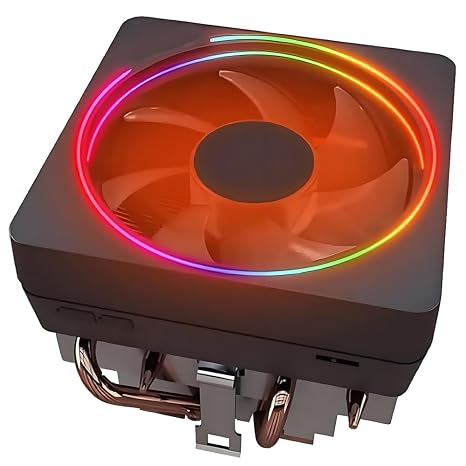
Keeping your AMD Ryzen processor cool without spending extra on aftermarket solutions becomes easy with this aluminum heatsink cooler. Perfect for those building or upgrading a desktop with AM4 or AM5 sockets, it stands out for its effective heat dissipation that handles demanding workloads quietly.
Built to fit right on standard AMD brackets, the cooler comes with pre-applied thermal paste, making installation straightforward. The fan uses a 4-pin connector allowing for speed control via the motherboard’s PWM.
Once running, it produces just 14 db of noise, barely noticeable during normal use, and its 2800 rpm speed ensures steady airflow to keep temperatures in check.
Four 6 mm copper heat pipes combined with an aluminum heatsink and pure copper base efficiently transfer heat away from the CPU. It copes well with a 105-watt load, managing to keep processors like the Ryzen 7 5700X cool under pressure. Build quality feels solid, but some mention the fan could be a bit louder under heavy load.
Its compatibility with many AMD sockets adds to its versatility.
Efficient cooling comes from the four direct-contact copper heat pipes and a solid copper base, keeping temperatures down during demanding tasks. Common feedback points towards the fan noise increasing noticeably when pushed hard, which might catch some attention.
People wanting a reliable cooler that fits most AMD processors and handles heat well at quiet levels will appreciate what it offers. Those who prioritize ultra-low noise or require a bracket included should explore other options.
Pros
- Compatible with a wide range of AMD sockets
- Pre-applied thermal paste for easy installation
- Quiet operation at 14 db during normal use
- Effective heat pipes combined with aluminum and copper
Cons
- Fan sometimes louder under heavy CPU loads
- Standard bracket not included with the cooler
| Specification | Details |
|---|---|
| Power Connector Type | 4-Pin |
| Voltage | 12 volts_of_direct_current |
| Wattage | 105 watts |
| Noise Level | 14 db |
| Maximum Rotational Speed | 2800 rpm |
| Air Flow Capacity | 45 cfm |
7. Cooler Master Hyper 212 Black II CPU Cooler

220W cooling capacity makes this ideal for demanding AMD Ryzen 7 processors, handling heat efficiently for gamers and productivity users alike. Direct Contact Technology and four heat pipes ensure stable thermal performance even under heavy workloads.
Installation is straightforward, thanks to a user-friendly mounting bracket that fits both first-time builders and experienced upgraders. The fan operates quietly at up to 1,750 RPM, combining high static pressure with a 75.19 CFM airflow to keep temperatures down without much noise disturbing your space.
Performance holds strong in extended gaming or intensive tasks, with stable operation under load. The cooler’s build features a clean, minimalist black cover that fits well in most setups.
Most praise it for effective heat transfer, while some mention the noise can rise near maximum RPM.
Direct Contact Technology combined with four heat pipes delivers strong cooling under heavy loads, praised for keeping Ryzen CPUs stable. However, fan noise can become noticeable at higher speeds, which some find distracting during intensive use. Installation is straightforward and suits a wide range of builds.
Gamers and productivity-focused users with AMD processors who want efficient, quiet cooling will appreciate this cooler. Those seeking ultra-quiet operation at full load or maximum RPM fan performance might want to consider alternatives with lower noise or higher airflow.
Pros
- Efficient heat transfer with Direct Contact Technology
- Quiet fan operation during average loads
- Simple installation with user-friendly bracket
- Minimalist design fits modern builds
Cons
- Noisy at maximum fan speed
- Air flow below description’s peak when running at standard RPM
| Specification | Details |
|---|---|
| Power Connector Type | 4-Pin |
| Voltage | 12 volts |
| Wattage | 2.4 watts |
| Noise Level | 26 dB |
| Maximum Rotational Speed | 2500 RPM |
| Air Flow Capacity | 42 CFM |
8. ARCTIC Liquid Freezer III Pro 360 AIO Cooler

Gamers and PC builders focused on cooling powerful AMD CPUs will appreciate this AIO cooler. Its standout feature is the integrated VRM fan that helps keep voltage converters cool, ensuring stable performance during intense loads.
Installation takes advantage of native offset mounting to align the cold plate exactly over the CPU hotspot, which helps with heat transfer. The ARCTIC P12 PRO fans run quietly at low speed while offering strong airflow when pushed harder. A 4-pin power connector and PWM control enable fine-tuning fan speeds based on workload, making daily operation adaptable and relatively quiet.
Cooling performance is solid, handling heat well thanks to its large 360mm radiator and efficient fan setup. The build feels durable, with optimized contact pressure distributing heat evenly to prolong CPU life. Praise centers on its quiet operation despite high airflow capacity, while the most frequent complaint mentions that the fan speed can still get loud under maximum load.
Quiet operation with effective cooling across the CPU and VRMs is its best attribute. Most users find the fan noise increases noticeably when pushed to full speed.
Builders with cases that support large 360mm radiators and who want stable, cool CPU power delivery will be pleased. Compact builds or those sensitive to maximum fan noise should consider other options.
Pros
- Integrated VRM fan for cooler voltage converters
- Powerful yet quiet P12 PRO fans
- Native offset mounting targets CPU hotspot
- High airflow capacity of 77 cfm
Cons
- Fan speed can be loud at maximum RPM
- Radiator size might not fit smaller cases
| Specification | Details |
|---|---|
| Cooling Method | Liquid |
| Maximum Rotational Speed | 3000 rpm |
| Voltage | 12 volts |
| Air Flow Capacity | 77 cfm |
| Power Connector Type | 4-Pin |
| Wattage | 3.96 watts |
9. ARCTIC Liquid Freezer III Pro 360 A-RGB AIO Cooler

ARCTIC Liquid Freezer III Pro 360 A-RGB AIO Cooler stands out with its optimized cooling design aimed at AMD CPUs. Best suited for those who want strong performance with quiet operation, it handles heat efficiently thanks to its native offset mounting and integrated VRM fan, which work together to keep temperatures down during intense workloads.
Setting it up is user-friendly, especially with the offset cold plate that targets the CPU hotspot more directly. The included P12 PRO fans run quietly even at higher speeds, so everyday tasks don’t come with distracting noise.
The integrated VRM fan helps cool voltage converters, supporting stable performance during heavy gaming or multitasking, and the 4-pin 12-volt power connector fits standard motherboard headers without fuss.
It performs impressively on heat dissipation, cooling CPUs well even under load thanks to its 3000 rpm fan speed and 77 cfm airflow capacity. The build quality feels solid with attention to contact pressure for longevity and heat transfer, though a small number of users note the size may challenge some cases.
The common praise highlights quiet operation alongside effective cooling, while some mention occasional noise from the VRM fan.
The strongest praise for this cooler is its quiet operation combined with effective heat dissipation, particularly due to the offset cold plate and integrated VRM fan. The most common complaint involves occasional noise from the VRM fan and the radiator size being too big for smaller cases.
Those who run demanding AMD processors and have enough case space will find this cooler meets their needs well. People with smaller builds or who are sensitive to fan noise might want to consider other options with smaller radiators or quieter VRM cooling solutions.
Pros
- Quiet P12 PRO fans at low and high speeds
- Offset cold plate targets CPU hotspot efficiently
- Integrated VRM fan cools voltage converters well
- Standard 4-pin power connector fits most motherboards
Cons
- VRM fan can produce occasional noticeable noise
- Large radiator size may not fit all cases easily
| Specification | Details |
|---|---|
| Cooling Method | Liquid |
| Maximum Rotational Speed | 3000 rpm |
| Air Flow Capacity | 77 cfm |
| Voltage | 12 volts |
| Power Connector Type | 4-Pin |
| Wattage | 3.96 watts |
10. Thermalright Peerless Assassin 120 Vision MAX CPU Cooler

Thermalright Peerless Assassin 120 Vision MAX CPU Cooler stands out with a unique 5-inch IPS LCD screen on its radiator, making it perfect for those who want real-time system monitoring alongside solid air cooling. It suits desktop users looking for a powerful cooler with visual customization and good airflow.
Setting it up involves placing the dual-tower cooler with its two fans and magnetically attaching the top cover featuring the display, which adds a neat touch. The included TRCC control software allows customizing the screen’s background themes, so checking your CPU temperatures and other stats becomes part of your daily routine. Noise remains low at 27 dB, making it easy to live with even during extended use.
Cooling performance is strong thanks to six pure copper heat pipes and a copper base ensuring tight CPU contact. The fans spin up to 2150 RPM, moving 69 CFM of air efficiently through the heatsink.
The build quality is solid with nickel plating for durability. Positive feedback highlights the excellent cooling, while some point out that the magnetic screen might require occasional repositioning to stay perfectly aligned.
Worth noting that the cooler’s 5-inch LCD adds a unique functional and aesthetic element, making system stats visible at a glance. Common feedback mentions the magnetically attached screen sometimes needing adjustment after installation due to slight movement.
Those wanting strong air cooling combined with visual system feedback will appreciate this cooler. Users with compact cases or who dislike slight management of the magnetic top cover should consider other options better suited for smaller builds or simpler designs.
Pros
- Clear 5-inch IPS LCD for real-time monitoring
- Strong cooling with six pure copper heat pipes
- Quiet operation at just 27 dB
- Customizable display with TRCC software
Cons
- Magnetic top cover may shift slightly over time
- Relatively large size might not fit all cases
| Specification | Details |
|---|---|
| Power Connector Type | 4-Pin |
| Cooling Method | Air |
| Noise Level | 27 dB |
| Maximum Rotational Speed | 2150 RPM |
| Air Flow Capacity | 69 CFM |
11. Noctua NH-U9S CPU Cooler
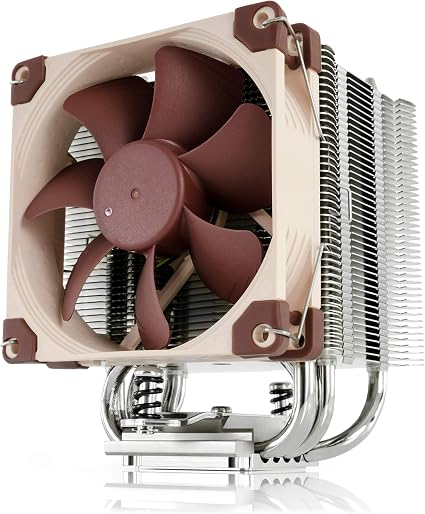
Quiet cooling and small size make this an easy fit for compact AMD builds. Perfect for anyone putting together an ITX or small form factor PC, it keeps temps low without blocking RAM or PCIe slots.
Its single tower design stands just 125mm tall, balancing good cooling with great compatibility.
Setup is straightforward thanks to the SecuFirm2 mounting system and supplied NT-H1 thermal paste. The included 92mm fan runs quietly, with PWM support that adjusts speed based on temperature.
It doesn’t get in the way of most RAM sticks or GPUs, so you won’t have to worry about clearance when fitting it into tight spaces.
Cooling performance impresses for a unit this size, keeping AMD CPUs effectively chilled under daily workloads. It’s built solidly with attention to detail, though occasional reports mention it’s not the absolute quietest.
Still, noise levels are low enough to not be distracting. The mounting kit makes installation less of a hassle than expected for a small cooler.
Many appreciate how quiet it stays during normal use, managing heat well for its size. The most frequent downside noted is that it can still be a bit loud compared to bigger or specially tuned coolers in very quiet setups. Installation is generally praised as simple and well-supported.
People building compact AMD systems or HTPCs will find it fits perfectly and works reliably. Those needing extreme cooling or ultra-low noise levels might look at larger or liquid coolers instead. Great for balancing performance and space constraints without overcomplicating things.
Pros
- Compact 125mm height for ITX and small cases
- Low-noise 92mm fan with PWM and speed adaptor
- No RAM or PCIe slot interference on most boards
- Includes high-quality thermal paste and mounting system
Cons
- Not the quietest cooler in very silent builds
- Single tower limits cooling on very high TDP CPUs
| Specification | Details |
|---|---|
| Model | NH-U9S |
| Unit Count | 1 Count |
| Fan Size | 92mm |
| Height | 125mm |
| Warranty | 6 year manufacturer’s warranty |
| Compatibility | AMD AM5 & AM4, Intel LGA1851, LGA1700, LGA1200, LGA115x |
12. Noctua NH-U12A chromax.Black CPU Cooler

Quiet and powerful, this air cooler suits anyone wanting a strong performer without RAM or PCIe clearance issues. Its biggest strength lies in balancing excellent cooling with low noise levels in a compact 120mm size that fits most tower cases.
Installation fits smoothly with a height of 158mm, staying clear of RAM slots and most PCIe connectors on ATX and Micro-ATX boards. Dual NF-A12x25 fans handle cooling with PWM control, running quietly during low loads and ramping up when needed.
Low-Noise Adaptors help keep noise minimal, making daily use pleasant whether gaming or working.
Performance delivers strong cooling thanks to the proven heatsink design, backed by more than 100 hardware awards. Build quality feels solid, with an all-black finish that matches many setups. Most praise centers on its quiet operation, while some mention it runs up to 2000 rpm under load, which can be noticeable in very quiet environments.
The cooler is widely praised for being whisper quiet when idle but some find the fan noise noticeable at full speed during heavy loads. It manages to keep temperatures low without blocking memory or PCIe slots, which is a frequent point of satisfaction.
People with mid-size or larger cases seeking quiet and effective cooling will be pleased. Those wanting an ultra-quiet setup when under heavy load might look elsewhere, especially in very noise-sensitive environments.
Pros
- Excellent cooling performance in a compact size
- Quiet operation with PWM speed control
- Fits most tower cases without blocking RAM or PCIe
- Attractive all-black design suits many builds
Cons
- Fan speed can be loud at maximum rpm
- Height requires mid-tower or larger case
| Specification | Details |
|---|---|
| Cooling Method | Air |
| Noise Level | 22.6 dB |
| Maximum Rotational Speed | 2000 rpm |
| Air Flow Capacity | 102.1 cfm |
| Power Connector Type | 4-Pin |
| Voltage | 12 volts |
Best AMD CPU Coolers Comparison Table
| Product | Cooling Method | Noise Level | Max RPM | Air Flow Capacity |
|---|---|---|---|---|
| Thermalright Peerless Assassin 120 SE | Air | 25.6 db | 1550 rpm | 66.17 cfm |
| be quiet! Pure Rock Pro | Air | 34.8 db | 2000 rpm | – |
| Noctua NH-D15 chromax.Black | Air | 24.6 db | 1500 rpm | 140.2 m³/h |
| Noctua NH-D15 G2 chromax.Black | Air | 24.8 db | 1500 rpm | 155.6 m³/h |
| AMD Wraith Stealth AM4 | – | – | – | – |
| Wraith Prism Aluminum Cooler | Fan | 14 db | 2800 rpm | 45 cfm |
| Cooler Master Hyper 212 Black | Fan | 26 db | 2500 rpm | 42 cfm |
| ARCTIC Liquid Freezer III Pro | Liquid | – | 3000 rpm | 77 cfm |
| ARCTIC Liquid Freezer III Pro | Liquid | – | 3000 rpm | 77 cfm |
| Thermalright Peerless Assassin Vision MAX | Air | 27 db | 2150 rpm | 69 cfm |
| Noctua NH-U9S | Air | – | – | – |
| Noctua NH-U12A chromax.Black | Air | 22.6 db | 2000 rpm | 102.1 cfm |
- Cooling MethodAir
- Noise Level25.6 db
- Max RPM1550 rpm
- Air Flow Capacity66.17 cfm
- Cooling MethodAir
- Noise Level34.8 db
- Max RPM2000 rpm
- Air Flow Capacity–
- Cooling MethodAir
- Noise Level24.6 db
- Max RPM1500 rpm
- Air Flow Capacity140.2 m³/h
- Cooling MethodAir
- Noise Level24.8 db
- Max RPM1500 rpm
- Air Flow Capacity155.6 m³/h
- Cooling Method–
- Noise Level–
- Max RPM–
- Air Flow Capacity–
- Cooling MethodFan
- Noise Level14 db
- Max RPM2800 rpm
- Air Flow Capacity45 cfm
- Cooling MethodFan
- Noise Level26 db
- Max RPM2500 rpm
- Air Flow Capacity42 cfm
- Cooling MethodLiquid
- Noise Level–
- Max RPM3000 rpm
- Air Flow Capacity77 cfm
- Cooling MethodLiquid
- Noise Level–
- Max RPM3000 rpm
- Air Flow Capacity77 cfm
- Cooling MethodAir
- Noise Level27 db
- Max RPM2150 rpm
- Air Flow Capacity69 cfm
- Cooling MethodAir
- Noise Level–
- Max RPM–
- Air Flow Capacity–
- Cooling MethodAir
- Noise Level22.6 db
- Max RPM2000 rpm
- Air Flow Capacity102.1 cfm
How to Choose the Right AMD CPU Cooler
Selecting the right AMD CPU cooler involves considering compatibility with your processor, cooling efficiency, and noise levels. Properly matching these factors ensures stable performance, prevents overheating, and avoids costly upgrades or repairs down the line.
Compatibility with Amd Sockets
A common frustration is buying a cooler that physically doesn’t fit the AMD socket or clashes with other components. Socket types like AM4 and AM5 differ in size and mounting hole placement, so a cooler rated only for one won’t sit properly on the other. This mismatch can cause the cooler not to make good contact with the CPU, leading to higher temperatures.
Besides the socket itself, the cooler must not interfere with tall RAM modules or crowded motherboard layouts, which often happens with large air coolers. Also, the overall height of the cooler should fit into your PC case without blocking airflow or stressing other parts. Standard dimensions vary, but measuring clearance before buying avoids these headaches.
Look for clear compatibility information that specifies socket support, RAM clearance, and case height limits.
Cooling Performance
The thermal design power (TDP) rating of a cooler should meet or surpass your processor’s heat output for effective temperature control. A cooler with a 95W TDP rating won’t keep a 105W CPU cool under load. Cooling solutions generally use either fans pushing air through fins or liquid circulation with a pump.
Liquid setups can handle higher heat loads and tighter spaces but may require more care.
Fan speeds or pump RPMs directly affect how quickly heat is moved away from the CPU. Higher speeds usually mean better cooling but can increase noise.
A good cooler balances speed and thermal performance, reliably dissipating heat during heavy tasks without thermal throttling. Checking ratings and user feedback on sustained cooling under load clarifies what to expect.
Noise Levels
Noise levels can quickly become a distraction, especially in quiet rooms or offices. Decibel ratings printed on boxes often show performance at maximum speed but quieter operation during typical use is more relevant.
Models that offer fan speed control or smart RPM adjustment reduce noise by spinning slower when the CPU isn’t hot.
Some coolers include antivibration mounts and noise-dampening materials that keep fan vibrations from transferring to the case. Without these, even a moderately loud fan can feel more intrusive because of rattles.
A cooler running below 30 dB during normal operation is generally unobtrusive, while exceeding 40 dB becomes noticeably loud.
Build Quality and Materials
Quality build materials like copper for heat pipes and thick aluminum fins improve heat transfer efficiency and durability. Cheaper coolers sometimes use thinner metals, which wear out or don’t move heat as effectively. The fan bearings also matter; sleeve or fluid dynamic bearings tend to last longer with less noise compared to basic ball bearings.
For liquid coolers, the pump quality is crucial. A well-sealed pump will last years without leaks or noise increases.
Corrosion resistance is important if the cooler uses metal parts in contact with coolant or air inside the case. Solid construction means fewer worries about performance degradation or component failure over time.
Ease of Installation and Maintenance
A straightforward mounting system cuts down frustration during installation. Socket compatibility is crucial here as mounting brackets for AMD CPUs vary slightly. Some coolers use tool-free clips or clear guides, saving time and reducing risk of uneven pressure that impacts cooling efficiency.
Maintenance often goes overlooked but dust buildup in fins or around pump blocks reduces performance. Coolers designed with easily removable fans or wide-spaced fins make cleaning practical, especially in compact builds. Some kits include thermal paste, which is helpful.
Using a thin, even layer of quality thermal compound ensures good thermal contact between the CPU and cooler base.
Optimizing Thermal Performance for AMD CPUs with Your Cooler
Thermal performance depends largely on good contact between the cooler’s base and the CPU heat spreader. A thin, even layer of thermal paste helps fill microscopic gaps, improving heat transfer. Over-application can hinder cooling, so use only a pea-sized amount.
Make sure the cooler’s mounting pressure is even and firm; uneven pressure often results in hotspots on the CPU surface.
Pay attention to the orientation of the cooler and airflow inside the case. Position the cooler so its fan pushes hot air toward an exhaust vent. Fans running in the same or conflicting directions can create turbulence, reducing cooling efficiency.
Keep dust filters clean and periodically remove dust buildup on heatsinks and fans to maintain consistent thermal performance.
Key points to remember:
- Use an appropriate amount of thermal paste, spreading thinly and evenly.
- Ensure stable and even mount pressure on the CPU socket.
- Align fans to promote smooth airflow through the case.
- Clean dust filters and cooler surfaces regularly.
Common Installation Mistakes and How to Avoid Them
One common installation mistake is failing to clean off old thermal paste before applying a new layer. Residual paste can act as an insulator, raising CPU temperatures.
Use isopropyl alcohol and a lint-free cloth for proper cleaning.
Another issue arises from improper mounting bracket installation. Loose or uneven screws cause the cooler to sit unevenly, compromising contact with the CPU and resulting in higher temps and noise levels. It helps to tighten screws incrementally, alternating corners to maintain balance.
Incorrect fan orientation also leads to subpar cooling. Ensure the direction of airflow matches the case fan layout so that hot air is pulled away efficiently. Check that any cables do not obstruct fan blades or airflow paths, as this can create heat pockets.
Installation tips:
- Thoroughly clean old thermal paste before reapplying.
- Tighten mounting screws gradually and evenly.
- Double-check fan orientation and airflow direction.
- Keep cables tidy to avoid airflow obstruction.
Comparing Air Cooling and Liquid Cooling Solutions for AMD Processors
Air cooling depends on heat pipes and fins to carry heat away from the CPU, assisted by one or more fans blowing air through the heatsink. They tend to be easier to install, require less maintenance, and cost less upfront. Good air coolers often handle moderate to high TDP CPUs well but may struggle with extreme overclocking.
Liquid cooling uses a closed loop where a pump circulates coolant from a block over the CPU to a radiator, where fans dissipate the heat. This method can achieve lower temperatures and quieter operation under load, though it involves more complex installation and potential pump failure risks over time.
Choosing between the two:
- Air coolers are straightforward, reliable, and budget-friendly.
- Liquid coolers provide better temperature control and lower noise in many cases.
- Size constraints inside your case may favor one type over the other.
- Consider maintenance effort and possible component replacement down the line.
People Also Asked
How Do I Know If My CPU Cooler Fits My Case?
Check your case specifications for maximum CPU cooler height and compare it to the cooler’s height. Also, measure the space around the CPU socket to ensure clearance for the cooler’s mounting brackets and fan. This avoids compatibility problems during installation.
What Is the Average Lifespan of an AMD CPU Cooler?
An AMD CPU cooler generally lasts around 3 to 5 years before performance declines. Over time thermal paste dries out and fans wear down. Replacing thermal paste and cleaning fans extends the cooler’s effective life.
Can I Use the CPU Cooler on Different AMD Processors?
Most AMD CPU coolers are compatible with multiple AM4 and AM5 processors, but verify the mounting bracket support for your specific model. Some coolers include optional brackets or adapters for different sockets, which you should confirm before purchase.
How Often Should I Clean or Maintain My CPU Cooler?
Clean the CPU cooler at least every 3 to 6 months depending on dust exposure. Dust build-up reduces airflow, causing higher temperatures. Use compressed air to remove dust from fins and fans without disassembling the cooler unless necessary.
What Are Common Issues with CPU Coolers and How to Fix Them?
Common issues include noisy fans, inadequate cooling, and mounting problems. Tighten loose screws for mounting. Replace or lubricate fans if noisy. Ensure thermal paste is properly applied for effective heat transfer to solve overheating.
Conclusion
Choosing the right AMD CPU cooler depends on noise level, cooling performance, and compatibility with your case. Quiet operation is important if you spend a lot of time at your computer. Cooling power matters more for high-performance CPUs or if you plan to overclock.
Double-check the size so the cooler fits properly without blocking other components.
Consider your budget and how you use your computer when making a final decision. Match the cooler size to your case and the level of cooling you need. Take another look at the comparison table and the detailed picks above to find the best fit for your setup and budget.

I’m Grant Mitchell, a firearms and hunting writer with years of experience at the range and in the field. I write about rifles, shotguns, handguns, optics, safe storage, cleaning, and responsible ownership, along with practical hunting tips. My goal is to share accurate, safety-first information that helps you choose the right firearm, maintain it properly, and become a more confident shooter.