Top 12 Best AMD Stock Cooler You Can’t Miss Out!
Running a CPU with an inadequate cooler often leads to annoying overheating issues, especially during heavy tasks like gaming or video editing. The best AMD stock cooler should manage heat effectively without causing excessive noise or throttle the processor’s performance. Many basic cooling solutions struggle to maintain the right temperature, which can reduce the lifespan of the CPU or lead to sudden shutdowns under load.
A quality AMD stock cooler typically combines solid build materials like aluminum fins with a reliable fan size around 90 to 95 mm diameter to ensure proper airflow. It’s important that the cooler fits securely on the motherboard socket to avoid vibrations and maintain consistent contact with the CPU surface for efficient heat transfer.
Also, ease of cleaning matters since dust buildup can quickly reduce cooling efficiency over time. Cooling power, measured in thermal design power (TDP), usually needs to match or exceed the CPU’s rated TDP, often around 65 watts for many AMD processors.
Need a Quick Check?
| Image | Product | Price |
|---|---|---|
Our Top Picks 1  | AMD Wraith Stealth | Check Price |
Our Top Picks 2 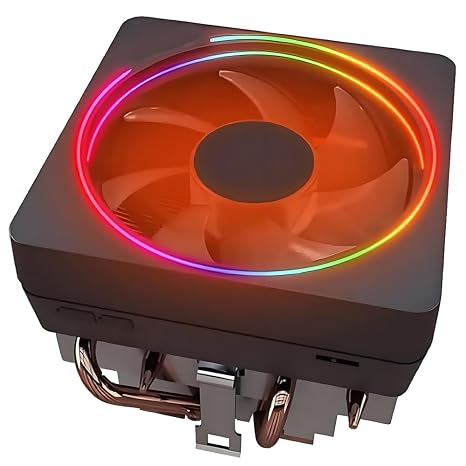 | CPU Wraith Prism Aluminum | Check Price |
Our Top Picks 3  | AMD Wraith Prism LED | Check Price |
Our Selected Top 12 Amd Stock Cooler Worth Buying
This list features a variety of AMD stock coolers, highlighting their performance, suitability for different users, and key pros and cons. Each review helps readers understand which cooler fits specific needs and how well it manages heat and noise.
1. AMD Wraith Stealth CPU Cooler
With a 3.5-inch 90mm fan and direct screw mounting to AM4 motherboards, this AMD Wraith Stealth CPU cooler suits those wanting a simple, no-fuss cooling option that fits perfectly on compatible AMD chips. Its biggest strength is easy installation combined with solid basic cooling performance.
Setup involves attaching the cooler directly to the AM4 socket using screws, which makes it straightforward without additional mounting brackets. The pre-applied thermal paste saves time and avoids mess in applying it separately.
Daily operation is quiet due to the fan’s 4-pin PWM connector, allowing the motherboard to adjust fan speeds based on temperature for a good balance of cooling and noise.
It handles typical workloads efficiently, thanks to the aluminum heatsink that helps disperse heat reasonably well. The build feels sturdy, with reliable mounting that won’t loosen over time.
Most appreciated in reviews is the ease of installation, while the main complaint often relates to the fan’s smaller size limiting cooling capacity under heavy loads.
Ease of installation receives strong praise, making it a convenient choice for quick setups. The smaller fan size is often mentioned as a drawback, especially for users running CPUs at higher power or extended workloads, where extra cooling might be needed.
Ideal for anyone looking for a stock cooler that fits neatly on AM4 boards without extra fuss. Not the best pick for those planning to push their processor hard or expecting very low temperatures, who should consider a larger, more powerful cooler instead.
Pros
- Easy direct screw mounting to AM4 socket
- Pre-applied thermal paste saves installation time
- Quiet operation with PWM fan control
- Compact size fits well in most builds
Cons
- Fan size limits cooling under heavy loads
- Aluminum heatsink less effective than copper options
| Specification | Details |
|---|---|
| Supports Motherboard Socket | AM4 |
| Fan Size | 3.5-inch 90mm |
| Heatsink Material | Aluminum |
| Thermal Paste | Pre-applied |
| Power Connector | 4-pin PWM |
2. CPU Wraith Prism Aluminum Cooler
People building or upgrading AMD Ryzen desktops who want solid cooling without extra expense will appreciate the Wraith Prism Aluminum Cooler. It’s especially suited for those using midrange to high-end Ryzen processors, offering reliable temperature control as its standout feature.
Setting it up is straightforward since it fits AM4 and AM5 sockets and comes with pre-applied thermal paste, so you can mount it directly without extra preparation. The cooler uses a standard AMD bracket, which most Ryzen motherboards already have. Day-to-day, the 4-pin fan adjusts speeds based on CPU heat, keeping a good balance between airflow and noise.
The combination of an aluminum heatsink and copper heat pipes handles heat well, keeping busy CPUs cool. It runs quietly at about 14 dB, which is gentle on the ears during normal workload.
Build quality feels durable with its copper base and solid metal construction, though some users note it can reach higher RPMs when under heavy load, increasing noise levels.
Wraith Prism Aluminum Cooler offers solid cooling performance with a combination of aluminum heatsink and direct-contact copper heat pipes. It comes with pre-applied thermal paste, making installation straightforward. Most find it runs quietly under normal loads. A frequent complaint centers on its size, which may interfere with tall RAM modules or smaller cases due to its larger design.
People running standard Ryzen processors like the Ryzen 5 5600 or 7600x and keeping stock settings will appreciate its balance of cooling and noise. Those planning heavy overclocking or needing a compact build might prefer a different cooler designed for higher thermal demands or tighter space constraints.
Pros
- Compatible with multiple AMD sockets
- Pre-applied thermal paste for easy installation
- Operates quietly during typical use
- Strong heat dissipation with copper and aluminum
Cons
- No mounting bracket included
- Fan can get noisy at high speed
| Specification | Details |
|---|---|
| Voltage | 12 volts_of_direct_current |
| Wattage | 105 watts |
| Noise Level | 14 db |
| Maximum Rotational Speed | 2800 rpm |
| Air Flow Capacity | 45 cfm |
| Power Connector Type | 4-Pin |
3. AMD Wraith Prism LED CPU Cooler
Known for its striking LED lighting, the AMD Wraith Prism LED CPU Cooler suits PC builders who want solid stock cooling paired with a bit of flair. Its standout feature is the quiet operation paired with decent power handling that keeps the CPU temperatures in check without extra noise.
Installation is straightforward with its 4-pin power connector, fitting easily onto most desktop setups designed for AMD CPUs. Day-to-day use highlights the quiet fan speed that won’t distract during work or gaming sessions. The cooler’s air cooling method is simple to maintain, with occasional dusting keeping it running smoothly.
It cools efficiently, handling up to 105 watts and spinning at a maximum of 1800 rpm while producing noise around 30 dB. The aluminum build feels sturdy enough for desktop use without being overly heavy.
Most praise focuses on quiet performance for a stock cooler, while some note the noise can get noticeable under heavy load.
The cooler runs quietly through standard tasks but some users find the noise level rises when the CPU peaks, making it less silent during intense workloads. The sturdy design matches its solid performance as a stock cooler for AMD CPUs.
Ideal for those who want reliable cooling with minimal fuss and a hint of visual style. Those planning high overclocking or using non-AMD platforms might want to explore aftermarket coolers better tailored to those needs.
Pros
- Quiet operation around 30 dB
- Easy installation with 4-pin connector
- Sturdy build suitable for everyday desktop use
- Good cooling for up to 105 watts
Cons
- Noise increases noticeably under heavy load
- Limited compatibility outside AMD desktop CPUs
| Specification | Details |
|---|---|
| Power Connector Type | 4-Pin |
| Voltage | 12 volts |
| Wattage | 105 |
| Cooling Method | Air |
| Noise Level | 30 db |
| Maximum Rotational Speed | 1800 rpm |
4. Wraith Stealth CPU Cooler AM4 AM5

AMD Wraith Stealth CPU Cooler is a compact air cooler aimed at Ryzen desktop builds using AM4 and AM5 sockets. Best suited for gamers or office users wanting quiet and reliable CPU cooling without extra bulk.
Its quiet operation stands out as a major benefit for focused work or gaming sessions.
Installation takes only minutes with a screw-mount design that fits AM4 and AM5 motherboards easily. The aluminum heatsink and optimized fins work together with the quiet fan to pull heat away efficiently.
Noise stays low at about 30 dB, so it won’t be distracting during daily use. It runs on a simple 4-pin, 12-volt connection.
Cooling performance reliably keeps compatible Ryzen CPUs at safe temperatures during gaming or regular tasks. The build quality offers solid aluminum construction that feels sturdy but not heavy.
Strong praise from reviews highlights its whisper-quiet fan. Common complaints mention it may struggle with higher-end CPUs under heavy loads.
Reviews commonly praise the quiet fan that keeps noise low throughout use. The most frequent downside noted is its limited cooling power with more demanding processors, which can lead to higher temperatures in those situations.
People running mid-range Ryzen CPUs for gaming or general work will find this cooler sufficient and easy to set up. Those needing to cool high-end models intensively may want to look for something with stronger airflow or larger heatsinks.
Pros
- Quiet operation at just 30 dB
- Easy screw-mount installation
- Compatible with AM4 and AM5 CPUs
- Lightweight aluminum heatsink
Cons
- Not ideal for high TDP CPUs
- Basic cooling, no RGB or extras
| Specification | Details |
|---|---|
| Power Connector Type | 4-Pin |
| Voltage | 12 volts |
| Wattage | 2 watts |
| Noise Level | 30 dB |
| Maximum Rotational Speed | 2000 rpm |
| Compatibility | AM4 & AM5 sockets |
5. Thermalright Peerless Assassin 120 SE Cooler

Quiet cooling with solid airflow makes the Thermalright Peerless Assassin 120 SE a great pick for anyone wanting reliable AMD stock cooler performance. It works well for standard desktop builds, shining when you need steady and effective heat dissipation without much noise.
Its biggest strength lies in balancing airflow and silent operation.
Installation goes smoothly with common mounting options and a 4-pin connector. Running at a maximum speed of 1550 rpm, it keeps noise levels down to 25.6 dB, so everyday use is not distracting. The air cooling method combined with a decent airflow capacity means it handles most typical desktop heat loads without fuss or extra maintenance.
Performance stays consistent thanks to a power rating of 265 watts, which covers plenty of ground for AMD CPUs within its limits. The build quality is solid with a sturdy fan and well-engineered frame. One frequent compliment is the quiet operation, but the occasional note mentions it might not be enough for very high-end or overclocked setups.
The strongest praise highlights the quiet operation paired with capable airflow, making it effective without being loud. The most common complaint concerns its limitations with heavy CPU loads and overclocking, where it might fall short on cooling power.
Anyone with a mid-range AMD desktop looking for reliable and quiet cooling will be satisfied. Those planning to push their CPU hard or use high-performance setups should consider more powerful alternatives.
Pros
- Quiet operation at 25.6 dB
- Good airflow of 66.17 cfm
- Easy to install with 4-pin connector
- Supports up to 265 watts power
Cons
- May struggle with high-end parts or overclocked CPUs
- Fan speed could be higher for extreme cooling
| Specification | Details |
|---|---|
| Power Connector Type | 4-Pin |
| Voltage | 12 volts |
| Wattage | 265 watts |
| Noise Level | 25.6 db |
| Maximum Rotational Speed | 1550 rpm |
| Air Flow Capacity | 66.17 cfm |
6. Cooler Master Hyper 212 Black II

Excellent cooling performance without breaking the bank makes this a solid pick for anyone upgrading a mid-range AMD Ryzen or Intel Core build. Its biggest strength lies in effectively handling loads up to 220W while staying quiet enough for everyday use.
Installation is straightforward thanks to a user-friendly bracket design, perfect for first-time builders. The fan runs quietly at up to 1,750 RPM and supports PWM control, balancing airflow and noise.
Four heat pipes utilize Direct Contact Technology to spread heat fast, keeping the CPU cool during gaming or productivity tasks without fuss.
Consistent thermal performance is the highlight, as the cooler maintains stability even under heavy loads. The minimalist black cover adds a neat look without extra bulk.
Most users praise its ability to keep temperatures down quietly, while some note the maximum fan speed could be higher for extreme overclocking needs.
Strong cooling and quiet operation stand out, with a straightforward installation process making the cooler popular. Most feedback highlights its stability during heavy use, while complaints focus on the fan’s top speed not reaching the highest possible rates for extreme performance.
Those running moderately powerful CPUs will find this cooler reliable and easy to fit. People aiming for serious overclocking or needing maximum airflow may want to look at more aggressive cooling options.
Pros
- Effective cooling up to 220W load
- Quiet fan operation at moderate speeds
- Easy, tool-free installation bracket
- Clean, minimalist black design
Cons
- Max fan speed might limit heavy overclocking
- Airflow capacity slightly moderate at 42 cfm
| Specification | Details |
|---|---|
| Cooling Capacity | Up to 220W |
| Maximum Rotational Speed | 2500 rpm |
| Noise Level | 26 db |
| Air Flow Capacity | 42 cfm |
| Power Connector Type | 4-Pin |
| Voltage | 12 volts |
7. CORSAIR NAUTILUS 360 RS AIO Cooler

Metal and water cooling combine in this all-in-one setup designed for modern AMD and Intel CPUs. It suits anyone looking for strong cooling performance with minimal cable clutter.
The standout feature is the daisy-chained RS120 fans that simplify installation and keep airflow focused where it matters most.
Installing the cooler is straightforward thanks to the pre-installed RS120 fans, which connect to the motherboard with a single 4-pin cable. These fans use CORSAIR AirGuide technology to push air directly onto the radiator. The magnetic dome bearing inside the fans lowers noise during operation, making day-to-day use quieter than many other water coolers at similar speeds.
Performance lives up to what you’d expect from a 360mm AIO, effectively cooling CPUs that generate significant heat. Build quality feels solid, especially with the wide compatibility covering AMD AM5 and AM4 sockets. Positive reviews highlight its quiet operation and strong airflow.
Some users note the maximum rotational speed of 2100 rpm can be loud under heavy load, but that’s a common trade-off with high-power cooling.
The quiet operation thanks to magnetic dome bearings stands out, but higher RPMs can bring noticeable noise. The daisy-chained fan setup streamlines installation, which customers find helpful for reducing cables and improving airflow focus.
Gamers or creators needing compatibility with both AMD and Intel will appreciate this cooler. People sensitive to fan noise at full speed might want to consider alternatives or additional fan controls.
Pros
- Supports latest AMD AM5 and AM4 sockets
- RS120 fans reduce cable clutter with daisy-chain
- Quiet magnetic dome bearing technology
- Strong airflow and high static pressure
Cons
- Can get loud at maximum fan speed
- Requires motherboard with suitable fan header
| Specification | Details |
|---|---|
| Power Connector Type | 4-Pin |
| Cooling Method | Water |
| Maximum Rotational Speed | 2100 rpm |
| Compatible Devices | Desktop |
8. Cooler Master 240 Core II AIO Cooler

ARGB lighting grabs attention right away, making it a vivid addition to gaming PCs. Perfect for those building around AMD Ryzen 7 or Intel Ultra 7 CPUs, the cooler focuses on powerful liquid cooling to keep those chips running efficiently during intense sessions.
Installation is straightforward with compatible brackets for AM5, AM4, LGA 1851, and 1700 sockets, fitting most recent builds nicely. The fan noise stays low thanks to its dynamic PWM control from 650 to 1,750 RPM. Customizing the infinity mirror lighting through motherboard controls adds a personal touch without extra software hassle.
CryoFuze thermal paste maintains good heat transfer on the CPU, keeping temps stable across a wide range.
Cooling performance is solid, with a 70.5 CFM airflow pushing heat away reliably while generating only 30 dB of noise, striking a decent balance between quiet operation and effective temperature control. The build feels durable, and the water cooling design targets the CPU hotspot efficiently.
Common feedback praises the strong cooling and quiet fan but notes some users would prefer a simpler installation process.
Strong cooling ability with quiet performance stands out as the main praise. Some users find the installation process less than intuitive, which can slow down setup time for those unfamiliar with AIO coolers.
Gamers and enthusiasts wanting solid cooling paired with striking RGB effects will appreciate this model. Those who prioritize the simplest installation might look for alternatives with clearer mounting mechanisms.
Pros
- Stunning ARGB infinity mirror lighting
- Quiet fan optimized for low noise
- Compatible with latest AMD and Intel sockets
- Includes effective CryoFuze thermal paste
Cons
- Installation could be easier for beginners
- Noise can increase at maximum fan speeds
| Specification | Details |
|---|---|
| Power Connector Type | 3-Pin |
| Voltage | 12 volts_of_alternating_current |
| Wattage | 12 watts |
| Noise Level | 30 db |
| Maximum Rotational Speed | 1750 rpm |
| Air Flow Capacity | 70.5 cfm |
9. Noctua NH-D15 chromax.Black Cooler

Choosing a high-performance air cooler like the Noctua NH-D15 chromax.Black is ideal for those who want powerful cooling without stepping up to liquid solutions.
It suits builders aiming for excellent heat dissipation paired with quiet operation. Its standout feature is how it matches cooling power from many all-in-one watercoolers while staying whisper silent.
Setup involves attaching the dual 140mm fans onto the wide dual-tower design, which features six heatpipes to spread heat efficiently. Day-to-day, the cooler maintains a quiet presence thanks to PWM controls that adjust fan speed according to load.
At idle, it barely registers noise, but it ramps up smoothly when demand rises, keeping processor temperatures well-managed without much fuss.
Performance matches what you’d expect from a premium heatsink, delivering cooling efficiency suitable for overclocking and demanding tasks. The all-black finish not only looks clean and matches many PC builds, but the quality of materials and build is solid. Feedback often highlights how quiet it runs, while some mention its large size can be tricky in smaller cases.
Quiet operation is the standout feature that keeps the processor cool without adding distracting noise. Most users note the cooler runs smoothly and handles heat well, but its bulky size is a common issue when fitting into smaller desktop cases.
Builders looking for superior air cooling that balances power and silence will appreciate this cooler, especially if their case supports its size. Users with compact or budget builds might want to explore smaller or more affordable options instead.
Pros
- Quiet operation even under full load
- Strong cooling on par with liquid coolers
- Attractive all-black design fits many builds
- PWM control for automatic fan speed
Cons
- Large size may cause compatibility issues
- Higher price compared to basic stock coolers
| Specification | Details |
|---|---|
| Cooling Method | Air |
| Noise Level | 24.6 db |
| Maximum Rotational Speed | 1500 rpm |
| Air Flow Capacity | 140.2 cubic meter per hour |
| Power Connector Type | 4-Pin |
| Voltage | 12 volts |
10. Thermalright AXP90 X36 ITX CPU Cooler

Cooling a compact PC inside a small case without making a racket can be tricky, especially when you’re running an AMD setup. Best suited for mini-ITX builds, this low-profile CPU cooler shines because of its slim 36mm height, which fits snugly where most stock coolers can’t. Its main strength lies in balancing size with solid cooling capability.
Setting up the cooler was straightforward thanks to the all-metal platform and backplate fastener system, which felt secure without too much effort. The nickel plating adds a layer of durability, resisting corrosion, acid, and alkali effects that might otherwise wear down the cooler over time.
Running this on a 4-pin connector ensures quiet operation, which keeps noise levels under 22.4 DBA, noticeable but not distracting for regular desktop use.
In daily operation, heatpipes efficiently move heat away from the CPU, keeping temperatures low despite its compact size. Build quality is solid, thanks to careful soldering and corrosion-resistant materials.
The biggest compliment given is how well it fits tight spaces while quietly cooling, yet some users find it less capable under heavy loads compared to larger coolers, as the airflow and rotational speed are limited by its size.
Quiet operation combined with corrosion-resistant materials earns praise for daily use, but smaller airflow and heat dissipation can limit performance during intense workloads. The product features strong build quality, with nickel plating and solid soldering techniques that guarantee durability in compact designs.
Ideal for users who prioritize space-saving design and quiet cooling inside compact desktops. Those needing higher performance cooling for intensive tasks or overclocking should consider larger or more powerful alternatives instead.
Pros
- Compact 36mm height fits in small cases
- Corrosion-resistant nickel plating for longevity
- Quiet operation with noise below 22.4 DBA
- Secure mounting with backplate fastener
Cons
- Cooling might struggle under heavy CPU loads
- Limited airflow compared to larger coolers
| Specification | Details |
|---|---|
| Maximum Rotational Speed | 2700 rpm |
| Noise Level | 22.4 db |
| Air Flow Capacity | 42.58 cfm |
| Power Connector Type | 4-Pin |
| Voltage | 12 volts |
| Wattage | 3.6 watts |
11. Noctua NH-U12A chromax.Black Cooler

102.1 cfm airflow makes the Noctua NH-U12A chromax.Black cooler an impressive choice for those wanting quiet yet powerful air cooling.
Designed to fit most tower cases and avoid blocking PCIE and RAM slots, it’s ideal for builders needing compact, high-performance cooling without complicated setups.
Installation is straightforward with a 4-pin connector that supports PWM, allowing the fans to automatically adjust speeds. Two NF-A12x25 120mm fans offer great cooling when the CPU is under heavy load but stay whisper quiet when idle thanks to low-noise adaptors.
The all-black design fits well in most builds, blending with a wide range of color schemes.
The cooler keeps temperatures consistently low, even at 2000 rpm fan speed. Its premium heatsink construction, recognized with over 100 awards, clearly shows in performance and durability.
Most appreciation comes from its quiet operation, while some note it may not be the quietest under maximum load.
The strongest praise from reviews highlights the quiet operation during normal use, combined with excellent heat dissipation when the CPU is stressed. The most common complaint is the noise increase when fans ramp up to maximum speed. Many appreciate the balance between cooling power and lower noise overall.
People building small to medium-sized towers who want a premium cooler that won’t interfere with other components will be happy with this. Those looking for a completely silent or ultra-budget stock cooler might want to look elsewhere due to occasional noise spikes and higher weight.
Pros
- Strong airflow without blocking RAM or PCIe
- Quiet operation at idle thanks to low-noise adapters
- Fits most tower cases under 158mm height
- Durable all-black design complements many builds
Cons
- Fan noise can increase under max load
- May feel heavy compared to simpler stock coolers
| Specification | Details |
|---|---|
| Noise Level | 22.6 db |
| Maximum Rotational Speed | 2000 rpm |
| Air Flow Capacity | 102.1 cfm |
| Power Connector Type | 4-Pin |
| Voltage | 12 volts |
| Cooling Method | Air |
12. Noctua NH-U12S SE-AM4 CPU Cooler

People upgrading AMD desktop PCs who want quiet, reliable cooling will appreciate this cooler. Its standout feature is how quietly it manages heat without compromising performance, making it a solid all-rounder for AMD AM4 sockets.
It fits well in most cases without fuss, delivering dependable cooling where it matters most.
Installation is straightforward thanks to its dedicated AM4 mounting hardware. The fan speed adjusts automatically via PWM, so it ramps up or down based on your CPU’s workload without needing manual tweaks.
You also get a low-noise adapter to reduce sound further when full power isn’t necessary. Applying the included NT-H1 thermal paste helps ensure good contact and heat transfer from the CPU.
Cooling power is effective for mid-range builds, handling heat quietly with a maximum fan speed of 1500 rpm and noise around 22.4 dB under load. It uses a single 120mm NF-F12 fan known for premium-grade durability and performance. The most often mentioned plus point is its quiet operation, while the main drawback is some find it pricier than basic stock coolers but expect better quality and longevity with its 6-year warranty.
Quiet operation stands out as the strongest praise, with many appreciating the balance between noise and cooling efficiency. On the downside, price concerns appear regularly since it costs more than simple stock coolers. The six-year warranty offers confidence in its build quality and long-term use.
This cooler suits users wanting solid, quiet cooling for AMD AM4 systems without extreme overclocking. People needing only basic stock level cooling might prefer cheaper alternatives, while those running high-end CPUs with heavy loads may require more powerful options.
Pros
- Quiet operation with low noise adapter included
- Easy AM4-specific installation
- High-quality NF-F12 120mm PWM fan
- 6-year manufacturer’s warranty
Cons
- More expensive than basic stock coolers
- Only single-fan setup limits extreme cooling
| Specification | Details |
|---|---|
| Power Connector Type | 4-Pin |
| Voltage | 12 volts |
| Cooling Method | Air |
| Noise Level | 22.4 db |
| Maximum Rotational Speed | 1500 rpm |
Best AMD Stock Coolers Comparison Table
| Product | Cooling Method | Noise Level | Max Rotational Speed | Air Flow Capacity |
|---|---|---|---|---|
| AMD Wraith Stealth | Air | – | – | – |
| CPU Wraith Prism Aluminum | Fan | 14 db | 2800 rpm | 45 cfm |
| AMD Wraith Prism LED | Air | 30 db | 1800 rpm | – |
| Wraith Stealth AM4 AM5 | Air | 30 db | 2000 rpm | – |
| Thermalright Peerless Assassin | Air | 25.6 db | 1550 rpm | 66.17 cfm |
| Cooler Master Hyper 212 Black | Fan | 26 db | 2500 rpm | 42 cfm |
| Corsair Nautilus 360 RS | Water | – | 2100 rpm | – |
| Cooler Master 240 Core II | Fan, Water | 30 db | 1750 rpm | 70.5 cfm |
| Noctua NH-D15 chromax.Black | Air | 24.6 db | 1500 rpm | 140.2 m³/h |
| Thermalright AXP90 X36 ITX | Air | 22.4 db | 2700 rpm | 42.58 cfm |
| Noctua NH-U12A chromax.Black | Air | 22.6 db | 2000 rpm | 102.1 cfm |
| Noctua NH-U12S SE-AM4 | Air | 22.4 db | 1500 rpm | – |
- Cooling MethodAir
- Noise Level–
- Max Rotational Speed–
- Air Flow Capacity–
- Cooling MethodFan
- Noise Level14 db
- Max Rotational Speed2800 rpm
- Air Flow Capacity45 cfm
- Cooling MethodAir
- Noise Level30 db
- Max Rotational Speed1800 rpm
- Air Flow Capacity–
- Cooling MethodAir
- Noise Level30 db
- Max Rotational Speed2000 rpm
- Air Flow Capacity–
- Cooling MethodAir
- Noise Level25.6 db
- Max Rotational Speed1550 rpm
- Air Flow Capacity66.17 cfm
- Cooling MethodFan
- Noise Level26 db
- Max Rotational Speed2500 rpm
- Air Flow Capacity42 cfm
- Cooling MethodWater
- Noise Level–
- Max Rotational Speed2100 rpm
- Air Flow Capacity–
- Cooling MethodFan, Water
- Noise Level30 db
- Max Rotational Speed1750 rpm
- Air Flow Capacity70.5 cfm
- Cooling MethodAir
- Noise Level24.6 db
- Max Rotational Speed1500 rpm
- Air Flow Capacity140.2 m³/h
- Cooling MethodAir
- Noise Level22.4 db
- Max Rotational Speed2700 rpm
- Air Flow Capacity42.58 cfm
- Cooling MethodAir
- Noise Level22.6 db
- Max Rotational Speed2000 rpm
- Air Flow Capacity102.1 cfm
- Cooling MethodAir
- Noise Level22.4 db
- Max Rotational Speed1500 rpm
- Air Flow Capacity–
How to Choose the Right AMD Stock Cooler
Choosing a good AMD stock cooler depends on factors like cooling efficiency, noise levels, and compatibility with your processor. Getting these right ensures your system runs smoothly without overheating or unnecessary noise, saving you money on expensive replacements and avoiding performance issues.
Cooling Performance
Using a cooler that struggles to keep the CPU temperature in check quickly shows its limits during demanding tasks like gaming or rendering. When heat isn’t dissipated well, the processor kicks in protective measures, lowering its speed to avoid damage, which slows down your whole system.
A cooler with a well-designed fan and sufficient heat pipe coverage helps avoid this by transferring heat efficiently away from the CPU. Fans around 90mm to 120mm paired with multiple heat pipes usually manage this balance well. Airflow design matters a lot; smooth, uninterrupted paths help the fan move air through the heatsink faster, maintaining safer temperatures across different workloads.
Good temperature control means the processor stays stable during extended use without thermal throttling. Lower idle and load temperatures also contribute to longer CPU lifespan and consistent performance. Look for coolers that offer quiet performance while handling at least moderate to heavy loads, which often comes down to the number and quality of heat pipes and fan speed range.
Compatibility and Fit
Fitting issues can be a major headache, especially if you’ve bought a cooler that’s incompatible with your motherboard layout or case size. Some stock-style models support various AM4 sockets but might still hang over RAM slots or obstruct tall memory modules.
The physical height and width of the cooler should be checked against your case’s internal dimensions to avoid clearance problems. A cooler that fits snugly without requiring extra brackets or adapters makes installation far less frustrating and saves time.
Support for multiple socket types is important if planning to upgrade later on, so look for models with built-in compatibility for your specific CPU socket. Easier mounting usually means fewer screws and clear instructions, which helps avoid cross-threading or uneven pressure that can harm the CPU or motherboard.
Noise Levels
Noisy cooling fans can quickly become a distraction during use, especially under load when the fan speeds up to dissipate more heat. Fan noise often varies depending on whether sleeve or ball bearings are used. Sleeve bearings can produce more noise over time, while fan models with fluid dynamic or dual ball bearings tend to last longer and run quieter.
A stock cooler with a well-balanced fan can deliver decent airflow at modest noise levels.
Good designs strike a balance: a fan that runs fast enough to keep temperatures low without ramping up to distracting volumes. Knowing this, I’ve learned to check the fan’s decibel ratings at idle and peak RPMs, usually between 20-35 dBA for quieter models. Finding a middle ground helps avoid noise fatigue while maintaining effective cooling during heavier CPU use.
Build Quality and Materials
Using coolers with flimsy plastic components or thin aluminum fins often leads to broken parts during installation or over time with dust and heat exposure. Higher quality stock coolers tend to use copper bases or heat pipes with aluminum fins, which provide better heat transfer without being overly heavy. Copper contact surfaces improve the speed of heat removal from the CPU, while aluminum fins balance cost and effective dissipation.
Mounting brackets and clips made from steel or reinforced plastic withstand repeated assembly better. Some designs also reduce dust buildup on fins, which can degrade performance quickly.
A cooler with solid build materials feels sturdy, aligns properly on the CPU, and holds up well through daily use and occasional cleaning sessions.
Maintenance and Cleaning
Dust accumulation on fan blades and heatsink fins is common, causing higher temperatures and more noise as the fan works harder. Coolers with easily removable fans or a simple clip mechanism enable quick cleaning without forcing disassembly of other parts. This can make a big difference in how often you perform maintenance.
Some designs incorporate anti-dust coatings or smoother fin surfaces that help reduce buildup.
Replacing worn fans can be necessary over time. Models that use standard fan sizes (such as 92mm or 120mm) allow for easy swaps without needing unique parts or complicated adapters. A cooler that offers straightforward access to the fan and fins simplifies regular maintenance and keeps the system running cooler without extra hassle.
Proper Installation Techniques for Optimal AMD Stock Cooler Performance
Ensuring the AMD stock cooler is correctly installed is crucial for maintaining efficient cooling. The thermal paste must be applied in a thin, even layer to facilitate proper heat transfer between the CPU and the cooler’s heat sink.
Overusing thermal paste can hinder performance, while too little will leave air gaps that cause overheating.
Follow these steps for installation:
- Clean the CPU surface thoroughly before applying thermal paste.
- Center the cooler carefully over the CPU to avoid uneven pressure.
- Secure the cooler firmly with the clips or screws provided, making sure it doesn’t shift or tilt.
- Connect the fan header to the motherboard’s CPU fan socket to allow proper fan speed control.
Proper mounting ensures even contact and reliable operation, especially during high-load periods. Avoid overtightening which can damage the motherboard or the cooler itself.
Effective Maintenance and Cleaning Tips to Extend Cooler Lifespan
Regular cleaning of an AMD stock cooler helps maintain its cooling efficiency and extends its lifespan. Dust accumulation on the fan blades and heat sink fins restricts airflow, which raises temperatures and forces the fan to work harder.
Key points for maintaining your cooler:
- Power off and unplug the PC before cleaning.
- Use compressed air or a soft brush to remove dust from the heat sink and fan.
- Inspect the fan for any signs of damage or wobbling that could indicate wear.
- Reapply thermal paste every couple of years or if you notice temperature spikes.
Keeping the cooler clean prevents overheating and helps maintain consistent CPU performance over time.
Comparing AMD Stock Coolers with Third-Party Alternatives for Different Use Cases
AMD stock coolers are designed to provide adequate cooling for mainstream CPUs without additional expense, but they have limitations compared to third-party alternatives. Stock coolers typically have simpler fan designs and less effective heat dissipation materials.
Third-party coolers might be preferable in cases such as:
- Overclocking, where extra cooling capacity is required to handle increased heat output.
- Building a quieter PC, as many aftermarket coolers operate at lower noise levels.
- Improving aesthetics, with options offering RGB lighting or unique designs.
For everyday computing or lighter gaming, AMD stock coolers usually suffice. Users leaning toward heavy workloads or wanting a quieter system should consider investing in aftermarket options.
People Also Asked
How Do I Properly Install an AMD Stock Cooler?
Align the cooler over the CPU so the mounting brackets line up with the holes on the motherboard, then press down evenly until it clicks into place. Make sure the thermal paste is applied equally between the CPU and cooler for effective heat transfer.
Is the Stock Cooler Compatible with All AMD Processor Models?
The AMD stock cooler included with CPUs generally fits most mainstream Ryzen processors but not all models, such as the high-end Threadripper series which require different coolers. Checking your CPU model and the cooler compatibility on AMD’s official site avoids installation issues.
How Long Does an AMD Stock Cooler Usually Last?
An AMD stock cooler can function well for several years, but its lifespan depends on dust buildup and fan wear. Regular cleaning helps maintain performance and prevents overheating over time.
What Are Common Problems with AMD Stock Coolers?
Common issues include noisy fans, reduced cooling efficiency from dust accumulation, and sometimes the cooler mounting becoming loose. Monitoring fan noise and temperature can help catch these problems early.
Can I Safely Clean My AMD Stock Cooler Without Damage?
You can safely clean an AMD stock cooler by gently blowing out dust with compressed air and wiping surfaces using a dry cloth. Avoid wet cleaning or using solvents on the fan or heatsink as this can cause damage.
Conclusion
Choosing the best AMD stock cooler comes down to three main factors: how well it keeps your processor’s temperature under control, the noise it produces, and compatibility with your CPU and case. A cooler that manages heat efficiently without being too loud will help maintain system stability and comfort during use. Make sure the cooler fits with your motherboard socket and leaves enough room inside your case for proper airflow.
Consider your budget and how much time you spend on demanding tasks that put stress on your CPU. A quiet and effective cooler makes more sense if you run heavy workloads often, while a more basic one can work if your needs are light. Check the comparison table and the detailed picks above to find the balance that suits your setup and budget best.

I’m Grant Mitchell, a firearms and hunting writer with years of experience at the range and in the field. I write about rifles, shotguns, handguns, optics, safe storage, cleaning, and responsible ownership, along with practical hunting tips. My goal is to share accurate, safety-first information that helps you choose the right firearm, maintain it properly, and become a more confident shooter.