Top 12 Best AM5 CPU Cooler That Will Blow Your Mind!
Spending hours on a gaming session or intense graphic work can quickly turn frustrating when a cheap or incompatible CPU cooler lets your processor overheat or throttle. The best am5 cpu cooler keeps temperatures low and performance stable so your system runs smoothly without unexpected shutdowns or loud fan noise. Picking the right cooler matters because the am5 socket has a specific design and power output that not every cooler handles well.
Effective cooling depends mainly on three factors: compatibility with the am5 socket, cooling capacity usually measured in watts TDP, and build quality. A cooler that fits perfectly ensures good contact with the CPU surface, avoiding hot spots.
Cooling power should match or exceed your processor’s TDP, often over 105 watts for modern desktop chips. Materials like copper heat pipes and dense aluminum fins improve heat dissipation, while easy-to-clean fans extend the cooler’s lifespan without affecting performance.
Need a Quick Check?
| Image | Product | Price |
|---|---|---|
Our Top Picks 1  | Thermalright Peerless Assassin 120 SE | Check Price |
Our Top Picks 2  | be quiet! Pure Rock Pro | Check Price |
Our Top Picks 3  | Thermalright Assassin X 120R ARGB | Check Price |
Our Selected Top 12 Am5 Cpu Cooler Worth Considering
This list features a carefully chosen selection of CPU coolers compatible with the AM5 socket, covering various designs and cooling capacities. Each review explains performance details, ideal user scenarios, and highlights strengths and potential drawbacks to help you find the best fit for your setup.
1. Thermalright Peerless Assassin 120 SE CPU Cooler
265 watts of cooling power makes a huge difference for anyone running an AM5 CPU that needs air cooling. This is ideal for desktop setups where silent but effective heat management is key. Its balance of airflow and noise level stands out for those who want a solid cooler without a loud fan.
Installation is straightforward thanks to the solid mounting brackets that keep the cooler firmly in place. The 4-pin power connector allows for PWM control, so fan speeds adjust automatically with workload. Day-to-day, the cooling capacity ensures your system stays stable without getting noisy, thanks to the maximum rotational speed capped at 1550 rpm.
It handles heat well, pushing 66.17 cfm airflow to move a good amount of air across the fins. The build quality reflects over 20 years of Thermalright’s experience, with durable materials in the radiator and fan assembly.
Most users note how quiet it stays under load, although a few mention it isn’t the absolute quietest at peak speeds.
Many praise the cooler for its quiet, effective airflow and its sturdy design, making it a dependable choice for managing heat. A common note is that the fan noise can become noticeable when pushed to maximum speeds, which might not suit those looking for near-silent operation.
Those running standard desktop systems wanting solid air cooling will appreciate it. People prioritizing absolute silence or compatibility beyond desktop CPUs might want to look for alternatives better tailored to those needs.
Pros
- Quiet operation even at high RPM
- Strong cooling performance for desktop CPUs
- Solid and reliable mounting hardware
- Adjustable fan speed via PWM control
Cons
- Not the quietest at maximum speed
- Only compatible with desktop processors
| Specification | Details |
|---|---|
| Power Connector Type | 4-Pin |
| Voltage | 12 volts |
| Wattage | 265 watts |
| Noise Level | 25.6 db |
| Maximum Rotational Speed | 1550 rpm |
| Air Flow Capacity | 66.17 cfm |
2. Be Quiet! Pure Rock Pro 3 CPU Cooler
Anyone building a high-performance system on an AM5 socket will appreciate this cooler. It excels at keeping CPUs cool even under heavy workloads or overclocking, thanks to its six copper heat pipes and precise airflow design.
Installing the cooler is straightforward with the included mounting hardware for AM5 sockets. The Pure Wings 3 120mm PWM fan runs quietly at up to 2000 rpm, and its funnel-shaped outlet directs air efficiently over the fins. Day-to-day, it stays relatively quiet at 34.8 dB, making it suitable for both gaming rigs and workstations without being distracting.
Cooling performance holds up well during intense tasks, thanks to the nickel-plated copper base that efficiently transfers heat. The build feels solid and reliable.
Many users praise its quiet operation and cooling capacity, though a few note the fan speed can ramp up noticeably under load, which increases noise a bit.
Cooler delivers solid thermal management paired with quiet running in normal use, but the fan speeds up under sustained high load, causing louder noise. The build is sturdy with attention to airflow patterns, keeping the CPU temperature in check during demanding sessions.
Ideal for gamers and workstation users who need efficient air cooling and socket compatibility without much noise. Those with very compact cases or who prioritize silent operation under max load might want to explore other options.
Pros
- Quiet operation even at higher RPMs
- Strong cooling performance for overclocked CPUs
- Easy mounting on AM5 socket
- Durable nickel-plated copper base design
Cons
- Fan noise rises noticeably under heavy load
- Larger size may not fit all small cases
| Specification | Details |
|---|---|
| Power Connector Type | 4-Pin |
| Voltage | 12 volts |
| Wattage | 3.6 watts |
| Cooling Method | Air |
| Compatible Devices | AM5, AM4, Intel 1851/1700/1200/1151/1150/1155 sockets |
| Noise Level | 34.8 db |
3. Thermalright Assassin X 120R Digital ARGB CPU Cooler
Quiet cooling with smart control makes the Thermalright Assassin X 120R Digital ARGB stand out. It fits well for anyone building a desktop that demands reliable air cooling with adjustable fan speeds tied directly to temperature. The biggest strength comes from its PWM fan that smartly shifts speed up to 2000RPM as needed.
Setting it up is straightforward without needing manual fan speed tweaks thanks to the PWM function. The fan adjusts itself based on motherboard temperature, keeping noise in check with silicone corner pads.
Watching it run day to day reveals solid airflow at 70.84 cfm and an almost silent 29.8 dB noise level during normal use. Its industrial-grade materials help avoid any shaking or wobbling of the fan blade, which makes the experience consistent and quiet.
Cooling performance matches expectations for mid to high-end CPUs, handling heat well under load. Construction uses durable PBT+PC materials at an industrial grade, adding good reliability and safety.
Reviews mostly praise how quiet it runs and how smoothly the fan adjusts. Some mention the fan speed can ramp up noticeably under heavy use, which might not suit those seeking ultra-quiet operation at all times.
The safest insulation and steady fan performance keep noise low for most tasks. Reviews confirm it handles fan blade shaking well but also point out noise can be noticeable when the fan hits maximum 2000 rpm.
Those building a quiet desktop with reliable automatic cooling will find it suitable. Users wanting absolute silence during peak CPU loads might prefer a lower rpm or liquid cooling option instead.
Pros
- Automatic fan speed control with PWM
- Quiet operation thanks to silicone corner pads
- High airflow capacity of 70.84 cfm
- Safe, industrial-grade materials
Cons
- Fan noise increases under heavy workloads
- Material quality may add slight weight
| Specification | Details |
|---|---|
| Power Connector Type | 4-Pin |
| Voltage | 12 volts_of_direct_current |
| Cooling Method | Air |
| Noise Level | 29.8 db |
| Maximum Rotational Speed | 2000 rpm |
| Air Flow Capacity | 70.84 cfm |
4. Thermalright Peerless Assassin 120 Digital ARGB CPU Cooler

Thermalright Peerless Assassin 120 Digital ARGB CPU Cooler suits those looking for strong heat dissipation in a compact design. Its standout feature is the dual tower cooling system combined with high-speed fans and a magnetic top cover, making it great for keeping AM5 CPUs cool under load.
Setting up the cooler is straightforward, with dual 120mm fans running at up to 1850 RPM through a 4-pin PWM connection for precise speed control. The air volume of 88.89 CFM helps maintain airflow, while noise stays relatively low at 25.6 dB.
The cooler’s size fits well in most mid-sized desktop cases without much trouble during installation or daily use.
Performance-wise, the six pure copper heat pipes and copper base work together for effective heat transfer. The cooler handles intense workloads efficiently, thanks to its balanced fan pressure and airflow. It is well built with durable S-FDB bearing fans that promise long life.
Some users mention the size may interfere with tall RAM modules in tighter cases.
The cooler excels at keeping CPU temperatures low with quiet fans and solid construction. Common concerns focus on its bulky size, which can cause clearance issues especially with taller RAM or smaller cases.
Those with mid-tower or larger cases and regular-sized RAM modules will appreciate this cooler’s performance and look. Small form factor users or those with tall RAM sticks might want to consider a slimmer alternative.
Pros
- Effective cooling with six copper heat pipes
- Quiet operation under load
- Long-lasting S-FDB fan bearings
- ARGB lighting with magnetic top cover
Cons
- May block tall RAM modules in some builds
- Relatively large size for small cases
| Specification | Details |
|---|---|
| Model | Peerless Assassin 120 Digital Black |
| Fan Speed | 1850 RPM ±10% |
| Noise Level | ≤ 25.6 dB (A) |
| Air Volume | 88.89 CFM |
| Cooling Method | Air |
| Power Connector Type | 4-Pin PWM |
5. ARCTIC Liquid Freezer III Pro 360 AIO CPU Cooler

Cooling power stands out here, especially for anyone pushing an AM5 setup hard. Liquid cooling suits demanding desktops and gaming rigs well, and this model’s big strength is how quietly it runs while handling heat.
Quiet operation combined with impressive cooling capacity makes it ideal for both performance and comfort.
Setup involves mounting the cold plate slightly offset to hit the CPU hotspot directly, which makes a tangible difference in heat transfer. The included P12 PRO fans balance power and silence, ramping up smoothly under load without sounding harsh. An added bonus is the integrated VRM fan that keeps those voltage converters cool, which is often overlooked but really helps with stability during long sessions.
Heat dissipation is very effective, thanks to a 360mm radiator and fans that reach a max speed of 3000 rpm delivering 77 cfm airflow. Build quality feels solid with well-designed contact pressure optimized for Intel and AMD sockets alike. Praised for quietness and strong cooling, some users note the fan can get a bit loud at max RPM, but that’s to be expected with high performance.
The quiet operation of the P12 PRO fans earns solid praise for keeping noise low during typical use, though some find fan noise spikes a drawback when pushed to full speed. The integrated VRM fan is a practical touch, making sustained performance more reliable by cooling CPU voltage regulators.
Ideal for users prioritizing thermal performance and low noise in demanding AM5 systems. Those seeking the simplest, quietest setup with minimal installation concerns might want to consider more straightforward air coolers or smaller AIOs.
Pros
- Quieter than typical fans at low and medium speeds
- Integrated VRM fan improves voltage regulator cooling
- Offset cold plate targets CPU hotspot efficiently
- Strong airflow with 77 cfm at high speeds
Cons
- Fans can become noticeably loud at maximum speed
- Complex installation due to offset mounting
| Specification | Details |
|---|---|
| Cooling Method | Liquid |
| Maximum Rotational Speed | 3000 rpm |
| Air Flow Capacity | 77 cfm |
| Power Connector Type | 4-Pin |
| Voltage | 12 volts |
| Wattage | 3.96 watts |
6. Thermalright Peerless Assassin 120 Vision MAX ARGB CPU Cooler

Powerful and stylish, the Thermalright Peerless Assassin 120 Vision MAX ARGB suits anyone looking for a high-performance AM5 CPU cooler that offers excellent temperature control while letting you keep an eye on system stats directly on its built-in LCD screen. Its standout feature is the 5-inch IPS display, which adds a unique touch to your setup.
Installation involves securing the dual-tower radiator with six copper heat pipes, designed to keep direct and efficient contact with your CPU. The two included fans run up to 2150 RPM, providing substantial airflow without sounding too loud at 27 dB.
The magnetic top cover holds the LCD screen in place, and the TRCC software lets you customize what’s shown, so daily monitoring is straightforward and visually engaging.
Cooling performance holds up well under heavy loads, thanks to its pure copper and nickel-plated base paired with strong airflow. The cooler is solidly built without any flimsy parts, and users love how the display makes it easy to check temperatures. The most common downside is its size and weight, which could be a tight fit in smaller cases or setups with limited clearance.
The standout feature is the magnetic LCD that shows temperatures and system info, which many appreciate for easy monitoring. On the other hand, the cooler’s size and weight sometimes cause fitting issues, especially in compact or cramped cases.
This cooler works well for those with mid to large cases who want strong cooling and a unique display. Users with smaller builds or tighter space constraints should consider a more compact alternative.
Pros
- Built-in 5-inch IPS LCD for real-time monitoring
- Strong airflow at 69 cfm
- Quiet operation at 27 dB
- Six copper heat pipes for efficient cooling
Cons
- Size may not fit in all cases
- Weight can be heavy for some builds
| Specification | Details |
|---|---|
| Power Connector Type | 4-Pin |
| Cooling Method | Air |
| Noise Level | 27 db |
| Maximum Rotational Speed | 2150 rpm |
| Air Flow Capacity | 69 cfm |
7. AMD Wraith Prism CPU Cooler
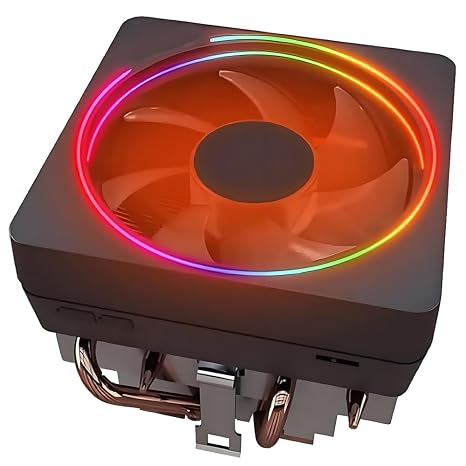
Aluminum heatsink combined with a pure copper base and four 6 mm copper heat pipes make this cooler a solid choice for anyone using AM5 Ryzen processors. Best suited to users looking for reliable thermal management straight from AMD without extra bells and whistles, its biggest strength lies in efficient heat transfer that keeps your CPU running smoothly.
Installation is straightforward, especially since many AMD motherboards come with the standard bracket needed to mount it. Pre-applied silicone thermal paste saves time and effort.
During daily use, the 4-pin fan connector manages speeds up to 2800 rpm, adjusting airflow quietly. At 14 dB noise level, it stays unobtrusive during gaming or work sessions without requiring constant adjustments or concerns about excess noise.
Cooling performance meets expectations for mid-range and high-end Ryzen chips, thanks mostly to the copper heat pipes directly contacting the CPU surface. Construction with aluminum and copper materials ensures durability.
Reviews highlight efficient cooling and quiet operation as strong points, while common complaints mention the fan speed possibly being higher than some prefer and the need to confirm bracket compatibility since it’s not included.
Heat dissipation and quiet performance earn strong praise, while the absence of a mounting bracket often requires a quick compatibility check before purchase. The pre-applied thermal paste and solid construction add convenience and reliability for daily use.
Those running Ryzen 5 or Ryzen 7 CPUs on AM5 platforms will find this cooler fits their needs well. Anyone without a compatible motherboard bracket or seeking ultra-low noise options might look for alternatives.
Pros
- Efficient heat transfer with copper heat pipes
- Quiet operation at 14 dB noise level
- Easy mounting with pre-applied thermal paste
- Compatible with AM5 and older AMD sockets
Cons
- Bracket not included, requires motherboard support
- Fan speed can be higher than some users want
| Specification | Details |
|---|---|
| Power Connector Type | 4-Pin |
| Voltage | 12 volts_of_direct_current |
| Wattage | 105 watts |
| Noise Level | 14 db |
| Maximum Rotational Speed | 2800 rpm |
| Air Flow Capacity | 45 cfm |
8. Be Quiet! Dark Rock 5 CPU Cooler

Silent operation attracts immediate attention, making it a great fit for those who value a quiet but powerful AM5 CPU cooler. Its standout feature is the combination of six copper heat pipes with a carefully designed fan for efficient heat management during heavy workloads.
Installation involves standard mounting compatible with AM5 sockets, which makes setup pretty straightforward for builders familiar with air coolers. The Silent Wings 4 fan runs quietly thanks to fluid-dynamic bearings and vibration-dampening features.
Day-to-day, the noise level remains low even as the fan adjusts speeds up to 2100 RPM to handle varying CPU demands.
Cooling is solid with the six copper pipes and black ceramic-coated aluminum fins working together to transfer heat efficiently. The 120mm fan’s tight blade clearance and airflow-optimized design keep temperatures in check without adding much noise.
The build quality is solid, but a few note that the size might challenge RAM clearance on compact boards.
Users praise the quiet cooling performance combined with strong heat dissipation thanks to six copper pipes and a specially coated heat sink. Some mention the cooler’s size poses a challenge for RAM clearance on smaller motherboards.
This cooler suits those who want quiet yet powerful air cooling for AM5 CPUs and don’t mind its larger footprint. Anyone with limited case space or tight RAM clearance might want to consider more compact options.
Pros
- Quiet operation with noise below 30 db
- Efficient heat transfer with ceramic coating
- Compatible with various AMD and Intel sockets
- Fan frame reduces vibration noise effectively
Cons
- Size may limit RAM slot clearance
- Max fan speed can be fairly high
| Specification | Details |
|---|---|
| Compatible CPU Socket | AM5 / AM4 |
| Cooling Method | Air |
| Maximum Rotational Speed | 2100 rpm |
| Noise Level | 29.8 db |
| Air Flow Capacity | 55 cfm |
| Wattage | 210 watts |
9. ARCTIC Liquid Freezer III Pro 360 A-RGB CPU Cooler

Choosing a liquid cooler that keeps your AM5 CPU cool under heavy loads is key with the ARCTIC Liquid Freezer III Pro 360 A-RGB. It stands out by focusing on efficient heat transfer and strong cooling power, suited for anyone wanting reliable thermal management with a bit of RGB flair.
Installation is straightforward thanks to the native offset mounting that aligns the cold plate with the CPU hotspot, improving cooling where it counts most. The built-in VRM fan automatically adjusts to cool voltage converters, which adds to system stability during extended sessions.
The ARCTIC’s P12 PRO fans run quietly even at higher speeds, keeping noise low in everyday use.
Cooling performance is solid and consistent, with airflow maxing out at 77 cfm and a fan speed reaching 3000 rpm when needed. Construction centers on durability, with a 4-pin power connector supporting smooth PWM control.
Reviews often praise how quietly intense workloads are handled, though the size can be a bit bulky for smaller cases.
The strongest point of this cooler is its quiet, powerful performance during intense CPU tasks thanks to both the P12 PRO fans and VRM cooling. The common complaint revolves around its size, which requires a larger case to fit comfortably without interference.
Gamers and content creators working with heavy CPU loads will appreciate the thermal stability and quieter operation. Those with smaller PC builds or stricter noise requirements might look at more compact or lower-RPM options instead.
Pros
- Optimized pressure distribution for better heat dissipation
- Quiet performance even at higher fan speeds
- Integrated VRM fan cools voltage converters effectively
- Offset cold plate targets CPU hotspot efficiently
Cons
- Large size may not fit compact cases well
- Higher RPM may cause noticeable noise at peak load
| Specification | Details |
|---|---|
| Maximum Rotational Speed | 3000 rpm |
| Air Flow Capacity | 77 cfm |
| Power Connector Type | 4-Pin |
| Voltage | 12 volts |
| Wattage | 3.96 watts |
| Cooling Method | Liquid |
10. Thermalright Assassin X 120R Digital ARGB CPU Cooler
When your CPU starts heating up under load, it’s important to have a cooler that can keep things steady without getting too loud. Designed for desktop users who want a solid balance between cooling power and quiet operation, it offers clear temperature info right on the LCD panel, giving you an instant read on your system’s status.
Installation is straightforward with a 4-pin PWM fan that spins up to 2000 RPM, so the setup fits most rigs without hassle. Day-to-day, the fan stays relatively quiet at under 30 dB and moves a good amount of air at 70.84 CFM.
The digital ARGB lighting and top-panel temperature readout give some useful and visual feedback while working or gaming.
Its single tower design with four heat pipes and aluminum fins provides effective heat dissipation. The symmetrical fins help spread heat evenly from the CPU. Strong praise centers on the accurate temperature display, while some note that operating noise can get noticeable when under full load.
Build quality feels solid, with a practical size that fits many cases.
The digital temperature display and ARGB feature receive frequent praise for providing both functional and aesthetic benefits. On the downside, the noise level can ramp up noticeably when running at full 2000 RPM, which might catch attention in quieter environments.
People looking for a cooler balancing decent airflow, stylish lighting, and temperature monitoring will appreciate this. Those wanting near-silent operation or extreme cooling might want to explore other options.
Pros
- Real-time temperature display on LCD panel
- Quiet operation under normal loads
- Strong heat dissipation with four heat pipes
- ARGB lighting adds a visual touch
Cons
- Fan noise can be loud at maximum RPM
- Aluminum fins may limit absolute cooling capacity
| Specification | Details |
|---|---|
| Fan Size | 120x120x25mm |
| Fan Speed | 2000 RPM +10% |
| Noise Level | 29.8 dB(A) |
| Air Flow Capacity | 70.84 CFM |
| Power Connector Type | 4-Pin |
| Heat Sink Material | Aluminum |
11. SK700 AM5 Air CPU Cooler

Designed exclusively for AMD AM5 sockets, the SK700 AM5 Air CPU Cooler offers steady cooling with a quiet fan, perfect for builds where silence matters most. Its standout feature is a low-noise 120mm fan with adjustable speeds, balancing airflow and minimal sound effectively.
Installation requires some care since it’s only compatible with AM5 and certain motherboards, excluding MSI MAG B850M Mortar (WIFI). The anti-bend bracket supports the cooler’s weight when the motherboard sits horizontally, which feels reassuring during the build. The fan speed adapts between 500 and 2200 RPM depending on load, running quietly under low demand and revving up when needed without being disruptive.
Cooling performance matches expectations for a fan spinning up to 2200 RPM, moving a decent 66.29 CFM of air. The design is solid, with a quiet 32.5 dB noise level under typical loads.
The strongest praise highlights the quiet operation and reliable anti-bend protection. A common issue is its incompatibility with some motherboard layouts, restricting fit options.
The quiet fan and CPU anti-bend support earn the most praise, making the cooler feel sturdy and discreet during use. Its biggest limitation is lack of compatibility with certain motherboards, affecting who can use it.
Anyone building on an AMD AM5 platform who prioritizes silence and CPU safety will appreciate this cooler. It is less suitable for users with MSI MAG B850M Mortar (WIFI) or non-AM5 motherboards, as those setups won’t work with it.
Pros
- Low noise operation under light loads
- Strong anti-bend bracket for CPU protection
- Adjustable fan speeds from 500 to 2200 RPM
- Five-year warranty ensures you’re covered for the long haul
Cons
- Only compatible with AMD AM5 socket
- Not compatible with MSI MAG B850M Mortar (WIFI)
| Specification | Details |
|---|---|
| Socket Compatibility | AMD AM5 ONLY |
| Fan Size | 120mm FDB PWM |
| Noise Level | 32.5 dB |
| Maximum Rotational Speed | 2200 RPM |
| Air Flow Capacity | 66.29 CFM |
| Power Connector | 4-Pin |
12. ASUS ROG Ryuo IV ARGB 360mm Liquid CPU Cooler

A gamer or content creator using an AM5 system will appreciate the ASUS ROG Ryuo IV ARGB 360mm Liquid CPU Cooler for its powerful cooling and eye-catching display. Its key strength lies in keeping high-performance CPUs at optimal temperatures during heavy workloads, paired with a unique AMOLED screen that shows system info or custom visuals.
Setting up the cooler involves a streamlined process thanks to the Precision Mount System, which ensures even pressure on the CPU for better contact. Pre-applied thermal paste makes installation tidier, and the pre-installed daisy-chained fans mean fewer cables to manage, just one to connect.
Its movable 6.67-inch AMOLED display adds a personal touch without complicating the daily use.
When running demanding applications, the cooler consistently maintains solid thermal performance. The Asetek Emma Gen8 V2 pump handles heat efficiently under load, and the fans provide a steady airflow of 56.66 cfm at up to 2000 rpm. Build quality focuses on reliability, though some users mention the massive radiator size can be challenging in smaller cases.
Strong points include its thermal efficiency and the smooth installation aided by uniform CPU contact and pre-applied paste. The standout complaint is the radiator’s bulky size, which can make fitting it in compact builds tricky.
High-performance PC users who want visual flair alongside effective cooling will benefit most, while those with smaller cases or simpler cooling needs should look for more compact options.
Pros
- Advanced thermal performance with Asetek pump
- Pre-applied thermal paste for easy setup
- Daisy-chained fans reduce cable clutter
- Customizable 6.67-inch AMOLED display
Cons
- Radiator size may not fit in smaller cases
- Limited compatibility beyond desktop and laptop
| Specification | Details |
|---|---|
| Cooling Method | Fan |
| Maximum Rotational Speed | 2000 rpm |
| Air Flow Capacity | 56.66 cfm |
| Power Connector Type | 4-Pin |
| Compatible Devices | Desktop, Laptop |
Best AM5 CPU Coolers Comparison Table
| Product | Cooling Method | Compatibility | Noise Level | Air Flow Capacity |
|---|---|---|---|---|
| Thermalright Peerless Assassin 120 SE | Air | Desktop | 25.6 db | 66.17 cfm |
| be quiet! Pure Rock Pro | Air | Intel & AMD AM5 | 34.8 db | – |
| Thermalright Assassin X 120R ARGB | Air | Desktop | 29.8 db | 70.84 cfm |
| Thermalright Peerless Assassin 120 ARGB | Air | Desktop | 25.6 db | 88.89 cfm |
| ARCTIC Liquid Freezer III Pro | Liquid | Desktop, Gaming Console | – | 77 cfm |
| Thermalright Peerless Vision MAX ARGB | Air | Desktop | 27 db | 69 cfm |
| AMD Wraith Prism Cooler | Fan | Desktop, Wraith Cooler | 14 db | 45 cfm |
| be quiet! Dark Rock 5 | Air | Intel & AMD AM5 | 29.8 db | 55 cfm |
| ARCTIC Liquid Freezer III Pro | Liquid | CPU | – | 77 cfm |
| Thermalright Assassin X 120R Digital | Air | Desktop | 29.8 db | 70.84 cfm |
| SK700 AM5 Air Cooler | Air | CPU | 32.5 db | 66.29 cfm |
| ASUS ROG Ryuo IV 360 | Fan | Desktop, Laptop | – | 56.66 cfm |
- Cooling MethodAir
- CompatibilityDesktop
- Noise Level25.6 db
- Air Flow Capacity66.17 cfm
- Cooling MethodAir
- CompatibilityIntel & AMD AM5
- Noise Level34.8 db
- Air Flow Capacity–
- Cooling MethodAir
- CompatibilityDesktop
- Noise Level29.8 db
- Air Flow Capacity70.84 cfm
- Cooling MethodAir
- CompatibilityDesktop
- Noise Level25.6 db
- Air Flow Capacity88.89 cfm
- Cooling MethodLiquid
- CompatibilityDesktop, Gaming Console
- Noise Level–
- Air Flow Capacity77 cfm
- Cooling MethodAir
- CompatibilityDesktop
- Noise Level27 db
- Air Flow Capacity69 cfm
- Cooling MethodFan
- CompatibilityDesktop, Wraith Cooler
- Noise Level14 db
- Air Flow Capacity45 cfm
- Cooling MethodAir
- CompatibilityIntel & AMD AM5
- Noise Level29.8 db
- Air Flow Capacity55 cfm
- Cooling MethodLiquid
- CompatibilityCPU
- Noise Level–
- Air Flow Capacity77 cfm
- Cooling MethodAir
- CompatibilityDesktop
- Noise Level29.8 db
- Air Flow Capacity70.84 cfm
- Cooling MethodAir
- CompatibilityCPU
- Noise Level32.5 db
- Air Flow Capacity66.29 cfm
- Cooling MethodFan
- CompatibilityDesktop, Laptop
- Noise Level–
- Air Flow Capacity56.66 cfm
How to Choose the Right AM5 CPU Cooler
Choosing the right AM5 CPU cooler involves considering compatibility, cooling performance, noise levels, and size to fit your case and processor. Picking the best match ensures efficient heat management, prevents overheating, and avoids costly returns or system issues down the line.
Socket Compatibility
Trying to fit a cooler intended for older sockets onto an AM5 motherboard often leads to incompatible mounting and wasted money. Cooling solutions that don’t include the correct AM5 brackets or backplates leave you unable to install the cooler properly.
This can cause poor contact with the CPU, leading to higher temperatures and potential throttling.
Check that the cooler explicitly supports the AM5 socket, which has a distinct mounting pattern compared to previous AMD sockets. Confirm that all mounting hardware is included or available for AM5 boards.
Some motherboards may require BIOS updates for better fan control, so verify your BIOS and chipset support, especially if you aim for precise temperature management.
Cooling Performance
Matching the cooler’s TDP rating with your CPU matters more than it sounds, especially when running demanding workloads. A cooler rated below your processor’s TDP struggles to keep temperatures in check, causing noise spikes or reduced performance. Good coolers typically handle slightly above the CPU’s maximum wattage to maintain stable temps.
Air coolers rely on efficient heat pipes and fans, while liquid coolers use pumps and radiators to move heat. Fan or pump speeds, often measured in RPM, relate directly to cooling capacity and noise. Solid models balance heat dissipation and speed, allowing effective cooling without excessive noise or energy use.
Size and Clearance
Some coolers are too tall for smaller cases or interfere with RAM modules that have tall heat spreaders. Measuring inside your case before purchase eliminates surprises.
A bulky tower-style air cooler might touch your motherboard VRM heatsinks or block RAM slots.
Liquid coolers require space for radiators, usually in 120mm or 240mm sizes, which need compatible mounting points. Make sure your case has enough room not only for the radiator but also for proper airflow around it. Checking clearance helps avoid installation headaches and ensures stable cooling.
Noise Levels
Coolers often sound quiet at idle but can become noisy when the CPU heats up under load. Knowing the decibel ratings at both low and maximum fan speeds predicts how intrusive the cooler’s noise will be in your setup.
Some fans ramp up rapidly, producing noticeable sound spikes.
Fans with well-designed curve profiles and quiet bearings keep noise manageable longer. Pumps on liquid coolers also make a difference, cheap pumps can be loud or produce rattling. Striking a balance between solid cooling and tolerable noise depends on personal sensitivity and environment.
Build Quality and Durability
Heat pipes made from copper conduct heat better than aluminum, which means faster cooldowns. Aluminum fins help disperse heat efficiently while keeping weight down.
Poor-quality fans and pumps typically fail sooner due to cheap bearings or construction.
A sturdy build with reliable components affects how long the cooler lasts and maintains performance. Extended warranty periods often signal confidence from manufacturers about durability.
Choosing models with solid materials and good reputations reduces the chance of replacements or failures down the line.
Optimizing Cooling Performance for AM5 CPUs
AM5 CPUs tend to generate considerable heat, especially during heavy workloads or gaming sessions. Choosing a cooler with direct contact heat pipes or an efficient vapor chamber helps transfer heat away from the CPU more quickly. Larger surface areas with densely packed fins also contribute to better heat dissipation.
The balance between fan size and speed matters; bigger fans can move more air at lower speeds, reducing noise while maintaining cooling. Coolers with multiple heat pipes arranged strategically tend to perform better by spreading heat more evenly.
Keeping the CPU temperature stable prolongs its lifespan and prevents thermal throttling, which can slow down performance during extended use.
Proper Installation Techniques to Maximize Efficiency
Secure mounting of the cooler is critical to achieve good contact with the AM5 CPU’s integrated heat spreader. Applying the right amount of thermal paste in a thin, even layer avoids air gaps that hinder heat transfer. Using the included mounting brackets firmly but carefully prevents the cooler from rocking, which can reduce effectiveness.
Tightening screws in a cross-pattern ensures even pressure across the CPU surface. Checking compatibility with the AM5 socket before purchase avoids fitting issues.
After installation, monitoring CPU temperatures helps verify that the cooler is working within expected parameters and that thermal paste has settled properly.
Comparing Air Coolers and Liquid Coolers for AM5 Platforms
Air coolers generally excel in reliability and easier installation on AM5 platforms. They typically require less maintenance and operate without pump noise.
Models with larger heatsinks and multiple fans provide strong cooling for mid-tier to high-performance AM5 CPUs. Liquid coolers use a closed loop of coolant to transfer heat away from the CPU to a radiator, often offering better thermal performance under sustained loads. These systems can handle overclocking better but may need more space for the radiator and fans.
Potential risks with liquid cooling include pump failures or leaks, which are less of a concern with air coolers. Selection depends on system layout, noise tolerance, and cooling requirements.
People Also Asked
Is This AM5 CPU Cooler Compatible with My Motherboard?
The AM5 CPU cooler works with motherboards that have the AM5 socket and proper mounting holes. Check your motherboard’s specifications to confirm it supports AM5 coolers or comes with the needed brackets.
How Do I Properly Install an AM5 CPU Cooler?
Installing an AM5 CPU cooler involves attaching the mounting bracket to the motherboard, applying thermal paste on the CPU, and then securing the cooler evenly to avoid pressure spots. Make sure the cooler’s fan orientation allows good airflow inside your case.
Will This Cooler Fit Inside a Mid-Tower PC Case?
Most AM5 CPU coolers fit inside mid-tower cases but verify the cooler’s height against your case’s maximum CPU cooler clearance. Some large air coolers or AIO radiators may struggle with tight space near other components.
How Long Does an AM5 CPU Cooler Usually Last?
An AM5 CPU cooler can last for many years, typically around 5 to 7 years or more with proper care. Regularly cleaning dust from the fan and heatsink helps maintain its cooling performance and prevents overheating.
What Are Common Issues with AM5 CPU Coolers?
Common issues include mounting bracket compatibility, ineffective thermal paste application, or insufficient airflow inside the case. Also, noisy fans and fan failure can occur if dust builds up or bearings wear down over time.
Conclusion
Choosing the right AM5 CPU cooler depends mostly on how much heat your processor generates, the size of your PC case, and how noisy you can tolerate the fan being. Cooling performance, physical clearance above the motherboard, and noise levels are the main factors to consider for reliable and comfortable use.
Think about your budget and how often you plan to push your CPU before deciding on a cooler. Larger coolers usually offer better cooling but might not fit in smaller cases.
Check the comparison table and the detailed information above to find the cooler that fits your setup and preferences best.

I’m Grant Mitchell, a firearms and hunting writer with years of experience at the range and in the field. I write about rifles, shotguns, handguns, optics, safe storage, cleaning, and responsible ownership, along with practical hunting tips. My goal is to share accurate, safety-first information that helps you choose the right firearm, maintain it properly, and become a more confident shooter.