Top 12 Best Air Cooler for 14600k That You Can’t Miss
Many users of the 14600k processor find their machines overheating or running loudly after a short time with a standard cooling setup. The best air cooler for 14600k addresses this by providing consistent cooling performance, preventing thermal throttling during extended heavy use. A poorly matched cooler often struggles with the processor’s heat output, which can cause system slowdowns and shorter component lifespans.
Key factors that set a reliable air cooler apart include heat dissipation capacity and physical size. Air coolers suitable for the 14600k usually have a thermal design power (TDP) rating of at least 95 watts to keep temps under control.
Fitment is critical as well, a cooler must fit the CPU socket securely while clearing RAM slots and other motherboard components. Sturdiness of materials, such as copper heat pipes and aluminum fins, also affects durability and cooling efficiency. Easy-to-clean designs help maintain performance over time without buildup reducing airflow.
Need a Quick Check?
| Image | Product | Price |
|---|---|---|
Our Top Picks 1  | Thermalright Peerless Assassin 120 SE | Check Price |
Our Top Picks 2  | ID-COOLING FROZN A620 PRO SE | Check Price |
Our Top Picks 3  | be quiet! Pure Rock Pro | Check Price |
Our Selected Top 12 Air Cooler for 14600k Worth Your Money
This list features carefully chosen air coolers designed to efficiently manage the heat of the 14600k processor. Each review explains how well the cooler performs, who it is best suited for, and highlights its main advantages and disadvantages.
1. Thermalright Peerless Assassin 120 SE CPU Cooler
Constructed mainly from metal with a focus on efficient heat dissipation, the Thermalright Peerless Assassin 120 SE suits desktop users looking for a powerful air cooler. Its standout feature is handling up to 265 watts, making it a strong choice for cooling demanding processors like the 14600k.
Setting up the cooler involves a 4-pin power connector that supports PWM for adjustable fan speed. Running at a max 1550 rpm, the fan keeps noise reasonably low at 25.6 dB while pushing an airflow of 66.17 cfm. Day-to-day use involves a balance of cold performance without loud distractions, thanks to its moderate noise output and stable voltage at 12 volts.
Cooling performance is solid, keeping temperatures in check under load and allowing the CPU to maintain higher clock speeds without overheating. The build quality reflects Thermalright’s experience, using durable parts that endure continuous operation. Positives include quiet operation and good cooling capacity, while a few notes mention that it may be bulky in smaller cases.
Quiet operation and effective heat dissipation are frequently praised in reviews, while limited space compatibility is a common concern. The design balances airflow and noise, making it comfortable for daily use without excessive sound.
Gamers and power users running high-performance CPUs who have enough case space will appreciate the cooler’s abilities. Smaller builds or those needing a simpler installation process might want to look for a more compact or user-friendly alternative.
Pros
- Handles high thermal loads up to 265 watts
- Relatively quiet at 25.6 dB noise level
- Fan speed adjustable via 4-pin PWM connector
- Strong airflow of 66.17 cfm for efficient cooling
Cons
- May not fit well in compact PC cases
- Lack of detailed instructions can complicate installation
| Specification | Details |
|---|---|
| Power Connector Type | 4-Pin |
| Wattage | 265 watts |
| Noise Level | 25.6 db |
| Maximum Rotational Speed | 1550 rpm |
| Air Flow Capacity | 66.17 cfm |
| Voltage | 12 volts |
2. ID-COOLING FROZN A620 PRO SE CPU Cooler
Blackout styling stands out right away, perfect for cases with dark interiors. It suits anyone looking for strong cooling with a height that fits most tower cases, especially those running higher-end CPUs like the 14600k. Its top feature is the dual-tower design paired with two fans, keeping temps low under load.
Setting it up involves managing the dual 120mm PWM fans, which run quietly enough at 27.2 dB during daily use while pushing a solid 58 cfm airflow. The 157mm height means you won’t have to worry about fitting issues in standard mid-tower cases. RAM clearance is decent, with 40mm space normally and up to 63mm if you adjust the fins, so most RAM modules fit without hassle.
Six heat pipes quickly draw heat away from the CPU, helping keep temperatures stable even under heavier workloads. Build quality feels sturdy, and the blackout finish complements many setups nicely.
Most users praise its efficient heat dissipation and quiet operation, though some find the cooler’s size challenging in tighter cases.
The most praised feature is how effectively the six copper heat pipes and dual fans maintain cool CPU temperatures quietly. A common drawback is the cooler’s size, which some find difficult to fit into smaller or tightly packed cases.
This cooler suits anyone with a mid-tower or larger case wanting solid performance and a clean look, especially for builds with a 14600k. Those with compact or mini cases should consider smaller alternatives to avoid fitment issues.
Pros
- Dual-tower design with two 120mm PWM fans
- 157mm height fits most tower cases
- Blackout finish looks great in dark interiors
- Good RAM clearance up to 63mm with fin adjustment
Cons
- May be too tall for compact cases
- Can be bulky and heavy to handle during installation
| Specification | Details |
|---|---|
| Power Connector Type | 4-Pin |
| Wattage | 1.2 watts |
| Cooling Method | Air |
| Noise Level | 27.2 db |
| Maximum Rotational Speed | 2000 rpm |
| Air Flow Capacity | 58 cfm |
3. Be Quiet! Pure Rock Pro 3 CPU Cooler
Picking a cooler that can keep an Intel 14600K chilled during intense workloads without breaking the bank usually means compromising on quality. Pure Rock Pro 3 Silver stands out by offering solid cooling power with six nickel-plated copper heat pipes, making it well-suited for overclockers and those running demanding setups.
Setting up involves a standard 4-pin power connection compatible with a variety of Intel sockets, including the latest 1700 series. The fan design focuses on boosting airflow using optimized blade angles and a funnel-shaped outlet, which helps maintain stable temperatures.
Noise at 34.8 dB remains low enough for daily use without becoming distracting. Cleaning is straightforward thanks to the accessible design.
Performance-wise, it handles high heat loads effectively thanks to its durable copper base and multiple heat pipes. Build quality is solid, with durable nickel plating that prevents corrosion. Most praise comes from its cooling effectiveness during overclocked or heavy workstation use.
The common drawback is a fan speed cap of 2000 rpm, which may limit further tuning options.
Strong cooling performance combined with quiet operation earns frequent praise, making it reliable during extended heavy use. Common feedback points out that the 2000 rpm fan speed limit can restrict pushing cooling beyond its moderate peak.
Ideal for anyone overclocking a 14600K or running demanding applications who needs good cooling without excess noise. Users seeking ultra-high overclocking or enthusiast-grade cooling might prefer a heavier-duty cooler.
Pros
- Six nickel-plated copper heat pipes improve heat transfer
- Quiet operation at under 35 dB
- Compatible with many Intel and AMD sockets
- Optimized fan blades for better airflow
Cons
- Fan speed maxes out at 2000 rpm, limiting tuning
- May not suit extreme overclocking beyond certain thresholds
| Specification | Details |
|---|---|
| Power Connector Type | 4-Pin |
| Noise Level | 34.8 dB |
| Cooling Method | Air |
| Maximum Rotational Speed | 2000 rpm |
| Compatible Devices | Intel sockets 1851/1700/1200/1151/1150/1155 |
| Wattage | 3.6 watts |
4. Noctua NH-D15 G2 chromax.Black CPU Cooler

Keeping a Intel Core i5-14600K cool under heavy workloads is a priority, and this air cooler is built for just that. It suits anyone wanting superb cooling with quiet operation, especially on powerful CPUs.
Its biggest strength is combining strong heat dissipation with near-silent performance.
Installation involves fitting the cooler onto your desktop CPU socket with its mounting system, and once running, the PWM-controlled fans adjust speed automatically. The two 140mm fans have speed-offset for quietness at idle and increased airflow under load. Cleaning is straightforward thanks to the all-black design and easily accessible fans.
Heat is efficiently managed through 8 heatpipes that increase the cooling surface area by 20%. The build is strong and uses quality materials to ensure durability and consistent performance. Reviewers praise how quiet it runs during daily tasks; some note the unit’s large size requires checking case compatibility beforehand.
Reviews highlight that this cooler excels at providing quiet yet effective cooling, making it well-suited for CPUs running demanding tasks. The main complaint involves its bulky dimensions, which might not fit all PC cases comfortably without checking beforehand.
Those seeking strong performance paired with low noise levels will find this cooler a reliable choice. Users with compact or smaller cases should consider alternatives with a more compact form factor to ensure proper fit.
Pros
- Quiet operation thanks to speed-offset fans
- High airflow with 8 heatpipes and large surface area
- Durable all-black chromax design
- Automatic fan speed control via PWM
Cons
- Large size may challenge case compatibility
- Power consumption could be higher than smaller coolers
| Specification | Details |
|---|---|
| Power Connector Type | 4-Pin |
| Voltage | 12 volts |
| Wattage | 2.28 watts |
| Noise Level | 24.8 db |
| Maximum Rotational Speed | 1500 rpm |
| Air Flow Capacity | 155.6 cubic meter per hour |
5. Thermalright Peerless Assassin 120 Vision MAX ARGB CPU Cooler

A 5-inch IPS LCD screen sits atop the cooler, making it stand out with real-time system monitoring. Perfect for those wanting a powerful CPU cooler paired with visual feedback, the dual-tower design with six copper heat pipes ensures impressive cooling for a 14600k processor.
Installation involves securing the dual towers and connecting two quiet fans, spinning at up to 2150 RPM. The magnetic top cover is easy to attach and lets you check temperatures and other stats without extra software running in the background constantly. The fan speed and airflow are well balanced for everyday use without excessive noise.
Cooling is efficient thanks to six nickel-plated copper heat pipes making direct contact with the CPU. The build quality feels solid, with a sturdy base and quality materials.
The biggest praise is the cooling performance paired with the visual display. Some users note the fans can get a bit loud at max speed, which is typical for this power level.
One of the biggest advantages is the clear and customizable screen that shows system data in real time. Fans delivering high airflow come with louder noise at peak speeds, which might not suit everyone. The cooler handles heat well but has a noticeable sound level during heavy loads.
People looking for strong air cooling with interactive visual feedback will enjoy this model. Those with smaller cases or who prefer very quiet cooling should consider alternatives that fit their space and noise preferences better.
Pros
- Real-time monitoring on 5-inch IPS LCD
- High airflow at 69 cfm supports strong cooling
- Quiet operation at standard speeds
- Sturdy nickel-plated copper base
Cons
- Fans can be noisy at maximum RPM
- Large dual-tower design may limit case compatibility
| Specification | Details |
|---|---|
| Maximum Rotational Speed | 2150 rpm |
| Noise Level | 27 db |
| Air Flow Capacity | 69 cfm |
| Power Connector Type | 4-Pin |
| Cooling Method | Air |
6. Thermalright Assassin X120 Refined SE ARGB CPU Cooler

People building a PC around the 14600k processor will find the Thermalright Assassin X120 Refined SE ARGB cooler a solid choice for reliable air cooling. It suits those who want quiet operation paired with decent airflow to keep temps manageable during both work and gaming.
The quiet noise level stands out as a key strength.
Installation involves fitting the cooler onto a desktop CPU socket with a 4-pin connector at 12 volts power. The fan spins at a max speed of 1550 rpm to provide steady air circulation.
Running this cooler day-to-day produces low noise, measured at 25.6 db, so it won’t interfere with a home or office environment. Maintenance mostly means occasional dusting, as it operates with a conventional air cooling method.
Cooling performance matches the expected airflow of 66.17 cfm, which balances well for a mid-range chip like the 14600k. The build shows Thermalright’s long experience, using quality materials designed for solid heat dissipation.
Most praise focuses on its quiet operation, while a common complaint is that peak cooling power may not suit extreme overclock setups.
Quiet operation rates as a standout advantage, keeping environments peaceful during use. Most feedback notes that while it manages normal loads well, it falls short for extreme cooling needs when pushing hardware hard. This balance reflects its design focus on everyday desktop builds rather than enthusiast overclocking.
Buyers wanting effective cooling without excess noise will appreciate this cooler’s capabilities. Those aiming for the highest performance on overclocked setups will likely need a more powerful alternative to meet intense thermal demands.
Pros
- Quiet operation at only 25.6 db noise level
- Strong airflow capacity of 66.17 cfm
- Compatible with standard desktop CPU sockets
- Stable performance with 4-pin 12 volts power
Cons
- May not cool well under heavy overclocking
- Requires regular dust cleaning for best performance
| Specification | Details |
|---|---|
| Power Connector Type | 4-Pin |
| Voltage | 12 volts |
| Cooling Method | Air |
| Noise Level | 25.6 db |
| Maximum Rotational Speed | 1550 rpm |
| Air Flow Capacity | 66.17 cfm |
7. Thermalright Phantom Spirit 120SE CPU Cooler

Thermalright Phantom Spirit 120SE stands out with its advanced AGHP heatpipe technology, designed to handle a wide range of thermal loads up to 280W. Ideal for those seeking a powerful air cooler that remains relatively quiet, it suits desktop users who need consistent cooling for a high-performance CPU like the 14600k.
Setting up the cooler is straightforward thanks to its secure mounting brackets and standard 4-pin power connector. Day-to-day operation benefits from the 1500 rpm fan speed, which balances airflow and noise.
Running at 25.6 dB, it’s quiet enough not to be distracting while delivering airflow of 66.17 cfm for effective heat dissipation.
Performance-wise, it keeps temperatures under control even when the CPU pushes higher TDP limits. The build quality reflects Thermalright’s long experience, combining durable materials with refined heatpipe design.
Praise often mentions its cooling power, but some point out that maximum rotational speed can still be a bit loud in very quiet environments.
The Phantom Spirit 120SE is recognized for its impressive cooling capacity and quiet operation at standard speeds, meeting the demands of high-performance CPUs. Some find the fan noise increases when pushed to maximum, which can affect use in quiet environments.
Enthusiasts who want reliable heat management without loud fans will appreciate this cooler. Users needing ultra-silent setups or those with very tight case space may want to explore other options better suited to those specific needs.
Pros
- Handles high thermal loads up to 280W comfortably
- Relatively quiet operation at 25.6 dB
- Strong airflow at 66.17 cfm
- Supports vertical and horizontal mounting orientations
Cons
- Fan noise can be noticeable at full speed
- May require careful installation to fit some cases
| Specification | Details |
|---|---|
| Power Connector Type | 4-Pin |
| Voltage | 12 volts_of_direct_current |
| Cooling Method | Air |
| Maximum Rotational Speed | 1500 rpm |
| Noise Level | 25.6 db |
| Air Flow Capacity | 66.17 cfm |
8. Scythe Mugen 6 Dual Fan Black Edition CPU Cooler

Scythe Mugen 6 Dual Fan Black Edition stands out for its high thermal efficiency, making it ideal for cooling the Intel 14600K processor. It suits anyone needing a powerful air cooler that handles demanding CPUs without struggling.
Installation is straightforward thanks to the spring-loaded H.P.M.S. V mounting system, which supports multiple Intel and AMD sockets. The dual fan setup runs quietly at 26.88 dB, while the 4-pin power connector keeps speed control responsive.
Its relatively tall 154mm heatsink and dense fin array require some clearance inside the case but ensure consistent cooling throughout daily use.
Thermal performance is excellent due to six nickel-plated copper heat pipes and increased fin count, allowing efficient heat dissipation even at high processor loads. The build uses quality materials and solid construction, though occasional complaints mention its size can interfere with tall RAM modules. Customers praise its quiet operation and cooling power, while the bulkiness remains a downside.
Praise focuses on the cooler’s excellent heat dissipation and quiet operation even under load. The most common complaint involves its bulk, making it less compatible with some RAM setups. The mounting system receives positive notes for how secure and user-friendly it is.
Those needing reliable cooling for high-TDP Intel CPUs like the 14600K will appreciate the performance and quiet fans. Users with smaller cases or large RAM modules might want to consider lower-profile options to avoid fitment issues.
Pros
- High thermal efficiency with dense fin array
- Supports wide range of Intel and AMD sockets
- Quiet operation at 26.88 dB noise level
- Secure and easy installation with spring-loaded mount
Cons
- Size may interfere with tall RAM modules
- Relatively tall 154mm height needs case clearance
| Specification | Details |
|---|---|
| Cooling Method | Air |
| Maximum Rotational Speed | 2500 rpm |
| Noise Level | 26.88 db |
| Air Flow Capacity | 60.29 cfm |
| Power Connector Type | 4-Pin |
9. Be Quiet! Dark Rock Pro 6 CPU Cooler
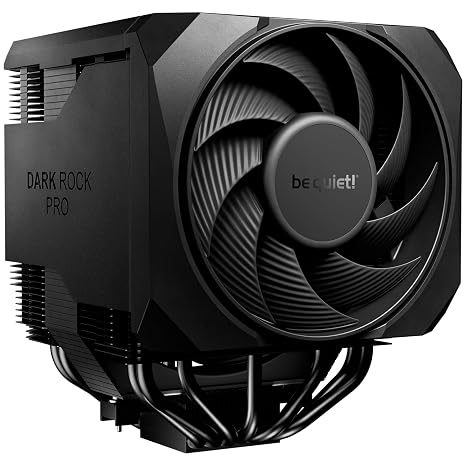
Feels solid and quiet, making it ideal for anyone running a 14600k who wants serious cooling without noise getting in the way. Its biggest strength lies in balancing strong air cooling power with very low noise levels, perfect for gaming and workstation PCs that need reliability.
Setting it up is straightforward thanks to the pre-installed mounting bridge and a gentle fixing method that avoids stress on the motherboard. The front fan slides on rails for height adjustment, which helps fit it in different cases. Daily operation can be switched between full fan stop for silence under light loads and powerful active cooling when performance is pushed hard.
Handles heat from overclocked CPUs well with seven copper heat pipes and a thick, optimized heatsink. Fans deliver solid airflow at a reasonable noise level of 32.4 dB. Construction feels premium and durable.
Praise often points to its quiet operation and effectiveness, while some mention it as a bit large and requiring space consideration inside the case.
The cooling performance stands out with quiet operation even during heavy workloads, praised for managing heat effectively. The most common complaint is the cooler’s large size, which can be an issue in smaller cases or builds with limited clearance.
This air cooler suits users looking for strong cooling with low noise, especially in mid to large PC cases. Those with compact builds or limited space would benefit from a smaller cooler.
Pros
- Extremely quiet operation even under load
- Strong cooling from 7 copper heat pipes
- Easy and secure installation system
- Adjustable front fan height for better fit
Cons
- Takes up considerable space in the case
- Fan speed can be high at maximum settings
| Specification | Details |
|---|---|
| Power Connector Type | 4-Pin |
| Voltage | 12 volts |
| Wattage | 300 watts |
| Noise Level | 32.4 db |
| Maximum Rotational Speed | 2000 rpm |
| Air Flow Capacity | 68.7 cfm |
10. Cooler Master Hyper 612 APEX CPU Cooler

Excellent cooling performance for high-end CPUs suits those running Ryzen 9 or Intel Ultra 9. The standout strength lies in the six heat pipes with a copper base, delivering solid thermal management without excess noise.
Installation is straightforward, thanks to redesigned brackets compatible with AM5 and LGA 1851|1700 sockets. The dual Mobius 120 fans run quietly between 0 and 2400 rpm, providing strong airflow of 78.2 cubic centimeters per minute while maintaining a noise level around 30 db.
The minimalist jet-black design fits well in most setups without drawing too much attention.
Execution of its primary function is reliable, keeping CPUs cool under heavy loads. The build quality feels durable with a stealth top-cover that looks clean and understated. Most praise highlights consistent quiet operation, while occasional notes mention the fan speed can ramp up noticeably at peak performance.
Praise centers on the cooler’s quiet operation during typical use and the effective six heat pipes and copper base keeping temperatures down. A common complaint is the fan noise getting louder when pushing the RPM to its maximum 2400.
Users valuing quiet, steady cooling and ease of installation will appreciate this model. Those needing absolute maximum airflow or ultra-low noise at full load might want to explore other cooling options.
Pros
- Quiet operation at low to moderate speeds
- Simple installation with updated brackets
- Strong airflow for effective cooling
- Minimalist black design suits most builds
Cons
- Fan noise increases at maximum speed
- Airflow volume may be modest compared to some rivals
| Specification | Details |
|---|---|
| Power Connector Type | 4-Pin |
| Cooling Method | Fan |
| Noise Level | 30 db |
| Maximum Rotational Speed | 2400 rpm |
| Air Flow Capacity | 78.2 cubic_centimeters_per_minute |
11. Noctua NH-U12A chromax.Black CPU Cooler

Solid metal construction and an all-black design provide both durability and stylish looks. Ideal for anyone running an Intel 14600k who wants powerful air cooling without dealing with bulky or noisy setups.
Its biggest strength lies in balancing strong cooling performance with quiet operation.
Installation is straightforward since it fits most tower cases at 158mm height without overhanging RAM or blocking PCIe slots. The dual 120mm NF-A12x25 fans adjust their speed automatically via PWM, keeping noise low when idle and ramping up efficiently under load.
The low-noise adapters make daily use pleasant with whisper-quiet operation while gaming or during heavy workloads.
Cooling power is impressive for a 120mm size, handling heat well even at maximum rotational speed of 2000 rpm. The build quality stands out due to premium materials and a proven heatsink design with over 100 hardware awards.
Most praise focuses on quietness and effective cooling, but some users note the price as comparatively high for air coolers.
Reviews consistently mention how quiet it runs during everyday tasks and gaming, maintaining cool temperatures even with the Intel 14600k. On the downside, the cost often comes up as a concern, making it less appealing for budget builds despite its performance.
Anyone looking for a reliable air cooler with great noise control and solid fit will appreciate this model. Those focused mainly on a low budget or who want absolutely silent operation at high load might consider alternatives.
Pros
- Compact 120mm size fits most tower cases
- Quiet operation thanks to low-noise adapters
- Does not block RAM or PCIe slots
- High airflow capacity of 102.1 cfm
Cons
- Priced higher than many other air coolers
- Maximum fan speed can be noticeable under heavy load
| Specification | Details |
|---|---|
| Cooling Method | Air |
| Noise Level | 22.6 db |
| Maximum Rotational Speed | 2000 rpm |
| Air Flow Capacity | 102.1 cfm |
| Power Connector Type | 4-Pin |
12. Noctua NH-D15 chromax.Black CPU Cooler

Black finish and dual-tower design stand out immediately for anyone looking for a powerful air cooler. Suited for users with a 14600k processor, it excels in quiet cooling, balancing size and noise without feeling out of place in most builds.
Setup involves attaching two 140mm fans to the extra-wide heatsink with six heatpipes, promising strong cooling throughput. Fans come with low-noise adaptors and use PWM for automatic speed adjustment, so day-to-day you get quiet idling and solid performance when the CPU is under full load. The all-black design fits well aesthetically with many color schemes.
Cooling performance matches many all-in-one watercoolers, keeping temperatures low even under heavy workload. Build quality is solid and straightforward, focusing on durability and function rather than flashy extras. Some find the size a bit large for smaller cases, which causes installation challenges or clearance issues with tall RAM modules.
Strongest praise revolves around its exceptional quiet cooling, delivering low noise even when the CPU is fully loaded. The common complaint highlights its large size, which sometimes causes clearance issues with RAM or case interiors. People appreciate its blend of silence and power but note the need for a compatible case.
Those who want top-tier air cooling and have ample space will find this cooler suits them very well. People with compact builds or restrictions around RAM height would do better looking for a smaller cooler solution.
Pros
- Whisper quiet at idle thanks to NF-A15 fans
- Cooling comparable to many all-in-one watercoolers
- Solid build quality with premium materials
- Attractive all-black design fits many setups
Cons
- Large size can block taller RAM modules
- Installation may be tricky in smaller cases
| Specification | Details |
|---|---|
| Cooling Method | Air |
| Noise Level | 24.6 db |
| Maximum Rotational Speed | 1500 rpm |
| Air Flow Capacity | 140.2 cubic meter per hour |
| Power Connector Type | 4-Pin |
| Voltage | 12 volts |
Best Air Coolers for 14600k Compared Side by Side
| Product | Noise Level (db) | Max RPM | Air Flow Capacity | Wattage |
|---|---|---|---|---|
| Thermalright Peerless Assassin 120 SE | 25.6 db | 1550 rpm | 66.17 cfm | 265 watts |
| ID-COOLING FROZN A620 PRO SE | 27.2 db | 2000 rpm | 58 cfm | 1.2 watts |
| be quiet! Pure Rock Pro | 34.8 db | 2000 rpm | – | 3.6 watts |
| Noctua NH-D15 G2 chromax.Black | 24.8 db | 1500 rpm | 155.6 m³/h | 2.28 watts |
| Thermalright Peerless Assassin Vision MAX | 27 db | 2150 rpm | 69 cfm | – |
| Thermalright Assassin X120 Refined SE | 25.6 db | 1550 rpm | 66.17 cfm | – |
| Thermalright Phantom Spirit 120SE | 25.6 db | 1500 rpm | 66.17 cfm | – |
| Scythe Mugen 6 Dual Fan | 26.88 db | 2500 rpm | 60.29 cfm | 150 watts |
| be quiet! Dark Rock Pro | 32.4 db | 2000 rpm | 68.7 cfm | 300 watts |
| Cooler Master Hyper 612 APEX | 30 db | 2400 rpm | 78.2 cm³/min | – |
| Noctua NH-U12A chromax.Black | 22.6 db | 2000 rpm | 102.1 cfm | – |
| Noctua NH-D15 chromax.Black | 24.6 db | 1500 rpm | 140.2 m³/h | – |
- Noise Level (db)25.6 db
- Max RPM1550 rpm
- Air Flow Capacity66.17 cfm
- Wattage265 watts
- Noise Level (db)27.2 db
- Max RPM2000 rpm
- Air Flow Capacity58 cfm
- Wattage1.2 watts
- Noise Level (db)34.8 db
- Max RPM2000 rpm
- Air Flow Capacity–
- Wattage3.6 watts
- Noise Level (db)24.8 db
- Max RPM1500 rpm
- Air Flow Capacity155.6 m³/h
- Wattage2.28 watts
- Noise Level (db)27 db
- Max RPM2150 rpm
- Air Flow Capacity69 cfm
- Wattage–
- Noise Level (db)25.6 db
- Max RPM1550 rpm
- Air Flow Capacity66.17 cfm
- Wattage–
- Noise Level (db)25.6 db
- Max RPM1500 rpm
- Air Flow Capacity66.17 cfm
- Wattage–
- Noise Level (db)26.88 db
- Max RPM2500 rpm
- Air Flow Capacity60.29 cfm
- Wattage150 watts
- Noise Level (db)32.4 db
- Max RPM2000 rpm
- Air Flow Capacity68.7 cfm
- Wattage300 watts
- Noise Level (db)30 db
- Max RPM2400 rpm
- Air Flow Capacity78.2 cm³/min
- Wattage–
- Noise Level (db)22.6 db
- Max RPM2000 rpm
- Air Flow Capacity102.1 cfm
- Wattage–
- Noise Level (db)24.6 db
- Max RPM1500 rpm
- Air Flow Capacity140.2 m³/h
- Wattage–
How to Choose the Best Air Cooler for 14600k
Choosing the best air cooler for the 14600k involves focusing on factors like cooling performance, size compatibility, and noise levels. Prioritizing efficient heat dissipation and a quiet operation ensures stable performance while avoiding overheating, ultimately saving money on repairs and improving overall system longevity.
Cooling Performance
Putting a powerful processor under heavy load generates a significant amount of heat that needs to be managed efficiently. The cooling solution’s job is to keep temperatures within safe limits to maintain performance and avoid thermal throttling.
A cooler that matches or exceeds the processor’s TDP rating ensures it can handle peak heat output without struggle. Heat pipes play a crucial role here; copper pipes conduct heat away from the CPU quickly, while a dense array of aluminum fins spreads that heat over a larger surface area, allowing the fan to dissipate it effectively.
Skimping on these aspects often results in elevated CPU temps, causing noisy fans running at max speed or even throttling. Look for coolers with multiple heat pipes, typically 4 to 6 copper pipes, combined with well-spaced aluminum fins for optimum airflow. This combination balances heat transfer and airflow, keeping daily performance stable even during intensive tasks.
Size and Compatibility
Not every cooler fits comfortably inside every PC case or on every motherboard layout. The physical size of the cooler, especially its height and width, needs to be checked against the clearance in your build.
Tall coolers often collide with side panels or RAM modules, restricting upgrade options. RAM clearance is particularly critical on boards with tall memory modules, as some coolers overhang the slots significantly.
It is essential that the mounting system matches the CPU socket exactly for a secure fit. The mounting hardware should support Intel’s recent LGA socket styles to ensure steady contact with the heat spreader. Measuring available space and comparing it with the cooler’s dimensions prevents installation headaches and incompatible setups.
Noise Levels
Fans designed for air cooling vary widely in noise production, especially at higher speeds needed to keep the processor cool under stress. Cooler models with larger, well-designed blades can move more air at lower rpm, resulting in quieter operation. Adjustable fan speeds or silent modes give users control, allowing quieter performance during less-intensive tasks.
Ignoring noise levels can turn your PC into a distracting noise source, particularly noticeable during quiet work sessions or immersive gameplay. Pay attention to rated decibel levels, fans producing around 20-30 dB are generally quiet enough for daily use. User-configurable fan curves let you balance noise and cooling performance to match your environment.
Build Quality and Materials
A cooler’s durability depends heavily on the materials used in its construction. Copper is often reserved for the heat pipes and base due to its superior thermal conductivity, while aluminum is common in the fins to reduce weight and cost. Over time, cheaper materials may warp or corrode, impairing heat transfer.
Reliable fan bearings, such as fluid dynamic or rifle bearings, help maintain smooth operation and longer lifespans compared to sleeve bearings.
Mounting brackets and assembly quality affect both long-term stability and ease of use. Sturdy metal brackets resist bending and maintain even pressure on the CPU surface, which is critical for consistent cooling. Some coolers can feel flimsy due to plastic parts, so opt for products with metal reinforcement in key areas.
Ease of Installation and Maintenance
Installing a cooling system can turn frustrating without intuitive design. Clear, detailed instructions and mounting hardware that fits the socket precisely make the process much smoother.
Some coolers use backplates that align easily and allow for tight, even mounting pressure without excessive fiddling.
Regular cleaning improves performance and longevity, so having open access to the fan and fins without disassembling the entire unit is a practical advantage. Dust buildup restricts airflow and increases noise, so designs that facilitate quick surface dusting or include removable fan covers save time and effort.
- Clear instructions with visuals
- Socket compatibility accessories included
- Removable fan units or dust filters
- Tool-free or minimal-tool installation
Optimizing Air Cooler Performance for the Intel Core i5-14600K
Choosing an air cooler that can handle the heat output of the Intel Core i5-14600K is crucial for stable performance. The 14600K can generate considerable heat under load, so focusing on coolers with a high CFM (cubic feet per minute) rating helps maintain lower temperatures. Larger heatsinks with multiple heat pipes promote better heat dissipation by increasing surface area.
Fans with PWM control allow the system to adjust speeds dynamically, balancing cooling and noise levels.
Installation also impacts performance. Ensuring a secure, even contact between the cooler’s base and the CPU surface maximizes thermal conductivity. Applying the right amount of thermal paste during installation prevents air gaps, which can impede heat transfer.
Key points to consider:
- High airflow fans (70 CFM or higher) to manage CPU heat spikes
- Multiple heat pipes (4 or more) for efficient heat spreading
- Proper mounting with thermal paste applied evenly
Proper Maintenance and Cleaning Tips for Air Coolers
Dust accumulation is the primary enemy of air cooler efficiency. Regular cleaning of the fan blades and heatsink fins ensures that airflow is not obstructed, which keeps temperature control optimal. Using compressed air to blow dust out of tight spaces prevents damage to fan components and maintains cooling performance.
Inspecting the fan bearings for wear and replacing noisy or wobbly fans will prevent unexpected failures. Thermal paste degrades over time and should be reapplied every couple of years to maintain good thermal contact between the CPU and heatsink.
Cleaning and maintenance checklist:
- Use compressed air to remove dust from fins and fan blades
- Check for and replace faulty or noisy fans
- Reapply thermal paste periodically, usually every 1-2 years
Air Cooler Compatibility: Comparing Air Cooling to Liquid Cooling Solutions
Air cooling remains the preferred option for many due to its simplicity and lower cost compared to liquid cooling solutions. Air coolers usually have fewer points of failure, require less maintenance, and are quieter at lower workloads.
However, liquid coolers often provide better temperature control for sustained heavy loads.
For the Intel Core i5-14600K, strong air coolers with sufficient airflow and heat dissipation can match the cooling needs for most users. Liquid cooling might offer tighter temperature regulation but involves pump noise and potential leakage risks.
Compatibility with your PC case is important, as some large air coolers or radiators may not fit in compact builds.
- Air coolers: simpler installation, lower cost, reliable
- Liquid coolers: better temperature control under heavy loads, higher maintenance
- Case size and clearance should be checked before purchase
People Also Asked
How to Properly Install an Air Cooler on a 14600k Processor?
The air cooler should be securely mounted on the processor with the included thermal paste applied evenly. Tighten the screws gradually in a diagonal pattern to ensure even pressure over the 14600k’s surface for better heat transfer.
What Size Air Cooler Is Ideal for Cooling a 14600k CPU?
A mid-sized to large tower air cooler is best for the 14600k to manage its heat output. Larger coolers with multiple heat pipes offer more surface area for cooling, which keeps temperatures lower during intensive tasks.
Are There Common Compatibility Issues with Air Coolers and the 14600k?
Compatibility issues mainly arise from the cooler’s mounting bracket not matching Intel’s LGA1700 socket used by the 14600k. Check for a cooler that specifically supports the LGA1700 socket or comes with an upgrade kit to avoid installation problems.
How Often Should I Clean My Air Cooler for Optimal Performance?
Cleaning the cooler every 3 to 6 months prevents dust build-up that can hinder airflow and reduce cooling efficiency. Use compressed air and a soft brush to avoid damaging the fins and fan.
What Are Common Problems When Using Air Coolers on a 14600k?
Common problems include improper mounting causing poor contact with the CPU, leading to higher temperatures. Blocking airflow inside the case by poor fan placement can also reduce the cooler’s effectiveness on the 14600k.
Conclusion
Choosing the right air cooler for a 14600k mainly comes down to how well it can manage heat without making too much noise. Pay attention to the size of the cooler and whether it fits your case. Also, look at the quality of the fans and the contact surface with the CPU to make sure it will cool efficiently.
Think about your setup size and budget before picking a cooler. When you don’t run heavy tasks often, a simpler model might do. Check the comparison table and the picks above to find a cooler that fits your specific needs and space.

I’m Grant Mitchell, a firearms and hunting writer with years of experience at the range and in the field. I write about rifles, shotguns, handguns, optics, safe storage, cleaning, and responsible ownership, along with practical hunting tips. My goal is to share accurate, safety-first information that helps you choose the right firearm, maintain it properly, and become a more confident shooter.