Top 12 Best Air Cooler for 13900k That Will Blow Your Mind
Overheating issues are common when running a 13900k processor, especially with air coolers that can’t keep up with its heat output. A cheaply made or undersized unit often results in higher temperatures, louder fans, and occasional thermal throttling.
Finding the best air cooler for 13900k means avoiding these interruptions and protecting your CPU from long-term damage.
The key aspects that distinguish an effective air cooler for the 13900k include the size and number of heat pipes, fan quality and airflow capacity, and the cooler’s mounting compatibility. Heat pipes should be at least six in number, made of copper for better heat transfer. Fans with airflow around 70 CFM and static pressure near 2 mmH2O handle dense fin stacks well.
Easy installation and the ability to clean dust buildup without disassembly also matter to keep performance consistent over time.
Need a Quick Check?
| Image | Product | Price |
|---|---|---|
Our Top Picks 1  | Thermalright Peerless Assassin | Check Price |
Our Top Picks 2  | Noctua NH-D15 G2 chromax.Black | Check Price |
Our Top Picks 3  | Thermalright Phantom Spirit 120SE | Check Price |
Our Selected Top 12 Air Cooler for 13900k Worth Your Money
This list features carefully chosen air coolers designed to efficiently manage the heat of the 13900k processor. Each review covers performance details, ideal user scenarios, and highlights both strengths and potential drawbacks to help you find the best match for your cooling needs.
1. Thermalright Peerless Assassin 120 SE CPU Cooler
Anyone building a system around the Intel Core i9-13900K looking for solid air cooling will find the Thermalright Peerless Assassin 120 SE a smart choice. It shines with strong cooling power that handles high heat loads while fitting comfortably in most desktop setups.
This cooler suits gamers and PC builders wanting efficient airflow without loud noise.
Setup is straightforward thanks to the 4-pin power connector and mounting hardware designed to stay secure. The fan runs quietly at 25.6 dB with a max speed of 1550 rpm, keeping noise levels low during everyday use.
Maintenance is manageable, with accessible fan blades and compact dimensions making it easier to keep dust at bay.
Cooling performance feels impressive, managing heat well thanks to 66.17 CFM of airflow and 265 watts of cooling output. The build quality reflects Thermalright’s 20 years of experience, featuring reliable components and thoughtful design.
Users appreciate its quiet operation, while some note it might struggle slightly in very cramped cases with limited airflow.
The quiet operation at 25.6 dB stands out as a key strength, offering good airflow without annoying noise. The most common drawback users mention is the tight fit in smaller or cramped PC cases, which can limit airflow and cooling effectiveness.
People with mid to large desktop towers seeking reliable air cooling will find this a solid option. Those with small or unconventional cases might want to look for a cooler with a slimmer profile or lower height requirement for better compatibility.
Pros
- Quiet fan during normal operation
- Strong airflow for demanding CPUs
- Secure mounting system ensures stability
- Compatible with most desktop setups
Cons
- May be tight in compact cases
- Not the quietest at maximum speed
| Specification | Details |
|---|---|
| Power Connector Type | 4-Pin |
| Voltage | 12 volts |
| Wattage | 265 watts |
| Noise Level | 25.6 db |
| Maximum Rotational Speed | 1550 rpm |
| Air Flow Capacity | 66.17 cfm |
2. Noctua NH-D15 G2 chromax.Black CPU Cooler
With eight heatpipes and fans designed for quiet efficiency, the Noctua NH-D15 G2 chromax.Black stands out as a powerful air cooler perfect for handling the heat of a 13900k processor. Its all-black design fits well with modern builds and is suited for anyone seeking high cooling performance without too much noise.
Setting it up involves attaching the dual NF-A14x25r G2 140mm fans, which have automatic speed control and low-noise adaptors. These fans adjust speeds to match the workload, running quietly when the system is idle and increasing flow when the CPU gets hot. Daily operation means less noise distraction while maintaining strong airflow, thanks to a careful design that balances cooling with sound levels.
The cooler handles heat very effectively and maintains low noise during normal tasks. Its build quality is solid, with extra surface area on the heatsink and premium fans contributing to sustained cool temperatures.
Praise frequently highlights how quiet it is under light loads, while some users mention that it requires enough case space because of its size.
Many users appreciate how nearly silent the fans remain during idle or light computing tasks, combined with cooling that handles heavy loads efficiently. The main downside is the physical size, which can make installation tricky in smaller cases or setups with limited clearance.
This cooler suits anyone building a high-performance rig with a spacious case, especially those wanting quiet operation under load. Users with compact cases or lower power needs may want to consider a smaller or less power-hungry cooling solution.
Pros
- Quiet performance thanks to low-noise adaptors
- Strong airflow with 140mm NF-A14x25r fans
- Effective heat dissipation from 8 heatpipes
- Automatic fan speed control with PWM
Cons
- Requires ample case space due to large size
- Runs at 2.28 watts, which may be high for low-power setups
| Specification | Details |
|---|---|
| Power Connector Type | 4-Pin |
| Voltage | 12 volts |
| Wattage | 2.28 watts |
| Noise Level | 24.8 db |
| Maximum Rotational Speed | 1500 rpm |
| Air Flow Capacity | 155.6 cubic meter per hour |
3. Thermalright Phantom Spirit 120SE CPU Cooler
Thermalright Phantom Spirit 120SE is an air cooler designed to keep high-performance CPUs like the 13900K running efficiently. Its greatest strength lies in handling a broad TDP range from 105W to 280W, thanks to advanced 7x6mm heatpipe technology, making it suitable for intense desktop use.
Setting up the cooler is straightforward with its 4-pin power connector. Its air cooling method combines a 1500 rpm fan speed with a 66.17 cfm airflow that manages heat without excessive noise, which settles around 25.6 db.
The design supports various mounting orientations thanks to the AGHP technique, helping maintain stable performance during daily workloads.
Performance-wise, this cooler manages heat well for demanding CPUs, maintaining good temperatures without sounding too loud. The build feels solid and thoughtfully designed for durability. Users often praise its efficient cooling and quiet operation.
The main drawback comes from its relatively high noise level when pushed to maximum rpm under heavy load.
The strongest praise is for its ability to cool powerful processors quietly during regular use. Most common complaints point to the noise rising when the fan runs at full speed, which can be distracting in quiet environments.
People who need reliable cooling for demanding desktop workloads and don’t mind some fan noise at peak performance will be happy with this cooler. Those seeking completely silent operation or compact size should consider other options.
Pros
- Supports wide TDP range up to 280W
- Quiet operation at moderate speeds
- Effective cooling for high-end CPUs
- Durable build quality
Cons
- Noise increases noticeably at max RPM
- May require careful orientation for best cooling
| Specification | Details |
|---|---|
| Power Connector Type | 4-Pin |
| Voltage | 12 volts_of_direct_current |
| Noise Level | 25.6 db |
| Maximum Rotational Speed | 1500 rpm |
| Air Flow Capacity | 66.17 cfm |
4. Be Quiet! Pure Rock Pro 3 CPU Cooler

Quiet operation combined with strong cooling keeps your CPU stable during heavy tasks. Suitable for those running Intel 13900K chips looking for high performance without loud noise.
Its biggest strength lies in managing heat effectively while staying calm in noise.
Setting up involves attaching the Pure Wings 3 120mm PWM fan, which fits smoothly onto supported sockets like Intel 1851/1700/1200/1151/1150/1155. The design focuses on maximizing airflow with adjusted fan blade angles and a funnel-shaped air outlet, helping keep your processor cool through long gaming or work sessions. The 4-pin connector offers easy speed control for balanced cooling and noise.
Cooling power holds up well even when the CPU runs overclocked, thanks to six nickel-plated copper heat pipes and base that transfer heat efficiently. Built to last with nickel plating, the cooler provides solid durability.
Most praise highlights its strong air pressure and quiet fan. Some find the 34.8 dB sound level noticeable in very quiet rooms.
Strong airflow and quiet operation are common praise points, while some users note the 34.8 dB noise level can be distracting in very quiet rooms. The copper heat pipes and nickel plating deliver lasting and consistent cooling performance.
Ideal for those seeking solid cooling on a 13900K without loud fans or complex liquid setups. Look elsewhere if ultra-quiet operation at all times or extreme overclocking headroom beyond 2000 rpm fan speed is needed.
Pros
- Quiet fan with optimized blades for strong airflow
- Effective heat transfer through six copper heat pipes
- Compatible with a wide range of Intel and AMD sockets
- Durable nickel-plated base and pipes
Cons
- Fan noise can be noticeable in silent room environments
- Maximum speed limited to 2000 rpm, may restrict extreme cooling
| Specification | Details |
|---|---|
| Power Connector Type | 4-Pin |
| Voltage | 12 volts |
| Wattage | 3.6 watts |
| Noise Level | 34.8 db |
| Maximum Rotational Speed | 2000 rpm |
| Compatible Devices | Intel sockets: 1851/1700/1200/1151/1150/1155 | AMD sockets: AM5/AM4 |
5. Thermalright Peerless Assassin 120 Vision MAX CPU Cooler

Powerful cooling paired with an interactive display makes the Thermalright Peerless Assassin 120 Vision MAX ideal for intense 13900k builds. Its standout feature is the 5-inch IPS LCD screen on top, perfect for anyone who wants real-time system info right on the cooler.
Setup is straightforward with a magnetic top cover that easily attaches, and the included software lets you customize the display’s background. The dual-tower design with two fans runs quietly at 27 dB while still pushing plenty of air at 69 CFM. Managing temps and checking stats becomes part of daily routine thanks to the clear display and consistent airflow.
Cooling performance is strong thanks to six pure copper heat pipes and a nickel-plated copper base, allowing the heatsink to stay cool under load. The build feels solid and durable with high-speed fan rotation reaching 2150 RPM. Commendable for keeping things quiet, though some mention the size may be too large for smaller cases.
Reviewers appreciate the sharp and customizable 5-inch display which shows system data continuously, making it handy for keeping track of performance without extra tools. The cooler delivers strong thermal control with its copper heat pipes and quiet fans, though some find its physical footprint bulky for tighter builds.
Gamers and overclockers who want active monitoring will find this cooler suits their needs well. Users with compact cases or who prioritize minimal noise might want to look at smaller or quieter cooling solutions. The display adds a unique twist but requires space and some setup interest.
Pros
- 5-inch IPS LCD for real-time monitoring
- Dual-tower design with two fans
- Quiet operation at 27 db
- Six copper heat pipes for efficient cooling
Cons
- Size may not fit smaller cases comfortably
- Fan speed can be high under heavy load
| Specification | Details |
|---|---|
| Cooling Method | Air |
| Maximum Rotational Speed | 2150 rpm |
| Noise Level | 27 db |
| Air Flow Capacity | 69 cfm |
| Power Connector Type | 4-Pin |
| Compatible Devices | Desktop |
6. Thermalright PS120SE CPU Cooler

Aluminum and copper form the core of this air cooler, designed to handle high TDPs up to 280W. Suitable for desktop builds with demanding CPUs like the 13900k, it delivers strong heat dissipation through Thermalright’s 4th generation AGHP heatpipe technology.
Installation involves securing the cooler with its mounting brackets, which are designed for a stable fit. The 4-pin power connector provides PWM control, allowing the fan to adjust speeds up to 1650 rpm. Day-to-day, the cooler runs quietly at about 25.6 db, while pushing air at 66.17 cfm, maintaining good airflow around the CPU area without overwhelming noise.
Performance is solid, with the inverse gravity heatpipe technology helping manage heat effectively whether the cooler is mounted vertically or horizontally. The build quality reflects Thermalright’s long experience, though some note the 280-watt capacity as nearing upper limits for the biggest overclocks. Most praise revolves around its quiet operation, while the main complaint is that it could be a bit bulky in tight cases.
The cooler earns praise for staying quiet during demanding tasks and delivering consistent cooling with its advanced heatpipe design. Still, its size might create fitment issues in smaller desktop cases, which can frustrate users who prioritize compact builds.
This cooler suits those with mid-to-large cases wanting solid cooling for a 13900k without loud fans. Users with very tight spaces or heavy overclockers may want to look for smaller or higher capacity coolers instead.
Pros
- Handles up to 280W TDP effectively
- Quiet operation at 25.6 db
- PWM fan control with 4-pin connector
- Strong airflow at 66.17 cfm
Cons
- Can be bulky for compact cases
- Reaches limits for extreme overclocking
| Specification | Details |
|---|---|
| Cooling Method | Air |
| Wattage | 280 watts |
| Maximum Rotational Speed | 1650 rpm |
| Noise Level | 25.6 db |
| Power Connector Type | 4-Pin |
| Air Flow Capacity | 66.17 cfm |
7. Be Quiet! Dark Rock Pro 6 CPU Cooler
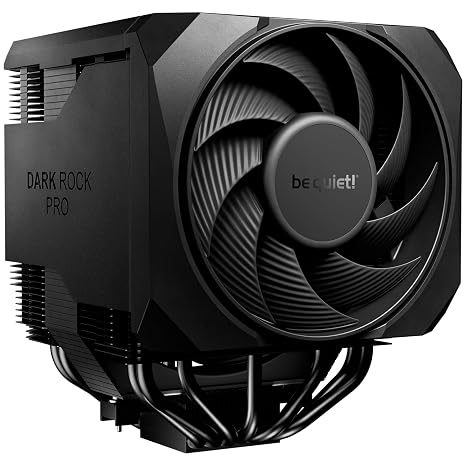
Impressive silent operation stands out immediately, making it ideal for anyone who values quiet but powerful cooling. It suits high-performance builds like gaming rigs or workstations, especially with overclocked processors such as the Intel 13900k. Its strength lies in balancing extremely low noise levels with solid heat dissipation.
Installing feels straightforward thanks to the pre-installed mounting bridge and the rail-mounted front fan, which you can easily adjust for better fit. The active mode switch lets you pick between maximum cooling or a quieter semi-passive mode that stops the fan completely under light loads. Running daily, it stays unobtrusive, managing temperatures without noticeable noise during gaming or heavy work sessions.
Heat pipes and optimized heatsink do a solid job keeping temps in check, even under overclocking strain. It’s clearly a well-built cooler, focusing on durability and minimal vibration. Praise often highlights how quiet and efficient it is, though some mention it could be a bit large for smaller cases.
The fans spin up to 2000 rpm but remain surprisingly soft sounding.
Quiet operation stands out as the top feature, making it suitable for demanding tasks while keeping noise extremely low. Size is the most common drawback, requiring careful case selection to fit properly without blocking other components.
Those building a powerful machine with enough space will find this cooler excels in cooling performance without disruptive sound. Users with compact builds or tighter space constraints might want to look at smaller models that trade off some cooling power for form factor.
Pros
- Very quiet even at full fan speed
- Switchable active and semi-passive modes
- Easy to install with pre-installed mounting bridge
- Strong cooling with 7 copper heat pipes
Cons
- Large size may limit compatibility with small cases
- Fan speed can get high under load
| Specification | Details |
|---|---|
| Power Connector Type | 4-Pin |
| Voltage | 12 volts |
| Noise Level | 32.4 dB |
| Maximum Rotational Speed | 2000 rpm |
| Air Flow Capacity | 68.7 cfm |
8. Thermalright Assassin X120 Refined SE ARGB CPU Cooler

Heavy-duty cooling for the Intel 13900K demands a solution with solid airflow and quiet operation, and the Thermalright Assassin X120 Refined SE ARGB fits the bill. Its single most impressive feature is balancing effective air cooling with low noise, ideal for someone building a powerful but reasonably quiet desktop.
Installation involves a straightforward 4-pin power connector setup, compatible with most desktop motherboards, making it user-friendly even for those not focused on complex cooling systems. The fan’s rotational speed peaks at 1550 rpm, keeping noise under 26 dB, which feels quite unobtrusive during typical use. ARGB lighting adds a subtle touch of style without overwhelming the setup.
Cooling capacity is solid with an airflow of 66.17 CFM, making it reliable under heavy CPU loads. The build respects practical durability standards, reflecting Thermalright’s long experience in cooling tech. Most users appreciate the quiet fan speed, though a common gripe is the size which might not fit in smaller cases without checking beforehand.
Quiet fan speed at 25.6 dB is praised for providing low noise during heavy CPU use. The most frequent issue relates to the cooler’s physical size requiring case compatibility checks before purchase.
Users building a powerful 13900K rig who want reliable, quiet air cooling will find this cooler a good fit. Those needing ultra-high fan speed or very compact designs might want to explore other options.
Pros
- Quiet operation under load
- Good air flow for high-end CPUs
- Easy 4-pin connector setup
- Attractive ARGB lighting included
Cons
- Size might not suit small cases
- Max fan RPM might feel low for overclocking
| Specification | Details |
|---|---|
| Power Connector Type | 4-Pin |
| Voltage | 12 volts |
| Cooling Method | Air |
| Noise Level | 25.6 db |
| Maximum Rotational Speed | 1550 rpm |
| Air Flow Capacity | 66.17 cfm |
9. Thermalright PS120SE ARGB CPU Cooler

Keeping a powerful CPU like the 13900k cool without it sounding like a jet engine can be a challenge. The Thermalright PS120SE ARGB CPU Cooler suits those who want reliable air cooling that’s quiet and built to last.
Its standout feature is the advanced AGHP technique that improves heatpipe performance for steady cooling.
Setting up the cooler involves standard mounting that fits most desktop chassis under 154mm in height. The 4-pin power connector makes fan speed control straightforward, running at a maximum 1500 rpm. Day to day, the fan stays quiet at 25.6 db while pushing a decent airflow of 66.17 cfm, keeping temperatures in check without distracting noise.
Performance wise, it handles heat from intense workloads well thanks to the upgraded 7x6mm heatpipe design. A long industrial service life of up to 20000 hours means the cooler won’t need replacing soon. The construction uses industrial strength PBT + PC materials, lending it robustness.
The biggest praise comes from its quiet operation, while some note that airflow could be a little higher for extreme overclocking.
Most appreciation goes to the quiet working noise and solid build quality from durable materials and advanced heatpipes. The main drawback is the airflow capacity which might limit peak cooling under very demanding conditions.
Those who want dependable, silent cooling without extreme overclocking will find this cooler suits their needs well. Users aiming for maximum cooling power or pushing the 13900k to its limit might prefer higher airflow options.
Pros
- Quiet operation at only 25.6 db noise
- Supports wide range of chassis up to 154mm tall
- Long industrial service life of 20000 hours
- 4th generation AGHP tech improves heatpipe efficiency
Cons
- Airflow could be higher for heavy overclocking
- Max fan speed limited to 1500 rpm
| Specification | Details |
|---|---|
| Power Connector Type | 4-Pin |
| Noise Level | 25.6 db |
| Maximum Rotational Speed | 1500 rpm |
| Air Flow Capacity | 66.17 cfm |
| Height | 154 mm |
10. Noctua NH-U12A chromax.Black CPU Cooler

Delivering a powerful cooling performance with dual NF-A12x25 120mm fans, the Noctua NH-U12A chromax.Black suits anyone running a 13900k who needs great heat dissipation without sacrificing quiet operation. Its compact height of 158mm fits well in most tower cases without interfering with RAM or PCIe slots.
Setup is straightforward thanks to its size and compatibility. The automatic fan speed control via PWM keeps noise levels low when the CPU is idle, while ramping up smoothly under heavy load. Dual fans with low-noise adapters balance airflow and quietness, so daily use means cooler temps without an annoying hum.
The cooler achieves top-tier performance within a small 120mm footprint, making it ideal for tight builds. Its all-black design is attractive and matches many setups.
Reviews often praise its quiet operation and effective heat management. Some users note the height may still be too tall for very small cases, so measuring beforehand is wise.
One of the strongest points is its whisper-quiet operation paired with effective cooling, thanks to the state-of-the-art fans. The most frequent complaint is related to clearance issues in particularly small cases, despite it fitting most towers. Measuring your case height before buying is important.
Anyone wanting a high-performing, low-noise cooler that fits standard-sized tower cases will appreciate this model. People with very small or custom compact cases might want to explore lower-profile coolers to avoid fit problems.
Pros
- Fits most tower cases with 158mm height
- Quiet operation with PWM fan speed control
- No RAM or PCIe slot obstruction
- Dual NF-A12x25 120mm fans for strong airflow
Cons
- May be too tall for very compact cases
- Premium price compared to simpler coolers
| Specification | Details |
|---|---|
| Cooling Method | Air |
| Noise Level | 22.6 db |
| Maximum Rotational Speed | 2000 rpm |
| Air Flow Capacity | 102.1 cfm |
| Power Connector Type | 4-Pin |
| Voltage | 12 volts |
11. Cooler Master Hyper 612 APEX CPU Cooler

People building a PC with a 13900k processor who want solid cooling without complicated setups will appreciate this air cooler. Its biggest strength lies in powerful heat dissipation, thanks to six heat pipes and a copper base that handle intense CPU heat well.
Setting it up is pretty straightforward, especially on AM5 and LGA 1851|1700 platforms due to redesigned brackets. The two 120mm fans run quietly, keeping noise around 30 dB while spinning up to 2400 rpm.
You can expect good airflow, making everyday use cool without loud distractions.
Heat moves efficiently through the SuperConducting Heat Pipes with advanced wick structures, contributing to reliable temperature control. The build feels sturdy, with a jet-black stealth cover adding a modern, minimal look.
Biggest praise centers on its quiet operation and effective cooling. Some mention the noise level can reach a bit higher at full speed.
Many appreciate the quiet operation combined with efficient heat dissipation from the copper base and multiple heat pipes. Common complaints revolve around the fan noise rising noticeably when pushed to its 2400 rpm limit during heavy CPU loads.
This cooler suits users wanting a balance of cooling and quiet performance on AM5 or LGA 1851|1700 platforms without complex installation. Those prioritizing extremely low noise or higher airflow performance might want to look elsewhere.
Pros
- Six heat pipes offer strong heat dissipation
- Quiet dual 120mm fans with PWM control
- Easy installation on latest CPU sockets
- Subtle, minimalist black design
Cons
- Fan noise can increase at maximum speed
- Air flow capacity modest for high-end gaming
| Specification | Details |
|---|---|
| Power Connector Type | 4-Pin |
| Cooling Method | Fan |
| Maximum Rotational Speed | 2400 rpm |
| Noise Level | 30 db |
| Air Flow Capacity | 78.2 cubic_centimeters_per_minute |
12. Thermalright Assassin X 120R Digital ARGB CPU Cooler

Thermalright Assassin X 120R Digital ARGB stands out with its 2000RPM PWM fan that adjusts speed based on CPU temperature, offering a strong cooling solution suited for the Intel i9-13900K. Its quiet operation and smart speed control make it a solid choice for those who value balance between performance and noise.
Setting up the cooler is straightforward thanks to its digital ARGB feature and 4-pin power connector, providing both power and RGB lighting control. The PWM function automatically adjusts fan speed with workload changes, so no manual tweaking is necessary.
Silicone corner pads help minimize noise from fan rotation, making daily use comfortable even during heavy CPU tasks.
Performance-wise, it keeps temperatures well in check during intensive use, with an airflow capacity of 70.84 CFM backing its capabilities. Built with industrial-grade PBT+PC materials and a stable S-FDB bearing, it handles fan blade vibrations effectively. Reports mention the quiet operation at a noise level of 29.8 dB as a highlight.
Some users note it may not be the best fit for extremely tight cases due to size.
Quiet performance around 29.8 dB and stable cooling make it suitable for high-demand CPUs. Most common drawbacks include its size being an issue in compact setups.
People with mid to large PC cases who want silent operation will be pleased. Users needing a smaller cooler or no ARGB effects might prefer alternative models.
Pros
- Automatic fan speed control via PWM
- Quiet operation at under 30 dB noise level
- Solid industrial-grade construction
- Effective vibration reduction with silicone pads
Cons
- May be bulky for small cases
- ARGB lighting requires compatible motherboard
| Specification | Details |
|---|---|
| Maximum Rotational Speed | 2000 rpm |
| Air Flow Capacity | 70.84 cfm |
| Noise Level | 29.8 db |
| Power Connector Type | 4-Pin |
| Voltage | 12 volts of direct current |
| Cooling Method | Air |
Best Air Coolers for 13900k Comparison Table
| Product | Cooling Method | Noise Level | Max RPM | Air Flow Capacity |
|---|---|---|---|---|
| Thermalright Peerless Assassin | Air | 25.6 db | 1550 rpm | 66.17 cfm |
| Noctua NH-D15 G2 chromax.Black | Air | 24.8 db | 1500 rpm | 155.6 m³/h |
| Thermalright Phantom Spirit 120SE | Air | 25.6 db | 1500 rpm | 66.17 cfm |
| be quiet! Pure Rock Pro | Air | 34.8 db | 2000 rpm | – |
| Thermalright Peerless Vision MAX | Air | 27 db | 2150 rpm | 69 cfm |
| Thermalright PS120SE | Air | 25.6 db | 1650 rpm | 66.17 cfm |
| be quiet! Dark Rock Pro | Air | 32.4 db | 2000 rpm | 68.7 cfm |
| Thermalright Assassin X120 SE ARGB | Air | 25.6 db | 1550 rpm | 66.17 cfm |
| Thermalright PS120SE ARGB | Air | 25.6 db | 1500 rpm | 66.17 cfm |
| Noctua NH-U12A chromax.Black | Air | 22.6 db | 2000 rpm | 102.1 cfm |
| Cooler Master Hyper 612 APEX | Fan | 30 db | 2400 rpm | 78.2 cm³/min |
| Thermalright Assassin X120R ARGB | Air | 29.8 db | 2000 rpm | 70.84 cfm |
- Cooling MethodAir
- Noise Level25.6 db
- Max RPM1550 rpm
- Air Flow Capacity66.17 cfm
- Cooling MethodAir
- Noise Level24.8 db
- Max RPM1500 rpm
- Air Flow Capacity155.6 m³/h
- Cooling MethodAir
- Noise Level25.6 db
- Max RPM1500 rpm
- Air Flow Capacity66.17 cfm
- Cooling MethodAir
- Noise Level34.8 db
- Max RPM2000 rpm
- Air Flow Capacity–
- Cooling MethodAir
- Noise Level27 db
- Max RPM2150 rpm
- Air Flow Capacity69 cfm
- Cooling MethodAir
- Noise Level25.6 db
- Max RPM1650 rpm
- Air Flow Capacity66.17 cfm
- Cooling MethodAir
- Noise Level32.4 db
- Max RPM2000 rpm
- Air Flow Capacity68.7 cfm
- Cooling MethodAir
- Noise Level25.6 db
- Max RPM1550 rpm
- Air Flow Capacity66.17 cfm
- Cooling MethodAir
- Noise Level25.6 db
- Max RPM1500 rpm
- Air Flow Capacity66.17 cfm
- Cooling MethodAir
- Noise Level22.6 db
- Max RPM2000 rpm
- Air Flow Capacity102.1 cfm
- Cooling MethodFan
- Noise Level30 db
- Max RPM2400 rpm
- Air Flow Capacity78.2 cm³/min
- Cooling MethodAir
- Noise Level29.8 db
- Max RPM2000 rpm
- Air Flow Capacity70.84 cfm
How to Choose the Best Air Cooler for 13900k
Choosing the right air cooler for a 13900k depends on factors like cooling efficiency, compatibility with your case, and noise levels. Paying attention to these ensures your CPU stays cool and quiet, which helps avoid overheating issues and potential costly repairs or replacements.
Compatibility and Size
Many PC builders end up with coolers that physically don’t fit inside their cases or block access to RAM slots. Checking the dimensions of the cooler against your PC case is necessary to avoid this hassle. Larger air coolers often require at least 160mm clearance height, though some low-profile options sit around 120mm.
Socket compatibility matters a lot since the cooling bracket must directly match the 13900k’s LGA 1700 mounting system. Using an incompatible bracket creates poor contact and poor cooling.
Another common issue is restricted space around the RAM slots. Some tall RAM modules don’t fit under big fans or shrouds.
Confirming clearance for your existing RAM and motherboard components avoids tight fits that make upgrades difficult. Compatibility checks prior to purchase save time and frustration with installation and performance later.
Cooling Performance
A cooler’s TDP rating should meet or exceed the processor’s thermal output to maintain safe operating temperatures under load. The 13900k produces significant heat, so aim for coolers rated 200W TDP or higher. Fans with speeds ranging from 1000 to 2000 RPM offer balanced airflow efficiency and noise.
Efficiency declines if air circulation or heat dissipation is insufficient.
Heat pipe design directly affects heat transfer speed from the CPU to fins. Look for multiple copper heat pipes with solid contact bases, usually made from copper or nickel-plated copper, as these materials conduct heat well. Designs with direct-contact heat pipes tend to perform better than base-plate only models.
These specs influence how well the cooler handles sustained workloads.
Noise Levels
Some coolers sound like jet engines at full load, which gets tiring during long gaming or rendering sessions. Full-load noise often measures between 30 to 40 dBA on decent air coolers, while idle can drop below 20 dBA for quieter operation. Antivibration pads help reduce rattling noise caused by fan vibrations transferring to the case chassis.
PWM control for fans allows automatic speed adjustment based on CPU temperature. This reduces noise during light tasks and ramps up only when necessary.
Coolers without PWM force fans to run at constant speeds, making noise management difficult. Paying attention to noise specifications can make a day-to-day difference in comfort.
Build Quality and Materials
Copper heat pipes and aluminum fins are common parts found in air coolers. Their quality varies significantly across brands and price ranges. Thicker copper pipes improve heat transfer but require solid soldering to the fins.
Look for corrosion-resistant coatings like nickel plating on heat pipes and anodized aluminum fins to prolong lifespan.
Mounting mechanisms are another critical durability factor. Plastic brackets often wear or break while metal ones hold firm over years.
Strong springs or screws ensure even contact pressure without loosening over time. Skimping on build quality can cause frequent reseating or dropped performance.
Ease of Installation and Maintenance
Clear mounting instructions are invaluable during assembly. Poor documentation forces trial and error that can damage components or void warranties.
Some coolers include branded AMD/Intel-compatible kits to simplify installing the backplate and brackets for the 13900k.
Access for dust cleaning impacts long-term performance. Coolers that allow easy fan removal or fin cleaning prevent dust buildup from reducing airflow. Replacing or upgrading fans should require minimal effort, ideally using standard fan connectors and screws.
This makes maintenance straightforward without disassembling the entire system.
Optimizing Air Cooler Performance for the Intel 13900K During High Workloads
Choosing the right fan speed and positioning is critical when cooling an Intel 13900K under heavy load. Running multiple cores at high frequencies generates a significant amount of heat, which requires efficient airflow to dissipate.
To optimize performance, position your air cooler so that its fans direct air through unobstructed paths within the case. This reduces heat buildup around the CPU socket.
Proper case ventilation improves the air cooler’s effectiveness. Intake fans at the front of the case bring in cool air, while exhaust fans at the rear or top remove hot air. The balance between these fans helps maintain lower ambient temperatures around the CPU cooler.
- Use high-quality thermal paste and reapply it periodically to improve thermal conductivity.
- Adjust fan curves in BIOS or software to ramp up speed during intense processing tasks.
- Keep the cooler’s heatsink fins free of dust to maintain optimal heat transfer.
This approach ensures your air cooler can handle the 13900K’s heat output effectively during sustained heavy use.
Routine Maintenance Tips to Extend the Lifespan of Your Air Cooler
Keeping an air cooler in good condition goes beyond installation. Routine cleaning prevents dust accumulation that reduces the cooler’s ability to dissipate heat.
Dust on the fan blades and heatsink fins restricts airflow and traps heat near the CPU.
Regular inspection every few months helps identify build-up before it impacts cooling performance. Using compressed air to blow dust off components can restore airflow without removing the cooler entirely. It is important to power down and unplug the system before cleaning.
- Check fan bearings for unusual noise or wobbling and replace the fan if necessary.
- Reapply thermal paste every year or two to maintain good thermal contact.
- Verify mounting screws remain tight to avoid decreased pressure on the CPU IHS.
Following these maintenance steps reduces the risk of overheating and prolongs the lifespan of both the cooler and your processor.
Comparing Air Cooling with Liquid Cooling Solutions for the 13900K
Air coolers offer simplicity and easier installation compared to liquid cooling systems for the Intel 13900K. They rely on a heatsink and fan to move heat away from the CPU without the need for pumps or liquid tubes. This makes air cooling less prone to potential leaks or mechanical failures.
Liquid coolers typically provide lower temperatures due to more efficient heat transfer through coolant circulation, but they come with added complexity and cost. Air coolers can handle the 13900K well if paired with adequate case airflow and proper thermal paste application.
- Air coolers generally require less maintenance since there are no fluids to check.
- Liquid cooling offers more overclocking headroom by keeping temperatures consistently lower.
- Budget constraints and system compatibility often make air coolers the more practical choice.
Evaluating your cooling needs and system configuration will help determine which method suits your use case best.
People Also Asked
Is This Air Cooler Compatible with Intel Core i9-13900K?
Many air coolers are compatible with the Intel Core i9-13900K, but you should check the manufacturer’s CPU socket support list, especially for LGA 1700 sockets. Confirming compatibility avoids buying a cooler that may not fit or work properly.
How Do I Properly Install an Air Cooler on a 13900K?
To install an air cooler on a 13900K, align the cooler’s brackets with the CPU socket holes and secure the cooler using the provided screws or clips. Make sure to apply an even layer of thermal paste to the CPU before placing the cooler for better heat transfer.
What Size Air Cooler Fits in a Typical 13900K Build?
A medium to large tower-style air cooler generally fits well in typical 13900K builds, but double-check your case dimensions for clearance, especially height. Cooler dimensions can affect RAM and GPU space, so measuring before buying is important.
How Long Does a Typical Air Cooler Last on a 13900K?
A typical air cooler can last several years if maintained properly, which includes cleaning dust off the fan blades and heatsink regularly. Replacing the thermal paste every couple of years also helps maintain cooling efficiency over time.
What Safety Precautions Should I Take When Using This Air Cooler?
When using an air cooler, avoid applying too much force during installation to prevent damaging the CPU or motherboard. Keep the cooler and surrounding components free from dust buildup to maintain airflow and prevent overheating.
Conclusion
Choosing the right air cooler for a 13900k depends mainly on its cooling capacity, noise levels, and compatibility with your case and motherboard. Make sure the cooler can handle the heat output of this processor and fits physically inside your PC build without blocking other components.
Consider how much space you have inside your case and your budget before deciding. Also, think about how often you plan to use the PC under heavy load because some coolers are quieter or last longer than others under continuous use.
Check the comparison table and detailed picks above to find the option that best fits your needs.

I’m Grant Mitchell, a firearms and hunting writer with years of experience at the range and in the field. I write about rifles, shotguns, handguns, optics, safe storage, cleaning, and responsible ownership, along with practical hunting tips. My goal is to share accurate, safety-first information that helps you choose the right firearm, maintain it properly, and become a more confident shooter.