Top 12 Best Air Cooler for 13600k That Will Blow Your Mind
Long gaming sessions or heavy workloads can push a processor like the 13600k to high temperatures quickly, and a cheap or poorly matched air cooler often struggles to keep it in check. Users who set out to find the best air cooler for 13600k know overheating can cause throttling or loud fan noise that disrupts both performance and focus.
A good air cooler for the 13600k typically has a heat sink surface area of at least 3000 cm², combined with powerful fans moving 50 to 70 CFM of air to dissipate heat efficiently. Compatibility with the LGA 1700 socket, low weight under 1 kg to prevent motherboard strain, and simple tool-free mounting systems make a significant difference. Also, an easy-to-clean design with removable fan covers helps maintain cooling efficiency over time.
Need a Quick Check?
| Image | Product | Price |
|---|---|---|
Our Top Picks 1  | Thermalright Peerless Assassin 120 SE | Check Price |
Our Top Picks 2  | be quiet! Pure Rock Pro | Check Price |
Our Top Picks 3 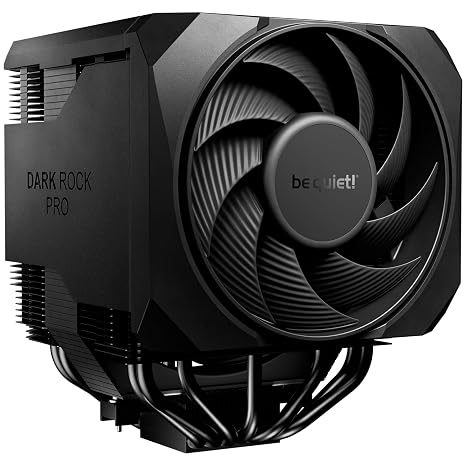 | be quiet! Dark Rock Pro | Check Price |
Our Selected Top 12 Air Cooler for 13600k Worth Buying
This list features a variety of air coolers compatible with the 13600k processor, offering insights into their cooling performance, suitability for different setups, and key strengths and limitations. Readers will find clear information to help choose an effective and appropriate cooling solution.
1. Thermalright Peerless Assassin 120 SE CPU Cooler
People building a desktop around an Intel i5-13600K will appreciate an air cooler that balances quiet operation and solid cooling. A standout feature here is its impressive 265 watts of cooling power, making it a reliable option for high-performance CPUs without loud fan noise.
Setting it up involves a straightforward 4-pin power connector designed for desktop compatibility. The fan runs up to 1550 rpm, which keeps noise low at 25.6 dB even under load. Its air cooling method with 66.17 CFM airflow ensures consistent heat dissipation without complicated maintenance routines, making regular use convenient.
The unit handles thermal demands efficiently with well-built materials that support intensive workloads. It maintains a quiet profile while cooling the CPU effectively, which many find to be its biggest plus. A frequent downside mentioned is the larger size, which can create tight fit issues in smaller cases.
The strongest praise acknowledges how quietly this cooler manages high wattage while keeping a stable temperature. Common complaints center on its physical size, which can interfere with tight or compact builds. The balance between noise and cooling is well-appreciated but not without space trade-offs.
Those with mid to large cases seeking effective air cooling will find it a solid choice. However, users with limited space or extreme cooling demands might benefit from smaller units or liquid cooling alternatives better suited for highly compact or overclocked setups.
Pros
- Powerful 265-watt cooling capability
- Quiet operation at 25.6 decibels
- Reasonable maximum fan speed of 1550 rpm
- Good airflow with 66.17 CFM
Cons
- Size may cause clearance issues in small cases
- Air cooling less effective than liquid solutions for extreme overclocking
| Specification | Details |
|---|---|
| Power Connector Type | 4-Pin |
| Voltage | 12 volts |
| Wattage | 265 watts |
| Noise Level | 25.6 db |
| Maximum Rotational Speed | 1550 rpm |
| Air Flow Capacity | 66.17 cfm |
2. Be Quiet! Pure Rock Pro 3 CPU Cooler
Ideal for anyone running a 13600k processor, the be quiet! Pure Rock Pro 3 stands out thanks to its six nickel-plated copper heat pipes designed specifically to handle high-performance and overclocked CPUs. It suits users looking for solid cooling without stepping into bulky or overly complicated setups.
Installation is straightforward, compatible with a wide range of Intel sockets including 1851 and 1700. The Pure Wings 3 120mm PWM fan runs quietly at 34.8 dB and adjusts its speed up to 2000 rpm depending on the load. Its fan blade design and funnel-shaped air outlet focus airflow, helping maintain stable temperatures during everyday tasks and demanding workloads alike.
The cooling performance keeps the CPU running smoothly even under stress, thanks to the efficient use of nickel-plated copper heat pipes and a carefully optimized fan. Build quality feels solid with nickel plating that improves durability. Praise centers on its ability to maintain low temperatures quietly, while most complaints mention the fan speed sometimes needing manual adjustment for quieter times.
The cooler consistently achieves impressive temperatures while running quietly, earning praise for keeping CPUs cool during intense workloads. A common drawback is the need to tweak fan speed settings occasionally to maintain a quieter environment.
Those wanting a reliable, silent air cooler for gaming or productivity with a 13600k processor will appreciate this cooler. Users looking for maximum cooling capacity in extreme overclocking scenarios might consider alternatives with higher wattage ratings.
Pros
- Six nickel-plated copper heat pipes for effective cooling
- Quiet operation at 34.8 dB noise level
- Compatible with a wide range of Intel and AMD sockets
- Optimized fan blade design for focused airflow
Cons
- Fan speed may require manual adjustment for quieter use
- Maximum 3.6 watts wattage limits cooling under extreme loads
| Specification | Details |
|---|---|
| Power Connector Type | 4-Pin |
| Voltage | 12 volts |
| Wattage | 3.6 watts |
| Noise Level | 34.8 dB |
| Maximum Rotational Speed | 2000 rpm |
| Compatible Devices | Intel sockets: 1851/1700/1200/1151/1150/1155, AMD sockets: AM5/AM4 |
3. Be Quiet! Dark Rock Pro 6 CPU Cooler
be quiet! Dark Rock Pro 6 CPU Cooler stands out for delivering powerful air cooling while staying impressively quiet.
Ideal for heavy users with Intel 13600k processors, it balances raw cooling capacity and low noise in demanding gaming or workstations.
Installation is straightforward, thanks to a pre-installed mounting bridge and a gentle but secure fixing system that feels reliable without needing extra muscle. The fan height adjustment adds flexibility that helps with tight builds. Day-to-day operation switches easily between full cooling and silent semi-passive mode where fans stop below 40% PWM, making it very adaptable to workload and noise preferences.
The cooler handles heat exceptionally well with seven copper heat pipes and an optimized heatsink to keep overclocked CPUs stable. Build quality is solid and refined fans push 68.7 cfm of airflow at up to 2000 rpm while running quietly at 32.4 db in active mode.
Some people mention the size can be bulky, which might limit compatibility in smaller cases, but most find it dependable and efficient for intense CPU loads.
The cooler receives consistent praise for its quiet running during intense use and its ability to switch to a silent fan stop mode under lighter loads. Common complaint focuses on its large size that may not fit all cases easily.
People needing excellent cooling for overclocked 13600k setups will appreciate the balance of silence and power. Compact or budget builds might want to look for smaller or simpler options due to the cooler’s bulk and price point.
Pros
- Quiet operation even at high performance
- Switchable active and semi-passive modes
- Easy, secure installation system
- Strong heat dissipation with 7 copper heat pipes
Cons
- Bulky size limits case compatibility
- Fans can hit 2000 rpm noise in maximum mode
| Specification | Details |
|---|---|
| Cooling Method | Air |
| Voltage | 12 volts |
| Power Connector Type | 4-Pin |
| Maximum Rotational Speed | 2000 rpm |
| Noise Level | 32.4 db |
| Air Flow Capacity | 68.7 cfm |
4. Noctua NH-D15 G2 chromax.Black CPU Cooler

Running a powerful Intel Core i5-13600K under control feels solid with this cooler. It suits anyone wanting quiet performance paired with strong cooling for heavy workloads.
Its biggest strength is handling heat with minimal noise thanks to the refined fan design and large surface area.
Setting it up requires some space awareness, as it’s a sizable air cooler with dual 140mm fans. Once in place, its automatic fan speed control keeps noise down when your PC idles but ramps up nicely under load. The included low-noise adapters help tune noise levels further, making daily use unobtrusive whether gaming or working.
Cooling efficiency is delivered by six heatpipes (eight in this second generation) and a larger surface area, resulting in strong heat transfer. The all-black finish feels solid and modern, fitting into most builds visually.
People often praise how quiet it runs, but some mention that fitting clearance in smaller cases can be tricky.
Quiet performance stands out as the strongest praise, with the dual NF-A14x25r G2 fans making little noise during heavy usage. The most frequent drawback mentioned is the cooler’s size, which complicates installation in compact or cramped PC cases.
Anyone working with a roomy case and needing efficient cooling for the 13600K will appreciate this air cooler. Those with smaller builds or inexperienced at cooler installation might look for a more compact or easier-to-install solution.
Pros
- Quiet operation even under load
- Large cooling surface area
- Speed-offset fans for noise tuning
- Durable all-black chromax finish
Cons
- Requires ample space inside the case
- Installation can be demanding for beginners
| Specification | Details |
|---|---|
| Cooling Method | Air |
| Noise Level | 24.8 db |
| Maximum Rotational Speed | 1500 rpm |
| Air Flow Capacity | 155.6 cubic meter per hour |
| Power Connector Type | 4-Pin |
5. Thermalright Peerless Assassin 120 Vision MAX CPU Cooler

Ideal for cooling the Intel i5-13600K, this air cooler stands out with a unique 5-inch IPS LCD screen that tracks system stats in real time. It suits users who want both strong performance and handy monitoring right on the cooler itself.
Installation is straightforward, and the cooler fits well on standard desktop CPUs. The dual-tower design and two fans make a noticeable difference in keeping temperatures down during daily tasks and gaming.
The magnetic top cover with its crisp display updates you constantly, adding a touch of personality to your setup with customizable themes through the TRCC control software.
Cooling is solid thanks to six copper heat pipes and a nickel-plated base that presses firmly against the CPU. Noise remains low at 27 dB despite the fans spinning up to 2150 RPM.
The build feels sturdy, blending metal and plastic. Common praise revolves around its powerful cooling paired with the innovative display, while some point out that the size demands good case clearance.
Many users appreciate the combination of effective cooling and the integrated LCD for easy system monitoring. The cooler keeps the CPU temperatures in check, though the fan noise can increase when pushed to maximum speed. Its size often demands careful consideration for compatibility with some cases.
People who want both visual system feedback and efficient cooling in one package will find this a good match. Those with smaller cases or a preference for ultra-quiet setups may prefer a more compact or quieter cooler option.
Pros
- Real-time system monitoring via 5-inch IPS LCD
- Six copper heat pipes improve heat dissipation
- Relatively quiet operation at 27 dB
- Customizable display themes with TRCC software
Cons
- Large size requires ample case space
- Fans can get noisy under heavy load
| Specification | Details |
|---|---|
| Power Connector Type | 4-Pin |
| Cooling Method | Air |
| Noise Level | 27 db |
| Maximum Rotational Speed | 2150 rpm |
| Air Flow Capacity | 69 cfm |
6. Thermalright Phantom Spirit 120SE CPU Cooler

Aluminum fins and seven 6mm heatpipes with AGHP technology form the core of this cooler, designed for users wanting solid air cooling for demanding CPUs like the 13600k. Its biggest strength is handling high thermal loads quietly, making it suited for those balancing performance and noise.
Installation involves straightforward mounting supported by the included brackets, with a 4-pin power connector controlling fan speed smoothly. The fan runs up to 1500 rpm, producing 66.17 cfm airflow, enough to keep temperatures manageable during heavy workloads.
Daily noise remains low at 25.6 dB, so it won’t get distracting in a work or gaming environment.
Performance-wise, it cools efficiently across a TDP range of 105W to 280W thanks to the AGHP technique reducing heat buildup. The build feels solid with quality materials.
While many appreciate its quiet operation and cooling power, some note it’s on the bulkier side, requiring decent case space for proper fitment.
Many users enjoy the quiet, efficient cooling thanks to the advanced heatpipe design and airflow capacity, but the size can be an issue in compact cases. It performs well under heavy CPU loads while maintaining low noise.
People with roomy cases looking for reliable, quiet cooling for high-TDP processors will find this cooler suits their needs. Those with smaller builds or priority on ultra-compact solutions might consider alternatives.
Pros
- Handles CPU heat loads between 105W to 280W
- Quiet operation at 25.6 dB noise level
- Strong airflow of 66.17 cfm helps effective cooling
- Stable 4-pin PWM fan control for speed adjustment
Cons
- Larger size may challenge tight case spaces
- Weight and bulkiness require secure mounting
| Specification | Details |
|---|---|
| Cooling Method | Air |
| Power Connector Type | 4-Pin |
| Noise Level | 25.6 db |
| Maximum Rotational Speed | 1500 rpm |
| Air Flow Capacity | 66.17 cfm |
7. Thermalright Assassin X120 Refined SE ARGB CPU Cooler

ARGB lighting stands out right away on the Thermalright Assassin X120 Refined SE ARGB, making it a solid choice for anyone wanting a blend of visual appeal and solid CPU cooling. It fits neatly on desktops and excels in air cooling, particularly suited for powerful processors like the 13600k that need consistent temperature management.
Setting it up is straightforward with the 4-pin power connector keeping control simple. The cooler operates quietly at 25.6 db, so daily use around the computer is not intrusive. Airflow is decent at 66.17 cfm, helping maintain steady warmth dissipation while keeping noise levels low, which matters a lot for users balancing work and play in the same space.
It holds up well in performance, handling heat efficiently without running too loud. The build reflects over 20 years of Thermalright’s experience, offering a solid feel and good materials.
The main praise is for how quiet and effective it is. The usual complaint is about rotational speed maxing out at 1550 rpm, which some want higher, but it suits most air cooling needs on a 13600k.
The most praised aspect is its quiet and effective cooling performance, making it great for managing CPU temperatures without excess noise. The most common drawback revolves around the maximum fan speed being capped at 1550 rpm, which some find limiting for pushing the CPU beyond typical loads.
People who want a reliable, quiet cooler with aesthetic lighting will appreciate this model, especially for standard or moderate CPU demands. Those needing more aggressive cooling, especially for heavy overclocking, might want to explore alternatives with higher fan speed capabilities.
Pros
- Quiet operation at 25.6 db
- Good airflow of 66.17 cfm
- Easy 4-pin power connection
- ARGB lighting adds visual appeal
Cons
- Maximum fan speed limited to 1550 rpm
- May not suit extreme overclocking needs
| Specification | Details |
|---|---|
| Power Connector Type | 4-Pin |
| Voltage | 12 volts |
| Noise Level | 25.6 db |
| Maximum Rotational Speed | 1550 rpm |
| Air Flow Capacity | 66.17 cfm |
8. Cooler Master Hyper 612 APEX CPU Cooler

Powerful cooling capability makes the Cooler Master Hyper 612 APEX a solid choice for 13600k builds that demand strong heat dissipation. It suits anyone looking for quiet operation combined with a dark, minimal design that fits modern setups.
Its biggest strength lies in managing thermal loads without excessive noise.
Setting it up is straightforward thanks to redesigned brackets compatible with LGA 1851 and 1700 platforms, making installation easier on current Intel sockets. Dual Mobius 120 fans provide adjustable speeds up to 2,400 rpm with PWM control, so you can dial the airflow without adding much noise. The copper base and six heat pipes help distribute heat evenly, keeping temperatures manageable during everyday tasks or heavier workloads.
Cooling performance is dependable, with six superconductor heat pipes and a copper base contributing to effective temperature control on demanding CPUs like yours. The build quality feels solid, highlighted by a jet-black cover that keeps things visually low-profile yet refined. Silent operation around 30 dB is a noted advantage, though some mention the fan speed ramping can get a bit loud when pushed hard.
Quiet operation around 30 dB while cooling heavy CPUs is a key selling point. A fairly common downside is the noise spike when fans reach maximum RPM, which some find disruptive during intense loads.
Builders looking for a solid, quiet cooler for a 13600k will find this suits them well, especially with simpler installation requirements. For those highly sensitive to fan noise at peak operation, exploring alternatives with lower max rpm might be better.
Pros
- Six heat pipes for strong heat dissipation
- Quiet PWM-controlled Dual Mobius fans
- Easy installation on latest Intel sockets
- Minimalist jet-black design fits most builds
Cons
- Fan noise increases noticeably at max speed
- Airflow capacity measured in cubic centimeters seems low
| Specification | Details |
|---|---|
| Cooling Method | Fan |
| Maximum Rotational Speed | 2400 rpm |
| Air Flow Capacity | 78.2 cubic_centimeters_per_minute |
| Noise Level | 30 db |
| Power Connector Type | 4-Pin |
9. Thermalright Assassin X120R Digital ARGB CPU Cooler

Keeping a Ryzen 5 3600 cool under heavy loads can be tough, but a quiet, efficient cooler makes all the difference. A good air cooler tailored for this chip needs strong airflow and adaptive fan speeds to avoid noise.
Thermalright’s Assassin X120R Digital ARGB handles these challenges well with an adjustable 2000RPM fan and adaptive PWM control.
Setup fits most desktops easily thanks to the 4-pin power connector and its medium size. The fan speed changes depending on your motherboard’s temperature sensors, so it won’t spin loudly when idle. Noise is reduced further by silicone corner pads around the fan, preventing vibration sounds.
The industrial-grade materials and S-FDB bearing keep fan blade wobble to a minimum while you work or game.
Performance at 70.84 CFM airflow means good heat dissipation, even with demanding tasks. Constructed from UL CLASSA safety insulation grade PBT+PC, it feels solid and built to last. High praise comes from its silent operation and efficient cooling, although some note the fan speed can remain high under heavy loads, causing more noise than expected.
The quiet operation during normal PC use is a strong highlight, paired with the efficient adjustment of fan speed according to temperature. However, louder noise at full fan speed is a common concern and noticed during heavy CPU loads.
People wanting an air cooler that blends quiet performance with solid cooling will appreciate it. Those sensitive to fan noise under load or looking for a very compact solution might want to explore alternatives.
Pros
- Adaptive PWM fan speed matches motherboard temperature
- Silicone pads reduce fan vibration noise
- Solid materials with industrial-grade insulation
- High airflow capacity at 70.84 cfm
Cons
- Fan can get loud at maximum speed
- May be bulkier than low-profile coolers
| Specification | Details |
|---|---|
| Maximum Rotational Speed | 2000 rpm |
| Noise Level | 29.8 db |
| Air Flow Capacity | 70.84 cfm |
| Power Connector Type | 4-Pin |
| Voltage | 12 volts_of_direct_current |
| Cooling Method | Air |
10. ID-COOLING FROZN A620 PRO SE CPU Cooler

Six copper heat pipes and dual 120mm fans make cooling the 13600k straightforward and reliable with this air cooler. It suits anyone looking for strong heat dissipation in a design that fits most tower cases and matches darker builds. Its dual-tower heatsink is the key strength, keeping temperatures well in check.
Setting up involves securing a cooler that stands 157mm tall, fitting comfortably in most mid-to-full tower cases. The two fans connect via a 4-pin PWM connector, spinning up to 2000 rpm for good airflow.
Day to day, noise levels stay around a moderate 27.2 dB. There’s enough space for RAM clearance, up to 63mm if the fins are cut out, so memory upgrades won’t be cramped.
Heat management works thanks to six 6mm heat pipes that pull heat from the CPU effectively across the heatsink’s large surface. The build feels solid, with a blackout design that blends into black PC interiors.
For many, the biggest plus is effective cooling with a compact footprint. Some complaints mention that the height might still be restrictive for very small cases.
Strong heat dissipation is praised, keeping CPUs cool with the dual-tower and six heat pipes. The main drawback users mention is the cooler’s height, which can be a tight fit in smaller cases. Noise is usually reasonable but can increase when the fans spin at maximum speed.
This cooler will satisfy those with mid to large tower builds who want dependable cooling without elaborate setups. For very compact cases or noise-sensitive environments, a lower profile or quieter cooler might be a better match.
Pros
- Six copper heat pipes for efficient heat transfer
- Good clearance for standard and taller RAM
- Relatively quiet operation at 27.2 dB
- Dual 120mm fans improve airflow substantially
Cons
- Height may not fit all compact tower cases
- Fans may reach 2000 rpm noise under heavy loads
| Specification | Details |
|---|---|
| Height | 157mm |
| Cooling Method | Air |
| Noise Level | 27.2 dB |
| Maximum Rotational Speed | 2000 rpm |
| Air Flow Capacity | 58 cfm |
| Power Connector Type | 4-Pin |
11. Noctua NH-D15 chromax.Black CPU Cooler

Enthusiasts running an Intel 13600K who want quiet yet powerful cooling will appreciate this air cooler. Its biggest strength lies in balancing strong heat dissipation with low noise, making it a perfect fit for silent builds without sacrificing performance.
Installing the cooler requires some space consideration due to its extra-wide 140mm dual-tower design. Once set up, the automatic speed control with PWM keeps it whisper quiet during light tasks while ramping up airflow when under load. The Low-Noise Adaptors help keep noise levels tolerable, so daily use remains pleasant without constant fan noise distractions.
Performance-wise, the six heatpipes and dual NF-A15 140mm fans offer cooling comparable to many all-in-one water coolers. The all-black design fits well in various color schemes, making it versatile for aesthetics.
One downside mentioned is its size, which might limit fit in smaller cases or obstruct RAM clearance. Build quality is solid, reflecting its premium status and international accolades.
The cooler receives praise for operating silently even at high performance levels while effectively managing heat. A common complaint points to its size, which can interfere with RAM clearance or not fit in compact cases. The balance of power and noise control is its defining trait.
Those prioritizing silent yet strong cooling for a desktop with space will find this cooler ideal. People with smaller cases or limited clearance around the CPU socket might want to consider a more compact solution to avoid installation issues.
Pros
- Excellent cooling performance for overclockers
- Quiet operation even at full load
- Compatible with many color schemes
- Automatic fan speed control with PWM
Cons
- Large size may block certain RAM slots
- Requires a roomy case for proper fit
| Specification | Details |
|---|---|
| Cooling Method | Air |
| Power Connector Type | 4-Pin |
| Maximum Rotational Speed | 1500 rpm |
| Noise Level | 24.6 db |
| Air Flow Capacity | 140.2 cubic meter per hour |
12. Thermalright Peerless Assassin 120 Digital ARGB CPU Cooler

Cooling a 13600k demands strong heat dissipation, and the Peerless Assassin 120 Digital ARGB meets that need with its dual tower design and two high-speed fans. Ideal for those wanting powerful air cooling without stepping into liquid cooling territory, its standout feature is effective temperature control paired with customizable lighting.
Installation requires a bit of attention due to its size but remains manageable for anyone familiar with PC building. The magnetic top cover is a neat touch, while the dual fans run quietly at a steady 1850 RPM.
Managing airflow is straightforward with the 4-pin PWM connection, and the durable S-FDB bearings promise lasting operation without much upkeep.
In terms of performance, six pure copper heat pipes and a copper base ensure excellent heat transfer from the CPU. The cooler handles the demanding 13600k well, maintaining solid temperatures even under load.
Build quality matches the heat dissipation power, though some report that the unit’s size can challenge fitment in smaller cases.
Heat transfer efficiency and surprisingly quiet fans are the biggest strengths, while common issues include fitting the cooler in smaller or tighter PC builds. The magnetic top cover also draws both admiration and curiosity during setup. It performs consistently at keeping CPU temperatures in check as advertised.
This cooler suits users running a 13600k who have mid-to-large cases and prefer air cooling with a visual flair. Those with small form factor builds or who want minimal installation effort might look for more compact alternatives or liquid cooling options.
Pros
- Strong heat dissipation with dual copper heat pipes
- Quiet operation at max fan speed
- Durable S-FDB fan bearings for long life
- Magnetic top cover adds aesthetic appeal
Cons
- Large size can complicate installation in compact cases
- No included mounting hardware for all motherboard types
| Specification | Details |
|---|---|
| Fan speed | 1850 RPM +10% |
| Air flow capacity | 88.89 CFM |
| Noise level | ≤25.6 dB (A) |
| Cooling method | Air |
| Power connector type | 4-Pin |
Best Air Coolers for 13600k Comparison Table
| Product | Noise Level (dB) | Max RPM | Air Flow Capacity | Compatible Devices |
|---|---|---|---|---|
| Thermalright Peerless Assassin 120 SE | 25.6 | 1550 rpm | 66.17 cfm | Desktop |
| be quiet! Pure Rock Pro | 34.8 | 2000 rpm | – | Intel/AMD sockets |
| be quiet! Dark Rock Pro | 32.4 | 2000 rpm | 68.7 cfm | Intel/AMD sockets |
| Noctua NH-D15 G2 chromax.Black | 24.8 | 1500 rpm | 155.6 m³/h | Desktop |
| Thermalright Peerless Vision MAX | 27 | 2150 rpm | 69 cfm | Desktop |
| Thermalright Phantom Spirit 120SE | 25.6 | 1500 rpm | 66.17 cfm | Desktop |
| Thermalright Assassin X120 Refined ARGB | 25.6 | 1550 rpm | 66.17 cfm | Desktop |
| Cooler Master Hyper 612 APEX | 30 | 2400 rpm | 78.2 cm³/min | CPU/Desktop |
| Thermalright Assassin X120R Digital ARGB | 29.8 | 2000 rpm | 70.84 cfm | Desktop |
| ID-COOLING FROZN A620 PRO SE | 27.2 | 2000 rpm | 58 cfm | Desktop |
| Noctua NH-D15 chromax.Black | 24.6 | 1500 rpm | 140.2 m³/h | Desktop |
| Thermalright Peerless Assassin 120 ARGB | 25.6 | 1850 rpm | 88.89 cfm | Desktop |
- Noise Level (dB)25.6
- Max RPM1550 rpm
- Air Flow Capacity66.17 cfm
- Compatible DevicesDesktop
- Noise Level (dB)34.8
- Max RPM2000 rpm
- Air Flow Capacity–
- Compatible DevicesIntel/AMD sockets
- Noise Level (dB)32.4
- Max RPM2000 rpm
- Air Flow Capacity68.7 cfm
- Compatible DevicesIntel/AMD sockets
- Noise Level (dB)24.8
- Max RPM1500 rpm
- Air Flow Capacity155.6 m³/h
- Compatible DevicesDesktop
- Noise Level (dB)27
- Max RPM2150 rpm
- Air Flow Capacity69 cfm
- Compatible DevicesDesktop
- Noise Level (dB)25.6
- Max RPM1500 rpm
- Air Flow Capacity66.17 cfm
- Compatible DevicesDesktop
- Noise Level (dB)25.6
- Max RPM1550 rpm
- Air Flow Capacity66.17 cfm
- Compatible DevicesDesktop
- Noise Level (dB)30
- Max RPM2400 rpm
- Air Flow Capacity78.2 cm³/min
- Compatible DevicesCPU/Desktop
- Noise Level (dB)29.8
- Max RPM2000 rpm
- Air Flow Capacity70.84 cfm
- Compatible DevicesDesktop
- Noise Level (dB)27.2
- Max RPM2000 rpm
- Air Flow Capacity58 cfm
- Compatible DevicesDesktop
- Noise Level (dB)24.6
- Max RPM1500 rpm
- Air Flow Capacity140.2 m³/h
- Compatible DevicesDesktop
- Noise Level (dB)25.6
- Max RPM1850 rpm
- Air Flow Capacity88.89 cfm
- Compatible DevicesDesktop
How to Choose the Best Air Cooler
Choosing an air cooler for a 13600k requires focusing on compatibility with the CPU socket, efficient heat dissipation, and quiet operation. Selecting the right features ensures reliable performance, prevents overheating, and avoids costly replacements or damage to your system.
Compatibility and Socket Support
Many people buy a cooler without verifying it fits the processor socket, leading to installation issues or poor contact that raises temperatures. For the latest generation Intel CPUs, the LGA 1700 socket is standard. Choosing a cooler designed to support that socket ensures the mounting brackets and screws align correctly, avoiding wasted time and risk of damage.
Clearance is often overlooked, especially around the RAM slots and motherboard heatsinks near the CPU socket. A bulky cooler can block tall RAM modules or interfere with VRM components, causing fitment problems.
Confirm the product specs cover these details and measure your case’s internal dimensions as well to make sure the cooler fits without crowding or airflow restrictions.
Cooling Performance and Tdp Rating
The processor can produce significant heat under load, and a cooler that can’t keep up will cause throttling or instability. This model’s TDP calls for a cooler rated at least 125 watts or higher.
Heat sink size, number of heat pipes, and fan airflow ratings directly impact efficiency. Larger fins and multiple copper heat pipes aid in spreading and dissipating heat more effectively.
Heavy workloads or slight overclocking push cooling systems harder. Coolers with strong sustained performance keep temperatures in check over long periods.
Look for models with large surface area radiators and good static pressure fans capable of consistent airflow rather than just peak ratings.
Noise Levels and Fan Quality
Some coolers blow air loudly at high RPMs, which becomes distracting during tasks. Evaluating fan noise levels at different speeds helps find models that remain quiet during idle or moderate workloads.
Fans with PWM control allow dynamic speed adjustments, preventing unnecessary noise when full power cooling isn’t needed.
Fan durability matters too. Bearings like fluid dynamic or rifle bearings run smoother and last longer than cheaper sleeve bearings.
Good build quality also keeps vibrations low, reducing both noise and wear over time, which benefits anyone using the system daily.
Size and Fit Constraints
Clearance inside the case is critical. A cooler too tall may not fit under certain side panels or interfere with cable routing. Measuring maximum cooler height against your case specifications prevents surprises.
Memory clearance also impacts user experience, taller RAM sticks can be blocked or compressed by large coolers, causing damage or installation frustration.
Other motherboard components like VRM heatsinks and PCIe slots should be accounted for. A well-sized cooler leaves enough room for these parts so everything fits comfortably without forcing components into unnatural positions or blocking airflow paths.
Build Materials and Durability
Materials affect both cooling efficiency and longevity. Copper heat pipes conduct heat much better than cheaper materials, while aluminum fins provide a lightweight structure that dissipates heat steadily.
Lower-grade materials may degrade or warp over time under heavy use, reducing performance.
Mounting mechanisms need to stay firm but not be so stiff they risk damaging the board during installation. Solid retention brackets that don’t loosen over months or years maintain consistent contact pressure.
Easy-to-clean designs simplify maintenance, which is important for keeping a cooler operating well throughout its lifespan.
Optimizing Airflow and Placement for Maximum Cooling Efficiency
Placing an air cooler where it can draw in the coolest possible air makes a significant difference in performance. Positioning it near open windows or in a room with good ventilation prevents the intake of warm, stale air that reduces cooling efficiency.
The direction of airflow also matters. Aligning the cooler so that its exhaust doesn’t blow hot air back onto the processor helps maintain consistent temperatures.
Using a fan to improve overall air circulation can boost the cooler’s effectiveness. Avoid clutter around the PC case that blocks vents or fans. Clearance on all sides ensures fresh air reaches the system and hot air exits without restriction.
- Place the cooling unit near a fresh air source.
- Ensure unobstructed airflow paths inside and outside the case.
- Use additional fans to move air through the space effectively.
Attention to these details can improve the cooler’s ability to dissipate heat effectively with the Intel Core i5-13600K.
Routine Maintenance Tips to Prolong Your Air Cooler’s Lifespan
Regular upkeep of an air cooler is key to maintaining steady performance over time. Dust accumulation on the fins and fans blocks airflow, causing higher temperatures. Cleaning with compressed air or a soft brush every few weeks prevents buildup.
Removing the cooler to clean areas that are harder to reach also helps.
Check for any loose screws or mounting hardware, as vibrations can lessen contact pressure between the cooler and CPU, reducing heat transfer. Reapplying thermal paste periodically, roughly once a year, restores optimal conductivity between the processor and heat sink.
- Clean dust from fans and fins frequently.
- Verify mounting stability and retighten if needed.
- Replace thermal paste annually for consistent thermal performance.
Consistent maintenance improves cooling efficiency and can extend the air cooler’s functional lifespan.
Comparing Air Cooling to Liquid Cooling for the 13600k Processor
Air cooling remains a popular choice for the Intel Core i5-13600K due to its simplicity and quiet operation. Air coolers are generally easier to install and require less active monitoring compared to liquid systems.
They rely on a combination of heatsinks and fans to dissipate heat.
Liquid coolers can provide higher thermal performance, particularly under sustained heavy loads or overclocking, by circulating coolant through a radiator to carry heat away more efficiently. However, they involve more components, such as pumps and tubes, increasing the chance of maintenance or leakage issues.
- Air coolers offer straightforward installation and reliable operation.
- Liquid coolers often perform better for intense, prolonged CPU use.
- Air coolers require less maintenance and have fewer failure points.
Choosing between them depends on your workload, noise preference, and willingness to maintain more complex hardware.
People Also Asked
How Do I Install an Air Cooler on a 13600k CPU?
Mount the cooler’s backplate and align it with the holes on the 13600k motherboard socket, then apply thermal paste and secure the cooler with screws or clips. Make sure the cooler is firmly attached to avoid any gaps between the CPU and cooler base for effective heat transfer.
What Size Air Cooler Is Compatible with a 13600k Processor?
A medium to large-sized air cooler with a base designed for LGA 1700 sockets fits the 13600k well; typical fan sizes range from 120mm to 140mm. Check the case clearance to ensure the cooler will fit without obstructing memory or other components.
How Long Do Air Coolers Typically Last with Regular Use?
Air coolers usually last several years, often 5 years or more, if the fan bearings remain functional and dust build-up is managed. Regularly cleaning the fins and fan blades extends lifespan and maintains cooling efficiency.
Are There Any Safety Tips for Maintaining a 13600k Air Cooler?
Unplug the PC during maintenance and clean dust from cooler fins and fan blades gently using compressed air or a soft brush. Avoid using water or liquids that could damage electrical parts and reapply thermal paste if you remove the cooler for a thorough clean.
What Common Problems Occur with Air Coolers on 13600k CPUs?
Common issues include dust accumulation reducing airflow, fan bearing noise or failure, and improper mounting leading to high CPU temperatures. Checking for secure attachment and periodic cleaning helps avoid these problems and keeps the 13600k running cool.
Conclusion
Choosing the right air cooler for a 13600k means focusing on cooling performance, noise levels, and compatibility with your case. The cooler must effectively handle the processor’s heat without being too loud.
Also, check the size to ensure it fits inside your PC case without blocking other components.
Think about the size of your setup and how much you want to spend. A bigger cooler usually cools better but might not fit smaller cases.
Use the comparison table and the detailed picks above to find one that suits your needs and budget.

I’m Grant Mitchell, a firearms and hunting writer with years of experience at the range and in the field. I write about rifles, shotguns, handguns, optics, safe storage, cleaning, and responsible ownership, along with practical hunting tips. My goal is to share accurate, safety-first information that helps you choose the right firearm, maintain it properly, and become a more confident shooter.