Top 12 Best AIO Cooler for Ryzen 7 5800X That Beat Heat!
Running a Ryzen 7 5800X without an effective cooling system often results in thermal throttling, noisy fans, or even sudden shutdowns during intense workloads. Choosing the best aio cooler for ryzen 7 5800x can prevent these issues, keeping the CPU temperature stable under heavy use.
A mediocre cooler can have trouble keeping temperatures under 85°C, which hurts both performance and lifespan.
Key factors for a good aio cooler include the radiator size, pump quality, and compatibility with your case and socket. Radiators typically come in 120mm, 240mm, or 360mm sizes; larger ones generally offer better heat dissipation if space allows.
The pump needs to provide steady flow without excessive noise, as cheap units can degrade quickly. Also, a secure mounting system ensures consistent contact with the CPU, which improves heat transfer and overall reliability.
Need a Quick Check?
| Image | Product | Price |
|---|---|---|
Our Top Picks 1  | ARCTIC Liquid Freezer Pro 360 | Check Price |
Our Top Picks 2  | ARCTIC Liquid Freezer Pro 360 | Check Price |
Our Top Picks 3  | Cooler Master 240 Core II | Check Price |
Our Selected Top 12 Aio Cooler for Ryzen 7 5800x for Every Budget
This list features a variety of all-in-one coolers designed to handle the Ryzen 7 5800x efficiently. Each review highlights performance aspects, ideal user scenarios, and key advantages and disadvantages to help you choose the best cooling solution for your needs and budget.
1. ARCTIC Liquid Freezer III Pro 360
Keeping a Ryzen 7 5800X cool under heavy loads can be challenging during gaming or content creation sessions. The ARCTIC Liquid Freezer III Pro 360 suits anyone looking for strong liquid cooling performance with added benefits like VRM cooling. Its standout feature is a dedicated fan for the voltage regulators, helping stabilize overall system temperatures.
Setting up is straightforward, with native offset mounting designed to align the cold plate directly over your Ryzen processor’s hotspot. Fans are controlled via PWM to keep noise levels low while ramping up cooling when needed.
The P12 PRO fans deliver more airflow quietly, especially at lower speeds, making daily use quieter than many other AIOs. Maintenance is minimal, as the sealed liquid cooling system requires no refills or cleaning beyond dusting the radiator and fans.
Performance-wise, it excels at managing the CPU’s heat output during demanding tasks, thanks to a 360mm radiator and efficient fan design running at up to 3000 rpm. The integrated VRM fan adds an extra layer of cooling not common in most AIO coolers.
Build quality feels solid, with a nicely optimized pressure contact frame for longer CPU lifespan. A few users mention the size can make it tricky to fit in smaller cases.
The strong cooling performance combined with the VRM fan stands out as the main praise, while several find the radiator size and occasional fan noise to be drawbacks. The fans run quietly at lower speeds but push up to 3000 rpm for intense cooling, which can be audible. The mounting improvements contribute to efficient heat transfer and CPU longevity.
People wanting reliable, powerful cooling with additional VRM temperature control will appreciate this cooler. Those with compact cases or who prioritize near-silent operation at max load might want to consider smaller or quieter options instead.
Pros
- Integrated VRM fan for added voltage regulator cooling
- Quiet operation with P12 PRO fans at low speeds
- Optimized mounting aligns cold plate for better heat dissipation
- Strong airflow of 77 cfm at high speeds
Cons
- Large radiator size may not fit smaller cases
- Higher fan speed can lead to noticeable noise
| Specification | Details |
|---|---|
| Cooling Method | Liquid |
| Maximum Rotational Speed | 3000 rpm |
| Air Flow Capacity | 77 cfm |
| Power Connector Type | 4-Pin |
| Voltage | 12 volts |
| Wattage | 3.96 watts |
2. ARCTIC Liquid Freezer III Pro 360 A-RGB
Liquid cooling power at 3000 rpm makes the ARCTIC Liquid Freezer III Pro 360 A-RGB a solid match for anyone with a Ryzen 7 5800X seeking strong thermal management. The integrated VRM fan helps keep voltage converters cool, offering steady performance under load.
Setup involves mounting with native offset placement that targets the CPU hotspot directly, improving heat transfer. The P12 PRO fans offer quieter operation at low speeds and ramp up efficiently when you push the system harder. The 4-pin power connector supports PWM control, letting the cooler adjust fan speeds based on need.
It handles heat well, thanks to a cooling capacity that stays reliable during intense tasks. Sturdy construction complements the smart layout that extends CPU life by optimizing contact pressure. Praised most for quiet yet effective cooling, occasional mentions of bulkiness in tighter cases occur as a downside.
Quiet operation paired with strong cooling performance stands out, though some mention that its size can be a tight fit for smaller builds. The integrated VRM fan adds stability that many appreciate during prolonged heavy use.
People seeking powerful and quieter cooling for Ryzen 7 5800X find this suitable, especially if their cases can accommodate a 360mm radiator. Those with limited space or sensitive to occasional higher noise spikes might want a smaller or different design.
Pros
- Quieter than regular P12 fans at low speeds
- Integrated fan cools VRMs effectively
- Efficient heat transfer with offset cold plate
- Good airflow of 77 cfm supports strong cooling
Cons
- Large size may challenge compact cases
- Higher max speed creates noticeable noise under load
| Specification | Details |
|---|---|
| Maximum Rotational Speed | 3000 rpm |
| Air Flow Capacity | 77 cfm |
| Power Connector Type | 4-Pin |
| Voltage | 12 volts |
| Wattage | 3.96 watts |
| Cooling Method | Liquid |
3. Cooler Master 240 Core II AIO Liquid CPU Cooler
Gamers and PC builders running Ryzen 7 5800X will find the Cooler Master 240 Core II AIO Liquid CPU Cooler tailored for high-performance cooling needs. Its key strength lies in the G9R Gen Dual-Chamber design that targets the CPU hotspot, delivering strong cooling where Ryzen chips demand it most.
Installation takes little time thanks to compatible brackets for AM5, AM4, LGA 1851, and 1700 sockets. The dynamic PWM fan adjusts between 650 and 1,750 rpm, providing quiet operation without sacrificing airflow.
The infinity mirror ARGB lighting adds a customizable look controlled through many motherboards, while the CryoFuze thermal paste helps maintain optimal thermal conductivity.
It keeps Ryzen 7 5800X temperatures low under load, with a solid build quality focused on durability and efficient water flow. Most users appreciate the quiet cooling fans and good thermal performance. Some mention the 3-pin fan connector limits advanced fan speed control, which can be a minor drawback for fine-tuners.
Cooling performance suits heavy Ryzen 7 workloads with stable temperatures and quiet fans. Some users find the 3-pin fan connector less flexible compared to 4-pin PWM options, limiting manual speed control. CryoFuze thermal paste contributes to consistent cooling results in everyday use.
Anyone seeking straightforward, strong cooling with added lighting customization will appreciate this unit. Users desiring granular fan control or plug-and-play lighting without extra software may want to explore alternatives offering 4-pin connectors and standalone RGB controllers.
Pros
- Strong cooling focused on Ryzen 7 CPU hotspots
- Quiet PWM fan with wide speed range
- Easy installation on current AMD and Intel sockets
- Customizable ARGB lighting with infinity mirror effect
Cons
- 3-pin connector limits advanced fan control options
- ARGB lighting may require motherboard software setup
| Specification | Details |
|---|---|
| Power Connector Type | 3-Pin |
| Voltage | 12 volts_of_alternating_current |
| Wattage | 12 watts |
| Noise Level | 30 db |
| Maximum Rotational Speed | 1750 rpm |
| Air Flow Capacity | 70.5 cfm |
4. CORSAIR NAUTILUS 360 RS AIO Liquid CPU Cooler

Designed with easy installation and quiet operation in mind, the CORSAIR NAUTILUS 360 RS works perfectly with Ryzen 7 5800X and other modern CPUs. Its single biggest strength lies in the way the RS120 fans are daisy-chained, cutting down cable clutter while delivering focused, powerful airflow.
Setup is straightforward with the included RS120 fans already pre-installed, which means fewer steps when putting everything together. Thanks to the AirGuide technology, everyday cooling stays focused and effective.
Only one cable plugs into the motherboard for all three fans, which simplifies wiring and helps keep your case tidy and free of unnecessary mess.
Performance-wise, the water cooling method paired with the magnetic dome bearing fans combines quietness and strong airflow well, maintaining temperatures under control during heavy use. Build quality seems solid, though some users mention the size and noise at maximum fan speed. The compatibility with AMD AM4 and AM5 sockets makes it flexible, but it can generate noticeable sound when pushed hard.
The cooler receives strong praise for its clean installation process and quiet fan operation during normal use. Some users point out noise levels increase noticeably at maximum RPM, which can be a drawback during intense workloads. The daisy-chained fans and AirGuide design help maintain balanced airflow and reduce cable clutter efficiently.
Those with roomy cases looking for a powerful water cooler with minimal wiring will appreciate this model. It suits Ryzen 7 5800X users wanting a solid balance of cooling and noise control. People with smaller builds or low noise tolerance under load may want to explore alternatives with smaller radiators or quieter fan options.
Pros
- Pre-installed RS120 fans for easy setup
- Daisy-chain cable reduces clutter
- Magnetic Dome bearing for quieter operation
- Supports latest AMD and Intel sockets
Cons
- Can be noisy at max fan speed
- Larger size might be tricky in small cases
| Specification | Details |
|---|---|
| Power Connector Type | 4-Pin |
| Cooling Method | Water |
| Compatible Devices | Desktop |
| Maximum Rotational Speed | 2100 rpm |
5. Thermalright Aqua Elite 240 V3 CPU Cooler

Thermalright Aqua Elite 240 V3 is a water-cooled CPU cooler designed for gamers and creators using Ryzen 7 5800X who want strong cooling with quiet operation. Its standout feature is the fourth generation pump head combined with a 240mm radiator that delivers efficient heat dissipation while keeping noise levels low.
Setting up the cooler involves attaching the 240mm radiator with its black aluminium fin heat sink to your PC case, guided by the sturdy cold row and protective mesh water pipe. The included 120mm ARGB fan runs quietly at up to 1800 rpm while moving 66.17 cfm of air, making daily running smooth without extra noise distractions.
The 4-pin power connector supports voltage at 5 volts, keeping things simple for compatibility.
Performance-wise, the cooler manages Ryzen 7 5800X heat well, thanks to its efficient pump head rotating up to 2800 RPM and low vibration design that minimizes noise capping at 25 db. The build uses durable materials meant to extend lifespan up to 40,000 hours.
Users most often praise the stable cooling it provides, though some mention the fan speed could be a bit higher for extreme loads.
The cooler is praised for consistent, quiet cooling and a long-lasting pump design. The main complaint centers around the fan speed, which some feel limits peak cooling potential during intense CPU use.
Users seeking reliable daily cooling with a quiet system will be satisfied here. Those needing more aggressive performance for overclocking or heavy workloads might want to consider options with higher fan speeds or larger radiators.
Pros
- Low vibration contributes to quiet operation
- High heat dissipation with 240mm radiator
- Durable pump head rated for 40,000 hours
- ARGB lighting adds visual appeal
Cons
- Fan speed maxes out at 1800 rpm
- Some find cooler less effective under heavy workloads
| Specification | Details |
|---|---|
| Power Connector Type | 4-Pin |
| Voltage | 5 volts |
| Wattage | 2.64 watts |
| Noise Level | 25 db |
| Maximum Rotational Speed | 1800 rpm |
| Air Flow Capacity | 66.17 cfm |
6. Minorsonic 360mm AIO CPU Cooler

Quiet operation and solid cooling performance make the Minorsonic 360mm AIO a great fit for anyone running a Ryzen 7 5800X. Its standout feature is the high-speed ceramic bearing pump, which drives coolant quickly and reliably, keeping temperatures low during intense workloads.
Setup is straightforward with the standard 4-pin power connector, and the industrial-grade motor ensures the pump runs smoothly at 3000 RPM without loud vibrations. Day-to-day use benefits from its quiet fan running at up to 1600 RPM and noise levels around 30 dB, which means it won’t be a distraction even under heavy system use.
Cooling power feels strong thanks to the fast coolant flow and stable operation, making it excellent at heat transfer. The 360mm radiator gives plenty of surface area for keeping the CPU temperature down.
Build quality feels solid with durable ceramic bearings in the pump, but some note that the wiring can feel a bit stiff during installation.
Strong points include the ceramic bearing pump that runs stably at high speeds, ensuring efficient coolant flow and consistent cooling during heavy CPU use. The most common issue mentioned is the stiff wiring, which can make installation a bit tricky or awkward in tighter cases.
A Ryzen 7 5800X owner looking for quiet and dependable cooling will appreciate this cooler’s performance and build quality. Those needing extremely high airflow or easier cable management might want to explore other AIO options with more flexible connectors and higher fan speeds.
Pros
- Very quiet operation around 30 dB
- High-speed ceramic bearing pump
- Stable and smooth motor performance
- Efficient cooling for demanding CPUs
Cons
- Wiring feels stiff and less flexible
- Fans max out at 1600 rpm, limiting airflow
| Specification | Details |
|---|---|
| Power Connector Type | 4-Pin |
| Voltage | 12 volts |
| Wattage | 5 watts |
| Noise Level | 30 dB |
| Maximum Rotational Speed | 1600 rpm |
7. Thermalright Aqua Elite 360 V6 ARGB CPU Cooler

Thermalright Aqua Elite 360 V6 ARGB is a solid choice for anyone with a Ryzen 7 5800X who wants efficient water cooling paired with eye-catching lighting. It stands out for its powerful pump combined with customizable ARGB effects, fitting well in builds where both performance and looks matter.
Setup involves connecting the 4-pin pump and syncing the ARGB lighting with a 5V 3-pin motherboard header, which controls everything smoothly. Daily operation is quiet at 29.8 dB, and the fan maintains an airflow of 70.84 CFM at up to 2000 RPM, balancing cooling with manageable noise. The vortex cold pump runs at around 2800 RPM, ensuring steady heat dissipation.
Cooling performance is effective thanks to the fourth-generation vortex pump and large 360mm radiator. The build feels solid, especially with the rounded pump head emitting a soft 1600W color light effect.
Light synchronization adds a nice visual touch. Some users note the lighting interface might be limited if the motherboard has fewer ARGB headers, posing a mild inconvenience.
The strongest praise points to its efficient cooling performance paired with rich ARGB lighting synchronized through standard 5V headers. The most common complaint revolves around the limited number of lighting interfaces, which can pose problems for users with fewer motherboard ARGB connectors.
Gamers and creative professionals who want effective cooling without loud noise will appreciate this cooler. Those planning heavy overclocking or needing extensive lighting control might want to explore options with higher fan speeds or more flexible ARGB support.
Pros
- Powerful vortex pump reaches 2800 RPM±10%
- ARGB lighting syncs well with motherboard headers
- Quiet operation at under 30 dB noise level
- High airflow with efficient 2000 RPM fan speed
Cons
- Limited ARGB lighting interfaces may restrict sync options
- Maximum fan speed not very high for extreme overclocking
| Specification | Details |
|---|---|
| Power Connector Type | 4-Pin |
| Cooling Method | Water |
| Noise Level | 29.8 db |
| Maximum Rotational Speed | 2000 rpm |
| Air Flow Capacity | 70.84 cfm |
8. Thermalright Frozen Warframe 360 SE AIO Cooler
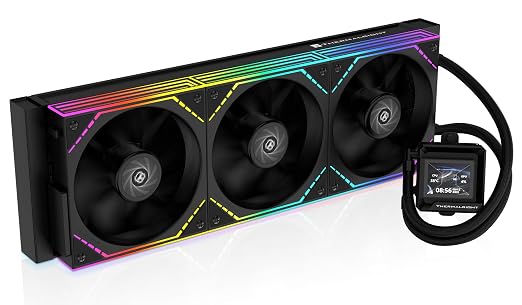
Built around a sizable 397×120×27mm aluminum radiator, this cooler is ideal for those with the Ryzen 7 5800X who want reliable liquid cooling along with a unique customizable display. Its standout feature is the 2 LCD screen which offers system status updates and custom visuals, blending performance with personal flair.
Installation integrates smoothly thanks to support for AM4 sockets, and the thrice 120mm TL-M12Q fans daisy-chained together simplify cable management. Fans ramp up to 2000RPM producing good airflow and static pressure to keep temperatures steady during gaming or creative work. The pump runs fast at 3000RPM yet keeps noise around 28.2 dB, avoiding an intrusive background sound.
Cooling performance holds firm under load, maintaining stable operating temperatures for demanding tasks. Build quality aligns with thermal components built for long-term use, although some note noise can rise near peak fan speeds.
The LCD adds a fun personalization touch but doesn’t affect core cooling abilities. A common critique targets potential noise at higher RPMs despite good airflow results.
The cooler receives praise for its stable cooling performance and the visual appeal of its 2″ LCD screen, adding a personal touch to any build. The most common complaint centers on noise levels rising when fans reach full speed, which can be noticeable in quiet environments.
Gamers and content creators wanting reliable temperature control with a customizable display will appreciate this cooler. Those prioritizing ultra-quiet operation or needing a smaller radiator for compact cases might look elsewhere.
Pros
- Customizable 2″ LCD screen with GIF support
- Three 120mm PWM fans reduce cable clutter
- Strong airflow at 68.9 CFM for efficient cooling
- Supports latest AMD AM4 and AM5 sockets
Cons
- Noise can increase near maximum fan speed
- Large radiator may not fit all cases
| Specification | Details |
|---|---|
| Voltage | 12 volts |
| Wattage | 3 watts |
| Max Rotational Speed | 2000 rpm |
| Noise Level | 28.2 db |
| Air Flow Capacity | 68.9 cfm |
| Radiator Size | 397×120×27mm aluminum |
9. ASUS ROG Ryuo IV ARGB 360mm CPU Cooler

Movable AMOLED display stands out as the unique feature when you first see this cooler. The Ryzen 7 5800X users looking for powerful cooling and a tech-savvy design will appreciate how it blends performance with customization.
Its biggest strength lies in advanced thermal management paired with an eye-catching screen.
Setting it up involves the Precision Mount System, which makes applying even pressure on the CPU straightforward. The pre-installed, daisy-chained fans reduce cable clutter down to just one connection, simplifying installation.
The curved 6.67-inch display can show custom info or 3D videos, adding flair without complicating daily use or maintenance.
Cooling performance stays solid thanks to the Asetek Emma Gen8 V2 pump and the included thermal paste. It keeps sustained heavy workloads in check, maintaining optimal temperatures. Build quality earns praise with its reliable mounting system and quiet, steady airflow from fans.
Some note the cooler’s size demands enough case space and may not fit all setups.
Strong thermal performance and the striking AMOLED display receive the most praise. Common concerns focus on its size requiring a roomy case and occasional noise at full fan speed. The mounting system ensures steady performance over time.
Anyone wanting high cooling power with a distinctive look will appreciate this cooler. People with smaller cases or who prioritize ultra-quiet operation might look toward more compact or quieter alternatives.
Pros
- Vibrant, movable curved AMOLED display
- Simple installation with Precision Mount System
- Strong thermal performance under heavy loads
- Reduced cable clutter with daisy-chained fans
Cons
- Requires adequate space due to large 360mm radiator
- May be louder than smaller coolers at max RPM
| Specification | Details |
|---|---|
| Cooling Method | Fan |
| Maximum Rotational Speed | 2000 rpm |
| Air Flow Capacity | 56.66 cfm |
| Power Connector Type | 4-Pin |
| Compatible Devices | Desktop, Laptop |
10. Thermalright Peerless Vision 360 ARGB CPU Cooler

Choosing a cooler with a vibrant display and solid performance makes the Thermalright Peerless Vision 360 ARGB stand out for anyone running a Ryzen 7 5800X. Its magnetic pump head with a 3.95-inch full screen really grabs attention, making it ideal for those who want both cooling power and a unique visual flair in their setup.
Setting up is straightforward thanks to the quick-install magnetic pump head, which slides on and off easily. The three TL-M12Q fans spin up to 2000 rpm, pushing a considerable 68.9 cfm airflow while keeping noise around 28.2 dB. The PWM control helps balance cooling needs with quieter moments, while the infinity mirror lighting adds a nice touch without extra complexity in daily use.
Performance-wise, it keeps the Ryzen 7 5800X running cool under load, managing heat well with its water cooling method. The build feels solid with attention to bearing design, S-FDB bearings reduce friction, noise, and extend fan life.
Most praise focuses on the cooler’s aesthetic and quiet operation, while some note the size and screen can be tricky to fit into tighter cases.
The cooler’s standout feature is the magnetic pump head with a vibrant 3.95-inch screen, praised for its ease of installation and visual impact. Quiet operation is another highlight, but bulk and occasional fan noise under intense loads are commonly mentioned limitations.
Ideal for those seeking a strong performer with visual appeal in a roomy case, especially builders wanting water cooling plus lighting effects. Users with smaller cases or sensitive noise environments might want to consider more compact or quieter alternatives.
Pros
- Magnetic pump head for easy installation
- ARGB infinity mirror lighting on fans
- Quiet operation at 28.2 dB
- High airflow of 68.9 cfm
Cons
- Large screen may be tough to fit in some cases
- Fans can reach high speeds, causing noise under load
| Specification | Details |
|---|---|
| Cooling Method | Water |
| Power Connector Type | 4-Pin |
| Maximum Rotational Speed | 2000 rpm |
| Air Flow Capacity | 68.9 cfm |
| Noise Level | 28.2 db |
| Wattage | 45 watts |
11. Cooler Master MasterLiquid ML240L RGB V2

Keeping a Ryzen 7 5800X cool during heavy workloads is a challenge, and this AIO cooler is designed to handle that with ease. It suits gamers and PC builders looking for efficient cooling combined with customizable RGB lighting as its standout feature.
Setting it up involves mounting the 240mm radiator and connecting the 4-pin pump and fans, which run quietly thanks to redesigned SickleFlow blades. The dual chamber pump improves cooling efficiency, while the improved seal material aims to prevent leaks over time. You’ll notice the RGB can be tailored to your setup, adding a bit of style alongside performance.
Cooling performance stays solid during gaming or multitasking, keeping temperatures manageable under load. Build quality feels durable, with a high-grade EPDM seal that promises better longevity. Praise often highlights quiet operation and effective cooling, while some note the lighting can be a bit less bright than other RGB options.
The pump’s dual chamber design contributes to strong cooling while the industrial-grade seal reduces leakage risks. Most find the fan noise low but note the RGB lighting doesn’t stand out as brightly as some competitors.
This cooler fits well for users prioritizing reliable cooling with modest lighting effects. Those seeking louder RGB illumination or ultra-quiet operation under max load might consider alternatives.
Pros
- Quiet SickleFlow fan design
- Customizable RGB lighting
- Durable industrial-grade EPDM seal
- Compatible with AMD AM4 sockets
Cons
- RGB brightness is somewhat modest
- Noise level can reach 30 dB at max speed
| Specification | Details |
|---|---|
| Power Connector Type | 4-Pin |
| Voltage | 12 volts |
| Wattage | 260 watts |
| Noise Level | 30 db |
| Maximum Rotational Speed | 1800 rpm |
| Air Flow Capacity | 62 cfm |
12. Cooler Master Atmos Stealth 360 AIO CPU Cooler

With a maximum fan speed of 2,400 RPM and a patented dual chamber design, this cooler fits Ryzen 7 5800X setups that need reliable, focused cooling right where the CPU heats up most. It stands out for balancing strong cooling performance with a quieter fan operation.
Setting up the cooler feels straightforward thanks to the pre-installed Mobius 120 fans and 4-pin PWM connection. You can easily adjust fan speeds to find the right balance between airflow and noise, which usually stays around a low 25 dB during normal use. The ring blade design reduces vibrations, making daily operation smooth without distracting hums.
Performance lives up to expectations, with precision-engineered fins that direct coolant flow exactly where it’s needed most. The build quality feels solid, keeping vibrations low and airflow steady. Praise highlights effective heat dissipation even under load, while occasional comments mention installation takes some patience due to its size and complexity.
The patented next-gen dual chamber and precision fins deliver consistent, targeted cooling while the fan design keeps vibrations low and noise minimal at 25 dB. Some users find installing the unit a bit challenging because of its size and complexity.
Those running demanding CPUs like the Ryzen 7 5800X will appreciate the focused cooling and customization of fan speeds. Users less comfortable with larger coolers or seeking ultra-quiet operation during heavy loads might consider other options.
Pros
- Patented dual chamber boosts CPU hotspot cooling
- Low noise operation at 25 dB
- Pre-installed fans ease installation
- Ring blade design reduces vibration
Cons
- Installation can be tricky due to size
- Fan speed may hit high RPM noise under load
| Specification | Details |
|---|---|
| Cooling Method | Fan, Water |
| Power Connector Type | 4-Pin |
| Maximum Rotational Speed | 2400 rpm |
| Noise Level | 25 db |
| Compatible Devices | Cpu, Desktop |
Best AIO Coolers Compared for Ryzen 7 5800X
| Product | Cooling Method | Max Rotational Speed | Air Flow Capacity | Noise Level |
|---|---|---|---|---|
| ARCTIC Liquid Freezer Pro 360 | Liquid | 3000 rpm | 77 cfm | – |
| ARCTIC Liquid Freezer Pro 360 | Liquid | 3000 rpm | 77 cfm | – |
| Cooler Master 240 Core II | Fan, Water | 1750 rpm | 70.5 cfm | 30 db |
| CORSAIR NAUTILUS 360 RS | Water | 2100 rpm | – | – |
| Thermalright Aqua Elite 240 V3 | Air, Water | 1800 rpm | 66.17 cfm | 25 db |
| Minorsonic 360 AIO | Water, Fan | 1600 rpm | – | 30 db |
| Thermalright Aqua Elite 360 V6 | Water | 2000 rpm | 70.84 cfm | 29.8 db |
| Thermalright Frozen Warframe 360 SE | Water | 2000 rpm | 68.9 cfm | 28.2 db |
| ASUS ROG Ryuo IV ARGB | Fan | 2000 rpm | 56.66 cfm | – |
| Thermalright Peerless Vision 360 ARGB | Water | 2000 rpm | 68.9 cfm | 28.2 db |
| Cooler Master MasterLiquid ML240L RGB | Water | 1800 rpm | 62 cfm | 30 db |
| Cooler Master Atmos Stealth 360 | Fan, Water | 2400 rpm | – | 25 db |
- Cooling MethodLiquid
- Max Rotational Speed3000 rpm
- Air Flow Capacity77 cfm
- Noise Level–
- Cooling MethodLiquid
- Max Rotational Speed3000 rpm
- Air Flow Capacity77 cfm
- Noise Level–
- Cooling MethodFan, Water
- Max Rotational Speed1750 rpm
- Air Flow Capacity70.5 cfm
- Noise Level30 db
- Cooling MethodWater
- Max Rotational Speed2100 rpm
- Air Flow Capacity–
- Noise Level–
- Cooling MethodAir, Water
- Max Rotational Speed1800 rpm
- Air Flow Capacity66.17 cfm
- Noise Level25 db
- Cooling MethodWater, Fan
- Max Rotational Speed1600 rpm
- Air Flow Capacity–
- Noise Level30 db
- Cooling MethodWater
- Max Rotational Speed2000 rpm
- Air Flow Capacity70.84 cfm
- Noise Level29.8 db
- Cooling MethodWater
- Max Rotational Speed2000 rpm
- Air Flow Capacity68.9 cfm
- Noise Level28.2 db
- Cooling MethodFan
- Max Rotational Speed2000 rpm
- Air Flow Capacity56.66 cfm
- Noise Level–
- Cooling MethodWater
- Max Rotational Speed2000 rpm
- Air Flow Capacity68.9 cfm
- Noise Level28.2 db
- Cooling MethodWater
- Max Rotational Speed1800 rpm
- Air Flow Capacity62 cfm
- Noise Level30 db
- Cooling MethodFan, Water
- Max Rotational Speed2400 rpm
- Air Flow Capacity–
- Noise Level25 db
How to Choose the Best AIO Cooler for Ryzen 7 5800X
Choosing the right AIO cooler for the Ryzen 7 5800X involves focusing on cooling performance, radiator size, and noise levels to ensure efficient heat management. Proper selection prevents overheating and reduces the risk of hardware damage, ultimately saving money and hassle over time.
Cooling Performance
Running a powerful processor under heavy workloads without adequate cooling quickly leads to throttling and unstable performance. The capacity of a cooler to dissipate heat efficiently hinges on the radiator’s surface area and the pump’s ability to circulate coolant fast enough.
Radiators sized 240mm or larger generally offer the thermal headroom needed for higher TDP chips. Pumps with higher flow rates tend to keep temperatures down during gaming or rendering sessions.
Fans directly affect how well hot air is expelled. Those spinning at higher RPMs move more air but can generate more noise, so a balance in rated airflow (CFM) and static pressure matters.
Good fans maintain CPU temperatures a few degrees lower, which translates to smoother operation under load and potentially longer component lifespan.
Compatibility and Size
Mounting space varies widely between cases, so matching radiator size to available slots is essential. 120mm radiators fit many mid-tower cases but often struggle with high heat loads compared to 280mm or 360mm alternatives. Clearance around the CPU socket matters as larger blocks may block tall RAM modules or interfere with motherboard components.
Confirming support for motherboard chipsets and the specific socket type ensures compatibility during installation. AM4 socket support is standard for many coolers targeting this platform.
Checking mounting hardware included and available space reduces surprises during setup.
Noise Levels
Fans typically idle quietly, but rapid ramp-up under load can create noticeable noise. Some of the quieter models keep fan noise under 30 dBA at idle and 40-45 dBA at peak, which feels less intrusive in a home or office setting. Pump noise is often less prominent but can produce high-pitched whining on certain units.
Striking the right balance between maintaining low CPU temperatures and keeping acoustics acceptable makes daily use more pleasant. Models that use PWM-controlled fans provide a good middle ground by adjusting speeds dynamically based on the workload.
Build Quality and Materials
Metal radiators made from aluminum or copper tend to hold up better against corrosion and physical damage over time. Pump housings constructed from sturdy plastics or metals resist cracking under heat stress.
Tubing quality is crucial; thick-walled, sleeved tubes help avoid kinks and potential leaks over years of operation.
Corrosion-resistant coatings inside the loop prevent degradation that could reduce cooling efficiency. Durability of these components affects how long the cooler can reliably protect the CPU without unexpected failures.
Installation and Maintenance
Mounting the pump/block over the processor can be straightforward or frustrating depending on the bracket design and instructions. Systems with clear, tool-free installation mechanisms save time.
Connecting the fan and pump cables should allow neat routing and standard connectors compatible with motherboard headers for easy control.
Closed-loop designs usually require minimal maintenance, but removing dust from radiator fins occasionally is necessary. Unlike custom loops, refilling is not needed, reducing upkeep complexity and the risk of spills during servicing.
Optimizing Fan Curves and Pump Speeds for Maximum Cooling Performance
Adjusting fan curves and pump speeds can significantly affect the cooling efficiency of an AIO cooler with a Ryzen 7 5800X. The processor generates variable heat under different workloads, so fixed settings may either be too loud or insufficient for high temperatures.
Setting a fan curve that responds directly to CPU temperature allows quieter operation during idle and gradual ramp-up under load. It is best to start with a moderate speed at idle to prevent dust buildup inside the radiator. Pump speed usually performs well at a consistent maximum, but some motherboards let you set a curve here too.
Keep an eye on pump noise versus cooling benefit.
- Use BIOS or software utilities to customize fan speed profiles based on temperature thresholds.
- Start with manufacturer presets, then tweak after observing system behavior under load.
- Ensure fans are configured for correct airflow direction to maximize radiator efficiency.
Fine-tuning these settings can reduce noise while keeping temperatures within safe limits.
Essential Maintenance Practices to Prolong Your AIO Cooler’s Lifespan
Regular maintenance is key to keeping an AIO cooler running smoothly and extending its service life, especially when paired with a Ryzen 7 5800X which can generate considerable heat under heavy use. Dust accumulation on the radiator fins restricts airflow and lowers cooling performance.
- Clean radiator fins with compressed air every few months, preferably outside to avoid spreading dust inside the case.
- Check and clean fans regularly to prevent imbalance and noise caused by dirt buildup.
- Inspect tubing for any signs of leaks or kinks, as damage can happen over time.
- Reapply thermal paste between the CPU and cold plate every 1-2 years to maintain good heat transfer.
Monitoring system temperatures can indicate when maintenance is due. Prompt attention to these details helps avoid overheating and ensures consistent cooling performance.
Common Installation Mistakes to Avoid with Ryzen 7 5800X AIO Coolers
Proper installation of an AIO cooler on a Ryzen 7 5800X is essential to avoid poor thermal contact that leads to high CPU temperatures. A common mistake is uneven mounting pressure, which can create air gaps between the cold plate and CPU heat spreader.
- Apply a small, pea-sized amount of thermal paste in the center of the CPU before mounting the cooler.
- Use the mounting hardware provided by the cooler manufacturer specifically for AM4 sockets to ensure a secure fit.
- Avoid overtightening screws; snug is sufficient and prevents warping of the cooler plate or motherboard.
- Confirm the cooler’s radiator and tubing are oriented to prevent air bubbles inside the pump or cold plate.
Checking all connections and the orientation before powering on the system can prevent costly reinstallation and temperature spikes.
People Also Asked
Will This AIO Cooler Fit My Ryzen 7 5800X Case?
Most AIO coolers designed for AM4 sockets will fit a Ryzen 7 5800X. Double-check your case’s radiator support dimensions to ensure compatibility. Measuring clearance around your motherboard and RAM slots helps avoid installation issues.
How Long Does an AIO Cooler Last with Heavy Use?
An AIO cooler can last around 3 to 5 years under heavy use before efficiency drops. Watching for pump noise or rising CPU temps over time indicates wear. Regularly checking coolant levels and connections prolongs its life.
Is It Safe to Install an AIO Cooler by Myself?
Installing an AIO cooler yourself is possible with patience and careful reading of the instructions. Taking time to line up the pump and radiator mounts correctly prevents leaks. Use thermal paste sparingly and evenly on the CPU for better cooling.
Can an AIO Cooler Handle Ryzen 7 5800X High Temperatures?
A good 240mm or larger AIO cooler can keep Ryzen 7 5800X temperatures within safe limits under heavy loads. Ensuring your case has good airflow helps the radiator dissipate heat. Avoid small 120mm coolers unless your case space is very limited.
What Are Common Problems to Watch for with AIO Coolers?
Common AIO issues include pump failure, coolant leaks, or fan bearing wear over time. Regularly inspect your cooler for unusual noises or visible leaks. Securing cables away from fans and cleaning dust off radiators helps maintain performance.
Conclusion
Choosing the right AIO cooler for a Ryzen 7 5800X mainly depends on its cooling capacity, noise levels, and compatibility with your case and motherboard. Efficient cooling keeps the CPU stable under load, while quieter fans make long sessions more comfortable.
Compatibility ensures the cooler fits without blocking other components or causing installation issues.
Consider the size of your PC case and your budget before making a final choice. When using your system heavily or planning to overclock, make sure to prioritize cooling performance. For lighter use, quieter or smaller models might work better.
Check the comparison table and detailed picks above to find an option that fits your specific setup and needs.

I’m Grant Mitchell, a firearms and hunting writer with years of experience at the range and in the field. I write about rifles, shotguns, handguns, optics, safe storage, cleaning, and responsible ownership, along with practical hunting tips. My goal is to share accurate, safety-first information that helps you choose the right firearm, maintain it properly, and become a more confident shooter.