Top 12 Best AIO Cooler for Ryzen 5 5600X You Need Now
Running a Ryzen 5 5600X with a basic cooler can lead to throttling under load or noisy operation that gets old fast. The best aio cooler for ryzen 5 5600x avoids these problems by keeping temperatures steady, even during extended gaming or heavy multitasking sessions. A poorly chosen cooler might struggle with the CPU’s heat output, causing performance dips that no one wants in the middle of an intense workflow.
What really sets the best aio cooler for ryzen 5 5600x apart is its radiator size, pump quality, and compatibility with your PC case. A 240mm or larger radiator usually offers enough surface area to dissipate heat effectively.
The pump should run quietly but with enough pressure to maintain steady coolant flow over time. Compatibility checks are important too, there’s no use in buying a cooler that won’t fit your motherboard or case, especially around the CPU socket area. Maintenance can also be an issue if the design doesn’t allow easy access to the fans and radiator for cleaning dust.
Need a Quick Check?
| Image | Product | Price |
|---|---|---|
Our Top Picks 1  | ARCTIC Liquid Freezer III 360 | Check Price |
Our Top Picks 2  | Thermalright Aqua Elite 360 V6 | Check Price |
Our Top Picks 3 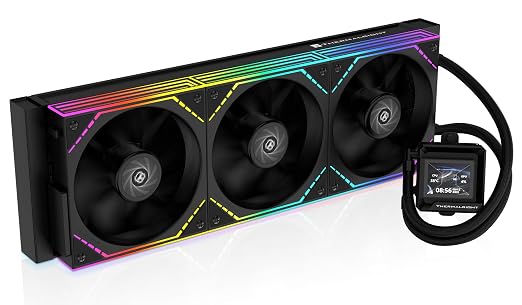 | Thermalright Frozen Warframe 360 SE | Check Price |
Our Selected Top 12 Aio Cooler for Ryzen 5 5600x Picks for Every Need
This list features carefully chosen all-in-one coolers designed to fit the Ryzen 5 5600x processor. Each review explains performance, ideal users, and highlights strengths and weaknesses to help you find the most suitable cooling solution for your build.
1. ARCTIC Liquid Freezer III Pro 360
Anyone running a Ryzen 5 5600X looking for solid cooling performance with quiet operation will appreciate this AIO cooler. Its standout feature is the integrated VRM fan that helps keep voltage regulators cool, making it a strong choice for longer, stable gaming or work sessions.
Installation involves a mounting system specially designed to focus the cold plate on the CPU hotspot, improving heat transfer. The setup feels thoughtfully engineered with a 4-pin power connector and PWM control on the VRM fan for balanced speed and noise.
Everyday use benefits from ARCTIC’s P12 PRO fans, which deliver strong airflow quietly, especially at lower speeds. The Liquid Freezer III Pro 360 keeps temperatures manageable without sounding like a jet engine.
Cooling performance impresses with a maximum fan speed up to 3000 rpm and airflow capacity rated at 77 cfm. Build quality feels sturdy and practical rather than flashy, focusing on efficient heat dissipation and durability.
Positive notes frequently point to the VRM cooling fan’s value, while some mention the weight and size as a downside during installation and fitting in smaller cases.
Many users find the VRM fan especially helpful in keeping voltage regulators cool during heavy use, making this cooler reliable for extended workloads. The main drawback noted is the unit’s size and weight, which can make installation tricky in smaller builds or tight cases.
Gamers and PC builders who want efficient, quiet cooling without tweaking will likely be satisfied. Those with compact cases or who prefer ultra-light setups should consider other options more suited to tight spaces or minimal weight.
Pros
- Integrated VRM fan improves system stability
- Quiet operation at low fan speeds
- Optimized contact pressure for AMD and Intel sockets
- High airflow capacity supports strong cooling
Cons
- Size and weight can complicate installation
- Higher speed fans may increase noise under load
| Specification | Details |
|---|---|
| Power Connector Type | 4-Pin |
| Voltage | 12 volts |
| Wattage | 3.96 watts |
| Maximum Rotational Speed | 3000 rpm |
| Air Flow Capacity | 77 cfm |
| Cooling Method | Liquid |
2. Thermalright Aqua Elite 360 V6
Featuring a colorful vortex pump head with ARGB lighting, the Thermalright Aqua Elite 360 V6 suits anyone looking for powerful cooling paired with eye-catching aesthetics. Its strongest point is how it balances effective heat dissipation with synchronized lighting effects that integrate neatly with most motherboards.
Setting up involves connecting the pump’s 4-pin power and syncing the ARGB lighting via the motherboard’s 5V 3-pin header. The pump speed can reach 2800RPM, ensuring steady water flow. Day-to-day, it runs quietly at around 29.8 dB, making it unobtrusive.
The fans provide an airflow capacity of 70.84 CFM, helping maintain low CPU temperature during heavier loads without being overbearing.
Performance-wise, it does a solid job keeping the Ryzen 5 5600X cool, thanks to its fourth-generation vortex pump design and high rotation speeds. Build quality is sturdy, and the ARGB effects stand out for visual appeal.
Most praise revolves around its efficient cooling and synchronized lighting, while some note the relatively high maximum pump speed noise as a minor downside.
The cooler excels at maintaining a low temperature thanks to its high-speed pump and powerful fans. The ARGB lighting is visually impressive and works well with motherboard software. A common complaint is the noise level when the pump hits its top speed, which might be noticeable to sensitive ears.
This cooler suits PC builders who want strong liquid cooling combined with vivid RGB effects. Those unwilling to manage lighting connections or sensitive to pump noise might want to explore quieter or simpler alternatives.
Pros
- Strong cooling with 2800RPM pump speed
- Vibrant ARGB lighting synchronized with motherboard
- Quiet operation at 29.8 decibels
- High airflow fans for effective heat dissipation
Cons
- Some noise at maximum rotational speed
- Requires 5V 3-pin header for lighting sync
| Specification | Details |
|---|---|
| Power Connector Type | 4-Pin |
| Cooling Method | Water |
| Noise Level | 29.8 dB |
| Maximum Rotational Speed | 2000 rpm |
| Air Flow Capacity | 70.84 cfm |
3. Thermalright Frozen Warframe 360 SE V2
Thermalright Frozen Warframe 360 SE V2 stands out as a strong choice for cooling Ryzen 5 5600X processors, especially in gaming and creating setups. Its biggest strength lies in a large 360mm aluminum radiator paired with a high-speed 3000RPM pump that keeps temperatures steady during intense workloads.
Setting up is straightforward with three 120mm PWM fans that chain together, reducing cable clutter. Fans spin up to 2000RPM, offering solid airflow without being too loud at 28.2 dB.
The 2 LCD screen lets you monitor system details or add custom animations with Thermalright software, making daily interaction a bit more engaging and visually informative.
Cooling performance is reliable, managing processor temperatures effectively under load. The build feels solid, with a sizeable aluminum radiator and quality fans.
Many appreciate the quiet operation and customizable LCD. Some users mention the pump noise can be noticeable at its highest speed, but it’s generally manageable.
Many appreciate the cooler’s effective temperature control and quiet fans during gaming or creation work. The customizable LCD screen adds a fun, informative touch. The most common complaint revolves around the pump noise, which some find too audible when running at full speed.
This cooler suits those with enough case space wanting solid cooling and aesthetic customization. People with compact cases or sensitive to pump noise might prefer a smaller or quieter alternative.
Pros
- Large 360mm radiator for strong heat dissipation
- 3 PWM fans reduce cable mess and improve airflow
- Customizable 2″ LCD for system monitoring and personalization
- Compatible with both AMD and Intel mainstream sockets
Cons
- Pump noise can be loud at maximum speed
- Requires space to fit the large radiator
| Specification | Details |
|---|---|
| Radiator Dimensions | 397×120×27mm |
| Pump Speed | 3000 RPM |
| Fan Size and RPM | 3×120mm, up to 2000 RPM |
| Fan Airflow | 68.9 CFM |
| Noise Level | 28.2 dB |
4. Thermalright Aqua Elite 240 V3

Cooling your Ryzen 5 5600X feels steady and quiet with the Thermalright Aqua Elite 240 V3. It suits anyone wanting effective heat dissipation without much noise.
Its biggest strength lies in maintaining low vibrations while keeping the CPU temperature in check thanks to its well-designed pump and fans.
Installing it is straightforward, with the 240mm radiator fitting most standard cases. The water pipe is covered by a mesh that boosts durability and makes handling safer.
Day-to-day, the 120mm ARGB fan runs quietly at a maximum of 1800 rpm, producing 25 db of noise. The pump head’s octagonal shape and speed up to 2800 RPM help keep the cooling consistent.
Performance stays solid under load with the black aluminium fin heat sink plate doing its job well. The cooler is built to last, with a pump life expectancy around 40,000 hours. Most users note its quiet operation even when the CPU works hard.
Some find the fan speed a bit on the lower side for overclocking scenarios.
The pump’s long lifespan and quiet running make this cooler reliable and pleasant in daily use. The most frequent downside is that its fan speed can feel a little low for heavy overclocking or extreme gaming setups.
Gamers or users valuing silent operation and steady cooling will be satisfied. Those pushing high CPU frequencies hard might want to explore options with faster fan speeds or larger radiators.
Pros
- Low vibration during operation
- Long pump head life of up to 40,000 hours
- Quiet 120mm ARGB fan
- Durable mesh water pipe protection
Cons
- Fan speed may limit overclocking potential
- ARGB lighting might not suit all tastes
| Specification | Details |
|---|---|
| Power Connector Type | 4-Pin |
| Voltage | 5 volts |
| Wattage | 2.64 watts |
| Noise Level | 25 db |
| Maximum Rotational Speed | 1800 rpm |
| Air Flow Capacity | 66.17 cfm |
5. ARCTIC Liquid Freezer III Pro 360

Liquid Freezer III Pro 360 fits perfectly with anyone upgrading a Ryzen 5 5600X who wants strong cooling without noise distractions. It stands out most for its quiet operation combined with high-performance heat dissipation, making it a solid choice for gaming and demanding tasks.
Setting it up is straightforward, with a native offset mounting that aligns the cold plate directly over the CPU hotspot, which helps heat transfer. The included ARCTIC’s P12 PRO fan runs quietly even at higher speeds and the integrated VRM fan keeps voltage regulators cool, which contributes to stable performance during heavy workloads.
Performance is focused on effective cooling, keeping temps down under load with a max fan speed of 3000 rpm and good airflow of 77 cfm. Reviews appreciate the quietness and reliability, although some users mention the large size may require checking case compatibility.
The build quality feels solid and well thought out, especially with the contact frame optimized for Intel and AMD CPUs.
Quiet performance combined with solid cooling efficiency is frequently praised, making the unit reliable for extended heavy use. Some find the large radiator size challenging to fit, which can require case compatibility checks before purchase.
Ideal for gamers and PC builders who value strong cooling and low noise. Those with smaller or compact cases may want to consider alternative coolers with smaller footprints.
Pros
- Quiet operation even at high fan speeds
- Effective heat transfer with offset cold plate
- Integrated VRM fan for additional cooling
- Strong airflow of 77 cfm
Cons
- Size may not fit smaller cases easily
- Maximum fan speed can be loud under peak load
| Specification | Details |
|---|---|
| Cooling Method | Liquid |
| Power Connector Type | 4-Pin |
| Voltage | 12 volts |
| Maximum Rotational Speed | 3000 rpm |
| Air Flow Capacity | 77 cfm |
6. Minorsonic 360mm AIO CPU Cooler

Built with a high-speed ceramic bearing pump and a 360mm radiator, the Minorsonic AIO is perfect for Ryzen 5 5600X users looking for strong, consistent cooling. Its standout feature lies in the durable water pump that maintains stable operation over long periods.
Setup involves mounting the sizable 360mm radiator where space allows, with fans connected via a 4-pin power connector. The pump runs quietly at 3000 RPM, while the fans spin at up to 1600 RPM, keeping noise levels around 30 dB.
Everyday use feels reliable, with steady coolant flow and minimal vibration thanks to the industrial-grade motor.
Performance stays solid under heavy workloads, efficiently transferring heat away from the CPU. Build quality is focused on longevity and silence, supported by the ceramic bearing pump and a quiet motor.
Positive feedback highlights dependable cooling, but some note the radiator size requires sufficient case space.
Reliable cooling performance and quiet operation stand out as key strengths, supported by a durable ceramic bearing pump. Most common concern involves fitting the radiator into mid-sized or smaller cases due to its length.
Those with roomy PC cases looking for steady cooling will find this AIO a solid choice. Users with compact systems might prefer smaller or more compact coolers to avoid installation difficulties.
Pros
- Quiet operation at 30 db noise level
- Long-lasting ceramic bearing pump
- Strong coolant flow for efficient cooling
- Minimal vibration with industrial motor design
Cons
- Large 360mm radiator needs spacious case
- Fans limited to 1600 rpm maximum speed
| Specification | Details |
|---|---|
| Power Connector Type | 4-Pin |
| Voltage | 12 volts |
| Wattage | 5 watts |
| Maximum Rotational Speed | 1600 rpm |
| Noise Level | 30 db |
| Cooling Method | Water, Fan |
7. ARCTIC Liquid Freezer III Pro 240

ARCTIC Liquid Freezer III Pro 240 stands out for its strong cooling ability paired with a compact form that fits well on Ryzen 5 5600X builds. It’s well suited for anyone who wants effective heat management while keeping noise levels low during intense workloads.
Installation is straightforward, helped by its native offset mounting tailored for AMD and Intel sockets, which ensures the cold plate aligns properly with the CPU hotspot. The setup provides balanced pressure distribution, safeguarding your processor over time.
The integrated VRM fan adds a layer of cooling for voltage regulators, which contributes to stable performance in day-to-day use.
Cooling performance hits the mark with the ARCTIC’s P12 PRO fans delivering both power and quiet operation, especially noticeable at lower speeds. The build feels solid with attention to effective heat transfer and durable components.
Some users have noted the higher maximum fan speed at 3000 rpm can generate more noise under load, which is the trade-off for its strong cooling output.
Users appreciate how quiet this cooler remains during everyday tasks thanks to its efficient P12 PRO fans. The most common issue is that noise rises noticeably when the fan ramps up to its 3000 rpm maximum under high CPU loads.
Those looking for strong cooling without excessive noise will find this model suits their needs well. Anyone wanting a larger radiator size or ultra-quiet operation at all load levels might want to explore other options.
Pros
- P12 PRO fan quieter and more powerful than standard models
- Offset mounting improves heat transfer on Ryzen CPUs
- Integrated VRM fan cools voltage converters effectively
- Optimized contact pressure benefits CPU lifespan
Cons
- Higher fan speeds increase noise under heavy load
- Limited to 240mm radiator size, may restrict some builds
| Specification | Details |
|---|---|
| Cooling Method | Water |
| Maximum Rotational Speed | 3000 rpm |
| Air Flow Capacity | 77 cfm |
| Voltage | 12 volts |
| Power Connector Type | 4-Pin |
| Wattage | 3.96 watts |
8. CORSAIR Nautilus 360 RS

Powerful and compatible with the latest CPU sockets, the CORSAIR Nautilus 360 RS is great for anyone running a Ryzen 5 5600X who wants strong cooling and low noise. Its biggest strength lies in the three pre-installed RS120 fans with advanced AirGuide technology, offering focused airflow that helps keep temperatures down under pressure.
Setting it up is reasonably straightforward due to the daisy-chained RS120 fans. You only need one cable connection to the motherboard, which cuts down on clutter. The magnetic dome bearing fans keep the noise low, making it comfortable for everyday use whether gaming or working.
The wide CPU compatibility means it fits on both AMD AM4 and AM5 sockets without hassle.
Performance is solid with impressive cooling capabilities thanks to the strong airflow and high static pressure fans. The build feels quality, especially with the advanced Magnetic Dome bearing reducing wear and tear.
Most praise highlights quiet operation alongside excellent cooling. Some users note the higher rotational speed of 2100 rpm can cause a bit more noise under heavy loads.
The strongest praise from reviews is about the quiet operation combined with efficient cooling thanks to the RS120 fans and AirGuide technology. The most common complaint is that when fans approach their 2100 rpm max speed, noise levels increase noticeably, which can be distracting for some.
Those wanting quiet but powerful cooling for their Ryzen 5 5600X will appreciate this unit, especially with its easy cable management. People with smaller PC cases or sensitive to louder fan noise under heavy load might want to explore smaller or quieter alternatives.
Pros
- Strong airflow with high static pressure fans
- Supports latest AMD and Intel sockets
- Daisy-chained fans reduce cable clutter
- Quiet operation from magnetic dome bearing
Cons
- Fans can get noisy at max speed
- Installation may be tricky on smaller cases
| Specification | Details |
|---|---|
| Power Connector Type | 4-Pin |
| Cooling Method | Water |
| Compatible Devices | Desktop |
| Maximum Rotational Speed | 2100 rpm |
9. Cooler Master 240 Core II

Keeping a Ryzen 5 5600X cool during gaming or heavy workloads requires reliable liquid cooling. Cooler Master 240 Core II suits those wanting quieter operation and solid thermal management with an eye-catching ARGB design.
Its strongest point is the boosted water flow targeting CPU hotspots, designed for AMD and Intel processors alike.
Setup is straightforward thanks to compatible brackets for AM5 and AM4 sockets. The Dynamic PWM fan quietly spins between 650 and 1,750 rpm, adjusting speed based on temperature to keep noise around 30 dB. The included CryoFuze thermal paste applies easily and ensures consistent heat transfer across a wide temperature range.
Performance-wise, it keeps temperatures stable even under demanding loads thanks to its dual-chamber design focused on peak cooling. Build quality feels solid with durable materials and well-thought-out mounting hardware.
Most praise goes to its quiet operation, while a common gripe is the moderate power consumption at 12 watts.
Quiet cooling is the biggest advantage noted, with the fan adjusting smoothly to temperature changes. The most common complaint relates to the power draw and simpler 3-Pin fan connector, which may limit fine-tuning. The unit performs well at keeping CPU temperatures stable during intensive tasks.
Anyone running a Ryzen 5 5600X who values quiet operation and straightforward installation will find this fitting. Those seeking ultra-low power consumption or advanced fan control might want to look at other options better tailored to those needs.
Pros
- Quiet fan operation under most conditions
- Compatible with AM5 and AM4 sockets
- CryoFuze thermal paste included
- Customizable ARGB infinity mirror lighting
Cons
- Power consumption could be lower
- 3-Pin fan limits advanced speed control
| Specification | Details |
|---|---|
| Noise Level | 30 dB |
| Maximum Rotational Speed | 1750 rpm |
| Air Flow Capacity | 70.5 cfm |
| Power Connector Type | 3-Pin |
| Wattage | 12 watts |
10. Thermalright Peerless Vision 360

Offering a magnetic 3.95-inch full screen on the pump head, the Peerless Vision 360 is perfect for Ryzen 5 5600X users who want both strong cooling performance and a unique visual touch. Its striking 480×480 resolution display is the standout feature in a water cooler setup.
Setting it up is simple thanks to the magnetic pump head that snaps on and off easily. Day-to-day, the trio of TL-M12Q fans operate quietly at 28.2 dB, spinning up to 2000 rpm, pushing air efficiently at 68.9 cfm. The infinity mirror lighting adds personality, while the S-FDB bearing ensures quieter operation and longer fan life, making it a reliable choice for regular use.
This device manages 45 watts of power efficiently, staying cool under pressure. Build quality impresses through solid materials and a cold radiator.
Most praise centers on the cooler’s balance of function and style. Common feedback includes occasional noise complaints when fans hit higher speeds.
The strongest praise highlights the cooler’s combination of effective heat dissipation and unique magnetic screen, while the most common complaint points to noise generated when fans run at full speed. This balance of style and function is the key takeaway from daily use.
People valuing striking visuals alongside efficient cooling will enjoy this model. Those seeking ultra-quiet operation at all times might consider quieter air coolers or models with lower fan speeds instead.
Pros
- Magnetic pump head with full screen display
- S-FDB bearing fans for low noise and durability
- High airflow at 68.9 cfm
- Supports video, animation, and screen projections
Cons
- Fans can get noisy at maximum speed
- Narrow bezel screen limits customization options
| Specification | Details |
|---|---|
| Wattage | 45 watts |
| Noise Level | 28.2 db |
| Maximum Rotational Speed | 2000 rpm |
| Air Flow Capacity | 68.9 cfm |
| Power Connector Type | 4-Pin |
| Cooling Method | Water |
11. Thermalright Aqua Elite 120 V3

Ideal for gamers or PC builders who want efficient cooling without taking up much space, the Thermalright Aqua Elite 120 V3 stands out for its strong cooling power packed into a compact 120mm water cooler. Its one-piece design offers reliable temperature control, making it suitable for Ryzen 5 5600X processors.
Setting up involves fitting the 120mm ARGB fan and connecting the 4-pin power header and 5V 3-pin ARGB sync to the motherboard. Daily use delivers quiet operation with a noise level of 25.6 dB, thanks to the low vibration pump and optimized fan speed capped at 1500 rpm.
The black aluminum fin heat sink plate adds durability while the water pipe has protective mesh for longer lifespan.
Cooling performance stays strong under load due to the fourth generation pump head and cold row design. The cooler consistently keeps temps down during gaming or heavy work, with airflow reaching 66.17 cfm.
Some users mention the ARGB lighting sync is a great touch, though a few noted a slight noise increase at peak fan speeds. Build quality leans on sturdy materials, with black aluminum fins and mesh-protected water pipes providing reliability.
The cooler is praised for keeping temperatures low with minimal vibration, ensuring stable performance. A common complaint centers on the fan noise increasing noticeably when running at full speed, which might bother sensitive users.
People wanting a reliable, quiet cooler with customizable lighting will appreciate this model, especially if case space is limited. Those lacking compatible ARGB headers on their motherboard or seeking ultra-silent operation might want to consider alternatives.
Pros
- Strong cooling with low vibration pump
- Compact 120mm size fits most cases
- ARGB lighting syncs well with motherboard
- Protective mesh extends pipe lifespan
Cons
- Fan noise can rise at maximum speed
- ARGB sync requires compatible motherboard header
| Specification | Details |
|---|---|
| Power Connector Type | 4-Pin |
| Voltage | 12 volts |
| Wattage | 7.2 watts |
| Noise Level | 25.6 db |
| Maximum Rotational Speed | 1500 rpm |
| Air Flow Capacity | 66.17 cfm |
12. Thermalright Aqua Elite 360 V3

Water cooling with a vibrant twist, designed for Ryzen 5 5600X builds that demand both strong cooling and eye-catching ARGB lighting. Its most notable feature is the vivid synchronization of the lighting effects with compatible motherboards, adding style without sacrificing performance.
Setting up involves syncing the ARGB fan and water block lighting to the motherboard’s 5V 3-pin header, which brings the colors to life smoothly. Day-to-day use is quiet thanks to a noise level of 25.6 dB and a moderate fan speed up to 1500 rpm. The 4-pin power connector keeps things straightforward, and the setup fits well inside most desktop cases with enough clearance for the large 360mm radiator.
It performs strongly at keeping high-end processors cool, delivering an airflow capacity of 66.17 CFM that handles heat effectively without sounding loud. The build quality feels solid, with a focus on both cooling efficiency and lighting aesthetics. Most praise highlights the smooth, bright light effects.
Some users note the need for sufficient motherboard headers to make full use of the lighting synchronization.
The most frequent compliment centers on vibrant and well-synchronized ARGB lighting that pairs nicely with performance cooling. The main challenge lies in the need for a 5V 3-pin header on the motherboard, which some setups lack, limiting light customization options.
Ideal for anyone who wants a strong water cooler combined with flashy lighting effects and a quiet system. Those without compatible lighting headers or who want higher fan speeds might want to consider other coolers that match those specific needs better.
Pros
- Strong airflow output at 66.17 CFM
- ARGB lighting syncs with motherboard easily
- Quiet operation with only 25.6 dB noise
- Solid water cooling performance for Ryzen 5 5600X
Cons
- Requires compatible motherboard header for lighting
- Fan speed capped at 1500 rpm limits maximum cooling
| Specification | Details |
|---|---|
| Power Connector Type | 4-Pin |
| Voltage | 5 volts |
| Wattage | 4.8 watts |
| Cooling Method | Water |
| Noise Level | 25.6 db |
| Maximum Rotational Speed | 1500 rpm |
| Air Flow Capacity | 66.17 cfm |
Best AIO Coolers for Ryzen 5 5600x Comparison
| Product | Cooling Method | Max RPM | Air Flow (cfm) | Noise Level (db) |
|---|---|---|---|---|
| ARCTIC Liquid Freezer III 360 | Liquid | 3000 rpm | 77 cfm | – |
| Thermalright Aqua Elite 360 V6 | Water | 2000 rpm | 70.84 cfm | 29.8 db |
| Thermalright Frozen Warframe 360 SE | Water | 2000 rpm | 68.9 cfm | 28.2 db |
| Thermalright Aqua Elite 240 V3 | Air, Water | 1800 rpm | 66.17 cfm | 25 db |
| ARCTIC Liquid Freezer III Pro | Liquid | 3000 rpm | 77 cfm | – |
| Minorsonic 360mm AIO Cooler | Water, Fan | 1600 rpm | – | 30 db |
| ARCTIC Liquid Freezer III 240 | Water | 3000 rpm | 77 cfm | – |
| CORSAIR Nautilus 360 RS | Water | 2100 rpm | – | – |
| Cooler Master 240 Core II | Fan, Water | 1750 rpm | 70.5 cfm | 30 db |
| Thermalright Peerless Vision 360 | Water | 2000 rpm | 68.9 cfm | 28.2 db |
| Thermalright Aqua Elite 120 V3 | Water | 1500 rpm | 66.17 cfm | 25.6 db |
| Thermalright Aqua Elite 360 V3 | Water | 1500 rpm | 66.17 cfm | 25.6 db |
- Cooling MethodLiquid
- Max RPM3000 rpm
- Air Flow (cfm)77 cfm
- Noise Level (db)–
- Cooling MethodWater
- Max RPM2000 rpm
- Air Flow (cfm)70.84 cfm
- Noise Level (db)29.8 db
- Cooling MethodWater
- Max RPM2000 rpm
- Air Flow (cfm)68.9 cfm
- Noise Level (db)28.2 db
- Cooling MethodAir, Water
- Max RPM1800 rpm
- Air Flow (cfm)66.17 cfm
- Noise Level (db)25 db
- Cooling MethodLiquid
- Max RPM3000 rpm
- Air Flow (cfm)77 cfm
- Noise Level (db)–
- Cooling MethodWater, Fan
- Max RPM1600 rpm
- Air Flow (cfm)–
- Noise Level (db)30 db
- Cooling MethodWater
- Max RPM3000 rpm
- Air Flow (cfm)77 cfm
- Noise Level (db)–
- Cooling MethodWater
- Max RPM2100 rpm
- Air Flow (cfm)–
- Noise Level (db)–
- Cooling MethodFan, Water
- Max RPM1750 rpm
- Air Flow (cfm)70.5 cfm
- Noise Level (db)30 db
- Cooling MethodWater
- Max RPM2000 rpm
- Air Flow (cfm)68.9 cfm
- Noise Level (db)28.2 db
- Cooling MethodWater
- Max RPM1500 rpm
- Air Flow (cfm)66.17 cfm
- Noise Level (db)25.6 db
- Cooling MethodWater
- Max RPM1500 rpm
- Air Flow (cfm)66.17 cfm
- Noise Level (db)25.6 db
How to Choose the Best AIO Cooler
Choosing the right AIO cooler involves considering factors like cooling performance, compatibility with your case, and noise levels to ensure efficient heat management and quiet operation. Getting these elements right helps avoid overheating issues and costly replacements, keeping your Ryzen 5 5600x running smoothly.
Compatibility and Socket Support
Many coolers that claim broad compatibility can surprise you by not fitting certain motherboard layouts or cases. It’s easy to assume any all-in-one liquid cooler will fit your Ryzen setup, but physical space around the CPU socket is often limited. The Ryzen 5 5600X uses AM4 or AM5 sockets, so the cooler must explicitly support these to mount properly.
A good cooler won’t just fit the socket but also leave enough room for tall RAM sticks and big GPUs. Some radiators or pump blocks obstruct DIMM slots or PCIe lanes, forcing compromises.
Checking your PC case’s clearance for radiator thickness and length is crucial, especially in smaller cases. Standard AM4/AM5 support and radiator sizes like 240mm often work well but measuring your exact dimensions before purchasing avoids unexpected jams.
- Confirm AM4/AM5 socket compatibility
- Measure case clearance for radiator (length and thickness)
- Check space around CPU socket for RAM height
- Ensure no interference with large GPUs
Cooling Performance and Radiator Size
Standard TDP for the Ryzen 5 5600X is 65 watts, so the cooling solution needs to handle that comfortably under load. Radiator size affects thermal dissipation capacity, with 120mm models working in tight spaces but 240mm or 360mm units providing better sustained cooling. Bigger radiators generally spread heat more effectively across fins, lowering core temps.
Beyond size, pump strength and coolant flow rate matter for consistent heat transfer. A weak pump can’t move the coolant fast enough, reducing overall cooling efficiency and resulting in higher CPU temps during gaming or rendering tasks.
Coherently sized radiators matched to your case and a pump tailored to maintain flow help keep your CPU running cooler over extended periods. Check coolant flow ratings and ensure your case can house the radiator size.
For example, a 360mm radiator demands larger cases but offers better temperature control during heavy workloads, making it a solid choice for long sessions.
Noise Levels
Noise levels can quickly become a daily annoyance if overlooked. Pumps and fans generate different sound frequencies and volumes depending on load.
Under idle, some units are nearly silent, but once the processor is under heavy use, cooler fans rev up loudly. Looking at decibel ratings under both idle and peak loads provides a realistic picture. Some coolers offer PWM or fan speed control, which helps dial back noise when the CPU isn’t stressed, switching to a quieter mode automatically.
Quiet operation matters if your PC doubles as a workstation, gaming rig, or home theater. Higher performance often comes with louder noise, so balancing cooling needs with noise tolerance is key.
A practical setup might have around 30 to 40 dB under load, which is noticeable but not distracting. Avoid models that get uncomfortably loud over 50 dB, especially if your room is small.
Build Quality and Materials
Radiators made of aluminum are common, but stainless steel or copper-cored options last longer and resist corrosion better. Tubing quality also shows after months of use, thin, stiff tubes are prone to kinking or wear, while flexible, reinforced tubing prevents leaks. Pump housing should feel solid and well-constructed, since cheaper plastics can crack or degrade with heat and time.
Metal fittings keep coolant sealed without leaking, which is crucial to prevent component damage inside your build. Components that don’t prioritize material quality often fail or lose cooling efficiency after a year or two.
Look for brands that specify anticorrosion treatments and use braided or rubberized tubing with resistance to brittleness. Durable materials reduce headaches down the line.
Ease of Installation and Maintenance
Mounting systems vary significantly; some require precise alignment and extra hands, while others come with straightforward brackets and thumbscrews. Clear, detailed instructions included in the box make a big difference when installing without experience. All necessary mounting hardware should be supplied and clearly labeled for AM4/AM5 sockets.
Some kits require removing the motherboard, which extends installation time and risk. Coolers designed for easier user installation speed setup and reduce the chance of damaging your components.
Maintenance is often overlooked until dust buildup causes warm temps. Radiators with spaced fins and easily accessible fans are preferred for periodic cleaning.
Removable fan mounts or dust filters ease this process, extending cooler life and consistent performance.
Optimizing AIO Cooler Performance for Ryzen 5 5600X
The Ryzen 5 5600X performs best when paired with an AIO cooler that matches its thermal output. A 240mm radiator offers a balanced solution for this CPU, providing sufficient cooling without overwhelming the case.
Ensuring good airflow inside the case is important; intake and exhaust fans should be positioned to create a consistent flow that passes through the radiator’s fins effectively.
Using quality thermal paste can impact temperature performance more than expected. Applying a thin, even layer helps with heat transfer between the CPU and cooler baseplate. Mounting the pump unit firmly but not overly tight avoids stress on the motherboard while maintaining good contact.
- Use a radiator size that fits your case but allows adequate surface area for cooling.
- Check fan direction for optimized airflow along with case fans.
- Apply a proper amount of thermal paste during installation.
Proper Maintenance and Longevity Tips for AIO Coolers
Maintaining an AIO cooler ensures it runs smoothly and lasts longer with consistent performance. Dust buildup on radiator fins reduces heat dissipation, so regularly cleaning the radiator with compressed air is a simple way to keep temperatures in check.
The pump’s operation can also affect cooler lifespan. Listen for unusual noises, which may indicate bearing wear or low coolant levels.
Since AIOs are sealed units, leaks should be checked during routine inspections, especially around tube connections.
Replacing fans after a few years can restore optimal airflow, as worn-out fans often slow down or become noisy. Keeping your PC environment clean and avoiding cable obstruction around the radiator also support cooler effectiveness.
- Use compressed air to clean dust from radiator fins every few months.
- Monitor pump noise for signs of wear or failure.
- Inspect for leaks periodically, especially near tubing.
- Replace fans if they become loud or slow down.
Comparing AIO Coolers to Air Coolers for Ryzen 5 5600X Builds
AIO coolers typically offer better temperature control than air coolers for the Ryzen 5 5600X, especially in overclocked setups. Their liquid loop moves heat away from the CPU to a radiator positioned remotely, allowing for more flexible case layouts and potentially quieter operation since fans can run at lower speeds.
Air coolers tend to be less complex and more affordable, with no risks of pump failure or leaks. Some high-end air coolers match the cooling capacity of smaller AIO units but can be bulkier and affect RAM clearance.
Deciding between the two comes down to case space, noise preferences, and intended CPU load. For standard gaming or everyday use, a quality air cooler works well. AIOs provide advantages in tight builds or higher CPU loads that generate more heat.
- AIO coolers offer better heat dissipation in compact or high-load systems.
- Air coolers are simpler, generally quieter when idle, and cost-effective.
- Consider case compatibility and potential interference with RAM or motherboard components.
People Also Asked
Will This Aio Cooler Fit in My PC Case with Ryzen 5 5600x?
The AIO cooler should fit if your PC case supports the radiator size specified by the product. Measure your case’s clearance for radiator thickness and fan placement before purchase. Double-check mounting compatibility with the Ryzen 5 5600x socket to avoid surprises during installation.
How Do I Safely Install an Aio Cooler on My Ryzen CPU?
Apply a thin, even layer of thermal paste to the CPU surface before mounting the cooler. Secure the cooler firmly but do not overtighten screws to avoid damaging the motherboard. Connect the pump power cable and fans to the proper headers for cooling control and monitoring.
What Are Common Issues with Aio Coolers on Ryzen 5 5600x?
Common issues include pump noise, insufficient radiator airflow, and occasional sensor calibration errors. Dust buildup on fans and radiator fins reduces cooling efficiency, so regular cleaning is important. Ensuring good case ventilation helps maintain stable temperatures under load.
How Long Do Aio Coolers Typically Last When Used with Ryzen?
AIO coolers generally last about 3 to 5 years, depending on usage and maintenance. Over time, pump performance might decline and leaks could develop, though these problems are relatively rare. Keeping the cooler and fans clean extends its operational life.
Can I Reuse an Aio Cooler After Removing It from My Ryzen System?
The cooler can be reused if it is carefully removed and cleaned. Replace the thermal paste with each reinstallation to maintain proper thermal conductivity. Inspect tubing and fittings for wear or leaks before reusing to avoid failures.
Conclusion
Cooling performance, radiator size, and noise levels are the key factors when choosing an AIO cooler for the Ryzen 5 5600X. The cooler needs to handle the CPU’s heat output efficiently without being too loud, and the radiator has to fit comfortably in your case.
Compatibility with your motherboard and ease of installation also play important roles.
Consider your available case space and how much you want to spend before making a decision. Also, think about how often you’ll be pushing your CPU to high loads.
Check the comparison table above and the detailed picks to find a cooler that fits your setup and needs.

I’m Grant Mitchell, a firearms and hunting writer with years of experience at the range and in the field. I write about rifles, shotguns, handguns, optics, safe storage, cleaning, and responsible ownership, along with practical hunting tips. My goal is to share accurate, safety-first information that helps you choose the right firearm, maintain it properly, and become a more confident shooter.