Top 12 Best AIO Cooler for Ryzen 7 3700X You Need Now
Many people upgrading to a Ryzen 7 3700x quickly find that the stock cooler can’t handle the processor’s heat during intense gaming sessions or heavy multitasking. Without the best aio cooler for ryzen 7 3700x, temps spike above comfortable limits, causing the system to throttle or shut down unexpectedly. Noise from lower-quality coolers can also make long hours at the desk really distracting.
Good aio coolers for the Ryzen 7 3700x focus on efficient heat dissipation through a well-sized radiator, commonly 240mm or larger, combined with reliable pump performance to keep coolant flowing properly. The pump noise and fan speed curves play a big role in both cooling power and daily noise levels.
Proper mounting compatibility with AM4 sockets ensures a secure fit, while sealed loop designs limit maintenance and prolong lifespan.
Need a Quick Check?
| Image | Product | Price |
|---|---|---|
Our Top Picks 1  | ARCTIC Liquid Freezer III 360 | Check Price |
Our Top Picks 2  | ARCTIC Liquid Freezer III 360 | Check Price |
Our Top Picks 3  | Cooler Master 240 Core II | Check Price |
Our Selected Top 12 Aio Cooler for Ryzen 7 3700x for Every Budget
This list features carefully chosen all-in-one coolers compatible with the Ryzen 7 3700x, covering various budgets and performance levels. Each cooler’s strengths, weaknesses, and ideal user scenarios are detailed to help readers find the best match for their specific needs.
1. ARCTIC Liquid Freezer III Pro 360 CPU Cooler
ARCTIC Liquid Freezer III Pro 360 is a liquid cooler designed to keep the Ryzen 7 3700x running cool, especially during demanding tasks. Its standout feature is the integrated VRM fan that actively cools voltage converters, making it a solid choice for those concerned about system stability under load.
Setup involves mounting that shifts the cold plate to target the CPU hotspot more effectively, which helps in better heat transfer. The P12 PRO fans offer a quiet experience at low speeds but are ready to ramp up to a 3000 rpm maximum when needed.
The 4-pin PWM control allows precise fan speed adjustments, which keeps noise in check during daily use.
Performance is trustworthy with 77 cfm airflow capacity that handles heat well. The fan design runs quieter than many alternatives, though some note it can be louder under very high loads.
The build includes an optimized contact frame targeted at both Intel and AMD sockets, making it a reliable piece that balances durability and function.
The integrated VRM fan commonly receives praise for helping maintain stable system temperatures during heavy workloads. Some note noise levels rise when the fans hit their upper speed limit, which could bother quiet PC setups. The cooler’s targeted cold plate and fan design deliver effective cooling, but loud moments are a trade-off for performance.
Users who prioritize active voltage regulator cooling and strong airflow will appreciate this unit. Those sensitive to noise or seeking a lower maximum fan speed might want to consider alternatives with quieter max RPM specifications.
Pros
- Integrated VRM fan improves voltage converter cooling
- Quiet operation at low fan speeds
- High airflow capacity of 77 cfm
- Optimized cold plate positioning for better heat transfer
Cons
- Can get noisy at maximum fan speed
- High 3000 rpm max speed may not suit all noise preferences
| Specification | Details |
|---|---|
| Cooling Method | Liquid |
| Maximum Rotational Speed | 3000 rpm |
| Air Flow Capacity | 77 cfm |
| Power Connector Type | 4-Pin |
| Voltage | 12 volts |
| Wattage | 3.96 watts |
2. ARCTIC Liquid Freezer III Pro 360 A-RGB CPU Cooler
Handling your Ryzen 7 3700X’s heat doesn’t get much smoother than with this cooler. It’s designed for people who want serious cooling power without constant noise, making it especially good for high-load tasks.
The standout feature is its smart design that places the cold plate exactly where the chip runs hottest.
Setting it up involves using the native offset mounting tailored for AMD processors, making sure the cold plate line-up is on point. The integrated VRM fan adjusts speed automatically, keeping voltage components cooler and the overall system stable.
The P12 PRO fan moves a lot of air quietly, especially beneficial when the CPU ramps up during heavier workloads.
Performance-wise, it keeps temperatures consistently low even under pressure, thanks to its liquid cooling method and a fan that can spin up to 3000 rpm. The build feels solid and purpose-driven, focusing on effective heat transfer. The biggest praise points to its quiet operation at low speeds, while some users find the fan speed peaking a bit loud under full load.
This cooler gets high marks for keeping the Ryzen 7 3700X cool quietly during typical use, though the fan noise rises noticeably when pushed to max speed. Users praise the precise heat transfer and steady VRM cooling, while a few mention the mounting process isn’t the easiest.
Ideal for those running demanding applications who want solid cooling without excessive noise most of the time. Users seeking the simplest installation or nonstop whisper-quiet operation might want to consider other options.
Pros
- Optimized contact pressure for better heat dissipation
- Powerful and quiet P12 PRO fan at low speeds
- Integrated fan cools voltage converters effectively
- Offset mounting targets CPU hotspot for efficiency
Cons
- Fan noise can get loud at maximum speed
- Setup requires careful alignment on some motherboards
| Specification | Details |
|---|---|
| Power Connector Type | 4-Pin |
| Voltage | 12 volts |
| Wattage | 3.96 watts |
| Maximum Rotational Speed | 3000 rpm |
| Air Flow Capacity | 77 cfm |
| Cooling Method | Liquid |
3. Cooler Master 240 Core II AIO CPU Cooler
Reliable and quiet, the Cooler Master 240 Core II works well for Ryzen 7 3700x builds, especially where consistent cooling is crucial. Its standout feature is the dual-chamber design that pushes water to chill the CPU hotspot effectively, making it a solid choice for maintaining stable temperatures.
Setup is straightforward thanks to compatible brackets for AM4 and AM5 sockets. The dynamic PWM fan keeps noise low, ranging from 650 to 1,750 rpm, so daily use means a balance of quiet operation and steady airflow.
The Infinity Mirror ARGB lighting adds a visual upgrade and can be customized through the motherboard’s controls. Also, the included CryoFuze thermal paste supports temperature stability across a wide temperature range.
It handles heat dissipation well, keeping the 3700x cool without needing excessively high fan speeds. The build feels sturdy with good water flow management, while reviews highlight ease of installation and quiet performance.
Some concerns include the 3-pin connector limiting precise fan control and occasional requests for stronger RGB effects.
Performance is praised for efficient cooling around the processor hotspot and quiet fan noise under load. The simplest installation and clear instructions help, though some users note the 3-pin power connector reduces fine-tuning capabilities on fan speeds.
The cooler suits anyone looking for dependable temperature management on Ryzen 7 systems without loud fans. Those requiring full fan speed control or brighter lighting may want to explore other options.
Pros
- Quiet fan operation at various speeds
- Customizable ARGB Infinity Mirror lighting
- Easy installation for AM4 and AM5 sockets
- Good thermal paste included for stable temps
Cons
- 3-pin connector limits precise fan speed control
- ARGB effects may not be vibrant enough for some
| Specification | Details |
|---|---|
| Maximum Rotational Speed | 1750 rpm |
| Air Flow Capacity | 70.5 cfm |
| Noise Level | 30 db |
| Power Connector Type | 3-Pin |
| Wattage | 12 watts |
4. Cooler Master Elite Liquid 360 AIO CPU Cooler

Ceramic and fluid dynamic design come together in a cooler built for keeping high-end Ryzen and Intel CPUs in check. Suited for anyone running a Ryzen 7 3700x who values quiet cooling and easy installation, its best feature is the low-noise pump that runs without needing any maintenance. It keeps temperatures steady without drawing attention to itself.
Installation is straightforward thanks to pre-installed brackets compatible with AM4 sockets, making it a convenient pick for Ryzen 7 3700x builds. The pre-applied CryoFuze thermal paste means you can avoid the mess and ensure good thermal transfer out of the box. Day-to-day use involves quiet fans that adjust speed dynamically between 650 and 2100 rpm to balance cooling and noise levels effectively.
Cooling performance holds well under heavy loads, keeping your CPU temperatures stable and comfortable for gaming or work sessions. The unit’s build quality is solid, with a durable pump and a neat translucent hexagon ARGB cap for some visual flair.
Bright lighting customization stands out, though some mention the 3-pin power connector as a minor inconvenience given modern alternatives. Noise levels stay around 30 dB, mostly unnoticed during everyday tasks.
The cooler receives strong praise for its quiet pump and efficient thermal performance with stable temperatures even under load. The most common complaint relates to the 3-pin power connector, which can limit fan speed control options on some motherboards.
Those prioritizing quiet, maintenance-free cooling with an easy install will find this cooler suits their build well. Users who want more advanced fan control or more universal lighting compatibility might consider other options with updated connectors or standalone RGB controllers.
Pros
- Quiet operation with dynamic PWM fan control
- Pre-installed CryoFuze thermal paste saves setup time
- Easy installation with pre-fit brackets for AM4
- Customizable ARGB lighting with hexagon design
Cons
- Uses 3-pin connector instead of newer 4-pin
- ARGB lighting requires motherboard support for customization
| Specification | Details |
|---|---|
| Cooling Method | Water |
| Noise Level | 30 db |
| Maximum Rotational Speed | 2100 rpm |
| Power Connector Type | 3-Pin |
| Voltage | 12 volts |
| Wattage | 12 |
5. Thermalright Aqua Elite 240 V3 CPU Liquid Cooler

Vibrant ARGB lighting first grabs your attention with this liquid cooler designed for desktop CPUs like the Ryzen 7 3700X. Its single biggest strength revolves around maintaining low vibration while offering efficient heat dissipation through a combination of quality materials and a smart design.
Setup involves connecting the 4-pin power and fitting the 240mm black aluminium fin radiator inside your case, which is compatible with standard 120mm ARGB fans. Day-to-day use benefits from a low noise level of 25 dB and an innovative pump head that runs up to 2800 RPM but usually stays around 1800 RPM, quiet enough to not be distracting while keeping temperatures stable.
Performance is solid, with effective cooling backed by the fourth generation pump head and water block design. The build feels sturdy thanks to the protective mesh on the water pipes and a well-thought-out cold row heat sink. Strong points include long pump lifespan and quiet operation, though some may find the maximum fan speed slightly limiting for extreme overclocking tasks.
Effective cooling and quiet operation stand out as major positives, thanks to the advanced pump head and quality radiator design. Some users note that the fan speed limit could be a downside when pushing high overclocks beyond typical usage.
Those looking for reliable, low-noise cooling with a bit of style in their PC setup will appreciate this cooler. Users requiring consistently high fan speeds for extreme cooling might want to consider alternatives better suited for heavy overclocking.
Pros
- Low vibration operation
- Long pump lifespan of 40,000 hours
- Quiet noise output at 25 dB
- Good airflow with 66.17 CFM
Cons
- Maximum fan speed capped at 1800 RPM
- ARGB lighting may not suit all builds
| Specification | Details |
|---|---|
| Power Connector Type | 4-Pin |
| Voltage | 5 volts |
| Wattage | 2.64 watts |
| Noise Level | 25 db |
| Maximum Rotational Speed | 1800 rpm |
| Air Flow Capacity | 66.17 cfm |
6. Thermalright Frozen Warframe 360 SE ARGB CPU Cooler
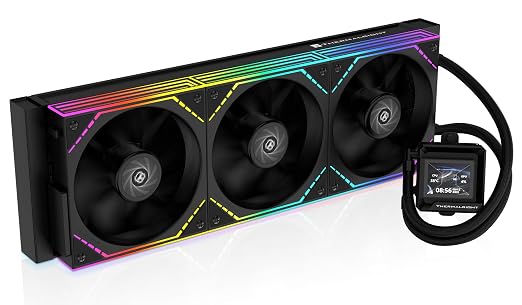
The Corsair iCUE H150i Elite Capellix is a powerful 360mm liquid cooler that keeps your Ryzen 7 3700X running cool under load. The Thermalright Frozen Warframe 360 SE ARGB stands out with a bright 2 LCD screen that shows system stats or custom images, making it great for gamers and creators who want a blend of performance and personalization.
Setting the cooler up involves slotting the radiator comfortably into a case that supports 360mm mounts. The three TL-M12Q 120mm fans connect via a single daisy-chain cable, helping to reduce clutter inside the system while providing airflow up to 68.9 CFM. The pump reaches up to 3000 RPM, though the fans run up to 2000 RPM, keeping noise at a reasonable 28.2 dB during typical use.
Using the Thermalright software, you can easily customize the LCD for status updates or add flair with GIFs and images.
The cooler does a solid job keeping the Ryzen 7 3700X temperatures in check during gaming and creative workloads. The aluminum radiator is quite sizeable at 397×120×27 mm and built for durability.
Users often praise the customizable LCD screen for adding a unique touch to their builds. Some mention that while the pump is powerful, the overall noise level can rise when the cooler ramps up, making it a bit louder than quieter fans. Build quality and cooling stability are definitely highlights.
The customizable LCD screen is often highlighted for making the build stand out, adding a personal flair beyond just cooling. However, the noise can become noticeable when the pump and fans crank up during intense tasks, which might bother those seeking a quieter setup.
Gamers and creators looking for dependable performance with some visual customization will appreciate this cooler. Those who prioritize near-silent operation or have smaller cases without space for a 360mm radiator might want to explore alternative options.
Pros
- Customizable 2″ LCD screen for system stats or images
- Three PWM fans reduce cable clutter via daisy-chain
- Strong cooling performance with 3000 RPM pump
- Compatible with AMD AM4 and AM5 platforms
Cons
- Noise level can increase under heavy load
- Requires case with 360mm radiator support
| Specification | Details |
|---|---|
| Radiator Size | 397×120×27 mm |
| Fan Size | 3 × 120 mm TL-M12Q PWM |
| Fan Speed | Up to 2000 RPM |
| Pump Speed | 3000 RPM |
| Noise Level | 28.2 dB |
| Air Flow Capacity | 68.9 CFM |
7. Thermalright Aqua Elite 360 V6 ARGB CPU Cooler

Keeping a Ryzen 7 3700X cool during intense workloads can be a challenge, but a 360mm AIO cooler like this brings solid performance and striking aesthetics. It’s great for builders wanting strong cooling with a bit of flair from ARGB lighting. Its main strength lies in balancing effective heat dissipation with customizable lighting effects.
Setup involves mounting the round vortex pump head that spins up to 2800RPM, helping the cooler quickly move heat away from the CPU. The pre-installed fans sync their ARGB lighting directly through a 5V 3-pin motherboard header, making it easy to match your build’s colors.
Noise stays under 30 dB, so it won’t distract during long gaming or productivity sessions.
This cooler keeps temperatures in check thanks to a water-based cooling system paired with fans pushing 70.84 CFM at speeds up to 2000 RPM. The build feels solid with durable materials, though some mention occasional fan noise as a downside during heavy use. Lighting is smooth and vibrant, but lighting interface compatibility should be checked beforehand.
The strongest praise highlights its efficient cooling with a smooth ARGB lighting effect that integrates well with many motherboards. A common complaint centers on occasional fan noise when pushed hard, which can be distracting to some users.
Those wanting reliable cooling combined with visually pleasing lighting will appreciate this cooler. People sensitive to fan noise or without compatible lighting headers may want to explore quieter or simpler options instead.
Pros
- High pump speed for effective heat dissipation
- ARGB lighting synchronizes with motherboard easily
- Quiet operation around 29.8 dB
- Strong airflow at 70.84 CFM
Cons
- May produce noticeable fan noise under load
- Lighting interface compatibility requires checking
| Specification | Details |
|---|---|
| Cooling Method | Water |
| Maximum Rotational Speed | 2000 rpm |
| Noise Level | 29.8 db |
| Air Flow Capacity | 70.84 cfm |
| Power Connector Type | 4-Pin |
8. CORSAIR Nautilus 360 RS AIO CPU Cooler

Strong airflow and high static pressure from the pre-installed RS120 fans stand out, making this ideal for anyone running a Ryzen 7 3700X who wants solid cooling. Compatibility with both AMD and Intel sockets means it fits well in most modern builds.
Setup is straightforward thanks to the daisy-chain feature on the RS120 fans, letting you connect all three to the motherboard with a single cable. This cuts down on clutter and speeds up installation. The magnetic dome bearing fans run quietly, so the cooler stays unobtrusive during daily use.
Water cooling keeps temps down efficiently even under load.
Cooling performance lives up to expectations, handling the Ryzen 7 3700X without trouble. The build feels solid, particularly the fans with magnetic dome bearings that reduce noise through less friction.
Praise often goes to the quiet operation, while the most common gripe mentions the higher-end price point.
Users praise the quiet fan operation thanks to the magnetic dome bearings while appreciating the straightforward cable management from the daisy-chained RS120 fans. Common criticism centers around the cooler’s cost, which some find steep compared to other options.
A great choice for those wanting strong and quiet cooling for Ryzen 7 3700X builds and who don’t mind spending more. People seeking budget options or non-desktop system compatibility should explore other coolers instead.
Pros
- Strong airflow and high static pressure fans
- Daisy-chained fans reduce cable clutter
- Quiet magnetic dome bearing fans
- Supports latest AMD and Intel CPU sockets
Cons
- Relatively high price point
- Limited to desktop use only
| Specification | Details |
|---|---|
| Power Connector Type | 4-Pin |
| Cooling Method | Water |
| Compatible Devices | Desktop |
| Maximum Rotational Speed | 2100 rpm |
9. Noctua NL-LC1-36 360mm AIO CPU Cooler

Enthusiasts building a high-performance Ryzen 7 3700X PC will appreciate a cooler that combines quiet operation with powerful thermal management. Ideal for those wanting a large 360mm radiator option, it handles heat efficiently while running exceptionally quietly, making it great for silent gaming rigs or professional workstations.
Setup is straightforward thanks to the Asetek Emma V2 closed-loop design, which fits most desktop cases compatible with 360mm radiators. Three premium Noctua NF-A12x25 G2 PWM fans optimize airflow with speed-offset technology, reducing noise during daily tasks and gaming.
The innovative pump noise absorber keeps vibrations low, so you barely notice it’s running even under load.
Cooling performance is excellent, maintaining low temperatures under heavy CPU loads without generating much noise. The build quality feels solid with durable materials and attention to acoustic detail.
Most praise focuses on how quiet it runs, while the only recurring issue involves fitting larger radiators in smaller cases, which can be a tight squeeze for some setups.
Quiet operation stands out as the strongest feature thanks to the layered soundproofing and tuned-mass damper, making it ideal for noise-sensitive environments. Case compatibility can be challenging with a large 360mm radiator, limiting options for smaller PC builds.
Ideal for users seeking silent yet powerful cooling in spacious cases, especially gamers and workstation builders. Those with compact PC cases or limits on radiator size should explore smaller AIO models better suited to tight spaces.
Pros
- Quiet pump operation with noise absorber
- Large 360mm radiator for effective cooling
- Three award-winning 120mm fans included
- Low vibration levels improve acoustic comfort
Cons
- Radiator size may not fit smaller cases
- Fans run up to 1800 rpm, can get audible
| Specification | Details |
|---|---|
| Power Connector Type | 4-Pin |
| Voltage | 12 volts |
| Wattage | 1.8 watts |
| Cooling Method | Water |
| Noise Level | 22.5 db |
| Maximum Rotational Speed | 1800 rpm |
| Air Flow Capacity | 107.3 cubic meter per hour |
10. Cooler Master MasterLiquid ML240L RGB V2 CPU Cooler

Cooler Master MasterLiquid ML240L RGB V2 stands out by combining strong cooling with customizable RGB lighting, making it ideal for gamers and PC builders using Ryzen 7 3700X who want both performance and style. Its refreshed pump design brings reliable cooling efficiency that keeps temperatures in check during heavy workloads.
Installation is straightforward thanks to compatibility with AMD AM4 sockets, fitting Ryzen 7 3700X easily. The updated SickleFlow fans provide quiet airflow without sacrificing performance and the pumped water cooling runs smoothly without extra noise.
The RGB setup is fully customizable, letting you tweak lighting effects to match any build theme without any slowdown or fuss.
Cooling power handles the Ryzen 7 3700X well, maintaining solid temperatures under load without sounding loud. Build quality feels sturdy, especially with its high-grade EPDM seals that prevent leaks and extend durability. Most users praise its quiet operation, though some mention the lighting effect could be brighter or more vivid in certain setups.
The MasterLiquid ML240L RGB V2 receives praise for its quiet cooling performance aided by the refined SickleFlow fans and dual chamber pump. The most common complaint focuses on its RGB lighting, which can appear less bright or impactful depending on the case lighting conditions.
This cooler matches well with users valuing effective temperature control and quiet operation, especially for Ryzen 7 3700X builds that include RGB aesthetics. Those who want more intense lighting effects or need a different power connector might look toward other models better suited to those needs.
Pros
- Quiet airflow with improved fan blades
- Customizable RGB lighting effects
- Strong 3rd gen dual chamber pump
- Durable high industrial grade seal
Cons
- Lighting effects sometimes less vivid
- Only supports 4-pin power connector
| Specification | Details |
|---|---|
| Power Connector Type | 4-Pin |
| Voltage | 12 volts |
| Wattage | 260 watts |
| Noise Level | 30 db |
| Maximum Rotational Speed | 1800 rpm |
| Air Flow Capacity | 62 cfm |
11. Thermalright Aqua Elite 120 V3 AIO CPU Cooler

Thermalright Aqua Elite 120 V3 AIO CPU Cooler offers reliable cooling performance tailored for Ryzen 7 3700X processors. Its standout feature is the fourth generation pump head combined with a 120mm ARGB fan, which delivers efficient heat dissipation with low vibration.
Ideal for users seeking solid cooling in a compact form.
Setup is straightforward, with the standard 4-pin power connector and ARGB sync capabilities to match your motherboard’s lighting. In daily use, the low noise level of 25.6 dB keeps things quiet during regular workloads. The black aluminum fin heat sink and mesh-protected water pipes contribute to durability and ease of maintenance, making it well-suited for desktop builds.
Thermalright’s focus on cooling power shows through a 1500 rpm maximum fan speed and airflow of 66.17 cfm, effectively keeping temperatures in check. Built with longevity in mind, the cooler features a low evaporation design for lasting performance. Praised for quiet operation, the most mentioned downside is the limited cooling capacity compared to larger AIO options.
The clear strength lies in quiet operation with respectable cooling for a 120mm AIO, supported by a low evaporation pump and solid build quality. The most common complaint focuses on its performance ceiling when paired with more demanding setups, suggesting it may fall short for heavy overclockers.
Builders aiming for a compact, quiet cooler that fits typical Ryzen 7 3700X usage will appreciate this design. Those planning extreme overclocking or needing more aggressive temperature control might prefer larger radiators or high-end AIO solutions.
Pros
- Low vibration pump design
- ARGB lighting sync with motherboard
- Compact 120mm fan size
- Durable aluminum heat sink plate
Cons
- Cooling capacity limited compared to larger units
- Fan speed maxes out at 1500 rpm
| Specification | Details |
|---|---|
| Cooling Method | Water |
| Maximum Rotational Speed | 1500 rpm |
| Noise Level | 25.6 db |
| Air Flow Capacity | 66.17 cfm |
| Power Connector Type | 4-Pin |
| Voltage | 12 volts |
12. Thermalright Peerless Vision 360 ARGB CPU Cooler

Running quietly while keeping a Ryzen 7 3700x cool, the Thermalright Peerless Vision 360 ARGB looks good with its 3.95-inch magnetic screen and fits well in many desktop builds. Its biggest strength lies in combining strong cooling power with eye-catching lighting effects on the fans and pump head.
Installation is fairly straightforward thanks to the magnetic pump head that snaps on and off quickly without fuss. The three wireless splicing fans spin up to 2000 rpm and use S-FDB bearings to stay quiet and reduce vibration.
You get smoother airflow at 68.9 cfm, which helps the radiator pull heat away efficiently during heavy use.
The 45-watt water cooling setup keeps temps under control while running just above 28 decibels, striking a solid balance between performance and noise. The build quality feels solid, with durable materials still lightweight enough to avoid excess strain.
Most praise the cool, silent operation and attractive lighting, though some mention the magnetic screen’s resolution could be sharper for animations.
The cooler impresses with quiet and effective cooling at 28.2 dB noise level and 68.9 cfm airflow, making it a dependable choice for Ryzen CPUs. On the downside, the 480×480 resolution on the magnetic screen offers only basic image sharpness, which can affect the display of video and animations.
People looking for a powerful cooler with striking lighting and an easy-to-install pump will appreciate this model. Those prioritizing high-resolution screen visuals or ultra-compact builds might consider other options better suited to those specific needs.
Pros
- Quiet operation with low vibration fans
- Magnetic pump head allows easy installation
- Strong airflow for efficient cooling
- Attractive ARGB lighting effects
Cons
- Screen resolution limited to 480×480
- Magnetic screen image quality not very sharp
| Specification | Details |
|---|---|
| Maximum Rotational Speed | 2000 rpm |
| Power Connector Type | 4-Pin |
| Cooling Method | Water |
| Air Flow Capacity | 68.9 cfm |
| Noise Level | 28.2 db |
Best AIO Coolers for Ryzen 7 3700X Compared
| Product | Cooling Method | Max Rotational Speed | Air Flow Capacity | Noise Level |
|---|---|---|---|---|
| ARCTIC Liquid Freezer III 360 | Liquid | 3000 rpm | 77 cfm | – |
| ARCTIC Liquid Freezer III 360 | Liquid | 3000 rpm | 77 cfm | – |
| Cooler Master 240 Core II | Fan, Water | 1750 rpm | 70.5 cfm | 30 db |
| Cooler Master Elite Liquid 360 | Water | 2100 rpm | 84.2 ci/min | 30 db |
| Thermalright Aqua Elite 240 V3 | Air, Water | 1800 rpm | 66.17 cfm | 25 db |
| Thermalright Frozen Warframe 360 SE | Water | 2000 rpm | 68.9 cfm | 28.2 db |
| Thermalright Aqua Elite 360 V6 | Water | 2000 rpm | 70.84 cfm | 29.8 db |
| CORSAIR Nautilus 360 RS | Water | 2100 rpm | – | – |
| Noctua NL-LC1-36 360mm | Water | 1800 rpm | 107.3 m3/h | 22.5 db |
| Cooler Master MasterLiquid ML240L RGB | Water | 1800 rpm | 62 cfm | 30 db |
| Thermalright Aqua Elite 120 V3 | Water | 1500 rpm | 66.17 cfm | 25.6 db |
| Thermalright Peerless Vision 360 ARGB | Water | 2000 rpm | 68.9 cfm | 28.2 db |
- Cooling MethodLiquid
- Max Rotational Speed3000 rpm
- Air Flow Capacity77 cfm
- Noise Level–
- Cooling MethodLiquid
- Max Rotational Speed3000 rpm
- Air Flow Capacity77 cfm
- Noise Level–
- Cooling MethodFan, Water
- Max Rotational Speed1750 rpm
- Air Flow Capacity70.5 cfm
- Noise Level30 db
- Cooling MethodWater
- Max Rotational Speed2100 rpm
- Air Flow Capacity84.2 ci/min
- Noise Level30 db
- Cooling MethodAir, Water
- Max Rotational Speed1800 rpm
- Air Flow Capacity66.17 cfm
- Noise Level25 db
- Cooling MethodWater
- Max Rotational Speed2000 rpm
- Air Flow Capacity68.9 cfm
- Noise Level28.2 db
- Cooling MethodWater
- Max Rotational Speed2000 rpm
- Air Flow Capacity70.84 cfm
- Noise Level29.8 db
- Cooling MethodWater
- Max Rotational Speed2100 rpm
- Air Flow Capacity–
- Noise Level–
- Cooling MethodWater
- Max Rotational Speed1800 rpm
- Air Flow Capacity107.3 m3/h
- Noise Level22.5 db
- Cooling MethodWater
- Max Rotational Speed1800 rpm
- Air Flow Capacity62 cfm
- Noise Level30 db
- Cooling MethodWater
- Max Rotational Speed1500 rpm
- Air Flow Capacity66.17 cfm
- Noise Level25.6 db
- Cooling MethodWater
- Max Rotational Speed2000 rpm
- Air Flow Capacity68.9 cfm
- Noise Level28.2 db
How to Choose the Right AIO Cooler
Selecting the right cooler involves considering factors like cooling performance, radiator size, and compatibility with your case and CPU socket. Prioritizing efficient cooling and proper fit helps prevent overheating and noise issues, ultimately saving money on repairs and enhancing system longevity.
Compatibility and Fit
Many people overlook how crucial it is for a cooler to fit properly within their PC case. Some coolers with large radiators won’t fit in mid-tower cases, especially if the radiator measures beyond 240mm.
This can block access to drive bays or other components. Clearance for RAM and motherboard capacitors also matters; tall RAM modules commonly conflict with the tubes or pump housing. Users often find themselves forced to replace high-profile RAM or reposition fans to fix fitment issues.
Support for the AM4 socket is essential since the mount points differ from other Intel or AMD sockets. The mounting brackets should align precisely to avoid stress on the CPU or motherboard. Look for radiator sizes like 120mm, 240mm, or 280mm that match your case’s fan slots, and confirm that the tubes won’t interfere with nearby hardware.
Verifying these details beforehand saves the hassle of returns and disassembly.
Cooling Performance
Pump efficiency directly affects how well heat moves from the CPU to the radiator. A low flow rate can cause coolant stagnation, resulting in higher temperatures during heavy workloads like gaming or rendering. Radiators with more surface area, typically 240mm or larger, allow for more effective heat dissipation when paired with quality fans.
Multi-fan configurations improve airflow but only if the pump keeps coolant circulating steadily. Consistent performance is crucial on longer sessions; some coolers cool well at idle but struggle under sustained load.
Checking the pump’s RPM range and coolant flow specifications helps predict real-world cooling ability.
Noise Levels
Fan and pump noise can become a distraction if overlooked. Pumps running at high speed produce a subtle but persistent whine noticeable in quiet rooms. Fans without PWM control often run full speed unnecessarily, increasing noise during low-demand periods.
Dynamic noise adjustment helps keep sound levels down when the CPU is idle and ramps up only under load. People sensitive to background noise should compare decibel ratings found in product manuals and online reviews to match their tolerance.
Components labeled with PWM fans and quieter pump bearings typically offer a better balance between cooling and noise.
Build Quality and Durability
Stuff like soft tubing or flimsy fittings often lead to leaking or reduced lifespan. Reinforced tubing with braided sleeves prevents kinks that restrict flow, while high-quality metal radiator fins resist corrosion over years.
Pumps built with ceramic or magnetic bearings usually last longer and run quieter.
Manufacturers vary in the tightness of their seals around fittings and joints, which affects leakage risk. A warranty covering three to five years is a good indicator of confidence in durability.
Many people learn the hard way that the cheapest products don’t always last, so investing in build quality upfront avoids costly damage and downtime later.
Ease of Installation and Maintenance
Installation often causes frustration; complex mounting brackets that don’t align well with the AM4 socket waste time and may require extra tools. Clear, step-by-step instructions with pictures or videos make the process straightforward, especially for first-time builders.
Cleaning is another issue, radiators that can be easily removed or accessed without dismantling the whole system reduce maintenance time. The ability to swap or add fans and replace tubing extends the cooler’s life.
Those who pick models with these features avoid rebuilding their system from scratch to maintain proper cooling.
Optimal Installation Techniques for AIO Coolers on the Ryzen 7 3700X
Proper installation of an AIO cooler on the Ryzen 7 3700X can significantly affect thermal performance. The orientation of the pump unit plays a vital role.
Positioning the pump so that the tubes exit from the top or side helps prevent air bubble buildup inside the pump block. Applying thermal paste lightly but evenly ensures good contact between the processor and the cooler block. Overusing thermal paste can actually reduce cooling efficiency.
Using the backplate supplied with the cooler and tightening screws in a cross pattern creates uniform pressure. This helps avoid uneven contact and possible damage to the CPU or motherboard. Ensuring the radiator fans push or pull air effectively within the case airflow setup also matters.
Intake fans on the radiator generally work better to keep component temperatures down. Common mistakes include snagged cables and failing to check clearance with RAM modules, which can interfere with installation and airflow.
Routine Maintenance Practices to Maximize AIO Cooler Lifespan
Maintaining an AIO cooler properly can extend its useful life and keep cooling performance steady. Dust buildup on the radiator fins is a frequent cause of reduced cooling efficiency.
Cleaning the fins gently with compressed air every few months prevents hot spots. The pump should be monitored for unusual noises, which might indicate bearing wear or fluid issues.
Checking that radiator fans spin freely and replacing any faulty fans ensures consistent airflow. It also helps to verify that mounting screws remain tight as vibrations can loosen them over time. Some users choose to occasionally reseat the cooler and replace thermal paste after a year or so, as paste can dry out and lose effectiveness.
Keeping the PC positioned in a dust-minimized environment reduces the frequency of maintenance tasks.
Comparing AIO Coolers with Air Coolers for Ryzen 7 3700X Performance
AIO coolers generally provide lower operating temperatures for the Ryzen 7 3700X compared to traditional air coolers. Liquid cooling can remove heat more quickly, allowing better performance during intensive workloads or overclocking. However, air coolers with large heat sinks and multiple heat pipes still offer reliable and consistent cooling without risk of pump failure.
Air coolers tend to have fewer points of failure and typically cost less upfront. They are simpler to install and maintain, since no liquid is involved.
On the other hand, AIO units take up less space around the CPU socket and can improve case airflow by relocating heat to the radiator area. Noise levels vary widely; some high-end air coolers run quietly, but many AIOs maintain lower fan speeds due to more effective heat dissipation.
People Also Asked
How Do I Install an AIO Cooler on Ryzen 7 3700x?
Mount the backplate behind your motherboard first, align the standoffs with the Ryzen 7 3700x socket, then secure the pump block on top of the CPU using the appropriate mounting hardware. Apply thermal paste minimally if not pre-applied. Tighten screws evenly to avoid pressure imbalances on the CPU.
Will an AIO Cooler Fit My Ryzen 7 3700x Case?
Check your case specifications for radiator support; most Mid-tower and larger cases fit at least a 240mm radiator, suitable for Ryzen 7 3700x. Measure space near your top or front panel and verify clearance for tubes and fan thickness before purchasing.
How Long Does an AIO Cooler Typically Last on Ryzen CPUs?
An AIO cooler usually lasts around 3-5 years depending on use and maintenance. Keep an eye on noise levels and pump operation; replace the unit if pump failure or significant coolant evaporation occurs.
Are AIO Coolers Safe to Use with Ryzen 7 3700x Processors?
AIO coolers are safe for Ryzen 7 3700x when installed correctly and regularly maintained. Ensure the pump runs constantly, keep radiator fans clean, and avoid kinks in tubing to maintain cooling performance and prevent leaks.
What Are Common Problems with AIO Coolers for Ryzen 7 3700x?
Common issues include pump noise or failure, radiator fan malfunctions, and coolant evaporation leading to reduced performance. Flushing dust from fans and checking for leaks periodically helps extend the cooler life and keeps temperatures stable.
Conclusion
Choosing an AIO cooler for the Ryzen 7 3700X mainly comes down to cooling performance, noise levels, and compatibility with your case and motherboard. Good cooling keeps the processor running smoothly during heavy tasks.
Low noise is important for a comfortable working environment, especially if you have the PC nearby. Making sure the cooler fits your case and matches the Ryzen socket avoids installation issues.
Consider your budget and available space before making a decision. Some coolers need more room or cost more but offer quieter operation.
Use the comparison table above to see how each cooler measures up across these aspects. Pick the one that best fits your setup and how you use your PC most of the time.

I’m Grant Mitchell, a firearms and hunting writer with years of experience at the range and in the field. I write about rifles, shotguns, handguns, optics, safe storage, cleaning, and responsible ownership, along with practical hunting tips. My goal is to share accurate, safety-first information that helps you choose the right firearm, maintain it properly, and become a more confident shooter.