Top 12 Best 5900X Cooler That Will Blow Your Mind!
Running a Ryzen 9 5900X without the best 5900x cooler can quickly turn into a headache. Overheating leads to throttled performance and loud fans that never seem to stop.
A cooler that can’t handle the chip’s heat output forces the system to slow down during heavy workloads, which defeats the purpose of having a high-end processor in the first place.
The most important aspects for a good 5900X cooler are its cooling capacity, fit, and noise levels. Efficient coolers often feature larger radiators, at least 240mm for liquid coolers, or big, thick fin stacks with multiple heat pipes for air coolers.
Compatibility with the AM4 socket and enough clearance inside your case is critical to avoid installation issues. Strong airflow combined with low RPM fans helps keep noise in check while maintaining steady temperatures under load.
Need a Quick Check?
| Image | Product | Price |
|---|---|---|
Our Top Picks 1  | Thermalright Peerless Assassin | Check Price |
Our Top Picks 2  | Cooler Master Elite Liquid 360 | Check Price |
Our Top Picks 3 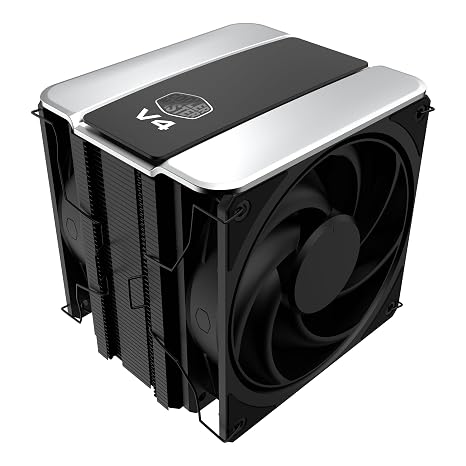 | Cooler Master V4 Alpha 3DHP | Check Price |
Our Selected Top 12 5900x Cooler Worth Considering
This list features a range of coolers suitable for the 5900x processor, with detailed insights on each model’s performance, ideal user scenarios, and key advantages and drawbacks. Readers will gain a clear understanding of which cooler fits their specific needs and preferences.
1. Thermalright Peerless Assassin 120 SE CPU Cooler
Excellent for those needing a powerful air cooler for the 5900X, this CPU cooler stands out with its high cooling capacity and quiet operation. It suits desktop users who want strong airflow without loud fan noise.
Setup involves a standard 4-pin power connector which keeps fan control straightforward. Running at a modest 1550 rpm max speed, the cooler manages heat effectively while staying fairly quiet at 25.6 dB.
The cooling method is air-based, making regular cleaning simple to maintain performance over time.
Performance-wise, it handles up to 265 watts, which is impressive for air cooling. The build feels durable and solid, typical of a brand with over two decades of experience in computer accessories.
Common praise highlights its balance of airflow and noise, while some users note the fan speed limit could be higher for extreme overclocking scenarios.
The cooling ability reaches 265 watts while keeping fan noise low at just 25.6 dB. Users often mention the fan’s rotational speed limit at 1550 rpm as a drawback when pushing their CPUs hard. Many appreciate its balance of performance and quietness without overly complicating installation.
Ideal for users who need effective air cooling with minimal noise during everyday tasks or moderate gaming. Those aiming for heavy overclocking or extreme cooling might want to explore higher-speed or liquid cooling options instead. It fits well in builds prioritizing steady and quiet operation.
Pros
- Strong cooling capacity up to 265 watts
- Quiet operation at 25.6 dB
- Reliable 4-Pin power connector
- Decent airflow of 66.17 CFM
Cons
- Fan speed capped at 1550 rpm may limit overclocking
- Lacks advanced cooling features for extreme setups
| Specification | Details |
|---|---|
| Power Connector Type | 4-Pin |
| Voltage | 12 volts |
| Wattage | 265 watts |
| Noise Level | 25.6 db |
| Maximum Rotational Speed | 1550 rpm |
| Air Flow Capacity | 66.17 cfm |
2. Cooler Master Elite Liquid 360 CPU Cooler
Featuring a dual-chamber ceramic pump and fluid dynamic design, this cooler is built specifically for high-performance CPUs like the Ryzen 9. Its standout feature is the quiet operation combined with efficient cooling, making it well suited for gamers and professionals running demanding workloads on AM5|4 and LGA 1851|1700 platforms.
Installation is straightforward thanks to pre-installed brackets and mounting hardware compatible with the latest sockets. You’ll notice the ARGB hexagon cap brings customizable lighting controlled directly through your motherboard software.
The CryoFuze thermal paste is pre-applied, ensuring good thermal conductivity right out of the box. Fans run at dynamic PWM speeds from 650 to 2100 rpm, balancing airflow and noise levels during daily use.
Cooling performance stays stable across a wide temperature range, with noise levels peaking around 30 dB. The build quality feels solid with a ceramic pump designed for minimal maintenance and low noise.
Most users praise how quiet it runs under load, while some mention the 3-pin power connector limits fan control options on certain setups.
Quiet operation stands out as the biggest plus, keeping noise at a low 30 dB even during heavy use. A common drawback lies in the 3-pin connector, which reduces flexibility in fine-tuning fan speeds through some motherboard software.
Users looking for solid cooling on Ryzen 9 CPUs with easy ARGB tuning will find this cooler a good fit. Those needing full PWM fan control or completely passive maintenance-free operation might look for other solutions tailored to those needs.
Pros
- Quiet operation even at max fan speed
- Easy installation with pre-installed brackets
- Customizable ARGB lighting fits gaming setups
- Effective thermal paste pre-applied for better cooling
Cons
- 3-pin power connector limits advanced fan control
- Not suitable for those wanting zero maintenance options
| Specification | Details |
|---|---|
| Power Connector Type | 3-Pin |
| Voltage | 12 volts |
| Wattage | 12 |
| Cooling Method | Water |
| Noise Level | 30 db |
| Maximum Rotational Speed | 2100 rpm |
3. Cooler Master V4 Alpha 3DHP CPU Air Cooler
Impressive cooling is what stands out immediately, making the V4 Alpha 3DHP ideal for those running a 5900X who want efficient temperature management without noise distractions. Its main strength lies in using two patented 3DHP heat pipes to outperform many air coolers on the market today.
Setup involves fitting it onto most CPU sockets thanks to its broad compatibility. The pre-installed Mobius 120mm fans run quietly in a push-pull arrangement, which keeps air flowing steadily without creating a racket. Daily use is smooth, with minimal noise from both the cooler and overall system thanks to the reduced turbulence design.
Performance excels with 30% better cooling than standard designs, handling heat output effectively. The build is solid and minimalist, fitting nicely into many cases without added bulk.
The strongest praise revolves around its quiet operation, while some find the noise level unexpectedly noticeable when pushed to the max speed of 2050 rpm.
The cooler delivers notably quiet performance and effective temperature control thanks to its patented heat pipes and fan design. However, noise does increase noticeably when fans reach their highest speed setting, which may catch some by surprise.
People looking for an efficient and quiet cooler for their desktop will appreciate this model, especially for 5900X use. Those constrained by very small case sizes or extremely noise-sensitive setups could consider other more compact or passive options.
Pros
- Two patented 3DHP heat pipes for better cooling
- Quieter system operation up to 2.2x lower noise
- Wide compatibility across major CPU sockets
- Push-pull Mobius 120mm fans for better airflow
Cons
- Fans can be noisy at maximum speed
- Might not fit in very compact cases
| Specification | Details |
|---|---|
| Power Connector Type | 4-Pin |
| Cooling Method | Fan |
| Compatible Devices | Desktop |
| Noise Level | 2.05 db |
| Maximum Rotational Speed | 2050 rpm |
4. Cooler Master Atmos II 360 LCD AIO CPU Cooler

Chose for its impressive cooling ability tailored for high-performance CPUs like the Ryzen 9 and Intel Ultra i9. Its standout feature is the patented Dual-Chamber design that targets CPU hot spots with boosted water pressure and flow for quiet, consistent cooling.
Installing this cooler involves connecting the 4-pin power connector and syncing its ARGB lighting with your motherboard. The LCD panel adds a personalized touch, showing system stats and lighting effects that you can program via MasterCTRL. It stays quiet at 38.5 db even at its maximum 2500 rpm fan speed, making daily use comfortable without noticeable noise distraction.
Performance-wise, it handles intense CPU heat well thanks to the strengthened PPS and fiberglass materials built to resist temperatures up to 70°C for 3,000 hours. The fan’s airflow capacity is strong at 190 cfm, keeping your processor cool during heavy tasks. Most find the cooling reliable and the design durable, though some mention the fan speed can get loud when pushed to the maximum.
The cooler delivers steady, quiet performance and maintains low noise at typical speeds while handling heavy CPU loads effectively. Most appreciate its durable construction, although the fan noise can increase noticeably when running at full speed.
Gamers and content creators who need strong, reliable cooling with visual customization will appreciate it. Those who want a silent setup at all times or lack ARGB-compatible motherboards might want to look for simpler options.
Pros
- Customizable LCD panel for system stats
- Quiet cooling even under load
- Built with heat-resistant PPS and fiberglass
- High airflow capacity at 190 cfm
Cons
- Can be noisy at max fan speed
- Requires motherboard with ARGB support for lighting
| Specification | Details |
|---|---|
| Power Connector Type | 4-Pin |
| Cooling Method | Fan, Water |
| Noise Level | 38.5 db |
| Maximum Rotational Speed | 2500 rpm |
| Air Flow Capacity | 190 cfm |
5. Thermalright Assassin X120 Refined SE CPU Cooler

Managing high temperatures on a powerful processor like the Ryzen 9 5900X demands a cooler that balances performance with noise and size. Designed for desktop users who want strong cooling without overwhelming their setup, this model impresses with its quiet operation while maintaining solid airflow.
Installation stays straightforward thanks to support brackets tailored for desktop CPUs. You get a 4-pin power connector allowing speed adjustments based on cooling needs. Running continuously at speeds up to 1550 rpm, this cooler keeps heat in check while staying relatively unobtrusive at 25.6 dB, which means daily use won’t flood the room with noise.
Built around a heat pipe system paired with a decent-sized fan, the cooling performance handles demanding loads without fuss. The materials feel sturdy and it doesn’t feel cheap or flimsy.
People often praise how quiet it runs despite vigorous airflow, although some note it’s not the smallest unit and might be a tight fit in compact cases.
The quiet performance ranks highest in reviews, making it suited for work or gaming rooms where noise matters. Some users find fitting the cooler challenging in more compact setups due to its dimensions. Those seeking a quiet, efficient cooler will appreciate its balance of airflow and noise level.
Individuals with mid to large desktop cases who prioritize quieter operation will find this works well. Those expecting ultra-high fan speeds or who have very tight spaces might want to consider other models with smaller footprints or higher RPM limits.
Pros
- Quiet operation at under 26 decibels
- Strong airflow capacity of 66.17 cfm
- Stable 12V power with 4-pin connector
- Sturdy heat pipe and fan combo
Cons
- Size may limit compatibility with smaller cases
- Fan speed maxes at 1550 rpm only
| Specification | Details |
|---|---|
| Power Connector Type | 4-Pin |
| Voltage | 12 volts_of_direct_current |
| Cooling Method | Heat pipe and fan-based |
| Noise Level | 25.6 db |
| Maximum Rotational Speed | 1550 rpm |
| Air Flow Capacity | 66.17 cfm |
6. Noctua NH-D15 chromax.Black CPU Cooler

With its extra-wide 140mm dual-tower design and six heatpipes, this cooler suits anyone wanting quiet yet powerful cooling for a high-performance CPU like the 5900X. Its biggest strength lies in balancing excellent thermal management with near-silent operation, perfect for overclockers and quiet PC builds.
Installation involves mounting the dual NF-A15 140mm fans, which come with low-noise adapters and PWM control for automatic speed adjustments. During daily use, the cooler stays exceptionally quiet at idle and ramps up smoothly under heavy loads without becoming distracting.
The all-black design fits well with various PC color schemes and doesn’t interfere with RAM or other motherboard components.
Performance-wise, it keeps temperatures low, rivalling many liquid coolers, thanks to efficient airflow at 140.2 cubic meters per hour and a max fan speed of 1500 rpm. Built solidly with premium materials, it feels durable and stable. Reviews note its ability to maintain cool, quiet operation, though some point out the large size may not fit in smaller cases.
Many users appreciate the quiet airflow and strong cooling performance, highlighting its ability to handle overclocked CPUs without noise issues. A frequent concern is the cooler’s bulk, which can cause clearance problems with some RAM sticks and limited-case interiors.
Those building spacious, silent-focused rigs or overclocking will find it a solid match. Anyone with a smaller case or low-profile components should likely explore more compact options to avoid compatibility headaches.
Pros
- Extremely quiet operation at idle
- High cooling efficiency rivaling AIO coolers
- Dual NF-A15 140mm fans with PWM control
- Clean all-black design fits many setups
Cons
- Large size might block tall RAM modules
- May not fit in compact or small PC cases
| Specification | Details |
|---|---|
| Cooling Method | Air |
| Maximum Rotational Speed | 1500 rpm |
| Air Flow Capacity | 140.2 cubic meter per hour |
| Noise Level | 24.6 db |
| Power Connector Type | 4-Pin |
| Voltage | 12 volts |
7. AMD Wraith Prism CPU Cooler
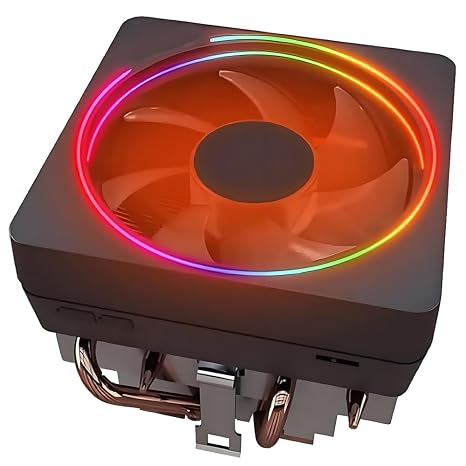
People building or upgrading AMD Ryzen systems who want a tried-and-true air cooler will find the Wraith Prism a solid choice. It works well with AM4 and AM5 sockets and fits a wide range of Ryzen processors.
Its biggest strength lies in solid heat dissipation thanks to copper heat pipes combined with an aluminum heatsink.
Setting up is straightforward since it uses the standard bracket already on many AMD motherboards, though that bracket isn’t included with the cooler itself. Pre-applied thermal paste means you can mount it quickly without extra supplies. The fan runs quietly at 14 db, and its 4-pin power connector allows for PWM control to adjust speed depending on the CPU temperature, keeping noise minimal during normal use.
It handles heat very effectively thanks to the pure copper base and four 6 mm copper heat pipes directly contacting the CPU. The build feels solid and durable with quality materials. Most praise highlights its quiet operation and efficient cooling even under load, while the main complaint is the absence of a mounting bracket in the box, which can complicate installation.
The Wraith Prism cools efficiently and quietly for most daily use, praised for its heat dissipation and quiet 14 db fan. The missing mounting bracket can cause some inconvenience during installation and is a common source of frustration if the motherboard doesn’t already have one.
Builders looking for a reliable, quiet air cooler for Ryzen 5900X or similar CPUs will appreciate the design and performance. Those who want a complete kit with mounting hardware included might consider other options that come with brackets and extra accessories.
Pros
- Compatible with AM4 and AM5 sockets
- Quiet fan operation at 14 db
- Pre-applied thermal paste included
- Efficient cooling with copper heat pipes
Cons
- Mounting bracket not included with cooler
- Maximum fan speed can be somewhat loud under heavy load
| Specification | Details |
|---|---|
| Power Connector Type | 4-Pin |
| Voltage | 12 volts_of_direct_current |
| Wattage | 105 watts |
| Noise Level | 14 db |
| Maximum Rotational Speed | 2800 rpm |
| Air Flow Capacity | 45 cfm |
8. ARCTIC Liquid Freezer III Pro 360 CPU Cooler

Exceptional cooling power makes this liquid cooler ideal for anyone running a Ryzen 9 5900X looking to keep temperatures down under heavy loads. Its integrated VRM fan and optimized mounting help maintain efficient heat transfer and stable performance through intense gaming or multitasking sessions.
Installation involves a native offset mounting that aligns perfectly with the CPU hotspot, ensuring efficient heat dissipation right where it’s needed most. The included ARCTIC P12 PRO fans run quietly at lower speeds yet ramp up to 3000 rpm when workloads demand it, giving both silent daily operation and strong cooling performance. The 4-pin power connector supports PWM control for fine-tuning fan speeds to balance noise and cooling.
Cooling performance is solid enough for extended gaming or content creation without worrying about thermal throttling. The contact frame design distributes pressure evenly, which supports longer CPU life.
The integrated VRM fan adds extra cooling for voltage converters, making it stand out among other AIOs. Few complaints mention the maximum fan speed being somewhat loud when fully ramped, but that is typical for a cooler of this size.
The integrated VRM fan and offset mounting perfectly address CPU hotspot cooling, keeping temps steady even during demanding tasks. The main drawback is that the fan noise rises noticeably at peak speeds, which can be distracting in quiet environments.
Gamers and power users who prioritize CPU and VRM temperature management will appreciate the cooling capabilities here. Those who prefer very silent or ultra-low wattage cooling solutions might look for alternatives with lower maximum fan speeds and less power draw.
Pros
- Quiet operation at low speeds
- Effective VRM cooling with integrated fan
- Optimized pressure distribution for longer CPU life
- Strong airflow of 77 cfm at high speed
Cons
- Maximum fan speed can be noisy under stress
- High-speed operation may draw nearly 4 watts
| Specification | Details |
|---|---|
| Cooling Method | Liquid |
| Maximum Rotational Speed | 3000 rpm |
| Air Flow Capacity | 77 cfm |
| Voltage | 12 volts |
| Power Connector Type | 4-Pin |
| Wattage | 3.96 watts |
9. Thermalright Phantom Spirit 120SE CPU Cooler

Thermalright Phantom Spirit 120SE is a CPU cooler designed for desktop users looking for solid performance on a Ryzen 9 5900X. Its biggest strength lies in the advanced 7x6mm heatpipe technology that handles a wide range of thermal demands from 105W to 280W TDP.
Setup is straightforward with a 4-pin power connector supporting standard 12 volts direct current, making it easy to integrate on most motherboards. Day-to-day use benefits from a balanced noise level of 25.6 dB at a maximum 1500 rpm fan speed. Airflow at 66.17 CFM keeps temps controlled while staying whisper-quiet for typical workloads.
Built with quality materials and Thermalright’s 4th generation AGHP technology, this cooler excels at managing heat effectively. It’s durable and solid, though some users note the fan speed could be higher for extreme cooling needs. The design supports both vertical and horizontal positioning, which is helpful for different builds and airflow setups.
The most praised feature is its solid heatpipe design that efficiently manages CPUs with up to 280W TDP while keeping noise low. The main drawback is the fan speed capped at 1500 rpm, which some find insufficient for heavy overclocking scenarios.
Anyone needing a reliable, quiet cooler for a Ryzen 9 5900X without pushing extreme overclocking boundaries will be satisfied. Those seeking ultra-high performance or aggressive cooling might want to explore higher RPM or liquid cooling options instead.
Pros
- Handles high TDP range up to 280W
- Quiet operation at 25.6 dB noise level
- Supports vertical and horizontal installation
- Stable 12V power with 4-pin connector
Cons
- Maximum fan speed limited to 1500 rpm
- May struggle with extreme overclocking cooling
| Specification | Details |
|---|---|
| Cooling Method | Air |
| Power Connector Type | 4-Pin |
| Voltage | 12 volts_of_direct_current |
| Noise Level | 25.6 db |
| Maximum Rotational Speed | 1500 rpm |
| Air Flow Capacity | 66.17 cfm |
10. Be Quiet! Dark Rock 5 CPU Cooler

Cooling a powerful CPU like the Ryzen 9 5900X demands a quiet yet effective solution. Be quiet! Dark Rock 5 fits right in for those wanting solid air cooling without constant loud fan noise, all while handling heavy workloads with ease thanks to its well-designed heat pipes and fan.
Setup involves fitting the cooler on compatible Intel or AMD sockets using the mounting hardware, which feels stable and secure once installed. The Silent Wings 4 120mm PWM fan runs quietly, thanks to its fluid-dynamic bearing and reduced vibrations from the rubberized frame. Daily use stays quiet, even when the CPU ramps up, with fine-tuned airflow keeping temps controlled without needing constant fan speed adjustments.
Strong cooling comes from six copper heat pipes and a dense aluminum fin design coated with ceramic particles to help transfer heat efficiently. The fan reaches up to 2100 rpm but remains under 30 dB in noise, which is appreciated.
Praises focus on silence during heavy tasks. Common critiques mention some difficulty installing due to its size and weight, which can block adjacent motherboard components in smaller setups.
The cooler provides very low noise levels while handling heavy CPU workloads effectively. Many find the installation process cumbersome because of its size and the space it occupies around the socket area.
Users wanting a quiet, powerful air cooler for demanding tasks will appreciate this model. Those with compact cases or limited motherboard clearance may want to consider smaller alternatives.
Pros
- Quiet operation despite high cooling load
- Strong heat transfer with ceramic-coated fins
- Rubberized fan frame cuts down vibrations
- Compatible with both Intel and AMD sockets
Cons
- Size can interfere with nearby motherboard components
- Installation can be tricky due to weight and bulk
| Specification | Details |
|---|---|
| Power Connector Type | 4-Pin |
| Voltage | 12 volts |
| Wattage | 210 watts |
| Noise Level | 29.8 db |
| Maximum Rotational Speed | 2100 rpm |
| Air Flow Capacity | 55 cfm |
11. Noctua NH-D15S chromax.Black CPU Cooler

Great for anyone running a Ryzen 9 5900X who wants solid cooling without sacrificing RAM or PCIe space. Its single-fan, dual-tower design handles heat impressively quietly, and the all-black look fits well in most builds. The NH-D15S chromax.
Black balances performance and compatibility like few others.
Installation is straightforward thanks to its height of 160mm, which fits most tower cases without fuss. The cooler leaves 65mm of clearance around the RAM slots, so you won’t have to swap out your memory just to make it fit. Its PWM-controlled, quiet 140mm fan keeps noise low during regular use and spins up smoothly when under heavy load.
Cooling power comes from a proven design with a hefty heatsink and an efficient fan capable of spinning up to 1500rpm. It manages heat very well while maintaining a noise level as low as 24.6db at idle, keeping your system whisper quiet when not stressed. The main complaint revolves around its size, which still may be too large for some compact cases despite the asymmetrical layout.
Praised for exceptional quietness and compatibility, this cooler effectively balances cooling and noise levels during daily use. On the downside, its 160mm height can be a tight fit in smaller cases, limiting its suitability for compact builds.
Ideal for anyone with mid-to-large tower cases prioritizing quiet, efficient cooling without blocking RAM or PCIe slots. Those with compact cases or extreme overclocking needs might want to explore alternatives with smaller form factors or multiple fans.
Pros
- High RAM clearance of 65mm
- Quiet operation with low noise adaptor
- Fits most ATX and Micro-ATX boards without blocking PCIe
- Durable, all-black design matches many setups
Cons
- May be too tall for some smaller cases
- Only one fan, which may limit airflow for extreme overclocking
| Specification | Details |
|---|---|
| Power Connector Type | 4-Pin |
| Voltage | 12 volts |
| Noise Level | 24.6 db |
| Maximum Rotational Speed | 1500 rpm |
| Air Flow Capacity | 140.2 cubic meter per hour |
12. Be Quiet! Light Loop 360 CPU Liquid Cooler

Aluminum and plastic form a visually striking cooler built for high-performance CPUs like the Ryzen 9 5900X. It fits users who want powerful liquid cooling combined with customizable RGB lighting. Its biggest selling point is the 64 LEDs spread across the block and fans, making your PC light show truly stand out.
Setting it up depends mainly on securing the radiator and connecting the 4-Pin PWM fans for speed control. The three 120mm Light Wings LX fans spin up to 2100 rpm, balancing strong airflow with manageable noise.
Daily operation benefits from the 12-volt system and the 5.4-watt power draw, which keeps power consumption reasonable while maintaining a quiet environment.
Cooling performance is strong, keeping high-core-count processors like the 5900X comfortably within safe temperatures under load. Build quality feels solid, and the inclusion of high airflow fans at 61.8 cfm is a plus.
Appreciation mainly goes to the impressive lighting effects, while some criticism arises about fan noise hitting close to 36.8 dB during high RPMs.
The most praised feature is definitely the stunning lighting that spreads evenly across the cooling block and fans, creating an eye-catching setup. On the downside, noise from the fans at peak speeds is the most mentioned complaint, which could be bothersome in very quiet environments.
Those who want a powerful and visually appealing cooler that matches a Ryzen 9 5900X’s thermal demands will appreciate this one. Users prioritizing ultra-low noise might want to consider quieter alternatives or fan speed tuning options before deciding.
Pros
- Vibrant RGB lighting with 64 LEDs total
- High airflow fans at 61.8 cfm
- Compatible with AM4 and AM5 sockets
- Quiet operation at moderate speeds
Cons
- Fan noise can get loud near 2100 rpm
- Power draw of 5.4 watts may be high for some setups
| Specification | Details |
|---|---|
| Cooling Method | Water |
| Maximum Rotational Speed | 2100 rpm |
| Air Flow Capacity | 61.8 cfm |
| Noise Level | 36.8 db |
| Power Connector Type | 4-Pin |
Best 5900x Coolers Comparison Table
| Product | Cooling Method | Noise Level | Max Rotational Speed | Air Flow Capacity |
|---|---|---|---|---|
| Thermalright Peerless Assassin | Air | 25.6 db | 1550 rpm | 66.17 cfm |
| Cooler Master Elite Liquid 360 | Water | 30 db | 2100 rpm | 84.2 cubic_inches_per_minute |
| Cooler Master V4 Alpha 3DHP | Fan | 2.05 db | 2050 rpm | – |
| Cooler Master Atmos II 360 | Fan, Water | 38.5 db | 2500 rpm | 190 cfm |
| Thermalright Assassin X120 Refined | Heat pipe and fan | 25.6 db | 1550 rpm | 66.17 cfm |
| Noctua NH-D15 chromax.Black | Air | 24.6 db | 1500 rpm | 140.2 cubic meter per hour |
| AMD Wraith Prism Cooler | Fan | 14 db | 2800 rpm | 45 cfm |
| ARCTIC Liquid Freezer III Pro | Liquid | – | 3000 rpm | 77 cfm |
| Thermalright Phantom Spirit 120SE | Air | 25.6 db | 1500 rpm | 66.17 cfm |
| be quiet! Dark Rock 5 | Air | 29.8 db | 2100 rpm | 55 cfm |
| Noctua NH-D15S chromax.Black | Air | 24.6 db | 1500 rpm | 140.2 cubic meter per hour |
| be quiet! Light Loop 360 | Water | 36.8 db | 2100 rpm | 61.8 cfm |
- Cooling MethodAir
- Noise Level25.6 db
- Max Rotational Speed1550 rpm
- Air Flow Capacity66.17 cfm
- Cooling MethodWater
- Noise Level30 db
- Max Rotational Speed2100 rpm
- Air Flow Capacity84.2 cubic_inches_per_minute
- Cooling MethodFan
- Noise Level2.05 db
- Max Rotational Speed2050 rpm
- Air Flow Capacity–
- Cooling MethodFan, Water
- Noise Level38.5 db
- Max Rotational Speed2500 rpm
- Air Flow Capacity190 cfm
- Cooling MethodHeat pipe and fan
- Noise Level25.6 db
- Max Rotational Speed1550 rpm
- Air Flow Capacity66.17 cfm
- Cooling MethodAir
- Noise Level24.6 db
- Max Rotational Speed1500 rpm
- Air Flow Capacity140.2 cubic meter per hour
- Cooling MethodFan
- Noise Level14 db
- Max Rotational Speed2800 rpm
- Air Flow Capacity45 cfm
- Cooling MethodLiquid
- Noise Level–
- Max Rotational Speed3000 rpm
- Air Flow Capacity77 cfm
- Cooling MethodAir
- Noise Level25.6 db
- Max Rotational Speed1500 rpm
- Air Flow Capacity66.17 cfm
- Cooling MethodAir
- Noise Level29.8 db
- Max Rotational Speed2100 rpm
- Air Flow Capacity55 cfm
- Cooling MethodAir
- Noise Level24.6 db
- Max Rotational Speed1500 rpm
- Air Flow Capacity140.2 cubic meter per hour
- Cooling MethodWater
- Noise Level36.8 db
- Max Rotational Speed2100 rpm
- Air Flow Capacity61.8 cfm
How to Choose the Best Cooler for 5900x
Choosing the right cooler for the 5900x involves considering factors like cooling performance, noise levels, and compatibility with your case. Prioritizing efficient cooling prevents overheating and extends CPU lifespan, while choosing a quiet model ensures a comfortable workspace. Getting these right avoids costly upgrades and maintenance.
Cooling Performance
Under heavy workloads like gaming or video editing, CPU temperatures can spike quickly, pushing the processor toward thermal limits. A cooling solution that fails to keep temperatures in check will cause the CPU to throttle, reducing performance and system stability. On air coolers, heat pipes with a solid copper base and dense aluminum fins improve heat transfer effectively.
Liquid coolers pump coolant through a radiator, usually providing better heat dissipation, especially under intense load. Radiator size, often 240mm or 280mm, directly affects how much heat can be moved away from the CPU.
Maintaining low temperatures allows the Ryzen 9 5900X to operate at peak frequencies without throttling, resulting in smoother multitasking and better game frame rates. Good cooling also means less risk of unexpected shutdowns during demanding tasks.
Fans capable of pushing high airflow paired with effective heat sinks or radiators usually deliver solid results for this processor.
Compatibility and Fit
The mounting system needs to clearly support the AM4 socket, since this is the foundation for a proper fit on boards tailored for Ryzen 9 5900X. Size matters beyond just compatibility; some tall coolers can interfere with RAM modules having high-profile heat spreaders or block PCIe slots if mounted too close to the GPU. Checking dimensions before purchase avoids surprises.
Cases vary widely in how much space they offer inside. Many mid-tower cases only fit coolers up to around 160mm in height. Liquid cooling radiators need compatible mounting points, often at the top or front panel.
Confirming the cooler’s physical dimensions and clearance requirements ensures smooth installation with no blocked components or cramped airflow paths.
Noise Levels
Fan noise can vary dramatically depending on speed and cooler design. At idle, a good cooler should run fans at low RPMs or briefly switch them off to keep things quiet. Under full CPU load, fans ramp up and noise increases, but excessive noise comes from cheap bearings or poorly dampened vibration.
Many coolers include anti-vibration mounts and rubberized fan frames to minimize buzzing or rattling sounds. Balancing strong cooling capability with moderate noise levels is critical for sustained use in a home office or gaming setup, as loud fans tend to tire users and interfere with audio or concentration.
Build Quality and Materials
Heat pipes composed of copper conduct heat efficiently but need solid solder joints to aluminum fins for longevity. Cheaper coolers may use thinner fins or weaker heat pipes that bend or degrade over time. In liquid cooling units, the pump should be reliably built to avoid failure, and the tubing should feel sturdy and resistant to kinks.
The thermal paste that comes included can vary; some kits provide high-quality thermal interface materials which help with initial cooling efficiency but may require reapplication after a couple of years. Coolers with corrosion-resistant coatings on fins or radiators tend to maintain performance longer by preventing oxidation or rust buildup.
Ease of Installation and Maintenance
Mounting clips and backplates that line up quickly make installation less frustrating. Some coolers provide detailed manuals and online tutorials, which prove valuable for users tackling this task for the first time.
Clear space around mounting holes and pre-applied thermal paste simplify the process even further.
Routine maintenance involves cleaning dust from fan blades and heatsinks or radiators to prevent airflow restriction. Liquid solutions demand occasional checks on coolant levels and possible refills or tubing replacements.
Coolers designed to be accessible without full disassembly save time and effort for keeping temperatures in check over the years.
Optimizing Cooling Performance with Different Fan Configurations
Cooling performance varies significantly depending on fan configuration. On a Ryzen 9 5900X, using a push-pull fan setup generally improves airflow over the heatsink compared to a single fan.
This configuration places one fan pushing air into the radiator or heatsink and another pulling air out, which can help reduce temperatures by a few degrees. Alternatively, increasing fan speed improves cooling but may introduce noticeable noise, so balancing airflow and sound is essential.
Key points for fan configuration include:
- Alignment of fans to ensure airflow moves directly through the heatsink or radiator.
- Using quality fans with higher static pressure to push air through dense fins effectively.
- Considering case airflow; intake and exhaust fans influence the cooler’s efficiency.
Changing fan placement or number can yield improvements, but compatibility with your case and cooler model should be checked before modifications.
Proper Maintenance Practices to Extend Your 5900X Cooler’s Lifespan
Keeping a cooler in good condition extends its effectiveness and lifespan. Dust buildup is the main enemy for both air and liquid coolers. It clogs fins and fans, reducing heat dissipation.
Regularly using compressed air to clear dust from the heatsink and fans helps maintain optimal performance.
Additional maintenance tips include:
- Inspecting thermal paste every year or two; dried or uneven paste can cause temperature spikes.
- Ensuring fan bearings are clean and lubricated or replaced if making noise.
- Checking liquid cooling loops for any leaks or signs of wear on tubing and fittings.
Routine cleaning and inspections prevent unexpected overheating and keep the cooler running efficiently with the Ryzen 9 5900X’s demands.
Comparing Air Cooling vs. Liquid Cooling Solutions for the 5900X
Air and liquid coolers each have advantages for the Ryzen 9 5900X. Air coolers are generally simpler to install and maintain.
Most high-performance air coolers handle the heat output well under normal and moderate overclocking conditions. They don’t suffer from pump failures or require periodic fluid checks.
Liquid cooling solutions offer:
- Lower temperatures during heavy loads due to better heat transfer capabilities.
- Smaller heatsinks freeing up space around the CPU socket.
- Typically quieter operation at equivalent cooling levels, depending on radiator and fan size.
On the downside, liquid coolers come with a higher price and potential risk of leakage. Choosing between the two depends on your priority for noise, available space, and budget.
People Also Asked
Will This Cooler Fit Inside My PC Case with 5900x?
Most coolers designed for the Ryzen 9 5900X will fit standard mid-tower cases, but you should check the cooler’s height and your case’s CPU cooler clearance. Measuring the distance from the motherboard mounting plate to the side panel helps avoid surprises.
How Do I Properly Install a 5900x CPU Cooler?
Installing a 5900X cooler involves carefully placing a thermal paste layer on the CPU, securing the cooler bracket, and attaching the fan. Tighten screws in a diagonal pattern to evenly distribute pressure and prevent damage.
How Long Does a Typical 5900x Cooler Last Under Heavy Use?
A 5900X cooler can last several years under heavy use if properly maintained. Cleaning dust from fans and heat sinks regularly keeps performance stable over time.
What Are Common Issues with Cooling a 5900x CPU?
Common problems include inadequate airflow, poor thermal paste application, or loose mounting. Ensuring good case ventilation and properly seated coolers prevents overheating.
Is It Safe to Run the 5900x at High Temps with This Cooler?
Running a 5900X at high temperatures isn’t ideal for longevity, but good coolers keep temps manageable during demanding tasks. Monitoring temps and adjusting fan speeds can reduce risk.
Conclusion
Choosing a cooler for the 5900x comes down to how well it handles heat, how noisy it gets under load, and whether it fits inside your case without trouble. Cooling power is important because the 5900x can run hot under heavy use.
Noise levels matter if you prefer a quieter workspace. Physical size should match your case and build layout to avoid installation issues.
Consider your budget and how often you plan to push the CPU to high usage when picking a cooler. Space in your case can limit your options, so measure before buying.
Use the comparison table and product details above for a clear look at what suits your needs best.

I’m Grant Mitchell, a firearms and hunting writer with years of experience at the range and in the field. I write about rifles, shotguns, handguns, optics, safe storage, cleaning, and responsible ownership, along with practical hunting tips. My goal is to share accurate, safety-first information that helps you choose the right firearm, maintain it properly, and become a more confident shooter.