Top 12 Best 5800X3D Cooler That Will Blow Your Mind!
Heat buildup and loud fans are common problems with cheap coolers on the AMD 5800X3D, leading to throttling and unpredictable performance. Choosing the best 5800x3d cooler makes a noticeable difference in keeping temperatures stable during heavy loads while managing noise levels.
A cooler that can’t handle the chip’s heat output will cause the processor to slow down or shut off, ruining gaming or work sessions.
A good 5800x3d cooler typically uses high-quality copper or aluminum for heat spreaders combined with efficient heat pipes or vapor chambers to transfer thermal energy. Fans usually operate quietly around 1200 to 1800 RPM but deliver strong airflow. Compatibility is key, as the cooler must properly fit the AM4 socket and leave room in the case.
Easy installation and straightforward cleaning also matter for long-term use.
Need a Quick Check?
| Image | Product | Price |
|---|---|---|
Our Top Picks 1  | Thermalright Peerless Assassin | Check Price |
Our Top Picks 2  | Thermalright Phantom Spirit | Check Price |
Our Top Picks 3  | LIAN LI HydroShift OLED 360 | Check Price |
Our Selected Top 12 5800x3d Cooler Worth Your Money
This list features carefully chosen cooling solutions ideal for the 5800x3d processor, highlighting their performance, compatibility, and design. Each review explains who the cooler suits best, along with its main strengths and potential drawbacks to help you make an informed decision.
1. Thermalright Peerless Assassin 120 SE CPU Cooler
Thermalright Peerless Assassin 120 SE is a CPU air cooler designed for desktop setups, excelling at balancing solid cooling power with reasonable noise levels. It suits those running high-performance CPUs like the 5800X3D who want reliable temperature management without excessive noise or bulky hardware.
Installation is straightforward thanks to the supported mounting brackets and the cooler’s manageable size. The 4-pin power connector handles speed control easily through motherboard headers. Daily operation stays quiet at 25.6 dB noise, and the fan spins up to 1550 rpm, enough airflow to keep temperatures in check without being intrusive.
Cooling capacity reaches up to 265 watts, making it capable of handling demanding workloads. The cooler’s build reflects Thermalright’s two decades of hardware experience, showing solid materials and design aimed at longevity. Most praise points to its effective cooling and quiet operation, while some find the airflow could be higher for extreme overclocking.
The cooling performance matches well with noisy reduction, keeping temperatures stable during regular gaming or work loads. The main complaint is the airflow, which some find less than optimal for pushing extreme overclocks on the 5800X3D.
Ideal for users wanting a balance of quiet and solid cooling in moderate overclocking scenarios. Those chasing maximum thermal performance or extreme OC should consider models with higher airflow capacity.
Pros
- Quiet operation at 25.6 dB
- Supports high wattage CPUs up to 265W
- Efficient air cooling with 66.17 CFM airflow
- Easy setup with compatible mounting brackets
Cons
- Cooling might struggle under extreme overclocking
- Airflow not the highest among competitors
| Specification | Details |
|---|---|
| Power Connector Type | 4-Pin |
| Voltage | 12 volts |
| Wattage | 265 watts |
| Noise Level | 25.6 db |
| Maximum Rotational Speed | 1550 rpm |
| Air Flow Capacity | 66.17 cfm |
2. Thermalright Phantom Spirit 120SE CPU Cooler
Quiet and efficient cooling makes running a Ryzen 7 5800X3D much smoother when paired with the Phantom Spirit 120SE. Best suited for desktop builds where steady airflow and reliability count, its main strength lies in applying advanced heatpipe technology to keep temps in check.
Installation feels straightforward thanks to its sturdy mounting brackets designed for secure fitment. The 4-pin power connector helps regulate fan speed, keeping noise down to a gentle 25.6 dB even under heavier loads.
You’ll notice the quiet hum as the fan spins up to 1500 rpm, moving 66.17 CFM of air to prevent overheating during gaming or multitasking.
It handles heat well with seven 6mm heatpipes employing AGHP 4th generation tech, supporting CPU load between 105W and 280W TDP. Build quality feels solid, matching its Taiwanese development heritage.
Comments praise its cooling power and quiet operation, but a few mention it could be a tight squeeze in smaller, cramped cases.
Performance and quietness stand out as key strengths, thanks to efficient air cooling and low noise. However, fitting the cooler in smaller cases can be challenging, limiting options for compact builds.
Those with medium to large desktop setups will benefit from consistent cooling and silent operation. Smaller PC users may want to explore alternatives with a more compact design for better compatibility.
Pros
- Advanced 7x6mm AGHP heatpipes cool high TDP CPUs
- Quiet operation at 25.6 dB noise level
- Strong airflow of 66.17 cfm supports stable temps
- Secure, easy mounting process
Cons
- May not fit well in compact cases
- Maximum fan speed limited to 1500 rpm
| Specification | Details |
|---|---|
| Power Connector Type | 4-Pin |
| Voltage | 12 volts_of_direct_current |
| Cooling Method | Air |
| Noise Level | 25.6 dB |
| Maximum Rotational Speed | 1500 rpm |
| Air Flow Capacity | 66.17 cfm |
3. LIAN LI HydroShift II OLED Curved 360 AIO Cooler
Ideal for anyone running a Ryzen 7 5800X3D, this cooler brings a unique blend of advanced water cooling and a vivid OLED display. Its standout feature is the motorized pump head that lets you position the display perfectly, merging performance and personal style in one unit.
Setting it up is straightforward for a water cooler. The 360mm radiator fits well in most mid to full towers, and the motorized pump head adjusts easily using L-Connect 3 software. Changing angles or rotating the display takes just a few clicks, making daily use feel personalized and fresh, especially when monitoring system info on the sharp 2K curved screen.
Cooling performance keeps CPU temperatures in check under load, with a noise level around 33 dB, so it won’t distract during work or gaming. Build quality feels solid and modern, though some find the software controls a bit fiddly to get exactly right.
The curved OLED is praised for brightness up to 500 nits, offering clear visuals in various lighting, but it adds complexity compared to simpler coolers.
Users appreciate the bright, vivid OLED screen that stays clear in different lighting, along with the unique motorized pump head that adjusts smoothly for optimal positioning. The main point of friction is the software, which can feel complicated and slow for adjusting the pump head and display settings.
Those who enjoy customizing the look of their PC with a high-quality display and quiet cooling will find this cooler suits their needs well. For people wanting a simple, no-fuss cooler focused solely on raw cooling power, a traditional AIO might be a better fit.
Pros
- Motorized pump head for angle adjustments
- Bright 6.67” 2K curved OLED display
- Low noise operation at 33 dB
- Wide compatibility with desktop CPUs
Cons
- OLED display adds setup complexity
- Software controls can be tricky to master
| Specification | Details |
|---|---|
| Cooling Method | Water |
| Compatible Devices | Cpu, Desktop |
| Noise Level | 33 db |
| Maximum Rotational Speed | 2600 rpm |
4. Be Quiet! Pure Rock Pro 3 LX CPU Cooler

Copper heat pipes combined with a nickel-plated base make the Pure Rock Pro 3 LX a solid air cooler aimed at users running high-performance CPUs like the 5800X3D. Its real strength lies in keeping temperatures down during demanding workloads or overclocking, thanks to efficient heat transfer and optimized airflow.
Installation is straightforward with support for multiple Intel and AMD sockets including AM4 and AM5. The Light Wings LX 120mm PWM fan keeps noise under control at around 34.8 dB, while the fan blades and funnel-shaped outlets boost airflow over the fins.
The included LED lighting adds a subtle but distinctive visual touch without being overwhelming.
Performance-wise, the six copper heat pipes handle heat very well, maintaining stable CPU temperatures under load. The build quality feels sturdy and reliable.
Most users appreciate the cooling power and quiet operation, though some mention the fan speed could get a bit loud when ramping up to 2000 rpm.
Cooling stays solid even with overclocking due to the six copper heat pipes and optimal airflow design. The most frequent gripe involves the fan becoming noticeably louder as it approaches its top rotational speed.
PC builders looking for reliable, quiet performance with some ambient lighting will appreciate this cooler. Those needing a smaller profile or ultra-quiet operation at all times may want to explore other options.
Pros
- Efficient heat dissipation with six copper pipes
- Quiet operation at normal speeds
- Supports a wide range of CPU sockets
- Attractive LED lighting on fan blades
Cons
- Fan noise increases near maximum speed
- May be bulky for smaller cases
| Specification | Details |
|---|---|
| Cooling Method | Air |
| Power Connector Type | 4-Pin |
| Voltage | 12 volts |
| Noise Level | 34.8 db |
| Maximum Rotational Speed | 2000 rpm |
| Compatible Sockets | Intel 1851/1700/1200/1151/1150/1155, AMD AM5/AM4 |
5. ARCTIC Liquid Freezer III Pro 360 AIO Cooler

Impressive cooling power stands out the most, well-suited for high-performance AMD Ryzen 7 5800X3D processors and gamers who push their CPUs hard. Its large 360mm radiator and smart design focus on heat dissipation efficiency, which is crucial for keeping temps down during intense workloads.
Setting up involves mounting the cold plate with a native offset positioned to directly target the CPU hotspot, improving heat transfer significantly. The included ARCTIC P12 PRO fans run quietly even at higher speeds, shifting air efficiently through the radiator.
Integrated VRM fan keeps voltage regulators cool, which adds a layer of reliability to everyday gaming or workstation tasks under heavy load.
Heat management performs consistently well, even during peak CPU usage, thanks to the 3000 rpm maximum fan speed and 77 cfm airflow. The cooler’s build feels solid with an optimized contact frame for Intel sockets enhancing durability and heat transfer. Praise often highlights its quiet operation paired with strong cooling.
A common drawback is the size, which may not fit in smaller cases easily.
Users praise how quietly the cooler runs despite its strong airflow and high fan speeds, offering stable temperatures for demanding processors like the 5800X3D. The most frequent complaint involves its physical size limiting compatibility with mid or small tower cases.
People with roomy cases who want reliable, efficient cooling for heavy gaming or workstation tasks will find this cooler meets their needs well. Those with more compact builds or space constraints might want to consider smaller or less bulky solutions.
Pros
- Excellent cooling performance for high-demand CPUs
- Quiet operation even at high fan speeds
- Integrated VRM fan adds extra component cooling
- Optimized cold plate placement for better heat transfer
Cons
- Large radiator requires spacious PC case
- Setup can be tricky in smaller or compact builds
| Specification | Details |
|---|---|
| Cooling Method | Liquid |
| Maximum Rotational Speed | 3000 rpm |
| Air Flow Capacity | 77 cfm |
| Power Connector Type | 4-Pin |
| Voltage | 12 volts |
| Wattage | 3.96 watts |
6. Noctua NH-D15 G2 chromax.Black CPU Cooler

Powerful cooling paired with near-silent operation make the NH-D15 G2 chromax.Black perfect for running the 5800X3D without worries.
Ideal for those who want serious heat management without turning up the noise, it stands out for its improved cooling thanks to eight heatpipes and a larger surface area.
Setting it up takes a bit of care given its size, but once installed, the two NF-A14x25r G2 140mm fans adjust their speed automatically via PWM, keeping noise to a minimum when idle. The low-noise adapters help fine-tune sound levels too, allowing it to manage heavy loads quietly all day long without needing constant tweaks.
Heat is pulled away efficiently, keeping the CPU cool during extended sessions. The all-black design is sturdy and fits well with a range of builds, but the cooler’s size can be a tight fit in smaller cases.
Most praise focuses on its quietness despite high performance, while some mention its bulky dimensions as a challenge.
The cooler delivers highly effective heat management while maintaining a very low noise level, praised for its quiet and steady performance. Bulky dimensions cause fitment issues in smaller cases, which is the main concern among users.
Ideal for users with spacious cases who prioritize strong cooling with minimal noise. Those with tight case spaces or compact builds should consider smaller or more compact options to avoid clearance problems.
Pros
- Excellent quiet cooling with 8 heatpipes and large surface area
- Adjustable fan speed with PWM and low-noise adapters
- Solid all-black design suits many builds
- Efficient air flow keeping high-end CPUs cool
Cons
- Large size can limit installation options
- May require careful case compatibility checks
| Specification | Details |
|---|---|
| Cooling Method | Air |
| Noise Level | 24.8 db |
| Maximum Rotational Speed | 1500 rpm |
| Air Flow Capacity | 155.6 cubic meter per hour |
| Power Connector Type | 4-Pin |
| Voltage | 12 volts |
7. Thermalright Assassin X120 Refined SE CPU Cooler

Keeping a Ryzen 7 5800X3D cool without drowning in noise matters a lot during intense gaming or heavy multitasking. Thermalright Assassin X120 Refined SE is tailored for those looking for a solid air cooler that handles heat effectively while keeping its volume down.
Its standout feature is quiet operation at a decent airflow rate.
Setting it up on a desktop involves standard mounting with its sturdy bracket. Controlling fan speed is easy thanks to the 4-pin power connector, allowing smooth adjustments based on temperature. The fan spins up to 1550 rpm and provides 66.17 cfm airflow, which is quite good for day-to-day cooling needs.
Noise stays around 25.6 dB, so it blends well in quieter environments.
It strikes a good balance in performance by using heat pipes paired with a fan-based heat sink, efficiently managing CPU temperature without extra bulk. Build quality follows Thermaright’s 20 years of experience, with reliable materials and sturdy construction. Many appreciate its quiet profile, while the usual gripe involves its size fitting tight spaces less comfortably.
The cooler maintains a quiet environment during intense use while delivering airflow that keeps the 5800X3D well-contained. Some find the size challenging when fitting it into compact PC builds, which can limit placement options.
People prioritizing low noise and reliable cooling will enjoy this model. Those with very small cases or who want maximum fan speeds for extreme overclocking might want to explore alternatives.
Pros
- Quiet operation at 25.6 dB
- Good airflow capacity of 66.17 cfm
- Reliable 4-pin connector for fan speed control
- Solid build quality with thermal expertise
Cons
- May be bulky for small cases
- Maximum fan speed could be higher
| Specification | Details |
|---|---|
| Power Connector Type | 4-Pin |
| Voltage | 12 volts_of_direct_current |
| Maximum Rotational Speed | 1550 rpm |
| Air Flow Capacity | 66.17 cfm |
| Noise Level | 25.6 db |
| Cooling Method | Heat pipe and fan-based |
8. Thermalright PS120SE ARGB CPU Cooler

Air cooling performance reaches new heights with the Thermalright PS120SE ARGB, ideal for those using a Ryzen 7 5800X3D who need effective heat management in mid-sized PC cases. Its 7x6mm heatpipes featuring 4th generation AGHP technology stand out as the key strength, designed for long-term reliability and efficient thermal transfer.
Installation fits well in many chassis, thanks to the moderate 154mm height. The 4-Pin 12V connector controls the fan up to 1500 rpm, which stays relatively quiet around 25.6 dB while pushing 66.17 cfm airflow. The durable S-FDB bearings promise extended lifespan, while the build uses industrial-strength materials suited to continuous use without requiring frequent upkeep.
Heat dissipation is solid for high-performance CPUs, leveraging the upgraded heatpipes that handle the 5800X3D’s heat output competently. Construction feels solid thanks to premium UL class A insulation and durable PBT+PC plastics, though some might see the fan speed and noise level as a downside compared to quieter systems.
Common praise notes its longevity and stable cooling, while a typical downside is the higher noise compared to liquid coolers.
Durability and consistent cooling performance receive strong positive feedback, attributed to the AGHP heatpipe design and solid materials. Noise at peak fan speeds is noted as the main drawback in everyday use, especially for those prioritizing silence over airflow.
Users with mid-sized cases who want reliable air cooling for a demanding Ryzen processor will appreciate this model. Those needing ultra-quiet setups or very compact coolers might want to explore alternatives.
Pros
- Long-lasting S-FDB bearing for durability
- Strong airflow of 66.17 cfm
- Compatible with a wide variety of cases
- High-quality industrial materials used
Cons
- Noise level can be noticeable during high load
- Not the lowest profile cooler available
| Specification | Details |
|---|---|
| Power Connector Type | 4-Pin |
| Voltage | 12 volts_of_direct_current |
| Noise Level | 25.6 db |
| Maximum Rotational Speed | 1500 rpm |
| Air Flow Capacity | 66.17 cfm |
| Height | 154mm |
9. Noctua NH-D15 chromax.Black CPU Cooler

People who push their Ryzen 7 5800X3D with overclocking or want a quiet yet powerful air cooler will appreciate the Noctua NH-D15 chromax.Black. Its biggest strength lies in its ability to keep temps extremely low while barely making a sound, matching many all-in-one watercoolers in cooling performance.
Installation feels straightforward for a dual-tower cooler with a solid mounting system. The two 140mm NF-A15 fans run silently during idle and automatically adjust speed via PWM when the CPU heats up. The all-black design fits well in cases where appearance matters, and the quiet operation makes it great for silent PC setups.
Cooling power handles high loads without struggle thanks to six heatpipes and wide fin stacks. The build uses premium materials, but its size might make it hard to fit into smaller cases. Most people praise how quiet and effective it is, but some mention it can be bulky and requires checking clearance before buying.
Performance reviews consistently highlight its quiet, effective cooling, handling overclocked CPUs well without noise spikes. Common complaints mention how bulky and large it is, sometimes causing compatibility issues with tight cases.
People wanting a silent and powerful air cooler for desktop CPUs will find it suitable. Those with small form factor builds or tight clearance would be better off with a smaller cooler option.
Pros
- Quiet operation even under heavy load
- Impressive cooling matching some watercoolers
- All-black design fits many color schemes
- Automatic fan speed control via PWM
Cons
- Large size may not fit smaller cases
- Can be bulky and heavy to handle
| Specification | Details |
|---|---|
| Power Connector Type | 4-Pin |
| Voltage | 12 volts |
| Cooling Method | Air |
| Noise Level | 24.6 db |
| Maximum Rotational Speed | 1500 rpm |
| Air Flow Capacity | 140.2 cubic meter per hour |
10. Thermalright Peerless Assassin 120 Vision MAX CPU Cooler

Performance-focused air cooling with a unique visual twist, perfect for gamers or overclockers running a Ryzen 7 5800X3D who want strong heat management and a fun aesthetic touch. Its standout feature is a 5-inch IPS LCD screen on top, adding flair without sacrificing cooling power.
Setup involves mounting the dual-tower heatsink with six copper heat pipes directly on the CPU, which keeps temperatures stable during intense loads. The two 120mm fans spin up to 2150 RPM, pushing plenty of air at a quiet 27 dB, and the magnetic top cover with the screen stays secure but removable. Controlling fan speeds through PWM helps balance cooling and noise day to day.
Heat dissipation is very effective thanks to six pure copper heat pipes and a nickel-plated copper base that make tight contact with the CPU. The build feels solid and noticeably well-made.
Most praise focuses on its cooling strength and the cool LCD screen, while the main drawback is its relatively large size, which could crowd compact cases or memory slots.
Superior cooling performance and a visually interesting LCD screen attract praise, helping CPUs stay cool under heavy load. Some find the cooler’s size restrictive for low-clearance builds, and the magnetic screen cover shows fingerprints easily.
Gamers and PC builders looking for powerful air cooling combined with a style element will appreciate this cooler. Users with limited case space or preference for simpler designs may want to explore smaller or traditional cooler options instead.
Pros
- Strong cooling with six copper heat pipes
- Quiet operation at 27 dB noise level
- Dual 120mm fans provide good airflow
- Unique 5-inch IPS LCD screen on top
Cons
- Large size may limit fit in smaller cases
- Magnetic cover could attract fingerprints
| Specification | Details |
|---|---|
| Cooling Method | Air |
| Fan Speed | 2150 rpm ±10% |
| Noise Level | ≤27 dB(A) |
| Air Flow Capacity | 69 cfm |
| Voltage | 12 volts |
| Power Connector Type | 4-Pin |
11. Cooler Master V4 Alpha CPU Cooler
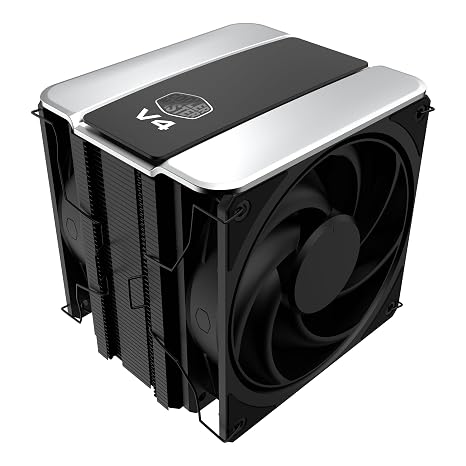
Cooler Master V4 Alpha CPU Cooler stands out with its unique two patented 3DHP heat pipes, offering 30% better cooling than standard options. It’s perfect for those running high-performance CPUs like the 5800X3D who want quieter operation without losing cooling power.
Setting up involves attaching the pre-installed Mobius 120mm fans in a push-pull layout, which helps keep airflow steady and cooling consistent. The cooler fits a wide range of CPU sockets and cases, so you won’t have to worry about compatibility.
Day-to-day, it stays quiet thanks to minimized radiator turbulence, making your system less noisy even under load.
Cooling ability is solid and noticeably better than many competitors, with a design that aims to reduce fan noise down to 2.05 dB. The build quality feels sturdy with good materials.
The main draw in reviews is how quietly it runs, but the most common complaint is the maximum fan speed, which some find a bit limited for extreme overclocking.
Quiet operation with notably better cooling is the most praised feature, helping keep CPU temperatures stable without much noise. On the downside, some users mention the fan speed limitations when pushing the processor harder, which could affect top-end performance.
Those looking for an effective cooler that balances noise and temperature control will find this a good fit. Anyone aiming for very high overclocks might consider alternatives with faster fans or larger heatsinks for extra cooling capacity.
Pros
- 30% better cooling with patented heat pipes
- Quiet operation reduces system fan noise
- Pre-installed push-pull Mobius 120mm fans
- Broad compatibility across CPU sockets
Cons
- Fan speed maxes out at 2050 rpm
- May not suit extreme overclocking needs
| Specification | Details |
|---|---|
| Power Connector Type | 4-Pin |
| Cooling Method | Fan |
| Compatible Devices | Desktop |
| Noise Level | 2.05 db |
| Maximum Rotational Speed | 2050 rpm |
12. Chill Arc 360 AIO CPU Cooler

Running a Ryzen 7 5800X3D feels solidly supported by this cooler, especially with its powerful cooling and unique screen feature. Designed for PC builders who want impressive temps alongside a bit of style, it handles heat with confidence and gives you a techy flair through its rotating AMOLED display.
Installation fits well on AMD AM4 sockets, and the triple 120mm ARGB fans create plenty of airflow without being intrusive. The 360-degree rotatable screen shows system info and custom visuals, which is a nice touch during daily use.
Noise levels stay reasonable, and the cooler’s white design lends a modern look that complements many builds. Setup is straightforward but requires attention to the alignment for the display rotation.
Cooling keeps the 5800X3D comfortably within thermal limits, thanks to the 320W TDP capacity. The build feels solid, combining air and water cooling elements to deliver a quiet yet powerful airflow.
High marks come from its thermal performance and visual appeal. A common downside is its size, which may challenge tight cases or airflow layouts.
Strong cooling keeps powerful CPUs stable under load, while the rotating AMOLED screen brings a unique visual element rarely seen in coolers. Most users notice the size as a potential space hurdle in smaller builds.
Those wanting a combination of high cooling performance and aesthetic customization will appreciate this cooler. Users working within compact cases or prioritizing minimal setup may want to consider alternatives.
Pros
- Powerful cooling supports high-end CPUs up to 320W TDP
- Rotatable 2K AMOLED screen adds useful system monitoring
- Three 120mm ARGB fans deliver strong airflow quietly
- Compatible with a wide range of Intel and AMD sockets
Cons
- Physical size may limit fitting in small or tight cases
- Setup requires careful alignment for optimal screen rotation
| Specification | Details |
|---|---|
| Power Connector Type | 4-Pin |
| Voltage | 12 volts_of_direct_current |
| Wattage | 6.1 watts |
| Noise Level | 30 db |
| Maximum Rotational Speed | 2700 rpm |
| Air Flow Capacity | 165 cfm |
Best Coolers for 5800X3D Compared Side by Side
| Product | Cooling Method | Noise Level | Max RPM | Air Flow Capacity |
|---|---|---|---|---|
| Thermalright Peerless Assassin | Air | 25.6 db | 1550 rpm | 66.17 cfm |
| Thermalright Phantom Spirit | Air | 25.6 db | 1500 rpm | 66.17 cfm |
| LIAN LI HydroShift OLED 360 | Water | 33 db | 2600 rpm | – |
| be quiet! Pure Rock Pro | Air | 34.8 db | 2000 rpm | – |
| ARCTIC Liquid Freezer Pro 360 | Liquid | – | 3000 rpm | 77 cfm |
| Noctua NH-D15 G2 chromax | Air | 24.8 db | 1500 rpm | 155.6 m³/h |
| Thermalright Assassin X120 SE | Heat pipe and fan | 25.6 db | 1550 rpm | 66.17 cfm |
| Thermalright PS120SE ARGB | Air | 25.6 db | 1500 rpm | 66.17 cfm |
| Noctua NH-D15 chromax.Black | Air | 24.6 db | 1500 rpm | 140.2 m³/h |
| Thermalright Vision MAX 120 | Air | 27 db | 2150 rpm | 69 cfm |
| Cooler Master V4 Alpha | Fan | 2.05 db | 2050 rpm | – |
| Chill Arc 360 AIO | Air, Water | 30 db | 2700 rpm | 165 cfm |
- Cooling MethodAir
- Noise Level25.6 db
- Max RPM1550 rpm
- Air Flow Capacity66.17 cfm
- Cooling MethodAir
- Noise Level25.6 db
- Max RPM1500 rpm
- Air Flow Capacity66.17 cfm
- Cooling MethodWater
- Noise Level33 db
- Max RPM2600 rpm
- Air Flow Capacity–
- Cooling MethodAir
- Noise Level34.8 db
- Max RPM2000 rpm
- Air Flow Capacity–
- Cooling MethodLiquid
- Noise Level–
- Max RPM3000 rpm
- Air Flow Capacity77 cfm
- Cooling MethodAir
- Noise Level24.8 db
- Max RPM1500 rpm
- Air Flow Capacity155.6 m³/h
- Cooling MethodHeat pipe and fan
- Noise Level25.6 db
- Max RPM1550 rpm
- Air Flow Capacity66.17 cfm
- Cooling MethodAir
- Noise Level25.6 db
- Max RPM1500 rpm
- Air Flow Capacity66.17 cfm
- Cooling MethodAir
- Noise Level24.6 db
- Max RPM1500 rpm
- Air Flow Capacity140.2 m³/h
- Cooling MethodAir
- Noise Level27 db
- Max RPM2150 rpm
- Air Flow Capacity69 cfm
- Cooling MethodFan
- Noise Level2.05 db
- Max RPM2050 rpm
- Air Flow Capacity–
- Cooling MethodAir, Water
- Noise Level30 db
- Max RPM2700 rpm
- Air Flow Capacity165 cfm
How to Choose the Best 5800X3D Cooler
Choosing the right cooler for the 5800X3D depends on factors like cooling performance, compatibility with your case, and noise levels. Getting these right ensures your processor stays cool and stable, preventing overheating and extending its lifespan while avoiding costly repairs or replacements.
Compatibility and Socket Support
Many coolers on the market fail to fit perfectly on the AM4 socket, which the 5800X3D uses. This can lead to installation issues or inadequate contact between the cooler base and the CPU, reducing heat transfer efficiency. Equally important is checking the clearance around RAM slots and motherboard components.
Some coolers with large heatsinks or fans might block tall RAM modules or side-mounted connectors, limiting upgrade options or cable management.
Dimension-wise, the height of the cooler should fit inside your PC case without forcing the side panel out. Cooler heights around 150mm or less usually fit mid-tower cases, but always measure before buying.
Width and depth matter for airflow and avoiding nearby components. Look for coolers explicitly listing AM4 socket support and provide detailed measurements.
Cooling Performance and Efficiency
The 5800X3D tends to run hot under load, so the cooler’s ability to dissipate heat efficiently is critical. Air coolers with multiple heat pipes that make direct contact with the CPU or vapor chamber-based designs tend to perform better, keeping temperatures stable during gaming or heavy workloads.
Radiator size and fan quality also influence thermal resistance; larger radiators or dual fans improve airflow.
Liquid coolers can offer better results but add complexity and cost. Checking reviews or manufacturer specs for thermal dissipation ratings helps avoid overheating issues or forced CPU throttling. A cooler that performs well under sustained load translates to a quieter, more stable system in daily use.
Noise Levels
Fan noise becomes noticeable especially when the CPU is under strain. Some coolers run fans at full speed constantly, creating an unpleasant racket.
PWM fan control lets the system adjust fan speed based on temperature, which reduces noise during idle or light tasks. Look for models with noise levels below 30dB at idle, which is barely perceptible, and below 40-45dB under heavy load for manageable sound.
Coolers with larger, slower-spinning fans tend to be quieter compared to small, high-RPM fans. Consider your workspace environment; noise levels matter more in quiet rooms or offices, while a louder cooler might be tolerable in a gaming setup with ambient noise.
Build Quality and Materials
High-quality metals like copper for the base and heat pipes improve heat transfer better than basic aluminum. Some coolers combine copper bases with aluminum fins to balance cost and performance. Sturdy mounting hardware made from solid metal ensures the cooler stays firmly in place, preventing shifts that can reduce cooling effectiveness over time.
Durability factors also include corrosion resistance and fan longevity. Poor build quality often results in bent fins or loose screws, which complicate maintenance.
Invest in coolers with reputation or user reports confirming they maintain performance and structure after months or years of use.
Ease of Installation and Maintenance
Installation difficulty varies widely among coolers. Some require backplates, screws in hard-to-reach spots, or even removal of the motherboard, which complicates upgrades or maintenance. Coolers with toolless mounting brackets or clear, step-by-step instructions speed up installation and reduce errors.
Cleaning is a factor often overlooked. Designs allowing easy fan removal and accessible heatsink fins save time and effort when dust builds up. Models with widely available replacement fans or parts extend the lifespan and simplify upkeep without full replacements.
Optimizing Cooling Performance for the Ryzen 7 5800X3D in Gaming Setups
The Ryzen 7 5800X3D generates notable heat during intense gaming sessions, making cooler choice critical. Its chiplet design and 3D V-Cache technology require consistent thermal management to maintain optimal performance without throttling.
Key factors to optimize cooling include:
- Choosing a cooler with a high static pressure fan to ensure airflow is directed across the CPU surface efficiently.
- Using heat sinks with a large surface area and copper heat pipes for effective heat dissipation.
- Ensuring the cooler is compatible with AM4 bracket specifications for secure mounting and optimal contact.
- Positioning case fans to create a balanced airflow path, preventing hot air pockets around the CPU area.
- Considering coolers that handle TDP ratings above 105W to accommodate peak loads under gaming.
With a properly matched cooler, the 5800X3D can sustain higher boost clocks and deliver smoother game frame rates.
Maintaining Your CPU Cooler: Cleaning and Thermal Paste Reapplication Tips
Regular maintenance of your CPU cooler prolongs its lifespan and keeps cooling efficiency high. Dust accumulation on fan blades and fins reduces airflow and increases CPU temperature.
Maintenance tips for your CPU cooler:
- Shut down the system before cleaning to avoid damage or static issues.
- Use compressed air or a soft brush to remove dust from fans and heatsink fins every few months.
- Inspect the thermal paste between the cooler base and CPU die annually; dried or worn paste should be removed and reapplied.
- Apply a pea-sized amount of high-quality thermal paste evenly to ensure proper heat conduction.
- Check mounting screws regularly to ensure the cooler is firmly secured without over-tightening.
Keeping the cooler clean and refreshing the thermal interface material helps maintain low temperatures during demanding workloads.
Comparing Air vs Liquid Cooling Solutions for the 5800X3D: Pros and Cons
Both air and liquid cooling have advantages to consider for a Ryzen 7 5800X3D setup. The choice depends on noise preference, budget, and case compatibility.
Air cooling:
- Generally less expensive, with simpler installation and lower maintenance.
- High-quality air coolers with large heatsinks can handle the 5800X3D’s heat if case airflow is good.
- Tends to be bulkier and may limit RAM clearance or interfere with tall RAM heat spreaders.
Liquid cooling:
- Offers better thermal performance in tighter spaces by transferring heat to radiators mounted elsewhere in the case.
- Typically quieter at load compared to high-RPM air coolers.
- Requires regular checking of pump function and occasionally refilling or replacing coolant depending on the type.
Choosing between air and liquid depends on your cooling needs, noise tolerance, and available case space.
People Also Asked
What Is the Best Cooler Size for a 5800x3d?
A 240mm or larger liquid cooler typically works best for the 5800x3d due to its size and thermal demands. Smaller air coolers might struggle to keep temperatures low during heavy loads. Ensuring good case airflow complements any cooler choice.
How Do I Safely Install a Cooler on a 5800x3d?
Use a compatible mounting bracket and apply a small, even dot of thermal paste on the CPU before attaching the cooler. Tighten screws in a diagonal pattern to evenly spread pressure. Double-check all connections to avoid loose parts or electrical shorts.
How Long Do Coolers Usually Last on a 5800x3d?
Most quality coolers last several years, often beyond five, before performance drops noticeably. Fans may wear out over time, so consider swapping them if noise increases or airflow weakens. Regular cleaning extends cooler lifespan.
Are There Common Problems with 5800x3d Coolers?
Common issues include insufficient contact pressure causing high temps and pump failures in liquid coolers. Air blockers in the cooling fins or dust buildup can reduce performance. Regular maintenance helps avoid these problems.
Can I Use a 5800x3d Cooler on Other CPUs?
Many 5800x3d coolers are compatible with other AMD AM4 socket CPUs and often some Intel sockets with adapters. Confirm compatibility before switching to avoid mounting problems or inadequate cooling. Always reapply thermal paste after moving a cooler.
Conclusion
Choosing the right cooler for the 5800X3D mainly depends on its ability to keep the CPU temperature low under load, how noisy it runs, and the size that fits your PC case. Good cooling performance ensures your processor maintains speed without throttling.
Quiet operation matters if you spend a lot of time near your computer. Finally, check that the cooler fits comfortably inside your system to avoid installation issues.
Pick a cooler that suits your case size and budget, and consider how often and hard you’ll be pushing the CPU. For most users, balancing noise and cooling is key. Review the comparison table above and the detailed options to find the best match for your setup and needs.

I’m Grant Mitchell, a firearms and hunting writer with years of experience at the range and in the field. I write about rifles, shotguns, handguns, optics, safe storage, cleaning, and responsible ownership, along with practical hunting tips. My goal is to share accurate, safety-first information that helps you choose the right firearm, maintain it properly, and become a more confident shooter.