Top 12 Best 5700X3D Cooler That Will Boost Your PC Speed!
When the wrong cooler goes on a 5700x3d, temperatures spike quickly under load and the system noise ramps up. A cheap or poorly fitting cooler can cause throttling that kills performance and leads to crashes during gaming or heavy multitasking. Finding the best 5700x3d cooler means avoiding these common frustrations that come from inadequate heat dissipation or incompatible mounting.
This CPU generates enough heat that not every cooler designed for standard chips will handle it well.
The best coolers for the 5700x3d usually have a larger base plate made of copper or a high-quality copper-aluminum hybrid to draw heat efficiently. The mounting mechanism must fit the AM4 socket securely without bending the motherboard, since uneven contact causes hotspots. Fans typically run in the 1500 to 2500 RPM range for good airflow, but quieter operation depends on blade design and bearing type.
Easy cleaning access is helpful since dust buildup reduces cooling over time, especially in cases with tight airflow.
Need a Quick Check?
| Image | Product | Price |
|---|---|---|
Our Top Picks 1  | Thermalright Peerless Assassin 120 | Check Price |
Our Top Picks 2  | Thermalright Assassin X120 Refined | Check Price |
Our Top Picks 3  | be quiet! Dark Rock 5 | Check Price |
Our Selected Top 12 5700x3d Cooler Worth Considering
This list features a variety of coolers designed for optimal performance with the 5700x3d processor. Each review covers how well the cooler manages heat, its ideal user type, and its main advantages and drawbacks to help you make an informed decision.
1. Thermalright Peerless Assassin 120 SE CPU Cooler
Thermalright Peerless Assassin 120 SE CPU Cooler excels at keeping the Ryzen 7 5700X3D cool with quiet efficiency. It suits desktop users looking for a reliable air cooler that balances strong airflow and low noise without taking up too much space inside the case.
Installation is straightforward thanks to sturdy mounting brackets that hold the cooler firmly in place. The 4-pin connector allows PWM control to adjust fan speeds based on temperature, giving you a quieter build when system demands are low. Running at up to 1550 rpm, the fan is noticeable but not overpowering at 25.6 dB, making it easy to focus on work or gaming.
It handles heat dissipation well, with an air flow capacity of 66.17 cfm and a power rating of 265 watts, proving capable for high-performance CPUs like the 5700X3D. The build quality is solid, featuring well-designed fins and a strong air-cooling system.
Users praise its efficiency but mention that size can be a tight fit in some smaller cases.
The cooler delivers solid temperature control and keeps noise levels low during everyday use. Most users appreciate its quiet performance, though some find its size challenging to accommodate in compact cases. Fan speed can increase under load, making it a bit louder than idle conditions.
Anyone with mid to large tower cases and a Ryzen 7 5700X3D will find it suits their needs well. Those with small cases or extreme space constraints should consider more compact cooling solutions.
Pros
- Quiet operation at moderate fan speeds
- Good airflow for high-performance CPUs
- Secure, easy-to-install mounting system
- Compatible with most desktop setups
Cons
- May not fit well in smaller cases
- Fan speed can rise noticeably under full load
| Specification | Details |
|---|---|
| Power Connector Type | 4-Pin |
| Voltage | 12 volts |
| Wattage | 265 watts |
| Noise Level | 25.6 db |
| Maximum Rotational Speed | 1550 rpm |
| Air Flow Capacity | 66.17 cfm |
2. Thermalright Assassin X120 Refined SE CPU Cooler
Quiet and efficient cooling is what you notice right away with the Thermalright Assassin X120 Refined SE. It fits well on a desktop setup, making it a solid choice for anyone running a 5700X3D looking to keep temperatures manageable without loud fan noise.
Its single biggest strength is balancing decent airflow with relatively low noise levels.
Installing the cooler is straightforward thanks to its heat pipe design and 4-pin power connector, which lets you control fan speed easily. The fan runs at a maximum of 1550 rpm, delivering enough airflow to cool without being intrusive in daily use.
At 25.6 dB, it stays quieter than many alternatives while still pushing 66.17 cfm of air.
It does a good job at keeping CPU temperatures down through consistent airflow and well-organized heat pipes. The build feels solid and holds up well over time, though some users mention the fan speed max isn’t quite high enough for extreme overclocking. Most praise the quiet operation, while quieter cooling options might be missed by those who want dead silence.
The cooler earns praise for its quiet performance and efficient airflow, keeping system noise low while maintaining good temperatures. Common feedback points to the maximum fan speed as a constraint for more demanding cooling needs or heavy overclocking. Day-to-day use sees a good balance between cooling and silence.
People seeking a balance between noise and performance will appreciate this cooler’s design. Those who need ultra-quiet operation or extreme cooling power might want to explore other options that push fan speeds higher or minimize noise further.
Pros
- Quiet operation at 25.6 db
- Good airflow of 66.17 cfm
- Easy 4-pin fan control
- Solid build quality
Cons
- Maximum fan speed may limit extreme cooling
- Not the quietest option for sound-sensitive users
| Specification | Details |
|---|---|
| Power Connector Type | 4-Pin |
| Voltage | 12 volts of direct current |
| Cooling Method | Heat pipe and fan-based |
| Noise Level | 25.6 db |
| Maximum Rotational Speed | 1550 rpm |
| Air Flow Capacity | 66.17 cfm |
3. Be Quiet! Dark Rock 5 CPU Cooler
Quiet and efficient cooling for high-performance CPUs is what the be quiet! Dark Rock 5 delivers best. Suited for anyone running a 5700X3D, it excels at keeping temperatures low without making much noise.
Installation is straightforward, and the cooler fits perfectly on AM4 sockets, making setup easy. The included Silent Wings 4 fan runs smoothly and quietly, thanks to its advanced bearing and rubberized frame that cuts down vibrations.
You won’t notice it humming during regular tasks, making it easy to forget it’s even there while gaming or working hard.
Cooling power is solid with six copper heat pipes transferring heat effectively through a dense aluminum fin stack. The special black coating seems to improve heat transfer a bit more.
It handles heavy workloads without overheating, while staying quiet. One complaint is its relatively high maximum fan speed at 2100 rpm, which can cause some noise under full load, though it’s still manageable.
Reviews confirm the cooler keeps CPUs well within safe temperatures and runs quietly most of the time. The occasional louder fan speed during intense workloads is the most frequent downside mentioned.
Anyone looking for a quiet but powerful air cooler for a 5700X3D will appreciate it. People with very compact cases or very strict noise limits might want to explore smaller or liquid cooling options.
Pros
- Very quiet operation under normal conditions
- Strong cooling with six copper heat pipes
- Rubberized fan frame reduces vibration noise
- Works well on multiple Intel and AMD sockets
Cons
- Fan can get noticeably loud at maximum speed
- Size may be bulky for smaller cases
| Specification | Details |
|---|---|
| Power Connector Type | 4-Pin |
| Voltage | 12 volts |
| Wattage | 210 watts |
| Noise Level | 29.8 db |
| Maximum Rotational Speed | 2100 rpm |
| Air Flow Capacity | 55 cfm |
4. Thermalright Phantom Spirit 120SE CPU Cooler

Aluminum and copper form the backbone of this cooler’s design, aiming to balance durability with effective heat dissipation. Suited for desktop setups running AMD Ryzen 7 5700X3D, it handles higher thermal outputs well thanks to its 7x6mm heatpipes and AGHP upgraded technology.
Its main strength lies in supporting a wide range of CPU thermal power, from 105W up to 280W.
Installation involves a 4-pin power connector, making it compatible with most standard motherboards. The cooler spins at a maximum of 1500 rpm, which keeps noise levels reasonable at 25.6 dB.
Airflow at 66.17 cfm helps maintain temperatures under load without demanding extreme fan speeds. The choice of upgrading to AGHP 4th gen heatpipe tech also means it manages heat efficiently whether mounted vertically or horizontally.
Cooler performance closely matches its build quality. It does an impressive job of moving heat away from the CPU while keeping noise relatively low.
The main drawback mentioned revolves around its noise level not being the quietest possible, which might bother those seeking ultra-silent builds. Solid construction supports long-term use, and the industry-experienced brand behind it gives some reassurance about reliability.
The cooler cools well across a broad TDP range and keeps noise at a manageable level. It performs effectively with its upgraded heatpipes, though the sound output can be noticeable compared to quieter options. The assembly is straightforward, and the build feels durable, backed by Thermalright’s long-standing reputation.
Anyone needing solid air cooling for a Ryzen 7 5700X3D at moderate noise will appreciate this unit. Users prioritizing near-silent operation might want to consider alternatives with lower dB ratings. Its durable heatpipe design works well for both standard and higher-power setups, though extreme overclockers might hit the fan speed ceiling.
Pros
- Efficient heat dissipation from upgraded 7x6mm heatpipes
- Quiet operation relative to its cooling performance
- Supports vertical or horizontal mounting without loss of efficiency
- Compatible with common 4-pin motherboard fan headers
Cons
- Noise level not optimal for ultra-quiet builds
- Fan maximum speed capped at 1500 rpm limits extreme cooling needs
| Specification | Details |
|---|---|
| Cooling Method | Air |
| Power Connector Type | 4-Pin |
| Maximum Rotational Speed | 1500 rpm |
| Noise Level | 25.6 db |
| Air Flow Capacity | 66.17 cfm |
| CPU Cooler TDP | 105W to 280W |
5. ARCTIC Liquid Freezer III Pro 360 AIO Cooler

Impressive cooling power stands out right away with the ARCTIC Liquid Freezer III Pro 360 AIO Cooler, designed for those running high-demand desktop or gaming setups. Its biggest strength lies in managing heavy workloads thanks to the powerful yet quiet ARCTIC P12 PRO fans combined with a liquid cooling method.
Setup is straightforward, featuring native offset mounting that aligns perfectly with the CPU hotspot, ensuring effective heat transfer. Integrated PWM control lets the VRM fan adjust speed based on temperatures, maintaining stable voltage converter performance.
Fans ramp efficiently to meet system demands, staying quieter at lower speeds but able to push up to 3000 rpm when needed without becoming overly noisy.
Heat dissipation is excellent with a maximum airflow of 77 cfm, keeping processor temps in check under load. The cooler’s build quality supports long CPU life through optimized contact pressure distribution on compatible Intel sockets.
Common remarks include high efficiency and quiet operation, though occasional comments mention its size and how that requires attention when fitting in some cases.
The cooler effectively handles heavy workloads with excellent heat dissipation and quiet running, praised for improving CPU longevity through optimized contact pressure. Complaints often point out the physical size and noise increase at full fan speed as concerns that need consideration during installation.
Those with spacious cases looking for solid liquid cooling and stable voltage regulation will appreciate what it offers. Users with smaller cases or strict noise limits might want to consider more compact or quieter alternatives.
Pros
- Powerful cooling for high-performance CPUs
- Quiet operation even at higher fan speeds
- The integrated VRM fan improves the stability of the voltage converter
- Optimized mounting for better heat transfer
Cons
- Large size may not fit all cases easily
- Fans can get noticeably loud near maximum speed
| Specification | Details |
|---|---|
| Power Connector Type | 4-Pin |
| Voltage | 12 volts |
| Wattage | 3.96 watts |
| Cooling Method | Liquid |
| Maximum Rotational Speed | 3000 rpm |
| Air Flow Capacity | 77 cfm |
6. Wraith Cooler Prism CPU Air Cooler for AMD Sockets
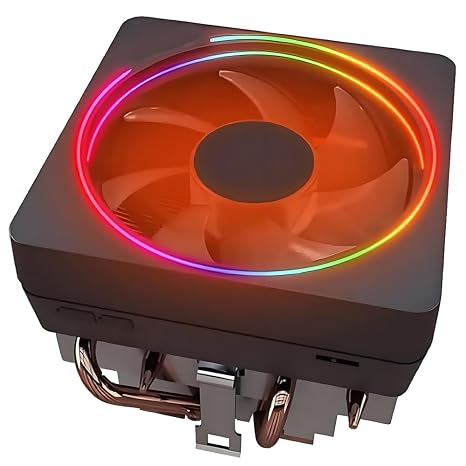
Great choice when looking for a cooler designed specifically to keep Ryzen 7 5700X running cool without pushing your budget on an aftermarket option. Its direct-contact heat pipes and solid compatibility with AMD sockets help it stand out for those wanting reliable performance with minimal fuss.
Setup is straightforward thanks to the pre-applied silicone thermal paste and compatibility with most AMD motherboards using standard brackets. Daily use involves a quiet 14 db fan running at up to 2800 rpm, pushing around 45 cfm of air.
It stays compact on your desktop, making it easy to clean and maintain over time without needing extra parts or complex mounts.
Cooling performance matches what you’d expect for stock or lightly overclocked Ryzen setups, efficiently transferring heat with aluminum fins and a copper base. The build quality feels solid, featuring four 6 mm copper heat pipes which contribute to steady heat dissipation.
Most users appreciate how quiet it runs; however, some note the maximum airflow could fall short for extreme overclocking scenarios.
The quiet operation is praised the most, making it ideal for users prioritizing low noise while maintaining good cooling for Ryzen CPUs. The most common downside is the limited airflow when pushing CPU performance beyond stock settings, which can cause temperatures to rise.
Those running their 5700X mostly at stock speeds will be happy with its balance of noise and cooling. Enthusiasts aiming for high overclocks should consider a more powerful cooler. Its easy compatibility and setup make it well suited for straightforward AMD builds without extra bells and whistles.
Pros
- Compatible with wide range of AMD sockets
- Pre-applied thermal paste for quick install
- Quiet operation at 14 db
- Efficient copper heat pipes
Cons
- Not ideal for heavy overclocking
- Requires motherboard bracket (not included)
| Specification | Details |
|---|---|
| Power Connector Type | 4-Pin |
| Voltage | 12 volts_of_direct_current |
| Wattage | 105 watts |
| Noise Level | 14 db |
| Maximum Rotational Speed | 2800 rpm |
| Air Flow Capacity | 45 cfm |
7. Thermalright Peerless Assassin 120 Vision MAX CPU Cooler

Keeping a 5700X3D cool without drowning in noise is a common challenge, especially during intense workloads or gaming sessions. Designed mainly for desktop users who want serious cooling with a tech-savvy twist, this cooler’s standout feature is definitely the built-in 5-inch IPS LCD screen that helps track temperatures and fan speeds in real time.
Setting it up involves securing the dual-tower cooler with its six copper heat pipes and attaching two fans. The high-speed fans run quietly enough for everyday use, humming at 27 db, which means you won’t be overwhelmed by noise. The 4-pin power connector and TRCC software tie everything together, letting you customize what shows on the screen, great for keeping an eye on system stats without extra software running all the time.
Cooling is reliable thanks to the nickel-plated copper base that contacts the CPU directly and circulating air at 69 cfm keeps temperatures manageable. The build feels solid and carefully designed, but some users mention the cooler takes up a notable amount of space, which could be a squeeze in smaller cases. The standout praise is always for its cooling efficiency and the visual monitoring through the LCD screen, while the size is the usual concern brought up.
The built-in IPS LCD screen clearly impresses with live monitoring and customization options, making it useful for enthusiasts who like to keep an eye on temperatures. Most notes on the downside focus on its physical size, which demands enough room inside your PC case and can be a tight fit for smaller builds.
Anyone looking for strong cooling performance paired with clear system feedback will appreciate this cooler, especially in mid to large cases. Those with compact or cramped setups might want to consider a more compact alternative that offers easier installation and fit.
Pros
- Real-time system monitoring on built-in 5-inch IPS LCD screen
- Effective cooling with six copper heat pipes and dual fans
- Relatively quiet operation at 27 db
- Custom background themes via TRCC control software
Cons
- Bulky size may limit case compatibility
- Complex setup for users new to advanced coolers
| Specification | Details |
|---|---|
| Maximum Rotational Speed | 2150 rpm |
| Noise Level | 27 db |
| Air Flow Capacity | 69 cfm |
| Power Connector Type | 4-Pin |
| Cooling Method | Air |
8. Thermalright Assassin X 120R Digital CPU Cooler

Running at a maximum speed of 2000RPM, this cooler suits anyone looking for reliable air cooling with an automatic fan speed adjustment. It’s designed to keep the 5700x3d chip cool while balancing noise and performance without the need for manual tweaks.
Setting it up is straightforward, especially with the 4-pin PWM connector that ties directly into motherboard controls. The fan adjusts speed depending on temperature, so it doesn’t run full blast all the time.
Silicone pads around the fan help lower sound during operation, and the durable build materials mean it handles extended running without worrying about parts wearing out quickly.
Cooling performance hits the mark for demanding desktop tasks, with a solid airflow of 70.84 cfm pushing heat away efficiently. Its PBT+PC industrial grade materials and the S-FDB bearing keep the fan steady and reduce shaking noise noticeably. One downside mentioned is the noise level, which runs just under 30 dB but can be noticeable during intense loads.
The cooler is praised for its automatic fan speed control which helps maintain balance between cooling and noise. Noise close to 30 dB and occasional fan shaking remain the main concerns for users during heavy use.
Those wanting a reliable and straightforward air cooler with temperature-adaptive fan speed will find this fits well. Anyone extremely sensitive to noise or needing absolute quiet might look for quieter alternatives.
Pros
- Automatic fan speed via PWM adjusts with temperature
- Silicone corner pads reduce fan noise moderately
- Strong airflow capacity at 70.84 cfm
- Durable industrial grade PBT+PC materials
Cons
- Noise can reach 29.8 dB under load
- Fan shaking not fully eliminated in some setups
| Specification | Details |
|---|---|
| Power Connector Type | 4-Pin |
| Voltage | 12 volts_of_direct_current |
| Cooling Method | Air |
| Noise Level | 29.8 db |
| Maximum Rotational Speed | 2000 rpm |
| Air Flow Capacity | 70.84 cfm |
9. Cooler Master Hyper 212 Black II CPU Cooler

Anyone building or upgrading a mid-range desktop with a Ryzen 7 5700X3D will find this cooler a solid choice. It stands out for maintaining stable performance under heavy loads while staying quiet, making it suitable for gamers and productivity users who want dependable cooling without noise distractions.
Installation is straightforward thanks to a simple bracket design, making it convenient even for first-time builders. The fan runs quietly at up to 1,750 RPM, providing enough airflow while keeping noise to a minimum.
Its minimalist black cover fits well in most builds without drawing attention. The cooling setup sustains efficient heat transfer with four heat pipes that keep temperatures in check during long sessions.
Heat management is solid with up to 220W cooling capacity, handling the Ryzen 7 comfortably. The construction shows good attention to durability, especially with anti-gravity technology ensuring coolant flow remains consistent.
Most praise highlights quiet operation during intensive tasks. A frequent downside mentioned is that it’s not the most powerful option for extreme overclocking.
Quiet operation during intense tasks is the most common compliment, proving the fan’s design works well. The main complaint involves limited cooling power for users who push their CPUs beyond stock speeds. It handles everyday gaming and productivity loads without issue but can reach its limits when overclocking.
Builders seeking steady performance with low noise will appreciate this cooler. Users planning high overclocks or heavy multitasking with extra demanding heat loads might want to look at more powerful alternatives to avoid thermal throttling.
Pros
- Quiet operation under heavy loads
- Simple, user-friendly installation
- Efficient heat transfer with four heat pipes
- Minimalist design fits most builds
Cons
- Cooling may not suffice for aggressive overclocking
- Fan speed maxes at 2500 rpm, limiting airflow
| Specification | Details |
|---|---|
| Power Connector Type | 4-Pin |
| Voltage | 12 volts |
| Wattage | 2.4 watts |
| Noise Level | 26 db |
| Air Flow Capacity | 42 cfm |
| Maximum Rotational Speed | 2500 rpm |
10. Thermalright Assassin Spirit 120 EVO CPU Cooler

Standing out for its quiet operation and efficient air cooling, the Thermalright Assassin Spirit 120 EVO suits those looking to keep their Ryzen 7 5700X3D cool without loud fans. Its balance between airflow and noise makes it ideal for desktop users who prioritize a well-cooled, relatively silent system.
Installation involves a straightforward 4-pin power connector setup that keeps things simple under the hood. The 120mm size fits well in most cases without crowding other components. Running at a maximum speed of 1850 rpm, the fan manages airflow effectively, while noise stays low at 27 dB, making everyday use comfortable for extended gaming or work sessions.
Performance-wise, the cooler manages heat with a maximum airflow of 70.4 CFM, handling the 5700X3D’s demands efficiently thanks to its aluminum build that balances weight and durability. Most users note the quiet operation as a strong point, but a few mention that it could push a bit more airflow for heavy overclocking situations.
The strongest praise is for its quiet operation, making it easy to run demanding tasks without distracting noise. The most common complaint centers on airflow limitations when pushing the CPU beyond standard performance levels.
People who want a low-noise cooler without extreme overclocking plans will find this a solid choice. Those planning heavy overclocking or needing more aggressive cooling might want to look for options with higher airflow capabilities.
Pros
- Quiet operation at 27 dB
- Effective air cooling with 70.4 CFM airflow
- Compact 120mm size fits well in cases
- Durable aluminum construction
Cons
- Could deliver stronger airflow for overclocking
- Fan speed capped at 1850 rpm
| Specification | Details |
|---|---|
| Power Connector Type | 4-Pin |
| Voltage | 12 volts |
| Noise Level | 27 db |
| Maximum Rotational Speed | 1850 rpm |
| Air Flow Capacity | 70.4 cfm |
11. Be Quiet! Light Loop 360mm CPU Liquid Cooler

be quiet! Light Loop 360mm CPU Liquid Cooler stands out with dazzling visuals thanks to 64 LEDs and solid liquid cooling performance.
Ideal for anyone wanting strong thermal management with a splash of customizable lighting for their Ryzen 7 5700X3D setup.
Setting it up requires mounting the three 120mm PWM fans and connecting the 4-pin power cable, which is straightforward but takes a bit of case space. Daily use is quiet at 36.8 dB despite the fans spinning at speeds up to 2100 RPM. The RGB lighting is individually adjustable, offering many color modes that keep your rig lively without needing extra software.
Cooling relies on a water-based method, moving air efficiently with 61.8 CFM airflow per fan while keeping the CPU temperatures in check during demanding workloads. The build is sturdy, featuring three Light Wings LX fans designed for high speed and good durability.
The most frequent praise notes stunning lighting effects, while noise level at top speed can feel noticeable for very quiet setups.
The most praised feature is undoubtedly the customizable and bright LED illumination combined with reliable cooling power. The common drawback noted is the higher noise level at maximum fan speeds, which might bother noise-sensitive users.
Those who prioritize eye-catching looks alongside solid cooling will appreciate this cooler. It fits well in cases with enough room for the 360mm radiator. Quiet computing enthusiasts with smaller cases or lower noise thresholds might want to look elsewhere.
Pros
- Stunning RGB lighting with 64 LEDs total
- Three high-speed 120mm PWM fans included
- Quiet operation at standard use speeds
- Compatible with modern AMD AM4 and AM5 sockets
Cons
- Top fan speed noise can be intrusive
- Large 360mm radiator needs ample case space
| Specification | Details |
|---|---|
| Power Connector Type | 4-Pin |
| Voltage | 12 volts |
| Noise Level | 36.8 db |
| Maximum Rotational Speed | 2100 rpm |
| Air Flow Capacity | 61.8 cfm |
| Compatible Devices | Intel sockets: 1851/1700/1200/1151/1150/1155 | AMD sockets: AM5/AM4 |
12. ARCTIC Freezer 36 A-RGB CPU Cooler

Running quietly while keeping temperatures down, the ARCTIC Freezer 36 A-RGB suits users looking to cool powerful CPUs like the 5700x3d without fuss. Its most notable strength lies in efficiently transferring heat with four offset heat pipes, matched to a pressure-optimized 120 mm fan that handles high-end processors well.
Setting up brings a slight twist for AMD users due to the need for original AMD mounting screws, usually included with the motherboard. Day-to-day operation feels steady thanks to the 4-pin, 12-volt fan running up to a max 2000 rpm, which provides 48.8 cfm airflow to keep the CPU temperature in check.
There’s also an Intel mounting frame for good contact with even heat transfer.
Performance in cooling is solid for high-end CPUs, making the processor stable under load while maintaining manageable noise levels. Build quality feels sturdy with a single tower and copper heat pipes designed to conduct heat swiftly.
Some users note the extra step for AMD mounting screw replacement, which can complicate installation if the original screws are missing.
The cooling system efficiently keeps temperatures low and noise reasonable, especially for high-end processors. Most common complaints focus on the need to source or replace AMD mounting screws, which can delay or complicate setup for some users.
Gamers and PC builders who want a reliable air cooler suited for powerful CPUs will appreciate this. Those without ready access to motherboard screws or who prefer simpler installation might want to consider models with included complete mounting kits.
Pros
- Strong heat transfer via four offset heat pipes
- Pressure-optimised 120 mm fans for effective cooling
- Quiet operation with a 4-pin fan connector
- Supports both AMD and Intel sockets with included hardware
Cons
- Original AMD mounting screws needed for installation
- Installation can be tricky without motherboard screws
| Specification | Details |
|---|---|
| Power Connector Type | 4-Pin |
| Voltage | 12 volts |
| Wattage | 1.32 watts |
| Cooling Method | Air |
| Compatible Devices | AM4, AMD: AM5, Intel: LGA1851, LGA1700 |
| Maximum Rotational Speed | 2000 rpm |
| Air Flow Capacity | 48.8 cfm |
Best 5700x3d Coolers Comparison Table
| Product | Cooling Method | Noise Level | Air Flow Capacity | Max Rotational Speed |
|---|---|---|---|---|
| Thermalright Peerless Assassin 120 | Air | 25.6 db | 66.17 cfm | 1550 rpm |
| Thermalright Assassin X120 Refined | Heat pipe and fan | 25.6 db | 66.17 cfm | 1550 rpm |
| be quiet! Dark Rock 5 | Air | 29.8 db | 55 cfm | 2100 rpm |
| Thermalright Phantom Spirit 120SE | Air | 25.6 db | 66.17 cfm | 1500 rpm |
| ARCTIC Liquid Freezer III Pro | Liquid | – | 77 cfm | 3000 rpm |
| Wraith Prism AMD Cooler | Fan | 14 db | 45 cfm | 2800 rpm |
| Thermalright Peerless Vision MAX | Air | 27 db | 69 cfm | 2150 rpm |
| Thermalright Assassin X 120R Digital | Air | 29.8 db | 70.84 cfm | 2000 rpm |
| Cooler Master Hyper 212 Black | Fan | 26 db | 42 cfm | 2500 rpm |
| Thermalright Assassin Spirit 120 EVO | Air | 27 db | 70.4 cfm | 1850 rpm |
| be quiet! Light Loop 360 | Water | 36.8 db | 61.8 cfm | 2100 rpm |
| ARCTIC Freezer 36 A-RGB | Air | – | 48.8 cfm | 2000 rpm |
- Cooling MethodAir
- Noise Level25.6 db
- Air Flow Capacity66.17 cfm
- Max Rotational Speed1550 rpm
- Cooling MethodHeat pipe and fan
- Noise Level25.6 db
- Air Flow Capacity66.17 cfm
- Max Rotational Speed1550 rpm
- Cooling MethodAir
- Noise Level29.8 db
- Air Flow Capacity55 cfm
- Max Rotational Speed2100 rpm
- Cooling MethodAir
- Noise Level25.6 db
- Air Flow Capacity66.17 cfm
- Max Rotational Speed1500 rpm
- Cooling MethodLiquid
- Noise Level–
- Air Flow Capacity77 cfm
- Max Rotational Speed3000 rpm
- Cooling MethodFan
- Noise Level14 db
- Air Flow Capacity45 cfm
- Max Rotational Speed2800 rpm
- Cooling MethodAir
- Noise Level27 db
- Air Flow Capacity69 cfm
- Max Rotational Speed2150 rpm
- Cooling MethodAir
- Noise Level29.8 db
- Air Flow Capacity70.84 cfm
- Max Rotational Speed2000 rpm
- Cooling MethodFan
- Noise Level26 db
- Air Flow Capacity42 cfm
- Max Rotational Speed2500 rpm
- Cooling MethodAir
- Noise Level27 db
- Air Flow Capacity70.4 cfm
- Max Rotational Speed1850 rpm
- Cooling MethodWater
- Noise Level36.8 db
- Air Flow Capacity61.8 cfm
- Max Rotational Speed2100 rpm
- Cooling MethodAir
- Noise Level–
- Air Flow Capacity48.8 cfm
- Max Rotational Speed2000 rpm
How to Choose the Best 5700x3d Cooler
Choosing the right cooler for the 5700x3d depends on factors like cooling efficiency, noise levels, and compatibility with your PC case. Getting these aspects right ensures your processor stays cool and quiet, preventing overheating and costly hardware issues over time.
Compatibility and Fit
Picking a cooler that fits well on the right socket is a must; many struggle with alignment on the AM4 socket used by this processor. Proper motherboard clearance is often overlooked, leading to trouble fitting larger coolers alongside tall RAM modules or VRM heatsinks. Some air coolers, especially tower style ones, can block the RAM slots or interfere with the first PCIe slot.
Case size also affects what cooler options are realistic. Slim cases limit height and radiator thickness. Good airflow is another key.
A cooler that fits perfectly but chokes airflow due to case constraints can cause higher temps overall. Checking your motherboard’s socket, nearby components, and case height limits (often 160mm or less for towers) is a necessary first step before purchase.
Cooling Performance
This CPU has a TDP around 105 watts, so cooling solutions need to handle at least this heat output continuously. Many budget coolers struggle under sustained loads, causing temps to creep up during gaming or long workload sessions. Cooling designs vary: air coolers rely on heat pipes and fans, while liquid cooling units often dissipate heat faster but need a case that supports radiator installation.
In daily use, a cooler’s efficiency affects how often the processor throttles or stays running at peak boost clocks. Fans rated for 1500 to 2000 RPM with multiple heat pipes usually provide solid air cooling. Liquid options with 240mm radiators handle heat better but require more case space and periodic maintenance.
Noise Levels
Fan noise fluctuates between idle and load; some models roar during stress, becoming a distraction. Units with fan speed control or PWM fans can tone down noise when the processor isn’t stressed, offering quieter system time. Pump sound in liquid coolers adds a static hum some find noticeable.
Balancing quiet operation with cooling performance requires coolers that allow for fan curve customization or have inherently quiet designs like larger, slower-spinning fans. At idle, noise levels under 30 dBA are comfortable for most users, while peak load below 40 dBA prevents annoyance during gaming or rendering tasks.
Build Quality and Materials
Durable materials directly impact longevity and thermal efficiency. Copper bases and heat pipes move heat faster than aluminum ones, though at a higher cost.
Fans with sealed bearings last longer than sleeve bearings, reducing noise and failure risk over time. Pumps with ceramic shafts also resist wear well.
Dust buildup and corrosion degrade performance. Some coolers have coated fins or anti-corrosion treatments, extending lifespan without constant cleaning. Choosing parts made with corrosion-resistant metals and tough fan blades will keep the cooler operating smoothly for years.
Installation and Maintenance
Securing a cooler properly affects both performance and ease of future upgrades. Bracket systems that click or screw in without specialized tools save frustration. Many users find multipoint mounting with clear instructions most reliable.
Access to fan blades and radiator fins for cleaning is important since dust reduces cooling efficiency over months. Removable fans or those with quick-release clips make maintenance simpler. Compatibility with widely available thermal paste means you can improve or refresh the interface temperature easily during installation or later down the road.
Optimal Installation Techniques for the 5700X3D Cooler
Securing the cooler firmly to the 5700X3D is crucial for effective heat transfer. Use a high-quality thermal paste and apply it in a small, pea-sized amount or a thin line down the middle of the CPU heat spreader.
This ensures even distribution once the cooler is mounted.
During installation:
- Tighten mounting screws diagonally in small increments to apply uniform pressure.
- Double-check that mounting brackets are compatible and properly aligned to avoid uneven contact.
- Ensure the cooler’s fan airflow direction matches your case ventilation for optimal cooling.
- Manage cables carefully to prevent obstructing airflow around the cooler and motherboard.
Following these steps prevents common problems like hotspots or poor contact, keeping temperatures stable during heavy workloads.
Maintaining Peak Performance: Cleaning and Upkeep Tips
Dust buildup significantly reduces a cooler’s effectiveness over time. Regular cleaning can prevent rising CPU temperatures and noise issues caused by stressed fans.
Best practices include:
- Using compressed air to blow dust out of heatsinks and fan blades every few months.
- Visually inspecting the thermal paste layer during major maintenance and reapplying if it has dried or cracked.
- Keeping the computer in a relatively dust-free environment to minimize frequency of cleanings.
- Monitoring CPU temperature trends with software to catch cooling degradation early.
Sticking to this routine maintains cooling efficiency, prolonging hardware lifespan and consistent performance.
Comparing Air Cooling vs. Liquid Cooling for the 5700X3D
Air coolers are generally easier to install and maintain for the 5700X3D. They rely on heatsinks and fans to dissipate heat, making them reliable and cost-effective for most users.
Liquid cooling systems use a pump and radiator to move heat away from the CPU, which can result in lower temperatures under heavy loads but involves more complex installation and potential leakage risks.
Key differences include:
- Air coolers tend to be quieter and require less maintenance.
- Liquid coolers can provide better thermal performance in compact or high-overclocking setups.
- Air coolers take up more vertical space and may interfere with tall RAM modules.
- Liquid cooling setups often handle high ambient temperatures better.
Choosing depends on your case size, noise preferences, budget, and how hard you plan to push the processor.
People Also Asked
What Is the Ideal Cooler Size for a 5700x3d?
A mid-size air cooler or a 240mm AIO liquid cooler suits the 5700x3d well. These options provide enough cooling without excessive bulk. Ensure your case supports the cooler height or radiator size to avoid fitment issues.
How Do I Install a Cooler on a 5700x3d Safely?
Secure the motherboard on a flat surface before attaching the cooler. Apply thermal paste sparingly, then evenly tighten screws in a cross pattern to maintain even pressure. Double-check connections for the fan or pump to avoid future overheating.
Can a Stock Cooler Handle the 5700x3d Temperature Well?
The stock cooler manages basic loads but struggles under sustained heavy use on the 5700x3d. This can cause higher temperatures and potential throttling. Investing in an aftermarket cooler improves stability and noise levels during gaming or rendering.
How Long Does a Typical Cooler Last on a 5700x3d?
A good quality cooler can last several years if properly maintained. Dust buildup and thermal paste degradation impact efficiency over time. Cleaning fans and reapplying thermal paste every couple of years helps maintain stable temperatures.
What Common Problems Occur with 5700x3d Cooling Solutions?
Common issues include insufficient airflow, poor contact between cooler and CPU, and degraded thermal paste. These lead to higher temperatures, fan noise, and system instability. Regular maintenance and careful installation reduce these problems significantly.
Conclusion
Choosing a cooler for the 5700x3d means focusing on good heat dissipation, quiet operation, and compatibility with your case size. Better cooling keeps the processor stable under load, while quieter fans reduce distractions. Make sure the cooler fits your motherboard socket and has enough clearance for your RAM and other components.
Consider your budget and how much noise you can tolerate before making a decision. Smaller cases need low-profile coolers, while larger setups can handle bigger fans or liquid options. Check the comparison table and earlier sections for details on performance and prices to find a match that suits your setup and usage habits.

I’m Grant Mitchell, a firearms and hunting writer with years of experience at the range and in the field. I write about rifles, shotguns, handguns, optics, safe storage, cleaning, and responsible ownership, along with practical hunting tips. My goal is to share accurate, safety-first information that helps you choose the right firearm, maintain it properly, and become a more confident shooter.