Top 12 Best 55mm CPU Cooler That Will Blow Your Mind
A computer can start to lag or overheat if the wrong 55mm CPU cooler is installed, especially in tight cases or compact setups. The best 55mm CPU cooler makes a noticeable difference, fitting snugly without forcing the side panel or blocking memory slots. Poor choices often lead to higher temperatures and louder fans because the cooler can’t move heat away efficiently.
Key factors for a good 55mm CPU cooler include airflow capacity, measured in cubic feet per minute (CFM), and low noise levels, usually under 30 decibels for quiet operation. Build quality matters too, with copper heat pipes transferring heat faster than aluminum alone. Compatibility with your motherboard’s socket and clearance for RAM modules are essential to avoid installation headaches.
Need a Quick Check?
| Image | Product | Price |
|---|---|---|
Our Top Picks 1  | Noctua NH-L9x65 chromax.Black | Check Price |
Our Top Picks 2  | Noctua NH-L9x65 | Check Price |
Our Top Picks 3  | ID-COOLING IS-55 Black | Check Price |
Our Selected Top 12 55mm Cpu Cooler Worth Considering
This list features compact 55mm CPU coolers designed for efficient cooling in tight spaces. Each review covers performance, ideal usage scenarios, and highlights both strengths and drawbacks to help you choose the most suitable option for your needs.
1. Noctua NH-L9x65 chromax.Black CPU Cooler
Only 65mm tall, this CPU cooler fits perfectly in tight spaces like HTPCs and small ITX builds. Its compact size is its biggest advantage, letting it slide in without blocking RAM or PCIe slots.
Setting it up is straightforward thanks to the SecuFirm2 mounting system, which works with a wide range of Intel and AMD sockets. The slim 92mm fan runs quietly with automatic speed control, making it easy to ignore during regular use. It also includes thermal paste so you don’t have to hunt for extra parts.
It cools efficiently within its size limits and stays quiet at 23.6 dB noise level. The all-black design looks neat and matches most builds.
People appreciate how well it fits and maintains low temperatures, though some might find its 2.52-watt power a bit underwhelming for heavy overclocking.
Many appreciate the quietness and compact design that doesn’t interfere with other components during installation. Common feedback notes noise levels increase noticeably when the CPU is under heavy stress, affecting overall silence.
Ideal for users building compact or quiet PCs needing reliable cooling without much height clearance. Those pushing their CPUs hard or overclocking heavily might want a cooler with higher wattage capacity.
Pros
- Compact size fits small cases easily
- Very quiet operation with PWM support
- Includes thermal paste for easy installation
- Clearance around RAM and PCIe slots
Cons
- Limited cooling power for high TDP CPUs
- Fan may ramp up under heavy load
| Specification | Details |
|---|---|
| Total Height | 65mm |
| Fan Size | 92mm |
| Noise Level | 23.6 dB |
| Max Speed | 2500 rpm |
| Air Flow | 57.5 cubic meter per hour |
2. Noctua NH-L9x65 CPU Cooler
People building small form factor PCs or HTPCs will appreciate a really compact CPU cooler under 70mm tall that fits tight spaces without blocking RAM or PCIe slots. This cooler keeps noise levels low while providing reliable airflow with a slim 92mm fan, making it great for low to moderate heat CPUs in mini desktops.
Setup is straightforward thanks to a mounting system that handles the most common Intel and AMD sockets, with an included thermal paste so you don’t need extra supplies. The PWM fan automatically adjusts speeds, lowering noise during light tasks and speeding up under load.
Its size means it fits comfortably without messing with other components close by, important in cramped builds.
Performance is solid when paired with recommended CPUs, balancing quiet operation and decent cooling within a tight height limit. The build quality presents as very sturdy with premium parts always a good fit for small rigs.
The main praise centers on quiet operation and good fit, while the most common gripe involves not handling high TDP CPUs well.
Quiet operation and compact fit stand out as key strengths, making it ideal for small builds where space and noise matter. Its limitation lies in handling heavier CPUs; it struggles to keep temps down when pushed beyond its recommended heat range.
Those building ITX or HTPC setups with lower heat CPUs will find it a neat fit and efficient cooler. Users with higher performance or overclocked processors may need to look at larger coolers with better heat dissipation capabilities.
Pros
- Low profile at 65mm total height
- Quiet fan with automatic speed control
- Does not block RAM or PCIe slots
- Easy installation with included thermal paste
Cons
- Not suited for high TDP CPUs
- Fan speed can get noticeable under load
| Specification | Details |
|---|---|
| Cooling Method | Air |
| Noise Level | 23.6 db |
| Maximum Rotational Speed | 2500 rpm |
| Air Flow Capacity | 57.5 cubic meter per hour |
| Power Connector Type | 4-Pin |
| Wattage | 2.52 watts |
3. ID-COOLING IS-55 Black CPU Cooler
Compact design and solid cooling power make this perfect for small builds like HTPCs and Mini-ITX setups. Its real strength lies in handling heat efficiently without taking much vertical space, standing just 57mm tall.
Great for anyone needing a low-profile cooler that doesn’t compromise on performance.
Installation is straightforward thanks to its low-profile and memory-friendly layout, fitting comfortably even on crowded Mini-ITX boards. The 120mm PWM fan adjusts speed automatically, keeping noise low during regular tasks while ramping up only when needed.
Its five heat pipes help spread heat quickly from the CPU, making everyday use worry-free on temperatures.
Heat management is very effective with the combination of five heat pipes and a large yet slim fan that moves up to 54.6 CFM. Build quality feels solid and compact, ideal where space is tight. Praise often focuses on how quiet it runs, though some found the maximum fan speed a bit high when under heavy loads.
It keeps most processors cool without being loud.
The cooler gets consistent praise for quiet operation and effective heat dissipation using five heat pipes and a slim fan. A common drawback is that the fan noise spikes at maximum speed, which some might find noticeable under heavy CPU stress. The 57mm height is very close to the low-profile target but slightly above 55mm exact.
Best choice for anyone building in tight spaces who prioritizes quiet cooling and memory clearance. Not ideal if absolute silence is needed during heavy CPU use or if strict 55mm height limit must be followed, where looking at slightly shorter options might be better.
Pros
- Low-profile fits tight spaces easily
- Quiet operation at low to medium loads
- Good RAM clearance on Mini-ITX boards
- Efficient heat transfer with 5 heat pipes
Cons
- Fan can get loud at max speed
- Height slightly above 55mm spec (57mm)
| Specification | Details |
|---|---|
| Height | 57mm |
| Fan Size | 120x120x15mm |
| Air Flow Capacity | 54.6 CFM |
| Noise Level | 13.8-31.2 dB(A) |
| Maximum Rotational Speed | 3300 RPM |
4. Noctua NH-L9i-17xx chromax.Black CPU Cooler

Noctua NH-L9i-17xx chromax.Black is a low-profile CPU cooler designed for compact builds like HTPCs and small form factor cases.
Its biggest strength lies in fitting perfectly into tight spaces without blocking RAM or PCIe slots, making it ideal for users looking for a powerful yet minimal footprint cooler for LGA1700 or LGA1851 sockets.
Setup is straightforward thanks to the SecuFirm2 mounting system compatible with Intel LGA1700 and LGA1851 CPUs. The included NT-H1 thermal paste helps ensure good thermal transfer right from the start.
Day-to-day use reveals a quiet operation from the slim 92mm NF-A9x14 fan, which adjusts speed automatically via PWM and includes a low-noise adaptor to keep the system whisper quiet during light workloads.
Performance is solid for a cooler this size, with the 37mm height fitting almost anywhere while maintaining adequate cooling under load. The all-black design fits nicely with many builds, giving a stealthy look.
Most users appreciate the quiet operation at idle, but some mention that cooling capacity can be limited on higher power CPUs. The build quality is solid, featuring a proven heatsink design that has earned more than 200 international awards.
The cooler receives strong praise for running whisper quiet at idle thanks to its award-winning slim fan and low-noise adaptor. The most common complaint revolves around its limited cooling capacity when paired with more demanding CPUs, highlighting its focus on compact builds rather than high-performance overclocking.
People building small form factor or HTPC systems with moderate power CPUs will find this cooler matches their needs perfectly. Those planning to use high TDP processors or seeking broader socket compatibility should consider other options better suited for heavy-duty cooling.
Pros
- Very low profile at only 37mm height
- No RAM or PCIe slot interference
- Quiet operation with PWM and low-noise adaptor
- Includes high-quality thermal paste and mounting system
Cons
- Cooling power may not suit high-end CPUs
- Limited to Intel LGA1700 and LGA1851 sockets
| Specification | Details |
|---|---|
| Height | 37mm |
| Fan Size | 92mm slim NF-A9x14 |
| Compatible Sockets | LGA1700, LGA1851 |
| Included Thermal Paste | NT-H1 |
| Warranty | 6 year manufacturer’s warranty |
5. ID-COOLING IS-67-XT Black CPU Cooler

Running quietly while fitting into tight spaces makes this cooler perfect for small builds like HTPCs or Mini-ITX systems. Its standout feature is the compact 67mm height combined with efficient heat dissipation, keeping temperatures down without needing a bulky fan setup.
Installation is straightforward thanks to its compact size and RAM compatibility, so it doesn’t block memory slots on smaller motherboards. The 120x120x15mm PWM fan adjusts speeds automatically, producing low noise levels during normal use.
Daily operation stays cool and quiet, ideal for environments where space and sound matter.
Heat transfer happens smoothly through the copper base and six heat pipes, making this cooler powerful for its size. Built solid with a focus on fitting into tight cases, it handles up to 67 watts of CPU power. Most users appreciate its quiet operation, though some note that the 15mm thick fan might struggle slightly with very high-end CPUs.
The cooler is praised for its quiet operation and excellent fit in small form-factor builds, though some users mention that the slim fan struggles a bit with very demanding processors. Heat management remains solid for mid-range CPUs thanks to the copper base and six heat pipes.
It suits anyone building HTPCs or compact desktops focusing on low noise and tight space constraints. Those running extremely high TDP CPUs might want to explore coolers with thicker fans or higher airflow for better sustained performance.
Pros
- Compact 67mm height fits tight spaces well
- Quiet PWM fan with automatic speed control
- Good memory slot clearance on Mini-ITX boards
- Efficient cooling with six heat pipes
Cons
- 15mm fan may limit cooling on very powerful CPUs
- Performance can dip under sustained heavy loads
| Specification | Details |
|---|---|
| Power Connector Type | 4-Pin |
| Voltage | 12 volts |
| Wattage | 67 watts |
| Noise Level | 28 db |
| Maximum Rotational Speed | 1800 rpm |
6. Thermalright Peerless Assassin 120 SE CPU Cooler

Thermalright Peerless Assassin 120 SE fits well for desktop users needing strong cooling in a compact design. Its key strength lies in handling up to 265 watts with a quiet fan, making it a solid option for those wanting reliable air cooling without bulky setups.
Setting up this cooler is straightforward, with a 4-pin power connector supporting PWM control for precise fan speed adjustments. The cooling fan spins at a maximum of 1550 rpm, moving 66.17 cfm of air quietly at just 25.6 dB. Keeping the cooler clean is manageable thanks to its accessible design, and it fits most standard desktop CPUs without fuss.
Performance matches its specs well, maintaining decent temperatures without excessive noise. The build reflects Thermalright’s long experience, combining quality materials and careful design.
Praise often highlights the quiet operation during heavy loads, while some mention the cooler’s size might challenge tight case spaces.
Quiet operation during demanding tasks stands out as a strong positive. The cooler manages heat well without loud fan noise. Common complaints point to its size, which sometimes restricts installation in smaller cases.
People who need solid cooling with low noise levels will appreciate this cooler. Users with very tight case space or extreme overclockers might want to consider alternatives that better fit their specific needs.
Pros
- Handles up to 265 watts effectively
- Noise level stays low at 25.6 dB
- 4-pin connector allows precise fan speed control
- Solid build quality from an experienced brand
Cons
- May be bulky for very compact cases
- Fan speed max at 1550 rpm may limit extreme overclocking
| Specification | Details |
|---|---|
| Power Connector Type | 4-Pin |
| Voltage | 12 volts |
| Wattage | 265 watts |
| Maximum Rotational Speed | 1550 rpm |
| Noise Level | 25.6 db |
| Air Flow Capacity | 66.17 cfm |
7. Be Quiet! Dark Rock 5 CPU Cooler

Featuring six copper heat pipes and a dense aluminum fin array, this cooler targets those needing strong, reliable air cooling within a 55mm height limit. It suits builders aiming for quiet operation during heavy workloads, shining brightest in heat dissipation without loud fan noise.
Setup is straightforward with compatibility across many Intel and AMD sockets, making it fit multiple systems easily. The Silent Wings 4 120mm PWM fan utilizes a fluid-dynamic bearing and smooth motor to keep noise levels low.
Rubberized mounting on the fan helps reduce vibrations, ensuring a quieter experience during daily use when system cooling is crucial but silence is preferred.
It handles high power CPUs well, managing heat with 210 watts of cooling capacity. Built from quality materials with ceramic-coated surfaces to improve heat transfer, it runs up to 2100 rpm while maintaining airflow at 55 cfm. The strongest praise centers on powerful cooling and quiet operation, while some find the fan less effective pushing air at max speed.
The cooler is praised for its strong heat dissipation combined with quiet fan operation thanks to the specialized fan design and materials used. Many note the fan offers good pressure but noise can creep up when pushed hard. The ceramic ceramic-enhanced heat sink stays cool even under intense workloads.
Those focused on silent builds and efficient air cooling will appreciate its performance, especially on mid to high power processors. Users needing ultra-high airflow or very low noise at peak fan speeds may look toward other options.
Pros
- Efficient cooling from six copper heat pipes
- Quiet operation with vibration-reducing fan frame
- Broad compatibility across Intel and AMD sockets
- Ceramic coating improves heat transfer
Cons
- Fan speed maxes at 2100 rpm, limiting airflow
- Noise level approaches 30 dB at full speed
| Specification | Details |
|---|---|
| Voltage | 12 volts |
| Wattage | 210 watts |
| Maximum Rotational Speed | 2100 rpm |
| Air Flow Capacity | 55 cfm |
| Noise Level | 29.8 db |
| Power Connector Type | 4-Pin |
8. Thermalright AXP90-X53 Low Profile CPU Cooler
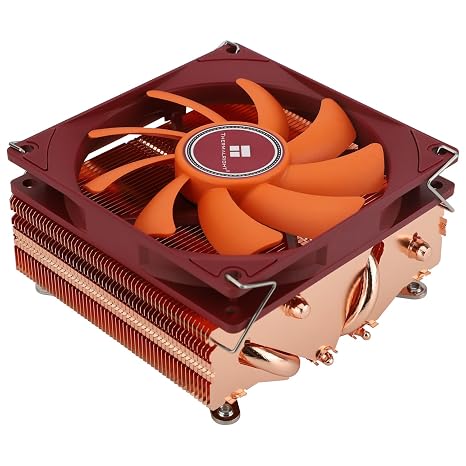
Height is the first thing that stands out with this cooler, it’s only 53mm tall, making it perfect for cramped setups like small ITX cases. Its main strength is managing heat quietly in tight spaces, thanks to a design focused on pure copper components and a high-performance fan.
Setting it up involves a straightforward 4-pin power connection that fits well on most desktops with limited room. The fan runs quietly at 22.4 dB while spinning up to 2700 rpm, which means daily use doesn’t add much noise.
Its compact size doesn’t mean it can’t work hard; it keeps temperatures down even with a 145-watt CPU load, adapting nicely to different motherboard orientations thanks to the improved heat pipe technology.
Performance-wise, it handles heat surprisingly well for its size thanks to the pure copper base, aluminum fins, and four heat pipes that double heat transfer efficiency. Construction feels solid, emphasizing durability with quality materials.
The strongest praise lies in its quiet operation and effective heat dissipation. Some complaints mention the limited airflow of 42.58 CFM, which might not satisfy high-end cooling needs.
Most users appreciate how quietly this cooler runs while keeping temperatures in check for compact PCs. On the downside, the airflow isn’t very strong, which can limit its use in systems with very demanding CPUs or overclocking.
Best for those building small form-factor PCs needing a reliable, quiet cooler without extra height. People using high-TDP processors or requiring heavy overclocking should look for something with greater airflow and cooling power.
Pros
- Very low profile height of 53mm
- High-performance pure copper cooling parts
- Quiet operation at 22.4 dB noise level
- Supports small ITX motherboards well
Cons
- Airflow capacity limited to 42.58 CFM
- May struggle with very high thermal loads
| Specification | Details |
|---|---|
| Power Connector Type | 4-Pin |
| Voltage | 12 volts_of_direct_current |
| Wattage | 145 watts |
| Noise Level | 22.4 db |
| Maximum Rotational Speed | 2700 rpm |
| Air Flow Capacity | 42.58 cfm |
9. CPU Water Block 55x55mm Copper Base

Excellent heat transfer makes this water block perfect for anyone upgrading to water cooling on AM series CPUs. It stands out with a micro water channel design and a high-quality copper base that quickly moves heat away from the processor. Ideal for those wanting reliable cooling without fussing over complicated parts.
Installation is straightforward thanks to the compatible bracket system with AM2 through AM4 and FM2+ sockets. The transparent acrylic top lets you see water flow and adds a neat visual touch. Stainless steel buckles hold everything firmly in place, so no worries about leaks.
You just connect the 4-pin power connector, and the cooler runs quietly in daily use.
Cooling performance impresses by carrying heat away fast due to the large water channel area combined with the 3 mm thick red copper base. The anti-oxidation treatment keeps the metal from corroding over time.
Most users praise how solid and well-built it feels. A noted downside is the block’s height restriction could limit use in some tight cases.
The water block is praised for its strong heat dissipation and solid build quality, making it dependable for continuous use. Most common complaint centers on the limited clearance provided by the 3 mm copper base height, which can interfere with some PC case layouts.
Anyone running AM or FM socket CPUs and wanting efficient water cooling in a compatible case will find it reliable. Those with tight space constraints or unfamiliar with water cooling setups might look for options with a lower profile or simpler installation.
Pros
- High-performance copper base for quick heat transfer
- Fits a wide range of AM and FM sockets
- Transparent acrylic top shows water flow clearly
- Stainless steel buckle holder for secure mounting
Cons
- Height of copper base might limit case compatibility
- Requires proper setup to avoid water leaks
| Specification | Details |
|---|---|
| Cooling Method | Water |
| Power Connector Type | 4-Pin |
| Compatible Devices | Desktop |
| Compatible Sockets | AM2 / AM2+ / AM3 / AM3+ / AM4 / FM2+ |
| Copper Base Height | 3 mm |
10. ID-COOLING FROZN A720 Black CPU Cooler

Keeping your CPU cool during intense work or gaming sessions can be tricky, but this air cooler handles heat incredibly well. Designed for desktop setups, it suits anyone looking for silent operation combined with strong cooling power, thanks to its dual 140mm fans and effective heat pipe design.
Installing the cooler involves managing its dual-tower heatsink and making use of its two 140mm FDB fans with PWM control for quiet day-to-day operation. You get plenty of clearance, 58mm with one fan removed, so RAM fits without hassle.
The automatic speed control means it rarely gets loud, adjusting performance as needed without bothering you.
Heat gets drawn away efficiently by seven 6mm copper pipes feeding into the large heatsink, keeping temperatures down even under stress. Construction feels solid with an all-black finish that blends well inside dark cases.
Praise often points to its quiet, powerful cooling, while the main gripe tends to be the size, which can limit full dual-fan use alongside certain RAM modules.
The cooler’s quiet, powerful fans stand out for keeping CPUs cool without noticeable noise. Users often mention its size as the main limitation, especially regarding RAM clearance when using both fans simultaneously.
People wanting strong air cooling with quiet fans and moderate RAM height will appreciate this model. Those with smaller cases or taller RAM modules might want to look for a cooler with a slimmer profile or different fan arrangement.
Pros
- Strong heat dissipation with dual 140mm fans
- Low noise level during operation
- Good RAM clearance with single fan setup
- All-black design fits many cases
Cons
- May limit full dual-fan use with tall RAM
- Bulkier size requires good case compatibility
| Specification | Details |
|---|---|
| Power Connector Type | 4-Pin |
| Voltage | 12 volts |
| Wattage | 300 watts |
| Noise Level | 33.5 db |
| Maximum Rotational Speed | 1800 rpm |
| Air Flow Capacity | 98.6 cfm |
11. Alphacool Eisbaer Pro Aurora 360 CPU Cooler

A massive 360 mm radiator paired with three 120 mm fans makes this cooler ideal for CPUs with large dies, like AMD Threadripper or Intel Xeon processors. It suits anyone handling heavy workloads who needs solid cooling performance without worrying about fitting issues.
Setup involves fitting the AIO on a broad range of sockets, including AM4, AM5, and several Intel variants that cover mainstream to high-end platforms. The included mounting kits simplify installation despite different CPU sizes.
Day-to-day use benefits from the quiet Rise Aurora fans running at up to 2500 rpm, keeping noise levels near 30 db, which is low for a cooler this powerful and large.
Cooling is reliable thanks to water circulation paired with a large surface radiator area measuring 390 x 120 x 30 mm. The build quality is solid, with well-made fans and a sturdy pump drawing just 4 watts.
Common praise highlights low noise for high airflow around 120 cubic meters per hour. Most frequent criticism concerns its size, which demands ample case space and careful planning before purchase.
Low noise paired with impressive airflow makes this cooler stand out for high-performance CPUs. The main downside is its considerable size, demanding extra space in the case and sometimes additional mounting hardware for certain Intel platforms.
People running CPUs with large dies who have roomy cases will appreciate its power and quiet operation. Those with smaller cases or simpler systems might want to consider more compact coolers that fit their setups without modifications.
Pros
- Supports a wide range of AMD and Intel sockets
- Large 360 mm radiator provides efficient cooling
- Quiet operation at just 30 db noise
- Includes three good-quality 120 mm fans
Cons
- Requires a lot of case space for installation
- Optional brackets needed for some Intel sockets
| Specification | Details |
|---|---|
| Radiator Size | 390 x 120 x 30 mm |
| Fan Size | 3 x 120 mm Rise Aurora |
| Noise Level | 30 db |
| Maximum Fan Speed | 2500 rpm |
| Power Draw | 4 watts |
| Compatible Sockets | AMD AM4, AM5, TR4, sTR5, SP3, SP6, sWRX8; Intel LGA 1700, 1851, 2011, 2011-3, 2066, 3647 |
12. Thermalright Peerless Assassin 90 SE Black CPU Cooler

People looking for a compact but powerful air cooler for their desktop CPU will appreciate this option. It suits those with limited space who still want strong cooling performance.
Its most notable strength is the combination of dual-tower design and high RPM fan, which helps manage heat efficiently without taking up too much room.
Setting up involves standard mounting with a 4-pin power connector. Day-to-day, the 2200 rpm fan runs quietly at about 23.85 dB, providing steady airflow at 32.77 cubic feet per minute.
The all-aluminum fins combined with a copper base help spread and dissipate heat smoothly. Cleaning could require some care due to the dense fin structure but overall it feels solid and manageable.
Performance-wise, this cooler really holds its own, thanks to four heatpipes and the dual tower setup that balances heat distribution well. The build feels sturdy with an aluminum top plate and a black coating that resists oxidation.
Users often praise its solid cooling ability and appreciate the relatively low noise. Some mention its size might be tight in very small cases, which is the most frequent limitation.
The cooler’s strong point lies in combining a dual-tower layout with a fast-spinning fan to keep CPUs cool while maintaining quiet operation. A common downside experienced is the challenge of cleaning between its densely packed aluminum fins due to their close spacing.
This cooling setup will please those needing a powerful unit in a smaller footprint, perfectly balancing performance and space. Choosing something else might be better for users with extremely compact cases where even these dimensions crowd the interior.
Pros
- Efficient dual-tower cooling design
- Quiet fan at 23.85 dB noise level
- Compact size fits tight spaces
- Durable aluminum and copper materials
Cons
- May be tight fit in very small cases
- Cleansing between tight fins requires patience
| Specification | Details |
|---|---|
| Dimensions | 94 x 94 x 110 mm |
| Power Connector Type | 4-Pin |
| Maximum Rotational Speed | 2200 rpm |
| Noise Level | 23.85 dB |
| Air Flow Capacity | 32.77 cfm |
| Wattage | 1200 Milliwatts |
Best 55mm CPU Coolers Comparison Table
| Product | Cooling Method | Noise Level | Max Rotational Speed | Air Flow Capacity |
|---|---|---|---|---|
| Noctua NH-L9x65 chromax.Black | Air | 23.6 db | 2500 rpm | 57.5 cubic meter/hour |
| Noctua NH-L9x65 | Air | 23.6 db | 2500 rpm | 57.5 cubic meter/hour |
| ID-COOLING IS-55 Black | Air | 31.2 db | 3300 rpm | 54.6 cfm |
| Noctua NH-L9i-17xx chromax.Black | Air | – | – | – |
| ID-COOLING IS-67-XT Black | Air | 28 db | 1800 rpm | 67.58 cfm |
| Thermalright Peerless Assassin 120 SE | Air | 25.6 db | 1550 rpm | 66.17 cfm |
| be quiet! Dark Rock 5 | Air | 29.8 db | 2100 rpm | 55 cfm |
| Thermalright AXP90-X53 Low Profile | Air | 22.4 db | 2700 rpm | 42.58 cfm |
| Copper Base Water Block 55x55mm | Water | – | – | – |
| ID-COOLING FROZN A720 Black | Air | 33.5 db | 1800 rpm | 98.6 cfm |
| Alphacool Eisbaer Pro Aurora 360 | Water | 30 db | – | – |
| Thermalright Peerless Assassin 90 SE | Air | 23.85 db | 2200 rpm | 32.77 cfm |
- Cooling MethodAir
- Noise Level23.6 db
- Max Rotational Speed2500 rpm
- Air Flow Capacity57.5 cubic meter/hour
- Cooling MethodAir
- Noise Level23.6 db
- Max Rotational Speed2500 rpm
- Air Flow Capacity57.5 cubic meter/hour
- Cooling MethodAir
- Noise Level31.2 db
- Max Rotational Speed3300 rpm
- Air Flow Capacity54.6 cfm
- Cooling MethodAir
- Noise Level–
- Max Rotational Speed–
- Air Flow Capacity–
- Cooling MethodAir
- Noise Level28 db
- Max Rotational Speed1800 rpm
- Air Flow Capacity67.58 cfm
- Cooling MethodAir
- Noise Level25.6 db
- Max Rotational Speed1550 rpm
- Air Flow Capacity66.17 cfm
- Cooling MethodAir
- Noise Level29.8 db
- Max Rotational Speed2100 rpm
- Air Flow Capacity55 cfm
- Cooling MethodAir
- Noise Level22.4 db
- Max Rotational Speed2700 rpm
- Air Flow Capacity42.58 cfm
- Cooling MethodWater
- Noise Level–
- Max Rotational Speed–
- Air Flow Capacity–
- Cooling MethodAir
- Noise Level33.5 db
- Max Rotational Speed1800 rpm
- Air Flow Capacity98.6 cfm
- Cooling MethodWater
- Noise Level30 db
- Max Rotational Speed–
- Air Flow Capacity–
- Cooling MethodAir
- Noise Level23.85 db
- Max Rotational Speed2200 rpm
- Air Flow Capacity32.77 cfm
How to Choose the Best 55mm CPU Cooler
Selecting the right 55mm CPU cooler depends on factors like cooling efficiency, noise levels, and compatibility with your CPU socket and case size. Getting these aspects right ensures reliable performance, prevents overheating, and avoids costly replacements or damage to your system.
Height and Compatibility
Many low-profile builds run into issues when the cooler exceeds the 55mm height limit, causing case side panels not to close properly or blocking airflow. Getting a cooler that stays within this height is crucial for compact systems to maintain good ventilation without forcing hardware rearrangements.
Beyond height, socket compatibility can’t be overlooked, installing a cooler incompatible with your CPU or motherboard socket wastes time and effort.
Clearance for RAM modules or nearby PCIe slots is often restricted in smaller cases. A bulky cooler design can block tall RAM or interfere with graphics cards.
Look for coolers specifying exact dimensions and clearances, typically compatible with popular sockets like LGA115x, AM4, and AM5. Those under 55mm and designed with low-profile RAM or offset heatpipes work best for tight spaces.
Cooling Performance
The cooler’s thermal design power (TDP) rating directly tells you what CPU heat it can handle. Choosing a model with a TDP rating equal to or higher than your processor is important to avoid overheating during extended load.
Fan airflow, measured in cubic feet per minute (CFM), affects how much air moves over the heatsink fins, higher CFM means more heat is pushed away but often at the cost of noise.
Static pressure is another key figure, especially in densely packed cases or fin arrays; it measures the fan’s ability to push air through resistance. Cooling hardware with heatpipes or vapor chambers typically offer better heat transfer from the CPU, keeping temperatures lower than simple block coolers. At least two copper heatpipes or a vapor chamber design are recommended for efficient thermal conductivity in tight spaces.
Noise Levels
Noise becomes noticeable quickly in compact or quiet environments. Fans rated around 20-25 decibels during load tend to stay unobtrusive while still providing decent cooling.
Fans using fluid dynamic bearings or sleeve bearings run more quietly and last longer than basic sleeve or ball bearings, which might produce more noise as they age.
PWM (pulse-width modulation) fan speed control helps keep noise levels down by adjusting fan speeds based on CPU temperature. This feature is particularly useful if your PC does light tasks often and only ramps up cooling under heavy usage. Quiet operation often comes from a combination of bearing type and PWM control, so prioritize these for better daily experience.
Build Quality and Materials
Materials make a real difference in performance and durability. Copper heatpipes conduct heat faster than aluminum, while aluminum fins help dissipate heat over a larger surface area efficiently. Coolers with all-aluminum parts often cost less but don’t cool as effectively as those with copper pipes running through aluminum fins.
Sturdy mounting systems prevent the cooler from loosening over time, ensuring consistent contact with the CPU surface. Look for brackets that allow secure, even pressure without requiring constant retightening.
Some models include corrosion-resistant coatings or treated metals that reduce oxidation and extend lifespan, a practical consideration for long-term use.
Ease of Installation and Maintenance
Mounting can turn into a frustrating experience if the cooler’s bracket requires tiny screws or strange tools in cramped cases. Models designed with simple clip-on or standard screw mechanisms make installation much faster, especially inside small form-factor PCs. Proper instructions or included mounting kits save time and reduce errors.
Maintaining the cooler’s effectiveness means cleaning accumulated dust from the fan and heatsink. Choose coolers where the fan is easily removable or accessible without disassembling the whole unit.
Pre-applied thermal paste can simplify installation and ensure good thermal contact, but having an easy-to-apply surface for aftermarket paste is also beneficial for future maintenance.
Optimizing Airflow for 55mm CPU Coolers in Compact Builds
Clear airflow paths are essential for compact systems using 55mm CPU coolers since limited space restricts ventilation. Position the cooler so it aligns with the case’s incoming and outgoing fans, which helps direct cool air straight over the heatsink fins. Avoid obstructions like large cables or additional components that block airflow around the cooler.
Paying attention to the orientation can reduce hot air recirculation inside the case, a common issue in small builds.
Additional steps to improve airflow include:
- Using cable ties to keep cables organized and out of airflow channels
- Selecting cases with mesh panels or vents near the CPU area
- Installing a dedicated exhaust fan to pull warm air away
Such arrangements may seem minor but can significantly affect temperatures when using a 55mm cooler, which has less surface area compared to larger models.
Essential Maintenance Tips to Prolong Your 55mm CPU Cooler’s Lifespan
Frequent dust buildup is the leading cause of reduced performance in 55mm CPU coolers due to the dense fins and compact fan design. Cleaning the fan blades and heatsink regularly prevents airflow restrictions and keeps noise levels low. Use compressed air or a soft brush to remove dust without damaging the fins.
Maintenance practices that help extend cooler life:
- Checking the fan bearings for smooth rotation, replacing the fan if it squeaks or slows down
- Reapplying thermal paste every couple of years or if temperatures rise noticeably
- Ensuring fan connectors remain firmly attached to prevent power loss
Maintaining a clean and properly functioning cooler ensures reliable CPU temperatures, especially in tight cases where heat can quickly accumulate.
Comparing 55mm CPU Coolers with Low-Profile Alternatives for Small Form Factor PCs
55mm CPU coolers are specifically designed for narrow clearance situations but often trade some cooling capacity for their low height. Low-profile alternatives may sit just slightly taller but use larger fans or heatpipes to compensate. This can mean better cooling performance at slightly increased space requirements.
Points to consider when choosing between a 55mm cooler and other low-profile models:
- Measure the exact CPU-to-case clearance to avoid fitment issues
- Compare fan sizes; larger fans tend to run quieter at similar airflow rates
- Look at heatpipe or fin design for efficient heat dissipation beyond height alone
A 55mm cooler works well in cases with very tight vertical restrictions but exploring slightly taller options often brings improved thermal results without drastically reducing compatibility.
People Also Asked
Will a 55mm Cooler Fit in My Small PC Case?
A 55mm cooler is likely to fit in a small PC case, but you need to measure the clearance inside your case first. Make sure there is enough space above the CPU socket and no interference with RAM or motherboard components.
How Do I Properly Install a 55mm CPU Cooler?
To install a 55mm CPU cooler, align it properly with the mounting holes and secure it with the provided clips or screws. Apply a thin, even layer of thermal paste before placing the cooler to ensure good heat transfer.
Is a 55mm CPU Cooler Safe for Overclocking?
A 55mm cooler might struggle with overclocking since it generally has limited cooling capacity. For mild overclocking, it may work if your case has good airflow, but higher clock speeds usually require a bigger or more powerful cooler.
How Long Does a Typical 55mm CPU Cooler Last?
Typical lifespan for a 55mm CPU cooler can be several years depending on build quality and fan maintenance. Regular dust cleaning and ensuring the fan doesn’t make strange noises can extend its functional life.
What Are Common Problems with 55mm CPU Coolers?
Common issues with 55mm coolers include insufficient cooling for high TDP CPUs and noise from small fans running at high speeds. Dust buildup can also reduce cooling efficiency, so cleaning it regularly is important.
Conclusion
Choosing a 55mm CPU cooler mainly comes down to how well it fits inside your case, how quiet it runs, and whether it can keep your processor cool enough under load. Size limitations often define your options more than anything else. Fans that move enough air while staying quiet and reliable matter just as much as cooling performance.
Checking these key points first can help avoid buying a cooler that doesn’t work with your setup or is louder than you expected.
Buy based on your available space and how intensely you use your system. Budget plays a role too, but it’s better to spend a little more on a cooler that fits and performs well. Refer back to the comparison table and the detailed picks to find the one that matches your case dimensions and noise preferences.
That’s the best approach for a good fit and steady temperatures without surprises.

I’m Grant Mitchell, a firearms and hunting writer with years of experience at the range and in the field. I write about rifles, shotguns, handguns, optics, safe storage, cleaning, and responsible ownership, along with practical hunting tips. My goal is to share accurate, safety-first information that helps you choose the right firearm, maintain it properly, and become a more confident shooter.