Top 12 Best 1155 CPU Cooler That Will Blow Your Mind!
Struggling with high CPU temperatures and loud fan noise is a common issue when the cooling solution is not up to task. The best 1155 cpu cooler can make a significant difference in keeping the processor at safe operating temperatures, preventing thermal throttling and frequent shutdowns. Using a cheap or incompatible cooler often leads to inconsistent performance and overheating problems, especially during intensive tasks.
What really separates a reliable 1155 CPU cooler from a poor one is primarily the heat dissipation capability, size compatibility, and build quality. Effective coolers usually feature copper heat pipes paired with aluminum fins to speed up heat transfer. Size matters too, since some cases limit cooler height to around 120mm.
Fans with RPMs between 800 and 1500 strike a good balance between airflow and noise. Easy installation and the ability to clean dust without disassembling the whole unit can also extend the cooler’s lifespan and maintain performance.
Need a Quick Check?
| Image | Product | Price |
|---|---|---|
Our Top Picks 1  | Thermalright Assassin X120 | Check Price |
Our Top Picks 2  | Cooler Master i30 | Check Price |
Our Top Picks 3  | be quiet! Pure Rock 3 | Check Price |
Our Selected Top 12 1155 Cpu Cooler Worth Buying
This list features a range of reliable CPU coolers compatible with 1155 sockets, covering various performance levels and user needs. Each review highlights the strengths, weaknesses, and ideal usage scenarios to help you choose the most suitable cooler for your setup.
1. Thermalright Assassin X120 Refined SE CPU Air Cooler
Aluminum fins paired with heat pipes and a 4-pin fan design make the Assassin X120 Refined SE ideal for users seeking effective cooling on an LGA 1155 socket CPU. Its standout feature lies in balancing solid thermal performance with relatively quiet operation, catering well to mid-range systems.
Installation requires some care due to the mounting bracket, but once secured, the 25.6 dB noise level keeps the environment comfortable during extended use. The fan spins up to 1550 rpm, delivering 66.17 cfm airflow that consistently manages CPU temperatures during daily tasks and moderate loads without turning into a loud distraction.
Performance-wise, heat pipes and the fan work together efficiently, keeping CPU temperatures in check. The construction feels sturdy with a focus on durable materials meant to last.
Many users appreciate how quiet it runs, though a few mention the size might create clearance issues in smaller cases or with tall RAM modules.
The quiet operation paired with efficient heat dissipation earns consistent praise from users who value low noise levels. A common downside noted involves the physical size leading to potential clearance problems in compact cases or setups with large RAM sticks.
Anyone building a mid-range desktop focused on maintaining reasonable noise and good cooling will find this cooler suitable. Those with compact cases or needing an extremely easy installation process should consider other options.
Pros
- Quiet operation at 25.6 db
- Strong airflow of 66.17 cfm
- Solid build quality
- Compatible with most desktop builds
Cons
- May interfere with tall RAM modules
- Installation can be tricky for beginners
| Specification | Details |
|---|---|
| Power Connector Type | 4-Pin |
| Voltage | 12 volts_of_direct_current |
| Cooling Method | Heat pipe and fan-based |
| Noise Level | 25.6 db |
| Maximum Rotational Speed | 1550 rpm |
| Air Flow Capacity | 66.17 cfm |
2. Cooler Master i30 CPU Cooler
A compact size and quiet operation make Cooler Master i30 a solid choice for anyone with an Intel LGA 1155 socket looking for steady cooling without too much noise. Its strongest point is running quietly at just 22 dBA while keeping temperatures under control.
Installation is straightforward thanks to the included backplate and manual, and the pre-applied thermal compound helps speed things up. The 95 x 25mm fan runs at up to 2200 RPM using a simple 3-pin connector, which fits neatly into most standard desktop cases without blocking other components or making a racket during daily use.
It does its basic job of air cooling reliably on Intel 1150, 1151, 1155, and 1156 sockets. The alloy-bearing fan contributes to a good lifespan. Many appreciate the low noise level, but some find it could cool a bit better under heavy loads compared to larger coolers.
The build feels decent for the price, though the 1.56 watts power limit means it’s not for overclocking.
The strongest praise highlights the quiet operation at 22 dBA, making it suitable for noise-conscious setups. The most common complaint is that its cooling capacity can struggle during intensive processing tasks, which may not suit high-performance demands.
Those looking for a simple, quiet cooler for everyday computing will be satisfied. Users planning to push their CPUs hard or wanting advanced fan control should consider other options with more power and features.
Pros
- Quiet at just 22 dBA noise level
- Compact fan fits most PC cases
- Easy to install with backplate included
- Pre-applied thermal compound
Cons
- Cooling might be limited for heavy CPU loads
- 3-pin connector limits advanced fan speed control
| Specification | Details |
|---|---|
| Noise Level | 22 dBA±3 |
| Fan Speed | 2200 RPM±10% |
| Fan Size | 95 x 25mm |
| Power Connector | 3-Pin |
| Voltage | 12 volts |
| Wattage | 1.56 watts |
3. Be Quiet! Pure Rock 3 Black CPU Cooler
Strong cooling performance for a mid-range build makes this cooler stand out. It suits gaming rigs, multimedia setups, and general consumer PCs well with its 190W TDP capacity.
Its main strength lies in the heat pipes and specially designed fan that keep temperatures in check without sounding too loud.
Installation is straightforward thanks to compatibility with a range of Intel sockets including 1155. The 120mm Pure Wings 3 fan runs quietly at up to 2000 rpm, which is adjustable via the 4-pin PWM connector. The black finish matches many builds, and the cooler size fits comfortably on mainstream motherboards without blocking RAM slots.
Heat pipes with minimal bends effectively spread heat across the fins, maintaining solid cooling over long sessions. The build quality feels sturdy, with a focus on efficient airflow and cooling. High marks come from its ability to handle 190W TDP without overheating.
Some users noted the fan noise reaching 34.8 dB at max speed, which might be noticeable in very quiet rooms.
The cooler receives praise for managing heat efficiently with its well-designed heat pipes and fan, keeping CPUs within safe temperature levels during demanding tasks. The most common drawback is the fan noise, which gets loud enough at full speed to catch attention in silent environments.
Users needing reliable cooling for mainstream to gaming PCs will find this cooler satisfactory. Those building ultra-quiet or very small systems might want to consider alternative options with lower noise levels or smaller footprints.
Pros
- Good cooling capacity up to 190W TDP
- Quiet operation with PWM fan control
- Compatible with many Intel sockets including 1155
- Stylish all-black finish complements builds
Cons
- Fan noise can be noticeable at maximum speed
- May not suit very compact or low-clearance setups
| Specification | Details |
|---|---|
| Power Connector Type | 4-Pin |
| Voltage | 12 volts |
| Wattage | 190 watts |
| Compatible Devices | Intel 1851/1700/1200/1151/1150/1155 |
| Noise Level | 34.8 db |
| Maximum Rotational Speed | 2000 rpm |
4. Thermaltake UX150 ARGB CPU Cooler

Keeping a CPU cool in compact or full-sized builds can be tricky, especially when space is tight around the memory slots. This cooler fits into small form factors thanks to its 72mm height, making it a solid pick for desktop users who want good cooling without fussing over RAM clearance.
Installation is straightforward because it works with various Intel sockets, including 1155 and others like 1200 and 1700. The fan’s 3-pin connector runs at 5 volts and can spin up to 2400 rpm, which helps keep the processor temperatures down. The cooler’s design ensures no interference with taller memory modules, so you don’t have to swap out your RAM just to fit it in.
It handles up to 130 watts of heat using a fan cooling method, which is plenty for many Intel CPUs on 1155 sockets. The build quality feels solid enough for daily use, with the added touch of an infinity mirror effect in the fan hub for some extra style.
One of the biggest praises is its non-interference with memory, but a common gripe is the fan noise at higher speeds.
Its biggest strength lies in the non-interference design, allowing you to use taller RAM without any clearance issues. The fan’s lighting effect also gets noticed for adding style, though the noise can become distracting when the cooler ramps up close to 2400 rpm.
People building compact PCs or those wanting to avoid clearance problems will appreciate this cooler. For users needing very quiet operation or higher cooling power, looking for a different model might be better suited.
Pros
- Compact 72mm height fits small and full builds
- Compatible with a wide range of Intel sockets
- Non-interference design avoids blocking memory slots
- Infinity mirror lighting adds visual depth
Cons
- Fan can get noisy at top rotational speeds
- Limited to 130W cooling capacity
| Specification | Details |
|---|---|
| Power Connector Type | 3-Pin |
| Voltage | 5 volts_of_direct_current |
| Wattage | 130 watts |
| Maximum Rotational Speed | 2400 rpm |
| Cooling Method | Fan |
5. Cooler Master Hyper 212 Black II CPU Air Cooler

Cooling capacity up to 220W makes it ideal for handling demanding CPUs on the LGA 1155 socket. Perfect for builders who want strong thermal performance paired with quiet operation in a compact air cooler. Its standout feature is the Direct Contact Technology that improves heat transfer significantly.
Installation follows a straightforward bracket design, so setting it up does not take long, even for a first-time build or upgrade. It runs quietly at just 26 dB noise level, and the fan speed can go up to 1,750 RPM with PWM control, making it adaptable for gaming or productivity tasks.
The cooler’s clean, minimalist design fits neatly into many desktop setups without taking up too much space.
Four heat pipes with anti-gravity technology help maintain stable coolant flow, ensuring consistent cooling even under load. The cooler holds up well with both Intel Core Ultra 7 CPUs and AMD Ryzen 7, although its primary use here is for LGA 1155 processors.
Some find the fan airflow capacity of 42 CFM a bit on the moderate side, but its build quality and reliable heat dissipation are praised consistently in reviews. The biggest drawback noted is that it might not be the best choice for extreme overclocking but excels in everyday use and moderate loads.
The cooler is highly praised for its quiet fan and efficient heat transfer that keeps temperatures under control during regular or gaming use. Common complaints focus on its moderate airflow and fan speed, which might struggle with extremely high heat output or overclocking scenarios.
Builders looking for a reliable, quiet cooler with easy installation will be satisfied with this option. Those planning serious overclocking or requiring very high airflow may want to explore alternatives designed for more intense cooling demands.
Pros
- Quiet fan operation at 26 dB
- Simple bracket design for easy installation
- Efficient heat transfer with Direct Contact Technology
- The clean, minimal design matches well with many builds.
Cons
- Airflow at 42 CFM may be limiting for heavy overclocking
- Fan speed maximum 1,750 RPM under PWM control
| Specification | Details |
|---|---|
| Cooling Capacity | Up to 220W |
| Maximum Rotational Speed | 2500 rpm |
| Noise Level | 26 db |
| Air Flow Capacity | 42 cfm |
| Power Connector Type | 4-Pin |
| Voltage | 12 volts |
6. Thermalright Aqua Elite 120 V3 AIO CPU Cooler

Fans of desktop builds seeking efficient cooling paired with striking aesthetics will appreciate this cooler. It suits those who want reliable heat management with visual effects synced to the motherboard.
Its biggest strength lies in its low vibration combined with strong heat dissipation.
Setup involves attaching the 120mm ARGB fan and connecting the 4-pin power along with syncing the LED lighting through the 5V 3pin header on the motherboard. Daily use benefits from the quiet operation at 25.6 dB, while the pump and water pipe design help reduce evaporation, ensuring long-term maintenance ease.
Cooling performance stays solid thanks to the fourth-generation pump head and the large aluminium fin heat sink plate. The build is durable, featuring a mesh-protected water pipe and a design built to last.
Strongest praise highlights effective heat dissipation with minimal noise, while complaints often mention the complexity of ensuring enough light sync headers on the motherboard.
The strongest praise focuses on how quietly and effectively it cools CPUs, thanks to its advanced pump and well-sized heat sink. The most common complaint surrounds the LED lighting setup requiring specific motherboard headers, which can limit light sync for some users.
Those with compatible motherboards who want both solid cooling and synchronized ARGB effects will enjoy this. People without the necessary light headers or who prefer simpler installations might want to consider a different cooler.
Pros
- Low vibration for quieter operation
- ARGB lighting syncs with 5V 3pin motherboard
- Durable mesh protective water pipe
- Effective heat dissipation with aluminium fins
Cons
- Requires compatible motherboard light headers
- Moderate complexity in LED setup
| Specification | Details |
|---|---|
| Power Connector Type | 4-Pin |
| Voltage | 12 volts |
| Wattage | 7.2 watts |
| Maximum Rotational Speed | 1500 rpm |
| Noise Level | 25.6 db |
| Air Flow Capacity | 66.17 cfm |
7. Noctua NH-U9S CPU Cooler
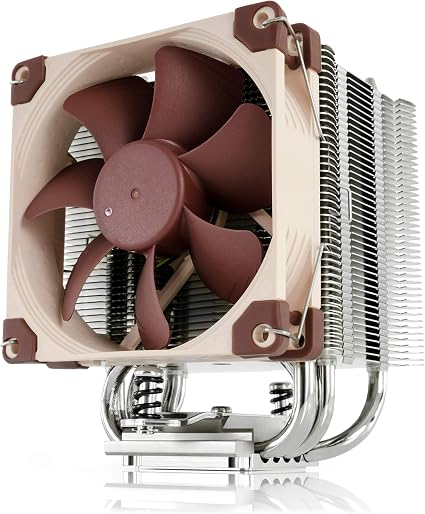
Compact size and solid performance make this an excellent choice for smaller builds and those needing perfect RAM and PCIe slot clearance. Suited especially well for HTPCs, ITX, and small form factor setups, it stands out by balancing quiet operation with effective heat management.
Installation is straightforward with the SecuFirm2 mounting system and included NT-H1 thermal paste. The 92mm fan runs quietly thanks to PWM support and a Low-Noise Adaptor, adjusting speeds as needed without drawing much attention.
Its 125mm height fits easily in tight spaces, avoiding interference with RAM or PCIe slots on most modern boards.
Cooling is reliable while staying quiet, which is key in compact builds. Built to last with quality materials and a strong mounting system, the most praised feature is its quiet operation paired with efficient heat dissipation.
Some note that while powerful for its size, it may not suit very high TDP CPUs requiring larger coolers.
Quiet operation paired with effective cooling stands out as the best aspect, delivering solid performance without noise. The most frequent drawback mentioned is the cooler’s limit on very high heat loads, which some users find insufficient for heavy overclocking.
Those building compact systems who prioritize low noise and compatibility with RAM and PCIe slots will find this cooler satisfying. Users with high-end CPUs aiming for top-tier cooling might prefer a larger or dual-fan solution.
Pros
- Compact 125mm height perfect for small cases
- Quiet 92mm fan with PWM and Low-Noise Adaptor
- No interference with RAM or PCIe slots
- Includes high-quality thermal paste and mounting kit
Cons
- Limited cooling for very high TDP processors
- Single fan may restrict peak cooling potential
| Specification | Details |
|---|---|
| Height | 125mm |
| Fan Size | 92mm |
| Compatibility | LGA1851, LGA1700, LGA1200, LGA115x, AM5, AM4 |
| Included Paste | NT-H1 thermal paste |
| Warranty | 6 year manufacturer’s warranty |
8. ID-COOLING SE-903-XT V2 CPU Air Cooler

ID-COOLING SE-903-XT V2 is a compact air cooler designed to handle CPUs on the 1155 socket with up to 150 watts of heat. It suits users who need effective cooling without taking up much space inside their desktop cases. Its single biggest strength lies in a larger 100mm fan that moves more air quietly.
Installing this cooler is straightforward with its secure fan clip design and upgraded fin locking system, which means the aluminum fins stay steady and reduce vibrations. The 4-pin connector allows for easy fan speed control, keeping noise around 29.1 dB during regular use or gaming. The compact size helps it fit well even in tighter setups.
Cooling performance is solid for its size, handling 150W without getting loud. The build quality feels durable due to reinforced fan clips and fin structure, lessening worries about damage during transport or extended use. The most praised feature is its quieter operation for the airflow it provides.
Common feedback points to the fan speed hitting a maximum of 2500 rpm, which might feel a bit high in quieter environments.
The strongest praise revolves around the quieter airflow and solid build quality thanks to the reinforced fan clips and fin locking design. The most common complaint concerns the maximum fan speed of 2500 rpm, which can be noticeable during heavy use.
Those looking for a compact cooler with good airflow and durability will find this a suitable choice. Users prioritizing very low noise levels might want to consider alternatives with slower fan speeds or larger coolers.
Pros
- Compact size suits small desktop builds
- Upgraded 100mm fan cools efficiently
- Fin locking system reduces vibration
- Balanced noise level at 29.1 dB
Cons
- Fan speed maxes out at 2500 rpm
- Might not be ideal for extremely silent setups
| Specification | Details |
|---|---|
| Power Connector Type | 4-Pin |
| Wattage | 150 watts |
| Cooling Method | Air |
| Noise Level | 29.1 db |
| Maximum Rotational Speed | 2500 rpm |
| Air Flow Capacity | 47.1 cfm |
9. Thermalright Assassin X120R Digital ARGB CPU Cooler

Staying quiet while cooling effectively is what makes this CPU cooler stand out. It’s built for those running desktop setups that need dependable temperature control without constant noise.
The automatic fan speed adjustment helps keep things balanced without any fiddling from your side.
Setting it up is pretty straightforward thanks to the 4-pin connector that lets the fan speed adjust based on the motherboard’s temperature. The silicone pads at the corners help keep the noise lower than you’d expect from a fan spinning at up to 2000RPM. It keeps a good flow of air, so your CPU stays cool without sounding like a jet engine.
Performance-wise, it manages to keep temperatures down while staying under 30 dB most of the time, making it suitable for quieter rooms. The combination of industrial-grade materials and an S-FDB bearing reduces vibration and fan blade shaking quite effectively.
Some users have mentioned that the noise reduction is helpful but not completely silent during intense workloads.
Quiet operation paired with good cooling stands out, but fan noise can creep up during intense tasks. The sturdy build and anti-vibration design get strong points for durability and steady performance.
Users wanting balance between noise and cooling will like this cooler. Those needing ultra-quiet or extremely low temperatures might want to explore other options.
Pros
- Fan speed adjusts automatically with motherboard temperature
- Quiet operation thanks to silicone corner pads
- Good air flow at 70.84 cfm
- Durable industrial-grade materials
Cons
- Noise still noticeable under heavy loads
- Cooling fan can reach highest speed at 2000RPM
| Specification | Details |
|---|---|
| Power Connector Type | 4-Pin |
| Voltage | 12 volts_of_direct_current |
| Maximum Rotational Speed | 2000 rpm |
| Noise Level | 29.8 db |
| Air Flow Capacity | 70.84 cfm |
| Cooling Method | Air |
10. Thermalright Peerless Assassin 140 SE CPU Air Cooler

Peerless Assassin 140 SE is a powerful air cooler aimed at anyone running an LGA 1155 CPU who needs excellent heat dissipation. Its biggest strength is the dual tower design paired with two PWM fans, which work together to keep temps low without being too loud.
Setting it up takes a bit of space given the 140x160x158mm size, but the dual fan setup helps spread airflow evenly across the aluminum fins. The six copper heat pipes and finely carved base improve contact with the CPU, while the 4-pin PWM fans adjust speed based on temperature, keeping noise down during light use.
Cooling performance stands out thanks to the dual tower design and 166.69 cfm airflow, easily handling heavier loads. Solid build quality is evident in the electroplated heat pipes and the sturdy fan frames.
The loudest noise reported is 29.5 dB, which is reasonable but not the quietest. Some users find the size challenging in smaller cases.
The cooler excels at maintaining low CPU temperatures with its dual tower design and powerful fans, but its bulk can make installation tricky in smaller builds. Noise levels are generally moderate, yet they can become noticeable under heavy CPU load.
Users valuing strong cooling and adjustable fan speeds will appreciate this model, especially with roomy PC cases. Those with limited space or needing ultra-quiet operation might want to consider more compact or quieter alternatives.
Pros
- Strong dual tower heat dissipation
- Two PWM fans for adjustable speeds
- High airflow capacity at 166.69 CFM
- Durable copper and aluminum materials
Cons
- Large size may not fit compact cases
- Noise level can reach up to 29.5 dB
| Specification | Details |
|---|---|
| Cooling Method | Air |
| Fan Speed | 1850 RPM ±10% / 1500 RPM ±10% |
| Noise Level | 25.6 dB / 29.5 dB |
| Air Flow Capacity | 166.69 CFM |
| Power Connector Type | 4-Pin PWM |
11. Thermalright AXP90 X47 Low Profile CPU Cooler

Aluminum fins and four 6mm heat pipes set the tone for compact efficiency with the Thermalright AXP90 X47 Low Profile CPU Cooler. It works well for small form factor builds where space is tight but good cooling still matters. Its key strength lies in applying an advanced welding process that improves heat transfer dramatically.
Setting it up involves mounting a low-profile cooler that doesn’t overwhelm compact cases. The 4-pin power connector supports PWM control so fan speed adjusts with CPU temperature.
Noise stays relatively low at 22.4 dB, making it easy to run quietly without sacrificing airflow. The fan pushes up to 42.58 CFM, enough to keep temps down even under decent loads.
Cooling performance holds strong for 1155 socket CPUs, handling a 125-watt thermal design power without struggling. The AGHP technique helps fight the inverse gravity effect seen in some cooler orientations, improving stability in various case layouts. Some note the fan speed can reach 2700 RPM, which might be a bit loud occasionally.
Build quality is solid, with clean secondary welding between heat pipes and fins.
Most praises highlight the efficient heat dissipation due to the AGHP technique and solid assembly, making it reliable for long use. The frequent complaint involves the fan’s high speed noise, which can get noticeable under heavy loads.
Builds with limited vertical space suit this cooler well, especially where quiet operation at moderate use matters. For users expecting lower fan noise at peak loads or requiring more RAM clearance, exploring larger coolers might be a better choice.
Pros
- Compact low-profile design fits small cases easily
- Good cooling power for TDP up to 125 watts
- Quiet operation at normal speeds
- Effective heat pipe welding improves thermal performance
Cons
- Noisy fan at maximum rotational speed
- Limited clearance for tall RAM modules
| Specification | Details |
|---|---|
| Power Connector Type | 4-Pin |
| Voltage | 12 volts |
| Wattage | 125 watts |
| Noise Level | 22.4 db |
| Maximum Rotational Speed | 2700 rpm |
| Air Flow Capacity | 42.58 cfm |
12. Thermaltake 92mm PWM Aluminum CPU Cooling Fan

Quiet operation stands out when using this cooler, making it ideal for anyone running an Intel LGA 1155 socket processor. Its aluminum extrusion heatsink design helps keep temperatures manageable without introducing much noise, fitting well in builds where space and sound level matter most.
Installation is quick and straightforward thanks to its compact size and mounting design. The 7-bladed 92mm fan runs quietly at just 22 db while providing decent airflow. Using the 4-pin PWM connector means fan speed adjusts easily to the CPU’s needs, balancing cooling and silence during day-to-day tasks.
Cooling performance handles moderate workloads well enough with a maximum rotational speed of 2500 rpm and 31.34 cfm airflow. The aluminum construction is both sturdy and lightweight, making maintenance simple and easy.
While many praise it for running quietly, some note it may not be powerful enough for very high-end or overclocked CPUs.
This cooler is praised for running quietly while delivering solid cooling under normal conditions. Some users find it lacks enough power for very demanding CPU tasks or when overclocking.
Great for builds that prioritize low noise and compact design on Intel LGA 1155 sockets. Those needing heavy-duty cooling for high-performance or overclocked processors may want to consider stronger alternatives.
Pros
- Quiet operation at 22 db
- Compact 92mm fan size fits small spaces
- Easy installation process
- 4-pin PWM allows speed control
Cons
- Cooling might be insufficient for overclocked CPUs
- Not the most powerful fan on the market
| Specification | Details |
|---|---|
| Voltage | 12 volts |
| Wattage | 2.16 watts |
| Fan Size | 92mm |
| Noise Level | 22 db |
| Maximum Rotational Speed | 2500 rpm |
| Air Flow Capacity | 31.34 cfm |
Best 1155 CPU Coolers Comparison Table
| Product | Cooling Method | Noise Level | Max Rotational Speed | Air Flow Capacity |
|---|---|---|---|---|
| Thermalright Assassin X120 | Heat pipe & fan | 25.6 db | 1550 rpm | 66.17 cfm |
| Cooler Master i30 | Air | 22 db | 2200 rpm | – |
| be quiet! Pure Rock 3 | Air | 34.8 db | 2000 rpm | – |
| Thermaltake UX150 ARGB | Fan | – | 2400 rpm | – |
| Cooler Master Hyper 212 Black | Fan | 26 db | 2500 rpm | 42 cfm |
| Thermalright Aqua Elite 120 V3 | Water | 25.6 db | 1500 rpm | 66.17 cfm |
| Noctua NH-U9S | Air | – | – | – |
| ID-COOLING SE-903-XT V2 | Air | 29.1 db | 2500 rpm | 47.1 cfm |
| Thermalright Assassin X120R ARGB | Air | 29.8 db | 2000 rpm | 70.84 cfm |
| Thermalright Peerless Assassin 140 | Air | 29.5 db | 1850 rpm | 166.69 cfm |
| Thermalright AXP90 X47 | Air | 22.4 db | 2700 rpm | 42.58 cfm |
| Thermaltake 92mm PWM Fan | Fan | 22 db | 2500 rpm | 31.34 cfm |
- Cooling MethodHeat pipe & fan
- Noise Level25.6 db
- Max Rotational Speed1550 rpm
- Air Flow Capacity66.17 cfm
- Cooling MethodAir
- Noise Level22 db
- Max Rotational Speed2200 rpm
- Air Flow Capacity–
- Cooling MethodAir
- Noise Level34.8 db
- Max Rotational Speed2000 rpm
- Air Flow Capacity–
- Cooling MethodFan
- Noise Level–
- Max Rotational Speed2400 rpm
- Air Flow Capacity–
- Cooling MethodFan
- Noise Level26 db
- Max Rotational Speed2500 rpm
- Air Flow Capacity42 cfm
- Cooling MethodWater
- Noise Level25.6 db
- Max Rotational Speed1500 rpm
- Air Flow Capacity66.17 cfm
- Cooling MethodAir
- Noise Level–
- Max Rotational Speed–
- Air Flow Capacity–
- Cooling MethodAir
- Noise Level29.1 db
- Max Rotational Speed2500 rpm
- Air Flow Capacity47.1 cfm
- Cooling MethodAir
- Noise Level29.8 db
- Max Rotational Speed2000 rpm
- Air Flow Capacity70.84 cfm
- Cooling MethodAir
- Noise Level29.5 db
- Max Rotational Speed1850 rpm
- Air Flow Capacity166.69 cfm
- Cooling MethodAir
- Noise Level22.4 db
- Max Rotational Speed2700 rpm
- Air Flow Capacity42.58 cfm
- Cooling MethodFan
- Noise Level22 db
- Max Rotational Speed2500 rpm
- Air Flow Capacity31.34 cfm
How to Choose the Right 1155 CPU Cooler
Choosing a good 1155 CPU cooler depends on compatibility, cooling performance, and noise levels. Ensuring proper fit and adequate heat dissipation prevents overheating and extends your CPU’s lifespan, saving money on repairs and avoiding future frustrations.
Socket Compatibility
Trying to install a cooler only to find it doesn’t fit the LGA 1155 socket is a common frustration. Proper support for this socket ensures the unit sits firmly on the processor, preventing poor contact that can cause overheating.
Also, the cooler must match your specific motherboard layout and CPU size; a mismatch may block components or leave the cooler loosely attached.
Check that the packaging or specs list LGA 1155 compatibility explicitly. Look for included mounting hardware meant for this socket, missing or incorrect brackets make installation difficult and risky. Secure installation affects daily performance because a poorly mounted cooler means inconsistent cooling and potential thermal throttling.
Cooling Performance
Your CPU’s TDP rating tells how much heat it generates, and the cooler’s rating must meet or exceed this. Without adequate cooling capacity, the processor will throttle or suffer reduced lifespan.
Air coolers generally work well for moderate heat loads, while liquid solutions better handle higher-performance setups with tighter thermal margins.
Look beyond TDP numbers to the cooler’s airflow capability and heatpipe or radiator design. A well-designed heat dissipation path reduces hot spots and keeps temperatures stable under load.
Choosing the right method depends on your CPU’s heat output and the case airflow; balanced performance avoids unnecessary noise or power draw.
Physical Dimensions and Clearance
Many users overlook cooler size until they try fitting it inside their case. The height determines if it will clear the side panel, while width affects access to RAM slots and other motherboard components. A bulky cooler may block RAM with tall heat spreaders, forcing compromises or even hardware changes.
Weight also matters since heavy coolers put extra strain on the motherboard, especially if the PC is moved often. Look for precise measurements in product descriptions and compare them with your case’s specifications. Leaving a few millimeters of clearance around critical areas reduces installation hassle and hardware interference.
Noise Levels
Noise levels become very noticeable during gaming or heavy workloads if a cooler runs at high RPM without control. Checking the decibel rating helps set realistic expectations about fan noise presence. Fans with PWM (Pulse Width Modulation) allow the speed to adjust dynamically, keeping noise low during light use and ramping up only when needed.
Fan bearing types affect operational sound and durability. Ball or fluid dynamic bearings tend to run quieter and last longer compared to sleeve bearings, which can degrade faster and grow noisy. Choosing a cooler with these features ensures a quieter environment and reduces distractions over time.
Build Quality and Materials
Copper heat pipes conduct heat more effectively than aluminum alone, so coolers featuring copper combined with aluminum fins usually lower temperatures better. However, materials also influence the cooler’s lifespan and resistance to corrosion, which is important for keeping performance consistent over years of use.
A cooler that’s easy to clean improves dust management and maintains thermal efficiency. Matte or textured finishes often hide dust better but may require more effort during cleaning.
Durable build quality contributes to long-term reliability and minimizes maintenance frequency, making daily use more convenient.
Optimal Installation Techniques for 1155 CPU Coolers
Proper installation ensures your 1155 CPU cooler performs efficiently and extends its lifespan. Begin by cleaning off any old thermal paste from both the CPU and cooler base with isopropyl alcohol and a lint-free cloth.
Applying a thin, even layer of fresh thermal paste helps maintain good thermal conductivity. Align the cooler correctly on the CPU socket, securing it with the provided mounting brackets or screws without over-tightening, which can damage the motherboard or CPU.
Check that the cooler’s fan has clearance from RAM modules and other components to avoid airflow obstruction. Connect the fan power cable to the correct motherboard header, usually labeled CPU_FAN.
It’s worth running a quick BIOS or hardware monitor check to confirm the cooler’s fan is spinning and the CPU temperature stays within safe limits right after installation.
Maintaining Peak Performance: Cleaning and Upkeep Tips
Routine cleaning of your 1155 CPU cooler prevents dust buildup that hampers heat dissipation. Use compressed air to blow dust off the heatsink fins and fan blades every few months. Avoid spinning the fan manually during cleaning lest you damage the bearings.
Follow these upkeep tips:
- Inspect thermal paste every 1-2 years and reapply if it’s dried or cracked.
- Keep your PC case filters clean to reduce dust influx onto the cooler.
- Ensure fan blades are free of sticky dirt or pet hair.
- Check fan operation regularly; replace if noisy or failing to spin.
Consistent maintenance helps the cooler maintain optimal performance and keeps CPU temperatures stable under load.
Comparing Air Cooling and Liquid Cooling Solutions for 1155 CPUs
Air cooling for 1155 CPUs typically involves a heatsink and fan combo that dissipates heat into the surrounding air. These solutions are usually easier to install, require less maintenance, and cost less. Quality air coolers can handle moderate CPU loads well, but their cooling capacity is limited by the physical size of the heatsink and fan design.
Liquid cooling systems use a closed loop of coolant circulated through a radiator and pump. They generally provide better cooling efficiency, especially for overclocked or high-TDP CPUs, by moving heat away from the CPU more quickly than air alone.
However, liquid coolers add complexity with additional components that may need maintenance, and installation involves more steps and care to avoid leaks. Air coolers remain a practical choice for most 1155 CPU setups, while liquid cooling benefits users pushing the hardware with higher performance demands.
People Also Asked
Is This 1155 CPU Cooler Compatible with My Motherboard?
The 1155 CPU cooler should be compatible if your motherboard has an LGA 1155 socket. Double-check your motherboard’s specifications and the cooler’s mounting system to ensure they match before buying.
How Do I Properly Install a 1155 CPU Cooler?
Secure the cooler by aligning it with the mounting points on the motherboard and fastening the screws evenly. Applying a thin, even layer of thermal paste between the CPU and cooler base helps achieve better heat transfer.
What Are Common Problems with 1155 CPU Coolers?
Common issues include insufficient contact causing high temperatures and noisy fan operation. Make sure the cooler is seated correctly, fans are clean, and airflow in the case is not restricted.
How Long Does a Typical 1155 CPU Cooler Last?
A 1155 CPU cooler can last several years, around 3 to 5 on average, depending on maintenance. Regular cleaning and occasional fan replacement can extend its functional life.
Can a 1155 CPU Cooler Fit in a Small PC Case?
A 1155 CPU cooler can fit in a small PC case if it has low-profile or compact design. Measure the available clearance inside your case and check the cooler’s height before purchasing to avoid fitment problems.
Conclusion
Choosing the right 1155 CPU cooler mainly depends on its cooling performance, noise level, and compatibility with your case and motherboard. These three points can make a big difference in how well it controls your CPU temperature and fits inside your setup.
Think about how much room you have in your case and how much you’re willing to spend before making a decision. Check the comparison table and earlier picks carefully to find a cooler that fits both your space and budget needs. That way, you avoid surprises and get the best match for your build.

I’m Grant Mitchell, a firearms and hunting writer with years of experience at the range and in the field. I write about rifles, shotguns, handguns, optics, safe storage, cleaning, and responsible ownership, along with practical hunting tips. My goal is to share accurate, safety-first information that helps you choose the right firearm, maintain it properly, and become a more confident shooter.