Top 12 Best AMD Ryzen Cooler You Can’t Miss Today!
Many who settle for a cheap or mismatched cooler for their AMD Ryzen CPU quickly notice rising temperatures and noisy fans under load. A best AMD Ryzen cooler quietly manages heat without forcing the processor to throttle back performance.
This is crucial for anyone running demanding software or gaming on their system. The wrong choice can lead to frequent overheating and shorter component life.
Good coolers focus on a few key things: thermal dissipation capacity, physical compatibility with the motherboard and case, and noise levels. Heat pipes made from copper with a smooth base plate help transfer heat effectively. Fans typically deliver airflow between 50-70 CFM while keeping noise levels under 30 dBA during regular use.
The cooler’s size also matters, as some tower models won’t fit smaller cases or RAM modules. Easy-to-clean fans and dust filters extend product longevity.
Need a Quick Check?
| Image | Product | Price |
|---|---|---|
Our Top Picks 1 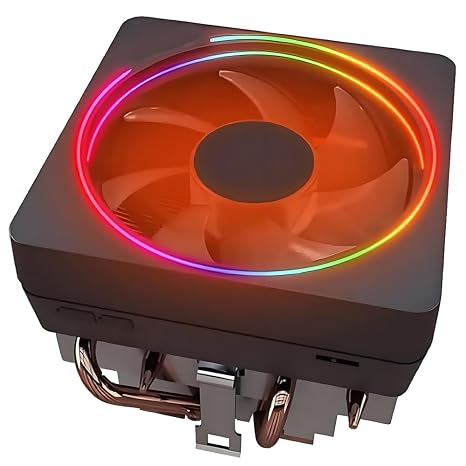 | AMD Wraith Prism | Check Price |
Our Top Picks 2  | Cooler Master Hyper 212 Black | Check Price |
Our Top Picks 3 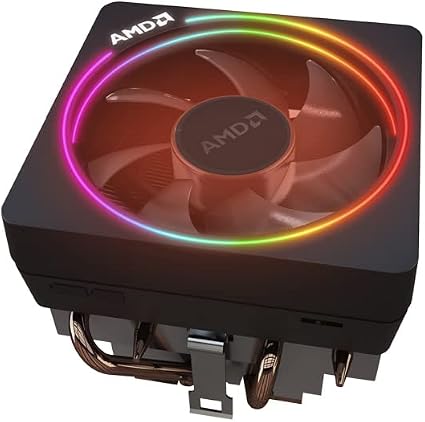 | AMD Wraith Prism Cooler | Check Price |
Our Selected Top 12 Amd Ryzen Cooler Worth Your Money
This list features a carefully chosen selection of cooling solutions compatible with AMD Ryzen processors. Each review covers performance, suitability for different users, and highlights the strengths and weaknesses, helping you find the best match for your specific cooling needs.
1. CPU Wraith Cooler Prism
Quiet operation and effective cooling make the Wraith Cooler Prism a solid choice for anyone running AMD Ryzen processors like the Ryzen 5 5600 or Ryzen 7 5700X. Its biggest strength lies in how it balances cooling power with low noise, making it suitable for most desktop setups without extra fuss.
Setting up the cooler is straightforward thanks to the pre-applied thermal paste, so there’s no extra step messing with thermal grease. It fits AM4 and AM5 sockets out of the box, which covers a broad range of Ryzen chips. Its compatibility with the standard bracket found on many AMD motherboards means installation usually matches up without surprises.
Cooling relies on direct-contact copper heat pipes paired with an aluminum heatsink to keep the processor temperature in check. The fan runs quietly at 14 db, pushing 45 cfm of airflow, so it keeps noise low during everyday tasks.
The build feels sturdy, combining copper and aluminum for good heat transfer. Complaints mostly focus on the absence of the mounting bracket with the cooler, requiring one to rely on the motherboard’s pre-installed hardware.
Praise stays strong around the cooler’s quiet operation and efficient heat transfer thanks to its copper base and heat pipes. Common frustration stems from the lack of a mounting bracket included in the package, requiring reliance on hardware already installed on the motherboard.
Those with mid-range Ryzen processors looking for a reliable, low-noise cooler will find it well suited. Users with very high-power CPUs or custom cooling needs might want to look beyond this model for more advanced solutions.
Pros
- Compatible with AM4 and AM5 sockets
- Pre-applied thermal paste simplifies installation
- Quiet fan operation at 14 db
- Good cooling with copper heat pipes
Cons
- Mounting bracket not included
- Might not suit extremely high-end Ryzen CPUs
| Specification | Details |
|---|---|
| Power Connector Type | 4-Pin |
| Voltage | 12 volts_of_direct_current |
| Wattage | 105 watts |
| Noise Level | 14 db |
| Air Flow Capacity | 45 cfm |
| Maximum Rotational Speed | 2800 rpm |
2. Cooler Master Hyper 212 Black II
Great value for anyone looking to keep an AMD Ryzen cool without overspending. It suits AMD Ryzen 7 users aiming for stable performance under heavy loads, thanks to its strong heat transfer and cooling capacity.
The ability to handle up to 220W makes it solid for many Ryzen builds.
Installation is straightforward with the user-friendly bracket design, ideal for first-time builders or upgrades. The fan runs quietly at 26 dB while pushing up to 42 CFM air flow, which keeps noise low during gaming or productivity work.
Minimalist design fits easily into most desktop cases without looking out of place.
The cooler efficiently moves heat away using four heat pipes and Direct Contact Technology, making it reliable under strain. The build focuses on consistent coolant flow, which is praised for maintaining stable temperatures.
Some mention the fan speed can spike to 2500 RPM, which can increase noise beyond usual levels. Lightweight and compact, it’s easy to fit but might struggle with extremely high power CPUs.
The cooler gets praise for stable performance and quiet operation under regular use but some note the fan noise rises when pushed to maximum speed. The straightforward installation helps make it accessible for many builds without extra fuss.
Users with mid-range AMD Ryzen setups will find it suitable for solid cooling needs, especially in gaming or productivity PCs. Those running extremely high-power CPUs or wanting absolute silence might want to look elsewhere for more specialized cooling solutions.
Pros
- Handles up to 220W cooling capacity
- Simple bracket design for easy installation
- Quiet fan with low noise level at 26 dB
- Compatible with AMD Ryzen 7 CPUs
Cons
- Fan speed can increase noise under heavy load
- May not cool very high power CPUs effectively
| Specification | Details |
|---|---|
| Power Connector Type | 4-Pin |
| Voltage | 12 volts |
| Wattage | 2.4 watts |
| Noise Level | 26 db |
| Maximum Rotational Speed | 2500 rpm |
| Air Flow Capacity | 42 cfm |
3. AMD Wraith Prism Cooler
Aluminum and transparent plastic combine in a cooler built specifically for AMD Ryzen chips up to 105W, offering strong cooling with a quiet operation. It’s designed to fit advanced AM4 sockets and features customizable LED lighting around its fan, making it a visually striking option for those who want solid cooling without much noise.
Installation is straightforward, thanks to its compatibility with AM4 sockets and standard eight-pin power connector. The RGB lighting can be controlled per LED, letting you personalize the look to match your rig’s style. Daily operation remains quiet, barely noticeable at just 14 dB, while the fan speed adjusts up to a 3000 rpm maximum to manage heat efficiently under load.
Cooling performance lives up to expectations for Ryzen CPUs up to 105 watts, keeping temperatures in check without loud fan noise. Build quality feels sturdy, with a well-made fan and durable materials. Positive feedback often highlights the quietness and lighting effects, but on warmer days or intensive tasks, some users notice the fan reaching higher speeds more frequently.
The quietness combined with vibrant RGB lighting receives consistent praise, while many note the fan can ramp up noise during intense processing tasks. The cooler generally keeps Ryzen CPUs within safe temperatures but struggles a bit with heavier overclocking or higher wattage chips.
Those running stock or lightly boosted Ryzen processors up to 105 watts benefit from the balance of silence and cooling. Users with demanding workloads or higher wattage CPUs may want to consider more powerful aftermarket coolers for better heat management.
Pros
- Quiet operation at 14 dB
- Compatible with AM4 socket
- RGB LEDs with per-LED control
- Supports Ryzen processors up to 105W
Cons
- Fan speed can get loud under heavy load
- Limited cooling beyond 105W CPUs
| Specification | Details |
|---|---|
| Wattage | 105 watts |
| Noise Level | 14 dB |
| Maximum Rotational Speed | 3000 rpm |
| Power Connector Type | eight-pin |
| Voltage | 12 volts_of_direct_current |
4. Cooler Master 240 Core II AIO Liquid Cooler

ARGB lighting immediately stands out, adding a cool visual touch tailored for Ryzen 7 CPUs. Suited for gamers and performance seekers looking for solid liquid cooling paired with a striking look.
Its strongest feature is the dual-chamber design that boosts water flow to keep AMD Ryzen processors running cooler.
Installation is pretty straightforward thanks to compatible brackets for AM5 and AM4 sockets. The dynamic PWM fan adjusts speeds between 650 and 1,750 rpm, so day-to-day noise stays low, around 30 dB. CryoFuze thermal paste is included, helping maintain stable temperatures during heavy loads.
The 3-pin power connector makes it plug-and-play with most setups.
Cooling performance holds up well under pressure, managing the CPU hotspot effectively with its water and fan combo. The build feels solid and reliable, especially with the focused water flow from the dual chambers.
The best feedback highlights its quiet operation, but some people mention the 3-pin connection limits fan control compared to 4-pin models.
Quiet fan operation is consistently praised for keeping noise under control while maintaining solid cooling. The most common gripe is the 3-pin power connector, which restricts finer fan speed adjustments compared to 4-pin designs.
Gamers and Ryzen 7 users who want effective cooling with a customizable light show will appreciate this liquid cooler. Those needing advanced fan control or a more minimalist look might want to look elsewhere.
Pros
- Quiet, dynamic PWM fan operation
- Compatible with AM5 and AM4 sockets
- ARGB lighting customizable via motherboard
- Effective dual-chamber water flow design
Cons
- 3-pin connector limits precise fan speed control
- ARGB lighting may not suit all build styles
| Specification | Details |
|---|---|
| Maximum Rotational Speed | 1750 rpm |
| Voltage | 12 volts_of_alternating_current |
| Noise Level | 30 db |
| Cooling Method | Fan, Water |
| Power Connector Type | 3-Pin |
5. AMD Wraith Stealth CPU Cooler

Great for budget-conscious builders aiming for reliable cooling, the Wraith Stealth cools AMD Ryzen CPUs efficiently without added extras. It fits perfectly on AM4 motherboards and stands out for its straightforward mounting system, providing steady performance without the need for high-end cooling features.
Setting it up is quick thanks to its direct screw mounting on AM4 sockets. Pre-applied thermal paste takes the guesswork out of application, so you can install and run it immediately. The 3.5-inch, 90mm fan with a 4-pin PWM connector manages noise and speed well during daily tasks.
Its aluminum heatsink keeps things cool without extra bulk or weight, making maintenance simple.
It handles everyday heat dissipation as expected for a stock cooler, keeping CPU temperatures in check under normal workloads. The solid aluminum heatsink adds durability without unnecessary weight. Positive feedback highlights its quiet operation and easy installation, though some mention it might struggle under heavier loads beyond standard use.
Quiet operation and simple, effective mounting are the main benefits, while the ability to handle intense workloads is where the cooler falls short. It provides consistent cooling without fuss, but isn’t designed for overclocking or demanding thermal conditions.
Anyone building a system on a budget with standard Ryzen CPUs will find it a good match. Users planning heavy multitasking or overclocking should consider larger aftermarket coolers for better heat management.
Pros
- Direct screw mounting for secure fit
- Pre-applied thermal paste saves installation time
- Quiet 90mm fan during low to moderate loads
- Aluminum heatsink for lightweight cooling
Cons
- Limited cooling under heavy CPU loads
- Smaller fan size may reduce airflow compared to bigger coolers
| Specification | Details |
|---|---|
| Supports Motherboard Socket | AM4 |
| Aluminum heatsink | Yes |
| Fan size | 3.5-inch 90mm |
| Pre-applied thermal paste | Yes |
| Power connector | 4-pin PWM, 9-inch length |
6. Thermalright Peerless Assassin 120 SE

Finding a cooler that handles high-performance AMD Ryzen processors without overheating or excessive noise can be tough. Designed for desktop users who need effective air cooling, this cooler’s main strength lies in managing heat efficiently up to its 265-watt capacity while keeping noise levels low.
Setting up the cooler requires attention to its 4-pin power connector and compatibility with standard desktop sockets. The fan runs at up to 1550 rpm, which balances airflow and quiet operation.
At 25.6 dB, it’s noticeable but not distracting. Routine cleaning is straightforward, thanks to the accessible fan blades and solid build.
Heat dissipation works well, providing steady airflow rated at 66.17 cfm, helping CPUs stay within safe temperature ranges under load. The construction feels sturdy with quality materials typical from a brand focused on long-term durability. Praise centers on quiet cooling during heavy workloads, while the most common complaint notes it is a bit bulky for tight spaces.
Quiet performance under heavy loads rates as its strongest feature, keeping CPUs cool without becoming a noise distraction. However, the size can pose challenges when fitting into compact setups or smaller PC cases. The cooler focuses on reliability and steady airflow rather than maximum fan speed.
Users prioritizing silent yet effective cooling for Ryzen processors should find this cooler well suited to their needs. Those with compact or unconventional PC cases might consider models with smaller dimensions or different mounting designs to avoid installation complications.
Pros
- Handles up to 265 watts heat output
- Quiet operation at 25.6 dB noise level
- Good airflow with 66.17 cfm capacity
- Compatible with standard desktop sockets
Cons
- Bulky design may limit clearance in small cases
- Maximum fan speed 1550 rpm might be low for extreme cooling
| Specification | Details |
|---|---|
| Power Connector Type | 4-Pin |
| Voltage | 12 volts |
| Wattage | 265 watts |
| Noise Level | 25.6 db |
| Maximum Rotational Speed | 1550 rpm |
| Air Flow Capacity | 66.17 cfm |
7. AMD Wraith Prism LED RGB Cooler

Running quietly at just 30 dB, the AMD Wraith Prism LED RGB Cooler is great for desktop users who want reliable air cooling alongside some visual flair. It suits Ryzen processors demanding stable, consistent airflow without extra noise on the side.
Its biggest strength comes from balancing effective cooling with modest sound output.
Setup involves connecting its 4-pin power connector to your motherboard, which is straightforward for most desktop builds. Daily use involves steady air cooling thanks to the maximum rotational speed of 1800 rpm. The 12-volt system keeps it powered efficiently, while the LED RGB adds customizable lighting effects without complicating maintenance.
It keeps CPU temperatures in check under regular workloads, running quietly without noticeable vibrations. The cooler’s build feels solid with a compact design that fits most desktop cases.
Praise often highlights its quiet operation. Common complaints involve it being a bit bulky, which can challenge installation in tighter cases.
The cooler is praised for running quietly without compromising its core job of air cooling. Most users find its physical size a hurdle when installing in compact desktop cases.
Those needing a low-noise cooler for standard desktop Ryzen builds will appreciate this model. People with smaller cases or requiring more compact solutions might look elsewhere for better fitting options.
Pros
- Quiet operation at 30 dB noise level
- Powerful air cooling at 105 watts
- LED RGB lighting adds visual appeal
- Easy 4-pin power connector setup
Cons
- Can be bulky, challenging in small cases
- Limited to desktop use only
| Specification | Details |
|---|---|
| Power Connector Type | 4-Pin |
| Voltage | 12 volts |
| Wattage | 105 |
| Cooling Method | Air |
| Noise Level | 30 dB |
| Maximum Rotational Speed | 1800 rpm |
8. ARCTIC Liquid Freezer III Pro 360

Anyone running a high-performance AMD Ryzen CPU and needing serious cooling should consider a liquid cooler like the ARCTIC Liquid Freezer III Pro 360. Its biggest strength lies in managing heat effectively while balancing noise levels, making it perfect for gamers and content creators pushing their systems hard.
Installation comes with well-thought-out mounting options, including a native offset design that targets the CPU hotspot for better heat transfer. The integrated PWM-controlled VRM fan keeps voltage regulators cool without adding much noise.
Day-to-day, the P12 PRO fans stay quiet but ramp up smoothly under load, letting your system stay stable without interruption.
Performance-wise, it handles heat exceptionally well, even when the CPU is under heavy strain. The build quality supports longer CPU life thanks to optimized contact pressure.
Reviews often highlight how quiet the fans run at lower speeds. Some users find the height and radiator size challenging to fit into smaller cases or compact builds.
The Liquid Freezer III Pro 360 is praised for its quiet fans at low speeds and effective cooling under heavy CPU load. Most users appreciate its balanced performance but mention the radiator’s physical size as an installation hurdle in tighter builds.
Gamers and creators running powerful AMD Ryzen setups will benefit most from the cooler’s strengths, especially where noise and temperature control matter. Those with small-form-factor or compact PC cases should consider alternatives with smaller radiator footprints.
Pros
- Quiet operation even under moderate loads
- Powerful cooling with efficient heat transfer design
- Integrated VRM fan helps keep voltage regulators cool
- Compatible with both Intel and AMD sockets
Cons
- Radiator size may not fit small cases
- Fans can get loud at top speeds
| Specification | Details |
|---|---|
| Power Connector Type | 4-Pin |
| Voltage | 12 volts |
| Wattage | 3.96 watts |
| Cooling Method | Liquid |
| Maximum Rotational Speed | 3000 rpm |
| Air Flow Capacity | 77 cfm |
9. Be Quiet! Pure Rock Pro 3

Pure Rock Pro 3 stands out with its six nickel-plated copper heat pipes, designed to handle demanding workloads and overclocked Ryzen CPUs. It suits anyone looking for reliable air cooling that keeps temperatures manageable without diving into complex liquid setups.
The fan’s shape and blade angle bring a noticeable boost in airflow.
Setup is straightforward, fitting AM4 and AM5 sockets without fuss. The 4-pin PWM fan adjusts speed smoothly, which means quieter operation when the CPU isn’t under heavy load.
The funnel-shaped air outlet directs airflow perfectly across the heat sink fins, making it efficient at moving heat away. Maintenance is easy since dust won’t rest much on the balanced fan blades.
Performance feels solid with the cooler maintaining good temperatures during intense tasks. The nickel plating on the pipes and base adds durability and prevents corrosion over time.
Most appreciate the quiet operation despite a 2000 rpm max fan speed. A common downside mentioned is the noise reaching 34.8 dB under full load, which some may find noticeable in very quiet rooms.
Heat dissipation remains effective thanks to six nickel-plated heat pipes and an optimized fan design. However, the noise can increase to 34.8 dB at full speed, which might feel louder during heavy CPU loads. Durability is well-managed with nickel plating protecting the base and pipes.
Those running mid-range to high-end Ryzen setups looking for consistent, solid cooling with quieter operation will be satisfied. Core overclockers or users needing the absolute lowest temps on heavily stressed CPUs might want to consider larger or liquid cooling options.
Pros
- Six nickel-plated copper heat pipes for strong cooling
- Quiet fan with optimized blade angles
- Easy to install on AM4 and AM5 sockets
- Funnel-shaped outlet boosts airflow
Cons
- Fan noise can be noticeable near max speed
- Not suitable for extreme overclocking cooling needs
| Specification | Details |
|---|---|
| Voltage | 12 volts |
| Power Connector Type | 4-Pin |
| Noise Level | 34.8 db |
| Maximum Rotational Speed | 2000 rpm |
| Compatibility | AMD sockets: AM5/AM4 |
| Cooling Method | Air |
10. Noctua NH-D15 chromax.Black

Noctua NH-D15 chromax.Black is a powerful air cooler designed for AMD Ryzen processors, particularly suited to overclockers and silent PC enthusiasts. Its biggest strength lies in balancing top-tier cooling performance with very low noise levels, making it comparable to many all-in-one water coolers.
Setting it up involves mounting the dual-tower heatsink easily with its secure brackets, fitting well in most desktop cases despite its extra-wide 140mm size. Dual 140mm NF-A15 fans use PWM for automatic speed control, which means it runs quietly at idle but ramps up efficiently under load.
Low-Noise Adaptors help keep noise minimal without sacrificing cooling power, making daily use unobtrusive.
Cooling performance remains excellent, consistently keeping high core temperatures down during heavy tasks. Build quality is solid, with six heatpipes and durable fan blades made to last.
The most praised aspect is its quiet operation, while the largest downside mentioned is the cooler’s bulk, which can challenge tight case spaces or RAM clearance.
The cooler is highly praised for running quietly while delivering performance on par with many watercoolers. Most common complaints focus on its large size that can interfere with RAM or smaller cases.
People looking for strong, silent cooling for overclocked Ryzen setups will be satisfied. Those with compact cases or limited internal space should consider smaller or different types of coolers.
Pros
- Quiet operation even under heavy load
- High airflow from dual 140mm fans
- Stable performance with six heatpipes
- Durable, all-black design fits many builds
Cons
- Large size may cause clearance issues
- Dual-tower setup can be bulky in some cases
| Specification | Details |
|---|---|
| Power Connector Type | 4-Pin |
| Voltage | 12 volts |
| Cooling Method | Air |
| Noise Level | 24.6 db |
| Maximum Rotational Speed | 1500 rpm |
| Air Flow Capacity | 140.2 cubic meter per hour |
11. Noctua NH-U12A chromax.Black

Running a Ryzen processor without worrying about overheating feels reassuring with this cooler. It’s designed to fit nicely inside most tower cases without blocking important slots, making it a great pick for people who want strong cooling power without a bulky setup.
Installing the cooler involves a fairly straightforward mount, compatible with a range of motherboards thanks to its 158mm height and clever design that avoids RAM and PCIe interference. The dual 120mm fans adjust their speed automatically depending on the demand, so it stays quiet while idling and ramps up cooling efficiently under heavy loads.
Performance-wise, it handles heat impressively in daily use, thanks to the NF-A12x25 fans that push a lot of air quietly. The all-black build feels solid and looks good with many color schemes. The most frequent complaint is the price, which can be higher than some alternatives, but the cooling effectiveness and quiet operation make it justifiable.
Noctua NH-U12A chromax.Black is known for effective cooling in a compact, 120mm form factor that fits well in most tower cases without blocking RAM or PCIe slots. Dual NF-A12x25 fans manage to keep CPU temperatures low under heavy load while running quietly at idle. Some point out its premium price as a downside compared to other coolers.
Enthusiasts who prioritize quiet operation and strong cooling for AMD Ryzen chips will appreciate its balance between size and performance. Those working with very tight cases or budgets might find smaller or more affordable coolers better suited to their needs. This model works best when case space and noise control both matter.
Pros
- Fits most tower cases up to 158mm height
- Doesn’t block RAM or PCIe slots on most boards
- Very quiet operation at idle
- High airflow with dual 120mm fans
Cons
- Higher price compared to some coolers
- Some may prefer RGB lighting options
| Specification | Details |
|---|---|
| Cooling Method | Air |
| Cooling Fan Size | 120mm |
| Noise Level | 22.6 db |
| Maximum Rotational Speed | 2000 rpm |
| Power Connector Type | 4-Pin |
| Compatible Devices | Desktop |
12. Noctua NH-D15 G2

Excellent cooling power paired with whisper-quiet operation makes this cooler a solid choice for high-end AMD Ryzen CPUs like the Ryzen 9 9950X. Its biggest strength lies in balancing strong thermal performance with near-silent fan noise, ideal for both intense workloads and quieter desktops.
Installing the cooler requires careful mounting, but the included offset bracket designed for AMD AM5 simplifies fitting. Dual 140mm NF-A14x25r G2 fans run with PWM control to adjust speed automatically according to load.
At idle, these fans are barely audible, while under heavy use they spin up smoothly without harsh noise. The setup benefits from Low-Noise Adaptors for additional acoustic tuning.
Eight heatpipes and a 20% larger surface area on the fins enable efficient heat dissipation, keeping CPU temperatures well-managed. The build quality feels solid with premium materials throughout. Most users appreciate its quietness and cooling strength, while the size makes it tricky to install in compact cases or alongside tall RAM modules.
The cooler achieves excellent quiet cooling through two advanced 140mm fans and increased surface area, but its bulky size demands a roomy case and careful installation. Most praise revolves around silent performance, while many note the initial mounting process requires patience.
Ideal for users running high-performance Ryzen CPUs seeking powerful cooling that stays quiet. Those with smaller cases or minimal build experience might want to consider smaller or simpler alternatives to avoid fitting issues or tricky setup.
Pros
- Quiet operation even under heavy load
- Impressive cooling with 8 heatpipes
- Automatic fan speed adjustment via PWM
- Compatible with AMD AM5 and Intel sockets
Cons
- Large size can limit case compatibility
- Installation can be challenging for beginners
| Specification | Details |
|---|---|
| Cooling Method | Air |
| Power Connector Type | 4-Pin |
| Voltage | 12 volts |
| Noise Level | 24.8 db |
| Maximum Rotational Speed | 1500 rpm |
| Air Flow Capacity | 155.6 cubic meter per hour |
Best AMD Ryzen Coolers Comparison Table
| Product | Cooling Method | Noise Level | Max Rotational Speed | Air Flow Capacity |
|---|---|---|---|---|
| AMD Wraith Prism | Fan | 14 db | 2800 rpm | 45 cfm |
| Cooler Master Hyper 212 Black | Fan | 26 db | 2500 rpm | 42 cfm |
| AMD Wraith Prism Cooler | Fan | 14 db | 3000 rpm | – |
| Cooler Master 240 Core II | Fan, Water | 30 db | 1750 rpm | 70.5 cfm |
| AMD Wraith Stealth | – | – | – | – |
| Thermalright Peerless Assassin 120 | Air | 25.6 db | 1550 rpm | 66.17 cfm |
| AMD Wraith Prism RGB | Air | 30 db | 1800 rpm | – |
| ARCTIC Liquid Freezer Pro 360 | Liquid | – | 3000 rpm | 77 cfm |
| be quiet! Pure Rock Pro | Air | 34.8 db | 2000 rpm | – |
| Noctua NH-D15 chromax.Black | Air | 24.6 db | 1500 rpm | 82.4 cfm |
| Noctua NH-U12A chromax.Black | Air | 22.6 db | 2000 rpm | 102.1 cfm |
| Noctua NH-D15 G2 | Air | 24.8 db | 1500 rpm | 91.5 cfm |
- Cooling MethodFan
- Noise Level14 db
- Max Rotational Speed2800 rpm
- Air Flow Capacity45 cfm
- Cooling MethodFan
- Noise Level26 db
- Max Rotational Speed2500 rpm
- Air Flow Capacity42 cfm
- Cooling MethodFan
- Noise Level14 db
- Max Rotational Speed3000 rpm
- Air Flow Capacity–
- Cooling MethodFan, Water
- Noise Level30 db
- Max Rotational Speed1750 rpm
- Air Flow Capacity70.5 cfm
- Cooling Method–
- Noise Level–
- Max Rotational Speed–
- Air Flow Capacity–
- Cooling MethodAir
- Noise Level25.6 db
- Max Rotational Speed1550 rpm
- Air Flow Capacity66.17 cfm
- Cooling MethodAir
- Noise Level30 db
- Max Rotational Speed1800 rpm
- Air Flow Capacity–
- Cooling MethodLiquid
- Noise Level–
- Max Rotational Speed3000 rpm
- Air Flow Capacity77 cfm
- Cooling MethodAir
- Noise Level34.8 db
- Max Rotational Speed2000 rpm
- Air Flow Capacity–
- Cooling MethodAir
- Noise Level24.6 db
- Max Rotational Speed1500 rpm
- Air Flow Capacity82.4 cfm
- Cooling MethodAir
- Noise Level22.6 db
- Max Rotational Speed2000 rpm
- Air Flow Capacity102.1 cfm
- Cooling MethodAir
- Noise Level24.8 db
- Max Rotational Speed1500 rpm
- Air Flow Capacity91.5 cfm
How to Choose the Right AMD Ryzen Cooler
Choosing the right AMD Ryzen cooler depends on factors like compatibility with your CPU and case, cooling performance, noise levels, and durability. Getting these right ensures efficient heat management, which prolongs your processor’s life and prevents costly overheating issues or unnecessary upgrades.
Compatibility with Ryzen Cpus
Compatibility issues become obvious right after installation when the cooler either doesn’t mount properly or fails to fit the socket. Many Ryzen processors use AM4 or AM5 sockets, and coolers built for one may not fit the other without adapter kits.
The motherboard’s layout also matters because larger coolers demand space not just on the socket but around it. Some boards with dense VRM heatsinks or unusual component placements can block cooler brackets or pipes. Check the TDP rating of your CPU’s model, coolers have max thermal design power limits.
A cooler rated for 95 watts won’t handle a 105-watt chip under full load, leading to higher temps or thermal throttling. Matching socket compatibility, motherboard clearance, and the cooler’s TDP rating avoids headaches from overheating or installation problems.
Cooling Performance
Cooling capacity determines how steady your CPU runs during heavy tasks. Air coolers rely on heat pipes and large fins to spread and dissipate heat.
Designs with multiple heat pipes in direct contact with the CPU transfer heat better and keep temperatures lower during long gaming or rendering sessions. Liquid coolers move heat through a radiator and fans, often performing better at keeping temps down but adding pump noise and complexity. Pick a solution whose cooling performance matches or exceeds the CPU’s thermal output; specs usually list cooling power in watts or compatibility with high TDP CPUs.
The quality of heat pipes or radiator thickness and fin density directly affects how quickly heat moves away from the processor, which impacts performance stability.
Size and Clearance
Coolers that are too tall often bump against the side panel of standard PC cases, a common problem with high-performance models. Measure the available space from motherboard to case side and compare this to the cooler height.
Besides height, clearance around the RAM slots needs attention. Some coolers with large fans or extended heat pipes block tall RAM modules, forcing a compromise on choice or making installation tricky. The same goes for proximity to the GPU; oversized coolers can interfere with graphics cards installed close to the CPU socket.
Fan size influences airflow direction and strength. Larger fans run slower while moving more air quietly but take up more space, which ties back to clearance and case volume requirements.
Noise Levels
Fan noise often becomes distracting during gaming or multitasking when fan speeds ramp up to cool the CPU. Different fan designs produce varying noise profiles; sleeve bearings sound smoother but wear out faster, while ball bearings last longer but can generate louder whirrs.
Many coolers offer PWM control, allowing fans to slow down at idle and ramp up only under load, reducing noise without sacrificing safety. Some models feature quiet modes or low RPM settings that keep noise under 20 dBA at idle. It’s important to consider fan blade design too, as some shapes minimize turbulence and reduce buzzing sounds.
The overall goal is a cooler that remains quiet during regular use and only becomes audible during intense CPU activity.
Build Quality and Durability
Coolers built with copper pipes and aluminum fins strike a good balance between effective heat transfer and light weight. Copper handles heat rapidly but is heavier and more expensive; aluminum fins dissipate heat but need adequate airflow to stay effective. Mounting hardware quality affects long-term stability; loose screws or cheap brackets can cause the cooler to shift slightly, reducing thermal contact and raising temperatures.
Some manufacturers apply corrosion-resistant coatings or anodize the metal parts to protect against oxidation, extending cooler life in humid conditions. A durable cooler feels solid, has well-machined parts, and doesn’t rattle after months of use, which matters in systems that run continuously or are transported regularly.
Optimal Installation Techniques for AMD Ryzen Coolers
Proper installation directly impacts a cooler’s cooling efficiency and noise levels. Start by cleaning the CPU surface and the base of the cooler with isopropyl alcohol to remove old thermal paste or residue. Apply a small, pea-sized amount of thermal paste to the center of the CPU; too much paste can hinder heat transfer.
Align the cooler carefully using the mounting brackets specified for AMD Ryzen sockets, ensuring all screws or clips engage evenly without overtightening.
Use a cross pattern to tighten screws gradually. This creates uniform pressure, avoiding air pockets that reduce thermal conductivity. Also, make sure the orientation of the cooler doesn’t block RAM slots or other motherboard connectors.
Check the cooler manual for specific torque recommendations and bracket compatibility. Once installed, confirm the cooler’s fan connectors are firmly attached to the CPU_FAN header on the motherboard.
Proper installation prevents hotspots and keeps the processor running stable under load.
Maintenance and Cleaning Tips to Prolong Cooler Lifespan
Regular cleaning keeps the cooler functioning at peak levels and extends its life. Dust buildup in the heatsink fins and fan blades reduces airflow and cooling performance.
Use compressed air to blow away dust about once every three months, holding the fan blades in place to prevent damage while cleaning. A soft brush can gently remove stubborn debris from tight spaces.
Check the thermal paste condition every 1-2 years. Over time, thermal paste can dry out or degrade, causing temperature spikes. When you notice CPU temperatures running higher than usual, try reapplying fresh thermal compound.
Also, inspect fan operation periodically to ensure they spin freely without noise or vibration.
- Turn off and unplug the PC before cleaning
- Avoid using vacuum cleaners inside the case
- Keep the cooler and surrounding components dry
Routine maintenance improves airflow, reduces wear on components, and helps maintain stable CPU temperatures over the long term.
Common Mistakes to Avoid When Using AMD Ryzen Coolers
Failing to secure the cooler properly is a common issue that leads to elevated CPU temperatures. Uneven mounting pressure or loose screws can create air gaps between the cooler base and the processor surface, drastically lowering heat transfer efficiency.
Another mistake is applying too much or too little thermal paste which can hinder heat conduction.
Ignoring compatibility between the cooler and the specific Ryzen socket may cause installation problems or reduced cooling performance. Some coolers lack the proper brackets for newer AM4 or AM5 sockets, so double-checking this before purchase is essential. Overlooking fan orientation also impacts airflow direction inside the case, which affects overall thermal management.
Poor cable management obstructs airflow around the cooler, increasing temperatures. Make sure fan cables are routed neatly and away from spinning blades. Finally, neglecting regular cleaning allows dust to accumulate on the fins and fan blades, blocking airflow.
Consistent attention to these details helps avoid overheating and prevents system instability.
People Also Asked
How Do I Install My CPU Cooler Properly for Ryzen Processors?
Secure the cooler to the motherboard firmly using the included mounting bracket and apply thermal paste evenly on the Ryzen CPU before placing the cooler. Ensure the cooler’s backplate or retention mechanism is tightly fastened to avoid uneven pressure, which could reduce cooling performance.
Will This Cooler Fit in My Mid-Tower PC Case?
Check the cooler’s height against the specifications of your mid-tower case to ensure there is enough clearance. Measure both the available space inside the case and the cooler’s height from the base to the top to avoid fit issues.
Can I Use This Cooler Safely with Overclocked Ryzen CPUs?
This cooler can handle moderate overclocking on Ryzen CPUs if it is a model designed with adequate heat dissipation capacity. Ensure your case has good airflow to complement the cooler’s performance when pushing higher clock speeds.
How Long Does a Typical CPU Cooler Last Before Needing Replacement?
A quality CPU cooler can last several years, typically 5 to 7 years or more, before you might consider replacing it. Monitor fan noise and temperature trends, as increased noise or higher CPU temps often signal wear or dust buildup.
What Are Common Issues When Using Aftermarket Coolers on Ryzen Chips?
Common issues include improper mounting pressure causing poor thermal contact, compatibility problems with Ryzen socket types, and insufficient cooling capacity for high-power Ryzen CPUs. Double-check compatibility and use the manual to ensure proper installation to avoid these problems.
Conclusion
Choosing the right cooler for an AMD Ryzen processor mainly depends on how much heat it needs to handle, how much noise you can tolerate, and whether your PC case has enough room. Cooling performance is important for keeping the processor running smoothly, while noise and size impact comfort and fit inside the case.
Consider your budget and the space available in your setup before making a final decision. Think about how often you use your PC for demanding tasks since that affects how much cooling you really need. Check the comparison table and detailed picks above to find a cooler that fits your specific requirements.

I’m Grant Mitchell, a firearms and hunting writer with years of experience at the range and in the field. I write about rifles, shotguns, handguns, optics, safe storage, cleaning, and responsible ownership, along with practical hunting tips. My goal is to share accurate, safety-first information that helps you choose the right firearm, maintain it properly, and become a more confident shooter.