Top 12 Best 5600X Cooler That Will Blow Your Mind
Overheating can cause your 5600x CPU to throttle, cutting performance during intense tasks or gaming sessions. A cheap or improperly sized cooler often struggles to keep temperatures down, leading to loud fans and unstable speeds.
Choosing the best 5600x cooler means finding one that matches the chip’s thermal output and fits inside your case without issues.
The best 5600x coolers usually have solid build quality, with copper or aluminum heatsinks for quick heat dissipation. Around 120mm fan diameter is common, balancing airflow and noise levels.
It’s important that the cooler’s mounting system fits the Ryzen AM4 socket firmly to avoid poor contact and higher temps. Ease of cleaning matters too since dust buildup reduces effectiveness over time.
Need a Quick Check?
| Image | Product | Price |
|---|---|---|
Our Top Picks 1  | Thermalright Peerless Assassin | Check Price |
Our Top Picks 2  | Thermalright Assassin X120 SE | Check Price |
Our Top Picks 3  | Thermalright Phantom Spirit 120 SE | Check Price |
Our Selected Top 12 5600x Cooler Worth Considering
This list features a variety of coolers designed specifically for the 5600x processor, covering options from quiet air coolers to efficient liquid models. Each review outlines performance, suitable user types, and highlights strengths and potential drawbacks for informed decision-making.
1. Thermalright Peerless Assassin 120 SE CPU Cooler
Air cooling for the Ryzen 5 5600X finds a solid option with the Thermalright Peerless Assassin 120 SE. Ideal for desktop users wanting a balance of effective cooling and reasonable noise levels. Its standout feature is managing heat output efficiently up to 265 watts.
Installing the cooler uses a standard 4-pin power connector, operating quietly at 25.6 dB, which makes regular use fairly undisturbed. The fan’s maximum speed of 1550 rpm and airflow of 66.17 cfm contribute well to keeping the CPU temperatures in check without much effort from the user side.
Setup fits most desktops comfortably due to its design.
Cooling performance lives up to expectations with solid heat dissipation that supports power-hungry tasks. The build quality reflects Thermalright’s experience, focusing on durability and reliable cooling solutions.
Common praise highlights its effective balance of airflow and noise, while the primary drawback observed relates to the noise level occasionally rising near maximum fan speeds.
The cooler manages heat well at the rated power and stays quietly efficient in everyday tasks. Users note that the noise level rises when pushing the fan to full speed, which might impact noise-sensitive setups.
Those seeking effective air cooling with moderate noise levels in regular-sized desktops will appreciate this cooler. Options with smaller profiles or quieter fans would better suit very compact builds or absolute silence goals.
Pros
- Strong cooling capacity up to 265 watts
- Quiet operation at 25.6 dB under normal load
- Compatible with most desktop rigs
- Durable build quality from Thermalright’s experience
Cons
- Fan noise can increase near max speed
- May not fit very compact cases easily
| Specification | Details |
|---|---|
| Power Connector Type | 4-Pin |
| Voltage | 12 volts |
| Wattage | 265 watts |
| Cooling Method | Air |
| Noise Level | 25.6 db |
| Maximum Rotational Speed | 1550 rpm |
| Air Flow Capacity | 66.17 cfm |
2. Thermalright Assassin X120 Refined SE CPU Cooler
Aluminum and copper combine to bring solid cooling power in a compact design suited for anyone running a Ryzen 5 5600X looking for efficient air cooling. Its standout feature is the balanced airflow that keeps temperatures in check without overwhelming noise.
Installation is straightforward thanks to its well-thought-out mounting system designed by Thermalright. The 4-pin power connector allows easy PWM fan control, meaning the fan speed adjusts automatically based on CPU temperature. Day-to-day use stays quiet with a noise level of just 25.6 dB, which means it won’t distract you during work or gaming sessions.
The heat pipe and fan-based cooling method effectively handles the Ryzen 5600X’s thermal output. Built with quality materials reflecting Thermalright’s 20 years of experience, it keeps the processor cool under load. Praises point to its reliable temperature control, while the main drawback is its maximum 1550 rpm fan speed, which some users find limits overclocking potential.
Many appreciate the quiet cooling performance at typical loads, while some find the fan speed ceiling restricts pushing the CPU too hard. The cooler generally maintains safe operating temperatures without adding noticeable noise.
People valuing a balance between quietness and cooling efficiency will be pleased. Those aiming for aggressive overclocking might want something with higher fan speed or liquid cooling capabilities.
Pros
- Quiet operation at 25.6 dB
- Good airflow with 66.17 cfm capacity
- Simple 4-pin PWM fan control
- Compact and sturdy build
Cons
- Max fan speed of 1550 rpm may limit heavy overclocking
- Not the tallest cooler, might conflict with large RAM heatsinks
| Specification | Details |
|---|---|
| Power Connector Type | 4-Pin |
| Voltage | 12 volts_of_direct_current |
| Cooling Method | Heat pipe and fan-based |
| Noise Level | 25.6 db |
| Maximum Rotational Speed | 1550 rpm |
| Air Flow Capacity | 66.17 cfm |
3. Thermalright Phantom Spirit 120 SE CPU Cooler
Quickly noticeable is the solid build quality paired with a design that fits well in many desktop setups. Ideal for those who want reliable air cooling on a Ryzen 5 5600X without going overboard on noise or size.
Its biggest strength lies in balancing powerful heat dissipation and decent acoustics.
Installation is straightforward with secure mounting options suited for various orientations. The 4-pin power connector gives control over fan speeds, and the cooler operates quietly at just 25.6 dB while spinning up to 1500 rpm. Airflow capacity of 66.17 cfm keeps temperatures stable, making it suitable for everyday gaming or intensive tasks alike without fuss.
Cooling performance handles heat loads between 105W to 280W, more than enough for a 5600X, thanks to the 7x6mm heatpipes using AGHP 4th generation technology. The design is sturdy and well-engineered. Praise often points to its efficient thermal management, though the noise at max speed can be noticeable to some users seeking ultra-quiet setups.
The cooler is frequently praised for managing heat effectively on high TDP CPUs, while some find the noise at peak speeds a bit too loud. Its build quality and airflow help keep the CPU stable under load with some audible fan activity.
People wanting solid cooling with moderate noise will find it fitting. Those prioritizing ultra-quiet systems or needing extreme cooling capacity might consider looking elsewhere.
Pros
- Supports CPU cooler TDP up to 280W
- Quiet operation at 25.6 dB noise level
- Good airflow capacity of 66.17 cfm
- Uses advanced AGHP 4th gen heatpipe technology
Cons
- Noise can be noticeable at maximum fan speed
- Compact size might limit cooling in extremely hot environments
| Specification | Details |
|---|---|
| Power Connector Type | 4-Pin |
| Voltage | 12 volts_of_direct_current |
| Maximum Rotational Speed | 1500 rpm |
| Noise Level | 25.6 db |
| Air Flow Capacity | 66.17 cfm |
| CPU Cooler TDP | 105W to 280W |
4. Thermalright Assassin Spirit 120 EVO CPU Cooler

Need a cooler that balances solid performance and quiet operation for a Ryzen 5 5600X? The Thermalright Assassin Spirit 120 EVO is a compact air cooler that fits comfortably in most builds, with its standout quality being great airflow without excessive noise. It suits anyone wanting reliable temperature control without going for liquid cooling.
Setting it up is straightforward, thanks to its manageable size of 120 x 73 x 156 mm. The 4-pin connector ensures easy PWM control for fan speed adjustments depending on load.
It runs quietly at 27 dB even when spinning up to its maximum 1850 rpm, making it well-suited to daily desktop use without drawing much attention or adding distracting noise.
To keep the 5600X cool, the 70.4 CFM airflow moves enough air through the aluminium fins to manage heat effectively. The build feels solid with quality materials, although some note that the cooler’s height means checking case clearance is essential.
Most appreciate its quiet operation and cooling balance, but a few mention that it’s not the lowest-profile option out there.
The cooler is praised for keeping noise levels low while effectively cooling the CPU under load. Common concerns include its height, which requires making sure your case can accommodate it without blocking other components.
People wanting a balance of performance and quiet running will appreciate this cooler. Those with smaller cases or strict space constraints might want to look toward more compact models instead.
Pros
- Quiet operation at full speed
- Good airflow for size
- Easy to install in most cases
- Solid aluminium construction
Cons
- Taller design needs case clearance check
- Not the smallest profile option available
| Specification | Details |
|---|---|
| Size | 120 x 73 x 156 mm (LxWxH) |
| Power Connector Type | 4-Pin |
| Noise Level | 27 dB |
| Maximum Rotational Speed | 1850 rpm |
| Air Flow Capacity | 70.4 cfm |
| Cooling Method | Air |
5. Cooler Master Hyper 212 Black II CPU Cooler

Keeping an AMD Ryzen 5 5600X cool during intense gaming or work sessions requires reliable airflow and heat dissipation. Ideal for users wanting solid cooling without loud fans or complicated setup, this cooler stands out with its ability to manage up to 220W of heat efficiently.
It’s a practical choice for overclocking or sustained heavy loads.
Installation is straightforward thanks to a user-friendly bracket system that suits both first-time builders and those upgrading their rigs. The fan operates quietly at up to 1,750 RPM, maintaining a good balance between silence and airflow of 75.19 CFM.
Direct Contact Technology with four heat pipes ensures consistent coolant movement, which keeps temps stable while you game or work.
This cooler reliably handles the heat output from the 5600X with solid performance and good build quality. The anti-gravity design of the heat pipes helps maintain steady thermal conductivity. Most users appreciate the quiet fan operation, though some mention the top speed reaching 2,500 RPM can be a bit noisy under full load.
The black cover gives the setup a clean, minimalistic appearance.
Strong points include quiet cooling during most tasks and solid heat management for processors up to 220W thermal loads. The most common downside is noticeable fan noise when spinning at higher speeds during intense workloads. It delivers reliable thermal performance with a clean design.
Gamers and productivity users running the 5600X or similar CPUs will find this cooler meets their cooling needs while keeping noise to a minimum. Those expecting very high airflow or silent operation under heavy load may want to consider other options with larger fans or liquid cooling solutions.
Pros
- Easy installation with user-friendly bracket design
- Quiet fan operation under typical load
- Efficient heat transfer with Direct Contact Technology
- Minimalist aesthetic suits modern builds
Cons
- Fan noise increases at maximum speed
- Air flow rating lower than some competitors
| Specification | Details |
|---|---|
| Cooling Capacity | Up to 220W |
| Maximum Rotational Speed | 2,500 rpm |
| Air Flow Capacity | 42 cfm |
| Noise Level | 26 db |
| Power Connector Type | 4-Pin |
| Voltage | 12 volts |
6. AMD Wraith Prism CPU Cooler
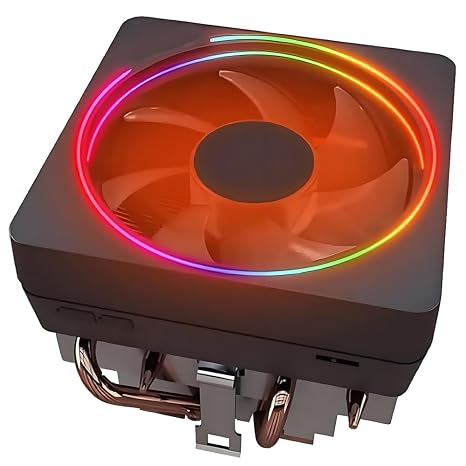
Quiet operation at 14 dB makes the AMD Wraith Prism a perfect cooler for those with a Ryzen 5 5600X who want silent performance paired with effective cooling. Suits those aiming for a reliable stock cooler replacement without extra fuss, especially fitting AM4 and AM5 sockets.
Setting up the cooler is straightforward thanks to compatibility with standard AMD motherboard brackets (not included). The pre-applied silicone thermal paste saves time and reduces mess during installation.
Its 4-pin power connector lets you control fan speed, adjusting performance and noise as needed in daily use.
The combination of aluminum heatsink, copper base, and four 6 mm copper heat pipes handles heat transfer well for mid-range Ryzen processors. Built solidly, it maintains cool temps under typical workloads. Users often praise its quiet operation, but some have noted fan speed noise during heavy loads can rise noticeably.
Most people praise the quietness of operation during everyday tasks, making it a good fit for typical use. Common issues include the fan becoming noticeably louder when running at full RPM during intensive workloads.
Those running typical Ryzen 5 5600X setups will find it reliable and quiet enough for daily use. Enthusiasts looking for ultra-quiet or heavy overclocking cooling should consider alternative options with higher cooling capacity or reduced fan noise.
Pros
- Quiet operation with low noise level at 14 dB
- Pre-applied thermal paste for easy installation
- Compatible with AM4 and AM5 sockets
- Effective heat transfer via copper heat pipes
Cons
- No mounting bracket included with the cooler
- Fan noise increases at maximum speed
| Specification | Details |
|---|---|
| Power Connector Type | 4-Pin |
| Voltage | 12 volts of direct current |
| Noise Level | 14 dB |
| Maximum Rotational Speed | 2800 RPM |
| Air Flow Capacity | 45 CFM |
| Wattage | 105 watts |
7. Noctua NH-U12A chromax.Black CPU Cooler

People building a powerful Ryzen 5 5600X setup will find the Noctua NH-U12A chromax.Black a strong contender.
Its standout feature is delivering top-tier cooling in a size that fits most standard cases without blocking RAM or PCIe slots.
Installation feels straightforward thanks to its 158mm height and compatibility with most ATX and Micro-ATX motherboards. The dual 120mm NF-A12x25 fans use PWM to adjust speeds automatically, keeping noise low during idle and boosting airflow when needed.
The all-black design fits well with many color schemes, so it won’t clash in your build.
Cooling performance matches expectations for a premium air cooler in the 120mm size, handling heat under load effectively while remaining quiet. The cooler has won over 100 awards, showing its quality metalwork and fan design.
A common complaint involves its price point, which some find high for an air cooler, but the build and quiet operation often justify it.
This cooler earns high marks for providing excellent, quiet cooling even under heavy use. Its build quality and fan technology stand out, while the most common criticism is its higher price compared to other air options. Noise levels remain impressively low when system demands are light.
People wanting efficient, quiet cooling without compromising RAM or PCIe access will be pleased. Those with very compact cases or tight budgets might want to explore other cooling solutions better suited for small spaces or lower costs.
Pros
- Excellent cooling in a compact 120mm size
- Quiet operation thanks to PWM and low-noise adaptors
- Fits most tower cases without blocking RAM or PCIe slots
- Attractive all-black design complements many builds
Cons
- Priced higher than many comparable air coolers
- Height may still be restrictive in very small cases
| Specification | Details |
|---|---|
| Cooling Method | Air |
| Noise Level | 22.6 db |
| Maximum Rotational Speed | 2000 rpm |
| Air Flow Capacity | 102.1 cfm |
| Power Connector Type | 4-Pin |
| Voltage | 12 volts |
8. Be Quiet! Dark Rock 5 CPU Cooler

Designed for serious cooling on mid to high-end CPUs like the Ryzen 5 5600X, this cooler stands out with its six copper heat pipes and a dense aluminum fin setup, all covered in a ceramic particle coating that helps move heat efficiently. Best for people who want quiet operation without giving up strong cooling power.
Installation is straightforward on both Intel and AMD sockets, thanks to wide compatibility. The 120mm PWM fan runs quietly due to its fluid-dynamic bearing and rubberized frame, which cuts down on vibration noise.
It keeps temperatures in check during gaming or heavy workloads while staying fairly quiet, making it a great match for everyday use without bothering the ears.
It cools well under load, capable of handling up to 210 watts. The build quality is solid, with a special black coating that improves heat transfer and a fan designed for efficient airflow and low noise.
Users often praise how quiet it runs. Some find the size a bit large or tricky to fit in tighter cases.
Its main praise revolves around quiet operation even under load, while the most common complaint highlights difficulties fitting it inside smaller PC cases. The fan design effectively reduces noise and maintains airflow, which users find beneficial.
People with mid-size to large cases who value silence and strong cooling will be satisfied. Those with small cases or who want something more compact might want to look for a smaller cooler instead.
Pros
- Very quiet with minimal vibration noise
- Strong cooling with six copper heat pipes
- Compatible with many Intel and AMD sockets
- Durable ceramic particle coating for heat transfer
Cons
- May be bulky for compact cases
- Can be challenging to install in some setups
| Specification | Details |
|---|---|
| Power Connector Type | 4-Pin |
| Voltage | 12 volts |
| Wattage | 210 watts |
| Noise Level | 29.8 db |
| Maximum Rotational Speed | 2100 rpm |
| Air Flow Capacity | 55 cfm |
9. Thermalright Phantom Spirit 120 EVO CPU Cooler

Thermalright Phantom Spirit 120 EVO is a CPU cooler designed for desktops, standing out with its effective air cooling and quiet operation. It suits anyone looking for solid cooling on a Ryzen 5600X without adding too much noise or complexity to their build.
Setup involves standard mounting with a 4-pin power connector, making it compatible with most desktop motherboards. The fan runs at a maximum speed of 2150 rpm, balancing airflow of 69 cfm and noise at 27 dB, which keeps daily operation relatively quiet.
Its wattage of 2.4 watts ensures it draws minimal power while staying efficient.
Cooling performance meets expectations for a mid-range air cooler, keeping temperatures manageable during typical workloads. Build quality reflects Thermalright’s 20 years in accessories, with sturdy materials and a focus on durability. The strongest point mentioned is its quiet operation; a common complaint is that the fan speed can feel a bit high when it ramps up under load.
Thermalright’s Phantom Spirit 120 EVO is appreciated for its quiet performance during everyday use, but the fan noise at peak speeds is a noticeable downside. Users value its balance of airflow and noise levels, though some find fan control could be smoother.
Anyone wanting reliable, quiet cooling for a Ryzen 5600X in a typical desktop setup will appreciate this cooler. Those prioritizing ultra-low noise or extreme overclocking might look for alternatives with bigger fans or liquid cooling solutions.
Pros
- Quiet operation at normal speeds
- Efficient air cooling for mid-range CPUs
- Compact size fits most desktop cases
- Power efficient with low wattage
Cons
- Fan speed can spike loudly under load
- May need regular cleaning to maintain airflow
| Specification | Details |
|---|---|
| Power Connector Type | 4-Pin |
| Voltage | 12V |
| Wattage | 2.4 watts |
| Noise Level | 27 dB |
| Maximum Rotational Speed | 2150 rpm |
| Air Flow Capacity | 69 cfm |
10. Noctua NH-U12A CPU Cooler

Quiet and remarkably efficient, Noctua NH-U12A suits anyone looking for strong cooling in a compact size. Its ability to deliver performance similar to larger 140mm coolers in a 120mm form factor stands out as the biggest advantage.
Installation fits well in most tower cases with a height of 158mm, making setup straightforward without covering RAM slots or PCIe on many boards. It uses two NF-A12x25 fans with PWM and Low-Noise Adaptors, helping it stay quiet when idle and ramp up cooling only when needed, perfect for daily work or gaming sessions.
Performance holds up well under load, matching some bigger coolers thanks to seven heatpipes and a larger surface area. Build quality is solid with carefully engineered fans.
Praise often highlights silent operation during low use, though some mention it can get noisy near max fan speed.
Most praise focuses on how nearly silent it runs when the system is idle, offering strong cooling without a lot of noise. Common complaints relate to fan noise increasing noticeably when the cooler ramps up under heavy loads or maximum rotational speed.
People with mid-tower cases wanting powerful, quiet cooling will appreciate this cooler’s balance of size and performance. Those with smaller cases or who prioritize absolute silence under full load might want to consider alternatives with lower maximum fan speeds.
Pros
- Compact design fits most tower cases
- Runs quietly during idle thanks to PWM fans
- Strong cooling capacity rivaling 140mm coolers
- Does not block RAM or PCIe slots easily
Cons
- Fan noise can rise at full speed
- Height near 158mm may not fit smaller cases
| Specification | Details |
|---|---|
| Power Connector Type | 4-Pin |
| Voltage | 12 volts |
| Cooling Method | Air |
| Noise Level | 22.6 db |
| Maximum Rotational Speed | 2000 rpm |
| Air Flow Capacity | 102.1 cubic meter per hour |
11. Cooler Master Elite Liquid 360 AIO Cooler

Great for Ryzen 9 builds, the Cooler Master Elite Liquid 360 AIO offers reliable liquid cooling and quiet operation with a fresh design that fits modern AMD and Intel sockets. Its biggest draw is a low-noise ceramic pump that stays maintenance-free while keeping temperatures stable.
Installation is straightforward with pre-installed brackets for AM5, AM4, LGA 1851, and LGA 1700 platforms, making the setup painless. The pre-applied CryoFuze thermal paste makes applying thermal compound easier and consistent, ensuring good heat transfer.
The fans have a dynamic PWM range from 650 to 2100 rpm, balancing airflow with quiet running during typical use.
Cooling performance stays stable under load, thanks to the water cooling method combined with the efficient dual-chamber ceramic pump. The build feels solid and durable, featuring a distinctive translucent hexagon for ARGB lighting customization.
High praise highlights quiet operation, while noise can rise somewhat when fans hit maximum speed.
Quiet operation is the most appreciated feature, making it suitable for build environments that prioritize noise reduction. The common complaint focuses on the fan noise rising noticeably at top rpm, which may not suit very quiet setups.
Gamers and content creators with Ryzen 9 CPUs looking for a straightforward, attractive liquid cooler will appreciate this model. Anyone needing broader socket compatibility or ultra-quiet performance under all conditions should explore other options.
Pros
- Quiet operation at low to medium fan speeds
- Easy installation with pre-installed brackets
- Pre-applied CryoFuze thermal paste
- Customizable translucent hexagon ARGB cap
Cons
- Fan noise increases at maximum speed
- Only compatible with specific AMD and Intel sockets
| Specification | Details |
|---|---|
| Voltage | 12 volts |
| Wattage | 12 |
| Noise Level | 30 db |
| Maximum Rotational Speed | 2100 rpm |
| Air Flow Capacity | 84.2 cubic_inches_per_minute |
| Power Connector Type | 3-Pin |
12. Be Quiet! Pure Rock Pro 3 LX CPU Cooler

Copper heat pipes and a nickel-plated base form the core of this air cooler, designed to keep even overclocked CPUs running smoothly. Suited for users with AMD or Intel sockets looking for reliable cooling without a complicated setup, its standout feature is maintaining performance under heavy workloads.
Setting it up involves attaching the Light Wings LX 120mm PWM fan with a 4-pin power connector, which balances airflow and noise well. The funnel-shaped air outlets and optimized fan blades help push air efficiently over the fins, making daily operation quiet enough for a normal workspace while keeping temperatures stable.
Cooling performance stays strong across demanding tasks, thanks to six copper heat pipes and carefully engineered airflow. The cooler is solidly built but not overly heavy, fitting a wide range of CPU sockets.
Most appreciate the quiet fan operation and consistent cooling, while some find the maximum noise level at 34.8 dB noticeable in very quiet environments.
High-performance cooling holds up well under heavy use, with the built-in fan providing solid airflow, though the noise level can be an issue for those preferring ultra-quiet systems. The reinforced copper heat pipes and nickel-plated base contribute to the effective heat dissipation.
The cooler suits anyone wanting dependable temperature control in demanding workloads, especially with recent AMD or Intel CPUs. Users sensitive to fan noise or those seeking a completely silent setup might want to consider other options.
Pros
- Efficient cooling with 6 copper heat pipes
- Quiet operation around 34.8 dB
- Compatible with latest Intel and AMD sockets
- Stylish LED-lit Light Wings LX fan
Cons
- Noise noticeable at maximum 2000 rpm speed
- Fan design prioritizes airflow over silence
| Specification | Details |
|---|---|
| Cooling Method | Air |
| Power Connector Type | 4-Pin |
| Voltage | 12 volts |
| Noise Level | 34.8 db |
| Maximum Rotational Speed | 2000 rpm |
| Compatible Devices | Intel sockets: 1851/1700/1200/1151/1150/1155 | AMD sockets: AM5/AM4 |
Best 5600x Coolers Comparison Table
| Product | Cooling Method | Noise Level | Max Rotational Speed | Air Flow Capacity |
|---|---|---|---|---|
| Thermalright Peerless Assassin | Air | 25.6 db | 1550 rpm | 66.17 cfm |
| Thermalright Assassin X120 SE | Heat pipe and fan | 25.6 db | 1550 rpm | 66.17 cfm |
| Thermalright Phantom Spirit 120 SE | Air | 25.6 db | 1500 rpm | 66.17 cfm |
| Thermalright Assassin Spirit EVO | Air | 27 db | 1850 rpm | 70.4 cfm |
| Cooler Master Hyper 212 Black | Fan | 26 db | 2500 rpm | 42 cfm |
| AMD Wraith Prism Cooler | Fan | 14 db | 2800 rpm | 45 cfm |
| Noctua NH-U12A chromax.Black | Air | 22.6 db | 2000 rpm | 102.1 cfm |
| be quiet! Dark Rock 5 | Air | 29.8 db | 2100 rpm | 55 cfm |
| Thermalright Phantom Spirit 120 EVO | Air | 27 db | 2150 rpm | 69 cfm |
| Noctua NH-U12A | Air | 22.6 db | 2000 rpm | 102.1 cfm |
| Cooler Master Elite Liquid 360 | Water | 30 db | 2100 rpm | 84.2 -in³/min |
| be quiet! Pure Rock Pro | Air | 34.8 db | 2000 rpm | – |
- Cooling MethodAir
- Noise Level25.6 db
- Max Rotational Speed1550 rpm
- Air Flow Capacity66.17 cfm
- Cooling MethodHeat pipe and fan
- Noise Level25.6 db
- Max Rotational Speed1550 rpm
- Air Flow Capacity66.17 cfm
- Cooling MethodAir
- Noise Level25.6 db
- Max Rotational Speed1500 rpm
- Air Flow Capacity66.17 cfm
- Cooling MethodAir
- Noise Level27 db
- Max Rotational Speed1850 rpm
- Air Flow Capacity70.4 cfm
- Cooling MethodFan
- Noise Level26 db
- Max Rotational Speed2500 rpm
- Air Flow Capacity42 cfm
- Cooling MethodFan
- Noise Level14 db
- Max Rotational Speed2800 rpm
- Air Flow Capacity45 cfm
- Cooling MethodAir
- Noise Level22.6 db
- Max Rotational Speed2000 rpm
- Air Flow Capacity102.1 cfm
- Cooling MethodAir
- Noise Level29.8 db
- Max Rotational Speed2100 rpm
- Air Flow Capacity55 cfm
- Cooling MethodAir
- Noise Level27 db
- Max Rotational Speed2150 rpm
- Air Flow Capacity69 cfm
- Cooling MethodAir
- Noise Level22.6 db
- Max Rotational Speed2000 rpm
- Air Flow Capacity102.1 cfm
- Cooling MethodWater
- Noise Level30 db
- Max Rotational Speed2100 rpm
- Air Flow Capacity84.2 -in³/min
- Cooling MethodAir
- Noise Level34.8 db
- Max Rotational Speed2000 rpm
- Air Flow Capacity–
How to Choose the Right 5600x Cooler
Choosing the right cooler for the 5600x means focusing on compatibility, cooling performance, and noise levels to keep your processor stable and efficient. Getting these factors right avoids overheating issues and reduces the risk of hardware damage, saving both money and time in the long run.
Compatibility and Fit
That tight squeeze inside many PC cases often makes fitting a cooler a headache. A cooler designed for the AM4 socket fits snugly around the components on motherboards compatible with the 5600X. Failure to check this first can lead to wasted time or a returned product.
Clearance for RAM clearance is another critical piece; tall RAM modules can block larger heatsinks or fans. The last thing anyone wants is to remove one piece only to discover the cooler won’t fit properly.
The physical size of the cooler must fit inside the PC case.
The ideal choice offers a size and design that leaves room for RAM slots and any VRM heatsinks on the motherboard. A maximum height of about 160mm suits most ATX cases, but smaller cases might require low-profile options under 130mm. Double-check the case specifications to avoid installation problems and save future hassle.
Cooling Performance
Processors like the 5600X can generate heat close to or beyond 65 watts under load. A cooler rated for at least this TDP can keep temperatures under control.
Large heatsinks with multiple copper heat pipes improve thermal transfer, reducing the chance of overheating during gaming or heavy workloads. Low airflow from the fan or a smaller heatsink can raise temperatures, causing thermal throttling and slower performance.
A solid cooling solution usually has at least 3 to 4 heat pipes and a fan capable of moving air at around 50 CFM or more. Heatsinks made of aluminum fins paired with copper heat pipes are typical. Keep in mind that bigger isn’t always better if your case size is limited, so balance heatsink size with your system’s airflow and available mounting space.
Noise Levels
Fan noise presses heavily on daily comfort, especially in quiet rooms or offices. Many coolers run fans aggressively when the CPU temperature rises, producing noticeable noise that can get distracting. Coolers with adjustable fan curves allow the user to set the fan speed based on temperature thresholds, keeping idle noise low and ramping up only when needed.
Some include silent modes that keep noise below 30 dB during light usage.
Look for manufacturers providing decibel ratings for both idle and load conditions. A cooler managing to operate around 25 to 30 dB during idle and not exceeding 35 to 40 dB under load tends to balance performance and quietness well. This helps maintain a quieter workspace without sacrificing the temperature control needed for demanding applications.
Build Quality and Materials
The durability of a cooler depends largely on its materials and build quality. Copper heat pipes provide better heat conduction than aluminum alternatives, while aluminum fins keep weight and cost lower. That combination is widespread for cooling parts.
Fans made with quality bearings, like fluid dynamic or rifle bearings, tend to last longer and spin smoothly without adding noise.
Structural design also impacts how well the cooler withstands long-term use. Secure mounting brackets and solid soldering between heat pipes and fins help avoid performance drops over time.
Cheaper models may use plastic components prone to cracking or loosening after repeated removals. Spending slightly more for reliable build materials pays off in consistent cooling month after month.
Ease of Installation and Maintenance
Installing a cooler can be tedious, especially if the mounting system is complicated or requires removing the motherboard. Models with user-friendly mounting mechanisms, such as screw-in backplates designed for AM4, make the process smoother and reduce the risk of damaging components.
Some coolers come with brackets or clips that line up easily and firmly hold the cooler in place.
Maintenance requires access to clean dust from fans and heatsinks. Designs with removable fan hubs or open fin structures simplify this chore. Tool-free or minimal-tool designs speed up installation and allow quick removal for cleaning or upgrading without hassle.
Checking these features upfront saves both time and frustration down the road.
Optimizing Airflow for Enhanced 5600X Cooler Performance
Good airflow inside the case is crucial for getting the most out of the 5600X cooler. Position intake fans at the front or bottom to bring in fresh air and exhaust fans at the rear or top to push hot air out.
This setup creates a steady flow that helps cool the CPU effectively.
The cooler itself should face the direction of airflow. For example, if your case fans blow from front to back, align the cooler so its heat pipes guide air that way. This reduces hot air from circulating around the components.
Key tips for airflow optimization:
- Keep cables tidy to avoid blocking air paths.
- Use dust filters on intakes and clean them regularly.
- Ensure fans are correctly oriented for intake or exhaust.
- Consider adding an extra case fan if temperatures are high.
Such adjustments can drop CPU temperatures noticeably without changing the cooler itself.
Common Installation Mistakes to Avoid with 5600X Coolers
Installing a 5600X cooler often involves errors that limit cooling efficiency. Many users apply too much or too little thermal paste. The right amount is about a pea-sized blob in the center of the CPU; spreading it thinly by the pressure of the cooler is sufficient.
Excess paste can insulate rather than conduct heat.
Another common mistake is improper mounting pressure. The cooler must be firmly secured but not overtightened. Uneven pressure can cause gaps between the cooler and CPU surface, leading to hot spots.
Orientation also matters for some coolers with directional airflow or heat pipe layouts. Make sure to check the cooler’s manual to install it in the recommended direction relative to your case fans.
Double-check that all screws or mounting clips are fully engaged and evenly tightened. Loose mounts can cause the cooler to wobble or lose contact over time, reducing effectiveness.
Comparing Air Coolers and Liquid Cooling Solutions for the 5600X
The choice between air coolers and liquid cooling for the 5600X depends on goals and setup. Air coolers tend to be more straightforward to install and maintain. They usually come with simpler mounting systems and do not carry the risk of pump failure or leaks.
Large air coolers with multiple heat pipes can still keep the 5600X temperature in check under load for most users.
All-in-one (AIO) liquid coolers often provide lower temperatures, especially at higher overclocks. The radiator can dissipate heat more efficiently by using fans and radiator placement flexibility. However, AIOs need space for the radiator and hoses, which might be limited in smaller cases.
Air coolers might be louder at full speed compared to some quality AIO pumps and fans. Air cooling is suitable for standard builds, while liquid cooling fits users prioritizing maximum thermal headroom and quieter operation.
People Also Asked
What Size Cooler Fits Best with a 5600x CPU?
A cooler with a 120mm or 140mm fan typically fits well on a 5600x processor. It is important to check your PC case dimensions and RAM height clearance to avoid any physical interference.
How Do I Properly Install a Cooler on the 5600x?
Secure the cooler’s backplate properly and apply a pea-sized amount of thermal paste on the CPU before mounting. Tighten screws evenly in a diagonal pattern to ensure uniform pressure.
Can I Use a Liquid Cooler Safely with a 5600x?
Liquid coolers can be used safely with a 5600x if installed correctly and maintained. Regularly check for any leaks and make sure the radiator fans are properly oriented for airflow.
How Long Does a Typical 5600x Cooler Last Before Replacement?
A typical 5600x cooler can last several years, about 3 to 5 years, before needing replacement. Dust buildup on fans and degraded thermal paste affect cooling efficiency and might prompt earlier maintenance.
What Are Common Problems with Coolers for the 5600x?
Common problems include insufficient contact of the cooler base with the CPU, causing high temperatures, and fan noise due to dust or aging bearings. Ensuring proper mounting and regular cleaning helps avoid these issues.
Conclusion
Choosing a cooler for the 5600x is mostly about how well it fits your case, how quiet it runs, and whether it can keep the CPU cool under your typical workload. Size matters a lot since not all coolers fit every case.
Noise level is important if you prefer a quiet setup, and cooling performance ensures your processor can run stable without overheating.
Consider your budget and how often you plan to push your CPU before deciding. A bigger cooler might not be necessary if you only do light tasks.
Check the comparison table and the picks listed earlier to see which options match your space and needs best.

I’m Grant Mitchell, a firearms and hunting writer with years of experience at the range and in the field. I write about rifles, shotguns, handguns, optics, safe storage, cleaning, and responsible ownership, along with practical hunting tips. My goal is to share accurate, safety-first information that helps you choose the right firearm, maintain it properly, and become a more confident shooter.