Top 12 Best Budget Phone Cooler That Will Blow Your Mind
Phones often overheat during gaming sessions or prolonged use, causing slowdowns and discomfort. Many people look for the best budget phone cooler to avoid these problems, but cheap models often fail to deliver consistent cooling or fit poorly. A unit that doesn’t sit flush against the phone’s back can waste battery and generate little real heat reduction, turning the effort into noise and annoyance.
The best budget phone coolers strike a balance between size and power. Most use small fans powered by USB or rechargeable batteries, with fan speeds around 3000 to 5000 rpm to keep temperatures down. The material contacting the phone should be heat conductive and soft enough to avoid scratches.
A good fit keeps the cooler stable during use, and simple designs help with easy cleaning since dust buildup can reduce airflow considerably over time.
Need a Quick Check?
| Image | Product | Price |
|---|---|---|
Our Top Picks 1  | Generic Magnetic Cooler | Check Price |
Our Top Picks 2  | Universal Phone Cooler | Check Price |
Our Top Picks 3  | Magnetic Cooler with Battery | Check Price |
Our Selected Top 12 Budget Phone Cooler Picks for Every Need
This list features affordable phone coolers designed to prevent overheating and improve device performance. Each review explains how well the cooler works, who it is best suited for, and highlights its main advantages and potential drawbacks to help readers make an informed choice.
1. Magnetic Phone Cooler
Phone heating during gaming or heavy use can be annoying, especially when it slows down your device. Designed for people who need a straightforward way to keep their phone cool, this Magnetic Phone Cooler stands out for its rapid and effective cooling thanks to semiconductor technology and vertical airflow.
It suits anyone wanting to prevent overheating without adding bulk or complicated setup.
Attaching the cooler is easy with its magnetic clip and included magnetic sheet, fitting securely on your phone. Power options give flexibility: plug it in for constant cooling or use the removable 3000mAh battery for cordless use up to 3 hours.
Switching between Powerful, Quiet, or AI temperature control modes lets you match cooling to your activity, whether gaming or just browsing.
Cooling performance is impressive, dropping phone temperatures by at least 57.6°F (32°C), sometimes reaching as low as 10.4°F (-12°C) when plugged in. Solidly built for everyday wear, the single fan and semiconductor chip handle heat well without excessive noise.
Common praise highlights the quick temperature drop, while some users find the battery life limited for extended use away from power sources.
Rapid cooling ability is the greatest advantage, achieving significant temperature drops quickly. Common feedback notes battery life as a limitation for longer cordless sessions without access to wired power.
Great for people needing quick and easy phone cooling during gaming or heavy use near a power source. Those requiring longer cordless operation might want to look for coolers with bigger batteries or alternative solutions.
Pros
- Efficient cooling with semiconductor chip
- Simple magnetic attachment for quick setup
- Three modes including AI smart temperature control
- Detachable battery allows cordless use
Cons
- Battery lasts up to 3 hours only
- Single fan may not suit very large phones
| Specification | Details |
|---|---|
| Built-In Media | 3000mAh Battery, Clips, Magnetic Sheet, Phone Cooler, USB-C Cable |
| Model Number | TH21-ZZ01 |
| Number of Fans | 1 |
| Power Options | Wired or 3-hour cordless with battery |
| Cooling Capability | Temperature drop of at least 57.6°F (32°C) |
2. Magnetic Phone Cooler
Dropping your phone’s temperature by over 57.6°F (32°C) in just 30 seconds is impressive and suits anyone looking to keep their device cool during intense gaming or streaming sessions. Its stepless cooling adjustment up to L100 allows for fine control that matches your phone’s needs precisely.
Setup is straightforward thanks to the magnetic design that sticks firmly to your phone. The lightweight 65g build makes it easy to carry and doesn’t add bulk while gaming or watching videos.
You can switch between four cooling modes, including an AI mode that automatically adjusts how much cooling your phone needs.
The cooler performs well at rapidly cooling phones with a semiconductor chip combined with vertical airflow. It’s compact and well-made but a few mention the magnetic attachment may not fit every phone perfectly.
Most appreciate the quick temperature drop, while some find it less effective on phones with cases.
Strongest praise highlights how quickly the cooler reduces phone temperature, making intense gaming or streaming more comfortable. The most frequent complaint points to the magnetic attachment not always fitting well on certain phones or when cases are used.
Anyone needing fast, adjustable cooling for case-free phones will find this cooler useful. Those who frequently use thick cases or have phones that don’t work with magnets might want to consider a different solution.
Pros
- Rapid cooling within 30 seconds
- Stepless adjustment up to L100 for precise control
- Lightweight at just 65g
- Multiple cooling modes including AI
Cons
- Magnetic mount may not fit all phone models
- Less effective with thick phone cases
| Specification | Details |
|---|---|
| Cooling Method | Air |
| Cooling Modes | 4 (L1, L2, L3, AI) |
| Weight | 65g (2.29 oz) |
| Temperature Drop | Over 57.6°F (32°C) |
| Minimum Temperature | 59°F (15°C) |
3. Magnetic Phone Cooler with Battery
People who spend long hours gaming or live streaming on their phones will appreciate this magnetic cooler with its built-in battery. Its standout feature is the detachable 2500mAh external battery that allows you to keep your phone cool without being tethered to a power source.
Setup is pretty straightforward thanks to the magnetic attachment. Once clipped on, it’s easy to turn on and off using the physical button, which helps avoid accidentally running it when not needed. The battery lasts about 2 hours on a full charge, so it covers longer sessions like video recording or online meetings without interruptions.
It delivers solid air cooling at a quiet 25 dB and spins up to 9000 rpm, noticeably lowering phone temperature during heavy use. The build feels reliable, though a few mention it could be bulky for some. The consistent praise is how well the battery supports uninterrupted use, while the common complaint revolves around size and fit on larger phones.
The standout feature of the magnetic cooler is its external battery which enables continuous cooling for up to two hours, making long gaming or streaming sessions smoother without overheating issues. Most users enjoy the quiet fan and easy controls but note that the unit can be a bit cumbersome on bigger smartphones.
Ideal for people who want a portable cooler without the hassle of cords and who use their phone heavily for extended periods. Those with larger smartphones or needing longer cooling intervals might want to look for alternatives with bigger batteries or slimmer designs.
Pros
- Detachable 2500mAh battery for cordless use
- Quiet operation at 25 decibels
- Easy on/off physical button
- Strong magnetic attachment
Cons
- Can feel bulky on larger phones
- Limited to about 2 hours of use per charge
| Specification | Details |
|---|---|
| Power Connector Type | 2-Pin |
| Voltage | 5 volts_of_direct_current |
| Cooling Method | Air |
| Noise Level | 25 db |
| Maximum Rotational Speed | 9000 rpm |
4. Magnetic Phone Cooler Gaming Fan

Magnetic Phone Cooler Gaming Fan stands out by combining strong semiconductor cooling with compatibility for both iPhone MagSafe and other devices using magnetic stickers and clips. It’s aimed at gamers and heavy phone users looking to keep their devices cool without bulky clamps or noisy fans.
Setup takes just a moment, thanks to the magnetic attachment that works smoothly with iPhone MagSafe or any phone when using the included magnetic sticker and clip. Daily use is easy as it offers two cooling modes: High-Speed for intense gaming sessions and Smart mode that balances quiet operation with effective cooling.
The USB-C power connection is convenient and fits most setups.
The powerful semiconductor chip and 7-blade hydraulic bearing fan provide rapid cooling that noticeably lowers phone temperature during heavy use. The fan’s noise stays low, around 20 db, which means it won’t interrupt calls or quiet gaming moments. The build feels solid, and it avoids clamp marks since it attaches magnetically.
Some mention that the magnetic clip can feel a bit loose on larger phones without MagSafe, which may affect stability for very active users.
Rapid and noticeable cooling happens thanks to the advanced semiconductor chip and fan, while the quiet operation means it won’t disturb calls or quiet moments. The magnetic clip option works well but can feel less secure on bigger phones compared to the MagSafe connection.
Ideal for iPhone gamers who use MagSafe and want quiet, effective cooling without damage. Android users get a good experience too, though those with larger phones or demanding stability might want to consider other coolers with more secure clamps.
Pros
- Works perfectly with iPhone MagSafe technology
- Quiet hydraulic bearing fan for low noise operation
- Two cooling modes for balance of power and silence
- Non-damaging magnetic attachment with clip option
Cons
- Magnetic clip may feel loose on larger non-MagSafe phones
- Relies on USB-C power source, no wireless option
| Specification | Details |
|---|---|
| Power Connector Type | USB-C |
| Voltage | 5 volts |
| Wattage | 15 watts |
| Cooling Method | Fan, Semiconductor |
| Compatible Devices | Android, Tablet, iPhone |
| Noise Level | 20 db |
5. Black Shark Magnetic Phone Cooler 6 Pro
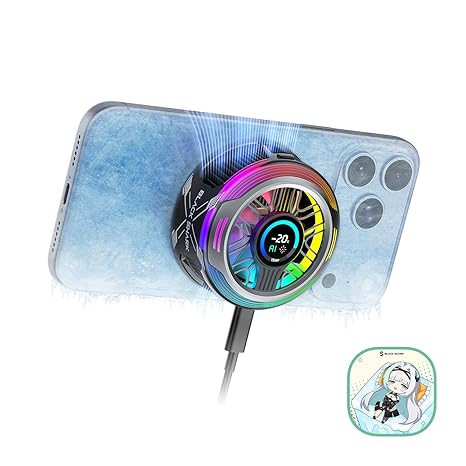
Black Shark Magnetic Phone Cooler 6 Pro is designed for gamers and heavy phone users who need to stop overheating during long sessions. Its biggest strength lies in its powerful 35W cooling capacity, which promises significant temperature drops to keep devices running smoothly without frame drops or black screens.
Setting it up involves attaching the magnetic cooler to the back of your device and plugging it into a 40W or higher wall charger using the USB-C connector. Day-to-day use is straightforward thanks to the full-color 0.71-inch HD smart display, showing real-time temperature, fan speed, and power output.
Custom wallpapers can be uploaded to personalize the look on the display.
It cools effectively, dropping temperatures by as much as 122℉ and even going as low as -13℉ with its fan-based method. The build feels sturdy and compact, fitting securely via magnets to various devices including Android phones, iPhones, Switch, iPads, and laptops.
The display is a highlight for tech lovers, but some users mention that the wall charger is not included, which is necessary to reach its full cooling potential.
The cooler delivers impressive temperature drops and real-time info on its display, which users appreciate most. Common issues include the need for a separate wall charger to unlock full power and the added size due to the magnetic cooler and cable.
People who spend long hours gaming or streaming on their phones will like how much cooler their device stays, while those wanting a slim, portable option might prefer a less bulky alternative without external power requirements.
Pros
- Strong 35W power for quick cooling
- Magnetic attachment works well on various devices
- Full-color display shows detailed real-time data
- Supports custom wallpaper uploads
Cons
- Wall charger not included, must use 40W+ charger
- Cord and cooler add extra bulk to the phone
| Specification | Details |
|---|---|
| Wattage | 35 watts |
| Power Connector Type | USB-C |
| Voltage | 220 volts |
| Cooling Method | Fan-based |
| Compatible Devices | Android phones, iPhones, Switch, iPads, laptops |
6. CHONCHOW Magnetic Phone Cooler PH-X76

Cooling your phone quickly during intense gaming or live streaming makes a big difference, and this cooler handles it without fuss. It’s suited for anyone dealing with overheating phones who wants a fast and effective way to keep things running smoothly.
The strong point is its actual refrigeration method, unlike just a fan blowing air around.
Setting it up is pretty straightforward with two options: snap it on magnetically or clamp it to the back of your phone. You’ll need to plug it in with a USB-C cable to a 15W or higher power adapter, so there’s no battery involved.
The magnetic option is very convenient for quick on and off, while the clip feels more secure for longer use.
The cooling feels genuinely effective and noticeably drops your phone’s temperature fast. Build quality is solid enough to hold the cooler steadily without causing scratches, thanks to the design choices. Most praise revolves around how much it cools down the phone quickly, though some mention the need to keep it plugged in as a minor hassle.
The cooler’s ability to quickly reduce phone heat during heavy use is widely appreciated, providing real temperature relief unlike standard fans. A common drawback is that it must remain plugged in at all times, which limits mobility and convenience for those on the go.
Anyone who mostly uses their phone near a power source will find this cooler very effective and reliable. Those who want a cordless or more portable solution might need to consider other options better suited to mobile lifestyles.
Pros
- Effective rapid cooling with real refrigeration
- Two installation methods for flexible use
- USB-C powered for stable energy supply
- Fits most phone sizes easily
Cons
- Requires constant connection to power adapter
- Not a wireless or portable cooler
| Specification | Details |
|---|---|
| Power Connector Type | USB |
| Cooling Method | forced air |
| Compatible Devices | Radiator |
| Power Requirement | Requires 15W+ Adapter |
| Installation Options | Magnetic attachment and back clip |
7. Black Shark FunCooler 5 Magnetic Phone Cooler

A magnetic phone cooler designed for budget-conscious users looking to keep their devices cool during heavy use. It suits gamers or anyone who frequently experiences overheating, with its standout feature being a powerful 20W cooling system that can drop phone temperatures significantly.
Setup involves just attaching the cooler magnetically to the back of your phone and plugging in the USB Type-C power cable. Switching between silent mode and overclocking mode is done with a single button, making adjustments quick during use.
The 12N magnetic force ensures the phone stays in place without slipping off, and the cooler works on smartphones, tablets, or laptops.
Performance impresses with its ability to reduce heat by about 95°F, which can prevent throttling during intense gaming or long calls. The build is solid and compact, with an air cooling method that operates quietly around 30 dB. Common praise highlights its cooling power, while the biggest complaint revolves around needing a 20W power source and the data cable not being included.
The strongest praise is for its powerful cooling capability, lowering device temperature by about 95°F effectively during heavy use. The most common complaint is the need for a separate data cable and a power supply exceeding 20W, which adds an extra step to setup.
People looking for a budget cooler with strong magnetic attachment and easy control will be happy with this. Those without access to a 20W power source or expecting a complete plug-and-play experience should look elsewhere.
Pros
- Strong 12N magnetic hold keeps phone firmly in place
- Switchable modes for quiet or fast cooling
- Compatible with multiple device types
- Easy one-button control
Cons
- Requires external power source over 20W for best use
- Data cable not included in the package
| Specification | Details |
|---|---|
| Power Connector Type | USB Type-C |
| Voltage | 5 volts_of_direct_current |
| Wattage | 20 watts |
| Cooling Method | Air |
| Noise Level | 30 db |
| Maximum Rotational Speed | 6500 rpm |
8. Magnetic Phone Cooler

Construction focuses on a large cooling plate powered by semiconductor active cooling, designed to suit gamers or heavy phone users looking to keep devices cool without lag. Its standout feature is visible frost at 30°C room temperature, showing real cooling power rare in budget models.
Setup takes just plugging in the Type-C cable and attaching the magnetic cooler to your phone, tablet, or even laptop. Three cooling speeds let you switch from quiet to full blast with ease, while the RGB lighting adds some style or can be turned off for distraction-free use.
The contact area feels substantial and keeps your hands comfortable during extended sessions.
Heat dissipation works well, preventing thermal throttling and frame drops during gaming or heavy use. Build quality feels solid with a stable magnetic attachment and a dependable cooling plate.
Praise often mentions how effective the semiconductor cooling is, while the main complaint is the 40 dB noise level at higher speeds which can be noticeable in quiet settings.
Cools devices well enough to see actual frost during use at room temperature, preventing performance drops during gaming. Noise is the biggest drawback, especially on higher fan speeds where it becomes fairly loud for quiet environments.
Gamer or heavy phone users will appreciate the real cooling benefits and adjustable modes, especially on a budget. Those seeking near silence might want to consider lower noise options or devices without active cooling.
Pros
- Effective cooling with semiconductor technology
- Large contact plate for better heat dissipation
- Adjustable speeds with quiet to rapid cooling modes
- RGB light with easy toggle or off option
Cons
- Noise level can reach 40 dB at full speed
- Only one Type-C power connector option
| Specification | Details |
|---|---|
| Power Connector Type | type-c cable |
| Voltage | 5 volts_of_direct_current |
| Wattage | 10 watts |
| Cooling Method | Air, TEC Semiconductor Active Cooling |
| Noise Level | 40 db |
| Maximum Rotational Speed | 5700 rpm |
9. Magnetic Phone Cooler with Fast Charging

Instant cooling power stands out as the main draw, making it ideal for anyone with an iPhone who wants to avoid overheating during gaming or heavy use. Its magnetic design attaches securely, keeping your device cool without adding any extra bulk.
Setting up involves simply connecting the USB Type-C plug to your power source and sticking the cooler to the back of your iPhone. It has two modes to choose from: a powerful cooling mode while charging and a quieter, less intense mode if you just want to keep things cool without noise. The fast charging feature also means it won’t slow down your phone’s battery charging while in use.
The semiconductor chip delivers targeted, strong cooling that noticeably lowers device temperature during demanding tasks. Built with a magnetic mount, it aligns well with iPhone models from 12 through 18 series.
Positive notes highlight how much smoother gameplay gets without lag or dim screens. On the downside, some users mention the noise level can be noticeable in the more powerful mode.
Cooling performance gets high marks for preventing device overheating during gaming and video recording. Noise from the high-power mode remains the most frequently noted irritation. Batteries keep charging at full speed while the unit runs, so it doesn’t compromise usage convenience.
Anyone with a compatible iPhone looking to keep their phone cool under prolonged load will appreciate this device. People needing a silent cooler or users of non-iPhone models should consider other options better suited to those needs.
Pros
- Instant and strong cooling effect
- Magnetic mount fits iPhones securely
- Dual-mode for strong or quiet cooling
- Supports 15W fast charging
Cons
- Cooling mode can be loud
- Only compatible with iPhone 12 and newer models
| Specification | Details |
|---|---|
| Special Features | 15W Fast Charging & Dual Modes, Magnetic Phone Cooler |
| Compatible Phone Models | iPhone 18/17/16/15/14/13/12 series |
| Connector Type | USB Type C |
| Input Voltage | 120 volts |
| Power Plug | Type C |
10. Black Shark Magnetic Phone Cooler 5 Pro

Need a phone cooler that really drops temperatures without holding you back? With up to 35W power, the Black Shark Magnetic Phone Cooler 5 Pro suits anyone who needs quick, effective cooling for gaming or heavy phone use. Its standout feature is how fast and deeply it cools, going well below zero.
Setup is straightforward with a magnetic attachment that holds steady during use. It runs off USB-C powering up to 35 watts, so having a 40W+ charger ready is smart. Daily use reveals how the 18 customizable RGB LEDs add a cool touch without interfering with function.
The noise level stays manageable at 39 db, making it fine for extended gaming or streaming sessions.
Performance impresses with a temperature drop of 113℉ (45°C) and cooling down to as low as -4℉ (-20°C), helping prevent overheating and performance drops during intense phone use. The build feels solid, designed for laptops and smartphones alike. Praise focuses on how fast and deep it cools, while some note the need for a stronger charger since it’s not included.
The cooler consistently lowers device temperature quickly and significantly, preventing lag and overheating during extended use. Users appreciate the strong cooling and fun lighting but often mention that the charger needs to be purchased separately, which adds to the setup cost.
Those who use their phones for gaming or heavy apps indoors will benefit greatly from this cooler’s power and design. Casual users or those wanting a simpler, charger-included option might prefer a lighter, less powerful model.
Pros
- Powerful 35W cooling capacity
- Fast cooling within 25 seconds
- Customizable RGB lighting effects
- Quiet operation at 39 decibels
Cons
- Requires separate 40W+ charger
- May be bulkier than simpler coolers
| Specification | Details |
|---|---|
| Power Connector Type | USB-C |
| Voltage | 12 volts |
| Wattage | 35 watts |
| Cooling Method | Air |
| Noise Level | 39 db |
| Maximum Rotational Speed | 7200 rpm |
11. NEVEIKA Plug-In Phone Cooler

Phones get hot fast during gaming or live streaming, which can slow things down or cause crashes. The NEVEIKA Plug-in Phone Cooler suits anyone who needs quick and effective cooling without breaking the bank. Its standout feature is the dual-engine system that cools a phone within seconds, much like a mini refrigerator.
Setup is simple, just clip it onto your phone and plug it into a power source. The telescopic clip adjusts easily to fit phones between 6 and 7.5 centimeters wide, though removing the phone case is best for optimal cooling.
Daily use is straightforward, and you can leave it running during heavy phone activity to avoid overheating interruptions.
The cooler does exactly what it promises, dropping the phone’s temperature quickly thanks to two fans working together. Build quality feels solid, with a sturdy clip that stays in place during use. Most people mention how fast it cools as its biggest perk, while the main drawback is the need to remove the phone case for the best experience.
The standout feature is how quickly it cools phones down, almost like a mini refrigerator. The most frequent downside people mention is that it doesn’t work as well with a phone case on, so you usually need to take it off before using the cooler.
Anyone who plays games or streams for long stretches and doesn’t mind removing their phone case will appreciate how fast it cools. Those who need a cooler that works with a case or is wireless should consider other options.
Pros
- Quick cooling in 3 to 5 seconds
- Easy-to-adjust telescopic clip
- Fits a wide range of phone sizes
- Works well during intense gaming or streaming
Cons
- Best used without a phone case
- Needs constant power connection to operate
| Specification | Details |
|---|---|
| Compatible Phone Width | 6 to 7.5 centimeters |
| Cooling System | Dual engine (like a refrigerator) |
| Number of Fans | 2 |
| Unit Count | 1 |
| Model Number | AH-102 |
12. NEEWER BASICS Magnetic Phone Cooler

Silent operation at just 45 db and smart temperature control make the NEEWER BASICS Magnetic Phone Cooler a great pick for anyone wanting to keep their phone cool without a lot of distractions. It’s particularly useful for gaming sessions where overheating can slow down your device. The simple design fits most phones securely with a clip-on mount.
Setting it up takes only a few seconds thanks to its clip attachment style. It runs on USB power, so you just need to connect it to a power source nearby.
Switching between the two speeds is easy with a push button, allowing you to choose between stronger airflow or quieter operation depending on what you’re doing. Just make sure the airflow is not blocked to keep it working efficiently.
Cooling performance is solid for its size, especially in the high-speed mode during heavy tasks like gaming. The build feels basic but sturdy given its budget price, with a brushless motor that keeps noise to a minimum.
Most praise the quiet fan but some mention it doesn’t support magnetic charging and needs to stay plugged in while working.
NEEWER BASICS Magnetic Phone Cooler efficiently prevents phones from overheating during wireless charging using a silent fan and semiconductor technology. It has two cooling modes, high speed for intense use like gaming and intelligent mode for quieter operation. The main drawback is that it does not support magnetic charging and requires a separate USB power source, which some find less.
People who need basic, cost-effective cooling while playing games or using power-intensive apps will find this cooler useful. Those looking for a device that allows magnetic charging or a fully wireless operation should consider other options that integrate those features for greater convenience.
Pros
- Quiet operation at 45 db
- Smart temperature control adapts automatically
- Simple clip-on mounting fits most phones
- Low power consumption at 2.5 watts
Cons
- Does not support magnetic charging
- Must be plugged in during use
| Specification | Details |
|---|---|
| Noise Level | 45 db |
| Number of Speeds | 2 |
| Power Source | USB Powered |
| Mounting Type | Clip-on/Clamp Mount |
| Wattage | 2.5 watts |
| Control Method | Push Button |
Best Budget Phone Coolers Comparison Table
| Product | Power Connector Type | Wattage | Cooling Method | Noise Level |
|---|---|---|---|---|
| Generic Magnetic Cooler | – | – | Air | – |
| Universal Phone Cooler | – | – | Air | – |
| Magnetic Cooler with Battery | 2-Pin | – | Air | 25 db |
| Gaming Fan Magnetic Cooler | USB-C | 15 watts | Fan, Semiconductor | 20 db |
| Black Shark 6 Pro Cooler | USB-C | 35 watts | Fan-based | – |
| CHONCHOW PH-X76 Cooler | USB | – | Forced air | – |
| Black Shark FunCooler 5 | USB Type-C | 20 watts | Air | 30 db |
| Compact Magnetic Cooler | Type-C cable | 10 watts | Air, TEC Semiconductor | 40 db |
| Fast Charge Magnetic Cooler | USB Type C | 15 watts | – | – |
| Black Shark 5 Pro Cooler | USB-C | 35 watts | Air | 39 db |
| NEVEIKA Plug-in Cooler | – | – | – | – |
| NEEWER BASICS Cooler | USB Powered | 2.5 watts | – | 45 db |
- Power Connector Type–
- Wattage–
- Cooling MethodAir
- Noise Level–
- Power Connector Type–
- Wattage–
- Cooling MethodAir
- Noise Level–
- Power Connector Type2-Pin
- Wattage–
- Cooling MethodAir
- Noise Level25 db
- Power Connector TypeUSB-C
- Wattage15 watts
- Cooling MethodFan, Semiconductor
- Noise Level20 db
- Power Connector TypeUSB-C
- Wattage35 watts
- Cooling MethodFan-based
- Noise Level–
- Power Connector TypeUSB
- Wattage–
- Cooling MethodForced air
- Noise Level–
- Power Connector TypeUSB Type-C
- Wattage20 watts
- Cooling MethodAir
- Noise Level30 db
- Power Connector TypeType-C cable
- Wattage10 watts
- Cooling MethodAir, TEC Semiconductor
- Noise Level40 db
- Power Connector TypeUSB Type C
- Wattage15 watts
- Cooling Method–
- Noise Level–
- Power Connector TypeUSB-C
- Wattage35 watts
- Cooling MethodAir
- Noise Level39 db
- Power Connector Type–
- Wattage–
- Cooling Method–
- Noise Level–
- Power Connector TypeUSB Powered
- Wattage2.5 watts
- Cooling Method–
- Noise Level45 db
How to Choose the Right Budget Phone Cooler
Consider factors like cooling efficiency, noise level, size, and compatibility with your phone to ensure effective performance without unnecessary bulk or distractions. Choosing wisely prevents overheating issues and avoids spending on replacements, ultimately saving both money and hassle.
Cooling Method and Efficiency
Using a cooler that relies on a basic fan often means the phone takes longer to cool down and the temperature reduction isn’t consistent during heavy gaming or streaming. Thermoelectric cooling units, which use the Peltier effect, usually bring down temperatures faster and keep the device cool for longer periods.
Fans alone sometimes struggle to maintain temperature under continuous load, causing the phone to heat up again quickly.
Experience shows that a good model keeps the phone several degrees cooler consistently, especially after 10-20 minutes of use. Look for coolers with at least a 5V fan rated for steady airflow, or a thermoelectric plate that can lower the surface temperature by 10°C or more.
Efficiency matters most if you use power-intensive apps or game for long sessions without breaks.
Size and Compatibility
Phones vary widely in size and thickness, so a cooler that fits only select models becomes frustrating fast. Cooler designs that clip or clamp to the phone need to secure firmly without damaging edges or slipping off during movement.
Many coolers now cover phones ranging from around 5 to 7 inches in screen diagonal with adjustable grips.
Portability impacts daily use heavily. Bulkier coolers weigh down the phone or don’t fit easily in pockets or bags. The best ones stay light and slim while providing tight attachment, often using silicone pads or adjustable metal clips for stability.
Prioritize lightweight materials under 150 grams and clips that fit phones up to 10mm thick for broad compatibility.
Power Source and Battery Life
Most models draw power via USB from the phone itself, power banks, or wall sockets, but some come with built-in rechargeable batteries. Battery life is critical for coolers that are cordless or used outdoors. In practice, devices with internal batteries typically last 1-2 hours before needing a recharge, which often takes 2-3 hours depending on battery capacity.
Choosing a cooler powered through USB allows continuous operation without interruptions, as long as an external power source is available. Battery-powered units are convenient for mobility but check the capacity rating to avoid losing cooling mid-session.
Being able to recharge quickly and use standard charging cables adds to usability.
Noise Levels
Noise from the cooler’s fan can become distracting, especially in quiet places like offices or libraries. Fans producing over 30 decibels stand out and may interrupt concentration or calls.
Some cheap models have louder, poorly balanced fans that create noticeable hum or vibration noise.
Models with quieter brushless fans usually operate below 25 decibels. Some allow the user to adjust fan speed, lowering noise during lighter use. Choosing a cooler which balances efficient airflow with low noise levels makes a difference, particularly for daily use where silence is valued.
Build Quality and Materials
Durability can vary widely between coolers made with cheap plastic and those using metal elements or reinforced casings. Plastics prone to cracking or warping under heat reduce lifespan.
Surfaces that touch the phone should also dissipate heat well; metals like aluminum are common for this reason.
Worth checking are coolers with sturdy frame construction and anti-slip pads that resist dust and wear over time. A solid build prevents the unit from loosening or failing even after months of daily use.
Some models offer sealed components which protect against dirt and improve reliability.
Effective Usage Tips to Maximize Your Budget Phone Cooler’s Performance
Positioning the phone cooler correctly can greatly improve its effectiveness. Place it on a flat surface and ensure the cooler’s fan or cooling plate makes full contact with the back of the phone.
Avoid placing the cooler over phone cases that are thick or made from insulating materials, as this reduces heat transfer.
Use the cooler during activities that generate the most heat such as gaming or video streaming. Running the cooler only during heavy use saves battery on both the phone and the cooler itself, especially if it draws power from the phone’s charging port.
Additional tips:
- Keep the phone cooler’s airflow unobstructed for optimal heat dissipation.
- Avoid using the cooler in hot environments, which can reduce its efficiency.
- Switch off the cooler when the phone is not in use to prevent unnecessary wear.
Proper Maintenance and Care for Longevity of Your Phone Cooler
Regular cleaning of the cooler’s fan or surface prevents dust buildup that impairs performance. Use a soft brush or compressed air to remove debris from the fan blades and vents. Wiping the cooling plate with a dry cloth keeps it free of oils and dirt that can block thermal contact.
Store the cooler in a dry place when not in use to prevent moisture damage to electronic components. Avoid dropping or applying excessive pressure to preserve its structure and internal parts.
Battery-powered coolers should be charged according to the manufacturer’s guidelines to maintain battery health. Overcharging or fully draining the battery repeatedly can shorten its life.
Periodic inspection for loose cables or worn connectors ensures steady power delivery and consistent cooling. Address any physical damage immediately to prevent electrical faults.
Comparing Phone Coolers: Airflow vs. Liquid Cooling Solutions
Airflow-based coolers use a small fan to blow air across the phone’s surface. They are generally lightweight and easy to carry but may produce noise and depend heavily on ambient temperature for effectiveness.
Liquid cooling solutions rely on a heat pipe or liquid coolant to draw heat away from the phone. These can offer quieter operation and more consistent cooling but tend to be bulkier and often more expensive.
Choosing between the two:
- Airflow coolers are often sufficient for general use and lighter gaming sessions.
- Liquid cooling is better for extended periods of heavy use or higher-performance phones prone to overheating.
- Consider your phone’s design and usage habits to find the most practical cooling method.
People Also Asked
How Do I Properly Use a Budget Phone Cooler Safely?
Place the cooler on a flat surface and avoid covering vents. Avoid moisture contact and power it with the recommended cable to prevent overheating. Using it in short sessions helps keep the cooler and phone in better condition.
Will a Budget Phone Cooler Fit All Phone Sizes?
Most budget phone coolers accommodate a range of phone sizes but may not fit larger models snugly. Checking measurements before buying helps ensure the cooler covers your device properly without blocking buttons or ports.
Can a Phone Cooler Damage My Phone’s Battery or Case?
Phone coolers generally do not damage batteries or cases if used correctly. Excessive cooling or moisture can cause problems, so keep the device dry and avoid constant cooling that may strain the battery over time.
How Long Does a Typical Budget Phone Cooler Last?
A budget phone cooler usually lasts from several months to a year depending on usage and build quality. Cleaning the fan and avoiding dust buildup can help extend its lifespan noticeably.
What Common Problems Occur with Inexpensive Phone Coolers?
Common issues include noisy fans, short cable lengths, and insufficient cooling power. Some also experience uneven contact that reduces effectiveness, so ensuring proper alignment and occasional maintenance is useful.
Conclusion
Choosing a budget phone cooler comes down to a few key points. Cooling performance is important so your phone doesn’t overheat during heavy use.
Size and portability matter if you want something easy to carry or tuck away. Battery life or power source also plays a role in how convenient the cooler will be for your needs.
Think about where and how often you will use the cooler before making a decision. A smaller, USB-powered option costs less and is fine for occasional use at a desk. For longer sessions or travel, a larger cooler with better power capacity might be worth spending a bit more on.
Check the comparison table above to match features with your budget and space requirements.

I’m Grant Mitchell, a firearms and hunting writer with years of experience at the range and in the field. I write about rifles, shotguns, handguns, optics, safe storage, cleaning, and responsible ownership, along with practical hunting tips. My goal is to share accurate, safety-first information that helps you choose the right firearm, maintain it properly, and become a more confident shooter.