Top 12 Best Budget Noctua CPU Cooler Deals You Can’t Miss
High temperatures and noisy fans are common signs that a cheap or poorly chosen CPU cooler isn’t doing its job. Those who hunt for the best budget noctua cpu cooler understand that balancing cooling performance with quiet operation is crucial, especially when upgrading older systems without breaking the bank. A cooler that can’t keep up often leads to thermal throttling, which slows down the processor and affects everyday tasks.
Key factors that set a good budget CPU cooler apart include its heat pipe design, fan noise levels, and compatibility with different CPU sockets. Effective models usually have two or more heat pipes made from copper to transfer heat efficiently. Fan speeds usually fall between 1200 and 1600 RPM, which keeps noise levels under 25 dBA during normal operation.
Proper fit matters too, many coolers come in a compact size to avoid interference with tall RAM modules or smaller cases, and easily removable fans make cleaning straightforward over time.
Need a Quick Check?
| Image | Product | Price |
|---|---|---|
Our Top Picks 1  | Noctua NH-D15 chromax Black | Check Price |
Our Top Picks 2  | Noctua NH-U12A chromax Black | Check Price |
Our Top Picks 3 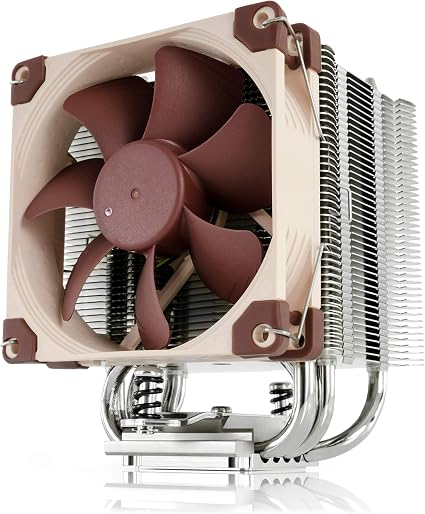 | Noctua NH-U9S | Check Price |
Our Selected Top 12 Budget Noctua Cpu Cooler for Different Needs
This list features twelve carefully chosen budget-friendly CPU coolers designed to offer reliable performance for various setups. Each review explains how well the cooler works, highlights its advantages and limitations, and identifies the types of users or systems that will benefit most from it.
1. Noctua NH-D15 chromax.Black CPU Cooler
Quiet cooling with solid performance makes the Noctua NH-D15 chromax.Black a favorite for those who want effective heat management without noise. It suits enthusiasts and gamers looking for a powerful air cooler that stays discreet with its all-black look.
Its biggest strength lies in handling heavy workloads while maintaining low noise levels.
Setting up involves a dual-tower cooler with two 140mm fans known for their quiet operation, designed for easy control through PWM and low-noise adaptors. Daily use brings low noise at idle but ramps up quietly during high loads.
The cooler fits well in many desktop builds and complements various color schemes thanks to its black finish.
Cooling is excellent for an air cooler, matching many liquid alternatives. Its build quality is solid, featuring six heatpipes and a wide dual-tower structure. The most praised aspect is its near-silent operation during everyday tasks.
The common downside is its large size, which can limit compatibility with some cases or RAM configurations.
Near-silent performance during normal use receives the most praise. The large physical size often leads to compatibility challenges with certain PC cases and tall memory modules.
Enthusiasts and silent PC builders who have enough clearance will appreciate the cooling ability and quiet operation. Users with smaller cases or limited space might prefer different, more compact air coolers or liquid setups.
Pros
- Extremely quiet operation under low load
- Strong cooling performance comparable to liquid coolers
- Attractive all-black design fits many builds
- Automatic fan speed control with PWM
Cons
- Bulky size may block RAM slots
- Not ideal for compact PC cases
| Specification | Details |
|---|---|
| Cooling Method | Air |
| Maximum Rotational Speed | 1500 rpm |
| Air Flow Capacity | 140.2 cubic meter per hour |
| Noise Level | 24.6 db |
| Power Connector Type | 4-Pin |
| Voltage | 12 volts |
2. Noctua NH-U12A chromax.Black CPU Cooler
Excellent choice for anyone wanting a powerful CPU cooler that fits most setups without fuss. It suits users needing strong performance in a mid-sized, all-black design that blends well with various PC builds. Its biggest strength lies in offering premium cooling in a compact, easy-to-install package.
Setup is straightforward thanks to its compatibility with most ATX and Micro-ATX motherboards. It doesn’t overhang RAM slots or block PCIe slots, making it ideal for standard tower cases under 158mm height. Dual 120mm fans with automatic speed control keep noise low when idle and ramp up cooling when needed.
Cooling power is impressive with airflow reaching 102.1 cfm and a maximum fan speed of 2000 rpm. Build quality lives up to the product’s premium reputation, featuring a stylish chromax finish.Black finish and reliable materials.
The most praised aspect is its quiet operation during regular tasks. Some note its height as a potential fit concern for very compact cases.
This cooler earns praise for maintaining whisper-quiet performance at idle while delivering full cooling power when stressed. The main complaint focuses on its height, which may cause fit issues in smaller cases.
Those with standard tower cases looking for a balance of size and power will be satisfied. Users with very compact builds might want to consider alternatives with a lower profile to avoid clearance problems.
Pros
- Quiet operation under idle conditions
- Compact size fits most motherboards
- Strong airflow for intensive cooling
- Attractive all-black design
Cons
- Height may be too tall for small cases
- Maximum fan RPM can be loud under heavy load
| Specification | Details |
|---|---|
| Cooling Method | Air |
| Fan Size | 120 mm |
| Noise Level | 22.6 dB |
| Maximum Rotational Speed | 2000 rpm |
| Air Flow Capacity | 102.1 cfm |
| Power Connector Type | 4-Pin |
3. Noctua NH-U9S CPU Cooler
Copper heat pipes and aluminium fins form a compact single-tower design that fits well in small spaces. Perfect for those building HTPCs or small form factor PCs, the main strength lies in its size, it’s only 125mm tall, so it won’t block RAM or PCIe slots on most boards.
Installation uses the SecuFirm2 mounting system, making setup straightforward on both Intel and AMD sockets. The 92mm NF-A9 fan includes PWM control and a Low-Noise Adaptor, so fan speeds adjust automatically and it stays quiet during everyday tasks.
Including thermal paste in the package adds convenience at the start.
Cooling performance manages everyday CPU heat efficiently without excessive noise. The build quality is solid, with durable materials and a clever offset mounting option to maximize effectiveness.
Most people appreciate the quiet operation, while a few mention that its cooling might struggle with high-end processors under heavy load.
Quiet operation receives strong praise for contributing to a peaceful environment during use. The most common complaint highlights that the cooler struggles with heavy workloads on high-end CPUs, which suggests limits to its cooling capability when pushed hard.
Anyone building a compact or quiet PC will be happy with this cooler’s size and noise control. Those running powerful processors or planning intense overclocking should consider a larger or dual-fan model instead.
Pros
- Compact 125mm height fits tight PC builds
- Quiet 92mm PWM fan with noise control
- Fully compatible with modern Intel and AMD sockets
- Includes quality thermal paste for easy installation
Cons
- May not cool well under heavy CPU loads
- Single fan limits maximum air flow
| Specification | Details |
|---|---|
| Height | 125mm |
| Fan | 92mm NF-A9 with PWM and Low-Noise Adaptor |
| Socket Compatibility | Intel LGA1851, LGA1700, LGA1200, LGA115x and AMD AM5 & AM4 |
| Included Thermal Paste | NT-H1 |
| Unit Count | 1 |
| Warranty | 6 years |
4. Noctua NH-U12A CPU Cooler

Known for packing 140mm cooler performance into a 120mm size, it’s ideal for gamers and PC builders needing strong cooling without sacrificing case or RAM space. The standout feature is the dual fan setup paired with seven heatpipes, delivering excellent heat dissipation in a compact form.
Installation fits most towers thanks to its moderate 158mm height and clearances around RAM and PCIe slots. The included NF-A12x25 fans run quietly at idle with noise barely noticeable but automatically ramp up precisely when temperatures rise, all controlled via PWM.
The low-noise adaptors help keep things calm during lighter loads, making daily use quiet and effective.
Cooling power rivals bigger 140mm coolers while fitting much tighter spaces. Solid build quality shows in premium materials and precise engineering.
Reviews highlight the cooler’s near-silent operation during normal use as a major plus. The most frequent gripe is the price being on the higher side for this size class, despite its performance.
Reviews commonly praise the quietness and powerful cooling that rivals larger coolers. The main complaint centers on its premium price which some find steep for a 120mm-class air cooler.
Builders needing a high-performance cooler that fits most cases and offers low noise levels will appreciate it. Those on a strict budget or requiring extreme airflow might want to consider alternatives with different sizes or fan speeds.
Pros
- Compact size fits tight cases easily
- Very quiet operation at idle
- Strong cooling from seven heatpipes
- Does not block RAM or PCIe slots
Cons
- Higher price compared to typical 120mm coolers
- Fan speed maxes at 2000 rpm, limiting peak airflow
| Specification | Details |
|---|---|
| Noise Level | 22.6 db |
| Maximum Rotational Speed | 2000 rpm |
| Air Flow Capacity | 102.1 cubic meter per hour |
| Power Connector Type | 4-Pin |
| Voltage | 12 volts |
| Cooling Method | Air |
5. Noctua NH-D15 G2 chromax.Black CPU Cooler

Choosing powerful cooling without breaking the bank is what sets this CPU cooler apart. Ideal for high-performance AMD Ryzen or Intel Core CPUs, it focuses on quiet operation while handling demanding workloads efficiently.
Installation involves fitting two 140mm fans with PWM control and low-noise adaptors, making it adaptable to your system’s needs. With speed-offset features, you can fine-tune fan speeds to balance cooling and sound during everyday use.
Its all-black design also fits well in most builds.
Cooling happens through 8 heatpipes and an increased surface area, keeping temperatures low even under load. The sturdy build feels durable, and it runs quietly at just 24.8 dB noise level. Some note the cooler’s size requires checking clearance inside smaller cases.
The quiet operation is praised, especially with the included low-noise adaptors and PWM fan control. The cooler handles heavy loads effectively but some find its physical size challenging for compact cases.
Great for users running high-power Ryzen or Intel CPUs who want strong quiet cooling. Those with smaller cases or on a tighter budget may want to consider smaller or simpler coolers instead.
Pros
- Runs near silent while idle
- Excellent cooling capacity for high-end CPUs
- Quiet fans with speed-offset and PWM control
- Stylish all-black chromax design
Cons
- Large size may cause case clearance issues
- More expensive than basic air coolers
| Specification | Details |
|---|---|
| Cooling Method | Air |
| Maximum Rotational Speed | 1500 rpm |
| Air Flow Capacity | 155.6 cubic meter per hour |
| Noise Level | 24.8 db |
| Power Connector Type | 4-Pin |
| Voltage | 12 volts |
6. Noctua NL-LC1-36 AIO CPU Cooler

Keeping a powerful CPU cool can be tricky, especially on a budget, but this cooler fits the bill perfectly for gamers or workstation users who want strong cooling without loud noise. It shines by delivering efficient liquid cooling that stays remarkably quiet during heavy use.
Setting up this 360mm AIO cooler requires enough space in your case, but the installation process goes smoothly thanks to standard fittings. The three 120mm Noctua fans are designed to balance airflow and noise, running quietly at speeds up to 1800 rpm and maintaining a steady airflow of 107.3 cubic meters per hour.
The pump’s noise absorber reduces vibrations, keeping any humming or buzzing to a minimum throughout daily tasks and gaming sessions.
Cooling performance ranks high thanks to the large radiator and advanced pump technology, keeping CPU temperatures well-controlled under load. The build quality is solid, using premium components from the Asetek Emma V2 platform combined with proven fan models.
Most people praise the low noise levels during operation, though some note the 360mm radiator requires a case with ample clearance, which might limit compatibility options.
Most praise goes to its quiet operation even under load, thanks to the acoustic design and fan setup. The main drawback is the large radiator size demanding a compatible case, limiting use to mid-towers or larger.
Anyone with a roomy case looking for efficient yet silent liquid cooling will appreciate this cooler. Those with smaller cases or tighter budgets might want to consider smaller or air-based coolers instead.
Pros
- Quiet pump with noise absorber and vibration reduction
- High airflow with three efficient 120mm fans
- Large 360mm radiator for strong heat dissipation
- Reliable Asetek Emma V2 cooling platform
Cons
- Requires spacious case for radiator installation
- Pump power consumption is modest but steady at 1.8 watts
| Specification | Details |
|---|---|
| Cooling Method | Water |
| Noise Level | 22.5 db |
| Maximum Rotational Speed | 1800 rpm |
| Air Flow Capacity | 107.3 cubic meter per hour |
| Power Connector Type | 4-Pin |
| Voltage | 12 volts |
7. Noctua NH-D15 G2 CPU Cooler

With eight heatpipes and 20% more surface area, the NH-D15 G2 delivers quiet and powerful cooling ideal for high-end CPUs like Ryzen 9 9950X and Intel Core Ultra 285K. It suits gamers or professionals who need dependable performance without noise distractions.
Installation makes use of included offset mounting for AMD AM5 and washers for Intel compatibility, helping prevent CPU warp. Equipped with two NF-A14x25r G2 140mm fans featuring speed-offset and PWM control, it adjusts fan speed automatically, running silently at idle and ramping up efficiently under load.
Cooling capacity stays impressive thanks to the large surface area and multiple heatpipes, keeping temperatures well in check. The build quality reflects Noctua’s reputation, with sturdy materials and well-designed fans. Strong praise points to its near-silent operation, while some users mention its substantial size requiring enough case clearance.
Many users appreciate the quietness combined with strong cooling performance, especially when the fans adjust automatically. The main complaint centers around its large dimensions, which can pose challenges fitting into smaller cases.
People building high-performance rigs with roomy cases will find this cooler well suited, especially those needing quiet operation. Users with compact builds or limited clearance might be better off choosing a smaller cooler option.
Pros
- Quiet fan operation at idle
- Supports latest AMD and Intel sockets
- Efficient cooling with eight heatpipes
- Automatic speed control via PWM
Cons
- Large size demands ample case space
- May require extra washers for certain CPU sockets
| Specification | Details |
|---|---|
| Power Connector Type | 4-Pin |
| Voltage | 12 volts |
| Wattage | 2.28 watts |
| Noise Level | 24.8 db |
| Maximum Rotational Speed | 1500 rpm |
| Air Flow Capacity | 155.6 cubic meter per hour |
8. Noctua NH-L9x65 CPU Cooler

People building compact PCs or HTPC setups will find the Noctua NH-L9x65 CPU cooler a fitting choice. Its biggest strength lies in its extremely low profile of 65mm, making it easy to install without blocking RAM or PCIe slots on most motherboards.
Installation is straightforward thanks to the SecuFirm2 mounting system and included thermal paste. The fan adjusts its speed automatically with PWM support, running quietly and handling heat efficiently during normal daily tasks.
Its size is ideal for small cases where space is limited and avoiding interference with other components matters.
Cooling performance suits CPUs with moderate heat output, keeping temperatures stable without much noise. The build feels solid with quality materials, but a few note it’s less suited for high-TDP processors.
The quiet fan is consistently praised, while some users mention it might struggle with heavy gaming or overclocking demands.
Users appreciate how quiet the cooler runs and its compact design that fits most small cases without obstructing other components. However, some experience higher fan speed noise when the cooler handles hotter CPUs, revealing its limits in more demanding scenarios.
Great for anyone building an ITX or HTPC system with moderate CPU heat output looking for a low-profile air cooler. Those planning heavy workloads or overclocking might want to explore options with stronger cooling capacity.
Pros
- Compact height fits small form factor builds
- Quiet operation with automatic fan speed control
- Easy installation with secure mounting system
- Does not block RAM or PCIe slots
Cons
- Not ideal for high-heat or overclocked CPUs
- Fan speed can reach 2500 rpm, noticeable under load
| Specification | Details |
|---|---|
| Cooling Method | Air |
| Maximum Rotational Speed | 2500 rpm |
| Noise Level | 23.6 db |
| Air Flow Capacity | 57.5 cubic meter per hour |
| Power Connector Type | 4-Pin |
| Wattage | 2.52 watts |
9. Noctua NH-U12S Redux CPU Cooler

Known for fitting comfortably in most tower cases without blocking RAM or PCIe slots, the Noctua NH-U12S redux suits anyone looking for a quieter and more affordable CPU cooler. Its biggest strength lies in delivering quiet cooling with a slim 120mm profile, making it a practical choice for everyday desktop builds.
Installation is straightforward thanks to the SecuFirm2 mounting system that works with a wide range of Intel and AMD sockets. The included NT-H1 thermal paste helps with an easy start during setup. The PWM fan adjusts speeds automatically, staying quiet during idle and ramping up when more cooling is needed, which is great for balancing noise and performance throughout daily use.
Cooling performance holds up well under load with a maximum rotational speed of 1700 rpm. Built with quality materials, it maintains its reputation for durability. Common praise highlights its quiet operation, while some mention that 25.1 dB noise can be noticeable under heavy load.
The cooler receives consistent praise for its quiet operation while running under load, though some find the noise noticeable when the fan reaches full speed. Its slim profile is a clear benefit, avoiding interference with RAM and PCIe slots.
Those building a normal desktop or looking for quiet operation with solid compatibility will appreciate this cooler. Users seeking extreme performance or lower noise at full load might want to consider other options.
Pros
- Compact 158mm height fits most tower cases easily
- Quiet NF-P12 redux fan with PWM controls speed automatically
- Doesn’t block RAM slots or PCIe on many motherboards
- Includes high-quality thermal paste and mounting hardware
Cons
- Noise level hits 25.1 dB at maximum fan speed
- Fan wattage at 1.08 watts may limit appeal for extreme overclocking
| Specification | Details |
|---|---|
| Fan Size | 120mm |
| Maximum Rotational Speed | 1700 rpm |
| Noise Level | 25.1 dB |
| Voltage | 12 volts |
| Power Consumption | 1.08 watts |
| Power Connector Type | 4-Pin |
10. Noctua NH-D15S chromax.Black CPU Cooler

Noctua NH-D15S chromax.Black stands out as a reliable air cooler designed for desktop CPUs, especially for those needing strong cooling in a compact space. It excels in providing dual-tower performance with a single fan, making it suitable where compatibility matters as much as cooling power.
Setting up the cooler involves fitting the asymmetrical design into cases up to 160mm tall without blocking RAM or PCIe slots. The included 140mm NF-A15 fan runs quietly, adjusting speeds automatically via PWM. Its all-black aesthetic matches many builds, and you won’t have to worry about it overhanging memory modules thanks to the 65mm clearance.
Performance shows strong cooling during heavy loads while remaining nearly silent when idle, thanks to a noise level of 24.6 dB and a max fan speed of 1500 rpm. The build quality is solid and premium, reflecting its award-winning reputation.
Some find the single-fan setup less powerful than dual fans in extreme overclocking scenarios but appreciate the no-blockage design.
The cooler is praised for balancing strong cooling performance with quiet operation and compatibility, especially avoiding RAM or PCIe blockage. Some users feel its single-fan design falls short compared to dual-fan variants for extreme overclocking. The all-black look is a bonus for matching diverse color themes.
People building with mid-sized cases and standard cooling needs will find the NH-D15S chromax.Black a solid choice. Those requiring maximum overclocking headroom or smaller case compatibility should investigate alternative models tailored to those demands.
Pros
- High RAM clearance of 65mm
- Quiet at idle with low noise adaptor
- Compact at 160mm height for larger compatibility
- Durable build with all-black design
Cons
- Single fan might limit peak cooling
- May not suit cases under 160mm height
| Specification | Details |
|---|---|
| Cooling Method | Air |
| Power Connector Type | 4-Pin |
| Voltage | 12 volts |
| Noise Level | 24.6 db |
| Maximum Rotational Speed | 1500 rpm |
| Air Flow Capacity | 140.2 cubic meter per hour |
11. Noctua NH-D12L CPU Cooler

Quiet cooling that fits comfortably in almost any setup describes the Noctua NH-D12L well. It suits those looking for solid CPU cooling without compromising case compatibility, especially in tighter builds or 4U rackmount cases. Its standout feature is how quietly it runs while still keeping temperatures well managed.
Installation is straightforward thanks to the SecuFirm2 mounting system and included NT-H1 thermal paste. The single-fan design offers excellent RAM compatibility, avoiding clearance issues on AMD and Intel sockets. Fan speeds adjust automatically via PWM, running near silent when idle but ramping up for strong airflow under load, balancing performance with noise control efficiently in daily operation.
Performance provides reliable heat dissipation with a low noise level of 22.6 dB at max speed, working quietly in demanding tasks. The cooler feels solid and well-built, with the asymmetrical design fitting well in compact spaces. Positive feedback often highlights the quiet operation, while some note the fan speed reaching up to 2000 rpm under load might be noticeable in very quiet environments.
The CPU cooler consistently delivers whisper-quiet performance while keeping temperatures well controlled even under load. Most users appreciate how silent it stays at idle, but the fan’s top speed of 2000 rpm can generate a noticeable sound during heavy CPU use.
People with limited space or those prioritizing silence over extreme cooling will find this model ideal. It may not satisfy those seeking maximum overclocking support or extremely low noise at full fan speed.
Pros
- Extremely quiet operation at idle
- 100% RAM compatibility on common sockets
- Fits most 4U rackmount server cases
- Easy to install with included thermal paste
Cons
- Fan can be noticeable at full 2000 rpm speed
- Single-fan setup limits overclocking headroom
| Specification | Details |
|---|---|
| Cooling Method | Air |
| Noise Level | 22.6 db |
| Maximum Rotational Speed | 2000 rpm |
| Air Flow Capacity | 102.1 cubic meter per hour |
| Voltage | 12 volts |
| Power Connector Type | 4-Pin |
12. Noctua NH-D12L chromax.Black CPU Cooler

Quiet and compact, the Noctua NH-D12L chromax.Black suits those needing strong cooling in smaller PC cases. Its biggest strength comes from maintaining excellent cooling performance without taking up much space, making it ideal for ITX and rackmount setups.
Installation is straightforward thanks to its low-profile, dual-tower design, which fits easily in many small form factor cases like the DAN C4-SFX and Cooler Master NR200 series. The included NF-A12x25r 120mm fan adjusts speeds automatically with PWM, running quietly when idle and ramping up under load.
RAM compatibility is not compromised, leaving no slots blocked.
Performance is solid, with the cooler staying effective while producing just 22.6 dB of noise at its maximum 2000 rpm speed. Its build is sturdy and well-finished in all black, appealing for those wanting a clean look. The main complaint is the relatively high maximum fan speed, which some might find a bit louder during heavy use.
Strong praise centers on its quietness and compatibility with RAM and small cases, while the most common complaint involves fan noise increasing noticeably at full speed. It performs well but makes its presence heard under stress.
Those building compact or rackmount desktop setups prioritizing quiet cooling will find this cooler a solid choice. Users seeking absolute silence and lower maximum noise levels should explore alternative options designed for ultra-quiet operation.
Pros
- Low-profile design fits small cases easily
- Excellent RAM compatibility with no blocking
- Quiet operation during idle and low load
- Attractive all-black finish
Cons
- Fan reaches 2000 rpm, louder under heavy load
- May not fit in ultra-tight spaces despite compact size
| Specification | Details |
|---|---|
| Voltage | 12 volts |
| Wattage | 1.68 watts |
| Noise Level | 22.6 db |
| Maximum Rotational Speed | 2000 rpm |
| Air Flow Capacity | 84.5 cubic meter per hour |
Best Budget Noctua CPU Coolers Compared Side by Side
| Product | Cooling Method | Noise Level (db) | Max Rotational Speed (rpm) | Air Flow Capacity |
|---|---|---|---|---|
| Noctua NH-D15 chromax Black | Air | 24.6 | 1500 | 140.2 cubic meter per hour |
| Noctua NH-U12A chromax Black | Air | 22.6 | 2000 | 102.1 cfm |
| Noctua NH-U9S | Air | – | – | – |
| Noctua NH-U12A | Air | 22.6 | 2000 | 102.1 cubic meter per hour |
| Noctua NH-D15 G2 chromax Black | Air | 24.8 | 1500 | 155.6 cubic meter per hour |
| Noctua NL-LC1-36 AIO | Water | 22.5 | 1800 | 107.3 cubic meter per hour |
| Noctua NH-D15 G2 | Air | 24.8 | 1500 | 155.6 cubic meter per hour |
| Noctua NH-L9x65 | Air | 23.6 | 2500 | 57.5 cubic meter per hour |
| Noctua NH-U12S redux | Air | 25.1 | 1700 | – |
| Noctua NH-D15S chromax Black | Air | 24.6 | 1500 | 140.2 cubic meter per hour |
| Noctua NH-D12L | Air | 22.6 | 2000 | 102.1 cubic meter per hour |
| Noctua NH-D12L chromax Black | Air | 22.6 | 2000 | 84.5 cubic meter per hour |
- Cooling MethodAir
- Noise Level (db)24.6
- Max Rotational Speed (rpm)1500
- Air Flow Capacity140.2 cubic meter per hour
- Cooling MethodAir
- Noise Level (db)22.6
- Max Rotational Speed (rpm)2000
- Air Flow Capacity102.1 cfm
- Cooling MethodAir
- Noise Level (db)–
- Max Rotational Speed (rpm)–
- Air Flow Capacity–
- Cooling MethodAir
- Noise Level (db)22.6
- Max Rotational Speed (rpm)2000
- Air Flow Capacity102.1 cubic meter per hour
- Cooling MethodAir
- Noise Level (db)24.8
- Max Rotational Speed (rpm)1500
- Air Flow Capacity155.6 cubic meter per hour
- Cooling MethodWater
- Noise Level (db)22.5
- Max Rotational Speed (rpm)1800
- Air Flow Capacity107.3 cubic meter per hour
- Cooling MethodAir
- Noise Level (db)24.8
- Max Rotational Speed (rpm)1500
- Air Flow Capacity155.6 cubic meter per hour
- Cooling MethodAir
- Noise Level (db)23.6
- Max Rotational Speed (rpm)2500
- Air Flow Capacity57.5 cubic meter per hour
- Cooling MethodAir
- Noise Level (db)25.1
- Max Rotational Speed (rpm)1700
- Air Flow Capacity–
- Cooling MethodAir
- Noise Level (db)24.6
- Max Rotational Speed (rpm)1500
- Air Flow Capacity140.2 cubic meter per hour
- Cooling MethodAir
- Noise Level (db)22.6
- Max Rotational Speed (rpm)2000
- Air Flow Capacity102.1 cubic meter per hour
- Cooling MethodAir
- Noise Level (db)22.6
- Max Rotational Speed (rpm)2000
- Air Flow Capacity84.5 cubic meter per hour
How to Choose the Right Budget Noctua CPU Cooler
Choosing a suitable cooler depends on factors like compatibility with your CPU socket, efficient airflow, and quiet operation. Prioritizing these ensures effective cooling without unnecessary upgrades or replacements, saving both money and hassle in the long run.
Compatibility and Fit
Buyers often find their new cooler doesn’t fit because they overlooked socket compatibility or motherboard layout. A cooler designed for Intel LGA 1151 won’t fit an AMD AM4 socket and vice versa.
Even if the socket fits, adjacent components like tall RAM modules or VRM heatsinks can block installation. It’s common to need clearance of at least 40mm above RAM slots to avoid conflicts.
Height and width matter just as much as socket type. Many mid-tower cases only allow up to about 160mm cooler height.
Measuring both case clearance and motherboard real estate ensures your chosen option will fit without hassle. Checking compatibility lists and physical dimensions upfront saves frustration during build or upgrades.
Cooling Performance
Matching a cooler’s thermal design power (TDP) to the CPU’s heat output prevents overheating. A cooler rated for 95 watts won’t adequately cool a 125-watt processor under load.
Cooling effectiveness depends heavily on the design of heat pipes and fin stack; more heat pipes (usually 4 or more) and dense aluminum fins spread heat better.
Fan airflow, measured in CFM, should be balanced with static pressure for use in tight fins. Fans around 50-70 CFM with static pressure above 1.5 mm H2O typically maintain steady temperatures even during sustained usage.
Cooling performance dips sharply with poor airflow or inadequate heat spreading.
Noise Levels
A noisy cooler distracts during work or gaming sessions, so checking fan noise levels in decibels is essential. A rating below 30 dBA is usually quiet enough for most users.
Fans with pulse width modulation (PWM) support adjust speed dynamically, preventing excessive noise at low loads.
Vibration-absorbing fan mounts and high quality sleeve or fluid dynamic bearings reduce buzzing sounds. Some included fans prioritize quiet operation over raw airflow, which is a trade-off worth considering unless absolute cooling is critical. Sound levels above 35 dBA become noticeably distracting in small rooms.
Build Quality and Materials
Coolers with copper heat pipes and a nickel-plated base plate conduct heat better and resist corrosion over time. Aluminum fins are standard, but their build quality varies. Cheap fins may bend or compress easily, lowering effectiveness.
Durable, well-joined pipes improve lifespan and consistent performance.
Bearings in the fan impact reliability. Hydrodynamic or fluid dynamic bearings tend to last longer and run quietly compared to sleeve bearings.
Fan frames made of sturdy plastic or reinforced materials avoid warping and rattling during use, reducing noise and maintenance needs.
Ease of Installation and Maintenance
Mounting kits that clearly label parts and work across several sockets reduce installation headaches. Cooler brackets that don’t require removing the motherboard are a bonus. Fans that can be fully detached from the cooler base simplify cleaning dust out of the fin stack, extending cooler lifespan.
Some models include pre-applied thermal paste, but often it’s better to use a high quality paste separately. This ensures even coverage and easier replacement down the line. Checking for straightforward reapplication options is wise since thermal paste degrades with time and heat cycles.
Optimizing Installation for Maximum Cooling Efficiency
Proper installation plays a key role in the cooling efficiency of a Noctua CPU cooler. The base of the cooler must make firm and even contact with the CPU surface to allow effective heat transfer. Applying a thin, even layer of thermal paste helps fill microscopic gaps and improves heat conductivity.
Follow these points to optimize installation:
- Secure the mounting brackets tightly but avoid overtightening, which can warp the motherboard or cooler base.
- Attach the fan so it directs airflow toward the rear or top exhaust of your case, aligning with the overall airflow pattern.
- Check that the cooler’s orientation provides clearance for RAM modules and doesn’t interfere with other components.
A correctly mounted Noctua cooler will run quieter and maintain lower CPU temperatures under load compared to a loosely installed one.
Maintaining Your Noctua CPU Cooler for Long-Term Performance
Maintaining your Noctua CPU cooler helps keep it running efficiently over time. Dust buildup can reduce fan performance and insulate heat away from the heatsink fins.
Practical maintenance steps include:
- Use compressed air or a soft brush to clear dust off fins and fan blades every few months or more often in dusty environments.
- Check that fan cables are securely connected and that the fan spins freely without unusual noise or wobbling.
- Inspect the mounting hardware at least once a year to ensure it remains tight and hasn’t loosened due to thermal cycles.
Regular upkeep keeps the cooler operating quietly and prevents temperature spikes caused by restricted airflow.
Comparing Noctua Budget Models to Other Popular CPU Coolers
Noctua’s budget CPU coolers stand out for their balance between price and performance compared to many other affordable options.
How they compare with other popular budget coolers:
- Noctua coolers typically have better build quality with sturdy heatsinks made from high-grade materials, which aids longevity and thermal dissipation.
- The fans included with Noctua models run quietly at lower RPMs, creating less noise under load than many budget competitors.
- Installation is often easier due to clear instructions and versatile mounting kits that fit a wide range of sockets.
Other budget coolers may offer similar thermal specs but often sacrifice quiet operation or long-term durability seen in Noctua’s designs.
People Also Asked
How Do I Install a Budget CPU Cooler Correctly?
Proper installation requires careful alignment of the cooler’s mounting bracket and even application of thermal paste. Check your CPU socket type and keep screws evenly tightened to avoid uneven pressure.
Will This Cooler Fit in My PC Case?
Measure available clearance inside your case and compare it to the cooler’s height. Also consider surrounding components like RAM and GPU which could block tall coolers.
How Long Does a Budget CPU Cooler Typically Last?
Budget CPU coolers generally last several years with regular cleaning of dust from the fan and heatsink to maintain airflow. Over time, fan bearings may wear and become noisy.
Is This Cooler Safe to Use with Overclocked CPUs?
Basic budget coolers can handle mild overclocking but may struggle under higher heat loads without good case ventilation. Monitor temperatures closely under load to avoid overheating.
What Are Common Problems with Budget CPU Coolers?
Common issues include noisy fans due to cheap bearings, insufficient cooling on high TDP processors, and poor mounting mechanisms that cause uneven contact with the CPU. Regular maintenance helps.
Conclusion
Choosing a budget CPU cooler means focusing on cooling performance, noise levels, and ease of installation. A cooler that manages heat well while staying quiet is key for daily use. It is also important to check compatibility with your CPU socket and case size to avoid fitting issues.
Pick a cooler that fits both your budget and your case, especially if you have limited space. Consider how often you use your PC at high loads, as this affects how much cooling you need.
For a clear side-by-side view of these factors, return to the comparison table and the detailed picks listed above. They’ll help you match a cooler to your setup without surprises.

I’m Grant Mitchell, a firearms and hunting writer with years of experience at the range and in the field. I write about rifles, shotguns, handguns, optics, safe storage, cleaning, and responsible ownership, along with practical hunting tips. My goal is to share accurate, safety-first information that helps you choose the right firearm, maintain it properly, and become a more confident shooter.