Top 12 Best All in One Cooler That Will Blow Your Mind!
Countless times, a poorly chosen cooler has let me down by not keeping ice frozen long enough or by leaking onto my car seats. The best all in one cooler solves those everyday issues by combining effective insulation with sturdy construction and user-friendly features.
It’s not just about being cold; it’s about durability, portability, and versatility in one package.
Good all in one coolers typically use thick, high-density foam insulation that can maintain temperatures for 24 to 72 hours depending on conditions. The size matters too, balancing enough capacity without becoming too bulky to carry.
Features like secure lids, corrosion-resistant hinges, and easy-to-clean interiors make a noticeable difference in daily use. Power options, such as built-in refrigeration or compatibility with external power sources, also separate the truly functional coolers from basic models.
Need a Quick Check?
| Image | Product | Price |
|---|---|---|
Our Top Picks 1  | ARCTIC Liquid Freezer 360 Pro | Check Price |
Our Top Picks 2  | ARCTIC Liquid Freezer 360 Pro | Check Price |
Our Top Picks 3  | CORSAIR Nautilus 360 RS | Check Price |
Our Selected Top 12 All in One Cooler for Different Needs
This list features versatile all-in-one coolers designed for various uses, from casual outings to more demanding needs. Each review highlights performance, ideal users, strengths, and possible drawbacks to help you make an informed choice based on your specific requirements.
1. ARCTIC Liquid Freezer III Pro 360
Keeping a CPU cool during intense gaming or heavy workloads can be tricky, especially when you want a quiet setup. The ARCTIC Liquid Freezer III Pro 360 suits anyone wanting powerful liquid cooling with smart design to maintain low temperatures and extend their CPU’s life.
Its standout feature is the integrated VRM fan that helps keep voltage converters cool.
Setup involves connecting the four-pin power connectors and mounting the cooler on Intel LGA1851 or LGA1700 sockets with native offset mounting. That means the cold plate is shifted toward the CPU hotspot, improving heat transfer where it’s needed most. The P12 PRO fans are quieter at low speeds but can ramp up to 3000 rpm for when the system demands more cooling power.
Performance-wise, it handles high loads well, keeping the processor temperature in check without being noisy. The build includes a well-thought-out contact frame that distributes pressure evenly, which should help with the CPU’s longevity.
The integrated VRM fan is praised for stabilizing voltage converter temperatures. Some users mention that installing the cooler can be a bit challenging due to its size.
The integrated VRM fan effectively reduces temperatures on the voltage converters, which supports reliable performance during intense tasks. Common complaints focus on the cooler’s size making installation a bit tricky for some setups.
Those running high-end Intel builds who want solid cooling and quieter fans at normal speeds will appreciate this model. Users with smaller cases or who prefer a simpler installation might want to explore other options.
Pros
- Integrated VRM fan cools voltage converters effectively
- P12 PRO fan is quieter at low speeds
- Offset mounting targets CPU hotspot precisely
- Supports Intel LGA1851 and LGA1700 sockets
Cons
- Bulkier size can complicate installation
- Higher maximum fan speed might increase noise under load
| Specification | Details |
|---|---|
| Power Connector Type | 4-Pin |
| Voltage | 12 volts |
| Wattage | 3.96 watts |
| Maximum Rotational Speed | 3000 rpm |
| Air Flow Capacity | 77 cfm |
2. ARCTIC Liquid Freezer III Pro 360 A-RGB
Cooling power reaches a maximum rotational speed of 3000 rpm, making it ideal for demanding CPUs. Suited for anyone needing serious heat dissipation, it stands out with its optimized contact pressure for better CPU lifespan and efficient heat transfer. Perfect for setups that run heavy loads without needing constant fan noise.
Setup is straightforward thanks to native offset mounting for both Intel and AMD sockets. The contact frame evenly distributes pressure, improving how heat moves away from the CPU. The integrated VRM fan adjusts speed with PWM control, keeping voltage converters cool during intense tasks.
Daily operations remain quiet, especially at lower speeds, thanks to the powerful yet subdued P12 PRO fans.
Heat removal is handled effectively, with the largest advantage being the balance between cooling capacity and noise level. The build quality feels solid, with attention to how the cold plate aligns with CPU hotspots for better performance. Some users mention that the 3000 rpm fans, while fast, can produce more noise under full load.
The most praised feature is the cooler’s ability to maintain low noise during regular use while providing strong cooling power. The largest complaint focuses on fan noise at peak speeds, which can be noticeable during heavy CPU loads.
Those who want a quiet, efficient liquid cooler with thoughtful pressure distribution will appreciate this model. For users sensitive to high fan noise under full load, a quieter or lower RPM option might be worth considering.
Pros
- Optimized contact frame for CPU longevity
- Quiet P12 PRO fans at low speeds
- Integrated VRM fan with PWM control
- Supports Intel and AMD sockets efficiently
Cons
- Fans can be noisy at maximum speed
- Requires careful mounting for best contact
| Specification | Details |
|---|---|
| Maximum Rotational Speed | 3000 rpm |
| Cooling Method | Liquid |
| Air Flow Capacity | 77 cfm |
| Voltage | 12 volts |
| Wattage | 3.96 watts |
3. CORSAIR Nautilus 360 RS ARGB
Enthusiasts looking for high-performance cooling combined with quiet operation will find this an excellent choice. Ideal for gaming builds and intensive workloads, it’s renowned for keeping CPUs cool without drawing much attention from noise.
Its standout feature is the whisper-quiet pump that doesn’t sacrifice circulation speed.
Installation is straightforward thanks to the pre-applied thermal paste on a slightly convex cold plate, ensuring good contact with the CPU. The ARGB fans are controllable through compatible motherboards, making it easier to match the build’s look while maintaining strong airflow.
Daily operation stays quiet at 36 dB, so it doesn’t disrupt your workspace or gaming sessions.
Cooling performance holds up well under load, thanks to efficient water cooling and high static pressure fans. The build quality feels solid, with sturdy fans and a pump that quietly circulates coolant at 20 dBA.
Common complaints focus on the fans’ maximum speed of 2100 rpm, which might be a bit high-pitched for some, but solid performance dominates most feedback.
Strong praise comes from the pump’s ability to circulate coolant quietly while maintaining performance. Most common issues revolve around the fan noise at high speeds, which might bother those sensitive to sound. The easily applied thermal paste speeds up setup and helps maintain consistent cooling results.
People wanting quiet but effective cooling solutions will appreciate this unit’s balance. Users focused on maximum silence or very fine fan control might look at alternatives offering lower fan speeds or PWM controls. It suits desktop setups where performance and lighting customization are priorities.
Pros
- Quiet pump at just 20 dBA
- Strong airflow and static pressure from RS120 ARGB fans
- Easy installation with pre-applied thermal paste
- ARGB lighting controlled via compatible motherboard
Cons
- Fans can get noisy at maximum 2100 rpm speed
- Only 4-pin power connector limits some control options
| Specification | Details |
|---|---|
| Power Connector Type | 4-Pin |
| Voltage | 12 volts |
| Wattage | 10 watt-hours |
| Noise Level | 36 db |
| Maximum Rotational Speed | 2100 rpm |
4. Be Quiet! Light Loop 360mm

Light Loop 360mm Black stands out with its impressive lighting setup featuring 64 LEDs and three 120mm fans, making it ideal for anyone wanting a visually striking all-in-one cooler for their PC build. Its biggest strength lies in mixing strong cooling performance with customizable, bright illumination to match your setup’s style.
Setting it up involves handling three Light Wings LX PWM fans that react to your system’s needs quietly but quickly, thanks to their 2100 rpm max speed. The lighting can be adjusted across multiple colors and effects, letting you personalize your PC’s look without complicated software. It fits well on a variety of Intel and AMD sockets, keeping compatibility broad while staying fairly quiet at just 36.8 dB.
Cooling power feels solid thanks to water cooling paired with decent airflow of 61.8 cfm from these fans. The build quality supports a steady performance with a 4-pin power connection, running on 12 volts and 5.4 watts. Reviews often highlight impressive lighting effects as a plus but note the cooling can get noisy when fans spin up to maximum speed.
The cooler impresses most with its visually appealing LED lighting spread across the fans and cooling block, contributing to a standout system appearance. Noise levels increase considerably when the fans hit full speed, which might disrupt a quieter environment.
Those wanting a combination of strong lighting and good cooling in one package will appreciate this cooler. Anyone highly sensitive to loud fan noise during heavy workloads might look for a quieter alternative.
Pros
- Bright and customizable 64-LED lighting system
- Compatible with wide range of Intel and AMD sockets
- Quiet operation at low to medium speeds
- Three high-speed 120mm PWM fans for good airflow
Cons
- Fan noise noticeable at maximum speed
- Uses 4-pin connector which may limit some motherboard controls
| Specification | Details |
|---|---|
| Voltage | 12 volts |
| Power Connector Type | 4-Pin |
| Noise Level | 36.8 db |
| Maximum Rotational Speed | 2100 rpm |
| Air Flow Capacity | 61.8 cfm |
| Compatible Devices | Intel sockets: 1851/1700/1200/1151/1150/1155 | AMD sockets: AM5/AM4 |
5. Igloo Trailmate Journey 70Qt Wheeled Cooler

Igloo Trailmate Journey 70Qt Wheeled Cooler is built to handle rough terrain while keeping things cool for outdoor adventures. Great for campers and those needing a large capacity, its standout feature is the combination of wheels designed for tough surfaces and a handle that makes pulling much easier.
Setting it up takes almost no time since it arrives ready to go. Daily use benefits from the 10-inch, never-flat wheels that glide smoothly over sand and uneven ground.
The horizontal dual-trigger steel Glide handle locks in place and telescopes out, helping with comfort and leverage when moving it around. For serving, the removable butler tray on the handle is handy and tucks away neatly when not needed.
The 70-quart capacity holds up to 112 cans, making it spacious enough for longer trips or bigger groups. Cooling performance is improved by the Cool Riser Technology, which lifts the cooler off hot surfaces.
The build feels solid, focusing on durability over flashy design. One of the most common praises highlights how much easier the handle makes pulling the cooler, while occasional complaints mention the cooler’s overall weight when fully loaded.
Users often praise how the horizontal dual-trigger steel Glide handle makes pulling this wheeled cooler significantly easier compared to others. At the same time, some find the cooler’s weight noticeable once packed full, which can make lifting or carrying less pleasant.
The cooler suits campers and outdoor enthusiasts who need a rugged design and easy transport over sand and rough ground. Those looking for a lightweight option or usage beyond camping might want to consider alternatives better tailored to those needs.
Pros
- Wheels glide smoothly over sand and rough terrain
- Pulling feels 50% easier with the Glide handle
- Large capacity fits many cans for group outings
- Removable serving tray stores conveniently under lid
Cons
- Cooler can be heavy when fully loaded
- Limited to camping scenarios in recommended uses
| Specification | Details |
|---|---|
| Capacity | 70-quart (fits up to 112 cans) |
| Wheels | 10-inch, never-flat, smooth-ride |
| Handle | Horizontal dual-trigger steel Glide, locking & telescoping |
| Cooling Technology | Cool Riser Technology |
| Included components | Cooler |
| Recommended use | Camping |
6. Titan Zipperless HardBody Cooler

Using the Titan Zipperless HardBody Cooler feels practical and straightforward, perfect for quick outdoor trips where easy access matters most. Its standout feature is the zipperless lid that flips open quickly, allowing easy access to drinks or snacks.
Great for anyone who values convenience alongside solid cooling on beach days or tailgates.
Setting up the cooler means just flipping open the lid, which doesn’t require wrestling with zippers. It holds up to 9 cans and comes with a removable SmartShelf that neatly separates sandwiches from cans to avoid squishing.
Removing the shelf provides more space when needed, so it adapts to different kinds of food and drink. Its soft-sided design is light enough for carrying on short journeys, and cleaning is simple because of the HardBody liner.
Cold holds up well thanks to Deep Freeze Performance Insulation with a radiant heat barrier and ColdBlock base, keeping ice cold for up to two days. Build quality feels sturdy for a soft-sided cooler, with a hard liner inside that protects contents. Most praise focuses on how quick and fuss-free the zipperless lid is, while some users mention the 9-can capacity might feel limited for longer trips or bigger groups.
Many users appreciate how the zipperless lid opens swiftly, making it simple and convenient to grab items during outings. On the downside, the cooler’s capacity to hold only 9 cans can be restrictive when packing for more than a few people.
People looking for an easy-access cooler with good insulation for day trips or short outings will be satisfied. Those needing larger capacity or extended cooling might want to consider bigger options.
Pros
- Fast zipperless flip-open lid access
- Keeps ice up to 2 days
- Removable SmartShelf for organized storage
- Lightweight and easy to carry
Cons
- Limited to holding 9 cans
- May feel small for bigger groups
| Specification | Details |
|---|---|
| Model Name | Titan 9 Can Cooler |
| Number of Packs | 1 |
| Recommended Uses | Beach, Lunch, Picnic, Roadtrip, Tailgating |
| Manufacturer | California Innovations |
| Warranty Type | Limited Lifetime Warranty |
7. Thermalright Aqua Elite 120 V3

Great for desktop users wanting strong cooling with added style. The biggest strength lies in its low vibration pump and efficient heat dissipation, delivering quiet, reliable performance.
Designed for those who want both effective cooling and eye-catching ARGB lighting in one compact unit.
Installation is straightforward, thanks to the standard 120mm fan size and clear mounting setup. The included 120 cold row aluminium fin and protective water pipe mesh feel sturdy and built to last.
Daily operation is quiet at 25.6 dB, making it easy to forget it’s running even during heavy loads. ARGB lighting syncs right onto the motherboard, making any setup look vibrant without extra hassles.
Cooling does its main job well with a pump and fan running at 12 volts and 1500 rpm, producing solid airflow at 66.17 cfm. The build quality combines a durable aluminium heat sink plate with a fourth generation pump head, ensuring reliability over time. The best part praised is its quiet operation, while some users note the light sync can require specific motherboard compatibility.
Quiet performance stands out as the most appreciated feature, with the aluminium fins and mesh water pipe also praised for durability. However, some report that the ARGB lighting requires very specific motherboard connectors for proper sync, making setup less flexible for certain builds.
Anyone wanting low noise and solid water cooling will find this a good match. Those lacking a 5V 3pin motherboard header for ARGB or needing higher fan speeds might want to explore alternatives better suited for those needs.
Pros
- Quiet operation at just 25.6 dB
- Sturdy aluminium fin heat sink
- ARGB lighting syncs with motherboard 5V 3pin
- Low vibration pump for lasting durability
Cons
- ARGB lighting needs compatible motherboard
- Fan speed capped at 1500 rpm
| Specification | Details |
|---|---|
| Cooling Method | Water |
| Maximum Rotational Speed | 1500 rpm |
| Noise Level | 25.6 db |
| Air Flow Capacity | 66.17 cfm |
| Power Connector Type | 4-Pin |
| Voltage | 12 volts |
8. Coleman Xtreme Rolling Cooler

Durable hard plastic construction with double-wall insulation makes the Coleman Xtreme Rolling Cooler a reliable choice for those needing a cooler that lasts through long days outdoors. Designed with a large capacity and wheeled mobility, it fits well for camping trips, beach outings, or any group gathering requiring plenty of cold storage.
Using the cooler daily, the large 84-can capacity means you can pack for bigger groups without worrying about running out of space. The rugged all-terrain wheels handle surfaces like sand and grass, and the retractable telescoping handle makes pulling easy without having to lift it.
Once done, the handle collapses for easier storage in your car or garage, keeping everything tidy and manageable.
Its main task of keeping things cold is handled well, thanks to the double-wall insulated lid and body which keeps ice frozen up to 5 days even in temperatures hitting 90°F. The plastic build feels sturdy and holds up well under rough conditions. Users appreciate its long ice retention but some mention the weight gets noticeable when full and wheeling over very rough terrain can be a bit challenging.
Ice stays frozen for as long as 5 days in heat up to 90°F, making it dependable for extended trips. Common issues include the weight when fully packed and some difficulty moving it over very uneven surfaces despite the rugged wheels.
Those needing a large, durable cooler for camping or beach days benefit from its capacity and ice retention. People prioritizing lightweight or easily carried coolers for rough hiking or very uneven terrain may want to consider alternatives.
Pros
- Keeps ice frozen up to 5 days in warm temperatures
- Large capacity holds up to 84 cans
- Wheels easily on sand, gravel, and grass
- Telescoping handle collapses for compact storage
Cons
- Heavy when fully loaded
- Wheels can struggle on very rough terrain
| Specification | Details |
|---|---|
| Holds | 84 Cans |
| Insulation | Double-wall insulated lid and body |
| Wheels | Rugged all-terrain wheels |
| Handle | Retractable telescoping handle |
| Use | Camping |
| Warranty | 1 year limited warranty |
9. ARCTIC Liquid Freezer III Pro 240

Efficient cooling paired with a quiet profile is what stands out most about the ARCTIC Liquid Freezer III Pro 240. It suits anyone who needs solid performance for demanding CPUs, especially those using Intel’s LGA1851 or LGA1700 sockets. Its standout feature is the optimized contact pressure that helps protect your processor while keeping temperatures low.
Setting it up is simple, especially with the native offset mounting designed for better heat transfer right where the CPU runs hottest. The included ARCTIC P12 PRO fans deliver strong airflow but stay surprisingly quiet, especially at lower speeds.
Everyday use is smooth since the integrated VRM fan takes care of your motherboard’s voltage converters, keeping things stable during long gaming or work sessions.
It does an excellent job managing heat under heavy loads, thanks to the high rotational speed up to 3000 rpm and the 77 cfm airflow capacity. Build quality feels solid and durable, with thoughtful touches like the contact frame that evenly distributes pressure.
The top praise is its quiet but powerful performance, while some mention the price is a bit steep for a liquid cooler.
What users really like is how quiet it stays while still handling tough cooling demands, thanks to its efficient fans and smart mounting. The common downside mentioned is that pushing speeds to the max can get noisy and the price might feel steep compared to simpler coolers.
Those who want reliable, quiet liquid cooling for high-end Intel or AMD CPUs will appreciate its design and performance. It may not be the best choice for someone on a tight budget or looking for an ultra-quiet setup at full fan speed.
Pros
- Quiet operation even under heavy load
- Optimized mounting for better heat transfer
- Integrated VRM fan improves motherboard cooling
- High airflow with ARCTIC P12 PRO fans
Cons
- Price is on the higher side
- Maximum fan speed can be loud at peak
| Specification | Details |
|---|---|
| Cooling Method | Water |
| Maximum Rotational Speed | 3000 rpm |
| Air Flow Capacity | 77 cfm |
| Power Connector Type | 4-Pin |
| Voltage | 12 volts |
| Wattage | 3.96 watts |
10. ARCTIC Liquid Freezer III Pro 240 A-RGB
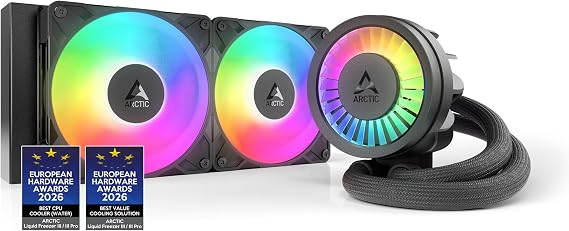
High-performance water cooling designed for CPUs, ideal for users who want quieter operation without sacrificing power. It stands out with a built-in VRM fan and optimized cold plate placement for better heat transfer, making it a smart choice for intensive computing tasks and long sessions.
Setup involves attaching the native offset mounting, which aligns the cold plate with the CPU hotspot, improving efficiency. The included P12 PRO fan delivers more cooling power at low speeds while keeping noise down. Day-to-day use means the PWM-controlled VRM fan quietly supports voltage converter cooling, maintaining reliability during prolonged use.
Performance excels in keeping temperatures low under heavy loads thanks to the powerful fan capable of a high maximum speed. The cooling system is solidly built with a water cooling method, and the contact frame ensures consistent pressure on Intel sockets LGA1851 and LGA1700.
Most praise highlights the quiet operation at low RPMs, while some note the maximum rotational speed could be better tuned for even quieter running.
The quiet operation at low speeds receives the most praise, especially for long, heavy computing sessions. The only notable complaint is that the maximum rotational speed data seems unusually low, which might confuse some about potential noise levels under max load.
People seeking effective cooling with quieter fans will appreciate this cooler’s design and features. Users looking for simpler installation or who are less comfortable with water cooling setups might prefer a different model that’s easier to manage.
Pros
- Optimized contact pressure for better CPU lifespan
- Quiet operation at low fan speeds
- Integrated PWM-controlled VRM fan
- Efficient heat transfer with offset cold plate
Cons
- Maximum rotational speed listed is very low
- Some may find setup complexity higher than basic coolers
| Specification | Details |
|---|---|
| Power Connector Type | 4-Pin |
| Voltage | 12 volts |
| Wattage | 3.96 watts |
| Cooling Method | Water |
| Maximum Rotational Speed | 1 rpm |
| Air Flow Capacity | 77 cfm |
11. NZXT Kraken Core 240 RGB

Keeping your CPU cool during intense gaming or multitasking sessions can be a challenge, but the NZXT Kraken Core 240 RGB handles it well. Suited for desktop users who want efficient cooling combined with quiet operation, its most notable strength is a powerful yet whisper-quiet pump that keeps temps down without annoying noise.
Installation is straightforward with the single-frame design and direct motherboard connection, cutting down cable clutter and simplifying setup. Adjusting fan speeds through PWM control lets you tailor cooling to your needs.
The optimized fan blades push air effectively through the radiator to maintain cooling performance while keeping sound levels low during daily use.
Cooling power comes from a 3,100 RPM pump combined with fans designed for high static pressure, making it adept at handling hot CPUs under load. The build feels solid and well thought out, designed to reduce installation hassle. Many appreciate how quiet it runs, though some notice it could be a bit louder when pushed to maximum speed.
The pump runs quietly even with high RPM at 3,100, which keeps CPU temps low without adding much noise. On the downside, some users find the fans become louder when pushed to their top speed despite overall quiet operation.
People wanting a balance of efficient cooling and reduced noise will appreciate this cooler. Those needing complete silence or higher voltage fans for specific setups might want to look for alternatives.
Pros
- Quiet operation during heavy CPU loads
- Simple direct motherboard connection
- Adjustable PWM fan speeds for customization
- Single-frame design simplifies installation
Cons
- Fans can get noticeably louder at max speed
- Limited voltage to 5 volts DC may affect compatibility
| Specification | Details |
|---|---|
| Cooling Method | Water |
| Maximum Rotational Speed | 3100 rpm |
| Noise Level | 31.9 db |
| Air Flow Capacity | 75.05 cfm |
| Power Connector Type | 4-Pin |
| Voltage | 5 volts_of_direct_current |
12. CORSAIR iCUE Link Titan 240 RX

Featuring a brilliant 2.1” IPS LCD Display with 480×480 resolution, this cooler suits desktop builders wanting reliable CPU cooling plus a unique visual flair. Its main draw is combining strong performance with the convenience of iCUE LINK for simplified connectivity.
Installation feels straightforward thanks to the iCUE LINK technology, which allows all components to daisy-chain through universal connectors into a single port. Day to day, the LCD lets you customize what you see, temperature, GIFs, or logos. Noise stays relatively low at 36 db, meaning it won’t be distracting during normal use.
Cooling with water proves efficient, supporting the CPU well under typical loads. The build quality seems solid, with components designed for desktop setups.
Frequent feedback highlights the clear display as the best feature, while some users note that the brightness can be a bit too strong in darker rooms.
The most praised feature is the customizable IPS LCD screen that gives useful CPU info or personalized images. A common complaint regards the screen’s brightness, which some find overwhelming in dark environments. Noise levels remain low, making it suitable for daily computer use without distraction.
Enthusiasts who value both performance and aesthetics will appreciate this cooler. Those looking for quieter operation or compatibility beyond desktop systems might consider alternative options to suit their needs better.
Pros
- Bright and sharp IPS LCD display
- Low noise level at 36 db
- Easy cable management with iCUE LINK
- Good airflow capacity for cooling
Cons
- Display brightness may be too intense in low light
- Only compatible with desktop devices
| Specification | Details |
|---|---|
| Power Connector Type | 4-Pin |
| Voltage | 12 volts |
| Wattage | 3 watts |
| Noise Level | 36 db |
| Maximum Rotational Speed | 2100 rpm |
| Air Flow Capacity | 73.5 cfm |
Best All in One Coolers Compared Side by Side
| Product | Cooling Method | Compatible Devices | Noise Level | Air Flow Capacity |
|---|---|---|---|---|
| ARCTIC Liquid Freezer 360 Pro | Liquid | Desktop, Gaming Console | – | 77 cfm |
| ARCTIC Liquid Freezer 360 Pro | Liquid | Cpu | – | 77 cfm |
| CORSAIR Nautilus 360 RS | Water | Desktop | 36 db | – |
| be quiet! Light Loop 360 | Water | Intel, AMD sockets | 36.8 db | 61.8 cfm |
| Igloo Trailmate 70Qt Cooler | Cooler | Camping | – | – |
| Titan Zipperless HardBody | Hardbody Cooler | Beach, Lunch, Picnic | – | – |
| Thermalright Aqua Elite 120 | Water | Desktop | 25.6 db | 66.17 cfm |
| Coleman Xtreme Rolling Cooler | Rolling Cooler | Camping | – | – |
| ARCTIC Liquid Freezer 240 Pro | Water | AMD, Intel | – | 77 cfm |
| ARCTIC Liquid Freezer 240 Pro | Water | AMD, Intel | – | 77 cfm |
| NZXT Kraken Core 240 RGB | Water | Desktop | 31.9 db | 75.05 cfm |
| CORSAIR iCUE Titan 240 RX | Water | Desktop | 36 db | 73.5 cfm |
- Cooling MethodLiquid
- Compatible DevicesDesktop, Gaming Console
- Noise Level–
- Air Flow Capacity77 cfm
- Cooling MethodLiquid
- Compatible DevicesCpu
- Noise Level–
- Air Flow Capacity77 cfm
- Cooling MethodWater
- Compatible DevicesDesktop
- Noise Level36 db
- Air Flow Capacity–
- Cooling MethodWater
- Compatible DevicesIntel, AMD sockets
- Noise Level36.8 db
- Air Flow Capacity61.8 cfm
- Cooling MethodCooler
- Compatible DevicesCamping
- Noise Level–
- Air Flow Capacity–
- Cooling MethodHardbody Cooler
- Compatible DevicesBeach, Lunch, Picnic
- Noise Level–
- Air Flow Capacity–
- Cooling MethodWater
- Compatible DevicesDesktop
- Noise Level25.6 db
- Air Flow Capacity66.17 cfm
- Cooling MethodRolling Cooler
- Compatible DevicesCamping
- Noise Level–
- Air Flow Capacity–
- Cooling MethodWater
- Compatible DevicesAMD, Intel
- Noise Level–
- Air Flow Capacity77 cfm
- Cooling MethodWater
- Compatible DevicesAMD, Intel
- Noise Level–
- Air Flow Capacity77 cfm
- Cooling MethodWater
- Compatible DevicesDesktop
- Noise Level31.9 db
- Air Flow Capacity75.05 cfm
- Cooling MethodWater
- Compatible DevicesDesktop
- Noise Level36 db
- Air Flow Capacity73.5 cfm
How to Choose the Right All in One Cooler
Choosing the right all in one cooler depends on factors like cooling capacity, noise levels, energy efficiency, and ease of installation. Prioritizing these features ensures the cooler matches your needs, saves on energy costs, and reduces maintenance, leading to long-term satisfaction and fewer problems.
Cooling Performance
A cooler that takes hours just to drop a few degrees quickly becomes frustrating, especially on a hot day. The best models cool down contents within 20 to 30 minutes and maintain a consistent low temperature throughout the day.
Insulation quality plays a big role here; thick walls with high-density foam or vacuum insulation keep the cold in longer and protect from external heat. Thin insulation or poor seals often lead to warm spots and uneven cooling, which means your drinks or food won’t stay cold for the entire duration.
Look for a cooler with a high BTU rating or maximum cooldown capacity listed by the manufacturer. Consistency also depends on power efficiency and good airflow inside the unit. A cooler that can cycle power smartly without big temperature swings makes a noticeable difference, especially during longer trips or power outages.
Capacity and Size
Understanding the actual capacity of a cooler means counting how many cans, bottles, or meal packs it can hold comfortably. Many all-in-one models list internal volume in liters, but this can be misleading if the shape is awkward or has bulky components. For a weekend trip, a 30-liter capacity might hold around 40 cans or a combination of food and drinks.
Larger sizes suit groups, but they also add bulk and weight, affecting portability.
The physical size determines how easy it is to fit into your car or storage space, but don’t ignore weight. An empty unit over 20 pounds plus full loading can become heavy quickly. Features like sturdy wheels or well-placed handles help, but for carrying long distances, lighter and more compact options make daily use less of a hassle.
Power Source and Efficiency
Power options vary widely; some models plug into household AC outlets, while others run off DC power from car sockets or internal batteries. Flexibility clearly affects where and how you can use the cooler.
Battery-powered versions often list runtime hours, which typically range from 6 to 12 hours, depending on power draw and temperature settings. Knowing this upfront helps avoid surprises during use.
Efficient models consume less energy, extending battery life and reducing reliance on vehicle power. Switching between AC, DC, and battery modes without fuss is important if you move between home, car, and outdoor settings.
Check if the cooler supports quick charging or USB power inputs, as these add convenience for extended trips.
Durability and Build Quality
The outer shell material and internal lining define how well a cooler handles bumps, rain, or accidental drops. Rigid plastics like polypropylene or ABS resist dents and cracking better than thinner materials.
Metal components or reinforced corners add durability but can increase weight. Poorly made seals or loose hinges often cause leaks and reduce cooling efficiency by letting cold air escape.
Regular use demands a build that withstands wear without parts breaking or warping. Some models feature rubber gaskets that hold up well over time, while cheaper rings crack or crumble after a few months. Maintenance usually involves periodic cleaning and checking seals.
A solidly built cooler needs less repair and keeps working efficiently for years.
User Convenience Features
Cleaning is easier when the interior has a smooth finish with removable trays or shelves that reach every corner. Models with drain plugs let you flush water without tipping the whole unit over.
Noise levels can vary, especially with compressors or fans. Lower-decibel operation is valuable if you use the cooler indoors or at night.
Additional controls like digital temperature displays and adjustable thermostats help maintain exact cooling without manual guesswork. Handle design affects comfort during transport, with grips that don’t dig into hands reducing fatigue.
These practical features add up when using the cooler regularly, making daily tasks less cumbersome.
Tips for Maximizing the Efficiency of Your All-in-One Cooler
Keeping the temperature consistent inside an all-in-one cooler depends a lot on proper organization. Avoid overfilling the unit since overcrowding restricts airflow and lowers cooling performance.
Placing frequently used items near the door reduces the time the cooler stays open, which helps maintain cold air inside. Regularly cleaning the condenser coils also plays a significant role by improving heat exchange efficiency.
Other effective measures include:
- Setting the thermostat to the recommended temperature instead of the coldest setting.
- Checking the door seal for cracks or gaps to prevent warm air leaks.
- Defrosting any built-up ice promptly, as ice buildup can block vents.
These steps work together to keep energy use lower and the cooler running smoothly for longer periods without extra strain.
Common Mistakes to Avoid When Using an All-in-One Cooler
Leaving the door open for long periods is a frequent mistake that significantly reduces an all-in-one cooler’s effectiveness. Warm air entering the cooler makes the compressor work harder and shortens its lifespan.
Ignoring regular cleaning is another issue. Dust on the coils and dirt inside the unit restrict cooling capacity and raise energy consumption.
Many users also pack the cooler too tightly, which limits airflow and causes uneven cooling. Avoid placing hot items directly inside, as they increase the internal temperature and strain the system.
Common pitfalls to watch for:
- Failing to check the door gasket regularly for wear and tear.
- Using sharp objects that can damage interior surfaces or cooling elements.
- Not defrosting built-up ice when recommended by the manufacturer.
Addressing these issues helps maintain consistent cooling performance and extends the product’s usability.
Comparing All-in-One Coolers with Traditional Cooling Systems
All-in-one coolers combine refrigeration, heating, and often even ventilation in a single unit, unlike traditional cooling systems that typically only handle temperature reduction. This makes them convenient for small spaces where multiple appliances would be impractical.
They generally consume less power overall since the system is designed to manage several functions efficiently. Traditional systems sometimes require separate devices that increase total energy use.
The installation process for all-in-one coolers is usually simpler, with fewer components to set up and maintain. On the downside, they can be less repairable if one component fails, as parts are integrated rather than modular.
Trade-offs include:
- Space savings versus potential difficulty in component replacement.
- Energy efficiency from integrated design compared with specialized performance of separate units.
- Maintenance requirements that vary depending on system complexity.
Choosing between the two depends on the user’s priorities for convenience, cost, and flexibility.
People Also Asked
How Do I Properly Clean and Maintain an All in One Cooler?
Clean the cooler by wiping the interior and exterior with mild soap and water regularly. Avoid harsh chemicals that can damage the lining; make sure to dry it thoroughly to prevent mold growth between uses.
What Size All in One Cooler Do I Need for Camping?
Choose a size based on the number of people and trip length; a 20 to 40-quart cooler usually works well for 2-4 days for two to three people. Consider space inside your vehicle and frequency of use too.
Is It Safe to Leave an All in One Cooler Running Overnight?
It can be safe as long as the cooler is designed for continuous use and the power source is stable. Avoid leaving it plugged in unattended if you don’t know the quality of your power source, to reduce any electrical risks.
How Long Does the Cooling Function of an All in One Cooler Last?
The cooling effect generally lasts several hours depending on the insulation and power source continuity. Using ice packs in addition to the cooler can extend cooling times significantly during power outages.
What Are Common Problems with All in One Coolers and Fixes?
Common problems include leaking seals, compressor noise, and power supply issues. Check seals regularly for cracks, keep the compressor clean from dust, and verify any power adapters or batteries are functioning properly.
Conclusion
Choosing an all in one cooler mainly comes down to capacity, cooling performance, and ease of use. It’s important the cooler can handle the amount of food and drinks you typically store.
Cooling efficiency matters to keep items cold for extended periods without draining the battery too fast. Controls and portability should be straightforward, so the cooler works well for your specific needs.
Consider how much space you have and your budget before making a decision. Think about how often you’ll use the cooler and where you plan to take it.
Check the comparison table and detailed picks above to find the model that fits your requirements best. Matching those factors will help you get the most practical and reliable choice.

I’m Grant Mitchell, a firearms and hunting writer with years of experience at the range and in the field. I write about rifles, shotguns, handguns, optics, safe storage, cleaning, and responsible ownership, along with practical hunting tips. My goal is to share accurate, safety-first information that helps you choose the right firearm, maintain it properly, and become a more confident shooter.