Top 12 Best Air Cooler for Ultra 7 265K You Can’t Miss
Many people have dealt with air coolers that stop cooling effectively after a short time or make constant noise that disrupts daily life. Choosing the best air cooler for ultra 7 265k can prevent these issues by offering reliable performance suited to that specific model’s capacity.
Using an incompatible or low-quality cooler often results in uneven airflow and excessive power use, which just adds to frustration.
What really matters in a good air cooler for this model is its cooling capacity and compatibility with the ultra 7 265k’s specifications. Durability is important too, so look for units with corrosion-resistant materials and easy-to-clean filters to avoid mold buildup. Power consumption should align with typical values for mid-range coolers, usually under 200 watts, helping keep electricity bills in check while still providing effective cooling.
Need a Quick Check?
| Image | Product | Price |
|---|---|---|
Our Top Picks 1  | Thermalright Peerless Assassin 120 SE | Check Price |
Our Top Picks 2 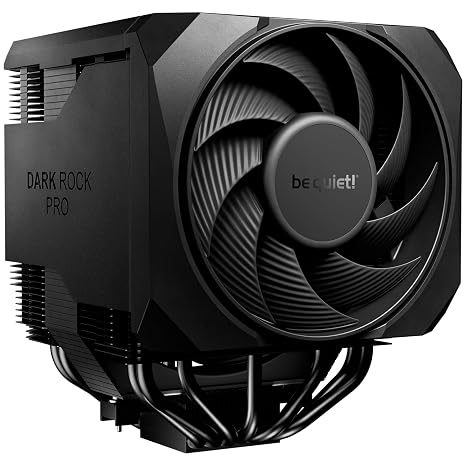 | be quiet! Dark Rock Pro | Check Price |
Our Top Picks 3  | Noctua NH-D15 chromax.Black | Check Price |
Our Selected Top 12 Air Cooler for Ultra 7 265k for Different Needs
This list features a variety of air coolers designed for the Ultra 7 265k model, each reviewed for performance, suitability, and key advantages or drawbacks. Readers will gain clear insights into which cooler fits specific needs and environments effectively.
1. Thermalright Peerless Assassin 120 SE CPU Cooler
Handling up to 265 watts of heat, this air cooler is ideal for anyone needing serious cooling power for their desktop. Its strongest point is managing high thermal loads quietly, making it great for intense computing sessions without loud fan noise.
Setup involves connecting the 4-pin power cable to your motherboard, while mounting hardware ensures a secure fit. Running at a maximum speed of 1550 rpm, the fan keeps airflow steady at 66.17 cfm without sounding intrusive. The voltage and cooling method stay consistent, so you know it works reliably every day.
Performance-wise, it cools efficiently with a 25.6 dB noise level, balancing airflow and quiet operation well. The build quality reflects Thermalright’s long experience in PC cooling gear, sturdy and thoughtfully designed.
Most praise focuses on the effective heat dissipation, while occasional comments mention the size as a potential fit challenge in smaller cases.
This cooler is praised for its impressive heat dissipation and quiet operation, making it reliable for powerful desktop setups. Some find the size a challenge, especially in smaller cases, which can make installation less straightforward.
Anyone running high-performance or overclocked systems looking for solid, quiet cooling will appreciate this. Those with compact PC cases might want to consider smaller coolers for easier installation and fit.
Pros
- Handles high heat loads up to 265 watts
- Quiet fan operation at 25.6 dB
- Strong, reliable build quality
- Good airflow at 66.17 cfm
Cons
- May be too large for compact case setups
- Installation can be tricky in tight spaces
| Specification | Details |
|---|---|
| Wattage | 265 watts |
| Power Connector Type | 4-Pin |
| Voltage | 12 volts |
| Noise Level | 25.6 db |
| Maximum Rotational Speed | 1550 rpm |
| Air Flow Capacity | 66.17 cfm |
2. Be Quiet! Dark Rock Pro 6 CPU Cooler
People building demanding gaming PCs or powerful workstations will find the Dark Rock Pro 6 ideal. It handles intense heat loads while keeping noise very low, making it perfect for those who want strong cooling without a distracting fan sound.
Installation is straightforward thanks to the pre-installed mounting bridge and an easy, secure fixing method. The fan rails let you adjust its height, so fitting it in different cases is more flexible than usual. The active mode switch lets you pick between full performance or quiet semi-passive mode, which stops the fans below 40% PWM, helping keep noise down during light tasks.
Heat dissipation is excellent, aided by the seven copper heat pipes and optimized heatsink design. It keeps even heavily overclocked CPUs cool without running loud.
The build feels sturdy and well-thought-out. Typical feedback highlights how quiet it runs under load and how effective it is at cooling. A common downside is its size, which may cause compatibility issues in smaller cases.
Quiet performance during heavy CPU use stands out, thanks to effective heat dissipation and semi-passive fan operation. Some find the cooler’s height and width a challenge when installing in compact setups.
Those with spacious cases and high-performance CPUs will appreciate how it keeps temperatures low quietly. Users with smaller cases or very limited space might want to consider smaller coolers to avoid fitting issues.
Pros
- Quiet operation even under heavy load
- Strong heat dissipation with seven copper heat pipes
- Easy installation with adjustable front fan
- Supports wide socket compatibility for Intel and AMD
Cons
- Large size may not fit smaller cases
- Fan speed limited to 2000 rpm maximum
| Specification | Details |
|---|---|
| Power Connector Type | 4-Pin |
| Voltage | 12 volts |
| Noise Level | 32.4 db |
| Maximum Rotational Speed | 2000 rpm |
| Air Flow Capacity | 68.7 cfm |
| Compatible Sockets | Intel 1851/1700/1200/1151/1150/1155/1156, AMD AM5/AM4 |
3. Noctua NH-D15 chromax.Black CPU Cooler
Known for its quiet operation and powerful cooling, this CPU cooler suits anyone needing strong and silent air cooling for desktops. Its dual-fan, dual-tower design stands out by matching the cooling performance of many liquid coolers while keeping noise very low.
Setting it up requires fitting the dual-tower heatsink, which is extra-wide at 140mm, so check your case for space first. The two NF-A15 140mm fans come with low-noise adapters and PWM control to balance speed and silence automatically, making everyday running nearly silent when idle and still cooling well under heavy load.
Its six heatpipes and dual fans handle heat efficiently, rivaling some all-in-one watercoolers, making it especially useful for overclocked CPUs. The all-black finish fits nicely with many color schemes, but some mention its large size may block tall RAM modules or not fit smaller cases.
The cooler provides excellent silent performance under load due to its dual 140mm fans and six heatpipes, but its size often requires users to check clearance around RAM and case dimensions carefully. Many praise how quiet it is while cooling effectively, though some find it bulky for their setup.
Those who overclock or value silence in a mid to large desktop case will appreciate this cooler. Users with compact cases or tall memory modules may want to look for smaller options to avoid fit issues.
Pros
- Quiet operation with low-noise adapters
- Powerful cooling comparable to liquid coolers
- Elegant all-black design fitting many setups
- Automatic fan speed control via PWM
Cons
- Large size may block tall RAM modules
- May not fit in smaller desktop cases
| Specification | Details |
|---|---|
| Power Connector Type | 4-Pin |
| Voltage | 12 volts |
| Cooling Method | Air |
| Noise Level | 24.6 db |
| Maximum Rotational Speed | 1500 rpm |
| Air Flow Capacity | 140.2 cubic meter per hour |
4. Thermalright Peerless Assassin 120 Vision MAX ARGB CPU Cooler

Thermalright Peerless Assassin 120 Vision MAX ARGB CPU Cooler is a desktop air cooler built for serious cooling power and system monitoring. Best suited for users who want to keep their PC temperatures low and enjoy real-time status updates right on a built-in display. Its standout feature is the 5-inch IPS LCD screen that lets you see system info at a glance.
Setting it up involves attaching the dual-tower heatsink and the two fans, each running up to 2150 RPM to push air effectively. The magnetic top cover with the IPS screen makes it easy to customize what you see using TRCC control software. Daily use means quiet operation at just 27 dB, with consistent airflow of 69 cfm ensuring your CPU stays cool under load without getting loud.
Six copper heat pipes paired with a nickel-plated copper base provide strong heat transfer, so it performs well even during intense tasks. The dual-tower design supports high cooling efficiency, which users appreciate.
Most praise focuses on its cooling effectiveness and the visual appeal of the LCD display. A common complaint lies in the size and fit, which might be bulky for smaller cases.
Cooling performance stands out thanks to the dual-tower design and efficient copper heat pipes, paired with a unique IPS LCD screen for constant system updates. The main drawback reported is its bulky size, which limits compatibility with compact PC builds.
Those running larger desktop setups and looking for detailed, on-the-fly monitoring will appreciate the cooler’s features. Users with small cases or tight space constraints might want to consider a more compact model to avoid installation issues.
Pros
- Built-in 5-inch IPS LCD for real-time system monitoring
- Strong cooling with six pure copper heat pipes
- Quiet operation with noise level at 27 db
- Customizable display through TRCC software
Cons
- Size may not fit smaller cases comfortably
- Magnetic cover can be fragile if handled roughly
| Specification | Details |
|---|---|
| Cooling Method | Air |
| Maximum Rotational Speed | 2150 rpm |
| Noise Level | 27 db |
| Air Flow Capacity | 69 cfm |
| Power Connector Type | 4-Pin |
5. ID-COOLING FROZN A720 CPU Cooler

Handling intense workloads without overheating feels straightforward with this air cooler. It suits desktop builders aiming for strong heat dissipation and quiet operation. Its biggest strength lies in combining dual-tower heatsink design with two 140mm fans for excellent CPU cooling.
Setting it up is mostly about fitting it carefully due to its size and ensuring good RAM clearance. The 58mm RAM clearance in single fan mode is useful for keeping memory modules free from obstruction. The fan speed switches automatically to keep noise low while still providing powerful cooling whenever the CPU gets hot.
Cooling follows through thanks to seven 6mm copper heat pipes that effectively draw heat away from the processor. The all-black look fits nicely inside cases with dark interiors, adding subtle style without being flashy.
Reviews praise its quiet operation and cooling power but occasionally mention fitting challenges in smaller cases or with certain RAM heights.
Quiet operation and efficient heat dissipation stand out as key advantages of this cooler. Many users find the size demanding, occasionally leading to installation difficulties in compact builds or with taller RAM modules.
People building mid to large form factor PCs who prioritize silent and powerful air cooling will appreciate this design. Those with smaller cases or need maximum RAM clearance might want to consider alternatives with more compact profiles.
Pros
- Excellent cooling with seven copper heat pipes
- Low noise thanks to PWM fan speed control
- Good RAM clearance in single fan mode
- The all-black design fits perfectly with dark-themed setups
Cons
- May struggle to fit smaller PC cases
- RAM clearance limited with dual-fan setup
| Specification | Details |
|---|---|
| Power Connector Type | 4-Pin |
| Voltage | 12 volts |
| Wattage | 300 watts |
| Noise Level | 33.5 db |
| Maximum Rotational Speed | 1800 rpm |
| Air Flow Capacity | 98.6 cfm |
6. Thermalright PS120SE CPU Cooler

Strong cooling power with a versatile design makes the Thermalright PS120SE ideal for desktop users who need a reliable CPU air cooler. It handles a broad thermal range, accommodating CPUs that generate between 105W and 280W heat, which suits mid to high-end builds requiring solid heat management.
Setup involves a straightforward mounting process thanks to the included brackets, ensuring firm attachment and good contact with the CPU. The 4-pin power connector supports PWM control, allowing easy fan speed adjustments from the motherboard.
At 1650 rpm max speed, the fan keeps quiet enough for regular use, while the vertical or horizontal installation options help fit different cases.
Cooling performance impresses with a rated wattage of 280W, sufficient for demanding CPUs without overheating. The heatpipes feature AGHP 4th generation technology for efficient heat transfer, and the build has the solid feel you’d expect from Thermalright’s gear.
Some users mention the cooler can be a bit noisy under heavy loads, but it generally delivers solid thermal control in a compact form.
Most users praise the cooler for handling high thermal loads efficiently thanks to advanced heatpipe technology. The common downside is noise, which becomes noticeable when the fan spins at its highest speed to manage heavy processing tasks.
Great choice for those running demanding desktop processors who need reliable air cooling without bulky size. Avoid this if quiet operation under full load is a top priority or if looking for cooling solutions for laptops or non-desktop devices.
Pros
- Supports high TDP CPUs up to 280W
- Quiet operation at typical speeds
- Flexible installation orientation
- Solid build quality for durability
Cons
- Can be noisy at maximum speed
- Limited to desktop use only
| Specification | Details |
|---|---|
| Cooling Method | Air |
| Wattage | 280 watts |
| Noise Level | 25.6 db |
| Maximum Rotational Speed | 1650 rpm |
| Air Flow Capacity | 66.17 cfm |
| Power Connector Type | 4-Pin |
7. Thermalright Peerless Assassin 120 Black CPU Cooler

Aluminum is the core material of this twin-tower air cooler with a unique offset asymmetric layout designed to fit alongside the first graphics card slot. Great for desktop users looking for a high-performance cooling solution that tackles heat effectively without compromising space around the CPU socket.
Setup involves securing the cooler with metal fasteners compatible with both Intel and AMD platforms, which makes getting it installed straightforward. Day-to-day use benefits from a quiet 4-pin fan spinning up to 1200 rpm, producing only 25.6 dB of noise. Airflow reaches 66.17 CFM, helping keep your CPU temperature stable and cool during demanding tasks.
Cooling power is impressive thanks to nearly 9600 cm² effective heat dissipation area, making sure heat is pulled away quickly from the processor. The black nanoscale paint on the aluminum heat sink adds durability and efficient heat spread. Most users praise the cooler’s performance and quiet operation, though some find its size a bit bulky in tighter cases.
The strongest praise highlights the cooler’s ability to keep CPU temperatures low while running quietly during heavy load. The most frequent complaint points out its bulky size, which can present challenges in compact PC builds. The heat dissipation area and fan setup clearly do their job well in normal desktop setups.
People with mid to large-sized cases and a need for powerful air cooling will find this a solid pick. Those with small form factor builds or who prioritize ultra-compact solutions might want to consider more compact alternatives to avoid fitment issues.
Pros
- Effective heat dissipation with twin towers
- Quiet fan operation at low noise level
- Compatible with Intel and AMD sockets
- Installed without blocking primary graphics slot
Cons
- Relatively large size may limit case compatibility
- Black coating could show scratches over time
| Specification | Details |
|---|---|
| Voltage | 12 volts |
| Wattage | 245 watts |
| Cooling Method | Air |
| Noise Level | 25.6 db |
| Maximum Rotational Speed | 1200 rpm |
| Air Flow Capacity | 66.17 cfm |
8. Cooler Master Hyper 612 APEX CPU Cooler

Strong cooling power stands out immediately, designed specifically for AMD Ryzen 9 and Intel Ultra 9 CPUs. It suits anyone running high-performance processors who needs reliable heat management without constant noise distractions.
Installation feels straightforward thanks to redesigned brackets compatible with AM5 and LGA 1851|1700 platforms, making it quick to fit onto modern CPUs. The dual Mobius 120 fans run quietly, and the 4-pin power connector offers precise speed control through PWM, keeping noise around 30 dB during daily operation.
Heat removal is efficient with six heat pipes and a copper base that handle high thermal loads smoothly. The unit’s construction balances solid materials and a minimalist jet-black design, appealing without bulk. High praise goes to its quiet airflow, while some mention the maximum fan speed of 2400 rpm may occasionally sound louder under heavy load.
This cooler is praised primarily for its quiet airflow combined with strong heat dissipation on demanding CPUs. Complaints focus mostly on the louder noise when the fans hit their highest speed during intense workloads.
Those who prioritize efficient, silent cooling for AMD Ryzen 9 or Intel Ultra 9 processors will find it dependable. People wanting customizable lighting or extremely low fan speeds might want to look elsewhere.
Pros
- Powerful cooling for high-end CPUs
- Quiet operation at moderate speeds
- Easy installation on current CPU sockets
- Clean, minimalist aesthetic in black
Cons
- Fan noise can increase near max speed
- Lack of RGB lighting options
| Specification | Details |
|---|---|
| Cooling Method | Fan |
| Maximum Rotational Speed | 2400 rpm |
| Noise Level | 30 db |
| Power Connector Type | 4-Pin |
| Air Flow Capacity | 78.2 cubic_centimeters_per_minute |
9. Noctua NH-D15 G2 chromax.Black CPU Cooler

Offering one of the quietest yet powerful air coolers around, it fits well with high-performance AMD Ryzen and Intel Core Ultra CPUs, including the 265K. Its standout feature is the improved cooling thanks to eight heatpipes and super-efficient fans designed for quiet but effective airflow.
Setup involves attaching two NF-A14x25r G2 140mm fans that come with speed-offset and automatic speed control via PWM. You get quieter performance when idle and stronger airflow under load without fiddling with fan speeds.
The all-black chromax finish also adds a clean look inside your desktop, while keeping it cool.
It excels at handling heat with 20% more surface area than before and a top airflow capacity of 155.6 cubic meters per hour. The build focuses on durability and noise reduction, with a max noise level of just 24.8 dB.
Reviews highlight its quiet operation even under load, although some mention the size can be bulky for tighter cases.
Its greatest praise is for consistent quietness even when under heavy CPU loads, ensuring your system stays cool without noise distractions. The most frequent complaint revolves around its size, which can be too large for compact builds and requires checking case compatibility beforehand.
Enthusiasts running high-end CPUs like the 265K will appreciate the cooling performance and quiet operation here. Those with smaller cases or seeking a lightweight cooler should look elsewhere for a more compact solution.
Pros
- Quiet cooling with near silent idle operation
- High airflow capacity for effective heat dissipation
- Durable all-black chromax design
- Automatic fan speed control with PWM
Cons
- Bulky size may not fit smaller cases
- Higher wattage than budget air coolers
| Specification | Details |
|---|---|
| Voltage | 12 volts |
| Wattage | 2.28 watts |
| Cooling Method | Air |
| Noise Level | 24.8 db |
| Maximum Rotational Speed | 1500 rpm |
| Air Flow Capacity | 155.6 cubic meter per hour |
10. Thermalright PS120SE ARGB CPU Cooler

Keeping a gaming or high-performance PC cool during heavy use takes reliable hardware that fits well and runs quietly. This air cooler suits desktop users who want strong cooling power without noise disturbances, with its standout feature being its low noise level at 25.6 db.
Setup involves attaching the cooler inside your desktop chassis, where its 154mm height fits most setups comfortably. The 4-Pin power connector offers easy integration with your motherboard’s fan header for RPM control. Daily operation feels stable thanks to the Inverse Gravity Heat Pipe (AGHP) tech that maintains efficiency regardless of cooler positioning.
It handles heat dissipation effectively, pushing 66.17 cfm airflow at speeds up to 1500 rpm to keep CPU temperatures down. Construction uses durable industrial-strength PBT + PC materials and S-FDB bearings, promising a long lifespan. Reviews praise its quiet operation most, while a few mention its cooling could be more aggressive for extreme overclocking.
Quiet operation stands out as the product’s biggest strength, making it excellent for users sensitive to noise. At the same time, its ability to cool may not fully satisfy those pushing their CPUs to extreme limits.
Anyone who values low noise and solid build quality will appreciate this cooler. Users needing the highest thermal performance for overclocking should consider other options that prioritize raw cooling power.
Pros
- Quiet cooling at only 25.6 db
- Durable industrial-grade materials
- Fits most chassis with 154mm height
- Efficient airflow of 66.17 cfm
Cons
- Not ideal for heavy overclocking needs
- Cooling performance may feel limited at max RPM
| Specification | Details |
|---|---|
| Noise Level | 25.6 db |
| Maximum Rotational Speed | 1500 rpm |
| Air Flow Capacity | 66.17 cfm |
| Power Connector Type | 4-Pin |
| Voltage | 12 volts_of_direct_current |
11. Cooler Master V8 ACE 3DHP CPU Cooler

Rapid heat dissipation is the key feature here, with 2 x 3DHP and 4 heat pipes designed to keep high-TDP CPUs cool. Ideal for users with AMD AM4 or AM5 sockets, it’s strong at reducing thermal throttling during demanding tasks.
Setting it up is straightforward thanks to tool-free sliding fans that make installation easier and provide better memory access. Managing airflow is simple with dual 120mm PWM fans, each designed to handle different pressure levels. The specially designed AMD contact plate ensures tight thermal contact, keeping things efficient during daily use.
The cooler performs very well in managing heat under load due to its 3DHP technology and dual fans. It feels solid, weighing 4.4 pounds with durable materials including Liquid Crystal Polymer blades that resist flex. Praised for its quiet but effective cooling, some mention its height around 6.58 inches might not fit smaller cases easily.
Cooling stays strong and quiet during heavy tasks, which many appreciate for maintaining stable CPU temperatures. The main issue noted is the cooler’s size, as it can struggle to fit in smaller PC builds due to its 6.58-inch height.
People with mid-large PC cases and AMD AM4 or AM5 processors looking for solid, quiet cooling will find it suitable. Those with very compact setups might want to consider lower-profile alternatives.
Pros
- Excellent heat dissipation with 3DHP technology
- Easy installation with tool-free sliding fans
- Quiet operation thanks to stable LCP blades
- Dedicated AMD contact plate for better thermal contact
Cons
- Height may not fit in compact cases
- Rear fan airflow lower than front fan
| Specification | Details |
|---|---|
| Product Dimensions | 5.47 x 5.37 x 6.58 inches |
| Item Weight | 4.4 pounds |
| Fans | Dual 120mm PWM Fans (Front: 89.6 CFM / 3.85 mmH2O, Rear: 61.0 CFM / 2.0 mmH2O) |
| Technology | 3DHP: 2 x 3DHP + 4 heat pipes |
| Compatibility | AMD AM4/AM5 CPUs |
12. Thermalright Peerless Assassin 120 Vision MAX ARGB CPU Cooler

Gamers and PC builders looking for a cooling solution with strong airflow and quiet operation will appreciate the Thermalright Peerless Assassin 120 Vision MAX ARGB. Its standout feature is the dual-tower, dual-fan system that delivers reliable cooling while keeping noise at a minimum.
Setting it up involves fitting the cooler onto compatible desktop CPUs with the included mounting kit, and the 4-pin power connector allows for PWM control. The fans run up to 2150 RPM, adjusting speed with temperature, while soft corner pads help reduce vibration, making daily use quieter and more stable.
The cooler performs well under heavy loads thanks to six 6mm heat pipes and efficient air movement of up to 69 CFM. Its nickel-plated copper base and offset design cater to space limitations near the GPU and RAM. The build is solid and well-engineered, but the higher fan speed can generate noticeable noise at peak levels, which might not suit every user’s preference.
The cooling system is praised for its effective heat dissipation and quiet operation during normal use. Most users note that fan noise rises when running at full speed, which can be distracting in quiet environments. Mechanical design offers good clearance for nearby components but needs patience during setup.
People who value strong airflow and quieter performance will enjoy this cooler. Those sensitive to fan noise at high speeds or wanting the easiest possible installation might want to consider alternatives with simpler mounts or lower max RPM fans.
Pros
- Strong dual-fan cooling with PWM temperature control
- Quiet operation at moderate speeds
- Offset design clears GPU and RAM space
- Soft corner pads reduce fan vibrations
Cons
- Fans can get noisier at maximum RPM
- Installation requires careful alignment
| Specification | Details |
|---|---|
| Power Connector Type | 4-Pin |
| Cooling Method | Air |
| Maximum Rotational Speed | 2150 rpm |
| Noise Level | 27 dB |
| Air Flow Capacity | 69 cfm |
Best Air Coolers for Ultra 7 265k Comparison Table
| Product | Wattage | Noise Level | Max Speed (rpm) | Air Flow |
|---|---|---|---|---|
| Thermalright Peerless Assassin 120 SE | 265W | 25.6 db | 1550 rpm | 66.17 cfm |
| be quiet! Dark Rock Pro | 300W | 32.4 db | 2000 rpm | 68.7 cfm |
| Noctua NH-D15 chromax.Black | – | 24.6 db | 1500 rpm | 140.2 m³/h |
| Thermalright Peerless Assassin Vision MAX | – | 27 db | 2150 rpm | 69 cfm |
| ID-COOLING FROZN A720 | 300W | 33.5 db | 1800 rpm | 98.6 cfm |
| Thermalright PS120SE | 280W | 25.6 db | 1650 rpm | 66.17 cfm |
| Thermalright Peerless Assassin 120 Black | 245W | 25.6 db | 1200 rpm | 66.17 cfm |
| Cooler Master Hyper 612 APEX | – | 30 db | 2400 rpm | 78.2 cm³/min |
| Noctua NH-D15 G2 chromax.Black | 2.28W | 24.8 db | 1500 rpm | 155.6 m³/h |
| Thermalright PS120SE ARGB | – | 25.6 db | 1500 rpm | 66.17 cfm |
| Cooler Master V8 ACE 3DHP | – | – | – | – |
| Thermalright Peerless Vision MAX ARGB | – | 27 db | 2150 rpm | 69 cfm |
- Wattage265W
- Noise Level25.6 db
- Max Speed (rpm)1550 rpm
- Air Flow66.17 cfm
- Wattage300W
- Noise Level32.4 db
- Max Speed (rpm)2000 rpm
- Air Flow68.7 cfm
- Wattage–
- Noise Level24.6 db
- Max Speed (rpm)1500 rpm
- Air Flow140.2 m³/h
- Wattage–
- Noise Level27 db
- Max Speed (rpm)2150 rpm
- Air Flow69 cfm
- Wattage300W
- Noise Level33.5 db
- Max Speed (rpm)1800 rpm
- Air Flow98.6 cfm
- Wattage280W
- Noise Level25.6 db
- Max Speed (rpm)1650 rpm
- Air Flow66.17 cfm
- Wattage245W
- Noise Level25.6 db
- Max Speed (rpm)1200 rpm
- Air Flow66.17 cfm
- Wattage–
- Noise Level30 db
- Max Speed (rpm)2400 rpm
- Air Flow78.2 cm³/min
- Wattage2.28W
- Noise Level24.8 db
- Max Speed (rpm)1500 rpm
- Air Flow155.6 m³/h
- Wattage–
- Noise Level25.6 db
- Max Speed (rpm)1500 rpm
- Air Flow66.17 cfm
- Wattage–
- Noise Level–
- Max Speed (rpm)–
- Air Flow–
- Wattage–
- Noise Level27 db
- Max Speed (rpm)2150 rpm
- Air Flow69 cfm
How to Choose the Right Air Cooler
Consider factors like cooling capacity, energy efficiency, and size to ensure the air cooler meets your space requirements without wasting power. Choosing the right balance reduces electricity costs and avoids frequent maintenance, making your purchase more practical and long-lasting.
Cooling Capacity and Efficiency
Rooms around 150 to 250 square feet require air coolers with at least 500 to 700 CFM (cubic feet per minute) airflow to feel comfortably cool in warm climates. Units with less power struggle to circulate air effectively, leaving hot spots and making the device run longer to compensate. A cooler rated for your room size keeps the temperature more consistent and reduces energy waste.
Pay attention to models offering multiple speeds and adjustable louvers, these let you dial in the airflow and cooling intensity based on the day’s heat or your comfort level. Energy efficiency matters over months; a unit with a power consumption below 80 watts under normal settings offers cost savings without sacrificing performance.
Always double-check the energy rating and air delivery specs rather than assuming bigger units consume too much power.
Water Tank Capacity and Duration
Small water tanks under 3 liters need refilling every few hours during continuous use, which interrupts cooling when indoors. Larger tanks, around 5 to 7 liters, run longer without a refill, making them better for all-day comfort if you’re home or working. Easy refill designs with wide openings prevent spills and let you top up quickly; some come with transparent panels or clear indicators to check water levels at a glance without opening the unit.
Models using efficient evaporation technology can extend water use, so even moderate tank sizes can provide longer cooling periods without frequent attention. Regular users find it practical to balance tank capacity with how accessible the cooler is during daily routines.
Build Quality and Materials
Plastic casings can crack or yellow over time, especially if the unit’s moved frequently or placed near windows with direct sunlight. Look for high-density polypropylene, which resists impact and weather exposure better than thin plastics.
Fan blades made of durable ABS plastic or metal tend to maintain shape and do not warp, maintaining airflow efficiency. Some cheaper models have loose parts that rattle or break after months, so solid assembly with tight fittings proves more reliable. Lightweight materials make the cooler portable but shouldn’t feel cheap; a sturdy carry handle and compact footprint improve mobility without sacrificing stability during operation.
The right materials protect against corrosion and water damage around the tank area, extending lifespan.
Noise Levels During Operation
An air cooler rated below 55 decibels is generally quiet enough for bedrooms or workspaces. Louder models at or above 65 decibels can compete with conversation noise and disrupt concentration or sleep.
Noise usually increases with fan speed, so it’s useful to have a quiet low setting for night use and a stronger setting during active hours. Ambient noise in typical rooms runs from 40 to 50 decibels, so a unit consistently above that level will stand out noticeably. Units with well-balanced fans and vibration dampening produce less mechanical noise.
Users sensitive to sound should prioritize a cooler with clear noise level ratings across all modes before buying.
Maintenance and Ease of Cleaning
Filters and cooling pads that pop out easily make cleaning straightforward and reduce mildew buildup. Fans and water tanks often collect dust and residue, so designs allowing simple internal access save time during routine upkeep. Some models use antibacterial or anti-mold treated pads, which slows down odor and bacterial growth and lowers the frequency of full cleanings.
Removable parts that can be rinsed under the tap prevent buildup that restricts airflow or causes unpleasant smells. Cooler maintenance is often the deciding factor between keeping a unit performing well year after year or struggling with declining effectiveness and hygiene.
Optimal Placement and Usage Tips for Ultra 7 265K Air Cooler
Positioning the Ultra 7 265K air cooler properly improves its cooling efficiency substantially. Place it near an open window or a door where it can draw in fresh air. This model works best in medium-sized rooms, so avoid overly large spaces that can reduce its effectiveness.
It’s important to keep the water tank filled with clean, cold water for optimal cooling output. Using ice cubes in the tank can give a temporary boost in cooling during very hot days.
Also, directing the airflow toward the areas where people typically sit or work maximizes comfort.
- Keep the cooler on a flat surface to ensure stable operation.
- Avoid placing it too close to walls to allow unrestricted airflow.
- Use the control settings according to room size and temperature for best results.
Regularly checking the cooler’s fan speed and timer settings helps tailor the cooling period without wasting water or electricity.
Maintenance and Care for Prolonged Performance of Ultra 7 265K
Cleaning the Ultra 7 265K’s water tank every week prevents buildup of algae and deposits that can hinder performance. Drain the tank completely and wipe it down with a mild detergent, then rinse thoroughly.
Filters should be inspected at least once a month and cleaned by rinsing with water. Replacing the filter when it becomes damaged or excessively dirty helps maintain airflow and cooling efficiency.
- Ensure the power is off before performing any maintenance.
- Check for any leaks around seals and water connections periodically.
- Empty the tank if the cooler will be unused for an extended time to avoid stagnant water.
Keeping the exterior clean and dust-free also allows better airflow through the unit, supporting longer product life.
Comparing Ultra 7 265K with Alternative Air Cooling Solutions
The Ultra 7 265K air cooler stands out for its balance of size and cooling capacity, suitable for rooms up to about 300 square feet. Unlike traditional fans, it adds moisture to the air, which can improve comfort in dry climates.
Compared to central air conditioning, the Ultra 7 265K uses less energy and is more portable, though it does not reach the same level of cooling power. It performs better than basic evaporative fans due to its larger water tank and adjustable control settings.
- Cheaper personal evaporative coolers may be smaller but have limited range.
- Window air conditioners cool a larger area but require installation and higher energy use.
- The Ultra 7 265K offers a practical solution for targeted cooling with lower operational costs.
Consider environmental conditions and room size carefully when choosing between these options to find the best fit for comfort and budget.
People Also Asked
How Do I Properly Maintain My Ultra 7 265k Air Cooler?
Regular cleaning of the water tank and air filters prevents mold and dust buildup. Using distilled water reduces mineral deposits, extending the cooler’s efficiency.
What Size Room Is Ideal for an Ultra 7 265k Cooler?
The cooler works best in rooms up to about 250 square feet. Larger spaces may require multiple units or a different cooling solution for sufficient airflow.
Are There Any Safety Concerns Using an Ultra 7 265k Air Cooler?
The unit should be placed on a flat surface away from water sources to avoid electrical hazards. Always unplug before cleaning to prevent shocks.
What Are Common Issues with Ultra 7 265k Air Coolers?
Common problems include water leakage and reduced airflow due to clogged filters. Regular filter maintenance helps prevent these issues and keeps performance steady.
How Long Does an Ultra 7 265k Air Cooler Usually Last?
With proper care, an ultra 7 265k air cooler typically lasts around three to five years. Timely replacement of parts like pads and filters can extend its functional life.
Conclusion
Choosing the best air cooler for the Ultra 7 265k mainly depends on cooling power, energy efficiency, and noise levels. These factors affect how well the cooler works in your specific room and how much it costs to run.
Consider how easy it is to refill and maintain as well, since that impacts daily use.
Match the cooler to the size of the space you want to cool and your budget. Using it frequently calls for a more durable model that’s easier to clean, which will save time. Revisit the comparison table and product details above to find the option that fits your needs best.

I’m Grant Mitchell, a firearms and hunting writer with years of experience at the range and in the field. I write about rifles, shotguns, handguns, optics, safe storage, cleaning, and responsible ownership, along with practical hunting tips. My goal is to share accurate, safety-first information that helps you choose the right firearm, maintain it properly, and become a more confident shooter.