Top 12 Best Air Cooler for Threadripper You Can’t Miss!
Running a Threadripper CPU without the best air cooler for Threadripper often leads to sudden thermal throttling and loud fan noise. Many coolers fail to handle the high heat output from these processors, causing instability and reduced performance during heavy workloads.
A poorly chosen cooler can make your system louder and hotter rather than cooler.
The key features that set a good air cooler for Threadripper apart include a large cold plate that fully covers the CPU’s heat spreader, multiple heat pipes for effective heat transfer, and a fan capable of moving enough air without excessive noise. Compatibility with the large socket size and sufficient clearance for RAM and case components is also critical.
Typically, the best coolers have six or more heat pipes and fans that can push around 60 to 100 cubic feet per minute airflow while staying under 40 decibels.
Need a Quick Check?
| Image | Product | Price |
|---|---|---|
Our Top Picks 1  | ID-COOLING A8-SP3 | Check Price |
Our Top Picks 2  | ARCTIC Freezer 4U-M | Check Price |
Our Top Picks 3  | Noctua NH-D9 TR5-SP6 | Check Price |
Our Selected Top 12 Air Cooler for Threadripper for Every Budget
This list features air coolers designed specifically for high-performance processors, covering a range of budgets and requirements. Each review explains how well the cooler performs, identifies the ideal user, and highlights its key advantages and disadvantages.
1. ID-COOLING A8-SP3 CPU Air Cooler
Made specifically for AMD high-performance platforms, this air cooler fits Threadripper sockets and copes with up to 320W TDP. Its key strength is handling powerful CPUs like AMD EPYC and Ryzen Threadripper with confidence, making it a solid pick for workstations and servers.
Setup involves mounting on supported sockets including sTRX4 and TR4, where the large copper base and eight heat pipes spread heat efficiently. Two 120mm PWM fans run quietly at speeds from 500 to 2100 RPM, so it adapts well to workload demands without being too noisy.
Cooling performance is strong for a 320W TDP load, thanks to a dual-tower design and an aluminum fin array. The build feels sturdy with quality materials.
Quietness is well-rated, though some find the size bulky inside smaller cases, limiting installation options.
Strong cooling and quiet operation stand out as the main benefits during heavy workloads. However, some struggle with fitting this relatively large cooler in compact systems. Its design clearly targets spacious builds with high-power AMD CPUs.
Those running Threadripper or EPYC in roomy towers will appreciate the cooling capacity and quiet fans. Users with tighter cases or lower TDP processors may want to consider smaller alternatives due to size and power draw.
Pros
- Supports multiple AMD high-performance sockets
- Handles up to 320W TDP processors
- Quiet dual 120mm PWM fans
- Large copper base with eight heat pipes
Cons
- Bulky size limits compatibility in smaller cases
- Uses 3 watts power, higher than some competitors
| Specification | Details |
|---|---|
| Power Connector Type | 4-Pin |
| Wattage | 3 watts |
| Cooling Method | Air |
| Maximum Rotational Speed | 2100 rpm |
| Noise Level | 34.9 db |
| Air Flow Capacity | 75.74 cfm |
2. ARCTIC Freezer 4U-M Server CPU Cooler
ARCTIC Freezer 4U-M Server CPU Cooler is designed to keep powerful CPUs like the Threadripper cool in tight server or workstation cases. Its biggest strength is its compact design that fits into 4U server cases without blocking RAM slots, making it great for dual-CPU setups and space-constrained builds.
Setting it up involves a straightforward installation process, especially with an additional Ampere kit for specific CPU compatibility. Day-to-day, the two 120 mm fans use PWM control to adjust speed based on temperature, keeping noise and airflow balanced. Its slim profile means it won’t interfere with other components, which is a major relief when working in cramped cases.
Performance is solid for an air cooler of this size, managing heat on demanding CPUs effectively thanks to its dual fans. The build quality feels durable and functional, with most praise focused on its efficient cooling in confined spaces. The only frequent downside mentioned is the need for separate kits to work with some newer CPUs, adding complexity for certain builds.
The cooler is praised for fitting tightly packed cases without blocking RAM slots while delivering effective cooling with quiet dual fans. The most common issue is the need for purchasing and installing additional kits when working with specific CPU models, which can complicate setup.
Builders with 4U server cases and dual-CPU systems will appreciate the space-saving design and reliable cooling. Those using newer or less common CPUs like Ampere ALTRA might consider alternatives or extra accessories for compatibility.
Pros
- Compact design fits in 4U server cases
- Compatible with dual-CPU motherboards
- Two custom 120 mm fans for strong cooling
- PWM control for fan speed adjustment
Cons
- Requires separate kit for Ampere ALTRA CPUs
- Limited out-of-the-box compatibility
| Specification | Details |
|---|---|
| Model Number | ACFRE00133B |
| Included Components | Item |
| Unit Count | 1 Count |
| Number of Packs | 1 |
| Warranty Description | 6 years |
3. Noctua NH-D9 TR5-SP6 Dual Tower CPU Cooler
Quiet operation and compact size make this dual tower cooler a solid pick for anyone running a Threadripper on a workstation or 4U server. Its real strength lies in fitting well around PCIe slots while still keeping powerful HEDT CPUs cool without fuss.
Installation goes smoothly thanks to its 92mm fan size and height of 134mm, fitting nicely in cases with tight PCIe clearance. Two 120mm NF-A9 fans keep airflow moving efficiently along the long axis of the CPU socket, matching well with cases where exhaust fans sit in that direction.
At only 30.6 dB noise, day-to-day operation feels unobtrusive, which helps in quieter work environments.
Built to support AMD’s sTR5 and SP6 sockets, it handles high-end Threadripper CPUs with four heatpipes and two fans pushing air through its dual tower design. Customer feedback praises how quietly it runs given the cooling power, while some mention the cooler can be a bit tall for certain setups. The build quality feels durable and purposeful for server or professional workstation use.
The unit is widely appreciated for its quiet cooling performance paired with a thoughtful compact design that fits well in tight PCIe spaces. However, the most frequent complaint revolves around its height, which can be restrictive depending on your case layout.
This cooler suits users running Threadripper (Pro) or Epyc 8004 CPUs who need low noise and effective performance without sacrificing PCIe slot access. Those with cases limited in vertical clearance might want to look for lower-profile alternatives.
Pros
- Compact 92mm size for PCIe compatibility
- Quiet 30.6 dB noise level during operation
- Dual NF-A9 fans improve airflow and cooling
- Supports AMD sTR5 and SP6 sockets
Cons
- Height may pose issues in some cases
- Fans max out at 2500 rpm, limiting airflow
| Specification | Details |
|---|---|
| Power Connector Type | 4-Pin |
| Voltage | 12 volts |
| Noise Level | 30.6 db |
| Maximum Rotational Speed | 2500 rpm |
| Cooling Method | Air |
4. Silverstone XE360-TR5 360mm Liquid Cooler

Perfect for handling the heat from Threadripper Pro 7000 Series CPUs, the Silverstone XE360-TR5 360mm Liquid Cooler offers powerful water cooling in a package designed specifically for the sTR5 / SP6 platform. Its biggest strength is managing high thermal loads effectively.
Installation is straightforward thanks to the integrated pump within the radiator and the nickel-plated copper water block that fits well on Threadripper sockets. The three 120mm fans, optimized for radiators, run up to 2800 rpm, pushing a strong airflow quietly enough for daily desktop and server use. The aluminum alloy cavity pump adds structural durability, making it feel like a long-term solution rather than something temporary.
It cools very well under heavy loads, largely because of the large micro-channel copper base plate paired with efficient fan airflow. Build quality impresses with solid materials like nickel plating and aluminum alloy reinforcing key parts.
Noise at 46 dB is noticeable during peak operation but manageable. Some users find the size and pump noise a bit demanding in quieter spaces.
Consistently praised for excellent cooling performance thanks to the copper base plate and high airflow fans. Most typical complaint surrounds the 46 dB noise level, which some find loud during intense tasks.
Builders seeking tough, dedicated cooling for Threadripper Pro 7000 will appreciate this cooler’s design and power. Users needing quieter operation or limited case space might want to consider smaller or quieter alternatives.
Pros
- Designed specifically for Threadripper Pro 7000 CPUs
- Effective heat dissipation with large micro-channel copper base
- Integrated pump for compact design
- Durable aluminum alloy pump structure
Cons
- Noise level can be intrusive during high load
- Large radiator size requires substantial case space
| Specification | Details |
|---|---|
| Cooling Method | Water |
| Noise Level | 46 db |
| Maximum Rotational Speed | 2800 rpm |
| Air Flow Capacity | 87.72 cfm |
| Wattage | 700 watts |
| Power Connector Type | 4-Pin |
5. Dynatron A50 SP3 CPU Heatsink and Fan

Aluminum construction with heatpipe design fits well for high-TDP AMD Epyc processors, making it ideal for powerful server builds. Its main strength is supporting up to 280 watts TDP, handling demanding workloads while staying compact for server racks.
Setting it up is straightforward thanks to its support for AMD Epyc Socket SP3, mainly found in 3U servers and larger. The 4-pin PWM fan delivers controlled airflow that adjusts with CPU demand, so it keeps noise and cooling balanced during daily operation.
The size of 4.69 x 3.23 x 4.33 helps fit in tight server spaces without blocking other components.
Heat dissipation works reliably under heavy loads, with the aluminum heatsink and heatpipe combination efficiently moving heat away from the processor. Build quality feels solid, though the fan may generate more noise under high load. Common praise highlights effective cooling of high-powered CPUs, while a typical issue is the fan noise during peak usage.
The cooler is praised for keeping AMD Epyc Threadripper-class CPUs well within safe temperatures, even under extended workloads. Some users find the fan noise noticeable when the CPU is at maximum power, which can be a drawback in quieter server environments.
Those running high-powered SP3 socket processors in space-limited server setups will benefit from this cooler’s performance and size. People needing quieter operation or compatibility with other CPUs should look for alternative cooling solutions.
Pros
- Handles high TDP processors well
- Compact size fits server racks
- PWM fan controls cooling speed
- Solid aluminum and heatpipe build
Cons
- Fan can be noisy under load
- Only supports AMD Epyc SP3 socket
| Specification | Details |
|---|---|
| Supports Socket | AMD Epyc SP3 |
| Material | Aluminum Heatsink with Heatpipe |
| Fan | 4-pin PWM Controlled |
| TDP Support | Up to 280 Watts |
| Dimensions (inches) | 4.69 x 3.23 x 4.33 |
| Recommended Use | 3U Server and up |
6. Thermalright Peerless Assassin 120 SE CPU Cooler

Air cooling power stands out immediately with the Thermalright Peerless Assassin 120 SE, built for demanding desktop CPUs like the Threadripper. It suits those who want strong cooling without pushing noise or complicated installation to the limit, balancing solid airflow and quiet operation.
Setting it up involves a standard 4-pin power connector, running at 12 volts. The cooler spins up to 1550 rpm, producing 66.17 cfm airflow while staying relatively quiet at 25.6 dB. Daily use means consistent, reliable cooling without needing frequent adjustments or worrying about excessive noise during heavy tasks.
The performance delivers 265 watts of cooling capability, matching the high thermal output that a Threadripper can produce. The build feels sturdy, with components designed for longevity and stable mounting. Common praise focuses on its effective heat dissipation and low noise level, while complaints mostly point to the cooler’s somewhat bulky size, which may challenge compact builds.
Praise focuses on the cooler’s ability to handle high thermal loads quietly and efficiently, making it a solid choice for powerful CPUs. The most frequent drawback is its size, which users find challenging to fit into tighter spaces.
This air cooler will satisfy those with roomy cases who value silence and strong cooling. Anyone with a compact build might want to consider smaller or alternative cooling solutions for better fit and clearance.
Pros
- Strong cooling power at 265 watts
- Quiet operation at 25.6 dB
- Reasonable fan speed maxing at 1550 rpm
- Good airflow performance
Cons
- Bulky design may limit compatibility
- May not fit smaller desktop cases
| Specification | Details |
|---|---|
| Power Connector Type | 4-Pin |
| Voltage | 12 volts |
| Wattage | 265 watts |
| Noise Level | 25.6 db |
| Maximum Rotational Speed | 1550 rpm |
| Air Flow Capacity | 66.17 cfm |
7. Cooler Master Wraith Ripper CPU Cooler

Picking a cooler specifically built for Ryzen Threadripper CPUs makes a big difference in keeping temps down during heavy workloads. Cooler Master Wraith Ripper stands out with its larger contact surface designed exclusively for Socket TR4, which means better heat transfer for these power-hungry processors.
Installation is pretty straightforward thanks to the all-in-one TR4 mounting system, making setup easier than expected given the size. The dual tower heatsink spreads heat across a larger area, with Jet black paint helping keep things cooler.
The included RGB software lets you manage your lighting, adding a neat touch to your build without complicating the day-to-day operation.
Cooling performance meets the demands of Threadripper CPUs well, especially under load, thanks to the dual tower design covering more surface area. Build quality feels solid with an emphasis on durability and efficient heat dissipation.
Some mention the cooler being a bit bulky, which may require a bigger case, but overall its main strength lies in its tailored contact surface and effective thermal management.
The cooler’s main advantage is its large, custom contact surface and efficient dual tower design that keeps Threadripper CPUs running cool during intensive tasks. Its bulkiness stands out as the biggest drawback, sometimes limiting compatibility with certain PC cases or setups.
Anyone running a Threadripper looking for a cooler matched specifically to TR4 sockets will appreciate its performance and installation ease. Those with compact builds or needing lighter, smaller options might want to explore alternatives better suited to tight spaces.
Pros
- Designed specifically for Ryzen Threadripper CPUs
- Easy all-in-one TR4 mounting system
- Dual tower heatsink covers more surface area
- Integrated RGB lighting with dedicated software
Cons
- Bulky size may not fit smaller cases
- Some users find installation a bit tight around RAM slots
| Specification | Details |
|---|---|
| Socket Support | TR4 |
| Heatsink Design | Dual tower heatsink |
| Fan Dimensions (L x W x H) | 4.7 x 4.7 x 1 inches |
| Model | MAM-D7PN-DWRPS-T1 |
| Unit Count | 1 Count |
8. Silverstone Hailstone 360 AIO Liquid Cooler

Handling the heat from a high-end AMD Ryzen Threadripper Pro demands serious cooling power, and this cooler is built for exactly that. Suited for Threadripper users seeking reliable thermal management, its biggest strength is the large copper base that covers the entire CPU surface for better heat transfer.
Setting up involves mounting the cooler with the rotatable pump cap, which lets you align the snowflake logo to match your case orientation. The three 120mm fans with Liquid Crystal Polymer blades run smoothly and push a strong airflow thanks to a next-gen motor design.
Day-to-day use is quiet enough despite the industrial fans, and the expandable water block helps keep temperatures stable during demanding tasks.
It handles thermal loads very well, showing how the large copper base and high-performance fans play their part. Build quality feels solid with reliable fan connectors and a sturdy pump.
Praise often points out its powerful cooling capabilities, while the main complaint revolves around the fan noise that comes with pushing high airflow at times.
Strong cooling performance is consistently noted thanks to the large copper base and advanced fans. Common criticism focuses on the fan noise when the cooler is working hard, which can be louder than some expect in quiet environments.
Enthusiasts with heavy Threadripper workloads will appreciate the cooling capacity and design flexibility, especially with logo alignment. Those seeking the quietest possible operation or non-desktop compatibility might want to explore other options.
Pros
- Covers AMD Ryzen Threadripper Pro with large copper base
- Strong airflow from three high-performance fans
- Rotatable pump cap for logo alignment
- Expandable water block for better cooling
Cons
- Fan noise can be noticeable under load
- Only supports desktop devices
| Specification | Details |
|---|---|
| Power Connector Type | 4-Pin |
| Cooling Method | Fan |
| Compatible Devices | Desktop |
| Fans | 3 x 120mm industrial fans with LCP blades |
| Motor | Three-phase, six-pole motor |
9. Thermaltake WAIR Single Tower CPU Cooler

Capable of managing up to 500W TDP, the Thermaltake WAIR Single Tower CPU Cooler suits anyone running powerful Threadripper CPUs who needs solid heat dissipation. Its six Ø6mm copper heat pipes arranged in a U-shape are the standout feature for transferring heat away quickly.
Setting it up is straightforward thanks to included mounting brackets that fit both Intel LGA 4677 and AMD sTR5/SP6 sockets. Daily use keeps the system cool and quiet, with two 140mm PWM fans that adjust speed between 500 and 1500 RPM, providing up to 83.4 CFM airflow.
Moving the fans vertically helps to avoid interference with taller RAM modules, which is useful when building a system with bulky memory.
Performance-wise, it handles heavy loads nicely without producing excessive noise. The construction feels sturdy with copper pipes and an aluminum fin stack focused on efficient cooling. Praised for keeping temperatures down under high stress, some users note that its size can be a little bulky, and the fans might not be the absolute quietest at full speed.
Many users appreciate the cooler’s ability to maintain low CPU temperatures under heavy workloads, while the most common complaint revolves around its relatively large size and noticeable fan noise at higher speeds. The heat pipes and fin design do a solid job, but expect it to take up significant space inside the case.
Ideal for anyone running a high-power Threadripper who needs effective cooling with decent noise control. Not well-suited for small form factor builds or those prioritizing silence over raw airflow. Choosing a smaller or quieter cooler might be better for compact or noise-sensitive setups.
Pros
- Handles up to 500W TDP efficiently
- PWM fans with adjustable speed
- Vertical fan adjustment for RAM clearance
- Compatible with major Threadripper sockets
Cons
- Bulkier size may affect case compatibility
- Fans sometimes louder at maximum speed
| Specification | Details |
|---|---|
| Cooling Method | Fan |
| Maximum Rotational Speed | 1500 rpm |
| Air Flow Capacity | 83.4 cfm |
| Voltage | 12 volts |
| Power Connector Type | 4-Pin |
| Wattage | 7.2 watts |
10. Cooler Master V4 Alpha CPU Air Cooler
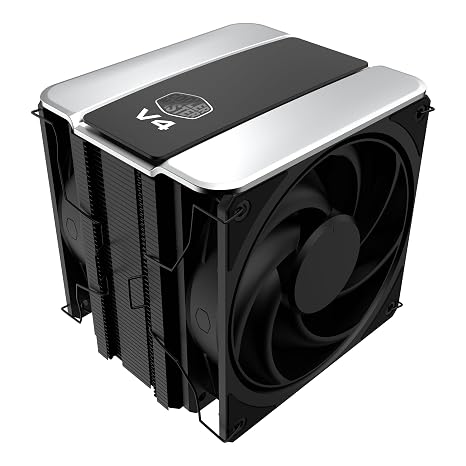
People running powerful CPUs like Threadripper processors will appreciate this cooler’s ability to keep temperatures down. It’s designed for users who want effective cooling without excessive noise.
Its standout feature is the patented 3DHP heat pipes, which deliver cooler operation than most standard air coolers.
Setting up the unit is straightforward with broad compatibility across major CPU sockets, so it fits well in various builds. The Mobius 120mm fans work in push-pull mode, creating strong airflow to manage heat during heavy workloads. Quiet operation is notable, as the design reduces noise compared to similar coolers, making it suitable for day-to-day computing without becoming a distraction.
Performance-wise, the cooler handles heat from demanding CPUs reliably. The 3DHP heat pipes contribute to about 30% better cooling than usual designs, and the fan speed maxes out at 2050 rpm to manage temperature spikes.
The main compliment from reviews praises how quiet it runs, while the most frequent criticism concerns fitting in smaller cases due to size. The build quality feels solid with a minimalist design that fits most setups.
The most praised aspect is how quiet it runs compared to other coolers with similar cooling power. A common drawback is the physical size, which limits installation options in compact PC cases. Strong cooling performance comes at the cost of needing enough space inside the chassis.
Those with roomy cases and high-performance CPUs will find it a solid choice. Users with very small cases or who need ultra-compact coolers might want to look elsewhere for a better fit. It offers a reliable balance of quiet operation and effective heat management in supported setups.
Pros
- 30% better cooling with patented 3DHP heat pipes
- Quieter operation reduces noise by over twice
- Pre-installed push-pull fans improve airflow
- Wide compatibility with various CPU sockets
Cons
- Larger size might challenge smaller case fits
- Fan speed can be loud near maximum RPM
| Specification | Details |
|---|---|
| Power Connector Type | 4-Pin |
| Voltage | 12 volts |
| Cooling Method | Fan |
| Noise Level | 2.05 db |
| Maximum Rotational Speed | 2050 rpm |
11. Noctua NL-LC1-36 360mm AIO CPU Cooler

Designed for high-performance builds, the Noctua NL-LC1-36 360mm AIO cooler stands out by combining a large radiator with quiet operation, making it ideal for Threadripper systems that need serious heat management without excessive noise.
Installation involves fitting a 360mm radiator and connecting three 120mm Noctua NF-A12x25 G2 fans, known for quiet efficiency. The pump uses a multilayer soundproofing method and a tuned-mass damper effect, which keeps vibration and noise low during daily use. Running at 12 volts and controlled through a 4-Pin PWM connector, it offers precise fan speed adjustments to balance cooling and acoustics.
The cooler offers strong thermal performance thanks to the Asetek Emma V2 liquid cooling platform paired with its large radiator. Build quality is premium, with attention paid to noise reduction, although some users note the large radiator size may require ample case space.
Noise level stayed around 22.5 db, excellent for quiet setups, while pump reliability is frequently praised.
Strongest praise centers on the quiet pump operation and solid cooling efficiency for heavy Threadripper workloads. Common complaint involves the radiator’s large size which can limit compatibility with smaller cases.
Those building spacious, noise-conscious systems will appreciate this cooler. It is less suited for compact cases or setups where power consumption is critical.
Pros
- Quiet pump with advanced noise absorber design
- High airflow fans with speed-offset for acoustic optimization
- Large 360mm radiator for effective heat dissipation
- Reliable Asetek Emma V2 closed-loop platform
Cons
- Radiator size requires spacious case compatibility
- Wattage usage at 1.8 watts may add minor power draw
| Specification | Details |
|---|---|
| Cooling Method | Water |
| Radiator Size | 360mm |
| Fan Size | 120mm |
| Noise Level | 22.5 db |
| Maximum Rotational Speed | 1800 rpm |
| Power Connector Type | 4-Pin |
12. Noctua NL-LC1-42 420mm AIO CPU Cooler

Noctua NL-LC1-42 420mm AIO CPU Cooler handles heavy Threadripper processors with serious cooling power. It suits users looking for quiet yet effective liquid cooling, especially those building high-performance gaming or workstation rigs where noise control and thermal management are crucial.
Installation requires some care due to the large 420mm radiator, which demands adequate case space. Connecting the pump’s 4-pin power and managing the three NF-A14x25 G2 PWM 140mm fans is straightforward, aided by their low noise design.
Daily operation is near-silent thanks to the innovative pump noise absorber and fan speed offset, keeping vibration and racket to a minimum in typical desktop settings.
Thermal performance ranks very high thanks to the premium Asetek Emma V2 platform and extra-large radiator design. Build quality feels solid, with attention to noise reduction standing out as the best feature.
A common gripe centers on the size, which might not fit every case or can make installation tricky. Nonetheless, it cools efficiently without driving noise levels too high.
Noise reduction stands out as the strongest praise, with the pump and fans running quietly even under load. On the upside, the notable complaint is the cooler’s size, which limits compatibility with smaller cases and may complicate installation without patience and space.
Enthusiasts with spacious cases and a focus on quiet performance will appreciate this cooler. Those with limited case space or seeking simpler installation might want to consider smaller or different cooling options better suited for compact builds.
Pros
- Quiet pump with 3-layer noise absorber
- Large 420mm radiator for effective cooling
- Three 140mm PWM fans with speed-offset
- Low noise level at 24.8 db
Cons
- Requires large case for radiator fit
- Installation can be complex due to size
| Specification | Details |
|---|---|
| Power Connector Type | 4-Pin |
| Voltage | 12 volts |
| Wattage | 2.28 watts |
| Cooling Method | Water |
| Noise Level | 24.8 db |
| Maximum Rotational Speed | 1500 rpm |
Best Air Coolers for Threadripper Comparison Table
| Product | Cooling Method | Noise Level | Air Flow Capacity | Maximum Rotational Speed |
|---|---|---|---|---|
| ID-COOLING A8-SP3 | Air | 34.9 db | 75.74 cfm | 2100 rpm |
| ARCTIC Freezer 4U-M | Air | – | – | – |
| Noctua NH-D9 TR5-SP6 | Air | 30.6 db | – | 2500 rpm |
| Silverstone XE360-TR5 | Water | 46 db | 87.72 cfm | 2800 rpm |
| Dynatron A50 SP3 | Air | – | – | – |
| Thermalright Peerless Assassin 120 SE | Air | 25.6 db | 66.17 cfm | 1550 rpm |
| Cooler Master Wraith Ripper | Air | – | – | – |
| Silverstone Hailstone 360 | Fan | – | – | – |
| Thermaltake WAIR Single Tower | Fan | – | 83.4 cfm | 1500 rpm |
| Cooler Master V4 Alpha | Fan | 2.05 db | – | 2050 rpm |
| Noctua NL-LC1-36 AIO | Water | 22.5 db | 107.3 m³/h | 1800 rpm |
| Noctua NL-LC1-42 AIO | Water | 24.8 db | 155.6 m³/h | 1500 rpm |
- Cooling MethodAir
- Noise Level34.9 db
- Air Flow Capacity75.74 cfm
- Maximum Rotational Speed2100 rpm
- Cooling MethodAir
- Noise Level–
- Air Flow Capacity–
- Maximum Rotational Speed–
- Cooling MethodAir
- Noise Level30.6 db
- Air Flow Capacity–
- Maximum Rotational Speed2500 rpm
- Cooling MethodWater
- Noise Level46 db
- Air Flow Capacity87.72 cfm
- Maximum Rotational Speed2800 rpm
- Cooling MethodAir
- Noise Level–
- Air Flow Capacity–
- Maximum Rotational Speed–
- Cooling MethodAir
- Noise Level25.6 db
- Air Flow Capacity66.17 cfm
- Maximum Rotational Speed1550 rpm
- Cooling MethodAir
- Noise Level–
- Air Flow Capacity–
- Maximum Rotational Speed–
- Cooling MethodFan
- Noise Level–
- Air Flow Capacity–
- Maximum Rotational Speed–
- Cooling MethodFan
- Noise Level–
- Air Flow Capacity83.4 cfm
- Maximum Rotational Speed1500 rpm
- Cooling MethodFan
- Noise Level2.05 db
- Air Flow Capacity–
- Maximum Rotational Speed2050 rpm
- Cooling MethodWater
- Noise Level22.5 db
- Air Flow Capacity107.3 m³/h
- Maximum Rotational Speed1800 rpm
- Cooling MethodWater
- Noise Level24.8 db
- Air Flow Capacity155.6 m³/h
- Maximum Rotational Speed1500 rpm
How to Choose the Right Air Cooler
Choosing the right air cooler for a Threadripper involves considering factors like cooling capacity, compatibility with the socket, and noise levels. Selecting a properly sized and efficient cooler prevents overheating and ensures stable performance, ultimately saving money on repairs and avoiding system instability.
Socket Compatibility and Mounting
Threadripper CPUs come with a large TR4 or sTRX4 socket, which is noticeably bigger than typical mainstream sockets. Many coolers that don’t specifically support this size can fail to make proper contact, leading to poor heat transfer and unstable mounting. The weight of these coolers can cause stress on the mounting system, which might loosen over time if the fit isn’t secure.
Choosing a cooler designed for the large socket size ensures a tight, stable fit that distributes pressure evenly across the CPU surface. Some models offer aftermarket mounting kits that improve contact and pressure, critical for consistent cooling performance. A reliable mounting system with broad backplates and strong retention mechanisms reduces the risk of damage or shifting during transport or heavy use.
Cooling Performance and Tdp Rating
Threadrippers generate heat beyond the capacity of many standard coolers due to their high core count and thermal design power (TDP) often exceeding 250W. Without a cooler rated for these high values, temperatures can spike quickly, triggering thermal throttling or crashes during intensive tasks.
Effective dissipation relies on a combination of ample heat pipe coverage and a large heatsink surface. Coolers with multiple thick heat pipes and densely packed fins help spread and dissipate heat faster.
Fans should provide both high airflow (measured in CFM) and good static pressure to push air through the dense fin arrays effectively.
Physical Size and Clearance
The physical dimensions of the cooler heavily influence installation and compatibility with other components inside the case. Taller coolers may not fit under the side panel or might block tall RAM modules.
Width and depth are just as important when the cooler can impinge on the GPU or motherboard VRMs.
Weight plays a role beyond just installation; heavy coolers can strain the motherboard and socket, especially if the PC is moved often. Users should look for clear manufacturer specifications on height (often around 160–170mm) and consider the surrounding space to avoid tight fits. Fans need to be sized accordingly to ensure clearance without crowding motherboard components.
Noise Levels
High-performance cooling often comes with increased noise, which can be distracting during quiet tasks or media consumption. A cooler that manages airflow efficiently while controlling fan speed helps keep noise levels within a reasonable range.
Constant high-speed fans without any control can become irritating over time.
Coolers featuring PWM support allow the fan speed to adjust based on temperature, running quietly at idle and ramping up under load only as needed. Quality fan bearings reduce mechanical noise, and vibration dampening mounts prevent resonance from amplifying the sound inside the case.
Build Quality and Materials
Material quality directly affects heat transfer and long-term durability. Copper heat pipes are preferred for their superior thermal conductivity, while nickel plating on base plates prevents corrosion and maintains smooth contact surfaces.
Cheaper materials can degrade or warp, reducing cooling efficiency over time.
A solid build resists warping and unnecessary flexing, which could cause uneven pressure on the CPU. Design that permits easy access for cleaning without requiring full disassembly helps prevent dust accumulation, maintaining thermal performance without complicated maintenance.
Optimizing Air Cooler Performance for Threadripper Workloads
Threadripper processors generate a significant amount of heat under heavy workloads, making the choice and setup of an air cooler crucial. The cooling effectiveness largely depends on proper thermal paste application and ensuring full contact between the cooler’s base and the CPU heat spreader.
A high-quality thermal paste with good thermal conductivity reduces the risk of hotspots.
Key factors to improve air cooler performance:
- Use a well-ventilated case with good airflow directed towards and away from the cooler.
- Choose an air cooler with a larger surface area and multiple heat pipes to dissipate heat effectively.
- Orient the cooler so the fan pushes air towards the case exhaust, minimizing heat recycling within the chassis.
- Regularly clean dust from the fins and fan blades, as buildup can quickly reduce efficiency.
These steps contribute to maintaining lower temperatures during demanding Threadripper tasks.
Common Installation Mistakes to Avoid with Threadripper Air Coolers
Incorrect installation of air coolers on Threadripper CPUs can lead to poor heat transfer and elevated temperatures. A common error is uneven mounting pressure, which can cause gaps between the cooler base and processor surface. This reduces contact area and thermal dissipation.
The large size of Threadripper chips requires a compatible mounting bracket, using one meant for smaller sockets will result in instability. Tightening screws too loosely or unevenly can lead to wobble or poor contact.
Applying too much thermal paste or too little can both be problematic. Excess paste can act as an insulator, while too little leaves gaps for air pockets, lowering conductivity.
Ensure the orientation of the cooler and fan is suitable for your case airflow path, and double-check that the fan connector is secured to the appropriate motherboard header for speed control.
Comparing Air Cooling and Liquid Cooling Solutions for Threadripper CPUs
Air cooling remains a practical choice for Threadripper CPUs that balance performance, noise, and maintenance. Most high-quality air coolers feature durable heat pipe designs that offer enough cooling for many users without the added complexity of liquid systems.
Liquid cooling solutions generally achieve lower temperatures under extreme load due to better heat transfer via the coolant but introduce additional failure points like pump or radiator issues. Maintenance includes checking for leaks and cleaning radiators, which may deter some users.
Air coolers tend to be simpler to install and maintain, requiring no additional components beyond the heatsink and fan, whereas liquid cooling solutions occupy more space and require compatibility with case mounting positions for the radiator.
Considering cooling needs against noise tolerance, budget, and case compatibility will help determine whether an air cooler or liquid cooling is the better fit for Threadripper builds.
People Also Asked
How Do I Install an Air Cooler on a Threadripper CPU?
Installation requires aligning the cooler’s mounting bracket with the Threadripper socket and securing it firmly but not too tightly. It’s important to apply thermal paste evenly and connect the fan headers correctly to the motherboard to ensure proper cooling and fan control.
What Size Air Cooler Fits Threadripper Sockets Properly?
Large air coolers with wide bases of about 120mm or more fit Threadripper sockets better due to the CPU’s larger size. Checking the cooler’s compatibility with the TR4 or sTRX4 socket prevents mounting issues and ensures optimal contact.
Is It Safe to Use an Air Cooler with Threadripper Processors?
Using an air cooler on a Threadripper is safe as long as the cooler supports the socket and has adequate heat dissipation capacity. Heavy workloads might require larger coolers or additional case ventilation to keep temperatures stable.
How Long Does an Air Cooler Usually Last on a Threadripper?
An air cooler typically lasts several years on a Threadripper if cleaned regularly and the fans maintain good airflow. Dust buildup can reduce efficiency over time, so periodic maintenance extends its effective life.
What Are Common Problems with Air Coolers on Threadripper CPUs?
Common problems include cooler mounting difficulties, insufficient contact causing high temperatures, and fan noise under load. Double-checking installation and using a cooler designed specifically for Threadripper sockets helps avoid these issues.
Conclusion
Choosing an air cooler for a Threadripper means focusing on compatibility with the large CPU size, strong cooling capacity to handle high heat output, and fitting within your case’s available space. Noise levels and reliability under extended heavy use are also important factors to consider. These details help ensure the cooler can maintain performance without causing other issues.
Make sure to consider your case dimensions and budget to find a cooler that fits both physically and financially. Think about how often you will be running demanding tasks that generate heat.
Reviewing the comparison table and the detailed picks above will help you find the right balance between cooling power, size, and price.

I’m Grant Mitchell, a firearms and hunting writer with years of experience at the range and in the field. I write about rifles, shotguns, handguns, optics, safe storage, cleaning, and responsible ownership, along with practical hunting tips. My goal is to share accurate, safety-first information that helps you choose the right firearm, maintain it properly, and become a more confident shooter.