Top 12 Best AIO Cooler RGB You Can’t Miss Today!
Nothing ruins a gaming session like an overheating CPU, especially with a cheap or poorly chosen liquid cooler that leaks or fails to keep temperatures down. The best aio cooler rgb not only controls heat effectively but also brings a subtle flair to the build with customizable lighting. Cooling performance and visual appeal should balance without sacrificing reliability or noise levels.
A good aio cooler rgb usually depends on the radiator size, pump quality, and fan design. Radiators come in 120mm to 360mm sizes, with larger ones offering better heat dissipation but requiring enough case space. Pumps that maintain steady flow rates around 250-300 liters per hour reduce vibration and noise.
High static pressure fans rated around 2-3 mmH2O are necessary for pushing air through radiator fins efficiently. Easy cleaning means accessible tubing and dust filters help maintain cooling performance over time.
Need a Quick Check?
| Image | Product | Price |
|---|---|---|
Our Top Picks 1  | ARCTIC Liquid Freezer III Pro | Check Price |
Our Top Picks 2  | CoolerMaster MasterLiquid ML240L V2 | Check Price |
Our Top Picks 3  | ASUS ROG Ryuo IV 360mm | Check Price |
Our Selected Top 12 Aio Cooler Rgb for Every Budget
This list features a variety of RGB all-in-one coolers designed for different budgets and performance needs. Each product is reviewed based on its cooling efficiency, lighting effects, and suitability for various users, highlighting both strengths and potential drawbacks to help you make an informed choice.
1. ARCTIC Liquid Freezer III Pro 360 A-RGB
People looking for a powerful and quiet AIO cooler with vibrant lighting will appreciate the ARCTIC Liquid Freezer III Pro 360 A-RGB. It fits well in high-performance gaming and workstation builds.
Its biggest strength lies in strong cooling performance combined with an integrated VRM fan to keep voltage converters cool.
Setting it up involves dealing with a slightly offset cold plate that targets the CPU hotspot for better heat transfer. The mounting design supports both Intel and AMD sockets without extra tweaks. Running day-to-day, the P12 PRO fan runs quietly at low speeds but can ramp up to 3000 rpm when needed, balancing noise and cooling.
The 4-pin power connector makes it easy to connect, and the PWM control lets it adjust fan speeds dynamically.
Cooler performance stays consistent under heavy loads thanks to efficient heat distribution and the extra VRM fan. The build feels solid, especially with ARCTIC’s contact frame optimized for Intel sockets like LGA1851 and LGA1700.
Most users praise how quiet it remains even at high speeds. On the downside, the larger 360mm radiator might not fit every case, which is a common complaint.
The strong cooling and quiet operation during regular use stand out, especially with the built-in VRM fan that provides extra temperature control. Some users find fitting this larger radiator challenging in certain PC cases, limiting where it can be installed comfortably.
Enthusiasts and gamers prioritizing low CPU and VRM temperatures will like this cooler. Builders with compact cases or strict noise limits might want to explore smaller models or alternatives with lower maximum fan speeds to avoid potential fit or noise issues.
Pros
- Powerful, quiet P12 PRO fan with high maximum speed
- Integrated VRM fan reduces voltage converter temperatures
- Optimized contact frame improves CPU heat dissipation
- Supports latest Intel and AMD sockets natively
Cons
- Large 360mm radiator may not fit all cases
- Relatively high fan speed can increase noise under load
| Specification | Details |
|---|---|
| Power Connector Type | 4-Pin |
| Voltage | 12 volts |
| Wattage | 3.96 watts |
| Maximum Rotational Speed | 3000 rpm |
| Air Flow Capacity | 77 cfm |
| Cooling Method | Liquid |
2. CoolerMaster MasterLiquid ML240L RGB V2
CoolerMaster MasterLiquid ML240L RGB V2 stands out with its 3rd Generation Dual Chamber Pump, designed to keep your system cool and quiet. Suited for gamers and PC builders who want solid cooling performance combined with customizable RGB lighting, it balances effective heat management with visual flair.
Installation is straightforward, fitting a wide range of AMD and Intel sockets including LGA1700. The revamped SickleFlow fans bring reduced noise at only 30 dB while still providing strong airflow at 62 CFM. The RGB lighting can be fully customized to match your build’s theme, and the industrial-grade EPDM seal helps prevent leaks, making daily maintenance less stressful.
Cooling is dependable with a rated 260-watt capacity, and the dual chamber pump improves heat dissipation to keep your system stable. The refreshed fan blades keep noise to a minimum while maintaining airflow.
Many appreciate its solid build and quiet operation, though some note the maximum fan speed of 1800 RPM may not suit extreme overclocking setups.
The strongest praise focuses on quiet performance paired with great cooling efficiency, thanks to the dual chamber pump and optimized fan design. The most common issue revolves around the limited maximum fan speed, which may not suit users pushing their CPU to the max. It handles everyday and gaming loads with ease.
This cooler will satisfy users who value quiet operation and customizable lighting for a mid-range to high-end build. Those seeking extreme overclocking or more aggressive cooling might consider other options with higher fan speed capabilities and larger radiators.
Pros
- Quiet fan operation at 30 dB
- Wide CPU socket compatibility
- Customizable RGB lighting
- Durable anti-leak EPDM seal
Cons
- Maximum fan speed may limit extreme overclocking
- Installation can be tight in smaller cases
| Specification | Details |
|---|---|
| Power Connector Type | 4-Pin |
| Voltage | 12 volts |
| Wattage | 260 watts |
| Noise Level | 30 db |
| Maximum Rotational Speed | 1800 rpm |
| Air Flow Capacity | 62 cfm |
3. ASUS ROG Ryuo IV ARGB 360mm
ASUS ROG Ryuo IV ARGB 360mm stands out for those wanting powerful cooling paired with unique visual customization. Suited for desktop builders who want a high-performance cooler and an eye-catching display on their CPU block.
Its single biggest strength is the movable 6.67-inch AMOLED display, which shows 3D-effect videos or custom system info.
Setting it up can be straightforward thanks to the Precision Mount System that ensures even pressure on the CPU, helping with both installation and long-term reliability. The pre-applied thermal paste and the pump design mainly target CPUs under heavy workloads, keeping temps low.
Fans come pre-installed and daisy-chained, so cable management is simpler with a single 4-pin power connection rather than managing several individual cables.
Cooling performance is consistent and effective, aided by a pump that runs at a speed designed for heavy CPU demands and fans that push 56.66 cfm of airflow at up to 2000 rpm. The build quality feels solid, especially the secure mounting and pump design. Praised for its advanced thermal performance and the cool AMOLED display that doubles as a system monitor.
Common complaints mention the complexity of setting up the display features and some noise during high RPM fan operation.
The pump and thermal paste deliver advanced cooling that holds up under sustained heavy workloads. Users appreciate the unique AMOLED screen for both aesthetics and monitoring, but many find the screen’s setup and customization somewhat tricky. Fans deliver great airflow but produce noticeable noise at top speeds.
Gamers or PC enthusiasts seeking powerful cooling and visual customization will enjoy this model. Those who prefer quieter operation or simpler installation might look for coolers with fewer customization features and lower noise levels.
Pros
- Movable 6.67-inch AMOLED display for custom visuals
- Strong, stable airflow with daisy-chained fans
- Uniform contact pressure for reliable CPU cooling
- Pre-applied thermal paste saves setup time
Cons
- AMOLED display setup can be complicated
- Fans can be noisy at maximum speed
| Specification | Details |
|---|---|
| Cooling Method | Fan |
| Power Connector Type | 4-Pin |
| Maximum Rotational Speed | 2000 rpm |
| Air Flow Capacity | 56.66 cfm |
| Compatible Devices | Desktop, Laptop |
4. CORSAIR Titan 360 RX LCD Liquid CPU Cooler

Cooling your PC while adding a splash of custom visuals feels surprisingly satisfying here. Ideal for anyone wanting a powerful yet visually engaging liquid CPU cooler, it shines brightest with its integrated IPS LCD display. It turns routine temperature monitoring into a bit of fun, making it great for setups where looks matter as much as cooling.
Setting up the cooler is straightforward thanks to the iCUE LINK technology, which lets you easily connect everything through one hub and port. Day-to-day use benefits from quiet operation at 36 db, keeping fan noise low even during demanding tasks.
The IPS LCD display stays bright and clear, showing anything from temperatures to personal images, which adds a nice personalized touch to the rig.
The performance is solid, moving 73.5 cfm of air and keeping CPU temps low without making much noise. The construction feels solid with quality materials, ensuring durability. The standout feature remains the vibrant IPS display, while some users note that the 2100 rpm max fan speed can feel a bit limited for extremely high heat scenarios.
The standout feature praised is definitely the bright, high-res LCD that shows real-time temps and custom images, making monitoring more interactive. Complaints mostly revolve around fan speed limits, which might not suit users pushing extreme overclocking or heavy loads.
Anyone looking for a silent, smart, and visually striking liquid cooler will appreciate this model. It fits well for mid to high-end gaming rigs or workstations but may leave hardcore overclockers searching for a faster fan option elsewhere.
Pros
- Customizable 2.1” IPS LCD display
- Quiet operation at 36 db
- iCUE LINK simplifies cable management
- High color range with 16.7 million colors
Cons
- 2100 rpm max fan speed may limit extreme cooling
- LCD setup can feel complex initially
| Specification | Details |
|---|---|
| Power Connector Type | 4-Pin |
| Voltage | 12 volts |
| Cooling Method | Water |
| Noise Level | 36 db |
| Maximum Rotational Speed | 2100 rpm |
| Air Flow Capacity | 73.5 cfm |
5. ARCTIC Liquid Freezer III Pro 240 A-RGB
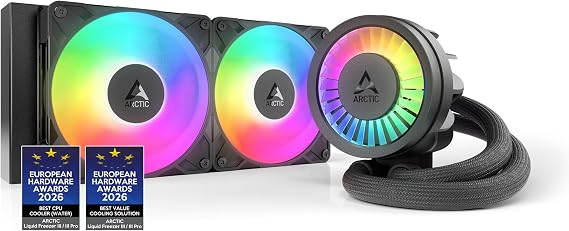
Powerful cooling and smart design make ARCTIC Liquid Freezer III Pro 240 A-RGB a solid choice for anyone wanting efficient CPU cooling and quieter operation. Suits both AMD and Intel setups, especially where keeping VRM temps in check is important.
Installation is straightforward with native offset mounting for Intel and AMD sockets, aligning the cold plate precisely with the CPU hotspot. The optimized contact frame helps distribute pressure evenly, which adds confidence in long-term CPU care. The A-RGB adds a subtle touch of lighting without going overboard, and the integrated VRM fan quietly keeps voltage regulators cool during heavy loads.
Cooling performance is strong, aided by the ARCTIC P12 PRO fans that deliver more airflow quietly, especially at low speeds. Its build quality feels sturdy and thoughtfully engineered to prolong CPU life. Common praise centers on its quieter operation compared to previous P12 models, while the main gripe is the somewhat limited maximum rotational speed listed, which could impact extreme overclocking scenarios.
Quiet and effective cooling stands out, thanks to the powerful ARCTIC P12 PRO fans and optimized pressure distribution. The integrated VRM fan helps maintain stable system performance by targeting voltage converter temperatures. The main issue noted is the surprisingly low maximum rotational speed, which some may find limiting for extreme performance setups.
Great for anyone who wants reliable, quiet cooling with a focus on CPU and VRM temperature control. Users seeking very high fan speeds or intense RGB customization might want to explore other models better suited for those priorities.
Pros
- Quiet operation with powerful airflow
- Improved contact pressure for better heat dissipation
- Integrated VRM fan for stable voltage converter temps
- Works on latest Intel and AMD sockets
Cons
- Maximum rotational speed listed as only 1 rpm
- RGB lighting is modest, might not satisfy all enthusiasts
| Specification | Details |
|---|---|
| Power Connector Type | 4-Pin |
| Voltage | 12 volts |
| Wattage | 3.96 watts |
| Cooling Method | Water |
| Compatible Devices | AMD, Intel |
| Air Flow Capacity | 77 cfm |
6. ARCTIC Liquid Freezer III Pro 420 A-RGB

Aluminum and copper materials make for a sturdy and efficient cooling solution, designed to suit desktop builds focused on strong thermal management. Its optimized contact pressure for Intel sockets and a large 420mm radiator stand out for those seeking serious cooling power paired with customizable lighting.
Installation involves native offset mounting that aligns the cold plate with the CPU hotspot, making heat transfer more direct. The ARCTIC P14 PRO fans operate quietly even at lower speeds, with PWM control ensuring the integrated VRM fan keeps voltage converters cool. Day-to-day, the cooling runs efficiently without much noise, a nice balance between performance and silence.
Performance-wise, the cooler handles high loads well thanks to its high maximum fan speed and 110 cfm airflow capacity. The build feels solid, particularly with the unique contact frame for Intel LGA1851 and LGA1700 sockets enhancing longevity and heat dissipation.
Praise often points to its quiet operation, while some users mention the size can limit case compatibility.
Highly praised for its quiet operation and excellent cooling performance, it offers reliable temperature management for demanding CPUs. A frequent point of complaint is the large size, which can be a challenge fitting into smaller cases.
Those building high-performance setups and with roomy cases will appreciate it the most. Users with smaller cases or those sensitive to any fan noise spikes may want to consider alternatives.
Pros
- Optimized contact pressure for better heat dissipation
- Quiet fan operation even at higher speeds
- Integrated VRM fan improves overall system stability
- Large radiator size for serious cooling capacity
Cons
- Size may limit compatibility with some cases
- Higher maximum speed can lead to occasional noise spikes
| Specification | Details |
|---|---|
| Cooling Method | Water |
| Maximum Rotational Speed | 2500 rpm |
| Air Flow Capacity | 110 cfm |
| Noise Level | 1 sones |
| Power Connector Type | 4-Pin |
7. NZXT Kraken Elite 360 RGB

A large 2.72-inch IPS LCD on the NZXT Kraken Elite 360 RGB immediately catches the eye, making it ideal for those who want powerful cooling with standout visuals. Its custom Turbine pump targets even demanding CPUs, offering a noticeable 10% performance boost while keeping noise low.
Perfect for anyone who enjoys tweaking both performance and style in their desktop setup.
Setting up the cooler involves dealing with an 8-pin power connector and a water cooling system designed for desktops. The pump’s high flow rate and strong head pressure keep temps down without much racket, running at a maximum speed of 2400 rpm but staying quiet around 30 dB.
Personalization shines through the LCD, which supports GIFs, images, and sync options with Google Photos or Spotify, easily matching other RGB gear.
Performance stands out for its efficient cooling and quiet operation that many appreciate during heavy loads. It’s built solidly, supporting the demands of high-end CPUs with airflow hitting nearly 79 cfm.
Users note the display quality as a key hit, though a common downside mentioned is the complexity of setup for less-experienced builders. The pump’s wattage is moderate at 28.44 watts, balancing power and efficiency well.
The cooler’s standout feature is its large, vibrant LCD display paired with quiet, effective CPU cooling achieved through a custom Turbine pump. While it handles demanding processors well, setting it up is often mentioned as a challenge, especially for those new to custom water cooling solutions.
People who want a balance of strong cooling and customizable aesthetics will find this a solid choice. Those seeking simpler installation or less complex setups might prefer a more straightforward cooler without advanced display features.
Pros
- Large crisp 2.72-inch IPS LCD display
- Efficient cooling with 10% performance boost
- Quiet operation at around 30 dB
- Syncs RGB with other devices easily
Cons
- Setup can be tricky for new builders
- Uses 8-Pin power connector exclusively
| Specification | Details |
|---|---|
| Power Connector Type | 8-Pin |
| Voltage | 12 volts |
| Wattage | 28.44 watts |
| Noise Level | 30 db |
| Maximum Rotational Speed | 2400 rpm |
| Air Flow Capacity | 78.86 cfm |
8. CORSAIR iCUE LINK TITAN II 360 RX LCD

Picking a cooler that combines strong cooling with a unique display makes the CORSAIR iCUE LINK TITAN II 360 RX LCD stand out. It’s ideal for someone who cares about keeping their CPU cool and wants to personalize their setup visually with a vibrant LCD screen that shows temps and even GIFs.
Setup is more straightforward than you’d expect thanks to the unified fan frame cutting down screws and cables. The 5” IPS LCD adds a functional flair, letting you watch temps or show custom images. The second-generation RX II fans run quietly, so your build doesn’t get noisy during long sessions.
Having temperature sensors built into the fans gives you real-time feedback right on the display or through software.
This cooler performs well thanks to water cooling paired with quiet RX fans using magnetic dome bearings and AirGuide technology for efficiency. Build quality feels solid and thoughtfully designed for easy installation.
Most appreciate the clear, customizable LCD screen. The main drawback from people’s experience is the noise level, which can reach 32.8 dB, a bit noticeable in very quiet rooms.
The most praised feature is the bright, sharp LCD display that shows CPU temps or personal images, adding a unique look while keeping an eye on performance. The main complaint lies in the noise, which can get a bit loud depending on your environment and fan speeds.
Anyone building a desktop who values aesthetics and real-time monitoring on a bright screen will find satisfaction here. Those prioritizing ultra-silent operation in completely quiet rooms might want to look at quieter options.
Pros
- Large customizable LCD with vivid colors
- Quiet operation with magnetic dome bearing fans
- Unified fan frame simplifies installation
- Real-time temperature sensor feedback
Cons
- Noise level can be noticeable in quiet environments
- Requires additional software for full customization
| Specification | Details |
|---|---|
| Cooling Method | Water |
| Compatible Devices | Desktop |
| Noise Level | 32.8 db |
| Screen Size | 5″ IPS LCD |
| Screen Resolution | 720×1280 |
| Screen Brightness | 500 cd/m2 |
9. NZXT Kraken Plus 240 RGB

Keeping a CPU cool during intense gaming or heavy multitasking matters a lot, and the NZXT Kraken Plus 240 RGB suits well for those who want strong cooling paired with standout visuals. Its custom LCD screen is the biggest strength, showing system stats and more right on the pump.
Setting it up is straightforward, thanks to having just four screws and one cable which means cleaner wiring and fewer headaches during installation. Daily use benefits from the NZXT Turbine pump, which balances quiet operation with good cooling performance, while the RGB Core fan adds bright, colorful airflow.
The NZXT CAM software lets you tweak the LCD display with images and system info easily.
Performance keeps CPUs cool under heavy loads with good water cooling efficiency and a noise level of 31.9 dB, which many find acceptable during demanding tasks. The build is solid, fitting recent AMD and Intel sockets including AM5 and LGA 1851.
Strong praise comes for the pump’s low noise and smooth installation. Some users note the 2800 rpm fan speed can get loud when pushed.
The custom LCD screen draws positive attention for showing real-time temps and personal content, while some find fan noise noticeable when spinning at 2800 rpm. The system generally keeps CPUs running cool without much fuss.
Those who want a visually unique cooler with solid performance and easy setup will appreciate this unit. Users who prioritize absolute silence under maximum load might look for quieter or larger-radius fan solutions instead.
Pros
- Customizable 1.54″ LCD screen on pump
- Quiet NZXT Turbine water cooling pump
- Simple installation with only one cable
- Supports newest AMD and Intel sockets
Cons
- Fan can get loud at maximum speed
- Limited wattage at 12 watts for extreme overclocking
| Specification | Details |
|---|---|
| Power Connector Type | 4-Pin |
| Voltage | 12 volts_of_direct_current |
| Wattage | 12 watts |
| Cooling Method | Water |
| Compatible Devices | Supports latest AMD AM5 and Intel LGA 1851 sockets |
| Noise Level | 31.9 db |
10. CORSAIR NAUTILUS 360 RS ARGB

Quiet operation at just 20 dBA is the standout feature for anyone looking to keep their PC cool without noise distractions. Perfect for desktop users who want a powerful AIO cooler with eye-catching ARGB lighting and strong airflow performance.
Setting up the cooler is straightforward thanks to the convex cold plate that matches the CPU’s heat spreader and pre-applied thermal paste, speeding installation. The RS120 ARGB fans connect easily to compatible motherboards, allowing you to manage lighting effects.
The pump keeps coolant flowing efficiently while maintaining quiet operation during daily use.
Cooling performance remains solid with good airflow and high static pressure, keeping CPU temperatures well controlled. The build quality is reliable, with careful engineering focused on low noise and efficient cooling.
Reviews often praise how quiet it runs, but some mention the 36 dB noise level can be noticeable under heavy load.
The quiet pump and efficient coolant circulation are praised the most, keeping noise low during normal operation. The most common complaint is the noise rising to 36 dB when the system works hard, which may be noticeable in very quiet environments.
People who want effective cooling with subtle lighting will enjoy it. Those looking for the absolute lowest noise or non-ARGB fans might want to consider alternatives.
Pros
- Quiet pump running at only 20 dBA
- Pre-applied thermal paste speeds installation
- ARGB fans offer customizable lighting
- Strong airflow with high static pressure
Cons
- Noise level can reach 36 dB under load
- ARGB controls require compatible motherboard
| Specification | Details |
|---|---|
| Power Connector Type | 4-Pin |
| Voltage | 12 volts_of_direct_current |
| Wattage | 16 watts |
| Cooling Method | Water |
| Compatible Devices | Desktop |
| Noise Level | 36 db |
11. NZXT Kraken Core 240 RGB

Gamers and multitaskers looking for quiet cooling with a cool visual touch will appreciate the NZXT Kraken Core 240 RGB. Its strongest point lies in combining powerful cooling capability with RGB lighting in an easy-to-install design.
Setup is straightforward since it connects directly to the motherboard, cutting down on extra cables and clutter. The single-frame design holds both fans firmly in place, making installation smoother and builds tidier.
Fan speeds can be adjusted precisely through PWM control, so you can dial noise and cooling performance to match your daily needs.
It keeps CPUs cool under load with its 3,100 RPM pump and optimized fan blades that push air efficiently through the radiator. The quiet operation at just under 32 dB helps maintain a calm environment. Users often praise its cooling power and low noise, while some note the lighting control lacks extensive customization options.
The strongest praise centers on the cooler’s quiet but powerful performance during heavy gaming and multitasking, thanks to its efficient pump and optimized fans. The most frequent complaint points to the limited customization of the RGB lighting despite having visually appealing fans.
People wanting strong cooling and minimal noise in a straightforward build will be pleased with this cooler. Those who want extensive RGB customization or lack a compatible motherboard header might look for a different option.
Pros
- Quiet operation under heavy load
- Clean cable management well thought out
- Precise fan speed control with PWM
- RGB fans integrated in single frame
Cons
- RGB lighting control options limited
- Requires 4-pin motherboard header
| Specification | Details |
|---|---|
| Maximum Rotational Speed | 3100 rpm |
| Noise Level | 31.9 db |
| Power Connector Type | 4-Pin |
| Voltage | 5 volts_of_direct_current |
| Cooling Method | Water |
| Air Flow Capacity | 75.05 cfm |
12. Lian Li Hydroshift II 360 CL-Liquid

Lian Li Hydroshift II 360 CL-Liquid stands out with its unique 2.1” round IPS LCD display offering three control modes. Ideal for desktop users looking for full customization and smooth wireless fan control, it combines cooling power with a highly visual and interactive setup experience.
Setting up involves connecting via USB and fans pre-installed for convenience. Adjusting the PWM port speed in BIOS may be necessary to ensure proper USB detection.
Three control modes allow quick offline changes, remote operation wirelessly, or in-depth streaming customization for personal preferences. Noise stays low around 30 dB, making it quiet enough for daily use without distractions.
Performance is solid, as water cooling keeps CPU temperatures well-managed. The build quality feels reliable, with fans reaching up to 2200 rpm for efficient heat dissipation. The display is praised for its clarity and usability, but some people experience occasional USB detection issues related to motherboard PWM settings.
The clear, bright 2.1” IPS LCD display receives frequent praise for easy customization and monitoring. Common issues revolve around USB detection problems caused by default motherboard PWM port settings, requiring manual adjustments in BIOS for proper function.
This cooler suits users wanting both aesthetic customization and reliable CPU cooling without overwhelming noise. Gamers or PC builders needing ultra-high cooling performance might prefer other options with faster fan speeds or simpler plug-and-play setups.
Pros
- 3 control modes with LCD for versatile adjustments
- Quiet operation at 30 dB noise level
- Pre-installed wireless fans simplify setup
- High-resolution 480×480 display for clear visuals
Cons
- USB detection may require BIOS PWM port tweaks
- Fans max out at 2200 rpm, limiting extreme cooling
| Specification | Details |
|---|---|
| Cooling Method | Water |
| Power Connector Type | 3-Pin |
| Maximum Rotational Speed | 2200 rpm |
| Noise Level | 30 db |
| Compatible Devices | Cpu, Desktop |
Best AIO Cooler RGB Comparison Table
| Product | Cooling Method | Maximum Rotational Speed | Air Flow Capacity | Noise Level |
|---|---|---|---|---|
| ARCTIC Liquid Freezer III Pro | Liquid | 3000 rpm | 77 cfm | – |
| CoolerMaster MasterLiquid ML240L V2 | Water | 1800 rpm | 62 cfm | 30 db |
| ASUS ROG Ryuo IV 360mm | Fan | 2000 rpm | 56.66 cfm | – |
| CORSAIR Titan 360 RX LCD | Water | 2100 rpm | 73.5 cfm | 36 db |
| ARCTIC Liquid Freezer III Pro | Water | 1 rpm | 77 cfm | – |
| ARCTIC Liquid Freezer III Pro | Water | 2500 rpm | 110 cfm | 1 sones |
| NZXT Kraken Elite 360 | Water | 2400 rpm | 78.86 cfm | 30 db |
| CORSAIR iCUE LINK Titan II | Water | – | – | 32.8 db |
| NZXT Kraken Plus 240 | Water | 2800 rpm | – | 31.9 db |
| CORSAIR NAUTILUS 360 RS | Water | – | – | 36 db |
| NZXT Kraken Core 240 | Water | 3100 rpm | 75.05 cfm | 31.9 db |
| Lian Li Hydroshift II 360 | Water | 2200 rpm | – | 30 db |
- Cooling MethodLiquid
- Maximum Rotational Speed3000 rpm
- Air Flow Capacity77 cfm
- Noise Level–
- Cooling MethodWater
- Maximum Rotational Speed1800 rpm
- Air Flow Capacity62 cfm
- Noise Level30 db
- Cooling MethodFan
- Maximum Rotational Speed2000 rpm
- Air Flow Capacity56.66 cfm
- Noise Level–
- Cooling MethodWater
- Maximum Rotational Speed2100 rpm
- Air Flow Capacity73.5 cfm
- Noise Level36 db
- Cooling MethodWater
- Maximum Rotational Speed1 rpm
- Air Flow Capacity77 cfm
- Noise Level–
- Cooling MethodWater
- Maximum Rotational Speed2500 rpm
- Air Flow Capacity110 cfm
- Noise Level1 sones
- Cooling MethodWater
- Maximum Rotational Speed2400 rpm
- Air Flow Capacity78.86 cfm
- Noise Level30 db
- Cooling MethodWater
- Maximum Rotational Speed–
- Air Flow Capacity–
- Noise Level32.8 db
- Cooling MethodWater
- Maximum Rotational Speed2800 rpm
- Air Flow Capacity–
- Noise Level31.9 db
- Cooling MethodWater
- Maximum Rotational Speed–
- Air Flow Capacity–
- Noise Level36 db
- Cooling MethodWater
- Maximum Rotational Speed3100 rpm
- Air Flow Capacity75.05 cfm
- Noise Level31.9 db
- Cooling MethodWater
- Maximum Rotational Speed2200 rpm
- Air Flow Capacity–
- Noise Level30 db
How to Choose the Best AIO Cooler RGB
Choosing the right AIO cooler RGB involves considering cooling performance, compatibility with your CPU socket, and the quality of the lighting system. Prioritizing these factors ensures efficient cooling, prevents hardware issues, and avoids unnecessary replacements or upgrades later on.
Cooling Performance
Choosing the right radiator size makes a noticeable difference in cooling. A larger radiator, like 240mm or 360mm, provides more surface area to dissipate heat efficiently compared to smaller 120mm options.
Thickness matters as well; radiators around 30mm to 45mm thick tend to balance airflow and heat dissipation well. Pump speed and design influence how effectively coolant moves through the loop. A pump that runs too slow or has poor internal flow design can cause hotspots or inadequate cooling during heavy use.
Higher pump speeds usually translate to better flow but may raise noise levels.
Fans play a key role in moving air through the radiator fins. High-quality fans generate good airflow and static pressure to push air through tight radiator spacing.
Look for fans rated around 70 CFM with static pressure near or above 2.0 mmH2O for optimal cooling. Lower specs often result in warmer temps under load. In daily use, a well-matched combo of radiator size, pump design, and fan quality keeps CPU temps stable during gaming or rendering sessions.
Rgb Lighting Customization
Synchronization with motherboard lighting software simplifies customizing the lighting look. Many all-in-one coolers support major brands like ASUS Aura Sync, MSI Mystic Light, or Gigabyte RGB Fusion, allowing users to control all RGB components from one app. Fewer zones or limited effects mean less control over how the lighting reacts or flows across the cooler.
Devices with multiple independent lighting zones provide more dynamic displays, including effects like rainbow waves or static color options on the pump and fans. Ease of synchronization is practical, especially if the computer has RGB strips or RAM with lighting. Avoid models with proprietary controllers that don’t connect to common RGB software, as this can complicate lighting setup and require running multiple apps.
Compatibility and Fit
Support for a wide range of CPU sockets ensures that the cooler fits multiple platforms, whether Intel’s LGA1200 or AMD’s AM4. Some coolers cover newer sockets like LGA1700 as well. Radiator size has to match the PC case capabilities; cases may only support 240mm radiators at the top or front, while larger 360mm or 420mm units need full-tower or some mid-tower cases with enough clearance.
Space around the CPU socket can be tight due to tall RAM modules or VRM heatsinks on the motherboard. Low-profile RAM and slim radiator designs help prevent unwanted contact or clearance issues when mounting.
Checking the exact dimensions of the cooler and case beforehand avoids installation headaches. A cooler that fits well without forcing components apart is easier to maintain and yields better results.
Noise Levels
Fan noise changes depending on the speed set in BIOS or software. Fans running above 1500 RPM usually produce noticeable noise, especially if made of cheap materials or lacking proper bearings. Models with quality PWM fans can quietly operate at lower RPM during light workloads, increasing speed only under load.
Pump noise varies between models as well. Some pumps emit a consistent hum or slight vibration, sometimes audible near the CPU socket, while others run nearly silent. Good coolers offer fan speed control or silent modes, allowing the user to balance cooling with acceptable noise levels.
Overlooking this can lead to a noisy system that distracts during work or entertainment.
Build Quality and Durability
Radiators and pump housings made from corrosion-resistant materials like copper and nickel-plated surfaces last longer and resist wear better than cheaper aluminum alternatives. The quality of tubing and fittings is crucial to avoid leaks over time; thick, braided or reinforced tubing reduces the risk of cracks or kinks.
A longer warranty signals manufacturer confidence and provides safety if something goes wrong. Some brands offer up to 5 years of coverage and responsive customer support to handle issues.
A well-built product means fewer surprises, from installation to months of usage, without needing repairs or replacements.
Optimizing RGB Sync with Motherboard Lighting Software
Many AIO coolers with RGB come with software that allows synchronization with motherboard lighting. This integration lets users control lighting effects and colors from a single interface, reducing conflicts between different RGB utilities.
For proper syncing, check that your motherboard supports RGB headers compatible with the cooler, such as 3-pin ARGB or 4-pin RGB connectors. Connecting the cooler’s RGB cables to the correct motherboard header ensures synchronization functions correctly.
Key points to remember:
- Use the motherboard’s official RGB software like ASUS Aura Sync, MSI Mystic Light, or Gigabyte RGB Fusion.
- Keep the cooler’s firmware updated to avoid compatibility issues.
- Disable or uninstall conflicting RGB software to prevent control problems.
- Pay attention to cable orientation when plugging into headers; incorrect insertion can prevent lighting from working.
Taking these steps helps maintain consistent RGB lighting across your build without sudden flickering or unsynchronized effects.
Maintenance Tips to Prolong the Lifespan of Your AIO Cooler
Liquid cooling systems require regular maintenance to perform at their best. Dust buildup on radiator fins and fans reduces airflow and cooling efficiency. Use compressed air every few months to blow out dust from these components without disassembling the cooler.
Checking pump operation is important; if you notice unusual noises or higher temperatures, the pump may need attention.
Simple maintenance steps include:
- Cleaning radiator and fan surfaces gently but thoroughly.
- Ensuring mounting screws remain tight to maintain good contact with the CPU.
- Monitoring software for pump speed and coolant temperature.
- Replacing thermal paste during cooler installation or if temperatures rise unexpectedly.
Proper care extends the cooler’s lifespan and keeps your CPU running at optimal temperatures.
Common Installation Mistakes and How to Avoid Them
Installing an AIO cooler incorrectly often causes performance problems or hardware damage. Most installation issues stem from poor mounting pressure or air trapped inside the loop.
Applying thermal paste unevenly, using too much or too little, prevents effective heat transfer.
Avoid common mistakes by:
- Cleaning the CPU surface thoroughly before applying thermal paste.
- Using a small pea-sized amount of paste in the center of the CPU.
- Aligning the pump block squarely and securing it evenly with mounting screws.
- Running the pump and fans for a few minutes outside the case to circulate coolant and expel trapped air.
- Checking tube placements to avoid kinks that restrict coolant flow.
Following these steps ensures firm contact and cooler efficiency from the start.
People Also Asked
How Do I Install RGB on My AIO Cooler Properly?
Connect the RGB cables to your motherboard’s correct headers, usually labeled RGB or ARGB, and ensure the software for customization is installed. Double-check connections before powering on to avoid any short circuits or lighting issues.
What Size AIO Cooler RGB Fits My CPU Compatibility?
Choose an AIO cooler that supports your CPU socket type, such as Intel LGA 1200 or AMD AM4. Most manufacturers list compatibility in the product details, and the mountings should align perfectly without forcing the cooler in place.
Is It Safe to Run an AIO Cooler with RGB 24/7?
Running an AIO cooler with RGB lighting around the clock is generally safe, as the LEDs and pump are designed for continuous operation. Keep your system dust-free and monitor temperatures periodically to ensure the cooler functions properly.
How Long Do AIO Cooler RGB Systems Typically Last?
AIO coolers with RGB generally last between 3 to 5 years, depending on usage and maintenance. Replace the thermal paste when you notice temperatures rising, as this helps maintain cooling efficiency over time.
What Common Problems Occur with RGB AIO Coolers After Months?
Common issues include pump noise, fading or malfunctioning LEDs, and minor leaks around fittings after long use. Regularly check for any unusual sounds and inspect the radiator and tubing for signs of wear or blockage.
Conclusion
Cooling performance should be your top priority, followed by how well the RGB lighting fits your setup visually. Don’t overlook noise levels either, since loud fans can be distracting during use. Also, consider the size to ensure the cooler fits your case and motherboard without blocking other components.
Choose a cooler that suits your budget and the size of your PC case to avoid compatibility issues. Planning to run demanding applications or games regularly means investing in slightly better cooling can really pay off. Check the comparison table and detailed picks above to find an option that matches your needs and preferences closely.

I’m Grant Mitchell, a firearms and hunting writer with years of experience at the range and in the field. I write about rifles, shotguns, handguns, optics, safe storage, cleaning, and responsible ownership, along with practical hunting tips. My goal is to share accurate, safety-first information that helps you choose the right firearm, maintain it properly, and become a more confident shooter.