Top 12 Best Air CPU Cooler for Overclocking You Need Now
Overclocking a CPU pushes it beyond its normal speed, which generates a lot more heat than usual. A cheap or poorly chosen cooler can lead to high temperatures, causing the system to throttle or even shut down to prevent damage.
Finding the best air CPU cooler for overclocking means dealing with more effective heat dissipation, preventing these interruptions during heavy use.
The main factors that separate a good air cooler from a weak one include the quality of the heat pipes and the size of the heatsink. Heat pipes should be made of copper for faster heat transfer, and fins should have enough surface area to dissipate heat efficiently. A fan capable of moving at least 70 CFM and fitting securely without blocking other components is essential.
Easy access for cleaning dust buildup also helps maintain cooling performance over time.
Need a Quick Check?
| Image | Product | Price |
|---|---|---|
Our Top Picks 1  | Thermalright Peerless Assassin 120 SE | Check Price |
Our Top Picks 2 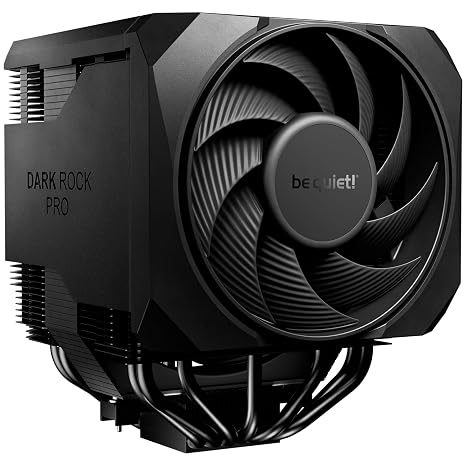 | be quiet! Dark Rock Pro | Check Price |
Our Top Picks 3  | Thermalright PS120SE ARGB | Check Price |
Our Selected Top 12 Air Cpu Cooler for Overclocking You Can Trust
This list features carefully chosen air CPU coolers designed for effective overclocking performance. Each review covers how well the cooler performs, the types of users it suits best, and highlights both its advantages and drawbacks to help you make an informed decision.
1. Thermalright Peerless Assassin 120 SE CPU Cooler
Recognized for its solid cooling power, the Thermalright Peerless Assassin 120 SE suits desktop users looking to overclock without resorting to liquid cooling. Its standout strength lies in managing high heat output up to 265 watts while maintaining a quiet profile, making it great for those who need reliable, strong air cooling.
Setup involves a standard 4-pin connection, providing straightforward compatibility with most desktops. The fan runs at a maximum of 1550 rpm, balancing airflow with noise, staying relatively quiet at 25.6 dB. Airflow capacity of 66.17 CFM keeps the cooling consistent, which you’ll notice during extended, heavier workloads.
Maintenance is simple thanks to its design, allowing easy dusting and cleaning without hassle.
Performance-wise, it handles intense CPU loads well, keeping temperatures in check during overclocking. The build quality reflects Thermalright’s two decades of experience, focusing on efficient air cooling components.
The fan speed and noise level are praised for being well-balanced, though a few users mention the mounting process could be fiddly depending on the case layout.
The cooler effectively manages heat under heavy loads and stays quieter than many air coolers at similar power levels. Mounting difficulties arise particularly in smaller cases or with certain motherboard layouts, taking more patience during installation.
Those overclocking CPUs with high thermal demands will appreciate the cooling strength and quiet performance. Users with tight space constraints or who prioritize silent operation above all might want to consider other options.
Pros
- Strong cooling capacity for high-watt CPUs
- Quiet operation at moderate fan speeds
- Easy to clean and maintain
- Compatible with most desktop systems
Cons
- Mounting can be tricky in compact cases
- Not the quietest at full speed
| Specification | Details |
|---|---|
| Power Connector Type | 4-Pin |
| Voltage | 12 volts |
| Wattage | 265 watts |
| Noise Level | 25.6 db |
| Maximum Rotational Speed | 1550 rpm |
| Air Flow Capacity | 66.17 cfm |
2. Be Quiet! Dark Rock Pro 6 CPU Cooler
be quiet! Dark Rock Pro 6 air cooler handles heavy overclocking with a focus on low noise and strong cooling.
Ideal for gamers and workstation builders who want a quiet system while pushing their CPU hard. Its biggest strength lies in balancing powerful heat dissipation and ultra-quiet operation in one package.
Installation is user-friendly thanks to the pre-installed mounting bridge and a gentle fixing method that prevents stress on the motherboard. The front fan is rail-mounted, allowing you to adjust height easily to fit different cases or RAM heights. It runs silently in semi-passive mode, with fans stopping below 40% PWM, making daily PC use very pleasant without noticeable noise disruptions.
Heat pipes and the heatsink work together well, keeping temperatures low during overclocking sessions. The build quality feels solid, with premium copper heat pipes and optimized fans. Most praise goes to how quiet it stays even at maximum load.
Some users mention the cooler’s height can limit compatibility in smaller cases or with tall RAM modules.
The most noted praise is its quiet operation despite handling intensive overclocking. Fans can stop completely below 40% PWM, which helps keep noise very low during light loads. However, the height of the cooler often limits its use with taller RAM sticks or smaller PC cases, requiring careful planning before purchase.
This cooler suits users who want strong cooling performance and low noise, especially in gaming or workstation setups. People with compact cases or who use RAM with tall heat spreaders might find it better to look for a lower-profile solution that fits their hardware more easily.
Pros
- Ultra-quiet operation even at high RPM
- Strong heat dissipation with 7 copper heat pipes
- Easy to install with pre-mounted bracket
- Fan height adjustable for better compatibility
Cons
- Tall profile can block compatibility with some RAM
- Large size may not fit in smaller cases
| Specification | Details |
|---|---|
| Power Connector Type | 4-Pin |
| Voltage | 12 volts |
| Wattage | 300 watts |
| Noise Level | 32.4 db |
| Maximum Rotational Speed | 2000 rpm |
| Air Flow Capacity | 68.7 cfm |
3. Thermalright PS120SE ARGB CPU Cooler
Feeling cool and quiet on a heavy overclocking workload comes naturally with the Thermalright PS120SE ARGB CPU Cooler. Its main strength lies in the upgraded AGHP heatpipe technology, providing reliable heat dissipation that suits anyone pushing their desktop CPU beyond the factory speeds. A neat height of 154mm keeps it compatible with most chassis.
Setup is straightforward with a 4-pin power connector working at 12 volts, making it easy to control fan speed. The cooler runs quietly at 25.6 dB and spins up to 1500 rpm, keeping noise low during daily use. The materials used, like the industrial strength PBT and PC, add a reassuring durability, while the fan airflow of 66.17 CFM keeps things crisp inside the case.
Cooling performance meets the expectations of overclocking, thanks to the seven 6mm heatpipes and clever AGHP technique. Built to last, the industrial service life runs up to 20,000 hours thanks to S-FDB bearings.
Users often praise its solid build and silent operation but sometimes mention clearance issues in smaller cases as a downside.
The cooler’s standout feature is its quiet operation paired with a long service life, making it reliable for intense overclocking sessions. However, some struggle with fitting it into tighter chassis because of its 154mm height. The solid build quality usually satisfies but expecting it to handle very constrained setups may be frustrating.
Anyone with a mid to full-size desktop chassis looking for consistent and quiet cooling under overclocking will appreciate this model. Those running compact or low-clearance builds might want to seek smaller coolers that fit better in limited space. It excels when space allows and silence matters.
Pros
- Quiet operation at only 25.6 dB
- Durable S-FDB bearings with long lifespan
- High airflow capacity of 66.17 CFM
- Works well with most chassis under 154mm height
Cons
- May have clearance issues in smaller cases
- Fan speed capped at 1500 rpm limits max cooling potential
| Specification | Details |
|---|---|
| Power Connector Type | 4-Pin |
| Voltage | 12 volts_of_direct_current |
| Noise Level | 25.6 db |
| Maximum Rotational Speed | 1500 rpm |
| Air Flow Capacity | 66.17 cfm |
| Height | 154mm |
4. Thermalright Assassin X 120R Digital ARGB CPU Cooler

Great for anyone looking to keep an overclocked CPU cool without fuss. The standout feature is its 2000RPM PWM fan that adjusts automatically based on motherboard temperature, so you get quiet, efficient cooling without manual tweaks.
Setup is straightforward, plugging into a standard 4-pin connector to control fan speed dynamically. Silicone pads help reduce fan noise during rotation, making it quieter in day-to-day use.
Its design ensures steady airflow of 70.84 cfm, which keeps things running smoothly even when the CPU is pushed hard.
Performance matches the promise of powerful air cooling with good airflow capacity and a max speed of 2000 rpm. The build quality feels solid, with industrial-grade PBT+PC materials and a fan using S-FDB bearing to minimize shaking.
The strongest praise is quiet operation, though some note noise could increase at full fan speed.
Automatic fan speed control keeps noise levels low during normal use, but the fan can get loud when running at full 2000 rpm. The build quality and materials help reduce wobbling and contribute to a stable cooling experience.
Those who want reliable cooling for overclocking with minimal noise interference will appreciate this cooler. Users seeking ultra-quiet operation at maximum load or looking to cool non-desktop systems might want to explore other options.
Pros
- Fan speed auto-adjusts with PWM based on temperature
- Quiet running thanks to silicone corner pads
- Strong airflow at 70.84 cfm
- Durable industrial-grade materials
Cons
- Noisy at maximum fan speed
- Only compatible with desktops
| Specification | Details |
|---|---|
| Power Connector Type | 4-Pin |
| Voltage | 12 volts_of_direct_current |
| Maximum Rotational Speed | 2000 rpm |
| Noise Level | 29.8 db |
| Air Flow Capacity | 70.84 cfm |
5. Thermalright Peerless Assassin 120 Vision MAX ARGB CPU Cooler

Nickel-plated copper and pure copper heat pipes combine in a dual-tower design for serious cooling. Suited for overclockers who want solid thermal performance paired with a unique visual touch, its biggest strength is the built-in 5-inch IPS LCD screen that shows real-time system info while running quietly.
Setup involves mounting two fans on the twin radiators and plugging in the 4-pin power connector. The magnetic display top cover easily attaches, letting you customize what you see through the TRCC control software.
Noise stays around 27 db, so it won’t get distracting during daily use. The cooler fits most desktop setups designed for air coolers, keeping things stable and controlled.
Cooling comes from six copper heat pipes and a nickel-plated base that lock tightly to the CPU surface. Spinning up to 2150 rpm, fans push 69 cfm of airflow, cooling even when the processor runs hot. Most appreciate how well it handles heat under overclocking loads.
The screen sometimes draws mixed opinions, either praised for style or seen as an unnecessary addition.
Heat management is excellent thanks to the solid copper base and multiple heat pipes, effectively cooling overclocked CPUs. The built-in display gains mixed reactions; some find it visually engaging, while others view it as a non-essential add-on that complicates the setup.
People who value strong cooling combined with a customizable display will appreciate this cooler. Those seeking a simpler, quieter model without extra features might want to consider less complex options.
Pros
- Strong cooling from six pure copper heat pipes
- Quiet operation at 27 db noise level
- Magnetic 5-inch IPS LCD screen for real-time monitoring
- Dual-tower design improves heat dissipation
Cons
- Screen feature may be seen as unnecessary by some
- Higher fan speed can increase noise during intense loads
| Specification | Details |
|---|---|
| Power Connector Type | 4-Pin |
| Cooling Method | Air |
| Noise Level | 27 db |
| Maximum Rotational Speed | 2150 rpm |
| Air Flow Capacity | 69 cfm |
6. Be Quiet! Pure Rock Pro 3 CPU Cooler

Nickel-plated copper heat pipes catch the eye first, showing a cooler built to handle overclocking with ease. Suited for users who push their CPU’s limits and need reliable cooling, it stands out for maintaining strong performance even under heavy workloads.
Installation fits common Intel and AMD sockets, making setup straightforward. The Pure Wings 3 120mm PWM fan works quietly and adapts speeds up to 2000 rpm depending on heat levels.
Its design focuses airflow precisely over the fins, which helps keep temperatures low without adding too much noise at an audible 34.8 dB level during operation.
Cooling power is solid thanks to six heat pipes and a nickel-plated base, ensuring heat moves away from the processor effectively. The build feels sturdy with quality materials designed to last. Reviews highlight strong thermal performance as a major benefit, but note the fan noise can become noticeable at full speed during extreme loads.
Excellent cooling keeps CPUs stable even when overclocked, but the fan gets louder at peak rpm, which some find distracting. The nickel plating and careful airflow design contribute to steady performance during demanding tasks.
Those who need reliable cooling for overclocked systems and value quieter operation will appreciate this cooler. Those sensitive to higher fan noise at full speed or with limited case space might want to explore alternatives.
Pros
- Strong cooling with six nickel-plated copper pipes
- Quiet operation under normal loads
- Supports wide range of Intel and AMD sockets
- Durable nickel-plated base for efficient heat transfer
Cons
- Fan noise increases noticeably at max speed
- May require space consideration due to size
| Specification | Details |
|---|---|
| Power Connector Type | 4-Pin |
| Voltage | 12 volts |
| Wattage | 3.6 watts |
| Maximum Rotational Speed | 2000 rpm |
| Noise Level | 34.8 db |
| Compatible Devices | Intel sockets: 1851/1700/1200/1151/1150/1155 | AMD sockets: AM5/AM4 |
7. Thermalright Phantom Spirit 120SE CPU Cooler

Strong cooling power makes the Thermalright Phantom Spirit 120SE a solid choice for anyone serious about overclocking. It handles up to 280W TDP, which means it won’t break a sweat pushing your CPU beyond its stock limits.
Ideal for desktop users wanting reliable air cooling combined with advanced heatpipe technology.
Setting up the Phantom Spirit 120SE is straightforward with its standard 4-pin power connector and decent size. Its upgraded 7x6mm heatpipe system uses AGHP 4th generation tech, helping it stay cool regardless of orientation.
At a noise level of 25.6 dB and max fan speed of 1500 rpm, it keeps temperatures down quietly enough for daily use without distraction.
Performance-wise, the cooler handles intense workloads with steady airflow of 66.17 cfm, maintaining good temperatures during prolonged overclocking sessions. The build quality reflects Thermalright’s decades of experience, combining reliable materials and efficient design.
Praise often goes to its cooling capacity, while some mention the fan noise could be lower at peak speeds.
Cooling power stands out, with a reliable heatpipe design and steady airflow. Many note the noise level rises to noticeable volumes at top fan speed, which may be distracting in quiet environments.
Those wanting powerful air cooling for overclocked desktop CPUs will find it effective. Users needing ultra-quiet operation or compatibility beyond desktops might want to look elsewhere for alternatives.
Pros
- High TDP range up to 280W for strong cooling
- Quiet operation at 25.6 db during normal use
- Supports multiple orientations without performance loss
- Simple 4-pin connector for easy installation
Cons
- Fan noise noticeable at maximum speed
- Limited to desktop compatibility only
| Specification | Details |
|---|---|
| Cooling Method | Air |
| Power Connector Type | 4-Pin |
| Noise Level | 25.6 db |
| Maximum Rotational Speed | 1500 rpm |
| Air Flow Capacity | 66.17 cfm |
| CPU Cooler TDP | 105W to 280W |
8. Thermalright Phantom Spirit 120 Vision EVO CPU Cooler

Overclocking pushes your CPU to perform beyond standard limits, so it really needs a cooler that can keep temperatures down without overwhelming noise. The Thermalright Phantom Spirit 120 Vision EVO is built for those who want efficient air cooling in a medium to large desktop setup. Its standout feature is the AGHP Heat Pipe Technology that adapts to different orientations for steady heat dissipation.
Setting it up involves fitting the cooler inside a case that supports its 160mm height, which generally means mid-tower or larger. The 4-pin power connector allows precise fan speed control, helping you balance airflow and noise.
With a maximum rotational speed of 2150 rpm, the fan adjusts well to your CPU’s demand, keeping temperatures in check without being too loud.
Performance-wise, it provides a solid airflow capacity of 92 cfm, which handles heat from overclocked CPUs reliably. The carefully crafted copper base with micro-carved design improves temperature sensing and heat transfer, which is a real plus for heavy users.
Most praise highlights its quiet operation at full speed, though some mention the 36 dB noise level can be noticeable when spinning fast.
The cooler is praised for staying quiet even at higher speeds thanks to the refined heat pipe design and micro-carved copper base. However, noise from the fan becomes more noticeable at its maximum 2150 rpm speed. Installation fits well in medium and larger cases but won’t work in smaller builds.
This cooling solution is ideal for anyone running a desktop capable of housing a 160mm tall heatsink and aiming to overclock without excessive noise. Users with compact systems or very low noise tolerance might want to explore smaller or quieter alternatives.
Pros
- Advanced heat pipe tech resists orientation effects
- Good airflow at 92 cfm for overclocked CPUs
- Height fits most medium and large cases
- Quiet fan operation at typical speeds
Cons
- Fan noise can reach 36 dB at max speed
- Not suitable for compact or small cases
| Specification | Details |
|---|---|
| Cooling Method | Air |
| Maximum Rotational Speed | 2150 rpm |
| Air Flow Capacity | 92 cfm |
| Power Connector Type | 4-Pin |
| The product’s overall height is 160MM. | |
| Noise Level | 36 db |
9. Thermalright Peerless Assassin 120 Vision MAX ARGB CPU Cooler

2150 RPM dual fans and AGHP Gen 5.0 heat pipe technology make the Thermalright Peerless Assassin 120 Vision MAX ARGB ideal for serious overclocking. It suits desktop users needing powerful air cooling in a compact design while keeping noise at a low 27 dB. Its biggest strength lies in balancing performance and clearance.
Setting it up involves fitting the dual-tower cooler with its offset design to avoid interference with GPU and RAM. The two high-speed fans adjust speed via PWM, so cooling adapts automatically based on CPU temperature. Soft corner pads help reduce vibration noise, making it suitable for everyday use without disturbing sound levels.
Heat dissipation is strongly supported by six 6mm copper heat pipes, which run through a nickel-plated copper base engineered for efficient heat transfer. The build is solid and designed for both vertical and horizontal mounting.
Most praise highlights the excellent cooling performance at high RPM, while the usual complaint points to fan noise at maximum speed.
The dual fans running at 2150 RPM combined with the advanced heat pipe technology deliver excellent cooling, especially for overclocked CPUs. However, reaching peak fan speed results in audible noise that might bother those sensitive to sound during heavy workloads.
People going for high-performance air cooling in mid to large desktop setups will find this cooler effective and reliable. Users with very small cases or those seeking quieter options might prefer something less aggressive on fan speed and size.
Pros
- Strong heat dissipation with six copper heat pipes
- Dual-tower design with offset for component clearance
- PWM-controlled dual fans for temperature-based speed
- Soft corner pads reduce fan vibration and noise
Cons
- Fan noise noticeable at maximum 2150 rpm
- Size may challenge very compact PC cases
| Specification | Details |
|---|---|
| Maximum Rotational Speed | 2150 rpm |
| Noise Level | 27 db |
| Air Flow Capacity | 69 cfm |
| Power Connector Type | 4-Pin |
| Cooling Method | Air |
| Compatible Devices | Desktop |
10. Thermalright Phantom Spirit 120 Digital EVO CPU Cooler

Anyone looking for a solid air cooler suited to overclocking will find the Thermalright Phantom Spirit 120 Digital EVO a great fit. Its standout feature is the combination of strong cooling with an innovative digital display that shows CPU and GPU stats right on top.
Setting it up in an ATX case is straightforward thanks to its 160mm height, which fits well in most setups. The magnetic ARGB display panel is easy to place and connects without any trouble. Running day to day, the software integration lets you keep an eye on temperature and utilization without opening any apps, giving real-time feedback.
The 4-pin connector controls fan speed quietly at 27 dB most of the time.
Cooling performance is solid, keeping temperatures in check during overclocking sessions. The build quality feels sturdy with its pure black coating, adding a nice touch to the tower design.
Most praise focuses on the informative display and cooling power, while some mention the maximum fan speed of 2150 rpm can get a bit noisy under heavy load.
The digital display panel gets praised for offering immediate CPU and GPU data, which is handy for monitoring overclocking. Common issues involve the fan getting noticeably loud when pushed towards its 2150 rpm limit. The magnetic cover makes the display easy to remove and adjust during use.
Anyone who wants clear visuals on system performance and a cooler that fits in most cases will like this option. Those sensitive to noise or lacking software support for the display might want to consider different air coolers without digital panels.
Pros
- Real-time ARGB display for temperature and usage
- Fits mainstream ATX cases with 160mm height
- Quiet operation at standard speeds
- Sturdy black-coated build
Cons
- Fan noise increases near maximum speed
- Requires compatible software for display features
| Specification | Details |
|---|---|
| Cooling Method | Air |
| Maximum Rotational Speed | 2150 rpm |
| Noise Level | 27 dB |
| Air Flow Capacity | 69 cfm |
| Power Connector Type | 4-Pin |
| Height | 160 mm |
11. Thermalright Peerless Assassin 120 Vision MAX ARGB CPU Cooler
Combining innovative cooling with a unique visual display, this cooler targets overclockers who want powerful air cooling and real-time system monitoring. Its standout feature is the built-in 5-inch IPS LCD screen on the radiator that shows system data and personalizes the look with custom themes.
Setting it up involves mounting six 6mm heat pipes around the CPU, then connecting the 4-pin power and 5V 3-pin ARGB lighting to your motherboard. The ARGB lighting can be tuned through your motherboard’s software for a consistent look with your build.
In everyday use, the 27 dB noise keeps things quiet even as the fan ramps up to 2150 rpm to push 69 cfm of air.
The cooler handles overclocked chips well thanks to AGHP Gen 5.0 heat pipe technology, which resists performance loss from different orientations. Its build quality is solid with a magnetic top cover and a durable fan surrounded by ARGB light strips.
Many praise the eye-catching LCD display, while some mention that the fan speed can get a bit loud at max RPM.
The built-in IPS LCD display is widely appreciated for providing detailed system info and customizable visuals, while the main complaint revolves around the increase in fan noise when pushed to maximum speed. This cooler’s performance and aesthetics suit those who want a monitoring tool combined with solid cooling.
This air cooler suits overclockers who crave real-time feedback and customizable lighting effects. Users with smaller cases or strict noise requirements should consider alternatives that prioritize compactness or quieter operation at high loads.
Pros
- Built-in 5-inch IPS LCD for real-time monitoring
- ARGB lighting customizable via motherboard software
- Advanced AGHP Gen 5.0 heat pipe design
- Quiet operation at moderate speeds
Cons
- Fan noise can increase at full 2150 rpm speed
- Large size may limit case compatibility
| Specification | Details |
|---|---|
| Cooling Method | Air |
| Maximum Rotational Speed | 2150 rpm |
| Noise Level | 27 db |
| Air Flow Capacity | 69 cfm |
| Power Connector Type | 4-Pin |
12. Thermalright Peerless Assassin 120 Digital White CPU Cooler

Thermalright Peerless Assassin 120 Digital White CPU Cooler excels at keeping your CPU cool during overclocking sessions, delivering strong cooling power with quiet operation. Ideal for desktop users who want reliable dual-tower, dual-fan performance without a noisy environment.
Setting up the cooler involves mounting the dual fans, each sized at 120x120x28mm, connected via a 4-pin PWM for precise speed control up to 1850 RPM. You’ll notice the airflow is impressive at nearly 89 CFM, helping maintain low CPU temperatures under heavy load. Noise levels stay low at 25.6 dB, making it unobtrusive during long use.
The size, 138x125x162mm, fits standard desktop builds comfortably.
Performance-wise, this cooler manages heat well thanks to its dual fans and tower design, making overclocking stable for many. The dual S-FDB bearings promise durability and long life, which is a major plus.
Some might find the cooler a bit large, potentially causing minor clearance issues in tighter cases, but build quality is solid overall without flimsy parts.
Most users appreciate its quiet running and solid cooling power for overclocked CPUs, while the most common drawback is the bulkiness that can complicate installation in smaller cases. The fans’ long lifespan with S-FDB bearings ensures steady performance every day.
Those with mid-tower or larger cases who want reliable, steady cooling at modest overclocking levels will find this cooler a good match. Avoid it if your setup demands the smallest cooler or extreme fan speeds beyond 1850 RPM.
Pros
- High airflow supports strong heat dissipation
- Quiet operation at under 26 dB
- Durable S-FDB bearing fans
- Dual-fan, dual-tower design improves cooling
Cons
- Size may cause fit issues in compact cases
- Fans max at 1850 RPM, less suited for extreme overclocking
| Specification | Details |
|---|---|
| Fan Size | 120x120x28mm |
| Fan Speed | 1850RPM +10% |
| Air Flow Capacity | 88.89 CFM |
| Noise Level | ≤25.6 DB (A) |
| Power Connector Type | 4-Pin PWM |
| The overall size measures 138x125x162mm |
Best Air CPU Coolers for Overclocking Comparison
| Product | Wattage | Maximum RPM | Air Flow Capacity | Noise Level |
|---|---|---|---|---|
| Thermalright Peerless Assassin 120 SE | 265 watts | 1550 rpm | 66.17 cfm | 25.6 db |
| be quiet! Dark Rock Pro | 300 watts | 2000 rpm | 68.7 cfm | 32.4 db |
| Thermalright PS120SE ARGB | – | 1500 rpm | 66.17 cfm | 25.6 db |
| Thermalright Assassin X 120R ARGB | – | 2000 rpm | 70.84 cfm | 29.8 db |
| Thermalright Peerless Assassin Vision MAX | – | 2150 rpm | 69 cfm | 27 db |
| be quiet! Pure Rock Pro | 3.6 watts | 2000 rpm | – | 34.8 db |
| Thermalright Phantom Spirit 120SE | – | 1500 rpm | 66.17 cfm | 25.6 db |
| Thermalright Phantom Spirit Vision EVO | – | 2150 rpm | 92 cfm | 36 db |
| Thermalright Peerless Assassin Vision MAX | – | 2150 rpm | 69 cfm | 27 db |
| Thermalright Phantom Spirit Digital EVO | – | 2150 rpm | 69 cfm | 27 db |
| Thermalright Peerless Assassin Vision MAX | – | 2150 rpm | 69 cfm | 27 db |
| Thermalright Peerless Assassin Digital White | – | 1850 rpm | 88.89 cfm | 25.6 db |
- Wattage265 watts
- Maximum RPM1550 rpm
- Air Flow Capacity66.17 cfm
- Noise Level25.6 db
- Wattage300 watts
- Maximum RPM2000 rpm
- Air Flow Capacity68.7 cfm
- Noise Level32.4 db
- Wattage–
- Maximum RPM1500 rpm
- Air Flow Capacity66.17 cfm
- Noise Level25.6 db
- Wattage–
- Maximum RPM2000 rpm
- Air Flow Capacity70.84 cfm
- Noise Level29.8 db
- Wattage–
- Maximum RPM2150 rpm
- Air Flow Capacity69 cfm
- Noise Level27 db
- Wattage3.6 watts
- Maximum RPM2000 rpm
- Air Flow Capacity–
- Noise Level34.8 db
- Wattage–
- Maximum RPM1500 rpm
- Air Flow Capacity66.17 cfm
- Noise Level25.6 db
- Wattage–
- Maximum RPM2150 rpm
- Air Flow Capacity92 cfm
- Noise Level36 db
- Wattage–
- Maximum RPM2150 rpm
- Air Flow Capacity69 cfm
- Noise Level27 db
- Wattage–
- Maximum RPM2150 rpm
- Air Flow Capacity69 cfm
- Noise Level27 db
- Wattage–
- Maximum RPM2150 rpm
- Air Flow Capacity69 cfm
- Noise Level27 db
- Wattage–
- Maximum RPM1850 rpm
- Air Flow Capacity88.89 cfm
- Noise Level25.6 db
How to Choose the Best Air CPU Cooler for Overclocking
Choosing the right air CPU cooler for overclocking depends on its cooling capacity, compatibility with your CPU socket, and noise levels. Prioritizing efficient heat dissipation and fit prevents overheating and reduces the need for costly replacements or system damage, ensuring stable and quiet performance.
Cooling Performance
Running a processor at high speeds quickly raises its temperature, and not all coolers handle this well. The ability to move heat away from the CPU depends on the design of the heatpipes and how well the cooler’s base contacts the processor surface. Models with multiple copper heatpipes in direct contact often perform better at transferring heat compared to ones relying only on aluminum bases.
Fan quality also plays a big role; those with high-speed fans around 1500 to 2000 RPM generate strong airflow necessary to carry heat away efficiently during heavy loads.
Fans with static pressure optimized blades perform better in pushing air through tight fin arrays, improving cooling. A good air cooler keeps CPU temps stable even during demanding tasks, avoiding thermal throttling. Look for coolers specifying at least four heatpipes and fans with PWM control to adjust speed based on temperature.
The overall assembly should prioritize both consistent heat transfer and airflow to maintain low processor temperatures under overclocking strain.
Compatibility and Size
The size of a cooler can make or break a build. Some of the larger towers might offer excellent cooling but won’t fit in smaller cases, causing clearance issues with tall RAM modules or nearby PCIe cards.
Standard socket compatibility is important, but real-world clearance with motherboard components matters just as much. For instance, coolers over 160mm tall often clash with mid-tower cases.
Advanced builds need to measure clearance height first and choose coolers under that limit. Also check width and depth to ensure it doesn’t overhang crucial slots or block airflow around the GPU. A well-fitting cooler supports different popular sockets like AM4 or LGA 1200 while leaving room for upgrades.
Manufacturers usually list max RAM height and supported motherboard layouts, which helps avoid surprises during assembly.
Noise Levels
Loud fans distract during work or gaming sessions, especially under load when fans speed up. Noise output varies widely; some fans reach 40 dB or higher at max speed, which is quite noticeable. Fans with PWM control can keep noise low during light use, ramping up only when needed.
Features like rubber fan mounts also reduce vibration noise transferred to the case.
Finding the right balance between airflow and quiet operation means choosing coolers with fans that stay below 30 dB at average workloads. The difference between a basic sleeve bearing fan and a fluid dynamic bearing can be clear in noise consistency and longevity.
A quieter setup is easier to live with when pushing hardware hard for long periods.
Build Quality and Materials
Coolers built with thick copper heatpipes and dense aluminum fins last longer and often perform better by spreading heat efficiently. Cheaper coolers may use thinner materials that degrade over time or don’t conduct heat as well.
Fan quality also influences durability; bearings like fluid dynamic or dual ball types usually outlast sleeve bearings and keep fans spinning smoothly without jitter.
Mounting brackets and screws need to feel solid and fit snugly without bending or stripping. Loose hardware can cause poor contact with the CPU surface, reducing cooling effectiveness and risking damage over extended use. A well-constructed cooler feels weighty but not flimsy and shows careful fitting, which adds confidence in its performance longevity.
Ease of Installation and Maintenance
Mounting a cooler can be frustrating without clear instructions or a straightforward bracket system. Some coolers use backplates and straightforward thumbscrews that make installation quick and secure.
Others require removing the motherboard or fiddling with odd clips, adding time and risk. Easy-to-remove fans and shrouds also help when cleaning dust.
Access to fins for cleaning varies; slim designs might limit how well a vacuum or brush can reach. Coolers designed with modular components allow swapping fans or upgrading parts without replacing the entire unit.
Clear, detailed manuals make setup easier for both new builders and experienced users who need simple maintenance.
Optimizing Airflow and Case Compatibility for Enhanced Cooling Performance
Airflow plays a crucial role in the effectiveness of any CPU cooler, especially when dealing with overclocked processors that generate additional heat. The placement of the cooler inside the case affects both the intake and exhaust of air, which is important for maintaining stable temperatures. Coolers that are bulky or tall might not fit correctly in smaller cases or could block RAM slots, so checking dimensions beforehand is essential.
Key factors to consider for optimal airflow and compatibility:
- Ensure the cooler’s fan orientation aligns with your case’s airflow path, generally front-to-back or bottom-to-top.
- Verify clearance for RAM modules and PCIe slots to avoid physical interference.
- Use additional case fans to create a proper balance between intake and exhaust air pressure.
- Keep cables managed and away from fan blades to reduce airflow obstacles.
Proper airflow setup can significantly reduce operating temperatures and improve the cooler’s efficiency during heavy loads.
Effective Maintenance and Cleaning Practices to Prolong Cooler Lifespan
Regular cleaning and maintenance are necessary to keep an air CPU cooler running efficiently over time. Dust buildup on the fins and fan blades limits airflow, causing higher temperatures and increased fan noise. It is advisable to inspect the cooler every few months, depending on the environment’s dust levels.
Maintenance tasks that help prolong cooler lifespan:
- Use compressed air or a soft brush to remove dust from fins and fan blades without damaging the components.
- Check fan bearings and listen for unusual noises; replace the fan if it becomes noisy or slow.
- Reapply thermal paste at regular intervals, generally every couple of years or when temperatures begin to rise.
- Confirm that mounting hardware remains secure to maintain consistent contact between the cooler and CPU.
Following these practices minimizes the risk of thermal throttling and ensures the cooler works as intended for extended periods.
Common Installation Mistakes to Avoid When Using Air CPU Coolers for Overclocking
Installing an air CPU cooler properly is key to achieving the expected cooling performance, especially when overclocking pushes hardware harder. One frequent mistake is applying too much or too little thermal paste, which can impede heat transfer and cause higher temperatures.
Other common installation errors to avoid:
- Not securing the cooler evenly to the CPU surface, leading to uneven pressure and poor contact.
- Forgetting to connect the cooler’s fan cable to the motherboard CPU fan header, resulting in no active cooling.
- Using a cooler that exceeds case dimensions without confirming fit, which can cause clearance problems or block airflow.
- Positioning the fan against the motherboard’s VRMs or other components with inadequate space, risking damage or reduced airflow.
Attention to these details during installation helps maintain effective cooling and prevents avoidable heat issues.
People Also Asked
How Do I Properly Install an Air CPU Cooler for Overclocking?
Apply a thin layer of thermal paste evenly on the CPU before placing the cooler. Make sure the cooler is securely fastened, with even pressure on all sides to avoid hot spots. Check that the fan is oriented to push air through the heatsink and exhaust it out of the case.
What Size Air Cooler Fits My PC Case and Motherboard?
Measure the clearance inside your case, especially from the motherboard to the side panel. Look for cooler specifications on height and width and match them to your available space. Be aware that some tall air coolers might block RAM slots if they extend too far.
Can an Air Cooler Handle CPU Temperatures During Heavy Overclocking?
A high-quality air cooler can manage temperatures during moderate overclocking but may struggle with extreme settings. Keep an eye on temps under load and ensure good case airflow to help maintain safe CPU temperatures. Upgrading case fans can make a difference.
How Long Does a Typical Air CPU Cooler Last with Regular Use?
Air CPU coolers generally last several years without issues if cleaned regularly. Dust buildup on fins and fans reduces cooling performance, so cleaning every few months is helpful. Fans may eventually wear out but are often easy to replace.
What Common Problems Should I Watch for with Air Overclocking Coolers?
Watch for dust accumulation that restricts airflow and causes higher temperatures. Fans can also develop noise or stop spinning due to wear. Loose mounting can cause poor contact with the CPU, leading to overheating, so retighten screws if needed.
Conclusion
Choosing the right air CPU cooler for overclocking comes down to cooling efficiency, noise level, and compatibility with your case and CPU socket. It’s important the cooler can handle the heat output without becoming too noisy, especially during extended gaming or workload sessions. Size and installation ease also play a big role since a large cooler won’t fit every build.
Consider your available space and budget before deciding. Some coolers offer great performance but may be too bulky or expensive for your setup. Take a moment to review the comparison table and the detailed options above to find the cooler that fits your specific needs for overclocking.

I’m Grant Mitchell, a firearms and hunting writer with years of experience at the range and in the field. I write about rifles, shotguns, handguns, optics, safe storage, cleaning, and responsible ownership, along with practical hunting tips. My goal is to share accurate, safety-first information that helps you choose the right firearm, maintain it properly, and become a more confident shooter.