Top 12 Best AIO Cooler for Ryzen 7 9800X3D That Shock Fans
Overheating is a common issue with Ryzen 7 9800X3D processors when paired with an inadequate cooling system. A cheap or poorly chosen AIO cooler can lead to thermal throttling, resulting in reduced performance and increased noise.
The best AIO cooler for Ryzen 7 9800X3D ensures the CPU runs at optimal temperatures under load, preventing these problems during gaming or heavy multitasking sessions.
Key factors that separate a good AIO cooler from a bad one include pump reliability, radiator size, and fan quality. A pump that maintains steady flow without excessive noise is essential, while radiator sizes of 240mm or 280mm typically provide sufficient heat dissipation for the 9800X3D.
Fans with static pressure around 2.0 mmH2O and airflow near 60 CFM balance effective cooling and quiet operation. The cooler must also fit your case and motherboard layout without obstructing RAM or other components.
Need a Quick Check?
| Image | Product | Price |
|---|---|---|
Our Top Picks 1  | ARCTIC Liquid Freezer III 360 | Check Price |
Our Top Picks 2  | ASUS ROG Ryuo IV 360 | Check Price |
Our Top Picks 3  | Noctua NL-LC1-36 360 | Check Price |
Our Selected Top 12 Aio Cooler for Ryzen 7 9800x3d Worth Considering
This list features carefully chosen all-in-one coolers designed to handle the Ryzen 7 9800x3d processor efficiently. Each review explains how the cooler performs, highlights its ideal user, and outlines key advantages and drawbacks to help you make an informed decision.
1. ARCTIC Liquid Freezer III Pro 360 CPU Cooler
Keeping a Ryzen 7 9800X3D cool during heavy workloads demands a reliable cooler, and the ARCTIC Liquid Freezer III Pro 360 fits the bill for those wanting strong cooling with a quiet operation. Its biggest strength lies in balancing powerful performance with quieter fans.
Setting up involves careful mounting thanks to the native offset bracket that centers the cold plate right where the CPU generates the most heat. The included P12 PRO fans run quietly even while spinning faster for intense gaming or multitasking sessions.
The integrated VRM fan takes care of the voltage regulators, helping maintain stability during long periods of use.
Cooling works solidly, keeping temps low under pressure thanks to 3000 rpm fan speed and good airflow. The build feels sturdy and well-engineered, particularly with pressure distribution aimed at Intel and AMD compatibility.
Praise mostly focuses on the quietness and strong cooling at the same time, while some mention the size requires checking case compatibility before purchase.
The strong point comes from the balance of powerful cooling and quieter fan noise even under load. The offset cold plate design effectively targets the heat hotspot. On the downside, the cooler’s size can be a challenge in smaller cases and setting it up requires careful mounting attention.
Gamers and heavy users needing efficient thermal management will appreciate the cooler’s performance and quiet operation. Those with limited space inside their case or looking for the simplest installation might look for other options that fit easier or have a smaller footprint.
Pros
- Quiet operation with high fan speed
- Efficient heat transfer near CPU hotspot
- Integrated VRM fan cools voltage converters
- Supports Intel and AMD CPU sockets
Cons
- Large size needs proper case compatibility
- Some users find installation a bit fiddly
| Specification | Details |
|---|---|
| Power Connector Type | 4-Pin |
| Voltage | 12 volts |
| Wattage | 3.96 watts |
| Maximum Rotational Speed | 3000 rpm |
| Air Flow Capacity | 77 cfm |
| Cooling Method | Liquid |
2. ASUS ROG Ryuo IV ARGB 360 CPU Cooler
Featuring a 6.67-inch AMOLED display that can show 3D-effect videos or system info, this cooler suits Ryzen 7 9800X3D builds that need serious cooling power with a visual twist. Its biggest strength lies in combining advanced thermal management with unique customization through the screen on the pump.
Setup is straightforward thanks to the Precision Mount System, which makes sure the CPU cooler sits evenly on the processor. The pre-installed fans are daisy-chained, limiting cable clutter and making installation easier by cutting down multiple cables to just one. The pump already has thermal paste applied, speeding up the build process and getting you running quickly.
Daily noise levels stay reasonable given the 2000 rpm fan speed, helping to keep your system cool without shouting over your other components.
The built-in Asetek Emma Gen8 V2 pump handles heat well under heavy workloads, maintaining safe CPU temperatures reliably. The cooler’s design includes a uniform pressure mount that improves both performance and long-term durability.
Most praise centers on its thermal efficiency and innovative display, while some users mention the higher price point as a drawback. The fans provide solid airflow at 56.66 cfm, which helps keep demanding CPUs comfortable.
The cooler excels at maintaining optimal temperatures during heavy use, and many appreciate the vivid AMOLED display as a cool personal touch. However, its cost and setup complexity around the display and pump discourage some, especially those seeking a more budget-friendly or simple solution.
Anyone looking for strong thermal performance with a flair for customization will be happy with this cooler. Those who prefer straightforward installation or want to avoid extra cost might want to consider more conventional options without additional display features.
Pros
- Advanced pump with pre-applied thermal paste
- Daisy-chained fans reduce cable clutter
- Unique 6.67-inch AMOLED display
- Uniform contact pressure boost cooling
Cons
- Price may be higher than traditional coolers
- Display adds minor complexity to setup
| Specification | Details |
|---|---|
| Maximum Rotational Speed | 2000 rpm |
| Air Flow Capacity | 56.66 cfm |
| Power Connector Type | 4-Pin |
| Cooling Method | Fan |
| Compatible Devices | Desktop, Laptop |
3. Noctua NL-LC1-36 360mm CPU Cooler
Gamers and professionals using a Ryzen 7 9800X3D will appreciate this cooler’s ability to manage heat quietly and efficiently. Its biggest strength lies in combining a large 360mm radiator with three powerful yet quiet fans, making it suitable for high-performance builds that value silence as much as cooling power.
Installation requires enough space for the sizeable radiator, so planning your case layout is important. The three Noctua NF-A12x25 G2 PWM fans run smoothly and adjust their speeds automatically, keeping noise low during regular use. The pump’s noise-absorber design also reduces vibrations, making it feel less intrusive when the system is under load.
Daily operation stays quiet without compromising thermal management.
It handles heat dissipation very well thanks to premium Asetek technology and a substantial cooling surface area. The build quality feels solid, especially with the soundproofing layers around the pump. Its strongest point is how quiet it runs despite the high airflow rate.
A noted downside is its physical size, which might challenge smaller cases or unconventional layouts.
The cooling system excels in keeping temperatures low while running quietly thanks to its innovative pump design and big radiator. Users commonly find the noise levels impressively low, though the cooler’s large size might not fit all case setups comfortably.
Those building near-silent gaming PCs or workstations with enough room for a 360mm cooler will find this model well-suited. Users with smaller or tighter spaces may want to consider alternatives with smaller radiators or simpler designs.
Pros
- Large 360mm radiator for effective cooling
- Very quiet operation with noise-absorbing pump
- Three PWM fans providing adjustable airflow
- Solid build quality with reliable components
Cons
- Size can be challenging for compact cases
- Pump noise reduction adds complexity
| Specification | Details |
|---|---|
| Cooling Method | Water |
| Radiator Size | 360mm |
| Noise Level | 22.5 dB |
| Maximum Rotational Speed | 1800 rpm |
| Air Flow Capacity | 107.3 cubic meter per hour |
| Power Connector Type | 4-Pin |
4. LIAN LI HydroShift II OLED 360 AIO Cooler

LIAN LI HydroShift II OLED 360 stands out with its impressive 6.67” 2K curved OLED display and motorized pump head, suited for anyone looking to combine powerful cooling with eye-catching customization. Its unique selling point is the ability to adjust the pump head angle easily, offering both strong performance and visual appeal for a Ryzen 7 9800X3D setup.
Setting it up involves handling a water cooling system, which is generally straightforward but requires attention to mounting the radiator and connecting the pump correctly. The L-Connect 3 software makes customizing the OLED screen and pump angle simple, letting you tailor the look while keeping noise levels reasonable at 33 dB. Daily operation feels smooth with quiet fans and the curved display adds a cool touch to your build without any extra hassle.
Cooling performance meets expectations with a reliable water-based system and a maximum pump speed of 2600 rpm, keeping the Ryzen 7 9800X3D well within safe temperatures. The sturdy construction supports long-term use, though some mention the OLED screen could be brighter or show limited content variety. It does its main job quietly and efficiently, with big points for the unique display and adjustable pump, balanced by a mild software learning curve.
The coolest feature is the adjustable OLED display on the pump head, which many appreciate for personalization and visual feedback. Common complaints note that the screen’s brightness might struggle under strong lighting, and customization options for display content are somewhat limited.
Anyone wanting a blend of high-performance cooling and a standout visual experience will find it a strong match. Those prioritizing max brightness or more varied display content may want to explore other options without OLED panels.
Pros
- 6.67” 2K curved OLED display with vibrant colors
- Motorized pump head with lift, rotation, and dual-axis movement
- Quiet operation at 33 dB noise level
- Customizable through L-Connect 3 software
Cons
- OLED brightness can be insufficient in bright rooms
- Limited content options for the OLED display
| Specification | Details |
|---|---|
| Cooling Method | Water |
| Compatible Devices | Cpu, Desktop |
| Noise Level | 33 db |
| Maximum Rotational Speed | 2600 rpm |
5. ARCTIC Liquid Freezer III Pro 360 A-RGB CPU Cooler

ARCTIC Liquid Freezer III Pro 360 A-RGB is a liquid CPU cooler designed for high-performance processors like the Ryzen 7 9800X3D. Its biggest strength lies in efficient heat dissipation, thanks to optimized contact pressure and an innovative cold plate design that targets CPU hotspots directly.
Setting it up involves mounting the cold plate precisely over the CPU thanks to a native offset mounting system, which ensures better heat transfer. Daily use benefits from the P12 PRO fans that run quieter than standard options, especially at low speeds, while still delivering enough airflow for cooling under heavy load.
The integrated VRM fan helps keep voltage converters cool, enhancing system reliability during long sessions.
Performance holds strong with up to 3000 rpm fan speed producing 77 cfm airflow, easily handling intense processor demands. Build quality feels solid and thoughtfully engineered, focusing on effective cooling and reduced noise. Reviews praise the quiet operation and excellent VRM cooling, but some note the fan speed can get quite high under peak load, which might raise noise levels for sensitive users.
Quiet operation combined with strong VRM cooling receives consistent praise, but noise levels rising at peak fan speeds are a common complaint. The cooler balances powerful performance with reasonable noise, except during intense workloads when fan speed ramps up noticeably.
Ideal for users who want reliable, effective liquid cooling with low noise during most use. Those highly sensitive to fan noise or looking for the quietest solution might want to explore quieter air coolers or liquid coolers with lower maximum RPM fans.
Pros
- Quiet operation at low and medium fan speeds
- Efficient cooling with offset cold plate design
- Integrated VRM fan keeps voltage components cool
- Compatible with both AMD and Intel sockets
Cons
- Fan can reach high speeds, increasing noise under heavy load
- May require careful mounting for optimal contact pressure
| Specification | Details |
|---|---|
| Maximum Rotational Speed | 3000 rpm |
| Air Flow Capacity | 77 cfm |
| Power Connector Type | 4-Pin |
| Voltage | 12 volts |
| Wattage | 3.96 watts |
| Cooling Method | Liquid |
6. MSI Vision ZS Ryzen 7 9800X3D Gaming Desktop

Running heavy games or multitasking on demanding apps feels smooth and cool thanks to the MSI Vision ZS Ryzen 7 9800X3D. Perfect for gamers and content creators who want a striking desktop with quiet and efficient liquid cooling.
Its ability to keep the CPU temperature low stands out above all else.
Setup involves a straightforward plug-and-play experience with the pre-installed Windows 11 Home and fast connectivity options like Ethernet and Bluetooth. The 360mm AIO liquid cooling system works quietly, keeping the Ryzen 7 9800X3D stable even during intense gaming or video editing sessions.
The 32GB DDR5 RAM and 2TB NVMe SSD handle multitasking and file access without slowdown.
Performance shines under load, thanks to the Ryzen’s 8 cores and 5.2GHz boost clock paired with MSI’s liquid cooling that prevents thermal throttling. The build feels solid with sufficient ports including USB 3.2 Gen 2, DisplayPort, and HDMI for multiple displays. Common praise notes how cool and quiet the system stays, while occasional complaints mention the considerable weight at nearly 47 pounds.
The standout feature is the 360mm AIO cooling that ensures the Ryzen 7 9800X3D runs without sacrificing performance due to heat. Most users appreciate how quiet the system stays but notice the desktop’s weight, which could be a factor moving it around.
Ideal for gamers and video editors needing powerful performance and efficient cooling. Anyone with limited desk space or who moves their PC frequently might want to consider a lighter, smaller setup instead.
Pros
- Keeps CPU cool under heavy, sustained loads
- Quiet operation even when gaming or editing
- Fast DDR5 RAM and large NVMe SSD for multitasking
- Multiple display outputs including HDMI and DisplayPort
Cons
- Heavy at 46.8 pounds, limiting portability
- Large physical footprint may not fit all desk setups
| Specification | Details |
|---|---|
| Processor | AMD Ryzen 7 9800X3D |
| Cooling Method | 360mm AIO Liquid Cooling |
| Memory | 32GB DDR5 RAM |
| Storage | 2TB NVMe SSD |
| Operating System | Windows 11 Home |
| Dimensions (inches) | 18.56 x 12 x 19.5 |
7. Thermalright Frozen Warframe 360 SE ARGB V2 Cooler
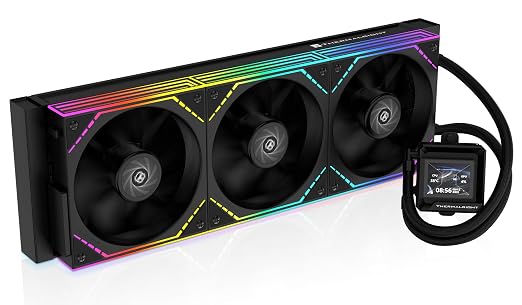
Perfect for Ryzen 7 9800X3D users needing serious cooling power, the Thermalright Frozen Warframe 360 SE ARGB V2 stands out with a massive 360mm radiator paired with a 2 LCD screen for customization. It’s ideal for gamers and creators wanting stable temps and a personal touch on their build.
Setup involves mounting the large aluminum radiator, which fits most mainstream cases supporting 360mm AIOs. The three 120mm PWM fans daisy-chain to reduce cable clutter, running quietly at up to 2000 RPM.
Daily use involves managing fan speeds through PWM, keeping noise at a comfortable 28.2 dB while maintaining airflow to keep your Ryzen cool. The customizable LCD keeps an eye on system stats or displays your favorite images right on the pump.
Performance is solid, efficiently dissipating heat thanks to its water cooling method and high airflow fans. The build feels sturdy with quality materials, highlighting the 397×120×27mm aluminum radiator. Most users praise its quiet yet effective cooling, though some note the large size requires sufficient case space.
The included pump runs at 3000 RPM, supporting stable cooling throughout intense workloads.
Many users appreciate the large radiator keeping temperatures steady on demanding CPUs while enjoying the unique touch from the LCD screen. Complaints mostly center around the cooler’s size, which demands a roomy case to avoid installation issues.
Those with spacious cases and a desire for visual customization will find this cooler rewarding. Users with smaller cases or sensitive to pump noise might want to explore alternatives.
Pros
- Customizable 2″ LCD screen with animated GIFs
- High airflow fans reduce cable clutter
- Supports multiple AMD and Intel platforms
- Quiet operation under typical loads
Cons
- Large radiator needs ample case space
- Pump noise could be noticeable at full speed
| Specification | Details |
|---|---|
| Radiator Size | 397×120×27mm aluminum |
| Fan Size and Type | 3×TL-M12Q 120mm PWM |
| Maximum Fan Speed | 2000 rpm |
| Air Flow Capacity | 68.9 CFM |
| Noise Level | 28.2 dB |
| Pump Speed | 3000 rpm |
8. CORSAIR Nautilus 360 RS CPU Cooler

Aluminum and high-quality plastic frame make up a sturdy water cooling setup tailored for Ryzen 7 9800X3D users looking for reliable thermal performance. It stands out with its set of RS120 fans featuring CORSAIR AirGuide technology that targets airflow directly to hot spots.
Installing the triple RS120 fans is straightforward due to their daisy-chain design, letting you connect all three with a single motherboard cable. The magnetic dome bearings on the fans keep noise low, making it easier to focus while gaming or working long hours. Its compatibility with AMD AM5 and AM4 sockets means it fits your Ryzen system without fuss.
The cooler handles heat dissipation well, maintaining solid temperatures under load thanks to its focused airflow. The build is solid, designed to last and keep outperforming air coolers in the same class.
Some mention cable management can still be a bit tricky despite the daisy chain setup, but many appreciate the quiet fan operation.
Quiet fan operation and strong directed airflow make this cooler excellent for maintaining low temperatures under intense workloads. Most find setup easy with the daisy-chained fans, though occasional cable management issues appear when fitting inside smaller cases.
Anyone running a Ryzen 7 9800X3D who wants a water cooler supporting AM4 or AM5 sockets will be satisfied here. Systems with very limited interior space or preferences for 3-pin fan control might want to explore alternatives.
Pros
- Strong airflow with focused cooling technology
- Supports AMD AM5 and AM4 sockets
- Low noise operation due to magnetic dome bearing
- Fans daisy-chain for reduced cable clutter
Cons
- Some users find cable management still challenging
- Limited to 4-pin fan connectors only
| Specification | Details |
|---|---|
| Power Connector Type | 4-Pin |
| Cooling Method | Water |
| Compatible Devices | Desktop |
| Maximum Rotational Speed | 2100 rpm |
9. CORSAIR iCUE Link Titan II 360 RX LCD Cooler

A standout feature of the CORSAIR iCUE Link Titan II 360 RX LCD Cooler is its bright 5 IPS LCD display, perfect for anyone who wants more than just cooling but also real-time updates and even GIFs. It suits Ryzen 7 9800X3D builds that need serious water cooling paired with a bit of custom flair.
Setting it up is simpler than many other AIOs thanks to the unified fan frame that cuts down screws and cables. Running daily, the RX II fans stay quiet and efficient, keeping noise to a low 32.8 dB.
The LCD screen not only shows CPU temps but can act as a secondary monitor, making it surprisingly useful beyond just cooling.
Its water cooling works reliably, keeping the CPU temperatures well managed under heavy loads. The build feels solid, with magnetic dome bearings in the fans and air-guide tech focusing airflow. Most praise focuses on the display’s customization options.
On the downside, some find the cooler’s size and the front-facing LCD not fitting as neatly in tight cases.
The vivid LCD display gets a lot of praise because it shows temperatures and custom content, adding personality and practicality. However, some find the cooler’s size a bit large, making installation in smaller cases tricky. Noise levels stay reasonably low, thanks to advanced fan tech.
Builders wanting both effective water cooling and a customizable display will appreciate this cooler. Those with compact cases or who prefer a more minimalist look might want to look elsewhere for a smaller, less conspicuous solution.
Pros
- Clear and vibrant 5″ IPS LCD screen
- Quiet fans with AirGuide technology
- Unified fan frame simplifies installation
- Real-time temperature and system info display
Cons
- Bulky size may challenge tight PC cases
- LCD placement may not suit all builds
| Specification | Details |
|---|---|
| Cooling Method | Water |
| Compatible Devices | Desktop |
| Noise Level | 32.8 db |
| Display | 5″ IPS LCD, 720×1280 resolution |
| Fan Type | Second-generation RX II fans with magnetic dome bearings |
10. Thermalright Aqua Elite 360 V6 ARGB CPU Cooler

Choosing a cooler with impressive heat dissipation and eye-catching lighting makes a big difference for Ryzen 7 9800X3D users. With a powerful pump and synchronized ARGB lighting, it fits builders who want both strong cooling performance and a lively setup look.
Setting up involves attaching the water block with its vortex-style pump, which spins up to 2800 RPM to keep temperatures steady. The pre-installed fans are quieter than many at just under 30 dB, running at a max speed of 2000 RPM. Its ARGB lighting syncs with motherboard controls, making customization straightforward without worrying about running out of light headers.
Regular usage shows good reliability without much fuss.
Cooling power matches the needs of high-end processors, offering strong airflow at 70.84 CFM. The build quality feels solid, especially around the pump and radiator.
Most praise goes to its efficient cooling and attractive lighting effects. On the downside, some find the noise level at full speed a little noticeable, especially in quieter rooms.
The cooler is known for its reliable thermal performance combined with attractive ARGB lighting that improves the look of any build. Noise can become noticeable when fans hit top speed, which might be distracting in very quiet environments. The complete lighting synchronization also requires specific motherboard support that not everyone has.
Gamers and enthusiasts seeking a balance of style and capable water cooling will find it well suited to their needs. Users on tighter budgets or those with motherboards lacking ARGB headers might want to consider simpler air coolers or alternatives without lighting demands.
Pros
- Efficient cooling with 70.84 CFM airflow
- Quiet operation under typical loads
- Attractive ARGB lighting with motherboard sync
- Strong pump speed up to 2800 RPM
Cons
- Noisy at maximum fan speed
- Requires motherboard with 5V ARGB header
| Specification | Details |
|---|---|
| Maximum Rotational Speed | 2000 rpm |
| Noise Level | 29.8 dB |
| Air Flow Capacity | 70.84 CFM |
| Power Connector Type | 4-Pin |
| Cooling Method | Water |
| Compatible Devices | Desktop |
11. ASUS ROG Ryujin III ARGB Extreme 360 CPU Cooler

Keeping a Ryzen 7 9800X3D cool under heavy workloads requires serious cooling power, and this AIO cooler suits those wanting a strong and reliable solution. Its powerful pump and thick ARGB fans deliver impressive airflow, making it stand out for anyone prioritizing consistent temperature control during intense use.
Setup involves snapping the ARGB fans together with magnets, speeding up installation. An embedded fan cools motherboard VRMs, keeping supporting components safe. The 3.5 LCD screen allows you to customize animated GIFs or monitor system stats like temperature and fans.
Control over pump and fan speeds comes via software, helping balance noise and cooling during daily operation.
Cooling performance is solid thanks to the Asetek Emma Gen8 V2 pump with its 3-phase motor, promoting higher coolant flow with less resistance. Build quality is impressive, blending thickened fans and firmware features for stability.
Reviews highlight excellent temperature management as a strong point, while some find the power consumption and noise level a bit higher than expected.
Exceptional temperature control comes from a powerful pump and high airflow fans. Some users note that noise levels can be noticeable, especially in very silent environments.
Anyone needing strong, consistent cooling with customizable monitoring will appreciate this design. Those prioritizing ultra-quiet performance or lower power draw might want to look at alternative options.
Pros
- Strong cooling with advanced pump technology
- Quick fan installation via magnets
- Customizable 3.5″ LCD screen for live monitoring
- Embedded fan cools motherboard VRMs
Cons
- Power consumption of 1.2 kwh can be higher than typical AIOs
- Noise level at 16 db might not suit very quiet setups
| Specification | Details |
|---|---|
| Power Connector Type | 4-Pin |
| Voltage | 2 volts |
| Wattage | 1.2 kwh |
| Cooling Method | Fan, Water |
| Noise Level | 16 db |
| Compatible Devices | Desktop, server |
12. Noctua NL-LC1-24 240mm CPU Cooler

240mm radiator size paired with two premium Noctua fans makes it ideal for Ryzen 7 9800X3D builds needing quiet yet strong cooling power. It suits anyone aiming for a compact, near-silent setup without compromising on thermal performance.
Setting it up involves attaching the compact radiator where space might be tight, thanks to its smaller 240mm footprint. The two Noctua NF-A12x25 G2 PWM fans manage airflow impressively while staying on the quiet side. Pump noise absorber technology effectively lowers vibration and noise during operation, making day-to-day use noticeably quieter than many other AIO coolers.
Thermal management keeps temperatures in check consistently with reliable water cooling powered by a 12V, 1.8-watt pump. Build quality is solid, combining Noctua’s fan engineering with Asetek’s liquid cooling platform.
Most praise is for how quiet it runs under load; the common gripe lies in its limited radiator size, which might not push cooling to absolute extremes compared to larger units.
The quiet operation stands out the most, with many admiring how little vibration and sound the pump produces during use. However, the smaller radiator can be a drawback for those pushing high thermal loads, as it may not cool as aggressively as larger AIOs.
Builders valuing silent PC performance and tight builds will appreciate this cooler, especially for mid-range to high-end Ryzen 7 setups. Users planning heavy overclocks or expansive cases might want to consider bigger radiators for extra cooling margin.
Pros
- Quiet pump with acoustic noise absorbing
- Compact 240mm radiator fits smaller cases
- Two efficient 120mm Noctua fans included
- Low power consumption of 1.8 watts
Cons
- Radiator size limits extreme overclock cooling
- May require careful case compatibility checking
| Specification | Details |
|---|---|
| Power Connector Type | 4-Pin |
| Voltage | 12 volts |
| Wattage | 1.8 watts |
| Noise Level | 22.5 db |
| Maximum Rotational Speed | 1800 rpm |
| Air Flow Capacity | 107.3 cubic meter per hour |
Best AIO Coolers for Ryzen 7 9800X3D Comparison Table
| Product | Cooling Method | Maximum Rotational Speed | Air Flow Capacity | Noise Level |
|---|---|---|---|---|
| ARCTIC Liquid Freezer III 360 | Liquid | 3000 rpm | 77 cfm | – |
| ASUS ROG Ryuo IV 360 | Fan | 2000 rpm | 56.66 cfm | – |
| Noctua NL-LC1-36 360 | Water | 1800 rpm | 107.3 m³/h | 22.5 db |
| LIAN LI HydroShift II 360 | Water | 2600 rpm | – | 33 db |
| ARCTIC Liquid Freezer III A-RGB | Liquid | 3000 rpm | 77 cfm | – |
| MSI Vision ZS Ryzen 7 | – | – | – | – |
| Thermalright Frozen Warframe 360 SE | Water | 2000 rpm | 68.9 cfm | 28.2 db |
| CORSAIR Nautilus 360 RS | Water | 2100 rpm | – | – |
| CORSAIR iCUE Link Titan II | Water | – | – | 32.8 db |
| Thermalright Aqua Elite 360 V6 | Water | 2000 rpm | 70.84 cfm | 29.8 db |
| ASUS ROG Ryujin III Extreme | Fan, Water | – | – | 16 db |
| Noctua NL-LC1-24 240 | Water | 1800 rpm | 107.3 m³/h | 22.5 db |
- Cooling MethodLiquid
- Maximum Rotational Speed3000 rpm
- Air Flow Capacity77 cfm
- Noise Level–
- Cooling MethodFan
- Maximum Rotational Speed2000 rpm
- Air Flow Capacity56.66 cfm
- Noise Level–
- Cooling MethodWater
- Maximum Rotational Speed1800 rpm
- Air Flow Capacity107.3 m³/h
- Noise Level22.5 db
- Cooling MethodWater
- Maximum Rotational Speed2600 rpm
- Air Flow Capacity–
- Noise Level33 db
- Cooling MethodLiquid
- Maximum Rotational Speed3000 rpm
- Air Flow Capacity77 cfm
- Noise Level–
- Cooling Method–
- Maximum Rotational Speed–
- Air Flow Capacity–
- Noise Level–
- Cooling MethodWater
- Maximum Rotational Speed2000 rpm
- Air Flow Capacity68.9 cfm
- Noise Level28.2 db
- Cooling MethodWater
- Maximum Rotational Speed2100 rpm
- Air Flow Capacity–
- Noise Level–
- Cooling MethodWater
- Maximum Rotational Speed–
- Air Flow Capacity–
- Noise Level32.8 db
- Cooling MethodWater
- Maximum Rotational Speed2000 rpm
- Air Flow Capacity70.84 cfm
- Noise Level29.8 db
- Cooling MethodFan, Water
- Maximum Rotational Speed–
- Air Flow Capacity–
- Noise Level16 db
- Cooling MethodWater
- Maximum Rotational Speed1800 rpm
- Air Flow Capacity107.3 m³/h
- Noise Level22.5 db
How to Choose the Best AIO Cooler for Ryzen 7 9800X3D
Choosing the right AIO cooler for the Ryzen 7 9800X3D involves considering cooling capacity, compatibility with your case and socket, and noise levels. Getting these factors right ensures efficient performance and longevity, preventing overheating and unnecessary replacements or repairs.
Compatibility and Socket Support
Trying to fit a cooler into a new build only to find it doesn’t match the motherboard socket or blocks RAM slots is a frustrating experience. Modern processors like the one in question need coolers compatible with the AM5 socket, including appropriate mounting brackets. Radiator size is another critical dimension; a 360mm radiator won’t fit in every case, especially mid-towers with limited top or front clearance.
Clearance around RAM slots often gets overlooked but is crucial. Taller memory modules with large heat spreaders can conflict with some pump blocks or hoses. Aim for coolers known to provide adequate RAM clearance or use low-profile memory to avoid compatibility headaches.
Measuring case dimensions and considering fan thickness can prevent unexpected installation issues.
Cooling Performance and Efficiency
High-performance CPUs generate significant heat, so choosing a cooler that matches the processor’s thermal design power is essential. A cooler with an insufficient thermal dissipation capacity often leads to throttling under sustained loads, which reduces performance.
Pump design influences how well coolant circulates and maintains thermal consistency during intense workload spikes.
Larger radiators, such as 280mm or 360mm, provide more surface area for heat exchange. Configurations with multiple fans improve airflow but can increase noise if not well managed. Look for coolers with pumps that sustain steady flow rates and radiators paired with efficient fan setups to maintain a balance between cooling and sound output.
Noise Levels and Acoustic Control
Noise can be a dealbreaker in quiet workspaces or gaming setups. A cooler that spins fans and pump loudly interrupts concentration and can be distracting during extended use. Fans controlled via PWM allow the system to adjust speeds dynamically, keeping noise low during light loads and ramping up only when necessary.
Some coolers include vibration dampening mounts or rubberized fittings to reduce mechanical hum and rattling. This makes a meaningful difference in overall acoustic comfort. Reading detailed reviews or testing in-person can help identify models with consistently low noise profiles at both idle and full load conditions.
Build Quality and Materials
Over time, pumps with cheaper housings or radiators made from lower-grade materials tend to develop leaks or corrosion. Better coolers use durable metals such as aluminum or copper in their radiators and sturdy plastic or metal for the pump casings. High-quality tubing should resist kinking and cracking to ensure long-term reliability.
Fittings need to be tight and well-sealed out of the box, and preapplied thermal paste should spread evenly without drying too fast. Corrosion-resistant internal components prevent coolant degradation, which can extend the cooler’s service life significantly.
Paying attention to these aspects saves time and replacement costs later on.
Ease of Installation and Maintenance
Setting up a liquid cooler doesn’t have to be a struggle with poorly labeled hardware or vague instructions. Good packaging with clear diagrams and all required screws or mounting brackets included speeds up assembly. Complex coolers can discourage maintenance if their design requires removing multiple components just to clean fans or radiators.
Some models feature modular parts like detachable fans or quick-release tubing, making upgrades or part replacements much simpler. This design approach also makes periodic dust removal less daunting, keeping thermal performance consistent without the need to disassemble the entire loop.
Optimizing AIO Cooler Performance for Ryzen 7 9800X3D
The Ryzen 7 9800X3D runs hotter than many processors, making efficient cooling essential. Selecting an AIO cooler with a radiator size of at least 240mm generally improves heat dissipation. Properly mounting the cooler to the CPU is critical; uneven contact can cause higher temperatures.
Using high-quality thermal paste and applying a thin, even layer ensures better thermal conductivity. Many users find that positioning the radiator fan as an intake or exhaust influences airflow patterns inside the case, affecting cooling performance.
Fans should be set to respond to temperature changes to avoid unnecessary noise. Strong airflow through the radiator paired with well-filtered case intake fans helps maintain lower temperatures over extended use.
Preventative Maintenance and Cleaning Tips for Prolonged Cooler Lifespan
Regular maintenance helps avoid decreased cooling efficiency and extends the service life of an AIO cooler. Dust buildup on radiator fins and fans restricts airflow, so cleaning these areas every few months prevents overheating.
Using compressed air or a soft brush keeps components free from debris without damage. Checking the pump’s operation silently is important since pump failure often precedes overheating. Avoid letting cables block fan movement or airflow pathways.
It’s also good practice to monitor coolant levels in models that allow topping up, though most sealed units do not require this. Lastly, ensure fan bearings stay lubricated by replacing fans at signs of noise or reduced speed.
Comparing AIO Liquid Coolers with Air Coolers for Ryzen 7 9800X3D Systems
AIO liquid coolers generally provide better thermal performance for the Ryzen 7 9800X3D compared to most air coolers, especially under heavy multi-threaded workloads. The larger surface area of a radiator and the possibility of using multiple fans help dissipate heat more effectively. However, air coolers are often simpler to install and less prone to mechanical failures since they lack pumps and liquid.
They typically occupy more vertical space and may block memory slots depending on the design. Air coolers can run quieter at low loads due to fewer moving parts but might get louder when pushed to high fan speeds.
Choosing between these cooling methods depends on case compatibility, noise preference, and budget considerations rather than raw cooling capacity alone.
People Also Asked
Is This AIO Cooler Compatible with Ryzen 7 9800X3D?
This AIO cooler is compatible with the Ryzen 7 9800X3D as it supports AM5 and AM4 sockets used by this CPU. Make sure the mounting brackets supplied with the cooler match your motherboard’s socket type to avoid fitting issues.
How Do I Install an AIO Cooler on Ryzen 7 9800X3D?
To install an AIO on a Ryzen 7 9800X3D, attach the pump block to the CPU socket with the included mounting hardware, secure the radiator inside your case, and connect the fans to the motherboard headers. Apply a thin, even layer of thermal paste if it’s not pre-applied on the cooler.
What Are Common Problems with AIO Coolers on Ryzen 7 CPUs?
Common problems include pump noise, insufficient cooling performance due to poor mounting, and occasional leaks. Double-check that the pump is securely fastened and that radiator fans are properly connected and oriented for airflow.
How Long Does an AIO Cooler Typically Last with Ryzen 7?
An AIO cooler for a Ryzen 7 usually lasts around 5 to 7 years but can vary depending on pump quality and maintenance. Keep the radiator and fans clean from dust to extend its lifespan and maintain good cooling efficiency.
Can AIO Coolers Fit Inside Mid-Tower PC Cases Safely?
Most AIO coolers fit safely inside mid-tower cases as long as you verify radiator size compatibility with your case’s mounting locations. Measure your case’s radiator clearance before purchasing to avoid fitting problems.
Conclusion
Choosing the right AIO cooler for the Ryzen 7 9800X3D depends mainly on cooling performance, noise levels, and compatibility with your case. Effective heat dissipation keeps the processor stable under load.
Quiet operation matters since high noise can be distracting. Making sure the cooler fits your case and motherboard layout avoids installation headaches.
Think about your available space and budget before making a final choice. Larger radiators may cool better but won’t fit every setup.
Check how often you plan to push the CPU hard, daily heavy use benefits from stronger cooling. Review the comparison table and the detailed picks above to find one that fits your specific needs.

I’m Grant Mitchell, a firearms and hunting writer with years of experience at the range and in the field. I write about rifles, shotguns, handguns, optics, safe storage, cleaning, and responsible ownership, along with practical hunting tips. My goal is to share accurate, safety-first information that helps you choose the right firearm, maintain it properly, and become a more confident shooter.