Top 12 Best 9700X Cooler That Will Blow Your Mind!
Running a 9700x processor without the best 9700x cooler often leads to overheating and sudden throttling, killing your PC’s performance during crucial tasks. Cheap coolers typically struggle with heat dissipation, resulting in constant fan noise and higher temperatures that shorten hardware lifespan. Those problems quickly become a daily nuisance for anyone pushing their system beyond basic use.
An effective 9700x cooler focuses on three main factors: thermal conductivity, airflow, and compatibility. Look for coolers with copper or direct-contact heat pipes, as these materials transfer heat away from the CPU faster than aluminum alone.
Fan size and speed also make a big difference, larger fans moving air around 100 CFM can keep temperatures low and noise levels manageable. Proper mounting that fits your motherboard socket tightly ensures stable contact without risking damage, while removable fans or fins simplify cleaning in the long run.
Need a Quick Check?
| Image | Product | Price |
|---|---|---|
Our Top Picks 1  | ARCTIC Liquid Freezer 360 | Check Price |
Our Top Picks 2  | Thermalright Assassin X120 SE | Check Price |
Our Top Picks 3  | Thermalright Assassin X120-A Dark | Check Price |
Our Selected Top 12 9700x Cooler for Every Budget
This list features a variety of coolers suitable for the 9700x processor, covering different needs and budgets. Each review explains performance aspects, ideal user scenarios, strengths, and potential drawbacks to help you make an informed choice.
1. ARCTIC Liquid Freezer III Pro 360 CPU Cooler
People building high-performance desktops, especially those planning to run intense applications, will appreciate this cooler. It suits users looking for quiet and efficient cooling with a focus on extending CPU lifespan through better heat management.
Setting it up involves aligning the cold plate precisely because of the native offset mounting tailored for both Intel and AMD sockets. The integrated VRM fan quietly keeps voltage converters cool, which helps maintain stability under load.
The P12 PRO FAN runs smoothly and quietly across speeds, making daily operation almost unnoticed while giving powerful cooling when needed.
Liquid cooling performance keeps the 9700x comfortably cool, even under heavy workloads. Quality materials and engineering contribute to long-term reliability.
Strong points include the effective heat dissipation achieved through optimized contact pressure and a smart fan design. Some have noted the size can be a challenge in tighter cases and the need for occasional cleaning to maintain peak performance.
Strong cooling and quiet operation stand out as major benefits, making it well-suited for high-load situations where keeping temperatures down matters. However, the cooler’s size can present a challenge in smaller builds, and dust buildup may affect performance over time without occasional maintenance.
This cooler fits enthusiasts and gamers who want reliable thermal performance quietly. Those with limited case space or a preference for less maintenance might look at other options.
Pros
- Quiet performance at low and high speeds
- Integrated VRM fan for extra voltage converter cooling
- Compatible with Intel LGA1851 and LGA1700 sockets
- Optimized contact pressure for better heat transfer
Cons
- Large size may limit installation in smaller cases
- Requires occasional cleaning to maintain cooling efficiency
| Specification | Details |
|---|---|
| Power Connector Type | 4-Pin |
| Voltage | 12 volts |
| Wattage | 3.96 watts |
| Cooling Method | Liquid |
| Maximum Rotational Speed | 3000 rpm |
| Air Flow Capacity | 77 cfm |
2. Thermalright Assassin X120 Refined SE CPU Air Cooler
Known for its precision cooling and quiet operation, the Thermalright Assassin X120 Refined SE suits anyone running a powerful CPU like the 9700X and looking for reliable heat pipe and fan-based cooling. Its standout feature is the balance between efficient airflow and low noise, keeping temperatures down without sounding like a jet engine.
Setup involves a 4-pin power connector and compatible mounting for desktop CPUs, making installation straightforward for most builds. The fan runs up to 1550 rpm, which keeps noise level around 25.6 dB, gentle enough for a home or office environment. Daily use means you won’t worry about overheating during gaming or heavy workloads thanks to its steady airflow of 66.17 cfm.
Performance-wise, it handles heat dissipation well for a mid-range air cooler, keeping the CPU temps in check under typical loads. The materials and build reflect Thermalright’s 20 years of experience, focusing on durability.
Reviews often praise how it runs quietly, while some mention it may have trouble fitting in smaller cases or with taller RAM modules.
Quiet operation is the strongest point, making it suitable for noise-sensitive environments. Common complaints focus on compatibility issues, such as fitting in compact setups or clearance with other components.
This cooler suits users prioritizing a quiet yet effective solution for a desktop CPU like the 9700X. Anyone with limited case space or tall memory should consider alternative options to avoid fitment problems.
Pros
- Quiet operation at 25.6 db
- Good airflow at 66.17 cfm
- Durable build from experienced brand
- Easy installation with 4-pin connector
Cons
- May not fit well in small cases
- Could interfere with tall RAM modules
| Specification | Details |
|---|---|
| Power Connector Type | 4-Pin |
| Voltage | 12 volts of direct current |
| Cooling Method | Heat pipe and fan-based |
| Noise Level | 25.6 db |
| Maximum Rotational Speed | 1550 rpm |
| Air Flow Capacity | 66.17 cfm |
3. Thermalright Assassin X120-A Dark CPU Air Cooler
Thermalright Assassin X120-A Dark is an air cooler designed for serious 9700X users who want strong cooling power without RGB distractions. Its all-black look blends perfectly with dark or minimalist PC builds while handling demanding workloads with ease.
Setup is pretty straightforward, and the four 6mm heat pipes with direct contact make sure heat moves away quickly from the CPU. The black fan runs quietly at 33.3 dB, spinning up to 2400 rpm, which balances decent airflow of 85.35 CFM and noise for daily multitasking or gaming sessions.
Cooling capacity rated at 240W TDP means it’s solid at keeping the 9700X temperatures down during heavy use. The single tower aluminum fin stack feels durable and the hidden heat pipes give it a clean finish.
While most appreciate how quiet it stays, some users noted the fan speed can hit the upper noise range under load.
The strongest point of this cooler is its excellent thermal performance paired with a visually neat all-black aesthetic that suits non-RGB builds. On the downside, the fan can get noticeably louder when pushed to its fastest speed, which might be distracting.
This cooler fits users who want serious cooling with a low-key style and are fine with slightly increased noise during peak CPU loads. Anyone seeking ultra-quiet operation at all times or tighter space requirements might look for a different solution.
Pros
- High 240W TDP cooling capacity
- Quiet operation under most conditions
- Clean all-black design hides heat pipes
- Compatible with demanding multitasking and gaming
Cons
- Fan noise rises near maximum RPM
- Single tower size may limit clearance in some cases
| Specification | Details |
|---|---|
| Cooling Method | Air |
| Power Connector Type | 4-Pin |
| Voltage | 12 volts_of_direct_current |
| Noise Level | 33.3 db |
| Maximum Rotational Speed | 2400 rpm |
| Air Flow Capacity | 85.35 cfm |
4. Thermalright Phantom Spirit 120 SE CPU Cooler

Cooling a powerful CPU like the 9700x demands trust in the cooler’s ability to handle heat quietly and efficiently. Thermalright Phantom Spirit 120 SE delivers focused cooling for desktop setups where compact size and effective heat dissipation make a significant difference, especially in tighter cases.
Setting it up is straightforward, thanks to a well-thought-out design that avoids memory interference with its cut corner layout. The 4-pin connector controls the fan speed up to 1500 rpm, keeping noise levels at a moderate 25.6 dB.
The blackened nano coating and fully electroplated heat pipes work steadily, ensuring it performs well without frequent cleaning or fuss.
Heat moves away quickly from the CPU, helped by a 7x6mm heatpipe applying upgraded AGHP technology for a long service life. The copper bottom and finely micro-carved surface improve contact with the processor. A common point raised is that while it’s quiet, the cooling is solid but not extreme, so high overclocking users might look elsewhere.
Strong cooling is achieved through a micro-carved copper base and electroplated heat pipes combined with quiet fan operation. The standout feature is reliable cooling without excess noise, though those pushing the CPU hard may find its limits.
Users looking for reliable, quieter cooling in a standard desktop configuration will appreciate this cooler. Those who need maximum cooling power for heavy overclocking might need to consider more aggressive solutions.
Pros
- Memory cut corner design for better compatibility
- Long service life with S-FDB bearings
- Quiet operation at 25.6 dB noise level
- Effective heat dissipation with nano coating and copper base
Cons
- Not suited for extreme overclocking setups
- Fan speed capped at 1500 rpm limits maximum airflow
| Specification | Details |
|---|---|
| Power Connector Type | 4-Pin |
| Voltage | 12 volts |
| Wattage | 2.4 watts |
| Noise Level | 25.6 dB |
| Maximum Rotational Speed | 1500 rpm |
| Air Flow Capacity | 66.17 cfm |
5. Noctua NH-U9S CPU Cooler
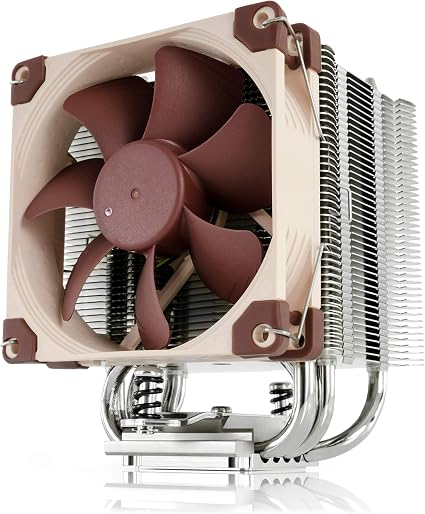
Great for compact builds, the Noctua NH-U9S CPU cooler offers solid cooling power combined with excellent compatibility. Perfect for HTPCs, ITX, and small form factor PCs, it stands out with its low height that fits in tight spaces without blocking RAM or PCIe slots.
Setting it up is straightforward thanks to the SecuFirm2 mounting system, which supports various Intel and AMD sockets. The included high-end thermal paste helps get optimal contact with the CPU.
The 92mm fan runs quietly thanks to PWM control and a low-noise adaptor, making it ideal for users who want less noise without sacrificing cooling efficiency.
The cooler keeps temperatures well-managed for a 9700X CPU within its size class. It feels sturdy in construction with high-quality materials. Many users appreciate its compact design that doesn’t interfere with other components.
Some find the 92mm fan smaller and less powerful compared to larger coolers, which may limit peak cooling under heavy loads.
Many users praise the cooler’s small size, which fits perfectly in tight builds and avoids interference with RAM or PCIe slots. The most common complaint revolves around the fan size, which can feel less effective for high power CPUs under heavy loads.
It suits anyone building compact or quiet PCs who does not push their CPU to extreme limits. Those needing maximum cooling performance or aggressive overclocking might want to consider larger coolers instead.
Pros
- Compact 125mm height fits small cases easily
- Very quiet operation with PWM fan control
- Does not block RAM or PCIe slots
- Includes high-quality thermal paste and mounting kit
Cons
- 92mm fan may limit maximum cooling capacity
- Not ideal for overclocking heavy-load CPUs
| Specification | Details |
|---|---|
| Height | 125mm |
| Fan Size | 92mm |
| Compatibility | Intel LGA1851, LGA1700, LGA1200, LGA115x, AMD AM5 & AM4 |
| Included Thermal Paste | NT-H1 |
| Mounting System | SecuFirm2 |
| Unit Count | 1 Count |
6. Thermalright Phantom Spirit 120 SE CPU Air Cooler

Aluminum fins paired with 7x6mm heatpipes characterize the cooler’s build, designed for desktop users looking for strong cooling power. It suits those who want a solid air cooler specifically tuned for CPUs with high thermal design power, handling anywhere from 105W up to 280W efficiently.
Installation involves a 4-pin power connector operating at 12 volts DC, offering straightforward setup and compatibility with most desktop systems. The fan reaches a maximum speed of 1500 rpm to provide consistent airflow of up to 66.17 cfm. Noise stays around 25.6 dB, balancing decent cooling with a fairly quiet operation that works well day to day.
Cooling performance effectively manages the heat output of CPUs demanding higher TDP without excessive noise. The build quality reflects over two decades of Taiwanese engineering experience, focusing on durable components and solid mounting systems. Although praised for quiet operation, some mention the physical size can limit fit in compact cases, which impacts compatibility.
Quiet operation and strong cooling capacity stand out as major benefits, thanks to advanced heatpipe design and optimized airflow. Common concerns focus on the cooler’s size, which can be restrictive in compact builds, making physical compatibility an important consideration.
People with mid to large desktop cases and high-TDP 9700X processors will appreciate this cooler’s power and silence. Users with small cases or those needing ultra-compact solutions might want to explore different models better suited for tight spaces.
Pros
- Supports high CPU TDP up to 280W
- Relatively quiet at 25.6 dB
- Solid heatpipe technology for efficient heat transfer
- Compatible with a wide range of desktop setups
Cons
- May not fit well in smaller PC cases
- Fan speed limited to 1500 rpm
| Specification | Details |
|---|---|
| Cooling Method | Air |
| Power Connector Type | 4-Pin |
| Voltage | 12 volts_of_direct_current |
| Maximum Rotational Speed | 1500 rpm |
| Noise Level | 25.6 db |
| Air Flow Capacity | 66.17 cfm |
7. Be Quiet! Pure Rock Pro 3 CPU Air Cooler

High-performance cooling stands out immediately with the Pure Rock Pro 3, ideal for anyone running a 9700x who needs serious heat management. Its six copper heat pipes and nickel-plated base keep temperatures steady even during intense workloads or overclocking sessions.
Setting up the cooler is straightforward thanks to its compatibility with various Intel and AMD sockets. The Pure Wings 3 fan with PWM control runs quietly and adjusts speed based on CPU temperature, keeping noise at a reasonable 34.8 dB. The funnel-shaped outlet directs airflow efficiently through the fins, helping maintain consistent cooling throughout daily use.
The cooler handles heat dissipation very well, making it a reliable choice for demanding tasks. Its build quality feels solid with premium materials like copper pipes and a nickel-plated base.
Most praise highlights the quiet operation, though some note the fan speed maxing out can create a noticeable hum under heavy load.
Quietness while maintaining excellent cooling is widely appreciated, although some report the fan noise rises under full load. The sturdy construction is often mentioned positively, reinforcing its reliability.
Users needing strong performance for overclocked CPUs will find this cooler suitable. Those seeking near-silent operation at all times might want to explore alternatives with lower maximum speeds or different fan designs.
Pros
- Effective cooling with six copper heat pipes
- Quiet operation under moderate loads
- Compatible with many Intel and AMD sockets
- Optimized fan blades increase airflow pressure
Cons
- Fan noise can become noticeable at max speed
- Relatively high maximum RPM may bother noise-sensitive users
| Specification | Details |
|---|---|
| Cooling Method | Air |
| Maximum Rotational Speed | 2000 rpm |
| Noise Level | 34.8 db |
| Power Connector Type | 4-Pin |
| Voltage | 12 volts |
8. LIAN LI HydroShift II OLED 360 AIO Cooler

Perfect for those seeking serious cooling power with a visual twist, this cooler stands out by combining effective water cooling with a large 2K curved OLED display. It suits users who want both strong heat management for a 9700x CPU and a unique, customizable design feature.
Setting it up involves attaching the radiator and connecting the motorized pump head, which moves smoothly through lift, rotation, and dual-axis tweaks using the L-Connect 3 software. Adjusting the angle to fit your case or viewing preference is straightforward and can be done quietly thanks to the low noise level. Daily operation stays quiet at 33 db, making it a good companion for a work or gaming setup.
This water cooler efficiently manages heat output with its 2600 rpm maximum fan speed, ensuring stable temperatures. The OLED adds a cool personalized touch but is the main reason some might consider something simpler. Build quality is solid and practical, though some users find the motorized controls a bit more complex than traditional models.
The cooler receives praise for its effective heat management combined with an impressive OLED display that lets you customize and control its positioning easily. The most frequent complaint centers on the motorized movements being more complicated than standard coolers, requiring some getting used to through its software controls.
Those who value both performance and a unique visual element will appreciate what the cooler offers here. People wanting a straightforward, less costly cooler might prefer a more traditional model without the advanced display and motorized adjustments.
Pros
- Large 6.67” 2K curved OLED display
- Motorized pump head for easy angle adjustments
- Quiet operation at 33 db noise level
- Strong cooling with 2600 rpm fan speed
Cons
- Motorized control can be complex for some users
- Higher price due to advanced display feature
| Specification | Details |
|---|---|
| Cooling Method | Water |
| Noise Level | 33 db |
| Maximum Rotational Speed | 2600 rpm |
| Compatible Devices | Cpu, Desktop |
9. Noctua NH-D15 G2 CPU Cooler

Keeping a powerful CPU like the 9700x cool during intense gaming or heavy workloads needs a cooler that manages heat and noise well. The Noctua NH-D15 G2 fits those looking for strong air cooling paired with very quiet operation.
Its biggest selling point is the balance between impressive cooling capacity and near-silent performance when idling.
Setting up the cooler involves handling the included offset mounting for AMD AM5 or Intel sockets, which helps it fit neatly without pressure issues. The two NF-A14x25r G2 140mm fans run at different speeds for better noise control and adjust automatically with PWM.
At idle, the low-noise adapters drop fan noise well below distracting levels. It stays easy to maintain, with the quality build making cleaning straightforward.
Cooling runs smoothly thanks to eight heatpipes and 20% more surface area, effectively handling higher heat loads from processors like the Ryzen 9 9950X. The build quality is solid with premium materials used throughout.
Most users appreciate how quiet it stays without sacrificing thermal performance. On the downside, its size and weight require careful case compatibility checks before buying.
The fans offer near-silent cooling while keeping temperatures well-controlled during heavy tasks, according to many who use it. Common feedback highlights the cooler’s bulkiness, which demands checks on case size and mounting clearance before trying it out.
People seeking quiet but effective air cooling for high-end CPUs will find this a solid choice. Users with smaller PC cases or those preferring simpler installation might want to explore more compact alternatives.
Pros
- Quiet operation at idle with low-noise adaptors
- Strong heat dissipation with 8 heatpipes
- Automatic fan speed control via PWM
- Compatibility options for AMD AM5 and Intel sockets
Cons
- Large size can limit case compatibility
- Requires care during installation due to weight
| Specification | Details |
|---|---|
| Cooling Method | Air |
| Noise Level | 24.8 dB |
| Maximum Rotational Speed | 1500 rpm |
| Air Flow Capacity | 155.6 cubic meter per hour |
| Power Connector Type | 4-Pin |
| Voltage | 12 volts |
10. Cooler Master Hyper 612 APEX CPU Air Cooler

Six heat pipes and a copper base deliver reliable cooling power, making it suitable for AMD Ryzen 9 and Intel Ultra 9 CPUs. The cooler stands out with its quiet Dual Mobius 120 fan that balances airflow and noise, ideal for those aiming to keep their high-end processors cool without loud distractions.
Installation is straightforward thanks to redesigned brackets supporting AM5 and LGA 1851|1700 platforms, so the setup process won’t take much time. The fan runs quietly at speeds up to 2,400 rpm and uses a 4-pin PWM connector for precise control, helping maintain low noise levels during normal use.
The minimalist design with a stealth top cover fits well in most builds without drawing attention.
Cooling performance holds steady under load due to six heat pipes and advanced wick structures in the pipes, keeping temperatures in check effectively. The build quality feels solid with a jet-black finish that resists wear. Review highlights point out excellent cooling efficiency, while some note the noise level can reach up to 30 dB at max fan speed, which might be noticeable in very quiet environments.
The cooler excels at keeping Ryzen 9 CPUs cool thanks to its six heat pipes and well-designed airflow, praised for solid thermal performance. The most common downside mentioned is that the noise reaches 30 dB at maximum fan speed, which might be audible during intensive workloads.
Those wanting strong cooling with minimal fuss and quiet operation during regular use will appreciate this model. Users highly sensitive to fan noise or looking for advanced software fan control might want to consider other options.
Pros
- Effective heat dissipation with six heat pipes
- Quiet PWM fan operation up to 2,400 rpm
- Simple installation on multiple CPU sockets
- Minimalist, modern black design
Cons
- Fan noise can be noticeable at full speed
- No included software for fan control
| Specification | Details |
|---|---|
| Maximum Rotational Speed | 2400 rpm |
| Noise Level | 30 db |
| Air Flow Capacity | 78.2 cubic_centimeters_per_minute |
| Power Connector Type | 4-Pin |
| Cooling Method | Fan |
11. AMD Wraith Prism CPU Cooler

Anyone building a desktop around the Ryzen 9 9700X will appreciate a cooler that balances quiet operation with solid air cooling. Designed for desktop use, the AMD Wraith Prism CPU Cooler fits well in setups where moderate noise and dependable cooling are priorities.
Its standout feature is a 30 dB noise level, making it one of the quieter options for a powerful CPU.
Installation involves a straightforward 4-pin power connector running at 12 volts, which keeps things simple for typical desktop builds. Running at a maximum rotational speed of 1800 rpm, this air cooler manages heat effectively.
Its black color integrates easily with most PC cases, and no additional software or drivers are required to keep it working day to day. Noise stays at a manageable level during regular tasks.
Cooling performance meets expectations for a 105-watt air cooler, keeping temperatures under control during typical workloads. The construction feels solid, built with materials suited for consistent desktop use.
Most notes mention effective cooling with low noise, while some users find it falls short under extremely heavy loads, which can lead to higher temperatures.
The cooler is praised for its quiet and effective cooling during typical desktop use, but it can run hotter when handling very demanding tasks or running CPUs close to 105 watts TDP. It remains a solid choice for maintaining a low noise environment.
People looking for reliable and quieter air cooling for moderate workloads will find this cooler suitable. Those planning to push their CPU under extreme load conditions might want to consider options with higher cooling capacity or liquid cooling alternatives.
Pros
- Quiet operation at 30 db noise level
- Simple 4-pin power connector setup
- Effective cooling for 105-watt CPUs
- Neutral black color suits most builds
Cons
- Cooling capacity may struggle under heavy loads
- Maximum 1800 rpm might limit extreme performance
| Specification | Details |
|---|---|
| Power Connector Type | 4-Pin |
| Voltage | 12 volts |
| Wattage | 105 |
| Cooling Method | Air |
| Noise Level | 30 db |
| Maximum Rotational Speed | 1800 rpm |
12. Noctua NH-D12L Chromax.black CPU Cooler

Low-profile design with dual-tower cooling puts the NH-D12L chromax.black in a class of its own for 9700x users needing strong cooling without compromising RAM space.
Its biggest claim is combining quiet operation with powerful airflow that fits well in small and mid-sized PC builds.
Setting it up is straightforward thanks to its compact size, which clears all your RAM slots and fits neatly in tight cases like the DAN C4-SFX. The NF-A12x25r fan has smart automatic speed control to keep noise low when you’re idling and cranks up cooling under heavy tasks without getting loud.
The all-black look blends into most builds without standing out.
Performance on the cooling front is solid, holding temps well under load with an airflow capacity of 84.5 cubic meters per hour and a max fan speed of 2000 rpm. It’s built to last with a rigid dual-tower heatsink structure and praised for staying quiet around 22.6 dB.
Most people appreciate its size and sound, though some note it could be a bit large for extreme compact cases.
Quiet operation during idle and good airflow under stress have been standout points. The only common concern deals with its size, which can feel bulky in the smallest of PC cases. The fan’s low noise at 22.6 db makes a noticeable difference in everyday use.
Anyone building a 9700x rig that needs good cooling without blocking RAM will appreciate this cooler. Those working with extremely compact or unconventional cases might want to explore lower-profile options or liquid coolers instead.
Pros
- Excellent RAM clearance with compact design
- Quiet operation even at full load
- Fits well in ITX and SFF cases
- Automatic PWM fan speed control
Cons
- Height still a challenge for some ultra-compact builds
- Single fan limits cooling compared to larger setups
| Specification | Details |
|---|---|
| Power Connector Type | 4-Pin |
| Voltage | 12 volts |
| Wattage | 1.68 watts |
| Noise Level | 22.6 db |
| Maximum Rotational Speed | 2000 rpm |
| Air Flow Capacity | 84.5 cubic meter per hour |
Best 9700x Coolers Compared Side by Side
| Product | Cooling Method | Maximum Rotational Speed | Noise Level | Air Flow Capacity |
|---|---|---|---|---|
| ARCTIC Liquid Freezer 360 | Liquid | 3000 rpm | – | 77 cfm |
| Thermalright Assassin X120 SE | Heat pipe & fan | 1550 rpm | 25.6 db | 66.17 cfm |
| Thermalright Assassin X120-A Dark | Air | 2400 rpm | 33.3 db | 85.35 cfm |
| Thermalright Phantom Spirit 120 SE | Air | 1500 rpm | 25.6 db | 66.17 cfm |
| Noctua NH-U9S | Air | – | – | – |
| Thermalright Phantom Spirit 120 SE | Air | 1500 rpm | 25.6 db | 66.17 cfm |
| be quiet! Pure Rock Pro | Air | 2000 rpm | 34.8 db | – |
| LIAN LI HydroShift II 360 | Water | 2600 rpm | 33 db | – |
| Noctua NH-D15 G2 | Air | 1500 rpm | 24.8 db | 155.6 m³/h |
| Cooler Master Hyper 612 APEX | Fan | 2400 rpm | 30 db | 78.2 cm³/min |
| AMD Wraith Prism | Air | 1800 rpm | 30 db | – |
| Noctua NH-D12L chromax.black | Air | 2000 rpm | 22.6 db | 84.5 m³/h |
- Cooling MethodLiquid
- Maximum Rotational Speed3000 rpm
- Noise Level–
- Air Flow Capacity77 cfm
- Cooling MethodHeat pipe & fan
- Maximum Rotational Speed1550 rpm
- Noise Level25.6 db
- Air Flow Capacity66.17 cfm
- Cooling MethodAir
- Maximum Rotational Speed2400 rpm
- Noise Level33.3 db
- Air Flow Capacity85.35 cfm
- Cooling MethodAir
- Maximum Rotational Speed1500 rpm
- Noise Level25.6 db
- Air Flow Capacity66.17 cfm
- Cooling MethodAir
- Maximum Rotational Speed–
- Noise Level–
- Air Flow Capacity–
- Cooling MethodAir
- Maximum Rotational Speed1500 rpm
- Noise Level25.6 db
- Air Flow Capacity66.17 cfm
- Cooling MethodAir
- Maximum Rotational Speed2000 rpm
- Noise Level34.8 db
- Air Flow Capacity–
- Cooling MethodWater
- Maximum Rotational Speed2600 rpm
- Noise Level33 db
- Air Flow Capacity–
- Cooling MethodAir
- Maximum Rotational Speed1500 rpm
- Noise Level24.8 db
- Air Flow Capacity155.6 m³/h
- Cooling MethodFan
- Maximum Rotational Speed2400 rpm
- Noise Level30 db
- Air Flow Capacity78.2 cm³/min
- Cooling MethodAir
- Maximum Rotational Speed1800 rpm
- Noise Level30 db
- Air Flow Capacity–
- Cooling MethodAir
- Maximum Rotational Speed2000 rpm
- Noise Level22.6 db
- Air Flow Capacity84.5 m³/h
How to Choose the Right 9700x Cooler
Choosing the right cooler for the 9700x involves considering factors like cooling performance, noise levels, and size compatibility. Prioritizing these ensures efficient heat management and quiet operation, which helps avoid overheating issues and unnecessary replacement costs in the long run.
Cooling Performance
High CPU temperatures under load can cause the system to throttle, slowing down processing speed and affecting responsiveness. A cooler that fails to keep the chip below 75°C during sustained workloads can lead to random freezes or crashes.
Air coolers rely on heatsinks and fans, which are simpler and usually quieter, but might struggle at very high loads without good airflow. Liquid coolers use pumped coolant and radiators to move heat more efficiently away from the CPU, often maintaining lower temperatures during intensive use.
The ability to dissipate heat directly affects how stable the system remains. For a mid-range processor, many find that an air cooler with a well-designed 120mm or larger fan and copper heat pipes can keep temperatures safe under typical gaming or work tasks.
Liquid coolers with 240mm radiators usually provide more consistent cooling at higher loads, but require more maintenance. Look for coolers with a high Thermal Design Power (TDP) rating matching or exceeding the CPU’s max power usage.
Compatibility and Fit
Support for the LGA 1200 socket is essential because the mounting brackets and backplate must match up perfectly. Trying to adapt a cooler meant for another socket often leads to poor contact with the CPU and worse heat transfer. Case space is another factor that many overlook.
A tall air cooler might interfere with side panels or limit RAM clearance, especially with modules that have tall heat spreaders.
It’s important to check dimensions, coolers between 150mm and 160mm in height often fit most mid-tower cases, while those over 170mm might not. Also verify the cooler’s width to avoid conflicts with tall RAM or VRM heatsinks. Some coolers include adjustable brackets or offset designs that help with tight motherboard layouts.
A practical choice lets you install it without having to remove other components or settle for lower-performance memory sticks.
Noise Levels
The speed of the cooling fan greatly affects noise levels. Basic coolers tend to run their fans at full speed when the CPU gets warm, creating a loud background hum. More refined models feature fan curves that adjust speeds based on temperature, allowing quieter operation during light tasks and ramping up only under stress.
Some also include silent or eco modes for nighttime use.
Noise isolation features like rubber pads on fan mounts or heavier fan blades can reduce vibration sounds. Users find that quiet cooling is tolerable below 30 decibels, which corresponds roughly to a whisper.
The best choices strike a balance where temperatures stay low enough without constant high-speed fan noise. Models with PWM (pulse width modulation) fans give the most granular speed control.
Build Quality and Materials
Many cheap coolers have plastic fan blades and thin aluminum fins that wear down or break over months of use. Models with metal blades or reinforced plastics last longer and maintain airflow consistency.
Heat pipes made of copper conduct heat much better than aluminum, so coolers with several solid copper heat pipes and a copper base plate generally perform better. The surface in contact with the CPU should be smooth and free of blemishes for optimal heat transfer.
Thermal paste quality also affects longevity and temperature. Some coolers include decent pre-applied paste or a premium tube recommended for replacement.
Corrosion resistance is important if the cooler will be exposed to humidity or dust; nickel plating on copper parts is one way manufacturers improve lifespan. A solid build reduces the chance of performance drop after a year of regular use.
Ease of Installation and Maintenance
A cooler that comes with clear instruction manuals and all necessary mounting hardware saves a lot of headaches during setup. Missing screws or incompatible backplates cause delays or incomplete installation. Some models provide a separate tool or screwdriver designed for the mounting system, which helps when working in tight spaces.
Maintaining the cooler involves cleaning dust from fans and heatsinks, so easy access without fully disassembling the unit makes regular maintenance more practical. Compatibility with standard fan sizes (e.g., 120mm) means finding replacement parts is straightforward. The best choices avoid glued fan mounts and offer quick-release clips or thumbscrews.
This reduces time spent on upkeep and keeps the cooling effective over the CPU’s lifetime.
Top Cooling Challenges with the 9700X and How to Overcome Them
The Intel Core i7-9700X generates a significant amount of heat during heavy workloads, especially in gaming or content creation. Poor case airflow often worsens temperature spikes, causing thermal throttling. Choosing a cooler with a high TDP rating suited for the 9700X ensures consistent performance.
Another common issue is improper cooler installation, which leads to uneven contact with the CPU heat spreader.
To address these challenges:
- Use high-quality thermal paste and apply it evenly to prevent hotspots.
- Optimize case airflow by adding intake and exhaust fans for better heat dissipation.
- Select a cooler that fits the CPU socket and provides sufficient clearance in your chassis.
- Check cooler mounting pressure to avoid uneven heat transfer.
Addressing these points minimizes temperature issues and helps maintain stable operation under load.
Comparing Air vs. Liquid Cooling Solutions for the 9700X
Air coolers for the 9700X are generally simpler to install and more affordable. They rely on large heatsinks paired with quiet fans to dissipate heat effectively.
In tight spaces or smaller cases, an air cooler with a low-profile design can fit without interfering with RAM or PCIe slots. However, high-end air coolers can still be bulky and may not match liquid cooling in peak thermal performance.
Liquid cooling solutions use a closed-loop design with a radiator and pump system. They often provide better temperature control under sustained loads, making them suitable for overclocking scenarios. Radiator size and radiator fan speed can influence noise levels and cooling efficiency, so these factors matter when selecting a liquid cooler.
Considerations include:
- Space constraints and case compatibility.
- Noise tolerance since some pumps may produce audible sound.
- Maintenance, as liquid coolers require periodic checks for leaks.
Both options work well if matched to your build and performance needs.
Proper Maintenance Practices to Maximize Your 9700X Cooler’s Lifespan
Regular upkeep extends the functional life of any 9700X cooler. Dust accumulation on heatsinks and radiator fins greatly reduces cooling capacity, so cleaning with compressed air every few months is beneficial. Fans should also be checked for dust buildup and replaced if they start making grinding noises or fail to spin properly.
Thermal paste degrades over time and should be reapplied roughly every one to two years, especially if you notice a temperature increase without changes to workload or ambient conditions.
For liquid coolers, inspect tubes and fittings for any signs of leakage or damage. Ensuring tight connections prevents liquid loss and potential hardware damage. Monitoring pump operation is crucial; a failing pump will cause temperatures to spike quickly.
Following these practices maintains effective heat transfer and prevents premature cooler failure, keeping the 9700X operating within safe temperature limits.
People Also Asked
How Do I Install a Cooler for My 9700x CPU?
Mount the cooler onto the CPU by aligning it with the socket, applying thermal paste, and securing it with the bracket or screws provided. Make sure to connect the fan power cable to the motherboard header to allow proper fan control.
Is This Cooler Compatible with All 9700x Motherboard Sockets?
Most coolers for the 9700x support Intel LGA 1151 sockets, which this CPU uses, but always check the cooler’s compatibility list before buying. Some coolers may need additional brackets or adapters depending on the motherboard model.
What Are Common Problems with Cooling the 9700x Processor?
Overheating often happens due to improper thermal paste application or insufficient airflow in the case. Dust buildup on fan blades and heatsinks can also restrict cooling, so routinely clean your setup for best performance.
How Long Does a Typical 9700x CPU Cooler Last?
Typical air coolers last several years with basic maintenance like cleaning dust and replacing thermal paste every few years. Liquid coolers may need more attention as their pumps and seals can wear out faster over time.
Can This Cooler Safely Handle the 9700x Under Heavy Load?
Most good quality coolers designed for the 9700x can handle full load without issues, provided the case has adequate ventilation. Monitoring temperatures during stress tests can help ensure the cooler is performing as expected.
Conclusion
Choosing a cooler for the 9700x means balancing cooling performance, noise levels, and size compatibility with your case. Good airflow and effective heat dissipation keep the processor stable during heavy use. Also consider how easy the cooler is to install, especially if you plan to upgrade or change components later.
Assess your available space and the budget you have before making a final decision. A larger cooler might cool better but won’t fit all cases, while a smaller one might be quieter and fit better but offer less cooling power. Check the comparison table and product details above to match your needs with the best options.

I’m Grant Mitchell, a firearms and hunting writer with years of experience at the range and in the field. I write about rifles, shotguns, handguns, optics, safe storage, cleaning, and responsible ownership, along with practical hunting tips. My goal is to share accurate, safety-first information that helps you choose the right firearm, maintain it properly, and become a more confident shooter.