Top 12 Best 90mm CPU Cooler That Will Blow You Away!
A noisy, overheating CPU can slow down all your work and cause random shutdowns, a problem familiar to anyone using a cheap or poorly matched cooler. Finding the best 90mm cpu cooler matters for compact setups where space is tight but effective heat dissipation remains critical.
Size constraints often force compromises, but a properly chosen cooler keeps temperatures steady without drowning out the room in noise.
Durability and performance come down mainly to the cooler’s build quality and airflow efficiency. Good coolers typically use copper heat pipes combined with aluminum fins for balanced heat transfer. Fan speed usually ranges from 1200 to 2400 RPM; too low and temperatures climb, too high and noise becomes unbearable.
Mounting compatibility is crucial too, as a 90mm cooler needs to fit securely on the socket without blocking nearby components, all while allowing easy access for occasional cleaning.
Need a Quick Check?
| Image | Product | Price |
|---|---|---|
Our Top Picks 1  | Thermalright Assassin X90 SE V2 | Check Price |
Our Top Picks 2  | Thermalright Assassin X90 SE V2 | Check Price |
Our Top Picks 3  | Thermalright Peerless Assassin 90 SE | Check Price |
Our Selected Top 12 90mm Cpu Cooler Picks for Every Need
This list features a variety of 90mm CPU coolers designed for different performance needs and system sizes. Each review explains how well the cooler performs, who it is best suited for, and highlights its main advantages and disadvantages to help you make an informed choice.
1. Thermalright Assassin X90 SE V2 CPU Cooler
Thermalright Assassin X90 SE V2 is a compact 90mm air cooler designed for desktop CPUs, known for balancing quiet operation with decent airflow. It suits users who need a cooler that fits in smaller cases without sacrificing much on cooling power.
Its biggest strength lies in keeping noise levels low while maintaining a solid airflow capacity.
Setting up the cooler is straightforward thanks to its 4-pin power connector, compatible with most desktop motherboards. The fan spins up to 2200 rpm, but it stays fairly quiet at 25 dB, making it suitable for daily use in work or gaming PCs.
Its moderate wattage draw of 1.2 watts means it doesn’t demand much power, and maintenance is simple due to its standard air cooling design.
Performance-wise, it handles CPU cooling efficiently with an airflow capacity of 32.77 cfm, adequate for mid-range processors. The build reflects a long brand history, focusing on reliable materials and solid manufacturing.
Praise centers on its quiet operation under load, while the biggest drawback noted is its limited cooling capacity for high-end or overclocked CPUs.
Quiet operation is the strongest point, with users appreciating how it keeps noise down during normal tasks. A common downside is that cooling capacity struggles with heavy workloads, making it less suited for powerful CPUs or overclocking scenarios.
Those running mid-range desktop processors in smaller cases will find it a good fit, especially if low noise is important. Users planning to push their CPU harder or needing top-tier cooling should consider larger or more capable coolers instead.
Pros
- Quiet operation at 25 db
- Compact 90mm size fits smaller cases
- Efficient 32.77 cfm airflow
- Low power consumption at 1.2 watts
Cons
- Limited cooling for high-end CPUs
- Fan can hit high speed and noise under heavy load
| Specification | Details |
|---|---|
| Power Connector Type | 4-Pin |
| Voltage | 12 volts |
| Wattage | 1.2 watts |
| Noise Level | 25 db |
| Maximum Rotational Speed | 2200 rpm |
| Air Flow Capacity | 32.77 cfm |
2. Thermalright Assassin X90 SE V2 CPU Air Cooler
Quiet yet effective cooling in a compact size makes it ideal for smaller desktop builds or users with limited space. The biggest strength lies in its heat dissipation thanks to the HDT direct-touch technology combined with an aluminum fin stack that maximizes surface area.
Installation is straightforward given its modest dimensions of 94 by 77 by 118 mm. The small fan runs up to 2200 rpm but keeps noise low at 23.85 dB, which means you can appreciate a quieter working environment.
The high-speed fan paired with symmetrical wave fins constantly channels air effectively, keeping the CPU temperature in check day after day.
Cooling performance impresses with a 32.77 CFM airflow figure, helping maintain stable CPU temperatures. The build quality feels sturdy with a nickel-plated heat pipe that resists oxidation.
High marks come for strong cooling on a compact frame, while the most mentioned downside is the small fan’s noise at maximum speed.
The cooling system provides strong results for its size, with fans effectively keeping temps down. Some find the fan noise at max speed a bit intrusive, especially if using a quieter PC setup.
Great for compact desktop users needing solid air cooling in minimal space. Those wanting ultra-quiet operation or extreme cooling performance could consider larger or liquid alternatives.
Pros
- Compact size fits tight spaces well
- Efficient heat dissipation from HDT base
- Low noise under typical loads
- Durable nickel-plated heat pipes
Cons
- Fan noise noticeable at full speed
- Limited cooling surface compared to larger coolers
| Specification | Details |
|---|---|
| Dimensions | 94(L)x77(W)x118(H) mm |
| Heat sink material | Aluminum with fine pure copper surface treatment |
| Noise Level | 23.85 dB |
| Maximum Rotational Speed | 2200 RPM |
| Air Flow Capacity | 32.77 CFM |
| Power Connector Type | 4-Pin |
3. Thermalright Peerless Assassin 90 SE Black CPU Cooler
Strong cooling performance in a compact design makes the Peerless Assassin 90 SE Black ideal for desktop builds with limited space. It fits well in smaller cases while keeping CPUs cool thanks to its efficient dual-tower structure and powerful fan.
Great for users needing solid airflow without a bulky cooler.
Setup involves a straightforward 4-pin power connector compatible with most desktop motherboards. The fan spins up to 2200 rpm, providing steady airflow of 32.77 cfm at a relatively quiet 23.85 dB noise level. Cleaning is easy due to the all-aluminium fins and black antioxidant-coated top plate that resist grime buildup.
Performance is impressive for a 90 mm cooler, thanks to four copper heatpipes with AGHP technology that spread heat evenly through the aluminium fins. The build feels sturdy with a smooth black finish. Some find the fan a bit loud at full speed, but most appreciate how well it keeps temperatures down in compact setups.
The cooler’s strongest point is its balance of size and cooling efficiency, thanks to dual towers and AGHP heatpipes that keep CPUs running cool. A common complaint is the fan noise when ramped up to full speed, which some may find noticeable in quiet environments.
Those with mini or mid-sized cases wanting good airflow in a tight space will appreciate this cooler. It may not be the best fit for heavy overclocking or very high TDP CPUs, where larger coolers could provide better thermal management.
Pros
- Compact dual-tower design fits small cases
- Efficient heatpipe and fin layout
- Relatively quiet operation at standard speeds
- Durable all-aluminium fins with copper base
Cons
- Fan can be loud at maximum speed
- Limited cooling compared to larger models
| Specification | Details |
|---|---|
| Maximum Rotational Speed | 2200 rpm |
| Air Flow Capacity | 32.77 cfm |
| Noise Level | 23.85 dB |
| Power Connector Type | 4-Pin |
| Voltage | 12 volts_of_direct_current |
| Wattage | 1200 Milliwatts |
4. Thermalright Assassin King 90 V2 CPU Air Cooler

Aluminum forms the core of this CPU cooler’s build, creating a solid, lightweight unit suited for small-form desktop setups. Measuring just 94 by 77 by 125 mm, it fits well in constrained spaces without sacrificing the capacity to cool effectively.
The standout feature is its use of five 6mm heat pipes with AGHP technology that work against orientation-related cooling issues.
Installation comes with metal fasteners compatible with Intel and AMD platforms, making the setup straightforward and secure. Its 4-pin connector supports PWM control, letting the fan speed adjust according to CPU temperature.
Running at a maximum of 2200 rpm and producing about 23.85 dB noise, the cooler manages airflow quietly enough for everyday use while maintaining steady cooling at 44 CFM.
Performance holds up well for its size, keeping CPUs at reasonable temperatures under load thanks to efficient heat dissipation through aluminum and heat pipes. Build quality is durable, backed by S-FDB bearings promising a long service life and high-quality insulating materials for safety. Some feedback mentions that the fan speed can be noisy at peak operation, although most find it acceptable for the cooling benefits offered.
The cooler is praised for its effective heat dissipation and solid construction that addresses orientation challenges typical of air coolers. Common feedback points to the fan noise rising noticeably at the highest speed settings, though it stays quiet when running at lower RPMs.
Those with compact desktops seeking reliable performance will find it fitting. It suits setups prioritizing space-saving and decent cooling without extreme overclocking. Systems requiring very quiet operation or higher heat output handling might need a larger or different cooler.
Pros
- Compact size works well in small builds
- Strong heat pipes with AGHP technology
- Long-lasting S-FDB bearing fan
- Metal fasteners for secure installation
Cons
- Fan can get noisy at max speed
- Cooling capacity limited by its size
| Specification | Details |
|---|---|
| Dimensions | 94(L)x77(W)x125(H)mm |
| Cooling Method | Air |
| Air Flow Capacity | 44 cfm |
| Maximum Rotational Speed | 2200 rpm |
| Noise Level | 23.85 db |
| Power Connector Type | 4-Pin |
5. Noctua NH-U9S CPU Cooler
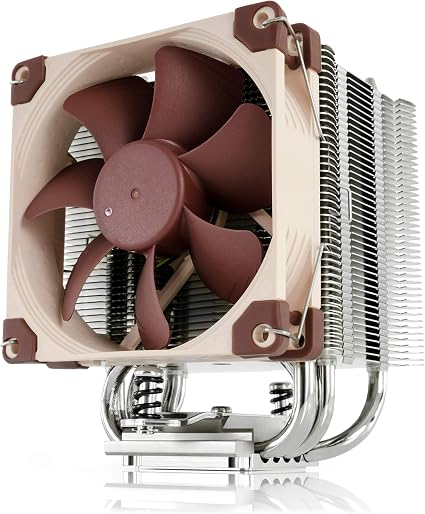
Compact size stands out immediately, making it perfect for small builds. Designed to cool effectively without blocking RAM or PCIe slots, it suits ITX, HTPC, and Small Form Factor PCs where space is tight but performance still matters.
Installation is straightforward with the SecuFirm2 mounting system, fitting Intel and AMD sockets, including LGA1851 and AM5. The included thermal paste simplifies setup. The 92mm fan adjusts speed automatically, keeping noise low while providing necessary airflow, so it blends into daily use quietly and efficiently.
Cooling performance holds up well for a cooler this size, managing heat without issues. The build feels durable and user-friendly.
Most praise centers on its quiet operation and compatibility, while a common drawback is its limited height, which may restrict performance compared to larger coolers.
Quiet operation and excellent compatibility with small builds are frequently praised. Most common criticism is its limited cooling potential due to its compact size, making it less suitable for heavy, overclocked setups.
Ideal for users prioritizing space-saving and quiet performance in small form factors. Not recommended for those who need high cooling capacity on powerful or overclocked processors.
Pros
- Compact 125mm height fits small cases easily
- Does not block RAM or PCIe slots
- Ultra-quiet NF-A9 92mm PWM fan
- Includes high-quality thermal paste and mounting kit
Cons
- Cooled performance limited by smaller size
- May not suit larger or overclocked CPUs
| Specification | Details |
|---|---|
| Height | 125mm |
| Fan Size | 92mm |
| Socket Compatibility | Intel LGA1851, LGA1700, LGA1200, LGA115x; AMD AM5 & AM4 |
| Included Thermal Paste | NT-H1 |
| Mounting System | SecuFirm2 |
| Warranty | 6 years |
6. Noctua NH-U9S Chromax.black CPU Cooler

Known for its quiet operation and compact size, the NH-U9S chromax.black fits well into smaller builds without compromising cooling power. Ideal for those who want a solid CPU cooler with great compatibility across cases and RAM, its main strength lies in balancing size and performance effectively.
Installation is straightforward, especially since its 125mm height fits most tower cases and avoids blocking RAM slots. Its 92mm fan comes with PWM for automatic speed control, keeping things whisper quiet during light use.
It works well even in ITX setups thanks to its small footprint and careful design to clear PCIe slots.
The cooler handles CPU heat efficiently under load while staying quiet when idle. Its all-black design not only looks good but matches many builds. Most users praise how quiet and compatible it is, though some mention the compact size limits peak cooling compared to larger models.
Quiet operation at idle receives strong praise as it makes the system barely audible during typical use. Most common gripe is that it doesn’t cool as aggressively as larger solutions, reflecting its compact design focus.
Those building smaller PCs or wanting a quiet cooler that doesn’t block other components will appreciate this choice. Users seeking maximum cooling capacity might want to look for bigger models.
Pros
- Compact size fits most tower cases
- Does not block RAM or PCIe slots
- Very quiet under low load
- Comes with easy-to-use Low-Noise Adaptor
Cons
- Smaller cooler limits extreme cooling needs
- All-black look may not suit every aesthetic
| Specification | Details |
|---|---|
| Unit Count | 1 Count |
| Number of Items | 1 |
| Fan Size | 92mm |
| Height | 125mm |
| Compatibility | 100% RAM Compatibility |
| Warranty | 6 year manufacturer’s warranty |
7. Thermalright SI-100 Black CPU Cooler

Finding a compact cooler that handles heat well without dominating your desktop build can be tricky. Ideal for small to medium-sized cases, this 90mm air cooler keeps temperatures in check while fitting into tighter spaces. Its standout feature is the balance between airflow and quietness, making it suitable for everyday computing and moderate workloads.
Installation is straightforward thanks to the mounting brackets, and the 4-pin connector allows for PWM fan control to adjust speeds as needed. Running at a maximum of 2000 rpm, the fan delivers adequate airflow of 72.37 cfm without becoming overly loud. Its 27.7 dB noise level means it won’t add distracting background noise during use, and the power draw stays low at 2.16 watts.
Performance-wise, it keeps CPUs cool enough for general desktop tasks and light gaming without issues. The build is solid and reliable, made with quality materials typical of a brand focused on computer accessories.
Common praises highlight the efficient airflow and quiet operation, while some note it doesn’t compete with larger or liquid cooling solutions for heavy overclocking.
This cooler is consistently praised for its ability to maintain good airflow quietly at a modest power draw. The most frequent drawback mentioned is the fan noise when spun up to its maximum 2000 rpm, which can be noticeable in very quiet environments.
People running standard desktop builds or light gaming setups will find this cooler a solid match. Those aiming for intense CPU overclocking or extremely silent machines might want to look for larger or liquid cooling alternatives.
Pros
- Quiet operation at 27.7 dB
- Good airflow for 90mm size
- Simple 4-pin PWM connector
- Compact fit for small cases
Cons
- Not ideal for heavy overclocking
- Fan speed can be loud at max RPM
| Specification | Details |
|---|---|
| Power Connector Type | 4-Pin |
| Voltage | 12 volts |
| Wattage | 2.16 watts |
| Cooling Method | Air |
| Noise Level | 27.7 db |
| Maximum Rotational Speed | 2000 rpm |
| Air Flow Capacity | 72.37 cfm |
8. ALSEYE W90 CPU Cooler

Showing real-time CPU temperature on your screen is unusual for a cooler at this size and price, making the ALSEYE W90 stand out. It’s designed for smaller cases and mid-range Intel systems like i3 or i5, with enough cooling for regular, non-overclocked setups.
The cooler fits compact spaces well thanks to its small dimensions of 102 by 102 by 82 millimeters. Installation goes smoothly on supported Intel sockets. The included software “BEM” displays accurate CPU temperature, which helps you keep tabs on your system’s heat without extra apps.
The ARGB fan adds a nice lighting effect and adjusts speed automatically through PWM control.
Its 40mm copper heat column handles up to about 135 watts of TDP, ideal for standard mid-tier processors. The fan runs quietly at 35 decibels with speeds up to 2200 rpm, balancing noise and airflow. Common praise highlights the temperature display feature and compact fit, while some users note it’s not suited for heavy overclocking or high-performance CPUs beyond mid-range.
Temperature display feature is highly appreciated as it provides easy real-time monitoring without additional tools. The main limitation is its inability to cool CPUs with higher power demands or overclocked processors.
Perfect choice for users with compact builds and mid-range Intel CPUs who want quiet cooling and temperature feedback. Those planning heavy overclocking or using high-end CPUs should look for more powerful alternatives.
Pros
- Built-in CPU temperature display via software
- Compact size fits small cases easily
- Quiet fan operation at 35 dB
- ARGB lighting for visual appeal
Cons
- Not suitable for overclocked or high TDP CPUs
- Limited to Intel mid-range socket compatibility
| Specification | Details |
|---|---|
| Fan Size | 90mm |
| Maximum TDP | 135W |
| Noise Level | 35 dB |
| Compatibility | Intel LGA 1700/1200/115X |
| Max Rotational Speed | 2200 rpm |
9. Vetroo Eclipse 90mm Low-Profile CPU Cooler

People building small form factor PCs with Intel LGA 1851 or 1700 sockets will find the Vetroo Eclipse 90mm Low-Profile CPU Cooler fits well in tight spaces while providing reliable cooling. Its compact size and quiet operation stand out, especially for systems where a bigger cooler won’t fit.
Installation is straightforward, designed specifically for Intel LGA 1851 and 1700 sockets, so compatibility is clear. The PWM control lets you adjust fan speed dynamically between 800 and 2500 RPM, which helps balance noise and airflow depending on your needs.
The dual ring ARGB lighting syncs easily with 5 V motherboard headers, adding a nice light show without complicated setup. Its low profile, standing 72mm tall, fits in most compact cases without clearance issues.
Cooling performance holds up well for its size, pushing up to 95 watts of power and 29.3 CFM airflow to keep the CPU temperature in check. The top-to-bottom airflow design also helps cool neighboring motherboard components. Build quality is solid, though the 29.6 dB noise can be noticeable at maximum speed.
The most frequent praise is about its good airflow in a small design, while the common complaint revolves around limited socket compatibility and noise at full speed.
The cooler offers impressive airflow and low-profile design for tight PC builds, though it can become noticeably noisy when the fan spins at full speed. The lighting integration is a plus for those who like a customizable build appearance.
People using compact Intel LGA 1851 or 1700 systems looking for balanced airflow and style will appreciate this cooler. It is not suitable for users with non-supported sockets or those prioritizing ultra-quiet operation under heavy loads.
Pros
- Compact 72mm height fits small PC cases
- ARGB dual ring lighting that syncs with motherboard
- Dynamic fan speed via 4-pin PWM control
- Effective cooling for Intel LGA 1851 and 1700 CPUs
Cons
- Supports Intel LGA 1851 & 1700 sockets only
- Noise level rises at maximum fan speed
| Specification | Details |
|---|---|
| Power Connector Type | 4-Pin |
| Voltage | 12 volts_of_direct_current |
| Wattage | 95 watts |
| Noise Level | 29.6 db |
| Maximum Rotational Speed | 2500 rpm |
| Air Flow Capacity | 29.3 cfm |
10. Thermalright AXP90-X53 Low Profile CPU Cooler
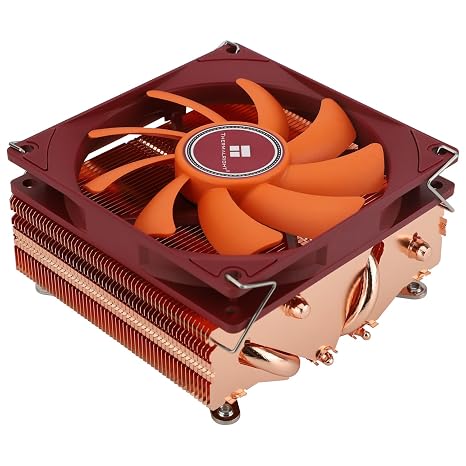
Designed for compact PC builds, the Thermalright AXP90-X53 Low Profile CPU Cooler stands out with its slim 53mm height and advanced 4th generation AGHP heat pipe technology. It fits neatly in small cases and offers strong cooling power, making it ideal for users needing efficient cooling in tight spaces.
Setting it up involves mounting on small motherboards with limited clearance, thanks to its low profile. The cooler’s micro-carved copper base and pure copper fins work quietly alongside a 4-pin fan connector, providing a balance between airflow and noise.
Day-to-day use shows it maintains stable temps without hitting high noise levels, making it suitable for desktops where space and cooling matter equally.
Performance meets solid build quality as the fine copper fins and soldered heat pipe fins help double heat transfer efficiency. It’s good at handling up to 145 watts while keeping noise around 22.4 sones.
Most praise highlights how well it cools in a compact form factor. A common gripe is the fan speed reaching up to 2700 rpm, which can be loud under load.
The cooler delivers excellent heat dissipation in a tight form factor, praised often for fitting small setups comfortably. A common downside is the fan becoming loud when spinning at full speed, which some find distracting during intensive tasks.
Ideal for anyone building compact desktop systems who needs solid cooling without bulk. Users seeking ultra-quiet solutions or heavy overclockers should consider alternatives that prioritize silence or higher wattage support.
Pros
- Compact height fits small cases easily
- Efficient heat transfer with AGHP technology
- Quiet operation under moderate loads
- Compatible with small motherboards
Cons
- Fan noise noticeable at maximum speed
- May struggle with very high heat loads
| Specification | Details |
|---|---|
| Maximum Rotational Speed | 2700 rpm |
| Noise Level | 22.4 sones |
| Air Flow Capacity | 42.58 cfm |
| Voltage | 12 volts |
| Power Connector Type | 4-Pin |
| Wattage | 145 watts |
11. Thermalright Assassin X90 SE V2 CPU Air Cooler

Thermalright Assassin X90 SE V2 is a compact 90mm air cooler designed for desktop CPUs where space is at a premium. It stands out for fitting a wide range of chassis while offering a sturdy build and advanced heatpipe technology meant for efficient heat dissipation in small form factor setups.
Setup is straightforward thanks to its moderate height of 118mm, making it compatible with many PC cases. The 4-pin power connector delivers steady voltage at 12 volts and keeps the fan spinning at speeds up to 2200 rpm.
Daily use benefits from its durable S-FDB bearing system and industrial-strength materials, promising long-term reliability without frequent maintenance.
Four 6mm heatpipes using AGHP 4th generation technology handle heat removal, improving cooling without adding bulk. The cooler achieves a modest airflow capacity of 32.77 cfm and a noise level of 23.85 sones, balancing effectiveness with audible fan operation. Built with tough industrial-grade PBT + PC materials and UL class A insulation, it focuses on safety and durability.
Some users note the noise as a downside during heavy load.
The standout feature of the cooler is its reliable build quality paired with AGHP technology, which really keeps temperatures balanced in small spaces. However, the noise output is noticeable, especially when the fan spins near its 2200 rpm maximum speed.
Those with compact PC cases and average CPU cooling needs will appreciate its size and durability. Systems requiring ultra-quiet operation or handling very high thermal loads might want to consider larger or quieter cooling options.
Pros
- Compact height fits a wide range of chassis
- Durable S-FDB bearings for long service life
- AGHP technology improves heatpipe efficiency
- Industrial-strength PBT + PC materials
Cons
- Noise level can be quite loud under load
- Airflow capacity relatively low for high-TDP CPUs
| Specification | Details |
|---|---|
| Power Connector Type | 4-Pin |
| Voltage | 12 volts |
| Maximum Rotational Speed | 2200 rpm |
| Air Flow Capacity | 32.77 cfm |
| Noise Level | 23.85 sones |
| Height | 118mm |
12. Thermalright AXP90 X47 Black Low Profile CPU Cooler

Quiet cooling with a low profile that fits tight spaces suits anyone building an ITX or HTPC system. What stands out most is the very compact 47mm height paired with a 92mm fan, making it one of the few coolers that balance good airflow and size without blocking RAM slots.
Setup is straightforward, with the fan using a standard 4-pin connector for PWM control, which means it adjusts speed based on your CPU’s temperature. The low noise level at 22.4 dB means it stays quiet even under load.
Its slim design avoids conflicts with memory modules, so upgrades to RAM won’t cause problems down the line.
Heat pipes use a special welding technique to prevent cooling loss caused by the cooler’s orientation, so it maintains solid performance whether mounted horizontally or vertically. The build feels solid and well put together, though some mention that it doesn’t push airflow as high as larger coolers.
Quiet operation and compatibility with small cases come as highlights.
Effective cooling depends on the improved welding technique and AGHP heat pipes, which keep temperatures down regardless of cooler orientation. While it is praised for quiet operation, some note that the fan reaches 2700 rpm during heavy loads, which can raise noise levels unexpectedly.
Compact system builders and those concerned about RAM clearance will appreciate the slim profile. Users needing maximum airflow or noise-sensitive setups with heavy thermal loads might want to look at bigger coolers or liquid options.
Pros
- Very low profile for compact builds
- Quiet operation at 22.4 dB noise level
- Compatible with all memory heights
- Effective heat pipe design for cooling
Cons
- Airflow lower than larger coolers
- Fan speed can get loud at max RPM
| Specification | Details |
|---|---|
| Height | 47mm |
| Fan Size | 92mm PWM |
| Noise Level | 22.4 dB |
| Maximum Fan Speed | 2700 rpm |
| Air Flow | 42.58 cfm |
Best 90mm CPU Coolers Compared Side by Side
| Product | Noise Level | Max RPM | Air Flow Capacity | Cooling Method |
|---|---|---|---|---|
| Thermalright Assassin X90 SE V2 | 25 db | 2200 rpm | 32.77 cfm | Air |
| Thermalright Assassin X90 SE V2 | 23.85 db | 2200 rpm | 32.77 cfm | Air |
| Thermalright Peerless Assassin 90 SE | 23.85 db | 2200 rpm | 32.77 cfm | Air |
| Thermalright Assassin King 90 V2 | 23.85 db | 2200 rpm | 44 cfm | Air |
| Noctua NH-U9S | – | – | – | – |
| Noctua NH-U9S chromax.black | – | – | – | – |
| Thermalright SI-100 Black | 27.7 db | 2000 rpm | 72.37 cfm | Air |
| ALSEYE W90 | 35 db | 2200 rpm | – | Air |
| Vetroo Eclipse 90mm Low-Profile | 29.6 db | 2500 rpm | 29.3 cfm | Air |
| Thermalright AXP90-X53 Low Profile | 22.4 sones | 2700 rpm | 42.58 cfm | Air |
| Thermalright Assassin X90 SE V2 | 23.85 sones | 2200 rpm | 32.77 cfm | Air |
| Thermalright AXP90 X47 Black | 22.4 db | 2700 rpm | 42.58 cfm | Air |
- Noise Level25 db
- Max RPM2200 rpm
- Air Flow Capacity32.77 cfm
- Cooling MethodAir
- Noise Level23.85 db
- Max RPM2200 rpm
- Air Flow Capacity32.77 cfm
- Cooling MethodAir
- Noise Level23.85 db
- Max RPM2200 rpm
- Air Flow Capacity32.77 cfm
- Cooling MethodAir
- Noise Level23.85 db
- Max RPM2200 rpm
- Air Flow Capacity44 cfm
- Cooling MethodAir
- Noise Level–
- Max RPM–
- Air Flow Capacity–
- Cooling Method–
- Noise Level–
- Max RPM–
- Air Flow Capacity–
- Cooling Method–
- Noise Level27.7 db
- Max RPM2000 rpm
- Air Flow Capacity72.37 cfm
- Cooling MethodAir
- Noise Level35 db
- Max RPM2200 rpm
- Air Flow Capacity–
- Cooling MethodAir
- Noise Level29.6 db
- Max RPM2500 rpm
- Air Flow Capacity29.3 cfm
- Cooling MethodAir
- Noise Level22.4 sones
- Max RPM2700 rpm
- Air Flow Capacity42.58 cfm
- Cooling MethodAir
- Noise Level23.85 sones
- Max RPM2200 rpm
- Air Flow Capacity32.77 cfm
- Cooling MethodAir
- Noise Level22.4 db
- Max RPM2700 rpm
- Air Flow Capacity42.58 cfm
- Cooling MethodAir
How to Choose the Right 90mm CPU Cooler
Choosing a good 90mm CPU cooler depends on factors like cooling performance, noise levels, and compatibility with your case and CPU socket. Getting these right ensures efficient cooling and quiet operation, preventing overheating issues and saving money on potential repairs or replacements.
Cooling Performance
Choosing a cooling solution with a mismatched thermal design power (TDP) rating can lead to higher CPU temperatures and throttling under load. A cooler rated for a lower TDP than your processor’s heat output struggles to maintain safe temperatures, causing performance drops or system instability. Practical experience shows a cooler matching or exceeding the CPU’s TDP rating reliably keeps temperatures controlled.
Airflow capacity, usually measured in cubic feet per minute (CFM), directly impacts how well heat moves away from the heatsink. Fans with higher CFM numbers move more air but tend to be louder. A fan speed range between roughly 800 and 2500 RPM offers a balance, letting you push cooling power when needed and dial it down for quiet operation.
Watch for models specifying their airflow specs clearly, as this indicates effective heat dissipation capability.
Size and Compatibility
Not every cooler fits comfortably inside smaller cases or around tight motherboard layouts. Some models stand tall enough to block side panels or interfere with your case’s front fans. Clearances near the CPU socket also matter, low-profile RAM sticks or PCIe components can get blocked by oversized coolers.
Measuring your case’s available height and spacing around RAM slots helps avoid headaches.
Socket compatibility is crucial; a cooler designed for one socket type might not mount securely on another. Most provide mounting kits for popular sockets but double-check your motherboard specs before buying. The mounting mechanism’s design can affect both installation ease and contact quality with the CPU.
Noise Levels
Noise level differences can be pretty noticeable between coolers, especially when running high fan speeds. Fans around 20 to 30 decibels stay fairly quiet during everyday use, but speeds above 2000 RPM can push noise higher.
Materials like fluid dynamic bearings greatly reduce vibration noise compared to sleeve bearings.
Look for rubber dampeners on fan mounts to minimize rattling against the heatsink frame. Ability to adjust fan speed manually or via motherboard fan controls lets you balance noise and cooling to suit your environment.
Without speed control, fans often run at full blast, making the system louder than necessary.
Build Quality and Materials
Heat transfer efficiency depends heavily on the materials used. Copper bases tend to draw heat away from the CPU faster than aluminum, but aluminum fins spread the heat well due to their lighter weight and cost-effectiveness.
A combination of copper and aluminum is common and practical for this cooler size.
Durability of the fan blades and frame also matters since cheap plastics can crack or warp over time. Solid construction helps avoid wobbling that leads to noise and uneven airflow. Some coolers include pre-applied thermal paste, but fresh, high-quality thermal interface material often improves contact and heat conduction during installation.
Ease of Installation and Maintenance
Mounting systems vary widely; some require removing the motherboard while others install from above the socket. A straightforward and clearly illustrated instruction manual saves time and frustration during setup.
Coolers with push-pin or screw-in brackets tend to offer more secure installation.
Maintenance plays a role in long-term performance. Fans and fins should be easy to access for dusting or cleaning without full disassembly. Check for availability of replacement fans or mounting parts, as these components may wear down or get damaged over years of use, and finding replacements extends the cooler’s lifespan.
Optimal Installation Techniques for 90mm CPU Coolers
Properly securing a 90mm CPU cooler requires attention to mounting pressure and contact with the CPU surface. Over-tightening screws can distort the cooler base or motherboard, while insufficient pressure leads to poor heat transfer.
Before installation, clean the CPU heat spreader and cooler base with isopropyl alcohol to remove old thermal paste and oils. Apply a small, pea-sized amount of thermal paste evenly to avoid air pockets.
Use the mounting bracket included with the cooler, ensuring it aligns perfectly with the socket holes.
- Check for clearance around RAM modules and motherboard components to prevent obstruction.
- Tighten screws incrementally in a cross pattern to distribute pressure evenly.
- Verify that the cooler fan is oriented to push air toward the rear or top exhaust of the case.
These steps help maintain effective heat dissipation and reduce vibrations or noise from an improperly secured cooler.
Routine Maintenance and Cleaning for Long-Lasting Performance
Dust buildup on the fins and fan blades of a 90mm CPU cooler significantly reduces cooling efficiency over time. Cleaning should be done every few months, depending on the environment and case airflow.
Power off and unplug the computer before starting any maintenance. Use compressed air to blow out dust from the heatsink fins and fan without disassembling the cooler.
For thorough cleaning, gently remove the fan from the heatsink if possible, then wipe blades with a dry cloth.
- Inspect fan bearings for noise or rough spinning and replace the fan if necessary.
- Reapply thermal paste once a year or if the cooler has been removed.
- Keep surrounding case areas clean to prevent dust from rapidly accumulating again.
Regular cleaning preserves cooling performance and extends the lifespan of both the cooler and CPU.
Comparing 90mm CPU Coolers with Larger and Smaller Alternatives
A 90mm CPU cooler strikes a balance between size and cooling capacity, fitting well in compact cases but offering more performance than the smallest options. Compared to 120mm or larger coolers, the smaller fan diameter produces less airflow and slightly higher temperatures under heavy load.
Smaller coolers, like those with 80mm fans, suit low-power or budget systems but may struggle with mid-range processors. Larger coolers improve thermal management by moving more air and having bigger heatsinks, but require more clearance and generate additional noise.
- 90mm coolers fit most mid-tower and mini-tower cases without interfering with RAM or GPU slots.
- They generally offer easier installation without the weight and bulk of large coolers.
- Noise levels from 90mm fans tend to be moderate when running at optimal speeds.
Choosing a cooler size depends on case dimensions, CPU heat output, and noise preferences rather than just fan diameter.
People Also Asked
How Do I Install a 90mm CPU Cooler Properly?
Secure the cooler onto the CPU with its mounting brackets and apply thermal paste evenly before installation. Tighten screws evenly to avoid uneven pressure that can reduce cooling effectiveness.
Will a 90mm CPU Cooler Fit in a Small PC Case?
A 90mm cooler usually fits in small cases but measure clearance for RAM and cables. Cases designed for ITX or microATX builds often specify compatible cooler heights, which helps avoid surprises.
How Long Does a 90mm CPU Cooler Typically Last?
A 90mm cooler fan can last about 3 to 5 years under normal use. Keeping dust off the fan blades extends its lifespan and maintains good airflow, so regular cleaning is useful.
Can a 90mm CPU Cooler Handle High CPU Temperatures Safely?
Most 90mm coolers handle average CPU loads but may struggle with heavy overclocking or high TDP processors. Monitoring CPU temps with software ensures it stays within safe limits during heavy tasks.
What Are Common Issues with 90mm CPU Coolers?
Noise from the fan and dust buildup are common problems. Using a fan controller or setting BIOS fan curves to balance noise and cooling performance helps reduce fan noise.
Conclusion
Choosing the right 90mm CPU cooler comes down to three main factors: how well it fits your case, its cooling performance, and noise levels. Make sure it can clear your RAM and other components.
Check that it moves enough air to keep your CPU temperature in a safe range without making too much noise.
Think about how much space you have inside your PC and your budget before making a choice. Less frequent use might allow for a quieter, less powerful option while daily heavy loads call for something more capable. Use the comparison table and detailed picks above to find the cooler that matches your setup and needs best.

I’m Grant Mitchell, a firearms and hunting writer with years of experience at the range and in the field. I write about rifles, shotguns, handguns, optics, safe storage, cleaning, and responsible ownership, along with practical hunting tips. My goal is to share accurate, safety-first information that helps you choose the right firearm, maintain it properly, and become a more confident shooter.