Top 12 Best 7700k Cooler That Will Blow Your Mind!
Overheating is a familiar issue for anyone running an Intel Core i7-7700K, especially during heavy workloads or gaming sessions. A cheap or ill-fitting cooler can lead to high temperatures, throttling performance, and even noise problems.
Finding the best 7700k cooler means addressing these key challenges effectively without constant tinkering.
The most important factors for a 7700k cooler include thermal dissipation capability, fit within the case, and noise levels. Coolers with heat pipes made of copper and large aluminum fins tend to move heat away more efficiently.
Mounting size matters because the 7700K socket requires secure contact without too much pressure. A fan speed range between 800 and 2000 RPM typically balances cooling with acceptable noise. Easy cleaning options, such as removable fans or dust filters, also help maintain performance over time.
Need a Quick Check?
| Image | Product | Price |
|---|---|---|
Our Top Picks 1  | Thermalright Assassin X120 | Check Price |
Our Top Picks 2  | Thermalright Peerless Assassin | Check Price |
Our Top Picks 3  | Noctua NH-D15 | Check Price |
Our Selected Top 12 7700k Cooler Picks for Every Need
This list features a variety of coolers designed to keep the 7700k processor running efficiently. Each review explains how well it performs, the type of user it benefits most, and highlights its main advantages and potential drawbacks.
1. Thermalright Assassin X120 Refined SE CPU Air Cooler
Excellent cooling power combined with a quiet fan makes it ideal for gamers running the Intel 7700K. It stands out by balancing airflow and noise at a very reasonable 25.6 dB, keeping your system cool without distraction.
Installation goes smoothly thanks to well-designed mounting brackets, fitting most desktop setups easily. The heat pipe design paired with a 4-pin 12V fan allows precise control over speed, adapting well to everyday tasks and heavier loads without fuss. It’s a solid choice for anyone wanting dependable, consistent performance without upgrading to liquid cooling.
The cooler keeps CPU temperatures low during intense use thanks to its efficient heat pipe and fan combo. Build quality is strong and components are durable, with a practical focus instead of flashy design. Most praise points to its quiet operation under load while some mention that the size can be a bit bulky in tighter cases.
Quiet operation around 25.6 dB is the most appreciated feature, offering powerful cooling without noticeable noise. The most common remark involves its bulkiness making installation tricky in smaller or tightly packed cases.
Ideal for gamers and users needing strong cooling with low noise in regular desktops. Those working with smaller cases or seeking extreme overclocking cooling might consider other options.
Pros
- Quiet fan runs at just 25.6 dB
- Powerful airflow of 66.17 cfm keeps CPU cool
- Compatible with most desktop setups
- 4-pin connector allows fan speed control
Cons
- Size may be too large for compact builds
- Fan speed maxes out at 1550 rpm, limiting peak cooling
| Specification | Details |
|---|---|
| Power Connector Type | 4-Pin |
| Voltage | 12 volts_of_direct_current |
| Cooling Method | Heat pipe and fan-based |
| Noise Level | 25.6 db |
| Maximum Rotational Speed | 1550 rpm |
| Air Flow Capacity | 66.17 cfm |
2. Thermalright Peerless Assassin 120 SE CPU Cooler
Aluminum fins paired with an efficient dual-tower design make this cooler a solid option for anyone running an Intel i7-7700K. Its most notable strength lies in managing heat with quiet operation, ideal for gamers or users demanding a quieter PC environment without compromising performance.
Installation involves a straightforward mounting system that fits well in most desktop cases supporting standard air cooling. The fan’s 4-pin connector allows for PWM control, adjusting speed up to 1550 rpm to balance cooling needs and noise levels.
Day-to-day, the cooler stays fairly quiet at 25.6 dB, helping maintain a calm workspace while pushing airflow at 66.17 cfm to keep temperatures in check.
Cooling power reaches up to 265 watts, which handles the 7700K’s heat output with ease. Build quality reflects Thermalright’s two decades of experience, focusing on durability with solid materials.
Positive feedback highlights its lasting quietness. Some complaints mention its slightly bulky size, which could interfere in smaller cases or with RAM clearance.
Cooling capability and quiet operation stand out as key positives. The main downside is the cooler’s size, which can limit compatibility with certain compact setups or taller RAM modules. The fan speed controls provide a good balance between noise and performance.
It suits users with medium to large cases looking for strong air cooling without loud fans. Those with tight case spaces or low-profile RAM should consider a smaller cooler to avoid fit issues.
Pros
- Efficient cooling at 265 watts power
- Quiet operation at 25.6 dB noise level
- PWM support via 4-pin connector for speed control
- Strong airflow at 66.17 cfm
Cons
- Bulky design may block some RAM slots
- Mounting can be tricky in smaller cases
| Specification | Details |
|---|---|
| Power Connector Type | 4-Pin |
| Voltage | 12 volts |
| Wattage | 265 watts |
| Noise Level | 25.6 db |
| Maximum Rotational Speed | 1550 rpm |
| Air Flow Capacity | 66.17 cfm |
3. Noctua NH-D15 CPU Cooler
Big and imposing, the NH-D15 is for anyone who wants serious cooling power for an Intel 7700k setup. Its standout feature is the dual-tower design complete with six heatpipes and two fans, which handle heavy loads quietly and efficiently.
The included SecuFirm2 mounting system takes the headache out of installation on various Intel sockets, including LGA115x and LGA1700. Everyday running is smooth thanks to PWM-controlled NF-A15 140mm fans that automatically adjust speed with low-noise adapters for near-silent operation. Cleaning takes a bit more care due to the size but is manageable for regular maintenance.
Built with solid materials and careful engineering, this cooler excels at keeping temperatures down during intensive tasks. It’s praised for its excellent cooling performance and low noise levels, but some find the large size tricky in tighter cases. The high-end thermal paste included helps improve heat transfer right from the start, while the airflow capacity ensures good air movement through the tower fins.
The strongest praise is about how cool and quiet the setup remains, even with overclocking, thanks to the dual-tower layout and the two efficient fans. On the downside, the large physical size can be a challenge when working with compact or mid-sized cases, limiting compatibility.
Those with roomy cases who prioritize silent and powerful air cooling will be very happy. Users with smaller cases or who prefer a more compact build might want to look at smaller cooler options that offer easier installation and clearance.
Pros
- Dual 140mm fans keep noise impressively low
- Mounting system simplifies installation across many sockets
- High airflow and heatpipe count for effective cooling
- Includes quality thermal paste for better heat transfer
Cons
- Bulky size may cause fit problems in smaller cases
- Requires occasional careful cleaning due to large fin area
| Specification | Details |
|---|---|
| Power Connector Type | 4-Pin |
| Voltage | 12 volts |
| Wattage | 1.56 watts |
| Noise Level | 24.6 db |
| Maximum Rotational Speed | 1500 rpm |
| Air Flow Capacity | 140.2 cubic meter per hour |
4. Noctua NH-D15S CPU Cooler

Choosing high-end cooling like the NH-D15S makes sense when overclocking or aiming for a near-silent PC. Its standout feature is the asymmetric design that fits better with RAM and PCIe slots, ideal for users needing powerful and compatible air cooling for Intel 7700k setups.
Setting it up involves the SecuFirm2 mounting system, which simplifies installation across various Intel sockets, including LGA115x series. The 140mm NF-A15 fan with PWM support adjusts speed automatically, balancing cooling needs quietly.
Included thermal paste ensures good heat transfer right out of the box, making day-to-day operation smooth and without unexpected noise or fit issues.
Cooling performance is strong thanks to six heatpipes and a dual-tower design. The build quality follows Noctua’s high standards, ensuring durability and reliability.
Reviews frequently praise its quiet operation, while the main complaint is bulk, as the size can interfere with larger RAM modules or smaller cases despite its optimized fit.
Quiet operation ranks high among the positive comments while size and clearance concerns come up most often. The fan speed control keeps noise low without sacrificing performance in normal and overclocked conditions.
People running standard to moderate-sized builds with standard RAM will find it a solid choice, especially on Intel 7700k and newer. Anyone with very tight space or tall memory modules should consider smaller coolers to avoid clearance problems.
Pros
- Excellent cooling with six heatpipes
- Quiet operation around 24.6 db
- Good fit for RAM and PCIe slots
- Easy installation with SecuFirm2 system
Cons
- Size may block taller RAM modules
- Not suited for compact PC cases
| Specification | Details |
|---|---|
| Noise Level | 24.6 db |
| Maximum Rotational Speed | 1500 rpm |
| Cooling Method | Air |
| Power Connector Type | 4-Pin |
| Voltage | 12 volts |
5. Be Quiet! Pure Rock 3 Black CPU Cooler

Handling the heat from an Intel Core i7-7700K chip requires a cooler that can keep temperatures in check without overwhelming noise or awkward installation. The be quiet!
Pure Rock 3 Black CPU Cooler fits the bill for gamers, multimedia users, and typical home setups with a 190W TDP capacity, making it a solid choice for mid-range systems aiming for balance between performance and quiet operation.
Installing the cooler is straightforward thanks to its compatible Intel sockets from 1151 to 1851, including the popular 1200 and 1700. The four black 6mm heat pipes are arranged with minimal bends to efficiently move heat to the cooling fins, while the Pure Wings 3 120mm PWM fan adjusts speeds up to 2000 rpm, keeping noise at a manageable 34.8 dB during regular use.
The 4-pin connector plugs right into standard motherboard headers, simplifying setup.
Cooling is its main strength, reliably handling 190 watts without overheating. The black heat pipes not only match the fins but also function well in heat dissipation.
Build quality feels solid, with well-designed components. Praises often focus on the quiet fan performance, while common complaints mention the fan speed noise at its maximum. It doesn’t have RGB or premium materials but does its basic job steadily.
The cooler earns praise for managing high heat loads quietly, thanks largely to its well-placed heat pipes and fan blade design. At full fan speed, though, the noise becomes more obvious, which may bother those sensitive to sound.
Systems needing reliable, no-nonsense cooling for mainstream Intel CPUs will find it suitable. Anyone looking for flashy designs or the quietest possible operation under heavy load might want to explore other options.
Pros
- Stable cooling for 190W TDP CPUs
- Quiet fan performance during regular operation
- Compatible with a wide range of Intel sockets
- Heat pipes arranged for efficient heat transfer
Cons
- Fan noise noticeable at maximum speed
- No RGB or decorative lighting options
| Specification | Details |
|---|---|
| Power Connector Type | 4-Pin |
| Voltage | 12 volts |
| Wattage | 190 watts |
| Maximum Rotational Speed | 2000 rpm |
| Noise Level | 34.8 db |
| Cooling Method | Air |
6. Noctua NH-L9x65 CPU Cooler

At just 65mm in total height, it’s a compact cooler made for small cases, HTPCs, and ITX builds where space is limited. It fits neatly without encroaching on RAM or PCIe slots on current motherboards, making it ideal for those tight setups. Its slim profile and quiet operation stand out the most.
Installation benefits from a thoughtful mounting system that works with a variety of Intel and AMD sockets. The included NT-H1 thermal paste makes the initial setup smoother than expected.
The slim 92mm fan adapts speeds automatically, so daily operation is quiet while still managing airflow efficiently in compact spaces.
Cooling performance suits CPUs with low to moderate heat output, keeping temperatures under control without loud fan noise. The build feels sturdy and well-made, backed by proven mounting hardware. Reviews often mention how quiet it runs and its neat fit, though the cooling power won’t be enough for higher-end or overclocked CPUs.
Quiet operation combined with the compact size consistently earns praise. The most common drawback is limited cooling capacity, which can struggle with more powerful CPUs or heavy workloads.
Those building a small form factor PC or HTPC focused on quiet running will appreciate this cooler. Users planning to push their CPU hard or needing stronger cooling performance should look for a larger solution.
Pros
- Friendly to compact and ITX builds
- Quiet fan with PWM and Low-Noise Adapter
- No RAM or PCIe slot overhang
- Easy installation with SecuFirm2 system
Cons
- Not suitable for high heat CPUs
- Fan speed can get loud at max rpm
| Specification | Details |
|---|---|
| Total Height | 65 mm |
| Fan Size | 92 mm |
| Maximum Rotational Speed | 2500 rpm |
| Air Flow Capacity | 57.5 cubic meter per hour |
| Noise Level | 23.6 db |
| Voltage | 12 volts |
7. Noctua NH-U9S CPU Cooler
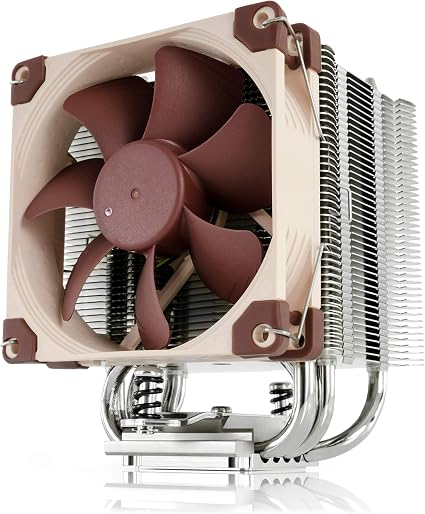
Anyone building a compact PC, especially HTPCs or small form-factor rigs, will find the Noctua NH-U9S a great fit. Its 125mm height keeps it clear of RAM and PCIe slots while delivering solid cooling performance in a small package, making it ideal for space-conscious setups.
Installation is straightforward thanks to the SecuFirm2 mounting system and included thermal paste. The 92mm NF-A9 fan runs quietly with PWM support and a Low-Noise Adaptor for controlled speeds. Everyday use means no worrying about clearance issues or fan noise in your build, allowing efficient cooling without loud distractions.
The cooler does a strong job keeping the 7700k temperatures managed within a limited space. Build quality is impressive, with premium components and thoughtful design to maximize compatibility. The most praised feature is its quiet operation, while a common drawback is the smaller fan size that might limit peak airflow compared to larger coolers.
The cooling solution stands out for its quiet operation and excellent compatibility with compact builds, praised consistently in reviews. A common complaint relates to the smaller fan size, which may not offer the highest airflow needed for intense cooling scenarios.
Anyone focused on building a small, quiet PC will be pleased with this cooler’s fit and noise levels. Users aiming for heavy overclocking or maximum thermal performance might want to look at larger or dual-tower coolers instead.
Pros
- Compact height fits tight cases and setups
- Quiet fan with PWM and Low-Noise Adaptor
- Does not block RAM or PCIe slots
- Easy installation with SecuFirm2 system
Cons
- 92mm fan might limit maximum cooling power
- Single tower design may not suit overclocking needs
| Specification | Details |
|---|---|
| Height | 125mm |
| Fan Size | 92mm |
| Compatibility | Intel LGA1851, LGA1700, LGA1200, LGA115x and AMD AM5 & AM4 |
| Included Thermal Paste | NT-H1 |
| Warranty | 6 year manufacturer’s warranty |
8. Noctua NH-L12S CPU Cooler

Exceptional for compact builds, the Noctua NH-L12S stands out as a low-profile CPU cooler ideal for ITX and HTPC setups. Its biggest strength lies in its slim design combined with a quiet, efficient 120mm fan that fits where larger coolers simply won’t.
Setup is straightforward thanks to the SecuFirm2 mounting system supporting various Intel and AMD sockets, including the latest LGA1851 and AM5. The included NT-H1 thermal paste comes pre-applied for easy installation.
Day-to-day, the PWM-controlled fan adjusts speed automatically, keeping noise to a minimum while maintaining stable temperatures in tight spaces.
The cooler manages heat well for a low-profile unit with its four heatpipes and a 70mm total height allowing for effective airflow even in small cases. Build quality is solid, with premium materials that feel durable. Praise often centers on the near-silent operation, while the most common downside is that its compact size limits extreme overclocking potential.
Most praise highlights how quiet the cooler runs without sacrificing thermal performance in small builds. The common complaint arises from its size, making it less suitable for advanced overclocking or high thermal output CPUs.
People building compact ITX or HTPC systems seeking quiet cooling will appreciate this cooler’s balance of size and efficiency. Users planning to push their CPUs with heavy overclocks might want to consider larger, more powerful coolers.
Pros
- Low 70mm height fits tight ITX cases
- Quiet 120mm NF-A12x15 fan with PWM control
- Includes reliable NT-H1 thermal paste
- SecuFirm2 mount ensures secure installation
Cons
- Limited cooling for heavy overclocking
- Some users may require larger coolers for high TDP chips
| Specification | Details |
|---|---|
| Height | 70mm |
| Fan Size | 120mm Slim |
| Heatpipes | 4 |
| Compatible Sockets | Intel LGA1851, LGA1700, LGA1200, LGA115x, AMD AM5 & AM4 |
| Warranty | 6 year manufacturer’s warranty |
9. Noctua NH-U12A chromax.Black CPU Cooler

Noctua NH-U12A chromax.Black CPU Cooler stands out for its exceptional cooling power in a compact 120mm size, perfect for anyone needing strong performance without sacrificing case compatibility.
It fits easily in most tower cases, avoiding common issues with blocking RAM or PCIe slots, which makes it a solid choice for builds focused on efficient space use.
Installation is straightforward thanks to its design that respects motherboard space constraints, fitting neatly without interference. Daily operation benefits from two NF-A12x25 120mm fans that balance powerful airflow with quiet running, especially in idle states where noise levels drop to a whisper.
Automatic speed control manages fan RPM according to load, so you get strong cooling during gaming or heavy tasks but minimal noise when your PC is relaxed.
Cooling performance is top-tier for its size, handling the heat output of a 7700k very effectively. The all-black finish adds a clean look while maintaining Noctua’s known build quality and premium materials. Reviews often praise the coolers’ quiet operation and fit, though some users note it runs up to 22.6 db which might be noticeable in ultra-quiet setups.
Weight and bulk are generally well balanced, keeping your motherboard safe without unnecessary strain.
Quiet operation during light use is a key highlight, keeping ambient noise low and unobtrusive. The most common drawback comes from noise levels that rise under heavy loads, which might bother those sensitive to sound.
Anyone needing powerful, compact cooling that fits in smaller setups will appreciate this cooler. Those focused on absolute silence might want to look elsewhere or consider liquid cooling options.
Pros
- Excellent cooling in a compact 120mm size
- Fits most tower cases without blocking slots
- Ultra-quiet fans at idle speed
- Durable all-black finish matching many builds
Cons
- Noise can reach 22.6 db under heavy load
- Limited to 158mm height cases only
| Specification | Details |
|---|---|
| Power Connector Type | 4-Pin |
| Voltage | 12 volts |
| Cooling Method | Air |
| Noise Level | 22.6 db |
| Maximum Rotational Speed | 2000 rpm |
| Air Flow Capacity | 102.1 cfm |
10. Thermalright Aqua Elite 120 V3 AIO CPU Cooler

Running cool and quiet, the Thermalright Aqua Elite 120 V3 AIO feels solid in daily use for anyone with a 7700k looking for reliable water cooling. Its main strength lies in effective cooling combined with low vibration and a long lifespan, making it a good choice for desktop enthusiasts wanting consistent performance.
Setup is straightforward with the included 120mm ARGB fan and the fourth generation pump head, both of which connect easily to your motherboard’s 5V 3-pin for synchronized lighting effects. The protective mesh around the water pipe adds durability and the cooler runs quietly at about 25.6 dB during use. The 4-pin power connector helps keep the system stable without much fuss.
Cooling performance stays strong thanks to the black aluminium fin heat sink and a fan that spins up to 1500 RPM, pushing 66.17 CFM of airflow. The build feels sturdy, especially with the enhanced water pipe protection. Most praise centres on its quiet operation and effective temperatures, while the fan speed limit might be a downside for those wanting extreme overclocking cooling.
Thermalright Aqua Elite 120 V3 offers effective and quiet cooling beneath its durable design. Most praise mentions how reliably cool it keeps the CPU without making noise, but a frequent note is about the limited fan speed, which might restrict maximum heat dissipation for very demanding setups.
Anyone wanting steady, near-silent cooling with ARGB lighting support will appreciate this cooler. Those looking for ultra-high performance cooling or extensive overclocking may prefer a model with higher fan speeds and airflow capacity.
Pros
- Quiet operation at moderate RPM
- Durable mesh-protected water pipe
- ARGB lighting syncs well with motherboard
- Long lifespan with low evaporation
Cons
- Fan speed capped at 1500 RPM
- Airflow may not suit extreme cooling needs
| Specification | Details |
|---|---|
| Power Connector Type | 4-Pin |
| Voltage | 12 volts |
| Wattage | 7.2 watts |
| Noise Level | 25.6 db |
| Maximum Rotational Speed | 1500 rpm |
| Air Flow Capacity | 66.17 cfm |
11. Noctua NH-D15 G2 CPU Cooler

Impressive cooling power with quiet operation makes it great for demanding CPUs like the 7700k. Ideal for users wanting strong heat dissipation without loud fans. Its ability to keep temps down even under load is its standout feature.
Mounting the cooler involves some care, especially with the included washers for certain Intel sockets to avoid CPU warp. The two 140mm fans run at different speeds to keep noise low, adjusting automatically with your system’s needs.
The offset mounting works well for AMD AM5 setups too, making installation flexible. At idle, the fans are almost silent, which is easy to appreciate during normal use.
Cooling is consistent thanks to the six heatpipes and ample surface area, making it reliable for overclocking or heavy multitasking. The build quality feels solid, with premium materials that add to its weight but also its sturdiness. Most say the cooling performance impresses, though the size can interfere with RAM clearance in some builds.
Cooled CPUs run noticeably cooler while remaining quiet, impressing most who use it daily. Common issues involve the cooler’s size making installation tricky in smaller cases or ones with tall RAM modules. The large fans and substantial heatsink deliver excellent thermal performance but require proper space.
Users looking for quiet and powerful air cooling with support for modern AMD and Intel sockets will appreciate this cooler. Enthusiasts comfortable with checking case and RAM clearance can benefit from its performance. Those with compact builds or low clearance might want to explore smaller alternatives.
Pros
- Includes offset mounting for AMD AM5 and Intel LGA1851
- Automatic fan speed control with low noise adaptors
- Two large 140mm fans designed for quiet performance
- Improved surface area and 8 heatpipes for better cooling
Cons
- May limit RAM clearance due to height and bulk
- Weight and size demand careful case compatibility check
| Specification | Details |
|---|---|
| Cooling Method | Air |
| Maximum Rotational Speed | 1500 rpm |
| Noise Level | 24.8 db |
| Voltage | 12 volts |
| Power Connector Type | 4-Pin |
| Air Flow Capacity | 155.6 cubic meter per hour |
12. Noctua NH-D15 chromax.Black CPU Cooler

Built around an extra-wide 140mm dual-tower design, this cooler features a solid all-black finish that fits easily into many PC builds. Perfect for desktop users aiming for quiet performance, it offers impressive air cooling on par with some liquid coolers, ideal for those wanting strong heat dissipation without noise.
Installation involves mounting the dual NF-A15 140mm fans with PWM control, which means the fans adjust speed automatically depending on the load. The six heatpipes spread heat efficiently through the dual tower fins, keeping the CPU cool even during intensive tasks. Low-noise adapters help maintain silence during lighter usage.
Regular cleaning is manageable despite its size, ensuring consistent airflow over time.
Cooling delivers a powerful balance of silence and temperature control, with airflow reaching 140.2 cubic meters per hour and a noise level of just 24.6 dB under load. Built from high-quality materials with a 4-pin power connection, it remains sturdy and reliable.
The standout praise highlights its quiet operation at idle, but some mention its large size can pose fitting challenges in smaller cases.
The cooler is praised for maintaining whisper-quiet noise levels at idle while delivering strong airflow and cooling. Its large size, however, often requires users to double-check their case compatibility prior to installation. Cleaning remains a straightforward but necessary task to keep performance steady over time.
Users who want silent, powerful air cooling without moving to liquid setups will find this cooler a great match. Those with smaller or compact cases may have to look for alternatives due to its expansive dual-tower design and fan setup.
Pros
- Quiet operation even under heavy load
- Strong cooling comparable to many liquid coolers
- Automatic fan speed adjustment with PWM control
- Stylish all-black design fits many build themes
Cons
- Large size may cause fitting issues in small cases
- Requires careful cleaning to maintain airflow
| Specification | Details |
|---|---|
| Cooling Method | Air |
| Air Flow Capacity | 140.2 cubic meter per hour |
| Noise Level | 24.6 db |
| Maximum Rotational Speed | 1500 rpm |
| Power Connector Type | 4-Pin |
| Voltage | 12 volts |
Best 7700k Coolers Compared Side by Side
| Product | Cooling Method | Noise Level | Max Rotational Speed | Air Flow Capacity |
|---|---|---|---|---|
| Thermalright Assassin X120 | Heat pipe and fan-based | 25.6 db | 1550 rpm | 66.17 cfm |
| Thermalright Peerless Assassin | Air | 25.6 db | 1550 rpm | 66.17 cfm |
| Noctua NH-D15 | Air | 24.6 db | 1500 rpm | 140.2 cubic meter per hour |
| Noctua NH-D15S | Air | 24.6 db | 1500 rpm | – |
| be quiet! Pure Rock 3 | Air | 34.8 db | 2000 rpm | – |
| Noctua NH-L9x65 | Air | 23.6 db | 2500 rpm | 57.5 cubic meter per hour |
| Noctua NH-U9S | Air | – | – | – |
| Noctua NH-L12S | Air | – | – | – |
| Noctua NH-U12A chromax.Black | Air | 22.6 db | 2000 rpm | 102.1 cfm |
| Thermalright Aqua Elite 120 V3 | Water | 25.6 db | 1500 rpm | 66.17 cfm |
| Noctua NH-D15 G2 | Air | 24.8 db | 1500 rpm | 155.6 cubic meter per hour |
| Noctua NH-D15 chromax.Black | Air | 24.6 db | 1500 rpm | 140.2 cubic meter per hour |
- Cooling MethodHeat pipe and fan-based
- Noise Level25.6 db
- Max Rotational Speed1550 rpm
- Air Flow Capacity66.17 cfm
- Cooling MethodAir
- Noise Level25.6 db
- Max Rotational Speed1550 rpm
- Air Flow Capacity66.17 cfm
- Cooling MethodAir
- Noise Level24.6 db
- Max Rotational Speed1500 rpm
- Air Flow Capacity140.2 cubic meter per hour
- Cooling MethodAir
- Noise Level24.6 db
- Max Rotational Speed1500 rpm
- Air Flow Capacity–
- Cooling MethodAir
- Noise Level34.8 db
- Max Rotational Speed2000 rpm
- Air Flow Capacity–
- Cooling MethodAir
- Noise Level23.6 db
- Max Rotational Speed2500 rpm
- Air Flow Capacity57.5 cubic meter per hour
- Cooling MethodAir
- Noise Level–
- Max Rotational Speed–
- Air Flow Capacity–
- Cooling MethodAir
- Noise Level–
- Max Rotational Speed–
- Air Flow Capacity–
- Cooling MethodAir
- Noise Level22.6 db
- Max Rotational Speed2000 rpm
- Air Flow Capacity102.1 cfm
- Cooling MethodWater
- Noise Level25.6 db
- Max Rotational Speed1500 rpm
- Air Flow Capacity66.17 cfm
- Cooling MethodAir
- Noise Level24.8 db
- Max Rotational Speed1500 rpm
- Air Flow Capacity155.6 cubic meter per hour
- Cooling MethodAir
- Noise Level24.6 db
- Max Rotational Speed1500 rpm
- Air Flow Capacity140.2 cubic meter per hour
How to Choose the Right 7700k Cooler
Choosing the right 7700k cooler depends on factors like cooling performance, noise levels, size compatibility, and airflow efficiency. Prioritizing these ensures your processor runs smoothly without overheating, which saves money by preventing damage and reduces future issues with system stability and loud operation.
Compatibility and Fit
Mounting issues show up quickly if a cooler doesn’t properly match the CPU socket or case layout. The LGA 1151 socket requires a specific mounting frame and spacing, so using coolers made for other sockets causes poor contact or outright incompatibility. A cooler may physically fit but exceed the clearance height for your PC case or block tall RAM modules near the CPU socket, leading to fitment headaches.
Checking cooler height specifications against your case max CPU cooler clearance and confirming the mounting bracket aligns with the motherboard layout will save time. This step prevents airflow blockages or installation failures that can stress hardware. Common heights range from 120mm to 160mm, but some compact cases need lower-profile coolers.
Compatibility lists from cooler manufacturers often include supported motherboard layouts and socket types; ignoring this leads to wasted money or forced returns.
Cooling Performance
The heat output of this processor usually maxes around 91W, so a cooler’s Thermal Design Power (TDP) rating should meet or exceed that for steady, reliable cooling. Heat pipes and fin arrays directly impact how fast heat transfers away from the CPU.
Multiple copper pipes combined with densely packed aluminum fins offer good conductivity and surface area.
Fan specifications like airflow measured in CFM and static pressure are critical for actual performance. Higher CFM values move more air, but static pressure ensures air pushes through fin stacks rather than flowing around them. A fan with around 50-70 CFM and adequate static pressure ensures the cooler can handle the processor’s heat without running at full speed all the time, resulting in better temperature control and less noise.
Noise Levels
Fan noise becomes noticeable during gaming or multitasking, especially in quiet rooms. Fans rated below 30 decibels tend to be unobtrusive while still providing sufficient airflow.
Look for coolers with PWM fan control to adjust fan speeds dynamically based on temperature, which reduces noise during light workloads.
Vibration dampening mounts or rubber inserts in fan brackets make a difference by preventing excess rattling that cheap coolers often suffer from. Quiet operation means you don’t have to keep the volume high on speakers or headphones to mask unwanted background sounds, improving overall comfort during long sessions.
Build Quality and Materials
Durability often hinges on materials. Copper heat pipes efficiently transfer heat, while aluminum fins help disperse it quickly with a favorable cost-benefit ratio.
Cheaper coolers may use all aluminum or poor-quality pipes, which show in performance and wear.
Fans with spool or fluid dynamic bearings tend to last longer and run smoother than sleeve bearings. The whole assembly should feel rigid enough not to flex during installation or transport; bending fins or loose parts indicate lower build quality and potential failures.
Ease of Installation and Maintenance
Installation can become frustrating if the mounting hardware is complex or instructions lack clarity. Well-designed coolers come with straightforward brackets and detailed guides that help avoid errors.
Cooler weight matters because heavy units risk stressing the motherboard or socket if mounting pressure isn’t balanced.
Maintenance access also plays a role in long-term usability. Fans that are easy to detach and fin arrays that can be cleaned without dismantling the entire cooler reduce dust buildup and ensure performance remains consistent over time.
Optimizing Cooling Performance Through Proper Installation Techniques
The way a 7700k cooler is installed has a direct impact on its ability to manage temperatures effectively. Poor contact between the cooler base and the CPU can lead to higher heat levels and throttling. Applying thermal paste evenly and in the correct amount is crucial; too much or too little paste reduces heat transfer efficiency.
During installation, ensuring the cooler is mounted with even pressure prevents gaps that block heat flow. Double-check that mounting brackets or screws are securely fastened but not overtightened, which could damage components or create uneven contact.
Key points for installation:
- Clean the CPU surface and cooler base thoroughly before applying thermal paste.
- Use a pea-sized amount of thermal paste for the 7700k’s specific heat spreader size.
- Align the cooler so fans direct airflow toward exhaust vents within the case.
- Consult the cooler’s manual for mounting torque specifications if available.
Following these steps helps the cooler function closer to its design specs and keeps temperatures in check under load.
Maintaining Your 7700k Cooler for Long-Term Efficiency
Keeping a 7700k cooler running efficiently over time means routine care to prevent dust buildup and wear-related issues. Dust can accumulate rapidly on heatsinks and fan blades, restricting airflow and causing temperatures to rise by several degrees.
Clean the cooler every few months using compressed air or a soft brush, focusing on narrow spaces between fins and around fans. Also, inspect fan operation regularly; unusual noises or inconsistent spinning could signal worn bearings needing replacement.
Check thermal paste condition every year or two. Over time, paste can dry out and lose effectiveness, leading to higher CPU temperatures.
Reapplying fresh thermal compound improves thermal conductivity between the CPU and cooler.
Watching temperatures with monitoring software after maintenance confirms improvements and catches early signs of cooling degradation before system instability occurs.
Comparing Air Cooling and Liquid Cooling Solutions for the 7700k
The choice between air cooling and liquid cooling for a 7700k depends on noise tolerance, case compatibility, and heat output management. Air coolers typically feature large heatsinks and fans that rely on steady airflow to dissipate heat.
They are straightforward to install and maintain but may struggle with the highest overclocking levels.
Liquid cooling uses a pump to circulate coolant through a block attached to the CPU, moving heat to a radiator that expels it with fans. This method often provides lower temperatures under heavy loads and quieter operation due to larger, slower spinning fans on the radiator.
Considerations include:
- Air coolers are generally less expensive and have fewer points of failure.
- Closed-loop liquid coolers require more space and occasional maintenance checks.
- Liquid cooling can manage peak CPU heat spikes better but may not yield large gains for mild overclocking.
- Case airflow and radiator placement influence liquid cooling efficiency significantly.
Understanding these factors helps select the right cooling solution tailored to performance needs and system design.
People Also Asked
How Do I Install a 7700k Cooler Properly?
To install a 7700k cooler properly, you need to apply thermal paste and securely fasten the cooler to the CPU socket. Make sure the cooler’s mounting brackets align with the motherboard holes to avoid uneven pressure that can reduce cooling efficiency.
Is This Cooler Compatible with My Motherboard Socket?
Compatibility depends on the cooler’s supported socket types. Most 7700k coolers fit LGA 1151 sockets, but check the product specs against your motherboard’s socket to ensure a proper fit.
How Long Does a Typical 7700k Cooler Last?
A typical cooler for 7700k CPUs can last several years, often 3 to 5, depending on usage and maintenance. Cleaning the fan and reapplying thermal paste periodically helps maintain performance and extend lifespan.
What Are Common Problems with 7700k Coolers?
Common problems include overheating due to dust buildup or dried-out thermal paste and noisy fans. Regular cleaning and replacing the paste every couple of years prevents these issues and keeps cooling effective.
Can I Use This Cooler on a Small PC Case?
Using a cooler in a small PC case depends on the cooler’s size and airflow clearance. Low-profile or compact coolers work better in tight spaces, while larger tower coolers may not fit or restrict airflow, causing higher temperatures.
Conclusion
Choosing the best cooler for a 7700k depends largely on how well it manages heat and fits in your case. Noise levels and installation ease also play important roles. A reliable cooler should keep temperatures under control during heavy use while not making your system too loud or difficult to set up.
Consider the space inside your PC and how much you’re willing to spend before making a final decision. Investing a bit more in cooling makes sense when you plan to use your system for intensive tasks frequently.
Revisit the comparison table and the detailed options above to find the cooler that matches your setup and needs best.

I’m Grant Mitchell, a firearms and hunting writer with years of experience at the range and in the field. I write about rifles, shotguns, handguns, optics, safe storage, cleaning, and responsible ownership, along with practical hunting tips. My goal is to share accurate, safety-first information that helps you choose the right firearm, maintain it properly, and become a more confident shooter.