Top 12 Best 7600X Cooler That Will Blow Your Mind!
Watching your CPU temperature spike while gaming or rendering can be frustrating, especially if you have a cheap or incompatible cooler. The best 7600x cooler helps your processor stay much cooler under heavy use, avoiding throttling and system crashes.
Without a proper cooler, the CPU’s performance will drop, making demanding tasks sluggish and potentially shortening its lifespan.
A good 7600x cooler needs to balance cooling efficiency and noise levels, often through high-quality heatsinks made of copper or aluminum combined with reliable fans that spin around 1500 to 2500 RPM for effective airflow. Size matters too, the cooler should fit your case without blocking RAM slots or other components.
Ease of installation and maintenance also plays a role; coolers that allow easy dust cleaning and use standard mounting systems save time and headaches down the line.
Need a Quick Check?
| Image | Product | Price |
|---|---|---|
Our Top Picks 1  | Thermalright Peerless Assassin | Check Price |
Our Top Picks 2  | ARCTIC Liquid Freezer III Pro | Check Price |
Our Top Picks 3  | Thermalright Phantom Spirit 120SE | Check Price |
Our Selected Top 12 7600x Cooler for Every Budget
This list features a variety of coolers designed to efficiently manage the 7600x processor’s heat across different budgets. Each review covers performance details, ideal user scenarios, and highlights strengths and potential drawbacks to help you find the right fit for your needs.
1. Thermalright Peerless Assassin 120 SE CPU Cooler
Strong cooling power and quiet operation make this cooler a solid match for someone running a 7600x on air. It suits users wanting efficient heat management without loud fan noise, delivering dependable performance that handles demanding desktop tasks with ease.
Setup involves standard mounting with a 4-pin connector running at 12 volts. The fan’s 1550 rpm speed balances airflow and noise well, making daily PC use comfortable. Noise stays low at 25.6 db, so the system stays fairly quiet, and the cooling fan moves a good amount of air at 66.17 cfm, helping keep temps down during extended sessions.
Cooling effectiveness handles heat up to 265 watts without issue, which fits the 7600x’s requirements nicely. It’s built to last with quality materials known from Thermalright’s decades of making PC components.
Reviews praise its strong cooling performance, while some users mention the cooler can be a bit bulky for tight cases.
Strong cooling performance up to 265 watts and quiet operation around 25.6 db are the main highlights, while the size of the cooler can be a drawback in compact builds. The fan speed provides balance but could limit extra cooling in extreme cases.
PC users looking for a durable air cooler for the 7600x will value its dependable thermal management and quiet operation. Those working in very small or cramped cases may prefer a smaller cooler for easier installation and better fit.
Pros
- Quiet fan operation at 25.6 db noise level
- Handles high heat loads up to 265 watts
- Good airflow with 66.17 cfm capacity
- Reliable 4-pin connector for PWM control
Cons
- Can be bulky for smaller PC cases
- Fan speed maxes out at 1550 rpm
| Specification | Details |
|---|---|
| Power Connector Type | 4-Pin |
| Voltage | 12 volts |
| Wattage | 265 watts |
| Cooling Method | Air |
| Noise Level | 25.6 db |
| Maximum Rotational Speed | 1550 rpm |
| Air Flow Capacity | 66.17 cfm |
2. ARCTIC Liquid Freezer III Pro 360 AIO Cooler
Aluminum and copper frame construction with a liquid cooling method makes the ARCTIC Liquid Freezer III Pro 360 AIO Cooler an excellent choice for anyone running a Ryzen 7600X looking for strong, consistent cooling. Its most notable feature is the optimized contact pressure and offset cold plate, which helps it keep temperatures low and stable.
Installing the cooler involves straightforward mounting designed specifically for Intel and AMD sockets, which works well for the Ryzen 7600X. The included P12 PRO fans provide quiet performance even when pushed to higher speeds, and the integrated VRM fan helps keep voltage regulators cool during heavy loads.
Running the 4-pin power connector at 12 volts, it fits in standard setups without big surprises.
It handles heat dissipation very efficiently thanks to the liquid cooling and the well-placed cold plate that stays close to the CPU hotspot. The build quality feels solid and durable, with the cooler known for running quietly and delivering strong airflow.
The main downside mentioned is the higher maximum fan speed of 3000 rpm, which can get noisy under intense use.
The strongest praise mentions how effectively the cooler keeps CPU and VRM temperatures down, even under high loads. The most frequent complaint involves fan noise at peak speeds, which some find disruptive during intensive use. Cooling performance and quiet operation make it well-suited for gaming or demanding work.
Those who want dependable, quiet cooling will appreciate this for their Ryzen 7600X build. Users sensitive to fan noise during heavy CPU use might want to consider air coolers or other liquid coolers with lower max fan speeds.
Pros
- Optimized contact for better heat dissipation
- Quiet at low speeds with strong airflow
- Integrated VRM fan improves voltage regulator cooling
- Compatible with Intel and AMD sockets
Cons
- Fans can get noisy at maximum 3000 rpm speed
- Higher wattage might require stronger PSU support
| Specification | Details |
|---|---|
| Cooling Method | Liquid |
| Power Connector Type | 4-Pin |
| Voltage | 12 volts |
| Maximum Rotational Speed | 3000 rpm |
| Air Flow Capacity | 77 cfm |
| Wattage | 3.96 watts |
3. Thermalright Phantom Spirit 120SE CPU Cooler
Silent operation stands out immediately, making it great for anyone valuing a quiet PC setup. Designed for desktop use, it handles AMD Ryzen 5 7600X CPUs without fuss, with its strength lying in efficient heat dissipation boosted by advanced heatpipe technology.
Installation is straightforward thanks to included mounting brackets and a 4-pin power connector ensuring PWM control. The fan runs smoothly up to 1500 rpm with a noise level just over 25 db, which keeps things calm during gaming or multitasking. Airflow is solid at 66.17 cfm, so it keeps temperatures in check throughout the day without requiring constant attention or extra tweaking.
Performance-wise, it covers a wide TDP range from 105W to 280W, giving it plenty of headroom for heavy workloads. Build quality reflects more than two decades of Thermalright’s experience, with a compact design that doesn’t sacrifice cooling power.
Some users mention noise levels when pushed to maximum speed as a downside, but the silent operation in normal conditions gets consistent praise.
Quiet performance during typical use is its strongest point, while the increase in noise at peak fan speeds is the most common issue noted. It cools effectively across a broad range but can get loud when pushed hard. The solid build reflects a brand with long-standing expertise in cooling technology.
People looking for quiet daily operation with good flexibility in cooling will appreciate this cooler. Those with small cases or sensitive to any noise in demanding workloads might want to explore alternative options designed specifically for tight spaces or ultra-low noise.
Pros
- Quiet operation even under moderate loads
- Supports wide TDP range up to 280W
- Simple installation process
- Good airflow at 66.17 cfm
Cons
- Noise increases noticeably at maximum fan speed
- Design bulk may limit compatibility in compact cases
| Specification | Details |
|---|---|
| Power Connector Type | 4-Pin |
| Voltage | 12 volts_of_direct_current |
| Cooling Method | Air |
| Noise Level | 25.6 db |
| Maximum Rotational Speed | 1500 rpm |
| Air Flow Capacity | 66.17 cfm |
4. Wraith Stealth AM4 CPU Cooler

Wraith Stealth AM4 CPU Cooler fits right in with most AMD AM4 motherboards and is a solid option for anyone running a Ryzen 5 7600. Its main advantage lies in simple compatibility and a design that handles basic cooling needs without fuss or extra parts.
Setting it up is straightforward as it uses the standard bracket already on many AMD boards. The fan speed can be adjusted between 2000 and 2600 RPM, controlled via a 4-pin PWM connector. The pre-applied thermal paste saves time during installation, and the fan remains reasonably quiet at around 30 dB, making it suitable for daily use without being distracting.
Its aluminum heatsink does a decent job at keeping temperatures in check for mid-range processors. The fan is compact with a 3.5-inch size and balances cooling and noise well. A frequent praise points to its quiet operation, although some mention that it runs a bit loud at full speed.
The cooler is sturdy but designed more for stock performance rather than heavy overclocking.
The most common positive note is how quiet the cooler runs during everyday tasks, which keeps a desktop comfortable without noise distractions. The main drawback is the louder fan noise when pushed to full speed, which some might find intrusive. The lack of a mounting bracket means you must ensure your motherboard supports it out of the box.
This cooler suits users looking for simple, reliable cooling for Ryzen 5 7600 setups without extra accessories. Those planning heavy overclocking or wanting very low noise under load might prefer a more advanced cooling solution better suited for high-demand performance.
Pros
- Compatible with most AM4 motherboards
- Pre-applied thermal paste for quick installation
- Quiet operation during typical use
- Adjustable fan speed via PWM control
Cons
- Can get loud when fan hits maximum speed
- No included mounting bracket with the cooler
| Specification | Details |
|---|---|
| Power Connector Type | 4-Pin |
| Voltage | 12 volts |
| Wattage | 2 watts |
| Cooling Method | Air |
| Noise Level | 30 dB |
| Maximum Rotational Speed | 2000 rpm |
5. Thermalright Assassin X120 Refined SE CPU Cooler

Keeping your Ryzen 5 7600X cool during intense gaming or heavy multitasking is essential, and this cooler handles that well. Suited for desktop users who want solid air cooling without loud noise, it shines in balancing effective heat dissipation with relatively low sound levels.
Setup involves mounting the cooler with its secure bracket system, which fits standard desktop sockets comfortably. The fan operates at a maximum speed of 1550 rpm, providing steady airflow while keeping noise at a manageable 25.6 dB. Its 4-pin power connector allows for fan speed control through the motherboard, making it easy to adjust cooling based on workload.
Built around heat pipe technology and a fan-based design, the cooler delivers consistent heat removal that suits the 7600X’s thermal needs. The housing and fan feel solid and well-made, offering durability. Some users mention it doesn’t push air as hard as higher-end models, but the quieter operation is a clear advantage for noise-sensitive setups.
A key strength lies in its quiet yet effective cooling that handles the 7600X without excess noise. Occasional mentions about moderate airflow reflect its design choice to prioritize low noise over extreme air movement.
Ideal for users wanting a reliable desktop cooler with quiet operation for daily use. Those looking for peak cooling performance under extreme overclocking might prefer a cooler with stronger airflow.
Pros
- Quiet operation at 25.6 dB
- Effective heat pipe cooling method
- Fan speed controllable via 4-pin connector
- Good airflow capacity of 66.17 cfm
Cons
- Moderate fan speed maxed at 1550 rpm
- Not the most powerful airflow compared to premium coolers
| Specification | Details |
|---|---|
| Power Connector Type | 4-Pin |
| Voltage | 12 volts_of_direct_current |
| Cooling Method | Heat pipe and fan-based |
| Noise Level | 25.6 db |
| Maximum Rotational Speed | 1550 rpm |
| Air Flow Capacity | 66.17 cfm |
6. Wraith Prism AM4/AM5 CPU Cooler
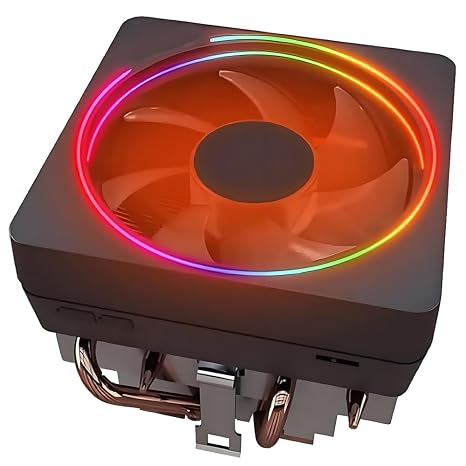
Running at a maximum speed of 2800 rpm, the Wraith Prism AM4/AM5 CPU Cooler offers solid airflow capacity for Ryzen processors like the 7600x. It fits a wide range of AMD sockets, making it useful for anyone upgrading or building around Ryzen and older AMD CPUs looking for a reliable cooling setup.
Setup is straightforward since it uses the standard bracket already on most AMD motherboards, though the bracket itself isn’t included. Pre-applied thermal paste means you can mount it quickly without extra prep.
Day-to-day, the 14 dB noise level keeps it quiet enough for work or gaming, and the fan adjusts with processor temperature to keep cooling consistent.
Heat transfer feels efficient thanks to the combination of the copper base, heat pipes, and aluminum heatsink. The cooler handles 105-watt loads well.
Build quality feels sturdy, with good materials for both durability and performance. Praise often points to its quiet operation, while some users notice it can get a bit loud at peak fan speeds during heavy loads.
Quiet performance stands out with a noise level of just 14 dB during typical use, but the fan speed can ramp up to 2800 rpm, causing noticeable noise under heavy workloads. Pre-applied thermal paste simplifies installation, though missing brackets might require checking motherboard compatibility before buying.
Those using standard AMD sockets who want decent cooling without too much noise will appreciate this cooler. People aiming for the absolute quietest build or needing included mounting hardware might want to explore other options better suited to those specific needs.
Pros
- Compatible with AM4 and AM5 sockets
- Pre-applied silicone thermal paste included
- Quiet operation under normal loads
- Efficient heat transfer with copper base and heat pipes
Cons
- Bracket not included with cooler
- Fan gets loud at maximum speed
| Specification | Details |
|---|---|
| Maximum Rotational Speed | 2800 rpm |
| Air Flow Capacity | 45 cfm |
| Noise Level | 14 db |
| Wattage | 105 watts |
| Power Connector Type | 4-Pin |
7. ARCTIC Liquid Freezer III Pro 360 AIO Cooler

Enthusiasts looking for serious cooling power for their AMD Ryzen 7600X will appreciate the ARCTIC Liquid Freezer III Pro 360 AIO Cooler. Its biggest strength lies in its smart design for optimized heat dissipation and the quiet, powerful fans that keep temperatures down without adding noise.
Setting up the cooler is straightforward, especially with the native offset mounting which targets the CPU hotspot precisely. Its contact frame adapts to both Intel and AMD sockets, but for the 7600X, the AMD fit is perfect.
Daily running noise stays low, thanks to the P12 PRO fans that perform quietly even under high loads, and the integrated VRM fan keeps voltage converters cool for stable performance.
Cooling performance meets expectations with a strong airflow at 77 cfm and a max fan speed of 3000 rpm, effectively managing heat. The build quality feels solid with attention to detail in mounting and materials.
Most praise highlights its quiet operation alongside powerful cooling, while some note its size can be a bit bulky in smaller cases.
The strongest praise centers on the quiet operation combined with efficient cooling power that keeps even high loads manageable. The most common complaint relates to its physical size, which can be a limitation in compact builds.
Gamers and PC builders with mid to large tower cases who want quiet, reliable cooling will find it a solid match. Those working with limited space or low-power builds might prefer a smaller or simpler cooler option.
Pros
- Optimized contact pressure for better heat transfer
- Quiet P12 PRO fans, even at high load speeds
- Integrated VRM fan improves component stability
- Compatible with both Intel and AMD sockets
Cons
- Bulky size may not fit smaller cases comfortably
- Power consumption might be higher than air coolers
| Specification | Details |
|---|---|
| Cooling Method | Liquid |
| Power Connector Type | 4-Pin |
| Voltage | 12 volts |
| Maximum Rotational Speed | 3000 rpm |
| Air Flow Capacity | 77 cfm |
| Wattage | 3.96 watts |
8. Noctua NH-U12A chromax.Black CPU Cooler

A standout among 120mm air coolers, it fits most tower cases without blocking RAM or PCIe slots. Ideal for anyone wanting strong cooling for the 7600X in a black design that blends well with many setups. Its biggest strength lies in balancing performance with quiet operation.
Installation suits a wide range of builds, thanks to its 158mm height and non-intrusive size around motherboard components. Dual fans use PWM to adjust speed automatically, running quietly when the CPU is idle but ramping up to keep temperatures down efficiently during demanding workloads. The all-black design blends smoothly with different color schemes for a polished look.
Cooling results stand out well in the 120mm category, delivering near high-end desktop cooler performance quietly. Built from proven premium heatsink materials, it’s designed for longevity and consistent heat dissipation.
The most common praise highlights its whisper-quiet operation while pushing impressive airflow, though some note its 2000 rpm maximum fan speed can be audible under heavy load.
The cooler receives praise for whisper-quiet operation at idle paired with strong airflow performance. Some users mention the maximum fan speed can get noisy when the CPU is heavily loaded, reflecting a trade-off between silence and peak cooling capacity.
Those looking for a balance of quiet use and effective cooling in a compact 120mm size will find it a solid choice. Users requiring the absolute lowest temperatures or who are very sensitive to peak noise may explore larger or liquid cooling options instead.
Pros
- Fits standard tower cases with 158mm height limitation
- Does not block RAM or most PCIe slots
- Dual PWM 120mm fans for automatic speed adjustment
- Quiet under idle conditions despite strong airflow
Cons
- Fans can be audible at full 2000 rpm speed
- Higher-end cooling rivals might outperform it in some setups
| Specification | Details |
|---|---|
| Cooling Method | Air |
| Noise Level | 22.6 db |
| Maximum Rotational Speed | 2000 rpm |
| Air Flow Capacity | 102.1 cfm |
| Voltage | 12 volts |
| Power Connector Type | 4-Pin |
9. Noctua NH-D15 chromax.Black CPU Cooler

Noctua NH-D15 chromax.Black is a high-performance air cooler that suits anyone building a quiet but powerful desktop.
Its main strength lies in delivering cooling efficiency comparable to many liquid coolers while maintaining very low noise levels, perfect for overclockers and silent enthusiasts alike.
Setup involves fitting a dual-tower design with extra-wide 140mm fans, which might require a little extra clearance inside the case. The included Low-Noise Adaptors and PWM control mean the fans automatically adjust speed, staying whisper quiet when your system is idle but ramping up effectively under heavy load.
Maintenance mostly requires dusting the fans and fins, thanks to the sturdy build.
Cooling performance is excellent, managing high heat loads quietly thanks to six heatpipes and two NF-A15 140mm fans. The all-black design blends well with many color schemes and feels solidly built. Praised for near water-cooler thermal results and quiet operation, it is sometimes criticized for its large size, which can limit compatibility in smaller cases.
The NH-D15 chromax.Black wins praise for delivering exceptional cooling performance quietly, rivaling watercoolers. Many appreciate how silent the fans remain when the CPU is idle, though the cooler’s large footprint often causes fitment challenges inside smaller cases.
The cooler is perfect for anyone prioritizing noise reduction and strong cooling, especially those overclocking or running demanding CPUs. People working with compact builds or limited clearance might want to consider smaller alternatives to avoid installation issues.
Pros
- Cooling matched to many all-in-one water coolers
- Whisper quiet at idle thanks to PWM fans
- Attractive all-black design fits many builds
- Automatic fan speed control with Low-Noise Adaptors
Cons
- Large size can limit case compatibility
- Requires some attention to fit in tight spaces
| Specification | Details |
|---|---|
| Power Connector Type | 4-Pin |
| Voltage | 12 volts |
| Cooling Method | Air |
| Noise Level | 24.6 db |
| Maximum Rotational Speed | 1500 rpm |
| Air Flow Capacity | 140.2 cubic meter per hour |
10. Thermalright Peerless Assassin 120 SE V2 CPU Cooler

Running cool and quiet, the Peerless Assassin 120 SE V2 fits well for gamers, content creators, or anyone pushing their 7600x hard. Its biggest strength lies in the combination of a dual-tower heatsink with a powerful fan system that keeps temperatures under control during intense workloads.
Setting it up involves some consideration due to the option to raise the front fan for taller RAM clearance, which does increase the overall height. Day-to-day use shows the benefits of this flexibility since you can tweak it to fit various builds.
The 4-pin connector gives PWM control, helping balance noise and cooling as you work or play.
Cooling performance holds strong thanks to the higher airflow fan pushing nearly 89 cfm while spinning up to 1850 rpm. The build feels solid with its sizable heatsink cooling surface, but you need to watch your case and RAM clearance carefully. Noise runs at a modest 29.5 dB, which is noticeable but not overpowering for a cooler this capable.
The cooler’s strong airflow and dual-tower setup offer effective temperature control, but raising the front fan to fit tall RAM adds height that can be a tight fit in some cases. Noise at higher speeds is noticeable, though it stays under 30 dB under normal load.
Those building a gaming or content creation PC needing solid cooling and RAM clearance flexibility will find this cooler suitable. Users with small cases or who prioritize near-silent operation might want to consider other options.
Pros
- Dual-tower design for better heat dissipation
- Front fan can be raised for taller RAM clearance
- High airflow capacity at 88.89 cfm
- Reasonable noise level at 29.5 dB
Cons
- Increased height with front fan adjustment may limit case compatibility
- Noisy when running near full 1850 rpm speed
| Specification | Details |
|---|---|
| Maximum Rotational Speed | 1850 rpm |
| Air Flow Capacity | 88.89 cfm |
| Noise Level | 29.5 db |
| Power Connector Type | 4-Pin |
| Voltage | 12 volts_of_direct_current |
| Wattage | 2.4 watts |
11. Be Quiet! Pure Rock Pro 3 CPU Cooler

Quiet and efficient cooling for a Ryzen 7600X, the be quiet! Pure Rock Pro 3 is great for anyone looking to keep their CPU cool under pressure without loud fans.
Its best feature is its strong heat dissipation, thanks to six copper heat pipes and a well-designed fan setup.
Setting up is straightforward, with compatibility across many Intel and AMD sockets ensuring a good fit in most builds. The 120mm PWM fan reacts to temperature changes, spinning up to 2000 rpm when needed. The fan blades and funnel-shaped air outlet push air precisely through the fins, which helps maintain steady cooling during normal use and heavier workloads.
Cooling performance handles the 7600X very well, even when pushing the CPU harder with demanding tasks. Its build is solid, combining nickel-plated copper pipes with a metal base for effective heat transfer.
Most praises focus on its quiet operation and reliable temperature control, while some mention the fan speed can get a bit noisy at peak RPMs.
The cooling power stands out with consistent CPU temperature control, especially during overclocking. Noise levels stay low for most of the time, but the fan’s max speed can be heard clearly under heavy load. Build quality and airflow design work together efficiently, making it a strong contender for air cooling.
People who want a balance between quiet operation and good cooling will appreciate this cooler. Those needing ultra-silent environments or extremely compact setups may want to consider smaller or liquid cooling options.
Pros
- Wide socket compatibility for Intel and AMD CPUs
- Effective heat dissipation with six copper heat pipes
- Quiet performance even at higher fan speeds
- Optimized fan blade design for stronger airflow
Cons
- Fan can be noticeably loud at maximum speed
- Installation might feel tight in smaller cases
| Specification | Details |
|---|---|
| Power Connector Type | 4-Pin |
| Voltage | 12 volts |
| Wattage | 3.6 watts |
| Cooling Method | Air |
| Noise Level | 34.8 db |
| Maximum Rotational Speed | 2000 rpm |
12. Cooler Master Elite Liquid 360 AIO Cooler

Construction centers on a dual-chamber ceramic pump designed to keep Ryzen 9 CPUs cool with minimal noise. Ideal for gamers or professionals using AMD Ryzen 9 or Intel Ultra 9 processors, it excels at stable, quiet cooling during intensive workloads while adding a touch of style with customizable ARGB lighting.
Setup benefits from pre-installed brackets supporting AM5|4 and LGA 1851|1700 platforms, making the installation straightforward. The dynamic PWM fan adjusts between 650 to 2,100 rpm to balance airflow and noise.
Comes with CryoFuze thermal paste pre-applied, saving the step of applying thermal compound and maintaining efficient heat transfer over a wide temperature range.
Performance delivers stable temperatures for demanding CPUs thanks to water cooling and the ceramic pump’s low noise. Its build quality offers durability with a translucent hexagon cap providing ARGB lighting control linked to the motherboard. Most praise focuses on its quiet operation, whereas some note the 3-pin power connector limits advanced fan control options.
Quiet functioning and stability under load make the cooling reliable, while the limitation of a 3-pin power connector is a noted concern for those wanting more fan speed customization. The make and setup simplify everyday use without sacrificing visual appeal or cooling results.
People running Ryzen 9 or Intel Ultra 9 CPUs who want a balance of quiet cooling and style will appreciate this product. Users seeking full fan control or pushing beyond standard performance might find other coolers better suited.
Pros
- Quiet operation with dynamic PWM fan control
- Pre-installed CryoFuze thermal paste for effective cooling
- Easy installation with pre-fit brackets for modern sockets
- Customizable ARGB lighting boosts the look and feel of the product
Cons
- 3-Pin power connector limits advanced speed control
- Maximum fan speed may not suit extreme overclocking
| Specification | Details |
|---|---|
| Power Connector Type | 3-Pin |
| Voltage | 12 volts |
| Wattage | 12 |
| Noise Level | 30 db |
| Maximum Rotational Speed | 2100 rpm |
| Air Flow Capacity | 84.2 cubic_inches_per_minute |
Comparison of Top 7600x CPU Coolers
| Product | Cooling Method | Noise Level | Max RPM | Air Flow Capacity |
|---|---|---|---|---|
| Thermalright Peerless Assassin | Air | 25.6 db | 1550 rpm | 66.17 cfm |
| ARCTIC Liquid Freezer III Pro | Liquid | – | 3000 rpm | 77 cfm |
| Thermalright Phantom Spirit 120SE | Air | 25.6 db | 1500 rpm | 66.17 cfm |
| Wraith Stealth AM4 Cooler | Air | 30 db | 2000 rpm | – |
| Thermalright Assassin X120 Refined | Heat pipe and fan | 25.6 db | 1550 rpm | 66.17 cfm |
| Wraith Prism AM4/AM5 Cooler | Fan | 14 db | 2800 rpm | 45 cfm |
| ARCTIC Liquid Freezer III Pro | Liquid | – | 3000 rpm | 77 cfm |
| Noctua NH-U12A chromax.Black | Air | 22.6 db | 2000 rpm | 102.1 cfm |
| Noctua NH-D15 chromax.Black | Air | 24.6 db | 1500 rpm | 140.2 m³/h |
| Thermalright Peerless Assassin V2 | Air | 29.5 db | 1850 rpm | 88.89 cfm |
| be quiet! Pure Rock Pro | Air | 34.8 db | 2000 rpm | – |
| Cooler Master Elite Liquid 360 | Water | 30 db | 2100 rpm | 84.2 cu in/min |
- Cooling MethodAir
- Noise Level25.6 db
- Max RPM1550 rpm
- Air Flow Capacity66.17 cfm
- Cooling MethodLiquid
- Noise Level–
- Max RPM3000 rpm
- Air Flow Capacity77 cfm
- Cooling MethodAir
- Noise Level25.6 db
- Max RPM1500 rpm
- Air Flow Capacity66.17 cfm
- Cooling MethodAir
- Noise Level30 db
- Max RPM2000 rpm
- Air Flow Capacity–
- Cooling MethodHeat pipe and fan
- Noise Level25.6 db
- Max RPM1550 rpm
- Air Flow Capacity66.17 cfm
- Cooling MethodFan
- Noise Level14 db
- Max RPM2800 rpm
- Air Flow Capacity45 cfm
- Cooling MethodLiquid
- Noise Level–
- Max RPM3000 rpm
- Air Flow Capacity77 cfm
- Cooling MethodAir
- Noise Level22.6 db
- Max RPM2000 rpm
- Air Flow Capacity102.1 cfm
- Cooling MethodAir
- Noise Level24.6 db
- Max RPM1500 rpm
- Air Flow Capacity140.2 m³/h
- Cooling MethodAir
- Noise Level29.5 db
- Max RPM1850 rpm
- Air Flow Capacity88.89 cfm
- Cooling MethodAir
- Noise Level34.8 db
- Max RPM2000 rpm
- Air Flow Capacity–
- Cooling MethodWater
- Noise Level30 db
- Max RPM2100 rpm
- Air Flow Capacity84.2 cu in/min
How to Choose the Best 7600x Cooler
Choosing the right cooler for the 7600x depends primarily on compatibility with your CPU socket, effective heat dissipation, and quiet operation. Prioritizing these factors ensures your system stays cool and runs efficiently, preventing potential damage and costly repairs over time.
Cooling Performance
The CPU temperature can quickly spike during heavy gaming or video editing sessions, causing unwanted throttling or crashes. A cooler’s ability to keep temperatures down under load shows in how well it moves heat away from the processor using metal fins, heat pipes, or liquid blocks. Air coolers rely on fans pushing cool air through aluminum or copper fin arrays, while liquid coolers use a pump to circulate coolant through a radiator for faster heat transfer.
Strong heat dissipation leads to stable system performance and opens up more headroom for overclocking. Expect base fan speeds of around 1200 RPM on air coolers, with larger heat pipes (6mm or more) and radiators from 120mm up in liquid systems.
This balance ensures the processor stays under 80°C during stress tests without aggressive noise or power draw.
Compatibility and Fit
Using a recent CPU means the cooler must fit the AM5 socket and work around other components on the motherboard. Larger air coolers can block RAM slots, especially if you have tall memory modules with heat spreaders. Clearance matters for both height inside the case and width to avoid interference with VRM heatsinks or expansion cards.
Checking the cooler’s specified dimensions against your chassis and RAM is essential.
The mounting system affects how easy it is to install and transfer between builds. Metal brackets with thumb screws simplify alignment on the AM5 socket, reducing the risk of uneven pressure on the chip. Versatility across different motherboards is a plus, allowing reuse if you upgrade or repurpose parts later.
Noise Levels
Fan noise can be a big annoyance during gaming or long work sessions. Fans that run constantly at high speed tend to produce a droning sound.
Models with PWM control allow the system to adjust fan speeds based on temperature, keeping the unit whisper-quiet at idle and ramping up smoothly under load.
Some coolers add noise reduction features like rubberized fan mounts to reduce vibration or aerodynamic blade designs that lower turbulence. A good cooler balances efficient cooling without pushing fans to full speed too often, keeping noise levels typically below 30 dBA during light use and under 40 dBA during heavy load.
Build Quality and Materials
Longevity depends heavily on the materials used for the cooler’s base, heat pipes, and fan blades. Copper or nickel-plated bases conduct heat better than aluminum but cost more. Heat pipes made from copper prevent corrosion and maintain efficiency over time.
Fan blades made from reinforced plastics are less likely to crack or warp.
Thermal interface materials also matter. Higher-quality thermal pads or paste included with the cooler improve heat transfer and can last longer without drying out.
Some units employ coatings to resist dust build-up, which helps maintain performance and reduces the need for frequent cleaning.
Installation and Maintenance
Installing a cooler that comes with clear instructions and labeled parts makes a big difference, especially for first-timers. Coolers that require minimal additional hardware or leverage intuitive mounting brackets speed up the process and reduce mistakes that can cause poor contact and overheating.
Regular cleaning to remove dust from fins, fans, or radiators is vital for sustained thermal performance. Coolers designed with easy access, like removable fan clips or accessible screws, make maintenance straightforward.
Availability of replacement fans or mounting kits extends the cooler’s usable life without needing a full swap.
Maximizing Cooling Efficiency with the 7600X
Proper contact between the cooler’s base and the Ryzen 7600X’s heat spreader is critical to keep temperatures down during heavy loads. Applying the right amount of thermal paste makes a significant difference in heat transfer efficiency.
Using too much paste can create a barrier to heat flow, while too little may cause hotspots. A thin, even layer spread across the CPU surface works best.
Choosing a cooler with a solid copper base and heat pipes helps dissipate heat faster. Air coolers with larger fan blades or higher RPM can improve airflow through the fins, but also tend to be louder.
Water cooling solutions generally provide better thermal management for overclocking scenarios but require more setup and upkeep.
- The cooler’s mounting pressure should be firm but not excessive to avoid damaging the CPU.
- Arrange case fans to ensure proper intake and exhaust to complement the CPU cooler’s airflow.
- Regular cleaning of the cooler’s fins prevents dust buildup that reduces thermal performance.
Maintenance Tips for Prolonged Cooler Performance
Dust accumulation on the cooler’s fan blades and radiator fins degrades cooling performance over time. Regularly cleaning these components prevents airflow restrictions that cause higher CPU temperatures.
Fans can wear out or make noise as bearing lubrication diminishes. Checking fan operation every few months and replacing or lubricating noisy fans can extend cooler life.
The thermal paste applied during installation tends to dry out and crack after a few years, which reduces heat transfer efficiency. Reapplying fresh thermal paste helps maintain proper thermal conductivity between the CPU and cooler base.
- Turn off and unplug your PC before cleaning.
- Use compressed air to blow dust off fins and fans; avoid wet cloths inside the cooler.
- Reapply thermal paste every 2-3 years or if temperatures rise unexpectedly.
Common Installation Mistakes and How to Avoid Them
Tightening the cooler mount unevenly can lead to poor contact with the CPU and cause higher temperatures. It is important to secure screws diagonally and in small increments to achieve even pressure.
Skipping the removal of old thermal paste before applying a new layer results in reduced heat transfer. Fully cleaning the CPU heat spreader and cooler base with isopropyl alcohol prevents mixing of pastes that can trap air and heat.
Using a cooler not compatible with the 7600X socket type creates mounting issues, uneven pressure, or shorts on motherboard components. Confirming socket compatibility before purchase avoids these problems.
- Avoid over-tightening mounts which can crack the CPU or board.
- Check the orientation of the cooler fan to align with your case airflow.
- Follow manufacturer instructions precisely for mounting hardware and paste application.
People Also Asked
What Size Cooler Fits Best with a 7600x CPU?
A mid-size air cooler or a 240mm liquid cooler fits well with a 7600x CPU. These sizes offer enough cooling capacity without causing clearance issues in most cases. Check the case and motherboard layout to avoid any conflicts with RAM or GPU.
How Do I Properly Install a 7600x CPU Cooler?
Align the cooler’s mounting bracket with the CPU socket and secure it evenly by tightening screws diagonally to ensure consistent pressure. Apply a small, pea-sized amount of thermal paste before mounting to improve heat transfer. Avoid overtightening to prevent damage.
Is It Safe to Use Liquid Cooling on a 7600x?
Liquid cooling is safe for the 7600x when properly installed with good radiator placement and secure tubing. Regular maintenance can prevent issues like dust build-up or pump failure. Make sure the case supports the radiator size for optimal airflow.
How Long Does a Typical 7600x CPU Cooler Last?
A 7600x CPU cooler can last several years if kept clean and maintained, such as by regularly removing dust from fans and radiators. Fans may silently degrade over time, so checking for unusual speeds or noise helps catch problems early. Replace thermal paste every few years for best results.
What Are Common Problems with 7600x CPU Coolers?
Common problems include fan noise, poor thermal paste application, and cooler size incompatibility causing airflow restrictions or RAM clearance issues. Over-tightening mounting screws is another issue that can damage the CPU socket or motherboard. Periodic cleaning prevents overheating.
Conclusion
Choosing the right cooler for the 7600x comes down to cooling performance, noise level, and size compatibility with your case. Effective heat dissipation keeps the processor running smoothly under load, while quieter fans make daily use more comfortable.
Checking the physical dimensions ensures the cooler fits well without blocking other components.
Consider your budget and the space available in your build before making a choice. When you don’t plan to push the CPU hard, a more modest cooler can still provide adequate performance.
Refer back to the comparison table and detailed reviews above to match the cooler options to your specific needs and preferences.

I’m Grant Mitchell, a firearms and hunting writer with years of experience at the range and in the field. I write about rifles, shotguns, handguns, optics, safe storage, cleaning, and responsible ownership, along with practical hunting tips. My goal is to share accurate, safety-first information that helps you choose the right firearm, maintain it properly, and become a more confident shooter.