Top 12 Best 65mm CPU Cooler You Can’t Miss Today
Anyone who has dealt with a cheap or poorly matched cooler knows how frustrating it can be when your CPU overheats or your case fans run loud just to compensate. The best 65mm CPU cooler fits snugly in tight spaces, like small form factor cases, without compromising cooling performance.
It stops heat from building up and keeps your system quieter during heavy use, which is critical for long-term reliability in compact builds.
Key factors that make a good 65mm CPU cooler stand out include its material and design to efficiently dissipate heat despite the reduced height. Copper heat pipes paired with an aluminum fin stack tend to balance heat transfer and weight well. Fan size and speed also play a role; typically, a 92mm or smaller fan operating around 2000 RPM hits the sweet spot for cooling without excessive noise.
Lastly, easy installation and cleaning help maintain consistent performance over time, especially in dusty environments.
Need a Quick Check?
| Image | Product | Price |
|---|---|---|
Our Top Picks 1  | Noctua NH-L9x65 chromax.Black | Check Price |
Our Top Picks 2  | Noctua NH-L9x65 Standard | Check Price |
Our Top Picks 3  | ID-COOLING IS-67-XT | Check Price |
Our Selected Top 12 65mm Cpu Cooler Worth Considering
This list features compact 65mm CPU coolers designed for efficient cooling in small builds. Each review covers performance, ideal user scenarios, and highlights both advantages and potential drawbacks to help you find the best fit for your specific needs.
1. Noctua NH-L9x65 chromax.Black CPU Cooler
Feels impressively compact considering its cooling power, fitting neatly into tight spaces like HTPCs, ITX, and small form factor setups. Its biggest strength is managing to keep cool without getting in the way of other components thanks to its low-profile design and 65mm height, making it perfect for builds where space is at a premium.
Installation is straightforward with the SecuFirm2 mounting system and comes with thermal paste included, saving a step. The slim 92mm fan runs quietly and adjusts its speed automatically with PWM support and a Low-Noise Adaptor.
Its compact 95x95mm footprint allows it to clear RAM and PCIe slots easily, making maintenance simple and keeping nearby connectors accessible.
Cooling efficiency holds up well for its size, with a maximum rotational speed of 2500 rpm producing 57.5 cubic meters per hour of airflow. The all-black finish adds a clean look, and while it runs quietly at 23.6 dB, some may find it less ideal for higher TDP CPUs. The sturdy construction and quiet operation receive high marks, though some users mention the cooling capacity is restricted by its height.
Quiet operation with well-optimized airflow is the standout feature that users appreciate most. Common feedback revolves around limited cooling performance for demanding processors due to the low-profile design. Assembly is made smooth by the inclusion of quality thermal paste and a secure mounting system, appealing to those prioritizing compactness.
This cooler suits anyone building small form factor or ITX systems who wants a balance of silence and space efficiency. Those running high-TDP CPUs or overclocking should consider alternatives designed for more aggressive cooling needs, as this model is optimized for modest thermal loads.
Pros
- Compact 65mm height fits small builds
- Quiet fan with PWM speed control
- Leaves room around CPU socket for components
- Easy installation with thermal paste included
Cons
- Cooling may not suit high-power CPUs
- Fan speed can get relatively loud at max RPM
| Specification | Details |
|---|---|
| Cooling Method | Air |
| Maximum Rotational Speed | 2500 rpm |
| Air Flow Capacity | 57.5 cubic meter per hour |
| Noise Level | 23.6 db |
| Voltage | 12 volts |
| Wattage | 2.52 watts |
2. Noctua NH-L9x65 CPU Cooler
Compact and quiet, the Noctua NH-L9x65 CPU cooler suits small form factor and HTPC builds where space is tight. Its main strength is fitting under 65mm height without blocking RAM or PCIe slots on most motherboards, making it a smart choice for low-profile setups.
Installation comes straightforward with the SecuFirm2 mounting system, and the included NT-H1 thermal paste simplifies thermal management. The slim 92mm fan with PWM adjusts speed automatically, keeping noise low around 23.6 dB during day-to-day use. It operates quietly and stays cool without fuss in typical low to moderate heat CPUs.
Performance remains solid for CPUs recommended by the manufacturer, providing steady cooling without interference on the motherboard. Built with quality materials, the cooler’s main compliment is its quiet operation.
However, some note it isn’t designed for high-power chips, so overheating could be an issue beyond recommended limits.
Offers excellent low-profile fit and quiet operation for recommended CPUs, but struggles with higher thermal loads. Easy installation with included paste and mounting system makes setup straightforward. Most users praise its quietness while noting it’s limited to low to moderate power processors.
Ideal for small form factor or HTPC builds with low to moderate thermal demand. Anyone needing more cooling power should consider a bigger cooler or liquid cooling options instead.
Pros
- Does not overhang RAM or PCIe slots
- Includes premium NT-H1 thermal paste
- Very quiet with low-noise adaptor
- Supports multiple Intel and AMD sockets
Cons
- Not suitable for high heat CPUs
- Fan speed can be high at 2500 rpm maximum
| Specification | Details |
|---|---|
| Cooling Method | Air |
| Maximum Rotational Speed | 2500 rpm |
| Air Flow Capacity | 57.5 cubic meter per hour |
| Noise Level | 23.6 db |
| Voltage | 12 volts |
| Wattage | 2.52 watts |
3. ID-COOLING IS-67-XT CPU Cooler
Copper base construction with six heat pipes makes this cooler a solid choice for compact builds. Perfect for HTPCs, ITX, and small form factor setups, it keeps temperatures down without taking up much space. Its biggest strength lies in combining efficient heat dissipation with an ultra-low profile measuring just 67mm in height.
Installation is straightforward thanks to its low-profile design, which ensures good RAM clearance on Mini-ITX motherboards. The 120x15mm PWM fan automatically adjusts its speed based on temperature, running quietly at just 28 dB during normal use.
Its reduced height means it easily fits into cases where standard coolers wouldn’t, making it very user-friendly day to day.
Heat transfer from the CPU is effective thanks to the copper base and heat pipe layout, with the fan delivering up to 67.58 CFM airflow at 1800 RPM. It’s well-built for its size and aimed at quieter operation. The main positive noted is its excellent cooling without noise.
Some users find the fan height a bit tight for extremely cramped spaces, but overall it performs well in small cases.
Effective cooling combined with quiet operation is widely praised, especially given the cooler’s compact height. Common feedback mentions the fan’s tight fit in minimal space as the main drawback, but the overall construction and airflow receive positive recognition.
This cooler works well for anyone building a small form factor PC who values quiet operation and solid heat transfer. Those with ultra-compact cases demanding even lower profiles or higher cooling capacity might want to explore other options better suited to extreme constraints.
Pros
- Very compact design fits tight cases
- Quiet PWM fan with automatic speed control
- Good RAM compatibility in Mini-ITX builds
- Copper base with six heat pipes for solid cooling
Cons
- Fan clearance can be tight in very small cases
- Limited to 67 watts cooling power max
| Specification | Details |
|---|---|
| Cooling Method | Air |
| Maximum Rotational Speed | 1800 rpm |
| Noise Level | 28 db |
| Air Flow Capacity | 67.58 cfm |
| Power Connector Type | 4-Pin |
| Voltage | 12 volts |
4. Be Quiet! Dark Rock Pro 6 CPU Cooler
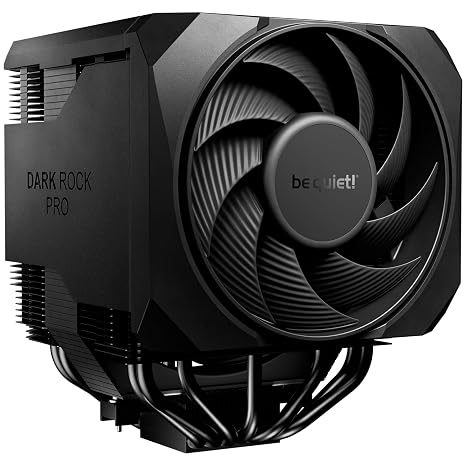
Impressive quietness stands out immediately for anyone looking at this high-performance air cooler. Designed for gaming rigs and workstations, it suits those who want reliable heat management without constant fan noise. Its active mode switch gives you control over maximum cooling or near silence during lighter loads.
Installation is straightforward thanks to a pre-installed mounting bridge and a gentle but secure fixing method. Adjusting the front fan’s height on its rails improves how well it fits different cases. Running the system day to day means enjoying very quiet operation below 40% PWM, where the fans actually stop spinning for a while.
Heat pipes made from copper and a powerful heatsink keep even overclocked CPUs cool and stable. The cooler handles up to 300 watts, which covers most heavy setups comfortably.
Reviews praise the quietness and cooling ability but some note the size can be a tight fit in smaller cases or with certain RAM modules.
Quietness impresses users most with fans stopping entirely at lower loads, creating a near-silent setup. Some find size a common issue since it can block tall RAM or challenge smaller cases.
Those running heavily overclocked CPUs needing strong, quiet cooling will be pleased. Users with compact cases or large RAM heatsinks may want to consider smaller coolers.
Pros
- Very quiet operation under 40% PWM fan speed
- Easy installation with pre-mounted bridge
- Strong cooling for overclocked processors
- Adjustable front fan height for better fit
Cons
- Large size may limit RAM or case compatibility
- Fan speed can reach 2000 rpm, slightly noisy at full load
| Specification | Details |
|---|---|
| Power Connector Type | 4-Pin |
| Voltage | 12 volts |
| Wattage | 300 watts |
| Noise Level | 32.4 db |
| Maximum Rotational Speed | 2000 rpm |
| Air Flow Capacity | 68.7 cfm |
5. Noctua NH-L9x65 SE-AM4 CPU Cooler
Perfect for compact builds with AMD AM4 sockets, the NH-L9x65 SE-AM4 is known for balancing quiet operation and efficient cooling in a slim profile. Its standout feature is the quiet NF-A9x14 92mm fan that adjusts speed automatically, making it a great pick for those wanting silent yet effective cooling without bulky hardware.
Setup is straightforward thanks to the dedicated AM4 mounting. The quiet fan uses PWM to manage speeds based on temperature, so noise stays low without manual tweaks.
It includes a low-noise adaptor and thermal paste that’s ready to apply, which cuts down on extra preparations. Day-to-day, the cooling stays stable and quiet, which is a big plus in tight spaces where airflow is limited.
Cooling performance is solid for its size, capable of moving 57.5 cubic meters of air per hour. Construction focuses on premium parts, including a well-regarded thermal compound and a 4-pin PWM fan connector. Praised widely for being quiet and compact, the most frequent downside mentioned is that its slim design limits cooling capacity compared to larger coolers.
Widely praised for running quietly even under load, the cooler maintains a low noise level around 23.6 db. The most common complaint points to its limited power compared to bulkier coolers, which can be a constraint for high-performance CPUs.
People with small form-factor AMD AM4 systems will appreciate its compact size and quiet operation. Those needing stronger cooling for overclocked or high-TDP CPUs might want to look at larger coolers instead.
Pros
- Quiet PWM fan adjusts speeds automatically
- Low-profile design fits compact builds
- Includes low-noise adaptor and thermal paste
- 6-year manufacturer’s warranty for reliability
Cons
- Cooling capacity limited by slim design
- Only suitable for AM4 socket motherboards
| Specification | Details |
|---|---|
| Cooling Method | Air |
| Power Connector Type | 4-Pin |
| Voltage | 12 volts |
| Noise Level | 23.6 db |
| Maximum Rotational Speed | 2500 rpm |
| Air Flow Capacity | 57.5 cubic meter per hour |
6. Thermalright Assassin X120 Refined SE CPU Cooler

Cooling down a powerful desktop processor in a compact space calls for a cooler that balances size and airflow. Suited for PC builders who have limited clearance but still want effective heat management, this model handles high heat output quietly while fitting into tight setups.
Installation fits typical desktop sockets and is straightforward, thanks to its anti-fall-off mounting bracket. Day-to-day use brings a consistent and quiet fan profile at 25.6 db, making it easy to forget it’s there. The 4-pin connector allows fine control over fan speed, which can climb to 1550 rpm when needed.
Cleaning is manageable as the fan and heat pipes don’t trap dust too heavily.
Its dual heat pipe and fan design keeps temps stable under load without sounding loud. Strong points include solid construction and quiet operation, with many noticing how effectively it balances airflow at 66.17 cfm.
The most common downside is that the cooling capacity might be modest for very high-end CPUs, so it’s better for mid-range builds. The build quality feels reliable and durable for long-term use.
Users appreciate how quietly the unit manages to keep temperatures down, maintaining a steady airflow without producing noticeable noise. The main complaint is that while effective, the cooler’s capacity might not suffice for the most demanding processors.
This cooler suits those with mid-range desktop builds or limited internal space who value quiet operation. It is less ideal for anyone seeking maximum cooling power for top-tier CPUs under heavy loads.
Pros
- Quiet operation at 25.6 db
- Efficient airflow of 66.17 cfm
- Compact design fits tight spaces
- Reliable heat pipe and fan system
Cons
- Cooling may struggle with high-end CPUs
- Fan speed limit could restrict aggressive cooling
| Specification | Details |
|---|---|
| Power Connector Type | 4-Pin |
| Voltage | 12 volts_of_direct_current |
| Cooling Method | Heat pipe and fan-based |
| Noise Level | 25.6 db |
| Maximum Rotational Speed | 1550 rpm |
| Air Flow Capacity | 66.17 cfm |
7. Thermalright Peerless Assassin 120 SE V2 CPU Cooler

With an air flow capacity of 88.89 cfm, this CPU cooler suits anyone looking for strong cooling power in a mid-sized design under 155mm tall. Its dual-tower heatsink and upgraded fan system handle intensive gaming and content creation workloads without struggling.
Installation involves clearing space around your RAM since the front fan can be raised, increasing overall height. The 4-pin power connector supports precise speed control, keeping noise level around a moderate 29.5 dB. Daily operation runs quietly while managing heat well during long desktop sessions.
Its cooling method by air does a solid job reducing CPU temperatures even under sustained loads. The cooler is well-built with a substantial frame and adaptable fan positioning. Most users praise its cooling capacity and quiet operation.
On the downside, fitting taller RAM modules may be a challenge due to height adjustments.
The strongest praise centers on the cooler’s ability to maintain low temperatures quietly during heavy gaming or creative workloads. Common complaints revolve around its adjustable fan height causing compatibility issues with taller RAM, requiring careful measurement before installation.
Anyone needing substantial air cooling power with quiet operation and adaptable fan position will be satisfied. People with cases or RAM modules that can’t accommodate up to 155mm cooler height should look for a smaller or differently designed cooler instead.
Pros
- High air flow capacity of 88.89 cfm
- Adjustable front fan clears taller RAM
- Quiet operation at 29.5 dB
- Dual-tower heatsink design
Cons
- Height increase may block tall RAM modules
- Maximum height reaches 155 mm, needs case clearance
| Specification | Details |
|---|---|
| Power Connector Type | 4-Pin |
| Voltage | 12 volts of direct current |
| Wattage | 2.4 watts |
| Noise Level | 29.5 db |
| Maximum Rotational Speed | 1850 rpm |
| Air Flow Capacity | 88.89 cfm |
8. ID-COOLING FROZN A720 CPU Cooler

People looking for a powerful CPU cooler that fits inside tighter cases will appreciate a model designed with a 65mm height in mind while still delivering strong cooling. Best for desktop users wanting quiet operation alongside solid heat dissipation, the ID-COOLING FROZN A720’s biggest strength lies in its combination of dual 140mm fans and seven heat pipes.
Installing the cooler is straightforward, with a focus on balancing clearance and airflow. The dual-tower heatsink works well with the two 140mm fans running at up to 1800 rpm, automatically adjusting speed to keep noise around 33.5 dB. Single fan mode leaves enough room, 58mm, for RAM, which helps avoid tight fits around memory slots on many builds.
Heat gets pulled away efficiently by seven 6mm copper heat pipes, keeping CPU temperatures down even under load. Build quality shows in the all-black finish that fits well inside most black or dark cases.
Most praise centers around its actual quiet operation and effective cooling, though some mention the cooler’s size can be a challenge for very small cases.
The cooler delivers solid heat dissipation thanks to its seven copper heat pipes and dual 140mm fans, running quietly most of the time but reaching moderate noise at full speed. The all-black design and decent RAM clearance add practical and aesthetic benefits that appeal to many desktops.
Gamers and power users wanting strong air cooling and quieter performance will likely be pleased with its efficiency and looks. Smaller builds or users preferring ultra-compact coolers should consider alternatives that fit better in tight spaces.
Pros
- Dual 140mm fans with PWM control for quiet operation
- Seven 6mm copper heat pipes for effective heat absorption
- 58mm RAM clearance when in single fan mode
- All-black design suits dark PC interiors
Cons
- May not fit well in very compact cases
- Noise level can reach 33.5 db at max fan speed
| Specification | Details |
|---|---|
| Power Connector Type | 4-Pin |
| Voltage | 12 volts |
| Wattage | 300 watts |
| Maximum Rotational Speed | 1800 rpm |
| Noise Level | 33.5 db |
| Air Flow Capacity | 98.6 cfm |
9. Scythe Mugen 6 Dual Fan Black Edition CPU Cooler

Scythe Mugen 6 Dual Fan Black Edition stands out with a significant fin increase and six heat pipes designed for excellent cooling performance on high TDP CPUs. It suits anyone running powerful Intel or AMD processors who needs reliable and efficient air cooling in a moderately sized cooler.
Installation is straightforward thanks to the spring-loaded H.P.M.S. V mounting system that supports multiple Intel and AMD sockets, ensuring a snug fit and solid contact with the CPU. The dual fans help keep temperatures in check while maintaining a noise level that won’t be distracting during long gaming or work sessions.
It lives up to its cooling promise with solid heat dissipation supported by 154mm height and dense fins. Build quality is strong, with nickel-plated copper heat pipes integrated into an aluminum heatsink.
Most feedback praises its thermal performance, though some find the noise around 27 dB noticeable at higher fan speeds.
Praise focuses on the efficient cooling due to the increased fin density and six heat pipes, effectively keeping temps down on demanding CPUs. The common complaint revolves around fan noise reaching nearly 27 dB during peak speeds, which some users find distracting during quiet environments.
This cooler fits well for those running high-performance Intel or AMD processors needing strong air cooling and broad socket compatibility. Someone prioritizing the absolute quietest operation or with small cases should consider a lower-profile or quieter fan alternative.
Pros
- Supports Intel and AMD multi-platform sockets
- High air flow with dual fans
- Increased fin count improves heat dissipation
- Secure and easy mounting system
Cons
- Noise can be noticeable at max fan speed
- Relatively tall at 154mm, check case compatibility
| Specification | Details |
|---|---|
| Power Connector Type | 4-Pin |
| Voltage | 12 volts |
| Wattage | 150 watts |
| Noise Level | 26.88 db |
| Maximum Rotational Speed | 2500 rpm |
| Air Flow Capacity | 60.29 cfm |
10. Thermalright Phantom Spirit 120 EVO CPU Cooler

Thermalright Phantom Spirit 120 EVO is a CPU cooler designed for desktop users seeking strong cooling performance within a compact size. Its main strength lies in handling heat efficiently through a combination of aluminum fins, a copper base, and seven heat pipes with advanced cooling technology.
Setting it up involves securing it firmly with included metal mounting hardware compatible with both Intel and AMD processors. The 120mm PWM fan adjusts its speed up to 2150 RPM automatically, balancing airflow and noise.
Daily operation stays relatively quiet at 27 dB, while the fan pushes up to 69 CFM to keep your CPU temperature in check without drawing too much attention.
Performance feels solid across various tasks due to the 4th generation heat pipe technology that prevents cooling loss regardless of the cooler’s orientation. Its build shows quality materials like copper and aluminum, ensuring fast heat transfer and durability. Most people appreciate the quiet yet powerful fan, though some mention the fan speed can be a bit high when the system ramps up under heavy load.
Quiet operation combined with efficient heat dissipation stands out as the best attribute. The most commonly noted drawback involves the fan spinning loudly when the CPU is pushed hard, which may bother sensitive users.
People looking for an effective air cooler with good noise control will appreciate this model. Those with small cases or who prioritize ultra-quiet fans might want to consider alternatives with lower height or quieter fan options.
Pros
- High airflow with low noise output
- Compatible with Intel and AMD sockets
- Stable cooling in any mounting orientation
- Solid build with aluminum and copper materials
Cons
- Fan can get loud under high load
- Height of 157mm may limit small case compatibility
| Specification | Details |
|---|---|
| Maximum Rotational Speed | 2150 rpm |
| Air Flow Capacity | 69 cfm |
| Noise Level | 27 dB |
| Cooling Method | Air |
| Power Connector Type | 4-Pin |
| Voltage | 5 volts |
11. LIAN LI HydroShift II OLED 360 AIO Cooler

Using a low-profile cooler with a 65mm height limit usually means compromises, but here’s a cooler that fits tight spaces and still keeps things icy. Its standout feature is the motorized pump head with a vivid curved OLED display, perfect for anyone who values both cooling and customizable looks in a compact setup.
Setting it up involves managing the motorized pump head which you can tilt and rotate easily via dedicated software. Daily adjustments are simple and the bright OLED panel adds more than just flair, it provides visually clear system info right on your cooler.
Noise stays low around 33 dB, so it won’t interfere while working or gaming.
Cooling performance is notably solid for a water cooler with a max speed of 2600 rpm, handling desktop CPUs well without overheating. The build feels durable and thoughtfully engineered, with smooth motorized movement options. Most users praise the cool’s display and customization, though a few mention the height might still be tricky depending on their case layout.
The most praised aspect is the motorized pump head that allows easy angle adjustments combined with a bright OLED screen that shows system info vividly. The most common drawback is the physical height fitting, which still demands case compatibility checks despite the low-profile category.
Anyone wanting a compact liquid cooler with visual flair and customizable positioning will appreciate this design. Users with extremely constrained case space or those avoiding extra software layers for control might want to explore other cooling options.
Pros
- Impressive 6.67” 2K curved OLED display
- Motorized pump head with lift and rotation
- Quiet operation at 33 dB noise level
- Adjustable angles for personalized setup
Cons
- Height might still challenge very tight cases
- Requires use of L-Connect 3 software for controls
| Specification | Details |
|---|---|
| Cooling Method | Water |
| Compatible Devices | Cpu, Desktop |
| Noise Level | 33 db |
| Maximum Rotational Speed | 2600 rpm |
12. Corsair A500 CPU Cooler

Corsair A500 is a solid choice for anyone needing a powerful 65mm CPU cooler that keeps temperatures low under heavy loads. It suits gamers and content creators running high TDP processors, with its standout feature being the quad direct-contact copper heat pipes that manage up to 250W TDP.
Setting up the cooler is straightforward thanks to the intuitive slide-and-lock fan mounts that make installation quick and adaptable, especially for different RAM heights. The two ML120 magnetic levitation fans offer flexible speed control, letting you switch between near-silent operation at 400 RPM and full-speed cooling up to 2400 RPM depending on your system’s needs.
In daily operation, the cooler effectively keeps CPU temperatures down, which helps maintain system stability during intense tasks. Components feel solid with a sturdy build and the Corsair holdfast retention system ensures a reliable fit on most modern AMD and Intel CPUs. Most praise focuses on its impressive cooling power, while some note the noise at higher fan speeds can get noticeable.
The quiet operation at low RPMs is frequently appreciated, allowing for cooler without distracting noise. The most common downside mentioned involves the noticeable fan noise when running at full speed, which might bother users sensitive to sound.
People who prioritize strong cooling for high-performance CPUs will find this cooler a good fit. Loud noise levels at max fan speed might make it less suitable for those needing a whisper-quiet setup or who have very noise-sensitive environments.
Pros
- Effective cooling up to 250W TDP
- Flexible fan speeds from 400 to 2400 RPM
- Easy installation with slide-and-lock fan mounts
- Compatible with most AMD and Intel CPUs
Cons
- Fan noise can be loud at maximum speed
- 200 watts listed wattage lower than heat pipe capacity
| Specification | Details |
|---|---|
| Power Connector Type | 4-Pin |
| Voltage | 12 volts |
| Wattage | 200 watts |
| Noise Level | 36 db |
| Maximum Rotational Speed | 2400 rpm |
| Cooling Method | Fan |
Best 65mm CPU Coolers Comparison Table
| Product | Cooling Method | Noise Level | Max Speed (rpm) | Air Flow |
|---|---|---|---|---|
| Noctua NH-L9x65 chromax.Black | Air | 23.6 db | 2500 rpm | 57.5 m³/h |
| Noctua NH-L9x65 Standard | Air | 23.6 db | 2500 rpm | 57.5 m³/h |
| ID-COOLING IS-67-XT | Air | 28 db | 1800 rpm | 67.58 cfm |
| be quiet! Dark Rock Pro | Air | 32.4 db | 2000 rpm | 68.7 cfm |
| Noctua NH-L9x65 SE-AM4 | Air | 23.6 db | 2500 rpm | 57.5 m³/h |
| Thermalright Assassin X120 SE | Heat pipe & fan | 25.6 db | 1550 rpm | 66.17 cfm |
| Thermalright Peerless Assassin 120 V2 | Air | 29.5 db | 1850 rpm | 88.89 cfm |
| ID-COOLING FROZN A720 | Air | 33.5 db | 1800 rpm | 98.6 cfm |
| Scythe Mugen 6 Dual Black | Air | 26.88 db | 2500 rpm | 60.29 cfm |
| Thermalright Phantom Spirit 120 EVO | Air | 27 db | 2150 rpm | 69 cfm |
| LIAN LI HydroShift II 360 | Water | 33 db | 2600 rpm | – |
| Corsair A500 | Fan | 36 db | 2400 rpm | – |
- Cooling MethodAir
- Noise Level23.6 db
- Max Speed (rpm)2500 rpm
- Air Flow57.5 m³/h
- Cooling MethodAir
- Noise Level23.6 db
- Max Speed (rpm)2500 rpm
- Air Flow57.5 m³/h
- Cooling MethodAir
- Noise Level28 db
- Max Speed (rpm)1800 rpm
- Air Flow67.58 cfm
- Cooling MethodAir
- Noise Level32.4 db
- Max Speed (rpm)2000 rpm
- Air Flow68.7 cfm
- Cooling MethodAir
- Noise Level23.6 db
- Max Speed (rpm)2500 rpm
- Air Flow57.5 m³/h
- Cooling MethodHeat pipe & fan
- Noise Level25.6 db
- Max Speed (rpm)1550 rpm
- Air Flow66.17 cfm
- Cooling MethodAir
- Noise Level29.5 db
- Max Speed (rpm)1850 rpm
- Air Flow88.89 cfm
- Cooling MethodAir
- Noise Level33.5 db
- Max Speed (rpm)1800 rpm
- Air Flow98.6 cfm
- Cooling MethodAir
- Noise Level26.88 db
- Max Speed (rpm)2500 rpm
- Air Flow60.29 cfm
- Cooling MethodAir
- Noise Level27 db
- Max Speed (rpm)2150 rpm
- Air Flow69 cfm
- Cooling MethodWater
- Noise Level33 db
- Max Speed (rpm)2600 rpm
- Air Flow–
- Cooling MethodFan
- Noise Level36 db
- Max Speed (rpm)2400 rpm
- Air Flow–
How to Choose the Right 65mm CPU Cooler
Choosing the right 65mm CPU cooler depends on factors like cooling efficiency, noise level, and compatibility with your system size. Prioritizing these ensures your CPU stays cool without unnecessary upgrades or failures, saving both money and hassle in the long run.
Size and Compatibility
Trying to fit a cooler into a tight PC case only to find it obstructs your RAM or doesn’t line up with the CPU socket is frustrating and all too common. Thickness and height clearances vary among coolers; some models force you to use low-profile RAM or even prevent access to nearby PCIe slots. Proper measurement of your case interior, motherboard layout, and RAM height helps avoid this issue.
Socket compatibility directly impacts whether the mounting hardware will secure the cooler properly. Common socket types like Intel’s LGA115x and AMD’s AM4 have distinct mounting sizes and pressure points.
Double-check that the cooler supports your CPU’s socket and chipset to ensure a solid fit and good thermal contact.
- Height under 65mm to avoid clearance issues
- Socket support list clearly stated by manufacturer
- Check RAM clearance to prevent interference
- Consider motherboard layout around the CPU socket
Cooling Performance
CPUs can get hot quickly under load, and a cooler lacking sufficient thermal dissipation can lead to throttling or system crashes. Cooling capacity often matches the CPU’s Thermal Design Power (TDP), so choosing a cooler rated for at least your CPU’s TDP keeps temperatures manageable. Heatpipes help transfer heat efficiently from the base to fins where airflow dissipates it.
Fan speed plays a critical role. A cooler with adjustable RPM lets you balance cooling and noise.
High airflow fans paired with a well-designed heat sink usually maintain stable temps during gaming or heavy workloads. Poor airflow or fewer heatpipes might cause temperatures to spike during intense use.
- Cooling capacity matching or exceeding CPU TDP (measured in watts)
- Heatpipe count and copper baseplate presence
- Fan speed range (e.g., 500-2000 RPM)
- Airflow rating in CFM (cubic feet per minute)
Noise Levels
Running a system with an overly loud cooler can be distracting or even stressful over long periods. Noise levels vary widely depending on fan quality and speed control.
Checking the cooler’s decibel (dB) ratings at standard and peak speeds provides a realistic sense of its noise during gaming or idle use.
Pulse Width Modulation (PWM) control allows the motherboard to adjust fan speeds automatically based on temperature, keeping noise down when the system is idle. In contrast, manual fan controllers or fixed-speed fans often run louder. For quiet workspaces or living rooms, prioritizing quieter fans with low minimum RPM and smooth speed ramps makes a noticeable difference.
- Idle noise under 25 dB preferred for quiet rooms
- Maximum noise under 35 dB for heavy loads
- PWM fan support for dynamic speed control
Build Quality and Materials
Durability is often overlooked until a cooler stops performing well due to corrosion or fan failure. Baseplates made of copper or nickel-plated copper transfer heat effectively and resist oxidation better than plain aluminum.
Thin fins bent easily by careless handling diminish heat dissipation over time.
Fan bearing types such as fluid dynamic bearings last longer and run smoother compared to sleeve bearings, reducing noise and extending lifespan. Since dust buildup can cause heat retention and mechanical wear, corrosion-resistant coatings on components help maintain performance over years.
- Copper or nickel-plated copper baseplate for better heat transfer
- Thick, densely packed aluminum fins to increase surface area
- Fluid dynamic or ball bearings in fans for durability
- Coatings or treatments to prevent rust and corrosion
Ease of Installation and Maintenance
Installing a cooler can be more difficult than expected, especially if mounting brackets are complicated or require backplates only accessible by removing the motherboard. Secure, well-designed mounting systems speed up installation and reduce the risk of uneven pressure on the CPU.
Spaces between fins and fan blades that allow easy cleaning prevent dust buildup which lowers cooling efficiency. Features like clips or screws that do not require tools for fan removal simplify the process further.
Regular cleaning is vital for long-term performance, so ease of access matters.
- Clear, tool-free or minimal tool mounting mechanisms
- Backplate designs that avoid motherboard removal
- Simple fan clips or screws for quick removal
- Wide fin spacing to ease dust cleaning
Optimizing Airflow for Enhanced Performance with 65mm CPU Coolers
Space around a 65mm CPU cooler is often tight, so optimizing airflow is crucial for keeping temperatures down. Considering the layout inside your case helps the air move efficiently through and around the cooler.
Position the cooler to align with case fans that push air either from front to back or bottom to top, which helps exhaust warm air faster.
- Check for any cables blocking airflow near the cooler and tidy them up.
- Make sure the case fans are set up to create a balanced flow, too many intake or exhaust fans can reduce effectiveness.
- Prefer cool air intake from outside the case towards the cooler’s fan for better heat dissipation.
The small size of 65mm coolers means they rely heavily on directed airflow to do their job well. Avoid obstructing the fan blades and keep the surrounding area clear.
Routine Maintenance Tips to Extend the Lifespan of Your CPU Cooler
Cleaning a 65mm CPU cooler regularly prevents dust buildup, which is the main cause of increased temperatures over time. Dust can clog the fan blades and the heatsink fins, reducing the cooler’s ability to dissipate heat.
Using compressed air is the easiest way to blow dust out of the heatsink and fan blades without removing the cooler. Try to do this every few months or sooner if you notice rising CPU temperatures.
- Check the fan for smooth operation; sometimes lubricating the bearing prolongs its life.
- Reapply thermal paste between the CPU and heatsink every year or two, as dried paste reduces heat transfer.
- Keep your PC area clean and dust-free to minimize how much settles inside the case.
Taking these simple steps will help maintain cooling efficiency and avoid premature fan failure.
Comparing 65mm CPU Coolers to Alternative Cooling Solutions
Compared to larger tower coolers, 65mm CPU coolers take up less space, making them suitable for compact builds. They often come with smaller fans and less metal on the heatsink, which can mean higher temperatures under heavy load.
AIO liquid coolers provide better cooling but require room for a radiator and pump, which is not always available in smaller cases. Passive coolers run silently because they lack fans but rely on very efficient case airflow and usually work best with low-power CPUs.
- 65mm coolers offer a middle ground: quiet operation and decent cooling for standard use, but not for overclocking or high TDP CPUs.
- They produce less noise than most stock coolers but might run hotter than dedicated liquid cooling setups.
- Installation is generally easier because of their size and compatibility with more sockets.
Picking between these options depends on case size, noise priorities, and the CPU’s cooling requirements.
People Also Asked
Will a 65mm CPU Cooler Fit in My Small PC Case?
A 65mm CPU cooler will typically fit in small PC cases designed to support low-profile coolers. Measuring your case’s CPU cooler clearance before buying helps avoid buying something too tall. Also, check if the cooler’s width or mounting brackets interfere with RAM slots or GPU placement.
How Long Does a 65mm CPU Cooler Usually Last?
A 65mm CPU cooler can last several years under normal use, often 5 years or more. Its fan life usually determines longevity; fan bearings wear out faster than the heatsink itself. Regular cleaning of dust build-up can prolong effective cooling and prevent fan failure.
Is It Safe to Install a 65mm CPU Cooler Myself?
Installing a 65mm CPU cooler yourself is generally safe with basic tools and care. Applying thermal paste correctly and ensuring the cooler is firmly but gently mounted prevents overheating. Watch installation videos for your specific model to avoid mistakes like uneven pressure on the CPU.
Can I Use a 65mm CPU Cooler with My Current Motherboard?
Compatibility of a 65mm CPU cooler with your motherboard depends on the socket type and mounting holes. Most low-profile coolers support common Intel and AMD sockets, but confirm your motherboard’s specifications before purchase. Some coolers also need clearance around the CPU area for components.
What Common Problems Occur with 65mm CPU Coolers?
Common problems with 65mm CPU coolers include inadequate cooling if thermal paste is poorly applied and noisy fan operation due to dust or bearing wear. Sometimes the cooler’s size limits cooling performance on high-TDP CPUs, causing thermal throttling. Make sure to clean them regularly and check fan speed.
Conclusion
Choosing a 65mm CPU cooler comes down to three main things: how well it cools, how quiet it runs, and whether it fits in your case. Cooling performance keeps your CPU safe from overheating. Quiet operation matters if noise bothers you or you want a calm work area.
The cooler’s height must fit in your setup without blocking other components.
Consider your available space and how much you want to spend before making a decision. When you don’t plan to upgrade soon, cost might be more important. Check the comparison table and read through the detailed picks above to find a cooler that matches your needs.
Matching the cooler to your build ensures you get the performance and fit you want without surprises.

I’m Grant Mitchell, a firearms and hunting writer with years of experience at the range and in the field. I write about rifles, shotguns, handguns, optics, safe storage, cleaning, and responsible ownership, along with practical hunting tips. My goal is to share accurate, safety-first information that helps you choose the right firearm, maintain it properly, and become a more confident shooter.