Top 12 Best 60mm CPU Cooler That Will Blow Your Mind
Overheating is a common issue that often comes with using a poor quality or incompatible CPU cooler, especially for compact builds that rely on a 60mm fan. The best 60mm cpu cooler stops the processor from throttling down due to heat, maintaining steady performance without overwhelming noise or power consumption. Many affordable coolers struggle to balance airflow with size constraints, leading to elevated temperatures and a shorter lifespan for components.
What sets a good 60mm CPU cooler apart are mainly the build materials, the fan’s ability to move sufficient air at a reasonable noise level, and how well it fits into tight spaces. Aluminum fins paired with copper bases offer effective heat transfer, while fan speeds between 2000 to 3000 RPM usually deliver a solid airflow of around 20 to 30 CFM without being excessively loud.
Compatibility with motherboard socket types and clearance for nearby components is also crucial to avoid installation headaches or blocking memory slots.
Need a Quick Check?
| Image | Product | Price |
|---|---|---|
Our Top Picks 1  | Thermalright AXP120-X67 Cooler | Check Price |
Our Top Picks 2  | Noctua NH-L9x65 chromax.Black | Check Price |
Our Top Picks 3  | Thermalright TL-B6W Fan | Check Price |
Our Selected Top 12 60mm Cpu Cooler for Different Needs
This list features a variety of compact 60mm CPU coolers designed to fit different system requirements and budgets. Each review covers performance, suitability for specific setups, and highlights the strengths and weaknesses to help readers choose the best option for their needs.
1. Thermalright AXP120-X67 CPU Air Cooler
Excellent for compact desktop builds, the Thermalright AXP120-X67 provides strong cooling in a small footprint. It suits users needing efficient heat dissipation without taking much space and has a reliable airflow capacity that keeps temperatures down during regular use.
Installing the cooler is straightforward thanks to its 4-pin power connector and moderate size. The noise level stays at a quiet 26.1 dB during operation, allowing it to run without drawing attention.
Operating at up to 1800 rpm, the fan maintains consistent airflow, making it a practical choice for daily desktop tasks without overheating concerns.
Cooling performance holds up well for its size, delivering solid air circulation at 59 CFM. Its build quality reflects Thermalright’s reputation with durable materials and a thoughtful design.
Most praise highlights its quiet operation, while the occasional downside noted is the wattage capped at 3.6 watts, limiting extreme overclocking potential.
Its strength lies in quietly moving a good amount of air without occupying much space, making it ideal for lower-power desktop CPUs. The most common drawback is its limited wattage, which could hold back users aiming for high-performance overclocking.
Those running compact builds or standard desktop processors will appreciate the balance of noise and cooling provided. Users wanting to push their CPU hard might need to look for a cooler with higher wattage and stronger fan speeds.
Pros
- Compact size fits tight desktop spaces
- Quiet operation at 26.1 dB
- Solid airflow at 59 CFM
- Reliable 4-pin power connector
Cons
- Limited wattage of 3.6 watts
- May not suit heavy overclocking needs
| Specification | Details |
|---|---|
| Power Connector Type | 4-Pin |
| Voltage | 12 volts |
| Wattage | 3.6 watts |
| Noise Level | 26.1 db |
| Maximum Rotational Speed | 1800 rpm |
| Air Flow Capacity | 59 cfm |
2. Noctua NH-L9x65 chromax.Black CPU Cooler
Aluminum and copper construction combine with a compact 65mm height design, making it ideal for small form factor or HTPC builds. It stands out for fitting easily into tight spaces without blocking nearby RAM or PCIe slots, which is key for compact setups.
Installation is straightforward thanks to the SecuFirm2 mounting system compatible with a wide range of Intel and AMD sockets. The 92mm slim fan runs quietly with PWM control, adjusting speed automatically to keep noise low. The included NT-H1 thermal paste helps ensure good heat transfer from the CPU.
Its 95x95mm footprint keeps it clear of other components, making assembly and maintenance easy and convenient.
Cooling performance is solid for its size, moving 57.5 cubic meters of air per hour with a maximum 2500 rpm fan speed. User experience shows it stays quiet at 23.6 dB under normal loads.
The all-black finish adds a clean look while the offset mounting option improves cooling efficiency. A common downside mentioned is that it may struggle with very high TDP processors due to its low profile.
The fan keeps noise levels pleasantly low during everyday use, but higher CPU loads push it closer to its top speed, which can get noticeably louder. Most appreciate how it fits so easily around other components without blocking slots or connectors.
Those building compact systems, especially HTPC or small ITX rigs, will find this cooler a solid choice. People running CPUs with very high heat output should consider more powerful cooling options to avoid thermal issues.
Pros
- Compact 65mm height fits in small cases
- Quiet operation with PWM speed control
- Clearance avoids RAM and PCIe slot interference
- Easy installation with SecuFirm2 mounting
Cons
- May not cool very high TDP CPUs sufficiently
- Fan speed can reach 2500 rpm, louder under load
| Specification | Details |
|---|---|
| Cooling Method | Air |
| Noise Level | 23.6 db |
| Maximum Rotational Speed | 2500 rpm |
| Air Flow Capacity | 57.5 cubic meter per hour |
| Voltage | 12 volts |
| Wattage | 2.52 watts |
3. Thermalright TL-B6W 60mm CPU Cooler Fan
Loud spinning is the first thing you notice about this 60mm CPU cooler, which is perfect if you need high airflow in a tight build. It suits desktop users who want a compact fan pushing more air than most small coolers without taking up much space.
Installation is straightforward thanks to the 4-pin PWM connection that lets you control speed precisely. Running at up to 3200 RPM, the fan can handle intense heat, although it can get noticeably noisy near max speed.
The seven blades provide strong airflow, so daily usability means steady cooling but with a fan sound you can’t ignore in quiet environments.
This cooler does a solid job dissipating heat thanks to a fan pushing 16.17 CFM with a pressure of 1.6 mm H2O, giving your CPU stable operation. The build feels sturdy for its size.
Most people praise the airflow power while the main downside mentioned is the noise level, which can be distracting if silence matters.
The strongest praise is about the high airflow and effective heat dissipation in a small package. The most frequent complaint revolves around the noticeable noise when the fan runs at its highest speed.
Users needing a compact cooler with aggressive airflow will appreciate this fan. Those who prioritize quiet operation should consider quieter alternatives despite the effective cooling performance here.
Pros
- High airflow for size at 16.17 CFM
- Compact dimensions fit tight spaces
- 4-pin PWM allows speed control
- Strong heat dissipation from 7 blades
Cons
- Noise level reaches 20.17 dB at full speed
- Power consumption at 6 watts higher than some small fans
| Specification | Details |
|---|---|
| Fan Size | 60*60*25mm |
| Maximum Speed | 3200 RPM ±10% |
| Air Flow | 16.17 CFM |
| Noise Level | 20.17 dB (A) |
| Voltage | DC 12V |
| Power Connector | 4-Pin PWM |
4. Dynatron K666 60mm CPU Cooler

Designed for Intel Socket 1155/1156 systems, this 60mm cooler stands out with its copper base and heat pipe for better heat transfer. Ideal for compact setups where space is tight but reliable cooling is a priority, it excels in balancing quiet operation with efficient airflow.
Installing the unit is straightforward thanks to its captive design, which keeps the cooler firmly in place. The 4-pin PWM fan adjusts speeds based on CPU temperature, helping maintain a stable environment while keeping noise as low as 1 dB. Its side-blow fan directs airflow precisely over key components, and the dual ball bearing system offers durability for regular use.
Cooling performance matches expectations for small form factor CPUs, generally handling heat output effectively at up to 2500 rpm. The use of copper and aluminum helps with rapid heat dissipation. Main praise centers on the quiet operation paired with efficient cooling, while a common drawback is the comparatively modest 26.45 cfm airflow, limiting its use in more demanding or overclocked setups.
The quiet fan and effective heat transfer from the copper base stand out, making it a solid pick for low-noise builds. Most critiques mention that the airflow at 26.45 cfm won’t be enough for more intensive CPU cooling needs or larger cases.
Those running compact Intel sockets with moderate cooling requirements will appreciate this cooler’s balance of silence and efficiency. Users seeking heavy overclocking or support beyond socket 1156 should consider other options with higher airflow and broader compatibility.
Pros
- Quiet operation even at full speed
- Efficient copper base with embedded heat pipe
- Easy captive mounting for secure installation
- PWM fan allows dynamic speed adjustment
Cons
- Lower airflow may struggle with high TDP CPUs
- Limited to Intel socket 1155/1156 compatibility
| Specification | Details |
|---|---|
| Power Connector Type | 4-Pin |
| Voltage | 12 volts |
| Wattage | 3 watts |
| Noise Level | 1 db |
| Maximum Rotational Speed | 2500 rpm |
| Air Flow Capacity | 26.45 cfm |
5. Noctua NH-L9x65 CPU Cooler

Tight spaces in HTPCs or small form factor builds call for a CPU cooler that fits without fuss. Well under 70mm tall, this low-profile air cooler is perfectly sized for compact desktops, boasting a slim fan setup that doesn’t block slots on most motherboards. Quiet operation stands out as its strongest trait.
Installation is straightforward thanks to a solid mounting system compatible across many Intel and AMD sockets. The included thermal paste ensures proper heat transfer right away. Its 92mm fan adjusts speed automatically, so it runs quietly most of the time and picks up slightly under load, maintaining a balance between cooling and noise.
Heat management works well for CPUs with moderate heat output, like some recent Intel and AMD models. The build feels premium, especially in how it integrates fan and cooler design. Reviews often praise its quiet performance, while some mention it isn’t suited for high-heat CPUs, limiting its use to less demanding setups.
Many point out it remains quiet during everyday use and manages heat well for suitable CPUs. Common feedback notes it lacks strength for powerful processors, limiting its range.
Ideal for those building compact, quiet systems that don’t demand heavy cooling. Builds needing stronger temperature control under heavy loads should look at larger coolers.
Pros
- Compact 65mm height fits small cases easily
- Very quiet with low-noise adaptor included
- Does not block RAM or PCIe slots on most boards
- Easy installation with secure mounting system
Cons
- Not suitable for CPUs with high heat output
- Fan can reach 2500 rpm, which is noticeable under load
| Specification | Details |
|---|---|
| Cooling Method | Air |
| Maximum Rotational Speed | 2500 rpm |
| Noise Level | 23.6 db |
| Air Flow Capacity | 57.5 cubic meter per hour |
| Voltage | 12 volts |
| Wattage | 2.52 watts |
6. ID-COOLING IS-67-XT Low Profile CPU Cooler

67mm total height makes the ID-COOLING IS-67-XT perfect for small form factor builds and HTPCs. Its low profile fits well in tight spaces while still focusing on strong heat transfer, ideal for Intel and AMD systems that need good cooling without bulky components.
Installation is straightforward thanks to its compact design and compatibility with various sockets including LGA1700 and AM5. The 120x15mm fan runs quietly, adjusting speeds automatically to balance cooling and noise. Since it’s so low-profile, it doesn’t interfere with RAM slots, making upgrades and maintenance easier on Mini-ITX motherboards.
Cooling relies on a copper base and six heat pipes, which work together to move heat efficiently away from the CPU. The fan spins up to 1800 rpm and pushes 67.58 CFM of air, keeping temperatures stable. Build quality is solid, though some find the fan a bit noisy at full speed.
It performs well under typical loads but isn’t meant for extremely high-power CPUs.
Heat transfer is very effective, thanks to the copper base and six heat pipes, which reviewers notice as the cooler keeps temperatures in check for low to mid-range CPUs. The most common complaint is the fan noise when it ramps up under heavier load, which some users find distracting in quiet environments.
Small-case builders and those with space constraints will appreciate its slim profile and easy RAM access. It suits users who don’t push their CPUs to the max and want a balance between noise and cooling. Anyone needing to cool higher wattage processors or looking for silent operation all the time might want to explore larger, more powerful coolers.
Pros
- Compact 67mm height fits tight cases
- Quiet PWM fan with automatic speed control
- Compatible with wide range of Intel and AMD sockets
- Good RAM clearance on Mini-ITX boards
Cons
- Fan noise noticeable at peak speeds
- Cooling capacity limited for high TDP CPUs
| Specification | Details |
|---|---|
| Total Height | 67 mm |
| Fan Size | 120x120x15 mm |
| Noise Level | 28 dB |
| Air Flow Capacity | 67.58 CFM |
| Maximum Rotational Speed | 1800 rpm |
| Compatibility | Intel LGA1851/1700/1200/115X, AMD AM5/AM4 |
7. Thermalright AXP90 X36 ITX CPU Cooler

People building compact PCs for gaming or office use will appreciate this low-profile cooler. It fits into tight spaces without sacrificing quality.
Its biggest strength is the blend of a small 36mm height with reliable cooling, making it ideal for ITX builds that need a strong yet compact solution.
Installation is straightforward thanks to the all-metal platform and included backplate fastener, giving a secure hold on the CPU. The cooler maintains quiet operation, running at noise levels below 22.4 dBA, which helps when working or gaming in a minimal-noise environment.
Its nickel plating offers durability against corrosion, so cleaning and maintenance are low effort over time.
Cooling performance is solid for a cooler of this size, aided by four 6mm heatpipes and an airflow capacity of 42.58 cfm. Its build shows quality workmanship with corrosion-resistant materials that also lower thermal resistance. The most common upside is its quiet operation, but some note that its 36mm height may still be too tall for extremely compact cases.
Quiet operation is frequently praised, making it suitable for noise-sensitive setups. Some users find the 36mm height still challenging in very compact cases, limiting compatibility in ultra-small builds.
Those needing a reliable, low-noise cooler for compact builds will be pleased. Users seeking ultra-low profiles beneath 36mm or extreme cooling performance should consider other options.
Pros
- Compact profile fits small ITX cases
- Quiet operation below 22.4 dBA
- Durable nickel plating resists corrosion
- Secure mounting with backplate fastener
Cons
- 36mm height may be tight for some mini cases
- Maximum 2700 rpm limits extreme cooling needs
| Specification | Details |
|---|---|
| Height | 36mm |
| Noise Level | 22.4 dBA |
| Heatpipes | 4×6mm AGHP |
| Air Flow Capacity | 42.58 cfm |
| Voltage | 12 volts |
| Compatibility | Intel 115X/1200, AMD AM4/AM5 |
8. Thermalright Assassin X120 Refined SE CPU Air Cooler

Thermalright Assassin X120 Refined SE stands out as a compact yet capable 60mm CPU cooler designed for desktops, with a focus on quiet performance. Its biggest strength lies in balancing decent airflow and low noise, making it ideal for users needing efficient cooling without a bulky setup.
Setup is straightforward thanks to the included mounting bracket designed to keep the cooler securely fastened. The heat pipe and fan system keeps the CPU temperature in check during regular use, while the 4-pin connector allows easy speed control from the motherboard.
Operating at up to 1550 rpm, the fan maintains a good airflow of 66.17 cfm with a noise level that stays under 26 dB, offering a comfortable everyday experience.
Performance-wise, the cooler does a solid job at dissipating heat without being overly loud. The build feels reliable, reflecting Thermalright’s two decades in computer accessory design. Some users mention the fan noise as a minor annoyance under load, but many appreciate the quiet operation at lower speeds, making it a practical option for compact desktop rigs.
The strongest praise for this cooler highlights its quiet operation and good airflow considering the compact size, while the main complaint is that the fan noise rises noticeably when pushed hard. Everyday use benefits from a cooler that stays unobtrusive but ramps up during intense tasks.
Those looking for a small but efficient cooler that won’t disturb with noise will find this model suitable. Users requiring ultra-silent operation under heavy CPU loads might want to look for options with better noise management or larger cooling capacity.
Pros
- Quiet operation under normal workloads
- Decent airflow for its size
- Secure mounting with specialized brackets
- Compact design fits tight desktop spaces
Cons
- Fan noise can increase under heavy load
- Limited to desktop compatibility only
| Specification | Details |
|---|---|
| Power Connector Type | 4-Pin |
| Voltage | 12 volts_of_direct_current |
| Cooling Method | Heat pipe and fan-based |
| Noise Level | 25.6 db |
| Maximum Rotational Speed | 1550 rpm |
| Air Flow Capacity | 66.17 cfm |
9. ID-COOLING IS-55 Low Profile CPU Cooler

ID-COOLING IS-55 Low Profile CPU Cooler stands out for keeping your processor cool in tight spaces like HTPCs and Mini-ITX builds. It’s designed to fit where others often can’t, thanks to its ultra-compact 57mm height, while delivering solid heat dissipation.
Perfect for those who need strong cooling without bulky hardware.
Setting it up involves attaching the cooler carefully onto compatible Intel or AMD sockets, including the latest LGA 1851 and AM5. The 120mm PWM fan adjusts its speed automatically, running quietly when the CPU is idle and ramping up when more cooling is needed. The fan’s slim design also avoids blocking RAM slots, which is a key advantage in small form factor builds.
Heat transfer is handled by five heat pipes connected to that quietly spinning 120x120x15mm fan, moving up to 54.6CFM airflow. It manages to keep temperatures down without drawing too much noise, sitting between 13.8 and 31.2 dB(A).
Built solidly with quality materials, the cooler is dependable, though some mention that it’s a bit tall for certain ultra-compact cases or setups needing an even smaller profile.
ID-COOLING IS-55 offers effective cooling with its 5 heat pipes and a 120mm PWM fan that balances airflow and noise. Quiet operation ranges from 13.8 to 31.2 decibels, suitable for keeping CPUs cool without much sound. Some find the 57mm height compact but still a bit tall for very tight mini-ITX cases, limiting compatibility in extremely small setups.
People building HTPCs or small form factor PCs that can fit the 57mm height will appreciate this cooler’s low noise and heat dissipation. Anyone with ultra-compact cases below 57mm clearance or needing absolute minimal height might want to look for a thinner CPU cooler. Suitable mainly for builds where a balance of low height and strong cooling is needed.
Pros
- Fits well in small HTPC and ITX cases
- Quiet fan with automatic speed control
- Good RAM clearance in cramped builds
- Supports wide socket compatibility
Cons
- Height may be too much for ultra-compact cases
- Fan speed can get noticeably loud at max RPM
| Specification | Details |
|---|---|
| Power Connector Type | 4 |
| Voltage | 12 volts |
| Wattage | 2.64 watts |
| Noise Level | 13.8-31.2 dB(A) |
| Maximum Rotational Speed | 3300 rpm |
| Air Flow Capacity | 54.6 cfm |
10. Be Quiet! Dark Rock Pro 6 CPU Air Cooler
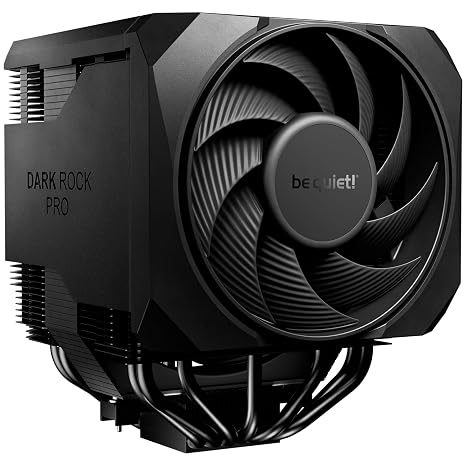
Running quiet and cool in a compact space, this cooler suits anyone looking to power through gaming or work without noise distractions. Its standout feature is the ability to switch between full cooling power and a near-silent semi-passive mode that stops the fan completely below 40% PWM.
Setting up involves a pre-installed mounting bridge that makes handling easier, and the rail-mounted fan slides up or down to fit just right in your build. Daily use benefits from the fan stopping at low temperatures, which really cuts down on noise when the system is idling. The 4-pin connector and 12-volt power supply keep controls simple while supporting smooth operation.
Seven copper heat pipes and optimized fins handle heat exceptionally well, even during overclocking. The cooler holds its ground in keeping CPUs at peak performance but can still be felt at 32.4 dB under load.
The build feels solid, but some users mention that the height adjustment is helpful yet slightly bulky, which might affect smaller cases.
The switch between active and semi-passive mode allows for quiet operation at lower loads and strong cooling under stress, while noise at maximum fan speed is still present. Installation is straightforward, but the cooler’s size and mechanism may require checking compatibility with smaller PC cases.
Ideal for users who want a cooler that performs well with demanding tasks and keeps noise low most of the time. Those with very tight internal case space should consider smaller profile coolers to avoid fitment issues.
Pros
- Fan stops completely under 40% PWM for silent idling
- Seven copper heat pipes for effective heat dissipation
- Pre-installed mounting bridge simplifies installation
- Adjustable fan height improves compatibility
Cons
- Fan noise noticeable at peak speeds
- Height adjustment mechanism can be bulky
| Specification | Details |
|---|---|
| Cooling Method | Air |
| Power Connector Type | 4-Pin |
| Maximum Rotational Speed | 2000 rpm |
| Noise Level | 32.4 db |
| Air Flow Capacity | 68.7 cfm |
| Compatible Devices | Intel sockets: 1851/1700/1200/1151/1150/1155/1156 | AMD sockets: AM5/AM4 |
11. Silverstone SST-FHS60X 60mm PWM Industrial Fan

Great for tight spaces, the Silverstone SST-FHS60X cools efficiently with a strong airflow despite its 60mm size. It’s ideal for desktop setups where compact, powerful fans are needed without sacrificing performance.
Installation is straightforward thanks to its protective metal grille and 4-pin PWM connector, allowing precise speed control from 0 up to 15,000 RPM. The dual ball bearings help keep noise consistent over time, and the solid frame design fits well in smaller builds while ensuring good stability.
Adjusting fan speed to balance cooling and sound level is easy with PWM control.
Cooling power reaches a max airflow of 65.74 CFM with pressure up to 62.95 mmH2O, keeping components cooled effectively even under load. The fan is built sturdy with a 38mm thick frame and durable bearings that prolong its life. The main praise is its high performance for the size, but some note noise can reach up to 61.5 dBA at full speed.
The fan’s biggest strength is its exceptional cooling efficiency for its small size, paired with a very broad speed range that allows careful adjustments. Noise levels near max speed are often mentioned as a downside, which may be a concern in quiet environments.
People needing a powerful fan in compact setups will appreciate this model. Those prioritizing whisper-quiet operation or needing ultra-slim fans might want to look for alternatives that trade some airflow for quieter performance or slimmer dimensions.
Pros
- Wide PWM speed range up to 15,000 RPM
- Dual ball bearing for longer service life
- Compact 60mm size with strong airflow
- Protective metal fan grille included
Cons
- Can get loud at maximum speed
- 38mm thickness may affect fit in very tight cases
| Specification | Details |
|---|---|
| Maximum Rotational Speed | 15,000 rpm |
| Air Flow Capacity | 65.74 cfm |
| Max. Noise Level | 61.5 dBA |
| Power Connector Type | 4-Pin |
| Cooling Method | Fan |
| Compatible Devices | Desktop, Graphic Cards |
12. Alphacool NexXxoS XT45 60mm Radiator

Copper stands out as the main material, offering a solid and efficient cooling experience in a compact 60 mm size. Perfect for anyone needing a reliable small radiator with serious cooling power, the design focuses on maximizing heat dissipation through full copper construction, which really makes a difference in tight spaces.
Setting up involves mounting a 60 mm fan using M3 threads, and you can even squeeze two fans on both sides if extra airflow is needed. With G1/4 threaded ports for inlet and outlet, connection to water cooling loops is straightforward.
Its thickness of 45 mm provides enough surface for heat exchange without taking up too much room, making it suitable for compact desktop or server setups.
Heat gets managed efficiently thanks to copper fins, chambers, and channels. The build quality stands out with stainless steel housing and brass threads ensuring durability. The loudest noise heard is around 35.2 db at 2500 rpm, which some might consider noticeable.
A bit on the bulky side at 45 mm thickness could be an issue where space is extremely tight.
The full copper build combines copper fins, chambers, and channels to deliver strong heat dissipation, praised for its efficiency. The common downside points to the noise level when the fan runs at its maximum 2500 rpm speed, which might be distracting in quiet environments.
This radiator suits those needing compact but powerful cooling for desktops or servers with limited space. Users sensitive to noise or requiring ultra-thin options may prefer exploring alternatives with quieter fans or thinner profiles.
Pros
- Fully copper construction for better heat transfer
- Compact size fits tight spaces well
- Durable brass threads and stainless steel housing
- Supports 1 or 2 60 mm fans comfortably
Cons
- Thicker 45 mm design may limit clearance
- Noise level can be noticeable at max fan speed
| Specification | Details |
|---|---|
| Power Connector Type | 4-Pin |
| Voltage | 12 volts |
| Wattage | 400 watts |
| Cooling Method | Water |
| Noise Level | 35.2 db |
| Maximum Rotational Speed | 2500 rpm |
Best 60mm CPU Coolers Comparison Table
| Product | Compatible Devices | Noise Level | Max RPM | Air Flow Capacity |
|---|---|---|---|---|
| Thermalright AXP120-X67 Cooler | Desktop | 26.1 db | 1800 rpm | 59 cfm |
| Noctua NH-L9x65 chromax.Black | Desktop | 23.6 db | 2500 rpm | 57.5 cubic meter/hr |
| Thermalright TL-B6W Fan | Desktop | 20.17 db | 3200 rpm | 16.17 cfm |
| Dynatron K666 Cooler | Server | 1 db | 2500 rpm | 26.45 cfm |
| Noctua NH-L9x65 Cooler | Desktop | 23.6 db | 2500 rpm | 57.5 cubic meter/hr |
| ID-COOLING IS-67-XT | Desktop | 28 db | 1800 rpm | 67.58 cfm |
| Thermalright AXP90 X36 Cooler | Desktop | 22.4 db | 2700 rpm | 42.58 cfm |
| Thermalright Assassin X120 SE | Desktop | 25.6 db | 1550 rpm | 66.17 cfm |
| ID-COOLING IS-55 Cooler | Desktop | 31.2 db | 3300 rpm | 54.6 cfm |
| be quiet! Dark Rock Pro | Desktop Intel/AMD | 32.4 db | 2000 rpm | 68.7 cfm |
| Silverstone SST-FHS60X Fan | Desktop/Graphic Cards | 61.5 db | 15000 rpm | 65.74 cfm |
| Alphacool NexXxoS XT45 Radiator | Desktop/Server | 35.2 db | 2500 rpm | – |
- Compatible DevicesDesktop
- Noise Level26.1 db
- Max RPM1800 rpm
- Air Flow Capacity59 cfm
- Compatible DevicesDesktop
- Noise Level23.6 db
- Max RPM2500 rpm
- Air Flow Capacity57.5 cubic meter/hr
- Compatible DevicesDesktop
- Noise Level20.17 db
- Max RPM3200 rpm
- Air Flow Capacity16.17 cfm
- Compatible DevicesServer
- Noise Level1 db
- Max RPM2500 rpm
- Air Flow Capacity26.45 cfm
- Compatible DevicesDesktop
- Noise Level23.6 db
- Max RPM2500 rpm
- Air Flow Capacity57.5 cubic meter/hr
- Compatible DevicesDesktop
- Noise Level28 db
- Max RPM1800 rpm
- Air Flow Capacity67.58 cfm
- Compatible DevicesDesktop
- Noise Level22.4 db
- Max RPM2700 rpm
- Air Flow Capacity42.58 cfm
- Compatible DevicesDesktop
- Noise Level25.6 db
- Max RPM1550 rpm
- Air Flow Capacity66.17 cfm
- Compatible DevicesDesktop
- Noise Level31.2 db
- Max RPM3300 rpm
- Air Flow Capacity54.6 cfm
- Compatible DevicesDesktop Intel/AMD
- Noise Level32.4 db
- Max RPM2000 rpm
- Air Flow Capacity68.7 cfm
- Compatible DevicesDesktop/Graphic Cards
- Noise Level61.5 db
- Max RPM15000 rpm
- Air Flow Capacity65.74 cfm
- Compatible DevicesDesktop/Server
- Noise Level35.2 db
- Max RPM2500 rpm
- Air Flow Capacity–
How to Choose the Best 60mm CPU Cooler
Look for a cooler that fits your case size, offers efficient heat dissipation, and operates quietly to ensure smooth performance. Choosing the right balance between size, airflow, and noise helps prevent overheating and reduces future upgrade costs by maintaining stable CPU temperatures.
Size and Compatibility
One time, a cooler arrived that technically fit the case but blocked the RAM slots and stuck out too far beside the GPU. This meant not just cramped space but also trouble installing components or upgrading later. Measuring the cooler’s height, width, and depth is essential, especially with small form factor builds that have tighter clearances.
Double-checking the cooler’s socket compatibility saves a lot of headaches. A cooler that doesn’t support your motherboard’s socket type can’t be mounted securely, causing poor contact and overheating. Also, consider the layout of your RAM and GPU slots to prevent interference.
Common sizes and motherboard layouts vary, so look for clear specifications on dimensions and compatible sockets, alongside any notes on component clearance.
Cooling Performance
One system I built had a CPU rated for 65W, but the cooler was only rated to handle 40W TDP. It ran hotter and throttled under load.
The TDP rating of the cooler should match or exceed your processor’s heat output for reliable performance. Check this number in the product specs to avoid overheating issues.
Cooling efficiency relies on how well heat moves away from the CPU. Coolers with heat pipes and dense aluminum fins disperse heat quicker than simple designs. The fan’s speed, measured in RPM, and airflow in CFM matter too.
Faster fans push more air but can be noisy, so find a balance that keeps temps low without constant loud noise.
Noise Levels
Running a PC in a quiet room revealed how some coolers kept the noise to a soft hum, while others made continuous whining sounds. Checking the decibel (dB) rating at typical load shows how loud a cooler will be when in use. This is important if the PC is in a living room or workspace.
Pulse Width Modulation (PWM) fan control lets the fan speed slow down when the CPU isn’t busy, reducing noise. Without it, fans may run at full speed all the time.
Pick models that balance low noise output with enough performance to keep temperatures stable during heavier tasks.
Build Quality and Materials
The difference between a cooler with a copper base and one with a cheap aluminum plate became clear when managing heat. Copper conducts heat much better, helping the CPU run cooler under stress.
Aluminum fins are standard for dissipating it efficiently, but poor build quality leads to warped surfaces or weak mounting.
Check the mount system for solid, even contact with the CPU surface to avoid hot spots. Some coolers include corrosion-resistant coatings on metal parts, which help maintain performance and durability over years of use.
This prevents issues like rust or discoloration that could impact cooling efficiency.
Ease of Installation and Maintenance
Installing a cooler with a complicated bracket and requiring multiple screwdrivers was frustrating. A simple, tool-free mounting system makes setup quicker and reduces the chance of damaging hardware.
Easier installation saves time and stress, especially for those who upgrade or clean their PC often.
Dust buildup can degrade performance, so designs that allow easy access to the fan and heatsink for cleaning are preferable. Check if fans or thermal paste can be replaced separately, rather than buying a whole new cooler, which can save money and extend the cooler’s life.
Optimizing Airflow for Enhanced Performance with 60mm CPU Coolers
Compact 60mm CPU coolers often operate within tight spaces, which makes managing airflow essential for keeping temperatures in check. Positioning the cooler to align with the natural airflow inside the case helps reduce heat build-up.
Avoid placing cables or components that might block air around the fan. Fans running at higher RPMs on these smaller coolers increase noise and wear, so balancing airflow that moves heat away from the CPU without stressing the fan is key.
To optimize airflow with a 60mm cooler:
- Ensure the intake and exhaust paths inside the case are clear of obstructions.
- Use case fans to create a unidirectional airflow pattern, pushing cool air in and pulling warm air out.
- Regularly monitor CPU temperatures to check if airflow adjustments make a difference.
Small coolers benefit greatly from thoughtful airflow because their limited size restricts heat dissipation compared to larger models.
Routine Maintenance Tips to Prolong the Lifespan of Your 60mm CPU Cooler
Dust accumulation on 60mm CPU coolers can severely impact their cooling efficiency since the small fans have less surface area to push air through. Cleaning the fan blades and heatsink fins at least once every few months prevents dust buildup that otherwise traps heat.
Use compressed air or a soft brush to avoid damaging delicate parts.
Additional maintenance steps:
- Check fan bearings for noise or stiffness and replace the fan if it shows signs of wear.
- Inspect thermal paste between the CPU and cooler; reapply it approximately every two years or if you notice temperature spikes.
- Secure mounting brackets to ensure the cooler maintains firm contact with the CPU surface.
Routine upkeep extends the cooler’s operational lifespan and maintains stable CPU temperatures without needing a replacement sooner than expected.
Comparing 60mm CPU Coolers with Larger Alternatives: When to Choose Small over Big
Choosing a 60mm CPU cooler over a larger alternative typically depends on space constraints and system requirements. Smaller coolers fit well in compact builds like mini-ITX where clearance for taller coolers is limited.
They also tend to draw less power and generate less airflow noise under light to moderate loads.
Situations favoring small coolers:
- Small form factor cases or HTPC setups with limited CPU cooler height allowances.
- Systems that prioritize quiet operation at low to mid CPU loads rather than maximum overclocking.
- When budget or power consumption limits exclude larger, more complex cooling solutions.
However, larger coolers usually provide better heat dissipation for high-performance CPUs or overclocking tasks. The decision involves balancing physical constraints, noise preferences, and cooling performance needs.
People Also Asked
How Do I Install a 60mm CPU Cooler Properly?
Mount the cooler onto the CPU socket by aligning the bracket and tightening the screws evenly. Make sure to apply a thin, even layer of thermal paste between the CPU and cooler for better heat transfer. Check all connections before powering up the system.
Will a 60mm CPU Cooler Fit in My PC Case?
Most small form factor or mini cases will accommodate a 60mm cooler, but it’s important to verify clearance for height and fan placement in your specific model. Measuring available space and comparing it to cooler specs ensures a proper fit.
How Long Does a 60mm CPU Cooler Typically Last?
A 60mm CPU cooler usually lasts around 3 to 5 years under normal conditions before fan bearings wear out or dust buildup reduces efficiency. Regularly cleaning the fan blades and heatsink extends its lifespan.
Is a 60mm CPU Cooler Safe for Overclocked CPUs?
A 60mm cooler can handle mild overclocking on low-power CPUs, but it may struggle with higher heat output demanding better cooling solutions. Monitoring temps during overclocking helps avoid overheating.
What Common Problems Occur with 60mm CPU Coolers?
Common issues include fan noise, dust accumulation, and insufficient cooling capacity for high TDP processors. Cleaning the fan and heatsink periodically and checking if the cooler suits your CPU helps maintain performance.
Conclusion
Choosing a 60mm CPU cooler mostly comes down to how much space you have inside your case, the noise level you can tolerate, and how well it keeps your processor’s temperature in check. Cooling performance varies with each model, but compact fit and quiet operation are key if you’re working with limited room or prefer a silent setup.
Think about where your build will live and your budget before making a final choice. Some coolers suit tight spaces better, while others cost less but might be louder or less efficient. Take another look at the comparison table and the detailed options above to find the one that fits your needs.

I’m Grant Mitchell, a firearms and hunting writer with years of experience at the range and in the field. I write about rifles, shotguns, handguns, optics, safe storage, cleaning, and responsible ownership, along with practical hunting tips. My goal is to share accurate, safety-first information that helps you choose the right firearm, maintain it properly, and become a more confident shooter.