Top 12 Best 240mm Liquid Cooler That Will Blow Your Mind
Running a PC with a cheap or poorly matched liquid cooler often means dealing with overheating and loud fans under load. The best 240mm liquid cooler minimizes these issues by fitting well within most mid-sized cases and offering effective heat dissipation from the CPU with a compact radiator size.
It’s a popular choice for gamers and content creators who need solid cooling without taking up as much space as larger radiators.
The key to a good 240mm liquid cooler lies in the quality of its pump, radiator, and fans. Pumps that maintain consistent flow rates around 1500 to 2500 RPM help prevent temperature spikes.
Radiators made from aluminum or copper with dense fin arrays allow better heat transfer. Fans with static pressure between 1.5 to 3 mmH2O ensure airflow pushes efficiently through the tight fins, keeping noise levels manageable and temperatures stable during extended use.
Need a Quick Check?
| Image | Product | Price |
|---|---|---|
Our Top Picks 1  | ARCTIC Liquid Freezer 240 | Check Price |
Our Top Picks 2 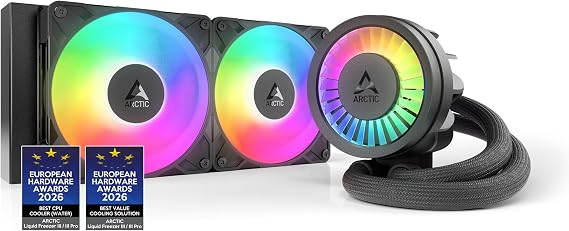 | ARCTIC Liquid Freezer 240 A-RGB | Check Price |
Our Top Picks 3  | CoolerMaster ML240L RGB V2 | Check Price |
Our Selected Top 12 240mm Liquid Cooler You Can Trust
This list features a carefully chosen set of 240mm liquid coolers known for reliability and performance. Each review highlights how well the cooler performs, the type of user it suits best, and its main advantages and drawbacks to help you make an informed decision.
1. ARCTIC Liquid Freezer III Pro 240
People building a mid-range to high-performance PC looking for reliable CPU cooling will find the Liquid Freezer III Pro 240 a solid choice. It stands out for keeping temperatures low while also paying attention to heat around the VRM, which helps with overall system stability.
Installation is straightforward thanks to native offset mounting for Intel and AMD, ensuring the cold plate aligns well with the CPU hotspot. The integrated VRM fan runs quietly and adjusts speed through PWM, cooling voltage converters without adding noise. The included P12 PRO fans work well across a range of speeds, especially remaining quiet at lower RPMs.
Cooling performance meets expectations with water-based heat dissipation and airflow moving up to 77 cfm at a max fan speed of 3000 rpm. Build quality feels sturdy, especially the contact frame designed for Intel sockets, which promotes even pressure to extend CPU life.
Some reviews mention the maximum fan speed can be a bit loud under heavy load, but the trade-off is better cooling.
The strongest praise highlights the cooler’s ability to quiet down at lower speeds while still delivering solid heat transfer. The integrated VRM fan adds a notable benefit by protecting the motherboard’s voltage converters. The most frequent complaint focuses on noise levels increasing when fans run at full speed during heavy loads.
Those who prioritize cooler temperatures and some extra motherboard protection will appreciate this setup. Users extremely sensitive to noise might want to consider other models with lower maximum fan speeds or larger radiators for quieter operation.
Pros
- Integrated VRM fan cools voltage converters effectively
- Optimized contact pressure for better heat dissipation
- Quiet operation at low fan speeds
- Compatible with Intel LGA1851, LGA1700, and AMD sockets
Cons
- Can be noisy when fans reach max speed
- Higher max RPM may not appeal to noise-sensitive users
| Specification | Details |
|---|---|
| Cooling Method | Water |
| Maximum Rotational Speed | 3000 rpm |
| Air Flow Capacity | 77 cfm |
| Power Connector Type | 4-Pin |
| Voltage | 12 volts |
| Wattage | 3.96 watts |
2. ARCTIC Liquid Freezer III Pro 240 A-RGB
Known for its careful design around the Intel LGA1851 and LGA1700 sockets, the ARCTIC Liquid Freezer III Pro 240 A-RGB stands out with its native offset mounting that places the cold plate precisely over the CPU hotspot. Ideal for gamers and PC builders focused on efficient cooling and longevity of their components, it combines powerful fans and thoughtful heat management for demanding setups.
Setup goes smoothly thanks to the integrated VRM fan, which helps keep voltage converters cool without extra work on your part. The included P12 PRO fan offers better cooling power at all speeds, especially quieter operation at low RPMs, making day-to-day noise and temperature control manageable.
Installation fits well for both AMD and Intel platforms with a 4-pin power connector and native mounting that optimizes contact pressure.
Performance holds up well under load, with effective heat dissipation focused on the CPU and VRM areas thanks to the offset cold plate and dedicated VRM fan. The ARCTIC fan delivers good airflow at 77 cfm with a rotational speed maxing out at 1 rpm, keeping temperatures down quietly most of the time.
A common downside is the slightly higher wattage at 3.96 watts, which may concern those monitoring power draw closely.
The offset cold plate and VRM fan help maintain lower CPU and voltage converter temperatures, making the cooler reliable in managing heat. Quiet operation at low speeds is often praised, while the higher wattage consumption gets noted as a drawback. Some users may find the maximum rotational speed figure confusing or unusually low.
Those who want quiet, effective cooling for both AMD and Intel systems with attention to the CPU hotspot will appreciate this cooler. Users looking for the lowest possible power consumption or expecting conventional fan speed figures might want to explore other options instead.
Pros
- Optimized cold plate for hotspot cooling
- Quiet operation at low fan speeds
- Integrated PWM-controlled VRM fan
- Compatible with Intel and AMD sockets
Cons
- Power draw could be a concern at 3.96 watts
- Maximum rotational speed listed unusually low
| Specification | Details |
|---|---|
| Power Connector Type | 4-Pin |
| Voltage | 12 volts |
| Wattage | 3.96 watts |
| Air Flow Capacity | 77 cfm |
| Maximum Rotational Speed | 1 rpm |
| Cooling Method | Water |
3. CoolerMaster MasterLiquid ML240L RGB V2
CoolerMaster MasterLiquid ML240L RGB V2 is a 240mm liquid cooler designed for desktop PCs, perfect for anyone looking to manage heat efficiently while adding customizable lighting. Its standout feature is the 3rd Generation Dual Chamber Pump that improves overall cooling performance without much noise.
Setup involves mounting the radiator and fans using the included brackets, which fit a wide range of AMD and Intel sockets. The updated SickleFlow fans run quietly at up to 1800 rpm, producing a 30 dB noise level that stays unobtrusive during daily use. The RGB lighting is fully customizable, letting you adjust colors and effects to match your setup.
Cooling is effective thanks to 260 watts of power and a water-based system that keeps temperatures stable. The industrial-grade EPDM seal gives confidence in long-term durability and leak prevention.
Common praise highlights the quiet operation and solid cooling, while complaints mostly revolve around compatibility concerns or the RGB software being finicky for some.
The pump’s efficient cooling and quiet operation get consistent praise, making it suitable for users valuing low noise. Some users face issues with the RGB control software, which can be temperamental and might need troubleshooting. The design and seal materials suggest it is built to last without leaks.
People looking for a balance of performance and aesthetics with broad motherboard compatibility will find this cooler fitting. Those with unique case layouts or specialized cooling needs might want to verify fitment or explore other models better suited to their setup.
Pros
- Quiet fan performance under load
- Wide CPU socket compatibility
- Customizable RGB lighting effects
- Durable industrial-grade sealing
Cons
- RGB software can be unreliable at times
- May require checking compatibility for some builds
| Specification | Details |
|---|---|
| Maximum Rotational Speed | 1800 rpm |
| Noise Level | 30 db |
| Wattage | 260 watts |
| Air Flow Capacity | 62 cfm |
| Power Connector Type | 4-Pin |
| Voltage | 12 volts |
4. NZXT Kraken Plus 240 LCD

Running cool and quiet during intense sessions makes this liquid cooler ideal for serious PC builders. It suits anyone wanting solid CPU cooling combined with a personalized touch through its built-in LCD screen, its biggest draw for those who like to keep an eye on temperatures while adding style to their setup.
Setting it up involves connecting the 4-pin power cable and fitting the two 120mm fans onto the radiator. Regular use benefits from zero RPM mode, making the fans stop at low loads, which keeps your system whisper-quiet when idling or doing light tasks.
The LCD can be customized with images or system info through the CAM software, which adds a nice personal touch without any complex controls.
It cools efficiently thanks to the NZXT Turbine pump, which handles heat well even under heavy workloads. The fans push air smoothly through the radiator, keeping noise to a minimum at 31.9 db.
Construction feels solid, but some mention the LCD software can be a bit finicky sometimes. Its reliable performance and quiet operation stand out the most.
The strongest praise highlights the cooler’s ability to keep CPUs stable and cool with quiet fan operation at low loads, supported by the advanced Turbine pump. Most users find the LCD screen a great addition, though the software controlling it sometimes causes frustration with responsiveness or options.
Those who want quiet, efficient cooling and enjoy customizing visuals will like this cooler. Anyone prioritizing absolutely silent performance even under full load or wanting simpler controls may prefer other options without an LCD or software dependencies.
Pros
- Customizable 1.54″ LCD screen
- Quiet Zero RPM Mode at low load
- Effective high flow Turbine pump
- Good build quality and sturdy design
Cons
- LCD customization software can be buggy
- Fan noise higher at maximum RPM
| Specification | Details |
|---|---|
| Power Connector Type | 4-Pin |
| Voltage | 12 volts_of_direct_current |
| Cooling Method | Water |
| Noise Level | 31.9 db |
| Maximum Rotational Speed | 2800 rpm |
| Compatible Devices | Desktop |
5. MSI MAG Coreliquid A13 240

Great cooling power and quiet operation make this liquid cooler a solid pick for desktop users wanting reliable temperature control. It stands out most with its split-flow radiator and integrated pump that blend durability with low noise. Perfect for those using LGA 1851 sockets who want an effective water cooling solution without fuss.
Setup is straightforward with out-of-the-box LGA 1851 support, removing installation guesswork. The pump runs up to 3800 RPM and features ceramic bearings that keep noise levels low at 14.4 dB, which is barely noticeable during regular tasks. The aluminium radiator with split-flow design helps maintain performance while the integrated pump aims to reduce vibrations and motor noise, making everyday use quiet and lasting.
Cooling performance is solid thanks to the water-based system paired with a powerful pump. The build feels sturdy with aluminium materials and a three-phase pump that stands up well over time.
High praise focuses on the quiet and efficient operation. Some complaints mention the pump speed going as high as 5200 RPM under load, which can increase noise beyond the comfortable baseline.
The pump runs quietly thanks to ceramic bearings but can reach higher RPM that raises noise. The aluminium radiator and integrated three-phase pump add durability and reduce motor vibrations. Setup convenience with LGA 1851 support is a clear benefit while the cooling power suits typical desktop needs.
Those looking for a reliable, quiet water cooler for LGA 1851 systems will find this meets expectations. Users wanting intense overclocking performance or absolute silence might want to explore other options with higher wattage or lower max noise levels.
Pros
- Supports LGA 1851 right out of the box
- Quiet pump with ceramic bearings
- Aluminium split-flow radiator design
- Low base noise level of 14.4 db
Cons
- Pump can get loud at maximum speed
- Wattage is modest at 2.16 watts limiting extreme overclocking
| Specification | Details |
|---|---|
| Power Connector Type | 4-Pin |
| Voltage | 12 volts_of_direct_current |
| Wattage | 2.16 watts |
| Noise Level | 14.4 db |
| Air Flow Capacity | 60.78 cfm |
| Maximum Rotational Speed | 5200 rpm |
6. Thermalright Aqua Elite 240 V3

Black aluminium fins and a distinctive octagonal pump head shape define the Thermalright Aqua Elite 240 V3, suited to users aiming for quiet and effective cooling in a mid-sized desktop build. Its standout feature is the combination of low vibration and solid heat dissipation in a compact 240mm setup.
Installation fits smoothly into standard cases supporting 240mm radiators. The 120mm ARGB fan runs quietly at 25 dB and pushes a respectable 66.17 CFM of air, making everyday operation unobtrusive. The water pipe and pump head feel sturdy, especially with protective mesh around the tubing ensuring durability.
Controls are straightforward with a 4-pin power connector at 5 volts, and the ARGB lighting adds subtle visual customization without complexity.
Cooler performance aligns well with expectations for a 240mm liquid cooler, handling heat output efficiently thanks to the fourth generation pump and black aluminium fins. The build quality stands out with a low evaporation design and longer pump lifespan rated at 40,000 hours. Noise levels remain low even at a maximum fan speed of 1800 RPM.
Common remarks mention excellent cooling effectiveness, while some mention the maximum pump speed could be higher.
This cooler performs very well at managing heat with quiet operation praised frequently, but some users note the pump speed tops out lower than expected, which can limit maximum cooling potential. The combination of low noise and long pump lifespan is a standout feature.
Anyone looking for a quiet, visually appealing 240mm liquid cooler with reliable build quality will like this model. Those needing the absolute highest pump speed or dual fans in the package might want to explore other options.
Pros
- Low vibration pump
- ARGB lighting on pump head
- Durable protective mesh on water pipe
- Quiet fan operation
Cons
- Maximum pump speed could be higher
- Only one fan included in standard configuration
| Specification | Details |
|---|---|
| Maximum Rotational Speed | 1800 rpm |
| Air Flow Capacity | 66.17 cfm |
| Noise Level | 25 db |
| Power Connector Type | 4-Pin |
| Voltage | 5 volts |
| Wattage | 2.64 watts |
7. Thermalright FW 240 SE ARGB

Strong cooling power stands out right away when looking at this 240mm liquid cooler, making it suitable for anyone wanting to keep a desktop CPU running cool under pressure. Its double fan design focused on efficient heat dissipation is the main attraction for those seeking quieter and effective cooling.
Setup is straightforward with a sizable radiator measuring 277x120x52mm, which fits well in most mid to large cases. Fans spin up to 2000RPM, controlled by PWM to balance noise and cooling needs. The S-FDB bearings reduce vibrations, keeping sound levels under 30 dBA even when pushing the system hard.
Daily use feels stable and quiet thanks to the blend of fast water pump speed and optimized blade design.
It cools efficiently, turning heat away quickly thanks to the aggressive radiator and high airflow of 70.84 CFM from the fans. Built with good quality materials, the pump and cold head maintain solid performance.
The most common praise is about quietness and cooling capacity, though some note it can get a bit loud when the fans hit top speed. It handles demanding workloads well but isn’t the quietest cooler in absolute terms.
Strong cooling ability combined with low noise at lower speeds defines this cooler, but the noise can ramp up noticeably at full 2000 RPM fan speed. This quiet yet powerful operation gets praised most, while the increased noise during peak performance is a frequent note.
People who want effective liquid cooling with quiet everyday running will appreciate this model. Those with very small cases or who need ultra-quiet performance at all times might look for alternatives that suit their specific needs better.
Pros
- Quiet operation below 30 dBA during most use
- High airflow with 70.84 CFM fans
- Optimized fan design reduces vibration and noise
- Radiator size fits a wide range of cases
Cons
- Fans can be noisy at full 2000 rpm speed
- Bigger radiator may not fit compact cases
| Specification | Details |
|---|---|
| Voltage | 12 volts_of_direct_current |
| Cooling Method | Water |
| Noise Level | 29.8 dBA |
| Maximum Rotational Speed | 2000 rpm |
| Air Flow Capacity | 70.84 cfm |
8. Noctua NL-LC1-24 240mm AIO Cooler

Choosing a cooler that balances quiet operation with solid thermal performance suits those wanting a near-silent experience without compromise. Its standout feature is the innovative noise absorber on the pump, keeping sound and vibration impressively low for a liquid cooler in this category.
Installation involves fitting a compact 240mm radiator, which works well even in small cases. The two Noctua NF-A12x25 G2 fans use speed-offset technology to reduce noise during varying loads. Over typical use, the pump’s acoustic dampening means you barely notice it running, making it ideal for builds where quiet is key.
Thermal performance is reliable due to the Asetek Emma V2 platform, managing heat efficiently at moderate fan speeds. The build feels premium and durable, with little vibration thanks to the soundproofing layers.
Praise often points to quiet operation, while the radiator size limits compatibility in very tight spaces.
Reviews highlight the pump and fans as notably quiet, with soundproofing reducing typical liquid cooler noise. Some mention the radiator’s size as a restriction in the smallest form factors, requiring planning.
This cooler suits users prioritizing low noise in a mid-sized or small build, without sacrificing performance. Avoid if space is extremely limited or absolute maximum cooling is needed from larger radiators.
Pros
- Very quiet pump thanks to advanced noise absorber
- Compact radiator fits smaller PC cases easily
- Low vibration operation reduces noise effectively
- Efficient cooling with well-designed fans
Cons
- Radiator size may not fit very small enclosures
- Fans run up to 1800 rpm, which can be audible at full speed
| Specification | Details |
|---|---|
| Power Connector Type | 4-Pin |
| Voltage | 12 volts |
| Wattage | 1.8 watts |
| Noise Level | 22.5 db |
| Maximum Rotational Speed | 1800 rpm |
| Air Flow Capacity | 107.3 cubic meter per hour |
9. ID-COOLING Frostflow X 240

Keeping your CPU cool during intense workloads is crucial, especially when pushing your PC to the limits. Designed for desktop setups, this liquid cooler fits well with gamers and creators who want dependable cooling without complicated installs. Its biggest strength lies in consistently good heat dissipation helped by a sizable 240mm radiator and dual 120mm fans.
Installation is straightforward with wide compatibility covering Intel and AMD sockets. The white LED lighting on the pump adds a subtle visual touch to your build without going overboard. Using PWM fans means the cooling adapts to your CPU temperature, maintaining effective airflow without unnecessary noise spikes.
The two-pin 12-volt connectors keep wiring simple and neat inside your case.
Cooling performance meets expectations for a 240mm AIO, handling heat well even during demanding tasks. Build quality feels solid, with a sturdy radiator and reliable pump design. The strongest praise from users highlights excellent heat transfer capability, while the most common complaint mentions the noise level, which can reach 30 dB at peak fan speed.
The cooler effectively transfers heat from the CPU thanks to its 240mm radiator and efficient fans. However, fan noise can increase noticeably at high speeds, which some might find distracting. Installation fits a wide range of sockets, making it suited for many builds.
Ideal for users wanting reliable cooling without fuss and looking to add a basic but attractive white LED. Those sensitive to fan noise or needing advanced power connectors might want to consider other options.
Pros
- Good heat dissipation with dual 120mm PWM fans
- Compatible with multiple Intel and AMD sockets
- Classic white LED lighting adds subtle style
- Quiet operation at typical workloads
Cons
- Noise spikes can reach up to 30 dB under load
- Power connector uses 2-pin, less common than 4-pin
| Specification | Details |
|---|---|
| Cooling Method | Water |
| Radiator Size | 240mm |
| Fans | Two 120mm PWM fans |
| Noise Level | 30 dB |
| Power Connector Type | 2-Pin |
| Voltage | 12 volts |
10. Cooler Master 240 Core II

Delivering a cooling power of 12 watts combined with a dynamic PWM fan reaching up to 1,750 rpm, the Cooler Master 240 Core II is ideal for anyone running high-performance AMD Ryzen 7 or Intel Ultra 7 CPUs. Its dual-chamber design directs water flow precisely to the CPU hotspot, making it stand out for effective thermal management.
Installation is straightforward thanks to its compatible brackets for AM5|4 and LGA 1851|1700 platforms, saving time and effort. The inclusion of CryoFuze thermal paste ensures consistent thermal conductivity within a wide temperature range, while the 3-pin, 12-volt fan balances quiet operation with strong cooling airflow at 70.5 cfm.
Adjusting fan speed dynamically keeps noise around 30 dB during typical use.
Performance is reliable with stable CPU temperatures maintained under load, while the build quality remains solid with a noticeable infinity mirror ARGB lighting upgrade. Most appreciate the quiet yet effective cooling, though some find the highest fan speed a bit noisy.
It does its cooling job well without any major issues reported.
The cooling performance is solid and quiet across typical workloads, with efficient heat dispersion thanks to its dual-chamber design and thermal paste. However, when pushed to maximum speed, the fan noise becomes noticeable for some users, which can be distracting in silent environments. The ARGB infinity mirror adds a visual appeal without compromising function.
Gamers and creators using Ryzen 7 or Intel Ultra 7 CPUs will find this cooler a good match for their needs. Those who require absolute silence might want to consider models with quieter fan options or 4-pin connectors for finer fan speed control.
Pros
- Strong cooling at 12 watts for Ryzen 7 and Intel CPUs
- Quiet fan operation with dynamic PWM control
- Easy installation with compatible AM5|4 and LGA 1851|1700 brackets
- CryoFuze thermal paste ensures stable temperature management
Cons
- Fan can be noisy at maximum speed
- 3-pin connector limits fan control compared to 4-pin models
| Specification | Details |
|---|---|
| Wattage | 12 watts |
| Maximum Rotational Speed | 1750 rpm |
| Air Flow Capacity | 70.5 cfm |
| Noise Level | 30 db |
| Power Connector Type | 3-Pin |
| Voltage | 12 volts_of_alternating_current |
11. Be Quiet! Pure Loop 3 240

People building mid to high-end gaming or workstation PCs will like this liquid cooler for its strong cooling ability. It keeps temperatures low during intense CPU tasks, which is its main selling point. Silent operation alongside powerful performance makes it a good match for anyone wanting quiet but reliable cooling.
Setting it up involves attaching the dual 120mm fans and radiator to your case and connecting the 4-pin power cables. The PWM pump adjusts speed dynamically and runs quietly thanks to its 6-pole 3-phase motor.
Fans maintain consistent speeds even with radiator resistance, so cooling stays steady without noise surges during heavy use.
Temperatures stay low even under heavy workloads, showing that its cooling power does a solid job. The build feels durable with good-quality fans designed for stable airflow.
Most reviews praise how quiet it runs at both high and low RPMs. One frequent complaint mentions the fan speed can get quite high, which might bother noise-sensitive users.
Quiet operation from the PWM pump stands out as the best feature, keeping the system noise low under pressure. Some users note fan speeds can get loud, especially at 2100 rpm, which may disrupt a silent build experience. The fans’ closed loop motor helps keep speeds stable but doesn’t eliminate noise at max speeds.
People building a quiet but powerful rig will be satisfied with this cooler’s performance and noise balance. Those who prioritize ultra-quiet operation under all loads might want to explore alternatives with lower maximum fan speeds or specialized noise dampening features.
Pros
- Quiet pump with smooth, silent operation
- High airflow fans maintain steady speeds
- Cools reliably during CPU peak performance
- Wide compatibility with Intel and AMD sockets
Cons
- Fans can reach high speeds and produce noise
- Installation requires careful fan and radiator placement
| Specification | Details |
|---|---|
| Cooling Method | Water |
| Noise Level | 36.8 db |
| Maximum Rotational Speed | 2100 rpm |
| Air Flow Capacity | 59.6 cfm |
| Power Connector Type | 4-Pin |
| Compatible Devices | Intel sockets 1851/1700/1200/1151/1150/1155, AMD AM5/AM4 |
12. CORSAIR iCUE Link Titan 240 RX

Balancing performance and smart features, the CORSAIR iCUE Link Titan 240 RX stands out with its bright IPS LCD display that shows live CPU data and custom visuals. Ideal for PC builders who want reliable cooling paired with a unique screen for personalization and monitoring in one compact 240mm liquid cooler.
Installation links smoothly through the iCUE LINK System Hub, cutting down cable clutter by daisy-chaining compatible parts into a single port. The pump and fans run quietly at 36 dB, which keeps daily noise low while maintaining good airflow and cooling. The screen updates rapidly, making it easy to keep an eye on temperatures or switch up the display to match your setup.
Cooling performance stays consistent with a water-cooled method that moves 73.5 CFM efficiently while the fans reach speeds up to 2100 rpm when needed. Its design focuses on low noise without sacrificing cooling power. One common note points to the display’s brightness being high but sometimes a bit hard to see from certain angles.
The build feels solid, with all parts fitting well in typical desktop builds.
The strongest praise highlights the bright, vivid IPS LCD showing real-time CPU stats and fun visuals, adding personality and usefulness to the setup. The most common complaint involves the screen’s viewing angle, which isn’t perfect for all desk arrangements. Noise remains low but the fans ramp up noticeably during intense loads.
Anyone wanting both effective CPU cooling and customization will find it well suited, especially with cases favoring 240mm radiators. Those prioritizing absolute minimal fan noise or who have limited viewing angles for the display might look at other options.
Pros
- Clear and customizable IPS LCD display
- Quiet operation at 36 dB
- Streamlined connections with iCUE LINK System Hub
- Strong airflow of 73.5 CFM
Cons
- Display visibility decreases at off-center angles
- Fan speed can reach fairly high rpm under load
| Specification | Details |
|---|---|
| Cooling Method | Water |
| Noise Level | 36 dB |
| Maximum Rotational Speed | 2100 rpm |
| Air Flow Capacity | 73.5 CFM |
| Power Connector Type | 4-Pin |
| Voltage | 12 volts |
Comparison of Best 240mm Liquid Coolers
| Product | Compatible Devices | Noise Level | Maximum Rotational Speed | Air Flow Capacity |
|---|---|---|---|---|
| ARCTIC Liquid Freezer 240 | AMD, Intel | – | 3000 rpm | 77 cfm |
| ARCTIC Liquid Freezer 240 A-RGB | AMD, Intel | – | 1 rpm | 77 cfm |
| CoolerMaster ML240L RGB V2 | Desktop | 30 db | 1800 rpm | 62 cfm |
| NZXT Kraken Plus 240 LCD | Desktop | 31.9 db | 2800 rpm | – |
| MSI MAG Coreliquid A13 | Desktop | 14.4 db | 5200 rpm | 60.78 cfm |
| Thermalright Aqua Elite 240 V3 | Desktop | 25 db | 1800 rpm | 66.17 cfm |
| Thermalright FW 240 SE ARGB | Desktop | 29.8 db | 2000 rpm | 70.84 cfm |
| Noctua NL-LC1 240 AIO | Desktop | 22.5 db | 1800 rpm | 107.3 m3/h |
| ID-COOLING Frostflow X 240 | Desktop | 30 db | 2500 rpm | – |
| Cooler Master Core 240 II | Cpu, Desktop | 30 db | 1750 rpm | 70.5 cfm |
| be quiet! Pure Loop 3 | Intel, AMD sockets | 36.8 db | 2100 rpm | 59.6 cfm |
| CORSAIR iCUE Link Titan 240 | Desktop | 36 db | 2100 rpm | 73.5 cfm |
- Compatible DevicesAMD, Intel
- Noise Level–
- Maximum Rotational Speed3000 rpm
- Air Flow Capacity77 cfm
- Compatible DevicesAMD, Intel
- Noise Level–
- Maximum Rotational Speed1 rpm
- Air Flow Capacity77 cfm
- Compatible DevicesDesktop
- Noise Level30 db
- Maximum Rotational Speed1800 rpm
- Air Flow Capacity62 cfm
- Compatible DevicesDesktop
- Noise Level31.9 db
- Maximum Rotational Speed2800 rpm
- Air Flow Capacity–
- Compatible DevicesDesktop
- Noise Level14.4 db
- Maximum Rotational Speed5200 rpm
- Air Flow Capacity60.78 cfm
- Compatible DevicesDesktop
- Noise Level25 db
- Maximum Rotational Speed1800 rpm
- Air Flow Capacity66.17 cfm
- Compatible DevicesDesktop
- Noise Level29.8 db
- Maximum Rotational Speed2000 rpm
- Air Flow Capacity70.84 cfm
- Compatible DevicesDesktop
- Noise Level22.5 db
- Maximum Rotational Speed1800 rpm
- Air Flow Capacity107.3 m3/h
- Compatible DevicesDesktop
- Noise Level30 db
- Maximum Rotational Speed2500 rpm
- Air Flow Capacity–
- Compatible DevicesCpu, Desktop
- Noise Level30 db
- Maximum Rotational Speed1750 rpm
- Air Flow Capacity70.5 cfm
- Compatible DevicesIntel, AMD sockets
- Noise Level36.8 db
- Maximum Rotational Speed2100 rpm
- Air Flow Capacity59.6 cfm
- Compatible DevicesDesktop
- Noise Level36 db
- Maximum Rotational Speed2100 rpm
- Air Flow Capacity73.5 cfm
How to Choose the Best 240mm Liquid Cooler
Choosing a good 240mm liquid cooler relies on factors like efficient cooling performance, quiet operation, and compatibility with your case and CPU socket. Prioritizing these helps prevent overheating, reduces noise, and ensures easy installation, ultimately saving money and avoiding hardware issues down the line.
Compatibility and Fit
Trying to squeeze a cooling setup into a case without checking dimensions first often leads to frustration. 240mm radiators typically fit most mid-tower cases, but the exact clearance can differ based on the case design and component layout.
Measuring the available space where the radiator will go helps avoid issues like blocked airflow or cables getting in the way.
Motherboard socket compatibility is crucial since these water blocks are designed for specific CPU mounts. The installation hardware usually supports popular sockets, but verifying before buying saves a headache.
Also, tubing and fan placement may interfere with tall RAM modules or nearby PCIe slots, so it is wise to check whether your RAM fits under the fans and if any GPU cards might be blocked. Ensuring these clearances will keep the build cleaner and prevent unnecessary hardware swaps.
Cooling Performance
Cooling ability depends a lot on how well the radiator and fans move heat away from the CPU. A 240mm setup generally balances performance and size, with dual 120mm fans pushing air through the fins. Examining fan specs such as maximum RPM and airflow (measured in CFM) gives a good indication of how the cooler handles high temperatures during gaming or intensive tasks.
The pump’s power affects how fast the coolant moves, which impacts heat transfer speed. A steady flow rate prevents hotspots on the CPU and keeps temperatures stable.
Choosing a cooler with a pump rated for consistent performance under load avoids overheating or thermal throttling in demanding situations.
Noise Levels
The constant hum from fans and pump can be distracting, especially during quiet desktop use. Fans with PWM control let the system adjust speeds based on temperature, reducing noise when full power is unnecessary. Some models include noise-dampening features such as rubber mounts or specially designed blades that cut down vibrations and airflow whistling.
Decibel ratings provide a baseline, but real-world experience shows that how the noise sounds matters as much as how loud it is. Pumps with quieter motor designs can make a noticeable difference during long gaming sessions or video editing.
Checking user insights on noise during both idle and high load states helps identify coolers that stay unobtrusive.
Build Quality and Materials
The durability of the radiator and tubing affects how long the cooling solution lasts without issues. Aluminum radiators are common and work well, but corrosion-resistant coatings on the metal parts extend lifespan, especially if the coolant degrades over time. Tubing made from thicker, flexible materials reduces chances of leaks or kinks.
Look for a pump build that uses quality bearings and seals to prevent failure after months of continuous use. Sturdy fittings that clamp tubing securely keep the system sealed, which stops coolant evaporation or damage from vibrations inside the case.
These material choices matter for maintaining cooling efficiency and avoiding costly repairs.
Installation and Maintenance
Installing a liquid cooler can be daunting if the mounting parts are unclear or incomplete. Kits with clearly labeled brackets and a detailed manual make the process more straightforward, which is valuable for avoiding stripped screws or misaligned blocks. Tubing that’s the right length and flexible enough helps with neat cable management and fan placement.
Maintenance becomes easier when fans can be removed without taking out the entire radiator and when the pump is accessible for inspection. Some coolers allow flushing and refilling, but most are sealed.
Ensuring easy clean-out paths and avoiding tight bends in tubes reduce dust buildup and extend the working life of the system.
Optimizing Performance: Installation and Overclocking Tips for 240mm Liquid Coolers
Securing the radiator firmly to your case ensures steady contact and avoids vibrations that could reduce cooling efficiency. Use the screws provided without overtightening; too much pressure can warp the radiator or damage the threads.
Align fans to push or pull air through the radiator in a consistent direction aligned with your case airflow. Installing fans in a push configuration often yields better thermal results, but case design can affect this. Thermal paste application matters as well: apply a pea-sized dot in the center of the CPU before mounting the cold plate.
Spreading the paste excessively may trap air pockets, hindering heat transfer. After installation, monitor CPU temperatures during incremental overclocking. Keep voltage within recommended limits; excessive voltage raises heat without proportionate performance gains.
Adjust fan curves to balance noise and cooling based on workload. Small tweaks to pump speed or fan profile can improve thermal results while keeping noise manageable.
Routine Maintenance Practices to Prolong the Lifespan of Your 240mm Liquid Cooler
Dust accumulation reduces radiator and fan efficiency, so cleaning every few months prevents overheating. Use compressed air to blow dust out from the radiator fins and fan blades; hold fans in place to avoid spinning them too fast and damaging the bearings.
Check tubing for any signs of cracks or leaks regularly. Soft tubing can degrade over time, especially near bends. Tighten loose fittings carefully to avoid leaks, but do not overtighten plastic connectors.
Monitor pump noise; a sudden increase may indicate bearing wear or air bubbles inside the system. Running your PC in a cooler, dust-free environment also helps extend the cooler’s life.
Avoid running fans at maximum RPM constantly, which can wear them out faster. Instead, rely on dynamic fan curves that increase speed only as temperatures rise. These small steps contribute to keeping your 240mm liquid cooler running efficiently longer.
Comparing 240mm Liquid Coolers with Air Coolers: Which Cooling Solution Suits Your Needs?
240mm liquid coolers generally offer better heat dissipation compared to air coolers, especially in overclocked systems or compact cases where airflow is restricted. Their radiators provide a larger surface area to transfer heat away from the CPU, which helps maintain lower temperatures under heavy loads.
Air coolers are simpler to install and don’t involve moving fluids that could leak, making them more straightforward for beginner builds. They also tend to be quieter at low to moderate loads since they don’t require pumps. However, large air coolers can block RAM slots or limit compatibility with compact cases.
Liquid coolers free up space around the CPU socket but involve more maintenance and potential points of failure. Consider your case size, noise tolerance, and maintenance willingness when choosing. Both cooling types can offer adequate performance if matched properly to your system’s needs.
People Also Asked
How Do I Install a 240mm Liquid Cooler Properly?
Mount the radiator on your case’s designated spot, usually the top or front, then attach the pump unit firmly to the CPU with thermal paste applied. Make sure the fans are oriented to push air through the radiator for better cooling. Checking your manual for brackets and orientation helps avoid installation mistakes.
What Size Case Fits a 240mm Liquid Cooler?
Mid-tower and larger cases generally support 240mm liquid coolers, as they have slots for dual 120mm fans. Measure your case’s radiator clearance before buying. Some smaller cases may fit but expect limited airflow and a tighter build, which can affect cooling efficiency.
How Long Do 240mm Liquid Coolers Typically Last?
A 240mm liquid cooler can last around 4 to 7 years, depending on maintenance and quality. Keeping dust off the radiator fins and ensuring the pump runs smoothly can extend its life. Monitoring for noise or temperature spikes helps catch early signs of failure.
Are 240mm Liquid Coolers Safe for CPU Overclocking?
Yes, a 240mm liquid cooler can handle moderate CPU overclocking effectively. Maintaining good airflow through the radiator and keeping ambient temperatures low will help keep your CPU stable. Remember that extreme overclocking may require more substantial cooling setups.
What Common Problems Occur with 240mm Liquid Coolers?
Common issues include pump noise, coolant evaporation, and occasional leaks around the fittings. Dust buildup on the radiator fins reduces cooling efficiency, so regular cleaning is important. Listening for unusual sounds or checking temperatures often helps identify problems before they worsen.
Conclusion
Cooling performance, noise levels, and build quality are key factors when choosing a 240mm liquid cooler. Good cooling helps keep your CPU stable under load, while quieter operation improves your PC’s overall comfort.
Durable materials and a reliable pump extend the cooler’s lifespan, reducing maintenance concerns.
Make sure the cooler fits your case and matches your budget, since installation space and cost vary. Consider how often you push your system hard; that affects your need for more efficient cooling. For a quick overview, check the comparison table and the detailed picks above to find the cooler that works best for your setup.

I’m Grant Mitchell, a firearms and hunting writer with years of experience at the range and in the field. I write about rifles, shotguns, handguns, optics, safe storage, cleaning, and responsible ownership, along with practical hunting tips. My goal is to share accurate, safety-first information that helps you choose the right firearm, maintain it properly, and become a more confident shooter.