Top 12 Best 240mm CPU Cooler That Will Blow Your Mind
A poorly chosen CPU cooler can quickly lead to overheating, loud fans, and even system crashes during intensive tasks. Finding the best 240mm CPU cooler can make a noticeable difference in maintaining stable temperatures while keeping noise levels manageable.
These coolers are common in mid-to-high-end PC builds due to their balance of cooling capacity and size.
The key factors that set a good 240mm cooler apart are radiator quality, pump efficiency, and fan performance. Radiators made from dense aluminum with copper heat pipes provide faster heat dissipation. Pumps that run quietly but maintain consistent coolant flow prevent temperature spikes.
Fans rated for at least 700 to 1800 RPM with adjustable speed controls help balance airflow and noise depending on workload.
Need a Quick Check?
| Image | Product | Price |
|---|---|---|
Our Top Picks 1  | Thermalright Aqua Elite 240 | Check Price |
Our Top Picks 2  | CoolerMaster ML240L RGB V2 | Check Price |
Our Top Picks 3 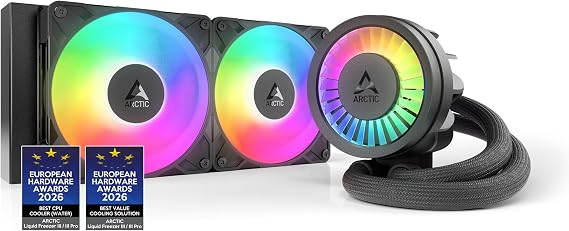 | ARCTIC Liquid Freezer III Pro | Check Price |
Our Selected Top 12 240mm Cpu Cooler for Every Budget
This list features carefully chosen 240mm CPU coolers suitable for a range of budgets and needs. Each review covers performance, ideal user scenarios, and highlights key strengths and weaknesses, helping readers make informed decisions based on their cooling requirements and budget constraints.
1. Thermalright Aqua Elite 240 V3 CPU Cooler
People looking for a quiet but effective 240mm CPU cooler will appreciate the Thermalright Aqua Elite 240 V3. It suits desktop builders who want reliable cooling with an eye-catching pump design and long-lasting performance.
Its standout feature is the low vibration pump that promises durability and solid heat dissipation.
Setup involves mounting the black aluminium fin heat sink plate and connecting the 4th generation pump head with the standard 120mm ARGB fan. The water pipe has a protective mesh that keeps it safe from daily wear.
The included 4-pin connector and quiet 25 dB noise level make it easy to integrate into most desktop builds without drawing too much attention.
Cooling power is strong, thanks to the 240 cold row size and 66.17 cfm airflow capacity, capable of handling demanding tasks. The octagonal pump head spins at up to 2800 RPM and is built to last with a life expectancy of 40,000 hours.
A frequent positive remark is the cool operation and quiet noise, while the most common gripe relates to slightly higher pump speed noise at peak performance.
Strong points include quiet, efficient cooling with a durable pump expected to last 40,000 hours. The main drawback noticed is that the pump can become noisier near its max rotation speed. The cooler excels with good airflow and low vibration, offering a solid performance for mid to high-range CPUs.
Builders who want a mix of performance, aesthetics, and quiet operation will find this cooler a good option. Users with smaller cases or very strict noise limits might want to consider smaller or different cooling setups.
Pros
- Low vibration pump extends component lifespan
- ARGB halo lighting adds visual appeal
- Protective mesh on water pipe improves durability
- Quiet operation with only 25 dB noise output
Cons
- Pump speed noise can increase under heavy load
- 240mm size may not fit all cases
| Specification | Details |
|---|---|
| Power Connector Type | 4-Pin |
| Voltage | 5 volts |
| Wattage | 2.64 watts |
| Noise Level | 25 db |
| Maximum Rotational Speed | 1800 rpm |
| Air Flow Capacity | 66.17 cfm |
2. CoolerMaster MasterLiquid ML240L RGB V2 CPU Cooler
Cooling performance and customizable RGB lighting make the MasterLiquid ML240L RGB V2 a solid pick for gamers and PC builders seeking efficient heat management and style. Its 3rd Generation Dual Chamber Pump stands out for delivering reliable thermal control under load, fitting many Intel and AMD sockets.
Setup involves mounting the 240mm radiator in the case with relative ease, thanks to broad socket compatibility including LGA1700 and AMD AM4. The fans run quietly at up to 1800 rpm while the SickleFlow design ensures smooth airflow.
RGB lighting adds a personal touch that you can adjust through your motherboard or software, creating a nice visual balance during daily use without much noise disruption.
Performance reflects steady cooling up to 260 watts, holding temperatures down on demanding CPUs. The build uses an industrial-grade EPDM seal to guard against leaks, offering a durable solution for longer lifespan.
Positive feedback highlights strong cooling power with pleasant quietness, while some note fan speed controls could be finer tuned for absolute silence at lower loads.
Strong cooling paired with quiet operation gets the most praise, especially appreciating the dual chamber pump and fan design. The main issue mentioned involves the fan speed controls not allowing more nuanced adjustment for ultra-silent performance.
Anyone building a mid to high-end gaming PC wanting both cool temperatures and RGB flair will find this cooler fitting. Those aiming for minimal noise in silence-focused rigs might want to look at alternatives with better fan speed customization.
Pros
- Compatible with many Intel and AMD sockets
- Quiet fans with effective airflow
- Customizable RGB lighting effects
- Leak-resistant industrial-grade seal
Cons
- Fan speed control could be more precise
- May not be silent enough for ultra-quiet builds
| Specification | Details |
|---|---|
| Power Connector Type | 4-Pin |
| Voltage | 12 volts |
| Wattage | 260 watts |
| Noise Level | 30 db |
| Maximum Rotational Speed | 1800 rpm |
| Air Flow Capacity | 62 cfm |
3. ARCTIC Liquid Freezer III Pro 240 CPU Cooler
ARCTIC Liquid Freezer III Pro 240 CPU Cooler is designed for those wanting efficient cooling without much noise. It stands out for its smart design that targets both CPU and VRM cooling, making it ideal for demanding Intel and AMD builds. Its biggest strength lies in balancing quiet operation with strong cooling performance.
Setup involves a native offset mounting system that centers the cold plate over the CPU hotspot, improving heat transfer where it’s needed most. The included P12 PRO fan runs quietly even at low speeds but can spin faster when the CPU is under load. An integrated PWM-controlled VRM fan also helps keep voltage converters cool during high processing tasks, ensuring reliable day-to-day operation.
Performance is solid, with the water cooling method efficiently managing heat on both CPU and VRM areas. Built with optimized contact pressure, it extends CPU lifespan by distributing pressure evenly.
The design is praised for quietness and low temperatures, while some note the integrated VRM fan adds a minor complication to mounting and cable management.
The cooler receives consistent praise for quietly keeping both the CPU and VRM temperatures low. The VRM fan’s presence improves reliability but sometimes causes minor installation challenges. Attention to mounting pressure helps protect the CPU over time while maintaining effective heat dissipation.
It suits users who want strong cooling paired with quiet operation and need both CPU and VRM cooling. Those seeking an easier mounting process without additional fans might look for simpler air coolers or different AIO designs.
Pros
- Quiet operation at low and high speeds
- Integrated VRM fan improves voltage converter cooling
- Optimized mounting targets CPU hotspot efficiently
- Compatible with Intel and AMD sockets
Cons
- VRM fan can complicate installation slightly
- Maximum rotational speed listed unusually low at 1 rpm
| Specification | Details |
|---|---|
| Power Connector Type | 4-Pin |
| Voltage | 12 volts |
| Wattage | 3.96 watts |
| Cooling Method | Water |
| Maximum Rotational Speed | 1 rpm |
| Air Flow Capacity | 77 cfm |
4. MSI MAG Coreliquid A13 240 CPU Cooler

Quiet and efficient cooling blends seamlessly with a compact design that suits most desktop setups. Ideal for anyone needing reliable temperature control without noise disruption, this cooler shines brightest in its whisper-quiet operation and durable build.
It suits builds that want dependable liquid cooling without fuss.
Setup takes standard effort, with the cooler’s aluminum radiator and integrated pump fitting neatly into common mounts. The unique split-flow system with a high-performance pump running at up to 3800 RPM ensures water moves consistently, supporting steady temperatures.
With a 4-pin power connector and noise levels as low as 14.4 dB, daily use is smooth and quiet, causing no distractions during long sessions.
Performance keeps CPUs cool even under load thanks to the ceramic bearing pump, which balances quiet operation with strong output. The cooler is well-built, featuring an integrated three-phase pump aimed at motor resonance reduction. Praise often points to its quiet running and durable parts; complaints mostly mention the pump speed hitting a maximum 5200 RPM could mean a slight noise increase under very heavy tasks.
The quiet operation and durable build stand out as main benefits, especially with the integrated pump designed to reduce motor noise. Many appreciate how well it maintains low sound levels, even when cooling effectively. The typical drawback mentioned is that pump speed increase can cause noticeable noise if pushed beyond the usual operating range.
Those looking for a quiet, durable cooler with solid water flow and easy compatibility with newer sockets will be pleased with this model. It fits well for typical desktop users focused on noise reduction. Heavy overclockers or users wanting absolute silence in max pump mode might want to consider other options.
Pros
- Very quiet operation at standard pump speeds
- Durable pump with ceramic bearings
- Supports LGA 1851 out of the box
- Compact aluminum radiator design
Cons
- Pump noise can increase up to 5200 rpm
- Power consumption is low but fixed at 2.16 watts
| Specification | Details |
|---|---|
| Power Connector Type | 4-Pin |
| Voltage | 12 volts_of_direct_current |
| Wattage | 2.16 watts |
| Cooling Method | Water |
| Noise Level | 14.4 db |
| Maximum Rotational Speed | 5200 rpm |
5. Thermalright FW 240 SE ARGB CPU Cooler

Ideal for those who want serious cooling power without constant noise, this 240mm CPU cooler excels at quickly removing heat thanks to its high-speed dual fans. It suits desktop users looking for efficient thermal management combined with quieter operation.
Setup is straightforward, with a 4-pin PWM fan connector allowing easy temperature-based speed control. Running two 2000 RPM fans ensures strong airflow while keeping noise under 30 dBA, so daily use feels calm even under load.
The double-fan design and the sizeable 277x120x52mm radiator help move heat away from the CPU effectively.
Performance is solid, consistently lowering CPU temperatures thanks to the high air flow capacity of 70.84 cfm. The water cooling method uses reliable S-FDB bearings in the fans for long-lasting operation with reduced friction. Most praise mention quiet yet powerful cooling, while a common complaint is the noticeable size, which could affect compatibility in smaller cases.
Effective heat removal and quiet performance stand out as its main strengths, thanks to the optimized blade design and quality bearings. The size can be an issue, with some finding it too large for compact builds.
Anyone wanting reliable water cooling in a mid to large PC case will find it well worth considering. Users with smaller cases should explore smaller or low-profile options to avoid fit problems.
Pros
- Strong cooling with dual fans and large radiator
- Quiet operation under 30 dBA noise level
- PWM-controlled fans for automatic speed adjustment
- Durable S-FDB bearing fans reduce vibration
Cons
- Bulky size limits use in small cases
- Fans can get loud at full 2000 rpm speed
| Specification | Details |
|---|---|
| Maximum Rotational Speed | 2000 rpm |
| Noise Level | 29.8 dBA |
| Air Flow Capacity | 70.84 cfm |
| Power Connector Type | 4-Pin |
| Voltage | 12 volts of direct current |
| Cooling Method | Water |
6. ID-COOLING FROSTFLOW X 240 CPU Cooler

Aluminum and metal construction combine with a 240mm radiator to provide solid cooling for gaming or work setups. It suits those looking for reliable heat dissipation on a range of Intel and AMD sockets. The standout feature is its strong airflow created by two 120mm PWM fans that keep CPU temperatures down.
Setting up involves mounting the radiator and fans, which are PWM-controlled to adjust speed with CPU load, allowing quieter operation during light tasks. The white LED on the pump adds minimal but appealing visual flair, fitting well in white or neutral-themed builds.
Fans run at a maximum of 2500 rpm, keeping noise around 30 dB, so daily use isn’t disruptive in a typical workspace.
Heat transfer is efficient with the water cooling method, maintaining good temperature control even under heavier loads. The build feels solid with attention to cooling dynamics and compatible mounting for the latest Intel and AMD sockets. Strong airflow stands out, though some may find 2-pin power connectors limiting compared to 4-pin PWM versions.
Excellent cooling with good airflow is the most praised feature, keeping CPUs cool without much noise. The frequent drawback is the 2-pin connector, which limits variable fan control and may impact fine-tuning in some motherboard setups.
Those building a mid-range or high-performance PC looking for dependable cooling and simple lighting will find this cooler a good match. Users needing advanced fan control or ultra-quiet operation might prefer alternatives with 4-pin connectors and lower max RPM fans.
Pros
- Efficient heat dissipation with dual 120mm fans
- Quiet operation at around 30 dB noise
- Compatible with multiple Intel and AMD sockets
- White LED lighting fits many PC builds
Cons
- 2-pin power connector limits fan control options
- Fans can reach up to 2500 rpm, louder under load
| Specification | Details |
|---|---|
| Cooling Method | Water |
| Maximum Rotational Speed | 2500 rpm |
| Noise Level | 30 db |
| Power Connector Type | 2-Pin |
| Voltage | 12 volts |
| Wattage | 4.8 watts |
7. Noctua NL-LC1-24 240mm CPU Cooler

Quiet operation stands out immediately with the Noctua NL-LC1-24 240mm CPU Cooler, ideal for anyone wanting a high-performance cooling solution without noise distractions. It suits users building near-silent Small Form Factor PCs, combining a compact design with excellent thermal management.
Installation is straightforward thanks to the compact radiator size, which fits well in most desktop cases without hassle. Two Noctua NF-A12x25 G2 PWM fans run quietly, thanks to speed-offset control, keeping airflow steady and noise levels low during daily use. The innovative pump noise absorber further decreases vibration and sound, making it less audible while maintaining effective liquid cooling.
Performance is reliable with the Asetek Emma V2 platform, delivering consistent cooling power while running at a modest 1.8 watts power draw. The build quality feels solid, with a thoughtful focus on reducing pump sound. Some users note that while it’s very quiet, the maximum fan speed of 1800 rpm might limit cooling under extreme loads.
Strongest praise focuses on how quiet the pump and fans operate, creating minimal noise for those wanting a silent PC. The main complaint is that fans reaching a maximum of 1800 rpm may not provide enough airflow for the heaviest CPU loads.
Anyone building a small or silent desktop with moderate to high demands will appreciate this cooler’s balance of size, noise, and performance. Users pushing the limits of CPU power might want to look at options with faster fan speeds for extra cooling capacity.
Pros
- Very quiet pump with low vibrations
- Compact radiator fits well in small cases
- Two high-quality fans with speed control
- Low power consumption of 1.8 watts
Cons
- Fan speed maxes out at 1800 rpm
- May struggle in extreme overclocking situations
| Specification | Details |
|---|---|
| Power Connector Type | 4-Pin |
| Voltage | 12 volts |
| Wattage | 1.8 watts |
| Noise Level | 22.5 db |
| Maximum Rotational Speed | 1800 rpm |
| Air Flow Capacity | 107.3 cubic meter per hour |
8. CORSAIR iCUE Link Titan 240 RX CPU Cooler

Choosing a 240mm CPU cooler often comes down to balancing cooling power with quiet operation and ease of setup. Great for someone wanting reliable water cooling and a neat way to monitor CPU temps visually, it stands out with an integrated IPS LCD screen that shows live temperatures or custom images, adding a touch of personalization to a high-performance system.
Setup involves connecting the cooler’s universal iCUE LINK connectors to a system hub, which means fewer cables and a tidier build inside your case. The 4-pin power connector is standard and straightforward.
Daily use is quiet thanks to the low noise level around 36 dB, and the LCD screen adds practical info without needing separate software. Controlling and syncing it through the iCUE ecosystem lets you keep an eye on temps and customize lighting easily.
The liquid cooling method performs well, with fan speeds reaching up to 2100 RPM and airflow hitting 73.5 CFM. The cooler runs on 12 volts with a modest 3 watts draw.
Many appreciate the crisp, bright 2.1-inch IPS LCD display’s resolution and color depth. Some users note the noise, while low overall, can get noticeable at full fan speed. Build quality is solid with a thoughtful design aiming for simplicity and integration into Corsair’s iCUE LINK setup.
The quiet performance and unique 2.1” IPS LCD display are among the most praised features, providing both effective cooling and live visual feedback. However, some find the noise at top fan speed a bit louder than expected, which might be a concern during intensive tasks.
People keen on monitoring their CPU temps visually and who want clean, streamlined connections will enjoy this cooler. Those looking for a completely silent system or compatibility beyond desktop setups might want to look elsewhere.
Pros
- IPS LCD screen for real-time CPU temperature display
- Low noise level during typical usage
- Simple connectivity with iCUE LINK system hub
- Good airflow capacity at 73.5 cfm
Cons
- Fan noise can become noticeable at maximum speed
- Only desktop compatibility limits usage
| Specification | Details |
|---|---|
| Power Connector Type | 4-Pin |
| Voltage | 12 volts |
| Wattage | 3 watts |
| Noise Level | 36 db |
| Maximum Rotational Speed | 2100 rpm |
| Air Flow Capacity | 73.5 cfm |
9. Be Quiet! Pure Loop 3 240 CPU Cooler

High CPU temperatures during intense gaming or heavy multitasking can cause slowdowns or crashes. be quiet!
Pure Loop 3 240 CPU Cooler handles these challenges well, making it a solid choice for those needing a quiet but powerful water cooling solution for their Intel or AMD builds. Its main strength is keeping temperatures low without much noise.
Installation is straightforward, fitting a wide range of Intel and AMD sockets. The powerful PWM pump provides smooth operation regardless of speed, so it runs quietly most of the time.
The two Pure Wings 3 120mm fans adjust dynamically with steady speeds, ensuring consistent airflow over the radiator even when resistance changes, which helps maintain stable cooling performance day to day.
Cooling performance balances well against noise, managing heavy CPU loads with low temperature readings. Build quality is solid, thanks to the 6-pole 3-phase motor providing quiet, smooth pump operation. A common praise lies in its whisper-quiet running, while the most frequent criticism is the noise level reaching up to 36.8 dB at maximum fan speed, noticeable in very quiet rooms.
The quiet operation of the pump is often highlighted as the best feature, delivering impressive cooling without loud noise. At the same time, some notice that the fans can get noticeably louder at full speed, which might disrupt very quiet environments.
People looking for low noise and good cooling for demanding tasks will appreciate this cooler. Those needing absolute silence or lower noise boundaries might want to consider alternatives with lower maximum fan speeds or quieter fan designs.
Pros
- Quiet pump thanks to 6-pole 3-phase motor
- High air pressure fans maintain consistent cooling
- Works with many Intel and AMD sockets
- Stable fan speeds with “closed loop motor” function
Cons
- Noise can reach 36.8 dB under heavy load
- Maximum fan speed of 2100 rpm might be loud for silent setups
| Specification | Details |
|---|---|
| Voltage | 12 V |
| Wattage | 5.4 W |
| Cooling Method | Water |
| Maximum Rotational Speed | 2100 rpm |
| Air Flow Capacity | 59.6 cfm |
| Noise Level | 36.8 dB |
10. Cooler Master 240 Core II CPU Cooler

Generating up to 70.5 CFM of airflow, the Cooler Master 240 Core II CPU Cooler suits users looking to tame temperatures on AMD Ryzen 7 or Intel Ultra 7 CPUs. Its dual-chamber design targets the CPU hotspot to deliver standout cooling performance without much noise.
Installation is straightforward thanks to compatible brackets for AM5|4 and LGA 1851|1700 sockets, making setup quick even if swapping parts. The dynamic PWM fan adjusts speed between 650 and 1,750 RPM, balancing silence and cooling as needed. Included CryoFuze thermal paste supports stable heat transfer over extreme temperature ranges, keeping things steady under load.
Performance lives up to expectations with consistent temperature control on demanding processors, benefiting from the focused water flow around the CPU. The build quality feels solid, combining water and fan cooling methods effectively.
Many praise its quiet operation at about 30 dB, but some note that the 3-pin fan connector might limit fan control options on certain motherboards.
Quiet performance stands out as a strong praise, with many users appreciating the low noise combined with effective cooling. The biggest downside reported is the fan’s 3-pin connector, reducing fan speed control flexibility on some systems.
People wanting a reliable 240mm cooler for Ryzen 7 or Intel Ultra 7 CPUs who prioritize quiet operation will find this model suitable. Those needing full fan control or advanced RGB management might prefer a cooler with a 4-pin PWM fan and standalone lighting controls.
Pros
- Strong cooling for Ryzen 7 and Intel Ultra 7 CPUs
- Quiet fan operation at 30 dB
- Easy installation with compatible brackets
- ARGB lighting customizable via motherboard
Cons
- 3-pin fan connector limits advanced fan controls
- ARGB lighting dependent on motherboard support
| Specification | Details |
|---|---|
| Air Flow Capacity | 70.5 cfm |
| Maximum Rotational Speed | 1750 rpm |
| Noise Level | 30 db |
| Power Connector Type | 3-Pin |
| Voltage | 12 volts_of_alternating_current |
| Wattage | 12 watts |
11. NZXT Kraken Core 240 RGB CPU Cooler

Gamers and multitaskers looking for a reliable liquid cooling solution will appreciate a cooler that balances strong performance with quiet operation. The NZXT Kraken Core 240 RGB CPU Cooler stands out for its powerful pump that keeps temperatures down without becoming a noise nuisance.
Setting up the cooler is straightforward thanks to the single-frame design that reduces screws and cable clutter. Connecting directly to the motherboard eliminates the need for extra controllers, simplifying cable management. Adjustable PWM fans allow fine control over fan speeds, making it easy to tweak performance based on workload.
The optimized fan blades move air efficiently through the radiator, keeping your system cool during extended sessions.
It handles heat dissipation well, maintaining low temperatures even under heavy loads thanks to its 3,100 RPM pump and high airflow fans. The solid build of the frame and fans contributes to a clean-looking build while minimizing installation frustration.
The main downside noted is the noise level, which can reach 31.9 dB under peak operation, not silent but still fairly quiet for a high-performance cooler.
The pump and optimized fans deliver effective cooling with minimal noise, though the noise level can rise noticeably at maximum speed. Installation is praised for its simplicity thanks to a reduced number of screws and cleaner cable management.
Users who want reliable liquid cooling with adjustable fan controls will be pleased. This cooler fits well in gaming and high-demand setups but might not be ideal for those needing silent operation below 31.9 dB or for other device types besides desktops.
Pros
- Strong cooling power with 3,100 RPM pump
- Quiet operation even under load
- Easy installation with single-frame design
- PWM fans offer precise speed control
Cons
- Noise level can peak at 31.9 dB
- Only compatible with desktops
| Specification | Details |
|---|---|
| Maximum Rotational Speed | 3100 rpm |
| Noise Level | 31.9 db |
| Air Flow Capacity | 75.05 cfm |
| Voltage | 5 volts_of_direct_current |
| Power Connector Type | 4-Pin |
| Wattage | 8.88 watts |
12. ID-COOLING FX240 PRO White CPU Cooler

Sporting an all-white design and a 300W cooling capacity, the ID-COOLING FX240 PRO White fits well with white or light-themed setups. Ideal for gamers and anyone pushing their CPU hard, it stands out primarily for its strong cooling power combined with a neat cable management system.
Setting up the cooler involves installing two 120mm fans that daisy-chain together, simplifying cable routing inside the case. The pump runs consistently at around 2900 RPM, actively pulling heat away from the CPU. Its water cooling method keeps temperatures in check during demanding tasks, while the all-white layout keeps your build looking clean and coordinated every day.
Performance-wise, it handles heat output up to 300W effectively, thanks to fans pushing 82.5 CFM of air alongside solid air pressure of 2.55 mmH2O. The build feels sturdy, and the quieter 3-pin fan connectors reduce noise to a manageable 35.2 dB. The main downside comes from the noise level, which can be noticeable during heavy loads.
The cooler effectively dissipates high CPU heat, thanks to its strong pump and efficient fans, making it reliable for heavy usage. Most users appreciate its appearance and ease of cable management but notice the noise level can become a bit loud during intense workloads.
Those seeking reliable performance paired with stylish design and straightforward installation will find it a solid choice. Users looking for quieter operation or more precise fan speed control might want to explore other options.
Pros
- Strong heat dissipation up to 300W
- Clean all-white design blends well with cases
- Easy cable management with daisy chain fans
- Stable pump speed at 2900 RPM
Cons
- Noise noticeable under heavy load
- 3-pin connectors limit fan speed control
| Specification | Details |
|---|---|
| Cooling Method | Water |
| TDP | 300W |
| Max Rotational Speed | 2900 rpm |
| Air Flow Capacity | 82.5 cfm |
| Noise Level | 35.2 dB |
| Power Connector Type | 3-Pin |
Best 240mm CPU Coolers Comparison Table
| Product | Voltage | Noise Level | Max RPM | Air Flow Capacity |
|---|---|---|---|---|
| Thermalright Aqua Elite 240 | 5 volts | 25 db | 1800 rpm | 66.17 cfm |
| CoolerMaster ML240L RGB V2 | 12 volts | 30 db | 1800 rpm | 62 cfm |
| ARCTIC Liquid Freezer III Pro | 12 volts | – | 1 rpm | 77 cfm |
| MSI MAG Coreliquid A13 240 | 12 volts | 14.4 db | 5200 rpm | 60.78 cfm |
| Thermalright FW 240 SE ARGB | 12 volts | 29.8 db | 2000 rpm | 70.84 cfm |
| ID-COOLING Frostflow X 240 | 12 volts | 30 db | 2500 rpm | – |
| Noctua NL-LC1-24 Cooler | 12 volts | 22.5 db | 1800 rpm | 107.3 m³/hr |
| CORSAIR Titan 240 RX | 12 volts | 36 db | 2100 rpm | 73.5 cfm |
| be quiet! Pure Loop 3 | 12 volts | 36.8 db | 2100 rpm | 59.6 cfm |
| Cooler Master 240 Core II | 12 volts | 30 db | 1750 rpm | 70.5 cfm |
| NZXT Kraken Core 240 RGB | 5 volts | 31.9 db | 3100 rpm | 75.05 cfm |
| ID-COOLING FX240 PRO White | – | 35.2 db | 2900 rpm | 82.5 cfm |
- Voltage5 volts
- Noise Level25 db
- Max RPM1800 rpm
- Air Flow Capacity66.17 cfm
- Voltage12 volts
- Noise Level30 db
- Max RPM1800 rpm
- Air Flow Capacity62 cfm
- Voltage12 volts
- Noise Level–
- Max RPM1 rpm
- Air Flow Capacity77 cfm
- Voltage12 volts
- Noise Level14.4 db
- Max RPM5200 rpm
- Air Flow Capacity60.78 cfm
- Voltage12 volts
- Noise Level29.8 db
- Max RPM2000 rpm
- Air Flow Capacity70.84 cfm
- Voltage12 volts
- Noise Level30 db
- Max RPM2500 rpm
- Air Flow Capacity–
- Voltage12 volts
- Noise Level22.5 db
- Max RPM1800 rpm
- Air Flow Capacity107.3 m³/hr
- Voltage12 volts
- Noise Level36 db
- Max RPM2100 rpm
- Air Flow Capacity73.5 cfm
- Voltage12 volts
- Noise Level36.8 db
- Max RPM2100 rpm
- Air Flow Capacity59.6 cfm
- Voltage12 volts
- Noise Level30 db
- Max RPM1750 rpm
- Air Flow Capacity70.5 cfm
- Voltage5 volts
- Noise Level31.9 db
- Max RPM3100 rpm
- Air Flow Capacity75.05 cfm
- Voltage–
- Noise Level35.2 db
- Max RPM2900 rpm
- Air Flow Capacity82.5 cfm
How to Choose the Best 240mm CPU Cooler
Choosing the right 240mm CPU cooler involves considering compatibility with your CPU and case, effective cooling performance, and quiet operation. Paying attention to these factors ensures reliable temperatures and reduces the risk of hardware issues, ultimately saving money and avoiding unnecessary upgrades.
Cooling Performance
Choosing a cooler with a weak radiator or inconsistent pump speed can cause temperatures to spike under load, leading to throttling or reduced system stability. Radiators with dense, finely spaced fins and multiple parallel cooling tubes typically dissipate heat more effectively, while fans with high static pressure push air through these fins, maintaining consistent cooling.
Pump speed affects how steadily coolant flows through the loop. Slower or erratic pumps can cause warming spots, especially during heavy workloads. Fans need to strike a balance between airflow and static pressure, often rated in CFM and mmH2O respectively.
Models with fans offering at least 70 CFM and over 2 mmH2O static pressure tend to perform well on 240mm radiators.
Compatibility and Fit
Various CPU sockets have different mounting designs, so a cooler that supports multiple sockets saves hassle. It’s common for these coolers to cover Intel LGA and AMD AM series sockets, but not all include all brackets.
The thickness of RAM modules near the socket matters, especially with big pump blocks or tubes that run close to memory slots.
Getting the right fit involves measuring clearance around tall RAM or VRM heatsinks and ensuring there’s enough case space for a 240mm radiator, which usually takes two 120mm fan spots. Some cases offer top, front, or even bottom mounting; flexible radiator mounts avoid installation headaches and help airflow.
Noise Levels
Fan noise often increases sharply above 1500 RPM as blades cut through air noisily. Some fans deliver solid airflow even under 1200 RPM, keeping noise down during casual use. The pump itself can produce a consistent hum or vibration that becomes annoying without good damping.
Coolers that balance fan speed and pump operation well manage to keep temperatures low without sounding loud. Look out for models specifying noise levels around 20-30 dBA or use PWM fans for automatic speed adjustment depending on temperature, reducing noise when full power isn’t needed.
Build Quality and Materials
Long term use exposes weak tubing to cracks, radiators to corrosion, and pumps to wearing out. Models with thick, braided tubing resist leaks and kinks better.
Radiator cores made from copper or brass cool faster but need good anti-corrosion coatings to prevent buildup.
The pump housing should feel solid, often made from high-quality plastic or metal to avoid deformation. Cheaper plastics get brittle and pumps may fail after a year of daily use.
Pumps sealed to protect against dust and water ingress contribute to longer service life.
Installation and Maintenance
Installing these coolers can be tricky if the manual is unclear or mounting brackets don’t line up. Kits with simple, well-labelled hardware and pre-applied thermal paste reduce frustration and risk of uneven contact.
Accessible screws on fans and radiator make cleaning easier.
Radiator fins need occasional dust removal; tight mounting makes this hard. Thermal paste quality impacts how temperatures remain steady over time, inexpensive pastes dry out faster, increasing CPU temps after months.
Reapplying paste periodically keeps cooling consistent without disassembly hassles.
Optimizing Thermal Performance with Proper Mounting Techniques
Correct installation of a 240mm CPU cooler significantly affects its ability to dissipate heat effectively. Applying the right amount of thermal paste is critical; too much or too little can create air gaps or reduce conduction.
Use a pea-sized amount in the center of the CPU to ensure even coverage once the cooler is mounted.
Align the cooler so that its fans have an unobstructed path for airflow through the radiator fins. Check that mounting brackets are tightened evenly to avoid pressure unevenness on the CPU surface, which can cause hot spots.
Quick tips to optimize mounting:
- Clean CPU and cooler contact surfaces with isopropyl alcohol before applying thermal paste.
- Ensure the radiator is mounted where airflow is adequate, commonly front or top case positions.
- Use the included mounting hardware to prevent over-tightening that might damage components.
Routine Maintenance Tips for Extending the Lifespan of Your 240mm CPU Cooler
Keeping your 240mm CPU cooler in good condition prevents performance drops over time. Dust accumulation on radiator fins and fans is the most common issue, as it restricts airflow and reduces cooling efficiency.
Use compressed air in short bursts to clear the dust without disassembling the cooler.
Inspect fan blades regularly for any signs of wear or wobbling. Replacing faulty fans promptly avoids noise increases and cooling interruptions.
Fans also benefit from occasional lubrication if they start to make grinding sounds.
Maintenance routine checklist:
- Dust off radiator fins every 3-6 months depending on environment.
- Check fan function monthly and clean with a soft brush.
- Verify fan connections to motherboard or controller remain secure.
Comparing Air Cooling and 240mm Liquid Cooling: Which Suits Your Setup?
Air cooling involves large heatsinks and one or more fans mounted directly on the CPU, while a 240mm liquid cooler uses a closed-loop system with a pump circulating coolant through a radiator. Air coolers tend to be simpler to install, with fewer points of failure and no liquid inside the case.
240mm liquid coolers generally offer better heat dissipation, especially under heavy loads or overclocking, due to the larger surface area of the radiator and liquid’s efficient heat transport. However, they require more space and careful mounting to prevent leaks or pump noise issues.
Choosing between the two depends on:
- Case size and airflow capability
- Cooling needs based on CPU power and workload
- Willingness to handle slightly more complex setup and maintenance
People Also Asked
How Do I Install a 240mm CPU Cooler Properly?
Installing a 240mm CPU cooler requires securing the radiator to your case and attaching the water block to your CPU with the supplied mounting hardware. Make sure to clean the CPU surface and apply thermal paste evenly before installation. It’s also important to connect the pump and fans to the correct headers on the motherboard for proper operation.
Is a 240mm CPU Cooler Compatible with My PC Case?
Compatibility depends on your PC case having support for 240mm radiators, typically in the top or front panel. Check the case specifications for radiator size clearance and thickness limits to avoid fitting issues. Measuring the space inside your case before buying the cooler can save a lot of frustration.
How Long Does a 240mm CPU Cooler Typically Last?
A 240mm CPU cooler can last several years with proper maintenance, often around 5 to 7 years or more. Dust build-up on the radiator and fans can reduce performance, so cleaning them regularly helps keep the cooler working efficiently. Replacing the thermal paste every couple of years also maintains good heat transfer.
What Are Common Problems with 240mm CPU Coolers?
Common issues include pump failure, noisy fans, and leaks in rare cases. Fans can accumulate dust which may cause noise and reduced airflow, so clean them routinely. Make sure the pump is powered correctly as improper connection can cause the cooler to stop circulating coolant.
Can a 240mm CPU Cooler Fit on All Motherboard Sockets?
Most 240mm coolers support a wide range of socket types but not all. Verify that the cooler includes mounting brackets for your specific CPU socket before purchase. Double checking this ensures the cooler fits your motherboard without requiring additional adapters or modifications.
Conclusion
Choosing the right 240mm CPU cooler comes down to how well it fits inside your case, the noise level it produces, and its cooling efficiency for your processor. Pay attention to radiator thickness and fan speed since these impact performance and compatibility.
Also, check if the mounting system suits your CPU socket to avoid installation issues.
Think about your budget and the space available in your build before making a final choice. Some coolers work better with certain cases or setups, and not everyone needs the highest performance model if their CPU isn’t heavily overclocked. Review the comparison table and the detailed picks to find the one that fits your setup best.

I’m Grant Mitchell, a firearms and hunting writer with years of experience at the range and in the field. I write about rifles, shotguns, handguns, optics, safe storage, cleaning, and responsible ownership, along with practical hunting tips. My goal is to share accurate, safety-first information that helps you choose the right firearm, maintain it properly, and become a more confident shooter.