Top 12 Best AIO Cooler for Ryzen 7 7800X3D You Must See!
Overheating and loud fan noise are common issues people face with the best aio cooler for ryzen 7 7800x3d, especially if the cooler can’t handle the CPU’s heat output. A poorly matched cooler might cause thermal throttling, cutting your performance just when you need it most.
The Ryzen 7 7800x3d runs hot under load, so settling for an inadequate cooling setup leads to frustration during gaming or heavy workloads.
Key factors that separate a good aio cooler from a poor one include radiator size, pump quality, and compatibility with your case and CPU socket. Radiators typically come in 120, 240, or 360 mm sizes, larger ones move more heat but need space. A strong, quiet pump maintains steady coolant flow to prevent hotspots.
Cooling blocks made of copper and efficient thermal paste application also improve heat transfer. Fit matters too: the cooler has to match the mounting system of the Ryzen 7 7800x3d socket to work properly and avoid installation headaches.
Need a Quick Check?
| Image | Product | Price |
|---|---|---|
Our Top Picks 1  | ARCTIC Liquid Freezer III | Check Price |
Our Top Picks 2  | ASUS ROG Ryuo IV ARGB | Check Price |
Our Top Picks 3  | ASUS TUF LC III ARGB | Check Price |
Our Selected Top 12 Aio Cooler for Ryzen 7 7800x3d Worth Buying
This list features carefully chosen all-in-one coolers designed to optimize the Ryzen 7 7800x3d’s performance. Each review covers cooling effectiveness, compatibility, noise levels, and design, helping readers understand which cooler best fits their specific needs and setup.
1. ARCTIC Liquid Freezer III Pro 360
ARCTIC Liquid Freezer III Pro 360 is a liquid cooler designed to keep powerful CPUs like the Ryzen 7 7800X3D running cool under load. It shines in delivering strong cooling performance while managing heat distribution evenly, making it a solid choice for gamers and heavy multitaskers who want reliability without noise distractions.
Installation is straightforward with mounting optimized for AMD and Intel sockets, ensuring the cold plate hits the CPU hotspot directly. The ARCTIC P12 PRO fans provide strong airflow quietly, especially noticeable at lower speeds.
An integrated VRM fan helps maintain stable voltage regulation temperatures, aiding system stability during extended workloads or gaming sessions.
Cooling power is impressive thanks to a maximum fan speed of 3000 rpm and an air flow capacity of 77 cfm from the 360 mm radiator. The build feels sturdy with well-thought-out design details like the contact frame for better heat dissipation and offset mounting for efficient thermal transfer.
Common praise points to its quiet operation and effective VRM cooling. Some users mention the larger size can challenge compact case fits.
The unit receives high marks for quiet yet powerful cooling and VRM temperature control. The most frequent issue is its large radiator size creating installation challenges in tighter cases. Setting it up takes care in checking space compatibility.
Those running high-performance Ryzen CPUs who have ample case room will benefit from its cooling ability and stable power delivery support. Users with compact cases or looking for smaller coolers might want to consider alternatives to avoid fit problems.
Pros
- Quiet fans even at higher speeds
- Effective VRM cooling with integrated fan
- Optimized mounting targets CPU hotspot
- Strong airflow rated at 77 cfm
Cons
- Large radiator can be hard to fit in small cases
- Fans run up to 3000 rpm, could be loud under full load
| Specification | Details |
|---|---|
| Power Connector Type | 4-Pin |
| Voltage | 12 volts |
| Wattage | 3.96 watts |
| Maximum Rotational Speed | 3000 rpm |
| Air Flow Capacity | 77 cfm |
| Cooling Method | Liquid |
2. ASUS ROG Ryuo IV ARGB 360mm CPU Cooler
Cooling a Ryzen 7 7800X3D feels reliable with the ASUS ROG Ryuo IV ARGB 360mm cooler, especially for those who want both performance and a cool-looking setup. Its standout feature is the AMOLED display, which adds a personal touch without compromising on temperature control during heavy workloads.
Setup is smoother than expected thanks to the Precision Mount System, ensuring even pressure on the CPU for better contact. The daisy-chained fans simplify wiring by reducing six cables down to one, making installation less of a headache. Day-to-day, the fans run steadily at up to 2000 rpm, maintaining airflow that keeps your system stable and visually interesting with the AMOLED display.
It performs very well by maintaining optimal CPU temperatures under sustained loads, helped by the Asetek Emma Gen8 V2 pump and pre-applied thermal paste. The build feels solid and long-lasting, although some users have noted the complexity of fully utilizing the AMOLED screen features.
It’s praised for effective heat management but not everyone finds the display customization intuitive.
The cooler keeps Ryzen 7 7800X3D running optimally even during heavy use, thanks to its advanced pump and mounting system. Most users highlight the AMOLED screen as a unique bonus, though its customization can be challenging for some. Fans appreciate reliable cooling but note minor difficulty with the display setup.
Gamers or creatives wanting both strong cooling and a visual flair will appreciate this cooler. Those focused solely on absolute performance without extra features might look toward simpler AIOs with higher fan speeds. Ideal for desktop users who enjoy tweaking their system’s appearance as well as performance.
Pros
- Impressive AMOLED display for custom info or visuals
- Precision Mount System ensures even pressure on CPU
- Daisy-chained fans simplify installation with one cable
- Strong airflow at 56.66 cfm keeps temps low
Cons
- AMOLED display features can be tricky to set up
- Limited fan speed to 2000 rpm may not suit extreme cooling
| Specification | Details |
|---|---|
| Maximum Rotational Speed | 2000 rpm |
| Air Flow Capacity | 56.66 cfm |
| Power Connector Type | 4-Pin |
| Cooling Method | Fan |
| Compatible Devices | Desktop, Laptop |
3. ASUS TUF Gaming LC III ARGB 360mm CPU Cooler
Works great for Ryzen 7 7800X3D builds, especially if you want strong cooling and a stylish look. Its biggest strength lies in pre-installed fans that combine high airflow and static pressure, making it ready right out of the box and easy to fit in most cases.
Setup goes smoothly thanks to integrated fans and reinforced, sleeved 400mm tubing, which helps avoid any awkward bends in your chassis. Once running, the TUF Gaming software lets you keep an eye on the hardware and customize lighting without extra tools. It’s built to match TUF Gaming motherboards visually, adding a unified look at the heart of your setup.
Cools power-hungry CPUs very well with a 360mm aluminum radiator and a copper CPU plate. The main callout is how quiet it stays at 37.4 dB, even under load. Most find its size and hose length accommodating but note that the aluminum radiator can be prone to surface scratches.
Solid build quality with durable tubing offsets most concerns.
The cooler receives praise for its quiet performance and strong airflow, aided by the pre-installed fans that simplify installation. A recurring note is its size, which some users find bulky and the aluminum radiator’s finish susceptible to minor damage during handling.
Anyone looking for a powerful but quiet cooling solution that matches TUF Gaming builds will appreciate this model. Users with smaller cases or who prefer a radiator with a tougher exterior finish might want to explore other options.
Pros
- Pre-installed high-performance fans included
- Durable sleeved 400mm tubing
- Compatible with AM5 socket and Intel LGA 1851
- Quiet operation under load
Cons
- Aluminum radiator prone to surface scratches
- Relatively large size may challenge some cases
| Specification | Details |
|---|---|
| Radiator Dimension | 397 x 120 x 27 mm |
| Water Block Dimension | 80.9 x 77 x 67.1 mm |
| Tubing Length | 400 mm |
| Air Flow Capacity | 90.78 cfm |
| Noise Level | 37.4 db |
| Cooling Method | Fan |
4. LIAN LI HydroShift II OLED Curved 360 AIO Cooler

Aluminum and glass combine in the design to create a striking look for a high-performance cooler. It works best with the Ryzen 7 7800X3D for people looking for strong cooling and a unique curved OLED display that shows useful info or custom visuals.
Its biggest draw is the motorized pump head that lets you adjust the display angle smoothly.
Setting it up involves attaching the motorized pump head and using the L-Connect 3 software to adjust the OLED view exactly how you like it. Everyday operation is quiet at 33 dB, and the pump and fans run smoothly without much noise disruption. The curved 6.67” 2K OLED gives a nice pop to your build and you can rotate or lift the display to keep it visible from your preferred angle.
It handles cooling well at a maximum fan speed of 2600 rpm, keeping the CPU temperature in check even when pushing the 7800X3D. The sturdy build feels high quality, with good attention to detail around the tubing and fittings.
Praised for its impressive display and quiet operation, the main gripe is the complexity of motorized adjustments sometimes needing software fine-tuning.
The coolest part is definitely the curved OLED that looks great and can be angled with the motorized pump. However, the common frustration is the software-based adjustment which sometimes takes time to get right. Despite this, the cooler runs quietly and handles heat from demanding CPUs well.
This cooler suits anyone who values cooling performance and wants a visually impressive setup with customizable display angles. Users looking for simpler installation without much need for fine adjustments might prefer a more basic AIO cooler option.
Pros
- Motorized pump head for adjustable display angles
- 6.67” 2K curved OLED with vibrant colors
- Quiet operation at 33 dB noise level
- High rotational speed fans for effective cooling
Cons
- Motorized adjustments can require software finetuning
- More complex setup than standard AIO coolers
| Specification | Details |
|---|---|
| Cooling Method | Water |
| Compatible Devices | Cpu, Desktop |
| Noise Level | 33 dB |
| Maximum Rotational Speed | 2600 rpm |
5. ARCTIC Liquid Freezer III Pro 360 A-RGB

A well-balanced cooler designed for Ryzen 7 7800X3D users who value quiet yet powerful cooling. Its biggest strength lies in the integrated VRM fan and optimized mounting system, ensuring efficient heat transfer and stable performance during intense workloads.
Setup involves aligning the native offset mounting to match the CPU hotspot for better contact. The ARCTIC P12 PRO fans run quietly at low speeds but can ramp up to maintain optimal temperatures when needed.
Having a 4-pin PWM connector makes controlling fan speed straightforward, while the integrated VRM fan actively cools voltage converters, supporting reliability in daily workloads and gaming sessions.
It excels at keeping temperatures down thanks to the liquid cooling and fan design, with airflow reaching up to 77 cfm at 3000 rpm. Build quality feels solid and thoughtfully engineered, especially with its optimized pressure distribution on AMD sockets.
Common appreciation highlights the cooler’s quiet operation, while some users mention the high maximum speed noise as a drawback during heavy loads.
The integrated VRM fan and offset mounting deliver stable, efficient cooling praised for quiet daily operation. Noise tends to increase noticeably under maximum load, which some find distracting. Cooling is effective but accompanied by a louder sound when fans spin at full speed.
This cooler suits users who want quiet performance during routine use and can tolerate some noise spikes in heavy tasks. Those seeking the absolute quietest operation at full load or lower power fans may want to look for alternatives.
Pros
- Quiet operation at low speeds
- Integrated VRM fan cools voltage converters
- Optimized mounting for AMD hotspots
- Powerful airflow for heavy loads
Cons
- Can get noisy at maximum fan speed
- Relatively high power consumption for fan
| Specification | Details |
|---|---|
| Cooling Method | Liquid |
| Power Connector Type | 4-Pin |
| Voltage | 12 volts |
| Wattage | 3.96 watts |
| Maximum Rotational Speed | 3000 rpm |
| Air Flow Capacity | 77 cfm |
6. MSI MPG CORELIQUID P13 360 AIO Cooler with AMD Ryzen 7 7800X3D

Powerful cooling is essential for pushing the AMD Ryzen 7 7800X3D, and the MSI MPG CORELIQUID P13 360 is built for that. It suits anyone needing reliable water cooling for overclocking or heavy tasks while keeping the CPU temperatures under control. Its biggest strength lies in handling the 120W TDP efficiently, especially on the AM5 platform.
Setup requires some care because it’s a 360mm liquid cooler, so ensuring it fits properly in your case matters. In daily use, the water cooling keeps the processor running smoothly even under load.
The MSI cooler is compatible with Windows 10 and 11 64-bit and supports DDR5, which works well with the Ryzen 7 7800X3D’s speed. The integrated AMD 3D V-Cache tech benefits from liquid cooling, making thermal management a priority.
The cooler does a solid job maintaining temps during long gaming or heavy processing sessions thanks to the triple fan setup on the radiator. Build quality feels sturdy and well-designed for water cooling setups.
Reviews often praise how quiet it runs while effectively keeping the CPU cool. Some users mention it can be bulky and require spacious cases to fit correctly.
Efficient cooling performance and quiet operation stand out as the main positives, making it a reliable component for the AM5 Ryzen build. However, the bulkiness and complexity of installation are common downsides noted by people living with it daily.
Ideal for gamers and professionals who want to push their Ryzen 7 7800X3D without worrying about heat. Those with smaller cases or limited experience in installing liquid coolers might want to consider alternatives.
Pros
- Keeps Ryzen 7 7800X3D cool under heavy load
- Compatible with Windows 10 and 11 64-bit editions
- Supports DDR5 memory and PCIe 5.0
- Quiet operation despite powerful cooling
Cons
- Larger size requires spacious PC cases
- Installation can be tricky for beginners
| Specification | Details |
|---|---|
| Processor Series | AMD Ryzen 7 |
| Processor Speed | 4.2 GHz |
| Processor Socket | Socket AM5 |
| Cooling Method | Water |
| Processor Core Count | 8 |
| Processor Number of Concurrent Threads | 16 |
7. Thermalright Frozen Warframe 360 SE ARGB V2 AIO Cooler
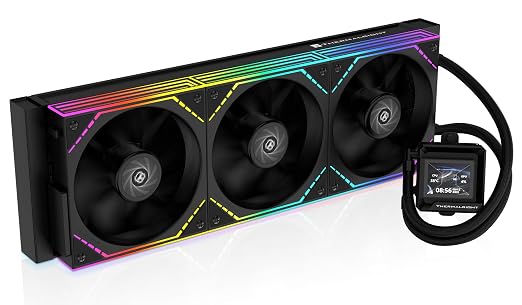
Keeping a Ryzen 7 7800X3D cool under heavy gaming or creative workloads demands serious cooling power. The Thermalright Frozen Warframe 360 SE ARGB V2 is a 360mm liquid cooler that suits users needing stable, strong cooling alongside a touch of customization with its 2 LCD screen.
Setup involves straightforward mounting on AMD AM5 or AM4 sockets. The three included 120mm PWM fans daisy-chain to reduce cable clutter and adjust speeds up to 2000 RPM automatically. Daily use benefits from the customized LCD that displays system stats or even personal images, adding a personal touch while monitoring temps.
Cooling performance is solid thanks to a powerful 3000 RPM pump and a large 397×120×27mm aluminum radiator. Most praise revolves around reliable and consistent cooling under load.
A common downside mentioned is the noise level peaking at 28.2 dB, which may be noticeable in very quiet environments.
The cooler reliably keeps temperatures stable with a high-speed pump and large radiator, making it strong for gaming and creator desktops. The main complaint is related to noise levels, which reach about 28.2 dB and might bother those wanting a whisper-quiet PC.
People wanting solid temperature control with some visual flair will appreciate this AIO. Users highly sensitive to noise or requiring ultra-low sound should consider quieter alternatives.
Pros
- Powerful 360mm radiator for effective cooling
- Customizable 2″ LCD for system info and images
- Reduced cable clutter with daisy-chain fan setup
- Compatible with AMD AM5 and AM4 sockets
Cons
- Noise can be noticeable under full load
- Fans max at 2000 RPM, may limit airflow in extreme cases
| Specification | Details |
|---|---|
| Radiator Size | 397×120×27 mm |
| Pump Speed | 3000 RPM |
| Fan Speed | Up to 2000 RPM |
| Airflow Capacity | 68.9 CFM |
| Noise Level | 28.2 dB |
| Power Connector | 4-Pin, 12 volts |
8. CORSAIR NAUTILUS 360 RS AIO CPU Cooler

2100 rpm maximum fan speed delivers strong airflow and high static pressure, making it a solid choice for cooling the Ryzen 7 7800X3D. Compatibility with AMD AM5 and AM4 sockets means it’s ready for the latest Ryzen chips. Ideal for users who want powerful water cooling with reduced cable clutter.
Setting up the cooler is straightforward thanks to daisy-chained RS120 fans that connect to your motherboard with a single cable. These fans use Magnetic Dome bearings to keep noise levels low while maintaining airflow.
The AirGuide technology focuses cooling where it’s needed most, helping maintain steady temperatures during daily use without loud fan noise.
It cools very effectively under load, handling high-performance CPUs well. The build is sturdy, with thoughtfully designed fans to reduce noise and friction. Positive feedback highlights its quiet operation during heavy use.
Some notes mention that the maximum fan speed can produce noticeable noise if pushed to the limit under intense workloads.
The quiet operation during normal use is frequently praised, especially thanks to the Magnetic Dome bearing fans. At the same time, some find the noise noticeably louder when the fans reach peak speed during heavy workloads. This contrast defines the everyday experience with the cooler.
Anyone seeking strong and quiet cooling for Ryzen 7 7800X3D will likely appreciate this design. Users who want fine-tuned fan control or extremely silent operation under all conditions might look for alternatives with PWM connectors or larger radiator options.
Pros
- Strong airflow with high static pressure fans
- Low noise operation with Magnetic Dome bearing
- Daisy-chained fans reduce cable clutter
- Supports latest AMD and Intel sockets
Cons
- Noise can increase at maximum fan speed
- Only 4-pin power connector limits customization
| Specification | Details |
|---|---|
| Maximum Rotational Speed | 2100 rpm |
| Cooling Method | Water |
| Power Connector Type | 4-Pin |
| Compatible Devices | Desktop |
| Compatible CPU Sockets | AMD AM5, AM4; Intel LGA 1851, LGA 1700 |
9. Noctua NL-LC1-36 360mm AIO CPU Cooler

Anyone looking to keep a Ryzen 7 7800X3D cool under heavy loads will appreciate this 360mm AIO cooler. Its biggest strength lies in combining powerful cooling capacity with very quiet operation, making it a great fit for gaming PCs and workstations that need efficient heat management without loud fans or pump noise.
Setup involves attaching the large radiator with its three 120mm Noctua fans, which are designed for efficient airflow at low noise levels. The soundproofing pump helps reduce vibrations, translating to less background noise during daily use.
It connects via a standard 4-pin power connector, and the software controls fan speeds to maintain quiet performance throughout all workloads.
Performance is solid, with the large radiator and premium Asetek cooling platform ensuring good heat dissipation even during intense sessions. The build quality feels sturdy and well-engineered, highlighted by the advanced acoustic design to minimize sound. Most comments praise its near-silent operation, while some note the size can pose challenges when fitting in smaller cases.
Many appreciate the exceptionally quiet pump and fan combination that keeps noise minimal during heavy CPU loads. A common drawback mentioned is the cooler’s large radiator size, which does not fit comfortably in smaller cases, requiring careful planning before purchase.
Enthusiasts with spacious builds looking for quiet, high-performance cooling will find this AIO ideal. Anyone with a compact case or strict power limits should consider smaller or different cooling options instead.
Pros
- Quiet pump with acoustic soundproofing
- Large radiator for effective cooling
- Three efficient 120mm Noctua fans
- Low noise level at 22.5 db
Cons
- Requires ample space in the case
- Pump power consumption at 1.8 watts
| Specification | Details |
|---|---|
| Cooling Method | Water |
| Radiator Size | 360mm |
| Noise Level | 22.5 db |
| Maximum Rotational Speed | 1800 rpm |
| Voltage | 12 volts |
| Power Connector Type | 4-Pin |
10. Thermalright Aqua Elite 360 V6 ARGB CPU Cooler

Bright ARGB lighting and a powerful fourth-generation water pump make this CPU cooler stand out for Ryzen 7 7800X3D builds. It suits anyone wanting both strong cooling performance and eye-catching aesthetics in their desktop setup.
Its biggest strength is the efficient heat dissipation combined with vivid, synchronized RGB lighting.
Installing the cooler is straightforward with its 4-pin power connector and water-based cooling system. The pre-installed ARGB fans and water block sync smoothly with motherboard lighting thanks to the 5V 3-pin header compatibility. Pump speed of up to 2800 RPM means you’re getting consistent cooling without excessive noise, and its aerodynamic fan blades push good airflow at 70.84 CFM, making regular use very quiet at 29.8 dB.
The cooler manages heat well on high-performance CPUs, keeping the Ryzen 7 7800X3D stable even under load. Built with solid materials, the vortex round cold pump head is visually distinct and durable. Most praise focuses on its attractive lighting effects, while a common complaint involves limited lighting interfaces for some setups, which can restrict synchronization options.
The most frequent compliment praises the effective cooling paired with impressive and colorful ARGB lighting that brightens up any desktop. The main drawback mentioned is the restriction in lighting synchronization for users with fewer compatible motherboard headers.
Anyone seeking a cooler that balances solid thermal performance with vibrant lighting will appreciate this model. Those with limited motherboard lighting support or needing higher pump speeds might prefer alternative cooling options.
Pros
- Powerful fourth-generation water pump
- ARGB lighting syncs with 5V 3-pin motherboard header
- Quiet operation at 29.8 dB noise level
- Strong airflow of 70.84 CFM for effective cooling
Cons
- Lighting interface limitations can affect sync options
- Pump speed capped at 2800 RPM ±10%
| Specification | Details |
|---|---|
| Power Connector Type | 4-Pin |
| Cooling Method | Water |
| Noise Level | 29.8 db |
| Maximum Rotational Speed | 2000 rpm |
| Air Flow Capacity | 70.84 cfm |
11. Thermalright Peerless Vision 360 ARGB AIO Cooler

Thermalright Peerless Vision 360 ARGB AIO Cooler offers standout cooling with its striking 3.95-inch magnetic screen and powerful tri-fan design. Ideal for Ryzen 7 7800X3D users looking for strong thermal performance and a visually unique setup, it combines effective heat management with attractive ARGB lighting effects.
Installation is straightforward thanks to the magnetic pump head, making it easy to mount and swap out. The fans run quietly thanks to their S-FDB bearings, which reduce noise and vibration during daily use. The PWM control lets the cooling speed adjust based on CPU temperature, keeping sound levels reasonable while maintaining airflow.
Cooling capability is solid, pairing high fan speeds of up to 2000 rpm with a large radiator delivers consistent temperature control under load. Build quality is durable, with a high-resolution 480×480 screen that supports animations and video projection, adding a decorative flair. Most praise highlights its effective cooling and quiet operation, though some users find the larger size a bit bulky for tight cases.
The cooler’s effective temperature control combined with quiet fans is its biggest strength, praised consistently. A common downside is its bulky presence that can be an issue in compact builds. The magnetic screen adds a unique aesthetic but runs at just 60HZ, which some may find limiting.
Those who want strong cooling with a visually impressive design will appreciate this unit. It suits Ryzen 7 7800X3D systems where case space allows for a larger radiator. Users needing a compact cooler or higher refresh rate display should consider alternatives.
Pros
- Magnetic pump head for easy installation
- Tri-fan system with PWM control
- ARGB lighting with infinity mirror effect
- Quiet operation due to S-FDB bearings
Cons
- Large size may not fit smaller cases
- Screen refresh rate limited to 60HZ
| Specification | Details |
|---|---|
| Power Connector Type | 4-Pin |
| Wattage | 45 watts |
| Cooling Method | Water |
| Noise Level | 28.2 db |
| Maximum Rotational Speed | 2000 rpm |
| Air Flow Capacity | 68.9 cfm |
12. ASUS ROG Ryujin III ARGB Extreme 360mm CPU Cooler

Living with the ASUS ROG Ryujin III ARGB Extreme 360mm cooler means quiet, efficient operation that suits gamers and creators running a Ryzen 7 7800X3D. Its standout feature is the powerful Gen8 V2 pump that keeps temperatures low under load while adding a customizable flair with a 3.5 LCD screen.
Installation feels straightforward thanks to magnetic ARGB fans that snap in place quickly. Day-to-day performance benefits from settings accessible via software, making pump and fan speed control easy. The embedded fan helps keep VRMs cool, which reassures when pushing the CPU hard.
You get live monitoring on the screen for clocks, temps, or flow, keeping important information visible right on the cooler.
The cooler handles intensive workloads by delivering high airflow and liquid cooling with a quiet 16 dB noise level, making it unobtrusive. Its thickened fans have a good static pressure profile, and the pump design focuses on low impedance for consistent circulation. Most praise highlights excellent cooling performance and visual customization, while the most frequent downside is the cost and size requiring space consideration in some cases.
The cooler earns praise for its excellent temperature control and quiet operation, especially under heavy loads. Common complaints focus on its size and power draw, which might not suit smaller builds or low-power setups. The vibrant LCD adds a unique touch but isn’t crucial for everyone.
Those who enjoy customizing and need serious cooling for Ryzen 7 7800X3D will appreciate its capabilities and features. Users with limited case space or minimal power budgets should look for more compact or efficient alternatives.
Pros
- Strong cooling with Gen8 V2 3-phase pump
- Customizable 3.5″ LCD screen for live data
- Magnetic ARGB fans speed up installation
- Embedded fan cools motherboard VRMs
Cons
- Large size may not fit all cases
- Relatively high power consumption
| Specification | Details |
|---|---|
| Power Connector Type | 4-Pin |
| Voltage | 2 volts |
| Wattage | 1.2 kwh |
| Cooling Method | Fan, Water |
| Noise Level | 16 db |
Best AIO Coolers for Ryzen 7 7800X3D Comparison Table
| Product | Cooling Method | Maximum Rotational Speed | Air Flow Capacity | Noise Level |
|---|---|---|---|---|
| ARCTIC Liquid Freezer III | Liquid | 3000 rpm | 77 cfm | – |
| ASUS ROG Ryuo IV ARGB | Fan | 2000 rpm | 56.66 cfm | – |
| ASUS TUF LC III ARGB | Fan | – | 90.78 cfm | 37.4 db |
| LIAN LI HydroShift II OLED | Water | 2600 rpm | – | 33 db |
| ARCTIC Liquid Freezer III A-RGB | Liquid | 3000 rpm | 77 cfm | – |
| MSI MPG Coreliquid P13 | Water | – | – | – |
| Thermalright Frozen Warframe SE | Water | 2000 rpm | 68.9 cfm | 28.2 db |
| CORSAIR Nautilus 360 RS | Water | 2100 rpm | – | – |
| Noctua NL-LC1-36 | Water | 1800 rpm | 107.3 m³/h | 22.5 db |
| Thermalright Aqua Elite V6 | Water | 2000 rpm | 70.84 cfm | 29.8 db |
| Thermalright Peerless Vision | Water | 2000 rpm | 68.9 cfm | 28.2 db |
| ASUS ROG Ryujin III ARGB | Fan, Water | – | – | 16 db |
- Cooling MethodLiquid
- Maximum Rotational Speed3000 rpm
- Air Flow Capacity77 cfm
- Noise Level–
- Cooling MethodFan
- Maximum Rotational Speed2000 rpm
- Air Flow Capacity56.66 cfm
- Noise Level–
- Cooling MethodFan
- Maximum Rotational Speed–
- Air Flow Capacity90.78 cfm
- Noise Level37.4 db
- Cooling MethodWater
- Maximum Rotational Speed2600 rpm
- Air Flow Capacity–
- Noise Level33 db
- Cooling MethodLiquid
- Maximum Rotational Speed3000 rpm
- Air Flow Capacity77 cfm
- Noise Level–
- Cooling MethodWater
- Maximum Rotational Speed–
- Air Flow Capacity–
- Noise Level–
- Cooling MethodWater
- Maximum Rotational Speed2000 rpm
- Air Flow Capacity68.9 cfm
- Noise Level28.2 db
- Cooling MethodWater
- Maximum Rotational Speed2100 rpm
- Air Flow Capacity–
- Noise Level–
- Cooling MethodWater
- Maximum Rotational Speed1800 rpm
- Air Flow Capacity107.3 m³/h
- Noise Level22.5 db
- Cooling MethodWater
- Maximum Rotational Speed2000 rpm
- Air Flow Capacity70.84 cfm
- Noise Level29.8 db
- Cooling MethodWater
- Maximum Rotational Speed2000 rpm
- Air Flow Capacity68.9 cfm
- Noise Level28.2 db
- Cooling MethodFan, Water
- Maximum Rotational Speed–
- Air Flow Capacity–
- Noise Level16 db
How to Choose the Best AIO Cooler for Ryzen 7 7800X3D
Choosing the right AIO cooler for the Ryzen 7 7800X3D involves focusing on cooling efficiency, compatibility with your case, and quiet operation. Prioritizing these factors ensures stable performance and extends component lifespan, saving money and avoiding overheating issues or noisy distractions.
Compatibility and Socket Support
Trying to fit a cooler that doesn’t support the AM5 socket used by the Ryzen 7 7800X3D can lead to wasted time and frustration during installation. Some coolers, even those designed for recent CPUs, might require additional brackets or might not maintain good contact with the CPU at all. Checking clearance is another practical step that can’t be overlooked.
RAM modules with tall heat spreaders or motherboard VRM heatsinks often clash with larger pump blocks or tubing, making it impossible to close the case properly.
Radiator size noticeably impacts compatibility. Most cases accept 240mm or 280mm radiators without trouble, but 360mm or larger sizes might require removing case panels or other hardware. Confirm that the cooler’s mounting points align with your motherboard’s layout to avoid unnecessary modifications.
Common radiator thickness between 27mm and 38mm is standard, so paying attention to your case specs will save headaches later.
Cooling Performance and Thermal Efficiency
Handling the heat output of a processor like the 7800X3D demands a strong pump and an efficient radiator design. A pump with higher flow rates moves liquid more effectively, preventing heat buildup at the block.
Radiators with larger surface area and multiple fans improve cooling by increasing heat dissipation. A 240mm radiator with two fans often handles average workloads well, while 280mm or 360mm setups provide more headroom for overclocking or sustained loads.
Thermal resistance is a key metric but rarely listed explicitly. Instead, look for coolers that specify low TDP ratings and offer preapplied or included high-quality thermal paste. This ensures good thermal contact between the CPU and cooler base.
Good thermal paste prevents hotspots and makes a noticeable difference in temperature stability during long gaming or rendering sessions.
Noise Levels and Fan Control
High fan speeds quickly reduce temperatures, but often at the cost of background noise. Loud fans can disrupt concentration, especially if the system is located in a common living area. Fans operating above 2000 RPM usually produce noticeable whine or buzzing.
Watching specs for maximum noise levels below 30 dBA provides a quieter experience under load. Adjustable fan speeds through PWM allow the system to ramp up cooling only as needed, preserving quiet operation during lighter tasks.
Vibration dampening adds to comfort by minimizing rattling, especially on poorly insulated cases. Rubber mounts and anti-vibration pads matter and reduce harsh mechanical noise.
Having control options via software or motherboard BIOS also allows fine-tuning fan performance without juggling manual controls.
Build Quality and Durability
Long-term reliability often depends on build materials. Pumps with ceramic bearings tend to last longer and run smoothly. Radiators made of copper or mixed copper/aluminum combine good heat dissipation with resistance to corrosion.
Tubing can be stiff or flexible; thicker, braided tubing resists kinking, but those that are too rigid may make routing difficult. Around 400mm tubing length is common, providing enough slack for complex setups.
Reliable seals and leak prevention measures are critical. Some coolers feature reinforced fittings or double O-rings to reduce the risk of leaks, protecting expensive hardware. Ignoring these details can lead to early failure and costly repairs, so spending time confirming quality here pays off.
Installation and Maintenance Ease
Mounting systems vary widely in complexity. Quad-screw setups with a backplate are secure but often require screwdrivers, while some newer designs skip tools entirely for faster installation. Having all necessary mounting hardware included avoids extra trips to the store and makes the process smoother.
Clear and detailed instructions that include pictures or videos reduce guesswork for first-timers.
Keeping fans and radiators clean affects performance and noise levels. Designs that allow fan removal without disturbing the radiator or tubing simplify cleaning. Dust filters on radiators prevent buildup and reduce maintenance frequency.
Using easy-to-access mounting points helps prevent user frustrations down the road.
Optimizing Fan Curves and RGB Synchronization for Your Ryzen 7 7800X3D
Adjusting fan curves to match the Ryzen 7 7800X3D’s temperature profile helps keep noise levels down without sacrificing cooling performance. Fan speed should increase methodically as the CPU temperature rises, ensuring efficient heat dissipation during heavy workloads while remaining quieter under lighter use. Many AIO coolers support software that allows you to customize these curves easily.
RGB lighting synchronization can be managed through the same software, linking the cooler’s lights with your motherboard and other components. Keeping all lighting effects consistent creates a unified look inside the case without extra cables or controllers.
Software control also simplifies turning off lights if you prefer a minimalistic setup.
- Use manufacturer software to create custom fan curves.
- Match fan ramp-up points with CPU temperature thresholds.
- Sync RGB lighting with your motherboard’s utility for consistent effects.
- Test fan curves under different workloads to find the best balance.
Maintaining Optimal Cooling Performance: Cleaning and Preventative Care for AIO Coolers
Dust accumulation on AIO cooler radiators and fans directly impacts cooling efficiency, especially after several months of use. Regular cleaning involves gently removing dust with compressed air or a soft brush to maintain unobstructed airflow. Avoid disassembling the unit to prevent voiding warranties or causing leaks.
Checking for loose cables and ensuring the pump is running smoothly can prevent unexpected failures. Some models feature software monitoring that reports pump RPM and coolant temperatures, which helps identify early signs of wear.
- Clean radiator fins and fans with compressed air every 3-6 months.
- Inspect fittings and tubing for leaks or damage during cleaning.
- Listen for unusual noises from the pump as an indicator of problems.
- Keep software monitoring active to track cooling system health.
Comparing AIO Coolers with Air Cooling Solutions for Ryzen 7 7800X3D Builds
AIO coolers typically provide better heat dissipation than air coolers on a Ryzen 7 7800X3D, especially under sustained loads, due to their liquid coolant and larger radiators. They often handle peak temperatures more effectively, which can support higher clock speeds or longer heavy use without thermal throttling.
On the other hand, premium air coolers avoid pump failures and generally require less maintenance. They tend to be quieter at low to medium loads and have fewer compatibility issues during installation. Budget options sometimes come with larger heatsinks that perform nearly as well as AIOs but occupy more space.
- AIOs offer superior sustained cooling but need regular upkeep.
- Air coolers are simpler, usually quieter under moderate loads.
- Installation space should be considered; AIOs require radiator mounting locations.
- Consider case airflow, as it affects both cooling types’ efficiency.
People Also Asked
Is This AIO Cooler Compatible with Ryzen 7 7800X3D?
The Ryzen 7 7800X3D is compatible with most AIO coolers that support AM5 or AM4 sockets. Confirm the cooler’s mounting bracket includes these sockets, as Ryzen motherboards have slight variations near the CPU socket area. It’s best to check the included hardware before buying.
How Long Do AIO Coolers Typically Last on Ryzen CPUs?
AIO coolers generally last around 5 to 7 years with proper maintenance, regardless of the Ryzen CPU used. Monitor the pump noise and temperature trends over time. Dust buildup on the radiator fans is a common issue that can reduce cooling efficiency.
What Size AIO Cooler Fits Best in a Mid-Tower Case?
A 240mm AIO cooler often fits well in most mid-tower cases without restricting other components. Check your case specifications for radiator support before choosing this size. Taller RAM modules can sometimes interfere with the radiator, so verify clearance.
How Do I Properly Install an AIO Cooler on Ryzen 7 7800X3D?
Install the AIO cooler on the Ryzen 7 7800X3D by securing the cold plate firmly on the CPU using the included bracket screws. Spread thermal paste evenly before mounting. Make sure the radiator fans are oriented to pull or push air through the case for best airflow.
Are There Common Issues with AIO Coolers on Ryzen Processors?
Pump failure and leakages are the most common problems with AIO coolers on Ryzen or any other processors. Sometimes fans can stop running properly, causing higher temps. Keep an eye on CPU temperatures and listen for unusual pump sounds to catch issues early.
Conclusion
Choosing an AIO cooler for the Ryzen 7 7800X3D mainly comes down to cooling performance, noise levels, and compatibility with your case. The cooler must handle the CPU’s heat output effectively, run quietly enough for your workspace, and fit inside your PC’s available space.
These factors ensure stable performance and a comfortable setup.
Consider your budget and how often you’ll use the system when picking a cooler. A more expensive model might offer quieter operation or better longevity, which matters if you run demanding tasks often.
Check the comparison table and reviews above to find which cooler fits best for your needs and setup.

I’m Grant Mitchell, a firearms and hunting writer with years of experience at the range and in the field. I write about rifles, shotguns, handguns, optics, safe storage, cleaning, and responsible ownership, along with practical hunting tips. My goal is to share accurate, safety-first information that helps you choose the right firearm, maintain it properly, and become a more confident shooter.