Top 12 Best AIO Cooler for Gaming That Will Blow Your Mind
Heat buildup during intense gaming sessions can cause frame drops and system instability, issues common with cheap or improperly sized coolers. The best aio cooler for gaming keeps temperatures low enough to maintain performance and prevent thermal throttling without making excessive noise. Many gamers upgrade from stock coolers after noticing stutter or crashes linked to rising CPU temperatures under load.
Key factors that set a good aio cooler apart include radiator size, pump quality, and compatibility with your case and CPU socket. Radiators typically range from 120mm to 360mm, with larger ones providing better heat dissipation but needing more space. A reliable pump maintains consistent coolant flow, which is essential to prevent hotspots.
Proper fitment ensures easy installation and effective thermal contact, crucial for long gaming runs. Easy maintenance and safe materials also help avoid leaks and extend system life.
Need a Quick Check?
| Image | Product | Price |
|---|---|---|
Our Top Picks 1  | ARCTIC Liquid Freezer Pro 360 | Check Price |
Our Top Picks 2  | ASUS ROG Ryuo IV 360 | Check Price |
Our Top Picks 3  | MSI MAG Coreliquid A13 240 | Check Price |
Our Selected Top 12 Aio Cooler for Gaming for Every Budget
These picks include a variety of all-in-one coolers designed for gaming setups across different budgets. Each review explains how the cooler performs, who it’s best suited for, and highlights its main advantages and drawbacks to help you find the right fit.
1. ARCTIC Liquid Freezer III Pro 360 CPU Cooler
Aluminum and copper combine in a design focused on cooling efficiency and longevity, making it ideal for gamers looking to keep their CPUs chill under heavy use. Its standout feature is the optimized contact pressure that helps extend CPU life while delivering excellent heat dissipation.
Installation involves native offset mounting for both Intel and AMD sockets, ensuring the cold plate hits the CPU hotspot where it matters most. The ARCTIC P12 PRO fans run quietly even at higher speeds, and the integrated VRM fan actively cools voltage converters, which is a bonus for maintaining system stability during marathon gaming sessions.
Performance keeps the CPU temperatures low with a maximum rotational speed of 3000 rpm and airflow capacity of 77 cfm, successfully handling demanding gaming loads. The build quality feels solid, with a carefully thought-out contact frame for modern Intel sockets. The most praised aspect is its quiet operation, while some find the size a bit bulky for smaller cases.
Quiet operation during heavy CPU loading stands out as a key strength, making long gaming sessions comfortable without excess noise. The main drawback for some is its relatively large size, which can be tricky in compact builds.
Gamers with mid to full tower cases who want reliable cooling and quieter fans will appreciate this unit. Those with smaller cases or strict noise limits at max fan speeds might want to explore different options.
Pros
- Optimized pressure for better heat dissipation
- Quiet ARCTIC P12 PRO fan even at high speed
- Integrated VRM fan cools voltage converters
- Compatible with latest Intel and AMD sockets
Cons
- Size may not fit in smaller cases
- Higher max fan speed can be loud if pushed
| Specification | Details |
|---|---|
| Power Connector Type | 4-Pin |
| Voltage | 12 volts |
| Wattage | 3.96 watts |
| Maximum Rotational Speed | 3000 rpm |
| Air Flow Capacity | 77 cfm |
2. ASUS ROG Ryuo IV 360mm Liquid CPU Cooler
Cooler Master’s 6.67-inch AMOLED display stands out by showing 3D videos or system info, ideal for gamers seeking both style and function. It fits well with desktop setups where top-tier cooling under heavy loads is a priority.
Installation is simplified by the daisy-chained fans and the Precision Mount System, reducing cable clutter to just one connection. The pre-applied thermal paste and reliable pump make setup quicker and prepare the cooler for long hours of gaming with consistent performance.
The movable display adds a customizable touch you can appreciate every time you power on.
It maintains excellent temperatures on even demanding CPUs thanks to the Asetek Emma Gen8 V2 pump, which keeps things efficient during sustained gaming sessions. Built solidly, it applies uniform pressure on the CPU for reliable performance over time. Praise often focuses on the impressive cooling power and unique display, while common complaints mention the size and complexity for smaller cases.
The cooler is praised for its advanced thermal performance and unique AMOLED display that combines style and useful system info. Many find the size and installation process challenging for compact cases or first-time builders.
Anyone with a mid to full tower gaming rig looking for powerful cooling and a customizable look will be happy. Those with smaller cases or wanting a simpler setup might want to consider other options.
Pros
- Movable AMOLED display adds customization
- Strong and stable airflow with daisy-chained fans
- Precision Mount System improves CPU contact
- Pre-applied thermal paste saves time during install
Cons
- Large size could be tricky for small cases
- Complex setup might overwhelm beginners
| Specification | Details |
|---|---|
| Cooling Method | Fan |
| Maximum Rotational Speed | 2000 rpm |
| Air Flow Capacity | 56.66 cfm |
| Power Connector Type | 4-Pin |
| Compatible Devices | Desktop, Laptop |
3. MSI MAG Coreliquid A13 240 CPU Liquid Cooler
Strong cooling performance paired with quiet operation makes the MSI MAG Coreliquid A13 240 a solid pick for gamers looking to keep their CPU temperatures down under load. It is designed especially for those with LGA 1851 sockets seeking reliable liquid cooling without too much noise.
Setup involves mounting the unique split-flow aluminium radiator and integrated pump, which is straightforward and fits well in most desktop cases. The high-performance pump runs quietly at up to 3800 RPM thanks to ceramic bearings, meaning you won’t get bothered by constant loud fan noise during long gaming sessions.
The 4-pin power connector makes wiring easy and compatible.
Cooling is effective with an airflow capacity of 60.78 CFM, keeping CPUs running cool without overworking the system. Build quality feels solid, especially given the sturdy aluminium radiator and motor resonance reduction design.
The most common compliment highlights the quiet pump, while the main complaint tends to be that the maximum fan speed of 5200 RPM can get a bit noisy in extreme loads.
The quiet pump with ceramic bearings impresses by balancing strong cooling and low noise, but the fans do become louder when pushed to maximum speed. This tradeoff is important for those sensitive to sound.
Gamers needing dependable cooling without a noisy setup will be satisfied. Those expecting ultra-high overclocking potential or ultra-quiet fans at full performance might want to look elsewhere.
Pros
- Quiet pump operation up to 3800 RPM
- Compatible with LGA 1851 sockets out of box
- Split-flow radiator reduces motor resonance
- Good airflow at 60.78 CFM for effective cooling
Cons
- Fan noise can increase near 5200 RPM
- Wattage at 2.16 watts limits extreme overclocking headroom
| Specification | Details |
|---|---|
| Power Connector Type | 4-Pin |
| Voltage | 12 volts_of_direct_current |
| Wattage | 2.16 watts |
| Noise Level | 14.4 db |
| Maximum Rotational Speed | 5200 rpm |
| Air Flow Capacity | 60.78 cfm |
4. ASUS ROG Ryujin III 360mm Liquid CPU Cooler

Keeping a gaming rig cool during long sessions can be a challenge, and the ASUS ROG Ryujin III 360mm Liquid CPU Cooler is built to tackle that head-on. Ideal for anyone aiming for strong, consistent cooling on high-performance desktop setups, its standout feature is the advanced pump paired with high airflow fans for impressive temperature control.
Setting it up involves connecting the pump with its 4-pin power connector and mounting the thickened ARGB fans, which are easy to snap in thanks to magnets. The 3.5 LCD screen allows live monitoring of your CPU stats or even custom animations to personalize your build.
An embedded fan added to the pump keeps motherboard VRMs cool, visible right from the software that also controls fan and pump speeds.
Performance-wise, the Asetek Emma Gen8 V2 pump drives cooling efficiently with higher flow and lower impedance, helping keep your system temperatures down in intense gaming. The fans manage noise well at a low 16 dB, which makes for quiet operation. Common feedback notes how great the cooling and custom display are but sometimes mentions the complexity of software controls as a drawback.
Cooling performance receives high marks, thanks to the Gen8 V2 pump and thick ARGB fans that keep temps low and noise minimal. The 3.5″ LCD screen adds useful monitoring and personalization options, though the controlling software often gets noted for being less intuitive and somewhat complex.
Gamers who want strong cooling and visual customization will appreciate this cooler, especially in larger cases that can accommodate 360mm radiators. Those seeking simpler software or smaller setups might find alternative solutions more fitting for their needs.
Pros
- Strong cooling with advanced pump technology
- Customizable 3.5″ LCD screen for live stats
- Quiet operation at 16 dB noise level
- Embedded fan cools motherboard VRMs
Cons
- Software controls can be complicated
- Large 360mm size requires spacious cases
| Specification | Details |
|---|---|
| Power Connector Type | 4-Pin |
| Voltage | 2 volts |
| Wattage | 1.2 kwh |
| Cooling Method | Fan, Water |
| Noise Level | 16 db |
5. ASUS TUF Gaming LC III 360mm Liquid CPU Cooler

360mm radiator size makes it a solid choice for gaming builds that need serious cooling. Designed to work smoothly with Intel and AMD sockets, it’s particularly good for gamers wanting quiet operation without sacrificing airflow.
Setup is aided by pre-installed integrated fans that save time and hassle during installation. The reinforced, sleeved 400mm tubes provide flexibility and durability, fitting comfortably inside most chassis. Daily use is straightforward with TUF Gaming software providing real-time status updates and fan customization to fine-tune your system’s cooling.
Cooling performance comes down to 90.78 cfm airflow and static pressure from the integrated fans, keeping temperatures low under load. Built with an aluminum radiator and a copper CPU plate, the cooler balances durability with effective heat transfer. Most users praise its quiet operation at 37.4 dB, while some mention the size requiring attention to case compatibility before purchase.
Cooler receives strong praise for its quiet and effective cooling capabilities, with users appreciating its real-time status display and easy fan customization. A common drawback noted is its large radiator size, which requires some cases to be checked for fit before installation.
Gamers running high-performance CPUs who want quiet, consistent cooling will find it suitable. Those with smaller cases or looking for ultra-compact solutions might want to explore smaller AIO coolers instead.
Pros
- Pre-installed fans simplify installation
- Durable sleeved rubber tubing
- Customizable with TUF Gaming software
- Quiet operation with good airflow
Cons
- Radiator size demands case compatibility check
- Noise level could reach 37.4 dB under load
| Specification | Details |
|---|---|
| Radiator Dimension | 397 x 120 x 27 mm |
| Cooling Method | Fan |
| Air Flow Capacity | 90.78 cfm |
| Noise Level | 37.4 db |
| Tube Length | 400 mm |
| Supported Sockets | Intel LGA 1851, 1700, 1200; AMD AM5, AM4 |
6. ARCTIC Liquid Freezer III Pro 360 A-RGB CPU Cooler

Gamers looking for powerful cooling with smart features will appreciate this liquid cooler. It suits high-performance builds that need reliable heat management with added care for components around the CPU.
Its best strength is the integrated VRM fan that keeps voltage regulators cool during intense gaming sessions.
Setup involves native mounting options for both Intel and AMD sockets, making installation straightforward. The offset cold plate targets the CPU hotspot, improving efficiency.
The quiet yet powerful P12 PRO fans run up to 3000 rpm, balancing noise and airflow well. The 4-pin power connector ensures compatibility with most motherboards. Day-to-day operation feels stable, with the cooler adapting to system demands without drawing attention.
Cooling performance is impressive for a 360mm AIO, keeping temperatures low under load. The build quality feels solid, with attention to contact pressure that helps extend CPU lifespan.
The standout feature is the PWM-controlled VRM fan, praised for added reliability in high-demand setups. Some users mention noise levels rising at maximum speeds as a complaint.
The built-in VRM fan is praised for keeping voltage regulators cool, which helps maintain stable performance during heavy gaming. Commonly noted issue is the fan noise at top speed, which can be noticeable in quiet surroundings. Installation benefits from the cold plate’s offset design, improving cooling directly where needed.
Those building a gaming rig that pushes hardware will find this cooler well suited to their needs, especially with its dedicated VRM cooling. Casual gamers or quieter PC enthusiasts may want to consider alternatives with lower noise profiles under full load. Compatibility with newer CPUs makes it a safe pick for current systems.
Pros
- Integrated PWM VRM fan for cooler voltage converters
- Quiet operation even at higher speeds
- Optimized cold plate positioning for efficient heat transfer
- Compatible with latest Intel and AMD sockets
Cons
- Gets noisy at maximum fan speeds
- May require motherboard headers for full PWM control
| Specification | Details |
|---|---|
| Power Connector Type | 4-Pin |
| Voltage | 12 volts |
| Wattage | 3.96 watts |
| Maximum Rotational Speed | 3000 rpm |
| Air Flow Capacity | 77 cfm |
7. TRYX Panorama SE 360mm AIO Liquid Cooler

A distinctive feature of this AIO cooler is its rotatable 6.67 inch AMOLED curved screen with 2K resolution and a 60Hz refresh rate, designed for gamers who want both high-performance cooling and a unique visual upgrade. Its standout strength lies in combining effective CPU cooling with a visually striking display that adjusts to multiple angles.
Setting up involves mounting the 360mm radiator and connecting the 7-pin power cable. The rotatable AMOLED screen offers smooth visuals at 60Hz and a sharp 2K resolution, making it easy to monitor system stats or enjoy preset animations.
Day-to-day use benefits from quiet operation at 27.86 dB noise and stable power consumption of 5.5 watts. The screen brightness at 400 nits remains clear even in well-lit rooms.
Performance on heavy CPU loads like gaming and video encoding stays solid thanks to the Asetek Adela cooling solution. The build feels durable, especially the combination of water cooling and the digital screen panel. Reviews highlight the impressive visual display as a strong selling point, while a common criticism points to the maximum fan speed of 3600 rpm occasionally resulting in louder operation under stress.
The vivid AMOLED screen with 2K resolution is frequently praised for enhancing the visual experience and providing useful system info, while the most common complaint is the noise that can increase noticeably when fans spin up to the maximum speed. The quiet baseline noise level makes it suitable for gaming setups focused on ambient sound levels.
People who value stylish, functional cooling with a built-in display will appreciate this cooler, especially in gaming rigs that demand efficient heat management. Those prioritizing ultra-quiet operation under heavy loads or with very bright ambient lighting might want to consider alternative models without a screen or with lower maximum fan speeds.
Pros
- Vivid 2K AMOLED curved screen with multi-angle rotation
- Quiet operation at under 28 dB noise level
- Strong cooling performance under heavy CPU use
- Compatibility with various CPU types
Cons
- Fan speed maxes out at 3600 rpm, can get loud
- Screen brightness might struggle in very bright environments
| Specification | Details |
|---|---|
| Cooling Method | Water |
| Noise Level | 27.86 db |
| Maximum Rotational Speed | 3600 rpm |
| Power Connector Type | 7-Pin |
| Voltage | 12 volts_of_direct_current |
| Air Flow Capacity | 66.09 cfm |
8. CoolerMaster MasterLiquid ML240L V2 CPU Cooler

CoolerMaster MasterLiquid ML240L V2 is a water cooling solution designed for gamers and PC builders who want effective cooling combined with customizable RGB lighting. Its biggest strength lies in balancing strong cooling performance with quiet operation, making it ideal for keeping gaming rigs cool during intense sessions.
Installation involves straightforward mounting compatible with a wide range of Intel and AMD sockets, including the latest LGA1700. The updated pump design and improved fan blades deliver quiet airflow while the refreshed exterior adds style with fully customizable RGB lighting. Daily use feels reliable and silent, without any distracting noise or leaks, thanks to the industrial-grade seal.
The 4-pin power connector fits standard motherboard headers without hassle.
Cooling efficiency stands out due to the 3rd Generation dual chamber pump and 260 watt water cooling method. Its build quality is sturdy, with a high-grade EPDM seal aimed at preventing leaks and extending lifespan.
Positive notes from reviews praise quiet operation and effective heat dissipation, while some complaints mention the lighting customization software can be somewhat fiddly to get just right.
Quiet operation paired with solid cooling is the most praised feature, making gaming sessions more comfortable. Some users find RGB lighting customization complicated, which can detract from overall ease of use.
Gamers wanting a reliable, quiet AIO cooler with style will appreciate this model. Those prioritizing the absolute fastest fan speeds or plug-and-play RGB controls might consider alternatives.
Pros
- Quiet airflow with improved fan blade design
- 3rd Generation dual chamber pump for reliable cooling
- Compatible with broad Intel and AMD sockets
- Customizable RGB lighting for personal style
Cons
- RGB software can be tricky to configure
- Fan speed maxes at 1800 rpm, not highest available
| Specification | Details |
|---|---|
| Power Connector Type | 4-Pin |
| Voltage | 12 volts |
| Wattage | 260 watts |
| Noise Level | 30 db |
| Maximum Rotational Speed | 1800 rpm |
| Air Flow Capacity | 62 cfm |
9. Thermalright Frozen Warframe 360 SE ARGB Cooler
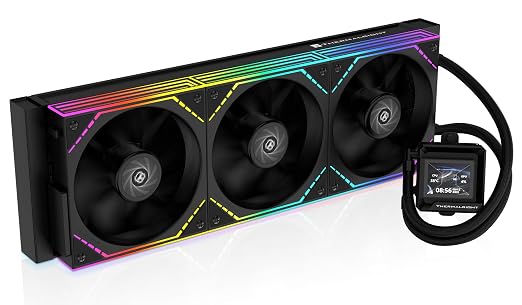
Cooling feels reliable during intense gaming sessions, making it a solid choice for gamers and creatives needing steady temperatures. Its standout feature is the customizable 2 LCD screen that adds personality while showing system status right on the cooler. It suits anyone wanting both functional cooling and a bit of flair in their PC build.
Setup is straightforward with support for common AMD and Intel sockets, so compatibility won’t be an issue in most builds. The three daisy-chained 120mm PWM fans simplify cable management and keep airflow optimized.
Daily use benefits from a pump spinning up to 3000RPM and fans reaching 2000RPM to maintain steady cooling without much noise interference.
Performance-wise, the water cooling method ensures solid heat management during long sessions. The aluminum radiator’s size (397×120×27mm) helps with stable and consistent cooling.
Users praise the clear LCD customization but often note that the pump noise can be noticeable at max speed. The overall build feels sturdy and well thought out for everyday desktop use.
Customizable LCD screen receives strong praise for letting users personalize the cooler while monitoring system status. The most common complaint involves the pump noise that becomes apparent when pushed to full speed, which might distract some during quiet moments.
Gamers and creators who want effective cooling and a stylish display will find this cooler a good fit. Those with smaller cases or who prioritize ultra-quiet operation may want to consider alternative options with smaller radiators or quieter pumps.
Pros
- Customizable 2″ LCD screen adds personalization
- Supports AMD AM5 AM4 and Intel platforms
- 3 high airflow pwm fans reduce cable clutter
- Stable cooling from 360mm aluminum radiator
Cons
- Pump noise noticeable at maximum speed
- Relatively large radiator requires roomy case
| Specification | Details |
|---|---|
| Radiator Dimensions | 397×120×27 mm |
| Maximum Fan Speed | 2000 rpm |
| Noise Level | 28.2 db |
| Air Flow Capacity | 68.9 cfm |
| Voltage | 12 volts |
10. ARCTIC Liquid Freezer III Pro 240 A-RGB CPU Cooler
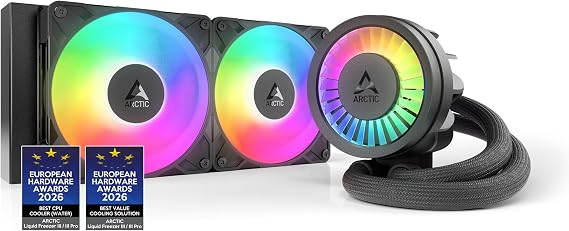
Great for gamers chasing quiet but powerful cooling, the ARCTIC Liquid Freezer III Pro 240 A-RGB keeps your CPU temperatures in check during intense sessions. Its standout feature is the integrated VRM fan, which adds a layer of safety by cooling voltage regulators directly, ideal for high-performance rigs.
Setting up is straightforward thanks to native offset mounting tailored for Intel and AMD sockets, ensuring a perfect fit over the CPU hotspot. The P12 PRO fan quietly runs even at higher speeds, balancing strong airflow and noise control daily.
The contact frame adjusts pressure evenly on Intel chips, which helps protect the CPU from long-term wear.
Performance stays solid under load, thanks largely to its water cooling method combined with a fan speed that can ramp up considerably. It’s well-built with attention to cooling both the CPU and motherboard components, noticeable in its integrated VRM fan.
Some mention the fan noise can pick up at peak speeds, but most praise the quiet operation at lower RPMs.
Most noteworthy is the cooler’s quiet performance combined with an integrated VRM fan that keeps voltage converters cool, extending stable performance during gaming. However, fan noise at the highest speed can be a drawback for those sensitive to sound levels. The data listing of maximum rotational speed at 1 rpm seems incorrect or a typo.
Good match for gamers running Intel or AMD setups wanting efficient CPU and VRM cooling without excessive noise. Users sensitive to peak fan noise might want to explore alternatives with quieter top-end profiles or without integrated VRM cooling depending on their priorities.
Pros
- Quiet operation, especially at low fan speeds
- Integrated VRM fan improves motherboard stability
- Optimized contact pressure for Intel CPUs
- Strong airflow capacity of 77 cfm
Cons
- Fan noise notable at highest speed
- Maximum rotational speed listed as 1 rpm unusual
| Specification | Details |
|---|---|
| Power Connector Type | 4-Pin |
| Voltage | 12 volts |
| Wattage | 3.96 watts |
| Cooling Method | Water |
| Compatible Devices | AMD, Intel |
| Air Flow Capacity | 77 cfm |
11. Thermalright Aqua Elite 240 V3 CPU Cooler

Black aluminium fins and a distinct octagonal pump head define this water cooler, made to keep your gaming rig cool during intense sessions. It suits gamers who want reliable cooling with a visually striking ARGB touch. Its biggest strength lies in solid heat dissipation combined with a quiet operation.
Setting it up is straightforward with the standard 120mm ARGB fan and the protective mesh on the water pipes that help avoid damage. The pump runs quietly at 2800 RPM but is designed for low vibration, making it comfortable for daily gaming marathons.
It connects through a 4-pin power connector and handles airflow efficiently, so your CPU stays cool without loud fan noise.
Heat is managed impressively thanks to the 240 cold row sized heat sink plate, effectively drawing heat away from the processor. Construction focuses on durability, with the pump rated for up to 40,000 hours of life.
The most praised feature is its quietness despite powerful cooling, while a common drawback includes the slightly limited maximum fan speed of 1800 RPM, which may affect peak performance for some.
The quietness under load and long pump lifespan receive consistent praise. Many note the limitation in fan speed could hinder maximum thermal performance during heavy overclocking or extended gaming sessions.
Gamers seeking a balance of cooling efficiency, longevity, and low noise will find it well suited. Those pushing for the highest overclocked speeds may want to explore alternatives with higher maximum fan speeds.
Pros
- Low vibration during operation
- ARGB lighting adds visual appeal
- Durable pump with long lifespan
- Effective cooling with quiet fan
Cons
- Maximum fan speed capped at 1800 RPM
- Cooling power might limit extreme overclocking
| Specification | Details |
|---|---|
| Power Connector Type | 4-Pin |
| Voltage | 5 volts |
| Wattage | 2.64 watts |
| Noise Level | 25 db |
| Maximum Rotational Speed | 1800 rpm |
| Air Flow Capacity | 66.17 cfm |
12. NZXT Kraken Core 240 CPU Cooler

Known for its quiet operation even under heavy loads, the NZXT Kraken Core 240 keeps CPUs cool without adding much noise. Ideal for gamers looking for effective cooling and straightforward installation, the single-frame design stands out by making cable management simpler than usual.
Setup takes less time thanks to its direct motherboard connection, which means no extra controllers cluttering the build. The adjustable fan control provides easy tuning of fan speeds, letting you balance quiet operation and cooling needs. High static pressure fans are effective at pushing air through the radiator fins, maintaining system temperature during long gaming sessions.
Performance-wise, the cooler handles heat from intense gaming and multitasking well, aided by a pump spinning at 3,100 RPM. Its water cooling method combined with specially optimized fan blades ensures strong airflow with relatively low noise at 31.9 dB.
The easiest parts to appreciate are its solid build quality and reduced cable clutter, while some users note installation can still be a bit fiddly.
Quiet operation during intense gaming sessions is frequently praised, with the cooler maintaining low noise levels even under load. A common complaint is that installation can still be a bit challenging, despite the fewer screws and cables thanks to the single-frame design.
Gamers looking for a quiet, efficient cooling solution that connects easily to the motherboard will appreciate this model. Those who prefer extra fan control options or want the simplest possible installation might want to consider alternatives.
Pros
- Quiet pump operation during heavy use
- Simple motherboard connection reduces cables
- Adjustable PWM fan control for custom setup
- Solid frame design reduces installation screws
Cons
- Installation can be tricky despite fewer cables
- No included extra fan controllers limits customization
| Specification | Details |
|---|---|
| Maximum Rotational Speed | 3100 rpm |
| Noise Level | 31.9 db |
| Voltage | 5 volts_of_direct_current |
| Wattage | 8.88 watts |
| Cooling Method | Water |
| Power Connector Type | 4-Pin |
Best AIO Coolers for Gaming Comparison Table
| Product | Cooling Method | Compatible Devices | Max Rotational Speed | Air Flow Capacity |
|---|---|---|---|---|
| ARCTIC Liquid Freezer Pro 360 | Liquid | Desktop, Gaming Console | 3000 rpm | 77 cfm |
| ASUS ROG Ryuo IV 360 | Fan | Desktop, Laptop | 2000 rpm | 56.66 cfm |
| MSI MAG Coreliquid A13 240 | Water | Desktop | 5200 rpm | 60.78 cfm |
| ASUS ROG Ryujin III 360 | Fan, Water | Desktop, Server | – | – |
| ASUS TUF Gaming LC III | Fan | Laptop | – | 90.78 cfm |
| ARCTIC Liquid Freezer Pro 360 | Liquid | Cpu | 3000 rpm | 77 cfm |
| TRYX Panorama SE 360 | Water | Cpu | 3600 rpm | 66.09 cfm |
| CoolerMaster ML240L V2 | Water | Desktop | 1800 rpm | 62 cfm |
| Thermalright Frozen Warframe 360 SE | Water | Desktop | 2000 rpm | 68.9 cfm |
| ARCTIC Liquid Freezer Pro 240 | Water | AMD, Intel | 1 rpm | 77 cfm |
| Thermalright Aqua Elite 240 V3 | Air, Water | Desktop | 1800 rpm | 66.17 cfm |
| NZXT Kraken Core 240 | Water | Desktop | 3100 rpm | 75.05 cfm |
- Cooling MethodLiquid
- Compatible DevicesDesktop, Gaming Console
- Max Rotational Speed3000 rpm
- Air Flow Capacity77 cfm
- Cooling MethodFan
- Compatible DevicesDesktop, Laptop
- Max Rotational Speed2000 rpm
- Air Flow Capacity56.66 cfm
- Cooling MethodWater
- Compatible DevicesDesktop
- Max Rotational Speed5200 rpm
- Air Flow Capacity60.78 cfm
- Cooling MethodFan, Water
- Compatible DevicesDesktop, Server
- Max Rotational Speed–
- Air Flow Capacity–
- Cooling MethodFan
- Compatible DevicesLaptop
- Max Rotational Speed–
- Air Flow Capacity90.78 cfm
- Cooling MethodLiquid
- Compatible DevicesCpu
- Max Rotational Speed3000 rpm
- Air Flow Capacity77 cfm
- Cooling MethodWater
- Compatible DevicesCpu
- Max Rotational Speed3600 rpm
- Air Flow Capacity66.09 cfm
- Cooling MethodWater
- Compatible DevicesDesktop
- Max Rotational Speed1800 rpm
- Air Flow Capacity62 cfm
- Cooling MethodWater
- Compatible DevicesDesktop
- Max Rotational Speed2000 rpm
- Air Flow Capacity68.9 cfm
- Cooling MethodWater
- Compatible DevicesAMD, Intel
- Max Rotational Speed1 rpm
- Air Flow Capacity77 cfm
- Cooling MethodAir, Water
- Compatible DevicesDesktop
- Max Rotational Speed1800 rpm
- Air Flow Capacity66.17 cfm
- Cooling MethodWater
- Compatible DevicesDesktop
- Max Rotational Speed3100 rpm
- Air Flow Capacity75.05 cfm
How to Choose the Right AIO Cooler
Choosing an AIO cooler involves focusing on compatibility with your case, cooling performance, and noise levels to ensure efficient heat management during gaming. Prioritizing these factors helps avoid installation issues and overheating, ultimately saving money and preventing hardware damage.
Cooling Performance
Radiator size directly affects how well heat is removed from the CPU. Larger radiators, like 240mm or 360mm models, have more surface area, which means they can dissipate heat more effectively during long gaming sessions. Smaller radiators may struggle to keep temperatures down, especially with highTDP processors that generate a lot of heat.
The pump’s quality and speed also make a big difference. A consistent coolant flow prevents hotspots on the CPU, maintaining stable performance. Pumps that run too slow cause temperature spikes, while louder, faster pumps can be a nuisance.
Look for reliable pump speeds and steady flow rates that match the CPU’s cooling demands to avoid throttling in heavy gaming.
Compatibility and Fit
PC cases and motherboards vary widely, so checking socket support and physical fit reduces compatibility headaches. A cooler that supports mainstream sockets like LGA1200, AM4, or newer types ensures it will attach without issues.
The radiator and fan size must fit within your case without blocking PCI slots or crowding components.
RAM clearance is often overlooked. Some larger coolers or thick radiators can interfere with taller memory modules, forcing compromises on memory or cooling.
Smaller radiators or low-profile fan designs free up space around the motherboard and let builds remain neat and functional. Double-check measurements before buying.
Noise Levels
Fan noise becomes noticeable during intense gaming or stress tests. Fans can ramp up to high RPMs, producing a constant hum or drone. Pumps sometimes generate a faint whine or vibration that transfers to the case if mounting isn’t solid.
Cooling solutions with quality, quiet fans and vibration-damping mounts improve the experience.
Adjustable fan and pump curve controls allow users to find a balance between cooling efficiency and noise. Fans that can stay silent at low loads but ramp smoothly under stress help keep distractions down during less demanding tasks. Look for models with customization options for quieter operation.
Build Quality and Materials
The radiator and tubing materials play a key role in longevity. Aluminum radiators combined with reinforced rubber tubing resist corrosion and cracking better over time.
Lower-grade materials tend to degrade, causing leaks or reduced performance after a year or two.
Fan quality impacts both cooling and noise. Bearings like fluid dynamic or rifle bearings last longer and run more quietly than sleeve bearings.
Blade design also affects airflow and static pressure, which determines how well the cooler pushes air through dense radiators. Strong sealing around joints prevents leaks, critical for long-term reliability.
Installation and Maintenance
Mounting hardware that fits various CPU sockets simplifies installation. Kits that include clear, step-by-step instructions reduce frustration, especially for first timers. Some coolers include pre-applied thermal paste and modular brackets, making the process faster and cleaner.
Maintenance involves regular dust removal from radiator fins and fans to keep airflow unobstructed. Checking tubing and fittings occasionally for any signs of leaks helps avoid damage.
Long-lasting seals and durable tubing minimize worries, but routine care still extends the cooler’s effectiveness.
Optimizing AIO Cooler Performance for Intensive Gaming Sessions
Effective cooling is crucial during long gaming sessions. Setting fan curves to respond dynamically to temperature changes can prevent overheating without excessive noise.
Most AIO coolers allow you to adjust pump and fan speeds in the motherboard’s BIOS or through dedicated software. Installing the radiator in a location with good airflow, such as front or top of the case, maximizes heat dissipation. Using high-quality thermal paste and applying it evenly between the CPU and cooler improves thermal conductivity, helping maintain lower CPU temperatures.
Monitor CPU temperatures regularly to spot rising levels that might indicate maintenance needs. Keeping cables tidy inside the case prevents airflow obstruction and contributes to overall cooling efficiency.
Proper installation and periodic software updates also ensure the cooler operates as intended under heavy gaming loads.
Routine Maintenance Tips to Extend the Lifespan of Your AIO Cooler
Regular maintenance helps keep an AIO cooler running efficiently for years. Dust accumulation on radiator fins and fans reduces airflow, so cleaning with compressed air every few months is important.
Avoid spinning the fans too fast during cleaning to prevent damage. Checking tubing for any signs of wear or leaks can catch problems early before they worsen. Ensuring the pump is working correctly, either by monitoring RPM through software or BIOS, avoids overheating due to pump failure.
Verifying that the cooler is firmly seated on the CPU maintains proper heat transfer. In some cases, flushing the system or replacing the coolant might be necessary, but most sealed units are designed to operate without this for a long time.
Proper upkeep minimizes performance drops over time.
Comparing AIO Coolers with Air Coolers: Which Suits Gamers Best?
AIO coolers offer better heat dissipation than many air coolers, making them suitable for overclocked CPUs and high-performance gaming rigs. They move heat away from the processor to a radiator where it can be expelled efficiently, often resulting in lower CPU temperatures under load.
Air coolers rely on heat pipes and large heatsinks to dissipate heat near the CPU, typically making them simpler to install and less prone to failure since they have no pump. Air coolers tend to be quieter under low to moderate loads but can get louder as fan speeds increase. AIO coolers offer a cleaner look with less bulk around the CPU socket, which can help with RAM clearance in some builds.
Choosing between them depends on case size, budget, and personal preferences regarding noise and maintenance.
People Also Asked
How Do I Install an AIO Cooler Properly for My Gaming PC?
Apply a thin layer of thermal paste on the CPU before mounting the AIO cooler’s water block. Make sure the radiator and fans are securely attached to your case vents and the tubes are not sharply bent to maintain good coolant flow. 2 | A 240mm or 280mm radiator usually fits well in most mid-tower cases, offering decent cooling without crowding other components. Measure your case’s radiator support options to confirm sizing. 3 | AIO coolers handle long gaming sessions reliably if they are properly mounted and dust is kept away from the radiator fins. Regular cleaning of dust buildup extends cooling efficiency during extended use. 4 | Most AIO coolers last around 5 to 7 years, depending on build quality and maintenance. Check for any liquid residue or unusual noises as signs it might be time for replacement. 5 | Watch for pump noise changes and rising CPU temperatures, which can indicate pump failure or coolant issues. Also, periodic dust removal from the radiator and fans keeps performance steady and prevents overheating.
What Size AIO Cooler Fits Best in a Mid-Tower Case?
A 240mm or 280mm AIO cooler generally fits best in a mid-tower case. It provides good cooling without crowding components. Always check your case specifications for radiator support and clearance near RAM and motherboard headers to avoid installation issues. Cooling efficiency and noise depend a lot on fan speed and placement.
Are AIO Coolers Safe to Use for Long Gaming Sessions?
AIO coolers are safe for long gaming sessions as long as they are properly installed and maintained. Keep an eye on pump noise, since a loud or failing pump can lead to overheating. Regularly check for dust buildup on the radiator, as it helps maintain cooling efficiency during extended use.
How Long Do AIO Coolers Typically Last Before Needing Replacement?
AIO coolers usually last around 5 to 7 years before needing replacement. The pump inside is the most common point of failure after several years of use. Regularly checking for unusual noise or rising CPU temperatures helps catch issues early. Cleaning dust from the radiator and fans also keeps performance steady.
What Common Problems Should I Watch for with AIO Coolers?
Common problems with AIO coolers include pump failure, leaks, and noisy operation. Pumps can stop working without warning, causing temperatures to spike. Tubes might develop leaks over time, so check for moisture inside your case frequently. Fans sometimes get loud, especially under heavy load, so clean dust from the radiator and fans regularly to keep noise down.
Conclusion
Choosing the best AIO cooler for gaming comes down to three main points: cooling performance, noise level, and compatibility with your case and CPU socket. Effective cooling keeps your system stable under load, while quiet operation avoids distraction during gameplay. Making sure the cooler fits inside your case and works with your motherboard is essential to prevent installation issues.
Think about the size of your PC case and how much noise you can tolerate before deciding. Budget matters too, as some models offer good basic cooling at lower prices.
Revisit the comparison table and product details above to find the right balance for your setup and needs.

I’m Grant Mitchell, a firearms and hunting writer with years of experience at the range and in the field. I write about rifles, shotguns, handguns, optics, safe storage, cleaning, and responsible ownership, along with practical hunting tips. My goal is to share accurate, safety-first information that helps you choose the right firearm, maintain it properly, and become a more confident shooter.