Top 12 Best AIO Cooler for 9900X That Will Blow Your Mind
Running a high-end CPU like the 9900x without the best aio cooler for 9900x can lead to overheating, thermal throttling, and loud fan noise that disrupts focus. Many who attempt to use a standard or incompatible cooler find their system struggles under load, reducing performance and risking hardware damage. This processor demands a cooler that can handle intense heat output consistently, especially during gaming or rendering sessions.
The key factors that distinguish a good aio cooler for a 9900x include radiator size, pump reliability, and mounting compatibility. Larger radiators, typically 240mm or 360mm, help dissipate more heat effectively. A quiet, durable pump ensures steady coolant flow without adding excessive noise.
Fit matters too, a cooler must support the LGA 2066 socket to sit securely on the 9900x. Easy maintenance, like simple tubing and accessible fans, makes a difference over long-term use.
Need a Quick Check?
| Image | Product | Price |
|---|---|---|
Our Top Picks 1  | ARCTIC Liquid Freezer III 360 | Check Price |
Our Top Picks 2  | ARCTIC Liquid Freezer III 360 | Check Price |
Our Top Picks 3  | Noctua NL-LC1 360 AIO | Check Price |
Our Selected Top 12 Aio Cooler for 9900x Picks for Every Need
This list features a variety of all-in-one coolers designed to efficiently manage the heat output of the 9900x processor. Each review covers performance levels, ideal user scenarios, and highlights the strengths and weaknesses to help you find the best fit for your specific cooling needs.
1. ARCTIC Liquid Freezer III Pro 360
77 cfm airflow capacity makes it a solid pick for cooling a demanding CPU like the 9900X. Built with features that specifically improve heat transfer and maintain system reliability, it suits users looking for quiet yet powerful liquid cooling without constant tweaks.
Setup involves matching the native offset mounting to the CPU hotspot, which helps the cold plate focus right where it needs to. The integrated VRM fan quietly chills voltage regulators, supporting stable performance.
Thanks to ARCTIC’s P12 PRO fan, sound stays low even under load, and the contact frame designed for Intel sockets protects the CPU while improving heat dissipation.
It keeps temperatures down effectively during heavy tasks, thanks to optimized contact pressure and strong fan performance reaching up to 3000 rpm. The build feels solid and well-thought-out with attention to details like quieter operation and targeted cooling.
Some users find fan speed control needs fine-tuning to avoid occasional noise spikes during high load.
The strongest point lies in how well it cools both the CPU and VRM components silently, thanks to the P12 PRO fan and specialized mounting. The common issue comes from the few moments when fan speed adjustments are noticeable and disrupt quiet operation.
Gamers or professionals needing reliable, quiet cooling will appreciate this model. Those seeking broader socket compatibility or simpler fan control might want to explore other options.
Pros
- Integrated VRM fan for cooler voltage converters
- Optimized pressure distribution for better heat transfer
- Quiet operation even at higher speeds
- Offset cold plate targets CPU hotspot efficiently
Cons
- Fan speed control may cause noise spikes
- Designed mainly for Intel sockets, less flexible
| Specification | Details |
|---|---|
| Power Connector Type | 4-Pin |
| Voltage | 12 volts |
| Wattage | 3.96 watts |
| Maximum Rotational Speed | 3000 rpm |
| Air Flow Capacity | 77 cfm |
2. ARCTIC Liquid Freezer III Pro 360 A-RGB
Anyone running an Intel 9900X who needs serious cooling power will find this AIO cooler a solid choice. Its standout feature is optimized contact pressure that keeps the CPU temperature down, helping your processor last longer through heavy workloads. It also targets the hottest parts of the CPU for better heat transfer.
Installation involves an offset cold plate designed for Intel sockets like LGA1851 and LGA1700, which means it fits your 9900X right where it counts. The built-in VRM fan runs quietly and adapts speed with your system load, preventing overheating in sensitive voltage areas.
The fans stay relatively quiet even at higher speeds and come with a 4-pin power connector, using just under 4 watts.
Cooling is impressive, with fans capable of spinning up to 3000 rpm pushing 77 cfm of air. The liquid cooling system keeps things much cooler than standard air setups, especially under heavy use.
Most users praise the quiet operation combined with strong airflow. Some note the installation is a bit involved because of the specialized mounting, but the build quality feels solid and reliable.
Many users highlight its quiet operation paired with strong cooling performance, especially with the specialized contact frame improving heat transfer. The most frequent complaint relates to the complexity of installation from the offset mounting system, which might require patience and care.
This cooler suits those who want reliable temperature control under heavy CPU loads and don’t mind a careful install process. Anyone looking for a simpler, quieter setup with less mounting fuss might want to explore other options instead.
Pros
- Optimized contact for longer CPU lifespan
- Quiet P12 PRO fan with high airflow
- Integrated VRM fan keeps voltage areas cool
- Offset mounting targets CPU hotspot efficiently
Cons
- Installation can be tricky due to mounting design
- Fans can get loud approaching maximum speed
| Specification | Details |
|---|---|
| Maximum Rotational Speed | 3000 rpm |
| Air Flow Capacity | 77 cfm |
| Voltage | 12 volts |
| Wattage | 3.96 watts |
| Power Connector Type | 4-Pin |
| Cooling Method | Liquid |
3. Noctua NL-LC1-36 360mm AIO CPU Cooler
Known for its quiet operation and large 360mm radiator, the Noctua NL-LC1-36 suits users wanting excellent cooling for high-performance CPUs like the 9900X. Its main strength lies in keeping temperatures down with minimal noise, perfect for anyone prioritizing noise control alongside powerful cooling.
Installation involves a straightforward setup using the Asetek Emma V2 closed-loop platform, which renters reliable thermal management without fuss. The three Noctua NF-A12x25 G2 PWM fans include speed-offset technology, balancing airflow with reduced noise, making day-to-day use pleasantly quiet. Vibration reduction through the pump’s 3-layer acoustic soundproofing helps keep distractions minimal during long sessions.
Performance is solid, delivering impressive thermal control thanks to the large radiator and efficient fans. Its build quality stands out with premium materials focused on durability and noise reduction. Praises often single out how quiet the pump runs, while some mention the size might be challenging for smaller cases or tight builds.
The quiet pump operation consistently earns praise, thanks to its triple-layer acoustic soundproofing and tuned-mass damper effect, making it a standout feature. A regular complaint concerns the size of the radiator, which can pose installation difficulties in smaller PC cases.
Those building high-performance desktops focused on low noise from powerful cooling will appreciate this cooler, especially with adequate space. Users with compact builds or limited case clearance might need to consider a smaller or different solution.
Pros
- Very quiet pump with noise-absorbing design
- Large 360mm radiator for strong cooling
- High airflow yet low noise from PWM fans
- Durable Asetek Emma V2 cooling platform
Cons
- Large radiator size demands spacious cases
- Pump vibration may be noticeable in some setups
| Specification | Details |
|---|---|
| Power Connector Type | 4-Pin |
| Voltage | 12 volts |
| Wattage | 1.8 watts |
| Noise Level | 22.5 db |
| Maximum Rotational Speed | 1800 rpm |
| Air Flow Capacity | 107.3 cubic meter per hour |
4. Noctua NL-LC1-42 420mm AIO CPU Cooler

Noctua NL-LC1-42 420mm AIO CPU Cooler is designed for powerful CPUs like the 9900X, excelling at keeping temperatures low while running quietly. Its biggest strength lies in its extra-large 420mm radiator combined with three ultra-quiet Noctua NF-A14x25 G2 fans, making it perfect for users wanting strong cooling performance without noise.
Setup involves fitting the large radiator and three 140mm fans, which provides great airflow. The innovative pump noise absorber cuts down on vibration and pump sound during daily use, so your system stays quiet even under heavy workloads.
A standard 4-pin power connector and PWM control help keep fan speeds balanced to noise and cooling needs.
Performance is solid, thanks mainly to the premium Asetek Emma V2 cooling system and large radiator. It handles the heat output of demanding CPUs with ease and maintains low noise levels around 24.8 dB. Build quality is strong with soundproofing layers in the pump.
Some users mention the large size might challenge small cases, but cooling and quiet operation earn consistent praise.
Strongest praise goes to the cooler’s low noise operation and effective cooling thanks to the 420mm radiator and triple fans. Most common complaint highlights the significant size, which can limit compatibility with smaller PC cases. Pump noise reduction is noticeably better than average.
Users building near-silent gaming rigs or workstations with enough case space will be happy with this AIO cooler. Anyone with compact systems or low power supply headroom might want to look for smaller or less power-intensive alternatives.
Pros
- Quiet pump operation with soundproofing layers
- Large radiator with three efficient 140mm fans
- Consistent low noise level under load
- Reliable Asetek Emma V2 water cooling platform
Cons
- Large size may not fit smaller cases
- Power draw of 2.28 watts requires stable supply
| Specification | Details |
|---|---|
| Cooling Method | Water |
| Radiator Size | 420mm |
| Fan Size | 140mm (three fans) |
| Noise Level | 24.8 dB |
| Maximum Rotational Speed | 1500 rpm |
| Power Connector Type | 4-Pin |
5. ARCTIC Liquid Freezer III Pro 240

Keeping a 9900X cool usually means dealing with a bulky setup or noisy fans, but this all-in-one cooler strikes a solid balance. It suits anyone who wants strong cooling without a constant drone of fan noise while also protecting their CPU over the long haul.
Its biggest strength is quietly managing heat through smart fan design and contact pressure.
Installation goes smoothly thanks to the offset mounting designed to line up with Intel and AMD CPUs. The optimized contact frame ensures steady pressure, which helps heat spread evenly without stressing the chip.
Its integrated VRM fan automatically adjusts speed to keep voltage converters cool, which is a nice touch for stability during heavy workloads.
Performance-wise, it handles intense processing jobs well, keeping temperatures in check even under load. The ARCTIC P12 PRO fan runs quieter compared to the original P12, especially when spinning slower, though it still ramps up to a solid 3000 rpm when things heat up. Build quality feels durable, though a few find cleanup around the radiator fins a bit fiddly.
Strong points include a quiet operation during normal use and effective cooling under load. Most users note the quieter P12 PRO fan and the smart contact pressure system, while some mention the hassle of cleaning the radiator fins.
Those looking for reliable thermal performance without constant fan noise will appreciate this cooler. Users prioritizing low maintenance or minimal fan noise at very high speeds might explore other options.
Pros
- Quieter fan operation, especially at low speeds
- Optimized contact pressure for better heat dissipation
- Integrated VRM fan improves voltage converter stability
- Fits Intel and AMD sockets with offset mounting
Cons
- Radiator fins can be tricky to clean
- Fan noise rises noticeably at maximum speed
| Specification | Details |
|---|---|
| Power Connector Type | 4-Pin |
| Voltage | 12 volts |
| Wattage | 3.96 watts |
| Cooling Method | Water |
| Maximum Rotational Speed | 3000 rpm |
| Air Flow Capacity | 77 cfm |
6. CORSAIR Nautilus 360 RS AIO CPU Cooler
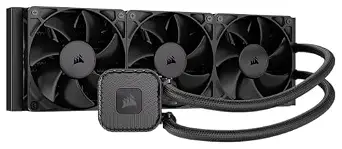
Great for anyone needing powerful cooling for an Intel 9900X, the CORSAIR Nautilus 360 RS AIO CPU Cooler stands out with its strong airflow and noise reduction thanks to RS120 fans. Its real strength lies in delivering focused cooling without a complicated setup.
Setup is straightforward with its daisy-chained RS120 fans that connect to the motherboard with a single cable. This reduces cable clutter and makes the installation less of a chore. The fans run quietly due to the magnetic dome bearing, so daily use stays calm even under load.
Compatibility with Intel LGA 1851 and LGA 1700 sockets means it fits modern systems and works without sticking out as a tight squeeze.
The water cooling method manages the 9900X’s heat output effectively, with fans spinning up to 2100 rpm for strong performance. The build feels sturdy, with quality materials contributing to a reliable fit.
Most reviews praise its quiet operation, though some mention that the maximum fan speed could still be louder for very demanding tasks.
The cooling performance impresses with quiet operation thanks to the magnetic dome bearing on the fans, addressing noise concerns effectively. However, the fans reaching only 2100 rpm means peak noise levels might not be sufficient for extreme cooling needs.
People needing reliable, quieter water cooling for their Intel 9900X or similar CPUs will appreciate this cooler. Those looking for maximum fan speed and full PWM control might want to consider alternatives with higher RPM ranges or advanced fan connectors.
Pros
- Strong airflow with high static pressure
- Magnetic dome bearing for quiet fan operation
- Easy installation with daisy-chained fans
- Supports latest Intel sockets, including LGA 1851 and 1700
Cons
- Fans could be louder at max speed for heavy cooling needs
- Only 4-pin power connector limits advanced fan control
| Specification | Details |
|---|---|
| Power Connector Type | 4-Pin |
| Cooling Method | Water |
| Compatible Devices | Desktop |
| Maximum Rotational Speed | 2100 rpm |
7. Antec Ultra 360 ARGB Liquid CPU Cooler

Mirror lighting on the pump head and a massive copper base plate set this cooler apart, giving excellent thermal conductivity and a stylish look. Suited for anyone running demanding setups, especially with Intel’s 9900X, it shines through with both performance and visual flair.
Installation offers compatibility with a wide range of Intel sockets, including LGA 115X up to 20XX, making it flexible for many builds. Day-to-day, the combo of 120mm ARGB PWM radiator fans and a 20-watt pump balances cooling output with reasonable noise at 33.05 dB. The lighting adds a multi-angle, layered effect, giving your rig a neat visual boost without extra effort.
It cools reliably with a pump running up to 2600 rpm and airflow of 67.62 cfm, keeping the CPU temperatures in check under load. The build quality stands out thanks to the copper base plate and efficient pump, but some reports mention it runs louder than quieter alternatives.
Still, most find its performance worth the slight noise trade-off.
The cooler’s standout strength is effective temperature management paired with eye-catching ARGB lighting. On the downside, noise levels near 33 dB can be a concern for those sensitive to sound during heavy use. A few find the 3-pin power connection less flexible than other options.
Suitable for users wanting solid cooling and unique lighting on an Intel 9900X or similar CPUs, especially those who don’t mind a bit of noise. Users prioritizing quieter operation should consider alternatives designed specifically for low sound output.
Pros
- Impressive cooling with copper base plate
- Multi-angle ARGB lighting effects
- Supports a wide range of Intel sockets
- Strong airflow from 120mm PWM fans
Cons
- Runs louder than some competitors
- Power connector limited to 3-pin type
| Specification | Details |
|---|---|
| Power Connector Type (Pump) | 3-pin |
| Voltage | 12 volts_of_direct_current |
| Noise Level | 33.05 db |
| Maximum Rotational Speed | 2600 rpm |
| Air Flow Capacity | 67.62 cfm |
8. CoolerMaster MasterLiquid ML240L RGB V2

Strong RGB lighting tends to catch the eye first on this cooler, especially if you want some flair alongside performance. It’s suited for desktop builders who value both aesthetics and solid cooling, particularly with intense processors like the 9900X. Its biggest strength lies in balancing quiet operation with dependable cooling power.
Installation is fairly straightforward, helped by compatibility with a wide range of Intel sockets including LGA1700, which covers the 9900X platform well. The 3rd Generation dual chamber pump focuses on keeping temperatures down without adding much noise. Fans run up to 1800 rpm but maintain a quiet presence at about 30 dB.
The refreshed fan blades provide steady airflow, allowing daily use without constant noise distractions.
Cooling performance remains consistent during demanding tasks, thanks to the 260-watt water cooling capacity. The build feels solid with industrial-grade EPDM material seals designed to prevent leaks and boost longevity. Some users appreciate the customizable RGB lighting, although a few mention that noise can rise during peak fan speeds.
It’s reliable and built to last.
Most users find the cooler’s RGB lighting impressive and appreciate its quiet airflow during average loads. The typical complaint centers on the noise level spiking when fans hit their top RPM during heavy cooling demands.
Those who want effective cooling combined with customizable lighting and a durable build will be pleased. It might not be ideal for people prioritizing ultra-silent operation or needing compatibility beyond desktop Intel sockets.
Pros
- Customizable RGB lighting adds visual appeal
- Quiet fan operation around 30 dB
- Durable industrial-grade sealing prevents leaks
- Supports wide range of Intel sockets including LGA1700
Cons
- Fan noise can increase at maximum speeds
- Only supports desktop devices, no broader compatibility
| Specification | Details |
|---|---|
| Power Connector Type | 4-Pin |
| Voltage | 12 volts |
| Wattage | 260 watts |
| Noise Level | 30 db |
| Maximum Rotational Speed | 1800 rpm |
| Air Flow Capacity | 62 cfm |
9. LIAN LI HydroShift II OLED Curved 360 AIO Cooler

Choosing a cooler with a vivid display and precise control can make a huge difference for a 9900X setup, and this model’s standout feature is its 6.67” curved OLED screen that shows impressive visuals. It’s designed for those who want strong cooling performance paired with customization that goes beyond a standard pump head.
Installation is straightforward, and the motorized pump head really shines day-to-day. You can tilt, rotate, and adjust the display angle with simple software controls, which helps keep an eye on temps or custom images.
Running quietly at 33 db, it won’t add distracting noise during gaming or work sessions, thanks to a maximum fan speed of 2600 rpm.
It cools the CPU efficiently without being clamorous, striking a good balance for powerful processors. Build quality feels solid with a clean finish, and the curved OLED adds a nice touch for anyone wanting flair on their desk.
Some users mention the motorized control as a tricky feature to fine-tune initially but appreciate the customization once set.
The OLED display and motorized pump head get the most praise for adding visual appeal and customization options not common in AIOs. The complex motorized adjustments take some effort to learn, which is the main complaint from people using this cooler.
Anyone who enjoys personalizing their setup will find this cooler a great match. Those prioritizing straightforward installation or minimal fuss might prefer simpler models without the extra mechanical features.
Pros
- 6.67” 2K curved OLED with high brightness
- Motorized pump head for flexible adjustments
- Quiet operation at 33 db noise level
- Supports high-speed cooling fans up to 2600 rpm
Cons
- Motorized controls require time to master
- Complex setup for beginners compared to standard AIOs
| Specification | Details |
|---|---|
| Cooling Method | Water |
| Compatible Devices | Cpu, Desktop |
| Noise Level | 33 db |
| Maximum Rotational Speed | 2600 rpm |
10. NZXT Kraken Plus 240 RGB AIO CPU Cooler

Keeping a high-end CPU like the 9900x cool under load can be tough, but this AIO cooler handles it confidently. It is well suited for users looking for strong cooling performance combined with a unique display feature that adds a personal touch while maintaining quiet operation.
Installation is straightforward thanks to only four screws and a single cable, which makes cable management much easier. The custom LCD screen lets you display system stats or fun images right on your cooler, controlled through the NZXT CAM software.
Daily operation runs quietly at around 31.9 dB, meaning it’s unobtrusive when under heavy workloads.
Performance-wise, it excels with a powerful Turbine pump designed for high flow and head pressure to keep the 9900x running cool. The build feels solid and thought-out with a water cooling method that maintains steady temperatures.
Some reviews mention the noise level rising at maximum fan speed of 2800 rpm as a downside, but most praise how efficient and quiet it is during regular use.
The standout feature is the custom LCD screen that shows real-time temps and other media, adding a personalized flair to your setup. Many users highlight the quiet performance except when the fan speed hits its maximum, which makes it louder than expected in those moments.
Those who want a cooler that balances strong, quiet cooling with unique visuals will appreciate this model. Better to consider other solutions if you prioritize ultra-low noise at high loads or need bigger radiator support for extreme overclocking.
Pros
- High flow pump provides efficient cooling
- Customizable LCD screen on the pump
- Quiet operation under normal loads
- Simple installation with minimal cables
Cons
- Noise increases noticeably at max fan speed
- Only a 240mm radiator may limit cooling headroom
| Specification | Details |
|---|---|
| Power Connector Type | 4-Pin |
| Voltage | 12 volts_of_direct_current |
| Wattage | 12 watts |
| Cooling Method | Water |
| Noise Level | 31.9 db |
| Maximum Rotational Speed | 2800 rpm |
11. Thermalright Trofeo Vision 360 ARGB AIO Cooler

Cooling with three high-speed fans spinning at 2150RPM keeps the 9900X running safely under heavy loads. Perfect for anyone needing a powerful AIO cooler that packs solid airflow, the Thermalright Trofeo Vision 360 ARGB offers large radiator dimensions to handle heat effectively.
Installing the triple-fan water cooler involves fitting the sizeable 403x120x52mm radiator inside your case, which takes some space but rewards with excellent cooling. The water pump runs at a fast 6400RPM for quick heat transfer, and the ARGB lighting on the fans adds a fun visual touch without extra noise or vibration thanks to balanced bearings.
The cooling capability is serious, capable of handling the heat output from a demanding 9900X processor. Its build feels sturdy, with an emphasis on reducing friction and operational noise around 27 dB.
Most praise the cooler’s performance and quiet operation, while others note that the large size requires ample case space.
Performance stands out thanks to powerful fans and a fast pump, which keep the CPU temperature low while maintaining quiet operation. Most users appreciate the cooler’s ARGB looks and steady reliability, though the size poses an installation challenge in smaller cases.
The cooler suits builders prioritizing strong cooling with aesthetics who have enough internal space to accommodate it comfortably. Buyers with compact cases or strict noise limits might seek smaller or slower models instead.
Pros
- High fan speed ensures strong airflow
- ARGB lighting adds visual appeal
- Quiet operation with low vibration
- Sturdy build quality
Cons
- Large radiator size needs big cases
- Pump speed can be loud at peak
| Specification | Details |
|---|---|
| Radiator Size | 403x120x52mm |
| Water Pump Speed | 6400RPM±10% |
| Fan Speed | 2150 RPM |
| Noise Level | 27 dB |
| Air Flow Capacity | 207 cfm |
| Power Connector Type | 4-Pin |
12. Cooler Master 360 Core II AIO Liquid CPU Cooler

People building or upgrading high-performance PCs with the Intel 9900X will appreciate the Cooler Master 360 Core II AIO Liquid CPU Cooler for its efficient cooling tailored to powerful CPUs. Its ability to keep temperatures low under heavy loads stands out as its biggest strength, making it a solid option for intense computing tasks.
Setup is straightforward, with compatible brackets for LGA 1851 and 1700 platforms simplifying installation. The dynamic PWM fan ranges between 650 and 1,750 rpm, balancing quiet operation and cooling power well during daily use.
ARGB lighting adds a stylish touch that can sync with most motherboard software, while the included CryoFuze thermal paste ensures reliable heat transfer right from the start.
The 360 Core II does a solid job keeping a 9900X cool, aided by a dual-chamber pump that improves water flow to hot CPU spots. Build quality feels reliable, with well-made fans delivering up to 70.5 CFM airflow at a max speed of 1,750 rpm. Common feedback highlights its quietness running around 30 dB and effective cooling, though some note the power connector is 3-pin, which limits PWM versatility compared to 4-pin alternatives.
Efficient cooling performance paired with quiet operation gets high marks, while the 3-pin power connector and limited fan control receive the most criticism. The included CryoFuze thermal paste supports steady temperature management over a wide range of conditions.
Enthusiasts seeking strong cooling for an Intel 9900X that also want customizable lighting will find this AIO fits well. Those needing advanced fan speed adjustments might lean toward products with 4-pin connectors instead.
Pros
- Strong cooling tailored for high-end CPUs
- Quiet fan operation with dynamic speed range
- Easy installation with compatible brackets
- Customizable ARGB lighting adds style
Cons
- 3-pin power connector limits fan control features
- Lack of PWM support on fan may affect fine tuning
| Specification | Details |
|---|---|
| Cooling Method | Fan, Water |
| Noise Level | 30 dB |
| Maximum Rotational Speed | 1,750 rpm |
| Air Flow Capacity | 70.5 cfm |
| Power Connector Type | 3-Pin |
Best AIO Coolers for 9900X Comparison Table
| Product | Cooling Method | Max RPM | Air Flow Capacity | Noise Level |
|---|---|---|---|---|
| ARCTIC Liquid Freezer III 360 | Liquid | 3000 rpm | 77 cfm | – |
| ARCTIC Liquid Freezer III 360 | Liquid | 3000 rpm | 77 cfm | – |
| Noctua NL-LC1 360 AIO | Water | 1800 rpm | 107.3 m³/h | 22.5 db |
| Noctua NL-LC1 420 AIO | Water | 1500 rpm | 155.6 m³/h | 24.8 db |
| ARCTIC Liquid Freezer III 240 | Water | 3000 rpm | 77 cfm | – |
| CORSAIR Nautilus 360 RS | Water | 2100 rpm | – | – |
| Antec Ultra 360 ARGB | Water | 2600 rpm | 67.62 cfm | 33.05 db |
| Cooler Master ML240L RGB V2 | Water | 1800 rpm | 62 cfm | 30 db |
| LIAN LI HydroShift II 360 | Water | 2600 rpm | – | 33 db |
| NZXT Kraken Plus 240 RGB | Water | 2800 rpm | – | 31.9 db |
| Thermalright Trofeo Vision 360 | Water | 2150 rpm | 207 cfm | 27 db |
| Cooler Master 360 Core II | Fan, Water | 1750 rpm | 70.5 cfm | 30 db |
- Cooling MethodLiquid
- Max RPM3000 rpm
- Air Flow Capacity77 cfm
- Noise Level–
- Cooling MethodLiquid
- Max RPM3000 rpm
- Air Flow Capacity77 cfm
- Noise Level–
- Cooling MethodWater
- Max RPM1800 rpm
- Air Flow Capacity107.3 m³/h
- Noise Level22.5 db
- Cooling MethodWater
- Max RPM1500 rpm
- Air Flow Capacity155.6 m³/h
- Noise Level24.8 db
- Cooling MethodWater
- Max RPM3000 rpm
- Air Flow Capacity77 cfm
- Noise Level–
- Cooling MethodWater
- Max RPM2100 rpm
- Air Flow Capacity–
- Noise Level–
- Cooling MethodWater
- Max RPM2600 rpm
- Air Flow Capacity67.62 cfm
- Noise Level33.05 db
- Cooling MethodWater
- Max RPM1800 rpm
- Air Flow Capacity62 cfm
- Noise Level30 db
- Cooling MethodWater
- Max RPM2600 rpm
- Air Flow Capacity–
- Noise Level33 db
- Cooling MethodWater
- Max RPM2800 rpm
- Air Flow Capacity–
- Noise Level31.9 db
- Cooling MethodWater
- Max RPM2150 rpm
- Air Flow Capacity207 cfm
- Noise Level27 db
- Cooling MethodFan, Water
- Max RPM1750 rpm
- Air Flow Capacity70.5 cfm
- Noise Level30 db
How to Choose the Right AIO Cooler
Choosing the right AIO cooler for the 9900x depends on cooling performance, radiator size, and compatibility with your case. Prioritizing these factors ensures efficient heat management, quieter operation, and avoids costly upgrades or fitting issues later on.
Compatibility and Socket Support
One of the first headaches encountered with an all-in-one cooler is discovering it doesn’t fit the motherboard or case as expected. The LGA 2066 socket requires a mounting system designed specifically for its layout. Some coolers claim compatibility but only include brackets for other sockets, or the radiator’s size clashes with tall RAM modules nearby.
Measure your case space carefully, especially around the CPU area. Radiators in 240mm or 280mm sizes are typical, but clearance issues can arise with 360mm units.
Good RAM clearance avoids bending or damage, which is common if the cooler sits too low or the tubes obstruct slots. Look for coolers with adjustable mounts and tubing length that reaches the required position comfortably.
Cooling Performance and Efficiency
A high-end processor producing over 165W of heat needs a cooler rated for at least that thermal output. Subpar pump performance can cause coolant flow to weaken over time, leading to temperature spikes during demanding tasks. Flow rates around 0.5 liters per minute or higher tend to keep the system stable under load.
Radiator size impacts how fast heat is transferred out of the system. Larger radiators with multiple fans provide better dissipation, reducing CPU temps.
Fans with FPI (fins per inch) around 18 to 22 strike a balance between airflow and static pressure necessary for radiator cooling. A well-designed setup results in consistently lower temps during heavy use.
Noise Levels
Noise can quickly become distracting, especially at full load. Fans spinning above 1500 RPM and pumps with up to 30 dBA noise levels may interfere with concentration during work or immersion in games. Some coolers allow fan and pump speed control via PWM, letting you dial back noise when full cooling power isn’t needed.
Look for models advertising low-noise operation or those that include rubber mounting to dampen vibration. Users who multitask or stream prefer quieter systems, while silent PC builders focus on coolers with noise ratings below 20 dBA at idle. Sound level measurements under various conditions help choose a balance between cooling and quiet.
Build Quality and Materials
Over time, cheaper materials tend to degrade: tubing can crack or stiffen and radiator fins may corrode, impacting longevity and cooling efficiency. Most reliable coolers feature braided nylon tubing that resists kinks combined with corrosion-resistant aluminum radiators treated to prevent rust.
Pump housings constructed from reinforced plastics or metal tend to last longer and avoid leaks. Antileak’s secure clamps at fittings ensure a reliable installation and operation experience.
Check whether thermal paste is preapplied or if you will need to apply your own; quality paste ensures better heat transfer right from the start.
Installation and Maintenance
Some of the worst experiences come from wresting a cooler into place with complicated mounting brackets and obscure instructions. Look for kits providing clear, step-by-step guides and hardware labeled for each socket type.
Toolless designs or few screws speed up assembly and reduce frustration.
Long-term maintenance includes occasional cleaning of radiator fins and fan blades, which affects cooling performance. Pump lifespan varies with quality but expect a few years before replacement is necessary.
Units featuring easily replaceable fans or modular tubing simplify upkeep, making daily use smoother without surprises.
Optimizing Your 9900X Performance with Correct AIO Cooler Installation
Proper installation of an AIO cooler plays a crucial role in maintaining the 9900X’s high performance. Ensuring the pump block makes firm and even contact with the CPU surface avoids hotspots and improves heat transfer. Before mounting, clean the CPU and cooler base surfaces with isopropyl alcohol to remove any old thermal paste residue.
A thin, even layer of fresh thermal paste helps fill microscopic gaps, which keeps temperatures down.
Pay attention to radiator placement inside the case. Placing it at the top or front allows airflow to pass through easily, reducing internal heat buildup.
Secure the fans in a push or pull configuration to maximize airflow efficiency. Connect the pump and fan power cables directly to the motherboard headers, so fan curves can be controlled based on CPU temperature. Double-check that there are no kinks in the tubing that could restrict coolant flow.
Routine Maintenance and Cleaning Tips for Prolonged AIO Cooler Lifespan
Keeping an AIO cooler clean is key for long-term reliability on a demanding CPU like the 9900X. Dust buildup on radiator fins blocks airflow, causing higher temperatures and increased fan noise. Use compressed air to blow dust out of the radiator every few months, or more often if your environment is dusty.
Inspect the pump and fan operation regularly. A failing pump can cause temperature spikes, so listen for unusual noises and monitor coolant temperatures with software tools.
Fan bearings may wear down over time; replacing noisy fans can prevent future issues.
Keep the cooling area around the PC free from clutter to promote good airflow. Periodically check all mounting screws and cables to ensure everything remains secure.
Proper upkeep extends the cooler’s lifespan and maintains consistent CPU cooling performance.
Comparing AIO Coolers to Custom Water Cooling Solutions for the 9900X
AIO coolers offer a straightforward installation and lower maintenance compared to custom water cooling solutions. They come pre-filled and sealed, which eliminates the need to handle coolant or worry about leaks. For users focused on reliable, efficient cooling with minimal setup, AIOs are a practical choice.
Custom loops provide more flexibility in cooling multiple components and can often achieve lower temperatures by using larger radiators and custom pump speeds. However, they require regular maintenance such as coolant replacement and leak checks. The complexity and cost are also significantly higher.
For the 9900X, which runs hot under heavy workloads, a high-quality 240mm or 280mm AIO adequately manages heat without the hassle of custom builds. Custom cooling may appeal to experienced builders seeking maximum performance, but for most users, an AIO offers a balance of cooling power and ease of use.
People Also Asked
How Do I Install an AIO Cooler on a 9900X?
Install the AIO cooler by mounting the water block securely on the CPU, attaching the radiator inside your case, and connecting the fans and pump to proper headers. Use the thermal paste provided or pre-applied, and ensure the radiator is positioned for good airflow. Tighten screws evenly to avoid uneven pressure on the CPU.
What Size AIO Cooler Fits Best with a 9900X CPU?
A 240mm or 280mm AIO cooler generally fits best for a 9900X, providing good cooling without space issues in most mid to full tower cases. Check your case’s radiator support before purchasing and consider 360mm if you want lower temperatures at higher fan speeds.
Can an AIO Cooler Handle the Heat from a 9900X?
A quality AIO cooler can manage the heat output of a 9900X but performance depends on radiator size and fan setup. Larger radiators and higher airflow fans help keep temperatures in check, especially during intense workloads or overclocking.
How Long Does an AIO Cooler Last with Heavy 9900X Use?
AIO coolers typically last around 3 to 5 years under heavy use before pump degradation or leaks may appear. Regularly monitor pump noise and coolant levels if your model allows, to catch issues early.
What Common Problems Should I Watch for with AIO Coolers?
Watch for pump noise, coolant leaks, and radiator fan failure. These are the most common issues with AIOs. Also, over time, dust accumulation on radiator fins reduces cooling efficiency, so clean those regularly.
Conclusion
Choosing the right aio cooler for a 9900x comes down to cooling performance, noise level, and compatibility with your case and motherboard. Good cooling keeps the CPU stable under load, while quieter operation makes for a more comfortable setup. Make sure the cooler fits your build and supports the socket properly.
Consider your available space and budget when making a choice, as these will influence which model works best over time. Refer back to the comparison table and detailed picks above to find a cooler that fits your setup and usage needs perfectly.

I’m Grant Mitchell, a firearms and hunting writer with years of experience at the range and in the field. I write about rifles, shotguns, handguns, optics, safe storage, cleaning, and responsible ownership, along with practical hunting tips. My goal is to share accurate, safety-first information that helps you choose the right firearm, maintain it properly, and become a more confident shooter.