Top 12 Best 92mm CPU Cooler That Will Boost Your PC Now
Many who rely on the best 92mm cpu cooler know how frustrating it can be when their computer starts overheating or gets uncomfortably loud under load. A cheap or ill-fitting cooler can cause higher temperatures that lead to throttling and shorten the CPU’s lifespan.
A properly chosen 92mm cooler fits tight in smaller cases where space is limited, without sacrificing airflow or creating noise issues.
The main things that separate a good 92mm CPU cooler are the quality of its materials, the design of the fan blades, and compatibility with your case and CPU socket. Copper or aluminum heatsinks with dense fins improve heat dissipation. Fans running quiet at around 1000 to 2000 RPM keep noise down while moving enough air.
Equally important is checking that the mounting hardware fits the specific CPU socket and leaves clearance for RAM and other components. Easy cleaning is a plus since dust builds up quickly in smaller fans.
Need a Quick Check?
| Image | Product | Price |
|---|---|---|
Our Top Picks 1  | Thermalright Assassin X90 SE V2 | Check Price |
Our Top Picks 2  | Thermalright Assassin X90 Air | Check Price |
Our Top Picks 3  | Thermalright Assassin King 90 V2 | Check Price |
Our Selected Top 12 92mm Cpu Cooler Worth Considering
This list features carefully chosen 92mm CPU coolers, highlighting their performance, compatibility, and design features. Each review explains who the cooler is best suited for, alongside clear pros and cons to help you find the right fit for your system’s cooling needs.
1. Thermalright Assassin X 90 SE V2 CPU Cooler
Thermalright Assassin X 90 SE V2 is designed for desktop users who want reliable cooling performance packed in a compact 92mm design. Its biggest strength lies in balancing noise and airflow, making it a solid fit for those with smaller cases needing efficient air cooling.
Setting it up involves attaching the 4-pin connector, which supports PWM control for flexible fan speed adjustments. The cooler taps into a 12-volt power source and runs quietly at 25 dB during routine operation. With a maximum spin of 2200 rpm, it keeps temperatures stable without being overly loud, making it practical for everyday use without annoying noise.
The cooler manages airflow at 32.77 cfm, effectively keeping CPU temperatures down while maintaining a modest power draw of 1.2 watts. The build quality is sturdy, typical of a brand with over 20 years of experience in cooling solutions.
Common praise highlights quiet operation while a frequent drawback is the moderate airflow compared to larger coolers.
The Thermaright Assassin X 90 SE V2 is known for its quiet performance during daily use, keeping noise levels low even when the fan spins near its maximum 2200 rpm. Reviews point out its airflow capacity meets everyday needs but falls short compared to bigger coolers on the market.
People with compact desktop builds and moderate cooling needs will appreciate the balance between size and sound. Those pushing for high-end performance or overclocking might want to look for a cooler that delivers stronger airflow and higher RPM capability.
Pros
- Quiet operation at 25 dB
- Compact 92mm size fits small cases
- Steady airflow of 32.77 cfm
- Low power consumption of 1.2 watts
Cons
- Airflow lower than larger coolers
- Max fan speed can be somewhat loud
| Specification | Details |
|---|---|
| Power Connector Type | 4-Pin |
| Voltage | 12 volts |
| Wattage | 1.2 watts |
| Noise Level | 25 db |
| Maximum Rotational Speed | 2200 rpm |
| Air Flow Capacity | 32.77 cfm |
2. Thermalright Assassin X 90 SE V2 CPU Air Cooler
Feels like a compact powerhouse on your desktop, built to handle CPUs that need solid cooling without taking up much space. Perfect for anyone with limited room inside their case but who wants effective heat dissipation. Its standout feature is the direct-touch heat pipes combined with a high-speed small fan that keeps temperatures down efficiently.
Setting it up involves dealing with a cooler that’s fairly petite at just under 12 cm tall, making fitment easier in tighter cases. The aluminum fins cover a wide area, improving heat spread. The nickel-plated heat pipes resist corrosion, helping maintain cooling performance over time while the 4-pin connector enables PWM fan control, so noise can be adjusted according to load.
Performance-wise, it handles heat better than many other small coolers thanks to its wave-designed fins and HDT base. The build quality feels solid with all-aluminum fins and a copper base treated for purity and oxidation resistance. The most common praise mentions its effective cooling for its size, while a typical complaint concerns the relatively high noise level coming from the fan spinning up to 2200 rpm.
The cooler delivers efficient heat dissipation for its size, thanks to aluminum fins and HDT direct-touch pipes. Noise from the high-speed fan is a common tradeoff for keeping temperatures down in tight spaces. The build uses quality materials designed to extend lifespan and maintain performance.
Fans with small cases or mainstream CPUs will appreciate the size and cooling balance here. Those wanting near-silent operation or using very tall RAM might want to look at larger or differently shaped coolers. It suits users prioritizing decent cooling in compact desktop builds.
Pros
- Compact size fits smaller cases easily
- Direct-touch heat pipes improve cooling speed
- Nickel plating prevents heat pipe corrosion
- Adjustable fan speed with 4-pin PWM connector
Cons
- Fan noise can get loud at top speeds
- Height might still block tall RAM modules
| Specification | Details |
|---|---|
| Dimensions | 94(L)x77(W)x118(H) mm |
| Noise Level | 23.85 db |
| Cooling Method | Air |
| Maximum Rotational Speed | 2200 rpm |
| Air Flow Capacity | 32.77 cfm |
| Power Connector Type | 4-Pin |
3. Thermalright Assassin King 90 V2 CPU Air Cooler
Thermalright Assassin King 90 V2 is a compact CPU air cooler suited for those needing strong cooling in smaller spaces. Its main strength lies in managing heat effectively with a smart design maintaining good airflow within tight setups.
Installing the cooler goes smoothly thanks to metal fasteners tailored for Intel and AMD platforms. Its size, 94 by 77 by 125 mm, fits many desktop builds without crowding the area.
The 4-pin connector offers good control over fan speed, and the noise level stays low at under 24 dB, keeping things quiet during daily use.
Performance impresses with five 6 mm heat pipes using AGHP technology, which reduces effects of different orientations. Its aluminum heat sink and industrial-grade materials give a solid feel. Reviews often highlight quiet operation and reliable cooling, though some mention it might struggle with very high TDP CPUs.
Quiet cooling and durability stand out as key strengths with low noise and long service life. Most users note the cooler does a solid job, but some find it less effective for very demanding processors.
The cooler suits those building compact or mid-sized systems wanting reliable cooling without extra noise. Users with high-power CPUs should consider larger or more powerful cooling options to avoid thermal limits.
Pros
- Compact size suits smaller cases
- Quiet operation under normal loads
- Strong heat dissipation with 5 heat pipes
- Compatible with Intel and AMD sockets
Cons
- May underperform on high TDP CPUs
- Installation requires attention to orientation
| Specification | Details |
|---|---|
| Cooling Method | Air |
| Noise Level | 23.85 dB |
| Air Flow Capacity | 44 cfm |
| Maximum Rotational Speed | 2200 rpm |
| Power Connector Type | 4-Pin |
4. Noctua NH-D9DX i4 CPU Cooler

Featuring a compact dual-tower design construction, the Noctua NH-D9DX i4 suits smaller builds like HTPCs, ITX, or 3U cases. Its major advantage is fitting tight spaces without blocking RAM or PCIe slots, thanks to its low 110mm height, making it ideal where clearance is a concern.
Installation feels straightforward thanks to the SecuFirm2 mounting system tailored for various Intel sockets including LGA2066 and LGA2011. The included NF-A9 92mm fan has PWM support for automatic speed control, using a Low-Noise Adaptor that keeps sound levels low. Daily noise hovers around 22.8 dB, so it stays quiet even under regular workloads.
Cooling performance stands firm for a cooler of its size, holding temperatures well for compatible workstation CPUs. Build quality is solid, with attention to detail such as the added NT-H1 thermal compound.
Common comments highlight its quiet operation as a strong point, while some note the fan speed reaching up to 2000 rpm can introduce noise under heavy load.
Quiet cooling at normal speeds is the standout benefit, with users appreciating its low noise output. A common drawback is fan noise when spinning up to 2000 rpm, which can be noticeable in quieter environments. Installation is generally smooth, helped by secure mounting hardware and included thermal paste.
Those building compact Intel-based systems will find it a great fit, especially when space is tight. Users needing a quieter workstation cooler at standard loads will appreciate it most. Systems requiring broader socket support or ultra-low fan noise under full load might want to consider alternatives.
Pros
- Compact size fits small and HTPC cases
- Does not block RAM or PCIe slots
- Quiet operation with Low-Noise Adaptor
- Includes quality thermal compound
Cons
- Fan can get noisy at max speed
- Limited socket compatibility outside Intel range
| Specification | Details |
|---|---|
| Power Connector Type | 4-Pin |
| Voltage | 12 volts |
| Cooling Method | Air |
| Noise Level | 22.8 db |
| Maximum Rotational Speed | 2000 rpm |
5. Noctua NH-U9S CPU Cooler
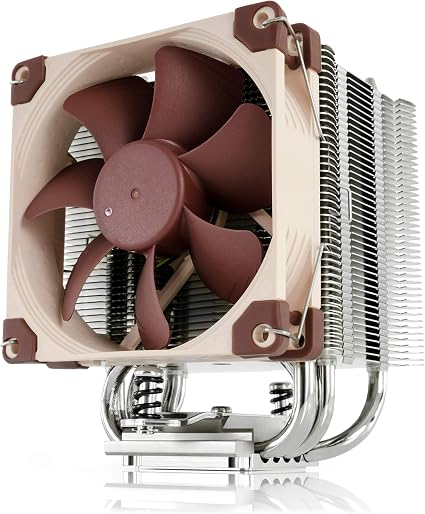
Compact size is the first thing you’ll notice, making it ideal for small builds like HTPCs and ITX systems. Its 125mm height fits comfortably without blocking RAM or PCIe slots, perfect for those who need strong cooling without sacrificing space.
Setting it up is straightforward thanks to the SecuFirm2 mounting system. Comes with high-end NT-H1 thermal paste that spreads easily for good contact. The built-in NF-A9 92mm fan adjusts speed automatically via PWM, running quietly under normal conditions while kicking into higher gear when temperatures rise, which is handy for balancing noise and cooling.
Cooling performance is solid for its size, managing heat well without overheating mid-tier CPUs. The fan is quiet but can get a bit noticeable when pushed hard.
Most praise focuses on how well it fits in cramped spaces without any interference with components. Common complaints mention fan noise during intense workloads, but it stays within reasonable limits.
The cooler is praised for its excellent fit in tight spaces and compatibility with a wide range of motherboards. It performs well in keeping temperatures in check but the fan noise can increase noticeably under stress. Installation is smooth with the included mounting system and thermal paste.
Small form factor builders and anyone needing a quiet, compact cooler will appreciate this unit. Those running high-end or heavily overclocked CPUs might find its cooling performance less sufficient and may want a larger cooler.
Pros
- Compact 125mm height fits small cases easily
- Does not block RAM or PCIe slots
- Ultra-quiet operation with PWM fan control
- Includes high-quality thermal paste
Cons
- Fan can become noisy under heavy load
- Cooling capacity limited to mid-range CPUs
| Specification | Details |
|---|---|
| Height | 125mm |
| Fan Size | 92mm |
| Compatibility | Intel LGA1851, LGA1700, LGA1200, LGA115x; AMD AM5 & AM4 |
| Mounting System | SecuFirm2 with offset option |
| Included Thermal Paste | NT-H1 |
| Warranty | 6 years |
6. ID-COOLING SE-903-XT V2 CPU Air Cooler

Compact design and upgraded airflow make this cooler a solid pick for small builds needing reliable performance without noise penalties. Its biggest strength lies in the larger 100mm fan that improves cooling while keeping sound levels manageable, ideal for daily desktop use and gaming.
Installation feels straightforward thanks to enhanced fin locking and secure fan clips, which keep everything tightly in place during setup and longer use. The 4-pin power connector supports motherboard fan speed control, so you can balance airflow and noise easily. Upgrading from the previous 92mm fan means better airflow without a noticeable increase in sound.
Cooling capacity reaches up to 150 watts, making it competent for mid-level CPUs. The build quality is sturdy with aluminum fins held firmly by an improved fin-lock structure, reducing vibration. Most users highlight quieter operation and durability after transport, while some find the 29.1 dB noise noticeable under full speed.
Users appreciate the secure fin locking system that keeps the cooler stable and reduces vibration, making it suitable for transport and daily use. The most frequent criticism involves the fan noise at peak speeds, which can be distracting during heavy workloads.
Ideal for people building compact desktops that need decent cooling without sacrificing much space or raising noise levels too much. Those with high-power CPUs above 150 watts should consider bigger coolers with higher capacity to ensure proper heat management.
Pros
- Upgraded 100mm fan for improved airflow
- Enhanced fin-lock and fan clip design
- Quiet operation around 29.1 dB
- Compact size fits small form factor builds
Cons
- Noise noticeable at maximum fan speed
- Cooling limited to 150 watts watt CPUs
| Specification | Details |
|---|---|
| Power Connector Type | 4-Pin |
| Wattage | 150 watts |
| Cooling Method | Air |
| Noise Level | 29.1 db |
| Maximum Rotational Speed | 2500 rpm |
| Air Flow Capacity | 47.1 cfm |
7. Noctua NH-U9S Chromax.black CPU Cooler

Finding a quiet but efficient cooler that fits in tight spaces can be tough. Suited for compact builds, this cooler offers a solid balance of size and performance. Its standout feature is a compact 92mm fan that fits most tower cases while keeping noise levels low, even under load.
Setup is straightforward thanks to the comprehensive accessory kit, and its 125mm height means it doesn’t block RAM slots or PCIe lanes, even on ITX motherboards. The fan’s automatic speed control adjusts quietly to your system’s demands, making day-to-day use practically noiseless when idle.
Cooling is strong for a 92mm cooler, keeping temperatures in check without sounding like a jet engine. The build quality feels premium, combining a proven heatsink with a stylish all-black finish.
Most praise highlights how quiet it runs, while some note the higher price point for its size as a downside.
Performance is very quiet even at full load thanks to the NF-A9 fan and smart speed control. A common note is that the cooler’s price tends to be on the steep side compared to alternatives of similar size.
This cooler suits users building compact or ITX systems who need good cooling without sacrificing silence. Someone on a tight budget or prioritizing aggressive cooling might want to explore different options.
Pros
- Compact size fits most tower cases easily
- Whisper quiet operation at idle
- Doesn’t block PCIe slots or RAM
- Comes with a rich accessory kit
Cons
- Higher price compared to similar-sized coolers
- All-black design may not suit all builds
| Specification | Details |
|---|---|
| Fan Size | 92mm |
| Height | 125mm |
| Compatibility | Intel & AMD, 100% RAM Compatibility |
| Fan Model | NF-A9 92mm |
| Warranty | 6 year manufacturer’s warranty |
8. Thermalright Silver Soul 110 Black CPU Cooler

Cooling a powerful CPU with up to 200W TDP gets manageable with the 92mm Thermalright Silver Soul 110 Black. It fits desktops well and offers quiet operation at only 23 dB.
Ideal for those needing reliable, moderate-sized cooling without loud fans or bulky heatsinks.
Setup involves a 4-pin power connector and mounts securely thanks to reliable brackets from Thermalright’s extensive R&D background. The AGHP technique with 5 heat pipes helps maintain performance regardless of cooler orientation. Daily use is quiet with fan speeds maxing at 1500 rpm, while airflow of 54 CFM keeps temperatures stable.
The cooler handles its job with solid airflow and decent heat dissipation. Built with quality components including a black finish, it balances looks and function. The most frequent praise highlights its quiet nature, though some mention modest cooling compared to larger models as a drawback.
The quiet fan noise at 23 dB stands out positively for users valuing low sound. However, the cooler may struggle a bit under very high CPU loads due to its size and capacity limits.
Anyone looking for a modest, quiet cooler suitable for mid-range CPUs will be satisfied. Those with very high-performance CPU requirements might want to look at larger cooling solutions instead.
Pros
- Quiet operation at only 23 dB
- Effective AGHP heat pipe design
- Compact 92mm size suits many builds
- Stable 4-pin fan speed control
Cons
- Cooling capacity limited to 200W TDP
- Runtime heat build-up on very high loads
| Specification | Details |
|---|---|
| Noise Level | 23 dB |
| Maximum Rotational Speed | 1500 rpm |
| Air Flow Capacity | 54 cfm |
| Cooling Method | Air |
| Wattage | 7.2 watts |
9. JONSBO CR-1200 RGB 92mm CPU Cooler

Anyone building a compact PC with limited space will find the JONSBO CR-1200 RGB 92mm CPU Cooler a solid choice. It suits people needing a balance between cooling power and quiet operation, with its main strength being efficient heat removal from smaller CPUs.
Setup is straightforward because it works with a wide range of AMD and Intel sockets, making installation simple. The quiet 92mm fan spins up to 2000 rpm, generating consistent airflow without being noisy.
Built-in RGB lighting adds a subtle touch of style to your build without affecting performance or noise levels.
Cooling performance is reliable for mid-range processors, with copper heat pipes that directly contact the CPU for quick heat transfer. The aluminum fins dissipate heat effectively while the fan maintains low noise around 26.5 dB. The cooler’s build feels solid, though some wish the fan speed could be adjusted for even quieter operation.
The cooler is praised for its quiet operation and effective heat transfer using copper heat pipes, making it suitable for CPUs that don’t produce excessive heat. The most frequent downside mentioned is the limited fan speed and its fixed 3-pin connector, which restricts fine-tuning fan curves or reducing noise further.
Builders looking for a compact, quiet cooler that fits various systems will be satisfied with this model. Users needing more advanced fan control or extreme cooling performance should explore alternatives with PWM connectors or larger fans.
Pros
- Quiet operation at 26.5 dB
- Direct-contact copper heat pipes
- Wide compatibility with AMD and Intel sockets
- Attractive RGB lighting
Cons
- Fan speed limited to 2000 rpm
- 3-Pin connector restricts precise fan control
| Specification | Details |
|---|---|
| Maximum Rotational Speed | 2000 rpm |
| Air Flow Capacity | 36 cfm |
| Noise Level | 26.5 db |
| Power Connector Type | 3-Pin |
| Voltage | 12 volts |
| Wattage | 95 watts |
10. Thermaltake Contac 9 SE CPU Cooler

Compact design and effective cooling make it suitable for builds with limited space while supporting up to 120W power. Its biggest strength is handling decent heat output with a 92mm PWM fan and double copper heatpipes in a neat package compatible with both Intel and AMD sockets.
Setting up requires quite minimal effort thanks to broad socket compatibility, including popular Intel LGA and AMD AM5 platforms. The tower side flow design channels air efficiently, while the aluminum fins keep temperatures down during regular use.
Fan speed adjusts automatically through PWM, balancing noise and cooling without much tinkering.
It does its job well under typical desktop loads, keeping processors cool without drawing too much attention noise-wise at 24.5 dB. The mix of two 6mm copper heatpipes and thin aluminum fins handles heat dissipation effectively.
Praise often mentions good cooling value for the size, while some note the fan can get a bit loud when spinning up to 2500 rpm.
Many appreciate it for keeping temperatures low while maintaining a quiet profile most of the time. The louder fan noise at its highest 2500 rpm speed stands out as the main drawback in the reviews.
Builds focused on mid-range CPUs and smaller form factors will benefit from this cooler. Those planning to run high-power processors should consider higher-capacity alternatives for better thermal performance.
Pros
- Compatible with both Intel and AMD sockets
- Relatively quiet at standard speeds
- Compact size fits smaller cases well
- Efficient heat dissipation with copper pipes
Cons
- Fan noise increases at maximum speed
- Supports up to 120W only, limits high TDP CPUs
| Specification | Details |
|---|---|
| Cooling Method | Fan |
| Maximum Rotational Speed | 2500 rpm |
| Noise Level | 24.5 dB |
| Voltage | 6 volts |
| Heatpipe Diameter | Ø6 mm |
| Power Support | 120 watts |
11. Thermalright TL-9015B 92mm PWM Cooling Fan

Thermalright TL-9015B 92mm PWM Cooling Fan manages cooling quietly while packing plenty of airflow for smaller PC builds. Ideal for people who want a reliable fan that adjusts speed automatically according to their motherboard’s temperature without creating much noise. Its standout feature is vibration damping that cuts down on fan noise during operation.
Installation is straightforward with the 4-pin PWM connector that hooks directly to most motherboards allowing automatic speed control. The four vibration damping pads reduce the usual shaking noise, making it quieter over time. The size fits most cases requiring a 92mm fan, and daily operation feels smooth since the fan adjusts its speed up to 2700 RPM depending on heat levels.
Cooling performance impresses thanks to a maximum airflow of 42.58 CFM, which helps keep temperatures down effectively. Build quality ensures the fan runs quietly, with noise capped at 22.4 dBA.
Many appreciate the lowered noise and solid cooling, although some mention it could be slightly louder at top speeds. The durable design and vibration pads generally make it a dependable cooling solution.
Users note the vibration damping pads effectively reduce noise during typical use, resulting in a quieter experience than many fans of this size. Some mention the fan can get noticeably louder when running at its peak 2700 rpm speed. The fan’s automatic speed adjustment helps keep cooling efficient without constant loud operation.
Those who want a balance between quiet running and solid cooling in small desktop setups will find this fan fitting well. People with high-end CPUs needing significant cooling capacity might need a larger or more powerful fan option instead.
Pros
- Quiet operation thanks to vibration damping pads
- Automatic speed control via 4-pin PWM connection
- Good airflow of 42.58 CFM for its size
- Compact 92x92x15 mm design fits most desktop cases
Cons
- Noisy at maximum speed of 2700 rpm
- May not provide enough cooling for very high-performance CPUs
| Specification | Details |
|---|---|
| Maximum Rotational Speed | 2700 rpm |
| Noise Level | 22.4 db |
| Air Flow Capacity | 42.58 cfm |
| Power Connector Type | 4-Pin |
| Wattage | 2.16 watts |
12. Thermalright AXP90 X53 Low Profile CPU Cooler
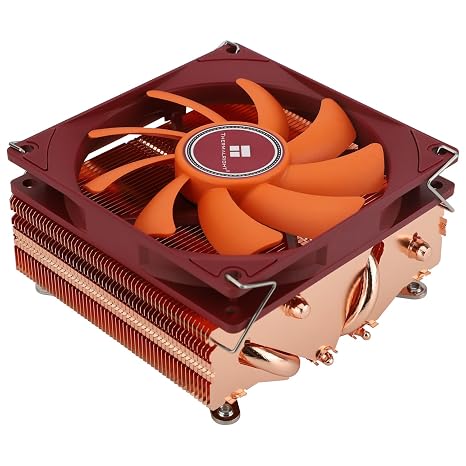
Runs quietly and fits snugly in compact setups, making it a great pick for anyone needing solid cooling without bulk. Best suited for small form factor PCs, its low profile design stands out as the main strength for tight spaces.
Installation is straightforward with familiar mounting brackets, and the 4-pin connector lets you control fan speed easily through your motherboard. The quiet operation at 22.4 dB means it’s not distracting during regular use, and the balanced airflow keeps temperatures steady without ramping up noise.
Handles up to 145 watts with a maximum fan speed of 2700 rpm, offering reliable air cooling that keeps things running cool under load. Built with quality materials, it performs well over time. Main praise focuses on its quiet but effective cooling.
The usual downside is limited clearance due to its size, which might challenge some cases.
Quieter than many similar coolers, the AXP90 X53 delivers steady cooling performance suitable for space-restricted builds. However, the size constraint means fitting it alongside higher RAM modules or bulky components requires careful planning.
People building compact, quiet desktops will appreciate the balance of size and cooling power here. Users pushing their CPUs past typical loads might look for bigger coolers offering higher maximum fan speeds and clearance.
Pros
- Low noise operation at 22.4 dB
- Compact low profile design fits snug spaces
- Supports up to 145 watts TDP
- Fan speed controllable via 4-pin connector
Cons
- Limited clearance might restrict RAM or tall components
- Fan speed maxes early for heavy overclocking needs
| Specification | Details |
|---|---|
| Power Connector Type | 4-Pin |
| Wattage | 145 watts |
| Cooling Method | Air |
| Noise Level | 22.4 db |
| Maximum Rotational Speed | 2700 rpm |
| Air Flow Capacity | 42.58 cfm |
Best 92mm CPU Coolers Comparison Table
| Product | Noise Level | Max RPM | Air Flow Capacity | Connector Type |
|---|---|---|---|---|
| Thermalright Assassin X90 SE V2 | 25 db | 2200 rpm | 32.77 cfm | 4-Pin |
| Thermalright Assassin X90 Air | 23.85 db | 2200 rpm | 32.77 cfm | 4-Pin |
| Thermalright Assassin King 90 V2 | 23.85 db | 2200 rpm | 44 cfm | 4-Pin |
| Noctua NH-D9DX i4 | 22.8 db | 2000 rpm | – | 4-Pin |
| Noctua NH-U9S | – | – | – | – |
| ID-COOLING SE-903-XT V2 | 29.1 db | 2500 rpm | 47.1 cfm | 4-Pin |
| Noctua NH-U9S chromax.black | – | – | – | – |
| Thermalright Silver Soul 110 Black | 23 db | 1500 rpm | 54 cfm | 4-Pin |
| JONSBO CR-1200 RGB 92mm | 26.5 db | 2000 rpm | 36 cfm | 3-Pin |
| Thermaltake Contac 9 SE | 24.5 db | 2500 rpm | – | 4-Pin |
| Thermalright TL-9015B 92mm Fan | 22.4 db | 2700 rpm | 42.58 cfm | 4-Pin |
| Thermalright AXP90 X53 Low Profile | 22.4 db | 2700 rpm | 42.58 cfm | 4-Pin |
- Noise Level25 db
- Max RPM2200 rpm
- Air Flow Capacity32.77 cfm
- Connector Type4-Pin
- Noise Level23.85 db
- Max RPM2200 rpm
- Air Flow Capacity32.77 cfm
- Connector Type4-Pin
- Noise Level23.85 db
- Max RPM2200 rpm
- Air Flow Capacity44 cfm
- Connector Type4-Pin
- Noise Level22.8 db
- Max RPM2000 rpm
- Air Flow Capacity–
- Connector Type4-Pin
- Noise Level–
- Max RPM–
- Air Flow Capacity–
- Connector Type–
- Noise Level29.1 db
- Max RPM2500 rpm
- Air Flow Capacity47.1 cfm
- Connector Type4-Pin
- Noise Level–
- Max RPM–
- Air Flow Capacity–
- Connector Type–
- Noise Level23 db
- Max RPM1500 rpm
- Air Flow Capacity54 cfm
- Connector Type4-Pin
- Noise Level26.5 db
- Max RPM2000 rpm
- Air Flow Capacity36 cfm
- Connector Type3-Pin
- Noise Level24.5 db
- Max RPM2500 rpm
- Air Flow Capacity–
- Connector Type4-Pin
- Noise Level22.4 db
- Max RPM2700 rpm
- Air Flow Capacity42.58 cfm
- Connector Type4-Pin
- Noise Level22.4 db
- Max RPM2700 rpm
- Air Flow Capacity42.58 cfm
- Connector Type4-Pin
How to Choose the Right 92mm CPU Cooler
Choosing the right 92mm CPU cooler involves considering factors like cooling performance, noise levels, and compatibility with your case and CPU socket. Getting these aspects right ensures efficient heat management, prevents damage, and avoids unnecessary expenses from returns or replacements.
Size and Compatibility
Many discover the hard way that a cooler physically won’t fit onto their motherboard because the socket type isn’t compatible. Socket compatibility is crucial since a misfit cooler cannot be mounted securely, causing poor contact and overheating. Alongside this, the height of the cooler must be checked against the available space inside the PC case.
A tall cooler might hit the side panel or block airflow.
Nearby components like RAM sticks and graphics cards also impose limits. Some coolers extend too close to RAM slots or GPU connectors, causing installation headaches or forcing the use of low-profile memory. Checking the dimensions in the specs helps avoid compatibility issues.
Common socket types for these coolers include LGA 115x and AM4, while heights usually range from 90 to 120 mm. Clearance of at least 20 mm around RAM slots is beneficial to ensure no fitting problems.
Cooling Performance
Proper cooling depends heavily on air moved through the heatsink fins. Fans with a higher CFM (cubic feet per minute) push more air, improving heat dissipation. Static pressure is just as important since it measures the fan’s ability to force air through tight heatsink gaps.
Fans rated above 40 CFM and with static pressure around 2 mmH2O or higher typically perform well on these coolers.
Heat pipes made of copper and a direct contact base improve thermal transfer significantly, pulling heat away from the CPU fast. Fan speed ranges roughly between 900 and 2500 RPM, allowing you to balance cooling power and noise. Choosing a model with a wider RPM range lets you run quieter during regular use and ramp up cooling under load.
Noise Levels
Noise can become distracting, especially in quiet environments. Coolers with noise levels under 30 dBA stay unobtrusive during normal workloads.
Loud fans creating continuous background noise often signal poor speed control or cheap bearings.
PWM fan control brings quieter day-to-day operation by adjusting fan speed according to temperature. Bearings like fluid dynamic bearings or rifle bearings ensure smoother, quieter rotation over time, unlike sleeve bearings which wear out faster and generate more noise.
Build Quality and Materials
Copper heat pipes paired with aluminum fins remain the go-to combo for reliable performance and durability. Copper removes heat efficiently while aluminum keeps weight down. Low-quality materials often lead to faster corrosion or reduced cooling over time.
Fans with sturdy blades and rigid frames reduce vibration, lowering noise and preventing rattling. Mounting hardware should be solid and include quality screws or brackets to keep the cooler firmly attached to the CPU.
A finished surface free of rough edges or corrosion helps maintain good thermal contact and protects components during installation.
Ease of Installation and Maintenance
Fast installation is a relief rather than a struggle. Coolers with tool-free mounting mechanisms or well-documented assembly steps save time and reduce mistakes.
Some models also feature simpler cleaning access, letting users remove dust build-up from fans or fins without total disassembly.
Standard 4-pin PWM connectors on the fans are common and convenient. They make replacements or upgrades simple when compared to proprietary connectors that can hinder future maintenance.
Good cable length and flexibility add ease when routing inside cramped cases.
Optimal Installation Techniques for 92mm CPU Coolers
The efficiency of a 92mm CPU cooler heavily relies on its correct installation. Start by applying a thin, even layer of thermal paste to the CPU surface to prevent overheating and improve heat transfer.
Avoid using too much, as it can reduce effectiveness or cause spills.
Ensure the cooler’s fan is oriented to direct airflow toward the rear or top exhaust vents of your case. This alignment helps dissipate hot air quickly. Secure mounting brackets tightly but not excessively to prevent damage to the motherboard or the cooler itself.
- Clear any cables or obstructions that might block airflow around the cooler.
- Use anti-vibration mounts or rubber pads if available to reduce fan noise.
- Regularly check screws and connection points to maintain proper contact and stability over time.
Following these steps maintains optimal cooling performance and noise levels, which are essential for smaller systems relying on 92mm fans.
Comparing Air Cooling and Liquid Cooling Alternatives for Compact Builds
Compact PC builds often face space limitations that impact cooling choices. Air cooling with a 92mm cooler generally offers simple installation and fewer failure points compared to liquid cooling systems.
Air coolers tend to be lighter and require less maintenance, making them suitable for small cases with limited clearance. Liquid cooling, while capable of handling higher thermal loads, demands additional radiator space and careful installation to avoid leaks.
- Air coolers are cost-effective and easier to replace or upgrade.
- Liquid coolers provide better heat dissipation but often need pumped fluid and tubing that can complicate tight builds.
- Consider noise levels as liquid pumps can add sound, whereas 92mm fans vary based on design and speed.
Choosing between these depends on available case space, budget, and desired system complexity. In many compact setups, a well-chosen 92mm air cooler delivers sufficient performance without additional risks.
Common Mistakes to Avoid When Using 92mm CPU Coolers
Several common errors can reduce the effectiveness of 92mm CPU coolers, impacting system stability and hardware lifespan. One frequent mistake is applying too much thermal paste, which can insulate rather than conduct heat from the CPU.
Another misstep involves improper fan orientation. Installing the fan in a direction that causes warm air to recirculate inside the case undermines the cooler’s purpose. Also, neglecting to clean dust buildup regularly on fan blades and heat sinks drastically reduces airflow and cooling efficiency.
- Skipping proper mounting torque can lead to poor contact between the cooler and CPU.
- Forgetting to connect the fan header to the motherboard prevents the cooler from spinning, causing overheating.
- Using incompatible mounting hardware that doesn’t secure the cooler firmly can lead to performance issues.
Staying diligent about these factors ensures the 92mm cooler operates correctly and extends the life of your processor.
People Also Asked
How Do I Install a 92mm CPU Cooler Properly?
Secure the cooler firmly using the mounting brackets that come with your CPU socket type. Make sure to apply a thin, even layer of thermal paste beforehand to improve heat transfer between the cooler and processor.
Will a 92mm CPU Cooler Fit in a Mini Case?
Many mini cases can accommodate 92mm coolers, but you need to check internal clearance measurements and motherboard layout before buying. Compact cases might limit RAM height or other components around the CPU socket.
How Long Does a 92mm CPU Cooler Typically Last?
A 92mm CPU cooler can generally last several years, around 3 to 5, depending on usage and maintenance. Regular dust cleaning and checking fan function can extend its lifespan significantly.
Can a 92mm CPU Cooler Handle High CPU Temperatures Safely?
A 92mm cooler can manage moderate CPU heat loads but may struggle with very high TDP CPUs under heavy load. It’s more suitable for mid-range processors or systems without extreme overclocking.
What Are Common Issues with 92mm CPU Coolers After Months?
Dust buildup, fan bearing wear, and noise increase are common after several months without cleaning. Regular dusting and occasionally replacing the fan can prevent overheating and maintain quiet operation.
Conclusion
Size, cooling performance, and noise level are the key points when choosing a 92mm CPU cooler. It needs to fit inside your case without blocking other components. Cooling should be enough to keep your CPU temperature stable under load.
Noise matters if you prefer a quiet setup or use your PC for extended periods.
Consider the space you have and how much you want to spend before making a decision. Using the comparison table and detailed reviews above will help you find a cooler that matches your exact needs. Taking the time to pick the right one means fewer surprises down the line.

I’m Grant Mitchell, a firearms and hunting writer with years of experience at the range and in the field. I write about rifles, shotguns, handguns, optics, safe storage, cleaning, and responsible ownership, along with practical hunting tips. My goal is to share accurate, safety-first information that helps you choose the right firearm, maintain it properly, and become a more confident shooter.