Top 12 Best Budget CPU Cooler for Ryzen 7 7800X3D Revealed!
Spending too little on a cooler for the Ryzen 7 7800X3D often leads to high temperatures and noisy fans. The best budget CPU cooler for Ryzen 7 7800X3D handles these issues without breaking the bank.
A cheap or ill-fitting cooler can cause the processor to throttle or create too much noise, which becomes frustrating during gaming or heavy workloads.
A reliable cooler for this CPU balances cooling performance with compatibility and noise levels. Look for heat pipes made from copper and an aluminum fin stack, usually around 120mm in size, to fit most mid-tower cases.
Fans rated at about 500 to 1500 RPM can keep noise manageable while maintaining good airflow. Easy installation and accessible fins make cleaning simpler, extending the cooler’s effective lifespan.
Need a Quick Check?
| Image | Product | Price |
|---|---|---|
Our Top Picks 1  | Thermalright Peerless Assassin 120 SE | Check Price |
Our Top Picks 2  | Cooler Master Hyper 212 Black | Check Price |
Our Top Picks 3  | Thermalright Peerless Assassin Vision MAX | Check Price |
Our Selected Top 12 Budget Cpu Cooler for Ryzen 7 7800x3d Picks for Every Need
This list features a variety of budget-friendly CPU coolers compatible with the Ryzen 7 7800x3d, covering different sizes and cooling methods. Each review highlights performance, ideal user scenarios, and the pros and cons to help readers make informed choices.
1. Thermalright Peerless Assassin 120 SE CPU Cooler
Keeping a Ryzen 7 7800X3D cool without spending a ton can be a real challenge, but this cooler handles it well for anyone on a budget. It suits desktop builders who want solid cooling power paired with manageable noise levels. Its single biggest strength lies in balancing airflow and quiet operation effectively.
Setting up the cooler is straightforward, with a 4-pin connector that supports PWM control for adjusting fan speed based on temperatures. Running at a maximum of 1550 rpm, it stays relatively quiet at 25.6 dB, which means your system won’t get loud during daily tasks. The air cooling method and decent airflow capacity help keep your CPU temps under control without complicated installation or maintenance.
Performance-wise, the cooler provides up to 265 watts of cooling power, enough to handle the Ryzen 7 7800X3D’s heat output comfortably. Its build from Thermalright shows in reliable materials and thoughtful design tailored for desktop systems.
Most praise mentions its quiet operation while the common complaint points out that it might not handle extreme overclocking as well as higher-end coolers.
This cooler is praised for maintaining a low noise level while offering sufficient airflow, which makes it great for everyday use. The most common issue some face is that it doesn’t support extremely high cooling demands, especially for overclocking beyond stock performance.
People building a system without heavy overclocking in mind will be happy with this choice, enjoying quieter operation and solid cooling. Those planning to push their CPU hard might want to look for a cooler with higher RPM or additional heat dissipation options.
Pros
- Quiet operation at moderate speeds
- Simple, straightforward installation
- Good airflow for its size
- Compatible with standard desktop sockets
Cons
- Not ideal for heavy overclocking
- Fan speed maxes out at 1550 rpm
| Specification | Details |
|---|---|
| Power Connector Type | 4-Pin |
| Voltage | 12 volts |
| Wattage | 265 watts |
| Noise Level | 25.6 db |
| Maximum Rotational Speed | 1550 rpm |
| Air Flow Capacity | 66.17 cfm |
2. Cooler Master Hyper 212 Black II CPU Air Cooler
220W cooling capacity makes the Cooler Master Hyper 212 Black II a solid budget choice for anyone running a Ryzen 7 7800X3D who needs reliable heat management without breaking the bank. It suits gamers and productivity users looking for stable performance under heavy loads with quiet operation.
Installation goes smoothly thanks to its simple, user-friendly mounting bracket, which fits both first-time builders and experienced upgraders. The cooler’s four heat pipes with Direct Contact Technology deliver consistent temperature control.
The fan operates quietly at up to 1,750 RPM and keeps airflow steady for daily gaming or work sessions.
The cooler handles the Ryzen 7 7800X3D well, maintaining cool temperatures without getting loud. It’s solidly built, with a minimalist look that fits many builds.
Praises focus on its efficient heat transfer and quiet fan, while some users mention the fan speed limit as a mild drawback for those wanting a bit more airflow at maximum RPM.
Strong points include effective heat transfer and keeping noise low during heavy CPU loads. The most frequent gripe is fan speed constraints that may not satisfy enthusiasts needing peak airflow. These factors balance performance and quietness well in everyday use.
Users building a Ryzen 7 7800X3D setup who want a stable, cost-effective cooler should find this fits nicely. Those chasing extreme overclocking or higher airflow might want to look at more powerful cooling options instead.
Pros
- Efficient cooling up to 220W TDP
- Quiet operation at 26 dB noise level
- Easy installation with user-friendly bracket
- Modern, minimalist design fits many builds
Cons
- Fan max speed capped at 2500 RPM
- Airflow of 42 CFM may limit heavy overclocking
| Specification | Details |
|---|---|
| Cooling Capacity | 220W |
| Fan Noise Level | 26 dB |
| Maximum Fan Speed | 2500 RPM |
| Air Flow Capacity | 42 CFM |
| Power Connector Type | 4-Pin |
3. Thermalright Peerless Assassin 120 Vision MAX ARGB CPU Cooler
Anyone running a Ryzen 7 7800X3D on a budget but looking to keep thermal performance in check will appreciate the Thermalright Peerless Assassin 120 Vision MAX ARGB. It suits gamers and power users wanting solid air cooling plus a cool visual touch without blowing the bank.
Its standout feature is a built-in 5-inch IPS LCD that lets you watch system stats live.
Setting it up involves installing two fans over a dual-tower heatsink, secured with a nickel-plated copper base touching the CPU. You’ll need to connect the 4-pin power cables and run the TRCC software for custom themes on the display, which adds personality while showing temps or other data. Noise stays low at 27 dB, making it easy to have on all the time without distraction.
The cooler performs well, thanks to six pure copper heat pipes and fan speed up to 2150 RPM pushing 69 CFM of air. The solid build stands out with a magnetic cover making access easy and attractive. Most praise notes the screen’s clarity and the cooling power, though some mention the bulkiness and weight can make installation tricky in tighter cases.
The cooling effectiveness and clear, customizable LCD screen draw the most attention from those using this cooler regularly. Most find the size and bulk the biggest downsides, which can limit compatibility with smaller PC cases or certain motherboards.
People with roomy cases who want quiet cooling plus a cool display will be very happy here. Those with tight fitting or mini ITX builds might look at smaller or simpler coolers to avoid fit issues or installation headaches.
Pros
- 5-inch IPS LCD screen shows real-time system stats
- Strong cooling with six pure copper heat pipes
- Quiet operation at just 27 dB noise level
- Magnetic top cover for easy access and personalization
Cons
- Large size may block RAM slots in some builds
- Weight can complicate installation in compact cases
| Specification | Details |
|---|---|
| Power Connector Type | 4-Pin |
| Cooling Method | Air |
| Noise Level | 27 dB |
| Maximum Rotational Speed | 2150 rpm |
| Air Flow Capacity | 69 cfm |
4. ARCTIC Liquid Freezer III Pro 360 A-RGB CPU Cooler

One standout feature of this cooler is its integrated VRM fan, which helps keep the motherboard voltage regulators cool while handling the Ryzen 7 7800x3d. It suits anyone wanting powerful liquid cooling without breaking the bank, combining excellent CPU heat management with smart mounting design made for both Intel and AMD.
Setup involves attaching the liquid cooler with an offset cold plate aimed exactly at the CPU hotspot, improving heat transfer. The P12 PRO fan runs quietly at low speeds but kicks up to 3000 rpm when needed, keeping temperatures in check during heavy workloads. The included 4-pin power connector fits standard headers, and the overall build feels solid without being difficult to clean or maintain.
It does a reliable job at cooling under pressure, with a good balance between airflow and noise levels thanks to the P12 PRO fans. The contact frame’s pressure distribution aims for longer CPU life.
The strongest point is how quietly it cools under normal use. Some mention the fan speed ramping up noticeably when workload spikes, which might bother those sensitive to noise.
Performance reviews often highlight the quiet operation during everyday tasks and the cooler’s effectiveness at keeping CPU temperatures low. Loud fan noise during intense workloads appears as a common drawback making it less suited for noise-sensitive environments. The integrated VRM fan helps keep your motherboard running longer and more reliably.
This liquid cooler fits users seeking a budget-friendly yet efficient solution for the Ryzen 7 7800x3d who have enough case space for a 360mm radiator. Users with compact builds or those prioritizing ultra-quiet setups might look elsewhere due to its size and occasional fan noise spikes.
Pros
- Integrated VRM fan improves voltage regulator cooling
- P12 PRO fan stays quiet at low speeds
- Offset cold plate targets CPU hotspot efficiently
- Compatibility with both Intel and AMD sockets
Cons
- Fan noise increases notably under heavy load
- Setup requires space for the 360mm radiator
| Specification | Details |
|---|---|
| Maximum Rotational Speed | 3000 rpm |
| Air Flow Capacity | 77 cfm |
| Power Connector Type | 4-Pin |
| Voltage | 12 volts |
| Wattage | 3.96 watts |
| Cooling Method | Liquid |
5. Thermalright Assassin X120 Refined SE CPU Air Cooler

Thermalright Assassin X120 Refined SE is an air cooler tailored for Ryzen 7 7800X3D users seeking quiet yet effective cooling. Its standout strength lies in balancing good airflow with low noise, making it ideal for those wanting solid thermal performance without loud fan noise.
Installation is straightforward thanks to included mounting brackets compatible with most desktop setups. The 4-pin 12V fan connector allows PWM control for quieter operation when the CPU isn’t under heavy load.
Day-to-day use reveals a reliable cooling method based on heat pipes and a fan spinning at up to 1550 rpm, providing steady airflow without demanding high maintenance.
Cooling performance hits a comfortable middle ground, effectively keeping temperatures down during typical workloads with a noise level of 25.6 dB that won’t distract. Its build quality reflects Thermalright’s two decades in the market, offering durable and well-made components.
Some find the fan speed cap limiting under extreme loads, but many appreciate the quiet operation above all.
The strongest praise centers on the quiet operation combined with effective cooling during everyday use. The most common complaint mentions the fan’s limited top speed, which may not satisfy users pushing their CPU to very high loads.
People wanting a balance of silence and decent cooling will be happy with this fan. Those aiming for hardcore overclocking or maximum cooling performance should look at other coolers with higher speed capabilities.
Pros
- Quiet operation at 25.6 dB noise level
- Good airflow capacity of 66.17 cfm
- Durable construction with solid materials
- Compatible with standard desktop mounting
Cons
- Maximum fan speed might limit extreme cooling
- Not the best choice for highly overclocked CPUs
| Specification | Details |
|---|---|
| Power Connector Type | 4-Pin |
| Voltage | 12 volts of direct current |
| Cooling Method | Heat pipe and fan-based |
| Noise Level | 25.6 db |
| Maximum Rotational Speed | 1550 rpm |
| Air Flow Capacity | 66.17 cfm |
6. AMD Wraith Prism CPU Cooler
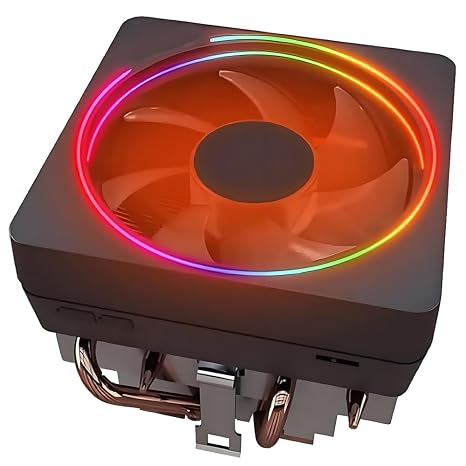
Running quietly while keeping temperatures in check makes it a solid choice for Ryzen 7 7800X3D builds on a budget. It suits anyone looking for a cooler that fits both AM4 and AM5 sockets and doesn’t complicate installation.
Its easiest win is efficient heat transfer, thanks to its copper base and heat pipes.
Setup is straightforward, with pre-applied thermal paste saving a step. The standard bracket on most AMD motherboards means mounting doesn’t need extra parts. During everyday use, the fan runs quietly at 14 dB, making background noise almost unnoticeable.
It manages airflow at 45 CFM and spins up to 2800 RPM when needed without being loud.
Cooling performance remains solid with an aluminum heatsink paired with a pure copper base and four 6 mm heat pipes. Build quality feels durable and practical, designed for long hours of use.
Positive notes highlight its quiet operation and cool running. Some mention compatibility concerns on motherboards where brackets are missing or have to be sourced separately.
Heat dissipation works well due to the copper base and four direct-contact heat pipes, keeping CPUs cool while running quietly for the most part. Main complaints come from needing a compatible motherboard bracket, which isn’t provided with the cooler and can cause installation delays.
Those wanting a quiet, budget-friendly cooler that fits AM4 or AM5 Ryzen builds will appreciate this model. Users lacking the right bracket on their motherboard or expecting ultra-low fan speeds during gaming sessions might want to look for alternatives.
Pros
- Quiet operation at 14 dB noise level
- Pre-applied thermal paste included
- Compatible with AM4 and AM5 sockets
- Efficient heat pipes and copper base design
Cons
- Requires motherboard bracket, not included
- Fan speed can get high under heavy load
| Specification | Details |
|---|---|
| Power Connector Type | 4-Pin |
| Voltage | 12 volts_of_direct_current |
| Wattage | 105 watts |
| Noise Level | 14 db |
| Maximum Rotational Speed | 2800 rpm |
| Air Flow Capacity | 45 cfm |
7. ARCTIC Liquid Freezer III Pro 360 CPU Cooler

Excellent cooling power and smart design make it a solid choice for Ryzen 7 7800X3D builds on a budget. It suits gamers and creators who want reliable liquid cooling without splurging.
The biggest strength lies in its efficient heat transfer thanks to the offset mounting and powerful fans.
Installation is straightforward with native mounting for both Intel and AMD, making it fit securely without fuss. The included ARCTIC P12 PRO fans run quieter than many alternatives, especially during light workloads, and ramp up nicely under load. The integrated VRM fan adds an extra layer of cooling to voltage regulators, helping maintain steady system performance day-to-day.
Cooling performance stands out with a maximum fan speed of 3000 rpm, delivering strong airflow up to 77 cfm and keeping temps well in check even under heavy use. The build feels solid with a carefully designed contact frame that distributes pressure evenly, improving longevity.
Praise often highlights its quiet operation and effective cooling, while some wish the setup took fewer steps.
Quiet operation and solid cooling are the biggest praises, with many appreciating the integrated VRM fan that helps maintain steady performance. The most common complaint regards the complexity of installation, which can feel lengthy to those new to liquid coolers.
Gamers and PC builders wanting effective cooling on a budget will find this a dependable choice, especially for high-demand CPUs like the Ryzen 7 7800X3D. Users seeking the simplest setup may prefer an easier-to-install air cooler.
Pros
- Efficient heat transfer with offset mounting design
- Quiet fans with strong airflow performance
- Integrated VRM fan for added voltage regulator cooling
- Optimized contact pressure distribution for CPU longevity
Cons
- Installation can be somewhat involved for beginners
- Maximum fan speed may be loud at full load
| Specification | Details |
|---|---|
| Cooling Method | Liquid |
| Maximum Rotational Speed | 3000 rpm |
| Air Flow Capacity | 77 cfm |
| Power Connector Type | 4-Pin |
| Voltage | 12 volts |
| Wattage | 3.96 watts |
8. Noctua NH-D15 chromax.Black CPU Cooler

An all-black dual-tower air cooler built from premium materials and designed to fit a wide range of color schemes, perfect for anyone running a Ryzen 7 7800X3D looking to balance quiet operation with strong cooling power. Its largest advantage is its cooling efficiency, rivalling many liquid coolers while staying near silent.
Setup involves installing the dual 140mm fans equipped with PWM speed control for automatic adjustments based on CPU temperature. The Low-Noise Adaptors help keep the system whisper quiet at idle, switching to full performance only under load.
Its wide, tall design with six heatpipes fits most desktop setups, though clearance around RAM should be checked due to its size.
Performance is solid, with airflow at 140.2 cubic meters per hour keeping temperatures down effectively, even in intense use cases. Reviews praise how quiet it stays despite strong cooling, though some note the cooler’s size can make installation and case compatibility tricky.
The all-black finish gives it a clean, modern look that suits many builds.
Quiet performance is a standout feature with fans barely audible at idle while still delivering excellent cooling under heavy tasks. The most common issue involves its large dimensions, which can interfere with nearby components or case clearance during installation.
Users wanting strong air cooling without noise complaints will appreciate this cooler, especially with ample case space. Those with compact builds or limited clearance might prefer a smaller or liquid cooler to avoid fitting problems.
Pros
- Quiet operation even under heavy load
- Powerful dual-fan, six-heatpipe cooling design
- Automatic speed control with PWM support
- Attractive all-black finish fits many builds
Cons
- Size may block RAM or cause installation challenges
- Relatively high height may not fit smaller cases
| Specification | Details |
|---|---|
| Power Connector Type | 4-Pin |
| Voltage | 12 volts |
| Cooling Method | Air |
| Noise Level | 24.6 dB |
| Maximum Rotational Speed | 1500 rpm |
| Air Flow Capacity | 140.2 cubic meter per hour |
9. Thermalright PS120SE CPU Air Cooler

Quiet operation stands out immediately with this air cooler, making it a strong choice for a Ryzen 7 7800X3D on a budget. It suits anyone looking for solid cooling performance without loud fan noise, especially in a mid-range build where keeping temperatures in check is important.
Setting up involves a 4-pin connector running at 12 volts, spinning up to 1650 rpm quietly enough at 25.6 dB. The design includes seven 6mm heatpipes with upgraded AGHP 4th generation technology, helping it cool efficiently regardless of orientation.
Day-to-day use involves reliable airflow at 66.17 cfm, meaning it handles typical Ryzen loads without trouble.
It cools within a 105W to 280W TDP range thanks to the inverted gravity heatpipe design, proving capable for a powerful CPU like the Ryzen 7 7800X3D. Build quality reflects Thermalright’s 20 years of experience, evident in sturdy mounting and materials. Praise often highlights quiet operation, while some find the size demands checking case clearance carefully.
Quiet operation is its best feature, making daily use comfortable even under load. The most frequent complaint concerns the cooler’s dimensions, which means it may not fit well in compact cases without measuring beforehand.
The cooler fits well for anyone needing a budget-friendly air solution with solid power and low noise. Users with tight case spaces or demanding extreme overclocking might want to explore alternatives better suited for small form factors or higher cooling capacity.
Pros
- Quiet operation despite powerful cooling
- Supports up to 280W TDP efficiently
- AGHP tech works in any orientation
- Solid build quality from experienced brand
Cons
- Size requires careful case compatibility check
- Fan speed maxes at 1650 rpm, limiting peak cooling
| Specification | Details |
|---|---|
| Cooling Method | Air |
| Maximum Rotational Speed | 1650 rpm |
| Noise Level | 25.6 dB |
| Air Flow Capacity | 66.17 cfm |
| Power Connector Type | 4-Pin |
| Wattage | 280 watts |
10. Thermalright Assassin X 120R Digital ARGB CPU Cooler

Picking a cooler that runs quietly while keeping the Ryzen 7 7800X3D cool is important, and this one stands out for controlling fan speed automatically based on temperature. It suits those looking for a budget-friendly air cooler that won’t require constant tweaking and keeps noise levels low during use.
Installation is straightforward with a 4-pin connector that adjusts the fan speed automatically thanks to PWM. The fan runs up to 2000 RPM but reduces speed when the CPU isn’t working hard.
Silicone pads help reduce vibration noise, so it stays quieter than many other coolers. The material quality feels solid, aimed at keeping both performance and noise in balance.
It cools effectively with good airflow at 70.84 cfm, matching well with the Ryzen 7 7800X3D’s demands. The build uses industrial-grade PBT+PC for safety and durability.
Many appreciate the quiet nature of the cooler, although some mention noise can increase when the fan hits top speed during heavy loads. It strikes a balance between solid cooling and sound levels.
The fan stays quiet under light to medium usage by adjusting speed automatically, but noise rises when it spins up to 2000 RPM during heavy CPU workloads. Users have praised the cooler’s balance of solid material construction and silent performance at typical temps.
People who want a low-maintenance cooler that keeps noise down most of the time will be happy with this option. Those looking for completely silent operation under sustained heavy loads might want to look at liquid cooling or larger air coolers.
Pros
- Automatic fan speed control with PWM function
- Quiet operation thanks to silicone corner pads
- Solid industrial-grade build materials
- Good airflow suited for Ryzen 7 7800X3D
Cons
- Fan noise increases at maximum 2000 RPM
- May require good case ventilation for best cooling
| Specification | Details |
|---|---|
| Maximum Rotational Speed | 2000 rpm |
| Noise Level | 29.8 db |
| Cooling Method | Air |
| Power Connector Type | 4-Pin |
| Air Flow Capacity | 70.84 cfm |
11. Thermalright Peerless Assassin 120 Vision MAX ARGB CPU Cooler
Keeping a Ryzen 7 7800X3D cool without spending a fortune is a common challenge. The Thermalright Peerless Assassin 120 Vision MAX ARGB offers air cooling that suits budget-conscious users who still want a standout feature: a built-in IPS LCD screen for real-time system monitoring right on the radiator.
Installation involves handling a magnetic top cover with the display, which easily attaches and adds customizable touches through TRCC software. The ARGB fan lighting syncs with motherboard controls to match your build’s style.
The 4-pin connector means standard fan control. Noise stays reasonable at 27 dB, while the fan spins up to 2150 rpm, adjusting quietly during regular use.
Cooling performance is solid thanks to six 6mm heat pipes using AGHP Gen 5.0 technology, which works well regardless of cooler orientation. The build puts practical heat dissipation first while adding a fresh visual element with ARGB lights and the display. Most praise centers on the screen’s usefulness; some find cleaning the radiator’s surface a bit tricky because of the screen and fan placement.
The display on the radiator is a well-liked feature, allowing users to keep an eye on system stats without extra software windows. However, some find the placement of the screen plus fan makes thorough cleaning inconvenient and fiddly.
Those who want both effective cooling and visual feedback without spending a ton will appreciate this cooler. People looking purely for maximum quietness or easy maintenance might consider alternatives with simpler designs.
Pros
- Built-in 5-inch IPS LCD for live monitoring
- ARGB lighting customizable via motherboard
- Effective AGHP heat pipe technology
- Quiet operation at 27 dB noise level
Cons
- Cleaning is harder with screen and fan in place
- Fan speed can get loud at max 2150 rpm
| Specification | Details |
|---|---|
| Cooling Method | Air |
| Noise Level | 27 dB |
| Maximum Rotational Speed | 2150 rpm |
| Air Flow Capacity | 69 cfm |
| Power Connector Type | 4-Pin |
12. Thermalright Frozen Notte 120 ARGB Liquid CPU Cooler

Handling up to 2800 RPM on the pump, this liquid CPU cooler suits those wanting solid cooling for the Ryzen 7 7800X3D without overspending. Its standout feature is the ARGB lighting synchronized easily with motherboards, combining aesthetic appeal and functional cooling.
Setting it up involves connecting the 4-pin power and syncing the ARGB with a 5V 3-pin header, making integration smooth. Day-to-day, the cooler runs quietly at 27.7 dB and manages airflow well at 72.37 CFM, keeping temperatures down without being noisy or distracting. The all-aluminum design with the mirror electroplated acrylic head adds some flair under the case window.
Performance is stable, thanks to the 0.1mm pitch copper base for heat transfer and a fast pump speed ensuring consistent cooling. Build quality feels reliable with durable materials used throughout.
Reviews often note excellent lighting effects, though some mention the fan speed topping out at 2000 RPM as a slight limit for more extreme overclocking.
Thermalright Frozen Notte 120 ARGB liquid cooler offers solid cooling with its copper base and fast pump speed, keeping Ryzen 7 7800X3D temperatures well under control during regular use. The synchronized ARGB lighting adds a nice touch for those who like custom PC aesthetics. Some find the installation somewhat fiddly and the fan a bit louder than expected.
People who want efficient cooling and like customizable lighting on a budget will appreciate this cooler. Those looking for super quiet operation or easier setup might want to consider alternatives with simpler installation and quieter fans. It suits mid-range builds where performance and style balance matters more than minimal noise levels.
Pros
- ARGB lighting syncs easily with motherboard
- Quiet operation at under 28 dB
- Solid cooling pump speed up to 2800 RPM
- Stylish aluminum and acrylic build
Cons
- Fan speed maxes out at 2000 RPM
- Lighting may require adequate motherboard headers
| Specification | Details |
|---|---|
| Maximum Rotational Speed | 2000 rpm |
| Noise Level | 27.7 db |
| Air Flow Capacity | 72.37 cfm |
| Voltage | 12 volts of direct current |
| Power Connector Type | 4-Pin |
Best Budget CPU Coolers for Ryzen 7 7800X3D Comparison
| Product | Cooling Method | Noise Level | Air Flow Capacity | Max Rotational Speed |
|---|---|---|---|---|
| Thermalright Peerless Assassin 120 SE | Air | 25.6 db | 66.17 cfm | 1550 rpm |
| Cooler Master Hyper 212 Black | Fan | 26 db | 42 cfm | 2500 rpm |
| Thermalright Peerless Assassin Vision MAX | Air | 27 db | 69 cfm | 2150 rpm |
| ARCTIC Liquid Freezer III Pro | Liquid | – | 77 cfm | 3000 rpm |
| Thermalright Assassin X120 Refined SE | Heat pipe and fan | 25.6 db | 66.17 cfm | 1550 rpm |
| AMD Wraith Prism Cooler | Fan | 14 db | 45 cfm | 2800 rpm |
| ARCTIC Liquid Freezer III Pro | Liquid | – | 77 cfm | 3000 rpm |
| Noctua NH-D15 chromax.Black | Air | 24.6 db | 140.2 m³/h | 1500 rpm |
| Thermalright PS120SE Air Cooler | Air | 25.6 db | 66.17 cfm | 1650 rpm |
| Thermalright Assassin X120R Digital ARGB | Air | 29.8 db | 70.84 cfm | 2000 rpm |
| Thermalright Peerless Assassin Vision MAX | Air | 27 db | 69 cfm | 2150 rpm |
| Thermalright Frozen Notte 120 ARGB | Water | 27.7 db | 72.37 cfm | 2000 rpm |
- Cooling MethodAir
- Noise Level25.6 db
- Air Flow Capacity66.17 cfm
- Max Rotational Speed1550 rpm
- Cooling MethodFan
- Noise Level26 db
- Air Flow Capacity42 cfm
- Max Rotational Speed2500 rpm
- Cooling MethodAir
- Noise Level27 db
- Air Flow Capacity69 cfm
- Max Rotational Speed2150 rpm
- Cooling MethodLiquid
- Noise Level–
- Air Flow Capacity77 cfm
- Max Rotational Speed3000 rpm
- Cooling MethodHeat pipe and fan
- Noise Level25.6 db
- Air Flow Capacity66.17 cfm
- Max Rotational Speed1550 rpm
- Cooling MethodFan
- Noise Level14 db
- Air Flow Capacity45 cfm
- Max Rotational Speed2800 rpm
- Cooling MethodLiquid
- Noise Level–
- Air Flow Capacity77 cfm
- Max Rotational Speed3000 rpm
- Cooling MethodAir
- Noise Level24.6 db
- Air Flow Capacity140.2 m³/h
- Max Rotational Speed1500 rpm
- Cooling MethodAir
- Noise Level25.6 db
- Air Flow Capacity66.17 cfm
- Max Rotational Speed1650 rpm
- Cooling MethodAir
- Noise Level29.8 db
- Air Flow Capacity70.84 cfm
- Max Rotational Speed2000 rpm
- Cooling MethodAir
- Noise Level27 db
- Air Flow Capacity69 cfm
- Max Rotational Speed2150 rpm
- Cooling MethodWater
- Noise Level27.7 db
- Air Flow Capacity72.37 cfm
- Max Rotational Speed2000 rpm
How to Choose the Right Budget CPU Cooler
Choosing the right budget CPU cooler for the Ryzen 7 7800X3D involves considering cooling efficiency, noise levels, and compatibility with your case. Prioritizing these factors ensures optimal performance and quieter operation, helping you avoid overheating issues and costly replacements down the line.
Compatibility and Socket Support
Coolers that don’t explicitly support the AM5 socket can cause headaches during installation or, worse, poor mounting pressure that leads to higher temperatures. It’s important to check that the mounting brackets match the motherboard’s layout exactly.
Some coolers list compatibility with multiple sockets but miss subtle differences in cooler standoff positions, which affects fit and contact.
Clearance around the CPU socket also matters because some boards pack components tightly near the RAM slots. A cooler designed without this in mind might block tall RAM modules or interfere with VRM heatsinks.
Look for detailed specs that include maximum supported RAM height and motherboard clearance measurements to avoid these issues.
Cooling Performance
Processors with a high TDP like the Ryzen 7 7800X3D need coolers that can reliably handle sustained heat output. Coolers with multiple thick heat pipes tend to perform better because they spread heat faster to the fins. Four to six heat pipes around 6 mm thick are a common practical range for this level of processor.
Pay attention to the fan’s airflow measured in CFM and RPM range. Higher airflow helps at peak load, but it’s only useful if the cooler’s fins and heat pipes can transfer the heat efficiently. Fans spinning between 1200 and 2000 RPM generally offer a good balance of airflow and noise for this kind of CPU.
Noise Levels
Fan noise becomes noticeable during gaming or intensive workloads, sometimes drowning out other system sounds. Quiet operation isn’t just about low decibel ratings; it’s how those ratings change at higher RPMs. A cooler might be silent at idle but loud under full load if the fan resists speed control.
PWM fan control provides better noise management by adjusting speed based on real-time temperature. Without it, fans often run at full speed unnecessarily causing more noise.
Check manufacturer specs or user reports for decibel levels at different RPMs to estimate what to expect in a noisy or quiet setup.
Size and Fit Constraints
Casing space constraints frequently cause poor fitment surprises. Some tall coolers can exceed 160 mm in height, which won’t fit in mid-tower or compact cases.
Measuring available clearance inside your actual case before buying avoids the hassle of returns or mounting failures.
Width is just as critical. Wide or bulky coolers can overhang RAM slots, especially with high-profile memory sticks.
This narrows your upgrade choices. Look for coolers specifically noting RAM clearance, often around 40 to 50 mm high, and check base designs for any protrusions that block PCIe slots or other components.
Build Quality and Materials
Heat sinks made from copper and aluminum provide a good balance between cost and thermal conductivity. Pure copper bases or pipes are common in better coolers because copper transfers heat faster, while aluminum fins keep weight manageable. Avoid coolers that use only aluminum near the base where heat dissipation is critical.
Fan longevity depends heavily on bearing quality. Sleeve bearings are cheap but wear out faster, causing more noise over time.
Ball or fluid dynamic bearings last longer and remain quieter. Solid, well-made mounting hardware also contributes to stable contact and reduces the chance of loosening after months of use.
Optimizing CPU Cooler Performance for Ryzen 7 7800X3D in Different Workloads
The Ryzen 7 7800X3D benefits from consistent cooling that adapts to varying workloads. High-intensity tasks like gaming or rendering push the CPU to generate more heat, so the cooler’s fan speed and airflow capacity become crucial. Lower power usage during light workloads means the cooler can operate quietly, conserving energy and reducing noise.
To optimize performance:
- Ensure the cooler has a solid contact patch with the CPU and properly applied thermal paste for efficient heat transfer.
- Set fan curves in the BIOS or through software to ramp up gradually as temperatures rise.
- Keep case airflow balanced to support the CPU cooler’s function, allowing heat to dissipate effectively.
Balancing cooler speed and noise, especially on budget models, helps maintain performance without overworking the fan or causing unnecessary sound levels.
Effective Maintenance Practices to Prolong the Lifespan of Your Budget CPU Cooler
Routine care extends the life of a budget CPU cooler by preventing dust buildup and mechanical wear. Dust accumulates on heatsinks and fan blades, reducing cooling efficiency and increasing operating temperatures.
Maintenance tips include:
- Regularly cleaning dust off the cooler using compressed air or a soft brush, ideally every few months.
- Checking that the fan spins smoothly without unusual noises, replacing it if it shows signs of bearing wear.
- Refreshing thermal paste when temperatures start rising or if the cooler is removed during upgrades.
Proper upkeep avoids overheating issues and keeps fans quieter over time, especially important for coolers on a budget that may not have high-end components.
Comparing Air and Liquid Cooling Alternatives for Ryzen 7 7800X3D Builds
Choosing between air and liquid cooling for the Ryzen 7 7800X3D depends on priorities like cost, noise, and case compatibility. Air coolers generally provide good performance at a lower price point and require less maintenance.
They use a large heatsink combined with one or more fans to dissipate heat.
Liquid coolers use a pump to move coolant through a radiator and block to carry heat away from the CPU more efficiently in many cases. They may offer better temperature control under heavy loads but often cost more and require more careful installation.
Considerations when selecting a cooler type:
- Air coolers tend to be simpler to install and more reliable long-term.
- Liquid coolers can provide quieter operation at higher performance levels but risk pump failure and leakages.
- Case size and airflow influence the choice, as radiators need adequate space and ventilation.
Both options can work well, but budget-conscious builds often benefit from a quality air cooler matched to the 7800X3D’s thermal profile.
People Also Asked
Will This CPU Cooler Fit Inside My PC Case?
Most budget CPU coolers for Ryzen 7 7800X3D will fit in standard mid-tower cases but check the cooler height against your case specs. Measuring clearance and noting RAM height near the socket can prevent fit issues.
How Do I Properly Install a Budget Cooler on Ryzen 7 7800X3D?
Clean the CPU surface, apply a thin layer of thermal paste, and secure the cooler firmly but not overly tight. Pay attention to cooler orientation for airflow matching your case fans.
Is a Budget Cooler Safe for Overclocking Ryzen 7 7800X3D?
Budget coolers can handle mild overclocking but may struggle under heavy loads, causing higher temperatures. Monitoring temps with software helps avoid thermal throttling or damage.
How Long Do Budget CPU Coolers Typically Last with Ryzen CPUs?
Budget coolers generally last several years but performance may decline as fans accumulate dust or bearings wear out. Cleaning the fan and heatsink regularly can extend their life.
What Common Problems Should I Watch for with Budget Coolers?
Watch for noisy fans, poor contact with the CPU, and dust buildup reducing cooling efficiency. Ensuring proper seating and occasional maintenance keeps the cooler running well.
Conclusion
Choosing a budget CPU cooler for the Ryzen 7 7800X3D mainly comes down to cooling performance, noise levels, and compatibility with your case. Make sure the cooler can handle the chip’s heat output without getting too loud. Also, check the height and mounting system to avoid fitting issues inside your PC build.
Consider the size of your case and how much you want to spend before making a final choice. For light or occasional use, a simpler cooler might be enough, but heavier loads need better cooling. Revisit the comparison table and product descriptions above to match those factors with your needs.

I’m Grant Mitchell, a firearms and hunting writer with years of experience at the range and in the field. I write about rifles, shotguns, handguns, optics, safe storage, cleaning, and responsible ownership, along with practical hunting tips. My goal is to share accurate, safety-first information that helps you choose the right firearm, maintain it properly, and become a more confident shooter.