Top 12 Best Bang for Buck CPU Cooler Deals You Can’t Miss
A dull hum and rising temperatures are familiar signs that a cheap or ill-fitting CPU cooler isn’t cutting it. Struggling with overheating or unexpectedly loud fans spoils the experience and can even throttle your system’s performance.
Finding the best bang for buck CPU cooler means balancing cost without sacrificing essential cooling efficiency that keeps your processor stable under load.
Key factors to watch for include the cooler’s material, aluminum fins are common, but copper heat pipes dramatically improve heat transfer. Size matters because a larger fan, typically 120mm or more, moves air more quietly while maintaining adequate airflow, roughly 40-70 CFM. Fit and compatibility are crucial; the cooler must match your CPU socket type and allow enough clearance inside the case.
Easy maintenance, like accessible fans for cleaning, can extend the unit’s life and maintain performance over time.
Need a Quick Check?
| Image | Product | Price |
|---|---|---|
Our Top Picks 1  | Thermalright Peerless Assassin 120 SE | Check Price |
Our Top Picks 2  | Thermalright Assassin X120 Refined SE | Check Price |
Our Top Picks 3  | Thermalright Assassin X120R Digital ARGB | Check Price |
Our Selected Top 12 Bang for Buck Cpu Cooler Worth Buying
This list features carefully chosen CPU coolers that offer great value for their cost. Each review explains how well the cooler performs, which users it suits best, and highlights its main advantages and disadvantages to help you make an informed decision.
1. Thermalright Peerless Assassin 120 SE CPU Cooler
Fans notice the quietness of this cooler right away. Designed for desktop CPUs, it suits builders seeking solid air cooling without a lot of noise. Its main strength lies in its ability to handle up to 265 watts while staying under 26 dB, making it a practical choice for mid-range to high-performance rigs.
Setting it up involves securing it with an anti falling off mounting bracket, something Thermalright supplies to ensure stability. The 4-pin 12-volt fan connector supports PWM control, so the fan speed adjusts based on CPU temperature.
Daily operation is calm thanks to its 25.6 dB noise level and air flow of 66.17 CFM keeps your processor cool without constant fan noise.
Performance-wise, the cooler manages heat effectively for desktops, supporting CPUs with significant wattage. The build quality is solid, reflecting Thermalright’s longstanding experience in computer accessories.
Common praise highlights its quiet operation alongside strong cooling performance. A noted complaint is that the fan speed topping at 1550 RPM might feel a little limited for aggressive overclocking enthusiasts.
Quiet operation remains a strong point, keeping noise low around 25.6 dB during normal CPU use. Reviews mention steady cooling performance, though some find the fan speed limit of 1550 RPM restrictive for very high heat output. This highlights its balance between noise and cooling capacity.
Builders looking for reliable, quiet cooling for most desktop CPUs will appreciate this cooler. Those needing maximum cooling power or pushing high overclocks might consider options with higher fan speeds or liquid cooling setups instead.
Pros
- Quiet operation under typical loads
- Good airflow at 66.17 CFM
- Supports up to 265 watts thermal design power
- PWM-controlled 4-pin fan connection
Cons
- Max fan speed capped at 1550 RPM
- Not ideal for extreme overclocking cooling needs
| Specification | Details |
|---|---|
| Cooling Method | Air |
| Power Connector Type | 4-Pin |
| Voltage | 12 volts |
| Noise Level | 25.6 db |
| Maximum Rotational Speed | 1550 rpm |
| Air Flow Capacity | 66.17 cfm |
2. Thermalright Assassin X120 Refined SE CPU Cooler
Picking a CPU cooler that balances solid cooling without making too much noise is key for many desktop builders. The Thermalright Assassin X120 Refined SE fits the bill for those wanting dependable heat pipe and fan-based cooling that won’t break the bank but keeps temperatures down effectively.
Setup feels straightforward thanks to its standard mounting that fits most desktop CPUs easily. The fan connectors are 4-pin, supporting PWM control, so you can dial back noise when full power isn’t necessary. Day-to-day, the 25.6 dB noise level is fairly quiet, and the fan’s max 1550 rpm speed means it adapts to higher thermal loads when gaming or heavy tasks pop up.
The cooler handles heat well during long sessions, using a combination of heat pipes and a fan that pushes 66.17 CFM, which is nice airflow for its size. The build quality is reliable and solid, with customer feedback often praising its effective cooling performance. Some mention it’s not completely silent, pointing out the slight fan noise under load as a downside.
The cooling performance stands out as solid, with many noting it keeps CPU temperatures in check while not creating a loud environment. The only common drawback is the increase in fan noise when the system is stressed, which some find distracting.
People who want effective, quiet base-level cooling at a good value will find it suits their needs well. Those prioritizing ultra-quiet operation or more advanced cooling features might want to look at higher-end options.
Pros
- Quiet fan operation even at higher speeds
- Strong airflow capacity with 66.17 CFM
- Supports PWM for flexible speed control
- Relatively easy to install on most desktops
Cons
- Fan noise becomes noticeable under heavy loads
- Limited advanced features compared to pricier coolers
| Specification | Details |
|---|---|
| Power Connector Type | 4-Pin |
| Voltage | 12 volts of direct current |
| Cooling Method | Heat pipe and fan-based |
| Noise Level | 25.6 db |
| Maximum Rotational Speed | 1550 rpm |
| Air Flow Capacity | 66.17 cfm |
3. Thermalright Assassin X120R Digital ARGB CPU Cooler
Keeping your CPU cool without spending a fortune can be challenging, especially when noise and space matter. The Thermalright Assassin X120R Digital ARGB is a compact air cooler that suits desktops needing strong airflow with quiet operation.
Its biggest strength lies in balancing solid cooling performance and adjustable fan speeds through PWM control.
Setting it up is straightforward with its 4-pin power connector that lets the fan speed adjust automatically based on your motherboard’s temperature readings. Fans run up to 2000RPM but manage to stay quiet thanks to silicone corner pads that soften rotation noise. The materials feel durable, including industrial-grade insulation and a solid fan bearing designed to limit vibration or shaking during use.
The cooler handles CPU temperatures well with airflow reaching 70.84 cfm while producing less than 30 dB of noise, which is acceptable for many builds. Its build quality feels dependable with attention to reducing fan vibration.
Strong praise from users focuses on its quiet cooling performance, while a common complaint involves the relatively small fan size which might limit cooling power on more demanding CPUs.
The fan delivers good cooling quietly thanks to silicone corner pads and reliable bearings, reducing noise and vibration. Common concerns include the smaller size fan which might struggle with CPU heat in high-demand scenarios.
This cooler fits well for anyone wanting decent cooling performance without noise creeping up and who uses mid-range CPUs. Those running high-end or overclocked processors might want a larger or liquid cooling option for better heat management.
Pros
- Adjustable fan speed with PWM control
- Quiet operation with noise-dampening pads
- Durable industrial-grade materials
- Effective airflow for its size
Cons
- Smaller fan limits cooling on hotter CPUs
- Fan vibration possible without careful mounting
| Specification | Details |
|---|---|
| Maximum Rotational Speed | 2000 rpm |
| Air Flow Capacity | 70.84 cfm |
| Noise Level | 29.8 db |
| Power Connector Type | 4-Pin |
| Voltage | 12 volts_of_direct_current |
4. Be Quiet! Dark Rock 5 CPU Cooler

With a cooling capacity of 210 watts, this CPU cooler is designed for those who push their systems hard and need reliable temperature control. It suits builders focused on high performance with quiet operation, thanks to a fan designed for low noise and high air pressure.
Installation works well on a variety of sockets including Intel 1851/1700/1200/1151/1150/1155 and AMD AM5/AM4. The 4-pin connector supports PWM for automatic fan speed adjustments based on load.
The Silent Wings 4 fan reduces vibrations with a rubberized frame, keeping the noise down during long sessions. It’s bulkier than some coolers, so checking case clearance beforehand is wise.
Cooling happens through six copper heat pipes paired with dense aluminum fins coated in a heat-conductive ceramic layer, showing strength in maintaining low temperatures under heavy CPU usage. The fan spins up to 2100 rpm, moving 55 cfm of air quietly at 29.8 db.
A common praise is its quietness during intense workloads, though some mention its size can create fitting challenges in smaller cases.
Quietness during heavy use is the product’s standout feature, making it ideal for users wanting low noise without sacrificing cooling power. The most frequent drawback relates to its size, requiring careful consideration of case compatibility before purchase.
Gamers and content creators running demanding CPUs will appreciate the cooling and noise balance. Those with compact builds or tight case clearances might want to look for smaller coolers better suited to limited space.
Pros
- Supports a wide range of Intel and AMD sockets
- Very quiet operation under load
- High cooling capacity with six copper heat pipes
- Rubberized fan frame reduces vibration noise
Cons
- Large size may not fit smaller cases
- Fan speed max can be loud at full RPM
| Specification | Details |
|---|---|
| Power Connector Type | 4-Pin |
| Voltage | 12 volts |
| Wattage | 210 watts |
| Cooling Method | Air |
| Maximum Rotational Speed | 2100 rpm |
| Air Flow Capacity | 55 cfm |
5. ARCTIC Liquid Freezer III Pro 360 AIO CPU Cooler

Anyone aiming for solid cooling on high-performance CPUs will find this cooler suits heavy workloads well. It stands out with an integrated VRM fan that helps keep motherboard components cool, making it a great pick for gamers and overclockers looking for reliable temperature control.
Installing the cooler involves dealing with a few mounting options since it supports Intel LGA1851 and LGA1700 sockets with an optimized contact frame. The native offset mounting directs the cold plate toward the CPU hotspot, improving heat transfer efficiency. The Arctic P12 Pro fans run quietly at low speeds yet ramp up to maintain strong airflow when the system is pushed hard, while the VRM fan turns on automatically to keep voltage converters cool.
Heat dissipation works well thanks to the liquid cooling method combined with a maximum fan speed of 3000 rpm that pushes 77 cfm of air. Build quality feels sturdy, and the quiet operation is often praised, though some mention the fans can get loud at peak speeds.
A common point that comes up is the complexity of installation due to the size and multiple mounting pieces.
The integrated VRM fan is frequently highlighted for preventing voltage converter overheating, supporting stable performance. On the flip side, many notice the fans become loud when pushed to top speed, which could affect noise-sensitive setups. The cooler’s size and mounting system demand patience during installation, especially on compact builds.
Gamers and overclockers will appreciate its strong cooling and VRM support, making it fit for intense CPU use. People prioritizing quiet operation or simpler installation may want to look at alternatives with smaller footprints or fewer components to install.
Pros
- Integrated VRM fan improves motherboard cooling efficiency
- P12 Pro fans powerful yet quieter than standard models
- Optimized contact pressure extends CPU lifespan
- Supports latest Intel sockets natively
Cons
- Fans can be noisy at maximum speed
- Installation is somewhat complex and bulky
| Specification | Details |
|---|---|
| Cooling Method | Liquid |
| Maximum Rotational Speed | 3000 rpm |
| Air Flow Capacity | 77 cfm |
| Power Connector Type | 4-Pin |
| Voltage | 12 volts |
| Wattage | 3.96 watts |
6. ARCTIC Liquid Freezer III Pro 360 A-RGB AIO Cooler

Offering a powerful cooling solution tailored for modern Intel and AMD CPUs, the ARCTIC Liquid Freezer III Pro 360 A-RGB stands out due to its integrated VRM fan and optimized cold plate placement. It’s ideal for those seeking consistent temperature control under heavy loads without sacrificing noise levels.
Installation is manageable with native offset mounting designed for Intel and AMD sockets, including LGA1851 and LGA1700. The contact frame optimizes pressure distribution, which helps both CPU lifespan and heat transfer. Daily operation benefits from the quieter P12 PRO fans that adjust speed smoothly and deliver strong airflow, keeping the system cool and quiet while the VRM fan works in the background to stabilize power components.
Cooling performance is excellent, providing reliable heat dissipation even during sustained high usage thanks to its 77 cfm airflow and 3000 rpm maximum speed. The build quality is solid, focusing on durability and efficiency with a liquid cooling method.
Users often praise the quiet operation alongside strong cooling, while some mention that the larger radiator size requires compatible case space for full benefit.
The ARCTIC Liquid Freezer III Pro 360 A-RGB is often praised for its quiet operation combined with powerful cooling, keeping both CPU and VRMs stable during intense use. Some users find the radiator size demanding on case compatibility, which can limit setups in smaller builds.
This cooling setup suits enthusiasts who run resource-heavy tasks or want reliable thermal management with extra care for CPU longevity. Those with compact gaming rigs or restricted chassis space might need to consider more compact coolers that fit their hardware better.
Pros
- Quiet P12 PRO fans with strong airflow
- Integrated VRM fan for better voltage converter cooling
- Optimized contact pressure for improved heat transfer
- Supports latest Intel sockets LGA1851 and LGA1700
Cons
- Large radiator size requires spacious PC case
- Higher maximum fan speed can be noticeable under heavy load
| Specification | Details |
|---|---|
| Power Connector Type | 4-Pin |
| Voltage | 12 volts |
| Wattage | 3.96 watts |
| Cooling Method | Liquid |
| Maximum Rotational Speed | 3000 rpm |
| Air Flow Capacity | 77 cfm |
7. ID-COOLING SE-903-XT V2 CPU Air Cooler

ID-COOLING SE-903-XT V2 is a compact CPU air cooler designed for desktop systems aiming for solid cooling without taking up much space. It suits users who want reliable performance with a quieter fan and sturdy build to last through long gaming or work sessions.
Installing the cooler is straightforward thanks to its secure fan clip design and reinforced fin locking, which keeps everything tightly in place. The upgraded 100mm fan ushers in better airflow than its smaller predecessor without increasing noise significantly. Daily use brings in a good balance of airflow and quiet operation, making it suitable for people running mid-range to slightly demanding workloads.
Cooling power hits up to 150 watts, which handles everyday tasks and gaming fairly well. The aluminum fins stay solid due to the enhanced fin-lock structure, which also cuts down on vibration.
Common praise centers on its quiet fan and solid build quality, while typical complaints mention that it might not cool the highest-end CPUs as aggressively as larger coolers.
Strong points include a quiet operation and sturdy construction thanks to improved fin and fan clip designs. The main downside noted is that it may not cool the hottest or most power-hungry processors thoroughly, making it less ideal for overclocking or extreme builds.
This cooler fits well with users who seek good cooling for mid-range CPUs in compact builds, valuing quiet fans and durability. Those needing to tame high-TDP processors or aiming for serious overclocking should consider larger or more powerful alternatives.
Pros
- Compact size fits many desktop cases
- Quiet 100mm fan with strong airflow
- Durable fin-lock and secure fan clips
- Handles up to 150W CPUs efficiently
Cons
- May struggle with very high-end CPUs
- Fan speed maxes at 2500 rpm only
| Specification | Details |
|---|---|
| Cooling Method | Air |
| Wattage | 150 watts |
| Power Connector Type | 4-Pin |
| Maximum Rotational Speed | 2500 rpm |
| Noise Level | 29.1 db |
| Air Flow Capacity | 47.1 cfm |
8. Thermalright Peerless Assassin 120 Vision MAX ARGB CPU Cooler

Cooling your CPU doesn’t have to mean a compromise on style or functionality. Designed for desktop users looking for strong cooling without much noise, this cooler stands out for its built-in 5-inch IPS LCD screen, adding a unique touch with real-time system monitoring. Its dual-tower setup and fast fans deliver solid performance for the price.
Setting it up involves handling a dual-tower layout with two fans that spin up to 2150 RPM. The screen on top magnetically attaches to the cover, making it easy to swap or customize through the TRCC control software. Daily operation stays quiet at 27 db, and seeing your system stats right on the cooler keeps things convenient.
Six copper heat pipes and a nickel-plated base provide good heat transfer, making it effective at keeping CPU temps down. The cooler is sturdy and well-assembled, but some mention that the size can create tight spaces inside the case. Noise levels are low, but the fan speed might be a little high for those wanting near silence.
The cooler receives praise for its excellent heat transfer and unique display that shows system parameters, while its main downside remains the size and occasional noise at higher fan speeds. This reflects a balance between strong performance and physical space demands.
Those who want effective cooling with the added bonus of a real-time display will find it appealing. Users with compact cases or who need ultra-quiet operation might prefer a smaller or quieter alternative.
Pros
- Built-in 5-inch IPS LCD screen for real-time monitoring
- Strong cooling with six pure copper heat pipes
- Quiet operation at 27 db in regular use
- Dual-tower design improves heat dissipation
Cons
- Bulky size may challenge tight PC builds
- Fan speed can be loud during peak loads
| Specification | Details |
|---|---|
| Power Connector Type | 4-Pin |
| Cooling Method | Air |
| Noise Level | 27 db |
| Maximum Rotational Speed | 2150 rpm |
| Air Flow Capacity | 69 cfm |
9. Thermalright Phantom Spirit 120SE CPU Cooler

Great value for anyone needing a reliable CPU cooler that handles a wide range of TDPs. It’s especially suited for desktops powering mid to high-end processors. Its standout feature is the upgraded 4th generation AGHP heatpipe technology, which lets it handle CPUs with TDP from 105W up to 280W efficiently.
Setting it up is straightforward, with a simple mounting system that fits most desktop sockets. The 4-pin power connector gives you fan speed control with a max of 1500 rpm, balancing cooling power and noise well.
Daily use is quiet at 25.6 dB, keeping your system cool without being distracting, and the decent 66.17 cfm airflow keeps temperatures in check under load.
It cools solidly thanks to the seven 6mm heatpipes using the AGHP tech, engineered for good heat transfer regardless of fan orientation. The build quality feels sturdy, focusing on functional materials rather than fancy design. Most users praise the temperature control and quiet operation, though some mention that bigger RAM modules could interfere with the cooler’s side clearance.
The cooler receives high marks for maintaining solid temperature control and quiet fan noise thanks to its advanced heatpipe design. Common feedback points to occasional clearance issues with taller RAM sticks, making layout planning important.
It suits anyone needing effective air cooling for mid to high-end CPUs while prioritizing quiet performance. Users with compact builds or unusual RAM heights may want to explore other options to avoid fit problems.
Pros
- Handles wide TDP range up to 280W effectively
- Quiet operation at 25.6 dB
- Strong airflow of 66.17 cfm
- Supports multiple mounting orientations
Cons
- Might block tall RAM modules on some motherboards
- Build focuses on function, less on aesthetics
| Specification | Details |
|---|---|
| CPU Cooler TDP | 105W to 280W |
| Fan Noise Level | 25.6 dB |
| Max Fan Speed | 1500 rpm |
| Airflow Capacity | 66.17 cfm |
| Cooling Method | Air |
| Power Connector Type | 4-Pin |
10. Thermalright Assassin X90 SE V2 CPU Cooler

Aluminum fins and a 4-pin 12-volt fan make for a solid air cooling setup with the Thermalright Assassin X90 SE V2. It suits desktop builders looking for good cooling performance without breaking the bank, where quiet operation is a priority. Its biggest strength lies in balancing noise and airflow effectively.
Setup is simple thanks to mounting brackets that fit most desktop CPUs, making installation quick and easy. The fan spins at a maximum speed of 2200 rpm, providing enough airflow of 32.77 cfm to keep temperatures controlled under typical workloads.
Noise stays around 25 db, which keeps the system quieter during regular use.
It cools reliably with decent airflow and does the job without loud interruptions. The build quality feels solid with standard materials, ensuring durability. Praise highlights its quiet performance, while some mention that cooling could improve under heavy loads, pointing to limits in heat dissipation for high-power CPUs.
Most users appreciate the quiet operation paired with adequate airflow for general desktop use. The most common downside is the cooler’s limited performance when handling more demanding or heat-intensive processors.
Those running mid-range or standard desktop CPUs will find it suitable and cost-effective. For heavy overclockers and users with high thermal demands, exploring more powerful cooling options is advisable.
Pros
- Quiet operation at 25 db
- Easy installation with mounting brackets
- Good airflow of 32.77 cfm
- Low power consumption of 1.2 watts
Cons
- May struggle with high-power CPUs
- Cooling not optimal under heavy loads
| Specification | Details |
|---|---|
| Power Connector Type | 4-Pin |
| Voltage | 12 volts |
| Wattage | 1.2 watts |
| Noise Level | 25 db |
| Maximum Rotational Speed | 2200 rpm |
| Air Flow Capacity | 32.77 cfm |
11. Thermalright Assassin X120R SE Plus CPU Cooler
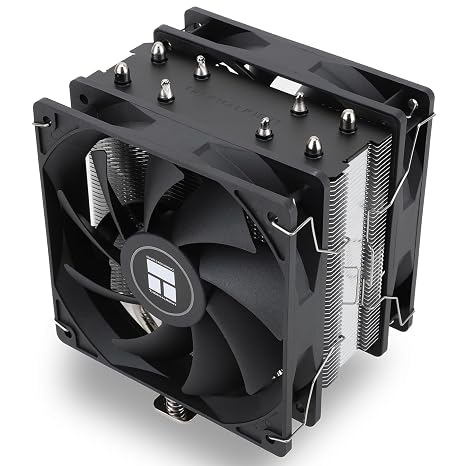
Quiet operation stands out as the first thing you’ll notice with the Thermalright Assassin X120R SE Plus CPU cooler. Designed for desktop setups, it fits well for those seeking reliable air cooling with minimal noise.
Its single biggest strength lies in how quietly it runs while maintaining solid airflow.
Setting it up is straightforward, thanks to the standard 4-pin power connector and support for common mounting brackets. Daily use involves a gentle hum at about 15 dB, barely noticeable during normal tasks.
The fan speed peaks at 1500 rpm, providing a good balance between cooling and quietness. Airflow of 58 CFM keeps temperatures in check without drawing too much power.
The cooler handles heat dissipation well for an air-based system and feels sturdy when installed. Thermalright’s experience shows in the quality materials and build, delivering consistent performance.
Much appreciation centers on its low noise and consistent airflow, though some users point out that cooling capacity isn’t aimed at high-end overclocking.
Users appreciate the very low noise output combined with reliable airflow that keeps typical desktop CPUs well-cooled. A common drawback is that it may fall short for those pushing their processors to extreme performance levels.
Ideal for anyone prioritizing quiet operation and decent cooling without overclocking demands. Those needing maximum cooling power for heavy workloads should look at more advanced options.
Pros
- Runs quietly at just 15 dB noise level
- Good airflow capacity of 58 CFM
- Uses a standard 4-pin connection
- Sturdy build quality from experienced brand
Cons
- Cooling not suited for heavy overclocking
- Power consumption could be lower
| Specification | Details |
|---|---|
| Power Connector Type | 4-Pin |
| Voltage | 12 volts |
| Wattage | 1.56 watts |
| Noise Level | 15 dB |
| Maximum Rotational Speed | 1500 rpm |
| Air Flow Capacity | 58 CFM |
12. Thermalright Assassin Spirit 120 V2 Plus CPU Cooler

Choosing solid cooling without overspending is easy with the Thermalright Assassin Spirit 120 V2 Plus. It suits desktop users needing reliable, quiet air cooling without complicated setups. Its biggest strength is balancing airflow and noise to keep temperatures down while staying unobtrusive.
Installation is straightforward, thanks to a well-designed mounting bracket that fits most desktop CPUs. The 4-pin connector allows easy fan speed control through your motherboard. Running at a maximum of 1500 rpm, the fan is quiet, hovering around 25.6 dB, which keeps operation subtle during everyday use without sacrificing airflow at 58 cfm.
It performs capably at heat dissipation, holding up well under typical loads thanks to its efficient air-cooling design. The build is sturdy, reflecting over 20 years of Thermalright’s experience in thermal solutions. Positive notes often highlight its quietness, though some have mentioned the maximum fan speed could be higher for heavy-duty cooling needs.
The fan is praised for being especially quiet during normal use, making it pleasant in quiet rooms. A common drawback is the capped fan speed which may not suffice for overclocked or very high TDP processors. The cooler handles everyday desktop demands cleanly without fuss.
This cooler suits users focused on silent operation and steady performance for mainstream tasks. Those running high-end gaming rigs or heavy multi-threaded work might look for higher speed or more powerful cooling options to manage temperatures under load.
Pros
- Quiet fan operation at 25.6 dB
- Good airflow at 58 cfm
- Wide compatibility with desktop CPUs
- Simple, secure mounting system
Cons
- Maximum fan speed limited to 1500 rpm
- May struggle with extremely high thermal loads
| Specification | Details |
|---|---|
| Power Connector Type | 4-Pin |
| Voltage | 12 volts |
| Cooling Method | Air |
| Noise Level | 25.6 db |
| Maximum Rotational Speed | 1500 rpm |
| Air Flow Capacity | 58 cfm |
Best Bang for Buck CPU Coolers Comparison Table
| Product | Cooling Method | Noise Level (db) | Air Flow Capacity (cfm) | Maximum Rotational Speed (rpm) |
|---|---|---|---|---|
| Thermalright Peerless Assassin 120 SE | Air | 25.6 | 66.17 | 1550 |
| Thermalright Assassin X120 Refined SE | Heat pipe and fan | 25.6 | 66.17 | 1550 |
| Thermalright Assassin X120R Digital ARGB | Air | 29.8 | 70.84 | 2000 |
| be quiet! Dark Rock 5 | Air | 29.8 | 55 | 2100 |
| ARCTIC Liquid Freezer III Pro | Liquid | – | 77 | 3000 |
| ARCTIC Liquid Freezer III Pro | Liquid | – | 77 | 3000 |
| ID-COOLING SE-903-XT V2 | Air | 29.1 | 47.1 | 2500 |
| Thermalright Peerless Assassin 120 Vision | Air | 27 | 69 | 2150 |
| Thermalright Phantom Spirit 120SE | Air | 25.6 | 66.17 | 1500 |
| Thermalright Assassin X90 SE V2 | Air | 25 | 32.77 | 2200 |
| Thermalright Assassin X120R SE Plus | Air | 15 | 58 | 1500 |
| Thermalright Assassin Spirit 120 V2 | Air | 25.6 | 58 | 1500 |
- Cooling MethodAir
- Noise Level (db)25.6
- Air Flow Capacity (cfm)66.17
- Maximum Rotational Speed (rpm)1550
- Cooling MethodHeat pipe and fan
- Noise Level (db)25.6
- Air Flow Capacity (cfm)66.17
- Maximum Rotational Speed (rpm)1550
- Cooling MethodAir
- Noise Level (db)29.8
- Air Flow Capacity (cfm)70.84
- Maximum Rotational Speed (rpm)2000
- Cooling MethodAir
- Noise Level (db)29.8
- Air Flow Capacity (cfm)55
- Maximum Rotational Speed (rpm)2100
- Cooling MethodLiquid
- Noise Level (db)–
- Air Flow Capacity (cfm)77
- Maximum Rotational Speed (rpm)3000
- Cooling MethodLiquid
- Noise Level (db)–
- Air Flow Capacity (cfm)77
- Maximum Rotational Speed (rpm)3000
- Cooling MethodAir
- Noise Level (db)29.1
- Air Flow Capacity (cfm)47.1
- Maximum Rotational Speed (rpm)2500
- Cooling MethodAir
- Noise Level (db)27
- Air Flow Capacity (cfm)69
- Maximum Rotational Speed (rpm)2150
- Cooling MethodAir
- Noise Level (db)25.6
- Air Flow Capacity (cfm)66.17
- Maximum Rotational Speed (rpm)1500
- Cooling MethodAir
- Noise Level (db)25
- Air Flow Capacity (cfm)32.77
- Maximum Rotational Speed (rpm)2200
- Cooling MethodAir
- Noise Level (db)15
- Air Flow Capacity (cfm)58
- Maximum Rotational Speed (rpm)1500
- Cooling MethodAir
- Noise Level (db)25.6
- Air Flow Capacity (cfm)58
- Maximum Rotational Speed (rpm)1500
How to Choose the Best Value CPU Cooler
Focus on cooling efficiency, noise levels, and compatibility with your CPU and case when selecting a value CPU cooler. Prioritizing these factors ensures reliable performance and quiet operation while avoiding extra costs from poor fit or inadequate cooling, ultimately saving money and preventing frustration.
Cooling Performance
Overheating during gaming or rendering sessions can throttle your CPU, causing noticeable slowdowns and occasional system restarts. The cooler’s ability to handle the CPU’s thermal design power (TDP) rating is crucial here.
A cooler matched to or exceeding this rating prevents temperature spikes that underperforming units can’t manage. Key to this are the heat pipes and the fin stack; multiple heat pipes made of copper transfer heat more effectively than single or aluminum-only models, while a dense array of fins increases surface area for faster cooling.
The fan design also impacts how quickly hot air leaves the cooler. Look for fans with good static pressure, often indicated by their RPM and blade shape, which push air through the fins efficiently.
A solid balance between heat pipes, fins, and fan quality means your processor stays cooler under varying workloads, keeping performance stable during long use.
Size and Compatibility
A large cooler may promise better heat dissipation, but it can cause headaches in tighter cases or conflict with tall RAM modules. Measuring your case’s available height clearance and motherboard layout is a must.
Some coolers extend far beyond the CPU socket, blocking memory slots or even PCIe ports. Models compatible with common sockets like AM4, LGA 1200, or LGA 1700 often list this clearly, but checking fan and heatsink dimensions gives a clearer picture.
Height, width, and depth matter here, along with how far the fan sticks out from the heatsink. A slimmer profile or offset fan position can reduce interference with RAM, especially if your memory has large heat spreaders. Keeping clearance in mind spares you from dicing with components and ensures smooth assembly and upgrades down the line.
Noise Levels
Some coolers sound like jet engines once the CPU hits load, while others run quietly even under heavy tasks like video editing. The difference often lies in fan speed control options and noise dampening materials. PWM fans adjust speed dynamically based on temperature, reducing noise during idle or light use.
Fans with sleeve or fluid dynamic bearings tend to run quieter and last longer than basic ball bearings. Also, some models include rubber pads or frame designs that reduce vibration noise.
For daily use, a cooler that balances airflow without excessive noise improves the overall experience, especially if your PC sits close to you during work or play.
Build Quality and Materials
The longevity of a cooler depends heavily on its materials. Copper heat pipes provide better heat transfer than aluminum but typically cost more, while aluminum fins help keep weight and price down. A combination is common, with copper pipes embedded in aluminum fins for a reasonable balance.
Fans with high-quality bearings and motors avoid rattling and premature failure. Mounting hardware should be sturdy and well-designed to hold the cooler firmly against the CPU, as loose contact leads to poor heat conduction.
Cheap plastic clips rarely offer the same grip or durability as metal brackets and screws, so investing in good build quality pays off long-term.
Ease of Installation and Maintenance
Installing some coolers feels straightforward, while others require fiddly steps or removing the motherboard. Quick-mounting systems with clear instructions save time and reduce frustration.
Included accessories like mounting brackets and thermal paste simplify the process further.
Regular maintenance matters for longevity; a cooler designed so you can clean dust from fans or fins without disassembling everything is easier to keep performing well. Clear manuals and compatibility with common cooler accessories, like upgraded fans or backplates, also make upgrades smoother without needing a full teardown.
Optimizing CPU Cooler Performance with Proper Installation Techniques
Correct installation is key to getting the most from a CPU cooler. Applying the right amount of thermal paste can make a big difference. Too much paste leads to poor heat conduction, while too little creates air gaps. Spread the paste evenly and thinly over the CPU surface.
Ensuring the cooler sits flat and tight against the processor prevents heat buildup. Check that mounting brackets align properly; any tilt reduces contact and cooling efficiency.
It’s important to secure screws with consistent pressure, avoiding over-tightening that can crack the CPU or motherboard. Cable management also plays a role, loose or obstructed fan cables can reduce airflow. Finally, placing the PC case in a location with good ventilation helps dissipate heat collected by the cooler.
Proper installation isn’t complicated but requires careful attention to these details to keep temperatures down and maintain stable performance.
Common Mistakes to Avoid When Choosing and Using CPU Coolers
Many people pick CPU coolers based on looks or brand without considering compatibility. A cooler that doesn’t fit the motherboard socket or case won’t work no matter how good the specs are. Check cooler dimensions against your PC case to ensure clearance above RAM modules and other components. Avoid models with fans that spin too slowly or too fast; slow fans deliver poor airflow, while fast fans can produce excessive noise.
Some users skip thermal paste during installation, which reduces the cooler’s effectiveness. Using generic or low-quality paste makes a difference compared to brand-specific or high-quality compounds.
Also, mixing types, like using air cooling in a heavily overclocked CPU that really needs liquid cooling, can cause heat issues. Confirm your CPU’s TDP rating and buy a cooler rated accordingly.
This prevents problems like thermal throttling or system instability during intense tasks.
Comparing Air Cooling and Liquid Cooling Solutions for Maximum Value
Air coolers and liquid coolers each offer advantages depending on what you need from your setup. Air coolers tend to cost less and have fewer points of failure since they rely on a simple heatsink and fan assembly. They work well for most users who don’t push their CPU too hard and provide easier maintenance.
Liquid coolers circulate coolant through tubes to a radiator, enabling faster heat dissipation especially under heavy loads or overclocking. However, they usually come at a higher price and require more careful installation and occasional upkeep to avoid leaks. For many builds, a quality air cooler delivers sufficient performance at a lower cost and simpler setup.
Choosing a liquid cooler pays off if you aim for lower temperatures at higher CPU clocks or want a quieter system due to large, slow-spinning radiator fans.
People Also Asked
How Do I Know If My CPU Cooler Fits My Case?
Check the dimensions of your CPU cooler and compare them with your case specifications, especially clearance around the CPU socket and RAM slots. Make sure the cooler’s height fits within the CPU area of your case to avoid installation problems.
What Maintenance Is Needed to Keep a CPU Cooler Working Well?
Dust buildup on fans and heatsinks should be cleaned regularly, usually every few months. You can use compressed air or a soft brush; this helps keep airflow unobstructed and cooling effective.
Can CPU Coolers Cause Damage If Installed Incorrectly?
Installing a CPU cooler incorrectly can harm your CPU or motherboard by causing poor heat transfer or physical damage. Ensure the cooler is firmly and evenly mounted with the correct amount of thermal paste to avoid overheating or hardware failure.
How Long Does a Typical CPU Cooler Last Before Needing Replacement?
CPU coolers typically last many years, often as long as the CPU itself, but fan bearings may wear out after 3-5 years. Monitor fan noise or performance drops; replacing just the fan can extend the cooler’s life without buying a whole new unit.
What Are Common Issues with CPU Coolers and How to Fix Them?
Common problems include fan noise, overheating due to dust, or loose mounting. Tighten screws if needed, clean the cooler regularly, and replace faulty fans to keep your system running cool and quiet.
Conclusion
Choosing the best bang for buck CPU cooler means focusing on effective cooling performance, noise level, and price. A cooler that keeps your CPU temperatures down without being too loud or expensive provides good value. Durability and ease of installation also matter but come second to how well it cools and fits your budget.
Consider the size of your case and your budget before making a choice. When you only need moderate cooling, a budget model might suffice, but intense workloads require a bigger cooler. Use the comparison table and reviews above to find an option that balances these factors for your setup and usage.

I’m Grant Mitchell, a firearms and hunting writer with years of experience at the range and in the field. I write about rifles, shotguns, handguns, optics, safe storage, cleaning, and responsible ownership, along with practical hunting tips. My goal is to share accurate, safety-first information that helps you choose the right firearm, maintain it properly, and become a more confident shooter.