Top 12 Best Air Cooler RGB That Will Blow Your Mind!
Spending warm days feeling little relief from a cheap air cooler is frustrating. A poorly designed cooler can be noisy, use too much power, or lack the airflow strength needed to actually lower room temperature.
Choosing the best air cooler rgb means finding a device that balances cooling efficiency with features like customizable lighting, which adds atmosphere without sacrificing function.
Good air coolers with RGB lighting stand out by combining sufficient airflow, usually between 300 to 500 cubic feet per minute, with energy-efficient motors that don’t spike electricity costs. The build quality matters too; coolers with washable filters and sturdy materials last longer and are easier to maintain.
A size that fits the room ensures the cooler can circulate air properly without being over- or underpowered. Safety features such as automatic shutoff when tipped over help you feel secure during everyday use.
Need a Quick Check?
| Image | Product | Price |
|---|---|---|
Our Top Picks 1  | Thermalright Assassin X120 SE | Check Price |
Our Top Picks 2 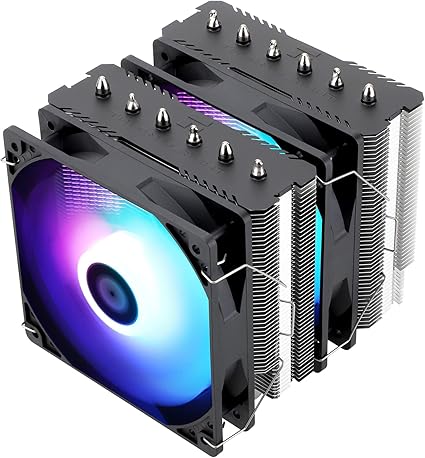 | Thermalright Peerless Assassin 120 SE | Check Price |
Our Top Picks 3  | Thermalright PS120SE ARGB | Check Price |
Our Selected Top 12 Air Cooler Rgb You Can Trust
This list features a selection of air coolers with RGB lighting, highlighting their performance, ideal users, and key advantages and disadvantages. Each review offers clear insights to help you find a suitable option based on cooling efficiency, design, and features.
1. Thermalright Assassin X120 SE ARGB CPU Air Cooler
Thermalright Assassin X120 SE ARGB stands out with its combination of quiet operation and eye-catching RGB lighting, designed mainly for desktop users wanting efficient cooling without extra noise. Its biggest strength is balancing strong airflow at an impressively low noise level, making it a great fit for players and enthusiasts who care about temperature control and aesthetics.
Installation is straightforward with the included mounting brackets, ensuring a secure fit on most desktop CPUs. The 4-pin power connector supports PWM control, allowing fan speed adjustments based on CPU temperature. Daily use proves quiet thanks to its 25.6 dB noise level and a moderate maximum rotational speed of 1550 rpm, so it won’t distract during gaming or work sessions.
The cooler delivers reliable airflow at 66.17 cfm, keeping temperatures well-managed even under load. It’s solidly built, with attention to its materials and structure to ensure steady performance over time. Many appreciate the quiet operation and effective cooling, while a common complaint points to its size possibly limiting installation in smaller cases or compatibility issues with certain RAM modules.
Quiet operation combined with effective cooling makes the Thermalright Assassin X120 SE ARGB stand out. The main downside is its size, which can cause installation challenges in compact builds or when using bulky RAM. People praise how unobtrusive the fan noise is during use.
Gamers and PC builders wanting a balance of visual flair and silent performance will find this cooler appealing. Those with smaller cases or tight space around the CPU socket might want to consider a lower-profile alternative to avoid fitment problems.
Pros
- Quiet operation at 25.6 dB
- Good air flow for effective cooling
- ARGB lighting for visual appeal
- 4-pin PWM fan for automatic speed control
Cons
- Can have clearance issues in small cases
- May conflict with taller RAM modules
| Specification | Details |
|---|---|
| Power Connector Type | 4-Pin |
| Voltage | 12 volts |
| Noise Level | 25.6 db |
| Maximum Rotational Speed | 1550 rpm |
| Air Flow Capacity | 66.17 cfm |
2. Thermalright Peerless Assassin 120 SE ARGB CPU Cooler
Thermalright Peerless Assassin 120 SE ARGB is a CPU air cooler designed for desktop users wanting a balance between quiet operation and effective cooling. Its standout feature is the integration of ARGB lighting that adds a touch of style while maintaining respectable cooling performance.
Setting up this cooler involves straightforward mounting thanks to its included brackets and 4-pin power connector. The noise level stays around 25 dB, which keeps distractions low during typical use.
Airflow capacity at 66.17 cfm means your CPU gets consistent airflow without the fan running at maximum speed constantly, so daily use is quiet and efficient.
Performance-wise, the cooler handles heat well, keeping temperatures in check with its 1550 rpm fan speed. The build quality reflects over 20 years of Thermalright’s experience in computer accessories, solid yet not overly heavy.
Most users appreciate its quiet operation and aesthetics, though some mention it could push a bit more airflow for the price.
The quiet 25 dB noise level and stylish ARGB lighting get high marks, making it a popular choice for those wanting a balance of performance and looks. However, some find the airflow and wattage limitations less ideal for very demanding CPU setups.
Gamers or casual users with mid-range desktops will appreciate the quiet and decent cooling. Those with high-performance CPUs requiring stronger cooling might want to look for a higher wattage alternative.
Pros
- Quiet operation at 25 dB
- Effective airflow of 66.17 cfm
- Attractive ARGB lighting
- Simple installation with included brackets
Cons
- Cooling could be stronger under heavy loads
- Limited wattage of 7 watts for high-power CPUs
| Specification | Details |
|---|---|
| Power Connector Type | 4-Pin |
| Voltage | 12 volts_of_direct_current |
| Wattage | 7 watts |
| Noise Level | 25 db |
| Maximum Rotational Speed | 1550 rpm |
| Air Flow Capacity | 66.17 cfm |
3. Thermalright PS120SE ARGB CPU Air Cooler
A solid air cooler for desktop CPUs, designed with effective heatpipe technology and lively ARGB lighting. Ideal for those looking to combine reliable cooling with a stylish look in a mid-sized chassis without excessive noise.
Setup involves mounting the 154mm tall cooler into a compatible case, which fits most standard desktop builds. The 4-pin power connector offers PWM control for variable fan speeds, allowing quieter operation at lower loads. The S-FDB bearings and strong materials mean it runs steadily and should last a long time without maintenance worries.
It handles heat well thanks to its 7x6mm heatpipes using AGHP technology, providing good airflow up to 66.17 CFM at a maximum of 1500 RPM. Build quality is sturdy, made from industrial strength materials rated for UL class A insulation.
The main praise highlights quiet operation at just 25.6 dB noise, while some mention it is somewhat bulky in smaller cases.
Quiet performance at 25.6 dB stands out as a major positive, allowing it to blend into everyday use without adding noise disruption. The 154mm height, while suitable for many builds, has drawn comments about clearance issues in compact cases.
Those seeking a cooler that balances low noise with attractive lighting and solid cooling will find this a good match. Users running very compact or highly demanding setups may want to consider alternatives designed specifically for tighter spaces or higher airflow.
Pros
- Quiet operation at moderate fan speed
- Long service life with reliable bearings
- Compatible with many mid-sized chassis
- Distinctive ARGB lighting adds visual appeal
Cons
- Height might not fit smaller cases
- Maximum fan speed could be higher for heavy loads
| Specification | Details |
|---|---|
| Power Connector Type | 4-Pin |
| Voltage | 12 volts of direct current |
| Cooling Method | Air |
| Noise Level | 25.6 db |
| Maximum Rotational Speed | 1500 rpm |
| Air Flow Capacity | 66.17 cfm |
4. Thermalright Peerless Assassin 120 Vision MAX ARGB Cooler

Thermalright Peerless Assassin 120 Vision MAX ARGB cooler offers reliable cooling with an eye-catching 5-inch IPS LCD screen on top. Ideal for desktop users who want strong air cooling performance and a bit of flair through customizable RGB visuals.
Its main strength lies in combining good heat dissipation with real-time system monitoring.
Setup involves attaching a dual-tower cooler with six heat pipes onto the CPU, using the included mounting system. The two fans spin up to 2150 RPM, providing consistent airflow without generating too much noise at 27 dB.
The magnetic top cover with the 5-inch screen is easy to adjust and use alongside TRCC software for customizing the display background.
The heat pipes and nickel-plated copper base ensure solid contact for fast heat transfer. Running at a max rotational speed of 2150 rpm, the fans deliver 69 cfm airflow which effectively keeps temperatures down.
Built well for durability, most praise focuses on its performance and customizable screen, while the main complaint revolves around its size fitting only specific cases.
The cooler performs well in managing CPU temperatures and impresses with its unique and clear 5-inch LCD screen. Many users mention that the most frequent limitation is fitting it into smaller or less spacious desktop cases.
Those looking for both effective air cooling and a visual monitoring tool would find it a good match. People with compact cases or without willingness to use software for customization might want to consider other options.
Pros
- Strong cooling from six copper heat pipes
- Customizable 5-inch IPS LCD screen
- Quiet operation at 27 dB noise level
- Magnetic top cover for easy access
Cons
- Size may not fit all PC cases
- Requires TRCC software for screen customization
| Specification | Details |
|---|---|
| Power Connector Type | 4-Pin |
| Voltage | 12 volts_of_direct_current |
| Cooling Method | Air |
| Noise Level | 27 db |
| Maximum Rotational Speed | 2150 rpm |
| Air Flow Capacity | 69 cfm |
5. Thermalright Assassin X120R SE V2 CPU Cooler

Aluminum and copper combine in an efficient design that suits users wanting solid CPU cooling with a quiet touch. Perfect for those with cases allowing up to 148mm height, it mainly stands out for delivering strong cooling with minimal noise during heavier tasks.
Setup is quite straightforward thanks to included metal fasteners for both Intel and AMD platforms, making the installation firm and stable. The fan runs at a steady 1550 RPM speed with PWM control, keeping fan noise low while maintaining airflow. Everyday use involves appreciating its balance between effective cooling and quiet operation, creating a pleasant desktop environment.
Performance is reliable with four heatpipes working from a pure copper base, giving consistent temperature control on processors. The build feels solid and compact, fitting well into many cases without much clearance trouble. The most noted compliment is its efficient cooling at low noise, while the common drawback experienced is the height limitation for smaller cases.
Users appreciate the effective cooling combined with low fan noise, which creates a comfortable working experience. However, a common issue is the cooler’s height, which can be too tall for tighter PC cases, limiting installation options.
This cooler suits anyone with mid-sized to larger desktop cases needing quiet but reliable air cooling. Those with smaller cases or wanting adjustable fan speed beyond 1550 rpm might consider other options for better fit or more custom airflow control.
Pros
- Quiet fan operation at 22 db
- Compact size fits many cases
- Strong cooling with copper base and heatpipes
- Supports Intel & AMD installations easily
Cons
- Height may not fit smaller cases
- Fan speed limited to 1550 rpm
| Specification | Details |
|---|---|
| Fan speed (RPM) | 1550rpm±10% |
| Noise Level | 22 db |
| Air Flow Capacity | 66.17 cfm |
| Power Connector Type | 4-Pin |
| Voltage | 12 volts |
| Wattage | 15 watts |
6. ARCTIC Freezer 36 A-RGB CPU Cooler

Bright RGB lighting is what immediately stands out about this CPU cooler, making it a great fit for anyone wanting to add some style to their build. It is designed to handle high-end CPUs, offering solid cooling through a single-tower setup with four heat pipes.
Installation requires the original AMD mounting screws for AM4 or AM5 sockets, so checking those beforehand is important. The Intel mounting frame helps evenly press the cooler against the CPU, which improves heat transfer.
Its 120 mm fan runs up to 2000 rpm and uses a 4-pin connector for straightforward power management under typical conditions.
Cooler keeps temperatures down efficiently thanks to the offset heat pipes and pressure-optimized fan. Made from quality materials, it feels sturdy and well-built.
The main praise revolves around effective cooling at a reasonable fan speed, while the most frequent downside comes from needing specific AMD screws that aren’t included, which can complicate installation.
The cooler effectively manages CPU heat thanks to its design and fan, with users noting strong temperature control during use. However, installation can be tricky on AMD platforms because it requires specific screws not supplied in the package, which some find frustrating.
Builders seeking solid performance with a focus on aesthetics will appreciate this cooler. Those who want an easier AMD installation process or quieter operation at full speed might want to look for alternatives that address these specific concerns.
Pros
- Good cooling for high-end CPUs
- RGB lighting adds visual flair
- Pressure-optimized fan supports efficient heat dissipation
- Compatible with latest Intel and AMD sockets
Cons
- AMD mounting screws not included
- Fan may be noisy at maximum speed
| Specification | Details |
|---|---|
| Power Connector Type | 4-Pin |
| Voltage | 12 volts |
| Wattage | 1.32 watts |
| Cooling Method | Air |
| Maximum Rotational Speed | 2000 rpm |
| Air Flow Capacity | 48.8 cfm |
7. Thermalright Peerless Assassin 120 Vision MAX ARGB Cooler

Powerful cooling meets eye-catching ARGB lighting with a design that works in tight spaces. Someone looking for strong CPU cooling performance alongside vibrant lighting effects will appreciate the Thermalright Peerless Assassin 120 Vision MAX ARGB Cooler.
Its dual-tower, dual-fan setup is the biggest strength for keeping temps down under load.
Setting up on a desktop is straightforward thanks to the designed offset that leaves enough room for GPU and RAM clearance. The two fast-spinning PWM fans adjust speed as the CPU temperature changes, keeping noise low. Soft corner pads reduce vibration, making daily use quieter and more comfortable during long gaming or working sessions.
Cooling efficiency remains excellent due to six 6mm pure copper heat pipes and a nickel-plated, micro-engraved copper base equipped with AGHP Gen 5.0 technology. Build quality is solid and durable, with the main praise targeting how effectively it holds CPU temperatures low.
Some find the fans a bit loud at max speed, reaching 27 dB, which can be noticeable in very quiet rooms.
The cooler effectively keeps CPU temperatures low during heavy workloads thanks to its dual-fan system and efficient heat pipes. However, fan noise at full speed has been noted as a distraction in quiet environments. The solid build and attention to clearance details contribute to a better overall user experience.
People wanting strong, visually appealing cooling for high-performance CPUs will find this a solid choice. Those prioritizing silent operation or very small cases might want to explore lower RPM or more compact coolers instead.
Pros
- Strong heat dissipation with 6x6mm heat pipes
- ARGB lighting adds customizable flair
- Dual-tower design fits around GPUs and RAM
- Anti-vibration fan pads reduce noise
Cons
- Noise level can be noticeable at max fan speed
- Setup requires checking GPU and RAM clearance carefully
| Specification | Details |
|---|---|
| Power Connector Type | 4-Pin |
| Cooling Method | Air |
| Noise Level | 27 db |
| Maximum Rotational Speed | 2150 rpm |
| Air Flow Capacity | 69 cfm |
8. Cooler Master Hyper 212 Spectrum V3 ARGB CPU Cooler

Keeping your CPU cool while adding a splash of color can be tricky, but this air cooler fits the bill nicely for AMD R7 and Intel i7 users. Its biggest strength lies in delivering solid cooling performance with visual appeal thanks to its customizable ARGB lighting.
Mounting the cooler is fairly straightforward due to the redesigned brackets that support AM5 and LGA 1851|1700 platforms. The Spectrum 120 fan comes ready to install and features PWM controls, so you can adjust fan speed from 650 to 1,750 RPM to find a quiet or powerful airflow balance. The frosted blades not only diffuse the light well but also prevent harsh glare, making it easy to enjoy the lighting effects daily.
Performance keeps your CPU temperatures well-managed under load, thanks to four heat pipes and a silver nickel-plated copper base that effectively transfers heat. The build quality feels solid and the fan is generally quiet at 27.2 dB during operation. Some users note that the airflow rate of 1.89 milliliters per second might not be the highest for more extreme overclocking needs, but it suits most mainstream setups comfortably.
The cooler receives praise for its balance between noise and airflow while adding good-looking ARGB lighting. A common complaint mentions that the airflow capacity can fall short for extreme performance needs and that some cases might struggle to accommodate its size.
It is a good choice for those running AMD R7 or Intel i7 CPUs wanting both reliable cooling and lighting effects. Users seeking maximum airflow for heavy overclocking or with smaller cases may want to consider more powerful or compact options.
Pros
- Effective cooling with four heat pipes
- Simple installation on modern sockets
- Quiet fan operation at low RPM
- Vibrant, evenly diffused ARGB lighting
Cons
- Airflow capacity may limit heavy overclocking
- May not fit all compact cases
| Specification | Details |
|---|---|
| Voltage | 3 volts |
| Noise Level | 27.2 db |
| Maximum Rotational Speed | 1750 rpm |
| Cooling Method | Fan |
| Power Connector Type | 4-Pin |
| Wattage | 250 watts |
9. Thermalright Peerless Assassin 120 Vision MAX ARGB White Cooler

2150 RPM fan speed delivers strong cooling power, making it a good fit for anyone wanting cooler system temps and real-time stats on a vivid 5-inch IPS display. It suits desktop users who want more than just a basic air cooler, especially those interested in seeing system status at a glance.
Setting up involves attaching two fans on the dual-tower design and connecting a 4-pin power connector. The magnetically attached top cover with the 5-inch IPS LCD is easy to customize with TRCC control software for backgrounds and system monitoring.
Daily use means watching CPU temperature and other stats in real time on a clear screen while the fans run quietly at 27 db.
Cooling performance is solid thanks to six pure copper heat pipes and a nickel-plated copper base that sits tightly on the CPU. The cooler handles heat well at high speeds and keeps noise levels low. It’s built with quality materials and the magnetic cover with the built-in display stands out.
Some users find the software for customizing the display tricky to use.
The coolest feature of this product is its magnetic top cover with the full-color IPS LCD showing real-time system data, which users find impressive. At the same time, the software managing the display customization is known to be less intuitive, causing trouble for some users.
Those who appreciate seeing live stats and want efficient cooling with quiet fans will like this cooler a lot. People who want simpler software and less fragile parts might prefer a different model without a magnetic display cover.
Pros
- 5-inch IPS LCD for live system monitoring
- Strong cooling with six copper heat pipes
- Quiet operation at 27 db noise level
- Customizable display with TRCC software
Cons
- Software customization can be difficult
- Magnetic cover may feel delicate to some
| Specification | Details |
|---|---|
| Maximum Rotational Speed | 2150 rpm |
| Noise Level | 27 db |
| Air Flow Capacity | 69 cfm |
| Power Connector Type | 4-Pin |
| Cooling Method | Air |
10. Vetroo V5 Black CPU Air Cooler

People building a gaming PC or upgrading their CPU cooling will like the Vetroo V5 Black CPU Air Cooler for its customizable RGB lighting and quiet performance. Its strongest feature is the balance between cooling power and noise level, making it suitable for both gamers and general users.
Setting it up involves aligning the included AMD or Intel brackets, which fit a wide range of sockets like LGA 1851/1700/1200/1150 and AM5/AM4. The RGB sync connects easily to a 5V 3-Pin motherboard port, allowing users to personalize lighting alongside other components. Everyday use benefits from the PWM control that adjusts fan speed between 800 and 1700 RPM, offering either quiet operation or stronger airflow as needed.
Its performance hinges on five heat pipes with direct contact to the CPU, supported by aluminum fins and a larger copper base for heat dissipation. The cooler manages up to 150 watts and maintains a noise level around 30.8 dB, which is quiet for its class. Most users appreciate the low noise and efficient cooling.
Some note the RGB lighting isn’t very bright in well-lit rooms, but it doesn’t affect cooling.
The cooler’s main praise is its quiet operation combined with effective cooling thanks to five direct heat pipes and a solid copper base. The most common complaint is the RGB lighting brightness, which tends to look muted under strong ambient light.
People looking for a quiet, well-built air cooler with customizable lighting will be satisfied here. Those wanting intense cooling for heavy overclocking might need to look at higher-end solutions. The wide socket support makes it versatile for many AMD and Intel setups.
Pros
- ARGB lighting syncs with motherboard
- Quiet operation with vibration dampening
- Broad CPU socket compatibility
- Fan speed dynamically controlled via PWM
Cons
- RGB lighting not very bright in bright rooms
- May not suit extreme overclocking needs
| Specification | Details |
|---|---|
| Noise Level | 30.8 db |
| Maximum Rotational Speed | 1700 rpm |
| Air Flow Capacity | 52 cfm |
| Voltage | 12 V |
| Power Connector Type | 3-Pin / 4-Pin |
| Cooling Method | Air |
11. Thermalright Peerless Assassin 120 Digital ARGB White Cooler

Among air coolers with RGB appeal, the Thermalright Peerless Assassin 120 Digital ARGB White stands out by combining dual-tower cooling power with customizable lighting. Perfect for desktop users wanting both strong heat management and eye-catching design, its biggest strength lies in delivering effective CPU cooling while adding a visual flair.
Setting it up involves fitting dual 120mm fans with S-FDB bearings, ensuring long-lasting, quiet operation at speeds up to 1850 RPM. The magnetic top cover adds style without complicating installation. Day-to-day, the cooler runs quietly around 25.6 dB while pushing an air volume of nearly 89 CFM, making it sturdy and efficient enough for regular desktop use.
The cooler does its job well by maintaining CPU temperatures through excellent air flow and pressure, thanks to dual fans and a substantial dual-tower design. The build feels solid with quality bearings for longevity. Praises often mention quietness and cooling strength, while complaints point to occasional bulkiness affecting tight PC cases.
Users appreciate the effective heat dissipation and quiet performance due to quality fans and dual-tower design. The most common downside is the cooler’s size, which sometimes makes fitting it into compact PC cases a challenge.
Anyone wanting good cooling with attractive RGB effects and enough case space will find this cooler satisfies those needs well. Those with smaller or cramped cases should look for a cooler with a slimmer profile to avoid installation issues.
Pros
- Strong cooling from dual-tower with two fans
- Quiet operation at or below 25.6 dB
- Long-lasting S-FDB bearing fans
- Customizable ARGB lighting with magnetic cover
Cons
- Size can limit compatibility in small cases
- Fan speed noise still noticeable at maximum spin
| Specification | Details |
|---|---|
| Fan Size | 120x120x28 mm |
| Fan Speed | 1850 RPM ±10% |
| Air Flow Capacity | 88.89 CFM |
| Noise Level | ≤25.6 dB (A) |
| Power Connector Type | 4-Pin PWM |
| Voltage | 12 V DC |
12. Cooler Master Hyper 212 PRO ARGB CPU Cooler

Cooler Master Hyper 212 PRO ARGB is a CPU cooler designed to handle processors like AMD R9 and Intel i7 with efficient heat management. It excels at combining solid cooling power with eye-catching ARGB lighting, making it suitable for gamers and builders who want both performance and style in their desktop setups.
Setting it up involves attaching the cooler to your desktop CPU with its four copper heat pipes and a solid base for effective heat transfer. The included SickleFlow Edge 120 fan runs quietly and can adjust speed between 690 and 2,500 RPM using PWM control, so you can lower noise when at light use and boost airflow when gaming. The frosted fan blades spread the customizable ARGB lighting nicely, adding a lively glow without being overpowering.
Performance-wise, it keeps CPU temperatures under control on demanding tasks thanks to the superconducting heat pipes and a reliable airflow of 70.7 cubic centimeters per minute. The build feels sturdy with a focus on quality materials, though some users find noise levels can reach 30 dB on higher fan speeds.
The main highlight is the impressive cooling efficiency, while occasional noise under load is the main downside found in reviews.
The cooler delivers excellent heat dissipation thanks to advanced heat pipes, while some users note the fan noise rises noticeably at its highest speeds. Day-to-day operation keeps components cool without much adjustment needed, but expect a bit of sound under heavier loads.
Ideal for PC builders who want effective cooling combined with customizable RGB lighting effects, especially those running mid to high-end desktop CPUs. Those seeking ultra-quiet operation at all times might consider quieter alternatives.
Pros
- Efficient cooling with four copper heat pipes
- Adjustable fan speeds via PWM from 690 to 2500 RPM
- Vibrant ARGB lighting with frosted blades
- Compatible with AMD R9 and Intel i7 processors
Cons
- Fan can get noisy at maximum speed
- Cooling limited to desktop CPUs only
| Specification | Details |
|---|---|
| Power Connector Type | 4-Pin |
| Voltage | 12 volts |
| Wattage | 2.4 watts |
| Noise Level | 30 db |
| Maximum Rotational Speed | 2500 rpm |
| Air Flow Capacity | 70.7 cubic_centimeters_per_minute |
Best Air Cooler RGB Models Comparison Table
| Product | Noise Level | Max Rotational Speed | Air Flow Capacity | Wattage |
|---|---|---|---|---|
| Thermalright Assassin X120 SE | 25.6 db | 1550 rpm | 66.17 cfm | – |
| Thermalright Peerless Assassin 120 SE | 25 db | 1550 rpm | 66.17 cfm | 7 watts |
| Thermalright PS120SE ARGB | 25.6 db | 1500 rpm | 66.17 cfm | – |
| Thermalright Peerless Assassin Vision MAX | 27 db | 2150 rpm | 69 cfm | – |
| Thermalright Assassin X120R SE V2 | 22 db | 1550 rpm | 66.17 cfm | 15 watts |
| ARCTIC Freezer 36 A-RGB | – | 2000 rpm | 48.8 cfm | 1.32 watts |
| Thermalright Peerless Vision MAX ARGB | 27 db | 2150 rpm | 69 cfm | – |
| Cooler Master Hyper 212 Spectrum | 27.2 db | 1750 rpm | – | 250 watts |
| Thermalright Peerless Vision MAX White | 27 db | 2150 rpm | 69 cfm | – |
| Vetroo V5 Black | 30.8 db | 1700 rpm | 52 cfm | 150 watts |
| Thermalright Peerless Assassin 120 Digital | 25.6 db | 1850 rpm | 88.89 cfm | – |
| Cooler Master Hyper 212 PRO | 30 db | 2500 rpm | – | 2.4 watts |
- Noise Level25.6 db
- Max Rotational Speed1550 rpm
- Air Flow Capacity66.17 cfm
- Wattage–
- Noise Level25 db
- Max Rotational Speed1550 rpm
- Air Flow Capacity66.17 cfm
- Wattage7 watts
- Noise Level25.6 db
- Max Rotational Speed1500 rpm
- Air Flow Capacity66.17 cfm
- Wattage–
- Noise Level27 db
- Max Rotational Speed2150 rpm
- Air Flow Capacity69 cfm
- Wattage–
- Noise Level22 db
- Max Rotational Speed1550 rpm
- Air Flow Capacity66.17 cfm
- Wattage15 watts
- Noise Level–
- Max Rotational Speed2000 rpm
- Air Flow Capacity48.8 cfm
- Wattage1.32 watts
- Noise Level27 db
- Max Rotational Speed2150 rpm
- Air Flow Capacity69 cfm
- Wattage–
- Noise Level27.2 db
- Max Rotational Speed1750 rpm
- Air Flow Capacity–
- Wattage250 watts
- Noise Level27 db
- Max Rotational Speed2150 rpm
- Air Flow Capacity69 cfm
- Wattage–
- Noise Level30.8 db
- Max Rotational Speed1700 rpm
- Air Flow Capacity52 cfm
- Wattage150 watts
- Noise Level25.6 db
- Max Rotational Speed1850 rpm
- Air Flow Capacity88.89 cfm
- Wattage–
- Noise Level30 db
- Max Rotational Speed2500 rpm
- Air Flow Capacity–
- Wattage2.4 watts
How to Choose the Best Air Cooler RGB
Choosing the right air cooler RGB involves balancing cooling performance, noise levels, and lighting effects to match your needs and setup. Prioritizing efficient airflow and quiet operation helps avoid overheating and distractions, while customizable lighting ensures a better visual experience. Getting these factors right prevents costly replacements and compatibility issues.
Cooling Performance
In smaller rooms, some coolers struggle to circulate air effectively, leaving hot spots near walls or corners. Models with a cooling capacity aligned to the room size perform consistently, quickly reducing temperature across the space. A unit rated for 150 to 250 square feet fits a typical bedroom or small office well, while larger rooms require correspondingly bigger capacity to avoid uneven cooling.
Adjustable fan speeds make a noticeable difference, letting users switch between gentle airflow and stronger blasts depending on need or time of day. Efficient evaporation minimizes water waste while maximizing cooling.
This balance means you won’t have to refill the tank too often. Look for coolers with evaporative pads that soak water well and fan speeds starting around 3,000 RPM for solid airflow without excessive noise.
Rgb Lighting Features
Some units come with basic lighting that cycles through preset colors, but serious customization offers control over the exact shades and effects. Models with multiple RGB zones and a wide color palette let you tailor the atmosphere to match mood or decor.
With connected apps, lighting can sync with music or smart home routines, creating a more integrated experience.
Brightness adjustment matters as well, especially if you want ambient light without disruption. Controls that let you dim or switch off the light separately from the cooler avoid glare in dark rooms.
Look for models that allow independent setting of brightness and color modes rather than fixed light patterns.
Portability and Size
Heavier, bulkier coolers can be a hassle to move between rooms. Lighter models around 5 to 10 pounds feel more manageable.
Compact designs that fit comfortably on a desk or nightstand provide flexibility, while taller, floor-placed units with wheels suit larger spaces.
Tank capacity strongly influences how often you must refill. Pads soaked with water provide cooling for longer stretches with bigger tanks, generally ranging from 1.5 to 4 liters. A larger tank means more runtime but also adds weight.
Ergonomics like easy-to-grip handles and a well-sealed cap matter for avoiding spills during moves.
Noise Levels
Fans at high speeds can become quite loud, disrupting conversations or sleep. Decibel ratings around 40 to 50 dB at low or medium settings indicate quieter operation suitable for bedrooms or offices. Fans pushing above 60 dB get noticeably louder and may interfere with concentration.
Finding a model that balances airflow power without excessive noise is key. Features like vibration-damping construction or variable speed control allow adjustment for quieter night use. Experience shows that an effective cooler should stay under 50 dB during typical operation to avoid being disruptive.
Maintenance and Durability
Refilling the tank is often one of the most frequent maintenance tasks, and designs that allow easy access without spills make daily use less frustrating. Removable water tanks with wide openings streamline cleaning and refilling, reducing buildup risk.
Filters need to be accessible and replaced or cleaned regularly to maintain airflow and cooling efficiency. Some models include washable pads, which last longer and save ongoing costs. Durable materials such as ABS plastic resist cracking or warping over months of use, so a sturdy build combined with straightforward upkeep extends the cooler’s useful life considerably.
Optimizing Air Cooler RGB Lighting for Different Ambiances
Adjusting the RGB lighting on an air cooler helps set the right mood for various settings. Many models include multiple color options and brightness levels that you can change according to the time of day or activity.
Soft blue or green lights work well for a relaxed atmosphere in bedrooms or lounges. Brighter colors like reds or purples can energize spaces used for work or hobbies.
Some air coolers allow synchronization of the lighting with music or fan speed, adding dynamic effects that match your environment. Using timers or app controls makes switching between lighting modes easy without manual adjustments.
Placing the cooler where the lighting reflects off walls or surfaces improves the visual effect without being too overwhelming.
- Choose cooler tones for calm, restful areas.
- Use warmer or vibrant colors to invigorate busy spaces.
- Adjust brightness to prevent glare during nighttime use.
These simple steps make daily use comfortable while making full use of the RGB features.
Essential Maintenance Tips to Prolong Your Air Cooler RGB Lifespan
Regular cleaning is key to keeping an air cooler with RGB features running well. Dust buildup on the fan blades and filters reduces airflow and cooling performance.
Most units have removable filters that you should wash every two weeks or more often in dusty environments. Make sure the cooler is unplugged before cleaning.
Check the water tank frequently to avoid stagnant water, which can cause unpleasant smells or bacterial growth. Empty and refill the tank with fresh water daily if possible.
Use a mild detergent or vinegar solution occasionally to wipe down the interior surfaces.
Inspect the RGB lighting components for dust or moisture that could interfere with their function. Gently wipe lights with a dry cloth and avoid water contact on electrical parts.
- Clean filters and blades regularly to maintain airflow.
- Keep the water tank fresh and clean.
- Protect lighting from moisture and dirt buildup.
Consistent upkeep helps extend the cooler’s lifespan and keeps the lighting vibrant.
Comparing Air Cooler RGB Models: Standalone Units vs. Integrated PC Coolers
Standalone air cooler RGB units and integrated PC coolers serve different purposes but both aim to reduce heat while providing visual appeal. Standalone models primarily focus on cooling a room or small area. They usually have larger water tanks and fans, meaning greater airflow and longer runtime between refills.
The RGB lighting often decorates the exterior or fan blades, adding ambiance to the room.
Integrated PC coolers, often liquid or air CPU coolers, have RGB elements designed to complement gaming or workstation builds. Their lighting is restricted to components inside the computer case, and cooling performance is tightly calibrated for specific CPU temperatures rather than ambient spaces.
These typically require careful installation and are part of a wider cooling system.
- Standalone units cool the environment with stronger airflow and larger water tanks.
- Integrated PC coolers focus on internal component temperatures within a computer.
- RGB on standalone units improves room lighting, while PC RGB contributes to the build’s overall aesthetics.
- Standalone units are portable; integrated coolers are fixed inside computer cases.
Choosing between them depends on whether you want to cool a room or a PC specifically, alongside the type of RGB lighting effect you prefer.
People Also Asked
How Do I Properly Clean and Maintain My Air Cooler RGB?
Regularly draining and cleaning the water tank helps prevent mold and buildup. Wipe down the exterior and clean the filter every two weeks to maintain airflow and performance. Running the cooler on a dry cycle after use removes lingering moisture inside the unit.
What Size Air Cooler RGB Do I Need for My Room?
Choose an air cooler RGB sized to the square footage of your room; a small unit works well for areas under 150 square feet. Larger rooms require more powerful coolers with greater water capacity to maintain efficient cooling.
Is It Safe to Leave an Air Cooler RGB Running Overnight?
Running an air cooler RGB overnight is generally safe, but it is important to use a timer or auto-shutoff function for safety. Also, make sure the water tank has enough water to avoid running the pump dry.
Can Air Cooler RGB Lights Be Synchronized with Other RGB Devices?
Many air cooler RGB models support synchronization with other RGB devices via compatible apps or controllers. Check the manufacturer’s specifications to confirm compatibility, especially if you want unified lighting effects across your setup.
What Are Common Issues with Air Cooler RGB Units and Solutions?
Common issues include water leakage, weak airflow, and malfunctioning lights. Make sure the water tank is properly seated to prevent leaks, clean or replace filters to improve airflow, and check connections or software updates if RGB lights stop working.
Conclusion
Good air coolers with RGB lighting should provide reliable cooling, have easy-to-use controls, and include customizable lighting options that fit your taste. Noise level is also key since you don’t want a distracting hum while using it. Consider models with decent airflow and enough settings to adjust both fan speed and light effects without complication.
Think about where you’ll put the cooler and how often you’ll run it; bigger rooms need stronger units, while smaller spaces do fine with compact designs. Keeping to your budget helps avoid spending on features you won’t use.
Check back at the comparison table and the detailed picks above to find the unit that fits your needs best.

I’m Grant Mitchell, a firearms and hunting writer with years of experience at the range and in the field. I write about rifles, shotguns, handguns, optics, safe storage, cleaning, and responsible ownership, along with practical hunting tips. My goal is to share accurate, safety-first information that helps you choose the right firearm, maintain it properly, and become a more confident shooter.