Top 12 Best Air Cooler for Ryzen 5 5600X You Can’t Miss
Overheating is a constant issue with an underperforming CPU cooler, especially for those running a Ryzen 5 5600x at stock or higher speeds. Loud fans and thermal throttling quickly become frustrating when the best air cooler for ryzen 5 5600x is missing from the setup. A poorly chosen cooler either fails to keep temperatures low or adds unnecessary noise during long gaming sessions or workload spikes.
Choosing a good air cooler mostly comes down to the size and quality of its heat sink and fan. A cooler with a heat sink made from copper or aluminum that offers at least 120mm diameter fans usually manages heat more effectively.
Compatibility with the AM4 socket and a reasonable TDP rating above 95 watts ensure secure fitting and sufficient cooling power. Easy cleaning access to the fan blades and thoroughly sealed bearing systems also make a big difference for maintenance and longevity.
Need a Quick Check?
| Image | Product | Price |
|---|---|---|
Our Top Picks 1  | Thermalright Peerless Assassin 120 SE | Check Price |
Our Top Picks 2  | Thermalright Peerless Vision MAX ARGB | Check Price |
Our Top Picks 3  | Thermalright PS120SE ARGB Cooler | Check Price |
Our Selected Top 12 Air Cooler for Ryzen 5 5600x You Can Trust
This list features carefully chosen air coolers designed to effectively manage the Ryzen 5 5600x’s heat. Each review covers performance, ideal user scenarios, and key strengths and weaknesses, helping you find the best option to match your specific cooling needs and preferences.
1. Thermalright Peerless Assassin 120 SE CPU Cooler
Strong cooling and quiet operation make the Thermalright Peerless Assassin 120 SE ideal for Ryzen 5 5600X builds. Compact enough for most desktops, it keeps temperatures well-controlled without adding much noise, perfect for anyone wanting solid performance without fuss.
Installation isn’t complicated thanks to the mounting bracket system and clear design, fitting neatly onto compatible CPUs. The 4-pin connector allows PWM control, so fan speed adjusts to your workload, helping manage noise and temperature automatically.
Daily operation remains quiet with a maximum noise level of 25.6 dB, barely noticeable during regular tasks or gaming.
The air cooling method handles heat efficiently, moving 66.17 cubic feet of air per minute at speeds up to 1550 rpm. The cooler supports up to 265 watts, which is more than enough for a Ryzen 5 5600X.
Built with quality materials, it delivers consistent thermal performance. The common praise focuses on its quiet operation, while the main complaint mentions it could be bulky for tight spaces.
Many find it impressively quiet during everyday use while still handling CPU cooling demands effectively. The most frequent downside noted is its bulk, which can pose challenges in compact PC builds.
People with standard to larger cases looking for a quiet, powerful air cooler will benefit from this model. Those with very tight space constraints should consider lower-profile alternatives.
Pros
- Quiet operation at 25.6 dB
- Efficient airflow of 66.17 cfm
- Supports up to 265 watts
- 4-pin connector for PWM control
Cons
- Can be bulky in smaller cases
- Fan speed max limited to 1550 rpm
| Specification | Details |
|---|---|
| Power Connector Type | 4-Pin |
| Voltage | 12 volts |
| Wattage | 265 watts |
| Noise Level | 25.6 dB |
| Maximum Rotational Speed | 1550 rpm |
| Air Flow Capacity | 66.17 cfm |
2. Thermalright Peerless Assassin 120 Vision MAX ARGB
Constructed mainly from copper and nickel-plated materials, the Thermalright Peerless Assassin 120 Vision MAX ARGB offers a dual-tower design perfect for anyone running a Ryzen 5 5600X who wants reliable and strong cooling paired with unique visual customization. Its standout feature is the magnetic top cover with a 5-inch IPS LCD screen for real-time system monitoring.
Setting up is straightforward with a 4-pin power connector and dual fans that spin up to 2150 RPM. The magnetic screen easily attaches, and the TRCC software allows personalized backgrounds to keep an eye on your CPU stats. Daily use means quiet operation at 27 dB noise level, so it stays unobtrusive while keeping temperatures in check even during heavy loads.
Cooling performs well with six pure copper heat pipes and a nickel-plated copper base that maintains strong contact with the processor. The air cooler pushes 69 CFM airflow, efficiently dissipating heat around a Ryzen 5 5600X. Reviews highlight excellent cooling performance as a major plus, although some mention the large size can make fitting in compact cases tricky.
Cooling performance and quiet operation receive high praise, making it effective for Ryzen 5 5600X processors. The main complaint revolves around the cooler’s size, which could be a challenge in compact desktop cases. The unique LCD display adds useful monitoring but might require some time to configure properly.
Ideal for users who want strong cooling with continuous system info right on their cooler and have enough space inside their case. Those with small form-factor builds or who prefer a simpler setup might want to consider more compact alternatives without extra customization features.
Pros
- Dual-tower design with six pure copper heat pipes
- Quiet operation at 27 dB even at high RPM
- 5-inch IPS LCD screen with customizable display
- High airflow capacity of 69 CFM
Cons
- Large size may cause fitment issues in smaller cases
- TRCC software customization could feel a bit complex
| Specification | Details |
|---|---|
| Power Connector Type | 4-Pin |
| Cooling Method | Air |
| Noise Level | 27 db |
| Maximum Rotational Speed | 2150 rpm |
| Air Flow Capacity | 69 cfm |
3. Thermalright PS120SE ARGB CPU Air Cooler
Quiet operation is a key feature of this air cooler, designed for people with a Ryzen 5 5600X who want strong performance without noisy distractions. Its strength lies in keeping temps low without needing extreme fan speeds, making it a quiet companion for your build.
Setting up involves a straightforward 4-pin power connection running at 12 volts DC, compatible with most desktop systems and cases up to 154mm tall. Daily use highlights a fan speed capped at 1500 rpm, which balances airflow and noise nicely.
The AGHP heatpipe technology works quietly in either vertical or horizontal orientations, making installation flexibility a real plus.
Cooling works well, moving 66.17 cfm of air with a noise level of just 25.6 dB, enough to handle the heat output of Ryzen 5 5600X efficiently. Built with industrial-strength PBT + PC materials and S-FDB bearings, it holds up over time. Most find it pleasantly quiet but some find the fan could push a bit more air for heavy loads.
The quietness at around 25.6 dB makes a noticeable difference in a working or gaming setup, while some users point out the air flow could feel a bit limited during intense CPU loads. The durable build means it’s set to last over many months of continuous use.
Those who want a balanced, quiet cooler for everyday Ryzen 5 5600X use will appreciate this model. It may not suit those pushing their CPU hard with overclocking or very high heat scenarios who need bigger airflow capacity.
Pros
- Quiet operation at low noise and moderate fan speed
- Compatible with many desktop chassis up to 154mm height
- Durable construction with industrial-grade materials
- Flexible installation orientation thanks to AGHP heatpipe design
Cons
- Airflow might be insufficient for heavy overclocking
- Not the most powerful cooler for very high TDP CPUs
| Specification | Details |
|---|---|
| Power Connector Type | 4-Pin |
| Voltage | 12 volts_of_direct_current |
| Noise Level | 25.6 db |
| Maximum Rotational Speed | 1500 rpm |
| Air Flow Capacity | 66.17 cfm |
| Height | 154mm |
4. Thermalright Assassin Spirit 120 EVO Dark CPU Cooler

Quiet operation and efficient cooling make the Thermalright Assassin Spirit 120 EVO Dark a solid pick for Ryzen 5 5600X builds. It suits those looking for a reliable air cooler with a good balance between airflow and noise, standing out mainly for its quiet fan supported by decent air movement.
Installation is straightforward, and the cooler fits comfortably with standard desktop cases thanks to its compact 120 mm length and 156 mm height. The 4-pin connector allows precise fan speed control, helping maintain a low noise level of 27 dB during typical use. Day-to-day, it keeps temperatures in check while running quietly, making it suitable for both gaming and work sessions.
Cooling performance meets expectations for mid-range desktop CPUs. Made mostly from aluminium, its build feels solid without being too heavy on the motherboard. Reviews mention great quietness as the standout feature, while the main drawback is that it may struggle a bit in high overclocking scenarios or very hot environments.
Quiet fan noise impresses users looking for peaceful operation while cooling meets standard desktop needs. Some find it less ideal for heavy overclocking or exceptionally hot settings.
Those with a Ryzen 5 5600X who prioritize low noise and standard cooling will appreciate this cooler. Users aiming for aggressive overclocking or high thermal environments should consider alternatives with greater cooling capacity.
Pros
- Quiet fan operation at just 27 dB
- Good airflow with 70.4 cfm
- Compact size fits most cases
- Aluminium build keeps weight reasonable
Cons
- May struggle with high overclocks
- Limited cooling in very hot environments
| Specification | Details |
|---|---|
| Power Connector Type | 4-Pin |
| Voltage | 12 volts |
| Noise Level | 27 db |
| Maximum Rotational Speed | 1850 rpm |
| Air Flow Capacity | 70.4 cfm |
5. AMD Wraith Prism CPU Cooler
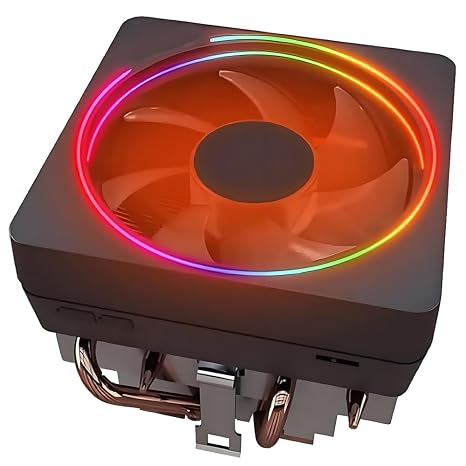
Keeping your Ryzen 5 5600X cool during long gaming or work sessions is essential, and this cooler does that reliably. Best suited for those who want solid compatibility with AM4/AM5 sockets and trustworthy cooling without extra accessories, its biggest strength is the effective heat transfer system that handles heat quietly.
Installation is straightforward since it uses the standard bracket included on most AMD motherboards, though the bracket itself isn’t part of the package. Pre-applied silicone thermal paste saves time during setup. The 4-pin fan connector supports motherboard speed control, and the cooler runs quietly at 14 dB, making daily use comfortable without adding background noise.
The combination of a copper base, aluminum heatsink, and four 6 mm copper heat pipes means it dissipates heat efficiently during heavy CPU loads. Most praise it for its quiet operation and solid construction.
A common downside is that it may not be the best fit if you want the absolute lowest temperatures under extreme overclocking or bulky case airflow.
Quiet operation and solid cooling capacity stand out as main positives. Users often point out missing bracket as a minor inconvenience during installation.
Ideal for those running standard or moderately demanding Ryzen 5 5600X setups. Those aiming for heavy overclocking or ultra-low temperatures should consider a higher-end cooler.
Pros
- Compatible with wide range of AMD sockets
- Quiet operation at 14 dB
- Pre-applied thermal paste included
- Effective heat dissipation with copper heat pipes
Cons
- Bracket not included with cooler
- Not ideal for extreme overclocking cooling needs
| Specification | Details |
|---|---|
| Power Connector Type | 4-Pin |
| Voltage | 12 volts_of_direct_current |
| Wattage | 105 watts |
| Noise Level | 14 db |
| Maximum Rotational Speed | 2800 rpm |
| Air Flow Capacity | 45 cfm |
6. Be Quiet! Dark Rock 5 CPU Cooler

6 high-performance copper heat pipes deliver solid cooling power, perfect for Ryzen 5 5600X setups. Designed for users who want strong air cooling without loud noise, this cooler keeps temperatures in check during heavy workloads.
Installing the cooler fits easily on AM4 sockets, and the Silent Wings 4 120mm PWM fan keeps noise levels low with its fluid-dynamic bearing and careful vibration reduction. The funnel-shaped frame guides airflow efficiently, while the ceramic particle coating on the heat sink improves heat transfer, ensuring consistent cooling throughout the day.
Cooling performance stays reliable even under intense use, with a maximum airflow of 55 cfm and a noise level below 30 dB. The dense aluminum fins and six copper heat pipes form a sturdy build.
Some note the cooler’s size can limit compatibility in smaller cases, but most agree it balances silence and cooling power well.
Low noise output and solid heat transfer are the most praised features, making it reliable under heavy loads. The most common drawback relates to its bulky size, which can make installation tricky in tight spaces.
People prioritizing quiet, steady cooling in mid-sized builds will appreciate this cooler. Users with very small cases or extreme overclocking needs may want to look for alternatives with a smaller footprint or higher fan speeds.
Pros
- Quiet operation thanks to fluid-dynamic bearing fan
- Efficient heat dissipation with six copper heat pipes
- Rubberized fan frame minimizes vibration and noise
- Compatible with a wide range of Intel and AMD sockets
Cons
- Size may limit use in compact PC cases
- Maximum fan speed of 2100 rpm limits extreme overclocking cooling
| Specification | Details |
|---|---|
| Power Connector Type | 4-Pin |
| Voltage | 12 volts |
| Noise Level | 29.8 db |
| Maximum Rotational Speed | 2100 rpm |
| Air Flow Capacity | 55 cfm |
| Compatible Devices | Intel sockets: 1851/1700/1200/1151/1150/1155 | AMD sockets: AM5/AM4 |
7. Thermalright Assassin X 120R Digital ARGB CPU Cooler

Ideal for gamers or anyone running a Ryzen 5 5600X who needs a quiet yet powerful cooling solution. Its biggest strength lies in dynamically adjusting fan speed to keep temperatures in check without manual tweaks, matching your CPU’s needs automatically.
Setup is straightforward with the 4-pin PWM fan connector that syncs speed to motherboard temperature sensors. The 2000RPM fan runs quietly thanks to silicone corner pads that reduce vibration noise, making everyday use pleasant even under load.
The durable PBT+PC materials and quality bearing type ensure the fan stays steady and reliable over time.
Cooling performance holds well for a mid-range air cooler, pushing 70.84 CFM airflow to manage the heat output effectively. Its build uses industrial grade materials for safe, stable operation. The best feedback highlights its quiet operation and stable fan mount, while a noted downside is that at full speed it’s not the absolute quietest option on the market.
Performance shines with quiet operation and a steady fan mount thanks to its quality materials and bearing system. Common complaints focus on noise increasing noticeably when the fan hits maximum speed and occasional vibrations unless properly secured.
Those valuing automatic fan speed control and solid build quality will be satisfied. Users needing ultra-silent cooling under full load might want to explore other options better optimized for whisper-quiet performance.
Pros
- Adjusts fan speed automatically via PWM
- Silicone corner pads reduce fan rotation noise
- Industrial grade PBT+PC materials for durability
- Stable S-FDB bearing minimizes fan blade shaking
Cons
- Not the quietest at full 2000RPM speed
- May require careful installation to avoid vibrations
| Specification | Details |
|---|---|
| Power Connector Type | 4-Pin |
| Voltage | 12 volts_of_direct_current |
| Cooling Method | Air |
| Maximum Rotational Speed | 2000 rpm |
| Air Flow Capacity | 70.84 cfm |
| Noise Level | 29.8 db |
8. Thermalright Assassin X120 Refined SE ARGB CPU Cooler

Designed for Ryzen 5 5600X builds, this air cooler stands out with its quiet operation and effective cooling capacity. Perfect for those who want solid performance without loud fans, it keeps temperatures low without taking up too much space or causing noise distractions.
Installation is straightforward, supported by a 4-pin power connector that makes setup simple for most desktop systems. It spins up to a maximum speed of 1550 rpm, balancing airflow and noise well.
The cooler’s ARGB lighting adds a subtle touch but doesn’t interfere with its main job or durability. Maintenance mainly involves occasional dusting since its design prevents buildup efficiently.
Cooling performance stays reliable with an airflow capacity of 66.17 cfm, handling Ryzen 5 5600X heat well under normal loads. Build quality reflects Thermalright’s experience, focusing on sturdy components without being overly bulky.
The quiet noise level at 25.6 dB is a highlight, though the cooling might not be sufficient for extreme overclocking scenarios, which is a common concern.
Many users praise how quiet the cooler runs at typical speeds, making it great for day-to-day use without noise distractions. The most frequent complaint involves its cooling limits when pushed beyond standard CPU workloads, which is typical at its size and airflow range.
Anyone aiming for a cooler that balances noise and performance on a Ryzen 5 5600X will find it suitable. Those looking for extreme cooling or more dynamic lighting effects might want to consider more powerful or dedicated options.
Pros
- Quiet operation at just 25.6 dB
- Good airflow with 66.17 cfm capacity
- Simple 4-pin connection for easy setup
- Compact design fits most desktops
Cons
- May struggle with heavy overclocking heat
- ARGB lighting is subtle, not very bright
| Specification | Details |
|---|---|
| Power Connector Type | 4-Pin |
| Voltage | 12 volts |
| Cooling Method | Air |
| Noise Level | 25.6 db |
| Maximum Rotational Speed | 1550 rpm |
| Air Flow Capacity | 66.17 cfm |
9. Thermalright Peerless Assassin 120 Vision MAX ARGB
Thermalright Peerless Assassin 120 Vision MAX ARGB stands out for cooling Ryzen 5 5600X processors efficiently while offering a unique visual edge with its built-in 5-inch IPS LCD screen. It suits PC builders who want strong cooling performance combined with customizable system monitoring right on the cooler itself.
Installation is straightforward, and the inclusion of ARGB lighting adds a nice touch to everyday system use, adjustable via motherboard software to match your setup’s style. The 4-pin power connector keeps connections simple, and the heat pipes featuring AGHP Gen 5.0 technology ensure it stays effective whether your motherboard is mounted vertically or horizontally.
In terms of performance, it delivers solid airflow at 69 cfm with a maximum fan speed of 2150 rpm while maintaining a noise level of just 27 db, making it both powerful and relatively quiet. The solid build and effective heat pipe design get most praise.
Some users mention the ARGB lighting controls could be more intuitive or flexible.
Many appreciate the unique LCD screen for system monitoring directly on the cooler. The main frustration lies with the ARGB controls, which some find tricky to adjust as expected. Cooling performance itself meets expectations for the Ryzen 5 5600X with good airflow and quiet operation at lower speeds.
Those who want to combine visual flair with solid air cooling will enjoy this cooler. Users looking for very quiet operation at full speed or simpler RGB control might prefer alternatives with more straightforward lighting options.
Pros
- Built-in 5-inch IPS LCD for real-time monitoring
- ARGB lighting customizable through motherboard software
- AGHP Gen 5.0 heat pipes work well in any orientation
- Quiet operation at 27 db noise level
Cons
- ARGB control not very intuitive for beginners
- Louder at maximum fan speed (2150 rpm)
| Specification | Details |
|---|---|
| Cooling Method | Air |
| Noise Level | 27 db |
| Maximum Rotational Speed | 2150 rpm |
| Air Flow Capacity | 69 cfm |
| Power Connector Type | 4-Pin |
10. Thermalright Peerless Assassin 120 Digital ARGB CPU Cooler

Running cool and quiet makes a big difference around a Ryzen 5 5600X, and this cooler excels at keeping temperatures down without being noisy. It’s great for anyone wanting solid performance without taking up too much space or dealing with complicated installation.
The biggest strength lies in how it balances effective cooling with manageable noise.
Installation is straightforward with the 4-pin PWM connector ensuring the fan speed adjusts as needed. Dual fans move plenty of air at up to 1850 RPM, helping heat escape efficiently. The magnetic top cover adds a neat touch but doesn’t impact function directly.
At under 26 dB, it’s easy to keep a quiet PC even under load, and the dimensions fit comfortably in most mid-size cases.
Six pure copper heat pipes and a solid copper base provide excellent heat transfer right where it counts. Two fans with S-FDB bearings run smoothly and last long, giving good reliability.
Many find it effective at keeping CPU temps low, though some mention it’s a bit tall and might clash with large RAM modules. It’s a reliable, well-built air cooler.
Cooling performance is strong thanks to well-placed copper heat pipes and powerful dual fans, and noise stays low even at higher speeds. Common issues center mostly on the size, with some users finding it challenging to fit in tighter cases or alongside tall RAM modules.
Anyone building a mid-sized desktop aiming for effective heat dissipation with quiet operation will appreciate this cooler. A system with limited clearance or a preference for very compact builds might call for a smaller or lower-profile cooler instead.
Pros
- Dual fans provide strong airflow
- Six copper heat pipes transfer heat well
- Quiet fan operation under load
- Magnetic top cover adds unique styling
Cons
- Relatively tall, may block large RAM
- Not the easiest to clean thoroughly
| Specification | Details |
|---|---|
| Fan Size | 120x120x28mm |
| Fan Speed | 1850 RPM +10% |
| Operating Noise | ≤25.6 dB(A) |
| Air Flow Capacity | 88.89 CFM |
| Power Connector Type | 4-Pin PWM |
11. Thermalright Peerless Assassin 120 Vision MAX ARGB

Great for gamers and PC builders looking for a powerful air cooler, the Peerless Assassin 120 Vision MAX ARGB stands out with its efficient dual-tower, dual-fan design. Its strongest point is handling Ryzen 5 5600X heat while fitting well without blocking other components.
Setting up involves a bit of care to align the offset base for proper clearance around GPU and RAM. The two fans run quietly at 27 db and spin up to 2150 RPM, adjusting speed with CPU temperature. The soft corner pads help reduce vibrations, so daily operation stays quiet and smooth, even under load.
Cooling performance is strong thanks to six copper heat pipes using advanced AGHP Gen 5.0 tech that works well in different orientations. The nickel-plated copper base is finely etched for good heat transfer.
Most users appreciate its solid build and quiet fans. Some mention the size requires checking case compatibility before buying.
The cooler’s dual-tower design combined with advanced copper pipes offers efficient heat dissipation, keeping CPU temperatures in check while running quietly most of the time. However, some find the height and width demanding for smaller cases, requiring attention before installation.
Users seeking a balance between noise and powerful air cooling will appreciate how well it manages Ryzen 5 5600X thermals. Those with compact cases or limited clearance might prefer a slimmer cooler option instead.
Pros
- Quiet operation at 27 db
- Strong cooling with six copper heat pipes
- Dual fans with PWM temperature control
- Anti-vibration soft corner pads
Cons
- Size requires case compatibility check
- Relatively high fan speed can rise under load
| Specification | Details |
|---|---|
| Power Connector Type | 4-Pin |
| Noise Level | 27 db |
| Maximum Rotational Speed | 2150 rpm |
| Air Flow Capacity | 69 cfm |
| Cooling Method | Air |
| Compatible Devices | Desktop |
12. Thermalright Phantom Spirit 120SE CPU Air Cooler

Aluminum and copper form the core of this air cooler’s design, making it a solid choice for anyone running a Ryzen 5 5600X and looking for an efficient cooling solution. Its biggest strength lies in the advanced AGHP 4th generation heatpipe technology, which manages heat remarkably well for a broad range of CPUs.
Setting it up involves a straightforward 4-pin connection that supports PWM control, allowing the fan to adjust speed based on temperature. The 1500 rpm max speed keeps noise reasonable at 25.6 db, making it suitable for daily use in quieter environments.
Its compatibility with standard desktop cases means fitting it in doesn’t usually require extra effort.
Performance is consistent with a CPU cooler TDP range from 105W to 280W thanks to the seven 6mm heatpipes using inverse gravity effect technology. Builds feel solid, focused on delivering effective air cooling without excess weight.
Most reviews highlight great temperature control, while some note size might be a tight fit in smaller cases.
The strongest praise for this cooler centers on its effective temperature management made possible by the 7x6mm heatpipes and inverse gravity effect technology. The most common complaint involves its size, with some finding it a bit bulky for compact cases.
Users with mid-sized or larger cases looking for reliable cooling will appreciate its performance and build. Those with very compact builds or needing ultra-quiet operation under sustained heavy loads may want to consider alternatives.
Pros
- Advanced heatpipe design handles wide TDP range
- Quiet operation at moderate fan speeds
- Compact enough for most desktop builds
- Solid build quality with quality materials
Cons
- May be a tight fit in smaller cases
- Not the quietest option under heavy load
| Specification | Details |
|---|---|
| Power Connector Type | 4-Pin |
| Voltage | 12 volts_of_direct_current |
| Cooling Method | Air |
| Noise Level | 25.6 db |
| Maximum Rotational Speed | 1500 rpm |
| Air Flow Capacity | 66.17 cfm |
Best Air Coolers for Ryzen 5 5600x Comparison Table
| Product | Noise Level | Max RPM | Air Flow Capacity | Wattage |
|---|---|---|---|---|
| Thermalright Peerless Assassin 120 SE | 25.6 db | 1550 rpm | 66.17 cfm | 265 watts |
| Thermalright Peerless Vision MAX ARGB | 27 db | 2150 rpm | 69 cfm | – |
| Thermalright PS120SE ARGB Cooler | 25.6 db | 1500 rpm | 66.17 cfm | – |
| Thermalright Assassin Spirit EVO Dark | 27 db | 1850 rpm | 70.4 cfm | 1.92 watts |
| AMD Wraith Prism Cooler | 14 db | 2800 rpm | 45 cfm | 105 watts |
| be quiet! Dark Rock 5 | 29.8 db | 2100 rpm | 55 cfm | 210 watts |
| Thermalright Assassin X 120R ARGB | 29.8 db | 2000 rpm | 70.84 cfm | – |
| Thermalright Assassin X120 Refined ARGB | 25.6 db | 1550 rpm | 66.17 cfm | – |
| Thermalright Peerless Vision MAX ARGB | 27 db | 2150 rpm | 69 cfm | – |
| Thermalright Peerless Digital ARGB | 25.6 db | 1850 rpm | 88.89 cfm | – |
| Thermalright Peerless Vision MAX ARGB | 27 db | 2150 rpm | 69 cfm | – |
| Thermalright Phantom Spirit 120SE | 25.6 db | 1500 rpm | 66.17 cfm | – |
- Noise Level25.6 db
- Max RPM1550 rpm
- Air Flow Capacity66.17 cfm
- Wattage265 watts
- Noise Level27 db
- Max RPM2150 rpm
- Air Flow Capacity69 cfm
- Wattage–
- Noise Level25.6 db
- Max RPM1500 rpm
- Air Flow Capacity66.17 cfm
- Wattage–
- Noise Level27 db
- Max RPM1850 rpm
- Air Flow Capacity70.4 cfm
- Wattage1.92 watts
- Noise Level14 db
- Max RPM2800 rpm
- Air Flow Capacity45 cfm
- Wattage105 watts
- Noise Level29.8 db
- Max RPM2100 rpm
- Air Flow Capacity55 cfm
- Wattage210 watts
- Noise Level29.8 db
- Max RPM2000 rpm
- Air Flow Capacity70.84 cfm
- Wattage–
- Noise Level25.6 db
- Max RPM1550 rpm
- Air Flow Capacity66.17 cfm
- Wattage–
- Noise Level27 db
- Max RPM2150 rpm
- Air Flow Capacity69 cfm
- Wattage–
- Noise Level25.6 db
- Max RPM1850 rpm
- Air Flow Capacity88.89 cfm
- Wattage–
- Noise Level27 db
- Max RPM2150 rpm
- Air Flow Capacity69 cfm
- Wattage–
- Noise Level25.6 db
- Max RPM1500 rpm
- Air Flow Capacity66.17 cfm
- Wattage–
How to Choose the Best Air Cooler
Choosing the right air cooler for a Ryzen 5 5600X depends on compatibility, cooling efficiency, and noise levels. Prioritizing these factors ensures optimal performance and prevents overheating, which saves money by avoiding damage and reduces future hassles from system instability or replacements.
Cooling Performance
Noticing your processor hitting high temperatures after extended gaming or rendering sessions reveals the cooler’s true capacity. The way heat pipes and fins are designed affects how quickly the heat gets away from the CPU.
Some coolers with direct contact copper heat pipes deliver much better conduction than those relying mostly on aluminum. Airflow design also plays a key role; a fan that pushes air through dense fins efficiently keeps temperatures stable under heavy loads.
Choosing a cooler built to handle bursts of high power output helps avoid thermal throttling during demanding tasks. For processors running at or above stock frequencies, models supporting heat dissipation around 150 watts or more are advisable.
Consistent temperature control matters when pushing a CPU because uneven cooling can shorten its lifespan or cause system crashes. Look for coolers known for solid thermal design rather than simply big fans or flashy looks.
Compatibility and Size
Been frustrated by RAM modules that won’t fit after upgrading the cooler? Clearance issues are common, especially if the cooler’s heatsink or fan extends beyond the socket area.
Checking the cooler’s height and width is necessary because PC cases vary widely; some compact mid-towers won’t accommodate tall models over 160 mm.
Compatibility with the AM4 socket is the bare minimum for Ryzen platforms, but choosing a cooler that supports updated mounting brackets can save headaches with future CPU generations. When planning ahead, consider the cooler’s dimensions and socket support, including how the fan clears tall RAM heat spreaders and motherboard heatsinks.
Noise Levels
Fans running at full speed really make a difference in noise levels during intense workloads. A cooler with fan speed control or multiple RPM settings allows balance between performance and quiet operation. Cheap fan bearings or poor design often result in annoying vibrations and buzzing at certain speeds.
Some models include noise-dampening features like rubber mounts or specially designed blades to reduce sound without sacrificing airflow. The difference shows in hours spent gaming or focusing; a loud fan becomes a distraction quickly, while a quieter one maintains concentration.
Checking decibel ratings near 30-35 dB at typical loads is a good starting point for tolerable noise.
Build Quality and Materials
It’s frustrating when the cooler’s finish dulls or rust develops after a year of use. Copper and aluminum remain the most common materials, with copper heat pipes providing superior heat transfer, but usually aluminum fins to reduce cost.
The build quality extends to fan bearings; sealed sleeve or fluid dynamic bearings generally last longer and run more smoothly than cheap sleeve types.
The frame supporting the fan needs to be rigid yet shock-absorbent; fragile plastic frames crack from simple handling. Look for coolers with corrosion-resistant coatings or anodized aluminum fins to ensure they retain efficiency and appearance over time. The material quality influences how much you struggle with maintaining steady performance on a daily basis.
Installation and Maintenance
Spending hours wrestling with mounting brackets or alignment errors is a recipe for cooling frustration. Clear and secure mounting hardware speeds up installation and reduces the risk of uneven pressure leading to hotspots. Coolers using standard AM4 mounting kits tend to be easier to fit, but some third-party designs require more patience.
Good accessibility matters during regular dusting; easily removable fans or fin stacks allow you to clean buildup without disassembling the whole thing. Applying thermal paste correctly remains essential; a thin, even layer improves contact but too thick leads to poor heat transfer.
Depending on usage, repasting every couple of years or if temperatures spike suddenly helps maintain efficiency.
Effective Maintenance Tips to Prolong the Lifespan of Your Ryzen 5 5600X Air Cooler
Dust buildup significantly reduces an air cooler’s ability to dissipate heat effectively. Regularly cleaning the fan blades and heatsink fins with compressed air prevents overheating and maintains steady performance for the Ryzen 5 5600X.
Applying fresh thermal paste every year also improves heat transfer between the processor and cooler. A thin, even layer is sufficient; too much paste can lead to higher temperatures.
Keep the airflow inside your PC case unobstructed by managing cables neatly. This ensures that cool air reaches the cooler without restriction and hot air is expelled properly. It helps to check the fan orientation, confirming intake and exhaust fans are positioned correctly to create efficient airflow paths.
Key maintenance tips:
- Clean the cooler and case fans every few months.
- Replace thermal paste annually.
- Organize cables to avoid airflow blockage.
- Check fan directions to maximize ventilation.
Comparing Air Cooling vs Liquid Cooling Solutions for Ryzen 5 5600X
Air cooling solutions for the Ryzen 5 5600X are generally easier to install and cost less than liquid coolers. They use a heatsink and fan combo to draw heat away, which works well under moderate workloads. Air coolers require less maintenance since there is no liquid involved that might leak or evaporate.
Liquid cooling tends to offer lower temperatures, especially for overclocking or heavy multitasking, but these systems are more complex. They require an external radiator and pump, and installation can be more time-consuming. The risk of leaks exists, though modern kits are designed to minimize this.
For users focusing on silent operation and straightforward setup, air coolers are practical. Liquid coolers suit those who prioritize maximum cooling and aesthetic customization options.
The choice depends on usage intensity and personal preference, but air coolers provide reliable performance for most Ryzen 5 5600X setups.
Common Installation Mistakes and How to Avoid Them When Setting up Your Air Cooler
A common mistake during air cooler installation is applying too much or too little thermal paste. Excessive paste can spill over and reduce cooling efficiency, while too little won’t cover the surface properly.
Clean the CPU surface thoroughly before each application to avoid trapped dust and oil.
Failing to mount the cooler securely often leads to higher CPU temperatures. Make sure the mounting brackets or screws are tightened evenly and according to the manufacturer’s instructions.
Uneven pressure can cause poor contact between the cooler and the CPU.
Incorrect fan orientation also undermines cooling. Fans should push air through the heatsink fins toward an exhaust point in the case. Installing the fan backward or opposite to the case’s airflow direction reduces cooling capacity drastically.
Avoid these errors by:
- Using a pea-sized amount of thermal paste.
- Cleaning the CPU surface before paste application.
- Tightening mounting screws evenly.
- Aligning fan rotation with case airflow.
People Also Asked
Will This Air Cooler Fit Inside My PC Case?
The air cooler will fit as long as your PC case supports the cooler’s height and width specifications. Measure the available space inside your case and compare it to the cooler’s dimensions provided by the manufacturer before buying.
Is This Air Cooler Compatible with Ryzen 5 5600X Socket?
Most air coolers are compatible with the AM4 socket used by Ryzen 5 5600X. Verify the cooler’s compatibility list or the included mounting brackets to ensure it supports AM4 sockets without extra parts.
How Long Do Air Coolers Usually Last Before Replacement?
Air coolers typically last around 5 to 10 years if maintained properly. Cleaning dust from the fins and ensuring the fan bearings remain lubricated can extend the cooler’s life significantly.
Are There Any Safety Concerns Using This Air Cooler Indoors?
There are no specific safety concerns using the air cooler indoors beyond standard precautions. Keep the cooler dust-free and ensure your case airflow is adequate to prevent overheating or fan failure.
What Common Problems Should I Expect with This Air Cooler?
Common issues include fan noise, dust buildup, and improper mounting causing poor cooling. Regular cleaning and double-checking installation can reduce these problems and keep temperatures stable.
Conclusion
Choosing an air cooler for the Ryzen 5 5600X mainly comes down to how well it can handle the chip’s heat output, how quiet it runs, and whether it fits your PC case. Cooling needs vary depending on workload, so pick one that balances performance with noise levels. Size matters too, as some coolers won’t fit compact cases or may block RAM slots.
Consider the space you have and your budget before deciding. A bigger or more powerful cooler isn’t always necessary if you don’t push your CPU hard or want quiet operation.
Use the comparison table and detailed reviews above to find a cooler that suits your setup and preferences without overspending.

I’m Grant Mitchell, a firearms and hunting writer with years of experience at the range and in the field. I write about rifles, shotguns, handguns, optics, safe storage, cleaning, and responsible ownership, along with practical hunting tips. My goal is to share accurate, safety-first information that helps you choose the right firearm, maintain it properly, and become a more confident shooter.