Top 12 Best Air Cooler for Ncase M1 That Will Blow You Away!
Many who use the Ncase M1 know how quickly temperatures can rise if the air cooler isn’t up to par. A cheap or ill-fitting option often results in uneven cooling, louder fans, and thermal throttling. The best air cooler for ncase m1 solves these issues by matching the case’s compact build and keeping heat levels stable, even during heavy use.
Choosing the right cooler means focusing on size constraints and airflow capacity. The Ncase M1 is small, so a low-profile cooler under 70mm tall usually fits best without blocking other components.
A cooler with copper heat pipes and an efficient fan that moves around 40 to 60 cfm makes a real difference in keeping CPU temperatures down. Also, ease of cleaning is key since dust buildup can reduce performance quickly in such a tight space.
Need a Quick Check?
| Image | Product | Price |
|---|---|---|
Our Top Picks 1  | Thermalright Peerless Assassin 120 SE | Check Price |
Our Top Picks 2  | Thermalright Assassin X120 Refined SE | Check Price |
Our Top Picks 3  | ID-COOLING SE-903-XT V2 | Check Price |
Our Selected Top 12 Air Cooler for Ncase M1 Worth Considering
This list features carefully chosen air coolers designed to fit compact cases with excellent cooling efficiency. Each review explains how the cooler performs, who it’s best suited for, and highlights its strengths and potential drawbacks to help you make an informed choice.
1. Thermalright Peerless Assassin 120 SE CPU Cooler
Thermalright Peerless Assassin 120 SE is a solid air cooler geared toward desktop users who need a quiet, efficient solution in a compact build. Its standout feature is the balanced airflow capacity combined with a low noise level, making it a good fit for small cases like the ncase m1.
Setup is straightforward with a 4-pin power connector and well-designed mounting. The 12-volt fan keeps noise down while spinning up to 1550 rpm, which means you can run everyday tasks or gaming sessions without it becoming distracting.
Maintenance is simple since the design avoids overly complex parts, helping when dusting or cleaning inside the case.
This cooler does a respectable job handling up to 265 watts, showing that it can manage higher loads without overheating. Build quality is solid, reflecting Thermalright’s long experience in cooling tech.
Many users find the noise level pleasantly low at 25.6 db, though some mention the maximum fan speed could have more headroom for extreme overclocking.
Many users appreciate the quiet operation paired with effective cooling that handles high wattage CPUs well. Some mention the fan speed ceiling as a drawback for pushing extreme performance limits.
People building in small cases like the ncase m1 who want effective cooling without noise will be pleased. Those needing extreme overclocking headroom should consider alternatives with higher max fan speeds.
Pros
- Quiet operation at 25.6 db
- Good airflow with 66.17 cfm
- Compact size works in small cases
- Solid build quality
Cons
- Maximum fan speed may limit cooling potential
- Setup may be tight in very dense builds
| Specification | Details |
|---|---|
| Power Connector Type | 4-Pin |
| Voltage | 12 volts |
| Wattage | 265 watts |
| Noise Level | 25.6 db |
| Maximum Rotational Speed | 1550 rpm |
| Air Flow Capacity | 66.17 cfm |
2. Thermalright Assassin X120 Refined SE CPU Cooler
Feels surprisingly compact yet powerful in a small case like the NCASE M1. It suits anyone looking for quiet but effective cooling in tight spaces. Its biggest strength is balancing airflow with low noise, making it a solid choice for dense builds.
Setting it up requires careful attention to fit in the NCASE M1, but the mounting brackets make installation straightforward. The 4-pin connector helps control fan speed via motherboard software. Daily operation remains quiet at 25.6 dB while delivering consistent airflow to keep temperatures down, which is key for cramped, high-performance setups.
It cools well thanks to a combination of heat pipes and a fan spinning up to 1550 rpm. The build quality feels durable and thoughtfully engineered with good materials.
The strongest praise highlights its quiet operation, while some users mention that space constraints might require precise positioning inside compact cases.
This cooler is praised mainly for its quiet performance while maintaining steady airflow. The most common drawback comes from its size constraints that make fitting it inside very small cases a bit tricky. It’s effective but requires careful measuring before installation.
People prioritizing quiet cooling in a small form factor will appreciate this design. Those needing extreme cooling or very easy installation in ultra-compact cases might want to explore alternatives tailored specifically for such environments.
Pros
- Quiet operation at 25.6 db
- Good airflow of 66.17 cfm
- 4-pin connector allows speed control
- Durable build quality
Cons
- Fit can be tight in compact cases
- Maximum fan speed may limit extreme cooling
| Specification | Details |
|---|---|
| Power Connector Type | 4-Pin |
| Voltage | 12 volts_of_direct_current |
| Cooling Method | Heat pipe and fan-based |
| Noise Level | 25.6 db |
| Maximum Rotational Speed | 1550 rpm |
| Air Flow Capacity | 66.17 cfm |
3. ID-COOLING SE-903-XT V2 CPU Air Cooler
Perfect for compact builds like the NCASE M1, this CPU air cooler offers a solid balance of size and cooling power. Its biggest strength lies in the upgraded 100mm fan that delivers better airflow while staying quiet enough for daily or gaming use.
Installation is straightforward, thanks to the secure fan clips and fin-lock design that keep everything firmly in place. The 4-pin connector lets you adjust fan speeds easily.
Noise stays low at 29.1 dB, so it doesn’t become a distraction even during longer gaming sessions or workdays. The compact size fits nicely without crowding other components.
Cooling performance handles up to 150 watts well, moving 47.1 CFM of air reliably. The reinforced fan clips and aluminium fins hold up through transport and regular use, cutting down vibration for steadier operation.
Common notes praise its quietness and fit in small cases, while some mention it’s best suited for moderate, not extreme, overclocking due to airflow limits.
The strongest point is the quiet and stable cooling delivered by the larger 100mm fan and reinforced fan clips, which also make the unit quite durable during transport. The most common complaint notes that its airflow serves regular builds well but might not keep up under very heavy CPU loads or extreme overclocking conditions.
People looking for efficient cooling in a small form factor case like the NCASE M1 will find this cooler reliable and quiet. Those who plan to push their CPUs hard with extreme overclocking or need the highest airflow should consider larger or liquid cooling options.
Pros
- Compact size fits tight cases well
- Upgraded 100mm fan improves airflow
- Quiet operation at 29.1 dB noise level
- Reinforced clips reduce vibration
Cons
- Airflow may limit high-end overclocking
- Fan speed maxes out at 2500 RPM only
| Specification | Details |
|---|---|
| Cooling Method | Air |
| Power Connector Type | 4-Pin |
| Wattage | 150 watts |
| Noise Level | 29.1 dB |
| Air Flow Capacity | 47.1 CFM |
| Maximum Rotational Speed | 2500 RPM |
4. Noctua NH-U9S Chromax.black CPU Cooler

Crafted with a compact heatsink and an all-black design, the Noctua NH-U9S chromax.black is ideal for small form factor builds like the Ncase M1. Its strongest feature is compatibility, standing just 125mm tall and fitting comfortably without blocking RAM or PCIe slots.
Installation is straightforward thanks to its size, and you won’t worry about clearance issues inside tight cases. The 92mm NF-A9 fan automatically adjusts speed via PWM, keeping noise low when idle and ramping up cooling under load.
It works quietly alongside other components, making daily use unobtrusive and efficient.
Cooling performance impresses with stable temperatures, handling Intel and AMD CPUs well. The build quality reflects premium standards, with a durable all-black finish that resists wear.
Most praises note its silent operation and case compatibility, while the primary complaint is that the height limit may still challenge extremely compact builds.
Highly praised for near-silent operation and excellent fit in small tower cases, this cooler ensures your components stay cool without adding much noise. Common feedback points to its height potentially being borderline in the smallest builds, requiring careful measurement before purchase.
This cooler suits anyone building a compact system requiring reliable cooling without sacrificing RAM or PCIe access. Those working with extremely low-profile cases might want to explore even smaller options to avoid clearance issues.
Pros
- Compact 125mm height fits most ITX cases
- Whisper-quiet at idle with PWM control
- Doesn’t block RAM or PCIe slots
- Durable all-black finish complements builds
Cons
- May be too tall for ultra-compact cases
- Single 92mm fan might limit peak cooling
| Specification | Details |
|---|---|
| Compact Size | 125mm Height |
| Fan | 92mm NF-A9 with Low-Noise Adaptor and PWM |
| Compatibility | 100% RAM and PCIe slot friendly |
| Warranty | 6 year manufacturer’s warranty |
| Supported CPU Platforms | Intel & AMD |
5. Thermalright Phantom Spirit 120SE CPU Cooler

Size and cooling power stand out immediately with the Phantom Spirit 120SE, making it a solid fit for compact builds like the Ncase M1. It’s designed to handle a wide range of CPUs, supporting TDPs from 105W up to 280W, which means it’s ready for both mid-range and higher-end setups.
Setup involves a straightforward 4-pin power connection, powering the fan at up to 1500 rpm. The cooler uses Thermalright’s 7x6mm heatpipe technology, which deals well with different orientations inside tight cases like the Ncase M1. The fan runs quietly at 25.6 dB, so day-to-day use won’t be noisy, and the airflow rating of 66.17 cfm helps keep temperatures stable without demanding high RPMs constantly.
It performs solidly in cooling thanks to its advanced heatpipe design and good air circulation. The build quality is sturdy, with a focus on durable materials to last through many cooling cycles.
Frequent positive feedback praises its quiet operation and effective heat dissipation. Some notes mention that the size can be a tight fit in smaller cases, which calls for careful installation consideration.
Performance reviews highlight impressive quietness paired with effective cooling power. Installation can be tricky in tight spaces like the Ncase M1 because of its size, so precision is needed during mounting. The fan’s moderate maximum speed balances noise and airflow well but might limit peak performance under extreme loads.
This cooler suits users with compact builds who want solid cooling for mid to high-TDP CPUs without noise complaints. It’s less ideal for any build where space is extremely limited or where pushing maximum fan speeds is critical for overclocking headroom.
Pros
- Handles high TDP CPUs up to 280W
- Quiet operation at 25.6 dB noise level
- Good airflow at 66.17 cfm
- 4-pin connector for precise fan control
Cons
- Size requires careful fitting in small cases
- Fan speed maxes out at 1500 rpm
| Specification | Details |
|---|---|
| Cooling Method | Air |
| Power Connector Type | 4-Pin |
| Maximum Rotational Speed | 1500 rpm |
| Noise Level | 25.6 db |
| Air Flow Capacity | 66.17 cfm |
| CPU Cooler TDP | 105W to 280W |
6. Thermalright Peerless Assassin 120 Vision MAX ARGB CPU Cooler

Ideal for small form-factor builds, the Thermalright Peerless Assassin 120 Vision MAX ARGB is a powerful air cooler with a unique twist: a 5-inch IPS LCD screen that shows real-time system info. It suits desktop users wanting strong cooling and a bit of customizable flair in their NCASE M1 setup.
Setup is straightforward thanks to the dual-tower design and two included fans, which clip onto the radiator easily. Regular maintenance is kept simple since the magnetically attached top cover allows quick access.
The screen connects via software for monitoring temps and fan speeds while letting you personalize the display’s background if you like a custom look.
It cools efficiently due to six pure copper heat pipes and a nickel-plated copper base in contact with the CPU. Fans spin up to 2150 RPM, pushing 69 cfm of air quietly at 27 dB noise level.
The sturdy build impresses, though some find the height and bulk challenging inside compact cases. Most users praise its cooling power, while the size is the biggest drawback.
The standout feature is the LCD screen offering live system monitoring combined with excellent cooling from a dual-tower design and copper pipes. Users commonly mention the cooler’s size as a challenge for compact builds like the NCASE M1, requiring careful fitting consideration.
Those who want serious CPU cooling with added flair from a display will appreciate it most. Builders with very limited space or preference for minimal coolers should look for slimmer alternatives to avoid compatibility issues.
Pros
- Real-time system monitoring on built-in IPS LCD
- Strong cooling with six copper heat pipes
- Customizable display backgrounds via TRCC software
- Quiet operation at 27 dB noise level
Cons
- Large size can be tight in small cases
- Magnetic cover may feel delicate during handling
| Specification | Details |
|---|---|
| Power Connector Type | 4-Pin |
| Cooling Method | Air |
| Noise Level | 27 db |
| Maximum Rotational Speed | 2150 rpm |
| Air Flow Capacity | 69 cfm |
7. Thermalright Peerless Assassin 120 Mini Black CPU Cooler

Keeping your NCASE M1 cool can be tricky due to its compact size, but this air cooler fits nicely without compromising on cooling power. It suits users wanting efficient airflow in a small desktop build.
Its biggest strength lies in the 6 fully plated heatpipes paired with a 12cm fan that manages heat well despite limited space.
Setup involves straightforward installation thanks to a 4-pin connector that supports precise fan speed control. The cooler’s all-black finish and symmetrical fin design blend well visually with modern builds, while the CNC precision copper base ensures tight contact with the CPU for efficient heat transfer. Running quietly at 25.6 dB, it stays unobtrusive during daily tasks.
Heat dissipation is solid due to AGHP’s upgraded 4th generation technology, which keeps the heatpipes effective regardless of mounting angle in the M1’s unique layout. Durable aluminum with an antioxidant coating adds to build quality, but some mention clearance issues with larger RAM modules. The fan speed maxes out at 1500 rpm, balancing airflow and noise nicely.
Reliable heat dissipation thanks to advanced heatpipe tech is praised alongside quiet operation during normal use. Clearance issues around RAM suggest checking component dimensions carefully before choosing this cooler for compact builds.
People prioritizing size and noise will like this model, especially in tight-space setups like the NCASE M1. Those needing extreme airflow or with very tall RAM may want to consider other options.
Pros
- Compact size fits NCASE M1 well
- Quiet operation at low noise level
- Efficient heat transfer with copper base
- All-black finish matches modern builds
Cons
- May block clearance for taller RAM sticks
- Fan speed capped at 1500 rpm limits max airflow
| Specification | Details |
|---|---|
| Cooling Method | Air |
| Power Connector Type | 4-Pin |
| Noise Level | 25.6 dB |
| Maximum Rotational Speed | 1500 rpm |
| Air Flow Capacity | 66.87 cfm |
| Wattage | 2.4 watts |
8. ARCTIC Freezer 36 Black CPU Cooler

56.3 cfm airflow capacity makes this cooler a solid choice for anyone wanting effective heat dissipation in a compact build like the NCASE M1. Its design suits those who need strong cooling without sacrificing too much space or adding unnecessary noise.
Setup requires using the original AMD mounting screws for AM4 and AM5 CPUs, which takes a bit of care but isn’t complicated. The Intel mounting frame ensures even pressure for good contact.
Day-to-day running feels stable thanks to the 120 mm fan spinning up to 1800 rpm at 12 volts, keeping temperatures down without drawing a lot of power. Cleaning involves regular dusting of the fins and fan, which is straightforward given the cooler’s accessible structure.
It handles heat very well thanks to four offset heat pipes directing warmth towards the heat sink efficiently. The build quality is sturdy with an emphasis on even contact with the CPU for optimal cooling.
Customers frequently praise its quiet operation and cooling performance, while the most noted drawback is the need to track down AMD screws when those aren’t included.
Many users appreciate the quiet operation paired with strong cooling performance thanks to the offset heat pipes and pressure-optimised fan. A notable complaint comes from the need to use original AMD mounting screws which might not always be on hand, causing installation delays.
Ideal for builders who want solid cooling in a small case without loud fans. Not the best pick for those lacking the required mounting hardware or in need of extremely high fan speeds for overclocking.
Pros
- Efficient heat transfer via four offset heat pipes
- Quiet 120 mm fan with pressure-optimised design
- Compatible with multiple CPU sockets including AM4 and AM5
- Compact enough for tight builds like NCASE M1
Cons
- Requires original AMD screws for proper installation
- Fan speed capped at 1800 rpm may limit peak cooling
| Specification | Details |
|---|---|
| Power Connector Type | 4-Pin |
| Voltage | 12 volts |
| Wattage | 1.2 watts |
| Cooling Method | Air |
| Compatible Devices | AM4, AMD: AM5, Intel: LGA1851, LGA1700 |
| Maximum Rotational Speed | 1800 rpm |
9. Cooler Master V4 Alpha CPU Air Cooler
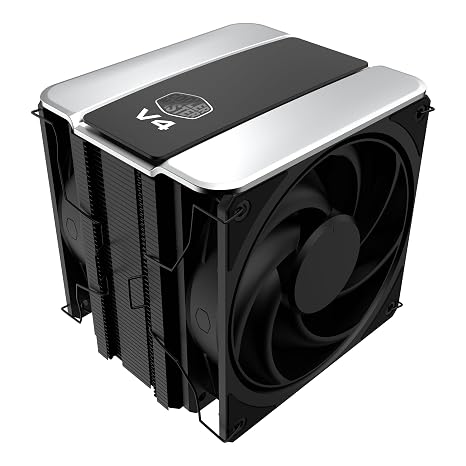
People building compact PCs with the Ncase M1 will appreciate the Cooler Master V4 Alpha CPU Air Cooler for its impressive cooling efficiency in a small package. Its standout feature is the patented 3DHP heat pipes that claim to deliver 30% better cooling than typical air coolers, making it suitable for users who need solid performance without upgrading to liquid cooling.
Setting it up is straightforward thanks to broad socket compatibility, fitting well into smaller cases like the Ncase M1. The pre-installed Mobius 120mm fans work in a push-pull setup, pushing air efficiently while keeping noise low.
Running quietly at just around 2.05 db, daily operation stays peaceful, which makes this a cooler you can run all day without distraction.
Cooling performance meets expectations with quieter operation due to the 3DHP design reducing fan turbulence. The build quality feels solid, focused on durability and minimal maintenance.
The biggest praise is how effective it stays cool without loud noise, while the main complaint in some reviews involves its height clearance in very tight cases, which might be a tight fit for some.
Strong cooling comes from the upgraded 3DHP pipes and dual Mobius fans, keeping the system quiet and efficient in daily use. The most common issue is the cooler’s height, which can challenge tight fits in compact cases.
This air cooler suits those wanting a balance of performance and silent operation in small builds like the Ncase M1. Users with ultra-low profile space requirements should consider alternative, lower-profile coolers.
Pros
- 30% better cooling than standard designs
- Push-pull fan configuration maximizes airflow
- Extremely quiet operation at 2.05 db
- Compatible with a wide range of CPU sockets
Cons
- May be too tall for very tight case builds
- Fan speed maxes out at 2050 rpm
| Specification | Details |
|---|---|
| Power Connector Type | 4-Pin |
| Voltage | 12 volts |
| Cooling Method | Fan |
| Noise Level | 2.05 db |
| Maximum Rotational Speed | 2050 rpm |
10. Noctua NH-U12A chromax.Black CPU Cooler

Among air coolers fitting the Ncase M1, this 120mm option stands out for combining powerful cooling with compact dimensions. It suits anyone needing excellent heat dissipation without blocking RAM or PCIe slots, ideal for builds where space and component access are priorities. Its biggest strength lies in delivering strong cooling quietly in a relatively small footprint.
Setting up involves straightforward installation with attention to clearance around the CPU socket. The cooler fits under the 158mm height limit, so it won’t crowd your case, and the two 120mm NF-A12x25 fans run quietly thanks to low-noise adapters and PWM control.
It keeps your system cool under load, adjusting fan speed automatically, while remaining whisper quiet at idle, which makes day-to-day use very comfortable.
The cooler provides top-tier air cooling with an airflow capacity of 102.1 cfm, effective at managing heat spikes without excessive noise. Its all-black design blends well visually, built around a well-proven heatsink structure. Most praise focuses on its quiet operation, while some find the maximum fan speed of 2000 rpm can still produce noticeable noise under heavy load.
The quieter operation at idle stands out as the most praised feature, allowing builds where noise matters a lot. The usual concern lies with fan noise rising at maximum speed, which some find uncomfortable during intense CPU workloads. The reliable build and compact size are consistent highlights.
People prioritizing low noise and space-saving design will find this cooler suits their needs well. Those requiring ultra-quiet operation even under heavy loads or seeking more aesthetic customization might consider alternative options better matching those specifics.
Pros
- Compact 158mm height fits most tower cases
- Dual fans with low-noise adapters for quiet operation
- Does not block RAM slots or most PCIe ports
- Automatic fan speed control via PWM
Cons
- Maximum fan speed noise noticeable under heavy load
- All-black design may limit visual customization
| Specification | Details |
|---|---|
| Power Connector Type | 4-Pin |
| Voltage | 12 volts |
| Cooling Method | Air |
| Noise Level | 22.6 dB |
| Maximum Rotational Speed | 2000 rpm |
| Air Flow Capacity | 102.1 cfm |
11. Thermalright SI-100 Black CPU Cooler

Thermalright SI-100 Black CPU Cooler shines in compact air cooling for small cases like the NCASE M1. Its strength lies in balancing solid airflow with a quiet operation, making it a reliable choice for users wanting efficient cooling without too much noise.
Installation feels straightforward, thanks to the 4-pin power connector compatible with most desktop motherboards. The cooler spins up to 2000 rpm, and the 27.7 dB noise level keeps it discreet in daily use.
Its air cooling method delivers steady airflow while the build remains compact, fitting well inside limited spaces without fuss during cleaning or maintenance.
Cooling performance stays consistent, pushing 72.37 cfm airflow to keep temperatures in check under moderate loads. The cooler is well-built, reflecting Thermalright’s experience over 20+ years in thermal solutions.
Praise mostly points to quiet running and effective cooling. Some mention that airflow could be stronger for heavier overclocking setups.
This cooler is praised for its quiet operation and effective management of heat in compact setups while some users find its airflow not quite enough for more demanding systems. Cleaning requires a careful approach due to its tight design.
Good fit for anyone running a mid-range rig in the NCASE M1 or similar small chassis. Avoid if pushing high overclocking or needing peak airflow performance. Its noise level and size make it ideal for quieter, space-aware builds.
Pros
- Quiet operation at moderate speeds
- Compact size fits tight case spaces
- Reliable 4-pin connection compatibility
- Reasonable airflow for mid-range systems
Cons
- Airflow may not suffice for high-end overclocking
- Some users find cleaning a bit fiddly
| Specification | Details |
|---|---|
| Power Connector Type | 4-Pin |
| Voltage | 12 volts |
| Wattage | 2.16 watts |
| Noise Level | 27.7 db |
| Maximum Rotational Speed | 2000 rpm |
| Air Flow Capacity | 72.37 cfm |
12. Thermalright AXP120-X77R Black CPU Cooler

Feels solid and quiet right out of the box, fitting snugly inside compact ITX cases like the NCASE M1. Best for those who want strong cooling without sacrificing limited space.
Its biggest strength lies in its low profile at just 77mm tall, making it a great match for small builds.
Installation is straightforward thanks to its compact size and 4-pin power connector. The fan sits beneath a single tower and uses a reverse airflow direct-exhaust approach.
This design keeps the case airflow well-managed. Daily use brings stable temperatures with a noise level around 37 dB, which stays comfortable even during higher CPU loads.
Performance is impressive given its slim profile, thanks to six 6mm copper heat pipes and a precise micro-sculpted copper base for effective heat spreading. Build quality shows attention to detail, especially with the AGHP 5.0 tech to handle different orientations inside tight cases.
People praise its cooling efficiency; some mention the fan speed can get a bit loud at max RPM.
Cooling efficiency stands out thanks to six copper heat pipes and a carefully machined copper base that handles heat well in different orientations. Common critique focuses on the fan noise at its highest speed, which can be noticeable in quiet environments.
Great fit for anyone building or upgrading a compact ITX desktop who needs reliable cooling without tall coolers. Not ideal if quiet operation at maximum fan speed is a top priority or if using a larger case that can accommodate taller coolers for potentially better airflow.
Pros
- Compact 77mm height fits most ITX cases
- Six pure-copper heat pipes for strong cooling
- Quiet operation around 37 dB under load
- Reverse airflow direct-exhaust fan design
Cons
- Fan speed reaches 3150 rpm, can be noisy
- Limited to smaller form factors due to size
| Specification | Details |
|---|---|
| Height | 77mm |
| Cooling Method | Air |
| Noise Level | 37.07 dB |
| Maximum Rotational Speed | 3150 rpm |
| Air Flow Capacity | 83.61 cfm |
| Power Connector Type | 4-Pin |
Best Air Coolers for Ncase M1 Compared
| Product | Noise Level | Maximum Rotational Speed | Air Flow Capacity | Wattage |
|---|---|---|---|---|
| Thermalright Peerless Assassin 120 SE | 25.6 db | 1550 rpm | 66.17 cfm | 265 watts |
| Thermalright Assassin X120 Refined SE | 25.6 db | 1550 rpm | 66.17 cfm | – |
| ID-COOLING SE-903-XT V2 | 29.1 db | 2500 rpm | 47.1 cfm | 150 watts |
| Noctua NH-U9S chromax.black | – | – | – | – |
| Thermalright Phantom Spirit 120SE | 25.6 db | 1500 rpm | 66.17 cfm | – |
| Thermalright Peerless Assassin 120 Vision | 27 db | 2150 rpm | 69 cfm | – |
| Thermalright Peerless Assassin 120 Mini | 25.6 db | 1500 rpm | 66.87 cfm | 2.4 watts |
| ARCTIC Freezer 36 Black | – | 1800 rpm | 56.3 cfm | 1.2 watts |
| Cooler Master V4 Alpha | 2.05 db | 2050 rpm | – | – |
| Noctua NH-U12A chromax.Black | 22.6 db | 2000 rpm | 102.1 cfm | – |
| Thermalright SI-100 Black | 27.7 db | 2000 rpm | 72.37 cfm | 2.16 watts |
| Thermalright AXP120-X77R Black | 37.07 db | 3150 rpm | 83.61 cfm | 4.8 watts |
- Noise Level25.6 db
- Maximum Rotational Speed1550 rpm
- Air Flow Capacity66.17 cfm
- Wattage265 watts
- Noise Level25.6 db
- Maximum Rotational Speed1550 rpm
- Air Flow Capacity66.17 cfm
- Wattage–
- Noise Level29.1 db
- Maximum Rotational Speed2500 rpm
- Air Flow Capacity47.1 cfm
- Wattage150 watts
- Noise Level–
- Maximum Rotational Speed–
- Air Flow Capacity–
- Wattage–
- Noise Level25.6 db
- Maximum Rotational Speed1500 rpm
- Air Flow Capacity66.17 cfm
- Wattage–
- Noise Level27 db
- Maximum Rotational Speed2150 rpm
- Air Flow Capacity69 cfm
- Wattage–
- Noise Level25.6 db
- Maximum Rotational Speed1500 rpm
- Air Flow Capacity66.87 cfm
- Wattage2.4 watts
- Noise Level–
- Maximum Rotational Speed1800 rpm
- Air Flow Capacity56.3 cfm
- Wattage1.2 watts
- Noise Level2.05 db
- Maximum Rotational Speed2050 rpm
- Air Flow Capacity–
- Wattage–
- Noise Level22.6 db
- Maximum Rotational Speed2000 rpm
- Air Flow Capacity102.1 cfm
- Wattage–
- Noise Level27.7 db
- Maximum Rotational Speed2000 rpm
- Air Flow Capacity72.37 cfm
- Wattage2.16 watts
- Noise Level37.07 db
- Maximum Rotational Speed3150 rpm
- Air Flow Capacity83.61 cfm
- Wattage4.8 watts
How to Choose the Right Air Cooler
Choosing the right air cooler for a compact case involves focusing on size compatibility, cooling performance, and quiet operation to fit the limited space effectively. Prioritizing these factors ensures efficient heat management and prevents costly hardware issues, making the build both reliable and easy to maintain.
Size and Fit
Trying to fit a standard cooler into a very compact case often ends in frustration or forcing components together too tightly. The size limitations inside this model of chassis mean there is very little room around the CPU socket.
Clearance for tall RAM modules or longer GPUs can get compromised, causing installation issues or reduced airflow.
Smaller coolers with a height under 70mm generally fit well without blocking memory slots or GPU slots. Low-profile designs that don’t have large overhangs keep the interior uncluttered, allowing easier cable routing and better heat dissipation overall.
Checking the cooler’s exact dimensions against the chassis specs and component sizes is crucial to avoid surprises.
Cooling Performance
In such a snug interior, spreading heat evenly becomes challenging because airflow paths are limited. A cooler must move heat away from the CPU efficiently while not disturbing the case’s overall airflow balance.
An airflow direction aligned with the case’s exhaust fans helps prevent hot air build-up.
Coolers that rely on a single well-placed fan pushing air through dense fins work better than those with multiple small fans that consume more power but don’t improve cooling significantly. A fan around 60-120mm in size often offers a good tradeoff between performance and consumption, sufficient for maintaining reasonable CPU temperatures inside the compact space.
Noise Levels
Small builds often amplify any sound generated because there’s less space to muffle fan noise and vibrations can transfer through the case. Fan noise varies widely between models, with some running quietly at low RPMs and others producing a noticeable hum even at minimum speeds.
Balancing noise and cooling means finding a cooler with well-built fans that have good bearings reducing mechanical noise. Rubber mounts or vibration dampeners help prevent rattles transferring to the chassis, which is especially important in small metal cases. A fan that stays under 30 dBA during typical loads keeps the system pleasant to use without sacrificing heat removal.
Ease of Installation and Maintenance
Working inside a small case can make installing or removing components a cumbersome task. A cooler designed with easy mounting mechanisms that fit the limited clearance saves time and avoids damaging other parts.
Quick-release brackets or single-screw mounts simplify the process.
Over time, dust builds up rapidly in such compact systems so a design that allows straightforward disassembly for cleaning is important. Compatibility with common mounting holes and minimal interference with adjacent components means you won’t have to dismantle half of the system just to replace thermal paste or fans.
Build Quality and Materials
Heat sinks made from high-quality aluminum or copper stay effective longer and resist corrosion better in confined, potentially warmer spaces. The cooler’s longevity often depends on material durability, especially since repairs or replacements can be inconvenient in these mini builds.
Fans equipped with sleeve or fluid dynamic bearings typically last longer and operate more quietly compared to basic sleeve bearings. Paying attention to these details avoids early wear and reduces noise over time. Materials that offer good thermal conductivity while maintaining lightweight construction suit this size range best.
Optimizing Airflow for Maximum Cooling Efficiency in the Ncase M1
Airflow in the Ncase M1 is crucial because of its compact size and dense component layout. Proper fan placement can help direct cool air over critical parts like the CPU and GPU, minimizing hotspots.
The case supports various fan configurations, but prioritizing intake fans at the front or bottom and exhaust fans at the top or rear usually works best. Blowing air directly onto the CPU cooler’s fins will improve heat dissipation. Low-profile coolers that fit comfortably within the restricted height allowance of the M1 ensure better clearance without sacrificing performance.
Remember to keep cables tidy and away from airflow paths to reduce turbulence and maintain steady air circulation.
Key points to keep airflow efficient:
- Use high static pressure fans for intake and exhaust to push air through tight spaces.
- Position your CPU cooler so its fan faces the main airflow direction.
- Ensure positive or balanced air pressure to avoid dust buildup and maintain cooling.
Maintaining and Cleaning Air Coolers to Prolong Performance
Regular maintenance significantly extends the effective lifespan of air coolers in small form factor cases like the Ncase M1. Dust accumulation on fan blades and heatsink fins reduces airflow and thermal conductivity, forcing components to work harder and run hotter. Removing the cooler periodically to clean it with compressed air or a soft brush is essential.
Take care not to damage the delicate fins or dislodge the thermal paste. Checking the fan bearings for smooth operation helps prevent noisy or failing fans.
Replacing the thermal paste every couple of years maintains good contact between the CPU heat spreader and cooler base, ensuring consistent heat transfer.
Maintenance tips:
- Power down and unplug before cleaning.
- Use gentle, dust-free compressed air from a distance.
- Apply new thermal paste when needed to restore thermal performance.
- Inspect fan blades and replace the fan if grinding or rattling occurs.
Comparing Air Cooling to Liquid Cooling Solutions for the Ncase M1
Air cooling remains a popular choice for the Ncase M1 because it fits well within the limited space and creates less risk of leaks compared to liquid cooling. Air coolers tend to be simpler to install and maintain, which is valuable for compact builds where every millimeter counts. However, large air coolers might struggle in the M1 due to height constraints and limited airflow volume.
Liquid cooling solutions, such as AIO radiators, can offer better temperature control by moving heat away from the CPU more efficiently and dissipating it via larger surface area radiators mounted strategically in the case.
Considerations when choosing between air and liquid cooling:
- Air coolers are quieter and require less maintenance.
- AIO liquid coolers free up space around the CPU socket and often offer lower temps under load.
- Radiator placement options are limited in the M1, so radiator size impacts cooling effectiveness.
- Air coolers avoid potential pump failures or coolant leaks but may run hotter under sustained load.
People Also Asked
Will a Low-Profile Air Cooler Fit in an NCASE M1?
Low-profile air coolers generally fit in the NCASE M1, but you need to check the height clearance which is usually under 55mm. Measuring your cooler beforehand helps prevent buying one that won’t fit comfortably inside the compact case.
How to Properly Install an Air Cooler in NCASE M1?
Secure the cooler by aligning the mounting bracket carefully and tightening screws evenly to avoid pressure on the CPU. It helps to apply thermal paste sparingly and use a screwdriver with a magnetic tip so small screws don’t drop inside the case.
What Are Common Overheating Issues with Air Coolers in NCASE M1?
Overheating issues often arise from limited airflow due to the small case size or blocked intake vents. Keeping interior cables organized and cleaning dust filters regularly can make a noticeable difference in maintaining cooler temperatures.
How Long Do Air Coolers Typically Last Inside an NCASE M1?
Air coolers in the NCASE M1 typically last several years if cleaned and maintained, such as removing dust buildup from fins and fans. Replacing fans if they become noisy or slow is a practical way to extend cooler life.
Are There Any Safety Concerns Using Air Coolers in NCASE M1?
Using air coolers in the NCASE M1 is safe as long as you ensure good airflow and avoid blocking vents. Make sure cables don’t interfere with the fan blades to prevent damage and possible short circuits.
Conclusion
Choosing the best air cooler for the Ncase M1 mainly comes down to size, cooling efficiency, and noise levels. The cooler has to fit the small case without blocking other components.
Cooling performance matters because the compact space doesn’t handle heat well. Quiet operation is also important since cramped systems can amplify fan noise.
Consider how much room you have around your setup and your budget before making a choice. A more expensive cooler might not be worth it if you don’t use your PC heavily or if space is tight.
Check the comparison table and detailed picks above to find the option that fits your specific needs.

I’m Grant Mitchell, a firearms and hunting writer with years of experience at the range and in the field. I write about rifles, shotguns, handguns, optics, safe storage, cleaning, and responsible ownership, along with practical hunting tips. My goal is to share accurate, safety-first information that helps you choose the right firearm, maintain it properly, and become a more confident shooter.