Top 12 Best AIO Cooler for i9 14900K You Can’t Miss!
Overclocking an i9 14900k or pushing it hard with gaming sessions often reveals the limits of a cooler quickly. A cheap or poorly matched cooler can lead to high temperatures, loud fan noise, and even thermal throttling that slows down performance. The best aio cooler for i9 14900k is designed to handle its high TDP without choking under load or making the system unbearably noisy.
Key factors that separate a solid aio cooler from a weak one include the radiator size, pump quality, and compatibility with the CPU socket. Radiators of 240mm or larger tend to manage heat better for this CPU, with efficient fans running around 1000-2000 RPM to balance cooling and noise. A pump with a good flow rate ensures heat moves away from the chip quickly.
The cooler must fit the case and have mounting hardware made for the specific socket to avoid installation issues and ensure safe operation over time.
Need a Quick Check?
| Image | Product | Price |
|---|---|---|
Our Top Picks 1  | ARCTIC Liquid Freezer III 360 | Check Price |
Our Top Picks 2  | Cooler Master 360 Atmos | Check Price |
Our Top Picks 3  | Noctua NL-LC1-36 Cooler | Check Price |
Our Selected Top 12 Aio Cooler for I9 14900k You Can Trust
This list features carefully chosen all-in-one liquid coolers designed to handle the high performance of the i9 14900k processor. Each review explains how the cooler performs under different conditions, identifies the ideal user, and highlights its main advantages and potential drawbacks.
1. ARCTIC Liquid Freezer III Pro 360
Powerful cooling and quiet operation stand out right away with this liquid cooler, tailored for demanding CPUs like the i9 14900k. Its biggest strength lies in keeping high temperatures down efficiently, making it ideal for anyone running heavy workloads or gaming sessions.
Installation is straightforward thanks to the optimized contact pressure for Intel sockets LGA1851 and LGA1700. The setup includes native offset mounting that targets the CPU hotspot for better heat transfer.
The integrated VRM fan adds extra cooling for voltage converters, which helps maintain stable performance. Fans run quietly even under load, giving you minimal noise distractions during daily use.
Cooling performance meets expectations with the high-speed fans capable of 3000 rpm and 77 cfm airflow, handling thermal demands well. The build quality feels solid, combining effective liquid cooling with smart design choices like the shifted cold plate center.
Praise often highlights its quiet yet powerful fans, while the common complaint revolves around fan noise when running at maximum speed.
Quiet operation combined with powerful cooling attracts praise, though the fan noise escalates noticeably under heavy load at max rpm. The cold plate offset design boosts heat transfer directly at the CPU hotspot, matching well with the system’s cooling ability.
Those running intensive tasks or overclocking will appreciate the performance and stability provided. Users requiring ultra-silent operation during maximum loads might want to consider alternatives with lower top-end noise levels.
Pros
- Excellent cooling for high-end CPUs
- Quieter than previous fan models
- Integrated VRM fan for better stability
- Optimized pressure for Intel CPU sockets
Cons
- Fan noise noticeable at top speeds
- Only compatible with specific Intel and AMD sockets
| Specification | Details |
|---|---|
| Power Connector Type | 4-Pin |
| Voltage | 12 volts |
| Wattage | 3.96 watts |
| Cooling Method | Liquid |
| Maximum Rotational Speed | 3000 rpm |
| Air Flow Capacity | 77 cfm |
2. Cooler Master 360 Atmos AIO Liquid Cooler
Need solid cooling power for your i9 14900k? Cooler Master 360 Atmos AIO Liquid Cooler stands out with its patented next-gen dual chamber design that directs optimized water flow right to your CPU hotspot. It fits heavy-duty needs, especially when stock coolers just won’t cut it.
Installation is straightforward thanks to the simplified brackets that support the latest AM5 and LGA 1851|1700 platforms. The pre-installed SickleFlow Edge fans come ready to provide good airflow with PWM control, helping keep noise levels manageable at about 25 dB. Personalizing the top cover with your own design adds a nice touch for those who want their rig to look unique.
Effective cooling is the core promise here, and the precision-engineered spade fins do an impressive job at targeted heat dissipation. The build quality feels solid and well-thought-through.
Most praise highlights the cooler’s ability to handle intense CPU loads quietly, while the common complaint revolves around the maximum fan speed which can feel a bit high for sensitive ears under load.
Performance consistently holds up under demanding conditions, keeping the i9 14900k cooler than many alternatives. The standout feature remains the dual chamber design improving water pressure directly on the CPU, although some find the fans to get loud when spinning at max speed.
Anyone running an Intel i9 14900k looking for a reliable liquid cooling solution that supports recent sockets and offers customization will appreciate this cooler. Those highly sensitive to noise might want to explore options with quieter fan profiles.
Pros
- Optimized water flow targeting CPU hotspots
- SickleFlow Edge fans installed for excellent airflow
- Simplified installation on AM5 and LGA platforms
- Customizable pump top cover with 3D designs
Cons
- Maximum fan speed may be loud under full load
- Noise level might bother sensitive users at peak rpm
| Specification | Details |
|---|---|
| Power Connector Type | 4-Pin |
| Cooling Method | Water |
| Noise Level | 25 db |
| Maximum Rotational Speed | 2500 rpm |
| Air Flow Capacity | 70.7 cfm |
3. Noctua NL-LC1-36 360mm AIO CPU Cooler
Keeping an Intel i9 14900K cool during intense gaming or heavy workstation tasks demands a powerful and quiet cooling solution. A 360mm radiator with three high-quality fans provides the cooling strength for demanding CPUs while maintaining low noise, ideal for builders wanting strong thermal performance without the usual fan racket.
Installation involves handling a large 360mm radiator, which fits well in cases designed for bigger coolers. The three Noctua NF-A12x25 G2 PWM fans run quietly thanks to speed offset and acoustic design, helping keep noise levels minimal while delivering strong airflow.
The pump features a special noise absorber, cutting down vibrations for smooth, quiet operation day-to-day.
Cooling works effectively to keep CPU temperatures under control, especially during long or heavy workloads. The build quality focuses on reliability, with a premium Asetek Emma V2 closed-loop system and precision fans.
The top praise is for near-silent operation, while some users mention the large radiator size may not fit all desktop cases comfortably.
The quiet pump noise absorber and three finely tuned fans make operating the cooler very low noise, a major win for near-silent builds. Some users find the radiator size challenging to fit into smaller desktop cases due to its 360mm length.
Gamers and power users with cases supporting large radiators will appreciate the strong thermal management and quiet cooling. Those with compact cases should consider smaller coolers to avoid fitment issues.
Pros
- Very quiet operation with low vibration pump design
- High airflow with three award-winning 120mm fans
- Strong cooling capacity suited for high-end CPUs
- Reliable Asetek Emma V2 liquid cooling platform
Cons
- Large 360mm radiator requires spacious case
- Pump wattage of 1.8 watts may limit power in extreme overclocking
| Specification | Details |
|---|---|
| Cooling Method | Water |
| Radiator Size | 360mm |
| Noise Level | 22.5 db |
| Maximum Rotational Speed | 1800 rpm |
| Air Flow Capacity | 107.3 cubic meter per hour |
| Power Connector Type | 4-Pin |
4. ASUS ROG Ryuo IV 360mm Liquid CPU Cooler

Featuring a movable curved 6.67-inch AMOLED display, this cooler is great for anyone running an i9 14900k who wants both powerful cooling and a bit of visual flair. Its biggest strength is the advanced thermal performance delivered by the Asetek Emma Gen8 V2 pump and pre-applied thermal paste, keeping even heavy workloads cool.
Setup is straightforward thanks to the Precision Mount System that ensures uniform pressure on the CPU, which helps with long-term reliability. The pre-installed daisy-chained fans reduce cable clutter from six to just one, making installation and daily operation neater.
You’ll see system info or 3D video animations clearly on the AMOLED display, which adds a unique touch without affecting performance.
Cooling performance is impressive, handling the high heat output of the i9 14900k with stable airflow generated by fans spinning up to 2000 rpm at 56.66 cfm. Build quality feels solid, especially the pump design. The most common praise highlights its cooling ability, while some find the large 360mm radiator a bit bulky for smaller cases.
High praise focuses on how well it keeps the CPU cool under sustained loads, pairing efficient airflow with a precise mounting system. Common complaints revolve around the radiator’s bulk and 4-pin connector limiting fine fan speed tuning for some setups.
Anyone building a high-performance desktop with room for a 360mm radiator will like this cooler’s mix of power and style. Small form factor builders or those needing more advanced fan control should consider alternatives.
Pros
- Advanced pump with reliable thermal paste pre-applied
- AMOLED display adds cool customization options
- Daisy-chained fans simplify cable management
- Strong airflow at maximum fan speed
Cons
- Radiator size may be too large for compact cases
- 4-pin connector limits fan control precision
| Specification | Details |
|---|---|
| Power Connector Type | 4-Pin |
| Cooling Method | Fan |
| Compatible Devices | Desktop, Laptop |
| Maximum Rotational Speed | 2000 rpm |
| Air Flow Capacity | 56.66 cfm |
5. ARCTIC Liquid Freezer III Pro 360 A-RGB

People building high-performance rigs with an Intel i9 14900K will appreciate this liquid cooler for its focus on efficient heat management. Its biggest strength lies in distributing contact pressure evenly to extend CPU life while keeping temperatures down, making it a solid choice for heavy workloads and overclocking.
Setting it up involves a native offset mounting system tailored for Intel sockets, which helps focus cooling on the CPU’s hottest parts. The integrated VRM fan works automatically with your motherboard’s PWM signal to keep voltage regulators cool. ARCTIC’s P12 PRO fans offer strong airflow quietly, especially at lower speeds, which means noise stays down during normal tasks but ramps up when the system heats.
Cooling performance is solid, handling the heat output of a demanding i9 without breaking a sweat. The build quality feels sturdy, with thoughtful engineering to optimize pressure and heat transfer. Users praise the reliable temperature control and quiet operation, but some mention that fan noise can increase noticeably under full load.
The cooler consistently maintains low CPU temperatures thanks to its contact frame and offset mounting, which users find key for performance. However, the fan noise level can rise noticeably under heavy load, making quiet environments a bit challenging during gaming or rendering.
This cooler suits serious Intel i9 users who push their CPUs hard but still want manageable noise. Those needing ultra-quiet setups might look at other options with lower top fan speeds. Proper installation is important to get the most out of the heat transfer design.
Pros
- Optimized contact pressure for better heat dissipation
- Quiet operation at low fan speeds
- Integrated VRM fan cools voltage converters efficiently
- Strong airflow up to 77 cfm for intense loads
Cons
- Fan noise increases during peak performance
- Requires proper mounting due to offset cold plate
| Specification | Details |
|---|---|
| Power Connector Type | 4-Pin |
| Voltage | 12 volts |
| Wattage | 3.96 watts |
| Maximum Rotational Speed | 3000 rpm |
| Air Flow Capacity | 77 cfm |
6. ARCTIC Liquid Freezer III Pro 240 A-RGB
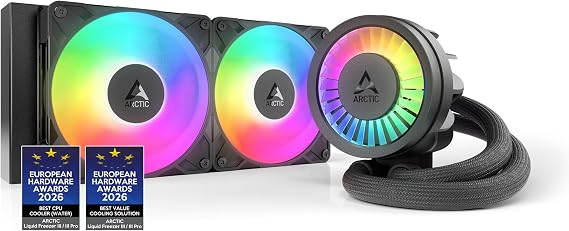
ARCTIC Liquid Freezer III Pro 240 A-RGB stands out with its optimized contact pressure and a clever native offset mounting designed specifically for Intel and AMD CPUs. Ideal for those running an i9 14900K who want reliable cooling performance and efficient heat transfer right where it counts.
Setup is straightforward thanks to the contact frame designed for Intel LGA1851 and LGA1700 sockets, making it fit perfectly without fuss. The included P12 PRO fan runs quieter and provides more airflow, especially useful at lower speeds during everyday tasks. The integrated VRM fan adds extra cooling on voltage converters, helping to maintain stable performance over long sessions.
Performance is solid, delivering consistent cooling even under heavy loads thanks to its water cooling method and powerful fans. Its build quality feels sturdy with an intelligently shifted cold plate that improves heat dissipation.
Many appreciate how quiet it stays, while some find the maximum fan speed could be louder for extreme overclocking.
Many users highlight how well the cooler stays quiet during daily tasks yet can struggle with peak noise levels when pushed to maximum speed. The offset cold plate notably improves heat transfer, keeping the CPU cooler than some other models could manage.
Those running demanding workloads on an i9 14900K who prioritize quieter performance and efficient VRM cooling will find this cooler favorable. Users seeking extreme overclocking headroom or ultra-high fan RPM might look for alternative options better suited for maximum airflow tuning.
Pros
- Optimized contact pressure for better heat dissipation
- Quieter operation at low fan speeds
- Integrated VRM fan for voltage converter cooling
- Native offset mounting targets CPU hotspot
Cons
- Maximum rotational speed may be low for heavy overclocking
- Fan noise, although low, can increase significantly at max speed
| Specification | Details |
|---|---|
| Power Connector Type | 4-Pin |
| Voltage | 12 volts |
| Wattage | 3.96 watts |
| Cooling Method | Water |
| Air Flow Capacity | 77 cfm |
7. CORSAIR Nautilus 360 RS AIO Liquid Cooler

Corsair Nautilus 360 RS AIO Liquid Cooler excels in providing strong, quiet cooling for powerful CPUs like the i9 14900k. It suits anyone needing wide compatibility and a neat setup with high airflow fans designed to keep temperatures down during intense workloads.
Installation is straightforward thanks to the included RS120 fans that can daisy-chain together, reducing cable clutter and making it quick to hook up with a single connection to the motherboard. These fans use Magnetic Dome bearings for quieter operation, making daily use noticeably more pleasant without distracting noise while gaming or working.
In terms of performance, the cooler manages heat well, especially under heavy CPU loads, thanks to its focused airflow and water cooling design. Build quality is solid, with reliable fan bearings and efficient water circulation, though some mention fan noise at peak RPM as a minor drawback. It balances cooling power with reasonable sound levels effectively.
The strong airflow and quiet operation stand out as major benefits during extended use, helping maintain lower temperatures on demanding CPUs. Some users find the fans a bit noisy when spinning at 2100 rpm, especially during overclocking or heavy workloads.
Enthusiasts running high-end Intel or AMD builds will appreciate its compatibility and cooling strength. Anyone with limited case space or a preference for ultra-silent setups might want to explore other solutions that fit smaller dimensions or prioritize quiet fan profiles.
Pros
- Strong airflow with focused cooling
- Supports latest AMD and Intel sockets
- Daisy-chained fans reduce cable clutter
- Low-noise operation from Magnetic Dome bearing
Cons
- Fan noise can increase at maximum speed
- Installation may be bulky in small cases
| Specification | Details |
|---|---|
| Power Connector Type | 4-Pin |
| Cooling Method | Water |
| Compatible Devices | Desktop |
| Maximum Rotational Speed | 2100 rpm |
8. CORSAIR iCUE Link Titan II 360 RX LCD Cooler

Running an i9 14900K with the CORSAIR iCUE Link Titan II 360 RX LCD Cooler feels impressively controlled and visually engaging. Ideal for those who want strong cooling performance combined with a unique, bright 5 IPS LCD display that shows temps and custom images, offering an added touch of personalization not often seen in AIO coolers.
Installation is smoother than expected thanks to the unified fan frame, which reduces screws and cable clutter. The quiet RX II fans with magnetic dome bearings keep noise low around 32.8 dB while maintaining efficient airflow. The LCD doubles as a secondary monitor in Windows, giving you a useful screen for system info or fun animations during everyday use.
Cooling capacity matches the demands of the i9 14900K well, delivering stable temperatures under load. The build feels solid with quality materials behind the water cooling design.
Praises often go to the vivid, sharp display and quiet fan operation. Complaints mostly mention that the loudness can spike depending on workload and fan speeds.
The vivid IPS LCD is a standout feature, making temperature monitoring both straightforward and visually appealing. Quiet operation is typical, but occasional spikes in fan noise can occur during intense CPU activity, reflecting how the cooler prioritizes performance when needed.
Those who want reliable cooling combined with a customizable display will appreciate this model. Users with tight case space or sensitivity to fan noise fluctuations might look for alternatives with smaller radiators or more consistent quietness.
Pros
- Large, bright IPS LCD for live temp and custom images
- Quiet RX II fans with magnetic dome bearings
- Unified fan frame simplifies installation
- Built-in temperature sensors for real-time monitoring
Cons
- Fan noise can increase under heavy loads
- Requires space for larger 360mm radiator
| Specification | Details |
|---|---|
| Cooling Method | Water |
| Compatible Devices | Desktop |
| Noise Level | 32.8 dB |
| Display | 5″ IPS LCD, 720×1280 resolution, 500 cd/m2 brightness |
9. Thermalright Aqua Elite 240 V3 AIO CPU Cooler

Strong cooling combined with a quiet operation makes the Thermalright Aqua Elite 240 V3 perfect for anyone running a demanding i9 14900K processor. Its core strength lies in efficient heat dissipation with minimal vibration, helping to keep high-end CPUs cooler without a lot of noise.
Installation benefits from its standard 120mm ARGB fans and thoughtfully designed pump head that minimizes vibration. Protective mesh on the water pipes adds durability, while the 4th generation pump keeps the cooler running smoothly day-to-day.
You’ll notice the pump speed can reach up to 2800 RPM, yet noise stays manageable around 25 dB, making it pleasant during intense workloads.
Cooling performance lives up to expectations with a black aluminium fin heat sink plate aiding swift temperature drops. Built solidly with a focus on longevity, the cooler is rated for up to 40,000 hours pump life.
Users regularly appreciate the quiet operation, though some mention that pump speed can feel a bit high at maximum RPM. The balance between cooling power and noise suppression is key.
The strongest point is the low vibration and decent noise level despite the pump spinning up to 2800 RPM, delivering reliable cooling for intensive CPU use. The most frequent issue users note is pump noise at higher speeds, which may be noticeable during heavy processing tasks.
This liquid cooler suits those prioritizing quiet, effective cooling for high-performance CPUs like the i9 14900K. Users wanting quieter pumps at full throttle or higher fan speed options might look towards alternatives offering different speed controls or noise profiles.
Pros
- Low vibration pump for quieter operation
- Durable protective mesh water pipe
- Efficient black aluminium fin heat sink
- ARGB lighting adds customizable aesthetics
Cons
- Pump can get loud at top speed
- Limited to 1800 rpm maximum fan speed
| Specification | Details |
|---|---|
| Maximum Rotational Speed | 1800 rpm |
| Power Connector Type | 4-Pin |
| Voltage | 5 volts |
| Noise Level | 25 db |
| Air Flow Capacity | 66.17 cfm |
| Wattage | 2.64 watts |
10. Noctua NL-LC1-42 420mm AIO CPU Cooler

Crafted with an extra-large 420mm radiator and three 140mm Noctua NF-A14x25 G2 fans, this AIO cooler suits anyone running an i9 14900k who wants excellent cooling performance with low noise output. Its standout feature lies in an innovative pump noise absorber, keeping things quiet while managing heat effectively.
Installation is straightforward with a premium Asetek Emma V2 liquid cooling platform. The large size means ensuring your case supports a 420mm radiator is key.
During daily use, the cooling stays quiet thanks to the 3-layer acoustic soundproofing and tuned-mass damper in the pump. The fans run up to 1500 rpm with speed offsets to balance airflow and noise. Maintaining it involves occasional dusting but no complex cleaning routines.
Thermal management performs strongly, keeping high-power CPUs like the i9 14900k cool under load without producing much noise beyond 24.8 dB. The build quality is sturdy, combining reliable liquid cooling with well-engineered acoustic features.
The most common praise focuses on its near-silent operation, while some note the larger radiator size could present fit challenges in smaller cases.
Quiet operation ranks as the biggest advantage thanks to the innovative pump design and acoustic layers. The size of the radiator receives the most criticism, as not all setups can accommodate a 420mm unit without modifications or special cases.
Those building near-silent workstations or gaming PCs with ample case space will appreciate the effective cooling and low noise. Users with compact cases or restricted interior layouts should look for smaller AIO options that are easier to fit.
Pros
- Very quiet pump with soundproofing technology
- Extra-large radiator improves cooling capacity
- Efficient 140mm fans balance airflow and noise
- Solid build quality for long-term reliability
Cons
- Large radiator may not fit smaller cases
- Requires checking case compatibility before purchase
| Specification | Details |
|---|---|
| Cooling Method | Water |
| Radiator Size | 420mm |
| Fan Size | 140mm |
| Noise Level | 24.8 db |
| Maximum Rotational Speed | 1500 rpm |
| Power Connector Type | 4-Pin |
11. LIAN LI HydroShift II OLED 360 AIO Cooler

A striking 6.67” 2K curved OLED display sets this cooler apart, making it ideal for anyone wanting a visually impressive setup alongside high performance. It’s suited for handling the intense cooling demands of the i9 14900k while adding a cool tech flair to your desktop.
Setting up involves positioning the motorized pump head that moves with lift, rotation, and dual-axis adjustments controlled through L-Connect 3 software. Daily use means you can easily customize the viewing angle, which feels like a nice touch when checking temperatures or just enjoying the screen’s vivid colors and brightness up to 500 nits.
Noise levels remain low enough not to be distracting during work or gaming.
It offers solid water cooling performance, keeping temperature spikes in check thanks to the fan speed that can reach 2600 rpm. The build quality feels sturdy and well-made, with the motorized head adding functionality beyond regular AIOs. The most noted praise focuses on the display clarity and customization options, while the common complaint involves the complexity some face adjusting the motorized pump head.
Many appreciate the clarity and brightness of the curved OLED screen, which provides more than just a cooling function, while some users find the motorized head adjustments a bit difficult to master initially. The cooler combines visual flair with gentle operating noise during everyday tasks.
People looking for strong cooling paired with standout screen customization will appreciate this model. Those wanting a straightforward installation and minimal setup might want to look elsewhere for a simpler AIO cooler.
Pros
- Vibrant 2K OLED display with curved design
- Motorized pump head for custom positioning
- Quiet operation at 33 db noise level
- High fan speed up to 2600 rpm supports cooling
Cons
- Motorized head adjustment can be tricky at first
- Requires software for full customization features
| Specification | Details |
|---|---|
| Cooling Method | Water |
| Maximum Rotational Speed | 2600 rpm |
| Noise Level | 33 db |
| Compatible Devices | Cpu, Desktop |
| Display | 6.67” 2K curved OLED, 500 nits brightness |
12. MSI MPG Coreliquid P13 360 AIO Liquid Cooler

Choosing a cooler with great water-tightness and a clean look is crucial for running an i9 14900k smoothly, and here is where MSI’s MPG Coreliquid P13 360 stands out. It suits anyone wanting consistent cooling with minimal cable clutter and a customizable display on the pump head.
Installation feels neat thanks to pump tubing hiding all the cables, leaving the cooling head clean. Using it daily, you get a clear view of system stats or fun animations on its 2.1-inch LCD screen.
The CycloBlade 9 fans deliver solid airflow, and the full-plane copper base improves sealing to avoid leaks over time.
Performance is solid with powerful fans spinning up to 2050 rpm and moving 64.9 cfm airflow, keeping the CPU temperatures well in check under load. The all-copper base plate ensures durability and reliability. Praise often focuses on the display’s customization and lack of visible wires, while some note its 5-volt pump limits maximum power a bit.
Strong points include a highly reliable water-tight copper base and the unique LCD on the pump that shows real-time stats without visible cables. Most users find the cable management and screen customization refreshing, while some mention the 5-volt pump keeps power and cooling head speed a bit lower than expected.
Anyone prioritizing a clean look and accurate system monitoring will like this cooler. Those looking for maximum pump power or simple plug-and-play setups might want to consider alternatives.
Pros
- Hidden cable design keeps setup tidy
- 2.1-inch LCD supports real-time monitoring
- CycloBlade 9 fan moves strong airflow
- Full-plane copper base improves water-tightness
Cons
- Pump runs at 5 volts, limiting max power
- Complex display adds some setup effort
| Specification | Details |
|---|---|
| Power Connector Type | 4-Pin |
| Voltage | 5 volts |
| Wattage | 1.68 watts |
| Maximum Rotational Speed | 2050 rpm |
| Air Flow Capacity | 64.9 cfm |
| Cooling Method | Water |
Best AIO Coolers for i9 14900k Comparison
| Product | Cooling Method | Maximum RPM | Air Flow Capacity | Noise Level |
|---|---|---|---|---|
| ARCTIC Liquid Freezer III 360 | Liquid | 3000 rpm | 77 cfm | – |
| Cooler Master 360 Atmos | Water | 2500 rpm | 70.7 cfm | 25 db |
| Noctua NL-LC1-36 Cooler | Water | 1800 rpm | 107.3 m³/h | 22.5 db |
| ASUS ROG Ryuo IV 360 | Fan | 2000 rpm | 56.66 cfm | – |
| ARCTIC Liquid Freezer III A-RGB | Liquid | 3000 rpm | 77 cfm | – |
| ARCTIC Liquid Freezer III A-RGB | Water | 1 rpm | 77 cfm | – |
| CORSAIR Nautilus 360 RS | Water | 2100 rpm | – | – |
| CORSAIR iCUE Titan II 360 | Water | – | – | 32.8 db |
| Thermalright Aqua Elite 240 V3 | Air, Water | 1800 rpm | 66.17 cfm | 25 db |
| Noctua NL-LC1-42 Cooler | Water | 1500 rpm | 155.6 m³/h | 24.8 db |
| LIAN LI HydroShift II OLED | Water | 2600 rpm | – | 33 db |
| MSI MPG Coreliquid P13 360 | Water | 2050 rpm | 64.9 cfm | – |
- Cooling MethodLiquid
- Maximum RPM3000 rpm
- Air Flow Capacity77 cfm
- Noise Level–
- Cooling MethodWater
- Maximum RPM2500 rpm
- Air Flow Capacity70.7 cfm
- Noise Level25 db
- Cooling MethodWater
- Maximum RPM1800 rpm
- Air Flow Capacity107.3 m³/h
- Noise Level22.5 db
- Cooling MethodFan
- Maximum RPM2000 rpm
- Air Flow Capacity56.66 cfm
- Noise Level–
- Cooling MethodLiquid
- Maximum RPM3000 rpm
- Air Flow Capacity77 cfm
- Noise Level–
- Cooling MethodWater
- Maximum RPM1 rpm
- Air Flow Capacity77 cfm
- Noise Level–
- Cooling MethodWater
- Maximum RPM2100 rpm
- Air Flow Capacity–
- Noise Level–
- Cooling MethodWater
- Maximum RPM–
- Air Flow Capacity–
- Noise Level32.8 db
- Cooling MethodAir, Water
- Maximum RPM1800 rpm
- Air Flow Capacity66.17 cfm
- Noise Level25 db
- Cooling MethodWater
- Maximum RPM1500 rpm
- Air Flow Capacity155.6 m³/h
- Noise Level24.8 db
- Cooling MethodWater
- Maximum RPM2600 rpm
- Air Flow Capacity–
- Noise Level33 db
- Cooling MethodWater
- Maximum RPM2050 rpm
- Air Flow Capacity64.9 cfm
- Noise Level–
How to Choose the Right AIO Cooler
Choosing the right AIO cooler for the i9 14900k involves focusing on cooling performance, radiator size, and compatibility with your case. Prioritizing these factors ensures efficient heat dissipation and prevents overheating, which saves money on repairs and keeps your system stable over time.
Cooling Performance
High heat output from a powerful processor often overwhelms average coolers, causing temperature spikes that reduce performance or trigger thermal throttling. The combination of a strong pump and a well-designed radiator is what keeps temperatures stable under continuous load. Radiators with larger surface areas, such as 240mm or 360mm, typically manage heat better by allowing more coolant volume and higher airflow.
Fans play a key role in moving air through the radiator fins. Fast spinning fans increase airflow but may also raise noise levels.
Look for PWM-controlled fans that adjust speed based on temperature. A pump with consistent flow rates reduces hotspots, while radiators made of copper or aluminum optimize heat transfer. A well-matched setup handles the processor’s peak heat output without constant extreme fan speeds, helping to maintain smooth system operation.
Compatibility and Size
The size of the radiator can make or break an installation. Larger radiators, such as 280mm or 360mm options, might not fit in smaller cases or may interfere with other components like tall RAM modules or large graphics cards.
Measuring available space carefully avoids buying a cooler that’s impossible to mount or reduces airflow by crowding other parts.
Socket compatibility matters as Intel’s latest chips use specific mounting hardware. The cooler must support the exact CPU socket type to ensure proper contact and pressure.
Clearance around RAM slots is crucial since some cooler blocks or tubing shapes extend over memory modules and can block tall heat spreaders. Checking these details ensures a setup that fits right the first time without modifications.
Noise Levels
Pump noise may be barely noticeable at idle but often increases under load, sometimes reaching distracting levels. Some pumps emit a low-pitched hum or faint electrical noise that some users find bothersome after long periods.
Fans contribute significantly to overall sound, especially during gaming or rendering sessions when they ramp up to max RPM.
Many coolers offer quiet or balanced modes through software, allowing the system to prioritize lower noise at the cost of slightly higher temperatures. Good fans use aerodynamic blade designs to reduce turbulence and whining sounds.
Aim for models with fan speeds adjustable between 600 and 2000 RPM and noise levels under 30 dBA at idle for a quieter experience.
Build Quality and Materials
Durability issues crop up when tubing becomes brittle or fittings loosen, leading to leaks that can damage hardware. Rubber or braided nylon coverings increase tubing lifespan and prevent kinks. Radiators made from copper generally outperform aluminum in heat transfer but tend to cost more.
The cold plate material in the CPU block should also be copper for efficient heat movement.
Coolant composition is critical; additives prevent corrosion from mixing metals inside. Over time, cheap components may degrade, causing discoloration or reduced cooling efficiency.
Choosing products with well-sealed loops and corrosion-resistant internal components helps avoid premature failures and keeps the system reliable over years of use.
Ease of Installation and Maintenance
Complex mounting systems can turn installation into a multi-hour frustration. Coolers with simple brackets or backplates that align easily make the process quicker and less stressful.
Clear, illustrated instructions that specify torque settings avoid damaging the motherboard or uneven contact on the CPU.
Dust buildup on the radiator and fans reduces cooling efficiency. Radiators placed in accessible case locations simplify cleaning routines.
Replaceability is another factor; being able to swap fans or tubing rather than the entire cooler saves money and effort down the road. Some kits support standard fan sizes and tubing fittings, offering upgrade paths that extend system life.
Optimizing Cooling Performance for the i9 14900k with AIO Solutions
The i9 14900k generates significant heat, so ensuring your AIO cooler matches its thermal output is essential. A 240mm or larger radiator is usually necessary to maintain stable temperatures under heavy loads.
Fans with a good static pressure rating help push air through the radiator fins efficiently, which directly affects cooling performance. Positioning the radiator where it can draw fresh cool air, such as the front or top of the case with proper airflow setup, also makes a noticeable difference. Using high-quality thermal paste applied evenly between the CPU and the cold plate improves heat transfer.
Adjusting fan curves in your motherboard’s BIOS allows the cooler to ramp up speed precisely when the CPU temperature rises, balancing noise and cooling needs.
Routine Maintenance Practices to Prolong Your AIO Cooler’s Lifespan
Maintaining an AIO cooler involves more than just monitoring temps. Dust accumulation on the radiator and fans restricts airflow, so cleaning these areas regularly with compressed air or a soft brush is beneficial. Checking fan operation ensures they spin freely without unusual noise, which can indicate bearing wear.
Periodically inspecting the tubing for any signs of leaks or brittleness helps catch issues before they impact performance. The pump is crucial and should produce a low hum during operation; a sudden increase or silence might require attention.
Keeping your computer’s internal environment cool and dust-free reduces stress on the AIO cooler and can prevent early failure.
Comparing AIO Coolers to Custom Water Cooling for the i9 14900k
AIO coolers offer quick installation and compact design compared to custom water loops, which require assembling individual parts like reservoirs, pumps, and radiators. Custom loops typically cool more efficiently because they can use larger radiators and more coolant volume, but they demand regular refilling and maintenance.
AIOs come sealed from the factory, minimizing service needs and risk of leaks for most users. However, custom water cooling setups allow more flexibility in component placement and can be visually customized extensively. For the i9 14900k, an AIO cooler will handle most users’ thermal demands well, but enthusiasts who want lower temperatures and quieter operation often prefer custom loops despite the upkeep.
Both options have their place based on user priorities around ease and performance.
People Also Asked
How Do I Install an AIO Cooler on i9 14900k?
Mount the backplate on the motherboard, attach the pump block to the CPU using thermal paste, and secure the radiator in the case fan slots. Make sure to route cables neatly to avoid obstructing airflow or other components.
What Size Radiator Fits Best in My PC Case?
Measure the available space inside your case before choosing a radiator; mid-tower cases typically fit 240mm or 360mm radiators. Confirm clearance around the motherboard and other parts, including RAM height, since larger radiators can block slots.
How Long Does an AIO Cooler Typically Last on i9 14900k?
AIO coolers usually last around 5-7 years under normal use before pump or seal wear can cause issues. Regular cleaning of the radiator fins can help maintain performance and extend the cooler’s useful life.
Are AIO Coolers Safe for Continuous High CPU Temperatures?
AIO coolers can handle continuous high CPU loads but expect higher temperatures if overclocking aggressively. Make sure your case airflow supports exhausting the heat efficiently to prevent heat buildup inside the chassis.
What Common Problems Should I Watch for with AIO Coolers?
Common issues include pump noise or failure, coolant leaks, and clogged radiator fins. Regularly check for unusual sounds, and clean dust from fans and radiator to prevent overheating and maintain cooling efficiency.
Conclusion
Choosing a suitable AIO cooler for an i9 14900k mainly comes down to cooling performance, noise levels, and compatibility with your case. The processor runs hot under load, so a cooler that can keep temperatures low without sounding like a jet engine is important.
Also, make sure the cooler fits your setup and supports the right socket.
Think about the space available in your case and how much noise you can tolerate during long sessions. Cooling capacity should match how hard you plan to push the processor.
Take another look at the comparison table and the options discussed above to find the best balance for your build and budget.

I’m Grant Mitchell, a firearms and hunting writer with years of experience at the range and in the field. I write about rifles, shotguns, handguns, optics, safe storage, cleaning, and responsible ownership, along with practical hunting tips. My goal is to share accurate, safety-first information that helps you choose the right firearm, maintain it properly, and become a more confident shooter.