Top 12 Best 7800X3D Cooler That Will Blow Your Mind!
Long gaming sessions or heavy workloads can push the 7800x3d processor to its limits, causing overheating when paired with an insufficient cooler. Choosing the best 7800x3d cooler prevents sudden throttling and system crashes, problems that often arise from underpowered or poorly ventilated cooling solutions. A cooler that can’t handle the heat output quickly becomes a bottleneck, limiting performance and reducing the processor’s lifespan.
The most important factors for a good 7800x3d cooler include efficient heat dissipation, secure mounting, and low noise levels. A cooler with a high-quality copper base and heat pipes improves thermal conductivity, while large or multiple fans, typically around 120mm or greater, help move air effectively.
Compatibility with the AM5 socket and adjustable mounting brackets ensure a tight fit and reliable pressure on the CPU for optimal cooling. Easy maintenance, like removable fan grills, also makes cleaning dust buildup simpler, preserving performance over time.
Need a Quick Check?
| Image | Product | Price |
|---|---|---|
Our Top Picks 1  | ARCTIC Liquid Freezer 360 Pro | Check Price |
Our Top Picks 2  | Thermalright Peerless Assassin 120 SE | Check Price |
Our Top Picks 3  | LIAN LI HydroShift II OLED | Check Price |
Our Selected Top 12 7800x3d Cooler Picks for Every Need
This list features a carefully chosen range of coolers designed to efficiently manage the heat of the 7800x3d processor. Each review covers performance, ideal user scenarios, and highlights strengths and weaknesses, helping readers find the best match for their specific cooling needs.
1. ARCTIC Liquid Freezer III Pro 360
Handling high-performance CPUs can get tricky without the right cooling, especially with power-hungry chips like the 7800X3D. A cooler that keeps temps down quietly and fits perfectly without fuss is what you need.
What stands out most here is how the cooler targets the CPU hotspot directly for better heat transfer.
Setting it up is straightforward with support for Intel’s latest sockets, including LGA1851 and LGA1700, so compatibility won’t hold you back. Everyday use benefits from the P12 PRO fan, which runs quieter at low speeds yet ramps up power when your CPU is under heavy load.
The integrated VRM fan works quietly behind the scenes, helping keep voltage converter temperatures in check and ensuring steady performance.
The cooling performs well due to the offset mounting that targets the hottest parts of the CPU. Build quality feels reliable, with a 4-pin power connector and a max fan speed of 3000rpm ensuring consistent airflow.
Most praise highlights its quiet operation during light tasks, while some note the fan noise increases noticeably under heavy loads.
The cooler stands out for being very quiet during regular use and targeting the CPU hotspot effectively. Most users mention the humming gets louder when pushed hard, but it’s a trade-off for strong cooling performance. Some find the power draw a bit on the higher side.
This cooler suits anyone running a powerful desktop requiring solid heat management and quiet daily operation. Those sensitive to increased noise at full load or with strict power budgets should explore alternatives.
Pros
- Optimized contact pressure for longer CPU life
- Quiet operation at low fan speeds
- Integrated VRM fan improves component reliability
- High air flow of 77 cfm under load
Cons
- Fan noise increases at maximum speed
- Relatively high wattage compared to some coolers
| Specification | Details |
|---|---|
| Power Connector Type | 4-Pin |
| Voltage | 12 volts |
| Wattage | 3.96 watts |
| Maximum Rotational Speed | 3000 rpm |
| Air Flow Capacity | 77 cfm |
| Cooling Method | Liquid |
2. Thermalright Peerless Assassin 120 SE
With a noise level of just 25.6 db, the Thermalright Peerless Assassin 120 SE is built to keep your Ryzen 7 7800X3D cool without drowning out your gaming or work sessions. It suits anyone looking for strong air cooling performance in a mid-sized desktop setup.
Installation requires attention, but the 4-pin power connector and 12-volt input make it compatible with most desktops. It runs quietly at a maximum 1550 rpm, providing steady airflow of 66.17 cfm. Regular cleaning is manageable thanks to its design, which keeps dust buildup minimal.
This cooler maintains consistent operation without needing frequent tweaks.
Cooling power tops out at 265 watts, proving it can tackle heavy CPU loads effectively. The build reflects Thermalright’s 20 years of experience in cooling tech, with solid materials and a reliable mounting system.
Praised for quiet operation, it occasionally draws criticism for its size, which may pose issues in smaller cases.
Quiet performance stands out as the biggest advantage, making it suitable for noise-sensitive environments. Some find the cooler bulky, which may complicate fitting it in compact desktops. Patience during setup helps avoid mounting troubles.
Gamers and everyday users with mid to large cases looking for strong and quiet cooling will benefit here. Those with small form-factor builds or new to PC assembly might want to consider smaller or simpler alternatives.
Pros
- Quiet operation at just 25.6 db
- Strong cooling capacity of 265 watts
- Decent airflow of 66.17 cfm for air cooling
- Compatible with standard 4-Pin connectors
Cons
- Size can be restrictive in small cases
- Installation requires careful mounting
| Specification | Details |
|---|---|
| Cooling Method | Air |
| Noise Level | 25.6 db |
| Maximum Rotational Speed | 1550 rpm |
| Air Flow Capacity | 66.17 cfm |
| Power Connector Type | 4-Pin |
| Wattage | 265 watts |
3. LIAN LI HydroShift II OLED Curved 360
Anyone running a high-performance CPU like the 7800X3D will appreciate the LIAN LI HydroShift II OLED Curved 360 cooler, especially if they want an eye-catching water cooling setup. Its standout feature is the large 6.67” 2K curved OLED display built into the pump head, perfect for those who enjoy customizing their PC aesthetics and monitoring system stats at a glance.
Setting up takes some attention due to the motorized pump head, which allows lift, rotation, and dual-axis movement controlled with L-Connect 3 software. Adjusting the angle feels smooth, helping you find the perfect view of the OLED display. Day-to-day operation is quiet at 33 db, with the water cooling providing steady temperatures without much noise or vibration to distract you during work or gaming sessions.
Performance-wise, the water cooling system keeps a 7800X3D well within safe operating temperatures, and the build quality feels solid and premium. The OLED provides vibrant colors and up to 500 nits brightness, making it easy to read in various lighting. The one downside is the noise level at higher pump speeds, peaking at 2600 rpm, which can be noticeable during intense workloads and might bother those wanting near-silent builds.
The strongest praise highlights the impressive OLED display that offers clear visuals with up to 500 nits brightness, allowing users to monitor system status in style. The most common complaint involves the noise becoming noticeable when the pump runs at full speed, which can be a drawback during heavy use.
Those who want both high-performance cooling and a visually striking, customizable pump display will find this cooler fitting well. Anyone who prioritizes near-silent operation above all might want to consider other options without motorized parts or with lower noise levels at peak speeds.
Pros
- 6.67” curved OLED with vibrant colors
- Motorized pump head adjustable by software
- Quiet operation at standard speeds
- Strong water cooling for high-performance CPUs
Cons
- Noise noticeable at maximum 2600 rpm speed
- Motorized adjustments require software setup
| Specification | Details |
|---|---|
| Cooling Method | Water |
| Noise Level | 33 db |
| Maximum Rotational Speed | 2600 rpm |
| Compatible Devices | Cpu, Desktop |
| OLED Display Size | 6.67” 2K curved |
4. Thermalright Frozen Infinity 360 Black

A liquid cooler with a solid triple-fan setup designed to tame the heat of high-performance CPUs like the 7800x3d. Fits well on desktops where space allows for a 397mm radiator. The standout feature is powerful cooling supported by a fast water pump and strong airflow.
Installation takes some patience due to the large radiator size but is straightforward once mounted. Fans run quietly at no more than 28.2 dB, making daily use peaceful.
The water pump spins fast to keep temperatures down, supported by temperature-controlled fans with ARGB lighting. You’ll notice low noise despite the high airflow at 68.9 CFM.
Cooling performance is solid with high-speed fans running up to 2000 RPM, easily keeping demanding CPUs cool. The triple-fan design spreads out heat effectively across the radiator.
Built with a sturdy water-cooled radiator and quality S-FDB bearings to reduce vibration and friction. Most praise revolves around powerful cooling and quiet operation, while the biggest gripe involves the bulkyness of the large 397mm radiator.
The cooler provides strong CPU cooling with low noise thanks to high-speed fans and quality bearing design. Most complaints mention its large radiator size, which may limit case compatibility and complicate installation.
Gamers or PC builders with roomy cases looking for powerful liquid cooling will appreciate its performance and low noise. Those with compact setups or sensitivity to high fan speeds might seek more compact or quieter cooling options.
Pros
- High airflow at 68.9 CFM keeps temps low
- Quiet operation with noise ≤28.2 dB
- ARGB fans with temperature control
- S-FDB bearing reduces vibration and prolongs fan life
Cons
- Large 397mm radiator can be hard to fit in smaller cases
- Fan speed can reach 2000 RPM, potentially noisy at max load
| Specification | Details |
|---|---|
| Radiator Size | 397*120*52mm (including fan) |
| Fan Speed | 2000 RPM +10% |
| Noise Level | ≤28.2 dB(A) |
| Air Flow | 68.9 CFM |
| Power Connector | 4-Pin |
| Cooling Method | Air |
5. Thermalright Assassin X120 Refined SE

Thermalright Assassin X120 Refined SE delivers solid cooling performance tailored for desktop users looking to tame the AMD Ryzen 7 7800X3D’s heat output. Its standout feature is a good balance between airflow and noise levels, making it suited for those wanting reliable cooling without excessive noise.
Setup is straightforward thanks to the included mounting brackets, a characteristic of Thermalright’s attention to detail in their R&D. The fan connector is a standard 4-pin, giving you PWM control to adjust speeds as needed. Running at a maximum of 1550 rpm, it holds noise at a reasonable 25.6 dB, so daily use doesn’t turn your PC area into a loud workspace.
Its heat pipe design efficiently moves heat away from the CPU, helping keep temperatures stable during extended sessions.
Performance is dependable, with the fan pushing up to 66.17 cfm of air to cool effectively. Build quality reflects Thermalright’s experience in components, using known materials for durability.
One strong point noted often is its quiet operation despite good airflow. Some have mentioned it could be slightly bulkier compared to more compact coolers, which might influence fit in smaller cases.
The quiet operation paired with decent airflow makes it a reliable cooler for managing CPU temperatures without sounding loud. Some find the physical size a bit large, making case compatibility an important consideration before purchase.
People with mid to large cases and a preference for quieter cooling will appreciate this model. Those working with compact setups or ultra-quiet builds might want to explore smaller or more specialized coolers instead.
Pros
- Quiet operation at full fan speed
- Good airflow for efficient cooling
- Standard 4-pin PWM connector for control
- Sturdy build quality from experienced brand
Cons
- Bulkier size may challenge small case fits
- Noise could still increase at max RPM
| Specification | Details |
|---|---|
| Power Connector Type | 4-Pin |
| Voltage | 12 volts_of_direct_current |
| Cooling Method | Heat pipe and fan-based |
| Noise Level | 25.6 db |
| Maximum Rotational Speed | 1550 rpm |
| Air Flow Capacity | 66.17 cfm |
6. ARCTIC Liquid Freezer III Pro 360 A-RGB

Liquid Freezer III Pro 360 A-RGB feels like a solid cooling companion for anyone running a 7800x3d chip, especially when heat and noise are concerns. Its biggest strength lies in balancing quiet operation with strong cooling power, fitting nicely in builds where fans matter as much as flow.
Setup involves fitting the native offset mounting which targets the CPU hotspot directly, making the contact more efficient. The integrated VRM fan adjusts speed by temperature, helping voltage converters stay cool without extra noise. ARCTIC’s P12 PRO fans run smoothly and quietly, even at higher speeds, making daily use calm and consistent while managing heavy workloads.
This cooler delivers strong liquid cooling performance that matches the demands of high-load CPUs. It feels well-built with its optimized contact frame enhancing CPU life and heat dissipation.
Common praise highlights how quiet the fans stay at low speeds, while some mention fan speed hitting 3000 rpm can get noticeable during intense workloads.
Daily reports praise the cooler’s quietness during medium workloads, balanced by occasional fan noise when pushed to full speed. Its direct contact design improves heat transfer, boosting CPU longevity and cooling efficiency. The integrated VRM fan is a notable addition that helps maintain system stability under strain.
Those wanting reliable, quiet operation with strong cooling will find this liquid cooler a good match. Users sensitive to max fan noise or looking for ultra-low power draw might consider alternative cooling solutions better suited to those priorities.
Pros
- Quiet operation at low fan speeds
- Integrated VRM fan for voltage converter cooling
- Optimized contact frame for better heat dissipation
- Powerful ARCTIC P12 PRO fans
Cons
- Fans can get loud near maximum speed
- Higher power draw than basic air coolers
| Specification | Details |
|---|---|
| Power Connector Type | 4-Pin |
| Voltage | 12 volts |
| Wattage | 3.96 watts |
| Maximum Rotational Speed | 3000 rpm |
| Air Flow Capacity | 77 cfm |
7. Be Quiet! Pure Rock Pro 3 Black

Quiet yet powerful, the Pure Rock Pro 3 Black is ideal for anyone running a 7800x3d looking for dependable cooling. Its outstanding heat pipe design and fan optimize airflow so the CPU stays cool during heavy use.
It handles overclocked setups without breaking a sweat.
Setting it up is straightforward on both Intel and AMD sockets, thanks to wide compatibility including AM5 and 1700. The 120mm Pure Wings 3 fan adjusts speed automatically via PWM, keeping noise around 34.8 dB while maintaining strong air pressure.
This means day-to-day, it balances cooling efficiency with a quiet environment.
Performance is solid, with six copper heat pipes that transfer heat efficiently from the nickel-plated base. Reviewers praise its ability to keep temperatures low under sustained loads.
Some mention the fan speed can peak at 2000 rpm, which may generate noticeable noise during intense tasks. Build quality feels premium and durable.
Many praise the cooler’s ability to maintain low CPU temperatures especially when overclocking. The main drawback noted is that the fan can get noisy near its 2000 rpm peak speed, which might distract in quiet rooms. The fan’s airflow design is otherwise effective for everyday performance.
People running high-end CPUs who value reliable air cooling and low noise will find this cooler fits well. Those looking for near-silent builds or extremely compact solutions might want to consider quieter or smaller alternatives.
Pros
- Includes six high-performance copper heat pipes
- Quiet operation with optimized fan blade angles
- Compatible with a wide range of Intel and AMD sockets
- Funnel-shaped air outlet maximizes airflow
Cons
- Fan speed can become quite loud at maximum RPM
- May require careful mounting to fit some cases
| Specification | Details |
|---|---|
| Power Connector Type | 4-Pin |
| Voltage | 12 volts |
| Wattage | 3.6 watts |
| Cooling Method | Air |
| Noise Level | 34.8 db |
| Maximum Rotational Speed | 2000 rpm |
8. Thermalright Peerless Assassin 120 Vision MAX ARGB

Copper heat pipes and a nickel-plated copper base form the core of this dual-tower cooler, designed to keep demanding CPUs like the 7800X3D running smoothly. Ideal for users who want a quiet yet powerful air cooler that also offers a unique real-time monitoring display, it stands out for marrying performance with style.
Setting up involves attaching two fans to the dual-tower heatsink, then placing the magnetic top cover with its 5-inch IPS LCD screen to keep an eye on system stats. Daily use benefits from the relatively low 27 dB noise level even when the fans spin up to 2150 RPM, making it easy to keep your desktop environment calm.
The cooling software lets you customize the LCD background to match your setup or mood.
Cooling ability is impressive thanks to six pure copper heat pipes and high airflow capacity of 69 CFM. The nickel-coated base ensures strong contact with the CPU, delivering consistent temperature control under load. Most users compliment its quiet operation and excellent heat management, though some mention the cooler’s height could be a tight fit in certain cases.
Cooling performance receives high marks for keeping even demanding CPUs cool with relatively low noise. Common complaints focus on the cooler’s size and the magnetic top cover, which some find fiddly when installing or cleaning.
This cooler suits users who prioritize silent, high-performance air cooling with a flair for customization. Those with compact cases or who prefer simpler designs should explore other options to avoid fit or handling challenges.
Pros
- Six pure copper heat pipes for effective heat transfer
- Quiet operation at just 27 dB noise level
- 5-inch IPS LCD screen for real-time monitoring
- Customizable display backgrounds with TRCC software
Cons
- Height may cause clearance issues in smaller cases
- Magnetic top cover adds complexity to handling
| Specification | Details |
|---|---|
| Cooling Method | Air |
| Noise Level | 27 db |
| Maximum Rotational Speed | 2150 rpm |
| Air Flow Capacity | 69 cfm |
| Power Connector Type | 4-Pin |
9. Thermalright Phantom Spirit 120SE

Quiet operation stands out immediately when considering the Thermalright Phantom Spirit 120SE, suited for those wanting a solid air cooling solution for their desktop. Its biggest strength is the advanced AGHP heatpipe technology, which supports powerful cooling without much noise.
Setting it up involves a straightforward 4-pin power connector, compatible with most desktop motherboards. Day-to-day usage is smooth, thanks to the moderate noise level of 25.6 dB and a fan speed capped at 1500 rpm, making sure the system stays calm even during intense tasks. The cooler’s air flow at 66.17 cfm helps maintain strong ventilation around the CPU.
Cooling performance spans a wide range, supporting TDP from 105W to 280W, which covers the demands of a Ryzen 7 7800X3D nicely. The build quality reflects experienced engineering, with 7x6mm heatpipes incorporating 4th generation AGHP technology to optimize heat transfer.
Praise often highlights its quiet fan, while the most mentioned drawback is that cooling capacity may struggle at the upper end of power loads.
Many appreciate the quiet operation combined with effective cooling for most mid to high-power CPUs. A common limitation is the fan speed cap, which might limit performance under maximum load conditions. The cooler balances sound and cooling well within its rated TDP range.
Those running CPUs with power demands up to 280W will find it a solid choice that quietly manages heat. For extreme overclockers or users pushing beyond this range, looking into higher capacity coolers might be a better match.
Pros
- Quiet fan keeps noise under control
- Good cooling performance up to 280W TDP
- Advanced 4th generation AGHP heatpipe technology
- Simple 4-pin power connector for compatibility
Cons
- May struggle with highest TDP loads
- Fan speed limited to 1500 rpm
| Specification | Details |
|---|---|
| Cooling Method | Air |
| Noise Level | 25.6 db |
| Maximum Rotational Speed | 1500 rpm |
| Air Flow Capacity | 66.17 cfm |
| Power Connector Type | 4-Pin |
| CPU Cooler TDP Range | 105W to 280W |
10. Chill Arc 360 AIO CPU Cooler

High-end cooling performance stands out for anyone running demanding CPUs like the Ryzen 7 7800X3D. It combines a strong liquid cooling system with unique visual flair thanks to its rotatable 2K AMOLED screen. Ideal for enthusiasts who want to keep their processor cool while adding a stylish touch to their PC build.
Installation comes with universal mounting hardware that fits the latest AMD and Intel sockets, making setup straightforward. Daily use highlights the strong airflow from three 120mm ARGB fans, keeping temperatures stable even during heavy tasks.
The screen rotation allows you to customize what you see on the cooler, from system stats to wallpapers, without interrupting airflow.
Cooling power easily handles processors with a 320W TDP, providing reliable temperature control even under intense loads. The all-white design with AMOLED display adds an eye-catching element without compromising build quality.
The main praise revolves around powerful cooling performance and visual customization. Noise level around 30 dB is relatively quiet, but some users might find the high fan speed noticeable during peak usage.
Strong cooling performance paired with a customizable AMOLED screen is the highest praise it receives. The sound of fans at 2700 rpm is the most common complaint, making it louder than quieter air-only coolers under load.
Enthusiasts who want both high thermal efficiency and something visually unique will appreciate this cooler. Those seeking near-silent operation or ultra-simple setups might prefer a traditional cooler without digital display features.
Pros
- 320W TDP cooling easily manages high-end CPUs
- 360-degree rotatable 2K AMOLED display for customization
- Three 120mm ARGB fans provide strong airflow
- Supports major Intel and AMD sockets
Cons
- Fan noise can be noticeable at maximum speed
- 6.1 watts power draw might be higher than simpler coolers
| Specification | Details |
|---|---|
| Cooling Method | Air, Water |
| Power Connector Type | 4-Pin |
| Voltage | 12 volts_of_direct_current |
| Maximum Rotational Speed | 2700 rpm |
| Noise Level | 30 db |
| Air Flow Capacity | 165 cfm |
11. Cooler Master V4 Alpha 3DHP
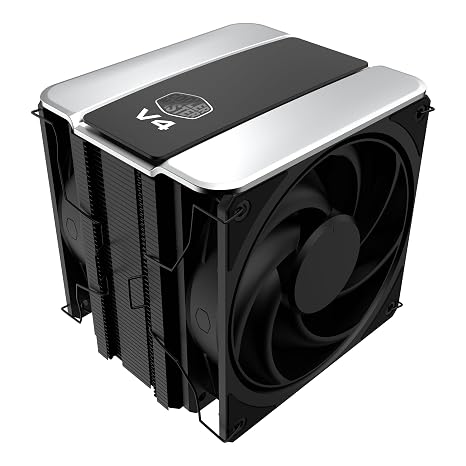
Keeping a Ryzen 7 7800X3D cool during intense gaming or heavy workloads can be a challenge. The Cooler Master V4 Alpha 3DHP stands out by offering a significant cooling boost with its patented heat pipe design. It suits users who want a quieter, efficient cooler that fits a variety of builds without fuss.
Setup is straightforward thanks to broad socket compatibility and a design that fits well in many case sizes. The pre-installed Mobius 120mm fans running in a push-pull setup help maintain strong airflow, keeping sustained temperatures lower without needing high fan speeds. Noise stays minimal during everyday tasks, so it’s easy to forget it’s even running.
Performance delivers on its promise with a 30% improvement on heat dissipation compared to standard coolers, keeping the CPU steady under load. The two patented 3DHP heat pipes clearly make a difference here, though some have mentioned the maximum fan speed can get somewhat loud at full throttle.
Build quality feels solid and the minimalist black design blends in easily with most setups.
The cooler is praised for noticeably better thermal performance using its patented heat pipe technology while keeping noise down during regular use. Some find the higher fan speeds louder than expected when pushed hard.
Anyone wanting strong cooling with quiet everyday operation will appreciate this cooler. Those needing ultra-quiet builds or a flashier design might want to look elsewhere.
Pros
- 30% better cooling with 3DHP heat pipes
- Quieter operation with reduced fan noise
- Push-pull Mobius fans improve airflow
- Wide CPU socket compatibility
Cons
- Fan speed can be loud at maximum RPM
- Minimalist design might feel plain to some
| Specification | Details |
|---|---|
| Power Connector Type | 4-Pin |
| Cooling Method | Fan |
| Compatible Devices | Desktop |
| Noise Level | 2.05 db |
| Maximum Rotational Speed | 2050 rpm |
12. Thermalright Peerless Assassin 120 Black V3

Running at 2000 RPM, this CPU cooler suits those looking for powerful air cooling for their 7800X3D. Its dual-tower, dual-fan design is what really drives strong temperature drops during heavy CPU workloads, making it great for desktop setups that need effective heat dispersion.
Installation is straightforward, and the cooler’s 4-pin power connector allows easy PWM control for fan speed adjustments. The S-FDB bearing reduces vibration significantly, so it feels solid and quiet during daily use.
Shock-absorbing silicone pads help keep noise low, meaning the fan hum isn’t distracting even under load.
Cooling performance is excellent thanks to six fully plated heatpipes and a precision micro-engraved copper base. The build feels durable, with a black anodized frosted top cover that resists wear.
Most praise goes to its powerful cooling ability, though some mention the fan noise creeping up near top RPM as a downside.
Effective cooling is consistently highlighted, especially under heavy CPU load, with many pointing out its quiet operation when not pushed to max fan speed. Noise tends to increase when the fan hits 2000 RPM, which is the main drawback for users sensitive to sound.
Those wanting to keep their 7800X3D cool without too much noise will be pleased. The cooler’s bulky size means it fits best in roomy cases; smaller builds might need a more compact option.
Pros
- Strong cooling with six heatpipes
- Quiet operation at moderate speeds
- Durable micro-engraved copper base
- Anti-vibration silicone corner pads
Cons
- Noisy near maximum fan speed
- Larger size needs enough case clearance
| Specification | Details |
|---|---|
| Maximum Rotational Speed | 2000 rpm |
| Noise Level | 29.8 db |
| Air Flow Capacity | 70.84 cfm |
| Power Connector Type | 4-Pin |
| Voltage | 12 volts_of_direct_current |
| Wattage | 2.4 watts |
Best 7800X3D Coolers Comparison Table
| Product | Cooling Method | Max RPM | Noise Level | Air Flow Capacity |
|---|---|---|---|---|
| ARCTIC Liquid Freezer 360 Pro | Liquid | 3000 rpm | – | 77 cfm |
| Thermalright Peerless Assassin 120 SE | Air | 1550 rpm | 25.6 db | 66.17 cfm |
| LIAN LI HydroShift II OLED | Water | 2600 rpm | 33 db | – |
| Thermalright Frozen Infinity 360 | Air | 2000 rpm | 28.2 db | 68.9 cfm |
| Thermalright Assassin X120 Refined | Heat pipe and fan | 1550 rpm | 25.6 db | 66.17 cfm |
| ARCTIC Liquid Freezer 360 Pro | Liquid | 3000 rpm | – | 77 cfm |
| be quiet! Pure Rock Pro | Air | 2000 rpm | 34.8 db | – |
| Thermalright Peerless Assassin 120 Vision | Air | 2150 rpm | 27 db | 69 cfm |
| Thermalright Phantom Spirit 120 SE | Air | 1500 rpm | 25.6 db | 66.17 cfm |
| Chill Arc 360 AIO Cooler | Air, Water | 2700 rpm | 30 db | 165 cfm |
| Cooler Master V4 Alpha 3DHP | Fan | 2050 rpm | 2.05 db | – |
| Thermalright Peerless Assassin 120 Black | Air | 2000 rpm | 29.8 db | 70.84 cfm |
- Cooling MethodLiquid
- Max RPM3000 rpm
- Noise Level–
- Air Flow Capacity77 cfm
- Cooling MethodAir
- Max RPM1550 rpm
- Noise Level25.6 db
- Air Flow Capacity66.17 cfm
- Cooling MethodWater
- Max RPM2600 rpm
- Noise Level33 db
- Air Flow Capacity–
- Cooling MethodAir
- Max RPM2000 rpm
- Noise Level28.2 db
- Air Flow Capacity68.9 cfm
- Cooling MethodHeat pipe and fan
- Max RPM1550 rpm
- Noise Level25.6 db
- Air Flow Capacity66.17 cfm
- Cooling MethodLiquid
- Max RPM3000 rpm
- Noise Level–
- Air Flow Capacity77 cfm
- Cooling MethodAir
- Max RPM2000 rpm
- Noise Level34.8 db
- Air Flow Capacity–
- Cooling MethodAir
- Max RPM2150 rpm
- Noise Level27 db
- Air Flow Capacity69 cfm
- Cooling MethodAir
- Max RPM1500 rpm
- Noise Level25.6 db
- Air Flow Capacity66.17 cfm
- Cooling MethodAir, Water
- Max RPM2700 rpm
- Noise Level30 db
- Air Flow Capacity165 cfm
- Cooling MethodFan
- Max RPM2050 rpm
- Noise Level2.05 db
- Air Flow Capacity–
- Cooling MethodAir
- Max RPM2000 rpm
- Noise Level29.8 db
- Air Flow Capacity70.84 cfm
How to Choose the Best 7800X3D Cooler
Choosing the right cooler for the 7800X3D depends on factors like compatibility, cooling efficiency, and noise levels. Ensuring these aspects fit your setup helps maintain optimal performance and prevents overheating, ultimately saving money on repairs and avoiding frustrating system slowdowns.
Compatibility with 7800x3d
Some coolers don’t fit properly on AM5 sockets, which can cause installation headaches or poor contact with the processor. Ensuring compatibility with this socket is essential because a mismatch can lead to insufficient cooling or physical damage to components.
The cooler’s mounting brackets and its base must be designed specifically for the AM5 platform used by the 7800X3D.
Besides socket support, check the cooler’s height and width against your PC case dimensions. Larger air coolers can block tall RAM modules or nearby VRM heatsinks, which impacts airflow or causes clearance issues.
Many coolers list their exact dimensions and RAM clearance, so look for specs that fit within your build constraints. A 120mm or 140mm fan diameter is common in this category, and height should fit comfortably inside a mid-tower or smaller case.
Cooling Performance
The high-density 3D cache on this processor means it runs hotter under load, so thermal dissipation capacity is critical. Heatpipes made of copper and dense fin stacks improve heat transfer away from the CPU. Both air and liquid coolers need strong airflow or adequate coolant flow rates to maintain safe temperatures during sustained heavy tasks like gaming or rendering.
Fan or pump speeds indicate how much air or liquid is circulated, usually measured in RPM (revolutions per minute). Higher RPM fans generally cool better but produce more noise. For best results, aim for a cooler with multiple heatpipes (4 or more is a solid baseline) and fans rated at 1000-2000 RPM with good static pressure.
Sustained loads shouldn’t cause thermal throttling if the cooler is properly rated for TDPs around 120 watts or more.
Noise Levels
Fan noise becomes noticeable quickly in quiet rooms, especially under load. Idle noise levels below 30 dBA allow a quieter working environment, while load noise can approach or exceed 40-45 dBA on some models.
Pulse Width Modulation (PWM) control helps adjust fan speeds based on temperature, reducing noise when full cooling isn’t required.
Zero RPM mode is handy for light workloads as it keeps fans off entirely when temperatures are low. Balancing cooling efficiency with quieter operation is important depending on where the PC sits, dorm rooms or shared offices benefit from stealthier designs.
Checking manufacturer noise specs or real user feedback on noise can make a difference in daily comfort.
Build Quality and Materials
Durability matters because coolers tend to last several years without replacement. Copper heat pipes are preferred for their heat conduction, while aluminum fins allow for efficient heat dissipation.
The contact plate should have a smooth, flat surface to maximize thermal interface material contact and reduce hotspots on the CPU.
Mounting hardware needs to feel sturdy and stable since loose contact impairs cooling. Some cheaper models skimp on brackets or screws, making installation tricky. Check cable thickness and sleeving on fan or pump wires; flimsy cables can break or fray over time, especially in tight cases.
The solid build quality guarantees consistent performance and reduces maintenance needs down the road.
Ease of Installation and Maintenance
Coolers with user-friendly mounting systems designed for AM5 minimize frustration during setup. Backplates that align easily and clear instructions help prevent installation errors.
The ability to access the fans or radiators without full disassembly is important for regular dust cleaning, keeping performance stable over the long term.
Thermal paste usually needs to be applied separately unless the cooler comes with preapplied compound. Preapplied paste saves time and guarantees even coverage but can dry out faster.
Separate paste allows for customization with premium thermal compounds. Consider your comfort level with applying paste when choosing between these options.
Optimizing Cooling Performance Through Proper Installation Techniques
Thermal paste application plays a critical role in how well your cooler handles the 7800X3D’s heat output. Too much paste can insulate instead of conducting heat, while too little leaves gaps that trap air. A small, pea-sized amount in the center usually suffices.
Mounting pressure needs attention too. Uneven mounting can cause hotspots and raise temperatures. Tighten screws diagonally and evenly to maintain uniform contact between the cooler base and CPU.
- Check that the cooler aligns precisely with the CPU socket.
- Make sure the cooler’s airflow direction matches case ventilation to avoid stagnant heat buildup.
- Use mounting brackets and backplates recommended for your specific cooler model to ensure stability.
Following these steps reduces thermal resistance and helps extract the maximum cooling capacity from your setup.
Regular Maintenance Tips for Prolonged Cooler Efficiency
Dust accumulation significantly impairs cooler efficiency over time. Fans and heatsinks collect dust that blocks airflow and insulates heat. A simple compressed air blast every few weeks keeps these parts clean and maintains consistent cooling.
Fan bearings need occasional attention too. Listen for grinding or rattling sounds indicating wear. In some models, replacing or lubricating fans extends their life and maintains smooth operation.
- Reapply thermal paste annually or if you notice temperature spikes, as it degrades and loses conductivity.
- Inspect cooler mounting screws regularly; vibrations can loosen them, reducing contact pressure.
- Keep case cables tidy to prevent blockage of cooler airflow paths.
Routine checks and upkeep prevent gradual performance loss, ensuring your cooler sustains its effectiveness longer.
Comparing Air and Liquid Coolers for the 7800X3D: Pros and Cons
Air coolers tend to be simpler to install and maintain, with fewer failure points like pumps or tubes. They typically provide solid performance with lower noise levels under moderate loads. Heatpipes directly transfer warmth from the CPU to the fins, and efficient designs keep temperatures stable.
Liquid coolers, especially all-in-one models, offer improved thermal management in tighter cases or during sustained heavy workloads. The radiator dissipates heat away from the CPU area, which can allow better overall airflow in the case.
However, pumps may eventually wear out, and installation demands more space and care to avoid leaks.
- Air coolers usually come at a lower price point and don’t require maintenance beyond occasional dusting.
- Liquid coolers tend to have higher initial costs but can keep the CPU cooler under extreme demands.
- Consider case size and clearance; some air coolers are bulky while liquid coolers need mounting for the radiator.
The choice depends on your system’s layout, noise preferences, and workload intensity.
People Also Asked
What Cooler Size Fits the 7800x3d CPU Socket?
A standard AM5 socket cooler size works for the 7800x3d. Make sure the cooler supports AM5 mounting brackets since this CPU uses an updated socket design.
How Do I Properly Install a Cooler on 7800x3d?
Apply a thin, even layer of thermal paste before securing the cooler to avoid air gaps. Tighten mounting screws diagonally to ensure equal pressure on the CPU.
Is Liquid or Air Cooling Better for 7800x3d Heat?
Liquid cooling generally provides better temperature control for the 7800x3d during intense workloads. Air coolers can work well too but require good airflow and often a larger heatsink.
How Long Do Coolers Typically Last on 7800x3d Chips?
Coolers last many years if maintained properly, sometimes 5 years or more. Regular cleaning of dust buildup on fans and heatsinks helps maintain optimal performance.
What Are Common Cooling Issues with 7800x3d Processors?
Common cooling issues include insufficient airflow or improperly mounted coolers causing high temperatures. Ensuring the case has good ventilation and firm cooler contact resolves most problems.
Conclusion
Cooling performance, noise level, and compatibility with your case are the main factors to consider for the 7800x3d. Ensuring the cooler can handle the CPU’s heat output while staying quiet enough for your workspace will make a big difference.
Also, check that the cooler fits your motherboard layout and case dimensions, as some can be bulky.
Choose a cooler that fits your budget and the space you have available. When you plan to push your CPU regularly, prioritize better cooling performance even if it costs more.
Use the comparison table and the detailed picks above to find the best balance for your needs.

I’m Grant Mitchell, a firearms and hunting writer with years of experience at the range and in the field. I write about rifles, shotguns, handguns, optics, safe storage, cleaning, and responsible ownership, along with practical hunting tips. My goal is to share accurate, safety-first information that helps you choose the right firearm, maintain it properly, and become a more confident shooter.