Top 12 Best 2U CPU Cooler You Can’t Afford to Miss!
Cramped server racks and small form factor cases offer limited space, making it tricky to install a cooling solution that actually fits and performs well. A poorly chosen cooler can lead to higher CPU temperatures, excessive noise, or even system instability. The best 2u cpu cooler balances low profile design with effective heat dissipation to keep CPUs running within safe temperature ranges without extra noise or clearance issues.
Key factors that separate the best 2u cpu coolers include height, usually under 60mm to fit the 2u chassis, material quality like copper bases for faster heat transfer, and fan size and speed to provide sufficient airflow without causing loud operation. Thermal performance matters most; a cooler should support CPUs with TDPs around 65 to 95 watts comfortably. Ease of installation and cleaning is also important since tight spaces can make maintenance more difficult.
Need a Quick Check?
| Image | Product | Price |
|---|---|---|
Our Top Picks 1  | Dynatron A26 Heatsink | Check Price |
Our Top Picks 2  | SilverStone XE02 AM5/AM4 | Check Price |
Our Top Picks 3  | SilverStone XE02 1700S | Check Price |
Our Selected Top 12 2u Cpu Cooler Worth Buying
This list features carefully chosen 2U CPU coolers that balance performance and size constraints. Each review covers cooling efficiency, ideal usage scenarios, and highlights the main advantages and drawbacks, helping readers find the best fit for their specific server or workstation needs.
1. Dynatron A26 Aluminum Heatsink for AMD EPYC SP3
Dynatron A26 Aluminum Heatsink for AMD EPYC SP3 is designed to keep server CPUs cool in compact 2U racks. It suits anyone needing reliable thermal management in tight spaces, with its greatest strength lying in efficient heat dissipation through its aluminum heatsink and embedded heatpipe.
Installation is straightforward with a single unit designed specifically for the AMD EPYC Socket SP3. Its size fits well within 2U enclosures without adding too much bulk. Daily operation benefits from active cooling, meaning the heatpipe embedded in the aluminum structure continuously moves heat away from the CPU to help maintain stable system temperatures.
It performs solidly at maintaining CPU temperatures under control during demanding server tasks. The aluminum construction paired with an active cooling system makes it durable and capable. Strong points include effective cooling and compatibility with EPYC processors.
A noted downside is it covers only one socket and might not suit systems requiring heavier duty cooling.
Effective heat dissipation through aluminum and active cooling is the main benefit reported. However, limitation to a single socket and moderate cooling capacity appear as the common constraints in practical use.
Professionals managing AMD EPYC processors in constrained 2U environments will appreciate its form and function. Those needing multi-socket or higher-performance cooling should explore alternatives better suited for heavy workloads.
Pros
- Fits AMD EPYC Socket SP3
- Aluminum heatsink with embedded heatpipe
- Compact 2U active cooling solution
- Durable construction suitable for servers
Cons
- Only compatible with AMD EPYC SP3 socket
- May not suffice for extreme cooling needs
| Specification | Details |
|---|---|
| Brand Name | Dynatron |
| Model | A26 |
| Unit Count | 1 Count |
| Manufacturer | Dynatron |
| Warranty Description | 1 year |
2. SilverStone XE02-AM5B CPU Cooler for AMD AM5/AM4
Quiet operation and solid cooling make this a great fit for AMD AM5 and AM4 setups. It handles heat efficiently without taking up too much space, so it’s especially handy for those who want dependable cooling without fuss. The main strength comes from its combination of five heat pipes and a dual ball bearing fan.
Installation is straightforward thanks to compatibility with AMD AM5 and AM4 sockets. The 4-pin PWM fan keeps fan speed adjustable based on temperature, helping to keep noise low during lighter tasks.
Routine cleaning is simple because the fan size is only 60mm, making it less bulky and easier to manage inside most desktop cases.
The cooler excels at conducting heat thanks to five 6mm heat pipes and aluminum fins working together. It performs well in maintaining lower CPU temperatures. The build combines functional materials that balance weight and durability.
Common appreciation focuses on its quiet fan, while some wish the fan was larger for even better airflow.
Quiet operation is frequently praised for keeping noise under control during daily tasks. Some users feel the smaller 60mm fan could be more effective with greater airflow to handle heavier loads. The build quality handles heat well but isn’t tailored for high-end overclocking.
People looking for reliable, low-noise cooling on AMD AM5 or AM4 systems will appreciate this cooler. Those needing aggressive cooling for overclocked processors might want to look at larger coolers with bigger fans or liquid options instead.
Pros
- Quiet 60mm PWM fan keeps noise low
- Good heat conduction with five 6mm heat pipes
- Compatible with both AMD AM5 and AM4 sockets
- Compact size fits well in most PC cases
Cons
- Fan size may limit maximum airflow
- Not ideal for extreme overclocking demands
| Specification | Details |
|---|---|
| Power Connector Type | 4-Pin |
| Cooling Method | Fan |
| Compatible Devices | Desktop |
| Socket Compatibility | AMD AM5/AM4 |
| Fan Type | 60mm PWM dual ball bearing |
| Heat Pipes | Five Ø6mm |
3. SilverStone XE02-1700S CPU Cooler for LGA1700/LGA1851
SilverStone XE02-1700S is a solid choice for anyone needing a reliable CPU cooler for Intel LGA1700 or LGA1851 sockets, handling CPUs up to 150W TDP. Its main strength lies in the effective heat transfer supported by four 6mm heat pipes combined with aluminum fins, making it a practical option for keeping temperatures down under load.
Setting up the cooler is straightforward thanks to its compatibility with specific Intel sockets. The dual ball bearing fan manages speeds from 1,600 up to 10,000 RPM via PWM control, adapting to your CPU’s cooling needs. Everyday use involves balancing noise levels at up to 57.5 dBA, while the fan airflow helps maintain stable temperatures through efficient heat dissipation.
It performs well in its core function, keeping CPUs cool during intense tasks thanks to its heat pipes and aluminum fins. The build quality feels sturdy and durable, with a long MTTF of 198,000 hours. Common feedback points out that the noise level can become noticeable at high fan speeds, but reliability on cooling is generally praised.
A key praise is its reliable cooling performance thanks to the heat pipes and efficient aluminum fins, ensuring CPUs stay cool under heavy workloads. The fan noise at full speed is frequently noted as a drawback in quieter environments or home use. Longevity is notable with a high MTTF rating.
Those running Intel CPUs up to 150W TDP on LGA1700 or LGA1851 sockets in server settings benefit most. Users needing quieter, casual desktop cooling may want to consider quieter, less performance-focused alternatives. The design prioritizes cooling capability over noise suppression.
Pros
- High heat transfer efficiency with four 6mm heat pipes
- PWM fan controls speed up to 10,000 RPM
- Durable dual ball bearing design
- Compatible with LGA1700 and LGA1851 sockets
Cons
- Can be noisy at max fan speed
- Designed mainly for server devices, less for typical desktops
| Specification | Details |
|---|---|
| Compatible Devices | Server |
| Cooling Method | Fan |
| Maximum Rotational Speed | 10,000 rpm |
| Air Flow Capacity | 51.9 cfm |
| Noise Level | 57.5 dBA |
| Wattage | 150 watts |
4. SilverStone AR09-115XP Intel CPU Cooler

Aluminum fins paired with three Ø6mm heat-pipes give the cooler a solid edge in heat conduction, making it a good fit for Intel LGA115x systems. It works well for anyone needing reliable cooling in a server environment with a compact build that’s easy to install.
Installation is straightforward thanks to the push-pin design, which fits well on compatible Intel sockets. Day-to-day, the dual 60mm ball bearing PWM fan operates with a maximum speed of 5000 rpm, allowing you to balance noise and cooling performance.
The 4-pin power connector helps regulate fan speed automatically depending on the CPU temperature, making temperature management smoother.
Cooling is efficient due to heat-pipe direct contact technology combined with the aluminum fins. The cooler handles moderate workloads quietly for the most part, though the noise can reach up to 42.5 dB when the fan spins at top speed.
Constructed in Taiwan, the build quality feels dependable. Some find fan noise distracting under heavy load, but many appreciate its compactness and solid heat transfer.
Efficient heat conduction and easy installation stand out as strong points, though fan noise rises noticeably at peak speed during heavy CPU use. The compact fan design supports consistent cooling with some noise trade-offs.
Ideal for server environments or users who need a stable Intel-compatible cooler with space constraints. Those prioritizing ultra-quiet operation or gaming-focused cooling might want to look elsewhere.
Pros
- Effective aluminum fins with heat-pipe direct contact
- Push-pin design makes installation easy
- Dual 60mm ball bearing PWM fan for adjustable speeds
- Compatible with multiple Intel LGA115x sockets
Cons
- Can get noisy at maximum fan speed
- Designed mainly for server use, less suited for gaming rigs
| Specification | Details |
|---|---|
| Power Connector Type | 4-Pin |
| Voltage | 12 volts |
| Cooling Method | Fan |
| Compatible Devices | Server |
| Noise Level | 42.5 dB |
| Maximum Rotational Speed | 5000 rpm |
5. SilverStone XE02-TR5B CPU Cooler for AMD sTR5/SP6

Quiet operation is the first thing you’ll notice with the SilverStone XE02-TR5B CPU cooler, designed specifically for AMD sTR5 and SP6 sockets. It’s ideal for anyone running a high-core-count desktop who needs steady cooling without constant noise distractions.
Installation fits well on supported sockets like sTR5, SP6, TR4, and SP3, making it versatile for various AMD setups. The 60mm PWM dual ball bearing fan adjusts its speed automatically to balance cooling and noise. Its slim design with five 6mm heat pipes means it doesn’t take up too much space inside your case, while aluminum fins help spread out the heat efficiently.
The cooler handles heat from powerful processors reliably, thanks to its five heat pipes and dense aluminum fins that improve heat conduction. Built to last with dual ball bearings in the fan, it keeps working smoothly over time.
Some mention the fan could be louder than expected under heavy load, but most say it stays surprisingly quiet during regular use.
The most noticeable feature is the cooler’s quiet performance during normal use paired with efficient heat transfer via its heat pipes and fins. The main complaint concerns fan noise rising when the system gets pushed hard, which may be noticeable in high-performance scenarios.
This cooler suits users focused on keeping noise levels down without sacrificing compatibility for AMD’s newer sockets. Those needing the absolute maximum cooling for extreme workloads might look for options with larger fans or multiple fan setups.
Pros
- Efficient heat dissipation with five heat pipes
- Supports multiple AMD sockets including sTR5 and SP6
- Quiet operation due to PWM controlled fan
- Durable dual ball bearing fan
Cons
- Fan noise increases under heavy load
- Smaller fan size may limit maximum cooling
| Specification | Details |
|---|---|
| Cooling Method | Fan |
| Compatible Devices | Desktop |
| Socket Compatibility | sTR5/SP6/TR4/SP3 |
| Fan | 60mm PWM dual ball bearing |
| Heat Pipes | Five Ø6mm |
6. SilverStone XE02-3647SB CPU Cooler for Intel LGA 3647

Designed specifically for Intel LGA 3647 sockets, this CPU cooler fits well in 2U server or workstation setups where space is tight but power needs are high. Its biggest strength lies in handling a hefty 205W TDP within a compact 2U height, making it ideal for dense rackmount environments.
Installation involves fitting the cooler on the square LGA 3647 socket, which is straightforward for compatible hardware. The 60mm PWM dual ball bearing fan adjusts speed based on temperature, helping manage noise and airflow effectively in tight server racks.
Cleaning is manageable since the fan size and aluminum fins allow access without too much hassle.
Heat pipes and aluminum fins work efficiently to keep temperatures down, proving the cooler’s ability to handle heavy workloads. The build quality is solid and practical, emphasizing function over flashy design. A common point mentioned is the fan size limiting airflow noise control, but overall it stays reliable under demanding conditions.
The cooler is widely praised for managing high power levels efficiently within a compact size, which fits well in tight 2U environments. Commonly mentioned downside is that the 60mm fan can become noticeably loud during heavy cooling demands, potentially distracting in quieter office or home settings.
Ideal for servers or workstations requiring powerful Intel LGA 3647 cooling in dense rack spaces. Those needing quieter operation or support for different CPU sockets may want to look elsewhere for options more suited to their environments or processor types.
Pros
- Supports high 205W TDP in slim 2U height
- Effective aluminum fins plus four heat pipes
- Quiet PWM fan adjusts speed to temperature
- Solid build quality for long usage
Cons
- 60mm fan can be noisy under load
- Only compatible with Intel LGA 3647 sockets
| Specification | Details |
|---|---|
| Wattage | 205 watts |
| Cooling Method | Fan |
| Compatible Devices | Server, Workstation |
| Fan Size | 60mm PWM |
| Heat Pipes | Four Ø6mm |
| Socket Compatibility | Intel LGA 3647 Square |
7. Dynatron S5 Cooler for FCLGA 4677 Socket

Keeping a powerful CPU cool in a compact 2U server setup can be tricky, especially with high-performance needs. Suited for systems with the FCLGA 4677 socket, this cooler stands out for handling significant heat without requiring a bulky design, fitting neatly where space is tight without sacrificing cooling capacity.
Getting the cooler installed involves standard mounting suited for FCLGA 4677 sockets. The aluminum fin base and stack spread heat efficiently while the five heatpipes pull heat away from the processor. The double ball bearing fan runs at up to 11000 rpm with a 4-pin power connector, offering precise speed control, but the noise can be noticeable during peak operation.
It handles up to 350 watts of thermal output, which is solid for server-class CPUs, keeping temperatures in check even under heavy load. The build quality focuses on durable materials like aluminum fins and a sturdy fan assembly. Common praise highlights how well it cools high-wattage processors, while typical complaints mention the higher noise level at full speed.
The cooler performs reliably under high thermal loads, keeping CPUs well-cooled in confined server chassis but can get noticeably loud at full throttle. Its sturdy aluminum fins and five heatpipes contribute to effective heat dissipation as highlighted by users who need consistent performance.
Those running powerful CPUs in 2U or larger server setups will appreciate its compact footprint and cooling capabilities. Users prioritizing quiet operation should consider alternatives with lower noise ratings or passive cooling options instead.
Pros
- Handles 350 watts thermal output efficiently
- Compact size fits 2U server spaces
- Durable aluminum fin base and stack
- Precise fan speed control with 4-pin connector
Cons
- Noise level near 60 dB at maximum speed
- Fan speed may feel too high for quiet environments
| Specification | Details |
|---|---|
| Socket | FCLGA 4677 |
| Cooling Method | Fan |
| Power Connector Type | 4-Pin |
| Maximum Rotational Speed | 11000 rpm |
| Noise Level | 59.8 db |
| Wattage | 350 watts |
8. Dynatron K21 CPU Heatsink and Fan for LGA115X/LGA1200

Supporting Intel Socket LGA 115X and LGA1200, this CPU cooler handles up to 125W heat dissipation. Suitable for users needing reliable cooling on mid-range Intel builds, it stands out with a mix of copper base and aluminum fins to manage heat effectively in a compact size.
Installing the cooler is straightforward due to its moderate dimensions of 3.6 x 3.3 x 2.5. The combination of heat pipes and fan keeps temperatures in check without being overly bulky. It fits well inside cases that support Intel LGA115X or LGA1200 sockets, making it practical for daily use on compatible systems.
Performance matches the expected standard for a 125W TDP cooler. The copper base speeds up heat transfer while aluminum fins aid in effective dissipation.
A frequent compliment is its reliable cooling within its size range. A common downside people mention is that the fan noise can be noticeable under heavy load.
Reliable cooling within its size and power limits earns praise, while the louder fan noise under stress is a regularly mentioned drawback. The cooler’s design balances performance and size but may not suit those seeking ultra-quiet operation.
Builders with mid-range Intel CPUs aiming for a compact cooling solution will appreciate this product. Anyone planning to cool higher TDP processors or prioritizing silent fans might want a different cooler option.
Pros
- Fits Intel Socket LGA 115X and LGA1200
- Effective heat dissipation up to 125W
- Compact footprint saves case space
- Copper base improves thermal conduction
Cons
- Fan noise can be noticeable under load
- Cooling capacity limited to 125W TDP CPUs
| Specification | Details |
|---|---|
| Socket Compatibility | LGA 115X, LGA1200 |
| Heat Dissipation | Supports up to 125W |
| Dimensions | 3.6″ x 3.3″ x 2.5″ |
| Materials | Copper Base and Aluminum Fins with Heatpipes |
| Brand Name | MITXPC |
| Manufacturer | Dynatron |
9. Dynatron A24 CPU Cooler for Socket AM4

Ideal for anyone running a 2U server setup with an AMD Socket AM4 CPU, this cooler stands out for managing heat effectively in tight spaces. Its main advantage lies in fitting well into compact server cases without sacrificing cooling power.
Installation is straightforward, designed to fit Socket AM4 CPUs specifically. The 4-pin PWM fan adjusts its speed automatically based on temperature, which helps keep the noise level down. Everyday use involves consistent airflow without much maintenance, thanks to the aluminum stacked fins paired with heat pipes that transfer heat quickly.
Cooling performance holds up well within its 95-watt TDP range, providing stable temperatures under typical server loads. The build focuses on functionality with sturdy materials but leans towards simplicity rather than style.
Reviewers often praise its quiet operation at 25 dB while some note the fan speed reaching up to 7000 RPM can be a bit loud under heavy load.
Quiet operation around 25 dB makes daily use comfortable in server rooms. The main drawback is the fan noise increasing significantly when running at 7000 rpm, which can be noticeable under high load. Installation and cooling are reliable but focused on function over looks.
Ideal for users with servers requiring efficient air cooling in limited space, especially with 95 Watt or lower AMD CPUs. Those with higher TDP CPUs or sensitive to high-pitched fan noise during full speed cycles should explore more powerful or quieter alternatives.
Pros
- Compact design fits 2U server cases
- Quiet operation during normal loads
- Adjustable fan speed via PWM
- Effective heat transfer with heat pipes
Cons
- Fan can get loud near max speed
- Supports up to only 95 Watts TDP
| Specification | Details |
|---|---|
| Power Connector Type | 4-Pin |
| Wattage | 155 |
| Cooling Method | Air |
| Maximum Rotational Speed | 7000 rpm |
| Air Flow Capacity | 40.5 cfm |
| Noise Level | 25 db |
10. SilverStone Argon AR09-1700 CPU Cooler for LGA1700/LGA1851

SilverStone Argon AR09-1700 stands out with its heat-pipe direct contact technology combined with a compact 60mm dual ball bearing fan, making it a solid choice for keeping LGA1700 or LGA1851 CPUs cool without taking up too much space. It suits users looking for efficient cooling in smaller server environments or compact builds.
Setup involves a spring screw mounting bracket and backplate that fit securely onto compatible motherboards. The aluminum fins paired with three 6mm heat-pipes work quietly alongside the 4-pin PWM fan, which spins up to 2500 rpm but keeps noise around 18 dB.
Its low 2-watt power draw means it won’t add much load. Regular cleaning mainly involves dusting the fan blades and fins to keep airflow optimal.
Heat dissipation happens efficiently thanks to the direct heat-pipe contact design and well-placed aluminum fins. The cooler is made in Taiwan, with a sturdy feel and reliable parts, including a dual ball bearing system for the fan. Positive feedback highlights its quiet operation and solid cooling, while some note the fan size as limiting airflow compared to larger coolers.
The cooler consistently receives praise for quiet performance paired with efficient heat transfer through its heat-pipe direct contact design. The most frequent downside is the small fan size, which some find restricts airflow, especially under heavier CPU loads.
People with compact systems or those prioritizing quieter operation will appreciate this cooler’s balance. Users running high-performance or high-power CPUs might lean toward larger coolers for more aggressive cooling capacity.
Pros
- Compact size fits LGA1700/LGA1851 sockets well
- Quiet operation at just 18 dB noise level
- Direct heat-pipe contact improves heat transfer
- Includes secure spring screw mounting bracket and backplate
Cons
- 60mm fan can limit airflow compared to larger coolers
- May not suit high-TDP CPUs needing stronger cooling
| Specification | Details |
|---|---|
| Power Connector Type | 4-Pin |
| Voltage | 12 volts |
| Wattage | 2 watts |
| Noise Level | 18 dB |
| Maximum Rotational Speed | 2500 rpm |
11. SilverStone XE02-4189 CPU Cooler for LGA4189

SilverStone XE02-4189 CPU Cooler is built for powerful Intel LGA4189 systems that need serious heat management. It stands out with impressive cooling capacity, handling up to 270W TDP, making it a solid option for high-performance desktops with demanding CPUs.
Installation aligns well with the LGA4189 socket, and the dual ball bearing PWM fan adjusts speeds between 1,600 to 10,000 rpm depending on workload. Noise peaks at 57.5 dB, noticeable but manageable for its performance.
The five Ø6mm heat pipes and aluminum fins work continuously, keeping temperatures in check without requiring frequent maintenance.
Cooling is strong, thanks to the efficient heat pipes and a high-speed fan rated with an MTTF of 198,000 hours, which suggests good durability. Build quality feels sturdy with reliable bearings, but some users find the noise level a bit high when the fan runs at maximum speed.
The cooler handles heavy loads consistently but can get loud at peak performance.
Many appreciate the cooler’s ability to manage heat under heavy loads, but the noise level at maximum fan speed is frequently mentioned as a downside. The durable dual ball bearing fan adds to reliability, yet it can get noticeably loud during intense CPU use.
This cooler suits those running high-power Intel LGA4189 setups prioritizing strong cooling over quiet operation. Anyone sensitive to sound or using another socket type should explore other options better suited to quieter or more versatile needs.
Pros
- Handles up to 270W TDP efficiently
- High MTTF of 198,000 hours on the fan
- Compatible with Intel LGA4189 socket
- PWM-controlled fan for dynamic speed control
Cons
- Fans can reach loud 57.5 dB at top speed
- Only compatible with LGA4189 socket type
| Specification | Details |
|---|---|
| Power Connector Type | 4-Pin |
| Wattage | 270 watts |
| Compatible Devices | Desktop |
| Noise Level | 57.5 db |
| Maximum Rotational Speed | 10,000 rpm |
12. Alphacool Eisbaer Pro ES CPU Cooler for AMD TR4/sTRX4/SP3 and Intel 3647
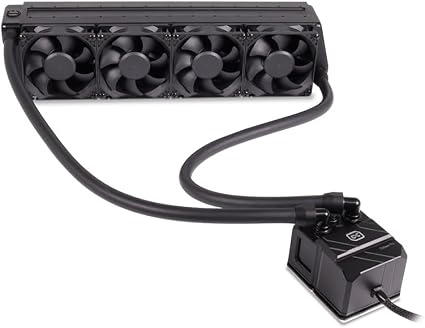
Cooling server and workstation CPUs feels efficient with the Alphacool Eisbaer Pro ES. It suits those running heavy-duty processors on AMD TR4/sTRX4/SP3 or Intel 3647 sockets, delivering strong thermal management in tight spaces where larger radiators can’t fit.
Its standout feature is the 80 mm Quad radiator combined with four PWM fans for focused cooling power.
Installation requires some care due to the 364.5 x 80 x 60 mm radiator size, but mounting on compatible sockets like AMD AM4, AM5, and Intel LGA 1700 is straightforward with included brackets. The four 80 mm ES PWM fans offer adjustable speeds from 800 to 6000 rpm, allowing fine control over noise and airflow.
Tubing length at 75 cm gives ample reach inside most workstations without crowding cables.
Performance stays solid under heavy loads thanks to the DC-LT 2 pump running at 2600 rpm. The cooler handles heat well, keeping high core-count processors running cooler than stock solutions.
Build quality is sturdy although weight at 8.82 pounds means it feels like a serious piece of hardware in your case. Frequent critique focuses on fan noise when ramped to high speeds during intense workloads.
Strong thermal management comes from the quad radiator and four high-speed fans, but users notice fan noise when the cooler runs at full speed. Setup is simple on supported sockets, and the cooler holds steady performance for demanding server or workstation CPUs.
Those managing high-heat processors in smaller cases will appreciate its size and power. Users requiring silent operation or working in ultra-compact 1U or 2U servers should consider alternative cooling solutions.
Pros
- Compatible with many AMD and Intel sockets
- Four PWM fans for flexible cooling control
- Compact radiator fits smaller workstations
- Long 75 cm tubes for easy installation
Cons
- Fan noise can be loud at high RPM
- Not compatible with 1U and 2U server cases
| Specification | Details |
|---|---|
| Radiator | 80 mm Quad, 364.5 x 80 x 60 mm |
| Fans | 4 x 80 mm ES PWM, 800 – 6000 rpm |
| Pump | DC-LT 2, 2600 rpm |
| Tubes | 75 cm, TPV, 12 |
| Weight | 8.82 pounds |
Best 2u CPU Coolers Compared Side by Side
| Product | Compatible Devices | Cooling Method | Wattage | Noise Level |
|---|---|---|---|---|
| Dynatron A26 Heatsink | Server/Desktop | Air | – | 1 year warranty |
| SilverStone XE02 AM5/AM4 | Desktop | Fan | – | – |
| SilverStone XE02 1700S | Server | Fan | 150 watts | 57.5 db |
| SilverStone AR09-115XP | Server | Fan | – | 42.5 db |
| SilverStone XE02 TR5B | Desktop | Fan | – | – |
| SilverStone XE02 3647SB | Server/Workstation | Fan | 205 watts | – |
| Dynatron S5 LGA4677 | Desktop | Fan | 350 watts | 59.8 db |
| Dynatron K21 LGA115X | – | – | – | – |
| Dynatron A24 AM4 | Server | Air | 155 watts | 25 db |
| SilverStone Argon AR09 1700 | Server | Fan | 2 watts | 18 db |
| SilverStone XE02 4189 | Desktop | Fan | 270 watts | 57.5 db |
| Alphacool Eisbaer Pro ES | – | – | – | 8.82 pounds |
- Compatible DevicesServer/Desktop
- Cooling MethodAir
- Wattage–
- Noise Level1 year warranty
- Compatible DevicesDesktop
- Cooling MethodFan
- Wattage–
- Noise Level–
- Compatible DevicesServer
- Cooling MethodFan
- Wattage150 watts
- Noise Level57.5 db
- Compatible DevicesServer
- Cooling MethodFan
- Wattage–
- Noise Level42.5 db
- Compatible DevicesDesktop
- Cooling MethodFan
- Wattage–
- Noise Level–
- Compatible DevicesServer/Workstation
- Cooling MethodFan
- Wattage205 watts
- Noise Level–
- Compatible DevicesDesktop
- Cooling MethodFan
- Wattage350 watts
- Noise Level59.8 db
- Compatible Devices–
- Cooling Method–
- Wattage–
- Noise Level–
- Compatible DevicesServer
- Cooling MethodAir
- Wattage155 watts
- Noise Level25 db
- Compatible DevicesServer
- Cooling MethodFan
- Wattage2 watts
- Noise Level18 db
- Compatible DevicesDesktop
- Cooling MethodFan
- Wattage270 watts
- Noise Level57.5 db
- Compatible Devices–
- Cooling Method–
- Wattage–
- Noise Level8.82 pounds
How to Choose the Right 2U CPU Cooler
Choosing a good 2U CPU cooler depends on factors like size compatibility, cooling efficiency, and noise levels. Ensuring the cooler fits your server and adequately manages heat prevents overheating and hardware damage, ultimately saving money and reducing maintenance hassles.
Compatibility and Size
Trying to fit a cooler into a 2U rack server often becomes a puzzle, especially with tight height limits around 40mm or so. It’s common to grab a cooler only to realize it won’t slot under the chassis or it clashes with tall RAM modules nearby. Missing these checks leads to a frustrating return or compromise on performance.
It helps to pick a cooler that explicitly states compatibility with your CPU socket type and supports your specific processor model. The size should not just fit height-wise but also leave room around the CPU socket for RAM and VRM heatsinks.
A low-profile design around 40mm or less is standard, but also watch out for those wider models that may block adjacent slots. Double-check motherboard layouts to avoid clearance issues.
Cooling Performance
Cooling a CPU in a slim 2U case is challenging because airflow is limited and airflow paths are narrow. A cooler with weak airflow or low static pressure won’t move enough air through dense server components, causing CPU temperatures to spike under heavy load.
The goal is to find fans rated around 40 CFM with static pressure above 1.5 mmH2O for sufficient airflow through tight spaces. Good coolers keep peak CPU temperatures under 75°C in demanding workloads.
Poor-performing ones let temps rise, resulting in thermal throttling or shutdowns that disrupt service.
Noise Levels
In data centers and offices, loud fan noise adds unwanted distraction. Some 2U coolers run at high RPMs to compensate for limited airflow, making them noticeably noisy.
This often becomes a headache in quiet environments or close quarters.
A practical cooler strikes a balance by offering adjustable fan speeds or noise-reducing features like rubber mounts to damp vibrations. Fans spinning under 3000 RPM with smooth airflow reduce noise while still cooling efficiently.
Without these, the noise can interfere with concentration and worker comfort.
Build Quality and Materials
Many affordable coolers use aluminum, which is lightweight but less effective at heat transfer than copper. Copper heat sinks pull heat away faster, which means cooler CPUs during continuous operation.
However, these usually cost more.
Fan construction quality matters too. Ball or fluid dynamic bearings last longer and handle vibrations better than sleeve bearings, preventing fan failure in sustained use. A solid build prevents rattling and keeps the cooling steady without maintenance every few months.
Ease of Installation and Maintenance
Mounting a cooler inside a cramped 2U chassis can get complicated if the design requires full motherboard removal or awkward clip mechanisms. Many times, a difficult install means longer downtime during server maintenance or upgrades.
Coolers with straightforward mounting brackets that fit standard sockets speed up installation. Cleanability is vital as dust buildup reduces cooling over time.
Being able to remove fans or access fins without disassembling the entire server saves effort. Also, compact cabling or well-placed connectors help keep cables tucked away, avoiding interference in densely packed racks.
Optimizing Airflow and Placement for 2U CPU Coolers
Choosing the right location for a 2U CPU cooler inside a server chassis significantly affects its performance. Tight spaces in 2U servers limit airflow, so positioning the cooler near an intake fan helps maintain a consistent flow of cool air over the heatsink.
The orientation matters too; typically, coolers aligned with the chassis fans allow heat to evacuate more effectively. Using low-profile fans designed for 2U height constraints also improves air movement without creating excessive noise.
Key placement tips:
- Keep cables and other components clear of the airflow path to avoid turbulence.
- Mount the cooler so the fan exhaust directs warm air towards an available chassis exhaust.
- Ensure the cooler is firmly seated on the CPU to maximize heat transfer.
Optimizing these factors can prevent hotspots and keep CPU temperatures within safe operating ranges, which is critical for server reliability.
Routine Maintenance Tips to Maximize 2U CPU Cooler Lifespan
Dust accumulation is the main threat to the lifespan of a 2U CPU cooler. Regular cleaning prevents buildup that can choke airflow and increase operating temperatures.
Using compressed air every few months or more often in dusty environments helps maintain good airflow through the heatsink fins and fan blades. Avoid using vacuum cleaners directly on the cooler since static electricity can damage components.
Maintenance tips include:
- Power down and unplug the server before cleaning.
- Remove the cooler carefully if deeper cleaning is needed, checking thermal paste condition for reapplication.
- Inspect fan bearings by gently spinning the blades to detect friction or noise.
Consistent upkeep reduces stress on the fan motor and prevents thermal throttling, extending the effectiveness of the cooler and the server’s uptime.
Comparing Active and Passive Cooling Solutions for 2U Servers
Active coolers use fans to blow air over the heatsink, whereas passive coolers rely solely on large surface areas and natural convection to dissipate heat. In a 2U server, the low height restricts the size of the heatsink and fan, which makes active cooling more common for CPUs because it offers faster heat removal in tight spaces.
Differences to consider:
- Active coolers typically provide better thermal control but consume power and generate noise.
- Passive coolers are silent and have no moving parts but need larger heatsinks and good chassis airflow to work effectively.
- Active cooling solutions allow for higher CPU performance in 2U setups due to more consistent temperatures.
Choosing between the two often depends on noise tolerance and the specific thermal demands of the CPU used in the 2U server.
People Also Asked
How Do I Install a 2u CPU Cooler Properly?
Install a 2u CPU cooler by carefully aligning it with the CPU socket and securing it with the mounting brackets or screws to ensure firm contact. Use thermal paste between the CPU and cooler to improve heat transfer. Avoid overtightening as it could damage the motherboard or the cooler.
Is a 2u CPU Cooler Compatible with My Server Chassis?
A 2u CPU cooler requires a 2u compatible server chassis due to the limited height clearance. Measure the internal height of your chassis before purchasing. Checking both the cooler’s height and the chassis specifications will prevent fitment issues.
How Long Does a 2u CPU Cooler Typically Last?
A 2u CPU cooler lasts several years under normal operating conditions, usually outlasting the average server component replacement cycle. Regular cleaning of dust buildup from fans and heatsinks helps maintain efficiency and longevity.
What Are Common Problems with 2u CPU Coolers?
Common problems with 2u CPU coolers include fan failure and dust accumulation, which reduce cooling performance. Noise can also be an issue if the fan bearings wear out. Regular inspection and cleaning stop these problems before they impact the CPU’s temperature.
Can a 2u CPU Cooler Keep My CPU Temperature Safe?
A 2u CPU cooler can keep CPU temperatures safe within its design limits, especially when airflow in the chassis is adequate. Ensure the cooler’s fan is spinning correctly and the thermal paste is in good condition for optimal cooling performance.
Conclusion
Choosing a 2U CPU cooler mainly depends on the cooling performance you need and the physical space available inside your case. Noise level matters too, especially for quieter builds. Also, check compatibility with your CPU socket and RAM clearance to avoid fit issues.
Pick a cooler that fits your budget and the space constraints of your setup. Consider how often you’ll use it, as heavier use may justify spending more on durability and cooling power.
Review the comparison table and options above to find the best match for your system.

I’m Grant Mitchell, a firearms and hunting writer with years of experience at the range and in the field. I write about rifles, shotguns, handguns, optics, safe storage, cleaning, and responsible ownership, along with practical hunting tips. My goal is to share accurate, safety-first information that helps you choose the right firearm, maintain it properly, and become a more confident shooter.