Top 12 Best Budget CPU Liquid Cooler That Beats Expensive Models
Overheating can sneak up fast when using a budget cpu liquid cooler that isn’t up to the task. The best budget cpu liquid cooler usually provides consistent cooling to keep the processor at safe temperatures without causing loud noise or leaks.
A poorly built liquid cooler may start quiet but quickly struggles under load, leading to thermal throttling or even system shutdowns during gaming or heavy workloads. This common issue shows why choosing the right unit matters beyond the sticker price.
Key factors that separate a solid budget liquid cooler from a poor one include the quality of the pump, radiator size, and compatibility with your case and CPU socket. Pumps that run smoothly and quietly tend to last longer and maintain stable flow rates around 240 to 280 liters per hour. Radiators in the 120mm to 240mm range balance cooling capacity against size for most budget setups.
Easy installation and accessible fittings also matter, especially when regular maintenance like cleaning dust buildup around fans can extend lifespan and performance.
Need a Quick Check?
| Image | Product | Price |
|---|---|---|
Our Top Picks 1  | ARCTIC Liquid Freezer 360 Pro | Check Price |
Our Top Picks 2  | Thermalright Aqua Elite 120 V3 | Check Price |
Our Top Picks 3  | CoolerMaster ML240L RGB V2 | Check Price |
Our Selected Top 12 Budget Cpu Liquid Cooler for Every Budget
This list features carefully chosen budget-friendly CPU liquid coolers that balance performance and cost. Each review explains how the cooler performs, identifies the best user scenario, and highlights its main strengths and weaknesses to help you find a suitable option for your needs.
1. ARCTIC Liquid Freezer III Pro 360
High cooling power and quiet operation make a strong case for upgrading with the ARCTIC Liquid Freezer III Pro 360. Suited for users who want to keep demanding CPUs cool without turning up noise levels.
Its biggest strength lies in balancing performance and silence, especially during heavy workloads.
Setup involves mounting the cold plate with a native offset designed to target the hottest CPU areas, which improves heat transfer. Compatibility covers Intel LGA1851 and LGA1700 sockets, plus AMD, making installation straightforward for most desktop builds.
The P12 PRO fans adjust speed silently, while the integrated VRM fan helps keep voltage regulators cool under load, aiding system stability.
The cooler excels at keeping temperatures low thanks to 3000 rpm fans pushing 77 cfm airflow. Its build feels solid with attention to detail like optimized contact pressure for better longevity.
Most users praise its quiet performance even at high loads. A common drawback is its size, which could challenge cramped cases or limit RAM clearance.
The cooler is often praised for quiet operation and reliable temperature control during intense CPU loads. Some find its size a bit challenging when working with compact cases or tall RAM modules. Installation benefits from refined contact pressure and native socket mounting, making it a thoughtful design for durability and performance.
Users with spacious cases who need dependable cooling for powerful processors will appreciate it. Those with limited space or who prefer ultra-compact setups might want to explore smaller, less demanding coolers instead.
Pros
- Effective heat transfer with offset cold plate
- Quiet operation even at high speeds
- Integrated VRM fan for voltage regulator cooling
- Compatible with latest Intel and AMD sockets
Cons
- Large size may limit compatibility in small cases
- Fan speed can reach 3000 rpm, potentially loud in some setups
| Specification | Details |
|---|---|
| Maximum Rotational Speed | 3000 rpm |
| Air Flow Capacity | 77 cfm |
| Power Connector Type | 4-Pin |
| Voltage | 12 volts |
| Wattage | 3.96 watts |
2. Thermalright Aqua Elite 120 V3
Keeping your CPU cool without spending a fortune is a common challenge, especially in smaller builds. The Thermalright Aqua Elite 120 V3 fits perfectly in setups where size and quiet operation matter the most. Its strongest point lies in combining effective cooling with low vibration and lighting that syncs well with your motherboard.
Installation is straightforward with the standard 120mm fan size and mounting system. The ARGB lighting aligns smoothly with 5V 3-pin connections so you can coordinate colors with your setup easily. The pump runs quietly at just 25.6 dB, which means it won’t drown out other components during normal use, and the black aluminum fin heat sink keeps the temperatures stable day to day.
Cooling performance holds up well for a budget model, thanks to the fourth generation pump head and cold row size fin plate. Build quality feels solid with protective mesh around the water pipe adding durability.
The biggest praise mentions its low vibration and effective heat dissipation, while the most frequent complaint points to the limited maximum rotational speed of 1500 rpm, which can restrict peak performance under heavy loads.
The low vibration and efficient cooling paired with quiet operation are the most notable benefits. Commonly, the fan speed limit can hold back cooling capacity in intense tasks, making it less suited for overclocking or extended heavy use.
A solid choice for those prioritizing quietness and light synchronization in compact systems. Users looking for more powerful cooling under high stress should consider higher-end alternatives with faster fan speeds and larger radiators.
Pros
- Quiet operation at 25.6 dB
- ARGB lighting syncs with motherboard
- Low vibration pump head
- Durable black aluminum fin heat sink
Cons
- Max fan speed capped at 1500 rpm
- Cooling limited during heavy CPU loads
| Specification | Details |
|---|---|
| Power Connector Type | 4-Pin |
| Voltage | 12 volts |
| Wattage | 7.2 watts |
| Noise Level | 25.6 db |
| Maximum Rotational Speed | 1500 rpm |
| Air Flow Capacity | 66.17 cfm |
3. CoolerMaster MasterLiquid ML240L RGB V2
With a maximum rotational speed of 1800 rpm and a quiet noise level of 30 dB, CoolerMaster MasterLiquid ML240L RGB V2 suits anyone looking for efficient cooling without loud fan noise. Its biggest strength lies in balancing solid cooling power with quiet operation and customizable RGB lighting.
Setup feels straightforward thanks to compatibility with a wide range of CPUs, including AMD AM4 and Intel LGA1700 sockets. The 3rd Generation Dual Chamber Pump promises reliable water circulation, while the redesigned SickleFlow fans keep airflow steady and subtle in sound.
Customizing RGB lighting adds a bit of flair to your build without affecting performance.
Cooling performance is consistent under typical desktop loads with an airflow capacity reaching 62 CFM. The industrial-grade EPDM seal boosts durability and reduces the risk of leaks, reassuring long-term use.
Praise often points to its quiet operation during extended use, but some note that the lighting effects might be too bright for those who prefer subtle setups.
Many appreciate how quiet the cooler runs even under sustained use, making it suitable for gamers and professionals who dislike noisy fans. However, the brightness of its RGB lighting occasionally draws criticism from those who want more subtle aesthetics in their builds.
Anyone wanting solid cooling performance along with visual customization will find this comfortable. For users needing cooling designed for ultra-high wattage CPUs or less intense lighting, looking at alternatives with different wattage specifications or RGB options might be preferable.
Pros
- Effective cooling with dual chamber pump design
- Quiet fan operation at 30 dB noise level
- Wide CPU socket compatibility
- Customizable RGB lighting effects
Cons
- RGB lighting may be too bright for some setups
- Wattage of 260 watts limits use on extremely high-power CPUs
| Specification | Details |
|---|---|
| Maximum Rotational Speed | 1800 rpm |
| Noise Level | 30 dB |
| Air Flow Capacity | 62 cfm |
| Power Connector Type | 4-Pin |
| Voltage | 12 volts |
| Wattage | 260 watts |
4. Thermalright Frozen Notte 120 ARGB

Anyone building a budget-friendly PC looking for reliable liquid cooling with customizable lighting will find the Thermalright Frozen Notte 120 ARGB a solid choice. Its standout feature is the synchronized ARGB lighting that adds visual flair without compromising cooling performance.
Setting it up is straightforward, connecting the 4-pin power and syncing the ARGB lights to your motherboard’s 5V 3pin header. The PWM fan operates quietly at up to 2000 rpm, while the water-cooling system effectively manages heat for easy daily temperature control. The lighting effects link in series, so you won’t run out of slots on the motherboard for brightness control.
Cooling efficiency is well supported by the copper base with a 0.1mm pitch, helping keep the CPU cool even under heavy load. The aluminum alloy pump head has a mirror finish, combining durability and design. Users note the quiet noise level of 27.7 dB as a highlight, though some might wish the max fan speed could push a bit higher for extreme overclocking scenarios.
The cooler stands out for quiet yet effective performance and its well-implemented ARGB lighting system. The most frequent drawback noted is the fan speed ceiling, which might limit cooling in very high-demand setups.
Someone looking for a budget-friendly liquid cooler with visual appeal and solid everyday cooling will be well served. Those pushing their CPU to extreme levels might want to consider a model with higher fan speeds or more aggressive cooling capacity.
Pros
- ARGB lighting synchronized with motherboard header
- Quiet operation at 27.7 dB noise level
- Durable aluminum alloy pump head with mirror finish
- Good airflow at 72.37 cfm
Cons
- Max fan speed limited to 2000 rpm
- May not cool strongest overclocked CPUs optimally
| Specification | Details |
|---|---|
| Power Connector Type | 4-Pin |
| Voltage | 12 volts_of_direct_current |
| Cooling Method | Water |
| Noise Level | 27.7 db |
| Maximum Rotational Speed | 2000 rpm |
| Air Flow Capacity | 72.37 cfm |
5. Antec Ultra 360 ARGB

Arriving with a mirror lighting pump head and powerful 120mm ARGB fans, the Antec Ultra 360 ARGB stands out in budget liquid coolers for keeping your CPU cool while adding some stylish lighting effects. It’s especially fitting for those who want solid cooling performance alongside a visual upgrade in their gaming or workstation builds.
Setting it up involves installing the well-designed copper base plate on compatible Intel or AMD sockets without fuss. The three-pin pump and LED connectors keep things straightforward. Day-to-day operation features quiet 120mm PWM fans that balance airflow with noise, maintaining system temperatures effectively without being intrusive.
Performance feels reliable thanks to the efficient cooling pump and copper base that help manage heat well during long sessions. The unit is sturdily built but some users mention the noise can push toward 33 dB under heavy load.
Lighting effects improve system aesthetics, but the 2600 RPM max speed can sometimes cause a noticeable buzz.
The cooler generally impresses with effective heat dissipation and eye-catching layered lighting effects. Common remarks focus on fan noise at higher speeds, which some find louder than expected compared to similar models.
People wanting reliable CPU cooling with visual flair will appreciate its features and compatibility. Those prioritizing near-silent operation or more customization options might want to look for alternatives.
Pros
- Strong cooling with massive copper base plate
- Multi-angle ARGB lighting on pump head
- Supports various Intel and AMD sockets
- Powerful 120mm PWM radiator fans
Cons
- Noise can reach noticeable 33 dB at full speed
- Three-pin connectors may limit advanced customization
| Specification | Details |
|---|---|
| Voltage | 12 volts_of_direct_current |
| Wattage | 20 watts |
| Noise Level | 33.05 db |
| Maximum Rotational Speed | 2600 rpm |
| Air Flow Capacity | 67.62 cfm |
6. ARCTIC Liquid Freezer III Pro 360 A-RGB

ARCTIC Liquid Freezer III Pro 360 A-RGB stands out for keeping CPUs cool with quiet efficiency, making it perfect for budget-conscious builders who want power without too much noise. Its advanced design focuses on directing cooling where it matters most, ensuring reliable temperature management during intense workloads.
Installation involves the native offset mounting, which aligns the cold plate accurately to the CPU hotspot, improving heat transfer. The included P12 PRO fans run quietly at low speeds but kick up when extra airflow is needed, responding well to different CPU loads.
The integrated VRM fan adds an extra layer of cooling for voltage regulators, helping maintain stable performance over time without much fuss.
The cooler handles heavy CPU heat well, thanks to its triple 120mm fans pushing up to 77 CFM each with speeds reaching 3000 rpm. Its build feels solid and thoughtfully engineered, focusing on longevity and effective contact pressure especially for newer Intel sockets.
A common downside mentioned is the size, which might challenge smaller cases or setups with tight space around the CPU area.
Performance praise highlights quiet and powerful cooling with the P12 PRO fans, while many note the cooler’s large size as a potential fit issue in compact builds. The design does well at balancing sound and airflow, but some find fan speeds too high when pushed hard.
Ideal for users with mid to large cases aiming for strong cooling in budget builds. Those with small or cramped cases should consider smaller or differently designed coolers to avoid installation challenges and clearance problems.
Pros
- Effective cooling with optimized pressure distribution
- Quiet operation especially at low fan speeds
- Integrated VRM fan adds extra component cooling
- Supports Intel LGA1851 and LGA1700 sockets natively
Cons
- Large size can complicate installation in small cases
- Higher fan speed may increase noise under heavy load
| Specification | Details |
|---|---|
| Maximum Rotational Speed | 3000 rpm |
| Air Flow Capacity | 77 cfm |
| Voltage | 12 volts |
| Power Connector Type | 4-Pin |
| Wattage | 3.96 watts |
7. Thermalright Aqua Elite 240 V3

Running cool and quiet together, this liquid cooler suits desktop users hunting for solid performance without overspending. Its standout strength lies in the balanced blend of effective cooling and low noise at just 25 dB, making it easy to live with day after day.
Setting up involves fitting the 240mm radiator with the standard 120mm ARGB fan, which runs up to 1800 RPM to keep temps down without much sound. The unique octagonal pump head offers a colorful glow and lasts a long time, thanks to protective mesh on the water piping and a sturdy aluminum fin heat sink.
Heat stays in check with a powerful 66.17 CFM airflow and a pump speed reaching 2800 RPM ± 10%, delivering reliability in everyday use. Build quality feels solid with black aluminum fins and low-vibration pump design. Reviewers note the cooler stays quiet and effective, although some mention the pump’s higher speed range as a slight noise point.
Crowds appreciate the cooler’s quiet, effective cooling with low vibration, but some find the pump’s upper speed range more noticeable than expected. The mesh water pipe offers durability, which shows in how well it handles heat day-to-day.
Those wanting reliable liquid cooling on a modest budget will enjoy this unit’s performance and visuals. Users needing ultra-silent operation or compatibility beyond desktop setups may want to explore other options better suited to their needs.
Pros
- Quiet operation at 25 dB
- Long-lasting pump up to 40,000 hours
- Effective cooling with 240mm radiator
- ARGB lighting for visual appeal
Cons
- Pump speed can cause slight noise spikes
- Limited to desktop setups only
| Specification | Details |
|---|---|
| Power Connector Type | 4-Pin |
| Voltage | 5 volts |
| Wattage | 2.64 watts |
| Noise Level | 25 db |
| Maximum Rotational Speed | 1800 rpm |
| Air Flow Capacity | 66.17 cfm |
8. MSI MAG Coreliquid A13 240

Great cooling power meets budget-friendly pricing with the MSI MAG Coreliquid A13 240, a solid choice for anyone wanting an effective liquid cooler with LGA 1851 support. Its standout feature is the split-flow radiator combined with a durable integrated pump that keeps things running quietly.
Setup is fairly straightforward, with the integrated pump designed to cut down on noise while running up to 3800 RPM. The aluminium radiator uses a split-flow cooling system, which helps maintain steady temperatures during heavy use.
Day-to-day, it stays quiet at 14.4 dB, meaning you’ll barely notice it working even under load. The 4-pin power connector fits standard desktop setups without trouble.
Cooling performance holds up well, managing to balance power and quiet operation thanks to high-quality ceramic bearings in the pump. The build feels sturdy, especially with the aluminium radiator and careful motor resonance reduction.
One strong point is how quietly it runs for its power level. On the downside, some noise can be heard when the pump hits higher RPMs, which might bother the most noise-sensitive users.
Users praise the quiet running at typical speeds thanks to the ceramic bearings, praising its durability and effective heat management. The common complaint revolves around the pump’s noise when cranking up to its maximum 5200 RPM, which can disrupt a very quiet build.
Ideal for anyone wanting solid CPU cooling without breaking the bank, especially with the latest LGA 1851 sockets. Those particularly sensitive to any pump noise or seeking ultra-low wattage solutions might want to consider alternatives.
Pros
- Out of box support for LGA 1851 socket
- Quiet operation at normal pump speeds
- Durable split-flow aluminium radiator
- High-quality ceramic bearing pump
Cons
- Pump noise noticeable near maximum speed
- Wattage slightly higher than some budget coolers
| Specification | Details |
|---|---|
| Power Connector Type | 4-Pin |
| Voltage | 12 volts_of_direct_current |
| Wattage | 2.16 watts |
| Noise Level | 14.4 db |
| Maximum Rotational Speed | 5200 rpm |
| Air Flow Capacity | 60.78 cfm |
9. ARCTIC Liquid Freezer III Pro 240 A-RGB
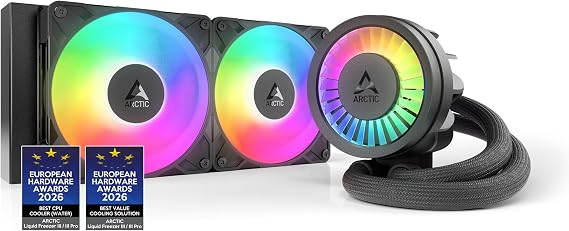
ARCTIC’s Liquid Freezer III Pro 240 A-RGB combines a clever contact frame and a specialized offset mounting for Intel and AMD CPUs, built from reliable materials for solid cooling performance. It suits anyone looking for a budget-friendly liquid cooler that prioritizes effective heat dissipation and quieter fan operation.
Setting it up involves mounting the contact frame specifically designed for Intel LGA1851 and LGA1700 sockets, ensuring good pressure distribution. Day-to-day use benefits from the ARCTIC P12 PRO fan, which runs quieter and more efficiently at varying speeds. The integrated VRM fan also manages nearby voltage converter temperatures, supporting stable performance during extended workloads.
Cooling is effective with the shifted cold plate focusing on the CPU hotspot for better heat transfer. The build feels sturdy, with a water-based cooling method that does its job quietly. A frequent note is how much quieter and more powerful the fan is at lower speeds, while some mention the maximum rotational speed spec being surprisingly low at 1 rpm, though this likely refers to a sensor reading and not actual fan speed.
The cooler is praised for its quiet but powerful fan performance, particularly at lower speeds, while the main complaint revolves around confusing technical numbers like the rotational speed, which may not reflect actual fan speeds. These specifics can make understanding detailed specs challenging.
Strong cooling efficiency and quiet operation make it suitable for budget-conscious users who want reliable liquid cooling without noise problems. People looking for clearer technical specs or higher wattage support might consider alternatives.
Pros
- Optimized cold plate placement for better heat transfer
- ARCTIC P12 PRO fan offers quieter operation at low speeds
- Integrated VRM fan helps keep voltage converters cool
- Compatible with Intel and AMD sockets
Cons
- Maximum rotational speed listed as 1 rpm may confuse buyers
- Wattage of 3.96 watts limits power usage awareness
| Specification | Details |
|---|---|
| Power Connector Type | 4-Pin |
| Voltage | 12 volts |
| Wattage | 3.96 watts |
| Cooling Method | Water |
| Compatible Devices | AMD, Intel |
| Air Flow Capacity | 77 cfm |
10. Antec Skeleton 240 ARGB

Vivid ARGB lighting stands out immediately, making it a great pick for anyone wanting flashy looks alongside effective cooling. It suits users with Intel or AMD sockets looking for powerful cooling without overspending, while also enjoying color customization through motherboard sync.
Setting it up takes standard steps, fitting easily onto supported sockets like Intel LGA 1700 or AMD AM5. The unique skeleton-frame pump head adds a cool aesthetic to your build, and the elastic high-density tubing keeps things flexible yet sturdy. Fans adjust speed automatically thanks to PWM control, keeping noise minimal around 32 db during regular use.
Heat gets pulled away efficiently by a copper base plate combined with high-density fins and forceful radiator fans. The build quality shows a focus on durability with hydraulic bearing fans designed for quiet, long-lasting operation. Praise often focuses on the strong cooling performance, while some mention the noise can reach 32 db when the pump hits higher speeds.
Cooling performance is impressive thanks to the large copper base plate and strong fans, but some users find noise levels rise noticeably when the pump spins faster. The striking ARGB lighting also gets mentioned as a highlight in everyday use.
Gamers and PC builders wanting strong cooling and a personalized lighting setup will appreciate this cooler, especially on Intel LGA 1700 or AMD AM5 systems. Silence-focused users might look elsewhere due to noise at higher speeds and the relatively high wattage demand.
Pros
- Vivid ARGB lighting fully customizable via motherboard sync
- Universal compatibility with Intel and AMD sockets
- Quiet operation thanks to hydraulic bearing fans
- High-density fins improve cooling efficiency
Cons
- Noise reaches 32 db at maximum fan speed
- Power consumption at 120 watts may be high for some setups
| Specification | Details |
|---|---|
| Power Connector Type | 4-Pin |
| Voltage | 120 volts |
| Wattage | 120 watts |
| Noise Level | 32 db |
| Maximum Rotational Speed | 2000 rpm |
| Air Flow Capacity | 72.29 cubic_centimeters_per_minute |
11. ARCTIC Liquid Freezer III Pro 240

Picking a liquid cooler that balances solid cooling power without emptying your wallet is tricky, but the ARCTIC Liquid Freezer III Pro 240 stands out for its efficient heat dissipation and quiet fans. Designed for both AMD and Intel systems, it brings impressive overall performance that suits anyone wanting reliable CPU temperatures under load.
Setup is straightforward thanks to the NATIVE OFFSET MOUNTING that targets the CPU hotspot, improving heat transfer. The built-in VRM fan helps keep voltage regulators cool, which adds to system stability. The ARCTIC’s P12 PRO FAN runs quietly even at higher speeds, making daily use peaceful without sacrificing cooling when running demanding apps or games.
In terms of performance, it handles heat really well, even under heavy use, because of the optimized contact pressure and powerful airflow of up to 77 cfm. Solid construction and smart design choices show attention to both durability and effective cooling. Some users note the maximum fan speed can get loud, especially during intense workloads, but that’s the trade-off for the power it provides.
Strong cooling performance combined with quiet fans at lower speeds gets frequent praise, while the main complaint centers on noticeable noise when the fans reach their highest rotational rate. This cooler performs well on heat management but can be loud under demanding loads.
Users seeking a solid, reasonably quiet liquid cooler for gaming or workstations will appreciate this. Those extremely sensitive to noise might prefer an air cooler or a liquid cooler with lower max fan speed. It works best in environments where some fan noise is acceptable for serious cooling power.
Pros
- Optimized contact pressure for better heat dissipation
- Quiet operation at low fan speeds
- Integrated VRM fan improves voltage converter cooling
- Supports both AMD and Intel sockets
Cons
- Fan noise increases significantly at max speed
- Relatively high maximum fan RPM might not suit noise-sensitive builds
| Specification | Details |
|---|---|
| Voltage | 12 volts |
| Power Connector Type | 4-Pin |
| Maximum Rotational Speed | 3000 rpm |
| Air Flow Capacity | 77 cfm |
| Cooling Method | Water |
12. ID-COOLING Frostflow X 240

Keeping your CPU cool without breaking the bank can be tricky, especially with higher-performance chips. The ID-COOLING Frostflow X 240 suits anyone looking for solid heat dissipation without spending a fortune. Its standout feature is the 240mm radiator with two 120mm PWM fans that handle heat transfer reliably.
Setting up the cooler goes smoothly, compatible with a wide range of Intel and AMD sockets like LGA1700 and AM5. The white LED lighting on the pump adds a nice touch without being too flashy.
The fans, running up to 2500 rpm with PWM control, adjust airflow automatically based on temperature, so noise stays low at around 30 dB during normal use.
Cooling performance stays consistent under heavy CPU loads thanks to the sizable radiator and strong airflow from the dual fans. The build feels sturdy, and the water cooling method effectively manages heat better than most air coolers in the budget range. Some people find the 2-pin power connector less common for fans, which can limit fan controller options, but overall it strikes a good balance of performance and value.
The Frostflow X 240 cools very well for a budget liquid cooler, thanks to the large radiator and capable PWM fans. The common complaint revolves around its 2-pin power connector, which can make fan speed management less flexible compared to 3- or 4-pin setups.
Anyone building a mid-range system will appreciate the quiet, efficient cooling and easy installation. Those needing advanced fan control or pushing CPUs to extreme overclocks might want to consider higher-wattage or better-connected models instead.
Pros
- Effective heat dissipation with 240mm radiator
- Quiet operation around 30 dB
- Compatible with wide range of sockets
- Classic white LED pump lighting
Cons
- 2-pin power connector may limit fan control options
- Wattage relatively low compared to high-end coolers
| Specification | Details |
|---|---|
| Voltage | 12 volts |
| Wattage | 4.8 watts |
| Cooling Method | Water |
| Maximum Rotational Speed | 2500 rpm |
| Noise Level | 30 dB |
| Power Connector Type | 2-Pin |
Comparison of Best Budget CPU Liquid Coolers
| Product | Cooling Method | Compatible Devices | Max RPM | Air Flow Capacity |
|---|---|---|---|---|
| ARCTIC Liquid Freezer 360 Pro | Liquid | Desktop, Gaming Console | 3000 rpm | 77 cfm |
| Thermalright Aqua Elite 120 V3 | Water | Desktop | 1500 rpm | 66.17 cfm |
| CoolerMaster ML240L RGB V2 | Water | Desktop | 1800 rpm | 62 cfm |
| Thermalright Frozen Notte 120 ARGB | Water | Desktop | 2000 rpm | 72.37 cfm |
| Antec Ultra 360 ARGB | Water | Desktop | 2600 rpm | 67.62 cfm |
| ARCTIC Liquid Freezer 360 Pro | Liquid | Cpu | 3000 rpm | 77 cfm |
| Thermalright Aqua Elite 240 V3 | Air, Water | Desktop | 1800 rpm | 66.17 cfm |
| MSI MAG Coreliquid A13 240 | Water | Desktop | 5200 rpm | 60.78 cfm |
| ARCTIC Liquid Freezer 240 Pro | Water | AMD, Intel | 1 rpm | 77 cfm |
| Antec Skeleton 240 ARGB | Water | Desktop | 2000 rpm | – |
| ARCTIC Liquid Freezer 240 Pro | Water | AMD, Intel | 3000 rpm | 77 cfm |
| ID-COOLING Frostflow X 240 | Water | Desktop | 2500 rpm | – |
- Cooling MethodLiquid
- Compatible DevicesDesktop, Gaming Console
- Max RPM3000 rpm
- Air Flow Capacity77 cfm
- Cooling MethodWater
- Compatible DevicesDesktop
- Max RPM1500 rpm
- Air Flow Capacity66.17 cfm
- Cooling MethodWater
- Compatible DevicesDesktop
- Max RPM1800 rpm
- Air Flow Capacity62 cfm
- Cooling MethodWater
- Compatible DevicesDesktop
- Max RPM2000 rpm
- Air Flow Capacity72.37 cfm
- Cooling MethodWater
- Compatible DevicesDesktop
- Max RPM2600 rpm
- Air Flow Capacity67.62 cfm
- Cooling MethodLiquid
- Compatible DevicesCpu
- Max RPM3000 rpm
- Air Flow Capacity77 cfm
- Cooling MethodAir, Water
- Compatible DevicesDesktop
- Max RPM1800 rpm
- Air Flow Capacity66.17 cfm
- Cooling MethodWater
- Compatible DevicesDesktop
- Max RPM5200 rpm
- Air Flow Capacity60.78 cfm
- Cooling MethodWater
- Compatible DevicesAMD, Intel
- Max RPM1 rpm
- Air Flow Capacity77 cfm
- Cooling MethodWater
- Compatible DevicesDesktop
- Max RPM2000 rpm
- Air Flow Capacity–
- Cooling MethodWater
- Compatible DevicesAMD, Intel
- Max RPM3000 rpm
- Air Flow Capacity77 cfm
- Cooling MethodWater
- Compatible DevicesDesktop
- Max RPM2500 rpm
- Air Flow Capacity–
How to Choose the Right Budget CPU Cooler
Choosing a good budget CPU liquid cooler depends on factors like cooling performance, compatibility with your CPU and case, and ease of installation. Getting these right ensures efficient cooling without overspending and helps avoid issues like overheating or difficult setup that can cost time and money later.
Cooling Performance
Radiator size directly affects how much heat the cooler can dissipate. Smaller radiators struggle to keep temperatures down on high-TDP processors, leading to thermal throttling or higher fan speeds.
Larger radiators like 240mm or 280mm models offer better heat dispersion, but only if your case supports them. The pump’s flow rate matters too; a low flow can cause hotspots, reducing cooling efficiency. Look for pumps rated around 200-300 L/h for budget models to ensure consistent coolant circulation.
Fans play a big role in maintaining airflow across the radiator fins. High static pressure fans (above 2 mmH2O) push air through dense radiator fins better, which is crucial for effective cooling.
Airflow ratings around 40-60 CFM balance noise and cooling performance well in this category. In daily use, a well-matched combo of radiator size, pump flow, and fan specs translates to stable CPU temps even during gaming or heavy multitasking.
Compatibility and Fit
Socket compatibility can limit your cooler choices if your system uses an uncommon or older CPU type. Check that the mounting brackets support your specific platform, whether Intel LGA 1200, 1700, or AMD AM4/AM5. Poor mounting mechanisms can cause uneven pressure, leading to higher temps or leaks.
Clearance matters; thick RAM with tall heat spreaders may block larger pumps or interfere with tubing placement. Similarly, the radiator and fan size must align with your PC case; oversized 360mm units rarely fit compact mid-towers.
Most budget options secure with a backplate and spring screws, which are generally fine but can feel fiddly in tight spaces. Proper planning helps avoid situations where your GPU or tall RAM modules restrict radiator placement. For reference, 120mm and 240mm radiators tend to fit most standard cases, whereas 280mm and 360mm sizes require larger, well-ventilated enclosures.
Build Quality and Materials
Soft tubing on some models wears out quickly, becoming brittle or leaking after a few years. Thick, braided tubes offer better durability and resist kinking. Fittings also need to be sturdy; cheaply made plastic connectors can crack or loosen with thermal expansion.
The radiator’s construction usually involves aluminum or copper; copper dissipates heat better but often costs more. Expect aluminum on budget coolers, which is acceptable if the coolant is non-corrosive.
The coolant itself affects lifespan. Pre-filled units usually use glycol-based fluids with anti-corrosion additives.
Without these, internal rust can develop, especially in mixed-metal loops. While you rarely refill budget models, corrosion resistance influences how long the cooler stays effective without failure. Choosing a product with rust-inhibiting coolant and quality radiator materials reduces maintenance headaches.
Noise Levels
Fans ramping above 1500 RPM can get noticeably loud, especially with high static pressure types since the denser blades generate more turbulence. Good quieter models keep noise under 30 dBA at idle and only become more audible under full load nearing 2000 RPM.
Pump noise is subtler but can cause vibrations felt through the case if mounts are loose. A steady hum is normal, but rattling or clicking indicates poor pump quality or wear.
Daily use means idle noise matters just as much as load noise. Budget pumps sometimes run louder over time as bearings degrade, affecting comfort in quiet environments.
Choosing a cooler with low-noise fans and well-isolated pumps improves the overall sound profile, making it less distracting when gaming or working nights.
Ease of Installation and Maintenance
Mounting instructions can be confusing or incomplete on budget models, leading to wasted time and incorrect installs. Clear diagrams and labeled parts simplify the process, especially around securing the backplate and aligning the cold plate for good contact. Access to the CPU socket area is key; bulky pump blocks or inflexible tubing complicate installation in cramped cases.
Maintenance varies little in sealed units; you won’t typically replace coolant or flush the system. Still, some designs let you rinse the radiator from outside, which is helpful over years of dust accumulation. Removable fans speed up cleaning but not all models support this.
Early experience with tricky mounts or inaccessible screws teaches the value of straightforward installation and basic maintenance features for keeping the cooler performing well long term.
Optimizing Performance: Installation Tips for Budget CPU Liquid Coolers
Proper installation is key to getting the most out of a budget CPU liquid cooler. Begin by ensuring the mounting bracket fits your CPU socket type exactly; forcing it can cause mounting issues and poor contact.
Apply a small, even layer of thermal paste. Too much or too little will interfere with heat transfer.
Follow these steps for a solid setup:
- Attach the radiator where airflow is optimal, like the front or top of your case, depending on your model.
- Make sure the tubes are not kinked; they should loop gently to avoid restricting coolant flow.
- Tighten screws evenly in a cross pattern to maintain pressure balance on the CPU.
- Connect fans properly and configure their speeds via BIOS or software to balance noise and cooling effectiveness.
These careful steps prevent common issues like overheating or pump noise, directly improving the cooler’s efficiency.
Routine Maintenance Practices to Extend the Lifespan of Your Liquid Cooler
Cleaning is essential to keep a budget liquid cooler working well over time. Dust can accumulate on the radiator fins and fans, reducing their ability to dissipate heat. Regularly remove dust with compressed air or a soft brush, especially from hard-to-reach areas.
Proper maintenance also includes:
- Checking for leaks around connections and fittings to avoid liquid damage inside the case.
- Listening for unusual pump noise, which could indicate wear or a failing unit.
- Ensuring fan bearings remain smooth; sticky fans reduce airflow and lifespan.
Perform these tasks every few months depending on your environment to maintain stable temperatures and avoid premature failure.
Comparing Budget Liquid Coolers with Air Cooling Alternatives for Different Builds
Budget liquid coolers typically offer better thermal performance than stock air coolers, especially under load and in overclocked systems. They tend to move heat away from the CPU more efficiently because the heat is transferred to a radiator with fans, rather than relying solely on a heatsink attached to the CPU.
Consider these points when choosing between liquid and air cooling:
- Air coolers are simpler to install and require less maintenance than liquid coolers.
- Liquid coolers can handle tighter spaces better if the radiator placement fits your case layout.
- Noise levels with budget liquid coolers can be higher due to both pump and fan operation.
- For non-overclocked systems or standard office use, a good air cooler may provide sufficient cooling at a lower cost and complexity.
Selecting the right cooler depends on your build goals, case size, and willingness to maintain the system.
People Also Asked
How Do I Install a Budget CPU Liquid Cooler Safely?
Installing a budget CPU liquid cooler requires careful alignment of the pump and radiator with your CPU and case. Make sure to tighten screws evenly to avoid uneven pressure on the CPU. Applying the right amount of thermal paste also helps ensure proper heat transfer without mess.
What Size Radiator Fits My PC Case for Liquid Cooling?
The radiator size depends on your PC case’s designated mounting points, commonly 120mm or 240mm for budget coolers. Check your case specifications before choosing a cooler to avoid fitting issues. Measuring inside space carefully avoids conflicts with other components like RAM or GPU.
How Long Does a Budget CPU Liquid Cooler Typically Last?
A budget CPU liquid cooler typically lasts around 3 to 5 years under normal use. Running the pump continuously at moderate fan speeds can extend its lifespan. Watch for any unusual noises or decreased cooling efficiency as signs it may need replacement.
Can a Budget Liquid Cooler Cause Leaks or Damage My CPU?
Budget liquid coolers can leak, but it is rare if the unit is properly installed and not physically damaged. Keeping tubing away from sharp edges and securing fittings firmly helps reduce risk. Regularly inspecting the cooler for drips or residue can catch issues before damage occurs.
How Do I Maintain and Clean a Budget CPU Liquid Cooler?
Maintain a budget CPU liquid cooler by cleaning dust from the radiator fins and fans every few months. Use compressed air or a soft brush to avoid bending fins. Checking for loose cables and ensuring the pump is running quietly will keep the cooler operating reliably.
Conclusion
Choosing a budget CPU liquid cooler comes down to how well it cools your processor, how loud it runs, and how easy it is to install. Efficiency matters most to keep your CPU temperature in check during heavy use, while quieter operation makes spending long hours at your computer more comfortable. Installation ease can save time and frustration, especially if you plan to change components often.
Consider the space inside your case and your budget before deciding. A compact cooler might fit better in smaller cases, and staying within your price range avoids overspending on features you may not need. Check the comparison table and the picks above to find the cooler that fits your setup and usage habits best.

I’m Grant Mitchell, a firearms and hunting writer with years of experience at the range and in the field. I write about rifles, shotguns, handguns, optics, safe storage, cleaning, and responsible ownership, along with practical hunting tips. My goal is to share accurate, safety-first information that helps you choose the right firearm, maintain it properly, and become a more confident shooter.