Top 12 Best AM3 Cooler That Will Boost Your PC Now!
Many people experience overheating issues or loud fan noise when using a cheap or incompatible cooler on an AM3 socket. The best am3 cooler can help avoid these problems by fitting securely on the motherboard while efficiently dissipating heat from the CPU. A cooler that doesn’t make good contact or is underpowered often leads to thermal throttling or system instability during heavy use.
Key factors that distinguish a good AM3 cooler include the quality of the contact base, usually copper or a copper-aluminum hybrid, since copper has better thermal conductivity. Fan size and speed also matter; typical models range from 90mm to 120mm fans spinning between 1000 and 2000 RPM to balance airflow and noise.
Proper mounting mechanisms ensure a snug fit without putting uneven pressure on the CPU, which helps maintain long-term performance and safety.
Need a Quick Check?
| Image | Product | Price |
|---|---|---|
Our Top Picks 1 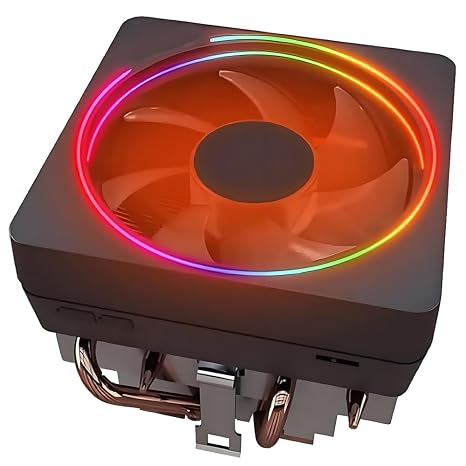 | AMD Wraith Prism Cooler | Check Price |
Our Top Picks 2 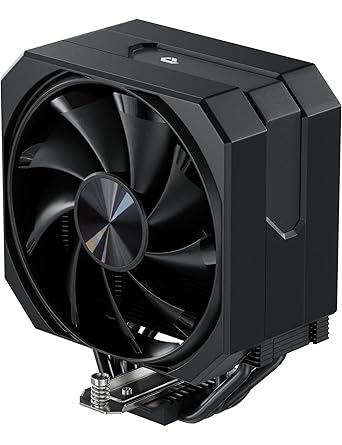 | Generic 120mm Air Cooler | Check Price |
Our Top Picks 3  | Dual Tower CPU Cooler | Check Price |
Our Selected Top 12 Am3 Cooler Picks for Every Need
This list features a variety of AM3 coolers designed for different performance needs and budgets. Each review highlights how well the cooler manages heat, its compatibility, and suitability for different users, along with clear strengths and potential drawbacks to help you choose the best fit.
1. CPU Wraith Prism Cooler AMD Socket AM5/AM4
Great for anyone running an AM3 or similar AMD socket system, the CPU Wraith Prism Cooler offers solid cooling with compatibility across many AMD processors. Its standout feature is efficient heat dissipation thanks to a well-designed combination of materials and heat pipes.
Setting it up is straightforward since it uses the standard bracket common on most AMD motherboards, though that bracket isn’t included in the package. The pre-applied silicone thermal paste saves time and makes mounting easy.
The fan runs quietly at 14 db and can spin up to 2800 rpm, keeping the system cool during everyday tasks without drawing much noise.
Heat management is effective due to the aluminum heatsink paired with a pure copper base and four 6 mm copper heat pipes that touch the CPU directly. The build quality feels sturdy and reliable with a focus on solid materials. Most praise highlights its quiet operation and good cooling, while some note the mounting bracket absence and a moderate noise level at maximum fan speed.
Many users appreciate how quiet the fan runs while still providing solid cooling performance thanks to the copper heat pipes and aluminum heatsink. However, complaints often revolve around needing to source a compatible mounting bracket separately and some noise at peak fan speed.
Anyone looking for a cooler that fits multiple AMD sockets and handles heat well without being too loud will find this works nicely. Those wanting an all-in-one mount and extremely silent operation might want to explore other options.
Pros
- Works with a wide range of AMD sockets
- Quiet operation at low noise levels
- Pre-applied thermal paste simplifies installation
- Effective heat dissipation with copper heat pipes
Cons
- Mounting bracket not included with cooler
- Fan noise increases near max speed
| Specification | Details |
|---|---|
| Power Connector Type | 4-Pin |
| Voltage | 12 volts_of_direct_current |
| Wattage | 105 watts |
| Noise Level | 14 db |
| Maximum Rotational Speed | 2800 rpm |
| Air Flow Capacity | 45 cfm |
2. CPU Air Cooler 120mm Fan Compatible with AMD/Intel
Aluminum and copper make up the core of this CPU Air Cooler, designed to fit a wide range of AMD and Intel sockets, including AM3. It suits users seeking a versatile cooler that handles heavy workloads without sacrificing compatibility.
Its direct heat pipe contact stands out as the key feature for efficient heat dissipation.
Installing the cooler is straightforward thanks to its compatibility with many processor sockets. The 120mm fan runs quietly at 26 dB and provides strong airflow of 68.2 CFM, which helps maintain steady temperatures during everyday tasks and more demanding loads.
You’ll notice the 4-pin connector allows for good fan speed control through your motherboard.
Performance delivers solid cooling thanks to the four 6mm heat pipes with a 25mm contact area that directly touch the CPU for fast heat transfer. It excels in keeping temperatures down during lengthy use. The build quality feels resilient with a focus on durability.
Common feedback often mentions how quiet it is, though some find the fan speed a bit moderate for extreme overclocking.
Users highlight the cooler’s quiet operation alongside effective heat dissipation as its main strengths during extended heavy workloads. Some mention that at high-performance demands, the fan speed might not provide enough cooling for extreme overclocking.
Gamers or professionals needing reliable cooling on popular sockets will appreciate this model’s fit and quiet design. Users with highly overclocked CPUs or ultra-compact builds might want a cooler tailored for more aggressive airflow or smaller form factors.
Pros
- Compatible with broad range of AMD/Intel sockets
- Quiet operation at 26 dB
- Four 6mm heat pipes for efficient cooling
- Good fan speed control via 4-pin connector
Cons
- Fan speed may limit cooling in extreme cases
- Build can feel a bit heavy for compact setups
| Specification | Details |
|---|---|
| Power Connector Type | 4-Pin |
| Voltage | 12 volts_of_direct_current |
| Wattage | 1.45 watts |
| Noise Level | 26 db |
| Maximum Rotational Speed | 1650 rpm |
| Air Flow Capacity | 68.2 cfm |
3. Dual Tower CPU Cooler with 120mm Fan AMD/Intel Compatible
Noticeable for its dual tower design and quiet operation, this cooler fits well in most AMD AM3 builds and a wide range of other sockets. Its strength lies in how it manages to stay compact enough not to block RAM while providing solid air cooling.
Setting it up doesn’t require taking off your old fan, which saves time. The installation process is straightforward, and the 4-pin connector allows neat control of fan speeds. Running at 25 dB noise level, it’s quiet enough for everyday use without distracting hum.
The heat pipes work efficiently, and you won’t have to worry about clearance around your RAM slots.
It handles heat well, keeping CPU temperatures down during regular workloads. Built with durability in mind, the cooler combines air and heat pipe cooling methods effectively. Some mention how it occasionally doesn’t push enough airflow for very high-end overclocking.
However, the solid build and low noise get frequent positive mentions.
The cooler receives praise for being easy to install and quiet, with its design keeping RAM access clear. A common drawback is that the airflow might not be strong enough for heavy overclocking or very demanding CPUs. This reflects a balance between noise and cooling power suited to moderate setups.
People building mainstream or moderate-performance AM3 systems will find this cooler fitting well. Users who plan extensive overclocking or need more aggressive cooling might prefer a more powerful option. Its broad socket compatibility and quietness make it a solid choice for many standard desktop builds.
Pros
- Compatible with many Intel and AMD sockets
- Quiet operation at only 25 decibels
- Doesn’t block or interfere with RAM slots
- Simple installation without removing old fan
Cons
- May lack airflow for intense overclocking
- Maximum fan speed capped at 1650 rpm
| Specification | Details |
|---|---|
| Power Connector Type | 4-Pin |
| Voltage | 12 volts_of_direct_current |
| Wattage | 1.45 watts |
| Cooling Method | Air, Heat Pipe |
| Noise Level | 25 db |
| Maximum Rotational Speed | 1650 rpm |
4. SilverStone RL-KR01 Low Profile AMD CPU Cooler

Designed for compact builds, the SilverStone RL-KR01 is a low profile cooler that suits systems with limited space. Its standout feature is the very slim 54mm height, making it ideal when case clearance is tight but you still want reliable cooling for AM3 CPUs up to 95W.
Installation is straightforward thanks to its AM2/AM3/AM4/FM1/FM2 socket compatibility. The 80mm PWM fan offers quiet operation while adjusting speed according to CPU load, and the dual ball bearings promise long life.
Its lightweight design and thermal pipes help keep temperatures in check without the bulk of larger coolers.
Cooling performance holds up well for processors with moderate heat output, benefiting from two 6mm heat pipes and aluminum fins. The build feels solid, though some users note the fan noise can reach 33 dB at full speed.
It’s a durable option that fits where traditional tower coolers won’t, although its max 3000 rpm fan speed might not match bigger models.
This cooler is praised for fitting low profile cases while keeping temperatures manageable. The most frequent downside is that the fan noise rises after heavy loads, reaching 33 dB, which some find distracting. The solid build and compact size make it a durable choice for tight spaces.
People building small form factor PCs or needing a cooler that fits under slim cases will appreciate this one. Those with high TDP CPUs or looking for whisper-quiet performance might want to explore larger options or models designed for more powerful cooling.
Pros
- Fits very low profile cases with only 54mm height
- Dual ball bearing fan increases durability
- Good heat conduction from dual 6mm heat pipes
- Compatible with a wide range of AMD sockets
Cons
- Fan noise can be quite noticeable at maximum speed
- Only suitable for CPUs up to about 95W TDP
| Specification | Details |
|---|---|
| Height | 54mm |
| Heat Pipes | Two Ø6mm |
| Fan Size | 80mm PWM |
| Compatible Sockets | AM2/AM3/AM4/FM1/FM2 |
| Noise Level | 33 dB |
| Maximum Speed | 3000 rpm |
5. Thermaltake UX400 ARGB CPU Cooler

Managing your CPU temperature without crowding your RAM slots can be tricky. Perfect for setups needing strong cooling without clearance issues, this cooler focuses on power and fit. Its biggest advantage is the clever non-interference design that keeps memory gaps free, making it a practical option for AM3 systems.
Setting it up involves attaching the cooler to your AM3 CPU socket with a simple 3-pin connector. The 120mm ARGB fan runs quietly and adjusts speed from 700 to 1800 RPM, delivering airflow that keeps your processor cool without extra noise.
Its design avoids conflicts with tall RAM modules, letting you use your preferred memory without changing your build.
Four 6mm copper heat pipes directly touch the CPU to quickly move heat to an aluminum tower fin stack, which handles up to 240W of heat. The fan’s speed control balances airflow and noise, running noticeably quiet at about 25 dB. Most people find its cooling performance reliable, though some mention the fan speed could be more precisely controlled at lower settings.
The cooling power of 240W combined with a quiet 25 dB fan suits many builds well, while the most common dissatisfaction centers on the fan speed’s limited fine-tuning. The non-interference design makes installation straightforward around memory modules without compromises.
Systems requiring reliable cooling with spacious RAM clearance will appreciate this cooler. Those looking for advanced fan controls or ultra-quiet operation below 25 dB might want to consider other options with 4-pin PWM connectors and finer speed management.
Pros
- Non-interference design avoids RAM clearance issues
- Quiet operation at 25 dB noise level
- Direct contact copper heat pipes improve heat transfer
- ARGB fan offers customizable lighting effects
Cons
- Fan speed control lacks finer adjustment at lower RPMs
- Only a 3-pin connector limits advanced fan control options
| Specification | Details |
|---|---|
| Power Connector Type | 3-Pin |
| Voltage | 5 volts |
| Wattage | 240 watts |
| Cooling Method | Fan |
| Noise Level | 25 db |
| Maximum Rotational Speed | 1800 rpm |
6. Thermalright Peerless Assassin 120 SE CPU Cooler

Running at a maximum of 1550 rpm, the Thermalright Peerless Assassin 120 SE air cooler offers quiet and effective cooling for desktop AM3 CPUs suited to gamers and enthusiasts. Its main strength comes from balancing airflow capacity with noise level, keeping temperatures down without becoming a distraction.
Installation is straightforward, aided by a secure mounting bracket designed for AM3 sockets. The 4-pin power connector allows for PWM control, helping adjust fan speed based on CPU load.
Day-to-day use keeps noise low at 25.6 dB while maintaining sufficient airflow at 66.17 cfm for consistent cooling during extended sessions.
Built with durability in mind, this fan handles up to 265 watts which covers most AM3 processors comfortably. The cooler sits firmly without any movement, and its aluminum fins efficiently dissipate heat.
Most appreciate how quiet it runs stated by many; some mention it could struggle with extreme overclocking but for typical setups it performs reliably.
Quiet operation is a standout feature praised for keeping noise to a minimum during high CPU loads. Cooling performance meets expectations for most desktop use but some note it might struggle with more demanding overclocked setups.
Gamers and general users looking for reliable, low-noise cooling will be satisfied. Those planning intense overclocking or requiring compact cooling solutions might want to look at alternatives.
Pros
- Quiet operation at 25.6 dB
- Strong airflow of 66.17 cfm
- Compatible with desktop AM3 sockets
- Durable build quality
Cons
- May not suit heavy overclocking needs
- Relatively large size needs case clearance
| Specification | Details |
|---|---|
| Power Connector Type | 4-Pin |
| Voltage | 12 volts |
| Wattage | 265 watts |
| Noise Level | 25.6 db |
| Maximum Rotational Speed | 1550 rpm |
| Air Flow Capacity | 66.17 cfm |
7. CPU Wraith Prism Cooler AMD Socket AM5/AM4

People building or upgrading AMD systems that use AM3, AM4, or AM5 sockets will find the Wraith Prism Cooler a solid choice. Its main strength lies in compatibility and ease of installation, fitting a broad range of Ryzen processors without needing extra adapters.
Setting it up takes minimal effort, thanks to straightforward installation that works on both new and existing setups. The dual-speed PWM fan lets you switch between a quiet low-speed mode and a more powerful high-speed setting, so you can tailor cooling depending on workload or noise preference. The 4-pin power connector makes it easy to connect to your motherboard without any fuss.
Its air cooling keeps desktop CPUs well within safe temperature ranges under load, handling up to 105 watts comfortably. The build feels sturdy and reliable, fitting securely on AMD sockets back to AM2.
Users commonly praise its quiet operation at low speeds, though some find the noise noticeable when running the fan at higher speeds.
Users appreciate that the cooler runs quietly on low speed, yet provides sufficient airflow up to 45 cfm when ramped up. The most frequent downside mentioned involves the noticeable noise when the fan switches to high speed for demanding cooling.
Those using standard Ryzen processors or prioritizing quiet computing will be satisfied by this cooler. People aiming to push their CPUs with heavy overclocking might want to look for coolers with stronger performance or quieter profiles at higher fan speeds.
Pros
- Compatible with multiple AMD sockets without adapters
- Dual-speed fan balances noise and cooling power
- Simple and quick installation process
- Quiet operation at low fan speeds
Cons
- Fan can get loud at maximum speed
- May not be enough cooling for extreme overclocking
| Specification | Details |
|---|---|
| Power Connector Type | 4-Pin |
| Voltage | 12 volts_of_direct_current |
| Wattage | 105 watts |
| Maximum Rotational Speed | 3000 rpm |
| Air Flow Capacity | 45 cfm |
8. SilverStone KR01 Low Profile AMD CPU Cooler
Low profile design stands out, making it perfect for compact AMD AM3 builds needing efficient cooling in tight spaces. Its main strength lies in balancing size and cooling power, fitting CPUs up to 95W without taking much vertical room inside the case.
Installation goes smooth since it comes with a compact 80mm PWM fan featuring a dual ball bearing, which keeps its bearings durable. The low height of 54mm means it fits under cramped spaces where traditional coolers can’t. The 4-pin connector allows easy speed control based on temperature. Day-to-day operation stays quiet at 33 dB, suitable for both quiet working and casual gaming setups.
Heat pipes and aluminum fins do a good job transferring heat away from the CPU. It handles up to 95 watts comfortably without overheating. The build quality feels solid, and the fan’s dual ball bearings promise longer life.
Some users note the fan can reach up to 3000 rpm, which might get louder during heavy load. It cools well but isn’t the quietest at max speed.
The cooler offers excellent heat conduction through its two Ø6mm heat pipes, combined with a durable dual ball bearing fan that runs quietly most of the time. Its main drawback appears when the fan spins at full speed, resulting in increased noise levels that might bother sensitive users.
People building compact AM3 systems and needing efficient, low profile cooling will be satisfied by this model. Those running higher power CPUs or who require very low noise should consider larger or more advanced coolers to maintain quieter operation and better heat management.
Pros
- Low profile at 54mm fits tight spaces
- Dual ball bearing fan for longer durability
- Works well with CPUs up to 95 watts
- Quiet at normal operating speeds
Cons
- Fan speed can reach 3000 rpm, louder under load
- Cooling limit suited for mid-range CPUs only
| Specification | Details |
|---|---|
| Height | 54mm |
| Heat Pipes | Two Ø6mm |
| Fan Size | 80mm PWM |
| Noise Level | 33 dB |
| Compatible CPUs | Up to 95W |
| Socket Compatibility | AM2/AM3/AM4/FM1/FM2 |
9. Dual 120mm Fan CPU Air Cooler AMD/Intel Compatible

Dual 120mm Fan CPU Air Cooler AMD/Intel Compatible works great for anyone needing solid cooling for AM3 and other sockets. Its standout feature is efficient heat dissipation thanks to dual tower design, making it suitable for CPUs under heavy workloads.
Setting it up requires a bit of care to fit the many supported sockets like AM3, AM4, and Intel variants. The 4-pin power connector controls fan speed, keeping noise down to 26 dB during regular use. Dual 120mm fans spin up to 1600 rpm, balancing airflow and quiet operation.
Cleaning involves occasional dusting between the two towers to maintain airflow.
The cooler handles heat well with six 6mm heat pipes and a 30mm direct contact area, keeping CPUs cool during intensive tasks. Build quality feels solid with durable materials but the cooler is bulkier due to the dual tower design, which might block RAM slots on some boards. Reviews often praise cooling power but mention the size as a downside.
Strong cooling performance stands out due to six heat pipes and dual tower layout, keeping CPUs cool under heavy loads. Common complaints focus on its bulky size, which can interfere with nearby components and make installation more challenging.
People looking for powerful cooling in AM3 systems with enough case space will appreciate this model. Those with compact builds or sensitive motherboard layouts might want to consider smaller alternatives.
Pros
- Compatible with wide range of AMD and Intel sockets
- Effective cooling with dual tower and six heat pipes
- Low noise level at 26 db during operation
- Good airflow of 68.2 cfm at max speed
Cons
- Large size may block some RAM slots
- Installation can be tricky on certain motherboards
| Specification | Details |
|---|---|
| Power Connector Type | 4-Pin |
| Voltage | 12 volts_of_direct_current |
| Wattage | 12 watts |
| Noise Level | 26 db |
| Maximum Rotational Speed | 1600 rpm |
| Air Flow Capacity | 68.2 cfm |
10. upHere Low Profile CPU Cooler AM4/AM5/Intel Compatible

Cooling a CPU without the bulk that clogs small cases feels refreshing, especially when the cooler barely towers over the motherboard. Designed for compact builds, it works well on both AMD AM3 and newer Intel sockets, offering reliable cooling without taking up much vertical space. Its biggest strength is its low profile height, making it perfect for tight setups.
Installation goes smoothly since it doesn’t require taking the fan off just to mount the heatsink. The cooler quietly spins at up to 1800 rpm, powered by a 3-pin or 4-pin connector, which gives some flexibility depending on the motherboard.
At 14.4 sones, the noise stays low during daily tasks, and the fan’s hydraulic bearing helps keep it running for a long time without getting loud or failing.
Cooling performance settles in well for modest desktop builds, handling heat silently without an aggressive footprint. The materials and compact design feel solid and well-made.
Praise mostly highlights how compact it is and how quiet it runs. On the downside, a few users mention it may not be enough for very high-power CPUs under heavy load.
Quiet running and compact size come up consistently as major positives, allowing easy placement in small cases while keeping noise minimal. The main trade-off is that it may struggle with CPUs that generate a lot of heat, making it less suitable for heavy overclocking or very demanding workloads.
Ideal for users building compact systems who want straightforward, quiet cooling without extra features or thermal headroom for extreme CPU loads. Those planning heavy gaming or overclocking sessions might want to consider larger or more powerful options instead.
Pros
- Fits a variety of Intel and AMD sockets
- Low 85mm height fits small-form-factor cases
- Quiet operation with hydraulic bearing fan
- Easy to install without removing the fan
Cons
- May not cool high-power CPUs effectively
- No RGB or aesthetic customization options
| Specification | Details |
|---|---|
| Power Connector Type | 3-Pin or 4-Pin |
| Voltage | 12 volts |
| Wattage | 1.45 watts |
| Cooling Method | Air |
| Noise Level | 14.4 sones |
| Maximum Rotational Speed | 1800 rpm |
11. CPU Cooler Aluminum Heatsink 70mm Fan AMD Compatible

Simple and effective cooling for a range of AMD sockets, this air cooler fits well in budget builds or setups where space is limited. Its strongest point is the straightforward installation thanks to the pre-applied thermal paste and broad compatibility with various AMD motherboards.
Installing the cooler is quick since it comes ready with thermal paste already applied, cutting down on prep time. The 70mm fan runs quietly at about 30 db while spinning at 3500 RPM, keeping temperatures under control without becoming disruptive. Aluminum fins with copper heat pipes handle heat well, making it suitable for everyday desktop use without extra fuss.
Cooling performance is reliable for moderate workloads, thanks to the combination of aluminum and copper materials. Build quality is solid enough for desktop setups, though some might wish for a larger fan size for heavier tasks.
Positive feedback often notes its ease of installation, while negative remarks typically involve noise level complaints from the fan spinning at full speed.
Ease of installation with pre-applied thermal paste is highly praised, making the setup straightforward. Common complaints center on the noise generated when the fan hits its top speed, which some find distracting.
Great choice for users needing a simple, reliable cooling solution for everyday desktop tasks on a variety of AMD sockets. Those with demanding processors or noise-sensitive environments might want to consider alternatives with bigger fans or lower noise levels.
Pros
- Wide socket compatibility for many AMD boards
- Pre-applied thermal paste speeds up installation
- Quiet fan operation under typical conditions
- Compact size fits smaller cases easily
Cons
- Fan noise increases at maximum RPM
- 70mm fan may limit cooling under heavy load
| Specification | Details |
|---|---|
| Maximum Rotational Speed | 3500 rpm |
| Noise Level | 30 db |
| Power Connector Type | 4-Pin |
| Voltage | 12 volts_of_direct_current |
| Cooling Method | Air |
12. CPU Wraith Prism Cooler AMD Socket AM5/AM4

Aluminum heatsink with copper core and heat pipes makes it a solid choice for cooling AMD processors on AM3 sockets. It suits users needing a cooler that fits a range of AMD boards while offering decent cooling power without too much noise. Its biggest strength lies in the pre-applied thermal paste and compatibility with multiple sockets.
Installation is straightforward, thanks to the pre-applied thermal paste and use of the standard AMD brackets (though the bracket comes with the motherboard, not the cooler). The 95mm RGB fan connects easily via USB header for lighting control, and the 4-pin PWM lets you adjust fan speed between 3000 and 3600 RPM.
It’s quiet enough around 40 db and the cable length gives you flexibility in tight setups.
Cooling performance holds up well under typical desktop loads, handling up to 105 watts efficiently. Its aluminum and copper construction keeps temps down while staying durable.
The RGB effects add a nice visual touch, though some find the fan’s noise level noticeable at full speed. Setup is praised for simplicity, but a few mention the bracket needs careful alignment for stable mounting.
Many users appreciate the cooler’s easy installation thanks to pre-applied paste and good build quality that keeps AMD CPUs below critical temperatures. The most common downside is the fan can get loud when running at full speed, which might not suit very quiet setups.
People wanting solid cooling with some visual flair will find it fitting well on many AMD platforms. Those who need ultra-quiet systems or lack AMD brackets on their boards might be better served by a different cooler that includes all mounting hardware or quieter fans.
Pros
- Works with a wide range of AMD sockets
- Pre-applied thermal paste saves installation time
- RGB fan with programmable LED effects
- Quiet operation under moderate load
Cons
- Bracket not included, must use motherboard bracket
- Fan noise noticeable at maximum speed
| Specification | Details |
|---|---|
| Compatible Sockets | AM5, AM4, AM3, AM2, FM2, FM1, 1207, 940, 939, 754 |
| Power Connector Type | 4-Pin PWM |
| Voltage | 12 volts |
| Cooling Method | Fan |
| Maximum Rotational Speed | 3000 rpm |
| Noise Level | 40 db |
Best AM3 CPU Coolers Compared Side by Side
| Product | Cooling Method | Noise Level | Wattage | Maximum RPM |
|---|---|---|---|---|
| AMD Wraith Prism Cooler | Fan | 14 db | 105 watts | 2800 rpm |
| Generic 120mm Air Cooler | Air | 26 db | 1.45 watts | 1650 rpm |
| Dual Tower CPU Cooler | Air, Heat Pipe | 25 db | 1.45 watts | 1650 rpm |
| SilverStone RL-KR01 Cooler | Fan | 33 db | 12 watts | 3000 rpm |
| Thermaltake UX400 ARGB | Fan | 25 db | 240 watts | 1800 rpm |
| Thermalright Peerless Assassin | Air | 25.6 db | 265 watts | 1550 rpm |
| AMD Wraith Prism Cooler X2 | Air | 40 db | 105 watts | 3000 rpm |
| SilverStone KR01 Low Profile | Thermal | 33 db | 95 watts | 3000 rpm |
| Dual Fan 120mm Cooler | Air | 26 db | 12 watts | 1600 rpm |
| upHere Low Profile Cooler | Air | 14.4 sones | 1.45 watts | 1800 rpm |
| Aluminum Heatsink 70mm Fan | Air | 30 db | – | 3500 rpm |
| AMD Wraith Prism Cooler X3 | Fan | 40 db | 105 watts | 3000 rpm |
- Cooling MethodFan
- Noise Level14 db
- Wattage105 watts
- Maximum RPM2800 rpm
- Cooling MethodAir
- Noise Level26 db
- Wattage1.45 watts
- Maximum RPM1650 rpm
- Cooling MethodAir, Heat Pipe
- Noise Level25 db
- Wattage1.45 watts
- Maximum RPM1650 rpm
- Cooling MethodFan
- Noise Level33 db
- Wattage12 watts
- Maximum RPM3000 rpm
- Cooling MethodFan
- Noise Level25 db
- Wattage240 watts
- Maximum RPM1800 rpm
- Cooling MethodAir
- Noise Level25.6 db
- Wattage265 watts
- Maximum RPM1550 rpm
- Cooling MethodAir
- Noise Level40 db
- Wattage105 watts
- Maximum RPM3000 rpm
- Cooling MethodThermal
- Noise Level33 db
- Wattage95 watts
- Maximum RPM3000 rpm
- Cooling MethodAir
- Noise Level26 db
- Wattage12 watts
- Maximum RPM1600 rpm
- Cooling MethodAir
- Noise Level14.4 sones
- Wattage1.45 watts
- Maximum RPM1800 rpm
- Cooling MethodAir
- Noise Level30 db
- Wattage–
- Maximum RPM3500 rpm
- Cooling MethodFan
- Noise Level40 db
- Wattage105 watts
- Maximum RPM3000 rpm
How to Choose the Right AM3 Cooler
Choosing the right AM3 cooler depends on its compatibility with your CPU socket, cooling performance, and noise level. Prioritizing these factors ensures efficient heat management, prolongs hardware lifespan, and prevents overheating issues, ultimately saving money and avoiding potential repairs or system failures.
Socket Compatibility
Many users discover after purchase that their cooler doesn’t sit properly on the motherboard, leading to poor contact with the processor. This causes higher temperatures and can even reduce performance.
Selecting a model that fits the AM3 and AM3+ sockets directly avoids these issues, ensuring the cooler aligns perfectly with the CPU heat spreader without needing extra adapters.
Installation goes smoother when the mounting system matches the motherboard socket type. Coolers designed for these sockets maintain consistent pressure, improving heat transfer efficiency.
Checking manufacturer compatibility details before buying prevents frustration and saves time during setup.
Cooling Performance
Heat buildup under heavy CPU loads affects overall system stability and performance. Coolers rated for the CPU’s thermal design power (TDP) manage heat more effectively, keeping temperatures within safe limits. Many processors on AM3 platforms generate between 95W and 125W TDP, so selecting a solution with matching or higher capacity is essential.
Efficient heat dissipation means the processor can sustain higher clock speeds without throttling. Look for cooling units with multiple heat pipes and larger fin arrays, as these features help spread and dissipate heat faster.
Size and Clearance
Coolers that are too tall or wide sometimes block RAM slots or don’t fit in compact cases. This causes installation headaches and may force compromises like removing RAM sticks or repositioning cables.
Measuring the available clearance and checking cooler dimensions against your PC case specs prevents these problems.
Height clearance under 160mm suits most mid-tower cases, and the cooler should not obstruct memory modules, especially if you use tall heat spreaders on RAM. Good clearance improves airflow and lets you maintain a clean build without awkward component placement.
Noise Levels
High fan speeds usually produce noticeable noise, which can become distracting if the system runs quietly otherwise. Some coolers strike a good balance by using variable fan speeds that ramp up only under heavy load while remaining near silent during lighter tasks.
In silent build projects, fans with hydraulic or fluid dynamic bearings help reduce sound over time. Checking decibel ratings, often between 20 and 30 dBA for quieter models, helps find options that won’t disrupt your workspace.
Build Quality and Materials
Materials like copper and aluminum affect both cooling efficiency and durability. Copper heatsinks transfer heat faster but are heavier and pricier; aluminum models are lighter and hold up well in longer use. Heat pipes combining both materials offer a practical balance.
Quality fan bearings and sturdy mounting brackets prevent vibrations and looseness that might develop after months of use. Investing in durable construction saves money over time by cutting down on replacements and ensuring steady cooling performance.
Optimizing Cooling Performance for AM3 CPUs
Effective cooling is crucial for maintaining the longevity and performance of AM3 CPUs. These processors often run hotter under heavy loads, so selecting a cooler with good contact and airflow is key.
Air coolers with a copper base and heat pipes efficiently transfer heat away from the CPU surface. The fan size and speed also play essential roles; larger fans generally produce sufficient airflow at lower noise levels. Ensuring proper airflow within the case helps the cooler work more effectively.
This means having intake and exhaust fans positioned to create a smooth path for air to move through the case. Applying an even layer of high-quality thermal paste between the CPU and the cooler improves heat transfer. Remember to check that the cooler is compatible with the AM3 socket to guarantee a secure fit, as improper mounting reduces cooling efficiency.
Proper Maintenance and Cleaning of AM3 Coolers
Regular cleaning is necessary to keep AM3 coolers operating efficiently. Dust accumulation on the heat sink fins and fan blades restricts airflow, causing temperatures to rise. Use compressed air to blow dust out of the cooler and the surrounding area every few months.
Removing the fan for a thorough wipe can also help if it’s particularly dirty. Over time, thermal paste can dry out and lose its efficiency, so replacing it during maintenance ensures good heat transfer.
Make sure to use a non-abrasive cloth and isopropyl alcohol when cleaning the CPU surface before applying new paste. Check fan bearings for wear; a noisy or wobbling fan should be replaced to maintain consistent cooling. Keeping the cooler clean not only improves performance but can also extend its lifespan.
Comparing Air Cooling vs. Liquid Cooling Solutions for AM3 Platforms
Air cooling remains the most common choice for AM3 systems due to its simplicity and reliability. High-quality air coolers provide sufficient thermal management for most AM3 CPUs, especially models with good heatsink design and larger fans. These coolers are generally easier to install and maintain, and they don’t introduce potential leak risks.
Liquid cooling systems offer better peak performance by actively circulating coolant, which can reduce temperatures under heavy load, beneficial for overclocking scenarios. However, they require more maintenance and careful installation to avoid leaks.
The cost and complexity of liquid cooling might not justify the benefits for typical AM3 builds. In many cases, a well-designed air cooler with good fan placement will keep the CPU temperatures within safe limits without added complexity.
People Also Asked
Will This AM3 Cooler Fit My CPU Socket Properly?
Most AM3 coolers are designed to fit the AM3 socket standard exactly. Before buying, check the cooler’s compatibility list or description to avoid mounting issues. Ensuring your motherboard supports the specified mounting brackets is key.
How Do I Install an AM3 Cooler Correctly on My Motherboard?
To install an AM3 cooler, align the mounting brackets with the socket holes, apply thermal paste on the CPU surface, then screw or clip the cooler into place evenly. Avoid overtightening screws as this can damage the motherboard or socket.
What Are Common Problems with AM3 Coolers During Heavy Use?
A common issue with AM3 coolers under heavy load is dust buildup, which reduces cooling efficiency. Fan bearings can wear out too, causing noise or failure, so cleaning and occasional lubrication or replacement may be necessary during long gaming sessions.
How Long Does an Average AM3 Cooler Last Before Replacement?
An AM3 cooler typically lasts several years if maintained properly, such as cleaning dust and reapplying thermal paste every couple of years. Fans may fail first, so keeping spare fans or knowing compatible replacements extends the cooler’s life.
Is It Safe to Leave an AM3 Cooler Running 24/7 Continuously?
Running an AM3 cooler continuously is generally safe as they are made for constant operation. Checking the fan function regularly and cleaning dust prevents overheating and mechanical wear that could lead to failure in continuous use.
Conclusion
Choosing the best AM3 cooler mainly depends on how well it fits your processor, how effectively it keeps temperatures down, and how much noise you can accept. Cooling capacity and compatibility with your case are key factors. A cooler that barely fits or doesn’t provide enough airflow won’t do its job properly.
Consider the size of your PC case and your budget when making a decision. Cooler performance matters most if you plan to overclock or use your computer heavily.
Revisit the comparison table and options above to find a cooler that fits your specific needs and setup.

I’m Grant Mitchell, a firearms and hunting writer with years of experience at the range and in the field. I write about rifles, shotguns, handguns, optics, safe storage, cleaning, and responsible ownership, along with practical hunting tips. My goal is to share accurate, safety-first information that helps you choose the right firearm, maintain it properly, and become a more confident shooter.